Tag: automation

  • Learn a Bit About AI

    Learn a Bit About AI

    Every once in a while, a trend becomes broad enough that I feel the need to offer career advice. This year it will be simple: Know enough about AI/ML to be dangerous. We are past the point where not having at least a basic understanding is a good idea. Looking around the data center, AI is in use from the earliest stages of development through production network performance evaluation. Somewhere in your environment, you are using AI and ML. More to the point, somewhere in the places you may interview going forward, they are using AI and ML.

    I’m not suggesting you become an AI/ML expert—though you certainly could; I have a relative that is a data scientist and that’s all he does—design and tweak algorithms. He’s learning new things pretty much daily, so if you like that (as I do), it’s an option. But for those of us doing DevOps or SRE or even regular old operations, we’re only going to have to understand a bit.

    Understand what tools like Jupyter are, and what the most commonly used ML algorithms in your space are. Then, learn about how AI and ML help with what you are doing. Just as knowing more about the compiler/interpreter of your chosen language helps you solve more odd problems, AI is going to have that same issue. Think about how those folks who understand the guts of routing are the ones we want solving our routing problems. Again, same scenario.

    Moving forward, AIOps, NetOps, DevSecOps … All intend to increase the amount of work offloaded onto the AI in question. In a lot of cases that is great. We have enough to do; if you can paw through those logs and give me relevant summary info, go for it. But it doesn’t end there—some AI engines are making the calls and implementing changes. In both network and application security, a fair number of vendors will tell you there is no time to wait for humans to stop an attack, and they encourage their customers to turn on automated responses. That’s the first of many applications for AI/ML. We will see an increasing number of AI/MLOps tools being used for full-on automation. We all do difficult jobs with a complex—sometimes bewildering—number of inputs. But we use pattern recognition and experience to make determinations and do what’s best for our organization. Our software has reached the point where sometimes, it can do that for us on the easier tasks so we can focus on the more complex ones. When the AI/ML fails—and it will, because pattern recognition and historical trends are not always indicative of normal usage—knowing what is going on under the covers can help you determine if it did the right thing in the wrong way, or simply did the wrong thing. And it can help you to quickly recover. I can’t speak for every organization, but I’ve never seen one that lamented, “Sure wish that outage had lasted another couple of hours!”

    And keep rocking it. Somewhere in the distant future, an  AI may be able to do your job as well as you. But that isn’t today. Even if it can handle one bit, it certainly isn’t rocking the entire breadth of your responsibilities like you are. Thank you, from all the users that don’t realize you’re keeping them live.

  • Top 5 Must-Haves for IaC Automation Tools

    Top 5 Must-Haves for IaC Automation Tools

    These days, there are a lot of different DevOps tools to accomplish a lot of different jobs. Almost daily another startup comes out with a new and innovative product or a newer (maybe even better) version of existing tools. One of the biggest innovations has been infrastructure-as-code (IaC). Giving infrastructure admins and developers alike the ability to create, manipulate and destroy infrastructure using code files changes the way we administer our environments. Though these tools are revolutionary and can solve many problems, sometimes they come with a whole new set of issues—as can any type of tooling, really. 

    Generally, IaC tools are run locally at first. When an infrastructure admin or developer is just starting out with it, they store the files locally; maybe in a repository, then clone the files to execute locally. This is perfectly acceptable and a very common practice. The issues arise when it comes to scaling this practice to a team; for example, with regard to visibility and governance. If everyone is running their deployments locally, the team doesn’t have clear visibility into who is deploying what, when and with what variables. This is where IaC automation tools come into play.

    There are many different types of tools to solve these problems. Some are better than others. CI/CD pipeline tools, custom-built automation platforms, purpose-built IaC automation platforms—each has their pros and cons. Getting into all of that can be overwhelming and we could go on for hours about each option. But, we’re here to talk a bit more generically today. So, we’ll save all of that for another time. For now, let’s take a step back and talk about the top five must-haves for any infrastructure-as-code automation platform you’re considering. Because each company and use case is different, we’ll talk about these considerations in no particular order. 

    Role-Based Access Control (RBAC)

    This first factor is pretty important. I know I said I wasn’t discussing these in any real order, but this one should really be close to the top of the list for anyone looking into IaC automation. We talked about how automating IaC can cause visibility issues when you scale across a team. You may want to know who deployed what, when, where and why, for example. Usually, the reason you want that kind of visibility is that you would like to control all of these aspects. That way you can help limit waste, budget problems, security concerns and the like. You may want to provide self-service deployment access, but only within certain parameters; maybe only to certain people or teams. Having granular RBAC can help you design a security policy that makes the most sense for your organization and its needs. Some tools have this baked in, some take a bit of work to make it work. The point is that you should have some form of control over your deployment process. 

    Self-Hosted Agents/Runners

    Following the security thread: A lot of these IaC automation tools are SaaS platforms. SaaS can be very secure. But sometimes, for compliance or regulatory reasons, you may want to retain a bit more control over your deployments. This is where self-hosted agents or runners come in. This type of design allows you to keep your “secrets”—such as your cloud credentials and other sensitive variable information—secure in your own way. You can use whatever secrets management solution you want, be it something from your cloud provider or another third-party solution. It also allows you to keep your code secure. All of these tools, when deploying your code, have to get a copy of that code to deploy. So, they’ll do a ‘Git clone’ or some kind of file copy process to get your files from where they are stored, to execute them. If this is a SaaS solution, then they will essentially have access to your code. Again, this may not be a huge issue for some, but it very much is for others. If you don’t want to give a third party this level of access to your code and secrets, a self-hosted agent or runner can help keep it all secure and under your control. 

    Plan on Pull Request

    This feature is a big one when it comes to workflow. Some may not even know how important plan on pull request (PR) is until they realize how easy it can make their life. This feature may be called something different depending on the platform. Plan on PR, PR plan, speculative plan, etc. Essentially, this means that whenever you open a pull request against a branch, your automation platform will complete a deployment just up to the “plan” phase so that you can see exactly what this code change will do. For example, if you accidentally add an extra 0 to a variable or code file, you may end up with 100 instances instead of 10. Ideally, you’d like to know what was going to happen with a change before it is deployed, giving you the option to quickly fix a potential mistake before it actually goes through. In DevOps, you always want to ‘fail faster’ and close the loop so that big mistakes are caught before they happen. That is why this feature is so important. And if the automation platform you choose is doing this correctly, when it runs this plan phase it’ll automatically update the pull request directly with the possible changes as a comment. This way, your developers can see what is going to happen before they try to merge the deployment back to the main branch for deployment to production. And if they take it a step further by adding service checks to the pull request, you can even configure it so that if the deployment plan fails for any reason, developers are actually blocked entirely from merging the PR back until it is resolved. All of these features help to enable the ability to work in a GitOps methodology. Don’t get me started on the wildl misuse of the term GitOps—it is very specific. While one of the central pillars of GitOps is using your repository as your “single source of truth” for what should be deployed, it’s not just using Git to store your Terraform files; it is an infrastructure administration via pull request methodology. If you want more information about GitOps, you can read more here. 

    Continuous Deployment

    This feature is essential for most folks. But, depending on the workflow, it can be less important. Even if it isn’t a must-have now, it may be down the road when you evolve and grow into new workflows. Continuous deployment is the ability for your automation platform to have a webhook or other connection to your source code repository so that it can automatically trigger a deployment process whenever you commit or push to the repository. This feature goes hand-in-hand with the plan pull request feature we just spoke about. To make that feature function properly, a CD feature would be needed, as well. Now, I want to make sure I clarify. Just because you have continuous deployment enabled doesn’t mean it is just going to push to production in the middle of the day every time a commit or push is done. You should still be given the ability to pause the deployment process after the plan phase. This way you can validate that the plan looks acceptable before you approve the deployment. For some use cases, like developer sandboxes, you may “auto-approve” the deployments because you don’t care about having to get validation first. It all depends on your workflow and processes. A good platform will give you the ability to control all of this. 

    Shift Left Extensibility

    This one is a bit of a wild card. It can mean a lot of different things depending on the situation. Essentially, what I am talking about here is the ability to integrate—or at least be interoperable—with a multitude of other tools during the deployment process. There is a concept called continuous verification which means to shift some tools and processes left into the deployment process so that you can stay on top of problems before they start. In the PR plan feature section earlier, we talked about catching issues before deploying. This isn’t just for resource configuration issues. What about security issues? Compliance issues? Performance issues? Or even budget issues? If your IaC automation tool gives you the ability to integrate the processes and tools you are using to validate these things into the deployment process, they no longer have to be an afterthought. You never have to worry about going over budget if you are constantly validating the budget each time you deploy. You don’t have to worry about a security issue if you’re validating security during every deployment. This type of functionality can look and be named very differently between tools. But as long as you have the ability to get all of these other groups (security, finance, etc.) involved sooner, everyone will be better off. Like we talked about before, in DevOps, it’s always better to fail faster. And integrating these checks into your deployments can help you achieve this. 

    Conclusion

    We’ve made it through all five! We’ve talked about some basic security features. We talked about some automation workflow must-haves to make your life easier. And we even scratched the surface on some next-step-type things to look into such as continuous verification. That was a lot—hopefully this has been helpful for anyone looking into IaC automation platforms and you now have an idea what to look for. Some features may be named differently, but the ideas behind them are the same. If your platform can’t do these, it may not be the right one for you. Or, maybe it is and that feature just isn’t that important to you. As I mentioned, your mileage may vary. Every organization is different.


    To hear more about cloud-native topics, join the Cloud Native Computing Foundation and the cloud-native community at KubeCon+CloudNativeCon North America 2021 – October 11-15, 2021

  • BMC Acquires StreamWeaver to Advance AIOps Strategy

    BMC Acquires StreamWeaver to Advance AIOps Strategy

    BMC has acquired StreamWeaver, a provider of a platform that makes it simpler to capture streaming data in real-time, as part of an effort to extend the BMC Helix IT operations platform infused with artificial intelligence (AIOps). Financial terms of the transaction were not disclosed.

    Margaret Lee, general manager and senior vice president for digital service and operations management for BMC, said StreamWeaver brings with it a wide range of integrations with multiple data sources that BMC will use to both train AI models and improve overall observability. While connecting to data sources is relatively straightforward, the challenge now is collecting that data in real-time in a way that is easily repeatable for IT operations teams, noted Lee.

    In general, AIOps continues to gain traction as IT environments become increasingly complex. Most IT operations teams are not going to be able to manage highly distributed computing environments without augmenting their IT staff with some AI, said Lee.

    Naturally, many rote tasks that were once performed manually by IT operations professionals will become increasingly automated. However, there will always be a need for IT personnel, noted Lee.

    Arguably, there may come a day when IT professionals will not want to work for organizations that don’t have an AIOps platform in place simply because the tasks assigned to them would otherwise be considered archaic, especially if they involve a series of tedious tasks that not many IT professionals really want to perform.

    At the same time, AIOps should reduce overall risk by making it easier for IT operations teams to proactively identify issues before they disrupt an application service. That’s especially critical as IT environments—increasingly with microservices-based applications constructed using containers—and serverless computing frameworks are being deployed with greater frequency alongside legacy monolithic applications.

    BMC has been making a case for AIOps as far back as 2017. However, since then, a wave of startups and IT operations incumbents have either built an AIOps platform from the ground up or updated an existing platform with AI capabilities. It’s difficult to assess which vendors are now ahead in terms of the AIOps race, but one thing that is certain is that IT organizations now have plenty of options.

    From a cultural perspective, however, not every organization is entirely comfortable with AIOps. While some IT professionals remain skeptical, others view AI as an existential threat to their existence. Most IT teams are also concerned about the potential impact any flawed AI model might have on IT operations—it’s one thing for a human to make a mistake, but an AI model making a mistake at scale could be catastrophic.

    There are few IT organizations that are embracing AIOps across the board, but most do recognize that AIOps platforms, in one form or another, are inevitably here to stay. After all, machine learning algorithms never forget anything they learn. Nor do they ever take a day off or decide to leave when offered higher pay. The challenge is figuring out exactly where the interface between IT staff and algorithms is going to be—not just today, but also in the near future.

  • Best Practices for Codeless Test Automation

    Best Practices for Codeless Test Automation

    Low-code and no-code development platforms have revolutionized how companies think about application development. The same can be said for software for quality assurance (QA), where codeless test automation solutions handle the burden of coding for organizations that can’t allocate extra programming resources or keep up with extensive writing and maintenance of automated tests.

    Codeless test automation can be a big win for companies that are resource-challenged and trying to get applications to market quickly. A recent Applause survey of more than 2,000 digital experts revealed that nearly 54% of organizations have strategic plans to purchase a codeless test automation tool in the future.

    Despite the heat in the market, though, it is not a fit for every type of application or use case. It is not, in most cases, a replacement for scripted automation, but rather should be used as a complement to traditional automated testing and manual functional testing.

    An example of this is with dynamic content in applications, which have unpredictable or even subjective outcomes. Consider a streaming media platform. An automated solution might validate that the “Play” button triggers the code to play a movie, but it cannot validate that the movie plays without audio or video glitches.

    In complex cases that aren’t a fit for either codeless or traditional automated methods, manual testing is a better alternative.

    When to Use Codeless Test Automation 

    Test automation is not going anywhere, even as codeless tools become more prominent. That’s because automation enables brands to move faster and meet the fast-moving target of building and testing software that is both high quality and able to be released to end users quickly. The downside of traditional test automation, however, is that building and maturing the process can be time-, cost- and resource-intensive.

    This is because traditional automation requires experts in coding, not only to write tests at the outset but to also maintain them over time. The complexity and need for different tools—like Appium, Selenium, Apple simulators, Android emulators, element locators, locator strategies and so on—all contribute to the complexity of traditional automation and the need for specific expertise. Plus, software development engineers in test (SDETs) are constantly being taken from QA teams and moved into development roles, which often means that these projects get stuck halfway through and never fully completed, which can then result in a tremendous waste of both time and money for companies.

    The overarching value of codeless test automation, on the other hand, is that anyone can do it. With a codeless solution, a user simply moves through a test case and the codeless tool can then transcribe that experience into an automated test. And, while codeless test automation tools originally addressed only web applications, more tools now offer the ability to run sessions and create automated tests on mobile apps—on both Android and iOS—as well as web applications.

    What it all comes down to, though, is that organizations shouldn’t be thinking of codeless tools and traditional automation as an either/or scenario. Codeless test automation tools are great for less-involved scenarios—like smoke tests or portions of a regression testing suite. Using codeless tools in this way allows SDETs and dedicated automation resources to focus on higher-priority and more complex automation. Ideally, manual testing should be used alongside both traditional automation and codeless test automation solutions as a way to maximize the speed, scale and quality at which software can be delivered to end users.

    As a rule of thumb, every organization should balance test automation and codeless test automation and consider automating when the following factors are in play: 

    • Repeatable task 
    • Time-consuming testing activity 
    • A stable testing environment with little change anticipated 
    • Repetitive test(s) 
  • Red Hat Extends Scope of Ansible Automation Ambitions

    Red Hat Extends Scope of Ansible Automation Ambitions

    During the online Ansiblefest, Red Hat announced the availability of a preview edition of Red Hat Ansible Automation Platform 2 that is intended to make it easier to automate IT processes at scale.

    Richard Henshall, senior manager for Ansible product management at Red Hat, said previously most IT teams have been automating individual processes, but as organizations become more adept at creating playbooks to automate processes, they now need to find ways to manage multiple automations that are often dependent on one another.

    Ansible Automation Platform 2 also enables IT teams to automate processes that span both monolithic as well as cloud-native applications based on containers using an automation controller, formerly known as Ansible Tower, that is more tightly integrated with Red Hat OpenShift, an application development and deployment platform based on Kubernetes, using Red Hat Operator tools. There is also an automation mesh capability that connects disparate automation components together and provides status checks.

    Ansible Automation Platform 2 also introduces automation execution environments within Ansible Engine that make it possible to create self-contained automation spaces that can be easily replicated and repeated across an organization.

    Red Hat also includes an automation content navigator to helps teams validate that automation content is working as it should across even the largest environments, along with updates to the Red Hat Insights analytics service that enable issues that might occur with automation controllers to be surfaced and eliminated by automatically applying policies.

    Henshall said going forward, IT teams should expect to see Red Hat focus more on enabling events to be the catalyst for triggering automation. Today, most automated processes begin with an IT administrator triggering the process. However, as digital business transformation initiatives mature, it’s become apparent there will be a need to trigger automation when specific events occur.

    Henshall said while there are still many organizations that are just starting to automate IT processes, there are also many that are entering the next phase of maturity. As such, they now require an automation platform that makes it simpler to manage automation at scale.

    In general, Ansible is designed to make it possible for developers and IT operations teams alike to declaratively create automation without much programming expertise required. However, creating a playbook that works reliably still requires a deep understanding of the processes that are being automated. Most IT teams would be well advised to closely monitor processes when they are first automated to make sure they are performing tasks as anticipated.

    Ultimately, it’s now a question of when rather than if most IT processes will be automated. DevOps teams, of course, have always been at the forefront of automation, but now it’s clear that as IT environments become more complex—with the rise of both the cloud and edge computing platforms—enterprise IT teams need to embrace automation more aggressively. The biggest barrier to automation is simply finding someone who has the passion to automate a process to lead the charge, said Henshall.

    Naturally, most of those efforts will initially focus on repetitive, tedious and manual IT tasks, but the potential to automate IT processes at levels of unprecedented scale has never been greater.

  • OpsRamp Extends AI Reach to Incident Management

    OpsRamp Extends AI Reach to Incident Management

    OpsRamp today extended its IT operations platform infused with machine learning algorithms, also known as AIOps, into the realm of incident management.

    The Summer 2021 release of the company’s namesake platform adds alert predictions for preventing outages and incidents, alert enrichment policies for faster incident troubleshooting and enhancements for automatically ingesting metrics data collected from the Alibaba Cloud environment and open source Prometheus monitoring software as well as Hitachi, Poly, VMware and Dell EMC platforms.

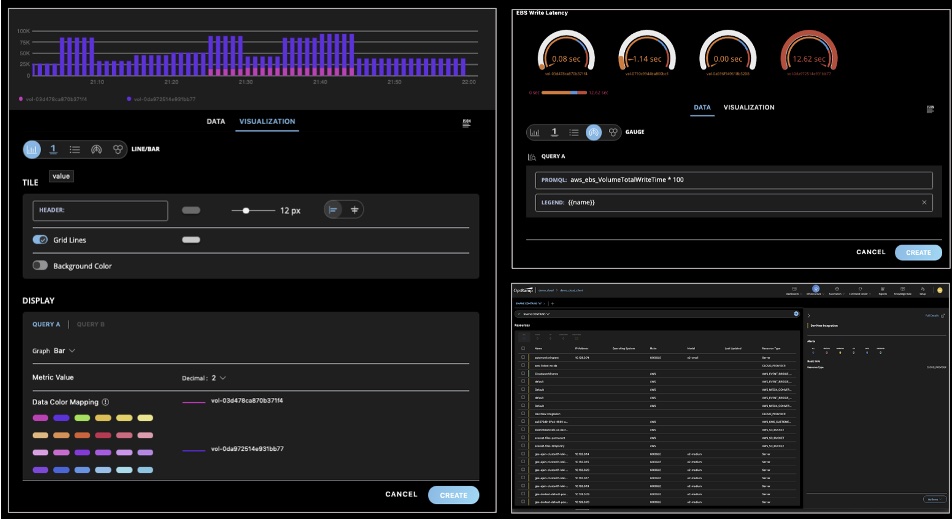
    IT operations teams can now also visualize metric values that can increase or decrease within a fixed range using Gauge charts. IT teams can also now add alert context details to provide more relevant information. There’s also now a mobile app for both Apple iOS and Google Android devices through which IT teams can now respond to alerts and incidents.

    Finally, OpsRamp is also making available a beta release of dynamic Workflows, which enable IT team to maintain a single decision table to address specific operational scenarios.

    Sheen Khoury, chief revenue officer at OpsRamp, said the goal is to leverage artificial intelligence (AI) to increase application availability by enabling IT teams to better predict when there are indicators of an incident caused by, for example, higher volumes of seasonal traffic that could lead to an outage.

    At the same time, IT operations teams can improve overall time-to-value by leveraging the automatic monitoring tools that are embedded in the platform, he added.

    OpsRamp is betting that rather than waiting for incumbent providers of IT operations platforms to add AI capabilities, many IT teams will opt to deploy a new IT management framework altogether. Many of the manual tasks IT operations teams regularly perform today can then be automated faster, noted Khoury.

    Naturally, it takes time for machine learning algorithms to be trained, so the benefits of AIOps are not instantaneous. However, those algorithms will continuously learn the unique attributes of an IT environment in a way that makes it easier for IT teams to manage an IT environment more proactively. The algorithms provide the added benefit of making it easier for new members to join an IT operations team without having to spend months learning all the nuances that are unique to that environment.

    Each IT team will need to decide for itself the degree to which they want to rely on an AIOps platform to manage their IT environment. Initially, most IT teams will need to evaluate the recommendations made by an AI platform. However, as they gain confidence in the recommendations, they will trust the platform to automate more processes in response to events occurring in the IT environment in real-time.

    Regardless of how much faith IT teams put in AI, it has become apparent that enterprise IT environments are only going to become more complex. Many IT teams will not be able to manage some environments without the aid of an AI platform. Many IT professionals may not want to work for organizations that don’t provide some way to augment their skills using AI—the stress level would simply be too high.

    One way or another, DevOps teams that are highly committed to ruthlessly applying automation will be at the forefront of AI adoption in the enterprise.

  • 4 Ways to Simplify Cloud Performance Monitoring

    4 Ways to Simplify Cloud Performance Monitoring

    Over the past 18 months, technologists across the globe have played a crucial role in the survival of brands and organizations via digital strategies. Across all industries, their skill and dedication have enabled businesses to rapidly launch innovative new digital services to meet huge fluctuations in customer needs and allow entire workforces to operate from home during the pandemic.

    This hasn’t been easy, even as end users’ expectations for seamless digital experiences are on the rise. In fact, the recent 2021 App Attention Index reaffirmed found 76% of consumers’ expectations of digital services have increased in the last year. And an overwhelming 85% noted that applications and digital services have become a critical part of their daily lives. This has placed even greater pressure on the technologists who are responsible for keeping applications and cloud experiences running smoothly.

    Often IT teams are challenged with monitoring companies’ digital services, but they lack the visibility they need to monitor health and performance across an increasingly sprawling IT estate, exacerbated by a seismic shift toward cloud architectures over the last 18 months. IT departments don’t yet have the right tools and data to optimize health and performance in their cloud environments.

    As a result, technologists are constantly addressing the same issues because they can’t easily isolate and identify them, and don’t know where to prioritize their actions. Hiccups can lead to brands losing customers—the same report revealed that over half of consumers indicated that brands have one shot to impress them, and that if their digital service does not perform, they won’t use them again.

    After a year and a half since the start of the pandemic and with adoption of cloud technologies set to accelerate even further over the next few years, it’s time for technologists to get ahead. Here are four things technologists can do to take the stress out of managing performance across the cloud.

    Implement Visibility from the Ground Up

    Having visibility into applications and the underlying cloud infrastructures that support them can be challenging without the right tools, which has contributed to some of the pressure technologists are experiencing. Traditional monitoring has allowed technologists to identify and catch issues in certain areas of an IT stack, but this approach is of little use in dynamic, distributed and software-defined environments where organizations are continually scaling their use of IT and the cloud up and down.

    As a result, the performance of the digital services can be impacted, potentially hurting end-user experience and eroding trust in the brand.

    To keep up with the rising demands from consumers in the digital world, technologists need the ability to monitor the full IT estate, from cloud infrastructures to customer-facing applications through to core infrastructure such as compute, storage and network; including the open web and security. With access to tools like observability platforms, technologists can lessen the burden of individually monitoring the performance of each item supporting the digital service. Instead, they can achieve one holistic view into alerting, root cause and analysis of correlated metrics, events, logging and tracing (MELT) data from the cloud to enable early and easy troubleshooting.

    Consider tools that link infrastructure (compute, storage and network) with the services and applications they execute. When there is an application-level issue, it is easy to take a closer look and identify problematic areas in what makes the application run or the application itself.

    Align IT Performance to Business Results

    After aggregating a full-stack view of applications and the cloud infrastructure behind them, technologists can then link performance data identified by the observability platform with real-time business metrics.

    Linking the two provides technologists with the ability to identify where and how the digital services are impacting the business and end-users. Full-stack observability automatically provides technologists with these linked insights, enabling them to address the areas that matter most.

    Educate Teams

    In addition to having the right tools to help take advantage of the cloud, it is important that an IT team is well-versed in the technology itself. Managing the performance of the cloud is complicated and there is a finite pool of talent available to businesses. Therefore, business leaders should provide appropriate resources to ensure teams are educated and equipped to succeed.

    To support a seamless implementation of cloud infrastructure to support a business’ digital services, business leaders must invest in upskilling their teams or recruit others who are knowledgeable about cloud monitoring.

    This will ease the pressure on existing teams and give technologists the skills and confidence to progress in their careers.

    Leverage Automation

    Even with the best observability solutions in place and teams equipped with the necessary skills, there is still concern that there will be an overwhelming amount of data generated by accelerated digital transformation over the coming years, especially those involved in large-scale public cloud environments. It can become a challenge for technologists to dedicate the level of resources and skills required to manage and optimize performance across the IT estate.

    To avoid these potential circumstances in the future, it’s worth considering how to minimize the impact of a data deluge by reducing an IT department’s reliance on manual interventions to monitor health and performance and resolve issues.

    Two things that will play an increasingly vital role in tracking health and performance across the entire IT estate are automation and AI. This is particularly the case in large-scale public cloud environments, which are fast becoming the biggest headache for some IT teams.

    With AI deployment to identify and fix issues in real-time, technologists can spend less time firefighting thanks to the AI/ML guiding hand. This will lead to increased job satisfaction and fulfillment and a better work-life balance.

  • Progress Expands Chef Automation Portfolio

    Progress Expands Chef Automation Portfolio

    In advance of its ChefCon 2021 conference, Progress today unveiled a series of enhancements to its Progress Chef automation platform that includes managed services and a software-as-a-service (SaaS) edition of its offerings as well as tighter integration with cloud services and other third-party tools.

    Sudhir Reddy, vice president of engineering for the Chef business at Progress, said the SaaS platform, now available in beta, combined with the managed services provided by Progress will make the automation platform much more accessible to a wider range of organizations.

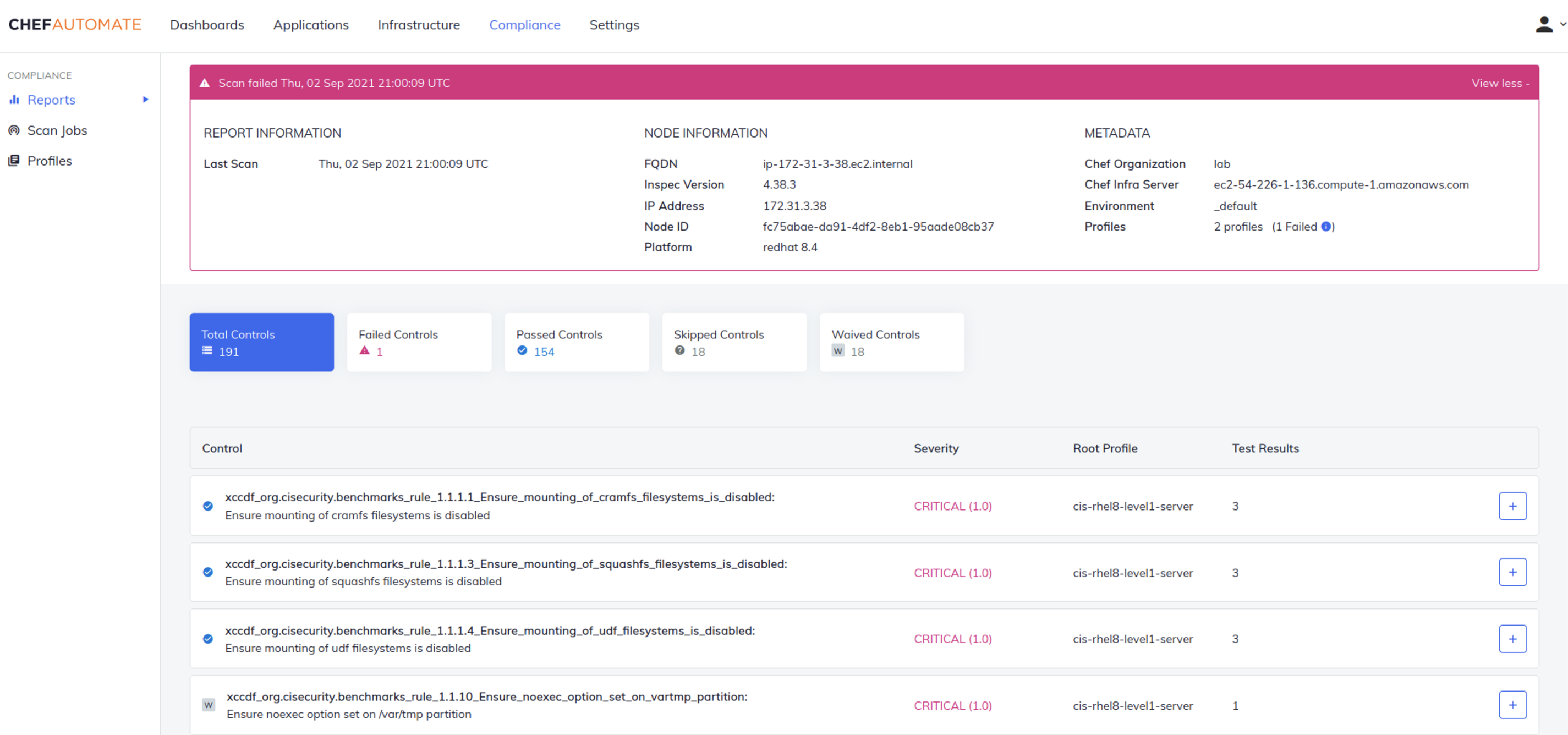
    Progress is now also extending the reach of its Chef Compliance Automation for Cloud Resources offering across Amazon Web Services (AWS), Microsoft Azure and Google Cloud Platform (GCP) to include Chef premium content that aligns with best practices for each cloud environment in addition to providing integration with Azure Policy, a suite of tools from Microsoft that compares resources to a set of business rules that define how cloud infrastructure should be employed.

    Chef

    Finally, Progress has enhanced Chef Enterprise Automation Stack to provide tighter integration between compliance and infrastructure automation along with adding infrastructure operations dashboard, support for Windows patch management, integration with third-party secrets management tools, and improvements to Chef Workstation and Chef Test Kitchen to simplify testing within application development processes.

    With the release of a SaaS platform and the availability of managed services, Chef is joining a long list of IT vendors that are removing responsibility for deploying and securing their platforms from internal IT operations teams. It’s clear more organizations now want to spend more time on building and deploying software than managing the platforms that automate those tasks on their behalf, said Reddy.

    It’s not clear how many IT teams that have already deployed a platform might shift over to a SaaS platform or rely on an IT vendor to manage that platform on their behalf. However, in the wake of the COVID-19 pandemic, many IT teams continue to work from home to help combat the spread of the virus. Many of those organizations have either shifted platforms to the cloud themselves, adopted SaaS platforms or outsourced the management of IT platforms altogether. There are also many small organizations that simply don’t have the internal expertise and resources required to stand up an IT automation platform on their own.

    That approach also makes it simpler to converge security, compliance and IT operations management within the context of a larger DevSecOps workflow, noted Reddy.

    The great paradox of IT automation has always been the level of expertise required to achieve it. Organizations that lack the expertise required to create automated playbooks, for example, don’t derive much value from an IT automation platform. It’s only been larger companies that have mostly derived the most benefit from investments in IT automation. However, as IT automation becomes more accessible via SaaS platforms and managed services, the level of expertise required to benefit from it naturally drops. In fact, with the advent of artificial intelligence (AI) for IT operations (AIOps), many manual IT tasks are increasingly being automated.

    It’s too early to say whether the IT industry as a whole is on the cusp of the next wave of automation, but the raw ingredients that make up the primordial soup needed to achieve that goal is, at this point, only awaiting a catalyst.