Category: Features

  • Synopsys Sets Course After Agreeing to Acquire WhiteHat Security

    Synopsys Sets Course After Agreeing to Acquire WhiteHat Security

    Synopsys, Inc. plans to add dynamic application security testing (DAST) tools to its software-as-a-service (SaaS) platform in the wake of agreeing to acquire WhiteHat Security from NTT Security Corp. for approximately $330 million in cash.

    Jason Schmitt, general manager of the Software Integrity Group at Synopsys, said the DAST tools developed by WhiteHat will complement the existing static, interactive and software composition analysis tools that Synopsys currently provides.

    The goal is to provide an end-to-end application security platform, including consulting, to help organizations better secure software supply chains, he added. NTT Security Corporation previously acquired WhiteHat Security in 2019 to extend the reach of the services it provides. Since then, SaaS platforms for testing application security have become more widely available.

    The acquisition comes at a time when many organizations are trying to determine how far left to shift responsibility for application security toward developers. While developers have a role to play, Schmitt said that shifting responsibility for applications completely left is a fallacy. DevOps teams will need to rely more on platforms that provide guardrails that enable developers to build secure applications in a way that doesn’t create a lot of additional friction, he said.

    Unfortunately, cyberattacks against applications are increasing in complexity and volume. That makes it a challenge for both application developers, DevOps teams and security professionals to keep track of how threats to applications are evolving, said Schmitt. As more companies rely on software to drive digital business initiatives, Schmitt said the business risks those organizations will face are only going to increase. In an era where developers far outnumber security professionals, he added that the only way to rise to that challenge is to rely more on SaaS platforms that enable organizations to implement DevSecOps best practices within their existing application development workflows, he noted.

    Today, the challenge is that much of an organization’s security budget is allocated to networks and endpoints rather than applications, added Schmitt. It’s not clear to what degree that spending needs to shift toward application security or if a larger portion of the application development budget needs to be allocated to security. One way or another, however, it’s apparent that overall spending on application security needs to increase to combat the increasingly frequent attacks.

    In the meantime, the historical divide that has existed between developers and cybersecurity teams should narrow as more security tools are made accessible to developers and DevOps teams alike. Otherwise, security professionals will continue to point out security issues that might affect an application running in a production environment and developers will continue to ignore issues they don’t see as relevant or that they don’t have time to patch. Not surprisingly, most vulnerabilities in applications running in production environments remain unpatched; the only way forward is to rely on automation to eliminate them before the application is ever deployed.

  • Pulumi Extends Infrastructure-as-Code Reach

    Pulumi Extends Infrastructure-as-Code Reach

    At its online PulumiUP conference, Pulumi announced it will make its Pulumi CrossCode translation technology available to third parties and DevOps teams. The technology was developed to integrate a wide range of programming languages with its infrastructure-as-code (IaC) platform.

    The company also announced it has added support for YAML—widely used to configure Kubernetes environments—as well as any variant of Java. It already supports .NET, Node.js, Go and Python programming languages.

    Finally, Pulumi also added packages for Oracle Cloud, Databricks and EventStore that simplify deployments on those platforms. The company already provides similar integrations for Amazon Web Services (AWS), Microsoft Azure, Google Cloud, Kubernetes, Auth0, CloudFlare, Confluent Cloud, Datadog, DigitalOcean, Docker, GitHub, Kong, MinIO, MongoDB Atlas, PagerDuty, Snowflake, Spot by NetApp and SumoLogic. There are also now components that provide support for container applications, Kubernetes clusters and serverless applications along with an AWS Cloud Development Kit (CDK).

    Pulumi has been making a case for an IaC approach that enables developers to use programming languages they already know to provision infrastructure as an alternative to having to deploy and master tools such as Terraform.

    The Pulumi CrossCode translation technology the company developed is now being made available to any organization that wants to add support for another programming language. It converts any infrastructure-as-code format, including Terraform, CloudFormation, Azure Resource Manager and Kubernetes configuration, to any programming languages supported by Pulumi.

    Pulumi CEO Joe Duffy said the goal is to extend the overall reach of the translation technology the company created to simplify provisioning any type of infrastructure.

    While many developers use tools such as Terraform, the need to limit misconfigurations is driving many larger enterprises to revisit their approach to IaC to improve software supply chain security, noted Duffy. Today, Pulumi claims more than 2,400 organizations have adopted platforms that enable developers to provision infrastructure and apply guardrail policies to reduce errors. That approach prevents developers from making configuration mistakes that can lead to exfiltration of data via, for example, a port that has been accidentally left open, he added.

    Too many developers assume that their cloud service provider is securing both the underlying platform and how it is configured only to discover later that it was their responsibility to validate those configurations. Security teams, meanwhile, can’t keep pace with the rate at which cloud infrastructure resources are being provisioned without some ability to apply policies that enforce rules for provisioning that infrastructure within the context of a larger DevSecOps workflow.

    Ultimately, the goal is to employ automation to resolve these issues once and for all as more organizations adopt DevSecOps best practices. In the meantime, the challenge is doing so in a way the average developer will accept and embrace. Otherwise, they will continue to find ways to work around security teams in the name of productivity, regardless of how insecure the underlying IT environment might become.

  • Smoothing the Transition From REST to GraphQL

    Smoothing the Transition From REST to GraphQL

    Since its open source release in 2015, GraphQL has taken the development world by storm. GraphQL, the query language originally developed by Facebook, is a big boon for frontend developers, as it enables you to grab the exact data you need with a single request. This solves the problems of over-fetching and under-fetching, which classical REST APIs are prone to. GraphQL also offers a nice developer experience with a consistent schema and documentation. Some are even treating GraphQL as a convenient meta layer to aggregate multiple underlying services and abstract their interfaces with simple commands.

    For these reasons and more, many development teams are considering switching from REST to GraphQL. Even enterprises are beginning to use GraphQL in large production environments. But, how can these teams make the switch without breaking existing integrations? How can we ensure that things like developer experience, security, and access control all remain stable?

    I recently met with Anant Jhingran, the co-founder of StepZen, to discover tips for transitioning from REST to GraphQL. According to Jhingran, most organizations see the benefit in adopting GraphQL but are hesitant to forgo years of investment into RESTful architectures. But according to Jhingran, it’s rarely a case of “either/or”—more often, he sees projects running both styles simultaneously or layering one on top of the other. Below, we’ll explore some things to keep in mind as you invest in GraphQL.

    The Decade of Developers

    We’ve reached ubiquity of web APIs among companies big and small. “APIs have turned out to be phenomenal for software supply chains,” said Jhingran, the former CTO of Apigee. They help share data between partners and can enable platform ecosystems to thrive. Jhingran describes how within the last decade, APIs and API management have peaked to near-ubiquity in terms of adoption.

    But not all APIs behave the same way. Although representational state transfer (REST) is the most popular style, it’s still quite a general architectural guideline for web APIs—how the data comes out of each service is still highly nuanced. The structure of requests and responses are different from service to service, causing developer experience hangups at scale.

    GraphQL, on the other hand, “is a fantastic way of structuring data,” said Jhingran. With a single call, you can return the explicit information that the client requires in an expected format. For an e-commerce application, for example, this might be customer information, order numbers and delivery status. Displaying this all with one call is an awesome experience for frontend developers. And, GraphQL APIs are easy to explore and navigate since the schema is baked in. This improves upon REST APIs, where documentation may not always match the actual production implementation.

    “This decade is the decade of developers,” said Jhingran. Satisfying developer experience has become more mission-critical as enterprises work to increase their footprint in the cloud marketplace and GraphQL is part of this movement. “For people who build apps, it’s just better,” said Jhingran.

    But just because frontend teams clamor for the ease of use of GraphQL doesn’t mean backend teams can easily restructure their entire framework around it. Doing it right requires many skills, and the journey can be arduous, explained Jhingran.

    It’s Rarely REST Vs. GraphQL

    REST and GraphQL are often pitted against one another to the point that they seem like polar opposites. But in practice, teams often use GraphQL to build on top of APIs already in place. Jhingran describes the most common pattern as “GraphQL comes in as a layer that connects the dots between various REST APIs.” Either GraphQL is consumed directly or as a REST layer above GraphQL. “It could go either way,” he said.

    GraphQL is a fantastic data infrastructure tier as it can mix and match database backends. It could, in essence, become the new plumbing upon which applications are constructed. But while GraphQL may be excellent for internal construction, the name of the game is stability when externalizing services to the outside world. With REST, the big goal is to decrease broken clients and ensure high-grade security for each resource. Therefore, Jhingran foresees certain use cases where using a REST wrapper around GraphQL services to deliver fixed JSON responses would be preferred.

    Another point is that GraphQL is not only relegated to appeasing frontend developers—it has some backend potential, too. “GraphQL is an opportunity to reimagine frontend and GraphQL is an opportunity to reimagine backend infrastructure,” said Jhingran. This concept has weight nowadays, as Netflix engineers, for example, use GraphQL as a backend for microservices architecture.

    Making the Transition From REST to GraphQL

    Not all apps are going to be transformed on day one. Teams may encounter cultural resistance to new technologies. Interface redesigns, especially for those external apps which are exposed to third parties, must also require extra precaution to maintain app compatibility to avoid breaking change.

    Thus, it may take time to transition effectively. “Getting it started versus getting it right are not the same thing,” said Jhingran. He said people who get started with GraphQL may struggle for months due to competing best practices and tools. For example, Jhingran identified two main perspectives when approaching GraphQL: Programming and declarative.

    • Programming: Teams use GraphQL libraries such as Apollo to program their way out of your GraphQL endpoint. In this approach, you just start writing. It’s quick to get started, said Jhingran, but you end up describing everything you do and encountering many contingencies along the way.
    • Declarative: The other option is a more declarative approach—instead of telling the system how, you tell it what to do. For example, this subsystem should do X, this subsystem should do Y and so on. According to Jhingran, adopting tooling with declarative snippets to create GraphQL endpoints is “better in the short and long run.”

    GraphQL Security

    A March 2022 report from Salt Labs found a shocking 681% increase in API-based cyberattacks over the previous 12 months. There are many concerns surrounding API security right now—these valuable endpoints are prone to broken access control, data overexposure and over-permissive states.

    As I’ve covered previously, GraphQL security is a bit nuanced compared to REST. Within the REST paradigm, you can easily assign permissions and rate limit calls per resource. But with GraphQL, it’s not that simple. Since you can batch multiple queries, callers have much more power at their fingertips, and hackers might abuse such power if the proper authorization isn’t in place.

    Companies may rightly worry about opening another can of worms with GraphQL. But according to Jhingran, these worries are all solvable. A comprehensive GraphQL endpoint will likely require another layer to uniquely segment authorization to retain a least-privilege model for all resources and backend endpoints.

    Future of GraphQL

    To date, GraphQL has gained modest prominence. But, Jhingran foresees an incoming inflection point in the next two to three years. “The dominoes are beginning to fall,” he said.

    Now that the market is saturated with APIs, characteristics outside of functionality will be what sets a service apart and gives it a competitive edge. This includes things like performance, security and developer experience, the latter of which makes GraphQL an attractive proposition. This, paired with the explosion in GraphQL tools, will undoubtedly help developers perform their jobs better.

    Looking to the future, Jhingran predicts increased usability and abstraction in how developers work with GraphQL. He compared it to how disjointed pages on the web became interconnected and searchable with links. We see similar thinking happening in the world of APIs, he explained, in which the disjointed APIs require a better connection. Similar to how Google simplified search, he foresees GraphQL and the tools that work with it helping to decrease cognitive load by abstracting complexity with declarative commands.

  • Why We Still Need Specialists

    Why We Still Need Specialists

    A few years back, I wrote here that specialists—particularly infrastructure specialists—were not going anywhere.

    I think it is worth updating that prediction and reminding you all that specialists across the bulk of DevOps subdomains are still necessary—even if you have broken down their silos.

    Spend time in any of the variety of places that DevOps folks hang out and listen to/read what they actually say. When they express their sentiments as a real-time activity, the idea that we made one team responsible for most, if not all, of an application’s life cycle seems rather brutal.

    In most industries, we have increasing specialization as complexity increases. Even if it was allowed, most carpenters are not qualified to do plumbing or electrical work. Oh, most know the basics and could do it in a pinch, but they aren’t the expert that the plumber or electrician is. IT, for the last many years, has tried to do the opposite, with a decent rate of success. But practicality wins out over rigidity to make that success.

    We still have specialists. And you should ignore people that suggest they need to go away. The situation is already bad enough without having a person you can turn to for help with a harsh issue in this language, or on that piece of networking gear. While some of this—language specialists are the easy example—is merged into a DevOps team, some of them—network admins, for instance—only partially are. The networking within/between containers is often handled by the DevOps team (using one set of specialties), while the networking that allows all of the organization to run is still handled by operations. But I can’t think of an org I deal with regularly that doesn’t house these specializations somewhere.

    This is one of the things that has traditionally held back low-code/no-code solutions—they assume these specializations and will require specialists in whatever the underlying technologies are when things inevitably go wrong. The same is true (to a lesser extent) of DevOps, AI and automation. Someone has to know what is going on underneath—they must have specialized knowledge—in order to fix it when things go wrong.

    Remember, you are asking your DevOps teams to be both Jack of all trades and master of some. That is a recipe for failure, but DevOps is designed to withstand or overcome failure in short order, so I only mention this so you understand why new hires seem wild-eyed at times and old hands seem jaded—there is a lot going on that they’re mastering and remastering.

    So, stand up if you’re one of the “sailing against the wind” crowd. Be proud you’ve managed to thrive in an environment with a ton of specialist parts and make sure you know who to ask for help when something goes wrong and you end up out of your depth. Even if the answer to “Who can I ask for help?” ends up being “Learn it for yourself and then be prepared to help others,” you’ll rock it either way and the rest of us who have struggled through it feel your pain and respect your work. So, thanks—for those who’ve never experienced it, but rely upon your work.

  • vFunction Tool Uses AI to Help Convert Monolithic Java Apps

    vFunction Tool Uses AI to Help Convert Monolithic Java Apps

    vFunction today added the ability to employ artificial intelligence (AI) to automatically assess the level of effort required to convert a monolithic Java application into a set of microservices.

    Bob Quillin, chief ecosystem officer for vFunction, said the goal is to make it simpler for IT teams to more effectively employ the company’s vFunction Application Transformation Engine by using a vFunction Assessment Hub that assesses the level of technical debt involved.

    Legacy monolithic Java applications tend to have a lot of technical debt and dependencies that make them a challenge to convert into microservices, he noted. Most simpler Java applications have either already been converted or are in process, Quillin added.

    The vFunction Assessment Hub enables IT teams to better predict the outcome of refactoring a Java application to better prioritize which Java application should be converted first based on, for example, the level of scalability that can be achieved, said Quillin. Current assessment approaches involve a lot of manual effort and which typically requires organizations to hire external contractors to perform, he added.

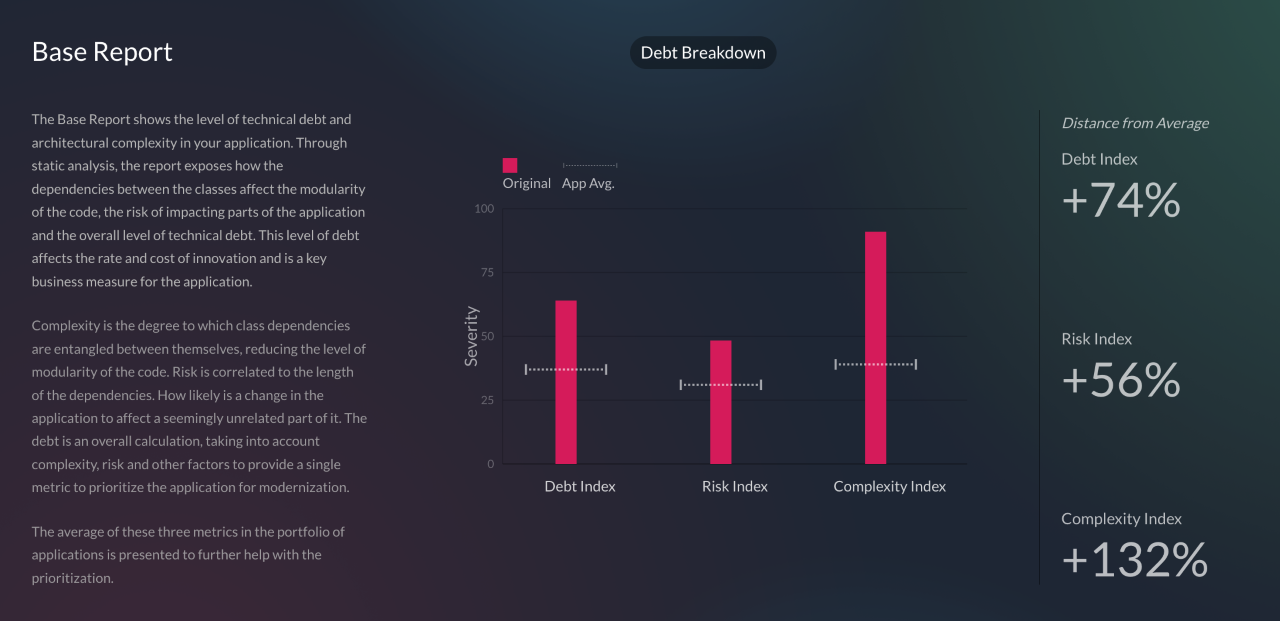
    An AI-based approach reduces the total cost of creating a business case and constructing a roadmap for modernizing existing Java applications, said Quillin. The vFunction Assessment Hub measures application complexity based on code modularity and dependency entanglements and then assesses the level of risk changes might have on the stability of the application based on the depth and length of the dependency chains. It then surfaces benchmarks for debt, risk and complexity in addition to identifying aging frameworks that could create security risks and licensing issues.

    Thus far most organizations have been content to lift and shift Java applications into the cloud without modernizing them. The application simply now runs on infrastructure that is managed by an external cloud service provider. That approach does little to improve the scalability of a monolithic Java application, noted Quillin. The goal should be to convert that Java application into a set of microservices that run natively in the cloud, he added.

    The vFunction Assessment Hub is already being used within a Java Refactoring Service for the Azure cloud provided by Microsoft that is based on agent software to analyze code and the vFunction Application Transformation Engine.

    In general, organizations are embracing microservices to build applications that are both more scable and resilient. In the event a microservice becomes unavailable, requests for services are rerouted to another microservice to make sure the application degrades gracefully, rather than simply crashing altogether. The challenge, of course, is that the dependencies that can exist between hundreds of microservices can be more challenging to manage over time than those of the monolithic application being replaced.

    It’s not likely that microservices-based applications will entirely replace monolithic applications any time soon, but the bulk of new applications are being built on top of a microservices-based framework. As such, many DevOps teams are now managing a broad mix of monolithic and microservices-based applications across IT environments that become increasingly more complex to manage with each passing day.

  • Applause Report Surfaces Functional Testing Issues

    Applause Report Surfaces Functional Testing Issues

    An analysis of more than 340,000 bugs collected by Applause, a provider of a testing platform designed to integrate with a range of DevOps platforms, found functional bugs accounted for 68% of issues. The research gathered data from 13,000 mobile devices and 1,000 unique desktops running 500 versions of operating systems and found that the majority of issues could be traced to functional bugs compared to visual (17%), content (9%), crashes (4%) and lags and latency (2%) issues that, collectively, only add up to 32%, the report found.

    The report also found screen readers comprised 66% of all accessibility bugs compared to keyboard navigation issues and insufficient color contrast which accounted for only 12%. In terms of localization, poor and missing translations account for more than two-thirds (67%) of bugs, the report found. Based on ongoing feedback data that Applause also continuously collects from customers, nearly half of organizations (47%) identified currency and number formatting as the most valuable bugs to identify when it came to localization.

    Overall, organizations ranked the discovery of crashes (75%), functional bugs (61%) and lag and latency issues (53%) as exceptionally valuable, according to Applause.

    Luke Damien, chief growth officer for Applause, said when it comes to testing, in general, there is still not enough focus on user and customer journeys. That lack of focus is becoming a larger issue as more organizations invest in digital business transformation initiatives that are driven largely by mobile applications, he noted. Payments are especially problematic because they often rely on application programming interfaces (APIs) exposed by a third party in a way that results in suboptimal application experiences that have a direct impact on revenues, he added.

    The challenge is that it’s not entirely clear how far left responsibility for application testing is shifting. In some cases, developers are assuming responsibility. In other cases, a dedicated testing team is still responsible. Developers, of course, will test applications as they build them but application experiences on a local machine may not always be replicated in a production environment. The issue is that most end users today are not especially forgiving when a mobile application fails to meet expectations. Months of development effort can be wasted simply because a function was not tested in a production environment.

    Less clear is to what degree testing will be automated in the future. Machine learning algorithms are making it possible to automate testing of both functions and user interfaces. It’s not likely the need for humans to be involved in testing will be eliminated any time soon, but many of the routine tedious tasks that conspire to limit the rate at which applications can be tested should be sharply reduced in the months and years ahead.

    In the meantime, an organization’s entire brand reputation is now tied to the quality of the application experience it enables on a mobile device. Revenue targets can now be easily missed if users of a mobile device choose one application over another simply because a function was broken—even for a short amount of time. As such, testing has never been more critical given organizations’ dependency on software.

  • Shedding Light On Toil: Ways Engineers Can Reduce Toil

    Shedding Light On Toil: Ways Engineers Can Reduce Toil

    It comes in many shapes and sizes and is embraced as a necessary evil. It lurks in the shadows, emerging now and again to stealthily creep into our workflows, where it feasts on our perceived shame. If not pruned, it grows and wraps its tendrils around the workforce, draining the energy out of every digital worker across departments. We all have it and most of us believe we suffer alone.

    I’m talking, of course, about toil.

    Dramatics aside, toil is common throughout most programming and DevOps positions, whether we like it or not. And when it comes to platform engineering, the chances of encountering toil is high. You can think of toil as those tedious workarounds that should be automated but aren’t. This could be due to a lack of standard configurations for deployments. Or, perhaps engineers must copy and paste data from one module to the other—an integration that has not yet been automated.

    One of the hallmarks of the SRE role is to spot and reduce such toil—hopefully before it gets out of hand. But, what exactly is toil? And, how can SREs reduce it?

    I recently met with Jake Englund, senior site reliability engineer, Blameless, and Matt Davis, intuition engineer, Blameless, to uncover some tips on spotting and eliminating toil in the daily life of an SRE. Below, we’ll attempt to define toil and explore some techniques to defeat this ghoulish foe.

    First, What is Toil?

    Toil is tedious. Englund defines toil as repetitive manual tasks that are, ideally, automatable. “It’s not gratifying work; it lacks enduring value.” James Curtis similarly described toil as “tedious actions that really have no enduring value.” Toil is similar to technical debt in that, if left unchecked, it can hinder productivity and contribute to burnout.

    Toil is invisible. Toil is the invisible work that goes on behind the scenes, says Davis. For example, at your team meeting or stand-up you might say something like, “I’m deploying this fix.” There’s usually no need to explain the nitty-gritty details of your exact step-by-step process, as it would be too far in the weeds. As a result, manual and repetitive tasks are often not given the spotlight.

    Toil is persistent. Toil might be readily apparent, but it’s not as simple to eliminate; attempts at fixing toil could potentially create new toil. Tedious tasks may also be essential to keeping core infrastructure pieces up-to-date. According to Englund, what often ends up happening is that only the specific engineer knows the niche mechanics of what they’re maintaining, making them irreplaceable—a power that some employees might abuse. “If you’re the only one who knows how to do something and you’re hoarding that information, it leads to inertia against resolving toil,” said Englund.

    Toil is pervasive. Toil is not limited to SRE or engineering. From UX to management or marketing, within most positions, you’ll encounter a degree of toil. This is because the ‘work as prescribed; is often much different than ‘work as done’, said Davis.

    Four Tips To Reduce Toil

    So, what can organizations do to conquer the nightmarish reality that is toil? Especially those that don’t have a dedicated engineering team to reduce drudgery?

    1. Find It!

    To reduce toil, you first have to find it. Sounds simple enough, right? Well, discovering toil might not be as obvious as it sounds. “You get into these toil situations where you might not even know you’re in it. How do you know that toil is encompassing what you’re doing?” asked Davis.

    To find toil, the Blameless team has a weekly session open to the whole company to examine ‘work as done.’ According to Davis, this has been very beneficial for discovering where toil occurs. It also helps garner perspectives from roles throughout the entire company.

    2. Standardize and Automate

    Next, a proven method to reduce toil is standardizing your engineering processes. Standardization, said Davis, is “another word for removing ambiguity.” For example, SREs can benefit from having a common series of steps to follow when responding to alerts. Runbooks that aggregate data to respond to issues can reduce toil in the data collection process while also helping improve mean-time-to-discovery and recovery rates.

    Standardizing change management is another way to reduce toil. If engineers are approaching change management in various ways, this could cause additional review and slow down the release process. Removing ambiguity from the change lifecycle can alleviate toil down the line.

    When you find yourself having to retain mental models for configurations, it’s a good sign that standardization is required, explained Englund. For example, perhaps some configurations are needed in some environments but are commented out in others. Documenting the specific configurations for different development environments (and automatically populating configurations) is one way to reduce toil and the chance for human error.

    3. Proactively Monitor

    More proactive monitoring is another way to reduce toil, according to Englund and Davis. “Responding to a crash loop is responding too late,” added Davis. Instead, he advocated that SREs look toward leading indicators that suggest the potential for failure so that teams can make adjustments well before anything drastic occurs.

    If SLIs like error rate and latency are getting bad, you must take reactive measures to fix them, causing more toil. Instead, proactive monitoring is best to see the cresting wave before the flood. Leading indicators could arise from following things like data queue operations connected to servers or the saturation of a particular resource. “If you can figure out when you’re about to fail, you can be prepared to adapt,” said Davis.

    4. Practice How to Improvise

    One major caveat of standardization is that you’re inevitably going to encounter edge cases that require flexibility. And when an outage or issue does arise, the remediation process is often very unique from case to case. As a result, not all investment into standardization pays out.

    Alternatively, teams that know how to improvise together are proven to be better equipped for unforeseen incidents—one study on Arctic Sea emergencies found collective improvisation to be imperative for emergency response situations. Similarly, collaboration is vital for software teams. Davis calls this the “practice of practice.” If you don’t practice backup restores, for example, teams may flounder in the case of a database outage. Yet, since every remediation effort is unique, it really boils down to learning how to collaborate effectively as a team. “We can gain a lot from getting together to practice,” added Davis.

    All the Small Things

    Toil is like manually typing an email signature every time you are about to hit “Send.” Maybe you’ve just been putting off configuring your signature in your email client. Or, perhaps you like to write a custom sign-off for each recipient. Regardless of the reason, the longer this repetitive motion is required, it’s a stick in the spokes of productivity.

    In the grand scope of things, this tedium can be a drain on time and resources. For every extra keystroke or click, every un-automated workflow or every copied-and-pasted code block, a small degree of toil is piled onto the daily workload of an engineer, dragging them away from focusing on what really matters.

    Standardization, automation, proactive monitoring and collaboration are all helpful elements to consider on your journey toward reducing toil. But of course, there is the trap of increased software development automation—the time saved building automation must outweigh the upfront development cost (and ongoing maintenance effort). Otherwise, you might end up creating even more toil.

  • CloudBolt Adds Modular Automation Framework to Tame Hybrid Clouds

    CloudBolt Adds Modular Automation Framework to Tame Hybrid Clouds

    CloudBolt Software this week added a framework consisting of eight modules that collectively make it simpler to automate, optimize and govern hybrid cloud computing environments.

    Jeff Kukowski, CloudBolt CEO, said the goal is to provide IT teams with a more modular approach to managing multiple clouds that they can employ as they gain additional expertise.

    The modules provided by CloudBolt address everything from providing a repository, dubbed Automation Exchange, through which reusable automation content can be shared to implementing governance policies and tracking cloud spending.

    Other modules address testing and assurance, integration, automated discovery and machine learning algorithms that can be used to automate processes.

    While most organizations employ multiple clouds alongside on-premises IT environments, the management of IT across an extended enterprise is far from unified. A recent survey published by CloudBolt found a full 88% of respondents needed a “manager of managers” that would enable them to unify the various silos that have multiplied across their IT environment. CloudBolt Software is making a case for an IT framework that provides a layer of abstraction through which the management of multiple clouds and on-premises IT environments can be unified.

    It’s not clear whether organizations are deliberately employing multiple clouds or if, because of simple inertia, they have found themselves managing multiple cloud platforms because of decisions made by various application development teams. Some IT organizations employ multiple clouds because they are concerned about either becoming locked in to a specific cloud computing service; others are concerned an outage on one platform might take all their applications offline. Others simply take advantage of services that are better provided by one cloud service provider than another. It’s also not uncommon for one organization to acquire another that relied on a completely different platform to deploy applications.

    Regardless of how IT organizations found themselves managing multiple clouds, the total cost of IT rises as each new platform is added to an IT environment. Just as challenging is the fact that each new platform exposes some type of automation framework. Before too long, IT teams find themselves having to navigate multiple islands of automation implemented across a highly distributed computing environment. In many cases, those automation instances are reinventing the same process that has already been automated on another platform using a completely different toolset.

    It is more a question of time and the degree to which IT organizations will eventually consolidate management of disparate IT environments under some type of unified control plane that enables true hybrid cloud computing. Once that capability is achieved, IT teams should find it simpler to migrate workloads from one platform to another.

    In the meantime, most organizations will be managing multiple IT environments for the foreseeable future. The only thing that is unclear is the volume of workloads that might be running on one of those platforms at any given time. The challenge—and the opportunity—is to regain control over computing environments increasingly more distributed.

  • BMC Integrates DevOps Mainframe Portfolio With Git

    BMC Integrates DevOps Mainframe Portfolio With Git

    BMC has expanded its efforts to bring DevOps best practices to the development of mainframe applications by integrating the BMC Compuware ISPW continuous integration/continuous delivery (CI/CD) platform with Git repositories.

    In addition, the company tightened integration between BMC Compuware ISPW and BMC AMI Ops platform and integrated BMC Compuware Topaz Workbench for building applications with code scanning tools from Vercacode.

    Finally, there is also now a BMC Enterprise Connector for Illumio that provides a bi-directional interface between the zero-trust segmentation platform from Illumio and the mainframe. In addition, the BMC AMI Command Center for Security system can now also surface malicious performance activity to accelerate incident response.

    John McKenny, senior vice president and general manager for intelligent Z optimization and transformation at BMC, said the overall goal is to make the mainframe just another platform where IT teams can apply DevOps best practices to build applications faster. That’s more critical than ever because mainframes are often at the core of digital business transformation initiatives and require integration with a wide range of distributed computing platforms. A recent survey published by BMC found two-thirds of respondents (66%) are investing in new technologies such as AIOps and artificial intelligence/machine learning (AI/ML), DevOps and integrations.

    That approach enables organizations to leverage existing mainframes in a way that minimizes technical debt rather than duplicating functionality, added McKenny.

    When it comes to DevOps in mainframe environments, the biggest challenge these days has more to do with culture than the maturity of the tools being provided, he said. Many of the IT teams building mainframe applications still rely on waterfall processes mainly because of simple inertia and a general fear of change, McKenny noted.

    There is, however, a new generation of IT professionals that have embraced modern development practices across all platforms to accelerate the rate at which applications are built and deployed, said McKenny. That shift is leading to the wider adoption of DevOps best practices within both mainframe and distributed computing environments, he added. In fact, as a result, enterprise IT has never been more hybrid, he noted.

    IBM continues to invest in mainframes, so the platform should remain relevant well through this decade and into the next. Though it’s been nearly 60 years since the venerable platform was introduced, it continues to host mission-critical applications for a broad range of enterprise IT organizations. Most recently, IBM added an IBM z16 edition of the mainframe that adds a dedicated on-chip AI accelerator in addition to quantum-safe cryptography. It’s not clear how quickly organizations that have mainframes will upgrade, but that level of investment suggests IBM is still investing heavily in mainframe research and development.

    Regardless of how—or even who—builds applications for the mainframe, tools such as Git repositories will be more widely used if for no other reason than to more easily share code. Now, the issue is improving the overall level of DevOps maturity within mainframe environments to keep up with the rapid pace at which applications are being built and updated across the rest of the enterprise.

  • GitLab Adds Fourth DORA Metric API to CI/CD Platform

    GitLab Adds Fourth DORA Metric API to CI/CD Platform

    The latest update to GitLab’s namesake continuous integration/continuous delivery (CI/CD) platform has added support for the application programming interface (API) for measuring change failure rates. This addition supports the fourth metric as defined in the DevOps Research and Assessment (DORA) framework.

    Version 14.10 of GitLab also expands the GitLab Runner Operator for Kubernetes to any distribution of the open source platform in addition to making it possible to manually trigger incident responses when needed.

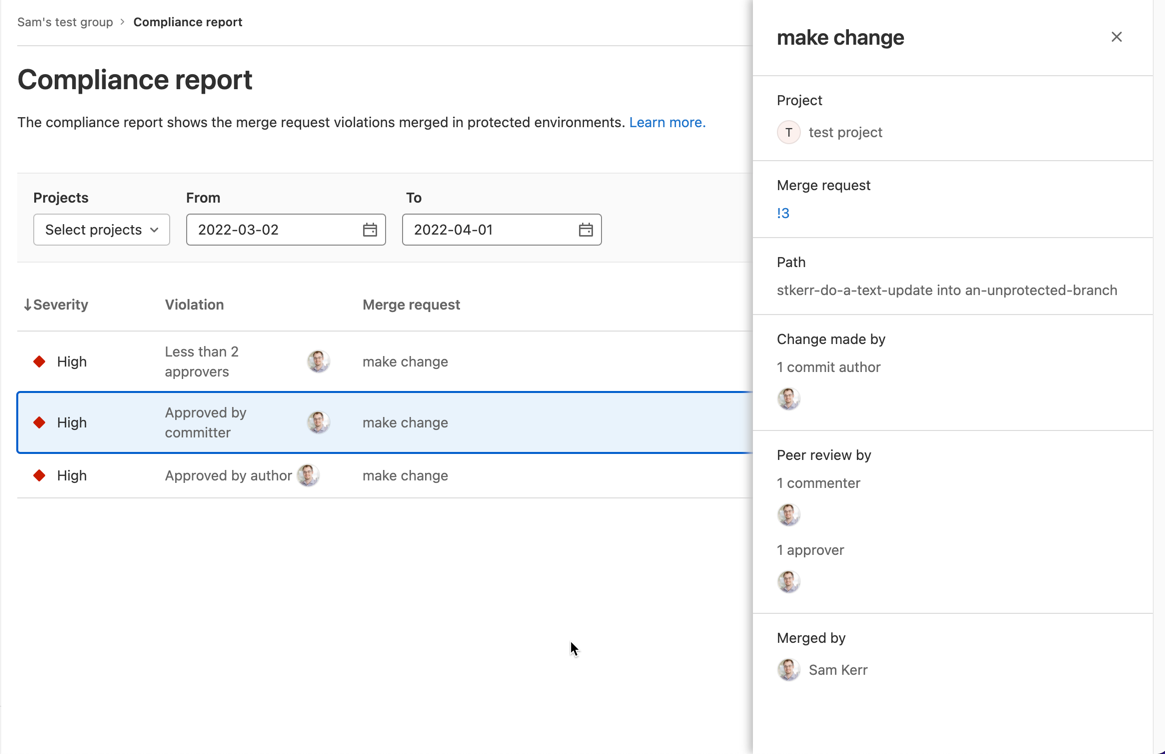
    Finally, a compliance report that surfaces every individual merge request violation has been added along with a tool for setting up streaming audit events.

    Brendan O’Leary, staff developer evangelist for GitLab, said that as DevOps processes continue to mature, DORA metrics make it simple for IT leaders to measure overall progress. While it’s not likely that any single set of DevOps practices will be universally implemented across an entire enterprise, O’Leary noted it’s important for DevOps teams to keep track of key performance indicators (KPIs) that enable teams to identify areas for ongoing improvement. For example, it’s not uncommon for technical debt to accumulate in the absence of metrics that track the progress of builds, he added.

    In general, a transition to microservices-based applications is increasing the need for CI/CD platforms that make it simpler to build them. Each of these applications is constructed using microservices that are typically built independently of one another. The challenge is that each microservice has dependencies on other microservices, so the need for DevOps workflows to optimally manage that development process is becoming more widespread, noted O’Leary.

    In some cases, organizations are deploying a CI/CD platform for the first time to build these applications. In other cases, they are looking to replace a CI/CD platform that was adopted to build legacy monolithic applications. Regardless of the type of application, there is a need to continuously refine and improve software engineering practices to increase developer productivity.

    It’s not clear to what degree developers are voting with their feet to work for one organization versus another based on the overall quality of developer experience. Organizations that do have a consistent approach to software engineering, however, make it easier for developers to spend more time writing code rather than managing the build process. The challenge is to make sure the DevOps platform itself does not become a bottleneck that hinders the rate at which developers can build code. It’s also not clear whether organizations are building applications faster than they can secure it and ensure overall quality. The only way to know for sure is, of course, to track metrics.

    Naturally, not every developer is a fan of metrics. Application development is still as much art as it is science. There is, however, a general appreciation that the amount of code that needs to be written far exceeds the available talent to write it; any effort to make software engineering more efficient benefits everyone involved. As such, given all the code that needs to be written, a software engineer is often today the best friend a developer can have.