Category: Blogs

  • Four key vectors for closing the DevOps feedback loop

    Four key vectors for closing the DevOps feedback loop

    A question I am asked frequently about DevOps – and a perennial challenge to all DevOps slide artists – is what exactly we mean by the idea of ‘closing the feedback loop’

    Q. What do you mean when you mention ‘closing the feedback loop’? Ops monitor our systems today, and alert devs when they are needed (next step, devs carrying pagers!). Is this the same Ac?

    Yes, this is definitely part of the equation. Feedback from operations (and more) to development (and more) – through alerts, monitoring, log entries, service tickets, or verbally – is essential. Good fast feedback helps, for example, to:

    • connect dev and ops more closely to user experiences
    • establish shared insight to replace fragile tribal knowledge
    • foster ownership from both teams in the entire service
    • provide rapid response to problems or new requirements
    • encourage faster experimentation and a tolerance for failure

    Feedback loops in smaller organizations tend to be relatively simple – just lean over the cubicle and tell your counterpart what is going on, or program the monitoring system to send you an alert. However for larger organizations the multiplicity of teams, volume of events, separation of duties, and variety of feedback can make this harder to handle.

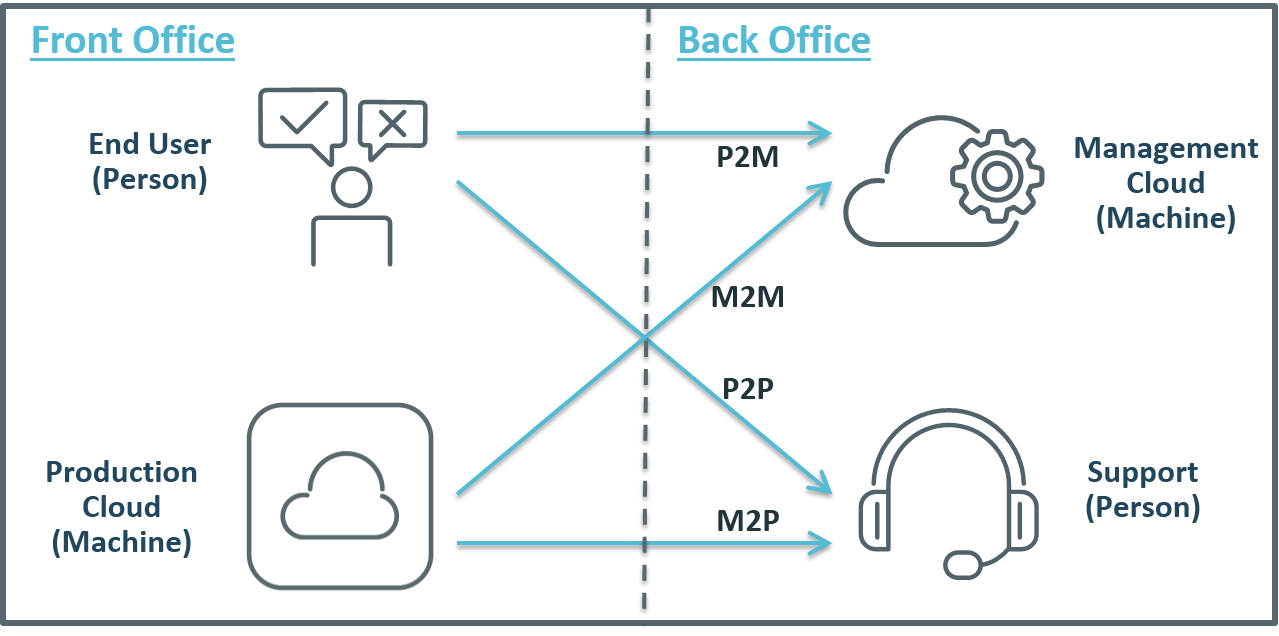
    In larger organizations then, I see four key vectors used in closing the DevOps feedback loop:

    • Machine to Person (M2P)
    • Person to Person (P2P)
    • Machine to Machine (M2M)
    • Person to Machine (P2M)

    I have tried to illustrate these 4 vectors below (and not being any kind of graphic artist, I would love any feedback on this image):

    FeedbackLoops

    Machine to Person (M2P)

    This is more or less the alert cycle the original question posed – a machine process (performance monitoring, for example) picks up an error situation that it cannot identify it as a ‘known resolvable’ issue, so forwards it to a person to take charge. Machines can resolve many problems automatically with intelligent orchestration – rollback a release, increase capacity, modify a configuration, migrate a workload, restart a service – but sometimes a person needs to fix hard and/or infrequent problems.

    Person to Person (P2P)

    This is just the classic ‘hot line’ feedback, where application users (internal or external) talk directly to someone in IT (e.g. help desk staff). This can be the most powerful feedback of all. Not only can it help identify defects, but it can also identify opportunities for improvement – from new features to entirely new services. However, to be useful this personal feedback must be transferred into development or operations process – e.g. to update configuration scripts, or as input to future release planning.

    Machine to Machine (M2M)

    This includes automated problem resolution (e.g. monitoring detects a performance bottleneck, triggers a provisioning engine to add additional capacity), but also includes data mining that feeds back ‘real-world’ production data to build more realistic test and QA environments, or to inform more accurate capacity plans. This feedback makes prod more stable, makes QA and test more realistic, reduces human and process errors, and helps to build scalability into applications from the start of the SDLC.

    Person to Machine (P2M)

    This can take many forms, such as end-users logging problems into a self-service portal or Service Desk, or rating a mobile app, or complaining online. Automation can trigger resolution for known problems, so end users can address problems automatically; or feedback can reach product owners to resolve common user complaints. However, P2M feedback may waste resources and increase technical debt, as solvable problems are fixed repeatedly rather than permanently; or user complaints are ignored.

    Final Tips

    These four vectors of active feedback are just a starting point, but describe a framework that enterprises can work to when looking to close and accelerate your feedback loops. Remember too that in a DevOps mode, feedback needs to be faster, it needs to be more accurate, and especially in a large organization it needs to connect not just with dev and ops, but with other stakeholders too – business owners, test and QA teams, security teams, and of course end users.

    What are your feedback loops? Do you cover all four vectors? Do you have more that I am missing? Please let me know in the comments below – as always, I would love to hear from you.

  • ShellShock vulnerability: Impact, analysis and protection

    ShellShock vulnerability: Impact, analysis and protection

    This week Stephane Chazelas, an Akamai security researcher, discovered an interesting bug in the Unix Bash (Bourne Again Shell) shell – known as “Shellshock” or “Bash Bug”. This vulnerability affects a wide range of operating systems (Unix, Linux, OS X), routers, and other technologies, making many of the systems we use on a daily basis vulnerable to attacks. A system vulnerability in the GNU Bourne Again Shell (Bash), the command-line shell used in many Linux and Unix operating systems, could leave systems running those operating systems open to attack. The bug utilizes the Bash process variables that are passed by the operating system or an application. If Bash is configured as the default system shell, it can be used to attack devices via web requests, secure shell, telnet sessions, or other programs that use Bash to execute scripts. Patches for this vulnerability are now available for all the major Linux distribution vendors.

    THE IMPACT
    The reason this vulnerability raises many concerns is the breadth in threat vectors available to attackers. For example, the simple task of loading a website gives attackers the opportunity to exploit the vulnerability if the server handling your website request uses bash commands to access the information you requested. So if you still don’t think we use command line anymore, think again.

    In fact, there are some computer programs that use Bash to execute commands on other computers. For example, how does a website know if you are accessing the site via mobile device or computer web browser? Based on the response your device returns ,the server will modify the content delivery to be compatible with the corresponding platform. From a technical perspective, your browser sends an agent to tell the web server that you are using either a mobile device or computer browser. The web server then uses that information to set the agent string as a variable before using Bash to execute code that generates the web page.

     Attackers are making use of this vulnerability as we speak. Several researchers are reporting that honeypot infrastructures are being actively attacked by a group exploiting the Bash vulnerability. The vulnerability is allowing the installation of a zero day bash injected ELF malware that is currently being used.  A system administrator using the @yinettesys Twitter account published a GitHub post reporting that threat actors exploited the Bash Bug flaw to launch kernel exploits on a computer system. The malicious code then performs a Web GET request from a user agent to begin a brute force dictionary attack to harvest credentials. The malicious code for this attack has been analyzed by virustotal and at this time there is 0/55 detection by antivirus.

    PROTECTING YOURSELF
    There are several detection methods that can be used to mitigate this risk. Since the Bash Bug affects versions 1.14 through 4.3 of the Bash shell, upgrading to the latest version will mitigate the risk.

    From a web application standpoint, the bug can be exploited by code that passes through the Bash interpreter. CGI’s (Common Gateway Interface) and CGI scripts are the most affected, but anything that is passed to the Bash interpreter can be exploited. Command execution can be achieved through HTTP Headers and POST/GET parameters on vulnerable systems. So you could use a web application firewall to monitor the vulnerability in the header. Additionally, a signature will be added to the POST/GET field. This signature will monitor for attempts to bypass the detection signature via multiple whitespace using ( ){ command  and  ( )  {  command  and (  )    {.

    Use an IDS/IPS to detect for any type of network communication; IDS/IPS will notify you when a connection is established and remote commands are executed.

    We will continue to monitor the situation and post any new information we uncover to the Alert Logic blog.

    SEE IF YOU ARE VULNERABLE

    To see if you are vulnerable to this exploit run the commands below, the response will tell you if you are vulnerable

    env x='() { :;}; echo vulnerable’ bash -c “echo this is a test”

    If the system is vulnerable, the output will be:

    vulnerable  this is a test

    An unaffected (or patched) system will output:

    bash: warning: x: ignoring function definition attempt  bash: error importing function definition for `x’  this is a test


    CREDITS

    https://lists.debian.org/debian-security-announce/2014/msg00220.html

    http://blog.erratasec.com/2014/09/bash-shellshock-scan-of-internet.html#.VCRpVitdXKN

    http://arstechnica.com/security/2014/09/bug-in-bash-shell-creates-big-security-hole-on-anything-with-nix-in-it/

    https://cve.mitre.org/cgi-bin/cvename.cgi?name=CVE-2014-6271

    ——————————————————

    Here are signatures for the IDS for detection that have been provided by Alert Logic.

    These rules have been created with resource consumption (No PCRE) of everyday average hardware to have more comprehensive coverage of use.

    We have to use “any” here because lots of services open web servers on non-standard http ports such as cups and devices any, because local attacks would be common ground for this (cups, avahi, etc.) and http_header likely only uses a whitelist we will miss unique header values. This can also be bypassed due to the “within” modifer, but we got to try to narrow this down for resource issues.

    External net would be the outside Internet IP address. Home Net would be any communication from internal IP space.

    alert tcp $EXTERNAL_NET [1024:] -> $HOME_NET any (msg:”AL: HTTP Server
    Headers Bash Environment Escape RCE”; flow:to_server,established;
    content:”() {“; http_header; fast_pattern; content:”}|3b|”; within:20;
    http_header; tag:session,5,packets; classtype:attempted-admin;
    sid:1006236; rev:1; )

    Uri and method are theoretical for now, but check just in case another server does this; any input poorly parsed to an internal scripting function like Popen could trigger:

    alert tcp $EXTERNAL_NET [1024:] -> $HOME_NET any (msg:”AL: HTTP Server
    URI Bash Environment Escape RCE”; flow:to_server,established;
    uricontent:”() {“; fast_pattern; uricontent:”}|3b|”; within:10;
    classtype:attempted-admin; tag:session,5,packets; sid:1006237; rev:1;
    )
    () { should never be in a method, so we don’t need additional checks here:

    alert tcp $EXTERNAL_NET [1024:] -> $HOME_NET any (msg:”AL: HTTP Server
    Method Bash Environment Escape RCE”; flow:to_server,established;
    content:”() {“; http_method; classtype:attempted-admin;
    tag:session,5,packets; sid:1006238; rev:1; )

    POST values might get parsed by the end application into environment variables (parsers, interpreters, formats, etc.) making one just to be safe, this might false, though

    alert tcp $EXTERNAL_NET [1024:] -> $HOME_NET any (msg:”AL: HTTP Server
    POST Bash Environment Escape RCE”; flow:to_server,established;
    content:”() {“; http_client_body; fast_pattern; content:”}|3b|”;
    within:20; http_client_body; tag:session,5,packets;
    classtype:attempted-admin; sid:1006239; rev:1; )

    Now the big bad one. An uploaded file could have metadata parsed and stuffed into an env variable (cups is notorious for this.) The optimization for this is going to be hard, but we have to do it so we don’t parse the max file parse byte:

    alert tcp $EXTERNAL_NET [1024:] -> $HOME_NET any (msg:”AL: File
    Transfer Parsing Bash Environment Escape RCE”;
    flow:to_server,established; file_data; content:”() {“; within:100;
    fast_pattern; content:”}|3b|”; within:20; tag:session,5,packets;
    classtype:attempted-admin; sid:1006240; rev:1; )

    Alright, now cookie values for base64 && unserialize/json_decode values that could be used. This could likely false due to these characters used often in these compressed data formats. This attempt is totally random because we don’t know the size and start of random people’s base64 encoded values + so rule might not even work, but we need to try disabled unless we need it due to the unknown and random chance of it working customer specific values where the cookie is known can easily be replaced in this rule:

    #alert tcp $EXTERNAL_NET [1024:] -> $HOME_NET any (msg:”AL: HTTP
    Cookie value Bash Environment Escape RCE”; flow:to_server,established;
    content:”=”; http_cookie; base64_decode:relative; base64_data;
    content:”() {“; tag:session,5,packets; classtype:attempted-admin;
    sid:1006241; rev:1; )

    DHCP sets user hooks

    alert udp $HOME_NET [67,68] -> $HOME_NET any (msg:”AL: DHCP Bash
    Environment Escape RCE”; flow:from_server,established; content:”() {“;
    fast_pattern; content:”}|3b|”; within:20; tag:session,3,packets;
    classtype:attempted-admin; sid:1006242; rev:1; )

    This article was also posted to the Alert Logic blog

    About the Author

    Stephen-Coty-Alert-Logic-200x300Stephen Coty joined Alert Logic in 2012 as the director of threat research and author of the Cloud Security Report, and has a wealth of experience in the security space. In his role at Alert Logic, Stephen is currently in the process of building a premier threat research team that is innovating the industry by taking a more proactive versus reactive approach to security through solid research, reverse engineering of malware, and constant searches for stolen data, all of which can be leveraged as actionable data for remediation. Stephen has over 15 years of experience in systems engineering and security consulting, in industries ranging from healthcare to finance and government. Most recently, he held a senior position at Rackspace Hosting as the Manager of Cyber Security, where he served as the architect of the Security Operations Center and Threat Research Team. He is also a member of ISSA, Infragard and the HTCIA.

  • CloudBees nurtures the Jenkins community to new highs

    CloudBees nurtures the Jenkins community to new highs

    One of the linchpins in the DevOps tools box is Jenkins.  Just about everyone knows Jenkins. For those few not familiar with Jenkins, here is an excerpt from the “What is Jenkins” page:

    What is Jenkins?

    Jenkins is an award-winning application that monitors executions of repeated jobs, such as building a software project or jobs run by cron. Among those things, current Jenkins focuses on the following two jobs:

    • Building/testing software projects continuously, just like CruiseControl or DamageControl. In a nutshell, Jenkins provides an easy-to-use so-called continuous integration system, making it easier for developers to integrate changes to the project, and making it easier for users to obtain a fresh build. The automated, continuous build increases the productivity.
    • Monitoring executions of externally-run jobs, such as cron jobs and procmail jobs, even those that are run on a remote machine. For example, with cron, all you receive is regular e-mails that capture the output, and it is up to you to look at them diligently and notice when it broke. Jenkins keeps those outputs and makes it easy for you to notice when something is wrong.

    Jenkins offers the following features:

    1. Easy installation: Just java -jar jenkins.war, or deploy it in a servlet container. No additional install, no database.
    2. Easy configuration: Jenkins can be configured entirely from its friendly web GUI with extensive on-the-fly error checks and inline help. There’s no need to tweak XML manually anymore, although if you’d like to do so, you can do that, too.
    3. Change set support: Jenkins can generate a list of changes made into the build from Subversion/CVS. This is also done in a fairly efficient fashion, to reduce the load on the repository.
    4. Permanent links: Jenkins gives you clean readable URLs for most of its pages, including some permalinks like “latest build”/”latest successful build”, so that they can be easily linked from elsewhere.
    5. RSS/E-mail/IM Integration: Monitor build results by RSS or e-mail to get real-time notifications on failures.
    6. After-the-fact tagging: Builds can be tagged long after builds are completed.
    7. JUnit/TestNG test reporting: JUnit test reports can be tabulated, summarized, and displayed with history information, such as when it started breaking, etc. History trend is plotted into a graph.
    8. Distributed builds: Jenkins can distribute build/test loads to multiple computers. This lets you get the most out of those idle workstations sitting beneath developers’ desks.
    9. File fingerprinting: Jenkins can keep track of which build produced which jars, and which build is using which version of jars, and so on. This works even for jars that are produced outside Jenkins, and is ideal for projects to track dependency.
    10. Plugin Support: Jenkins can be extended via 3rd party plugins. You can write plugins to make Jenkins support tools/processes that your team uses.

    But beyond the wiki how did Jenkins become one of the most successful open source projects of all time? The answer to that has a lot to do with CloudBees, a little to do with Oracle and even more to do with an architecture that supports an ecosystem that has allowed almost a thousand plugins to be developed to the core project.

    First let’s get the little do with Oracle out of the way.  Jenkins was originally known as Hudson. Hudson was started by Sun Microsystems. When Oracle bought Sun it inherited a lot of open source projects (OpenOffice and Java among them). Many in the open source community questioned Oracle’s intentions regarding open source. It didn’t take long for a dispute to arise between many of the Hudson developers and Oracle. Oracle claimed they owned the term Hudson and that had an easy answer. There was a vote taken and Hudson became Jenkins. When Oracle objected, Jenkins became a fork of Hudson (or Hudson became a fork of Jenkins). Oracle still maintains Hudson, which is a shell compared to Jenkins.

    In the meantime Sacha Labourey former CTO at JBoss, started CloudBees in 2010. This was after JBoss was acquired by Red Hat. CloudBees created a PaaS that was one of the first PaaS to support the entire application lifecycle from development to deployment. A key part of CloudBees offering was the Jenkins Continuous Integration (CI) engine. Labourey brought in Kohsuke Kawaguchi, a founder and key contributor to Jenkins. Along with Kawaguchi, several other key Jenkins contributors also came to CloudBees.

    CloudBees and their employees contributed more than 80% of the code to Jenkins. Jenkins and the community that supports it is thriving. I had a chance to speak with Kawaguchi about this. He is very proud that there are over 1000 plugins now for Jenkins. I was blown away by a number of something like 500k downloads a month from the Jenkins website.

    Of course a thriving open source community does not necessarily translate into a thriving commercial business. There have been many companies that never cracked the formula to monetize there open source success.

    This is where CloudBees appears to be winning. I spoke to Kwaguchi about CloudBees commercial success. With offices around the world CloudBees has been able to translate an iconic open source project into a thriving business.  They have a set of enterprise (ready pay for) plugins that enhance Jenkins in a number of ways. Additionally, the offer hosted versions of Jenkins, CI-a-a-S if you will. They call in Jenkins Operations Center. They also offer Dev@cloud, which is an umbrella for other services and software that enhance and make Jenkins easier to use across different platforms, with different languages and other options. Of course they offer support for your Jenkins installs as well.

    All in all, Labourey and Kawaguchi have built a thriving commercial entity on top of Jenkins, while at the same time keeping Jenkins as a healthy, growing open source project. Kudos to them for a job well done.

    That is not to say that there aren’t competitors to Jenkins. There are some open source projects and some commercial projects that claim to do CI better and faster. Of course many of them benefit from having Jenkins already there as a template and just improving incrementally on this already there. You can see a full list of Jenkins competitors at: https://www.g2crowd.com/products/jenkins/competitors/alternatives

    While some of these competitors offer an improvement here or there, by and large Jenkins is still the standard against which they are measured. With CloudBees guiding and managing Jenkins, it will probably stay that way for the foreseeable future.

  • Why Continuous Integration Doesn’t Work

    Why Continuous Integration Doesn’t Work

    Continuous integration is easy. Download Jenkins, install, create a job, click the button, and get a nice email saying that your build is broken (I assume your build is automated). Then, fix broken tests (I assume you have tests), and get a much better looking email saying that your build is clean. Then, tweet about it, claiming that your team is using continuous integration.

    I’ve seen it multiple times in multiple projects. The start is always bright and smooth. Problems start later when the build gets broken again and we simply don’t have time to fix it. We’re simply busy doing something else and a few broken unit tests shouldn’t be a distraction for us. After all, we all know that unit testing is not for a team working with deadlines, right?

    Wrong. Continuous integration can and must work. The latest build should always be clean. Always.

    What is Continuous Integration?

    Nowadays, software development is done in teams. We develop in feature branches and isolate changes while they are in development. Then, we merge branches into master (Git usage is assumed). After every merge, we test the entire product, executing all available unit and integration tests. This is what is called continuous integration, abbreviated as CI.

    Sometimes, some tests fail. When this happens, we say that our “build is broken”. Such a failure is a positive side effect of quality control because it raises a red flag immediately after an error gets into master. It is a well-known practice, when fixing that error becomes a top priority for its author and the entire team. The error should be fixed right after a red flag is raised by the continuous integration server.

    # Why Continuous Integration Doesn’t Work?

    CI is great, but the bigger the team (and the code base), the more often builds get broken. And, the longer it takes to fix them. I’ve seen many examples where a hard working team starts to ignore red flags, raised by Jenkins, after a few weeks or trying to keep up.

    The team simply becomes incapable of fixing all errors in time. Mostly because the business has other priorities. Product owners do not understand the importance of a “clean build” and technical leaders can’t buy time for fixing unit tests. Moreover, the code that broke them was already in master and, in most cases, has been already deployed to production and delivered to end-users. What’s the urgency of fixing some tests if business value was already delivered?

    In the end, most development teams don’t take continuous integration alerts seriously. Jenkins or Travis are just fancy tools for them that play no role in the entire development and delivery pipeline. No matter what continuous integration server says, we still deliver new features to our end-users. We’ll fix our build later. And it’s only logical.

    # What Is a Solution?

    The solution I propose is simple — prohibit anyone from merging anything into master and create scripts that anyone can call. The script will merge, test, and commit. The script will not make any exceptions. If any branch is breaking at even one unit test, the entire branch will be rejected.

    In other words, we should raise that red flag before the code gets into master. We should put the blame for broken tests on the shoulders of its author.

    Say, I’m developing a feature in my own branch. I finished the development and broke a few tests, accidentally. It happens, we all make mistakes. I can’t merge my changes into master. Git simply rejects my push, because I don’t have the appropriate permissions. All I can do is call a magic script, asking it to merge my branch. The script will try to merge, but before pushing into master, it will run all tests. And if any of them break, my branch will be rejected. My changes won’t be merged. Now it’s my responsibility — to fix them and call the script again.

    In the beginning, this approach slows down the development, because everybody has to start writing cleaner code. At the end, though, this method pays off big time.

    In my projects I automate this merging operation using www.rultor.com, a free hosted DevOps service. Its usage is explained in this article: Rultor.com, a Merging Bot. I would be glad to answer your questions, just shoot me an email.

  • Right-Picking the First Project to Go DevOps On

    Right-Picking the First Project to Go DevOps On

    One of the hardest things to do when starting a new initiative is picking the right project to work on. Should I start with App A? App B?  Does it really matter as long as I get started on this DevOps thing and prove its value to management?

    Yes, actually, it might.

    If you think about it, one of the reasons you’re doing DevOps in the first place is not just because it’s cool (it is, of course, but that rarely flies with the business guys) but because it’s going to add value in one or more ways by improving time to market, reducing risk and lowering operating costs. If the project you choose to go DevOps on isn’t capable of showing those benefits (or isn’t capable of showing those benefits in a reasonable time frame) then you might just be choosing the wrong one to start with.

    So how do you choose? Well, how about starting with an app that’s being developed using agile methodologies?

    According to the “8th Annual State of Agile” survey from VersionOne 88% of respondents were practicing agile development, which means you shouldn’t have a hard time finding one.

    Except, you might if you aren’t paying attention. A high adoption rate doesn’t necessarily mean a high saturation rate, however.

    number of projects using agileDig a bit deeper into the survey and you’ll find that agile isn’t used for every project. On the contrary, there’s a good distribution of agile and traditional (waterfall ) methodologies being used. While over half of the respondents are using agile to manage more than 50% of projects, the other 48% are using some other methodology.

    Which offers some interesting strategies for how to get started with DevOps on the other side of the wall (that’s you, in operations land).

    On the one hand, the projects most in need of improved velocity in deployment (time to market) are likely those being developed using agile methodologies. The aforementioned survey validates that approach, with the top reason cited for adopting agile being “accelerate time to market.” The general premise of agile is fast, frequent updates, making the need to deploy into production a more pressing priority. Choosing an app that’s being developed using agile methodologies means you’ll be able to practice, refine, and optimize the processes as you work to automate the deployment. Because of the frequency with which agile-developed projects tend to need deployment, this gives you the opportunity to practice similar techniques on your automation and optimization.

    You’ll be able to automate individual tasks and test them thoroughly before moving on to the next one and the next one and the next one, until you’ve got the process orchestrated (yes, Virginia, there is a difference). You’ll then have ample opportunity to optimize the process, finding redundancies or inefficiencies in the way information is gathered and disseminated into the process. Optimization of the process means greater efficiency, especially if you can knock out those all important wait times between tasks.

    The key here is that you have to know which projects are being developed using agile methodologies, and which aren’t. That means communicating with developers. And not just by sending an e-mail and asking for a list, but really talking to them to understand which projects the business would benefit from improving time to market. Getting an app that is the vehicle for competitive advantage to market faster seems a bigger return on investment than the app used by just a few people for non-critical purposes. You’ve got to dig in and determine which agile projects need agile deployment the most, and then decide where to dig in.

    This is not to imply that less frequently deployed apps will not benefit from agile. They most certainly will, though the benefits that DevOps brings to those apps are more about stability and consistency than they are those derived from improving time to market.

    What’s important is to decide what your goals are with DevOps and what benefits will be worth the most bang for the buck (cause it ain’t going to be cheap in terms of time investment). Getting DevOps on an infrequently but mission-critical app can reduce the risks associated with rusty processes and improve stability in general. Automating the deployment  of such applications can certainly save time and resources that can be redirected to agile projects in need of greater deployment velocity.

    But if you’re looking to show value and return on investment, you’ll likely want to choose one of the agile-developed projects that already exists and needs some attention. Not only because it’ll show value faster, but because it’s releasing frequently enough that you’ll actually get the opportunity to refine (and one hopes optimize) your automation and orchestration.

  • Enterprising DevOps in Banking sector

    Enterprising DevOps in Banking sector

    “Shift left” is common in project life cycle management where the risks are mitigated early in the cycle by involving QA team early in the planning & development phase. In the  IT support systems, shift left empowers support staffs with enough tools, processes & knowledge base so that the issues get resolved at a point closest to the customer. The purpose of this process is to create a leaner organization and increase customer satisfaction. DevOps is a continuous shift left that helps in high velocity product delivery and enhance the quality of the deliverables.

    Why DevOps is crucial to Banking Sector?

    a.       Multi-channel delivery

    Traditionally banks have been offering products & services that were physically distributed through branches/ATMs in a brick-and-mortar fashion. But with the rapid increase in the use of smartphones & tablets, the banks are challenged to transform their distribution channels and trend towards drive-to-digital. The study from eMarketer.com shows the distribution of banking channels used by various US Internet users. The distribution of banking channels increases the need for multi-channel interactions, a consistent UX across different channels like mobile/internet/TV banking, ATMs etc and an integrated channel to offer a seamless user experience. This in turn requires a transformation in the way the applications are developed & deployed, while adhering to high level of security & compliance. Now considering that each of the banking product is managed by a separate division with its own operations team, offering an integrated delivery channel is extremely difficult.

    b.      Security updates and hot fixes

    It is not long since the outbreak of the Heart Bleed vulnerability. It not only impacted the websites but also the banking applications using OpenSSL technology. Hackers could impersonate the banking services and steal user credentials. Banking Applications using OpenSSL were patched. Similarly, Zero-day-attacks pose a serious risk to banking applications as the hackers take advantage of the time before the vulnerability is publicly announced and a patch is available & applied. In early Feb 2014, a zero-day-attack by name IE “Operations SnowMan” [ CVE-2014-0322] could steal banking credential if the user uses IE 9 or 10. DDoS (Distributed Denial-Of-Service) & Man in the browser (MitB) attacks are some of the other top vulnerabilities that can threaten the security of the banking applications. This urges the banks to test & release the hotfixes / patches at the earliest without breaking the existing functionalities and most often make live patches while the customers are still using the banking applications.

    c.       Regulatory and legislative pressures

    US Patriot Act (Providing Appropriate Tools Required to Intercept and Obstruct Terrorism Act of 2001) has changed the way the banks identify their potential customers. All US banks and other oversees banks that have their correspondent account in US need to get certified under this act. As stated here the banks need to have teams & processes in place to ensure that it complies with these regulatory requirements. This mandates a risk management framework and a reporting mechanism. This increases process overheads, which inturn slow down innovation and product delivery.

    DevOps to the rescue

    DevOps philosophy is similar to Toyota’s Kanban / JIT (Just-In-Time) production. Banks are familiar with Agile & XP processes for product development, ITIL/ITSM for Operational efficiency, yet they are not JIT production ready. Let us pick the two major aspects that gear up the banks to be DevOps ready.

    a.       Organizational Structure in Banks

    We all acknowledge the fact that there is a huge gap between R&D and IT Operations. But, bridging the gap between R&D & IT can be complex based on the magnitude of the size of the organization, geographical distribution, compliances and processes. In 2011, Citi bank initiated a multi-billion dollar project named “Project Rainbow” to consolidate its IT platforms across different product portfolios like mortgages, credit portfolios etc. The focus was to move away from product-centric strategy to a more customer centric strategy and improve communication between the teams. In similar terms, RBI [Reserve Bank of India] recommends aligning the IT Development, Quality Assurance & Operations. The above picture is a recommendation of the organizational structure by RBI. This greatly improves the collaboration within the teams and help them move towards a common goal.
    b.      Automation

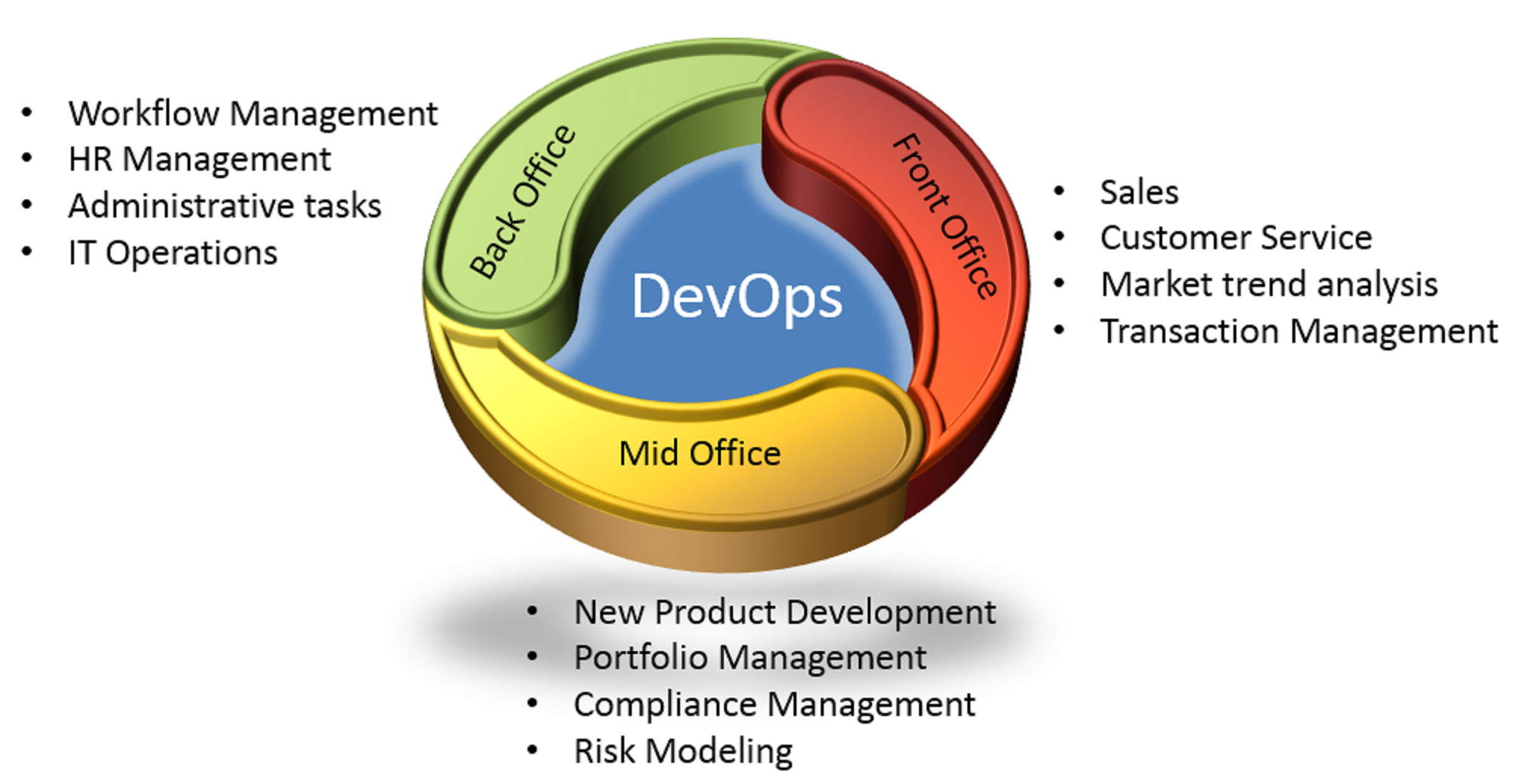
    Banking business processes are typically split as back office, mid office and front office processes. Back office processes are those that do not require direct customer interaction but involve a lot of data processing. Typically, banks have around 300 – 500 back office automation processes, some of them are repeatable and highly structured. These back office processes like HR management, administrative tasks & IT operations are good candidates for optimization and cost reduction. devops Mid office processes provide the necessary decision support system. Analytical reports, collaboration tools that foster communication and process unstructured data fall under this category. IT systems monitoring and reporting automation can identify the systems usage and reduce IT sprawls. Front office process are customer facing and requires constant up to date information from the mid and back office tools for quick response times. When these front, mid and back office processes are automated and integrated, it greatly increases the velocity of product delivery and increase customer satisfaction.

    Success stories like Loyld, show that banks can reduce cost and operational complexity by automating server configurations and release automation. Automating software testing can greatly improve defect containment and testing efficiency. Thus the banks can make consistent software deliveries across multiple delivery channels, apply hot fixes quickly or accommodate new regulatory needs, once they are DevOps ready.

  • IBM and Rackspace join as premier sponsors of Camp DevOps Houston, tickets now only $5

    IBM and Rackspace join as premier sponsors of Camp DevOps Houston, tickets now only $5

    We are very happy to report that IBM and Rackspace have signed on as a premier sponsors of Camp DevOps Houston on October 28, 2014. They join CA Technologies ITInvolve and JumpCloud as premier sponsors of this event. Additional sponsors of Camp DevOps Houston include BlueMeric, CloudBees, PagerDuty, VictorOps, Automic, Qwinix and Incapsula. We are very grateful for the support.

    With all of this great support from our sponsors, devopsy.kinsta.cloud is dropping the cost of admission to Camp DevOps Houston to just $5.00!

    The reason for this is that Camp DevOps are set up to educate and bring DevOps to areas that may not have been exposed to on site DevOps education and conferences. We believe Houston is a great market to bring DevOps too. As long as the costs of the conference are covered (including breakfast, lunch and refreshments) our mission is accomplished in that regard. The only reason for the $5 dollar admission is to stop people from registering and then not attending, taking away a seat from someone else who would like to attend.

    The speaker lineup for Camp DevOps is just about full.  Sanjeev Sharma, author of DevOps for Dummies headlines a great lineup of speakers on a wide variety of DevOps topics. There are multiple tracks aimed at both the technical and business tracks. You can get much more information at Campdevopsy.kinsta.cloud. You can register for just $5 at: http://www.eventbrite.com/e/camp-devops-houston-tickets-12489234637

    If you are in the Houston area or know tech people who are, be sure to come join us. We think this is going to be a great event in just about a month away.

    ibmpos_blurgb

    rackspace-No1-managed-cloud-logo

  • Buzzword abuse: The anatomy of a DevOps Engineer

    Buzzword abuse: The anatomy of a DevOps Engineer

    Once, people used the word genius only when describing someone who really was a genius. Someone with extraordinary intellectual and perceptual capabilities. Today every parent uses this word to describe their, likely cognitively regular child – and this term has lost any good taste.  I find the same trend holds true for DevOps. And yet, that doesn’t stop everyone from saying the word DevOps, a lot (and more often than not, in a completely wrong context).

    The Problem

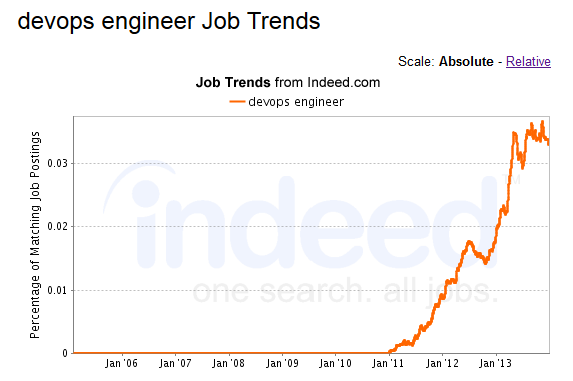
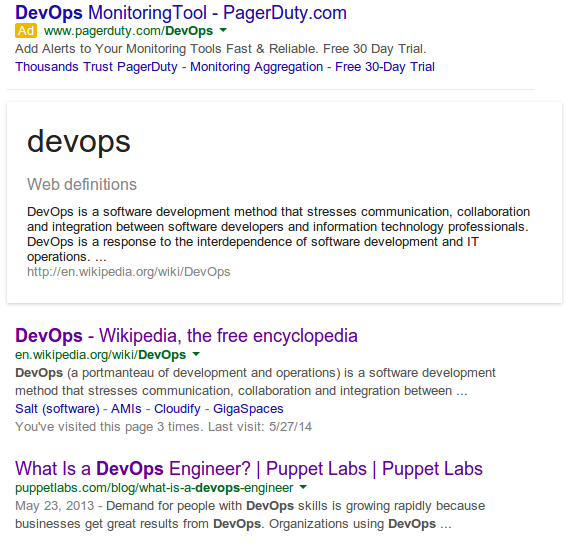
    Many recruiters are now looking for “DevOps Engineers”.  The demand for “DevOps engineers” has grown exponentially over the course of the last few years by thousands of %, just a small trend graph from indeed.com, and snippet from Google.

    buzz 1

    buzz 2


    We constantly hear about companies building, “DevOps Teams”, and developing “DevOps Tools”. Everyone wants “DevOps” but have no idea what it means.

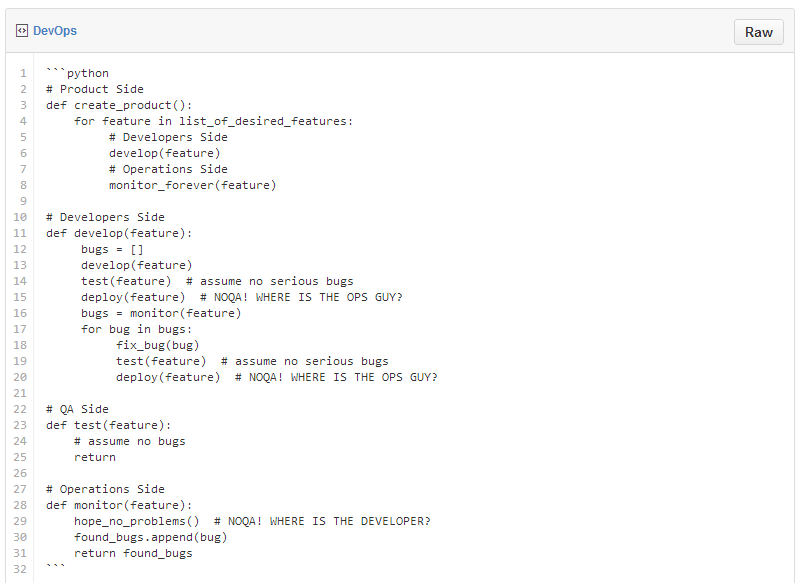
    The short definition of DevOps is the ultimate business-requirements to customer to business-requirements cycle (often referred to as the best “development to production cycle”). How this would look in code:

    buzz3


    (Of course, this snippet presents the problem very broadly and doesn’t take serious bugs into consideration)

    All of this, aside from the development process is expected to happen automatically, not affect users at all, and have monitoring that is so exceptionally smart that it always points to the exact problem.  Hmmm.  What’s described above, is of course…. utopia.

    Reality Check. Most companies are more likely in the camp that:

    • runs tests manually or not at all
    • monitors the wrong things
    • reacts to the wrong problems in the wrong manner
    • doesn’t improve work processes
    • keep doing the above in iterations and trying to set out fires while more fires appear.
    • more bad stuff…

    DevOps aims to solve these problems.

    It is a culture, in which people work together to improve the product delivery cycle.

    At its base, it requires good collaboration/communication (with the other teams), familiarity (with the system), control (over features and failures), short dev-to-prod cycles (this isn’t mandatory, but can help to prevent major bugs), and quality testing (‘nuff said). This is practically a great analogy to a good relationship except that it also requires automation (to make all of the above possible), which is something you should probably refrain from in your relationship if you want your belongings to remain inside the house.


    The Perceived Anatomy of a “DevOps Engineer”

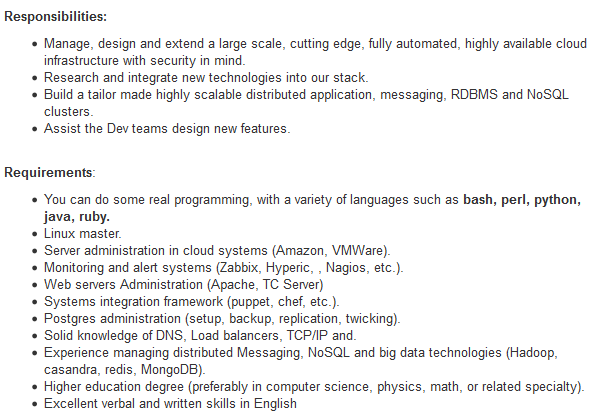
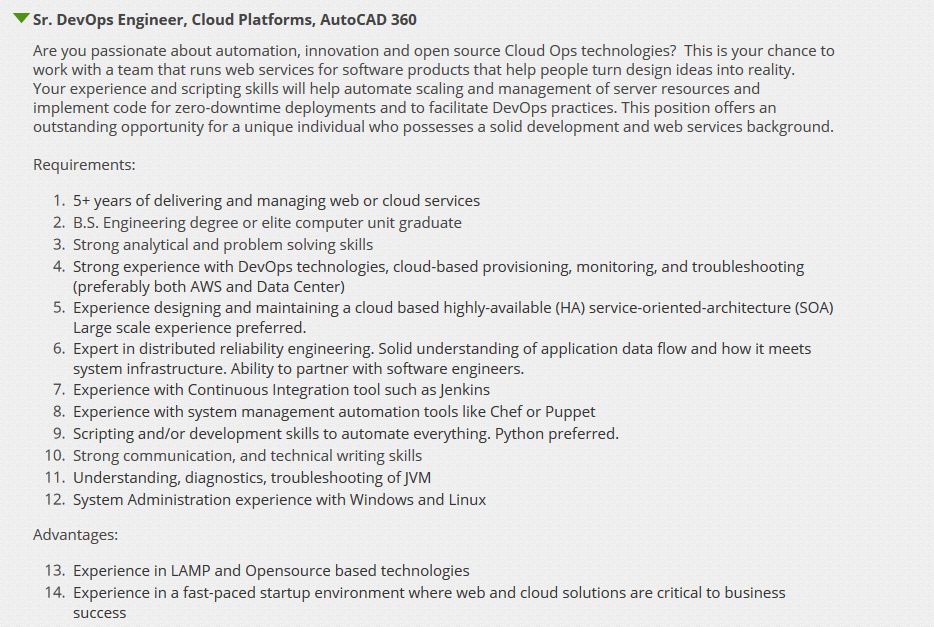
    Let’s look at the following job descriptions.

    DevOps Expert

    buzz3a


    buzz4

    See anything… strange about them? Yes, they want a God.

    The Dream Errr…”DevOps Team” is basically a group of:

    • Linux Experts (preferably all distributions in the world)
    • Coders (preferably Python, Ruby, Perl, Bash, Batch, Powershell, Powerpoint…)
    • Adept at CM, CI, CD, NBA and NBC (So they must know Chef, Puppet, Jenkins, Hudson, Travis, Git…)
    • Have vast knowledge in Cloud (like.. in the sky?)
    • are familiar with Databases (Including high availability, disaster recovery, fault tolerance, fail-over… something like the average marriage)
    • Know Storage (WTF?)
    • Know Monitoring (Nagios? REALLY?!)
    • Know Networks…
    • Know Big Data (the bigger, the better)

    Bottom line, they are supposed to be a group of people who know everything, can do anything, yet do not develop the application (That’s the Devs Job), nor do they install servers manually (That’s the Ops job).

    Don’t even get me started on “DevOps Tools” – Puppet, Chef, Ansible, Cloudify, Saltstack, OpsWorks, Jenkins.. these are all “DevOps Tools”, right? WRONG! They are automation tools! They don’t “DevOps”. They automate, i.e. enable “DevOps”.  JIRA, HipChat, PagerDuty, CloudWatch, New Relic… these are communication, collaboration and monitoring tools. You get the idea.

    There are no “DevOps Tools”. Developers have development tools because a developer is a profession. Just like a blacksmith has a mallet. Can you define a set of culture tools? Are the pen, the paintbrush, and the violin considered culture tools? No, they are instruments for the writer, painter, and musician to create works of cultural significance.

    In the same way, there are automation, collaboration and communication tools that enable the DevOps culture to be implemented into the organizational DNA.

    What we tend to mean when we say DevOps:

    • ‘We use Puppet to manage our servers’ configuration’.
    • ‘We use Ansible to deploy our application versions’.
    • ‘We use AWS as our infrastructure’, ‘we use Cloudify for our orchestration.

    What we should mean when we say DevOps:

    • ‘Our Devs and Ops work closely together’.
    • ‘They’re familiar with each other’s work so that Devs know the system they’re writing code for, (and adjust to it) and Ops know the code they’re deploying (and understand how it affects the system)’.
    • ‘They develop in short iterations and can deploy fast (both infrastructure and application) to overcome bugs ASAP and create smaller problems if any new bugs arise’ (again, not mandatory, but can help).
    • There are many more items in this list… but you get the gist.

    This is enabled by:

    • Keeping code tidy and well documented so it’s easily understood by all.
    • Keeping our code under version control and backed up so that we can always go back to a previous version in our environments, when needed.
    • Testing and monitoring the most important aspects of the system rather than the ones that we don’t care about.
    • Automating our Infrastructure, because deploying servers and configuring them manually makes them more susceptible to human errors.
    • Automating our code deployment so that we can deploy a lot (that doesn’t mean that we HAVE to deploy a lot), without making mistakes.

    Where did we stray off course?

    Culture is a very abstract and complicated concept. It isn’t as simple and obvious as a tool.

    Along the way, we took the tools and skills that are required to implement DevOps and named them DevOps instead. We appended the skills necessary to deal with these tools to a list, created a job description, and from there… the rest is history.

    What people refer to as “DevOps people” is usually (not always) a term that describes operations people who know how to code and who automate stuff – “InfraCoders”.

    So pretty much, you can’t (well,you can – it just doesn’t make much sense) have a “DevOps Team” or a “DevOps Engineer” because “DevOps” is not a thing.

    It is a how. It doesn’t respond to the question: ‘What’s your job?’ or ‘What does your team do?’ it responds to: ‘How does your company do it?’.  And most importantly: DevOps, is “DevsWITHOps”, not “DevANDOp.”

    Having said that, DevOps is not ONLY for Devs and Ops. It’s for everyone. It’s not about the titles or teams, it’s about the way a company handles the process of delivering a product to production in the best way possible.

    The problem with the “everything is DevOps” attitude is that it renders definitions meaningless. If everything is DevOps, then it’s everything and nothing, and de facto has no meaning. DevOps is already a complex concept. Making it mean everything, will make it practically impossible to implement.

    Ultimately, it really makes no difference whatsoever what you call your special forces team. You can call them “DevOps” or you can call them Bean Soup. Just be sure not to delude yourself that by constantly using the word DevOps in the wrong context, that your company is doing DevOps, while all you’re actually doing, is using Puppet.

    About the Author

    nircohenNir Cohen – is an Ops Architect at GigaSpaces working on Cloudify and a co-organizer of DevOps Days Tel Aviv.  He’s the brainchild behind the awesome open source tool Packman for package management. Nir loves system architecture, likes to think of himself as an innovative, think-tank type of guy who adores challenges and has an extremely strong affinity to automation and system architecture. He’s primarily driven by researching and deploying new systems and services. To Nir, the most important thing in life is ethics. Find Nir on GitHub or follow him on Twitter.

  • JumpCloud Introduces Directory-as-a-Service

    First Cloud-based Directory Service Builds upon the Company’s Strong User Management, Orchestration, and Security Foundation

    BOULDER, Colo.–(BUSINESS WIRE)–JumpCloud today announced the availability of the industry’s first Directory-as-a-Service (DaaS) solution. Through a SaaS-based offering, organizations can move the last vestiges of their legacy, on-premise IT systems to a fully-managed cloud service, providing an alternative to solutions such as Microsoft Active Directory® (AD) or Lightweight Directory Access Protocol (LDAP).

    “As we have seen with the transitions from Siebel to SalesForce, Exchange to Gmail, and file servers to DropBox, JumpCloud is enabling the transition of one of the last on-premise technologies to a fully managed service: the user directory”

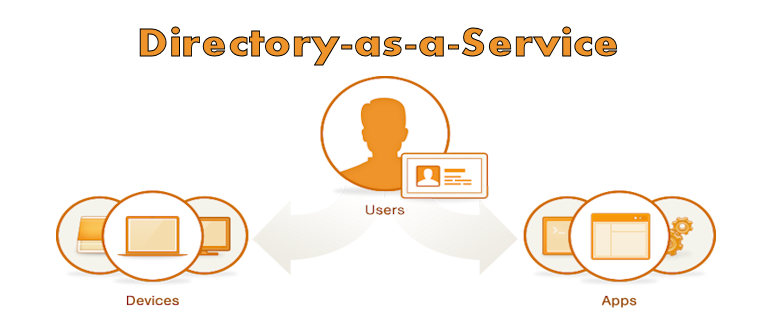
    JumpCloud’s DaaS is the first cloud-based directory with the ability to authenticate, authorize, and manage users, devices, and applications. The service acts as a single-user store for an organization or can extend existing AD/LDAP user stores to the cloud. Further, it integrates with single sign-on (SSO) providers without forcing IT admins to manage multiple directories.

    “Jumpcloud understands the need for directory services in the cloud,” said Salvatore D’Agostino, CEO of IDmachines. “Building on their secure shell configuration management tools, this offer puts in place cloud-to-machine, user authentication and other directory services. At IDmachines, we see this as a big need in current XaaS.”

    “As we have seen with the transitions from Siebel to SalesForce, Exchange to Gmail, and file servers to DropBox, JumpCloud is enabling the transition of one of the last on-premise technologies to a fully managed service: the user directory,” says Rajat Bhargava, JumpCloud’s President and CEO. “Directory-as-a-Service brings IT teams the simplicity, ubiquity, and security of user and device management, all from the cloud.”

    A single, secure user directory is a foundational element of any company. By moving the directory to the cloud, organizations are more agile, efficient, and secure. Further, DaaS enables IT admins to take advantage of major IT innovations, including cloud services such as IaaS and Gmail, and additional device/operating system combinations, such as Linux and OSX, among others.

    JumpCloud has reimagined the directory for the cloud era. The company’s new Directory-as-a-Service meets three critical enterprise needs:

    • Organizations who need a user directory – With the combination of a hosted LDAP offering as well as an agent-based authentication mechanism, this offering takes the heavy lifting off of IT and places it on JumpCloud while enabling the customer to authenticate and authorize cloud infrastructure, servers, IT applications, and internal devices.
    • Organizations extending their AD or LDAP to the cloud – With the adoption of Infrastructure-as-a-Service (IaaS), managing server users is largely a manual process and can create reliability and security issues due to the complexity introduced around networking and security configurations. JumpCloud easily, reliably, and securely extends an existing user directory to cloud-based servers and infrastructure.
    • Organizations replacing AD – Many organizations have migrated to Gmail from Microsoft Exchange, but are still forced to leverage AD for continued management of devices (functionality not available with the Google Apps Directory). JumpCloud’s DaaS gives IT admins a fully cloud-based solution that connects and manages users, their devices and IT applications.Pricing and availability
      JumpCloud’s Directory-as-a-Service is available immediately. Pricing plans start at $10 per user per month, and the first ten users are free forever. JumpCloud supports the LDAP protocol and works with Windows, Mac, and Linux devices.About JumpCloud
      JumpCloud, the first Directory-as-a-Service (DaaS), is Active Directory® and LDAP reimagined. JumpCloud securely connects and manages employees, their devices and IT applications. Try JumpCloud’s cloud-based directory free at jumpcloud.com.
  • JumpCloud launches new Directory-as-a-Service offering

    JumpCloud launches new Directory-as-a-Service offering

    The cloud is a great equalizer that enables startups and smaller companies to scale quickly, and play on a more or less even playing field with larger organizations. Managed cloud services free businesses up from implementing, configuring, and maintaining the underlying infrastructure, and allow individuals to focus on the business. With all of the freedom cloud services provide, though, there is still a need for a directory service that defines who the users are, and controls which individuals have access to which resources. JumpCloud wants to move that to the cloud as well.

    JumpCloud has established itself as a leading solution for managing security across a vast, rapidly-changing, virtual ecosystem in the cloud. Today, JumpCloud is announcing a new offering that takes builds on that foundation, and applies its experience to deliver Directory-as-a-Service (DaaS). JumpCloud claims its new service will allow organizations to stop managing directory services locally, and enable them to move to a fully-managed, cloud-based alternative to LDAP (Lightweight Directory Access Protocol) or Microsoft AD (Active Directory).

    “As we have seen with the transitions from Siebel to SalesForce, Exchange to Gmail, and file servers to DropBox, JumpCloud is enabling the transition of one of the last on-premise technologies to a fully managed service: the user directory,” says Rajat Bhargava, JumpCloud’s President and CEO in a press release statement. “Directory-as-a-Service brings IT teams the simplicity, ubiquity, and security of user and device management, all from the cloud.”

    The JumpCloud DaaS services can act as the sole user store for an organization, or it can extend existing AD or LDAP user stores to the cloud. JumpCloud DaaS also integrates with single sign-on (SSO) providers so that IT admins are not forced to manage multiple directories.

    “JumpCloud understands the need for directory services in the cloud,” said Salvatore D’Agostino, CEO of IDmachines. “Building on their secure shell configuration management tools, this offer puts in place cloud-to-machine, user authentication and other directory services. At IDmachines, we see this as a big need in current XaaS.”

    JumpCloud DaaS promises to help organizations be more agile and more effective whether they’re just implementing a directory service, extending an on-premise directory service to the cloud, or migrating locally-managed directory services to the cloud.

    A cloud-based DaaS offering makes sense. No matter what size an organization is, managing the user directory through local, manual processes is an obstacle to realizing the full benefits of other cloud services. It creates complexity, and introduces reliability and security issues. Cloud-based services need a cloud-based directory service—a directory service that can keep up in terms of availability, scalability, and flexibility.

    JumpCloud DaaS—like other managed cloud offerings—takes the burden off of local IT to manage the backend of the directory services infrastructure, and places it on JumpCloud. Customers can focus on building things, and authenticate and authorize cloud infrastructure, servers, applications, users, and devices.

    JumpCloud’s Directory-as-a-Service is available immediately. Pricing plans start at $10 per user per month, and the first ten users are free forever. JumpCloud supports the LDAP protocol and works with Windows, Mac, and Linux devices.