Category: Blogs

  • The DevOps Juice is Worth the Squeeze

    The DevOps Juice is Worth the Squeeze


    “To such an extent does nature delight and abound in variety that among her trees there is not one plant to be found which is exactly like another; and not only among the plants, but among the boughs, the leaves and the fruits, you will not find one which is exactly similar to another. “ 

                                                                                                                                                                                                            ~ Leonardo DaVinci


    DaVinci never stepped inside the produce section of a modern grocery store. The food we get today is horribly consistent. The store may have five kinds of apples, but any two of the same kind seem cloned from a mother apple locked in a factory vault somewhere.


    A tradition from my childhood my family has recently adopted is the summer peach run. Growing up in south west Georgia we’d regularly stop at random road side stands and buy whatever produce they were selling. Regular fruits and vegetables like corn and peaches but other more colloquial varieties like butter beans and zipper peas as well.

    Since I moved to Atlanta it’s become less frequent. We go to the farmers’ markets and occasionally we will find a road side stand in the north west suburbs where I reside, but the quality just isn’t the same. I’m starting to think that many of the road side stands up here are just reselling stuff they bought at the grocery store down the street.

    A couple of summers ago my wife and I decided our kids were old enough to start visiting historical landmarks, as we both endured long summers of being educated against our will under the ruse of a road trip ourselves. Our first trip was to Andersonville, near Montezuma, GA. While there’s not much left of Andersonville itself, the story and the national POW museum (which is an international account throughout history) are worth stopping by should you be through middle Georgia.

    When we passed a produce stand while driving home on some two lane back road I insisted we turn around. I new we were in the height of peach season and close to the orchards. Being close matters because the best peaches do not ship well.

    The peaches they send off elsewhere are uniform in size and at a ripeness where they can survive the truck ride and some time on the shelf before they’re bought. We don’t have to worry so much about them going bad before we eat them because of this particular ripeness. In pursuit of this portability we have sacrificed taste. They won’t get ripe enough to rot but they won’t get ripe enough to really taste like a peach either.


    This year we bought 75 pounds of peaches (those are my kids with the actual peaches in the picture). At this volume they end up being pretty cheap, which is good given the high rate of attrition. They’re late off the tree and inconsistent in age and size more than ripeness. Some have rotten pits and must be thrown away immediately. Others are lost in transit. I carefully brought 30 peaches to work with me and ended up tossing the 10 that were on the bottom of the box. They were bruised just from the weight of the fruit on top of them.

    Most the folks that come to my daily stand-up told me the peaches they picked had some bruising, but they trimmed it off  and the rest was juicy and sweet. I gave one to a VP that stopped by my desk. I hope it was good but haven’t had a chance to ask. A few other co-workers, however, had the best peach of their entire life. I have confirmations that the peaches they selected from the box ruined store bought peaches for them, rendering them oddly disappointing since they tried the fruit I brought from middle Georgia.

    Food is meant to be eaten and enjoyed, not shipped. Some time ago taste played a huge part in what seeds were planted the following season. Instead of being shipped across the country produce was bought local and could afford to be tender. It didn’t have the greatest shelf life, but that’s why things like canning, pickling, and preserving are popular in agrarian societies. Preserves made with these peaches (along with muffins, cobblers, and ice cream) taste that much better too.

    Software is best served fresh as well

    Our users are more concerned with their experience than how the software was developed or how the infrastructure was provisioned. It stands to reason that our innovation should strive to continuously improve their experience as users more than ours as technology professionals. For us that innovation will be an arduous task. DevOps needs the enthusiastic rejection of any yield that is not up to standards. it’s how we get to the juicy sweet quality on the right side of the curve. It’s how you find the changes that redefine how you operate.

    The ability to make changes quickly and painlessly tightens our feedback loops, but it is only an intermediate step towards improving our user experience. It allows us to take the energy we spend on deploys and apply it elsewhere so we can continue to raise our standards every time we push code. This is not light work and it is not for the lazy or the faint of heart, but the juice is definitely worth the squeeze.


  • COBOL: Completely Obsolete But Omnipresent Language

    COBOL: Completely Obsolete But Omnipresent Language

    The programming language COBOL is a nuisance, something everyone wants to get rid of; however, I’m about to advise you to learn it. It might be a gold mine.

    The IT world is a fast paced one where obsolescence is the rule and where things evolve so fast that any person who wants to understand it has to continuously learn and train. Languages, methodologies and technologies keep on changing, evolving to make programming easier, safer more robust and above all, faster. As to every rule, there is one exception.

    In 1959, convinced that the English language would be more suitable for programming than machine code or the assembly language, Grace Hopper creates the first ever human-readable programming language that would survive for over fifty years: COBOL

    COBOL, 55 years old and still in its youth, not ever thinking about retirement, has become a nuisance, something everyone wants to get rid of but no one has the courage to try.

    Are we ready to replace COBOL?

    Nowadays, 80% of financial transactions are made through COBOL programs and most of those programs have been written decades ago and have proven to be reliable, effective and efficient. To top it all most companies which are still using it have invested a lot of money in those systems and if it is not broken, why fix it?

    So why would one want to change them? Well, it’s not Java. COBOL was created in an era where IT didn’t have the meaning it has today. A program was mainly designed to replace simple repetitive tasks such as retrieving data from a database, performing a couple of operations and generating a report or updating some other data. Today’s programs have to present a front-end to thousands of users, go through different layers of security, logic and quick data retrieving before accessing the back-end to ultimately alter data and send some information back to the user. Alternatively, a program can be a tool to design objects and buildings, communicate with your friends, frag your opponents, enhance your reality, you name it… The whole philosophy behind the conception of programs has changed so much in the last two decades that having such an outdated technology that almost no one knows anymore represents a potential danger. Only few people learn COBOL these days and even though those systems are not supposed to evolve much, there is always maintenance to be performed. But are we ready to replace it just yet?

    Fast, robust and future-proof language

    COBOL has been on the brink of death for years but its presence overall hasn’t changed. Not only are the cost to migrate from one technology to another huge but the choice of the replacing technology itself is a million dollars question. What better than COBOL to perform typical COBOL operations? While not designed to be an Object Oriented Language such as Java or C#, COBOL has slowly adopted some of their aspects, extending itself and its functionalities to a point where almost everything is possible. Everything with the exception maybe of creating user friendly or good looking Human-Machine Interface. In that matter, nothing has changed much since Hopper’s time. Many of us still remember the frustration of spending hours to get a simple screen with a couple modifiable fields and those who still use them must be dreaming every day to replace F5 and F6 by simple buttons…

    But that was never the point; the point was to have a fast, robust and future-proof language.

    COBOLs main contenders

    The discussion is still opened as to which language could replace COBOL but here are some pros and cons to the main contenders:

    –       Java is easy to learn, well spread and has a huge community of developers already but is rather slow compared to other languages despite the existence of some specialized compilers and massive improvements in the last few versions. It is also arguably still in its youth and the yearly evolutions and changes to the language don’t play in its favor. Not to mention the recent security issues.

    –       C++ is fast, flexible and robust but it takes time to learn and understand and has what is maybe its biggest flow, potential memory leaks. Something COBOL and Java programmers have, almost, never heard of. By conception, it offers a lot of freedom to developers but that also implies few ready-to-use components and thus it’s less cost-worthy.

    Let’s say that one day we manage to find a clear winner, another major problem will suddenly emerge. COBOL was made to perform all kind of operations in one block but we have learned throughout the years that modularity is the key to success. So if we replace COBOL itself by another language, we will also need to have databases and SQL, a front end and HTML, most likely a Business Process Management Software to externalize workflows… Basically, replacing COBOL programs means creating whole new ones.

    The ultimate piece of advice

    While it is possible to replace this aging language, this comes at such an extremely high cost that we can anticipate its presence in at least the next twenty years which brings us to the ultimate piece of advice of this paper: if you have the opportunity to learn it and enough motivation to write white on black interfaces, go for it. The pool of competent COBOL programmers is getting smaller by the day and the demand doesn’t change, meaning that this personal investment might reveal itself a gold mine.

  • A How to Guide on Modern Monitoring and Alerting

    A How to Guide on Modern Monitoring and Alerting

    syslog-ng, riemann, collectd-notifications, elasticsearch: putting it all together

    Context

    At our organization (CCIN2P3) we are building an event-based infrastructure to push structured messages to different subsystems for alerting, reporting and storage. Using syslog-ng, each message is normalized into a structured event, optionally correlated with other messages, and conditionally routed to the next systems, including:

    • a synchronous web-dashboard,
    • different asynchronous alerting systems, and
    • a searchable storage backend.

    The events which are collected are essentially system and application logs. Here’s a few examples of interesting messages:

    puppet-agent[16528]: Finished catalog run in 44.06 seconds
    kernel: Killed process 29959, UID 42046, (hadd) total-vm:202363492kB, anon-rss:13069860kB, file-rss:60kB
    ata2.00: exception Emask 0x0 SAct 0xffff SErr 0x0 action 0x0
    EXT3-fs error (device dm-1): ext3_journal_start_sb: Detected aborted journal
    

    The unified nature of this pipeline makes it possible for a human to easily identify an event in all the available back- and frontends.

    In this post you’ll learn a way to implement this model, and achieve the following:

    • Collect system metrics
    • Monitor events for outliers
    • Normalize and Correlate these events
    • Route the events to a real-time stream processor and to a searchable storage backend

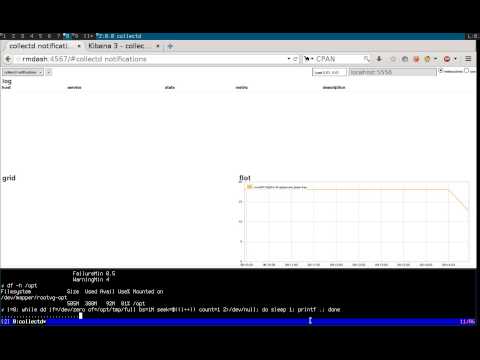
    We’ll describe the configuration files you’ll have to change, and explain the workflow that processes an event. For the impatient, we’ll illustrate the final result in a short recorded demo.

    Demo

    Realtime monitoring using riemann, syslog-ng, collectd and elasticsearch

    Requirements

    We will assume you have basic knowledge of the following tools, as well as a running instance of each:

    The tools

    Here’s a list of all the tools we’ll be using, along with a short summary, and their main functions in the pipeline:

    On the client:

    • collectd: “a daemon that receives system statistics and makes them available in a number of ways”
      • periodically poll system metrics
      • trigger notifications based on predefined thresholds
    • (any)syslog: “system error logging protocol”
      • listen for syslog messages, including collectd notifications
      • forward them to a remote destination

    On the server(s):

    • syslog-ng: “a flexible and highly scalable system logging application”
      • listen for remote notification messages
      • patterndb: create structured events by parsing the flat collectd notification messages
      • route the events to the next stages (riemann, Elasticsearch, Nagios, Email, …)
    • riemann: “aggregates events from your servers and applications with a powerful stream processing language”
      • listen for remote structured messages (protocol-buffers)
      • expose a websocket and/or sse service for subscriptions
      • send asynchronous alerts to the next stages (e.g. Nagios or Email)
    • riemann-dash: “a javascript, websockets-powered dashboard for Riemann”
      • synchronous realtime in-browser display
      • web application to subscribe to collectd streams using websockets or sse
    • elasticsearch: “a flexible and powerful open source, distributed, real-time search and analytics engine”
      • store and index all events
      • expose an API for query e.g. by Kibana
      • “You know, for search!“
    • kibana: “Elasticsearch’s data visualization engine for the browser”
      • browser-based search interface to query elasticsearch

    Architecture

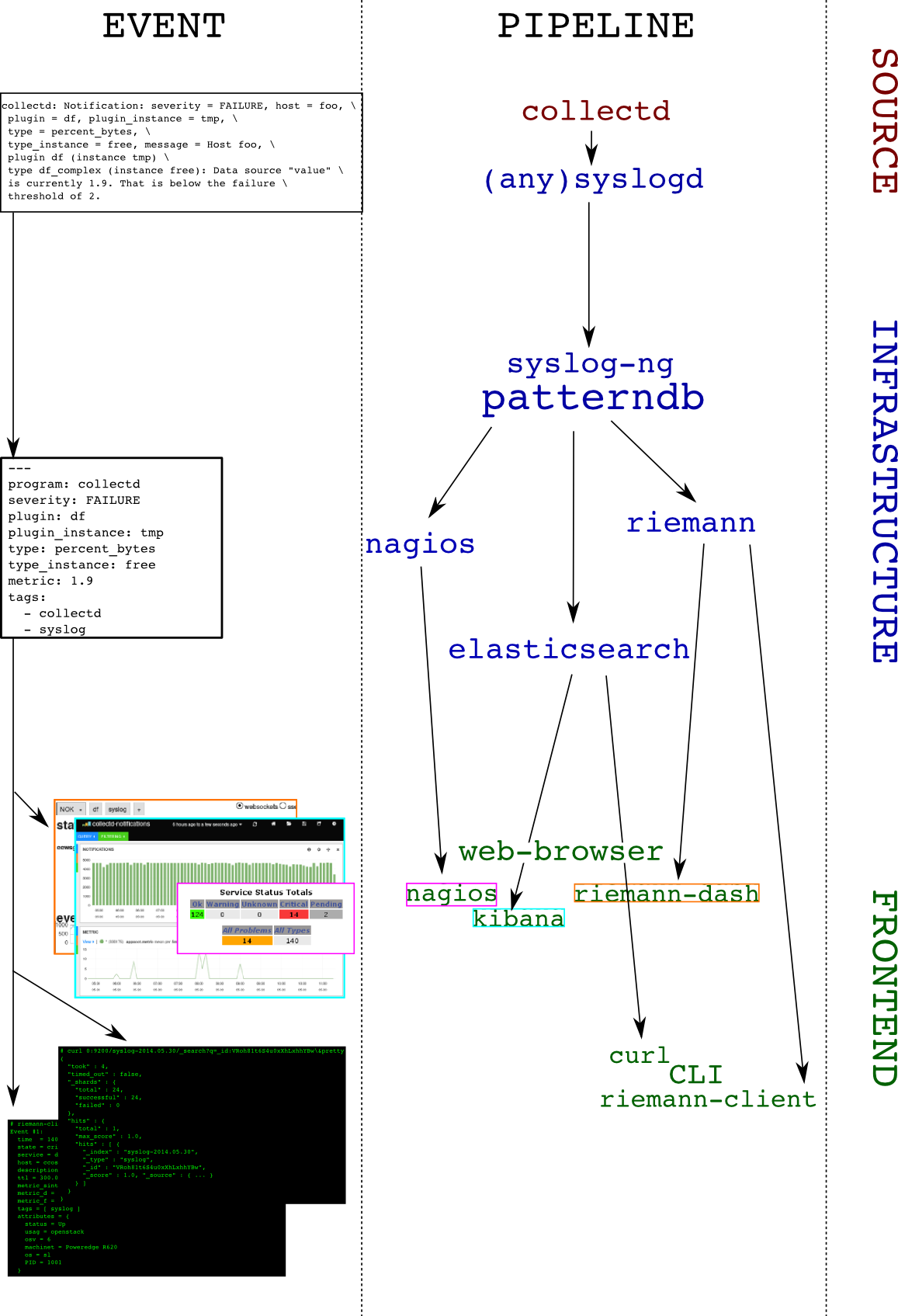
    To make things crystal-clear, we’ll choose an example: let’s track filesystem’s usage. The collectd-df plugin collects this information. Here’s a diagram depicting the dataflow: you can follow how an event is evolving from a user perspective on the left column, as it travels the pipeline (right column):

    architecture

    And the details:

    1. collectd-df plugin polls the filesystem utilization:
      df-tmp/percent_bytes-free is 1.9
    2. collectd-threshold plugin issues a notification as the failure threshold is reached: Notification: severity = FAILURE, host = foo, plugin = df, plugin_instance = tmp, type = df_complex, type_instance = free, message = Host foo, plugin df (instance tmp) type df_complex (instance free): Data source "value" is currently 1.9. That is below the failure threshold of 2.0
    3. collectd-network plugin receives this notification and sends it over to the local syslog server
    4. the local syslog server forwards the flat message to a remote destination
    5. the remote syslog-ng server receives the message and parses it using patterndb
    6. the patterndb extracts relevant values and creates a hash table (name-value pairs):
    • program: collectd
    • host: foo
    • tags: syslog, collectd
    • collectd.plugin: df
    • collectd.plugin_instance: tmp
    • collectd.type: percent_bytes
    • collectd.type_instance: free
    • collectd.thresh_type: the thresh type (above/below)
    • collectd.thresh_value: the failure thresh: 2
    • collectd.metric: the value of the current reading: 1.9

    This structured event is then routed to syslog-ng destinations, in our case riemann and elasticsearch. Both of these applications can then be used to query the event in a comprehensive manner, for example, “show me all collectd notifications concerning the plugin df and the instance tmp“

    Configuration

    Due to formatting issues, and for detailed examples on configuring the components of this solution, see the folowing link.

    Conclusion

    In this article we showed how to send collectd threshold notification messages to a central syslog-ng server, and how to extract numeric metric information from it. We also showed how to route the result to two backends, one of which can be used to view the data in real-time (riemann), and the other to query historical data (elasticsearch). This system could be extended in multiple ways, for instance:

    • by compiling a large patterndb to match multiple subsystem messages
    • by tagging important messages, and routing them to relevant destinations. For instance: “send all hardware errors to nagios“
    • by using the correlation context information to generate alerts, excluding self-healing components: “send an email if a filesystem is full and doesn’t come back to normal in less than 5 minutes”
    • by using the correlation context information to generate alerts upon reaching a threshold on the number of messages: “run this command if the same scsi device is referenced in more than 100 messages every minute”
    • send metric data to graphite

    Configuration files

    tarball

    Here‘s a transcript from a shell session working on these configuration files.

    Link to full article including configuration on github

  • Provisioning versus Configuration Example

    Provisioning versus Configuration Example

    A few weeks back I wrote about the difference between configuration and provisioning noting, primarily, that there are differences between the two tasks. It remains an important distinction to make because it’s really where the rubber meets the road (or the app meets the network) where it becomes important. As the infrastructure/network side of the house is where we’re concentrating our efforts to apply DevOps, it’s necessary to dig a bit deeper on this topic.

    So today we’ll examine  couple of concrete examples of the difference – and why it’s important.

    Your application is being deployed and it needs, wonder of wonders, a load balancer. Cause, elasticity. Scale. You know, cloudy type stuffs.

    So you grab that golden image and launch that virtual machine with Whatever Your Favorite Load Balancing Thing might be (HA Proxy, Nginx, F5, etc…). Voila! You’re ready to go, right?

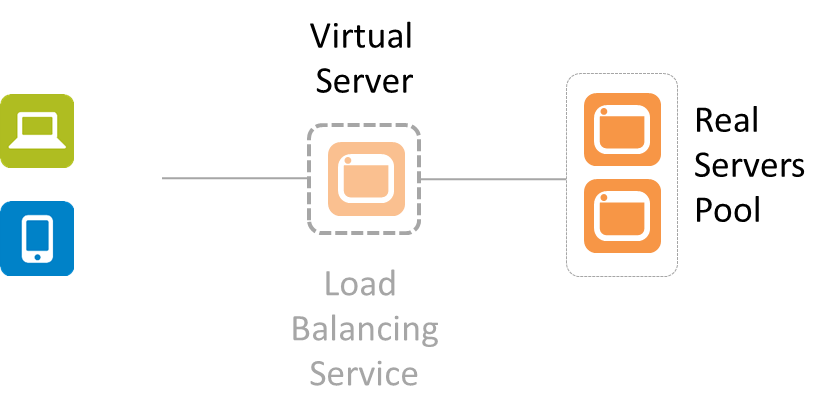
    Not by a long shot. You’ve provisioned a load balancing service, yes. But is it configured? Probably not. In addition to the basic networking needed (IP addresses, VLANs, etc…) there are also a whole bunch of very application specific things that must be configured. There’s no “golden” load balancing service that can be generically applied to your application. Period. At a minimum the virtual server (that represents your application to the rest of the world) needs two things: an IP address and a pool of app instances to select from.

    simplified-lb


    That means there’s some configuration that must occur after the provisioning. There’s no single LB image that will work for all applications, period. Even if all other settings are the same (LB algorithm, L7 app routing rules, TCP options, etc..) you still have to tell it which pool of real servers to select from and what IP address to use so clients can connect.

    This is true for pretty much all application services (infrastructure) that support an application deployment. Because there’s no single golden image that just “works” for everything and no way to use dynamic configuration options for everything (DHCP for IP addresses is one thing, but there’s no “dynamic load balancing algorithm selection” service out there yet) there remain a set of options that must be configured after provisioning occurs. Consider application security like a web app firewall (WAF). It has to be configured to protect a specific application. It has to learn the URIs and the data expected to be exchanged so it recognizes when some interaction is out of bounds and potentially dangerous. That’s unique to the application, and thus it requires some specific configuration after provisioning.

    It’s important to note this distinction lest we get caught up in believing that we can simply create a golden image of all our network infrastructure and services and put them into production with the touch of a button.

    This little reality also helps to understand why it doesn’t really matter whether the network service in question is launched on custom hardware or some server off the shelf. The bulk of the work when automating the deployment of network services is in the configuration, not the provisioning.

    While you can minimize the amount of post-provisioning configuration necessary, you can’t eliminate it entirely. That’s why API-enabled, programmable infrastructure is a critical piece of the larger DevOps picture. It is the API, programmable templates and similar capabilities that enable the configuration to be automated and orchestrated so as to not be the bottleneck in the deployment process.

  • A Culture of Trust

    A Culture of Trust

    Trust is by far the most critical element of a DevOps culture.  It is also the most difficult to achieve.  IT was not built for trust.  The silo structure that is common in most IT organizations was built for specialization and territorial ownership.  The silo walls are thick.

    While DevOps may not be able to break down the silos, but it can encourage and groom a culture of trust.

    Trust is difficult to define.  We know when we feel it, we know when we don’t.   In 1993, Dr. Duane C. Tway, Jr. published a dissertation called “A Construct of Trust”.  In it, Dr. Tway defines trust as

    “The state of readiness for unguarded interaction with someone or something.”

    Dr. Tway believes that trust is actually “constructed” from three basic elements:

    • The capacity for trusting
    • The perception of competence
    • The perception of intentions

    The capacity for trusting is how your total life experiences have developed your current capacity and willingness to risk trusting others.

    The perception of competence is your perception of your ability and the ability of others with whom you work to perform competently at whatever is needed in the current situation.

    The perception of intentions is your perception that the actions, words, direction, mission and decisions are motivated by mutually-serving rather than self-serving motives.

    While trust is individual, a culture of trust is organizational.   Both are earned.  DevOps is a great opportunity to look at Dr. Tway’s construct of trust and identify small but meaningful opportunities to steadily increase the trust between Dev and Ops including

    • Improved and honest communications
    • Increased personal interaction
    • Honored commitments
    • More listening than talking
    • Frequent knowledge sharing
    • Welcomed input and feedback
    • Admitted mistakes
    • Intolerance of blame
    • Mutual respect
    • A celebration of mutual achievements

    What else could you do to increase the capacity for trusting, perception of competence and perception of intentions in your organization?   Perhaps you can start with an honest dialog with and between your Dev and Ops teams.  The answers may be surprising and insightful.

  • Being Agile is all about controlling the flow

    Being Agile is all about controlling the flow

    For businesses, Agile is the new fashionable initiative as was E-business was in the 2000’s, Six Sigma was in the 90’s and Total Quality Management (TQM) was in the 80’s. If we look back across the spectrum of these initiatives, we need to examine how many of these initiatives met the goals the business was looking for and, more importantly, if they were fully adopted, remembering that many were derailed, did they deliver the value the business was seeking?

    Of course we cannot answer this question with generalities—it’s a spectrum. For some businesses, these initiatives were red herrings, some did not follow through to completion, but certain changes adopted as part of these initiatives had a very positive impact, while others succeeded wildly. It’s a Harvard Business Review case study as to why a business ended up at the point on the spectrum that they did.

    Clearly, one fundamental aspect that is consistent across all these initiatives is the ability for a business to embrace change. In a previous blog, “Cloud Computing, DevOps and Business Velocity,” I addressed the issue of business velocity—the rate at which an organization can embrace a particular disruptive technology change. Underestimating your business’ ability to adopt a new technology or process will most likely have a strong negative impact on the outcome. In a recent conversation with a client, the non-IT business areas has been very successful at adopting lean practices, but IT short-circuited shortly after starting. It didn’t outright fail, but after a strong start, they took a break from which they never started back up. Without a post-mortem, we don’t know why this specific initiative fell flat, but we can intimate that if something is difficult and feels unnatural, we’re more easily able to focus our attention elsewhere—think dieting and exercise programs in your own life.

    This seems to be the decade of Agility. Businesses want to be more dynamic and fluid. They want the organization to be prepared to respond to market changes more quickly, introduce new products faster, and respond to problems that occur more rapidly. To accomplish this goal, the business will have to let go of some of the ways that they do things today. They will have to re-engineer processes to be more compose-able and componentized so that they are less static. For example, a manufacturer goes through a lot of planning to deliver a new product to market. They go through steps for design, prototype, test, source, manufacture and distribute. The entire cycle may take upwards of a year and is highly automated once it reaches the manufacture stage. Tweaking the product between batches would cause  significant delays and pain because the process is static. It effectively amounts to restarting the entire cycle. So, what if they discovered that by simply elongating the body by 2 cm the product was far more useful their intended audience? In this case, agility might equate to being able to complete the design-to-manufacture process faster.

    In the previous example, this latter step of being able to tweak the product is called continuous improvement and is a key element of fostering agility. If a product isn’t selling well in the market, many companies will just abandon the product completely due to the costs associated with making the product viable. The reason being that most manufacturers consider that each product is a project and when it reaches the manufacturing stage it moves under the control of operations. That is, the creative team that includes marketing, finance, and other stakeholders view their position as “completed” with regard to getting that product to market and they then move onto other projects. With this mindset, there’s no room for the group to review the process, think about how it could have been done better and then iterate with the improvements incorporated. Hence, they just keep taking their “this is the way we do it” to the next project.

    Being agile means being able to control the flow. There’s no way to change how products come to market if there’s a culture of accepting finality once a product has reached a certain point in the cycle.

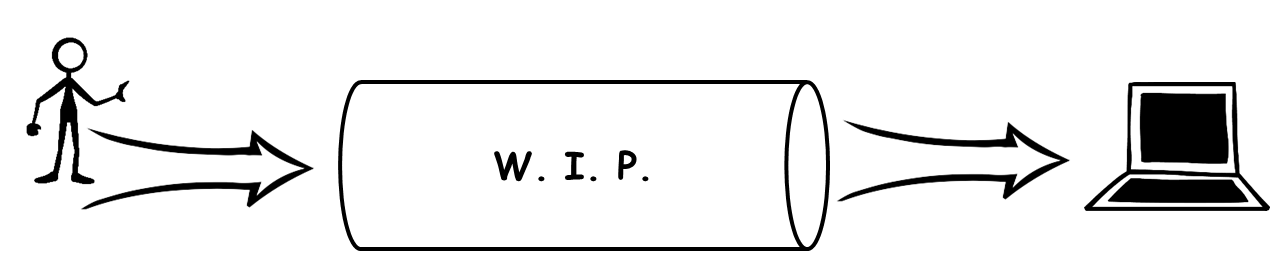
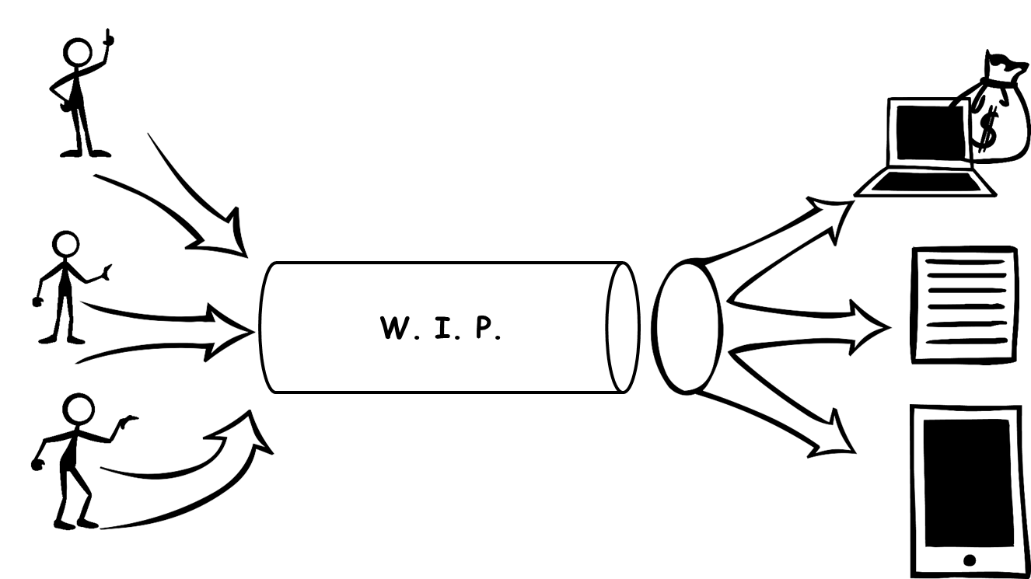
    The other aspect of controlling the flow is managing how products and services enter and exit the development pipeline.  I spend a lot of my time helping IT organizations unlock their potential to deliver by helping them to understand that there’s only so much that can be done to improve managing the work-in-progress (WIP). The only way to make gains beyond a certain point is to enable transparency with those that are responsible for inserting work into the pipeline or who are demanding that work completes and exits the pipeline at a certain time.

    The following two figures express well the reason transparency is a requirement. I believe most people would agree that managing production is a far easier task in Figure 1 than Figure 2. In Figure 1, there is one input and one expected output. Managing WIP for this pipeline is a matter of optimizing just the process for completing that one deliverable. In Figure 2, there are many more variables at work. There could be contention for resources within the pipeline to support the multiple inputs.

    wip


    wip2


    Likewise, there may be a request to reprioritize what gets completed when to meet certain business goals. Perhaps a particular report is required urgently to support a key business decision. I personally dealt with this very scenario when the business I was working for years ago was suddenly engaging in acquiring another company. All focus was transferred to producing the needed financial statements and everything else was put on the backlog. In that particular case, the CEO and CFO were the customer, so no one questioned the delays to their projects, but for many IT organizations reprioritization requests are never that clear making it very difficult to manage the control of the flow. Hence, transparency and communication between those consuming the services of the pipeline and those who own the control of the flow of the pipeline is an imperative for agility.

    Like TQM, Six Sigma, and E-Business, Agility will require changes to the fundamental way that a business operates. An analogy of this process can be as benign as a person recovering from knee surgery or as complex as recovering from a stroke depending upon what the business wants to accomplish and how they are organized currently. Along the way, people will most likely be the biggest hurdles to success.

    When change of this magnitude occurs, employees tend to become very myopic of their own situation. To mitigate this risk, it is critical that changes are reviewed with employees prior to change, during implementation and after the change is enacted. Management must gauge if employees are struggling because the complexity of the change or because they personally don’t agree with the change. The former can be overcome with education and support while the latter should be dealt with quickly through removal.

    Businesses can succeed with their Agility initiatives given they identify and mitigate key risk factors prior to starting and are willing to commit to looking critically at the way they have been operating the business. In agile software development, developers are trained to think about ways their code can break and then write unit tests to ensure that the software is sustainable in light of these possibilities. Creating an agile business means looking at ways to ensure sustainability in light of market changes, new competitors, supplier changes, and changing customer demands.

  • It’s About What Works.

    It’s About What Works.

    Enterprises have been working through production delays and operational inefficiencies for decades. Don’t get sucked in too deeply to the ever-present mantra of “this time is different”. There is a lot of source material out there from people in a different kind of operations that have already been through the same wringer as DevOps presents. You just have to know where to look and remember in the end “it’s about what works.”

    SkyIsFalling

    I was talking to Lori about my concept for this blog, and she sent me a link to a pretty good (dated, but relevant in light of DevOps) PDF that introduces quite a few of the concepts. But let me pull from personal experience to try and show how little uniqueness is enshrouded in DevOps.

    Like DevOps… In the past.

    I was hired into a utility company a long time ago to take them from a run-of-the-mill utility to a fully implemented Automated Meter Reading utility. No utility in the country had gone to 100% automated for meter readings for a variety of reasons, some technological, some fear of change, some organizational. For the organizational part, imagine how many meter readers it takes to read 350,000 meters… Now imagine reorganizing without all or nearly all of those jobs. And imagine they type of jobs – automated meter reading operations and high-tech meter repair – that would replace them. It was a tall order.

    My role was strictly datacenter. I was given a mostly empty chunk of DC real estate, and told to build. When I walked in, there was a server for collecting the readings of the system that won the prototype phase, and some modems to read some meters that were already automated when the project was first conceived.

    While the engineering manager, operations manager, and myself overcame our various technological issues, others were dealing with the organizational issues. When I joined the company there were less than one percent of meters being read electronically. When I left the project two years later we were at 80% and the groundwork was laid to reach 100%. The organizational changes had been run through, both in terms of staffing issues, and in terms of resource utilization in IT. The transformation took a long time because physical hardware had to be installed on each meter.

    But reading errors rapidly became an exception. Cases where there was too much snow and the meter reader had to estimate? A thing of the past. Estimation was now reserved for exception cases, as normal operational procedure covered the vast majority of meter reads, even in blizzard conditions. And cost went down. While the initial investment was extremely large for a utility of that size, the ROI was solid, and rapidly that money was being recouped.

    What did they have to do? They had to conquer the three issues DevOps faces. Automate complex, error prone operations, make organizational changes that will serve the long term interests of operations, drive disparate groups to work together and understand issues impacting the overall project, and constantly monitor the ROI of the overall project.

    For that project, we were lucky in that there was more than buy-in from executive management, their was strategic priority. We got what we needed as long as we showed we were on track. DevOps is unlikely to achieve that level of support unless C-level execs can see the ROI and how it will help the organization going into the future. That’s the topic of my next blog, but luckily we won’t need that level of buy-in.

    …Is DevOps Today.

    Get a project manager, give them an operational process that is either done so frequently as to warrant special attention or is error prone enough to warrant special attention, and tell them to figure out the steps, who is involved when, and come up with a plan to automate it that can be achieved in a reasonable amount of time.

    Then set guidelines for what you will measure to prove success, and make certain you start measuring them in the current state if you aren’t already. Measurements are useless without a baseline.

    For an oft-repeated process, reduction in the time it takes to complete the process OR in the manhours required to complete the process is a good first measure. For error prone processes, measure rates of error.

    It is that easy to get started. While the PM will require some time of employees, if you choose the project well, the PM will be the only one devoting significant amounts of time to it… And you will come out the other end having a story to talk about. Hopefully having a success story, but even if the results are not enough to warrant further investigation, you’ll have a solid reason why.

    Are we increasingly hearing about nifty cool tools and whiz-bangs? Yes. And if you have the funds, go explore them. But always remember, first came DevOps, only then did tools get developed. Some will help you, none are strictly necessary, and DevOps rarely gets an overflowing budget.

    So hop on in there. You have done this a zillion times in each of the given areas of IT – how many standardized VM images or automated spin-up scripts do you have laying around for example? The only difference here is that you are doing it across more of IT, and you’re being more formal about it.

    And if the results of your first project show little improvement in your chosen measurements, you will have to look closely at the project, the PM, the organization, and the measurements. Each of these will lend itself to different solutions, it’s up to you to decide what to do for your company at that point.

    But likely, if you chose the project well, you’ll be off and running with little risk and much knowledge gained.

    And the PDF Lori sent me? It is about Business Process Management. And if you look closely at the steps, you will find that BPM was doing for the business pretty much exactly what we’re doing for ourselves now – reducing turnaround time, saving money, and improving customer (in our case the business user) experience.

  • Testing in the Agile Age

    Testing in the Agile Age

    The Agile Age
    For a business to survive or, dare I say, thrive in the “Agile Age”, it must adopt agile methodologies. The term agile may ring some bells with those of you from the product lifecycle field. But when I say agile, I’m not referring to product lifecycle terms like Scrum or Kanban. I’m talking about agility throughout the organization, starting from the CEO, through marketing, sales, R&D and, of course, to IT operations.

    To compete in today’s environment, you must act and react fast! If you don’t, your competition will beat you to it. Today, the barriers to compete are minimal and the only way to defend one’s stature is by innovating in short iterations.

    Agility facilitates survival in a highly competitive business environment. And it dictates a different DNA. One that can move fast, innovate and work in ridiculously short iterations.

    This new DNA demands an IT infrastructure that supports agility. What was so right in the waterfall-age is sometimes so wrong in the agile-age. While the right IT infrastructure can enhance agility, the wrong infrastructure will add friction and cause failures.

    Five years ago, the vast majority of IT infrastructures were dominated by giants like HP, IBM, Compuware, BMC, etc. Today, you’re more likely to see agile, streamlined companies making waves thanks to their ease of use and excellent ROI for their customers. Companies like Heroku, New Relic and BlazeMeter are fast becoming the new household names in the technology of today and tomorrow.

    Waterfall Vs. Agile Approaches

    A product lifecycle is built out of iterations. As adopting agile methodologies mean you have dozens or hundreds of extremely short iterations every year, the waterfall development cycle is no longer adequate. A typical iteration starts with product marketing specifications, then goes through design, development, QA and finally deployment. During the Waterfall age, this process would take many months to complete. However, in the Agile age, a typicaliteration can take anything from a few days for a minor release to a few weeks for a major release.

    Testing in the Agile Age

    An organization that relies on web or mobile applications to deliver services, benefits and features needs to introduce agility into its product development lifecycle. In order to achieve agility, we need to build applications differently than we did in the past. Bugs, bad user experience and downtime come with a far greater cost than they used to.

    The Agile Age is all About the Continuous Delivery Process

    By moving from Waterfall to Agile, the entire testing process has changed significantly. There can no longer be manual handoffs between development and QA in order to perform testing. There is simply no time as iterations are so short. Testing needs to be automated and performed as part of the cycle and not as the next phase. Today, testing is part of the continuous integration and deployment processes.

    What is Being Tested and by Whom?

    Today, testing is conducted by the entire technical team in all phases of the development lifecycle. Testing starts at the development stage by the developers, continues through the continuous delivery process all the way to post production monitoring of the application’s service level. While testing is performed throughout the product lifecycle, it is carried out by different teams with various skill sets: Dev, DevOps, Performance Engineering, QA, Ops and others. Some of these teams have a comprehensive understanding in the field of performance testing and some have close to zero understanding and little patience to learn. As these teams can no longer do handoffs to the QA team, they must carry out testing on their own. They need to leverage their skill sets and utilize tools that will enable them to perform these tests.

    A Fantastic Story: The Life of the Agile-Age Test Script

    The Agile-Age test script can be used by developers manually for troubleshooting, unit-testing and module-testing. Very quickly, the test is automated and run as part of the continuous integration cycle after each daily build. Prior to production, the test script can be used to run a load test. Once the release is ready for deployment, the test script is attached to the continuous deployment process as part of a Chef or a Puppet recipe to be performed as part of an automated deployment. The same test can also be used to monitor the application service 24/7 post production.

    Open Source Vs. Commercial

    If, in the past, the testing market was dominated by commercial tools such as Loadrunner and QTP, today it is obvious that the use of open source tools for testing such as Apache JMeter and Selenium is becoming increasingly common. Working with a commercial tool binds you to a certain company – making you dependent on its support team and feature roadmap. Open source tools today are far more up-to-date than many of the commercial tools and they give you freedom. With open source tools, you can find one that you like, download it, view a couple of YouTube videos and get going without speaking to anyone. In the past, no CEO would ever be fired for choosing IBM, today it’s the same for choosing open source. Not only do open source tools tend to be more up-to-date than commercial tools, they are also easily integrated with other open source tools and users can share their experiences. Most importantly, they can be altered and customized per use case.


    Conclusions

    For the past four years, we’ve been witnessing an IT revolution. Organizations have a new DNA – which some have started calling ‘DevOps’. This new DNA cannot survive without an IT infrastructure that supports agility. The right IT infrastructure can enhance the agility that DevOps requires, whereas the wrong infrastructure will create friction and ultimately cause failures. Testing has become an integral part of the development lifecycle. It needs to isolate bugs and bottlenecks – but it absolutely cannot stop or slow the release cycle.

    Cloud computing and open source tools have become a great facilitator for agility. They replace many of the old techniques, saving a significant amount of time while enabling users to achieve more with less. Apache JMeter, Selenium and AWS allow the Agile-Age professional to do ten times more with ten times less. In this agile age, an investment in testing might just be the smartest investment an organization can make.

  • First speakers announced for Camp DevOps Houston, October 28th

    First speakers announced for Camp DevOps Houston, October 28th

    We are very happy to announce the first group of speakers for Camp DevOps Houston on October 28, 2014 at the Norris Conference Centers.  There are still a few days left to submit your abstract and join this stellar line up. Email campdevops@devops.com if you would like to join us deep in the heart of Texas at Camp DevOps.  You can also get more information about attending or sponsoring Camp DevOps Houston at http://www.campdevopsy.kinsta.cloud.

  • Is Docker leaving Immutable Infrastructure?

    Is Docker leaving Immutable Infrastructure?

    According to Chad Fowler’s definition, Immutable Infrastructure can be defined as:

    “[S]ervers (or whatever) are deployed once and not changed. If they are changed for some reason, they are marked for garbage collection. Software is never upgraded on an existing server. Instead, the server is replaced with a new functionally equivalent server.”

    Though the idea is powerful implementing it is actually very difficult, especially with hypervisors. Thus, the DevOps community has advocated Docker from its launch to market because of its capability of building the Immutable Infrastructure, due to its layered image approach and super fast “booting” performance.

    However, last week Docker introduced us all to a new feature to allow “Writable /etc/hosts, /etc/hostname and /etc/resolv.conf”:

    “You can now edit /etc/hosts, /etc/hostname and /etc/resolve.conf in a running container. This is useful if you need to install bind or other services that might override one of those files. Note, however, that changes to these files are not saved during a docker build and so will not be preserved in the resulting image. The changes will only “stick” in a running container.”

    It‘s an interesting move as the Writable feature opens another door. Things are no longer static, at least not 100%. For example you could change the state of a running container. The question now being asked is: Where is Docker heading to next? Are they moving away from ‘Immutable Infrastructure’ and if so, is ‘Immutable Infrastructure’ wrong?

    The answer is Yes and No.

    Immutability itself is a hugely valuable way to build, deploy and operate applications. But like all patterns, there is some trade-off.

    One of the most discussed benefits of Docker is the consistency across different deployments: dev, qa, staging, prod, etc. However, there is always some context-specific configuration, e.g. IP, dns name. As the result, those parameters have to be set at the runtime, instead of being hard-coded in the “read-only” images. There are various ideas on how to solve this service discovery problem [1][2][3]. Yet the issue remains that all of these solutions are more or less intrusive to the code and application, which means quite some effort in testing the theories. Then, the whole thing becomes a decision based on personal preference. Even though we of course all want better ways to manage the infrastructure, the engineering cost with the 100% immutability is a concrete no go for a lot of people.

    —

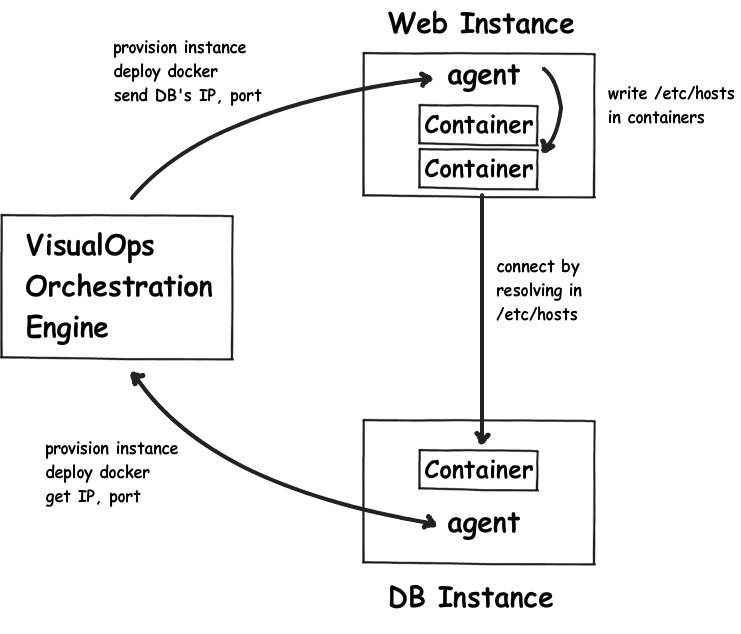
    The new Writable feature gives us the option to non-intrusively determine the configuration at the runtime, so that it will not cost you too much effort, while at the same time retaining the immutability. Assuming you are deploying a WordPress application, which involves web-tier containers and DB containers. You certainly don’t want to hard code the DB instance’s IP, nor bring in an etcd cluster, which adds more moving parts to manage and increases the odds of faliure . Instead, an orchestration tool could do the job by leveraging the Writable feature of Docker:

    Immutable Infrastructure

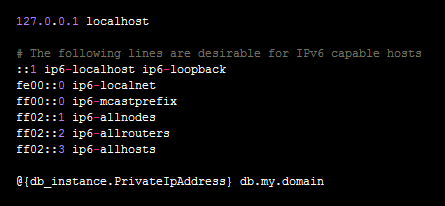
    As in the above diagram, the orchestration tool will take care all heavy lifting, from instance provisioning, container deployment, to a properly setup /etc/hosts file in the web containers. More importantly, if your DB instance’s IP changed, the orchestration engine will automatically rewrite /etc/hosts to fix the DB connection. And all you need to do is just to specify the following in /etc/hosts:

    Immputable infrastructure - hosts

    Pretty easy, right?

    In conclusion

    While Docker lays a great foundation of code deployment and it is especially useful in keeping the unit as immutable as possible, the deployment context plays an important part in the service discovery. By leveraging the new Writable feature and the Orchestration tool, one could really benefit from immutability, whilst avoiding having to change too much.

    [1] smartstack [2] etcd [3] consul