Category: Blogs

  • Tips to change culture (at least in your team).

    Tips to change culture (at least in your team).

    DevOps is all about automation, enhancing the Application Lifecycle Management and culture change. In the last few years there have been tons of conferences and articles about the benefits of a cultural change on a project, but I have yet to read a paper about how to actually change culture.

    How do you manage to get people to change the way they think and act towards each other and professionally? This is a huge challenge that most DevOps leads will have to overcome. Here are some of my ideas.

    Create cohesion.

    The first thing to keep in mind when trying to implement DevOps (or on any other kind of project for that matter) is that people who don’t have fun at work will not perform as good as they could. How to make people happy to go to work is up to you, but I find that simple activities such as team exercises and/or after-work beer work best.

    Whenever a new member comes to a team, try to get everyone together to have fun and talk. Take them out to a game of laser tag, get some sumo suits and make people try wrestling amongst other sports. Try to identify a common interest for a sport and have everyone play together. Remember, this is not a competition, do not force people to participate if they don’t feel like it.  There are neither losers nor winners, so try to balance the teams as well as you can.

    Another way to get people to know each other and ease potential tension is to take people out. Take your team out to discover a new restaurant or pub and discuss the place together, what they would have changed in the decoration, which Belgium beer is missing from the menu, why on earth do they serve foie gras on a scallop… The point once again is to try to discover others’ interests and behavior outside of work. This specific activity however needs some rules; try to limit the alcohol intake and by all means – do not talk about religions or politics. While those two topics can be fascinating with your friends, some people might get offended, even if they say they don’t mind.

    Back on the project, the use of Scrum is highly recommended. Even though the benefits are debatable, I find that shy people tend to open up and contribute more during those sessions than they normally would. On top of that, Scrum meetings include everyone on the ladder, from bottom to top. Only one rule here: no matter what, remember to actually do your daily stand-up, if you can’t do it personally, get one of you team members to conduct it and check afterwards that is has been done. Delegating is not a sign of weakness; it just shows trust in your team.

    Create incentive.

    People make mistakes, always. There are, however, ways to get to get people to make fewer of them. Pointing fingers and blaming people is definitely not a solution. Making people pay for their mistakes is more efficient. Say each team member has to pay 50 cents (adapt to your own country and project) for every mistake (new bugs, fail in commit, forgot to write a comment in SVN/Git at commit…) they make, and things might start to change. The point here is not to rob your employees, so you will have to find a creative way to use that money. You could for example gather that money at the end of the month to buy candies for everyone. But then that’s just punishing people, which does not make it fun, so you have to come up with a way to compensate for that too. If the management doubles every penny in game, then everyone is involved and there starts to be some interest. But then again, you might get extra bugs because everyone loves candies, so you could triple the sum of gathered money when there are fewer problems than the previous month.

    At that point of reading, you might think it’s actually costly and doesn’t benefit anyone except dentists. Well you’re wrong. In the worst case scenario we’re talking about tens of dollars a month, and given that you will actually get some accurate metrics about this, this is a no-brainer.

    If candies are not popular in your project (is that possible?), you can also get the good old “employee of the month” award to whomever created the least problems and reward him/her with cinema/theater tickets, a dinner for two… Please note that on high stress periods, dinners for two, even though a lot more expensive than regular rewards, are a lot more appreciated as they might represent a good opportunity to ease work related tension in a couple.

    Develop people.

    Don’t see your colleagues, especially the young ones as just resources, rather think of them as potential wonders. Everyone aspires to shine and it’s all up to you to make it happen. Do not ever take someone else’s ideas and get the glory. That would be idiotic, mean and potentially a good way to get your colleagues to quit or resent you.  Instead, go on, try to encourage people to speak up, make them give technical presentations, make them speak and give them a positive feedback (even on failures, there are always good ways to explain how one can improve).

    Once again, Scrum can help you with that. Identify the elements in your team who need some help and pair them with some others that are more comfortable for some small sessions of peer-programming, peer-presenting, peer-testing… once a week. It can cost some time in the beginning but the benefits are potentially huge in a long term perspective. There is nothing better than a team that has learned to work together and where the first reflex when someone ask for help is to actually help, not to ignore.

    Demonstrate values.

    One of the things that really is important to remember, is where you come from. No matter your position today, you didn’t start at the top and you’ve had to learn all the values that you try to get your team to demonstrate today. So show them every day, what it means to create DevOps; a potentially highly stressful job, especially in the beginning, where tension between people should not exist. Smile as much as you can, take time to help others even if you that means staying later at night, be proactive once again, try to identify potential bombs and defuse them before they are seen by others. All in all, be nice to others, treat them as you would like them to treat you.

    But what if you are faced with a pigheaded team member? Someone who is convinced they are right, no matter how many people disagree? Well once again, do not ignore them; that will only create frustration. Instead, get some documentation or an expert and talk openly about the topic without being aggressive. In the end, the team member should be respectful of your efforts and have won some valuable knowledge in the process.

    The biggest piece of advice I have is this: Do not ever be arrogant, do not ever be pompous. Help others, always, and do it nicely and in a humble way. The leaders we like are not the ones that talk too much but the ones that are the nicest to work with.

    Changing a culture on a project is a tough thing, but it can be done with a few tricks and a lot of time spent helping others. Luckily, smiles and good atmosphere have a tendency to spread fast and the tight links between Dev and Ops can be strengthened quite fast with some goodwill.
  • Continuous Delivery and Continuous Deployment

    Continuous Delivery and Continuous Deployment

    A question comes to mind in what exactly do we need to do to move forward with Continuous Delivery and Continuous deployment, How should we start or rather where we should start from. Many times teams may not have achieved the continuous integration properly, maybe due to lack of proper tools, workflow or historical process.

    What we need to do before even thinking of CI/CD, what are our prerequisites:

    • Source code
    • Builds System
    • Deployments
    • QA Automation

    We need to understand release != deployment

    Lets assume with the help of right source control tool, build system and QA, automation team has achieved the continuous integration which means developers integrate code into a shared repository several times a day and each check-in can be verified by an automated build, allowing teams to detect problems early.

    The next step: From CI to Continuous Delivery deployment

    What exactly is Continuous Delivery, Its attitude to make software safe and to go fast
    Lets begin with basics, How much time does it take to deploy one line change or a small bug fix in to the production? Exactly, our goal should be to achieve this as fast as we can.

    Why We Need Continuous Delivery?

    • Yes, its Speed which is needed in current fast paced software industry.
    • Stop waiting around on each other to provide go ahead and open the gate.
    • Quality – It raises the overall quality of your application – No surprises.
    • Capacity and Clarity – Get every team on one tool – Eliminate manual error

    How are we going to do this…..

    Key Areas:-

    • Speed is essential because there is an opportunity and cost associated with not delivering Software
    • Frequent Releases, How frequent is frequent? Why do developers need to wait after writing code?
    • Every build can be potential release candidate.

    Bottom Line

    Remove Manual Work/Steps.
    Move towards complete automation

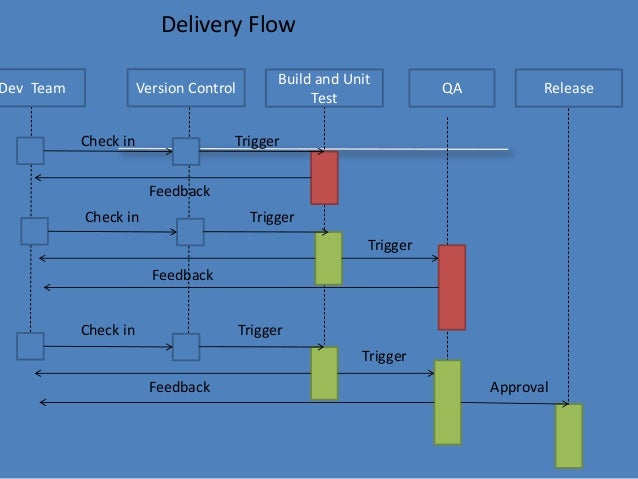
    Delivery Flow

    Here is the Delivery Flow.

    Ingredients:-

    Configuration Management
    continuous integration/ Automated Build
    Automated Deployment
    Automated Testing

    Obviously no single team in a company alone can achieve CD without the help of other teams. It needs collaboration and team work to implement it, Lets take a look at what do we need from various teams

    Dev Team

    • Collaboration – Integration is no longer an event
    • Check in regularly
    • Make small frequent releases because Big Change -> Big risk –> Big effort and Small Change –> Small risk –> Small effort

    QA team

    • Should have complete automation or whatever max is possible. More manual testing leads to more delay.
    • Keep the Build and Test Process Short
    • Break the QA automation into small pieces so that they can run simultaneously and do the QA frequently.
    • Publish the report

    Environment

    • Should have complete Environment to test everything.
    • Flexible and scalable so that multiple env can be spawn any time and can be extended.
    • Managed as prod or at least similar to prod

    This increases Confidence in build’s production readiness reducing release risk.

    Main blocker to achieve CD

    1. manual work
    2. Lengthy Process
    3. ticket system
    4. approval

    Now, How do we deal with blockers

    Do not add gates, add only checks. Adding gates to prevent issues from creeping into prod is not so smart. There are many more issues hiding, you just don’t know them

    Approval!!! Why do we need CAB?

    Dev Sign off
    QA sign off
    Ops and Dependency sign off
    Infra sign off

    Dev Sign off -> Use proper project mgmt tool to track everything that goes in to software with adequate workflow. Get everyone together at the beginning so that these will not be surprises at the last moment. Keep meeting across the team during entire development. This way you don’t need any approval since you have already taken care of all necessary elements during the entire development process.

    QA Sign off -> Publish consolidated QA report with each and every build which should be visible to everyone. You should have proper definition of “Go Ahead” instead of just random checks, Nobody has to ask QA for a thumbs up for the go. • Minimum criteria for Q has to be set.

    Ops, Dependency and Infra Sign off -> Include them at the beginning of the project. Have capacity and change planning during requirement gathering, This gives enough time for ops and infra to get ready for the release.

    Role of SCM/ Release Mgmt

    SCM/ Release Mgmt provide the workflow, tools and necessary filler to enable all teams to interact and automate their part.
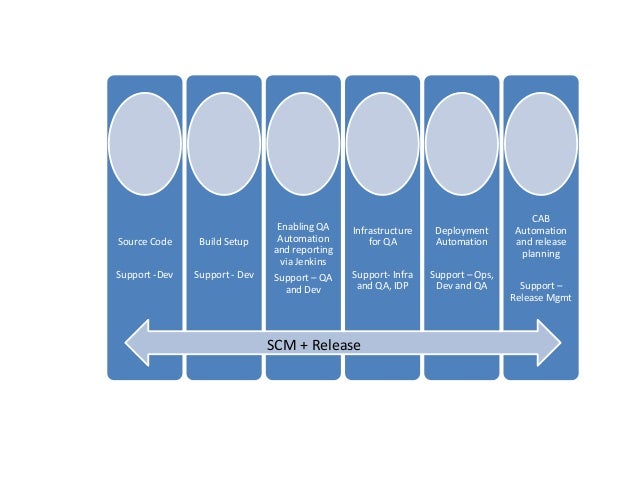
    The picture below shows How SCM and Release Management help each team.

    Source code support for Dev by defining branching policy, Build Setup Support for Dev team to provide continuous build with predefined configuration and in managed environment which includes static code analysis like unit test, code coverage, checkstyle etc..

    Enabling QA Automation and reporting via build tools (Like Jenkins) to support QA and Dev to run their automation and aggregate report on central location. which include QA automation/regression, functional code coverage etc..
    Infrastructure for QA Support like managing integrating environment, Deployment Automation etc.

    Ops, Dev and QA CAB Automation and release planning support.

    It’s clearly visible that CI and CD is not a one man show. Planning, collaboration and teamwork are essential parts of the execution.

    Tools can be chosen by the org/team whichever are suitable for them, but the main part is automation and integration of the tool with each other to make flow smooth and free.

  • Service Virtualization – Window into “Advanced” DevOps

    Service Virtualization – Window into “Advanced” DevOps

    The new style of IT is pushing DevOps teams to reinvent software building, validation and delivering processes with an aim to shrink development cycle time and reducing defects in production. But in constrained testing environments, DevOps teams face a range of challenges in following the continuous integration and delivery approach for large multi-tier applications. Because release cycles are compressed application testing coverage, and what you test is constrained. And on top of that, consumers demand for an always-on, easily enhanced and mobile experience that comes with cloud-sourced and cloud-delivered composite mobile app offerings.

    (more…)

  • You Might Already be Doing DevOps in the Software-Defined Data Center

    You Might Already be Doing DevOps in the Software-Defined Data Center

    I was out reading the Internet and came across a report from EMA (Enterprise Management Associates) regarding the state of the Software-Defined Data Center (SDDC) in 2014. After perusing the data and highlights, I was surprised (and yet should not have been) to find so much DevOps-related content and concepts within. Neither should I have been surprised to find significant mention of software-defined networking (SDN). It makes sense, in a puzzle-fitting-together kind of way, that SDDC comprises software-defined operations and software-defined networks (and probably software-defined storage but it’s too early in the day for me to contemplate that).

    In any case, a significant percentage of organizations take advantage (today) of software-defined operations and networking, based on the report:

    Which of the following technologies, structures or processes does your organization take advantage of?

    4. Cross-functional processes to orchestrate provisioning and management of storage, network and server resources (57%)
    5. Solution for server administrators to provision their own storage volumes (56%)
    6. Continuous/centralized capacity management for physical, virtual and cloud resources (55%)
    9. Policy-based automation of infrastructure for routine adjustments without human intervention (50%)
    10. Software Defined Networking (virtual overlay network) (48%)
    11. Software Defined Networking (separated control plane from delivery plane)  (46%)
    13. APIs for developers to provision their own app environments (servers, network and storage)  (42%)
    14. Configuration management solutions (Puppet, Opscode Chef, SaltStack, ServiceMesh, etc.)  (41%)

    More telling, perhaps, of how critical DevOps is to enabling the SDDC is the emphasis put on not just automation but on process. When asked what respondents believed were the “most important aspects of the Software Defined Data Center”, number 2 and 3 focused on deployment and automation of applications and infrastructure:

    • Best-practice, repeatable configurations of software and infrastructure for workload deployment  (46%)
    • Orchestration and automation to easily deploy applications across silos  (44%)

    In case you weren’t entirely convinced, yet, “operational analytics” (we might call it “measurement” or “metrics” here in DevOps land) came in number four with a respectable 42% of respondents.

    There’s more in the report, some less relevant but for the most part, reading this SDDC report left me with a decidedly DevOps after taste. Which was kind of a minty chocolate coffee taste, in case you were wondering.

    The concepts typically associated with DevOps are not necessarily peculiar to DevOps or SDN. They’re generally part of a larger trend to operationalize all the things: the network, the storage, the compute, the security. The business goals of SDDC are strikingly similar to those promoted by DevOps and SDN – reducing risk, lowering opex, improving stability and time to market. The collaboration through creation of interfaces designed to promote repeatable, consistent (and measurable) handoffs between groups is present and looms as large in SDDC as it does in DevOps.

    The point is that DevOps may, in fact, be in the adoption process right now under the guise of another name in an organization near you – or around you. If you hear someone saying software-defined something, check it out. You may be surprised to find out that someone has snuck in DevOps through another door, under a different name.

  • Copying Data From One Docker Container to Another

    Copying Data From One Docker Container to Another

    Docker containers can easily be compared to a directory. A Docker container holds everything that is required for an application to run including its dependencies and can be started, stopped, moved and deleted at will. When containers are activated they use Linux kernel namespaces. Each container operates in isolation from the server apart from networking and storage. Each container is created from a Docker image and one can have multiple containers running, depending upon the server hardware capacity. Docker containers are the run component of Docker.

    What are Docker images?

    Each Docker container is created from a Docker image, which can be built either by executing commands manually or automatically through Dockerfiles. Images can be basic either consisting of the operating-system fundamentals or a pre-built stack ready for launch. They are read only templates and consist of series of layers, so any new action or update leads to the addition of new layer on top of the previous one rather than replacing whole image entirely. This is how a new container is made.

    Copying data from one Docker Container to another:

    Copying of data from one container to another is essential and most important feature of Docker containers. Copying data to another container means having a backup that could be used if any kind of disaster occurs out of any situation in real time scenario.

    Using Data Volume Containers:

    Data volume is a directory available to a container but it is located outside of its root file system. Sharing data between the containers allows volume to bypass image layering. Any changes in the data are made directly, containers have dedicated directories in the /var/lib/docker directory and volumes are stored separately in/var/lib/docker/volumes/ by default. –v option of docker run can be used to copy volume data between the two containers.

    How to copy content from one container to another -An Illustration

    In this example we assume that Docker is running two instances of data volume container image mymod/dvc: v1. Following are the commands that are used to start the container

    # docker run –d –name dvc1 mymod/dvc:v1

    # docker run –d –name dvc2 mymod/dvc:v1

    Now to copy data to the host and to even mount the volume from another container, use cp command to copy data

    [root@host ~]# docker run –rm –v /var/tmp:/host:rw  \ –volumes- from dvc1 cp –r/var/www/html/host/dvc1_files

    The container mounts the host directory /var/tmp read-writable as /host, mounts all the volumes, including/var/www/html, that dvc1 exports, and copies the file hierarchy under /var/www/html to /host/dvc1_files, which corresponds to /var/tmp/dvc1_files on the host.

    Now to copy data from dvc1 host to another data volume container we use following command

    [root@host ~]# docker run –rm –v /var/tmp:/host:ro –volumes-from dvc2 \ cp –a –T /host/dvc1_files /var/www/html

    The container mounts the host directory /var/tmp read-only as /host, mounts the volumes exported by dvc2, and copies the file hierarchy under /host/dvc1_files (/var/tmp/dvc1_files on the host) to /var/www/html, which corresponds to a volume that dvc2 exports.

    Another method with which one can copy data is ADD command, a Dockerfile command. Source and destination form the two arguments for ADD command to run successfully. It copies the files or data from the source container into the destination container with its own filesystem.

    Conclusion:-

    Docker will certainly expose nicer ways to grow container service to support wider deployment platforms and the community is surely expected to build service layers around. Development of core capabilities, cross service management and messaging between the containers are the paths set by Docker. We’ve tried to demonstrate via this article that data can be copied and replicated in another Docker container thus can be used in any case of disaster as well as recovery. Docker provides the ability to easily differ containers. It improves debugging, fast sharing of the environment and quick deployment. Docker has an ability to put the containers directly from Dev or QA onto AWS. User can share data through volume containers, mount host directories to containers or even can export data from containers to archive files thus very flexible.

  • Does Automating Application Release Mean the Same that it Used to?

    Does Automating Application Release Mean the Same that it Used to?

    Over the last ten years, we have seen a shift towards automation in how applications have been released. Automation has been encouraged first by agile’s embrace of continuous integration and delivery, and now the broader move to DevOps. As deployment automation left the sphere of the individual development team, another trend has emerged. The understanding of what it means to deploy an application in an automated fashion has steadily expanded. For developers in the early days of continuous delivery, production concerns were usually secondary. They would take a single build, and automate its deployment to test environments. Some teams would succeed in expanding this approach to production with a full-fledged delivery pipeline, but most would stumble. Ignoring production concerns in the lower environments resulted in their work being dismissed as unworkable in production environments. However, the success of agile development meant an increased demand for change in production. At the same time, the trend towards cloud services expanded the number of targets that a given deployment would impact. Production support teams had to automate, and in a way that would also work for the rapid rate of change in development and test. The build pipeline model was close, but didn’t meet the Ops needs of incremental change (rather than full builds), and orchestrating changes across multiple builds and tiers.

    A 2012 survey of over 500 technologists by UrbanCode found that only 12% of teams scoped production releases to a single build. With the business demanding faster change, and DevOps ascending, we have seen automation mature in the production environments rapidly in the past several years. This includes the rise of Application Deployment/Release Automation as a tool category at the start of this decade. These ADA tools are defined by automation scoped at a business application – they coordinate across multiple tiers and components. So they deploy not just the new version of a web service, but also five other web services the backend databases, etc. With DevOps better linking development and operations, and an increased willingness to automate in production, we saw the first big shift in the scope of automation. From deploying a build, to deploying the build and related builds, content and database changes. The web app was still the most common scenario. Today we are seeing the next major expansion underway, and it’s hitting on several fronts at once.

    1.  The first front is that organizations whose releases span multiple business applications are adding release centric orchestration to speed releases of coupled applications.
    2.  The next front is a move beyond the web application itself. Mobile development tied to backend services is getting pulled in to the definition of the “business application” as are systems of record including the mainframe.
    3. The third front is a shift down the stack. The environment and infrastructure are seen increasingly not as a place the application runs, but as part of the application itself. As that shift happens, we see a push to make a change to the CPU count in a VM go through the same types of automation and governance that updates to the behavior of a web service go through. Change is change.
    4.  Finally, we are seeing the normalization of Platform as a Service offering like Bluemix. That results in increased acceptance of the technology, but also the desire to coordinate change to services delivered through a PaaS platform and those delivered through other cloud or traditional data-center platforms.

    Broadly, IT is delivering value to the business by delivering services. Changes to those services tend to be scoped to applications that are complex. The trend is to treat everything in that application that is software defined the same through the same channels. That lets system level testing validate the whole system, and for the whole system to be promoted forward together. The above discussion not only informs about the change taking place but also prompts at taking the step towards the change. The move to DevOps is bringing about change rapidly. On November 20, some of the industry experts and leaders got together to discuss the effects and steps to adopt the change effectively, at the IBM DevOps Symposium in the New York area (Jersey City). Understand how to adopt DevOps successfully by listening to distinguished industry leaders and experts. Join us for the replay of the webcast. Be a part of the change

    About the Author:

    Eric

    Eric Minick is a Technical Evangelist. He joined IBM through its acquisition of UrbanCode. He has spent the last ten years helping organizations – large and small – adopt continuous integration, delivery and now –DevOps. He is a frequent speaker on the topic, and co-authored Application Release and Deployment For Dummies. Prior to consulting, Eric was a developer, test automation engineer and support engineer, and has contributed to multiple generations of UrbanCode products.

  • DevOps Connect: SecOps Edition @RSA Conference

    DevOps Connect: SecOps Edition @RSA Conference

    devops_connect_header3We are very happy to announce that we will be hosting DevOps Connect: SecOps Edition at RSA Conference on Monday, April 20, 2015. It will take place at the Moscone Center and is sponsored by RSA Conference.

    What is DevOps Connect? Great question. DevOps Connect is the new name for the Camp DevOps brand we have run here at devopsy.kinsta.cloud.  We felt that Camp DevOps sounded too much … well, like a camp. DevOps Connect is so much more.  We will hold DevOps Connect events at existing conferences such as this one at RSA Conference, as well as standalone events in cities around the globe.

    DevOps Connect: SecOps edition will be focused on DevOps and security’s role in the software development lifecycle. The agenda, sessions and speakers will be chosen by our program committee.  I am very happy to report that the committee is chaired by Josh Corman and Gene Kim, with the assistance of myself and Mark Miller, organizer of theNexus community. A formal call for speakers will be announced shortly.

    We anticipate over 7 hours of sessions followed by the 2nd annual DevOps wining, not whining happy hour brought to you by Sonatype, IT Revolution Press and devopsy.kinsta.cloud at a location to be announced.

    Full details are on the DevOps Connect website, but there some bullet points:

    1. Admission is free to all RSA badge holders, regardless of level. However you must pre-register for the event when you register for RSA Conference.
    2. At the DevOps Connect website there is a code to save $100 dollars on an RSA Conference full conference pass.
    3. We are limited to 600 attendees, so pre-registration is a must if you want to guarantee you are admitted. Attendance and registration is on and is on a first come first serve basis
    4. Sessions will feature keynotes (Gene Kim will deliver one), panel discussions and multi-track topics.
    5. DevOps Connect will be at Moscone West on Monday of RSA week.
    6. Sessions and presentations will be focused on real world experiences from practitioners.

    RSA Conference is where the premier infosec event in the world and we think a perfect venue for DevOps Connect: SecOps Edition. So if you are planning on attending RSA Conference you don’t want to miss what promises to be a great DevOps event!

    If after visiting the DevOps Connect website you have any questions, please reach out to us at devopsconect@devops.com. We will update the website with more information as it becomes available.

  • AWS Key Management Service

    AWS Key Management Service

    Security of data and applications whether stored on-premises or in the cloud has always been a supreme issue of influence. To date AWS has provided it’s customers with services that help in securing and encrypting the data e.g., Amazon S3, Amazon Elastic Block Store(EBS) which is a server-side encryption service, Amazon Redshift, Amazon RDS for SQL and many more. All these services make use of the “master keys” that are created, stored and managed within the AWS.

    Recently AWS launched a new and even more secure option for Key Management which will help in managing the keys for the applications and services running both in the cloud and on-premises.

    Introduction to AWS Key Management

    AWS Key Management Service is a fully managed service that helps you in providing a uniform, centralized control over your encryption keys. It makes use of the Hardware Security Modules (HSMs) to protect the security of your keys and empowers you to easily encrypt your data across your AWS infrastructure plus within your own applications by providing a highly available key storage facility, management where you can create, rotate, disable, define the usage and perform auditing solution to examine carefully the use of encryption keys used to encrypt your data.

    AWS Key Management service provides:

    1. One click encryption
    2. Full control over your encryption keys
    3. A centralized place to manage keys
    4. Forced-key rotation policies

    AWS KEy Management

    Key Management Service components:

    There are three major components of AWS Key Management Service and they are:-

    1. Create and Manage keys:

    All the encrypted keys of your organization are stored and viewed in a single place thus easy to implement creation, rotation, usage policies and auditing.

    2. Use Keys to encrypt your data:

    AWS Key Management Service works with SDK for simple integration of encryption into your application. It integrates with AWS services like Amazon S3, Amazon EBS and Amazon Redshift.

    3. Audit Key usage:

    It provides all the audit trail information to CloudTrail that helps in meeting the regulatory and compliance requirement by providing logs that examines and verifies who used which keys, on which resource and when.

    Key Benefits:

    AWS Key Management Service provides high accessibility, low latency and a high level of persistence for your keys. Following are some benefits provided by AWS Key Management Service:

    1. Centralized Key Management

    It provides you with a uniform, centralized control over your encryption keys. You can easily create, rotate, disable, define the usage and enable logging either from AWS Management Console or by using API. The entire keys that are being used in the organization KMS provides a single view of them.

    2. Integrated with AWS services

    AWS Key Management Service (KMS) is unified with Amazon S3, Amazon EBS and Amazon Redshift so to simplify encryption of your data within those services. With these integration encryption and decryption are done automatically. You just have to choose the KMS master key with which you want to do the encryption or decryption.

    3. Encryption for all your applications

    AWS Key Management Service integrates with the SDK and the Command Line Interface. It provides a programmatic integration of your encryption and key management into your applications. Regardless of the storage of the data, KMS makes it easy to organize the encryption key used to encrypt data.

    4. Built-in Auditing

    AWS Key Management Service operates with AWS CloudTrail that supply you with logs of API calls made by or made to KMS which even helps developers in auditing. These logs helps you in examining and verifying who used which keys, on which resource and when.

    5. Fully Managed

    Accessibility, physical security and hardware maintenance of the infrastructure is managed by the AWS. Whereas AWS key management prime attention is on the encryption needs of your applications.

    6. Low-cost

    You just have to pay for the supplementary master key that you have created and for your key usage. Storage of the default keys in your account is charge free.

    7. Secure

    AWS Key Management provides you a secure location so that no one access to your master keys. It makes use of the hardened systems where your unencrypted keys are only used in the memory. Any update on the service is managed by a multi-level approval process that is examined, verified and evaluated by an independent group within Amazon.

    AWS Key Management Use with the example:

    In this example and usage we will

    1. Create a key in AWS KMS
    2. Use this key to encrypt a file in S3 bucket
    3. Modify access permission of this key
    4. Audit all activity related to this key

    Example:
    Here three IAM users are called which are named as

    1. Admin1- An Administration
    2. User1- A user of Financial Report
    3. User2- A compliance officer

    Creating Keys Using AWS Key Management Service

    Sign in to an AWS management console and click on IAM.
    On the IAM dashboard you will see the encryption key at the bottom of the detail section

    clicking on this option you will reach to AWS KMS console.
    AWS KMS keys are region specific and can only be used in the region they are created. For this example we click on US West (Oregon).

    Next click on create key to start the three step process of creating a master key

    1. First step is to give a name to a master key called Allias. Allias is display name of the master key and is required field. Here we define

    Allias name – “Financial_Report”

    Description key option is also displayed with the name option. This key is used to give a meaningful description and what master key will be protecting. We define it as

    Description key -Protected_Corporate_Financial_Data

    We Click on Next Step.

    2. Here in this step we define Key Administrators for the Financial_Reports master key we are creating.

    After you click on next step a screen appears where you can define which IAM users are allowed to administer the new key by choosing one or more IAM users and/or roles. Users added here can edit, enable, disable and rotate the master key. They can also encrypt and decrypt data with the help of this master key. From this screen we select Admin1 and make him/her enable and click on next step option.

    3. In this step we decide which users, roles and other AWS accounts are allowed to use the key to encrypt and decrypt data. Users, roles we select can use the Financial_Report key within their applications or within AWS KMS.

    Here we select the option of User1.
    If you want to allow another AWS account to be able to use this key then you can enter the account or Amazon resource name in the external accounts option.

    To complete key creation process we click on Finish button. Once this master key is created we will use this Financial_Report key to protect the file that we have uploaded to Amazon S3.

    Using Key with Amazon S3

    1. Now once we are in Amazon S3 console our foremost step is to create a bucket and upload a Financial_Report document in the bucket and encrypt this document using Financial_Report key that you have created.

    We will click on create bucket to get started and enter

    Name – Finance.Reports.US.2014

    Region – Oregon

    Make sure that region you select should match the region you have created for master key. Now click on create bucket option.

    2. Once bucket is created we have to upload this document. To do so we click on Action button and then click on upload.

    Click on set details button to select the encryption option we want for this file. Two options will appear on the screen out of which first is default key option so we choose second key option.

    When we choose second option a drop down list appears which will ask for your master key name. Once you write your master key name Financial_Report, all the other details like description, account, key ID will automatically get filled. After filling and checking all details click on Start Upload Button.

    Modify and Audit all activity related to this key

    Now let’s assume that compliance officer who is User2 also needs to use encrypted file to Audit and he needs access to the Financial_Report key to decrypt the file in that bucket. We can grant bucket access to him by using Amazon S3 console. This can be done by making few simple changes.

    For this first go back to AWS KMS console. When screen appears click on Financial_Report key on this page under the key usage section click on ADD button and a list of users and roles appears click on User2 and then click on attach.

    User2 will now have access to encrypt and decrypt files using the Financial_Report master key. When User2 no longer want access of the key you can come back to the same page and click on User2 and click on Remove.

    AWS KMS master key can be disabled and enabled according to your own need. All the data that is protected with that key becomes inaccessible as long as the key is disabled thus removing your charge from the key. To do this we first go to the encryption page and select Financial_Reports option and then go to Key Action option and select disable and same way you can make it enable.

  • Eliminating ShadowOps

    Eliminating ShadowOps

    If you were like me, you thought that cloud and compute virtualization technologies were transforming the data center, but they are nothing compared to what is coming our way. The IT landscape evolution is accelerating with the advent of application containers, network and storage virtualization, big data, and integrated and hyper-converged infrastructures, to name just a few. IT and business unit roles for infrastructure and application support and management are also changing; driving the need for solutions that are not found in the traditional IT playbook.

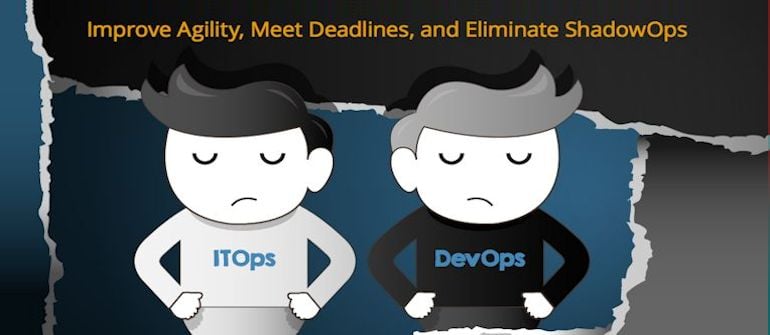
    The competitive online marketplace is placing increasing pressure on businesses to deliver services and application updates faster to market. While the increased focus today is on the applications themselves, the reality is that they are dependent on infrastructure in order to be delivered to the end user or customer. The inflexibility of traditional IT operations to deliver needed infrastructure impedes development teams from meeting that need for speed in service delivery, causing a disparity between ITOps and development teams.

    The availability of infrastructure resources from cloud service providers today is viewed by application/service owners and development teams as a faster and more flexible way to get infrastructure for application and service delivery.  When the business units and development teams begin to circumvent traditional IT operations to get the agility they require to meet their rapidly evolving needs, it creates what I call ShadowOps.

    ShadowOps is characterized by the clandestine proliferation of outsourced infrastructures and services, which further impedes the relationship between IT and development operations and creates risk, affecting everything from governance and compliance, to business continuity disaster recovery, service quality and more.

    Understanding ShadowOps

    The infrastructure that application/service owners and developers require to run their applications is supported and managed by IT Operations.  The business’ perception is that IT operations is a barrier.  They are too slow and inflexible.  This causes the businesses to seek outside infrastructure and thus a ShadowOps strategy is born.

    ITOps has an enormous responsibility to meet certain requirements, such as regulatory or security audits, while also making sure there are disaster recovery and business continuity plans and systems in place; essentially planning for everything and anything that may happen.

    Developers, on the other hand, live in the business unit and often have no baseline understanding of what IT Ops goes through on a daily basis, or how their procedures and needs are impacted by their operations.

    While developers can typically deliver multiple releases per day, mostly unfettered as they traverse testing, development, QA and pre-production, once they enter the production environment, IT Operations is often unsuspecting of new or changed application behavior and underlying infrastructure requirements and are often left scrambling to deliver what new and changed applications need.

    This causes the impacted developers to begin to look for infrastructure solutions that can give them the ease and speed they crave. So they go to Rackspace, or Amazon, or Microsoft Azure and simply buy the infrastructure they need to support their application and pay for it on a monthly basis.

    When developers and application owners begin to outsource infrastructure, often with little regard for risk, they tend to overlook things like compliance requirements, audits, and the fact that a simple change can significantly impact IT operations.

    IT Operations is burdened with certain regulatory demands and company policies, which makes them “slow” in the eyes of the application owners.  External infrastructures are extremely appealing to application support and DevOps teams because of the pace at which cloud service providers can provision and deliver what is needed.

    IT Operations is also saddled with legacy monitor systems, which requires a huge manual effort. Not only are there separate tools for monitoring storage, database, network and middleware, now with ShadowOps, there are separate infrastructures altogether and IT Ops has extremely limited insight into or control over external resources.  They often don’t even know they exist until someone calls into the help desk unable to get to their application or unable to process a transaction. This is when things start to get out of control.

    The Allure and Consequence of ShadowOps

    ShadowOps is alluring to the developer for a few reasons: better time-to-value, time-to-market, agility, speed, responsiveness, which are all good things until they begin to impact availability or increase risk with no disaster recover or business continuity or audit ability on the part of IT operations. When developers purchase cloud service provider offerings rather than working through IT channels you have to deal with multiple providers – project management suffers, costs get out of control and you don’t get economies of scale.

    So if each business unit, or development team goes this route independently, you have to ask yourself: Are they meeting business continuity requirements? Do they have redundancy in place? Are they backing up on a regular basis? Are they logging everything required? Are they controlling which administrators have access to certain systems? And finally, will it pass an audit, and how will the provider give access?

    The consequence of a ShadowOps environment is not only multiple providers, but also the lack of a point person to negotiate response rates and SLAs that will meet the needs of their business unit, so when there is a security issue, there is no one to respond in a time frame to enables its resolution.

    Unify, Automate, and Empower IT

    So how do you eliminate ShadowOps and give developers the agility they need while also empowering IT?

    It begins with enabling developers from central IT for better coordination, with better tools that address the needs of the changing IT landscape.

    Providing IT operations with a unified, automated performance and availability monitoring tool, with a single UI and single datastore, along with event management for your entire infrastructure wherever it’s deployed is a big step towards overcoming the hurdles that lead to ShadowOps.

    With a unified model that is automatically built and updated you’ll always be able to monitor the most accurate view of your entire IT environment, contain costs, promote shared resources and allow different units to make better purchases that meet evolving business demands.

    A key symptom of a ShadowOps environment is an inflexible IT Ops organization, where it controls everything in-house with a strict menu of services and SLAs that developers are forced to deal with to meet their requirements. By leveraging a unified monitoring solution, you can empower IT to adapt and relinquish some of that control and facilitate a common ground with developers where IT acts as an enabler rather than an enforcer.

    If the business unit wants to use an outside provider, IT operations can help them choose the right one, assign a project lead, help them set it up and make it work with the right controls.

    IT is then free to be consultative with the business and development teams, guiding them to make better purchases and have more control of their environment, potentially combining multiple business units’ needs with a particular provider that specializes in the infrastructures they actually need.

    IT operations, along with X-as-a-service (infrastructure, platform, software, etc.), allows greater flexibility to support rapid prototype and delivery. It allows IT to be a technology enabler for development teams, rather than forcing them to rely solely on their existing infrastructure and inevitably seek out ShadowOps.

    For more on how you can eliminate ShadowOps by leveraging a unified monitoring tool to make IT Ops more agile and meet the evolving needs of your development teams, read our full report on aligning ITOps and DevOps here.

  • 10 Top Tips for DevOps Cultural Change

    10 Top Tips for DevOps Cultural Change

    DevOps is commonly recognised to be primarily about creating a culture of effective and seamless collaboration but this is often the hardest piece to enact when it involves changing an existing culture (as opposed to creating a culture from scratch in a startup type environment and having the luxury of hiring individuals with certain mindsets and defining working practices from day one). So how can you change culture? Here are our top ten tips:

    1. Learn to Trust

    It sounds a little cheesy I know, but at the core of what DevOps is trying to fix is the conflict that has come about from years, decades even, of development and operations teams being segregated from one another and not being enabled to communicate, let alone collaborate, effectively. This situation has been exarcebated by the pressures to innovate and push rapid change battling with the need to stabilise fragile systems – and created what James Turnbull described as a ‘toxic’ working environment.

    So the very first thing that needs to happen is a unified agreement and understanding that we are all on the same team.

    DevOpstastic Tip ~=>
    Take some time to review your individual and team goals and ensure none are in conflict. Then create a single goal that brings everyone together. Get everyone to agree it. Fire anyone that can’t. Kind of joking – but kind of not.

    A change in culture will demand changes in the way that you do your daily work – habits will need to be broken.

    DevOpstastic Tip ~=>
    Shift left – arrange your teams around projects not linear tasks and involve operations staff who will be responsible for your application in production much earlier in the process. Being involved sooner will help them plan for when the code is ready and feel they also have some skin in the game.

    2. Understand Motivations

    Conflict often occurs when people don’t understand each other – I’m sure we’ve heard the phrase: “They have a personality clash” countless times over the years. Humans and our brains, personalities, backgrounds and characters come in a whole heap of flavours and this is a good thing since, as my mother always says: “It would be boring if we were all the same.” However, sometimes at work, under pressure, it’s difficult to take the time to understand why someone is reacting or thinking differently to you and the immediate response is to fight or denounce it; not just unpleasant but downright unhealthy.

    So if we accept we are all on the same team, how can we all get to know each other better and grease the wheels of collaboration? I know I’ve been subjected to countless team-bonding exercises that I’ve found quite excruciating over the years so I am applauding the new wave of neuroscience that allows us to be a little more exact about what’s going on in our heads than just try and decide whether I am a green or red personality type.

    Our particular favourite at the moment is SCARF from The Brain at Work – the premise is that the same reward circuit in our brains that we use for survival and defence is also used for our motivations at work. So if I am motivated by Autonomy (the ‘A’ in SCARF) and someone at work attacks my sense of autonomy in the workplace (by, for example, micro-managing me) I will have the same neuro-response as if they made a direct attack on my life – including the release of the related neurochemicals, in this case, cortisol, the stress hormone. Similarly, if something happens to reinforce my sense of autonomy (for instance, an event I created has an excellent turn out and feedback) I feel great and get a nice rush of dopamine.

    DevOpstastic Tip ~=>
    Have a SCARF workshop with your team(s) and ask everyone to complete this self-assessment first, share the results and discuss. We don’t always agree with the results of this assessment tool but finds that only adds fuel to the fire of debate.

    My key takeaway here is that we should try to understand ourselves first, and then those around us (a bit more ‘fluffy’, but this is about mindfulness). Having this level of insight into ourselves and our colleagues means that when conflict occurs we have a better chance of taking a breath and understanding what’s really going on, remembering we share that common goal and working closer together, collaborating to reach it.

    We’ve more recently also starting working with unconscious bias – we’d love to hear from you if you have any experiences in this area.

    DevOpstastic Tip ~=>
    If you want to know if you have unconscious bias you can test yourself using Harvard’s online Project Implicit testing tool.

    3. Eliminate Blame

    Let’s start by watching one of my favourite DevOps videos – here you are:

    [youtube http://www.youtube.com/watch?v=2PjVuTzA2lk?wmode=transparent]

    If we’ve taken on board tips one and two and are now in a ‘circle of trust’ we should be able to avoid this kind of finger-pointing blame game. There is no place for blame in a DevOps culture – it is a pointless waste of emotion. We need to understand what went wrong in a retrospective but the most important thing is how to make sure it doesn’t happen again.

    DevOpstastic Tip ~=>
    Try running a blame free post mortem/retrospective next time you have an outage. Here are some retrospective plans you might want to road-test.

    4. Embrace Smart Failure

    In order for businesses to thrive, survive, even, in today’s uber-competitive markets, innovating at speed is an imperative. When we are assessing organisations’ DevOps cultural maturity, one of the features we measure is the organisations’ capability to ‘dance around the edge of failure’. Innovating at hitherto unseen velocity introduces a whole host of risk that must be mitigated. Systems need to be created that can warn and pre-empt failure and capabilities need to be implemented to do things like instantly redeploy a last known good state or working version of an application in the event of a failure. In no way are we suggesting that failure should be celebrated.

    In addition to creating an safe environment, where failures are quickly and easily fixed, you can also prepare for failure by spending some time prioritising features and architecting applications in a composable manner – for example, your business transactions are probably more important than your social feeds. At a recent workshop we were told a story of how the French railways online ticketing application was down for three days due to a problem with its analytics – if the components weren’t so tightly coupled, the users wouldn’t have suffered as the reservations system could have been operating standalone.

    DevOpstastic Tip ~=>
    Study Netflix’s Chaos Monkey approach and identify a way to test failures safely in your infrastructure.

    5. Focus on Bottlenecks and Flow

    If you’ve read The Phoenix Project you’ll know all about The Theory of Constraints – our favourite summary of the concept is that “Any improvement not made at the constraint is an illusion”. Work hard as a team to identify the real constraints – and watch out for that common pitfall as described via the Brent character in the book that those people who often look like heroes are, in fact, your bottleneck. Try to understand the real value to your business of each improvement and prioritise them accordingly.

    DevOpstastic Tip ~=>
    Try playing ‘Featureban’ – exercise #7 in our DevOps LiftOff Workshop

    Don’t be afraid to rethink your process or find a new pair of eyes to see the things you can’t because you are too close. Check out this video to see the improvements motor racing have made to their process over the last fifty odd years – check out the resource utilization, perfect process and automation in 2013:

    [youtube http://www.youtube.com/watch?v=RRy_73ivcms?wmode=transparent]

    6. Eliminate Unplanned Work

    Another major topic from The Phoenix Project and a universal complaint we hear from organisations when we start working with them: “How do I find the time to save time?”. People know their processes can be improved and there’s a good chance automation could exploit advantages even further but if the culture is to keep doing things that are breaking and broken it’s tough to put aside the hours outside of the firefighting to make DevOps happen.

    It’s nigh on impossible to tell a business they can have innovation or support but not both but it’s sensible to get a handle on the projects running and the resources available and the volume of unplanned work coming through the pipe. Some lower priority projects may need to go on hold while the DevOps project has higher priority – this will probably need to be mandated from management and have a solid case behind it that all subsequent projects will be accelerated as a result once the foundation has been laid.

    DevOpstastic Tip ~=>
    Read The Phoenix Project – what on earth are you waiting for?!

    7. Be Continuous

    There a lot of these out there – we’ve seen continuously:

    • integrate code
    • test
    • integrate
    • deploy
    • deliver
    • fund

    The idea is to always have software in a shippable state and have a DevOps toolchain capable of deploying on demand – have your software development lifecycle like a manufacturing pipeline.

    Our favourite here though is ‘continuously fund’ – as Forrester say:

    “Organizations that deliver at rapid release cycles create a stable basis for funding a continuous stream of innovation. They use customer feedback and business priorities to continuously prioritize the capabilities that will result in the greatest business value.”

    DevOpstastic Tip ~=>
    Try setting a pre-approved innovation budget and short, iterative approval cycles rather than annual, large project driven budgets.

    8. Form Dedicated, Cross-Functional Teams

    Lots of people ask us about creating DevOps teams, something we think it mostly counterproductive as it has a tendency to create another silo. However, there are challenges here as it’s impossible to make everyone a master of everything, particularly in the case of more complex technologies. Simpler technologies can have the advantage of bringing people closer to business.

    We recently held a workshop with Jonny Wooldridge, the CTO at The Cambridge Satchel Company where we discussed the DevOps team he built and managed during his time at Marks and Spencer. Jonny’s team acted more like a ‘tiger’ team, where key resources could be drafted into project teams as needed to evangelise the DevOps way and help cross-skill through the project lifecycle.

    DevOpstastic Tip ~=>
    When you are considering bringing on a new technology, consider the time to mastery – the shorter this is, the better chance your team has for cross skilling for it.

    The key is to get everyone thinking in a DevOps manner and cross-skilling and obtaining mastery as time and resources allow – but arrange your resources around projects, rather than their core skillset.

    9. Love Transparency

    The adage says that knowledge is power – but this isn’t always the case. Sometimes you are better off sharing your knowledge – not only may you gain respect and credibility, you may find that the team around you are able to then work faster to achieve your shared goal – and encourage others to share their knowledge with you too. We can’t possibly all know everything but if we keep things to ourselves, we are often stymying the performance of our team and therefore ultimately ourselves.

    DevOpstastic Tip ~=>
    Write a blog post about an area of your work you are passionate and enthusiastic about. Share it with your team. Share it with the world. Repeat.

    Knowledge hoggers can often be bottlenecks – for instance, we often see cases where an individual has had responsibility for a deployment process, become bored of repeating it manually and written scripts to speed it up – and more scripts and more until they have a ‘script-monster’. Now they are the only person that can possibly understand this part of the process and when anything goes wrong they’re the only one that can fix it – what a hero! If a person is motivated by Certainty (back to SCARF) they’ll certainly enjoy the sense of security and indispensability it will give them – but it’s not so helpful for the rest of the organisation as now they are a serious bottleneck.

    Transparency and visibility are features of DevOps cultures and, going back to tip 2, Understanding Motivations, those of us motivated by fairness will feel happier in a culture of openess and equality. Secrets can be very counterproductive and alienating.

    10. Build Autonomy, Mastery and Purpose

    Changing your culture will probably mean you need to revisit the way you target and reward the people in your business and review the goals you have set, ensuring they are not in conflict and there is a clear, single goal everyone can focus on. The psychology of rewards may surprise you – have a look at this Ted Talk from Dan Pink.

    You need to be able to create a working environment where people feel they have autonomy, mastery and purpose – these are the ultimate rewards. Take a look at this blog for an exploration of DevOps goal setting and rewards in more detail.

    DevOpstastic Tip ~=>Have you heard of The Illusion of Control? If not, spend a little time researching it and imagining how it could affect your outputs at work.

    What’s your top tip for making DevOps cultural change happen?