
As a developer or technical architect, there is no better feeling than taking pride in giving a quality product or service result to your customers. Now, with computer trends going rapidly towards cloud services and mobile devices, regular company IT development teams are finding their testing capabilities more and more limiting. They are faced with faster releases with more complex products. How do they keep up?
Category: Blogs
-

Google Hangout: InterConnect 2015 preview from IBM & Nationwide on #DevOps
Join us for a Google Hangout* with a distinguished panel of guests as we discuss: Adopting DevOps for Two-Speed IT.
With IBM InterCnnect 2015 just a month away, three featured presenters will give us an Interconnect preview
*Google Hangouts are FREE. To participate in a Google Hangouts LIVE, a Gmail or Google Profile is required.
Date: Wednesday, January 28th, 2015
Time: 3pm eastern standard time
REGISTRATION LINK:(NO REGISTRATION REQUIRED*)
About Our Guests:
 Rosalind Radcliffe, our guest from @IBM
Distinguished Engineer – Chief Architect for CLM and DevOps, Member of the Academy of Technology
 Carmen DeArdo, our guest from @Nationwide
Director – Tools and Technology Leader

Sanjeev Sharma, our guest from @IBM

IBM Worldwide Lead – DevOps Technical Sales (Executive IT Specialist),
Author of DevOps for Dummies
-

Metrics for DevOps
Your organization is now committed to DevOps methodology. You’ve integrated development, operations, and QA, and you have moved drastically away from waterfall and into a fire hose of application development. How do you find out how well it works? How do you know if it’s working at all? Many net new DevOps organizations are surprised to find that it was easier to start then they thought, but hard to keep alive. This can be because of menacing habits, or just because the team is too far into the weeds. In a word, you need metrics
-

The Trouble With Enterprise DevOps
The literary world and beyond has been up in arms as of late regarding the use of the word ‘literally’. It seems that many are using the word literally when they mean figuratively. For example, if you say, “I literally split my pants laughing,” it would be plausible for one to look at your pants looking for a tear. Words are funny that way. When used to emphasize the action or outcome, some will take literary privilege. Enterprise is also one of those words that are used to convey emphasis often with disregard to the implied meaning.
When it comes to DevOps there has been a lot of debate about the modifier ‘enterprise’. Modifiers are supposed to add specificity to the noun it is modifying. Agreeably, enterprise is a horrible modifier for DevOps when used without additional modifiers representing scale. I have been, and continue to be, a big advocate of the concept of Enterprise DevOps. That said, I too have been remiss in my use of the word enterprise to further modify with the term ‘large-scale.’
I don’t remember exactly what triggered me to seek out if the word enterprise implied large, but when I did I was surprised to find that there is no implied meaning that enterprise means large and, in fact, can be modified with small-, medium- and large-scale to represent the appropriate size. As further evidence to the ambiguity of the use of the word enterprise, I worked for a company that divided their sales organization into enterprise and commercial accounts. Clearly, this organization believes that enterprise connotes large-scale since this group was responsible for selling to a specific class of customer that spent a significant amount of money with them. In this case, scale was identified by how much money the business spent with that vendor versus annual revenues versus number of employees. So, clearly, not only does the word enterprise not imply scale, but it also has different metrics that will determine the scale of an enterprise.
Merriam-Webster defines Enterprise as follows:
en·ter·prise
noun
\ˈen-tə(r)-ˌprīz\: a project or activity that involves many people and that is often difficult
: a business organization
: the ability or desire to do dangerous or difficult things or to solve problems in new ways
Obviously, none of these meanings relate to size or scale, but two of the meanings do indicate difficulty. Let’s put that in the parking lot for later.
Why is this important? With regard to IT, I believe there is a tendency to throw around the word enterprise with no modifiers when we mean large-scale. For example, “Enterprise Software” is a term that is often used to describe very expensive and complex software applications that are designed to operate at the scale of the entire business versus the individual. Typically, the software described by enterprise software is found in mid- to large-scale enterprises where they can afford to acquire, configure and operate this type of software. Likewise, “Enterprise Storage” is a way to describe compute data storage environments for large organizations.
Likewise, “Enterprise DevOps” is a term that that is often used to represent adoption of DevOps practices in large, complex organizations with many different stakeholders and sub-organizations making it much more difficult to coordinate efforts around efforts like continuous delivery and continuous improvement.
Interestingly, and I believe accidentally, implementing enterprise software and adopting enterprise DevOps are difficult projects. So, based on our Webster’s definition, enterprise works as a modifier for these nouns. But there’s still the issue that for small-, mid- and large-scale enterprises the challenges and hurdles associated with DevOps adoption vary enough that the constraints and bottlenecks require different approaches to remove. This is especially true of large-scale global enterprises where development exists in four continents, operations data centers exist in multiple countries on four continents and the business operates in six continents with a comprised IT staff of 120,000 people.
I for one will be very careful in the future to define what I mean when I’m using the word enterprise in the future. If I’m talking about large-scale enterprises, which I usually am, I will make sure that early on in my writings and presentations I specify that when you see enterprise going forward I’m talking about large-scale enterprises.
-

Security Should Be the Top Driver for DevOps
I’ve often said that the driving factor for many companies in adopting a comprehensive information security program are the dreaded “F” and “A” words – FUD and Audit. Technically FUD is an acronym for fear, uncertainty and doubt. And it might be better said that audit is the action used to hopefully demonstrate compliance and trust.
Just a few years ago, the predominant drivers for security spending were regulatory and compliance requirements. While compliance remains a driver today, the primary moving force for many is the concern of cybercrime. Fear of being the next Sony, Target, Chase or countless other victims is driving information security budgets to be readdressed.
In a recent CA survey the top obstacle (28%) to DevOps in their organization were security or compliance concerns. Yet, in the same study, a huge percentage (88%) already have or plan to adopt DevOps in the next 5 years. The dichotomy of the situation has not escaped me. Organizations are in a situation where they are actively spending money on DevOps and information security, but at the same time view these two initiatives as counter.
The answer is simple, information security teams need to adopt DevOps principles.
While a widely agreed upon definition of DevOps is still up for grabs, its safe to say that DevOps is generally inclusive of a few core tools and principles. First, DevOps promotes a culture of cooperation and sharing among different groups in an organization. Second, DevOps promotes the use of heavy automation, decreasing time to market and agile development.
Information security’s goals are the CIA triad – confidentiality, integrity and availability. Security teams argue that DevOps is the antithesis of good security. Constant change, open culture and automation smack directly in the face of security’s tactics of compartmentalization and tight process control.
Here is a little secret – DevOps is winning, information security is losing.
DevOps teams are deploying code faster and faster. They are reducing time to market and increasing revenue. Information security teams, well, lets just say that they continue to be in the news for the wrong reasons.
The second little secret – the companies which are really winning are using DevOps tools and principles everywhere in their organization. Even in information security. Imagine overseeing infrastructure configurations with code that ensures compliance 24×7 across an entire organization. Or picture being able to instrument thousands of data points to benchmark security performance over time. Conceptualize being in charge of an automatic closed-loop security system which automatically takes action to mitigate attacks based on shared threat intelligence. These are possible with DevOps.
For all that DevOps provides, security should not be a hinderance to DevOps adoption. Instead, security should be a top driver for adopting DevOps. Using DevOps to create the next generation information security program might just be your only hope in combating the next cyber threat.
-

DevOps needs infrastructure multi-tenancy
DevOps will, under whatever moniker you want to give it – NetOps, DevOps for Networks, operationalization – continue to make inroads into the network infrastructure because ultimately it’s part of the application deployment lifecycle. While DevOps folks call it “application delivery” the reality is that an application is not ready to deliver to a user (internal or external) until all its requisite services have been provisioned and configured.
Yes, infrastructure and network devices are increasingly API-enabled and supportive of a variety of tools and frameworks most often associated with DevOps – Puppet, Chef, OpenStack, VMware – and those more commonly associated with just the network – Arista, Cisco ACI, and OpenDaylight.
But it takes more than APIs. APIs do not inherently bestow upon devices the ability to support multi-tenancy. That is, the isolation of services unique to a team (or application) required to effectively deploy application-supporting infrastructure services within what is traditionally a shared environment.
According to ThoughtWorks Technology Radar (jan 2015) partitioning infrastructure along team bounds is becoming an imperative to removing roadblocks in the application deployment lifecycle:
Many of our customers have made DevOps a reality in their organization with delivery teams that build, deploy, and support their own applications and services. Unfortunately, a regular roadblock on that journey is allowing teams to have superuser privileges in production environments. In most organizations, the production environment is shared, and therefore risky to provide access widely. It is effective when we can partition infrastructure along team bounds,so that those teams can have safe isolated access to do their work, without risking impact to other systems. Where cloud environments are used, this is much easier to implement, aligning account structures to team boundaries. [emphasis mine]
This has always been an issue where shared services are relied upon. A change to support one application (or team) can be disruptive or cause issues for another application or team. Thus, most infrastructure and network teams staunchly refuse to let anyone in the application or operations side of the house play with their toys.
They are the network ninjas; guarding their configurations with their very lives.
It’s this kind of conflict that needs resolution if we – as a unified IT organization – reach goals of improving the time to market and frequency of deployment. It doesn’t matter if the app team can deliver an app in 3 weeks if it takes 3 months to deliver it to the customer because of overloaded network and infrastructure staff.
There are two good solutions to this problem*.
1. The governance over more application-affine infrastructure services – load balancing, caching, proxies, etc… – is necessarily moving closer to the application and under the control of app and operations teams. This is supported by concepts like Network Service Virtualization, proposed in Lippis Report 217 as well as the increasing adoption of open source proxy-based (virtual and software) services. This model assumes continued shared network and infrastructure services as appropriate while migrating per-application services to the more agile, operational architecture.
2. The introduction of multi-tenancy in infrastructure architecture provides a similar approach while still maintaining shared resources (hardware). A single, high capacity system is able to host multiple, virtual instances of its services, each dedicated to either teams or applications, as is the organization’s need. This approach spreads the cost of the hardware resources across the entire organization while allowing a more per-application approach to provisioning, configuration and ultimately, cost. Isolation addresses the concerns of shared resources and configurations that can cause consternation among network and infrastructure teams because the underlying shared system is managed by them while role-based control over application services is offered to teams or designated responsible individuals.
Both approaches are valid and in many cases both architectural solutions will be used to resolve the issues caused by traditionally shared infrastructure.
The key takeaway here is that there are answers to the need for partitioned infrastructure that are supportive of DevOps-driven workflows and processes and can certainly provide a path toward ensuring a more seamless, time-sensitive end-to-end application deployment process.
* Oh, I’m sure there’s more, but right now these appear to be the best two options.
-

Change Management & Continuous Delivery: Clash or Harmony?
Introducing changes into running software systems is risky. There’s always a chance of failure, and that can have a negative impact on your business. It’s important to mitigate that risk, but there’s more than one way to do so.
Change Management is all about ensuring that changes to existing systems and software in production are done in a controlled way. Change managers review the changes that are to be implemented, assess their impact, and perform due diligence, before giving or withholding their approval.
Continuous Delivery (CD) is about improving the process of delivering software and increasing efficiency. It aims to cut down the time between ideation and realization. It’s about reducing the scope for error and increasing the speed to market to generate a competitive advantage.
Is there an inevitable clash between CM and CD? Are they really compatible? At heart, the CD pipeline is intended to achieve the same thing as CM by enabling the smooth, error-free roll-out of changes, but today they are usually coming from very different angles.
If CM is to have a future in the CD revolution, then it needs to change. Before we discuss how that might be achieved, let’s take a look at the current state of play
Is Change Management delivering?
Ask yourself what impact change management is having on your organization. If change management was working perfectly then there wouldn’t be any production problems, and yet issues still crop up. There are a few things to consider:
- How many entries in the CM checklist could be automated? Is the change manager doing anything that really requires human input? Fact collection and verification could be a part of your CD pipeline.
- How much value do check boxes deliver in the first place? What is change management really bringing to the table?
- Is the process fit for purpose? Does it actually prevent problems, or is the change manager really just a fall guy, there to sign off on the release and take the blame if something goes wrong?
Clashing with Continuous Delivery
CM is intimately linked with the idea and practice of big complicated transformations, but with CD we’re not talking about enormous, disruptive changes. CD is about changing small parts of a system and doing it often. The risk to reward ratio is different when you think and work iteratively. Smaller change sets are less likely to cause problems and easier to rollback when they do.
Does the process really require human input? Heavyweight validation will slow it down and speed is one of the key benefits Continuous Delivery offers. Streamlining and automating the checklist process makes perfect sense in many business contexts. The aims of CM and CD are in sync, but CD is better placed to deliver.
A possible advantage of traditional CM is the presence of a human eye, offering intuition that a machine or a piece of software may not be capable of. By moving beyond the checklists and reimagining the CM role we can retain this advantage and push CD forward.
From Gatekeepers to Masters of Continuous Delivery
If the bulk of CM is really an administrative exercise in checking boxes then it could be an unnecessary overhead, but there is a way to retain that human oversight for organizations wary of full automation. Why not ask the former gatekeeper to own the CD process? For a CD pipeline to be truly effective someone has to guide the process, engage with all the teams involved and understand exactly why and how the process generates business value.
A change manager, paired with a build or release engineer to handle the automation, could work to help organizations move towards CD. They are uniquely well placed to identify dependencies, map processes, and help construct the CD pipeline with minimal disruption. They can help sketch out what the pipeline should verify, what data and dependencies need to be taken into account, what automated tests are required, and how it fits with other components to automate that release procedure. They also have experience mediating between business and IT.
The traditional CM approach of committee meetings and spreadsheet checklists is dated, and for many organizations it no longer makes sense. You can find much greater business value in focusing on an efficient rollback procedure that kicks in immediately and automatically when changes fail.
Take a look at your CM and ask yourself – is it really adding anything to the process, or is it just another bottleneck? It may be time for a change.
About the Author/Andrew Phillips
 Andrew Phillips heads up product management at XebiaLabs. Andrew is an evangelist and thought leader in the DevOps, Cloud and Continuous Delivery space. He sits on the management team and drives product direction, positioning and planning.
 -

There is No ‘I’ in Team: Transitioning Engineering Teams into a DevOps Model
As the pace of development and business continues to scale, teams need an agile and collaborative work environment to succeed. Moving to a DevOps model is a critical part of setting your engineering teams up to succeed, but making the transition can be challenging for many companies.
What’s the deal? – Why you need a DevOps model
DevOps is a movement in the software world that focuses on collaboration between developers and operations, customer empathy and infrastructure automation. In traditional models, developers write code and then hand it to operations teams to deploy and and run in a production environment. This often leads to a lack of ownership between the two teams (“It worked on my local box!”) as well as a slower pace of development. In a DevOps model, by contrast, the two teams work closely with each other, and toward common, customer-facing goals – developers take ownership of their code even while it’s in production, and operations teams build tooling and processes that help developers write, test and ship code faster and more easily.
By breaking through traditional developer-operations walls, development happens faster and with more customer empathy, ultimately resulting in a better customer experience and a happier team. Rather than seeing the other team as a gate or obstacle, if done right, developers and operations see each other as teammates working to deliver value to the customer and business.
Unfortunately, introducing DevOps culture and practices to your company isn’t easy. Big changes to long-entrenched silos can generate resistance, and business leaders are often scared of the costs that come with change. To combat these concerns and hesitations, we’ve highlighted a few tips for transitioning to a DevOps model.
Start with Collaboration – what’s working and what’s not?
At the heart of DevOps is improved collaboration between your Operations and Development teams. You’re probably not starting from a vacuum, though – look at and talk about the best examples of how your operations and software development teams are collaborating today. Are there particular dev/ops groups that are already working tightly together, championing great communication or doing joint planning? Focusing on what is already working and how to make it work better, rather than what’s broken, keeps things positive and more likely to succeed.
You could set up a group brainstorming session to discuss, or have one-on-one conversations with individual team members, depending on the format that you think will help people open up more easily. This article highlights opportunities for collaboration across the application delivery lifecycle, and could provide a useful framework for asking questions and identifying opportunities.
In addition to the state of collaboration, you’ll also want to look for process successes and breakdowns in how you deploy and maintain applications, services and infrastructure. Identify the biggest opportunities for improvement – do your builds and test take hours? Are your 20 development teams all competing for the same three staging environments? Being able to quantify the impact of these pain points can help defend the transition to business stakeholders who may not have as much on-the-ground context about your teams’ pain points.
It’s also important to build an understanding of the different perspectives operations and development teams may have. If your organization has traditionally been very siloed, thinking about other teams’ goals when planning and prioritizing may be a new mindset. Sharing each team’s objectives and what success looks like for them can help build this understanding and empathy. Focus on transparency (a framework like OKRs can help) to avoid conflict from mismatched assumptions about priorities.
Create a plan
Once you’ve identified opportunities to improve the collaboration and workflow between developers and operations, it’s time to create a specific plan. Pick key opportunities and identify the first few steps to make a difference. Courtney Nash recommends starting with a group of people who are receptive to the vision and picking a small product or service as a test-bed. When implementing big changes, it helps to start small and scale from there after proving success.
Engineers are not always known for their people skills, but transitioning to DevOps is as much about people as it is about process and tools. Throughout this whole process, you’ll want to be investing key stakeholders in your team and company in the transition. Change management sounds awfully corporate, but at it’s heart, it’s about making sure you build support for your projects and goals by collecting input from key stakeholders: gathering their feedback and goals, sharing and re-shaping your plan based on their input, and communicating your progress with them. It’s always easier to work in silos with people that already agree with you, but for lasting change, you’ll need to invest in building support across teams and throughout your organization.
Finally, pick realistic timelines and objectives. It’s important to note that some effects of the change may take longer to realize as people ramp up on new tools and ways of working. Don’t discount or neglect the amount of time required for training, and try not to be fazed if the first project you pick doesn’t turn out to be a good one. As Courtney Nash mentions, Nordstrom.com realized their first project was not ultimately the right one to start with. Importantly, they didn’t give up, instead choosing a different, better-suited application.
Measure and reflect
While it’s rare for timelines in complex systems to happen exactly as planned, it’s important to timebox your work so that you can measure and reflect on how it went.
After the specific milestone you’ve chosen, bring stakeholders together and run a retrospective. There are a lot of great resources out there to help with good retrospectives, but regardless of approach, make sure you make an intentional space to look critically at your results, celebrate success, and think about how you’d like to change or iterate the process for the future.
When reflecting on progress, it’s important to be candid and honest while assuming the best intentions of your teammates. You are guaranteed to make mistakes – that’s inevitable with any new process – but remember (and help others remember) that you’re all working toward the same purpose and share a common set of values and goals.
Don’t give up
Adopting DevOps is a big change for an organization, and there will be bumps along the road. At the end of the day, though, the rewards of tighter collaboration among teams and a more empathy-driven engineering culture can be really powerful, and will show in product quality, velocity and team morale.
-

Log Analysis, or Log Clog
Log Analysis has the ability to transform teams. It centralizes communication, increases responsiveness, moves efforts from reactive to proactive, reduces time to resolution TTR, and allows increasingly complex environments to grow without fear. But, if log analysis becomes the bottleneck, it reverses all these benefits.
-
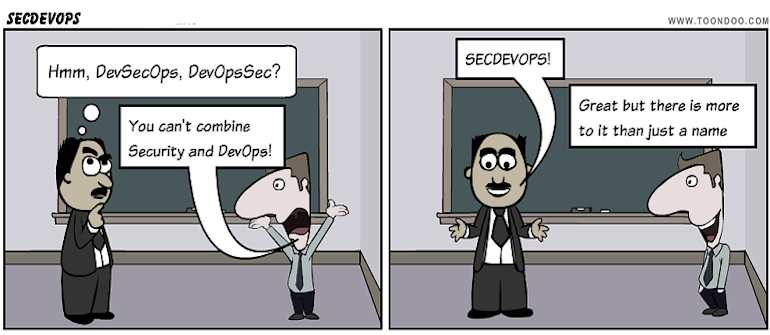
DevOps need to pay more attention to security
Ty Miller, founder of Threat Intelligence, suggests organisations adopting DevOps need to pay more attention to security.
Over the last five years or so, the prevailing approach to IT security has changed – largely triggered by the activities of hacktivist groups such as Anonymous and LulzSec – and it is becoming an increasingly integrated part of the application lifecycle, he said.
The less attention given to security in the earlier stages, the more likely it is that the application will have to be rearchitected and redeveloped before deployment, which can be 100 times more costly than building in security from the outset.
Since DevOps is often adopted to allow more frequent code releases, it is important that security is built into the process from start to finish, as there is no longer time for extensive security testing between completion and release.
Part of the problem is that developers tend not to be security experts, and because of their backgrounds security officers generally are not application security specialists. This can leave a security gap, he said.
Miller’s recommendations include:
Code libraries The reuse of known-good code instead of reinventing the wheel each time reduces the risk of building new vulnerabilities into software.
Platform security While IT teams would not dream of omitting intrusion prevention systems and other security components from an on-premises system, “these sorts of things are quite commonly being left out” from cloud deployments possibly because they are thought to be insufficiently scalable – a symptom of the tendency to sacrifice security for flexibility. And organisations sometimes assume that SaaS products are secure, even though they can “become large scale data breaches.” Recent research suggests around 90 percent of SaaS offerings are not sufficiently secure for enterprise use, he said.
Automated builds Automatically building systems based on pre-hardened templates helps reduce the risk of accidentally overlooking something and other human errors. If you can be confident that a new server will spin up in a secure configuration, development teams can concentrate on the code they are working on.
Automated security testing Frequent releases are at odds with traditional security testing, such as engaging specialist penetration testers before a major release. “That’s thrown a spanner into the works,” Miller said. When do you do the security testing? Can you pinpoint everything that has changed since the last test, and focus testing efforts accordingly? “Automated security testing needs to be built into the DevOps process,” he advised.
Fortify, AppScan and Burp Suite are among the more reputable tools, he said.
HP’s Fortify http://www8.hp.com/us/en/software-solutions/application-security/ , a code review tool, “is very expensive [at up to $120,000 per year] but also very good,” according to Miller, even though it generates false positives as other tools do.
IBM’s AppScan http://www-03.ibm.com/software/products/en/appscan/ helps with web and mobile app development, and costs around $30,000 per year, he said. While it has a good feature set and a convenient GUI, it does need a lot of setting up and maintenance when it comes to workflows.
PortSwigger’s Burp Suite http://portswigger.net/burp/ is a semi-automated scanner for web applications. At $300 per seat it is relatively cheap, and “virtually every penetration tester around the world uses it,” said Miller. It might not be as intelligent as the big-name commercial products, but “it is a very accurate scanner.”
But automated testing is not a panacea. Automated scans can find perhaps 20 percent of vulnerabilities, but that’s 20 percent less for humans to find. And the output of such tools tends to include many false positives, so some expertise is needed to interpret the results – an inexperienced user can waste a lot of time, Miller warned.
For example, access control flaws can be hard to detect automatically. Does changing a number in a URL produce a different page in the same report, or a report for a different customer? Is any particular report public or private? A penetration tester understands the application and can easily decide whether or not there is a security issue, but the best an automated tool can manage is to warn there may be a problem here.
An organisation that has a defined set of methodologies covering the entire process from development to production, implements security as a baseline feature in code and infrastructure builds, uses automated scanning and security testing, and integrates regular penetration tests and reviews “will be significantly ahead of other organisations,” Miller suggested.
About the Author:

Stephen Withers is one of Australia¹s most experienced IT journalists, covering everything from gadgets to enterprise systems. In previous lives he has been an academic, a systems programmer, an IT support manager, and an online services manager. Stephen holds an honours degree in Management Sciences, a PhD in Industrial and Business Studies, and is a senior member of the Australian Computer Society. You can see his Linkedin profile here: http://au.linkedin.com/pub/stephen-withers/0/222/687/

