Category: Blogs

  • Trend Micro Allies With Snyk to Advance DevSecOps

    Trend Micro Allies With Snyk to Advance DevSecOps

    Trend Micro and Snyk unveiled today a software-as-a-service (SaaS) platform the two companies have jointly developed to identify vulnerabilities in open source code.

    The Trend Micro Cloud One – Open Source Security by Snyk platform enables DevOps teams to both identify vulnerabilities and licensing issues to better monitor, prioritize and share information about risk and exposure rates within application development projects.

    Trend Micro COO Kevin Simzer said the SaaS platform provides a unified approach that combines six services within a single subscription to enable organizations to better protect a software supply chain.

    Snyk CTO Geva Solomonovich said that while the relationship between the two companies is not exclusive an alliance with Trend Micro will enable organizations to employ Snyk tools and the open source vulnerability database to implement a set of best DevSecOps practices within their organization.

    Simzer said Trend Micro is also including automation tools that make it easier for cybersecurity teams, along with the rest of the IT organization, to discover what application development projects are underway with their organization. The goal is to provide cybersecurity teams and DevOps teams with a set of tools that provides them with a common language through which they can collaboratively address vulnerabilities.

    Trend Micro claims approximately eight hours can be saved per vulnerability through automation and early discovery of the versions of open source code being employed. Roughly 80% of all application code in use today is derived from open source software, noted Trend Micro. That translates to saving more than 650 hours of development time per application, according to the company.

    Snyk, meanwhile, claimed to have observed a 2.5x increase in the number of open source vulnerabilities it has discovered over the past three years. In the wake of some recent high-profile breaches the security of software supply chains has become a greater area of focus, with many organizations now implementing a more rigorous review of all the code they employ and any associated dependencies.

    It’s still early days as far as adoption of DevSecOps best practices are concerned within most organizations. Responsibility for application security is clearly shifting further left toward developers. As part of that effort, cybersecurity teams are trying to adjust their processes in a way that enables them to vet the efforts of developers without slowing down the rate at which applications are developed. That’s becoming more challenging as the rate at which applications are being developed continues to increase.

    The conundrum organizations are trying to navigate is that every minute a developer spends on security is, theoretically, one less minute they have to write applications or business logic. At the same time, however, if vulnerabilities are not addressed early in the development cycle, they may take longer and cost more to fix, especially if they are discovered after an application is deployed in a production environment.

    Of course, there may come a day a when application security is just another set of steps to be performed within a quality assurance process. In the meantime, however, a lot more attention is being paid to application security today, in part, to make up for the many sins of the past.

  • Developer’s Guide to Open Source Spring Cleaning

    Developer’s Guide to Open Source Spring Cleaning

    Spring is here, and after a year filled with record-setting digital transformation and its associated vulnerabilities, now is the right time to give the open source components in your codebase a refresh. For many development teams, today’s open source operations present a ‘mess’ that’s difficult to clean up; often, no one knows how many libraries, third-party components or modules are in use, not to mention their vulnerability status. This can create a significant source of risk and technical debt, making a spring cleaning that much more necessary.

    The good news is that there are some simple strategies and tools that organizations can implement to jump-start the open source spring cleaning process. Once implemented, these systems will help ensure that your codebase is kept up-to-date and clear of vulnerabilities.

    Organizing and Inventorying Open Source

    When embarking on your open source clean-up mission, an ideal first step is to take stock of what’s there. Gathering a list of all the relevant libraries and packages in your codebase, along with version information and where in your code they are used, should be your top priority.

    Decide to Keep or Toss

    There is a strong possibility that some of the components in your library contain vulnerabilities. Be sure to use online databases for a published list of vulnerabilities to easily identify which items may be past their security sell-by date. Consider which ones to update and which to remove altogether if they’re riddled with unpatched flaws.

    Polishing, Dusting and Refreshing

    Polishing your physical surfaces not only makes them look shiny but also protects them from damage caused by light, water or other natural elements. Digitally polishing your open source security posture should involve keeping your code base defended in a similar manner, which means making repeat security assessments as frequently as possible while also keeping the inventory up-to-date so your teams are always aware of what’s being used.

    As a last step in this process, consider dusting off any outdated or existing policy documentation. Give them a spring refresh, as well, so they can account for the changes not only in your open source database but for your entire development team. By ensuring developers are all on the same page regarding policies, responsibilities and best practices, you are effectively setting the stage for the next phase of operational success.

    Keeping Your Open Source Code Clean

    Sometimes a clean-up becomes more substantial than anticipated and requires some extra muscle. Implementing a dedicated tool to assist with this clean-up will not only make the process faster and easier, but it can also lead to fewer false positives and more accurate results based on your choice of reinforcements.

    Software composition analysis (SCA) tools can parse your codebase and discover the libraries, modules or frameworks that are in use, and automatically compare all discovered components against a vulnerability database. Your SCA tool needs two key things to produce actionable results:

    • Access to a curated, high-fidelity vulnerability database. Your time is valuable. It’s well worth getting the most accurate data you can, despite what may be marked “vulnerable” or “safe” in the public domain.
    • Insight into your code. Just because you are using a vulnerable library does not automatically mean your code is vulnerable. What method in the library is vulnerable – are you even using it in your code? If you are using it, are you passing a static value or some input-derived variable? This is a function described as the ‘Exploitable Path’, and it is critical to focusing your clean-up efforts.

    This process will provide a comprehensive list of the flawed modules in use and help you decide what needs to ultimately be kept and what needs immediate attention. With the right tools – and the right data – you can get an accurate, prioritized list of what open source components you should update or depreciate in your code.

    While embedding an SCA tool into your development process and workflow alongside your other build and security-focused tools is essential to stop the accumulation of more risk and technical debt, maintaining the quality and freshness of the source vulnerability data is also extremely critical. While retaining an up-to-date list of vulnerable components seems like a full-time job, baking an open source hygiene process into your workflow can be a key component of your database’s overall maintenance.

    Evaluating your open source components at build time – and then systematically scheduling reassessment scans to catch newly discovered vulnerabilities in previously ‘safe’ libraries – can bake an open source hygiene process into the developer workflow. This will serve to extend the “spring cleaning” mentality to a year-round endeavor. With the threat landscape continuing to rapidly evolve and vulnerabilities rising by the hour, implementing these simple practices could have a long-lasting impact on your open source infrastructure as it stands today.

  • SAST, DAST, SCA: What’s Best For AppSec Testing?

    SAST, DAST, SCA: What’s Best For AppSec Testing?

    According to the most recent Verizon Data Breach Investigations Report, almost 90% of data breaches are driven by financial gain, up from 71% in last year’s report. Most noteworthy, however, is that cloud platforms are particularly at risk, with web application attacks increasing by 43%. As more information is stored within cloud infrastructures, and as more enterprises rely on web applications to maintain business continuity, security teams should consider how security controls can be integrated to DevOps without impacting productivity. However, the security market is often shrouded by acronyms and buzzwords. With the increase in automated security testing tools, such as SAST, DAST and SCA, it’s important to understand the difference between each of these practices, and when to use them in the development cycle.

    DevOps is the convergence of software development and IT operations that aims to continuously build, test and release software. Understandably, DevOps is becoming an integral part of any business as it facilitates delivering new products to end users faster and driving increased revenue. However, failure to secure these digital assets can open organizations to cyberattacks resulting in operational downtime, loss of customer trust and even hefty fines from a regulatory body. The sharp rise of application layer attacks proves that enterprises must proactively address security issues earlier in the software development stage.

    The evolution of DevSecOps takes the concept of DevOps one step further, putting security where it should be: at the heart of the development life cycle, using automation. DevSecOps has helped security professionals understand how they can successfully integrate automated security processes without slowing down development while allowing DevOps to focus on what matters most – building and creating software.

    There are a host of automated application security testing tools out there, each with unique benefits, that are commonly used in the agile software development cycle. This raises the question: what tools should we use, and when, to ensure a secure software development life cycle (SDLC)?

    The Difference Between SAST, SCA and DAST

    The most popular application security testing tools businesses implement in their development cycles are static application security testing (SAST), software composition analysis (SCA) and dynamic application security testing (DAST). Knowing the differences between them and when to use them is crucial to enhance your DevSecOps strategy and secure your web applications.

    Static Application Security Testing (SAST)

    As the pressure to deliver high quality and secure code increases, and DevOps embraces new agile methodologies and technologies, integrated static analysis within the continuous software development pipeline can help detect vulnerabilities early in the software development process from the inside out (white box testing). The benefit of a SAST solution is it doesn’t require a running system to perform code security checks and won’t slow you down like a manual code review or penetration test.

    One aspect that makes SAST unique is that it automatically checks for vulnerabilities within the application source code, byte code or binaries, line by line. This ensures security weaknesses – such as those listed in the OWASP top 10 and the 2019 CWE top 25 – in the proprietary code are detected from the start and during development. As a result, developers can identify the risks and fix any vulnerabilities before they make it into production. They are empowered to shift left and recognize early code defects in the development cycle, a security best practice, which also reduces the cost of fixing security issues.

    However, SAST does have some disadvantages in that it requires access to source code and the underlying framework, making it unsuitable for testing commercial off-the-shelf software (COTS) or working with outsourced development. It is also unable to identify runtime and environment-related issues, which makes it difficult to determine the actual and contextual risks of security flaws and suggest meaningful remediation.

    Dynamic Application Security Testing (DAST)

    Unlike SAST, dynamic application security testing (DAST) is done from the outside in (black box testing), and identifies vulnerabilities when the application is running. DAST tools crawl web pages, locate web services endpoints, inputs and outputs; it requires a working version of a web application for the testing to work. Without looking into the source code, dynamic analysis works to simulate penetration testing to uncover exploitable vulnerabilities and business logic issues from a hacker’s point of view, with reliable results.

    Yet, because this scanning occurs towards the end of the SDLC (running applications), the findings can be substantial and often put additional pressure on DevOps teams to fix these runtime vulnerabilities on short notice, creating friction between the security and development teams. Further drawbacks of DAST include the risk that vulnerabilities can be found too late in the SDLC, resulting in rushed or delayed remediation.

    Software Composition Analysis (SCA)

    Releasing new features on a deadline means that developers often don’t write all their own code. The use of prepackaged open source code is commonplace in modern DevOps practices, and so is the need for security governance. Some SAST solutions now include software composition analysis (SCA) functionality to locate weaknesses in proprietary code and vulnerabilities in open source code.

    SCA tools are designed to analyze the open source components by detecting software licenses, deprecated dependencies and known vulnerabilities and potential exploits in a codebase. SCA enables DevOps teams to manage their security exposure and license compliance while still allowing the use of prepackaged code to speed up development processes. In addition, composition analysis can be run and expanded to newer architectures, including containerized environments, to automate detection for publicly disclosed vulnerabilities within your containers and prevent those disguised in public registries, such as Docker Hub, from being brought into the project.

    With open source components now present in 96% of commercial applications, the ability to spot software supply chain vulnerabilities in development, in and out of the cloud, are vital to reduce web application risks – all of which can be a potential entry point for malicious actors, as we’ve learned from the Equifax and SolarWinds breaches.

    Choosing the Best Application Security Testing Tool

    There is no shortage of application security testing tools. The real conundrum arises when decision makers are presented with a host of various options and pressured to choose. However, these tools are not mutually exclusive. Instead, they form a holistic, almost linear, approach to the entire DevOps pipeline from plan to implementation. What does vary, however, is the application development model. Which tool(s) should you choose for your specific use case? Here are some general guidelines:

    Outsourced Development and Commercial off-the-shelf (COTS) Applications: When it comes to critical business applications for prepackaged code, black box testing is advised for enhanced security peace of mind. Without access to the source code, DAST scanning and/or penetration testing are ideal to test the running application for any critical software vulnerabilities before deployment and to monitor security compliance in the long run.

    Internal Development and Software Customization: For businesses with the resources and infrastructure to create applications in-house, it’s important to build security testing into the SDLC from the beginning. Doing so can help protect against application vulnerabilities including cross-site scripting. For true DevSecOps, arm your development teams with SAST/SCA tools to ensure code security in the ‘code and build’ stage, and apply black box testing (DAST) for security assurance before deployment. Once deployed, regular penetration testing and continuous vulnerability assessment of the underlying infrastructure are also recommended to keep security issues in check with each new release.

    As cyberattacks targeting web applications increase, it is essential for organizations to have complete application security across the SDLC, providing maximum security coverage for development and ensuring they can keep up with business operations.

  • Why We’re Swimming in Dashboards and Drowning in Data

    Why We’re Swimming in Dashboards and Drowning in Data

    Knowing how to use a dashboard is table stakes in the enterprise. Information technologies generate countless volumes of data from multiple sources, and dashboards are meant to harness all of that information, reduce the noise and display the stats you need to do your job. Yet businesses are still struggling to unlock the value of their data, with over half of global businesses (57%) claiming they can identify and capture just 70% of their data, according to a study conducted by IDC and commissioned by Qlik.

    As in “The Rime of the Ancient Mariner,” there is water, water everywhere, but not a drop to drink. Enterprises are inundated with dashboards and still struggle to make effective decisions with the information in front of them.

    The Limits of Analytics

    There are many reasons why a dashboard may communicate ‘bad’ or ‘useless’ information. Analytics can’t do it all. A data pipeline may be parched with too little data or flush with the wrong kind of data, limiting the volume and/or value of outputs that can be drawn into the dashboard. The organization may be heavily siloed, rationing the range of information available to the dashboard. Or, the tooling itself might be inadequate for leaders to quickly respond to opportunities and disruption.

    When a decision-maker looks at a dashboard, they want to see things as they could be, as well as how they are. That requires a dashboard that depicts the data itself, but that also generates views of, for example, how it looks when sales activity in the Southwest is increased in the face of a weather event or other externalities. Results don’t have to be taken at face value – they can be analyzed more carefully and intuitively to uncover meaningful insights.

    Investigatory analysis is what modern, interactive dashboards and applications are all about. They support non-linear exploration and search and provide advanced features, such as augmented analytics, to help subject matter experts explore data and generate insights without relying on IT, data scientists or expert analysts. Interactive dashboards also make it possible for business intelligence to be truly self-service, simplifying aspects that were once limited to experts working in much more complex environments. They give all employees access to the insights they need to make better decisions, regardless of their skill level, essentially democratizing analysis across organizations.

    How to Choose the Right Dashboard

    For any business looking to really expand decision making across the business, here’s how to find a dashboard suited for investigatory analysis:

    Accessibility and timeliness: In the past, business users who wanted insights had to submit a request to an analyst, wait for their turn in the queue and go back and forth answering clarifying questions before they could review a dashboard and make decisions. The process took too long, and insights came too late. With modern, interactive dashboards, users can explore all their data using interactive selections (filters), search, and NLP (natural language processing) powered by AI. In the end, they can ask and answer all their questions leading to informed decisions.

    Flexibility: Modern dashboards are not just static displays of content with limited filtering. They are rich analytics applications that provide unmatched interactivity and exploratory power. Business users aren’t limited to rigid, linear analysis on partial subsets of data. Instead, they have the freedom to explore all their data however they like. Analytics are always in context together, giving users peripheral vision, and all data relationships are exposed – including what’s related to your selections and what’s not.

    Performance: Interactivity should be driven by outcomes. Novel techniques to optimize and store data, index and understand relationships and deliver high-performance calculation all help to go beyond the limits of query-based and RDBMS architectures. Interactivity should also be enhanced with AI to deliver next-level analytical power, in new forms, across a full range of user experiences.

    A Crucial Tool in the Stack

    Turning data into business value is what a dashboard should—and can do—for the business. When a business user looks at a static dashboard or visualization, they usually end up with more questions than answers. To make an informed decision, they need to go through a process of questioning and evaluating – and then questioning again – an interactive display of business-critical trends until the right insight is fully uncovered. This iterative process is unique to every user and their lines of thinking, and modern dashboards allow all users, beyond data experts and analysts, to build visualizations and queries.

    In addition to creating business value, interactive dashboards help rally key stakeholders in organizations and allow them to act quickly to changing market needs. Take, for example, a major luxury fashion retailer; parent company of three well-known apparel brands. Their businesses hinge on having the products consumers want and need, when they want and need them. Their assortment planners need to analyze their sales mix and inventory mix by product attribution to identify mismatches and, more importantly, understand the drivers behind the mismatches to make more accurate inventory recommendations. Interactive dashboards allow them to investigate their data in different ways and ultimately inform strategic decisions for the business moving forward.

    In addition to empowering users to transform data into business value, dashboards ultimately drive the need for data literacy. Sharing dashboards throughout all levels of an organization fosters a data-driven culture by encouraging exploration of data – and that’s how new discoveries and innovations can be made.

    So while some say the dashboard is dead, I say long live the interactive dashboard.

  • How IT Ops Can Exceed Service Level Objectives in Digital Transformations

    How IT Ops Can Exceed Service Level Objectives in Digital Transformations

    The pace of change can be managed successfully by defining service level objectives and more in dev environments

    Mobile applications, data lakes, microservices, data visualizations, SaaS integrations, automations, IoT data streams, machine learning models—in proof of concepts, pilots and scaling production environments, for customer-facing capabilities and employee workflows—all of these technical capabilities are developed, deployed and enhanced faster today more than ever before.

    I spoke to Jason Walker, field CTO at AIOps platform BigPanda, about how the speed of deployment, the breadth of technology services transforming businesses are developing, the greater security threats, and the increase in reliability and performance requirements impact IT Ops.

    Walker believes that of all the things we’re trying to do in IT—more, faster, smarter, safer, innovative, secure, reliable—it’s the speed that’s the driving force. “The most significant impact is velocity; the dev-test-deploy cycle time is drastically reduced,” he said. “Without the right guardrails, that breeds unnecessary complexity and a gradual loss of operational awareness.”

    He explained that much of the barriers that once slowed down development teams are addressable today when developing service-based architectures on the cloud. “Developers realize that the traditional constraints, either technical dependencies or organizational capability, are much reduced,” Walker noted. “Developing in the cloud for a cloud-based service, leveraging an ecosystem of microservices for inputs, an agile team can move very quickly.”

    Why IT Ops Can’t Slow Down Transformations

    IT Ops can’t easily say “no” or “slow down” to business stakeholders investing in digital transformation to improve customer experiences and gain competitive advantages with data, analytics and machine learning. Some IT leaders attempted that command-and-control approach during the early days of public clouds, but today, DevOps practices, SRE responsibilities and AIOps capabilities are integral to mainstream IT Ops teams in keeping up with transformational velocities.

    So instead of saying “no,” progressive IT Ops teams say “yes, but” by defining service level objectives, (SLOs), capturing service level indicators (SLIs) and managing to error budgets.

    Walker agreed. “SLIs, SLOs and error budgets are a very useful way to manage the critical inputs and outputs at the interfaces between microservices and at a high level across the business service, allowing developers to keep changing the ‘interior’ pieces.“

    These tools change the operating model and mindset across the entire IT organization by exposing trade-offs to business stakeholders. For example, if a web application has a 99.9% SLO, the whole IT team has a 0.1% error budget. If the SLO is missed, a service level policy identifies areas of investment to improve performance, reliability, security and automation or to address technical debt.

    What IT Teams Should Do to Implement Service Level Objectives

    Defining service level objectives helps bring business stakeholders, development teams, SREs and IT Ops together and align on reliability objectives and trade-offs. It’s an important step, but not sufficient for teams that want to exceed service levels during digital transformation.

    Walker offered several technical recommendations for IT Ops groups transitioning to service level objectives:

    1. Where there are dependencies between microservices and interfaces, frequent check-ins between adjacent teams are required.
    2. APIs, inputs and outputs, need to remain consistent over time and changes communicated and receipt confirmed.
    3. Knowledge management processes delivering accurate, up-to-date documentation have to be baked into the SDLC to prevent the generally small, modular teams from sprawling away from each other and developing incompatibilities.
    4. Consolidated change awareness for operations is also a must-have. Whether changes are human or automated, they have to be tracked and relatable to service events and alerts.
    5. The later phases of the SDLC, when cloud-native, containerized microservices are running and supporting customers, have to be monitored. A monitoring strategy is necessary to ensure effectiveness and minimize the work and noise involved.
    6. Synthetics and client telemetry can be very useful macro-indicators of overall service performance. As with all monitoring efforts, actionability is key. Signal-to-noise in monitoring has to be measured.

    These are balanced recommendations, with the first two focused on how development teams engineer microservices and the last two on how IT Ops teams use monitoring and AIOps to implement actionable SLIs. The middle two recommendations on knowledge and change management processes help the entire organization stay in sync through a fast-paced operating environment.

    “The velocity, flexibility and variability of this type of development means leaders at all levels need to understand and align the strategic and tactical goals, and to prevent their teams from drifting away from business goals,” Walker said.

    Why AIOps is a Force Multiplier for IT Transformation

    So, the business leaders align on service level objectives, development teams engineer observable containerized microservices, IT Ops executes a monitoring strategy and the CIO ensures communication, collaboration and knowledge sharing. Is that all that’s required?

    The issue is that most IT Ops teams are understaffed and get overwhelmed supporting the new cloud-native microservices, legacy systems and everything in between. To address the gap, IT leaders are investing in AIOps, and even hundred-year-old enterprises are successful at adopting machine learning and automation to accelerate IT Ops.

    Automation and machine learning event correlation applied to monitors, alerts and observable artifacts are the force multipliers. Open-box machine learning enables IT Ops to triage incidents and improve their mean time to resolution, while automation reduces manual efforts and keeps teams in sync. Organizations that are modernizing applications and supporting hybrid clouds require these capabilities to manage the complexities, run at business speed and manage databases, microservices and applications to higher service level objectives.

    As Walker noted, increasing velocity is important for responding to customer opportunities and changing conditions. Driving faster digital transformations is more achievable today when IT Ops leverages automation and AIOps to stabilize speed with reliability and performance.

  • The Basics of DevSecOps Adoption

    The Basics of DevSecOps Adoption

    Embracing DevOps is essential, but keeping the software delivery and deployment pipeline safe has become more critical than ever. While attackers are keen on getting into your Docker containers or Kubernetes clusters, securing your images, pods and clusters can deter attackers. Securing your artifacts, deployment workloads and production environments remains critical today. While we have many tools to get these jobs done, it is vital to understand DevSecOps and its related factors.

    DevSecOps has become a mass movement today. But what makes it so important?

    What is DevSecOps?

    DevSecOps addresses software development security via the mindset that everyone is responsible for security at every stage in the development process.

    DevSecOps is a culture and an evolution where security is given the utmost priority in the software development life cycle (SDLC). Security is everyone’s responsibility, and inspection is done at each stage of the development cycle. Basically, implementing a process for inspecting, scanning and reviewing code by developers at predetermined checkpoints to immediately tackle any identified bugs or vulnerabilities. One of the most challenging parts of the transition from DevOps to DevSecOps lies in building more open and communicative teams.

    Why DevSecOps?

    Using DevSecOps, security becomes an integral part of the planning, coding, building, testing, deployment and production stages. DevSecOps makes continuous testing the default for developers and security professionals to deliver more secure features to the market more quickly.

    In many organizations, most development, operations or DevOps teams see security or security teams as a roadblock to getting things done faster; delaying features. In traditional DevOps implementations, the security aspect was missing, DevSecOps was introduced to stress the priority of security in DevOps.

    The Importance of DevSecOps

    Let’s take Uber’s security breach in 2017 as an example. Personal details and information of 57 million customers and over 600,000 drivers was exposed. Uber paid a $100,000 ransom to hackers in an attempt to get them to delete the breached data. This breach happened because engineers failed to secure and update the credentials they were using on GitHub.

    Similarly, in 2018, Tesla’s Cloud was hijacked and used to mine cryptocurrency by abusing a vulnerability in the company’s Kubernetes cluster. A significant amount of FedEx data was also exposed in the same way, affecting 119,000 individuals.

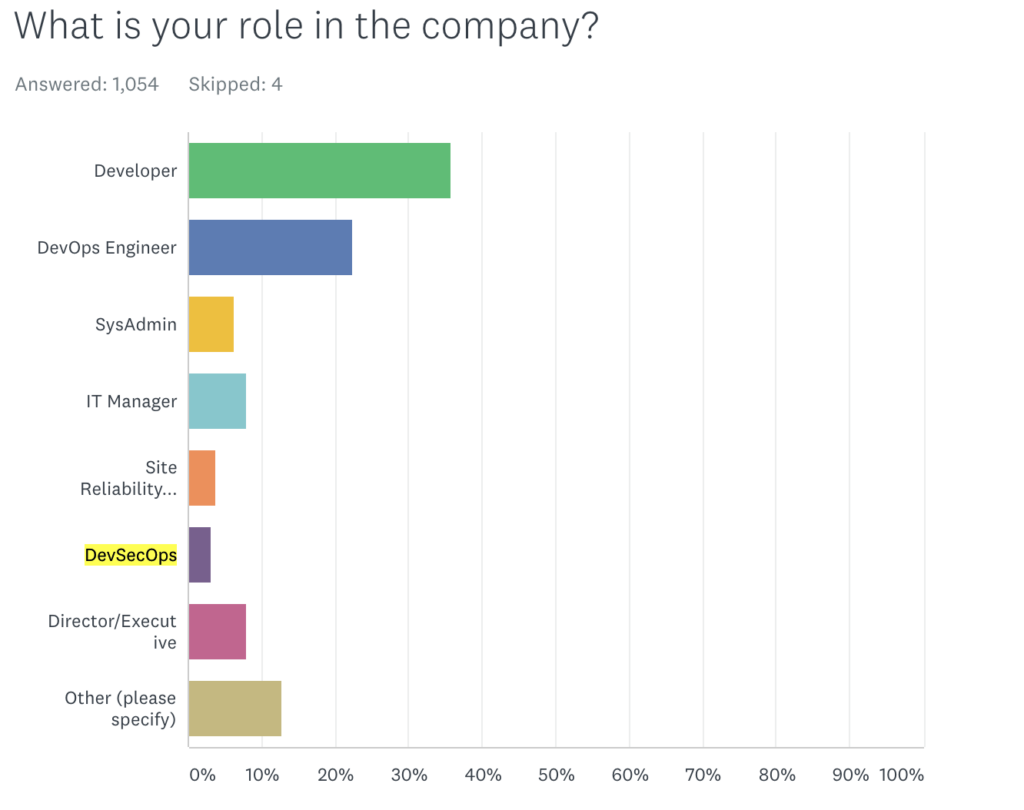
    Logz.io’s annual DevOps Pulse 2020 survey revealed that, out of 1,000 respondents, only 3% indicated their development methodology as DevSecOps, hinting at the slow pace of DevSecOps adoption in the industry.


    Image source: Logz.io

    DevSecOps Best Practices

    Adopt a Shift Left Approach

    Shifting security left helps organizations secure each stage of the development life cycle. This refers to starting testing earlier in the SDLC. The goal here is to enhance quality, cut down long test cycles and reduce the likelihood of unpleasant security surprises at the end of the development cycle or in production.

    Include a Threat Modeling Mechanism

    It is essential to implement a threat modeling mechanism in DevOps workflows since it helps developers and security professionals to view software from an attacker’s perspective. It makes developers more careful while writing code and encourages them to more closely follow code writing and review best practices. Threat assessment or threat modeling will also help identify potential vulnerabilities in system design and architecture, and acts as a crucial part of successful security integration in the SDLC.

    Mandate Developer Training

    Training developers on the importance of security is a critical best practice. Making sure each developer who writes, tests and deploys code understands that security is part of their job description is a priority. Training developers on security best practices, how to embed security, check for vulnerabilities and use appropriate security tools will improve overall security knowledge and increase its application within the organization. 

    Use Available Security Vulnerability Tools

    A vulnerability is considered a flaw in the code, application dependencies, external libraries, licenses used or operating system (OS) packages. There are a number of static and dynamic application security tools that can help the development team to find and address bugs and vulnerabilities as early as possible in the development pipeline. Many are automated to reduce the time it takes for developers to find these flaws.

    Sponsor Bug Bounties

    Bug bounty programs and rewards motivate external and internal security experts to experiment with the platform, analyze, think outside the box and report any major bugs and security flaws found. 

    Security-as-Code

    Security-as-code is the next evolution in DevOps, where security is fully embedded in the development processes. This practice implements security and secure coding practices in the earliest stage of development. With security-as-code, developers will be able to identify vulnerable code ahead of time and add security checkpoints/measures to tackle such irregularities. 

    DevSecOps Tools

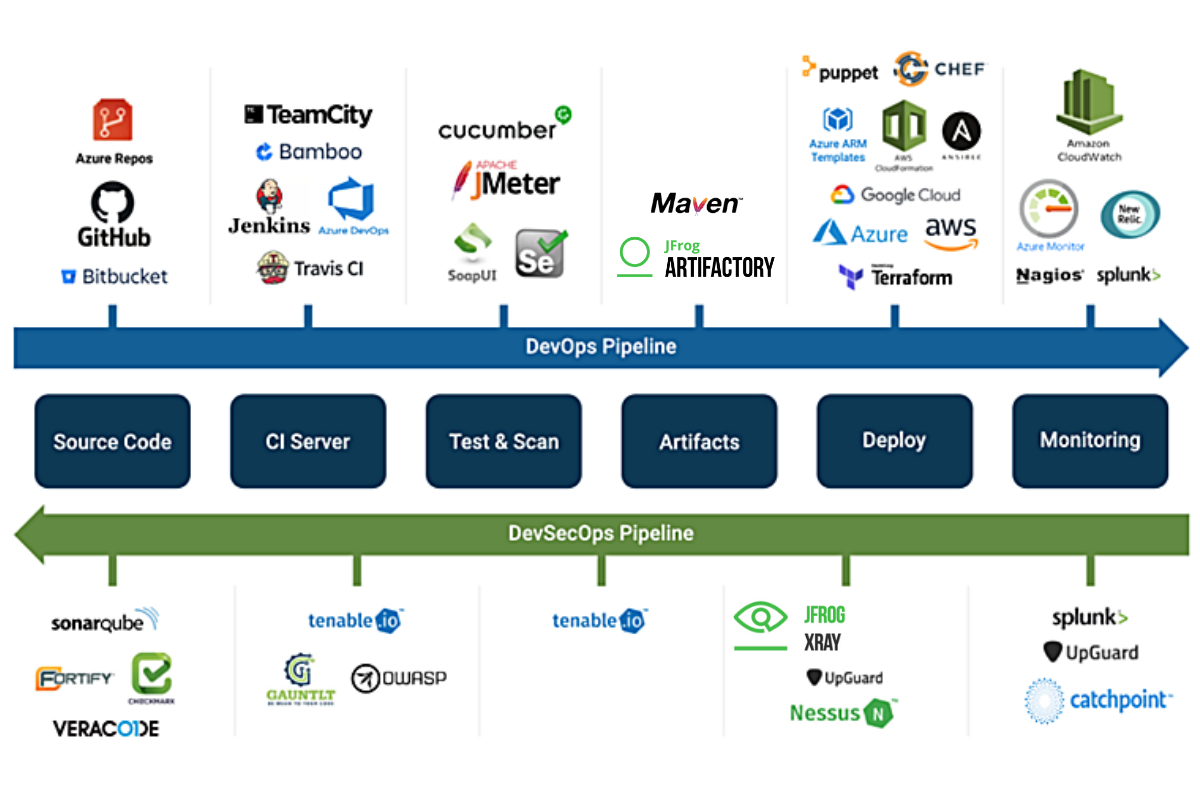
    When we talk about DevSecOps, the software development cycle involves multiple checkpoints to identify bugs and any other vulnerabilities and resolve them so that the application works as designed. The aim is to deploy software with quality and confidence, and this is achieved by using various tools at different stages.


    Image credits: CatchPoint

    Organizations can choose to use the type of security tools that best work for their needs from their preferred vendor. While the security tools themselves are critical for detecting vulnerabilities in the application through the DevSecOps pipeline, monitoring is also considered an integral part of this process. It not only lets developers analyze and evaluate security vulnerabilities from the end user’s viewpoint, but it can help identify breaches and anomalies after an application is in production.

    DevSecOps Pipeline

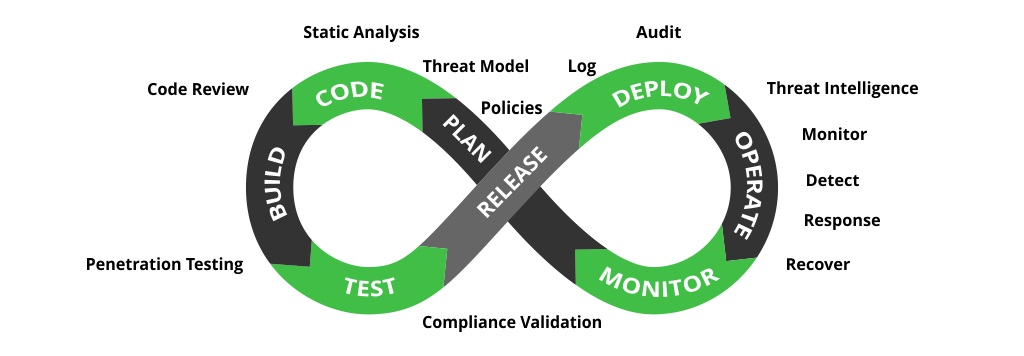
    While DevOps focuses on speed and agility, DevSecOps adds a layer of security throughout the software development life cycle. A DevSecOps pipeline adds security activities to every stage of the development process, not simply tacking it on to the end as an afterthought. This is achieved by integrating security checkpoints, controls, policies, tools and techniques from the beginning of the DevOps pipeline until the end. These additions facilitate automated security controls at each stage of the software delivery pipeline.

    Image credits: JFrog

    In his swampUP conference keynote The Divine and Felonious Nature of Cyber Security, John Willis shared some valuable DevSecOps best practices, including:

    • Treat security issues as you would software issues.
    • Adopt a “security-as-code” approach to enable the automation of security.
    • Build security controls and vulnerability detection into CI/CD pipelines.
    • Automate security testing as part of the build process.
    • Proactively monitor the security of production deployments.

    Embedding security earlier in your software development life cycle will yield bug-free features and satisfied customers. Have security checkpoints at each stage and make sure developers understand that security is everyone’s responsibility, including theirs. Manage your software and build artifacts, scanning and securing them at every stage of the pipeline using appropriate tools and techniques. Happy DevSecOpsing!

  • Why You Must Lead With AI

    Why You Must Lead With AI

    AI will soon be a necessary part of doing business. Every company will have an AI strategy in the same way that they have a social media strategy, branding strategy, talent strategy, etc.

    So if you want to stand out from the competition and gain an edge, you can’t just use AI; you must lead with AI.

    What does that look like?

    To lead with AI, you can’t simply set up a small innovation team to solve point problems. You must embed AI throughout the organization, such that every team is taking advantage of the technology and incorporating it into their operations.

    The specifics will vary from company to company, but there are some general strategies that will help you begin leading with AI.

    Be Persistent

    Leading with AI doesn’t just happen in the blink of an eye. It’s going to take time and hard work, and it’s critical you stay persistent.

    Amazon, a leader in machine learning technology applications, didn’t start out using advanced AI techniques on day one. Just like everyone else, they had to go on a journey filled with discovery, successes—and the occasional course correction. For example, in 2017, Amazon launched a TV ad that accidentally triggered Alexa devices in its customers’ homes to purchase an expensive dollhouse. Not ideal, and not the best advertisement for the convenience of their machine learning devices.

    They stuck with progress, though, and learned from their mistakes. They were persistent, even though they started out behind the pack. Their focus on incremental progress meant that it only took five short years for Alexa to beat out Siri and Google Assistant in the smart home speaker market. Alexa may have had a slow start, but now she’s a very strong player in the market.

    Persistence and determination are the ingredients that build leaders in AI—not perfection from the start.

    Train Your Leaders to Look for AI Solutions

    Before a business can lead with AI, it has to identify problems AI can solve. You can’t accomplish this by building an AI tiger team and turning them loose to hunt through each department for inefficiencies. That AI team wouldn’t have the necessary context, and all its time would be spent coming up to speed on the operations of the various departments.

    Each division or department is familiar with its own operations and has the context to identify the most important problems. What they might lack is an understanding of AI and the types of problems it can solve. Giving them that training is the first step.

    Organizations that do this successfully start with the belief that every department can use AI to solve some of its problems and work toward enabling their leaders to identify and solve those use cases. For example, a CFO, who is presumably good at what they do, probably doesn’t have any experience in AI—their expertise lies in finance. That CFO will need training to develop an AI-aware mindset, the ability to identify the places within the finance department where AI can solve problems.

    Obviously, your leaders don’t need to understand everything about AI; they just need to know enough to be able to identify when AI is a good solution.

    Create Cross-Functional Teams

    When you think of AI, your mind might jump to data scientists, but there’s a lot at play in an AI model. It’s a marriage of technology and business, which means you need cross-functional teams to develop the best solutions. Because of this, the organization as a whole must become highly effective at multidisciplinary communication and collaboration.

    At its simplest, this might involve rolling out something like Slack to improve communication across departments. Some companies might adopt Agile processes and workflows to encourage collaborative planning of requirements, or they might institute regular all-hands meetings to sync up business priorities all at once and provide transparency.

    The details will be different for every organization, but every company will have a need for departments to collaborate more than before to identify common problems, prepare and share data, and develop related models. In some cases, this may be best served by restructuring the organization and reporting lines; in others, a department that expects an extensive adoption of AI—marketing, for example—may need to establish its own data science team.

    This degree of change may seem overwhelming. It’s important, however, for organizations to avoid the short-term solution of creating an AI team that’s shared across the company, or that team will end up being the primary bottleneck blocking AI adoption.

    Budget and Allocate Resources

    Nothing happens in a company without a budget and allocated resources. Finding the budget to implement AI solutions—to buy off-the-shelf products, hire people with the needed skills, spend time and resources annotating data—is critical, but challenging, especially because a good portion of the investment in AI has to be made company-wide up front.

    Leading with AI can necessitate reallocation of significant money and people, both of which are, in most cases, already budgeted out to normal operations. Deciding how much to reallocate and from where will impact the entire organization.

    Cutting costs is always unpopular, but you must look at it as an investment. Take, for example, a company eager to invest in AI that runs a call center to capture support calls, return requests and complaints. There’s no magical pool of money sitting around to invest in AI to improve this call center.

    Instead, the company will have to take money out of the yearly budget to spend on the AI initiative and just accept that the time to handle a call will go up for a period because fewer agents are deployed to receive those calls. The promise, of course, is that the investment in AI will lead to a chatbot that can divert 15% of those incoming calls, requiring fewer agents to handle calls and improving the call-handling time overall.

    Clearly articulating the long-term gains of AI will make it easier to secure buy-in across the company, so that the needed resources will be allocated.

    Leading With AI

    Leading with AI is hard. It will take time and massive investment. It’s never easy to switch up the operation of huge chunks of a business, reorganize reporting structures and refocus priorities; it will almost certainly require killing some sacred cows.
    Amazon, for example, spent years and a lot of investment to make the transition to leading with AI. Now, on the other side, they’ve maintained their status as a leader in their industry, with the infrastructure and culture that enables them to implement new AI solutions throughout their businesses as opportunities and problems arise.

    With persistence, AI-aware leaders, cross-functional teams and the right budget and resources, you, too, can begin leading with AI, ensuring a future competitive advantage.


    Co-author Wilson Pang is CTO at Appen.

  • Empowering Developers Through Lean Code

    Empowering Developers Through Lean Code

    Digital transformation is widely understood as a critical component for increasing user adoption, fueling workplace productivity and innovation, and driving business growth. Software has become increasingly important across countless industries, teams, and functionalities, and as a result, companies are beginning to understand that being an industry leader and gaining competitive advantages starts with software development.

    Easier said than done. Modern software apps are a complex orchestration of infrastructure, deployment pipelines, notifications, user experience, data filtering and processing, and error handling. A good engineering team will be able to account for each of these items and integrate them into a larger, comprehensive infrastructure.

    So what happens when you don’t have a solid, in-house team guiding your software maintenance and development? Consider a lean code development platform; a developer service that pares down the explicit requirements of standard functions, interactions, errors and software infrastructure into implicit scripts, templates, configurations and API requests. Using a lean code solution will give your team the power to build higher-quality features more quickly than they otherwise would on their own.

    There are several ways that lean code platforms can simplify processes for developers. Primarily, these platforms turn explicit requirements into implicit interactions, eliminating the need for developers to pull elaborate infrastructure to solve complex problems. Lean code also gives developers the freedom to customize everything to fit where it is needed, while limiting the amount of code necessary to do so. Lastly, lean code platforms provide tools that assist developers at all levels of the software stack, significantly increasing productivity while cutting down on time and workload.

    How Does it Differ from Low-Code?

    While many people might be unfamiliar with the term “low-code,” they’d probably be surprised to learn that they use it all the time. Low-code describes platforms that require minimal code in order to build applications and processes.

    Essentially, these programs enable users with little to no coding or software development experience to create and use applications. The idea of low-code is to introduce audiences to intermediate level software development concepts such as object-oriented programming, interface design, conditional logic and code syntax.

    However, no matter how helpful these low-code approaches might be, many users still run into the problem of wanting more customization than the low-code system is designed to give. In fact, many users become frustrated with the term “customization” because it’s viewed as the enemy, indicating a need for more advanced software development services than the consumer is able to provide.

    Lean code platforms, on the other hand, are designed to specifically meet developers’ needs at all stages of the software development life cycle. In essence, lean-code prioritizes simplicity, efficiency, flexibility and accessibility with the goal of making software development accessible on a larger scale.

    Instead of encouraging you to reduce your development team, lean code platforms allow users to expand development through exploring new avenues and abstracting away the explicit requirements of traditional software development.

    What Does Lean Code Have to do With Productivity Infrastructure?

    Many forward-thinking companies have gone beyond simply building technical solutions to specific development problems. Instead, they’ve taken the advancement of lean code platforms to a new level by providing fixes that meet developers at the central stages of the integration process.

    Because lean code offers such integrated solutions to developer challenges, the approach is increasingly becoming the norm across the bulk of the productivity infrastructure category — an emerging market category that combines elements of cloud communications services, API platforms, low-code development tools, business process automation and AI software development kits.

    If you’re looking to implement a lean-code platform, consider the following features:

    • Intelligence: By making it easy to pull information from unstructured data sources and flip it into more meaningful material, machine learning (ML) replaces the manual effort to build, implement and maintain models.
    • Automation: Workflows, triggers, templates and notifications can be abstracted away for common use cases.
    • Security: When handling user data, security is a top priority. From protecting health records to pet names, data security is crucial.
    • Connectivity: The ability to connect to a relevant data source can make or break an infrastructure.
    • User experience: User interfaces should follow expected conventions for whichever task the user is trying to accomplish. Maintaining a successful user experience requires constant evaluation.

    How will Lean Code Become Market-Leading Software?

    Lean code development platforms have emerged as market-leading software development solutions in three major areas:

    • Productivity Infrastructure: More companies have pivoted to providing full-stack development services that assist developers in building out native communications, search and indexing, scheduling and financial experiences.
    • Software development and deployment workflows: Continuous integration/ continuous deployment (CI/CD) pair down complex build and deployment pipelines to basic configuration files.
    • Infrastructure deployment: Infrastructure as a service (IaaS) products assist in deploying scalable web services via API requests and simple configurations.

    Where are lean code development platforms headed?

    It’s safe to assume that, given their ability to provide efficient and effective infrastructure to development teams, lean code has a bright future ahead. The number of developers in the space is only growing. A Slash Data survey from 2019 estimated there to be just under 19 million active developers across the globe and expected the number to grow to 45 million by 2030.

    As the market for software development rapidly expands, it would make sense to assume that the need for a platform that solves problems across the entire software ecosystem would, too. Lean code development platforms are emerging as a top choice for companies that want to build out a leading software platform into the future.