Category: Blogs

  • How to Analyze Your Code for Security Vulnerabilities

    How to Analyze Your Code for Security Vulnerabilities

    Shifting Left 2.0 is a two-day virtual conference taking place from 9 a.m. to 2 p.m. PDT on June 22nd-23rd that dives deep into application security in the modern tech space. Security experts share insights on topics ranging from how to measure AppSec success to what role AppSec plays in digital transformation. Software developers, security engineers, C-level business leaders and more can all benefit from the lively tech conversations at this free virtual experience. 

    Vickie Li, developer evangelist at ShiftLeft, teases her session at Shifting Left 2.0 in the Q&A below. Vickie and Suchakra Sharma, staff scientist at ShiftLeft, describe how to effectively review code for vulnerabilities and present tactics for performing an effective security code review on your applications on Wednesday, June 23rd from 10:10 a.m. to 10:40 a.m. PDT.

    You can find the full agenda and register for free at Shifting Left 2.0.

    To start off, why don’t you tell me a little bit about your role as a developer evangelist at ShiftLeft?

    My job as a developer evangelist is to help developers write more secure code. Here at ShiftLeft, we build and support ShiftLeft CORE, a security tool that helps developers find vulnerabilities in their code through SAST, SCA, and secret scanning. But a big component that goes into building secure software is to understand and remediate the vulnerabilities found by these tools. My goal is to help developers build more secure applications by learning the security fundamentals they need to write secure code and use security tools effectively.

    Your session is titled, “Intro to Code Analysis,” so I am curious what are some of the most effective ways to analyze your code for security vulnerabilities?

    I am probably giving away a bit of a spoiler here for my session with Suchakra. The most effective way of finding vulnerabilities in code is to use static code analysis, or to find security issues by analyzing source code. Techniques like dynamic analysis and penetration testing excel at finding exploitable vulnerabilities but often miss a large number of security issues. Static analysis, on the other hand, tends to be much better at finding as many vulnerabilities as possible.

    But conducting a manual code analysis on every single line of code is inefficient and not feasible in most cases. In this case, utilizing a SAST tool to scan the application and then validating the results afterward using manual code review would be the best action plan. 

    Code is really at the heart of building secure applications. With that in mind, how beneficial is it for developers to have a security mindset when writing code? 

    It is extremely crucial for developers to keep security in mind when building software. Security is a team effort by everyone: application security engineers, system administrators, managers, architects, and analysts. But when dealing with application security, developers are the ones who write vulnerabilities into code, and developers are the ones who have to fix vulnerabilities when they are found. So as developers, if we can keep security in mind during the development process, we can prevent vulnerabilities from being introduced into the code base, saving ourselves and our colleagues time and headache down the line.

    What type of security training or continuous learning practices should dev teams implement to help secure the code they write?

    Learning about security continuously is key to building secure applications. Developer security education needs to be efficient, engaging, and easy to absorb, and we need to introduce security training in a way that is relevant to everyday development work. By identifying security issues in a developer’s code, we can provide the context of the security issue and demonstrate the real-life importance of best practices.

  • Using Rust to Build Distributed Applications

    Using Rust to Build Distributed Applications

    Rust is an open source programming language that was initially developed at Mozilla Research and became increasingly popular for building distributed applications. It has been referred to in the Stack Overflow Survey as “the most-loved programming language” by software developers for five consecutive years. Moreover, companies like Amazon and Microsoft have recently revealed that they are using Rust to develop the software components that are responsible for ensuring application safety.

    Rust allows the implementation of safe and predictable code by leveraging memory safety and speed. It is the ideal choice to create code without incurring undefined or unpredictable behavior thanks to its features such as consistent runtime behavior and a static type system.

    Although Rust can be used for any system programming application, it is mainly implemented to build applications like simulation and game engines, browser components and file and operating systems. Rust syntax is similar to C++, but it addresses issues that C and C++ normally struggle with such as developing code without security vulnerabilities, general memory errors and problems in writing concurrent programs.

    The Advantages of Rust in Distributed Programming

    Rust tackles the performance and reliability problems of other low-level programming languages by using a careful compiler which examines all the variables used and referenced. As the code is compiled, Rust uses monomorphization by creating exclusive and high-performance code for each type of channel. It prevents programmers from paying performance penalties due to its flexibility. Based on the principle that you don’t pay for what you don’t use, the code written in Rust is enhanced and abstractions are solved at compile time making the program safe and without runtime overhead.

    Rust doesn’t have a garbage collector, which allows programmers to build abstractions with predictable performance. In Rust, there is no garbage to collect because the moment something would have become garbage, it gets freed immediately at compile time, making the program much faster. Moreover, Rust uses a borrow checker to check where data is used across the program, and by following a set of rules it establishes where data needs to be dropped or initialized. It provides the same advantages of a garbage collector with the efficiency and predictability of manual management.

    Another crucial characteristic of Rust is its asynchronous I/O. In Rust, asynchronous programming is widely implemented and well-integrated. It enables developers to effectively scale on a certain number of cores and exploit the operating system resources. By running several units of code on each application, this feature enhances performance and responsiveness of the operating system.

    Rust prevents some of the software engineering problems that could critically damage the application development process. These issues concern concurrency and memory safety which can cause very often denial of service, code vulnerabilities or compromised secrets. Examples of these frictions that are common in other languages such as C or C++ include uninitialized variables, undefined behavior, invalid iterators and unexpected variable modification.

    Another great advantage of using Rust is the Rust developer community, an extremely friendly and welcoming community. There are multiple events, chat rooms and forums to participate in that makes it even more pleasant to build distributed applications with Rust.

    Thanks to its ability to fix concurrency and memory issues, to compile and run safe and predictable code and provide a fast implementation, Rust is quickly increasing its popularity and establishing itself as the ideal choice for building distributed applications.

  • Yes, You Do Need SCA

    Yes, You Do Need SCA

    We often go to restaurants and treat ourselves to unfamiliar and exotic foods made with ingredients we’re only vaguely aware of. A chef and their team (or a manager and their crew) are our vouchsafe that what’s in there isn’t deadly. Most of the time, that works out just fine; but, very rarely, we end up paying the price. The same is true for food brought home from the supermarket, though for lesser illnesses it is harder to track because they’re not clustered like restaurant customers. While it is indeed exceedingly rare for the results to be fatal, the CDC estimates that around 3,000 people die of food-borne illnesses in the U.S. each year, and millions more are made ill. The U.S. has incredibly safe foods, and yet, we still have these illnesses. Simple things like leaving ingredients out too long, or consuming food sourced from a contaminated production facility can cause problems, even in an otherwise safe environment.

    Our code is similar—how it is created and consumed—and increasingly falls in this category. We rely upon a ton of sources for the systems that run our networks, and, quite often, there is no one to tell us how safe our sourcing is, or if changes are happening beneath that escape our notice.

    This is why we absolutely must have software composition analysis (SCA). If no one else is going to stand up and verify the safety of all that code we are pulling in, then we need to at least be aware of what is there. We need to understand the inter-relationships of pieces of underlying software, both the known and the unknown. Some libraries are so ubiquitous that you are using them and likely don’t even know it. But that’s not good management; knowing what you have and taking care of it are increasingly becoming a core part of IT. Knowing what alternatives are available in case something goes wrong with your preferred (or automatic) inclusion is imperative for continuity, making SCA a critical part of continuity planning along with the fact that it’s just good business practice.

    The good news is, if you are using any of the major code scanning tools from the DevSecOps space, you either already have SCA available to you, or you can buy it as an add-on from the same vendor. Hit their website and find out.

    Your systems are out there, every day, serving the needs of your users. Protect those users from unforeseen circumstances like vendor issues, open source changes, security vulnerabilities and nested dependencies. While the vast majority of open source is safe and secure, we use so much of it—and the tools we use link in so much of it—that it’s almost certain there is a bomb hidden somewhere in your code. Think of it like the food-borne illness example above: Would you eat at a restaurant that said “Yeah, 90% of our food is safe, but we’re not sure about the other 10% …”?

    You’re building astounding things, and keeping the world moving. Don’t stop, but don’t let your guard down, either. Know what is running in those apps, what its vulnerabilities (both security and downtime) are and what you can do to mitigate those weaknesses–so you can keep making astounding things rather than spend your time fixing what is already there.

  • Akamai Adds Service to Optimize API Traffic

    Akamai Adds Service to Optimize API Traffic

    Akamai today launched an API Acceleration service specifically designed to accelerate application programming interface (API) calls using special purpose hardware, reserved capacity and prioritized routing.

    At the same time, the company is also making available a globally distributed key-value store dubbed EdgeKV that enables stateful applications to be deployed on its EdgeWorker nodes.

    Finally, Akamai is also making available free tiers of services that provide access to a combined 60 million serverless EdgeWorker events per month with a limit of up to 30 million EdgeWorker events per tier. The two tiers are made up of a basic compute service for applications requiring lower CPU and memory consumption and a dynamic compute service for those applications demanding additional resources.

    Josh Johnson, an enterprise architect for Akamai, said Akamai is expanding its offering at a time when many organizations are starting to deploy microservices-based applications across an extended enterprise using serverless EdgeWorker nodes deployed at the network edge. EdgeKV provides access to a low latency data store that also enables those edge computing applications to process data closer to the point where it is being created and consumed.

    In general, Akamai reported that, in 2020, its platforms processed more than 300 trillion API requests, a 53% year-over-year increase. Much of the increased activity is being driven by distributed applications that are deployed directly on the Akamai CDN, rather than being deployed in a local data center to take advantage of a global network of data centers that allow IT organizations to take advantage of caching. In effect, the CDN becomes the target platform when an application developed using DevOps best practices is being deployed. The rise of edge computing has increased the number of use cases where DevOps teams are relying on CDNs to deploy applications.

    Naturally, competition among providers of CDNs has increased considerably as the number of applications deployed at the edge continues to increase. There may even come a day when there are more applications deployed at the network edge than there are in the cloud as more organization deploy applications that need to process and analyze data in near-real time as part of a larger digital business transformation initiative.

    Akamai, of course, as the provider of the largest global CDN, is betting it will be able to leverage the size of its CDN to convince developers to deploy applications on its platforms rather than smaller rivals.

    Regardless of the approach to edge computing, the applications being deployed will be more latency sensitive than ever. Each IT organization will need to decide to what degree they want to count on infrastructure to optimize API calls those applications make before they time out or need to be redirected to another microservice. One way or another, the laws of physics still apply. No edge computing application is an island. It depends on a complex web of infrastructure ranging from routers and switches to servers running back end services in the cloud. The challenge is finding a way to optimize all those interactions in a way that developers never have to be concerned about.

  • Enterprises Face Growing Technical Debt

    Enterprises Face Growing Technical Debt

    Technologists are always espousing new, trendy development solutions. More robust frameworks, increased delivery, better integration. But rarely do these proponents consider the long-term side effects of introducing new technologies. As a result, technical debt is an all-to-common occurrence in most companies.

    Nearly a third of IT budgets are dedicated to addressing technical debt. Devoting so much effort to maintaining legacy code leaves fewer resources to support the status quo, let alone develop new solutions. In fact, a recent study found that 69% of IT leaders identify technical debt as a significant threat to their companies’ ability to innovate.

    “The Growing Threat of Technical Debt,” a report from OutSystems, surveyed 500 IT leaders about this conundrum. Below, we’ll explore the top causes of technical debt and consider ways to prevent it from getting out of control.

    What is Technical Debt?

    Technical debt seems counterintuitive. Isn’t technology supposed to help organizations become more productive? Why would it be a burden? Well, technical debt often arises from hasty decisions taken in the short term that have long-term consequences. It’s also often the result of a company juggling many competing technologies, some of which have become outdated.

    Technical debt can carry a hefty price tag. But this debt isn’t so much measured in the cost of hosting legacy technology or running broken code, but in the hours lost maintaining and patching it. The report found that, on average, businesses devote 28% of their IT budgets to addressing technical debt. This number increases to 40% within large enterprises.

    Common Causes

    There is not one single factor causing technical debt. Many issues within an organization contribute to the problem, including reliance on stale technology, pressure to deliver in the short term, constant change, developer churn and incorrect architectural decisions.

    The top cause of technical debt is too many development languages and frameworks, cited by 52% of respondents as a big or critical problem. Legacy technology can weigh an IT department down. But, it’s not necessarily only old tech getting in the way—it could be that IT is supporting too many competing agendas.

    The second top cause is a high turnover rate within developer teams. In today’s competitive climate, quality engineers are in short supply, and hiring can be challenging. It is thus difficult to attract and nourish steady engineering talent. If developers frequently leave for greener pastures, especially before documenting their procedures, best practices can easily be lost and efficient use of technology is stunted.

    The study found that other common causes include accepting known defects to meet deadlines, using outdated programming languages and frameworks and dealing with challenges in serving new markets or segments. At times, teams release software with known defects simply to meet deadlines. The sheer size of a large organization can lead to increased technical debt, and not addressing it compounds the issue further.

    In terms of industries, the report found the health care and social assistance category hit hardest. In this sector, 35% of IT budgets go toward addressing technical debt, on average. The next most-burdened group is the financial category, which was at 29% according to the report.

    The Costs of Technical Debt

    What are the costs of technical debt? There’s a high price to maintain, reduced hours for innovation and a detrimental effect on overall software performance. Team dynamics could also incur adverse reactions from sustaining technical debt.

    Technical debt requires an disproportionately high amount of time to maintain. On average, engineers spend 33% of their time dealing with technical debt, found Stripe’s “The Developer Coefficient” study. This equates to about 13.5 hours of an average work week.

    The more debt you take on, the smaller the budget left for running status quo operations and building new capabilities. Supporting technical debt not only has financial implications but could stifle future prospects; in fact, 69% of respondents said technical debt limits their capacity to innovate. In today’s acceleration economy, not setting aside resources for digital innovation, could break a business.

    “The combination of old code along with the new generation of mobile apps, stack applications and SaaS sprawl are robbing organizations of resources, time and the ability to innovate,” said Paulo Rosado, CEO, and Founder of OutSystems.

    Technical debt could also stunt performance. According to the survey, 61% of respondents said it causes a significant drag on their company’s performance. Stale projects could interfere with streamlining customer experiences and digital transformation goals.

    Lastly, technical debt could also negatively affect morale. Few engineers take pride in repeating inefficient processes or working with obsolete tech.

    Alleviating Technical Debt: Be Intentional

    Similar to financial debt, technical debt comes with compounding interest. This interest could grow exponentially if left unchecked. So, what steps can organizations take to reduce their technical debt?

    To help alleviate the problem, the report recommends reversing the top two causes of technical debt by stemming turnover in development teams and limiting the number of new programming languages and frameworks you adopt.

    Other methods involve taking stock of your holdings to understand the presence and impact of legacy technologies. Next, rethink and redirect your strategy from simply maintaining legacy dependencies to addressing them and replacing them with modern styles.

    “A lot of bad tech debt comes from building too much and getting stuck spending more time on maintenance and bug fixes than expected,” said Jon Thornton on the Squarespace blog. ”The key is to be intentional about what you invest time in and aware of the costs you’re taking on.”

    Of course, enterprise IT must take on some form of technical debt to function—it’s futile to get rid of it entirely. Therefore, as Thornton advises, be intentional about it and stay aware of the costs you take on. When adopting new technologies, it’s best to consider maintenance implications and plan with longevity in mind.

    For more insights, download “The Growing Threat of Technical Debt” report in full here.

  • Broadcom Adds VSM Platform to DevOps Portfolio

    Broadcom Adds VSM Platform to DevOps Portfolio

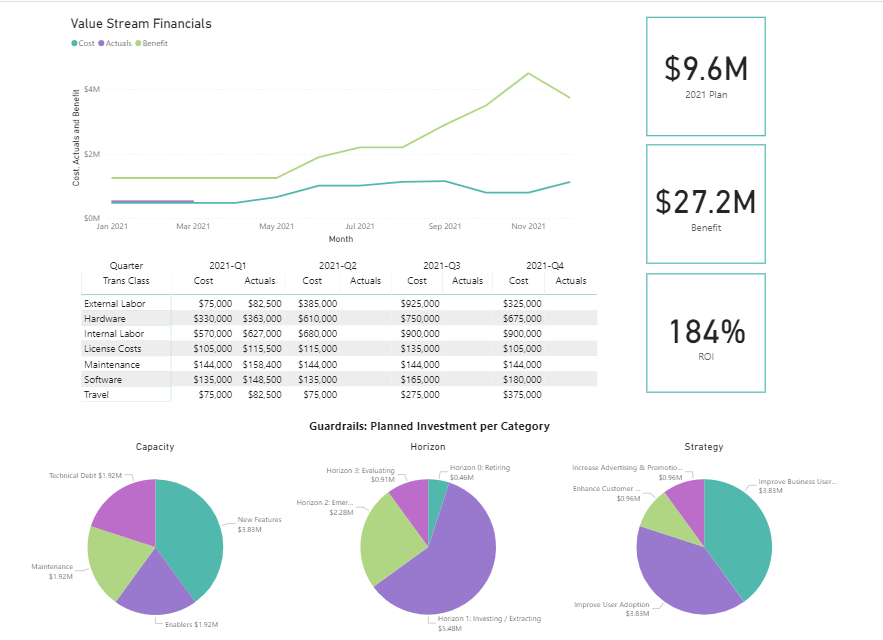
    Broadcom Inc. today added a dedicated value stream management (VSM) application to its portfolio of DevOps offerings as part of an effort to make it simpler to prioritize software development initiatives.

    Serge Lucio, vice president and general manager for the enterprise software division of Broadcom, said that while the company has previously provided VSM capabilities within its tools this addition to its ValueOps portfolio marks the first time Broadcom is making available a complete VSM application.

    The offering is unique because it combines the IT investment capabilities found in the Clarity project management software provided by Broadcom with the Rally platform for managing agile software development processes, added Lucio.

    In comparison, other VSM offerings don’t provide the same level of depth in terms of connecting software development projects to actual financial costs, noted Lucio. The Broadcom platform, for example, in addition to surfacing dependencies between software projects and potential developer capacity issues, also enables IT organizations to forecast the impact changes to funding will have on software development projects, said Lucio.

    In fact, Lucio noted that tracking code as it is developed is relatively easy. Surfacing the financial implications of software development projects requires an additional level of analytics not found in rival VSM offerings, he said.

    VSM, as a concept, traces its roots to lean manufacturing methods, which called for each step of a manufacturing process to be continuously measured. As software development has evolved from being a craft to a process that is automated as much as possible using DevOps best practices, an appreciation for the value of monitoring the impact of missed software development deadlines on the business is growing as organizations realize how dependent they now are on software to achieve business goals. A VSM platform aggregates technical metrics gathered from DevOps workflows and then maps them to key performance indicators (KPIs) defined by business leaders. Once those KPIs are defined it then become possible to apply advanced analytics to assess the financial impact changes to software development schedule will have on the business.

    In general, Lucio said organizations are evolving their approach to software development as they embrace digital business transformation. Rather than managing individual software development projects in isolation, organizations are now managing software development in much the same way they manage product development. As a result, a collection of related software development projects are now being managed in a way that better aligns to the strategic business initiatives, he said.

    It’s not clear at what rate organizations are adopting VSM platforms, but as the number of stakeholders in an organization that have a vested interest in software development increase there is a need for tools that enables those individuals to more easily track processes in a way that doesn’t depend on them mastering the project management application employed by the software development team.

    Regardless of approach, the appreciation of software development in organizations has never been greater. That same increased appreciation, naturally, is creating a level of anxiety among business leaders that need to make decisions that impact the entire organization based on processes that today they often have limited visibility into much less actual understanding.

  • How Low-Code is Anchoring the Digital-First Enterprise

    How Low-Code is Anchoring the Digital-First Enterprise

    When the pandemic hit, digital transformation was accelerated, and many companies turned to low-code development in the hopes of winning in the new agile world. Technology aficionados have heard the phrase, “Faster, better, cheaper — pick two.” Fortunately, low-code gives you all three and then some, adding “flexible” to the mix. It’s no surprise that low-code development interest is now surging, as it’s quickly becoming a critical component of a modern enterprise technology stack, with estimated low-code development market growth predicted to exceed 25%, growing from $13B in 2020 to $65B in 2027, according to research from Brandessence Market Research.

    With their roots in the rapid application development (RAD) tools of the 1990s, low-code platforms are an application development environment that use graphical user interfaces and configuration instead of traditional hand-coded computer programming. Formal software engineering skills are not required to create applications since a visual user interface in combination with model-driven logic is used. This opens the door to a wider range of people who can build apps for the business. With a little training, employees can rapidly create and deploy secure scalable software. One note to remember–low-code is not interchangeable with no-code, which is a subset of technologies aimed at business users primarily working on enhancing their individual productivity.

    A New Player in the Enterprise Technology Stack

    It’s impossible to argue against the need and demand for low-code in the enterprise. According to Gartner, more than 65% of application development in 2024 will be performed by low-code platforms. That’s a remarkable shift for a software category that did not exist a decade ago. The number of digital applications and services being built is exploding as well. Between 2018 and 2023, more than 500 million apps will be created according to IDC. To put that massive number into perspective, that’s more than the previous 40 years combined. With low-code, companies can rapidly produce applications within a shorter time span and at a fraction of the cost. Some skeptics may point out the lack of available IT resources, but business users can learn low-code development methodologies quickly, typically in less than one month. Clearly the old way of building apps cannot keep pace with today’s digital marketplace.

    Process Intelligence Jump Starts Low-Code Journey

    To help accelerate use of low-code and scale it across the enterprise, process intelligence is a key enabler. You cannot improve how you operate tomorrow if you don’t fully understand how you work today. And most companies truly don’t understand how they operate on a daily basis, especially at the granular user activity level required to automate a process or streamline a workflow. They have limited process understanding. They don’t know how their applications and data interact, and they don’t really understand what their customers expect.

    The impact of this gap in process data is well documented. The 70% failure rate of transformation programs is widely reported. McKinsey pegs the cost at nearly $1 trillion annually and noted that 14% of companies have seen a sustained and material improvement in their business. Another study from Gartner noted only 1% of companies have sufficient understanding of their processes to take full advantage of the technology solutions.

    Before embarking on a major initiative, a company must map its processes, its systems and its experiences. Today, that necessary level of operational intelligence just does not generally exist in most companies and on top of that it is very difficult to obtain without process intelligence.

    Low-Code and Process Intelligence – Better Together Than RPA

    Process intelligence was a similar catalyst for robotic process automation (RPA), but the opportunity with low-code is even greater. RPA programs enjoyed massive early uptake, but the challenge was how to scale the initiatives. Companies still struggle getting more than 50 bots deployed. Once any obvious low-hanging fruit is automated, it becomes difficult to identify what to tackle next and how to tackle it. Process intelligence answers those questions to help scale RPA.

    With low-code, process intelligence accomplishes that and more. The combination will overtake RPA as the gateway for AI and automation. Low-code is more efficient and scalable than traditional RPA development because it does not operate at the user interface (UI) layer, making the applications more resilient. Additionally, where RPA is traditionally limited to task-based activities, low-code is much more capable of handling sub-process and process level activities, making it much more valuable to the enterprise. Coupling process intelligence with low-code helps steer an enterprise toward a next-generation operation model that is faster, cheaper, better and flexible. It may also fully realize the promise of citizen developers that RPA struggles to achieve.

  • There’s No Innovation Without Automation

    There’s No Innovation Without Automation

    Companies of all sizes and across virtually every industry today have ready access to hyperscale compute, storage and myriad other technologies — without needing the significant budget or technical expertise of a hyperscale cloud provider like AWS.

    This is a boon for innovation. Cloud opened the door to cost optimizations, previously out-of-reach cloud-native tools, security improvements and other tangible business benefits. This also created something of a myth in the industry: people commonly think of cloud as “easy.” Yes, migrating existing applications to the cloud can create significant business value. But saying “cloud is easy” can be dangerously misleading.

    There are reasons for this perception. A developer with a credit card can create an account and spin up a new environment in a matter of minutes, for example. That’s a far cry from the days when that same IT professional might need to submit a ticket to an internal Ops team days (or weeks) in advance to provision a new Dev environment.

    Operating in the cloud at any kind of enterprise scale is not necessarily easy, however. In fact, cloud can be much more complicated than on-premises infrastructure. Consider the sheer number of new tools and services a platform like AWS rolls out in a given month—keeping up with the pace of change and innovation can itself seem like a full-time job.

    Complexity becomes an even bigger issue when teams migrate to cloud (or begin pursuing greenfield cloud-native projects) while simultaneously trying to move with greater speed and agility, often driven by a new or ongoing digital transformation project in the company. Think about a team that’s undergoing a shift toward DevOps while also migrating a major legacy system to a cloud—that’s a lot to tackle at once.

    Fortunately, cloud complexity is an eminently addressable challenge — so long as you embrace automation. Automation, including the use of embedded or native tools from the hyperscalers themselves, is absolutely critical to cloud success.

    Automation is what enables today’s IT teams to achieve the benefits of a cloud migration without saddling themselves with an untenable operational burden. Furthermore, automation is what makes a lot of popular mantras in business and IT today — such as “fail fast” and similar ideas — actually possible.

    Automation is the foundation of innovation. There is no such thing as meaningful innovation without automation. That’s because sticking with largely manual operations turns IT into a bottleneck. Technology hampers the overall business rather than drive its most pressing strategic priorities. Organizations that don’t adapt to this reality face big headwinds. Cloud on its own does not solve the problem; cloud paired with automation is what is needed.

    Consider the various operational requirements of any IT environment: provisioning, configuration, security, scaling, resource management and optimization, and change control/change management. Without effective automation, each of these alone can require an intensive amount of manual effort to manage in the cloud and quickly become more complicated than their counterpart in a plain-vanilla on-premises environment. If you can’t quickly scale up as your application needs change, whether due to a demand surge or other factors, then you’re not achieving the speed and agility that cloud promises, for example. Likewise, if you can’t scale down machines that are no longer needed, you’re almost certainly wasting money on idle resources. This is where a cloud platform’s autoscaling capabilities come into play.

    Similarly, consider your organization’s existing change control or change management processes. It’s a necessary function of many enterprises, especially those who must manage regulatory compliance. When applied manually in the cloud, it can quickly become a byzantine effort that severely limits agility. That’s a nonstarter for most modern businesses. This is another challenge that can be addressed with automation in the cloud.

    It’s also important to understand that automation drives quality as much as it drives agility. It enables you to deliver new products and services faster and more frequently while fostering top-notch user experiences. The autoscaling scenario above can reduce capacity-related outages that damage customer experience and the bottom line, for instance. In this way, automation and cloud together form the basis for true operational excellence and its hallmark characteristics of capacity, elasticity, performance, and security.

    This is not just the purview of customer-facing applications, either. Competitive businesses must bring the same philosophy to their whole IT portfolio. Innovation depends on internal systems becoming as nimble as a web front-end.

    Think about an ERP system like SAP; change on SAP for enterprises has traditionally moved at the speed of an elephant when today’s businesses operate at the speed of a gazelle. You must apply the processes, tools and culture of cloud and automation to back-end systems, too. You can automate operational tasks in the cloud, such as system refresh and other system-level operations. This paves the way to zero-downtime maintenance, patching the database at the OS level while getting rid of the hours of downtime that task would previously have required. Or think of the necessity of backup-and-restore: Via cloud-based automation, you can deliver point-and-click restores that greatly reduce time to recovery.

    Again, this is about quality just as much as agility. Applying automation appropriately to a cloud-based ERP system can reduce or eliminate human error, too, further boosting system performance and reliability.

    In short, cloud offers great opportunities for enterprises to access transformational innovation.  However, you can’t be innovative without being agile, and you can’t be agile without automation.

  • Accurics Aligns DevSecOps Platform With GitLab

    Accurics Aligns DevSecOps Platform With GitLab

    Accurics today announced it has integrated its tool for discovering violations of security policies that occur when developers provision infrastructure as code with both the continuous integration and continuous delivery (CI/CD) platform and the static application security assessment testing (SAST) tools from GitLab.

    Om Moolchandani, chief information and security officer (CISO) and CTO for Accurics, said both integrations make it easier for developers to discover security issues earlier as part of a DevSecOps workflow using the company’s Terrascan tools.

    Many of the issues organizations are having with cloud security these days can be traced back to misconfigurations created by developers when configuring infrastructure using tools such as Terraform. Accurics created Terrascan to identify those misconfigurations.

    The integration with GitLab makes it easier to incorporate Terrascan into a DevOps workflow in a way that also aggregates data collected from both SAST and dynamic application security testing (DAST) tools, said Moolchandani. That approach effectively unifies what today are two separate cloud infrastructure and application development pipelines by enabling DevOps teams to employ threat scores to enforce security policies as code that are deemed too risky to deploy with block builds, he added.

    At the same time, the integration with SAST and DAST tools provides the context developers need to prioritize remediation efforts before applications are deployed in a production environment, noted Moolchandani.

    Organizations of all sizes are now trying to strike a balance between two conflicting agendas. On the one hand, infrastructure-as-code (IaC) tools such as Terraform have played a critical role in enabling developers to build and deploy applications faster. The issue is that developers lack the security expertise required to ensure infrastructure is secured properly at a time when cybercriminals are more aggressively seeking to compromise software supply chains. Organizations most likely won’t slow down the rate at which applications are being deployed to make sure software supply chains are not compromised. However, in the absence of best DevSecOps practices—which still are not widely implemented—there may be a backlash against shifting application responsibility left toward developers.

    The challenge that creates is most organizations don’t have enough security expertise available to review applications in a timely manner before they are deployed, which results in them hoping security issues will be discovered and remediated during the application update cycle before cybercriminals find a way to exploit a vulnerability.

    Of course, hope does not make for an application security strategy. Organizations will need to find ways to enable developers to better secure applications while simultaneously making it easier for cybersecurity teams to maintain a zero-trust IT environment that reduces the chances organizations will be breached via, for example, a phishing attack to steal developer credentials.

    Regardless of how DevSecOps workflows and zero-trust IT architectures are implemented, it’s clear organizations have run out of time to resolve longstanding security issues that are now making the kinds of headlines no one wants to see.

  • Designing Cost-Efficient Cloud Environments

    Designing Cost-Efficient Cloud Environments

    Today, the days of on-premises data centers are mostly behind us, and the cloud has largely taken over with the promise of scalability, flexibility and cost-efficiency. Despite these promises, the cloud often falls short of these ideals. Why?

    Because managing the cloud is hard—especially when it comes to managing its costs. There are no automatic savings the moment you sign up with AWS or any other cloud provider. Instead, realizing cloud savings requires lots of capacity planning, careful analysis, consistent monitoring, accurate forecasting and endless adjustments—it’s enough work to make anyone’s head spin.

    But the rewards make it worth the effort. If you manage your cloud correctly, it offers tremendous savings compared to on-premises environments. However, moving to the cloud without first putting a cost strategy in place can cost your organization millions as you scale in the long term.

    So, what guidelines should you follow to ensure you’re maximizing your potential cloud savings? Here are some common do’s and don’ts you can start implementing—or stop doing—now.

    Moving to the Cloud

    Migrating to the cloud is the first, and the most complex step. So before you get started, bear in mind the following:

    Do: Analyze Your Environment Prior to Migration

    Let’s face it—if you have a disorganized and over-provisioned on-premises environment, you’ll have a disorganized and over-provisioned cloud environment. Unless, of course, you clean it up prior to the big move.

    On the bright side, cleaning up your current, familiar environment is less daunting than doing the clean-up once you move to the new and unfamiliar cloud environment. Therefore, it’s critical to analyze your current environment prior to your cloud migration.

    Start by decommissioning all assets that are not currently being used. For example, you may have a virtual machine (VM) that was provisioned for a particular project and not turned off once that project was finished. As a result, you’d have an application running that is no longer needed. Identifying and removing these resources now will lower your future cloud costs while relieving engineers of future headaches.

    Do: Create a Blueprint for Your Cloud Architecture

    Next, you need to re-architect your application stack. Don’t worry, this task isn’t as scary as it sounds. You’ll need to create a list of the infrastructure you’re using now and find its corresponding infrastructure in the cloud. Say, for example, you’re using multiple dedicated servers for message queuing. If you’re moving to AWS, you’ll need to identify similar instance types in AWS prior to your cloud migration.

    Don’t: Follow the “Lift and Shift” Approach

    It may be tempting, but whatever you do, avoid the “lift and shift” approach. There are certainly ways to optimize your current environment, so simply moving exactly what you have into the cloud is a missed opportunity to reorganize, restructure and optimize performance and costs.

    For example, you may be running VMs that are not being used, backing up unused development servers, or storing data that can be allocated to a low-cost archival storage class. Make sure to readjust your architecture to fit the cloud, not the other way around.

    Governance

    The bottom line is, somebody needs to be responsible for managing cloud costs. Depending on your company size, it can be a team or an individual, but it must get done sooner rather than later.

    Do: Ensure Cloud Spend is Managed by a Specific Individual or Team

    Sticking to a cloud budget is easier said than done, but if you delegate this task to a team or specific individual, it will be their top priority to ensure your company stays on target. They will be responsible for handling cloud budgets, establishing who can and cannot provision resources and monitoring use.

    If you fail to establish governance, you run the risk of having many individuals provisioning resources without any liability or accountability, which results in significant overspend and lots of chaos.

    Don’t: Presume Governance Is Only for Large Organizations

    Think your company’s too small for governance? Think again.

    At least one individual should always be responsible for monitoring your cloud spend and ensuring it stays in line with the allocated budget. This person will work hand-in-hand with finance to create budgets, monitor use, create billing alerts and more.

    Cloud Security

    If you’re migrating to the cloud without thinking about security, you’re making a huge mistake. It is estimated that cybercrime will cost the world over $10.5 trillion by 2025. Even worse, according to Verizon’s recent study, cloud security breaches have surpassed their on-premises counterparts for the first time ever.

    So, needless to say, security should be prioritized when moving to the cloud. Here are some tips to get started.

    Do: Develop a Layered, Multi-Tiered Cloud Security Plan

    Your cloud security strategy should safeguard both your data and IT assets in the event of a cyberattack, while being compliant with the standards and regulations specific to your industry.

    Some cloud security strategies include:

    • Building your solution with a well-architected framework
    • Using solutions like threat detection, automated patching or security auditing
    • Connecting your on-premises network to the cloud using a transit gateway or similar technologies
    • Creating enough firewall rules for traditional systems and web applications

    Don’t: Rely Exclusively on Your Cloud Provider’s Security Controls

    While many cloud providers offer great security solutions, relying on them exclusively will not help you cover your bases. AWS regularly refers to the shared responsibility model, which states that AWS covers infrastructure, but the user must secure their own applications.

    Scheduling Your instances

    The longer you run your servers, the larger your bill will be. And, unfortunately for us, creating a new VM in the cloud has become so easy that many forget to turn them off when they are no longer in use. This results in cloud costs that are up to 66% higher than they need to be.

    So, if you’re looking to cut cloud costs, keep the following in mind when scheduling your instances:

    Do: Automatically Schedule Instances

    Let’s face it, it’s easy to forget about shutting down instances after hours. In fact, it’s so easy, it can happen to even the best of us. Automatically scheduling instances, on the other hand, avoids human error while simplifying the shutdown process.

    AWS’s Amazon Instance Scheduler or Azure’s Start/Stop feature makes it easy to shut down instances from non-production environments during “off hours” and spin them back up once they’re needed. In addition to these tools, you should consider implementing alerting so you can be notified if anything goes wrong in the scheduling process.

    Do: Take Advantage of AWS Auto-Scaling

    AWS auto scaling enables you to take full advantage of the cloud’s elasticity. The technology continuously monitors your application’s capacity needs and automatically adjusts resources to fit its current use. As a result, you don’t have to spin out a large VM for your workload. Instead, you can begin with a low-spec server and add it to an auto scaling group. When demand increases, more nodes will be added to your fleet to accommodate scale. Likewise, when the demand decreases, the extra nodes will be spun down.

    This helps optimize both performance and costs so you’re never paying for resources you’re not using and you always have the right number of instances to run your applications.

    Don’t: Allow Your VMs to Run Continuously

    This may seem obvious, but as we mentioned earlier, many forget to shut down VMs when they are not needed. For example, 9 AM to 5 PM on weekdays may be your peak hours. This means you probably won’t need certain VMs to run on Saturdays or at 3 AM—so why pay for them? Instead, shut down VMs during “off hours” to ensure your savings are maximized.

    Tagging Your Assets

    There’s no getting around it—tagging assets is an essential part of understanding your usage patterns and optimizing cloud costs. Asset tags are metadata labels which can be attributed to individual resources in your cloud fleet to track which application it belongs to. Usually, you can assign up to 50 tags per resource, and they can be organized and named according to your needs.

    When tagging assets, make sure to keep in mind the following:

    Do: Implement a Tagging Strategy Early in your Cloud Journey

    It’s never too early to start tagging assets. In fact, the longer you postpone it, the harder it will become. Once your spend and usage increases, which it inevitably will, you will need to have a tagging system in place in order to determine which team is responsible for each asset (so you can have them evaluate resources and costs), deactivate unneeded resources and more.

    Tags are extremely useful in many real-world scenarios. For example, if you’re not using a specific application, you can search for the tag “application” with a value of the application’s name. You will then see all resources related to that application, so you can easily delete them.

    Additionally, tags can be used to enforce budgets and prevent overspending. Simply set a budget threshold on your tag and set up alerts to notify you when you’re getting close to that threshold.

    Don’t: Embark on Cloud Migration Before Tagging Assets

    Tagging is simple if you do it in the beginning when your environment isn’t so complex. But it’s excruciatingly difficult once your environment is more mature. So, if you’re moving to the cloud, make sure to start tagging beforehand so you don’t have any regrets.

    Do: Use Reserved Instances and Savings Plans

    If you’re on AWS, using reserved instances (RIs) and savings plans can save you up to 72% over the cloud giant’s on-demand pricing. The catch is you have to commit to purchasing RIs one to three years in advance, which means you’ll need to predict your usage needs ahead of time. Despite this challenge, RIs offer tremendous savings for those that use them wisely.

    Don’t: Purchase Reserved Instances or Savings Plans Without Building a Strategy

    When using RIs, it’s crucial to develop a strategy to ensure your savings are maximized. Often, people make the mistake of purchasing many RIs, which are not used. This results in upfront savings, but no return. Make sure to come up with a plan for how you handle reserved capacity. Selling them on the AWS marketplace is a good place to start.

    We move to the cloud for the promise of more flexibility and lower costs. But to actualize that promise, we can’t expect the cloud or our cloud provider to do all of the work for us. Unfortunately, cloud savings are not automatic.

    That’s why creating a strategy that covers costs, security, and other critical aspects of cloud migration should be your No. 1 priority. Even if you’ve been using the cloud for years, you should continue to reassess your cloud cost strategy to ensure it is optimized fully. Start by pinpointing practices that result in cloud waste and creating a game plan to prevent it from happening.

    Keep in mind that new technologies are always emerging, so make sure you are aware of any industry changes which could impact your cloud cost strategy.