Category: Blogs

  • Report: The State of Cloud-Native Application Security

    Report: The State of Cloud-Native Application Security

    The cloud brings tremendous capabilities in terms of increased deployment fluidity and automation. Along with cloud adoption has come the use of cloud-native tools built specifically for developing applications for this domain. However, cloud-native tools carry some nuanced security concerns, such as misconfigurations, known vulnerabilities and leaked secrets. As such, 83% of organizations recognize security as very important to their cloud-native strategy, according to a recent report from Snyk.

    Snyk’s State of Cloud Native Application Security report surveyed hundreds of IT professionals on their cloud-native security concerns. Below, we’ll pick out the top takeaways from the report, identify the most common trouble areas for cloud-native application security and see if there’s a correlation between deployment automation and higher degrees of application security.

    The Move to Cloud-Native

    Teams are moving to cloud-native tech, empowering DevOps with software-driven architecture and infrastructure-as-code (IaC). In this new cloud-native paradigm, 58% of production workloads are deployed as containers, 21% now are serverless and 50% use some form of IaC within the deployment process.

    Organizations are moving to cloud-native technology for a variety of reasons. For one, containerized software affords increased speed — 68% of organizations moved to containers for increased deployment velocity, the study found. This is followed by ease of management (at 67%) and reduced cost (43%). There is also the security imperative for adopting cloud-native tools; 36% of respondents cited security as a primary reason for moving production applications to containers.

    Top Cloud-Native Security Concerns

    While cloud-native technologies such as containers, Kubernetes, serverless and IaC enable more rapid development, they also bring unique security issues. The report found that misconfigurations and known unpatched vulnerabilities are by far the most common type of incidents among cloud-native environments. In fact, 45% of organizations have experienced an incident arising from a misconfiguration, followed by 38% due to known unpatched vulnerabilities.

    Other common cloud-native security incidents include secrets leaks, failed audits and malware. Interestingly, the study also found that data leaks by insiders are more common within organizations with higher degrees of cloud-native adoption. According to the report, 38% of organizations with high cloud adoption have suffered data leaks by an insider, whereas the figure is cut in half, at 17%, within organizations with low cloud adoption. Secrets like API keys must be managed carefully, especially as cloud-native tools force more dependencies. “The need for effective management of these kinds of artifacts is a key differentiator from the more centralized pre-cloud era,” the report noted.

    Automating Security Testing

    End-to-end deployment automation shows promise, yet is still at an early stage of maturity for most development teams. Though 95% of organizations use some kind of deployment automation, only about one in three organizations have an entirely automated deployment pipeline.

    Organizations with increased deployment automation tend to embrace a higher degree of security testing, as well. Highly automated pipelines are twice as likely to use security testing throughout their development lifecycle, found the report. Since incidents most commonly arise from misconfigurations and known vulnerabilities, automated scanning could help identify many cloud-native issues, comparing production code against databases of known exploits.

    So, when does this security testing occur? More often than not, it happens within the CI/CD pipeline. Over 60% of organizations perform security testing within the CI system. This is opposed to testing source code repositories or local IDEs and CLI tools early on in the development process. In terms of testing frequency, there is a wide range of executions. For those groups with high deployment automation, 70% test security daily or more frequently. Automated security testing seems to be functioning well, as 72% of fully automated teams find and fix critical vulnerabilities in under one week.

    The report also exposed an interesting disconnect with regard to security testing ownership. Only a small percentage of security engineers (less than 10%) feel developers are responsible for the security of the cloud-native environment and applications, whereas 36% of developers stated they are responsible for security. These figures may demonstrate the security onus shifting left toward the development side. Or it could underline changing attitudes as full-cycle development becomes more realistic. Regardless, teams will have to find clarity on roles to avoid some difficult conversations!

    Cloud-Native Security

    With the shift toward cloud-native strategies, security standards are rising to respond to new issues like misconfigurations. To address mounting application threats, increased automation could help shift security left—this and other reports clearly demonstrate a correlation between fully automated deployment pipelines and an increased security testing regimen.

    As a result of cloud-native adoption, 58% of organizations have increased their security concerns since adopting cloud-native tools. Part of this involves moving to a zero-trust approach across all infrastructure, whether internal or external facing. The report revealed that 58% of organizations are increasingly concerned with misconfiguration, 52% are increasingly concerned with insecure APIs and 43% are increasingly concerned about known unpatched vulnerabilities, while 41% are concerned about secrets leaks. Hopefully, these benchmarks will help you see how your organization stacks up in comparison to others.

    Snyk’s State of Cloud Native Application Security report questioned 600 experts in development, security and operations on cloud-native adoption and security practices. For more insights, view the study in its entirety here.

  • Best Practices for Modern IT Incident Management

    Best Practices for Modern IT Incident Management

    [pdf-embedder url=”https://devopsy.kinsta.cloud/wp-content/uploads/2021/06/best-practices-for-modern-it-incident-management.pdf”]


  • Linux Foundation Makes Available Software Manifest Tool

    Linux Foundation Makes Available Software Manifest Tool

    The Linux Foundation is making available a set of free tools for building software bills of material (SBOMs) based on the software data package exchange (SPDX) file format it curates.

    Backed by more than 20 organizations, SPDX is an effort to standardize the way metadata describing the contents of a software package is described.

    The SPDX specification was submitted last fall to the International Organization for Standardization (ISO) by the Joint Development Foundation, an arm of the Linux Foundation.

    The Linux Foundation, as part of its efforts, is also making available a free, online training course to provide IT teams with the foundational knowledge required to create and maintain SBOMs.

    Kate Stewart, vice president of dependable embedded systems for the Linux Foundation, said SBOMs play a critical, often overlooked role in maintaining the security of a software supply chain. One of the major challenges organizations have today is that an SBOM isn’t often created, which makes it harder to discover what software components have been included in a package. That makes it difficult for organizations to determine if they are employing a version of a software component that now has a critical vulnerability that was just recently reported, noted Stewart.

    Even when there is a SBOM, its construction can vary from one team or organization to the next. The tools provided by the Linux Foundation are intended to standardize how the fields used to describe a SBOM are defined, added Stewart.

    The SBOM tools being advanced by the Linux Foundation are, in part, a response to President Biden’s executive order pertaining to the security of software supply chains, added Stewart. The National Telecommunications and Information Administration (NTIA), as a result, is now asking for wide-ranging feedback to define the minimum requirements for a SBOM.

    It may take time before there is an agreed upon SBOM standard, but as microservices based on containers become more prevalent, it’s also apparent the issue will become more pressing. More, smaller packages of software being deployed in the enterprise without manifests will only further exacerbate an application security crisis that has deepened in the wake of recent high-profile software supply chain breaches.

    Ultimately, a SBOM should automatically be self-generated as part of any DevOps workflow. The challenge is there is still a massive amount of software being created outside of any formal DevOps workflow. On top of that, the massive amount of poorly documented legacy application software already deployed in an enterprise IT environment makes it clear how big an issue the lack of a simple SBOM really is.

    It’s not precisely clear who inside an organization should be responsible for standardizing SBOMs. The challenge is that within many organizations it’s not the kind of issue for which developers are rewarded, much less motivated, to solve. Nevertheless, everything from application security issues to the massive amount of technical debt that stems from duplication of software development projects can all be traced back to the lack of a simple manifest.

    Of course, now that many organizations are starting to appreciate just how dependent they are on software, more questions are being asked about how it’s constructed. The thing that many of the business executives asking those questions are about to discover (with some incredulity) is how much of the software the organizations depend on is still being built using methods that have more to do with a medieval craft than they do a manufacturing line.

  • Google Proposes SLSA Framework to Secure Software Supply Chains

    Google Proposes SLSA Framework to Secure Software Supply Chains

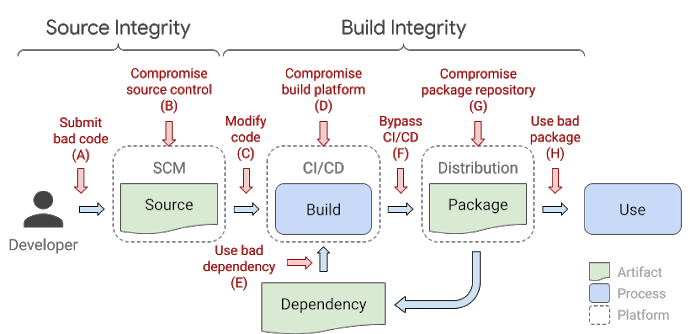
    Google is proposing organizations adopt a framework for securing the integrity of software artifacts across a software supply chain.

    Kim Lewandowski, a product manager for open source software security at Google, said the Supply Chain Levels for Software Artifacts (SLSA) is based on an internal framework, known as binary authorization for Borg, that the company has been employing now for more than eight years to secure its software. Borg is the name Google attached to the platform for building and deploying applications upon which Kubernetes is based.

    In its current form, SLSA is a set of guidelines that identifies how to attain four different levels of application security. The goal, however, is to create a framework that will automatically generate auditable metadata that can be fed into policy engines to create a SLSA certification.

    The lowest level of SLSA requires that the build process be fully scripted or automated and generates metadata that enables provenance to be created. At the highest level, SLSA requires a two-person review of all changes made during a hermetic, reproducible build process. At the highest SLSA security level, organizations should be able to assure others that their software supply chain has not been compromised, said Lewandowski.

    Google

    In the wake of a recent series of high-profile breaches of software supply chains, the level of scrutiny being applied to how software is constructed has increased significantly. In theory, at least, developers have assumed more responsibility for application security as part of an overall shift left that provided them with more programmatic control over IT environments. As a result, cybercriminals are now focused on compromising either the credentials of developers as part of an effort to insert malware into application as it is developed, or they are trying to exploit vulnerabilities that developers have inadvertently created by programmatically misconfiguring infrastructure.

    DevSecOps best practices are, of course, being adopted to teach developers how to better secure their application environments. The issue is that not enough developers are learning how to secure applications fast enough. The volume of attacks against the software supply chain continues to grow at a rate that is now much faster than organizations can thwart simply by educating developers. In some cases, organizations are once again empowering cybersecurity teams to make sure software supply chains are secure regardless of the potential impact on the rate at which applications are being developed.

    Google is trying to promote adoption of SLSA as a framework for securing both open source and proprietary application code, said Lewandowski. There’s no silver bullet for securing software, but a framework that ultimately automates as many of the security processes as possible within the context of a DevOps workflow would go a long way toward hardening the software supply chain, noted Lewandowski.

    SLSA is being put forward as a response to a cybersecurity executive order issued by President Biden that, among other things, tasks the National Institute for Standards and Technology (NIST), an arm of the U.S. Department of Commerce, to consult with federal agencies, the private sector, academia and other stakeholders in identifying standards, tools, best practices and other guidelines to enhance software supply chain security. Given the level of dependencies that exist across those software supply chains, that executive order, to varying degrees, now applies to almost any entity that builds software for an organization that, on some level, interacts with the Federal government.

  • Code Ownership Is Key to Accelerate Debugging

    Code Ownership Is Key to Accelerate Debugging

    App stability is a fundamental part of every app experience. Broadly speaking, app stability is a measurement of the number of total app sessions that are crash-free or the percentage of daily active users who do not experience an error. End users have little patience for apps that crash or fail. Every application, whether it’s B2B- or B2C-oriented, suffers some level of instability and fails occasionally. Ideally, organizations should aim for app stability scores close to 99.999%. To achieve that quality of performance, software engineers must be fast and efficient in fixing coding errors that are frequently the cause of app crashes.

    But that’s a major challenge using the traditional approach to debugging. Most major applications have a wide variety of engineers, including completely separate engineering teams, all working from a single code base. Each team typically uses their own unique issue tracker to monitor errors, such as Jira or Asana. In addition, teams typically use their own channel in a collaboration platform to communicate internally, like Slack or Microsoft Teams. This causes silos between the various engineering teams, limiting communication and visibility between each team.

    When an error occurs, all the engineering teams are alerted about the bug through their own issue trackers. From there, they figure out where the error occurred in the code and who is specifically responsible for fixing it. This requires each team to manually review code as they try to locate the bug, which wastes precious time as engineers duplicate one another’s efforts. Because teams are using different communication channels, there’s little to no collaboration or alignment between the various engineering teams during this process. Overall, this approach to debugging is a cumbersome and inefficient undertaking that slows the process of repairing apps, ultimately hurting the end user experience.

    Consider a real-world example. Suppose your team is one of a dozen engineering teams, all working together on an application that creates a mobile game. Perhaps your team works on maintaining the in-app purchases feature set, while another works on the account setup flow and yet another team works on character customization features. If a bug suddenly crashes the app for a significant portion of users (resulting in a clear drop in the app stability score), every team will receive an error alert through their issue tracker notifying them that a coding issue has caused the application to fail. No one will know if their team’s code was responsible. As a result, each team is forced to go through the laborious process outlined above. If it turns out that the bug was in the character customization code, then the teams responsible for in-app purchases and account setup have wasted valuable time and resources searching for the error.

    The only team that should be notified of a bug is the one responsible for the part of the code a bug originates from. The emerging concept of code ownership makes this possible, providing a faster and easier approach to debugging. With this method, organizations create code owner files to determine which engineers or teams are responsible for each section of code, feature flags or experiments. If section X within the code fails, then team X will be responsible for addressing it. In the example above, only the team responsible for the code associated with character customization would need to find and fix the bug.

    This makes it much easier to respond to application issues and allocate the correct resources to remedy those issues. For end users, code ownership means that malfunctioning apps will be fixed faster, improving the customer experience and boosting business metrics. From an internal POV, engineering teams become far more cost- and time-efficient, freeing developers to take on new projects they actually enjoy working on.

    A culture of code ownership also helps engineering teams adopt other best practices for debugging. One major example is error prioritization. Not all bugs cause significant app instability and need to be fixed right away. When a team can ignore errors unrelated to their code, they have more time to fully hone in on and evaluate the errors they are responsible for. With this focused approach, they can establish metrics determining if they need to fix a bug immediately or if it can wait.

    Simply put, code ownership eliminates the confusion and guesswork associated with the process of debugging, allowing engineering teams to easily identify, own, prioritize and remedy bugs. Embracing code ownership is critical for companies to improve app stability, which is the most fundamental measure of an app’s health. This ties directly into business outcomes, because app stability is closely associated with customer retention, customer growth, sales and revenue. By speeding up debugging efforts, code ownership has a pronounced, positive impact on stability, boosting each of those metrics.

  • Automatic Right-Sizing is Magical Thinking

    Automatic Right-Sizing is Magical Thinking

    Some months ago, AWS evangelist Corey Quinn wrote a short blog post titled “Right Sizing Your Instances Is Nonsense.” As usual, Corey was spot-on in his takedown of cost-reduction-magic-AI industry hype. But his piece only scratches the surface. I would take the argument a step farther and say that anyone who tells you they can automatically and generally “right-size” compute instances simply doesn’t understand how software works.

    Does that strike you as overly aggressive? Stay with me. Even if you don’t wind up agreeing, there’s a lot to be learned about AIOps from a discussion of “automatic instance right-sizing.”

    What is Right-Sizing?

    Quoting directly from the website of one of the many services that claim to provide “right-sizing” for cloud instances:

    “The Recommendations Engine leverages the time series data of relevant utilization metrics for your resources, then creates a statistical model around average and peak utilization periods. The tool leverages historical utilization data to identify performance characteristics across instance types, families and zones to provide valid recommendations for your workload.”

    The idea behind this “right-sizing” is quite simple, really: track a bunch of cloud service metrics (and maybe a bunch of OS metrics, too, if they are available), use some statistical model—commonly called “AI” on VC decks—and magically deliver recommendations for a more cost-effective cloud instance type.

    There’s just one problem: creating a useful statistical model from generic metrics is practically impossible unless your software is purpose-built to support it, and that is never a software design goal. In fact, software is almost always built in a way that is completely contrary to this goal, and for very good reasons. To understand why, let’s go over the assumptions behind “right-sizing”:

    1. The software will be able to use all given resources
    2. Performance will improve (or degrade) predictably and uniformly with added resources
    3. Metrics accurately describe application load
    4. Scaling dimensions are independent
    5. There will be no side effects on connected systems

    It turns out, none of these assumptions behind right-sizing are generally true.

    A Crash Course in Software Scaling

    In theory, software is bottlenecked on resources, be they CPU, disk, RAM, network, what have you. In practice, however, it is extremely difficult to build software that can fully utilize resources.

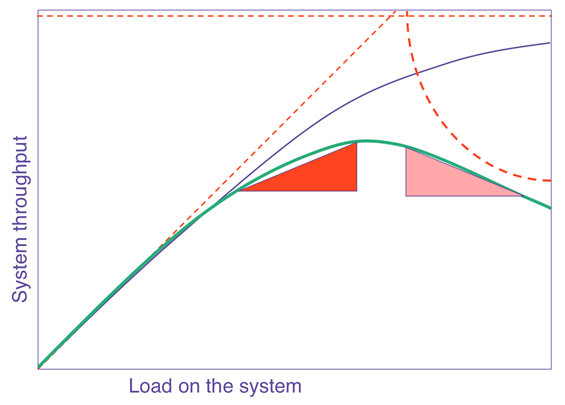
    The general curve that describes how software scales with resources or load is known as the Universal Scalability Law (USL). In a nutshell, it says that on any chart showing scale versus performance, you will see a region of linear scaling where adding resources (say, CPU cores) proportionally increases performance; however, you will then see where performance continues to increase on a nonlinear basis, with smaller and smaller gains with every additional resource until, at some point, the benefit is so marginal as to be completely negligible. This is known as Amdahl’s law, which states that the performance of every program is limited by the serial part.

    Beyond Amdahl lies the issue of retrograde scaling, the existence of which people often forget about until the consequences hit them smack in the face. In this issue, adding resources actually slows down the system. That’s right. From this point onward, larger servers will make your software slower.

    The reason this happens is that, to scale linearly, the workload and resources must be completely isolated and decoupled from each other, which isn’t realistically possible. There are always shared components, e.g. the kernel scheduler, the memory controller, the main PCI bus, perhaps the algorithm requires locking. In any case, the net result is queueing on the shared resource, which might also become a bottleneck when overloaded. Think of a supermarket checkout: you can admit more and more shoppers into the store, but they will still end up waiting at the checkout, eventually, no matter how many registers you open and staff. Performance is limited by the number of checkout counters, not by the number of shoppers or clerks. Worse yet, if the queue gets out of control (maybe people got tired of waiting and shopping carts are literally abandoned in front of remaining shoppers, blocking the path to checkout — think of this as the contention of retries and timeouts), the throughput of checkout will decrease as counters are starved for shoppers.
    right-sizing

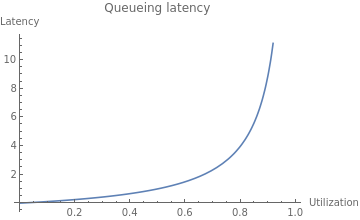
    The USL shows us what happens to throughput as we scale, but what about latency?
    right-sizing

    As resource utilization approaches 100%, the wait time for the resource will approach infinity in a nonlinear fashion. This is why systems are designed to run at low utilization, so that quality of service does not degrade too much. You might see a server running at 50% utilization and think, “We can use a server with half the resources and save money!” but if you actually try to do that, you will degrade latency and quality of service to an unacceptable level, most likely causing an outage.

    The Dark Arts of Configuration

    Even if your software is able to take advantage of available resources in theory, it needs to be properly configured to use them. Buffer sizes, thread pool sizes, memory heap size, number of connections—most software has numerous options to tune it for resources and specific workload. You can’t just change the box size and expect it to work! Not to mention, it’s quite possible your current configuration is far from optimal. I’ve substantially reduced cluster sizes on several occasions by making a one-line configuration change.

    For example, a common web server configuration is the number of concurrent requests the server can handle (often expressed as number of threads), which relates to the number of CPU cores available, the amount of memory available to the specific workload and the average time it takes to handle a request. The problem you are solving isn’t “What instance size will have the best ROI?” but rather “What combination of instance size and configuration will have the best ROI?” That is a totally different question that requires specific knowledge of the application to answer.

    Let Them Eat Cache

    In the old days, when you tried to allocate memory beyond what was currently available, the operating system would simply refuse your request. Ah, the good old days were simple! Alas, in our quest to simplify programming and resource management, and to allow software to efficiently adapt to a changing environment, we made common use of resource tradeoffs. For example, a complicated computation can be calculated again and again using the CPU, or the results can be saved and reused, saving CPU time and trading it for the use of RAM or disk. This pattern is quite common; when you overallocate memory, the operating system may trade off CPU to free memory by compressing memory objects, or it may trade off disk space by paging out RAM to swap. Java, Node.js and Go each have a similar tradeoff where they spend CPU time on garbage collecting to free RAM. Modern software makes numerous tradeoffs between CPU, RAM, disk and network in multiple dimensions. The end result is that different resources are coupled in many unexpected and obscure ways.

    Lies, Damned Lies! (And Metrics)

    Speaking of that server running at 50% CPU utilization, it is quite possible that server is also maxed out on CPU at the same time. How can this be? It’s because the metrics you see are not raw data but aggregates—in many cases, averages—and aggregates hide certain behaviors that can be very important; for example, peaks and bursts, such as the ones you get from compaction, garbage collection and other periodic processes that routinely run in modern software. There are billions of events happening every second on a modern server, and only a few data points of metrics emitted every minute. All metrics are loss-y; it’s simple math, really. But machine learning (ML) models are only as good as the data they work on, so if the metrics weren’t specifically created to show the relevant behaviors—and they weren’t—the model would be completely blind to their existence.

    What is “Performance,” Exactly?

    Whenever we deal with resource allocation, we are interested in its impact on performance, which raises the obvious yet rather uncomfortable question: what’s your definition of “performance?” Is it throughput? Latency? Mean or the 99th percentile? Of which transaction? Or, perhaps you are mostly interested in the rate of purchases executed on the website? These are all different things, and often, optimizing one might degrade the others.

    This kind of discussion is the first step in any performance engineering session—but completely absent from the scope of “right-sizing” services, and the last thing you want is the generic cost function of the ML model costing you money.

    This wouldn’t be so bad if all performance goals could be achieved at once, but, sadly, some of them are in opposition: e.g., higher throughput causes higher latency due to queueing effects. When making changes to software systems, we have to know what performance metrics are important to us.

    The Curse of Local Optimization

    It is very tempting to look at a cluster of machines as an independent system. But if that system is doing something meaningful, it is part of some bigger system, and changing the configuration will likely have an effect on the larger system it is a part of. When we make changes to subsystems, it is with the intent of improving the system as a whole, to make the customer happy and make more money. But when a change to a subsystem is motivated by a desire to reduce the cost of the subsystem, the result is often an increase in the overall cost of the system! This is because the local cost of subsystems is relatively small compared to the cost of the entire system, not to mention the possible reduction in the income of the system. For example, you could save lots of money by using older, slower servers, but your customers won’t be very happy with a slow application and your profits will suffer—which will probably cost you much more than whatever you saved.

    To take this ad absurdum, you could save 100% of the subsystem cost by turning it off completely. Of course, the assumption is that changing server sizes will not have any side effects, which, as discussed, is highly unlikely. There will be side effects on connected systems as well, some of which will not appear immediately. Load is variant, and operational overprovisioning and buffers were often put in place for a reason. It’s quite likely the reason for low utilization is safety margins.

    The Problem With “Right-Sizing”

    The basic problem with “right-sizing” is the rather obvious, yet implicit, assumption that there is such a thing as “the right” size. Software engineering is all about tradeoffs, precisely because it’s very rare (if it happens at all) that one thing can be improved without making another thing worse. Tradeoffs mean business decisions to make, and you really don’t want a generic ML heuristic to make those for you. ML is very good at dealing with problems where a lot of data is available, the data is high quality, the data is predictive of behaviors (which isn’t the case for complex systems!) and most important, the problem is well defined. Most problems in AIOps are very far from this. Don’t take it from me, take it from the people who excel at both high-scale ops and ML.

    Even if it was feasible to make such ML models work, software is unable to automatically adapt to different machine sizes and fully utilize server resources. If it were, companies like ScyllaDB and Azul Systems wouldn’t need to exist. Creating software that is scalable and resource-efficient on modern hardware is a very difficult problem, and without those building blocks, ML models are constructing very shaky structures.

    It’s worth emphasizing that I’m not arguing against adapting the size and configuration of servers, only that doing so automatically and blindly for some local “cost-saving” goal isn’t the solution you might think. The goal of such changes should be to raise the overall quality and performance of the larger system guided by a theory of how that system works. ML is not a replacement for human thought and learning. There might certainly be an “optimal” instance type, or even a few, but “optimal” implies a target metric that certainly isn’t cost reduction. No system exists for the sole purpose of being inexpensive. All systems exist to serve business requirements first, and to be low-cost second.

  • Survey Reveals Slight Decline in Level of SRE Toil

    Survey Reveals Slight Decline in Level of SRE Toil

    The amount of routine toil that site reliability engineers (SREs) perform declined slightly in the last year even though IT environments in general are becoming more complex to manage.

    An annual survey of 300 SREs conducted by Catchpoint, a provider of an IT monitoring platform, in collaboration with VMware and the DevOps Institute suggests that the amount of toil—defined as low-level manual tasks—declined 15% in the last year.

    Only 22% of respondents claim to be scientifically measuring toil, so, to a degree, the survey results are apocryphal. Overall, the survey, published this week, finds SREs are, not surprisingly, spending the bulk of their time on responding to incidents and outages, followed by participating in postmortem analysis and on-call rotations. The primary sources of toil cited in the survey are too much technical debt, lack of alignment of priorities and goals, lack of appreciation of business value, lack of training and support and lack of collaboration.

    In terms of automation adoption, the most common use cases cited are release management, infrastructure management and application management. The tools most commonly employed by SREs are used to monitor infrastructure, networks and application performance. Adoption of artificial intelligence (AI) tools to manage IT operations (AIOps) remains low. The survey also finds respondents are roughly split evenly between centralized (42%) and decentralized (38%) approaches to managing IT. Another 20% said they have adopted a hybrid approach. Lack of visibility across the stack (53%) was the most cited cloud application monitoring challenge.

    The survey also finds only half of respondents continually refine their service level objectives (SLOs).

    Leo Vasiliou, director of product marketing for Catchpoint, said it’s clear that SREs are becoming more proactive in terms of preventing and containing the impact of IT incidents. The challenge they face is lack of visibility and context as those IT environments become more complex. Complexity is increasing, in part, because of the rise of cloud-native computing platforms running microservices-based applications that have lots of dependencies.

    Less clear right now is the percentage of IT environments managed by SREs today. In theory, a single SRE can do the same amount of work as multiple IT administrators by automating processes using various DevOps tools rather than relying on traditional graphical tools. However, SREs are hard to find and retain. It’s also not always apparent to what level of automation needs to be attained to qualify to be an SRE or, for that matter, what certifications may be required. Interest in becoming an SRE is rising, in part, because they typically command higher salaries.

    In the meantime, it’s clear organizations will need to find ways to automate the management of IT to a much greater extent. Most organizations cannot afford to hire a small army of IT professionals to manage IT environments that become more complex with each passing day. Everything from DevOps best practices and next-generation observability tools that promise to provide more context to AI platforms will all be part of the mix. The challenge is finding a way to implement those tools before IT management spins further out of control.

  • No More Hot Potato: How Collaboration is Key in Application Security

    No More Hot Potato: How Collaboration is Key in Application Security

    Technology is accelerating at an unprecedented rate and companies with little digital footprint or experience in application security are struggling to keep up. With more and more breaches and vulnerabilities being detected in applications, people are shifting blame like it’s a game of hot potato. But it doesn’t have to be that way.

    With Shifting Left Virtual Conference rapidly approaching, Rebecca Auguste sat down with the CEO of ShiftLeft, Manish Gupta, to discuss how developers and application security teams can better collaborate to increase application security efficacy. The two talked about ShiftLeft’s strategy, how innovation and security can be at odds with one another, adopting modern solutions and everything in between.

    What is ShiftLeft? 

    ShiftLeft is a next generation application security company. As companies are moving rapidly adopting the cloud, developing software ever faster so they can deliver features to their customers and drive ever increasing revenue, in that race we are starting to leave security behind because we are still using legacy tools. The idea is we need to shift left and we have to start fixing vulnerabilities as early on as possible in the process thereby reducing our cyber risk.

    Are innovations and security at odds with each other now? 

    Historically they have been. Use of legacy technologies in a modern pipeline forces customers to choose between being agile delivering feature functionality faster or getting better at security. At ShiftLeft we are starting to show through our customer successes that that choice doesn’t have to be that way. We can become more agile and we can become more secure.

    Here are some important statistics from ShiftLeft customers:

    1. If you’re doing automated enforcement in ShiftLeft you are fixing 91.8% of the vulnerabilities
    2. If you’re not doing automated enforcement but you’re using a modern solution like ShiftLeft you’re fixing 58% of vulnerabilities in the first sprint.
    3. If you’re still stuck with a legacy solution, your team isn’t fixing 60% of the vulnerabilities ever – forget if it’s the first, second or third sprint. It becomes technical debt. 

    So why aren’t people adopting modern solutions like ShiftLeft and ditching legacy solutions?

    Legacy solutions ask developers to slow down because they have to take a few hours to go scan and dump a long list of vulnerabilities. As the developer, seeing hundreds of vulnerabilities is like a deer in the headlights. Because it’s a mountain of work, it’s easy for developers to want to ignore the problems. The question shouldn’t stop at “what are our applications consisting of?” The real problem gets solved when we start asking what do our applications contain and what vulnerabilities do they have that can be exploited, therefore how quickly can we fix them. It’s all about moving to be proactive, not reactive.

    How can development and security teams better collaborate to increase the efficacy of security with applications and software? 

    It’s extremely important for us to realize that developers are not responsible for security. Developers are measured, they are compensated to deliver feature functionality on time and to provide that feature functionality with minimum bugs. But bugs are not vulnerabilities. There is a lot of talk in the industry that developers should become responsible for application security. We aren’t there today but we can eventually.

    There are two important application personas: 

    • Application security: Application security has a mile wide and inch deep knowledge of applications and who is compensated on app security improvements.
    • Developers: Developers have a mile deep but inch wide knowledge of software because they are so focused on their own code.

    Both personas are required because application security cannot fix vulnerabilities in applications, the developer must do that. But developers aren’t going to want to do that unless that work is prioritized by application security.

    Key takeaway? Collaboration is essential to application security.

    We need to create a workflow that allows application security to meet their end goals such as: What are the vulnerabilities of an application? What are the critical vulnerabilities? How can I provide these vulnerabilities to the developer in a developer workflow without asking them to go to a different console so they can fix vulnerabilities as quickly as possible? We need to start seeing a workflow that allows both application security and developer personas to work collaboratively to improve application security.

    Shifting Left 2.0 is a two-day virtual conference taking place from 9 a.m. to 2 p.m. PDT on June 22nd-23rd that dives deep into application security in the modern tech space. To register for free and to check out the full agenda, visit the Shifting Left 2.0 website.

  • Does it Matter That We’re Still Working in Silos?

    Does it Matter That We’re Still Working in Silos?

    Seventy-two percent of business leaders believe that cross-departmental working at the enterprise level benefits their employees’ experience and engagement. However, 68% of these same organizations admit to working in silos—the complete opposite of collaboration.

    So, there seems to be a conundrum. We know that working in silos is detrimental to our employees, customers and the business as a whole, yet, we’re still doing it.

    The question is: why?

    Our Protective Bubble

    To work in a silo means to build a protective bubble around you and your team, where nothing comes in and nothing goes out. It’s a zone of comfort, shielding your department from the rest of the organization.

    Siloed teams keep processes and knowledge to themselves. They work independently, for the most part, toward their own goals. By actively keeping themselves to themselves, they resist cross-functional collaboration of any type.

    As a result, those in the protective bubble are oblivious to the problems, processes, knowledge and successes outside of their immediate vicinity. Imagine what they’re missing! Someone from inside the bubble could have an idea that could solve one of an enterprise’s issues, or they may be the key to elevating an existing idea to the next level. But they’re in the bubble because they tend to feel overprotective of their work and that of their team–so forget about hearing those great insights.

    Silos Are a Hard Habit to Break

    The likelihood is that if one of the teams in your organization is working in a silo, then many others are too. And letting departments stay safe in their protective bubbles is far easier than rocking the boat and trying to change the way that several groups work.

    And once we have silos, they become part of the furniture. We build our routines and the way we work around them and suddenly they become ingrained in who we are, much like a bad habit we never intended to continue, but now cannot stop.

    This explains why we continue to work in silos despite knowing the detrimental impact they are having. A habit is hard to break. And even if we do start on the journey to change, it’s often easier to give up when the going gets tough than push through the problems. Take smoking for example; (one of the most difficult habits to break, sure, but hugely beneficial if you can do so) a 2015 survey found that only 7% of those who attempted to quit did so in six to 12 months. Changing ways of working has to be easier than that, right?

    Bursting Those Bubbles

    If staying stagnant and failing to grow or develop is more your thing, then, by all means, stay in your safe silos.

    But if becoming a more efficient, engaging, and effective business is important to you (which it should be), then you cannot expect to grow if all organizational teams are moving in different directions, not sharing their processes, ideas and insights. And much like quitting smoking cold turkey is a recipe for failure, expecting to diminish our silos in one day also is not a viable option.

    There is a solution that can incrementally burst those bubbles in a manageable and effective way: enterprise service management (ESM). Collaboration and communication are the main benefits of working in an ESM system; it provides organizations with one place for all departments to work in. Each team can set up and share processes, import knowledge and provide services through ESM.

    And by working in this unified area, departments are unconsciously collaborating. Teams can learn from each other, thanks to the universally available knowledge, and can share processes without even realizing it’s happening.

    For example, say the IT department is alerted to a printer fault in the ESM system. They first try to fix the defective item, but unfortunately, it’s not possible; they mark the printer as needing to be replaced. A notification is sent to the purchasing team asking them to buy a new printer; the order and delivery information then goes to facilities that will procure and fit the new device.

    Departments are able to keep their responsibilities and meaning, which was often their primary reason for staying siloed, while also being empowered to work better with their colleagues–and they don’t even have to lift a finger to improve the collaboration; ESM provides the space and the processes to do so.

    The Domino Effect

    The thing with ESM is, though, that we can’t just chuck all of our departments into the system at once and expect it to solve all our problems. We must implement it slowly, sometimes even one team at a time. But once we have freed one department from its protective bubble, it becomes the catalyst for something of a domino effect.

    It’s easy to work independently when everybody else is doing it, but the minute others start collaborating, it’s a different story. Imagine it’s a Friday night and you’re at home with no plans and all your friends are, too. It’s easy to be content with the situation. Now, imagine all your friends are out at a bar socializing and having fun instead, with all the pictures flooding your social media feed—the fear of missing out sets in.

    The same is true of siloed working. When we’re all in our bubbles, there is no organizational connection that we’re missing out on. But if we suddenly start to see departments collaborating and succeeding thanks to shared knowledge and processes, we want to be involved, too. And the more teams suffer from the fear of missing out, the more bubbles we’re bursting until there aren’t any more left.

    Stick or Break the Silos?

    It’s easy to unconsciously take up the habits of siloed working; after all, we thrive with our own responsibilities and a close-knit team. But it has to be a conscious decision to break down our organizational silos; it can be a long, difficult journey to do so.
    So, are you going to stick with the habit? Or find a way to collaborate and communicate better together?