Category: IT as Code

  • Nutanix Brings HCI Platform to AWS

    Nutanix Brings HCI Platform to AWS

    Nutanix today announced that Nutanix Clusters are now available on bare-metal instances of the Amazon Elastic Compute Cloud (Amazon EC2) provided by Amazon Web Services (AWS).

    Manoj Agarwal, senior vice president of engineering for Nutanix, said Nutanix Clusters on AWS will provide IT organizations with access to hyperconverged infrastructure (HCI) capabilities based on Nutanix virtual machine that AWS doesn’t provide today on a public cloud.

    IT organizations that already have Nutanix clusters deployed in on-premises IT environment will not have to refactor them to lift and shift them into a public cloud, he said, noting IT teams will also be able to provision Nutanix Clusters on AWS using the same Nutanix Prism management tools they currently employ in on-premises IT environments.

    IT teams will also be able to employ on AWS add-on tools from Nutanix such as Files to manage unstructured data, Calm to orchestrate applications and Era to manage databases.

    Agarwal declined to reveal whether Nutanix plans to support other public clouds. However, deploying HCI software on multiple clouds will provide IT organizations with the opportunity to deploy workloads without having to be concerned about being locked into a specific cloud service, he said.

    In the wake of the economic downturn brought on by the COVID-19 pandemic, IT teams are under even greater pressure to reduce total costs. Many IT teams prior to the pandemic managed cloud and on-premises IT environments in isolation. As part of the effort to reduce the total cost of IT, more organizations are now looking to embrace a heterogeneous hybrid cloud strategy that would enable them to manage multiple platforms via a common management plane. IT teams may not dynamically move workloads between clouds, but they will eventually move toward a common management framework that enables workloads to be more easily managed independent of the underlying IT infrastructure.

    Nutanix, of course, is not the only provider of an IT platform aiming to become the provider of that management plane. Rather than rely on separate compute and storage services, Nutanix is making the case for an HCI platform that converges the management of compute, storage and networking.

    Of course, providers of cloud service are simultaneously making available on-premises instances of cloud platforms they will manage on behalf of customers. The Nutanix approach enables IT teams to automate the building and managing of their own hybrid cloud computing environments without having to cede control to a cloud service provider, noted Agarwal.

    It’s still early days as far as hybrid cloud computing is concerned, but it’s clear that the pace at which IT teams are moving toward them will accelerate in the wake of the downturn. The issue now is determining how best to achieve that hybrid cloud goal given the relative maturity of the management frameworks that would be used to manage multiple platforms. Regardless of the path selected, however, there will eventually be one IT team to rule them all.

  • Considering Hybrid Cloud? Focus on the Why

    Considering Hybrid Cloud? Focus on the Why

    So much of business—and life in general—comes down to semantics. We articulate goals and measure success using a variety of terms. Some serve to clarify; others confuse. Consider the term “hybrid cloud”—a Google search yields 5.96 million results. So, yes, hybrid cloud is a hot topic, but what exactly do we mean by it?

    The (current) accepted definition of a hybrid cloud is any compute/storage environment using a combination of third-party and private (on-premises) cloud resources. Yet, this definition is somewhat misleading. It is very likely that your company has already been using third-party platforms and services—a hybrid cloud model—for many years.

    Hybrid cloud is less about the “what” than the “why.” The question isn’t, “Should I move to a hybrid cloud?” (You already have.) The better question is, “Am I using that model to my best advantage?”

    On-Premises vs. Public Cloud Capacity—Strategic vs. Non-Strategic Applications

    The number of diverse applications, systems and business requirements IT must support is growing exponentially. In response, more tools are being made available to help. Public cloud, private cloud, edge computing and PaaS/SaaS models all give CIOs and IT managers options for handling new, more complex demands. Each has its advantages and disadvantages. The challenge for IT is developing the best mix of available tools to ensure business goals are being met in the most efficient way possible.

    Source: Veritas Inc., global IT consulting

    The first step in developing a hybrid cloud strategy is understanding which functions, applications and requirements are strategic to the business. More specifically, which operations are core to the organization’s purpose or must remain in-house (i.e., private cloud) due to security, regulatory or other governance issues? These are the high-priority operations for which it makes sense to prepare highly efficient, on-premises resources and staff to support your cloud initiatives.

    In deciding whether an application or function is strategic, it is essential to separate the IT output from the hardware/software producing it. For example, you may have significant dollars invested in a legacy mainframe with the software and analytics to run mission-critical applications. But the real question is: How strategically important is the output? If it is strategic, then, by all means, keep it in-house. If not, it may make more sense to migrate applications to public cloud equivalents and use the vacated space for something more strategic.

    On the other hand, non-strategic functions represent an opportunity to increase operational efficiency and cost-savings. For example, using a SaaS or PaaS provider to host your CRM platform in a public data center provides more space, staff and resources to support the higher-priority business.

    Maximum Productivity and Value, Minimum Space

    While the functional purpose of a hybrid cloud strategy is to determine which applications remain on-site and which can go, the overall goal is improving the value and delivery of strategic and non-strategic functions. Often, the full weight of your decisions is not realized until later, when you must address the need for additional data center space.

    The cost, time and manpower needed to plan, design, build and maintain a new facility represent some of the most substantial investments a company can make. By strategically optimizing your on-premises cloud capacity—and offloading non-strategic functions to the cloud—you increase available white space. This buys you more time to figure out when you need more space and whether your current optimized facility remains competitive with other options. Additionally, your on-premises equipment (because of its strategic importance) becomes far more valuable and productive.

    In some cases, organizations will discover that, once they take their non-strategic operations to the cloud, the cost of running key applications on-site does not warrant maintaining their existing data center. At this point, it may make more sense to sell the data center and lease back the space needed or partner with a multi-tenant data center.

    Potential Pitfalls

    Of course, moving applications and business functions off-premises also has its downside. Select well. Re-locating core capabilities to the cloud compromises control and can erode your competitive edge. And, while public cloud may appear to be an especially good option for smaller organizations, it can quickly become cost-prohibitive as you scale. Should you decide to transition from a public cloud, re-locating your data to a new environment is often complex and costly, restricting future options. This is not to say that public cloud options are intrinsically high-risk; they’re not. It does, however, emphasize the need to view every decision within the context of your long-term strategy while weighing the cost and agility entailed by public cloud options.

    Business First

    The bottom line is that developing a hybrid cloud strategy is first a business decision. When done well, it is based on the vision and trajectory of the company and implemented using the best combination of all available options—XaaS partners, private cloud, public cloud, hosted providers, captive resources and edge computing.

    Before you start trying to figure out details such as architecture and security, you’ve got to nail the strategy. For more common non-strategic applications, cloud-based deployments offer a degree of flexibility and cost-efficiency the data center can’t match. On the flip side, when it comes to supporting mission-critical applications, nothing beats the on-site control and dedicated resources of your data center.

    There are certainly pros and cons when deciding what stays and what goes. Your challenge is figuring out which is which—and why. Choose well.

  • Are We Nearing the End of IT Service Outages?

    Are We Nearing the End of IT Service Outages?

    Over the last two decades, the evolution of IT has been more like something a revolution—in some cases, the transformation even unpinning real-life uprisings. Today we’re acutely aware of advances in technology and the internet, particularly as the global COVID-19 pandemic creates a sweeping reliance on tele-everything and online commerce to sustain companies’ livelihood.

    The current surge in online traffic underscores the massive strides made across IT, ensuring critical support functions largely go uninterrupted—quietly impacting millions of lives. Behind the scenes, ITOps teams continue working to ensure the customer experience is resilient and incidents are addressed even before end users notice an issue. The irony of these seamless digital experiences, though, is that the delivery is built on escalating complexity. Providers seeking agility, speed and efficiency are increasingly adopting virtualization, microservices, containerization and cloud-based services. These capabilities often meet their designated needs, but the trade-offs can be costlier than expected.

    IT Complexity Demands Smart, Machine Intelligence

    The industry has rallied around AIOps, looking to AI and machine learning to scale to modern complexity. The goal is to evolve from human-driven monitoring and analysis to automated detection and remediation. The human inability to keep up with service alerts derived from machine-driven operations has created a gulf between machine speed and the traditional, event-correlation approach to troubleshooting.

    The issue is clearly—and commonly—illustrated by the war room-style positioning assumed when a service degradation occurs and ITOps teams are besieged by demands for situation reports, impact assessments and projected resolution timelines. Amid a “sea of red,” when the operator has no idea which of the volumes of trouble tickets to work on first or where to focus attention, it’s undeniable that events correlation is wholly inadequate in navigating the modern-day minefields of data exhaust. It’s like diagnosing an illness solely by taking a patient’s temperature.

    Applying advanced AI/ML will improve the thermometer, but it won’t fundamentally improve the patient’s diagnosis. Similarly, it’s much more promising to work through service interruptions by taking a holistic approach, tracking and connecting behavioral attributes and anomalies across the IT estate instead of solely relying on event data.

    Behavioral correlation provides a deeper, more contextual understanding of what’s happening at the service level, starting with dynamic baselines of “normal” activity levels upon which ML is applied to detect and flag anomalies captured across a broad variety of real-time data. With an aggregated, service-level topology, it’s much easier to assess service health through availability and risk, so that decision-makers can prioritize what’s most pressing and visualize potential business impact.

    Traversing New Realities: Technology as a Front-Line Offense

    As the global COVID-19 pandemic continues to transform how people live and work, it’s clear that technology is the most common and often the most important tool in moving forward. By now most of the workforce has straightened out the initial kinks in telework and figured out general best practices. With some sense of stability now in place, leaders are shifting their focus to ensuring business continuity and instituting the necessary infrastructure to sustain new operational models indefinitely.

    In organizations where digital transformation is already underway, adopting new tools and protocols will benefit from foundational support. Companies and agencies already making strides in harnessing IT to boost operations and outcomes will already be on their way to achieving better visibility and improved efficiency. Implementing behavioral correlation will, in those cases, apply the power of ML to aid in faster root-cause analysis and resolution—and a better overall customer experience.

    That’s not to say that organizations less mature in their digital transformation won’t also benefit from eschewing the ineffective methodologies of event correlation and reactive ITOps. By evolving beyond legacy systems of piecemeal products and services, IT teams instead can leapfrog ahead to sophisticated analytics, data synthesis and comprehensive modeling that monitors for and detects anomalous activity—correlating broader behaviors, not just events. By jettisoning the focus on events and instead incorporating behavioral correlation into IT service, troubleshooting and remediation become fluid.

    Amid seismic shifts in the demands on IT services, it’s more crucial than ever to deliver reliable services and capabilities. That means getting to the root causes of problems quickly and resolving them faster—a feat that’s now a reality through the integration of service metrics and IT automation.

    The world of IT has changed dramatically over the past 10 years, and especially in the past few months. Traditional processes and tools are inadequate to manage the speed and complexity of the modern IT environment. A new era is arriving, and not a moment too soon.

  • VMware Brings Hybrid Cloud Computing to Virtual Desktops

    VMware Brings Hybrid Cloud Computing to Virtual Desktops

    VMware has updated its desktop and application virtualization platform to make it easier for IT teams to support end users who need to regularly shift between working in the office and from home.

    The latest version of VMware Horizon adds support for an instant clone capability that rapidly provisions personalized virtual desktops and applications enabled by the VMware vSphere platform.

    VMware Horizon is also now available on the Google Cloud VMware Engine service as well as on-premises servers from Dell EMC, a sister company of VMware. It is also committing to adding support for Microsoft Azure in addition to existing support for Amazon Web Services (AWS).

    VMware is also adding REST application programming interfaces (APIs) to make the platform more programmatically extensible.

    The company has also optimized audio and video support for Microsoft Teams and is making it possible to publish Linux applications on the platform.

    Finally, VMware has launched a beta of VMware Workspace ONE Proximity, which leverages Bluetooth Low Energy (BLE) beacons to give employees insight into how to better maintain social distancing in the workplace. A forthcoming Workspace ONE Campus will also enable employees to leverage that same beacon infrastructure to book meeting rooms and determine how best to optimally move about a larger work environment.

    Jeff McGrath, senior director for VMware End User Computing, said interest in hybrid cloud implementations of VMware Horizon has risen sharply. IT teams want to be able to drive application traffic to on-premises servers to minimize latency whenever employees are in the office. When those same employees are at home, however, it may make more sense to drive that traffic to a cloud-based instance of VMware Horizon. As employees move between environments, McGrath said VMware Horizon makes it possible to maintain a consistent digital workspace experience for end users.

    Interest in virtual desktops has been rising since Microsoft changed Windows licensing terms in advance of launching its own Windows Virtual Desktop (WVD) service. The VMware Horizon platform is significantly more robust in terms of both the hybrid cloud computing scenarios it supports and the management tools provided to IT teams, said McGrath.

    In the wake of the COVID-19 pandemic, it remains to be seen how many desktops will shift into the cloud. Most IT organizations were simply content to provide access to desktops applications over a virtual private network (VPN) when the pandemic first hit. Now that it appears more employees will be working from home on a semi-permanent basis, many IT organizations are revisiting their entire IT strategies.

    Of course, there is no shortage of options when it comes to desktop and application virtualization. VMware is betting a large installed base of IT organizations that have already standardized on VMware vSphere in both on-premises and now cloud computing platforms will result in more enterprise IT organizations embracing VMware Horizon. Regardless of the outcome, the one thing that is clear is virtual desktops in the age of COVID-19 are now well on their way to becoming the preferred default option for many organizations.

  • The IT Admin’s Checklist for a Newly Remote Company

    The IT Admin’s Checklist for a Newly Remote Company

    A few simple tips can help keep your remote workers productive and relatively stress-free during the new WFH paradigm

    Months into adjusting to COVID-19 impacts, organizations are now living in the day-to-day that was built on—let’s be honest—somewhat rushed plans to get everyone remote as quickly as possible. The image of repairing a bus while the bus is also driving its normal route comes to mind. Quick reactivity like this is vital in the moment, but it can be easy to miss a step along the way.

    Of course, IT is central to business continuity. This has only been made more true when so much of remote work relies on technology. Now is the time to make sure that your organization is truly set up to excel in remote conditions.

    But the mission for IT teams can’t just be to remain operational in the short term. We’ve got to look ahead and chart a course for long-term success: processes, tools, security measures and automation. We must ask, as IT admins, how can we help our teams thrive in this pivotal moment as well as the next?

    We’ve broken down the steps IT admins can take to ultimately set their entire team up for success as we all adjust to remote work.

    How an IT Admin Can Support Remote Work

    Step 1: Safety First

    With changes in every part of their life, your workforce is focused on one thing first: their personal safety and that of their loved ones.

    If you haven’t already shifted as much of your team as possible to a work-from-home model, now is better than never. This demonstrates to your people that you care about them and trust them, which is foundational for getting amazing work done.

    For organizations that are already remote, now is the time to dot the I in information and cross the T in technology. Do your due diligence as an IT team to ensure you have taken all of the necessary steps to make remote work a sustainable practice. Fortunately, you’re in just the right spot for that—just keep reading!

    Step 1.5: Professional Safety, Too

    Safety also encompasses job security. People fear for themselves and their families in this tumultuous time. Economic downturn brings anxiety, period. Even when your company has prioritized personal safety by going remote, there can still be uncertainty in whether someone’s paycheck is safe.

    You might not realize it, but as IT professionals, you have influence over job anxiety within your organization. Every time a tool or system functions perfectly, you’ve made what could have been a stressful day that much better. Simply put, you let people focus on their jobs instead of technology.

    Take pride in this! Give your team members comfort that you are going to make it as easy as possible for them to take care of their responsibilities. You’ll ensure that they have the tools and systems to succeed to help them retain their jobs. People who can focus on their jobs instead of stressing about tools are more able to make a big impact.

    Step 2: Make Remote Work Happen for Your Team

    Once safety is covered, it’s about the technology—hardware and software. There’s good news here: According to Buffer’s “2020 State of Remote Work,” 98% of employees would like to work remotely at least some of the time. That means that what we’re all going through to support the necessity of remote work now will hopefully set up organizations for higher employee satisfaction in the future.

    Whether you’re still in the process of streamlining remote work or you had to rush the process, let’s start at the beginning. You’ll need to ensure that everybody has systems that they can take home with them. If everyone doesn’t have a laptop, create a sign-out process for their desktop machines and any other equipment that they may need. (Psst … You can do this retroactively if your organization already let folks take technology home without a formal process.)

    In the beginning, it may have seemed like we could get through this time with the bare minimum, but making employees work harder because of a lack of resources simply won’t benefit the bottom line. It’s not too late to set up your team’s homes with high-quality monitors, printers, other peripherals and even chairs and desks, if necessary.

    Pro tip: Educate your team on how to adjust their screen resolutions, if that’s a feature on their computer. It’s not something the average computer user knows to do, but it can eliminate the need for a larger monitor and save a few headaches (literally!).

    Step 3: Provide Access to IT Resources

    The next tick on the checklist is to ensure that everybody knows how to access their IT resources. For better or worse, no one is walking over to your desk to ask how to login to their email anymore. (Actually, that’s almost certainly for the better.) Now is the time for education and self-serve training to benefit the entire team while we’re working away from the office.

    If your organization is accustomed to a mobile environment, your users should know how to VPN into the network or securely access applications in the data center or elsewhere. If not, now is the time to teach them.

    As with all times of change, there will be (and probably have already been) many questions. Tighten your process for accepting requests and answering questions. Survey the rest of the IT team for gaps and pain points that have come up in the initial months to ensure you can efficiently continue to support the adjustment period.

    And, most importantly, take the time to document all of the pathways for people to be productive and do their work. Regardless of your company’s familiarity, this will enable better training going forward and give you resources to use when colleagues have questions.

    Step 4: Manage the IT Fleet

    Now that your team is generally enabled to do their work, you need to ensure that you have visibility into the entire environment. Ask yourself these important questions:

    • Do you know all of the IT resources in use across your organization?
    • Do you have full control over access to all IT resources?
    • What about full control over their systems to ensure that you can fix issues, maintain security and configure and control their computer environment properly?

    Insight into these mission-critical questions doesn’t always come easy, but it enables your IT team to manage, control and secure all systems. It’s also foundational to being compliant with regulations and company security policies (which don’t stop, even when the whole world does).

    If any of the above questions gave you pause, we probably don’t have to tell you that something needs to change. Rogue IT resources threaten the organization legally and can be a financial drain—but the solution can be as simple as one tool to manage the whole suite. More on that later.

    Step 5: Secure Your Now-Dispersed Environment

    A key part of gaining control is securing the environment without making security the bane of your team’s existence.

    Security isn’t a new imperative, so let’s revisit the six core activities we recommend here:

    1. Enforce unique access and segment resources.
    2. Lock down computers and servers.
    3. Enable multi-factor authentication (MFA).
    4. Implement full disk encryption (FDE).
    5. Enforce password complexity and MFA.
    6. Conduct regular security awareness training.

    Don’t forget to train your team and provide strong guidance on how you would like them to operate to ensure security. Make compliance a team effort by explaining the why behind all of your security guidance to make it more tangible for people.

    Can Your Technology Support Remote Work?

    Your management tools will largely define your ability to operate securely. The right tool will make something essential like MFA seamless, ensuring end user security without adding friction to anyone’s day. If you’re not happy with your current system, now’s a great time to do the research to find one that makes everyone happy, from IT to the end users.

    Of course, the exact features you’ll prioritize in your search will depend on your specific organization. To get you started here’s a list of the basics of what you should expect your IT management tool to do for you in this remote work period:

    • Compliance-focused security. Look for password complexity management, multi-factor authentication (MFA), policy management, and SSH key authentication, plus whatever’s important for your individual organization’s priorities.
    • Easy integration with all of your current tools. Does your team use both G Suite and Microsoft 365? A good management tool shouldn’t make you pick.
    • A streamlined database that centralizes the IT environment. When all users and IT resources are integrated into a directory service, IT admins gain a controlled, automated environment.
    • Provides easy-to-use single sign-on (SSO) to web applications. Secure, convenient application access is essential and made simple with SSO.
    • Built to optimize your team’s productivity. Technology is only as important as the people who wield it. Choose technology that is intuitive and built with humans in mind.

    Final Thoughts

    While we may not have much certainty right now, one thing is for sure: Success largely will be built from home in the coming months and perhaps years. Being productive while also creating a healthy WFH culture is paramount, and IT teams have a huge role in accomplishing this task.

    The steps we’ve reviewed above are an effective way to help your team feel safe physically and be able to succeed at their jobs. Here they are again, a bit more boiled down:

    1. Prioritize employee safety.
    2. Support teams with the tools they need.
    3. Provide seamless, managed access to IT resources.
    4. Maintain and, if possible, increase security.

    Besides the supporting technology, the most important thing for these steps to be successful is the IT professionals guiding them! Remember how positive your impact can be during this stressful time and set your sights on not just reacting to this moment but proactively preparing your team for any remote working circumstance.

    Recommended for you: Want more on how to be your team’s IT key to successful remote work? For the A-Z handbook that covers everything from password policies to directory integration, download the IT Admin’s full guide to working at home here.

  • Serverless: Helping the Enterprise Scale DevOps

    Serverless: Helping the Enterprise Scale DevOps

    Serverless is the paradigm shift that allows engineers to innovate and move faster

    DevOps has been around for more than 10 years and it’s still misunderstood by many companies. You can’t buy “a DevOps,” but DevOps is critical to your business. In some ways, serverless is similar: a name that markets well but creates confusion and misunderstanding in the industry.

    Like DevOps, serverless is a game-changer. Some say that DevOps is no longer required, this is not true. Serverless has enabled Fortune 100 global insurance company Liberty Mutual to scale the advanced DevOps practices required for a modern enterprise with a global reach. Serverless has been the paradigm shift that enables acceleration.

    Liberty Mutual started its cloud journey around 10 years ago, the same time the DevOps discussion started within the engineering teams. Two very important concepts came around over the next few years: For cloud, we should build a foundation on cloud-native, not just “someone else’s data center.” And for DevOps, we should think about CALMS (Culture, Automation, Lean, Measurement, Sharing) as opposed to writing scripts. Both of these concepts started a collision course that would eventually result in launching in a serverless-first strategy for our organization.

    One of the key concepts of the cloud strategy is infrastructure as code. Back in 2015, it was a pretty tall order to teach 1,000-plus software engineers how to provision secure and resilient infrastructure using YAML. Of course, some teams will excel, but it was a very steep learning curve for many. Then adding on more advanced requirements such as secure by design, chaos testing, resiliency, observability, performance optimization … phew! However, once teams evolved to creating serverless systems, something really interesting happened: Teams started to create self-healing workloads, blue-green deploys, hit high DORA metrics (throughput and stability) and deliver exceptional business value at low compute costs.

    Serverless Considerations

    For any business starting its serverless journey, the following principles should be considered. These key building blocks will help teams anchor by focusing on business outcomes and addressing customer needs. Enable teams to explore cloud technologies but help them avoid being lost in it—inertia can kill an organization.

    Team Outcomes Are Measured in Business Outcomes

    Product thinking, North Star metrics and impact mapping are extremely useful to help teams focus on clear outcomes. What is the most important feature we can deliver next? Yes, it is that simple.

    Code Is a Liability

    For 40 years, we have known that you cannot measure engineering success by lines of code written. Yet, we sometimes have a sense of pride at the high LOC (Lines of Code) counts. Encourage engineers to create systems with as little code as possible. Managed infrastructure that is event-driven and correctly decomposed will not need as much code. This is a fact. You can’t code your way out of complexity—be pragmatic.

    Serverless Is a Spectrum

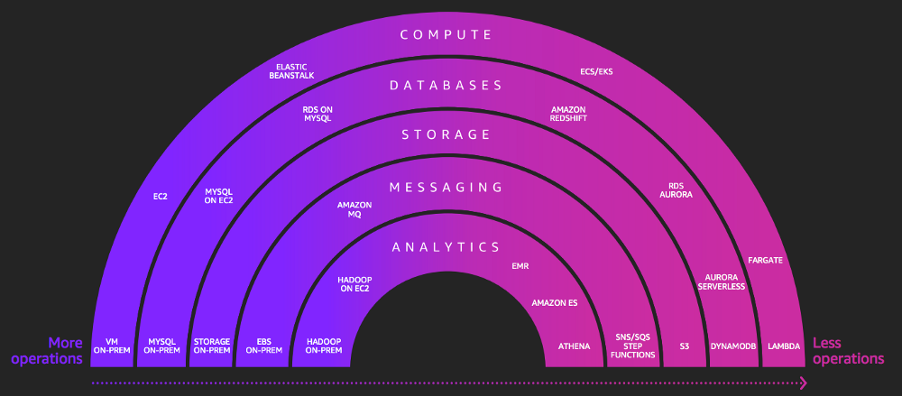
    Start with serverless first [Fig. 1] and then work your way back to IaaS (infrastructure as a service). Insist on high engineering standards. Measurement is difficult in modern software development—it should be based around trends, not absolutes. The “four key metrics” from DORA (deployment frequency, lead time, MTTR and change fail rate) are fantastic indicators. A serverless team with minimal hand-offs can perform very well.

    Fig. 1 Serverless is an Operational Construct – from AWS re:Invent 2018 presentation

    Clearly, such a strategy requires lots of building blocks in place. You have committed to DevOps; serverless can help scale the advanced practices, but let’s make it real! Here are some key building blocks that you may find useful:

    Public Cloud Strategy: Absolute clarity is required on the move to public cloud. This is a transformation and many traditional functions must (effectively) reinvent themselves—security, infrastructure, procurement, engineering, etc. Alignment at the initial stages is critical. What is your collective opinion on cloud-native? If you are a startup, then only serverless-first will give you the velocity you need.

    Pipelines: The “pipeline to production” becomes a business-critical capability. Many critical controls must be reimagined in this new world and a low-friction environment is required for teams to move fast safely and securely. Investment in this area is important; otherwise, you will frustrate your engineers.

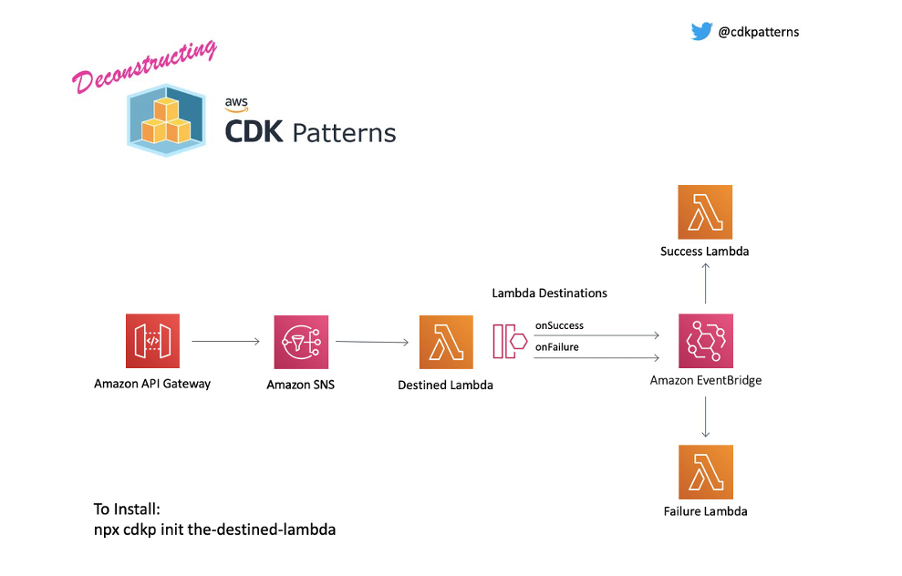
    Patterns: You are now moving toward a commodity platform that welcomes standardized. You will start to notice that many teams are creating the same boilerplate components. Do you have an effective reuse strategy? If it’s too heavy, you will slow everyone down, but if it’s too light, you will create mass duplication. Approaches such as AWS CDK (Cloud Development Kit) and some of the scaffolding approaches available today to enable the creation of “building block patterns” to create components quickly. This is well demonstrated in cdkpatterns.com, which is an open source library of cloud patterns. Liberty Mutual has deployed hundreds of applications using such patterns [Fig 2].

    Fig. 2 CDK pattern from cdkpatterns.com

    Well-Architected: Finally, in this environment, architecture must happen within the teams. But you still need architects. The AWS Well-Architected Framework provides a very clean approach with five pillars of non-functional requirements that prompt teams around concerns that must be addressed. It’s not a checklist; more like a set of challenges. You’ll find that teams can self-assess, but require an architect to coach through some of the more advanced areas.

    Finally, imagine well-architected constructs that are available in your code building blocks and comply with your pipeline controls. This is how DevOps can scale in a serverless environment: You bake the quality controls into the engineering environment.

    Fig. 3 – Lambda Power Tuner from Alex Casalboni

    After engineers go on this journey, they have power tools at their disposal. They can create world-class systems quickly that run at a low cost. But, be warned, once you set your teams off on this journey, there is no turning back. It is a relentless journey of optimization and improvement; that may be an overhead for companies that do not regard engineering as a differentiating capability.

    For the serverless journey, the most important piece of the puzzle is to ensure your engineering teams understand your core business. Create cross-functional teams that are chasing a business KPI. Engineers are engaged when they have a powerful environment that allows them to solve business problems quickly. There is no business-IT divide; you end up with technology teams innovating to meet the company vision. Liberty Mutual has not only observed many of the benefits mentioned here, but also improved engagement from our engineering community. Serverless is the paradigm shift that allows engineers to innovate and move at a pace that has never been possible before.

  • Red Hat Updates Virtualization Platform

    Red Hat Updates Virtualization Platform

    Red Hat today announced an update to its virtual machine platform that now can run on the latest version of Red Hat Enterprise Linux (RHEL).

    Version 4.4 of Red Hat Virtualization can now run on version 8.2 of RHEL. In addition, Red Hat has added Grafana-based dashboards for its Data Warehouse (DWH) service that IT teams can employ to track performance and analyze workloads.

    Finally, Red Hat Virtualization 4.4 simplifies configuring network services using its NetworkManager console.

    Peter Lauterbach, a product manager in the Cloud Platforms group at Red Hat, said support for RHEL 8 is core to the company’s overall strategy to enable IT teams to run microservices-based applications simultaneously with existing monolithic applications.

    Red Hat envisions IT organizations will deploy RHEL on bare-metal servers running Red Hat OpenShift, an application development and deployment platform based on Kubernetes that can run applications built using containers. In addition, Red Hat OpenShift supports kubevirt, open source software that enables kernel-based virtual machines (KVMs) such as Red Hat Virtualization to run on top of a Kubernetes cluster. Made available as Red Hat OpenShift Virtualization, that software makes it possible to run legacy monolithic applications alongside microservices-based applications on the same Kubernetes cluster as needed, said Lauterbach.

    That approach not only is easier to manage from an infrastructure perspective, Lauterbach noted it also can reduce latency between monolithic applications and microservices. Many IT teams in the wake of the COVID-19 pandemic have accelerated the rate at which they are moving applications into the cloud by encapsulating entire monolithic applications into containers that then can be ported to a cloud platform without the need to refactor them. They then can begin to modernize those applications by breaking them up into smaller microservices.

    Lauterbach also noted it has become a lot easier to leverage Kubernetes to move applications between platforms because interoperability between storage and networking services has improved significantly, thanks to the Container Storage Interface (CSI) and Container Network Interface (CNI) that have been made available by the Kubernetes community. In fact, Lauterbach said standards in infrastructure are living up to their interoperability promise.

    Red Hat, of course, has been making the case for open source virtual machines for decades now. However, in the wake of the economic downturn brought on by the COVID-19 pandemic, there will be many more organizations looking to reduce costs by relying on commercial virtual machine software. In addition, Lauterbach noted that now that cloud service providers such as Amazon Web Services (AWS) support KVM, it is a lot easier to create a hybrid cloud computing environment by deploying Red Hat Virtualization in a local data center than it is to replicate a VMware environment in a public cloud.

    It’s too early to say how the battle for hybrid cloud computing will play out in the months and years ahead. The one thing that is certain is the more diverse the IT infrastructure environment is, the more difficult it is to manage.

  • Atlassian Adds Asset Management to ITSM Portfolio

    Atlassian Adds Asset Management to ITSM Portfolio

    Atlassian this week announced it has acquired Mindville, a provider of IT asset management software that the company plans to integrate with its Jira ServiceDesk platform.

    Edwin Wong, head of product for IT at Atlassian, said Mindville will extend the reach of its IT service management (ITSM) portfolio, which includes Opsgenie for incident management, Jira for project management and the recently acquired Halp software for conversational ticketing.

    Mindville, which already makes its software available on the Atlassian marketplace, has more than 1,000 customers including NASA, Spotify and Samsung. The acquisition of Mindville presents an opportunity for those IT teams to manage IT assets within the Jira ServiceDesk platform, which is widely employed as a help desk to manage interactions with end users, said Wong.

    Atlassian has been steadily bolstering its ITSM portfolio at a time when competition across the sector is fierce. In the wake of the COVID-19 pandemic, many IT organizations are re-evaluating their IT help desk platforms now that it has become apparent many employees will be working from home much more regularly.

    At the same time, IT organizations are looking to reduce the total cost of IT, which becomes easier to achieve if they acquire all their ITSM tools from a single vendor. Going forward, Wong said IT teams should expect Atlassian to continue to tighten integration across both its ITSM and DevOps tools portfolio. The goal is not so much to converge every offering into a single platform as much as it is to seamlessly share data between all the tools that make up that portfolio, he said.

    Atlassian this week disclosed it generated $1.6 billion in revenue for the fiscal year, a 33% increase over the prior year. Total revenue was $430.5 million for the fourth quarter of fiscal 2020, up 29% from $334.6 million for the fourth quarter of fiscal 2019. Atlassian ended the fourth quarter of fiscal 2020 with a total of 174,097 customers based on an active subscription or maintenance agreements. The company said it added 3,046 net new customers during the quarter. However, it recorded a net loss of $385.2 million for the fourth quarter of fiscal 2020, which included a non-cash charge of $382.7 million.

    Atlassian tools can be deployed on-premises or in the cloud and the company has been offering discounts to IT organizations as an incentive to entice customers to shift to the cloud. In the wake of the economic downturn, it’s not clear to what degree organizations will prioritize spending on ITSM tools. However, with more employees and IT administrators now working from home, the need for cloud-based tools to manage a highly distributed IT environment has never been more apparent. One of the things that will differentiate Atlassian is the teams-centric approach the company takes toward ITSM and DevOps, said Wong.

    In the meantime, as the Atlassian ITSM and DevOps portfolio expand, IT teams should expect the divide these two distinct approaches to managing IT to continue to narrow.

  • Making the Move to Edge Computing? Consider This 

    Making the Move to Edge Computing? Consider This 

    Edge computing has exciting potential, but there are certain considerations to thrive in today’s competitive landscape

    Data is king, especially in the current era of the data-driven business, where a data mindset and analytical capabilities are significant factors in determining future success. With so much data to be mined and monetized, more companies are recognizing the competitive advantages of edge computing, which can also jump-start the journey to becoming an autonomous digital enterprise. That said, a variety of security and infrastructure challenges may prevent some IT professionals from making the move, according to a recent survey by Volterra and Propeller Insights.

    Distributed models such as edge computing have always been attractive because of their ability to minimize network latency issues with large data and put essential functions closer to the technology consumer. Now, they’re even more attractive with new compute and application architectures and so many new data sources—network-connected and internet of things (IoT) devices, social media, customer engagement systems, transactional systems and systems of record—dramatically expanding the volume of data and changing the nature of the data collected. Edge computing also helps solve the traditional issues of optimizing for network capacity and performance and addresses new areas such as the localized pre-processing of all data sources (telemetry, video, mobile, etc.).

    It’s no surprise, then, that 54% of the IT leaders surveyed said they prefer edge to the cloud for operators who need to control and analyze data for local use cases, and to avoid the latency that can occur when sending edge data to public cloud-based apps. By moving certain workloads to the edge of the network instead, devices spend less time on the cloud, react faster to local changes, and operate reliably–even in extended offline periods.

    Edge computing still has its challenges and difficulties to overcome. Among them are key concerns such as a lack of resources or time for long-term upkeep of application and infrastructure, and managing distributed clusters as siloed instances rather than a single resource.

    Taking IT to the Edge – Edge Computing, That Is

    Despite the roadblocks, the value of edge computing is clear. This is why many companies are including edge computing models in their business plan. However, the performance, control and governance challenges that come with distributed models of compute, applications and data should be considered carefully beforehand.

    Innovative, data-driven companies that want to stay on the cutting edge and are planning an edge migration should develop a plan and long-term vision for their mix of data center, cloud and edge resources that consider their current and future use cases. Partnerships will also prove useful. By leveraging multi-vendor, commercial off-the-shelf solutions, enterprises can be more successful yielding value from edge computing than they would with single-vendor niche products. An ecosystem of seamlessly integrated solutions will help companies harness data and translate information into insight and actions that can optimize assets.

    As today’s enterprises seek to become more data-driven and evolve into the autonomous digital enterprises of tomorrow, it’s important to think about edge use cases as part of an overall automation strategy. Companies should consider how edge applications and distributed architectures will support them from a capacity, monitoring, deployment and service management perspective.

    Finally, edge computing’s advantages also come with the risk of security vulnerabilities if they’re not addressed from the outset, since the “attack surface” of a company’s IT estate becomes much larger. Organizations must deploy a multi-layer security approach that aligns with their edge initiatives while factoring in service-level needs to ensure assets are adequately protected.

    Edge computing has exciting potential, and the enterprises that make strategic investments and take a holistic, outlook-driven, secure approach to migration will thrive in tomorrow’s competitive landscape and years into the future.

  • Juniper Networks Brings AI to SD-WANs

    Juniper Networks Brings AI to SD-WANs

    Juniper Networks today announced it can now apply the same artificial intelligence (AI) engine it uses to automate the management of wireless local area networks (LANs) to software-defined wide area networks (SD-WANs).

    Based on an AI engine that Juniper Networks gained when it acquired Mist Systems, the Juniper Mist WAN Assurance cloud service streams telemetry data gathered from Juniper SRX devices to an AI engine that advises IT teams on how to best set WAN service levels as part of a larger transition to intent-based networking.

    As part of that initiative, Juniper Networks is also providing access to a Marvis conversational interface originally developed by Mist to enable IT teams to verbally issue commands, replacing the traditional command-line interface (CLI).

    Christian Gilby, director of product marketing for Juniper Networks, said as the number of remote branch offices that IT organizations need to manage increases at a time when travel is limited, the need to apply AI to SD-WANs has never been more apparent.

    Rather than return to central offices in the wake of the COVID-19 pandemic, Gilby noted, many organizations are shifting staff to smaller remote offices to enable collaboration while continuing to minimize potential exposure to anyone who might be infected.

    The challenge is that many IT teams tasked with managing the WANs that connect those remote offices aren’t growing during the downturn caused by the pandemic. AI provides a way to troubleshoot and optimize WAN performance without having to increase network operations headcount, Gilby said.

    Platforms such as the Juniper Mist WAN Assurance cloud service provides the added benefit of never forgetting anything they learn or taking a day off.

    Gilby said it’s not likely AI systems will replace the need for network operations teams anytime soon. However, Juniper Mist WAN Assurance is part of a larger wave of AIOps technologies that are augmenting existing IT staff. It may take a while for them to trust the optimizations being made by AIOps platforms, but the more data those systems collect, the more accurate they become over time.

    In the case of a cloud service, the machine learning algorithms that drive the AI models are being trained continually using anonymized data collected from thousands of systems.

    The launch of Juniper Mist WAN Assurance comes at a time when more organizations are looking to embrace SD-WANs as a way to more easily scale the delivery of network services when employees are working from home for the foreseeable future. In many cases, IT teams are now dropping Mist wireless routers into home offices to extend the reach of SD-WAN services in a way that can be managed and optimized using the same core AI technologies, said Gilby. In its most recent quarter, Juniper Networks reported a 170% rise in orders year-over-year for Mist wireless LANs.

    It remains to be seen how much or how quickly networking operations will be transformed by AI. However, at this point, that transformation is all but inevitable.