Category: IT as Code

  • Morpheus Data Extends Hybrid Cloud Reach

    Morpheus Data Extends Hybrid Cloud Reach

    Morpheus Data has updated its hybrid cloud computing platform to add support for a bare metal-as-a-service option as well as tighter integrations with VMware vCloud Director (vCD) and NSX-T, Microsoft System Center Virtual Machine Manager (SCVMM), Microsoft Azure and Veeam data protection tools.

    In addition, version 5.0 of the Morpheus IT management platform adds support for additional financial operations tools and a user interface that can be tailored to different classes of end users with varying levels of expertise.

    Finally, Morpheus has added support for the latest release of the ServiceNow platform for managing IT via a software-as-a-service (SaaS) application.

    Interest in employing bare-metal servers is on the rise as IT organizations look to deploy everything from platforms to build and deploy artificial intelligence (AI) to edge computing applications based on cloud-native technologies such as Kubernetes.

    At the same time, many IT organizations are beginning to more aggressively reduce the total cost of IT by centralizing the management of multiple IT platforms.

    Brad Parks, chief marketing officer for Morpheus Data, said the financial operations tools added to the Morpheus platform surface more granular cost analysis for utilization of specific classes of cloud services as well as views into Amazon Web Services (AWS) Reservation Coverage and Savings Plans.

    The revamped user interface, meanwhile, makes the platform available to a wider range of end users by adding support for different types of personas within an IT team. That enhancement makes it easier for IT organizations that have adopted Morpheus to provide self-service capabilities.

    It’s not clear at what rate IT organizations will be transforming IT operations. It typically requires IT teams to spend money before they can begin to save money. However, rationalization of the many tools that IT teams rely on today may also help cost-justify the investment.

    Regardless of the motivation, the need to centralize the management of IT is becoming more acute as IT environments become more distributed. Most organizations cannot afford to hire and retain IT staff for each IT platform it uses. IT organizations also want to be able to move workloads between platforms as they best see fit, which is easier to accomplish via a central control plane. The economic downturn brought on by the COVID-19 pandemic is, in effect, acting like a forcing function driving IT organizations to accelerate the rate of transition to hybrid cloud computing, noted Parks.

    Over time, it will also become easier to apply AI to IT operations when the data on which AIOps platforms depend is more easily accessible.

    In the last several years IT has become much more complex. With the rise of everything from microservices based on cloud-native technologies such as containers to internet of things (IoT) applications, the IT environment has never been more diverse. The challenge now is finding the most efficient way to manage all those devices at a time when IT budgets have never been as constrained.

  • Cisco Expands Effort to Meld DevOps, NetOps

    Cisco Expands Effort to Meld DevOps, NetOps

    Cisco Systems has accelerated its efforts to converge network operations (NetOps) by adding support for Terraform tools for managing infrastructure-as-code as well as expanding its support for the Ansible IT automation framework.

    In addition, Cisco has improved and standardized the application programming interfaces (APIs) it makes available for its Application Centric Infrastructure (ACI) framework for virtualizing network services and is expanding the free code samples, boot camps and certifications its makes available via its DevNet Express training program.

    Yousuf Khan, vice president of technical marketing and solutions engineering, said Cisco is moving toward embracing open source automation tools that are being widely employed to automate the management of IT infrastructure. That transition is being driven by DevOps teams, many of which have assumed control over IT infrastructure budgets as network operations are more integrated within DevOps processes, he said.

    To increase its appeal, Cisco is making available Terraform Providers for Cisco ACI alongside Ansible and Cisco ACI Multi-Site Orchestration (MSO) to enable IT teams to automate network management using declarative tools, Khan added. Ansible can now be applied to invoke Cisco Data Center Network Manager (DCNM) alongside the other network services Cisco has already made accessible via Ansible.

    Terraform is widely employed to programmatically configure cloud infrastructure, which Cisco is now embracing to enable IT teams to apply to network and server infrastructure. Ansible, meanwhile, is being embraced by multiple providers of IT infrastructure as IT teams look to standardize on a single automation framework. That approach eliminates the need to master multiple proprietary IT automation frameworks for each platform employed.

    Cisco has spent the last few years encouraging network administrators to abandon command-line interfaces (CLIs) employed to program individual routers and switches in favor of a software-defined network architecture based on graphical tools that enables NetOps teams to more flexibly manage network infrastructure using virtual overlays enable by its ACI framework. Now ACI is being made accessible to Terraform and Ansible as more IT organizations adopt both tools as de facto open source tools for managing heterogeneous IT infrastructure environments. That effort will make it easier for DevOps teams to employ GitOps processes to deploy applications on Cisco infrastructure from whichever continuous integration/continuous delivery (CI/CD) platform they employ, Khan said.

    Ultimately, he noted, the goal is to make the networks more agile. IT teams in on-premises environments today can provision a virtual machine in minutes but are still required to wait weeks for network services to be provisioned. The goal is to apply a more cloud-like operating model to a hybrid IT environment.

    Each IT organization will need to decide to what degree they will want to meld their network operations and DevOps teams. While the tools to manage network services are becoming available, the cultural divide between most network operations and DevOps teams is still wide. The rate at which that divide is narrowing, however, is finally starting to accelerate as business leaders continue to demand higher levels of agility.

  • Equinix Adds Automated Bare-Metal Server Service

    Equinix Adds Automated Bare-Metal Server Service

    Equinix, a provider of hosted IT services, added an Equinix Metal offering that allows IT teams to automate the deployment of bare-metal servers.

    Interest in deploying bare-metal servers is increasing due to the rise of both artificial intelligence (AI) applications that are compute-intensive and Kubernetes clusters that, in many cases, don’t require the overhead created by a virtual machine. However, it is more difficult to automate the provisioning of bare-metal servers compared to provisioning virtual machines.

    To address that challenge, Equinix earlier this year acquired Packet, provider of an IT automation framework for bare-metal servers that now drives the Equinix Metal service. As part of that service, the framework has been integrated with Equinix Fabric, formerly known as Equinix Cloud Exchange Fabric, to gain access to a software-defined interconnection service spanning 237 data centers deployed near major internet exchanges across 46 geographies.

    Jacob Smith, vice president of bare-metal strategy and marketing for Equinix, said those servers are available either on-demand or as reserved instances that can be spun up in less than 15 minutes, similar to the way IT organizations provision cloud resources. The servers can be provisioned via application programming interfaces (APIs) common libraries or employ any one of several tools that they already use to manage infrastructure-as-code, he noted.

    As applications become more distributed, latency issues that arise because of network physics are becoming more challenging. Many IT teams are now trying to deploy applications closer to where data is created and consumed. Equinix Metal enables IT teams to achieve that goal in an IT environment that also gives them their own private internet managed by Equinix, said Smith.

    At the same, Equinix Metal reduces the time it takes IT teams to deploy bare-metal servers in a rival co-location facility to minutes from days, via an automated service, he added. Not many IT organizations are interested in dispatching IT personnel to physically provision servers in the wake of the COVID-19 pandemic. The health risks involved in traveling to a co-location facility to configure hardware are deemed too high.

    In the meantime, as more application workloads find their way to the edge, the physical locations of servers start to matter a lot more. It may now only be a matter of time before IT teams rediscover the merits of hosting services that can provide as much flexibility as a cloud service provider with far less adverse impact on application performance.

    Of course, that also means many existing DevOps processes will need to be extended to include not just a local data center or cloud service, but also a network of data centers that are being managed by someone else on their behalf.

  • Netlify Extends JAMstack Reach to Edge Computing

    Netlify Extends JAMstack Reach to Edge Computing

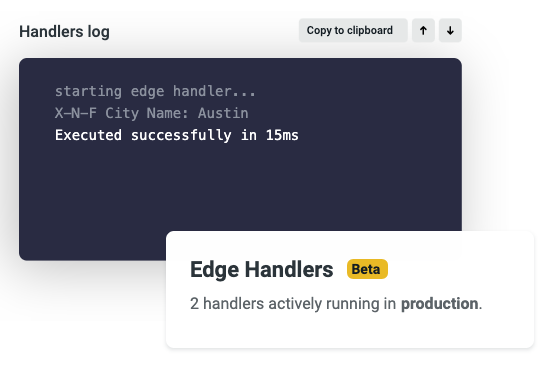
    Netlify, at its JAMSTACK CONF VIRTUAL event today, announced Netlify Edge Handlers, which make it possible to extend a Git-based workflow to edge computing applications.

    Company CEO Matt Biilmann said Netlify Edge Handlers, available in beta, puts the primitives in place for deploying serverless web applications based on a JAMstack software architecture that employs JavaScript, application programming interfaces (APIs) and markup languages, otherwise known as JAM, to isolate front- and back-end components of an application.

    A Git-based approach will also enable DevOps teams to extend workflows to edge computing applications that can be deployed on any number of platforms, he said. As an extension of a Netlify platform written in a modern Rust programming language, Netlify Edge Handlers makes it possible to build and launch web applications and websites based on a JAMstack architecture from within a continuous integration/continuous delivery (CI/CD) environment.

    Prior to the availability of Netlify Edge Handlers, building and deploying web applications on edge computing platforms required extensive coordination across teams, the creation of detailed edge logic with many dependencies and deviation from standard web development best practices, Biilmann said. Now, developers can write simple JavaScript that builds and deploys to the network edge in a way that enables simplified A/B testing, custom authentication and API aggregation, he noted.

    Developers also can build and manage edge logic from preview to production, including deploying those applications via the existing Netlify multi-cloud network.

    More application code is being pushed out to the edge because many organizations are now processing and analyzing data closer to where it is created and consumed, as part of their digital business transformation initiatives. Web applications that execute closest on a node to the user eliminate or reduce roundtrip request and response flows with the client.

    Biilmann also noted that because those applications are employing a platform developed using Rust, they are also inherently more secure.

    There may come a day when there are more application workloads collectively running at the edge than there are on cloud computing platforms. However, if that goal is ever to be achieved, it needs to become easier for developers to build those applications. Given the fact those applications are also likely to be targeted by cybercriminals, it’s critical to ensure those applications are as secure as possible.

    In the wake of the economic downturn brought on by the COVID-19 pandemic, many organizations have accelerated digital business transformation initiatives, many of which depend on edge computing platforms. The only way to achieve that goal, however, is to make it possible to build these applications using JavaScript tools that most developers of web applications have already mastered. Otherwise, organizations will need to invest in training developers to master another framework for deploying edge computing applications. That would require time they might not have.

    Regardless of the path forward, a massive wave of edge computing applications soon will stretch the boundaries and limitations of whatever DevOps processes organizations have in place today.

  • How To Build Out a Successful Multi-Cloud Strategy

    How To Build Out a Successful Multi-Cloud Strategy

    Navigating even just a single cloud environment can be complicated enough for any startup. Between understanding the range of features on offer, planning for expenditure and ensuring you have the right expertise to leverage the tool to its full potential, the thought of managing multiple clouds can seem daunting.

    However, whether your company is just starting out or has been around for years, the rewards to be reaped from a multi-cloud approach make it a worthy investment. Adopting a multi-cloud strategy offers a whole host of benefits and can allow you to optimize costs when implemented correctly. In fact, a recent Gartner survey of public cloud users found that 81% of respondents are working with two or more providers. In addition, the amount of business applications, services and workloads is set to double over the next two years.

    Here’s what companies of all sizes can gain from going multi-cloud, and how they can do so.

    Why Opt for Multicloud?

    For startups, adopting a multi-cloud strategy can be rewarding from day one. If you’re building your proof-of-concept or are in the design stage of building your infrastructure, leveraging multiple environments at once can help you develop faster and with more advanced tools.

    With access to multiple clouds, you can play around with the strengths of each provider and combine them to get the “best of all worlds,” increasing agility and eliminating vendor lock-in. Having immediate access to more than one cloud also means being able to take advantage of these features as and when you need them, without having to fully migrate to another cloud, which can be a costly and lengthy process. In fact, Gartner analyst Michael Warrilow stated that “most organizations adopt a multi-cloud strategy out of a desire to avoid vendor lock-in or to take advantage of best-of-breed solutions.”

    Opting for a multi-cloud environment also boosts security and disaster recovery and ensures easier migration for some data and applications. Cybersecurity is heightened as spreading applications across different providers means an attack is less likely to bring your entire infrastructure down at once. Furthermore, sticking with one provider inevitably runs the risk of losing control of a mission-critical application during an outage. All of this adds to the overall resiliency of your system’s infrastructure.

    So, how exactly can you get started with your multi-cloud journey?

    Making the Right Cloud Choices

    While a multi-cloud approach can deliver serious value in terms of resiliency, flexibility and cost savings, making sure you’re choosing the right providers requires a comprehensive assessment.

    Luckily, all main cloud vendors offer free trial services so you can establish which ones best fit your needs and see how they work with each other. It will pay to conduct proofs-of-concept using the free trials and run your data and code on each provider. You also need to make sure that you’re able to move your data and code around easily during the trials.

    It’s also important to remember that each cloud provider has different strengths—one company’s best option is not necessarily the best choice for you. For example, if your startup is heavily reliant on running artificial intelligence (AI) and machine learning (ML) applications, you might opt for Google Cloud’s AI open source platform.

    Or perhaps you require an international network of data centers, minimal latency and data privacy compliance for certain geographies for your globally used app. Here’s where AWS could step in. On the other hand, you might need your cloud applications to seamlessly integrate with the various Microsoft tools that you already use. This would make the case for Microsoft Azure.

    There are multiple factors at play that you have to carefully consider to ensure ROI of your multi-cloud investment. According to a 2019 Spiceworks study, AWS comes out top for maximum uptime, Azure wins on compatibility and Google Cloud proves to be the best for manageability.

    However, it’s also crucial to remember that there are far more cloud providers than the “big three.” For example, Aliyun is Chinese conglomerate Alibaba’s cloud computing offering, while Oracle and IBM also have their own services. Many startups turn to more niche vendors that can better suit their individual needs, so it could pay to explore alternative options, too.

    Ultimately, you need to understand not only what your current needs are but also how your business goals align with the capabilities of your cloud strategy. Consider what you might need in the future that your current cloud provider doesn’t provide.

    Avoiding vendor lock-in—being able to dip into different features as and when you please—is one of the key benefits of multi-cloud adoption. However, it requires careful planning and assessment of your short- and long-term business goals and how these relate to your cloud infrastructure needs.

    Managing Multiple Cloud Environments Requires Expertise

    There’s no doubt that leveraging a single cloud environment requires team members with experience and know-how of that particular cloud vendor. So, moving to a multi-cloud approach means there’s an even higher demand with regards to the expertise you need at your disposal.

    If your team only has engineers who are experienced with working with Azure, it wouldn’t be a wise move to immediately adopt AWS without recruiting more talent. This is especially true as AWS is the most complex and mature of all of the main cloud providers and requires the relevant knowledge to be able to take full advantage of the tools and applications available. Hence, you need to consult your team at every step of the way on what kind of cloud environment is within their capabilities when crafting your multi-cloud strategy.

    Another vital aspect of multi-cloud adoption is managing the integration of the databases from each cloud provider. This means aligning your data management strategy across each cloud environment, otherwise you risk creating data silos and databases that don’t communicate with each other. Fortunately, many cloud providers include features that let you create clusters and manage and deploy databases. A team that understands the need for this is essential.

    Finally, a DevOps culture is crucial for any successful multicloud strategy. The purpose of multicloud adoption is not only to build out your infrastructure, but also to power continuous delivery and integration when it comes to product development. To ensure you select the best features and determine the right capacity according to your needs and expertise, you need to get the input of your entire DevOps team, including cloud experts, software developers and QA engineers, too. In fact, going one step further, many companies are even building out Cloud Centers of Excellence (CCoE), aa team of cloud experts who drive cloud-based digital transformation across an organization.

    The Balance of Controlling Multi-Cloud Costs

    Controlling and managing your expenditure while adopting a multi-cloud environment is no easy task, especially as your personalized use of the tool, which scales up and down, will result in fluctuating costs. In fact, controlling these expenses can be so difficult that cloud cost management vendor ParkMyCloud predicted that companies spent more than $14 billion on unnecessary cloud infrastructure costs in 2019.

    From a cost-saving perspective, Google Cloud is the best option as it offers more flexible contracts, lower starting costs and clearer visibility into expenditures compared to the other big providers. However, the decision should be taken against the potential ROI of the multicloud strategy you adopt, so calculating the financial optimization that will come from accessing multiple cloud environments can help guide you.

    If possible, it’s a good idea to consult with an expert partner on the ways in which you can best manage costs and maximize ROI. If this isn’t an option, you can use different tools that allow you to create estimates around expenditures.

    As the growing numbers around multi-cloud adoption suggest, it’s a trend that’s delivering value and is here to stay. With a multi-cloud environment, startups and enterprises alike can have flexibility around the features they need, optimize costs, increase security and protect themselves against outages. However, embarking on a multi-cloud strategy is no straightforward task: It requires research, planning and consultation with your technical team. By aligning your business goals with your cloud requirements and democratizing your decision process, you can ensure you get the most out of your multi-cloud investment.

  • Cloudflare Expands Range of CDN Alternatives to the Public Cloud

    Cloudflare Expands Range of CDN Alternatives to the Public Cloud

    Cloudflare, a provider of a content delivery network (CDN) based on more than 200 data centers, this week announced it has made available a Durable Objects capability in beta that makes it possible to run stateful applications across a distributed serverless Cloudflare Workers service.

    Company CEO Matthew Prince said Durable Objects provide a truly unified approach to managing storage and state that ensures low application latency across the CDN service.

    Cloudflare this week also launched API Shield, which employs client certificate-based identity and strict schema-based validation using hosted public key infrastructure (PKI) that only allows application programming interfaces (APIs) with known behavior and identities to access the CDN service.

    The company also added a Cron Triggers tool that enables IT teams to schedule jobs on Worker nodes rather than always having to make HTTP requests.

    Finally, Cloudflare this week added a free Cloudflare Web Analytics tool and a free Cloudflare Radar tool that allows IT teams to view global traffic and security trends across the internet as they happen using data gathered from a network that touches more than 25 million internet properties in more than 100 countries.

    As applications become more distributed than ever thanks to the rise of edge computing, there is a growing need to deploy stateful applications that process data closer to where it is generated and consumed. Rather than IT teams having to manually deploy those edge computing platforms, Cloudflare has been making a case for a serverless computing platform that enables IT teams to leverage platforms it manages on their behalf.

    A Durable Object, in the case of Cloudflare, is an instance of a class that can be written in any programming language. Each object has a unique identifier and exists in only one location. Any Worker running anywhere in the world that knows the object’s ID can send messages to it. Durable Objects can have persistent state stored on disk. Each object can also maintain a consistent copy of the state in memory to eliminate latency. The in-memory object will be shut down when idle and can be re-created later on-demand.

    The Cron Trigger tools provide IT teams with more control over how they consume capacity on the Cloudflare CDN, added Prince.

    The Cloudflare CDN ultimately provides a lower-cost alternative to cloud services for deploying edge computing applications that gives IT teams more control over where and when application workloads run, Prince said.

    In the age of COVID-19, the days when IT organizations dispatched IT staff to physically install and update physical infrastructure may be coming to an end. There’s no real need to incur the cost or put IT staff at risk of contracting the virus. The issue now is determining whether to employ a cloud service provider or rely on any one of several CDN options that have historically been employed to optimize web applications.

    Regardless of the path chosen, the ability to remotely deploy any type of application on IT infrastructure resources has never been greater or easier.

  • Optimize Performance, Cut Costs With AWS Autoscaling Services

    Optimize Performance, Cut Costs With AWS Autoscaling Services

    A very easy (and free) way to get the get your money’s worth on the AWS Cloud platform is autoscaling. Autoscaling allows for better fault tolerance, better availability and better cost management, quickly scaling up and down to meet traffic demands while keeping your costs within budget by detecting and replacing the components that are not healthy enough to be present in the infrastructure.

    Some of the key benefits of autoscaling are:

    1. Meeting the traffic requirement on-demand and scaling accordingly.
    2. Adjusting scaling group capacity through the scheduled actions on the autoscaling groups.
    3. Reducing resources and costs.
    4. Increasing application availability by deploying across the availability zones.

    AWS has several services that help autoscaling the infrastructure components and reduce the management associated with scaling. They are mediated through the CloudWatch monitoring and observability service. CloudWatch provides up to 1-second visibility of metrics, 15 months of data retention (metrics) and the ability to perform calculations on metrics. This allows digital engineering teams to perform historical analysis for things such as cost optimization, for instance. On top of the specified metrics, teams can create alarms and alarm trigger the autoscaling policy to perform predefined steps, either to scale out or scale in.

    Autoscaling Services on AWS Cloud Platform

    EC2 Instance Auto Scaling

    EC2 instance autoscaling helps us to keep the correct number of EC2 instances available to handle incoming traffic requests for the application. We can create an EC2 autoscaling group, which is a collection of EC2 instances. In that group, we can specify a minimum, making sure that the group never goes below a specified size. We can also specify a maximum number of EC2 instances, which ensures that the group never goes above the specified size. This keeps capacity at a minimum and maximum range and ensures that your autoscaling group has EC2 instances specified in the desired capacity. Autoscaling also allows us to configure scheduled actions that can change the minimum, maximum and desired auto-scaling group capacity at a specified time.

    EC2 instance autoscaling allows for the configuration of scaling policies that will scale up or down according to the policy to increase or decrease EC2 instances in your infrastructure.

    There are two types of scaling: manual, in which we can attach and detach EC2 instances from the autoscaling group, and dynamic scaling, in which we can define how to scale the autoscaling group capacity in response to the incoming request or changing demand in terms of specific resource utilization. This allows us to configure policies that can take care of scale-up and scale-down and acts according to the policy for factors such as the number of requests, CPU and memory utilization.

    Below are the three types of dynamic scaling policies:

    • Target-tracking: This policy will increase or decrease the autoscaling group’s current desired capacity based on the target value for the specific metric. This policy maintains the capacity to match specified target metrics like CPU or memory utilization. Let’s assume that you have set 60% utilization of your autoscaling group—the target-tracking policy will add or remove EC2 instances to meet the specified utilization.
    • Step Scaling: This policy increases or decreases the current capacity of the autoscaling group based on a set of scaling adjustments (EC2 instances) that vary based on the size of the alarm breach. Let’s assume that the autoscaling group has three stages for tracking CPU utilization—the first alarm would be triggered when 40% is reached and would add one EC2 instance, the second alarm would be triggered when 60% is reached and two EC2 instances are added, and the third alarm is triggered when 80% is reached and three EC2 instances would be added.
    • Simple Scaling: This is a simple scaling policy option that increases or decreases the current autoscaling group capacity based on a single scaling adjustment. Here we can add one EC2 instance when specified alarm breaches.

    EC2 autoscaling provides on-demand instance scaling and spot fleet instance autoscaling, through which we can automatically increase or decrease the current capacity of the spot fleet based on the demand. It can launch (scale out) or terminate (scale in), within the specified range.

    ECS Container Service Auto Scaling

    Elastic Container Service (ECS) Auto Scaling works on published container CloudWatch metrics such as CPU and memory usage. It increases or decreases the desired capacity of container tasks in ECS service automatically. CloudWatch metrics can be used to scale out (add more tasks) to handle a high degree of incoming requests and scale in (remove tasks) during low utilization.

    ECS Auto Scaling allows us to configure policies including target tracking, step scaling and scheduled scaling actions.

     RDS Storage Auto Scaling

    Amazon Relational Database Services (RDS) for MariaDB, MySQL, PostgreSQL, SQL Server and Oracle support storage autoscaling, with zero-downtime RDS storage autoscaling automatically to scale the backend storage volume attached to the RDS database in response to growing database size.

    RDS monitors current storage consumption and scales storage capacity up when current consumption reaches near the actual provisioned size, without affecting current database operation and disturbing current database transections.

    Aurora Auto Scaling

    AWS Aurora autoscaling adjusts the number of Aurora replicas dynamically. You can define the scaling policy and Aurora acts accordingly. It scales Aurora replicas to handle a sudden increase in the database connectivity or the workload. As and when database connections or workload decreases, Aurora Auto Scaling removes unwanted Aurora replicas automatically, so customers are not charged for the unwanted replica instances.

    Just as we were able to define scaling policies in other services, so we can define them in Aurora Auto Scaling, and it also allows us to configure the minimum and the maximum number of Aurora replicas that can be managed. Aurora Auto Scaling is available for both of the Aurora engines MySQL and PostgreSQL.

    DynamoDB Auto Scaling

    The most difficult part of the DynamoDB workload is to predict the read and write capacity units. If an application needs high throughput for a specific period, it is not necessary to overprovision capacity units for the entire time. Amazon DynamoDB Auto Scaling dynamically adjusts provisioned throughput capacity on your behalf in response to actual incoming traffic request patterns.

    As and when the workload decreases, application autoscaling decreases the provisioned throughput capacity units, so that customers do not pay for any unnecessary capacity.

    With DynamoDB Auto Scaling, we can create scaling policies on the table or global secondary index. We can specify within the scaling policy whether we want to scale read capacity or write capacity (both), and the minimum and maximum provisioned capacity unit settings for the table or index.

    Prime Your Infrastructure For Autoscaling

    For these AWS autoscaling services to function as they should, organizations need to ensure they have:

    • Specified application user session state and persistence when using EC2 instances.
    • Tested, monitored and tuned their autoscaling strategy to ensure that it functions as expected.
    • Decision-making logic in place that evaluates these metrics against predefined thresholds or schedules and decides whether to scale out or scale in.
    • Service-specific limits in place before configuring autoscaling.
    • While using EC2 autoscaling, teams have specified cooldown time as well as which application to start up, and are ready to serve in a defined time.
  • VMware Embraces SmartNICs to Extend Virtualization

    VMware Embraces SmartNICs to Extend Virtualization

    VMware, as part of a bevy of updates to its portfolio announced today at its online VMworld 2020 conference, previewed its Project Monterey initiative to provide IT teams with composable infrastructure.

    At the core of that effort will be support for smart network integration cards (NICs) within VMware Cloud Foundation, the suite of software through which VMware bundles its vSphere, vSAN and NSX platforms. SmartNICs make it possible to offload network and storage I/O function from a virtual server by enabling its ESXi hypervisor to run on a SmartNIC.

    VMware also revealed plans to rearchitect VMware Cloud Foundation to enable disaggregation via SmartNICs that can be plugged into either a bare-metal server or a server running virtual machines from VMware. That capability will make it possible for applications to invoke bare-metal servers via an application programming interface (API) and will also enable VMware to extend its management framework to bare-metal servers that have SmartNICs installed.

    The decoupling of networking, storage and security functions will also allow IT teams to patch and update IT infrastructure independently from the server running VMware vSphere.

    VMware also noted that via Project Monterey each SmartNIC will be capable of running a stateful firewall along with other security software. IT teams will be able to enhance security by deploying thousands of firewalls on SmartNIC across the extended enterprise.

    There is no timetable for when Project Monterey will be available. Chris Wolf, vice president for the Advanced Technology Group in the Office of the CTO at VMware, said SmartNICs will play a major role in enabling IT organizations to compose IT infrastructure either using graphical tools employed by IT administrators or via APIs programmatically invoked by DevOps teams.

    Separately, VMware today also announced plans to update to its Virtual Cloud Network, a platform through which it bundles VMware NSX, VMware SD-WAN by Velocloud and VMware vRealize Network Insight in a single offering.

    VMware is committing to bringing more automation, making available predictive analytics enabled by machine learning algorithms, increased virtual networking scale enabled by VMware NSX-T 3.1. VMware will double the scale of NSX Federation, add advanced routing and multicast capabilities based on APIs and add support for configuration tools based on open source Terraform tools.

    Version 6.0 of vRealize Network Insight 6.0 will add assurance and verification capabilities as well as expanded support for VMware SD-WANs. VMware Edge Network Intelligence, meanwhile, adds a tool that applies artificial intelligence (AI) to optimize network performance.

    VMware also announced that its Virtual Cloud Network platform can now support Kubernetes clusters.

    In addition, VMware announced that VMware vRealize AI Cloud, a cloud service for optimizing application performance using machine learning algorithms, formerly known as Project Magma, is now available and that CloudHealth by VMware services has been extended to add support for Oracle Cloud Infrastructure along with tools for analyzing the security of workloads deployed on Google Cloud.

    Finally, VMware is making a series of other security updates, including providing access to VMware NSX Advanced Threat Prevention, which combines NSX Distributed IDS/IPS with malware detection software and network traffic analysis (NTA) technologies acquired from Lastline Inc.

    VMware is also committing to reselling a secure web gateway from Menlo Security as part of the VMware SD-WAN portfolio and formed an alliance with Zscaler to manage security as a service.

    Finally, VMware today launched VMware Carbon Black Cloud Workload, which combines vulnerability reporting with workload hardening software for both legacy platform and microservices-based applications deployed on Kubernetes clusters.

    VMware now has one of the broadest portfolios of offerings of any enterprise IT vendor. It’s not clear to what degree IT organizations are consuming all that software on top of VMware vSphere. However, for IT teams looking to reduce the number of vendors they need to engage VMware has become a compelling option.

  • Preparing for Digital Life After COVID-19 

    Preparing for Digital Life After COVID-19 

    The shift to a digitally dependent remote workforce across numerous industries was instantaneous for organizations after the COVID-19 pandemic spread, and after months of adapting, this way of life has become “a new normal.” IT professionals are facing unprecedented pressure to meet the increased demands they are experiencing now and preparing for the changes that will continue after the pandemic, such as enabling remote employees and driving the business. This presents an immense opportunity for these professionals to make a change.

    In recent months, limits to digital transformation and what organizations are capable of have been tested and surpassed. IT professionals have searched for tools, visibility and insights to help them manage the new challenges so the technology being used by organizations continues to perform well. This means expectations moving forward have been set even higher for the level of performance these professionals provide. If limits can be exceeded and issues solved as they arise, what does this mean post-COVID-19?

    Agents of Transformation

    We call the professionals who are navigating these digital changes and inspiring innovation Agents of Transformation. As the leaders of the IT industry, these technologists are identifying what tools are needed not only for their efforts, but also for the organizations they support to provide a tighter interlock between IT and business leaders. Our recent special COVID-19 research report showed how the pandemic has changed the industry long-term.

    According to the report, 79% of the 1,000 IT professionals we surveyed believe the pandemic will separate the strong from the weak in tech teams worldwide. Even if organizations find themselves surviving the digital transformation changes they’re making during the pandemic, it is crucial they also plan for the future so they do not fall behind with any additional new curveballs. As documented in the chart below, the key areas these Agents of Transformation think will change in business practices are risk and disaster planning, the continued use of remote working tools and flexible resourcing.

    Planning for Changes in Business Practices

    COVID-19 brought a lot of unexpected challenges that forced organization leaders to adapt. It is crucial organizations determine what their plans are moving forward and how they will be implemented. Once organizations know what their ideal digital journey looks like, they can begin to fill in the missing pieces such as how it could be impacted by outside forces like COVID-19 and how they can navigate these changes. Digital transformation will continue to play a key role in a post-COVID world with potential challenges including:

    •       Delivering positive experiences at an increased capacity.
    •       Lack of visibility into the performance of technologies.
    •       Managing mean time to repair (MTTR).

    Continued Use of Remote Working Tools and Technologies

    Even as health risks decrease and more employees are allowed to return to work, survey respondents expect tools and technologies for remote working are here to stay. To be successful moving forward in a world now dependent on digital transformation, organizations should figure out what their digital needs are, whether to efficiently manage increased traffic on their applications or support space for storing the influx of data. It is also important that an organization’s plans for a digital journey focus on things such as collaboration, clear goals and objectives and autonomy.

    Keeping the above in mind, one way to prepare for shifting digital goals is by embracing risk and experimentation. Applying scalable cloud instances alongside microservices allows IT teams to quickly test agile new features with a small group of users, then scale out as needed. The future is uncertain, but with digital transformation continuing to grow, organizations should use this time to push new features for their applications that can address current and potential future bottlenecks. For example, if an organization noticed COVID-19 led to larger issues in their applications, they could use this time to research and try new tools that can address the smaller challenges, allowing for more time to focus on tackling the prominent challenges.

    Jump-starting Your Digital Today

    Organizations can jumpstart their digital transformation by adopting tools such as cloud monitoring, microservices and application performance management (APM). By identifying and preventing issues before the end user experience is diminished, organizations can reduce customer support issues and ensure continued brand loyalty.

    Tools such as APM can accurately monitor and manage application technology stacks, from the user experience to network performance. These tools can help address surges in demand or shifts in resource allocations, especially as user behaviors change throughout the pandemic. While IT professionals often struggle to manage and scale services, it is possible to do this without sacrificing the user experience.

    Cloud monitoring can help organizations prepare for traffic surges during and after the pandemic, through scalable cloud instances that offer additional capacity for IT resources. Many on-premises resources that are bound to offices or other physical locations are currently underutilized due to remote work. As a result, 74% of technologists surveyed said that digital transformation projects which would normally take more than a year to be approved are now moving forward within a matter of weeks. To keep up with this growing adoption, cloud monitoring provides IT professionals with real-time visibility and insights. Implementing microservices can also support organizations to develop, test and deploy new features at an extraordinary rate, resulting in improvements in security, speed and productivity.

    Now that these changes are more familiar to end users, expectations will remain high moving forward. The organizations that successfully tackle challenges during the pandemic will be far more resilient. Internal processes have been a longtime barrier for companies to transform. Our current situation has broken down some old barriers and allowed for rapid changes in styles of work, which is likely to continue in some fashion post-pandemic. Businesses will see the value and become less risk-averse, empowering their IT teams to push the envelope for their ongoing transformations.

    Whether it is through utilizing tools such as APM, cloud monitoring and microservices, disaster planning or managing the complexity of cloud and on-premises assets, technologists have never had a bigger opportunity to lead their businesses through change or bring closer alignment of IT to the business.

  • The Benefits of an IaC Approach to Storage

    The Benefits of an IaC Approach to Storage

    Adopting an IaC approach to storage offers freedom from storage infrastructure considerations

    Today’s multicloud world allows you to move applications and/or functions between clouds depending on your needs, but it also puts you in the position of having to understand the different storage requirements of each cloud provider. These providers have their own unique storage offerings and parameters, which differ not only from each other but also from storage being used in private cloud deployments.

    Infrastructure as code (IaC) can be invaluable in navigating this multicloud environment. Over the past couple of years, IaC has become well-known in application development as a type of IT infrastructure that can be managed and provisioned automatically using a common template.

    The same basic principle can be applied to the way you approach storage across clouds. With IaC, your applications can consume storage in a consistent manner across all environments and providers so you don’t have to worry about the specific infrastructure aspects of each cloud platform. It offers an abstraction layer that essentially eliminates inconsistencies in the ways various providers handle storage while gaining a consistent set of interfaces that help you manage applications across clouds.

    IaC and Storage

    Here are three ways IaC can help you leverage different clouds to your advantage, regardless of their storage requirements.

    Freedom to Move

    One of the things that make multicloud environments so great is being able to take advantage of the unique benefits of different clouds, particularly as your needs and business requirements change. For example, it may be more cost-effective to host certain functionality in one cloud over another during peak hours, and then move that functionality back to a different cloud in off-peak times.

    With an IaC approach, you can have greater application portability so you can move applications across clouds or regions. You won’t be encumbered by specific infrastructure components or physical locations. You can transfer workloads as necessary. The abstraction layer can enable you to manage those workloads in the same way across all clouds.

    You can also protect your data by automatically replicating copies of object data across multiple clouds. If one copy is compromised, the data will continue to be available in other locations. You’ll have the resiliency to keep your applications running without interruption.

    Freedom to Keep Your Data Close

    Data gravity can improve performance by decreasing latency. This is especially important for applications that need fast access to data or depend on large data sets. The closer the data is to the application, the better that application can perform.

    To maintain performance, you must be able to move your data along with your applications. The abstraction layer enables you to do this because it removes the barriers and various data parameters that exist between different cloud providers. You can migrate your application’s data along with the application itself.

    Freedom to Scale

    You may be employing a number of different size workloads and storage types for various applications–traditional file storage for smaller workloads or object or block storage for larger and growing datasets, for example. Regardless of what you have today, you’ll want the freedom to scale out your storage as business needs change. The abstraction layer enables you to embrace a diversity of workloads without worrying about whether they’ll be supported in a particular cloud environment. You can also repatriate your applications back on-premises if the costs of using a public cloud become too exorbitant or if your security or performance needs change.

    Yet you can’t put a price on flexibility, which is instrumental to modern agile software development. You need the flexibility to move between clouds with ease. Adopting an IaC approach will give you the freedom to let go of storage infrastructure considerations and focus your energy on developing the best applications possible.