Category: IT as Code

  • How to Avoid Cloud Overspend

    How to Avoid Cloud Overspend

    Cloud overspend can have a major impact on a company’s bottom line. Here’s what organizations need to know

    Cloud technology has reached the stage of mainstream adoption across multiple industries, be it finance, health care, manufacturing or retail. According to a Research and Markets report, the global cloud computing market is expected to grow further to $832.1 billion by 2025, at a compound annual growth rate of 17.5% during the forecast period. However, with the expected increase in cloud usage, cloud waste is bound to increase. According to a report by Gartner, cloud waste is forecasted to reach $21 billion by 2021.

    Companies that are not aware of the factors that lead to cloud overspend will end up wasting a lot of money without even realizing it. This article discusses some of the reasons for cloud overspend and potential ways to optimize cloud usage and expenditure.

    1. Understand cloud better: One of the most prevalent reasons organizations overshoot their anticipated cloud usage is a general lack of understanding of cloud technologies. They often fail to make well-informed choices at the beginning of their journey to the cloud. Without truly understanding their business needs and the trends in their industry, they will opt for a one-size-fits-all approach, which frequently does not work. Gartner estimates that 70% of the global cloud overspend can be attributed to companies that do not have a defined plan for cloud cost management. An activity as simple as organizing data before a cloud migration can help organizations optimize cloud usage.
    2. Define a policy around cloud usage and associated expenditure: Organizations that do not have a defined strategy to navigate their cloud journey frequently end up with misaligned priorities that can lead to overspend. This lack of strategy manifests with different people and/or departments managing disconnected cloud initiatives that frequently are not aligned with the overall business goals or bound by governing policies, the result of which is typically out of control cloud sprawl. To avoid overspend due to a lack of governance and oversight, organizations should at the very least define these three controls at the start of their cloud journey:
      • Financial controls at multiple levels of the organization.
      • A project lead who coordinates, controls and manages cloud resources across the organization.
      • Resource quota policies to help prevent unanticipated spikes in usage.
    1. Control overprovisioned resources: According to a report by RightScale, approximately 40% of cloud instances are larger than needed for their workloads. The widespread perception that cloud technology is economical and affordable makes companies worry less about controlling the expansion of cloud instances. This often leads to the creation of unnecessary or oversized instances, resulting in shockingly large bills.
    2. Decommission idle and orphan resources: Continuous and thorough assessments help to identify and eliminate assets that are no longer used or required. The right assessment helps identify unattached volumes and orphaned assets that can be deleted. Investing in cloud cost optimization tools can assist with these assessments and reviews. Without a regular review of cloud resources, companies will continue to pay for resources that are no longer needed.
    3. Track vendor contracts regularly: Keeping a close watch on your vendor contracts governing licensing and subscription services is a complicated but necessary step to reduce cloud overspend. This becomes more critical for companies dealing with multiple vendors for different cloud services. Vendor contracts should be re-negotiated and fine-tuned at regular intervals to reduce subscription costs. These savings could be substantial in the long run.

    One of the most important steps on your journey to the cloud is finding the right partner that can assist you at every stage. Choose a technology partner that can help with not just implementation but also the management of your cloud instance. A strategic partner will help you leverage the cloud to drive business growth as well as scale your cloud usage and spend to suit your ever-changing business needs.

  • How Cloud Data Platforms Help Enterprises Drive Business Value

    How Cloud Data Platforms Help Enterprises Drive Business Value

    Cloud data platforms make businesses more scalable and flexible and more cost-efficient

    The need for actionable data is nothing new. Enterprises spend time, money and resources working to get their data into a format that is usable for analytics. But most are still struggling to do just that. More than 90% of enterprises say that making data available for insights is a key challenge in their analytics programs. The journey to modernizing your data infrastructure is challenging, especially if performing data transformation quickly is holding back your business.

    To compete effectively with data, you need “analytics-ready” data. This requires scalable data transformation—the ability to join together siloed data, denormalize, enrich and apply business logic. This process is imperative for getting to the insights that will help you solve business challenges at pace. So how much can data transformation benefit your business? It can rapidly improve your data preparation process, consolidate your data sources, save money, make accurate forecasts and predictions and most importantly, provide you with the insights you need for business growth.

    Cloud-native Solutions and the Cloud Data Warehouse

    A modern data infrastructure works best with cloud technology. Legacy data warehouses hold businesses back from scaling alongside data volumes and bringing data together into a single view. Cloud data warehouses help companies move quickly, and cloud-native solutions use the economics and power of the cloud to handle big and varied data volumes. This is especially helpful with a cloud ELT (extract, load, transform) solution. Traditionally ETL (extract, transform, load) is used to perform data transformations. But the modern ELT approach allows you to move data directly into your cloud data warehouse and then perform the necessary transformation. When enterprises employ a modern data environment and cloud-native tools, it is easier to proactively use data to glean insights—and save on provisioning costs.

    Take, for instance, a large cloud security organization that needed a centralized data repository that was modeled to handle diverse data sources and increasing data storage and reporting needs. This company moved off of its legacy system onto a cloud data platform with a cloud data transformation tool, allowing them to reduce application spends by 84%. Now with a single view of data, they can easily run unified reports to analyze data quickly, opening up greater possibilities to extract insights.

    Preparing and Transforming Data Quickly for Faster Time to Insights

    The act of wrangling data is time-consuming. In a recent survey by IDG, nearly half of data professionals reported that it takes more than a week to prepare data for analytics. ETL, ELT and data preparation workloads are bogging down precious data engineering resources and wasting valuable time that could be better spent innovating with data. Data preparation is a challenge for organizations because the work is code-heavy and manual.  Cloud-native ELT solutions can reduce the burden of data wrangling and provide a much faster, low-code process to prep data.

    Data transformation tools that take advantage of the power of the cloud, have intuitive and automated data preparation processes that eliminate the need for coding.

    This enables businesses to transform data for advanced use cases such as machine learning. For example, a global logistics company that made 100 million deliveries to 37 million unique customers across 72 countries needs to use massive amounts of data, from a variety of sources, to fuel its daily operations. Using data transformation inside their cloud data warehouse helped them to join together disparate data and improve business processes. The company deployed 200 machine learning models in a single year, used to make 500,000 predictions every day. This significantly increased the efficiency of its delivery operations and helped the customer service team reduce inbound call center inquiries by 40%.

    High-quality, Accurate, Timely Data Makes the Difference

    New data sources are proving beneficial—and challenging—for businesses to integrate into their organization. As the pace of data increases, the need for recent and accurate data rises along with it. An analytics platform built in the cloud can provide a much-needed pipeline of high-quality data that can be used in a timely manner, with insights provided quickly.

    As another example, a software company that wants to improve its data-driven culture by relying on fast data integrations using a cloud analytics platform to ingest information. Instead of analyzing data that was days old, the software company used a cloud data transformation tool to load data in real-time from all external sources in the business. By taking advantage of reusable components built in the cloud, the team reduced their data ingestion process from as many as 10 workflows down to just one. This allowed them to reduce their data warehouse and ETL administration, freeing up developer resources to innovate within the business.

    Scaling Resources and Saving Costs With a Cloud Data Platform

    The results of cloud data transformation speak for themselves, as enterprises from different industries see accelerated time to value, scalability and cost savings that validate their investment in modern solutions.

    Data transformation, performed in the cloud, can help you rapidly improve data management and existing processes. Analytics-ready data can help you solve critical business problems and ultimately generate revenue. As external factors contribute to pressure on budgets, resources and road maps, transforming data with an ELT solution will help reduce development time and accelerate innovation with new insights. Cloud ELT and data platforms make businesses more scalable and flexible, cost-efficient and better-prepared to leverage data in advanced use cases involving IoT data, machine learning and artificial intelligence that can predict what comes next and what to do about it.

  • Aruba Aims to Centralize Network Management

    Aruba Aims to Centralize Network Management

    Aruba, a unit of Hewlett-Packard Enterprise (HPE), unveiled orchestration software that makes it possible to centralize the management of network switches in the data center, across an extended campus and at the network edge.

    In addition, Aruba is adding a family of five 1/10/25/40/100 GbE switches to its portfolio that are designed to be deployed in the data center or network edge.

    Finally, Aruba is making available integrations for HPE ProLiant DL and DX servers as well as SimpliVity, Nimble, Synergy, Cray Shasta, Cray ClusterStor, SAP HANA, VMware and Nutanix platforms.

    William Choe, vice president of product management for Aruba, said Aruba Fabric Composer can also be coupled with HPE GreenLake, a managed service HPE provides to remotely manage HPE servers on behalf of customers.

    Based on a graphical interface, Aruba Fabric Composer is designed to make it possible for IT generalists to provision any type of switch, Choe said. The goal is to reduce the total cost of networking by enabling IT teams to centralize the management of switches regardless of whether they are a data center, campus or edge computing environment.

    With the rise of edge computing, the number of network switches that are being employed across a distributed computing environment is increasing. The challenge IT teams face is they can’t easily dispatch personnel to physically provision switches in remote locations at a time, as most IT staff members are working from home to help combat the spread of the COVID-19 pandemic.

    Aruba Fabric Composer, which is designed to be accessed via a VMware console, eliminates the need to manage enterprise networks in a piecemeal fashion, added Choe.

    Arguably, the centralization of network management is long overdue. Too many IT organizations are still managing each individual switch via a command-line interface (CLI) for each box. That not only makes managing a large network cumbersome, but it also creates a rigid IT environment that is unable to adroitly respond to rapid changes being made to the application environment. At a time when many organizations are trying to accelerate the deployment of applications needed to drive digital business transformation initiatives, legacy approaches to networking are hampering the modernization of IT.

    There are other networking equipment providers working to centralize the management of switches. However, it remains to be seen whether IT organizations are prioritizing the centralization of network management during the economic downturn brought on by the pandemic. But there is an absolute need to increase network bandwidth, so one way to justify an upgrade to the network is to make it less expensive to operate.

    As part of that effort, many organizations are also starting to converge network operations with best DevOps practices using application programming interfaces (APIs) and overlays such as service meshes to programmatically manage network underlays. Regardless of approach, the days when networks were managed by a dedicated team of specialists are on the wane.

  • How to Choose the Right IoT Cloud Provider

    How to Choose the Right IoT Cloud Provider

    The flexibility and scale of cloud-native development makes it an obvious choice for IoT initiatives. That’s partly because IoT engineering tends to be more complex, requiring seamless interoperability between software, hardware, a UI, together with connectivity and data handling capabilities. Typical IoT initiatives are compute-intensive too, again making them a good fit with the functionality a cloud-native development platform can provide. The right cloud platform can help accelerate the launch of an IoT project and reduce the risks associated with rollout. Simultaneously, cloud-native development should also increase efficiencies through the development cycle, which both speeds things up and lowers costs.

    Considering the significant benefits of cloud-native engineering, what, if any, are the downsides? For those new to engineering in the cloud, there is a learning curve involving a few new variables that need to be taken into consideration to avoid disruptions and vulnerabilities in the software development and operations environment. Furthermore, selecting the right cloud tools can be confusing. The cloud giants (Microsoft, Amazon Google, and IBM) all have comprehensive offerings. In addition, dozens of specialist providers compete alongside them with targeted sector-specific solutions.

    An IoT platform should help to minimize risk and ensure quality digital service delivery from end-to-end. It should provide organizations with tangible benefits that amount to a head start in engineering terms: built-in tools and capabilities that cut effort, costs and time required. Many specialist vendors offer attractive packages that address IoT solutions needs without requiring too much customization. However, engineering teams must also take into account how the IoT solution integrates with their organization’s wider digital offering. IoT systems deliver the most value when they are closely aligned with the rest of the business. As a result, data handling and data integration become critical factors in the decision-making process.

    More generally, IoT platforms offer some very attractive services to help companies get started in setting up their IoT solutions. There are trade-offs, however, which often come later down the line in the form of pricing, technical constraints, complexity and vendor lock-in. When it comes to evaluating cloud platform providers for IoT, there are a number of factors every organization needs to keep front of mind.

    1. Is there a cloud platform name that keeps cropping up in conversations with your trusted influencers? Enterprises should seek recommendations, then follow up to ensure providers can share examples and evidence to back up success stories.
    2. Pay attention to scalability. Cloud providers will dazzle prospective clients with how many millions of connections they can handle. Can they show consistently high uptime? Can they help you make the job of scaling easier? Can they monitor the performance of devices?
    3. Finding a cloud platform that can meet your IoT solution needs is your primary concern. But longer-term, it is worth asking how well the platform accommodates changing use cases.
    4. How will your IoT system handle regular updates? These come in the form of system integrations from the IoT platform vendor and firmware updates that you will want to push out to your connected devices.
    5. The new IoT environment will need to seamlessly manage data, so businesses need to consider how they will ensure that happens. When approaching the challenge of data management, they will need to evaluate if they have the skills and resources in-house to work alongside their IoT cloud provider to ensure success, or if additional external support may be required.
    6. Congratulations, your role is now to own, manage and secure millions of data points! How will your IoT cloud platform work alongside your existing security practices to bolster security and privacy in the IoT system?
    7. Established all-rounders or small specialists? Proprietary or open source? There are many factors to weigh up, including the trade-off with ease of setup, where enterprises feel the benefits immediately, but potentially at the expense of future constraints such as vendor lock-in.
    8. It’s important to read the small print when it comes to disaster recovery options. A whole host of environmental factors can impair the ability of an IoT system to function. This is an opportunity to examine how DR planning is handled right from the get-go, and to question a provider’s track record when it comes to outages.
    9. The difficulty businesses most often have in budgeting for their IoT platform support is failing to account for how their needs change. A pricing model that seems great upfront can prove costly in the long run. Try to anticipate the changing needs and ask what kind of pricing flexibility the IoT cloud platform can offer.

    While there are undoubtedly many factors to consider before undertaking cloud-native IoT development, cloud engineering confers many significant benefits. Nowadays the right IoT cloud platform is much more than hosting and accessing resources in the cloud. Cloud-native computing enables companies to take advantage of the most up-to-date techniques and services. These include PaaS, multi-cloud, microservices, agile methodologies, containers, CI/CD, data engineering, IoT, AI, and machine learning, but the list could go on. With the right IoT cloud partner, companies can harness the latest technical capabilities to progress toward their strategic business goals. Embracing cloud-native engineering helps organizations accelerate digital delivery as well as achieve scale, increase reliability and improve efficiency.

  • How to Make a Self-Healing IT Infrastructure a Reality

    How to Make a Self-Healing IT Infrastructure a Reality

    In 2019, enterprises worldwide reported that every hour of infrastructure downtime cost them an average of $301,000- $400,000. If a system is down for five hours, that’s $1.5 million lost—and that’s on the low end. Five hours of downtime can impact companies for months down the road. It’s in the hands of DevOps practitioners to ensure systems are up and running and budgets are kept in line. But if they don’t have the proper tools on hand that allow them to juggle their responsibilities while adding value to the business, it makes their jobs that much more difficult—or, dare I say, impossible.

    Teams simply can’t afford to go offline to fix incidents, but neither can they afford to manually sift through data to find the root cause. By automating the incident management process, developers have more time to focus on building new products and capabilities that drive revenue. With a self-healing IT infrastructure, teams can tackle these issues before they become larger issues costing millions of dollars.

    Imagine you’re running to catch a bus and your heart rate increases, but when you sit down, it doesn’t come back down to a normal rate. This could quickly become a much larger, even fatal issue. In this instance, the body should “self-heal” to get back to a normal rate. On a similar note, a self-healing IT infrastructure allows teams to quickly get back on track by fixing issues before they become a $1.5 million problem.

    Let’s look at how DevOps practitioners can turn a self-healing IT infrastructure into a reality.

    Self-Healing Infrastructure Needs Observability and AI

    Observability is the practice of collecting deep data from applications and services to provide insights through three core components: logs, traces and metrics. While these three components are essential to a self-healing infrastructure, they are most powerful when used together. Similar to our senses of sight, hearing and touch, they each tell us something different but are equally important. When combining the power of all three, development teams can determine where, when and how an incident occurred and take action as needed.

    We all know the pain of traditional monitoring tools. They don’t surface immediate issues or identify root causes. They rely too heavily on developers to interpret and analyze immense amounts of data then sift through it in a tedious and time-consuming process requiring extra budget for more human power, and extra time to identify and remediate incidents. Using today’s cloud-native self-service approaches to combine observability and artificial intelligence, teams can set up tools themselves that automate the process of gathering and correlating metrics, logs and traces at machine speed to provide a complete, intelligent and actionable picture of what’s happening and why. And that’s where a self-healing IT system starts.

    The Future Is Within Reach

    By ingesting observability data, applying AI to analyze that data and create insights around root causes, then leveraging automation in a closed-loop, dev teams can not only see what’s happening but also take action on it for remediation. When this closed-loop process is done intelligently at machine speed, that’s when self-healing becomes a reality.

    The idea of a self-healing IT infrastructure doesn’t have to be a distant vision. In fact, the democratization of cloud computing and advanced data science have put the required observability technology within reach of teams of any size with any budget. When artificial intelligence and observability come together, DevOps practitioners can operate less and innovate more.

  • How to Optimize Your Cloud Operations

    How to Optimize Your Cloud Operations

    Taking a holistic approach to cloud optimization and application modernization can help keep cloud spend in check

    There’s a fine line between cloud spend and cloud sprawl. Most companies today are using cloud technologies to power their most important products and services, communications and collaboration, but it’s easy to cross the line from spending smartly on cloud services to spending unnecessarily.

    Gaining control of cloud operations and cloud spend should be a goal for every organization, big or small. The good news is, it’s not as tough as you think. With a few smart moves, every company can become a cloud operations optimizer. Below are a few tips.

    3 Tips for Cloud Optimization

    Gain Complete Visibility Into Your Data

    It’s all about gaining a comprehensive view of all your data, pulling correct metrics, ensuring tagging best practices are followed and analyzing/interpreting what is going on. Many of the cloud optimization tools out there don’t pull the necessary information (actual RAM usage, for example) to accurately make meaningful recommendations.

    Compute resource data is only part of it; having a deep financial understanding around when to make RI/Savings Plans purchases and EDP/EA negotiation are just as important. You don’t want to pay for too much coverage or too little, and ideally you don’t want to make those decisions before you know your environment has been optimized.

    Know your Applications

    Cloud providers offer multiple financial methods of procuring resources such as savings plans, reserved instances, spot resources, EDP/EA plans, etc. Knowing how your users are interacting with your applications is key to understanding which financial option will make the most sense and achieving maximum savings.

    For example, a client has an application that is very spikey in utilization and is only accessed at certain hours during the workweek. Purchasing a Compute or EC2 savings plan or reserved instances may not be as cost-effective as applying auto-parking policies or utilizing spot resources (or a combination of both), since the application doesn’t need to be on all of the time.

    Non-Traditional Cloud Services

    Frequently, clients migrating to the cloud will simply perform a 1-for-1 migration and carry with it the traditional three-tier architecture (web/app/database). Getting out of that mentality can be a struggle for many clients, but having awareness of what is going on in the cloud environment at the application layer can help formulate a strategy for that over time. It can also help transition that mentality away from traditional architecture into more cloud-native services (containers/serverless, for example), which can provide cost savings and improved performance and open the door to more advanced services that can be taken advantage of in the future, such as machine learning and AI.

    Mistakes to Avoid

    Too often, companies believe that their cloud environment is already optimized. A typical cloud provider rolls out approximately 20 to 30 new features and updates per week. Multiply that by three for the top cloud platform providers (AWS, Azure and Google Cloud), and you have a daunting challenge of keeping up with everything. This takes the client away from doing their most important job: running their business.

    Companies also have a tendency to not think about optimization or application modernization when deciding to move to the cloud. A lot of clients will simply look at their compute requirements that are being utilized in their data center and build the exact same thing in the public cloud. While this will get them to the cloud more quickly in most cases, there tends to be a lot of waste when performing this method. The sooner you can start thinking about optimizing, the better.

    And, finally, too many companies take a traditional data center operations mentality to the cloud. The cloud continues to offer more and more advanced services that can greatly benefit a business.

    Conclusion

    Taking a holistic approach to optimization and application modernization leaves no stone unturned, typically generates enough savings to pay for itself, and, once implemented on a regular basis, will ensure that application performance meets demand. This is especially effective for clients with large cloud spend and dynamic environments.

    The best way to optimize cloud operations and spend is by engaging a managed services provider (MSP) and realizing that there is no single tool that can provide the type of analysis most companies need. Optimization requires both in-depth technical and cloud financial knowledge. It also requires collaboration between the MSP and all of a company’s business units to gain an understanding of their needs and application usage. Once all the data has been collected and interviews performed, recommendations can be delivered. It’s then up to the client, in collaboration with the MSP, to implement those recommendations to achieve true optimization and ultimately realize cost savings.

  • Intel Readies Gold oneAPI Toolkit

    Intel Readies Gold oneAPI Toolkit

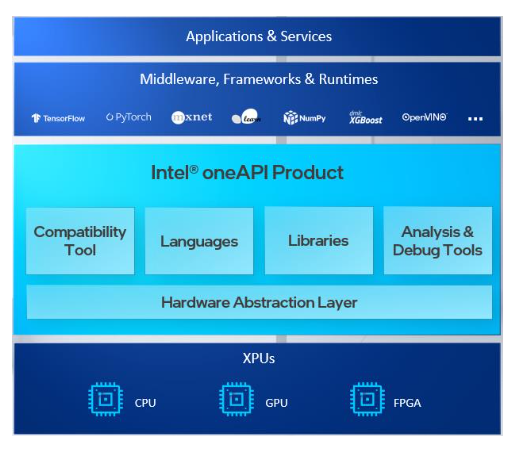
    Intel this week said a gold image of its oneAPI for unifying infrastructure as code will be available starting next month.

    Jeff McVeigh, vice president of data center XPU products and solutions Intel, said the goal is to provide a standard application programming interface (API) for accessing the compute capabilities of any processor regardless of what company may have manufactured it.

    The availability of oneAPI coincides with the launch of a series of dedicated graphical processor units (GPUs) from Intel that are intended to supplant the dominance of NVIDIA.

    McVeigh said Intel is encouraging cloud service providers and builders of systems deployed on-premises to embrace oneAPI as a way to standardize the way any CPU, GPU, field-programmable gate arrays (FPGAs) or any other class of processor is incorporated within an environment rather than continuing to relying on programming models such as CUDA from NVIDIA that are designed for only one class of processor.

    The average developer may never interact directly with a low-level oneAPI, but McVeigh said a standard set of APIs at the processor level should ultimately serve to reduce the total cost of IT as developers invoke multiple classes of processors with their applications.

    Intel, of course, also sees oneAPI as an opportunity to usurp NVIDIA as the dominant providers of GPUs that are now widely employed in the cloud to train machine learning models. While Intel CPUs are still employed most to run the inference engine that enables those models to be deployed in a production environment, NVIDIA is now seeking to leverage its success in the cloud to provide either GPUs that can be used to run inference engines or processors from Arm. NVIDIA is in the process of acquiring Arm, a provider of processors that are widely employed in embedded system and edge computing environments.

    Microsoft and the open source contributors that oversees the development of the TensorFlow framework for building artificial intelligence (AI) applications have thus far endorsed oneAPI. In addition, the University of Illinois Beckman Institute for Advanced Science and Technology this week announced it is creating a oneAPI center of excellence (CoE) that will extend the oneAPI programming model to nanoscale molecular dynamics (NAMD) environments that employ code to simulate large biomolecular systems.

    Previously, the University of Stockholm (SeRC) has committed to adding support for oneAPI to GROMACS, open source software for building simulations of biomolecules, while Heidelberg University is working on adding support for oneAPI to GPUs from other vendors. Intel is also making available software based on oneAPI that is compatible with CUDA, added McVeigh.

    Finally, Intel also announced this week that the Intel Implicit SPMD Program Compiler (ISPC) will run on top of oneAPI Level Zero, which provides low-level, direct-to-metal interface. Written in X, ISPC is used to accelerate Intel OSPRay ray tracing engine on Intel CPUs. Support for ISPC on Intel GPUs is forthcoming.

    It may a little while before DevOps teams see the benefits of oneAPI; however, as it becomes easier to mix and match processors as they best see fit, chances are it’s because the overhead on the back end has been substantially reduced using a common API.

  • What’s the Best Multi-Cloud Strategy for Your Organization?

    What’s the Best Multi-Cloud Strategy for Your Organization?

    Scaling your business needs robust solutions, and a multi-cloud strategy can exactly help you achieve that. There has been a debate on whether organizations should go for multi-cloud or stick to a single vendor. Recently, one of the users of Reddit posted a question, “Do you need a multi-cloud strategy?”

    Responses to the question offer some interesting observations, in which large organizations are considering the multi-cloud strategy as failover situations. Most organizations migrate toward multi-cloud strategies to:

    • Avoid vendor lock-in.
    • Porting over dependency for computing function toward one cloud service.
    • Achieve self-containerization and portability.

    Multi-cloud is a strategy in which organizations seek services from heterogeneous cloud providers. Such providers can be specialized in platform as a service (PaaS), infrastructure as a service (IaaS) and software as a service (SaaS). Multi-cloud can also include public cloud, private cloud and even hybrid cloud service.

    The strategy has been quite popular among organizations across the globe. The global market for multi-cloud management will reach more than $1659.6 million by the end of 2020 and is expected to grow at a CAGR of 16.1% for the forecast period of 2021-2026.

    Here, we are going to discover some fantastic architecture designs for multi-cloud deployments. But, before that, let’s answer the question that most organizations should ask.

    Why Deploy a Multi-Cloud Strategy?

    Suppose you are a big organization like Spotify and all your data is handled by a single vendor—say Google Cloud Platform (GCP). Now, the streaming service has all the chips on a single vendor here. It is not that GCP is inefficient, but the dependency is higher. So, what to do for the worst-case scenario?

    Multi-cloud is an architectural decision for an organization. It helps reduce the dependency on a single vendor and creates a fail-safe.

    So, let’s discover some interesting multi-cloud migration strategies for your business.

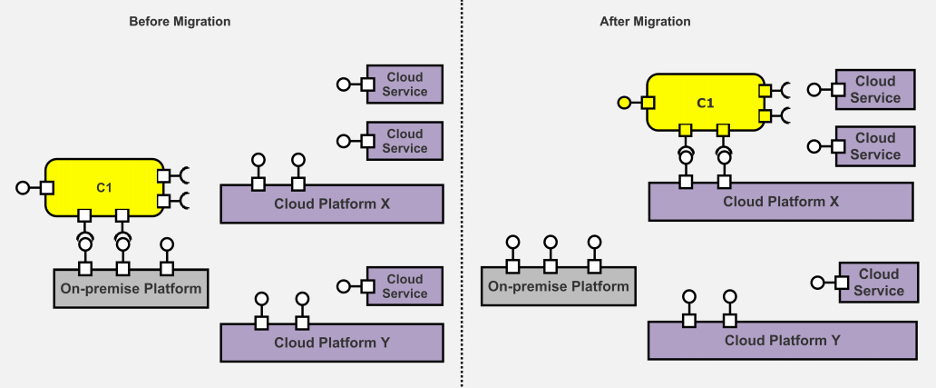
    Redeployment Multi-Cloud Migration Pattern

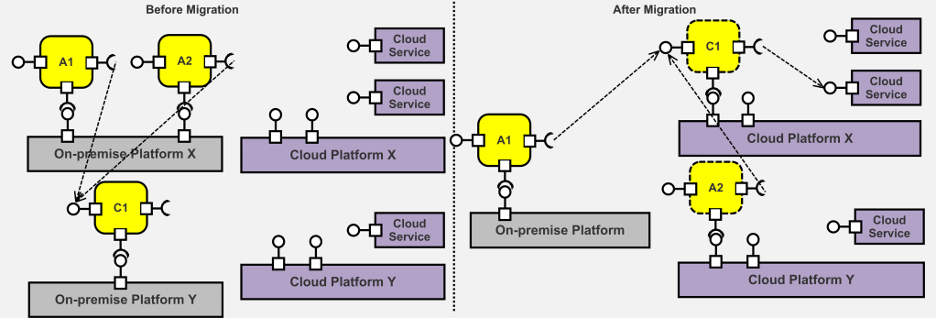
    Re-deployment of an application or software needs refactoring of the architecture. It is a great way to revisit the deployment strategy, especially when you are migrating to multi-cloud. This migration pattern can help transform the existing architecture into a multi-cloud design. It includes pre-defined architecture elements including the service, cloud platform, connectors and even onsite storage devices.

    Image Source: Re-deployment Migration Pattern

    Any service component can be atomic or allow a hierarchical redundancy. Here, before the migration, the component uses services from the on-premises platform. These services can be the coordination of different component architecture or IaaS.

    Once we migrate the component to multi-cloud architecture design, the on-premises service is replaced by a public cloud platform. So, the application is re-employed on a cloud platform without higher operational expenses, offering greater virtualizations.

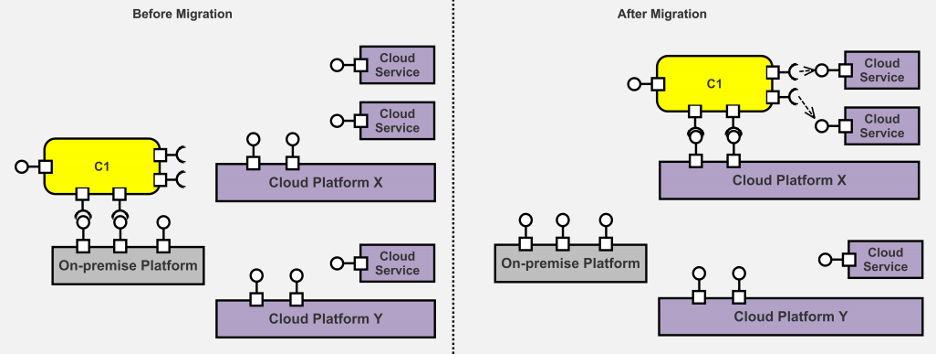
    Cloudification

    Cloudification design architecture explores the integration of public cloud platforms for added capabilities. Before the migration, the component uses on-premises services without any additional capabilities. It reduces the extensibility, increases redundancy and decreases reusability.

    Image Source: Cloudification Migration Pattern

    The solution here is simple: You can migrate to the cloudification architecture. Here, the on-premises service is integrated with the existing public cloud platform for extended capabilities.

    Relocation Design Pattern

    Sometimes significant changes in the multi-cloud architecture design can increase the operational expenditures. The solution to such an issue is a relocation strategy that helps maximize the existing architecture with multi-cloud capabilities.

    Image Source: Relocation Migration Pattern

    Here, the architecture uses queues, partitions of the database and other tools such as NoSQL or cache to capitalize on cloud services. It helps improve the efficiency of the components rehosted in the cloud.

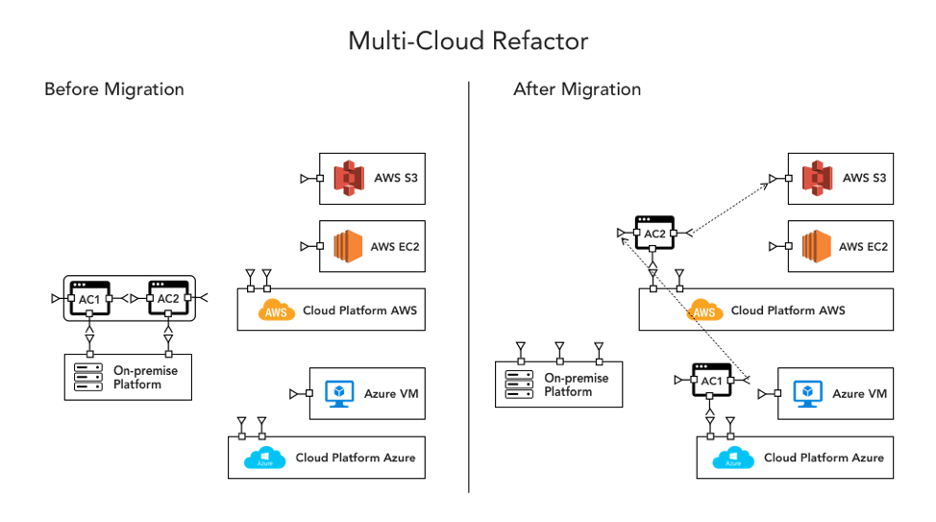
    Multi-Cloud Refactoring

    Many large organizations opt for multi-cloud architecture designs. The component is often pretty large to capitalize on the advanced optimizations offered by cloud platforms. The bulky components do not respond well to changes and variations in data.

    Image Source: Reforctoring Multi-cloud

    The solution is to refactor the multi-cloud architecture. The application is refactored into small components that are optimized individually for lower usage. A parallel architecture helps with better performance, scalability and flexibility of multi-cloud features through integration.

    Multi-Cloud Rebinding

    Multi-cloud rebinding is an especially fail-safe architecture. Take an example of Netflix’s streaming service: You are watching a movie on the app, but streaming stops due to a bug in the cloud platform. Netflix simply routes the traffic to the nearest healthy data center or cloud service for an uninterrupted experience.

    Image Source: Rebinding Multi-cloud pattern

    Rebinding the multi-cloud architecture can help redirect the traffic while your unhealthy instances come back to normal during a failover. So, you can again use the original cloud services and direct the traffic back.

    Replacement Architecture Design

    Innovation in existing products often needs services with higher capabilities. For example, you want to integrate a machine learning algorithm into an application, but the current architecture does not have that capability due to existing cloud service. So, you can replace the cloud service with the ones that have better performance and handle such integrations.

    Image Source: Replacement Architecture Design Pattern

    Replacement architecture saves your re-engineering efforts and operational costs. It helps improve the performance of your products through cloud services with advanced technology.

    Multi-Application Modernization

    Many organizations tend to create a portfolio of on-premises applications for cost reduction and better consistency. What transpires in the real world, however, is often different from the envisioned architecture. These shared components do not have that consistency and cost higher.

    Image Source: Multi-application Modernization Pattern

    Here, you can see that A1/A2, C1 shares the on-premises platform as a portfolio deployed on the cloud environment. Instead of a portfolio, these services are separately deployed in a re-architected multi-cloud design. It helps in identifying the capabilities of different components and finding the solutions shared among them. It will help organizations have constant information on shared solutions and reduce operational costs through optimizations.

    Conclusion

    The current application market has many organizations leaping through innovations and advancements. It emboldens these firms to use multi-cloud architectures to leverage different microservices and containers. The multi-cloud landscape is growing and a new era of function as a service (FaaS) has emerged.

    Breaking the single vendor lock-in to deploy apps with services from multi-cloud is popular these days. The best things about this revolutionary change are better consistency, flexibility and performance, which become evident. Organizations can switch to multiple vendors to share the workloads and create an ecosystem of services.

  • 20/20 Network Visibility: Making Cloud Migration a Success

    20/20 Network Visibility: Making Cloud Migration a Success

    Organizations need to take a considered and gradual approach to cloud migration to ensure security and compliance

    For businesses to succeed in 2021 and beyond, agility and responsiveness are critical. Data is the new currency, and businesses need to be able to access theirs instantly and securely to make the rapid-fire business decisions that will make or break their long-term strategies. One way IT can improve responsiveness and business agility is by moving business applications to the cloud.

    When migrating applications to the cloud, the need for network security is often overlooked. When this happens, applications are deployed in the cloud without adequate security and compliance measures in place—or, conversely, the security team steps in and halts the migration process.

    This puts the company at risk: Inadequate security makes it easier for hackers to access the network and mount an attack against the company, exposing the company to financial losses and legal repercussions. Moreover, if the business is unable to respond to market demands in a timely fashion, there are clear financial implications.

    The Challenge of Security

    Cloud migration comes with several benefits, but it also exposes a number of security risks. With every advantage comes a cost, and it is up to businesses to do whatever they can to mitigate that risk to leverage the cloud to its fullest potential.

    An AlgoSec survey found that organizations reported a range of problems when migrating to public clouds, with 44% having difficulty managing security policies post-migration and nearly a third struggling to map application traffic flows at the start. Respondents also had concerns about applications in the cloud, with the greatest worry being cyberattacks (58%) and unauthorized access (53%) followed by application outages and misconfigured cloud security controls.

    But this shouldn’t stop progress from happening. To demonstrate this, let’s take four of the biggest advantages of cloud migration and outline the security challenges that come with them.

    1. Security and Data Protection

    When adopting the public cloud, data itself is much more accessible no matter where it is located, but this does not come without a cost. Data in the cloud is highly regulated and therefore subject to greater regulatory compliance—for example, under GDPR in the EU. Once the data is no longer kept on-premises, security must be tightened and additional security controls must be employed to demonstrate greater control over data storage and usage, in accordance with set guidelines. There are best practices to uphold, as well as financial penalties if organizations do not comply with them.

    1. Agility

    Spinning up a server in the cloud takes mere minutes. Cloud computing requires no hardware and no locally installed software; all you need is a credit card and you can be up and running with your very own cloud-based infrastructure almost instantly. Some businesses are powered purely through SaaS and IaaS services, and it makes them incredibly nimble in rapidly changing times. But this agility also comes with risks. For security to be tight, businesses need complete visibility, and that is not always possible when working exclusively in the cloud. Therefore, stronger pre-fail measures and cloud firewalls are needed, as well as established baselines for allowed connectivity for each cloud server used.

    1. Cost-saving

    The cloud offers zero maintenance and capital cost along with reduced IT support costs. You also have the added benefit of only paying for what you use, which means you don’t have to purchase expensive hardware that you would only need during peak times. However, there may be hidden costs depending on which provider you use, so you will want to monitor usage and cloud assets more generally, ensuring they’re optimized and working as efficiently as possible.

    1. Time to market

    When the cloud is coupled with DevOps practices and tools, organizations can gain a flexible framework in which to build with zero capital investment. PaaS has revolutionized time-to-market for these organizations, but this too comes with risk. With so many teams collaborating on development and so many moving parts in the process, security is often sidelined and even forgotten, meaning it gets tacked on at the end of the process, leaving gaps that can be exploited.

    What these organizations need is a security policy automation that supports the DevOps methodology, and more importantly the DevSecOps approach to building a security foundation. This solution needs to be able to automatically copy the firewall rules—and then make the necessary modifications to map rules to the new objects when the rules are applied to each new environment in the DevOps life cycle. With the right automation solution, security can be baked into the entire process.

    Cloud migration is absolutely essential for businesses that want to stay market-fit and competitive. But too often security seems to fall down the list of priorities, causing damaging problems in the long run. So how should organizations approach their cloud migration projects to ensure that security and compliance are not compromised during or after the migration?

    Visibility Is Key in Cloud Migration

    Obtaining an inventory of applications is a key requirement when migrating to the cloud. Most businesses have two types of applications—enterprise and departmental—and it should be relatively easy to obtain the necessary connectivity information needed to migrate them to the cloud. The key here is to know that these applications exist.

    Once the list of applications is in place, you can move onto the next stage in the process of closing the security gap as you migrate to the cloud: identifying and sealing any vulnerabilities in the server that could be exploited by a hacker and understanding network connectivity requirements and application attributes such as the number of servers and associated business processes. These elements help determine the complexity involved in migrating applications.

    Several attributes can affect the complexity of migrating an application to the cloud, including its specific connectivity requirements and the firewall rules that allow/deny that connectivity. Mapping this connectivity provides a deeper understanding of network traffic, which then provides insight into the flows you will need to migrate and maintain with the application in the cloud. The more applications that utilize a server, the more difficult it is to migrate an application that depends on that server. It may be necessary to migrate the server itself or migrate multiple applications at the same time.

    Mapping the firewall rules provides insight into the security measures you will need to put in place once the application has been migrated to the cloud. As a rule of thumb, the more firewall rules are required, the greater the complexity. This mapping allows you to identify and decommission firewall rules that are no longer necessary post-migration.

    So how do you generate documentation of application connectivity? The obvious choice is to employ a solution that automatically maps the various network traffic flows, servers and firewall rules for each application. If you do not have access to such an automation solution, manually documenting—however tedious—will provide the necessary information.

    Adopting a Migration Strategy

    For most businesses, digital transformation is a gradual evolution that requires forethought and strategy to get it right. An organization might choose to only move a few of its applications onto the cloud to begin with and may even choose to use one or more cloud vendors for their needs. Either way, organizations still have a responsibility to manage and maintain security and compliance in the cloud, just as they did on-premises. This will need a deeper understanding of cloud security controls and how they connect to on-premises security devices, made possible by enhanced visibility and automated network management.

    No matter which approach they take to cloud migration, organizations need to take a considered and gradual approach, understanding that the responsibility to manage the security and compliance of their services still lies firmly at their door.

  • Building an IaC Security and Governance Program Step-by-Step

    Building an IaC Security and Governance Program Step-by-Step

    Infrastructure as code (IaC) is undoubtedly changing how engineers approach the cloud. IaC, when coupled with dev tools and automation, opens up new avenues for infrastructure performance, scalability and, now, security.

    By embedding IaC security and compliance controls into your version control systems and CI/CD pipelines, you can start identifying and fixing errors earlier. But, to do so without being disruptive, it’s vital to lay out a strategy to determine where and how to enforce security controls to meet your goals without slowing your developers down, from experimentation to governing your strategy.
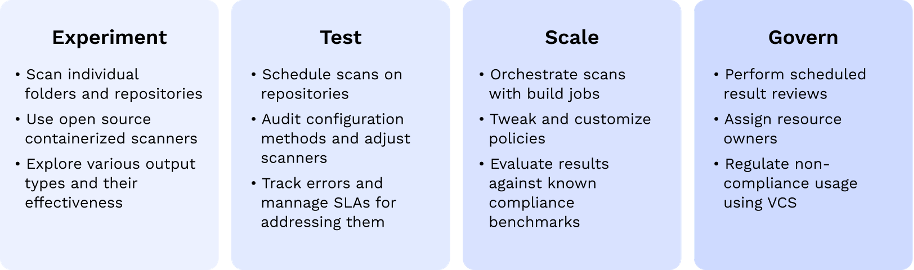
    This post will share a technical process for approaching and building an internal IaC security strategy.

    What are Your Infrastructure Security Goals?

    The key to implementing the most sustainable infrastructure security program lies in leveraging the tools and workflows developers already use. For many, that may be easier said than done because security tooling traditionally lacks the access and context necessary to play nice with dev workflows. The IaC security approach is fundamentally different from the more reactive cloud security monitoring and alerting that happen independent of developer workflows.

    As you start paving the road ahead for continuous infrastructure security processes, start by defining your ideal state. That way, as you go through the process, you’ll have an idea as to how and where you want to enforce different security and compliance controls.

    What Policies Do You Want to Enforce, and How?

    Your infrastructure security program is highly dependent on your organizations’ security priorities and maturity, and you should read this guide with your unique needs in mind.

    If you want to improve your overall cloud security posture, you may want to look for ways to apply common security policy frameworks such as the Center for Internet Security. Several open source security scanners such as Checkov or Open Policy Agent (OPA) enforce policy-as-code at the IaC level.

    They’re usually standalone packaged containers defined to accept a file, directory, repository, branch, etc., and output scan results in a machine-readable format such as JSON or JUnit XML. The most significant advantage of using an open source scanner is that they pre-package valuable security testing logic that your developers won’t have to learn.

    The alternative to a scanner is a full-featured security product, preferably one with exposed APIs and webhook integration sources. Most developer-first security solutions have done this part of the heavy lifting, so you should be getting some of this out-of-the-box.

    If you need to enforce external controls such as industry benchmarks or regulatory compliance requirements, you’ll need a more structured approach that maps individual checks to desired outcomes. Many cloud providers include robust compliance reporting for standard benchmarks such as HIPAA, NIST, PCI-DSS, etc. Make sure your policy enforcement approach enables you to build your own policies so you can adopt those controls as well.

    Where Should You Enforce Infrastructure Policies?

    Each of your teams likely has its unique frameworks and processes in place, and it’s important to have a full lay of the land before diving in. Start with a simple mapping exercise and list all the configuration frameworks in use—from CloudFormation or Azure Resource Manager (ARM) to Terraform or Pulumi.

    Once you know what frameworks exist internally, the next step is to determine the best place to scan them for infrastructure security errors. With many frameworks in place, building out new processes from scratch would be an uphill battle. Depending on your organization’s DevOps maturity, you’ll likely find an existing foundation on which you can build.

    Understand your teams’ end-to-end code review process—from committing new infrastructure changes to CI/CD build pipelines and deployments. Your team likely has some automated tests—unit, acceptance, integration, etc.—in place to ensure updates work as intended and don’t introduce bugs. Use those processes as an example for inserting security scanning. To better understand those processes, you might want to ask questions such as:

    • What triggers a CI/CD build?
    • Do your current automated quality assurance efforts run continuously on every new pull request and commit?
    • Do more time-consuming tests such as integration tests run on less-than-continuous intervals such as nightly or only on branches following specific naming conventions?
    • Are developers testing their work locally before committing?
    • How many CI/CD pipelines are in use?

    How and where you implement your security scanning will depend on those processes and the tools used to do them. Based on your current setup, you’ll generally want to take one of two approaches to IaC security—leveraging CI/CD processes or the built-in functionality from your version control system (VCS).

    Approach #1: CI/CD Pipeline

    Building security controls as part of CI/CD pipelines is probably the easier of the two approaches because modern CI/CD tools have completely abstracted away the complexity behind orchestrating test logic.

    In many cases, scanning security in CI pipelines is the fastest way to implement an IaC security and governance program. If a modern CI tool is already in place, you can probably set it up in less than 10 minutes. If you find yourself going down this path, consider the residual results of the scan and spend time dry-running it with the team that’s going to be in charge of handling its output.

    For teams operating in a centralized infrastructure operation model, this is an optimal solution. Expertise and control can remain in the hands of a small few, and the continuous enhancements to this process will not affect a large population of developers. For everyone else—continue reading.

    Approach #2: Version control system

    Your version control system (VCS) of choice is also hiding some robust security governance internal controls. Apart from adding individual automation capabilities, all of the three platforms currently dominating the market (GitHub, GitLab and Bitbucket) offer embedded code review and authorization controls that can be utilized to better control who can change what and where.

    Through their native versioning and branching, developers can perform extensive testing without compromising any running production system and continue to collaborate and converse before making changes due to a test.

    By embedding infrastructure security here, there are some pros in terms of more fine-grained access and controls. Two of the more common methods to do that utilize the standard pull request review (PR) process:

    • PR annotations: Start simple by choosing the path of least resistance. Using a standard webhook or API interface, you can start by scanning every PR and annotating its results with concrete secure coding advice. The benefit of the annotation is that it’s frictionless. Developers can choose to adopt or ignore it—little frustration, but on the other hand, not a lot of governance.
    • Checks: With the addition of native CI to most git platforms, you can also always incorporate a standard CI pipeline in git. The main benefit is to include a CI-like scan as part of each individual PR. It surfaces the same kind of output in an earlier stage and enables developers to react before actually failing building in the pipeline.

    How Should You Enforce Security Output?

    Before you include intrusive controls and overwhelming security scanning results, it’s a good idea to set expectations for how security output should be actioned. Nobody wants to get bombarded by tens of failure indications with no clear path to justify their decisions. If your IaC strategy is noisy or becomes a blocker at the end of the day, your team won’t adopt it.

    Define how passive or active you want the output of your security controls to be. Should it block builds actively or provide passive feedback to address in some pre-defined SLA?

    Some scanners can even integrate further into pipelines and orchestrate more advanced actions, such as blocking a build from completing until testing is complete. Scanning in CI was generally meant to be passive; it wasn’t built for interactive testing and troubleshooting. Should a development pipeline hold the answers to complex questions that need to be answered when resolving a security error or compliance violations?

    Ask yourself who is going to get the notification when that build fails. Continue by imagining if your CI console is where you want to troubleshoot a misconfiguration. Will you have sufficient context to solve the kind of issues your scanner is going to raise? Will you be able to deduce the impact of a change you’ll make to pass a CI scan?

    In addition to the previously mentioned benefits of hinging your IaC security strategy on your VCS, there are more fine-grained controls in git such as:

    • Approval rules: With a VCS, you can define how many approvals, and a pull request needs before it can be merged. Some even let you select which specific users those should be.
    • Code owners: If you have admin access to your main repo, consider using CODEOWNERS parameters to define a stricter approval protocol for more sensitive files.

    Some of the more mature tools also support advanced functionalities such as importing custom rule files and applying suppression and skips as code annotations. Those should help you make sure that only relevant checks eventually crop up.

    Conclusion

    There are no one-size-fits-all strategies for infrastructure security, and we as an industry are still defining the best practices for embedding it into IaC. It’s up to every security team to work closely with their engineering and DevOps to make security consumable and, ultimately, to prevent risk as early in the development life cycle as possible.