Category: IT as Code

  • Overcoming Cloud Asset Management Challenges

    Overcoming Cloud Asset Management Challenges

    Twenty years ago, no one in IT could have predicted the monumental role that cloud computing would play in our everyday lives. To play off the words of Back to the Future‘s Doc Brown: “On-premises? Where we’re going, we don’t need on-premises.” As technology continues to evolve, though, security teams face greater challenges.

    Infrastructure is no longer server rooms and boxes; it is dynamic, changing constantly to support fluctuations in demand. And moving to the cloud introduces new third parties into the digital mix. Although AWS, Google, and other cloud providers have a lot at stake when it comes to protecting customer data, security responsibility is never completely out of an organization’s hands. Compliance considerations are yet another complicating factor. In many cases, regulations around data access, privacy and residence were created for an on-premises world.

    Looking to the future, companies want to maximize their investments in the cloud, while better addressing these security challenges. However, the rapidly changing nature of the cloud makes it difficult for security teams to fully understand the scope of assets they are responsible for at any given point in time, which is an absolute necessity in order for companies to truly be secure. After all, how can a company make sure it has no gaps in its cloud security if it can’t account for all cloud assets – especially when working with multiple cloud providers?

    Security teams need to inventory their entire cloud infrastructure, understand what controls are in place and find ways to detect and mitigate any vulnerabilities or misconfigurations in a timely manner.

    Understanding Cloud Workloads

    When moving assets to the cloud, it can be incredibly difficult to try to inventory devices with dynamic IP addresses, which constantly change, compared with more static devices. The mass adoption of containers and microservices, some of which exist for just seconds before disappearing, make dynamic systems even harder to track.

    One of the most important improvements that have come out of cloud growth is that everything has an API, which can be a massive advantage when inventorying assets. Because each cloud provider is self-contained, finding out when a new bucket or instance is created is certainly possible. Organizations that have advanced development capabilities can write and maintain their own applications to identify every new cloud instance for each provider – but doing this for multiple cloud providers and correlating cloud asset inventories with other security control data becomes a major investment of resources. The ability to access all resources in the cloud makes asset management a more achievable goal.

    Security Controls

    It is essential for organizations to carefully manage their assets and understand the security controls in place to know exactly what they cover. By categorizing their resources, companies not only better understand what they have, but can make informed decisions about exactly what additional security measures need to be taken. For example, vulnerability scanners may not be scanning critical workloads – or perhaps dedicated cloud workload protection platforms need to be deployed for certain cloud assets. It can be incredibly difficult for security systems to keep up; since cloud assets can be created so quickly, they need security systems tailored specifically to keeping them safe.

    A security tool can only secure devices that it knows exist. Once an organization understands the assets it has, it can expand the coverage of any existing tools to devices that were previously unknown. When that coverage is fully adopted, asset management can help the organization find gaps in its coverage to identify areas for additional protection and the right tools to secure them.

    Addressing Vulnerabilities and Misconfigurations

    Once an organization establishes a comprehensive asset inventory and visibility, the next step is to address vulnerabilities, gaps in coverage or misconfigurations that are found. With the ability to spin cloud instances up or down at will, it is inevitable that instances may be forgotten and inadvertantly left unprotected. Since cybercriminals automatically scan public cloud infrastructure to exploit these types of vulnerabilities, public-facing cloud workloads are especially at risk.

    Similarly, finding and addressing misconfigurations in cloud workloads becomes more complex. With the highly configurable nature of the cloud, mistakes happen often, and without proper security controls in place to detect these misconfigurations, attackers can easily access and steal data. Organizations must implement a process to continuously detect cloud workload misconfigurations.

    A great place to start is the Center for Internet Security (CIS) Benchmarks, which provides objective security guidelines. By comparing data from each cloud provider with the rules in the CIS Benchmarks, security teams will be able to identify assets that don’t adhere to best practices.

    The key to maintaining security in a modern cloud environment is to implement continuous discovery and interrogation, which requires automation. This includes the ability to create tailored alerts when certain conditions are met, and automatically deploy and change security controls as needed. Teams should set restrictive access controls by default so that non-approved users don’t have access to sensitive data. Any time a cloud workload deviates from policy, there should be a plan in place to automate the corrective action.

    Computing technologies continue to evolve at a staggering pace. The computing environment 20 years from now won’t resemble even the most far-fetched, futuristic ideas today. The evolution of cloud adoption from justified skepticism to ubiquity taught us an important lesson: change is constant. It is incumbent upon technology and security professionals to  constantly challenge the expectations of security solution coverage and adherence to controls to keep data and systems protected.

  • Moving Legacy Applications to the Cloud

    Moving Legacy Applications to the Cloud

    Even in 2021, many companies still run business-critical, legacy applications on-premises, just as they have for the last 20 to 30 years.  The midrange server hardware, and their unique architecture, on which many of these applications run is both their biggest drawback and biggest advantage; the benefits of being able to vertically scale a platform were measured against the drawbacks of the necessary custom hardware. Migrating the workloads running on these types of systems to the cloud, which can potentially offer huge benefits, presents some unique challenges – here are four strategies for doing this, with pros and cons for each.

    Option 1: Lift and Shift

    The “lift and shift” option means you’re simply representing the on-premises network within a cloud service provider. This is the easiest and quickest option.

    Until recently, this was not an option for most legacy applications. This was because the main hyperscale clouds did not offer dedicated infrastructure as-a-service (IaaS) implementations for several common data center operating systems. The process required purchasing a vast amount of dedicated hardware to offer as-a-service to customers, and it wasn’t clear if the demand warranted that cash outlay.

    Recently, however, it’s clear that the only way for organizations can leave behind the data center is by moving business-critical applications to the cloud. There are now hyperscale cloud providers that offer lift and shift options for even the most demanding workloads.

    Despite these benefits, it’s important that a lift and shift approach is carefully planned before executing. Even a couple of seconds of downtime in traditional application workloads can cost businesses thousands of dollars. Finally, organizations should understand that they won’t be using the cloud to its full potential simply by recreating their on-premises environment.

     Option 2: Rewriting or Refactoring

    Refactoring a traditional application into a cloud native application has been the de facto migration option for many years. It provides greater long-term cost savings than other options, because previously underprovisioned data center resources can now be consumed on-demand in the native FaaS offerings of hyperscale cloud providers. The compute capacity is nearly limitless, and only scales as resources are being used.

    However, refactoring to cloud native services does have major risks, such as high short-term costs. Refactoring an existing business-critical application is typically much more complex than a simple lift and shift. Also, an application that has been part of the core business stack will have likely accrued many dependencies and interfaces with other systems and added modules that must be accounted for.

    Another consideration is that legacy interfaces must appear identical to other systems post-migration, otherwise you must expand the scope — including other systems in the migration project that originally weren’t planned. Many of the hyperscale cloud providers do not support legacy interfaces in their cloud native services. Scope creep can become a real issue in this scenario, and your organization could lose sight of the migration timeline.

    An enterprise service bus (ESB) is one potential solution to the problem of legacy interfaces. An ESB is typically deployed as a “bus” between various business applications, ensuring that all those interfaces use a common interface. The ESB handles the network, transport, routing and delivery of messages and content. However, ESBs add yet another layer of complexity, increasing the risk of failure for the overall refactoring project.

    Option 3: Dynamic Lift and Shift (Reshape)

    Reshaping an application to the cloud typically lies somewhere between the lift and shift and the refactoring strategies. It’s similar to lift and shift, but usually involves some minor modification to the application to take advantage of native tools within the cloud infrastructure. An example is adding automated launch and tear down of development and test environments.

    One of the main advantages of a reshaping is that it is cost-effective. An organization will see significant cost savings over a simple lift and shift, for example, by only having to pay for the hours that the development and testing machines are powered up and running.

    It also means that the development teams are free to experiment with refactoring certain applications without a hard deadline (such as a data center exit.) Finally, a dynamic lift and shift strategy allows development teams to leverage cloud native functionality, such as infrastructure as code, to automate traditional workloads without retraining on a whole new development stack.

    Option 4: Drop and Replace with COTS

    Another option is to replace your custom application for one that is commercial off the shelf (COTS). For example, replacing a custom-built customer relationship management (CRM) system with a vendor’s product.

    This is not feasible for some organizations because of their business environment constraints, but it is recommended when possible. COTS products (that are typically SaaS) usually have a repository for various connectors to different legacy applications; however, this is largely dependent on the size and maturity of the COTS product.

    It’s important to note that one of the largest risks of considering a COTS application is the skills within the organization. If the current development team’s skillset lies with custom, traditional applications, they will need extra time to retrain and develop the extensions to integrate the COTS product with their existing environment.

    Migrating any application to the cloud is a large undertaking. There will always be risks when moving existing on-premises applications to the cloud, but in general, the overall positive impact of moving legacy applications far outweigh any risks, regardless of the approach you decide to take.

  • OpsRamp Extends AIOps Reach to the Network

    OpsRamp Extends AIOps Reach to the Network

    OpsRamp today announced its AI-enabled IT operations management (AIOps) platform now has the ability to analyze network flows and communications traffic.

    Ciaran Byrne, vice president of product management for OpsRamp, said the new analytics capabilities will make it possible for IT teams to correlate the IT events OpsRamp already tracks on servers and storage systems against multiple types of traffic moving across a corporate network.

    OpsRamp is based on a software-as-a-service (SaaS) platform that simplifies IT adoption of AIOps without having to build and maintain their own management platform or install an AIOps platform on their own infrastructure.

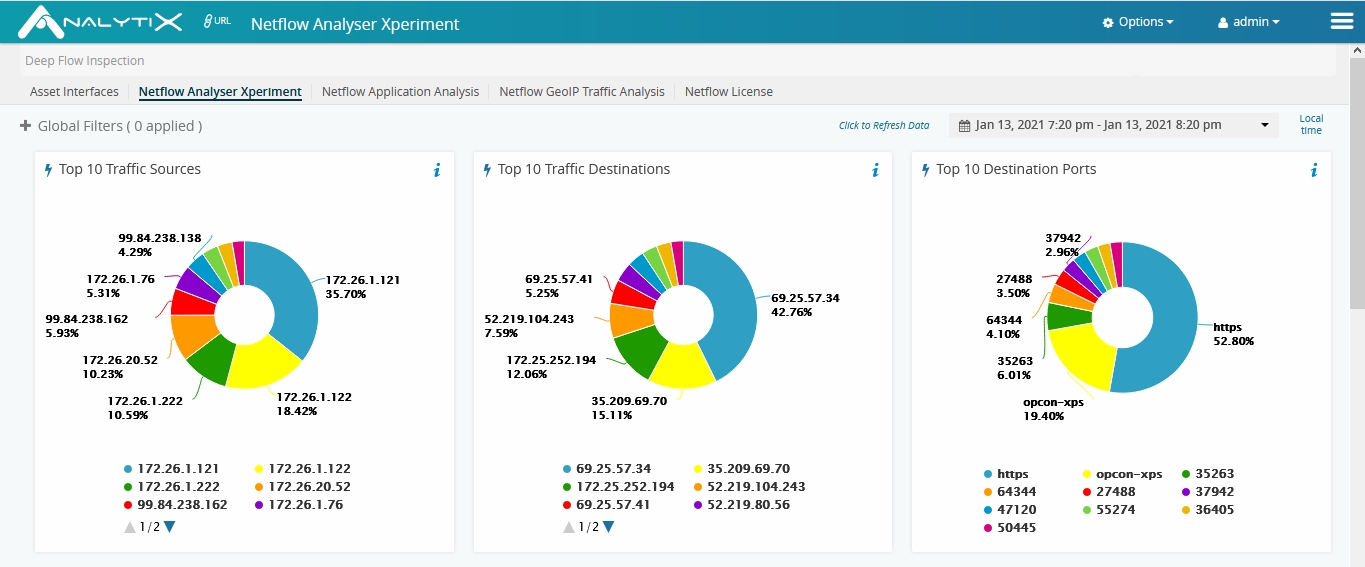
    Rather than acquiring a separate platform to analyze network traffic, OpsRamp is adding an OpsRamp NetFlow monitoring module, for analyzing packets using the NetFlow protocol developed by Cisco, and an OpsRamp Unified Communications monitoring module, for analyzing voice and collaboration data.

    OpsRamp NetFlow provides real-time diagnosis of network latency across wide area networks (WANs). It generates alerts based on network traffic utilization, and delivers insights into network utilization patterns by identifying source, destination, protocols and applications that impact services.

    OpsRamp Unified Communications works in a similar way, surfacing alerts and insights about traffic patterns impacting, for example, Zoom or Microsoft Teams.

    With more employees working remotely, the need to analyze network traffic has become more acute, said Byrne. Network performance degradations can have a major impact on overall application experience, Byrne said.

    Communications and collaboration platforms like Microsoft Teams pose particularly stubborn challenges, because they offer IT teams little to no visibility into that traffic, Byrne said.

    It’s unclear whether – and to what degree – networking and other IT operations will converge, but as AIOps platforms become more accessible, the ability to correlate IT events across multiple infrastructure classes as they transpire will steadily improve. While that may not lead to IT role consolidation anytime soon, it should enhance the level of collaboration teams can achieve.

    In the meantime, AI is poised to have a profound impact on how IT environments are managed. The amount of time spent in “war rooms” performing root cause analysis can be sharply reduced through the use of machine learning. As algorithms surface insights, IT teams will be better able to proactively address issues before they have a major impact on application performance and user experience. It may take time for IT teams to fully trust AIOps platforms, but in the near future, IT professionals will avoid working for organizations that don’t have such platforms in place. For IT professionals, keeping complex application environments running without AIOps platforms will be nearly impossible.

    Of course, transitioning to any type of new IT management platform is no small undertaking. However, as AIOps platforms continue to evolve, the overall cost of managing IT should also decline as leadership justifies the costs of these tools.

  • A Security Vulnerability Management Guide

    A Security Vulnerability Management Guide

    Living in a container-native world is not easy. Containers have a reputation for being a point of entry for security vulnerabilities for many organizations. In 2015, according to a research paper, over 40% of Docker images distributed through Docker Hub had high-risk vulnerabilities; at that time there were more than 95,000 container images hosted on Docker Hub. Today, there are over 3.5 million container images on Docker, and container security is of even greater concern. In a more recent 2020 study by a team of researchers at the Norwegian University of Science and Technology found container image vulnerabilities in certified and popular packages.

    This is just one example of one kind of security vulnerability. This article will share an introduction to security vulnerabilities and the role of vulnerability management for containers and other artifacts in a continuous integration and continuous delivery (CI/CD) pipeline.

    What is a Security Vulnerability?

    A vulnerability is a weakness or flaw present in software. Security vulnerabilities can be present in application dependencies or operating system (OS) packages. Common vulnerabilities include missing data encryption, buffer overflows, missing authentication for critical functions and insecure interactions between software components.

    There are different risks associated with different types of vulnerabilities. With critical or high-risk vulnerabilities, an attacker who exploits your software has the potential to seriously impact your organization. Risks associated with data breaches impact not only an organization, but also its end users and customers.

    Vulnerability Management Techniques

    Vulnerability assessment practices and tools exist to make detecting vulnerabilities simple, accurate and fast. Some of these practices include:

    • Penetration testing – Penetration testing, or pen testing, allows you to identify security vulnerabilities by attempting to break into your own systems to identify weaknesses.
    • Configuration management – Configuration management involves managing infrastructure configurations and identifying missing patches that leave your software service vulnerable to errors and risks. There are tools that provide infrastructure scanning as-a-service to help detect outdated or misconfigured instances.
    • Container and application Scanning – Allows you to detect vulnerabilities in deployable artifacts and running applications. Some available tools for container scanning include Twistlock, Clair and Trivy.

    These practices help build solid, repeatable vulnerability management techniques across your security and delivery teams. One way to scale these security practices is through security automation. Security automation is the use of technology that performs tasks with reduced manual assistance. It ultimately enables users to apply security decisions automatically and secure processes to deliver more robust applications and infrastructure.

    Security Practices in your CI/CD process

    Security automation is a core tenant of DevSecOps. DevSecOps is short for development security and operations, and it describes how organizations deliver and make security decisions and actions within the development life cycle of their valued deliverables.

    DevSecOps is a way of continuously integrating security in the software development life cycle. It’s a way of working and thinking so that security is at the forefront of how security teams deliver business value.

    One way to enable DevSecOps is through your CI/CD pipeline. Today’s enterprises can use CI/CD to accelerate better software delivery, but with that speed it becomes even more important to enable robust security. Vulnerability scanning improves software security while giving individuals across engineering and product teams accountability for each of the processes these teams own.

    Don’t let Security Vulnerabilities Ruin your DevSecOps

    This is a simple, basic introduction to security vulnerabilities and the risks they pose for your organization. There are practices and tools for detecting and reducing security vulnerabilities, and finding ways to incorporate those processes into a CI/CD pipeline is a great way to accelerate your DevSecOps.

  • Internal Makes On-Premises Edition of No-Code Tool Available

    Internal Makes On-Premises Edition of No-Code Tool Available

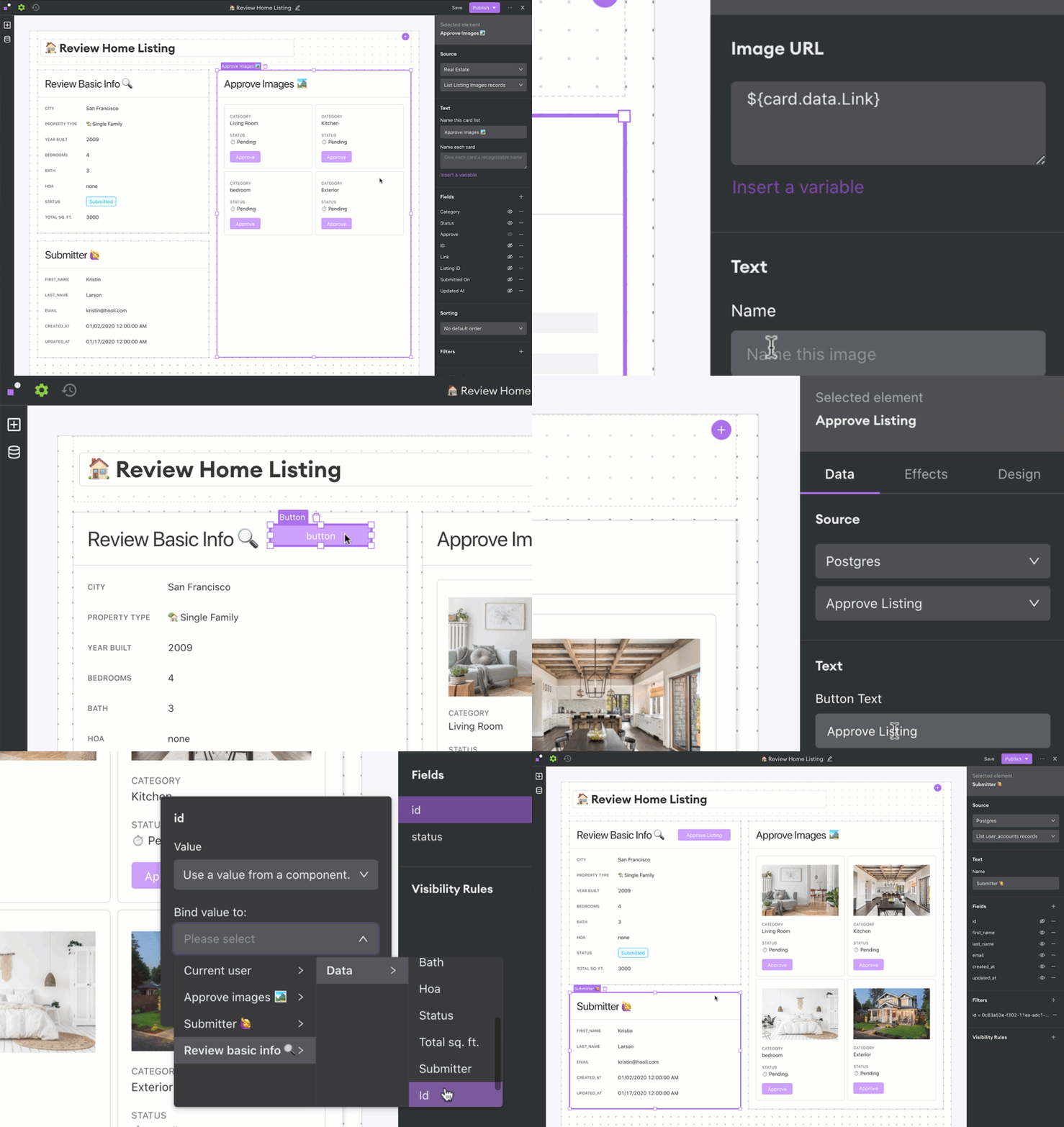
    Internal today launched an on-premises edition of its eponymous no-code development platform that promises to simplify application development backlog reduction for enterprise IT organizations.

    Arisa Amano, CEO of Internal, said many professional developers regularly find themselves building simple applications that, if given access to the right tools, could be built instead by end users. Internal was created to provide that capability either through a cloud service or, now, through an on-premises edition.

    The on-premises edition makes it simpler for developers to work with databases, application programming interfaces (APIs) and applications that reside behind a corporate firewall, Amano said.

    As organizations accelerate digital business transformation initiatives, professional developers are pressed to build and deploy more complex applications faster. Many lower-priority application development projects are sidelined simply because developers don’t have time to take them on. Internal, and other no-code and low-code application development tool providers, are making a strong case for enabling end users to build their own applications using graphical tools, or encouraging professional developers to use these tools to build less complex applications more quickly.

    A survey published by Internal finds 62% of respondents report their developers spend more than 25% of their time fulfilling requests to build internal tools. More than three-quarters of respondents (79%) said engineers use any extra time they can find to develop customer-facing features or other applications.

    Most of the projects filling application backlogs tend to involve workflows that span multiple applications running in a data center. The challenge organizations face is low-code and no-code tools that reside in the cloud can’t easily access that data. As such, Amano said there’s a clear need for a no-code tool that can be deployed in an on-premises IT environment.

    Of course, regardless of who builds the application, it still must be deployed. Challenges arise as developers build more applications, which must be concurrently deployed in production environments. The addition of no-code and low-code tools, and the applications created with those tools, will require organizations to rethink and refine their DevOps processes.

    Historically, professional developers have tended to view no-code and low-code tools as the application development equivalent of a black box preventing them from building reliable, robust applications that can scale. Many low-code and no-code applications that organizations build, however, are meant to used internally by a finite number of end users. At the same time, no-code and low-code tools become more robust with each major update.

    Whatever bias may exist, the current application development backlog in most organizations is only going to increase. Professional developers may prefer to write code at a lower level than a no-code or low-code tool allows; however, most business executives are more interested in application performance than in how it was constructed.

  • Improving Mainframe Agility With DevOps

    Improving Mainframe Agility With DevOps

    Mainframe workloads were on the rise even before the coronavirus pandemic, and transaction-processing mainframes became vital as lockdowns went into effect and every aspect of business and personal life occurred online. Mainframes are reliable, secure, highly available and affordable, and it is essential for organizations to ensure their mainframe can achieve peak agility to enhance profitability and improve customer experience.

    There are four areas of focus for DevOps teams who want to improve mainframe agility: teamwork, cloud services, KPIs and automation. Let’s look more closely at each one.

    Encourage Teamwork Between DevOps and Mainframe Ops Teams to Improve Agility

    It’s vital that mainframe ops teams work seamlessly with DevOps teams to ensure adoption of best practices in both areas, where practical, and that those best practices are adhered to. No matter how skilled your DevOps team, they must always be open to learning from mainframe professionals, operational and cybersecurity experts.

    To truly empower everyone on your team to achieve maximum mainframe agility, mainframe code must translate within the larger, multi-platform DevOps toolchain. If DevOps and mainframe code are not in sync, mainframe code could slow down software development lifecycles. Important processes, such as diagnostics, test execution and source code need to be integrated to enable DevOps teams to achieve better productivity.

    Enterprise DevOps is shifting focus away from software development exclusively to encompass surrounding processes within organizations. Successful DevOps teams must be able to work with cybersecurity experts and mainframe ops teams throughout the coding life cycle to ensure that everyone is on the same page and applications are functioning optimally.

    Decide Whether to Move Entirely to the Mainframe or Integrate Cloud Services with On-Premises Mainframes

    Scaling your organization for growth by migrating entirely to the cloud is not necessarily the right choice for everyone. In some cases, moving away from the mainframe’s core systems can be costly and unnecessary.

    Cloud-based services don’t have to be eliminated entirely, either. The cloud can and should be used for business processes that could benefit from real-time data updates, easy team collaboration and seamless integration with other software and tools. Mainframes excel at functions that require reliable, secure transactions.

    Whatever decision your organization makes, it must be communicated and agreed to at all levels. A customer-centric approach is ideal here, where the needs of the business are considered, but a seamless customer experience is prioritized.

    Establish Measurable KPIs

    Achievable and measurable key performance indicators (KPIs) are essential to monitoring your progress as an organization. KPIs for mainframe functionality usually include an availability rate of 99.999%, which roughly translates to downtime of less than 5.6 seconds per year. KPIs also generally measure time windows for batch completions. Software delivery velocity, efficiency and quality should be evaluated, but make sure you’re not prioritizing one of these metrics at the expense of another.

    There are more nuanced goals that need to be prioritized, too. Continuous improvements in software delivery are harder to quantify, but no less important. By fostering a collaborative environment where communication is key and teamwork is valued, your organization can create a better product or deliver better services for developers and customers.

    Use Automation Whenever Possible for Mainframe Agility

    Automated testing and AI-enabled processes can solve problems in real-time and free your DevOps teams to focus on larger issues. Mainframe ops teams can save their organizations money by relying on automated processes, which can also reduce personnel costs.

    Despite the benefits of automation, mainframe code is often removed from automated processes commonly applied to DevOps toolchains. Javascript, for instance, is one of the most commonly used programming languages due to its platform independence. It’s an essential tool for DevOps developers to enable the smooth configuration and installation of applications.

    But as infrastructures grow more complicated and surface areas expand to accommodate more users, operations teams can feel overwhelmed. With the continuous pressure to create new and better software on accelerated timelines, DevOps teams can unwittingly introduce vulnerabilities in Javascript coding as they speed through the software development and delivery pipeline.

    Automated mainframe diagnostics and optimization tools are vital to improving both the customer and developer experience.  Comprehensive and accurate data presented to mainframe ops teams in real-time can detect vulnerabilities and to find and fix potential issues.

    Ultimately, the mainframe is here to stay, with 93% of software experts citing the strength, reliability and scalability of the platform. Mainframes form the backbone of most monetized applications and websites, so it’s no surprise that mainframe agility has become a top focus for many IT departments. No matter how sleek and flashy your application is, if customers have a bad experience at the transactional level of the process, it could mean lost sales.

  • Cloudflare Lays Out GitOps Ambitions for CDN Platform

    Cloudflare Lays Out GitOps Ambitions for CDN Platform

    Cloudflare’s acquisition of Linc is the latest move in the hosting provider’s move to better align its content delivery network (CDN) service with the tools and frameworks organizations rely on to build modern applications using GitOps processes, according to CEO Matthew Prince. Cloudflare also announced other updates and automation-related features, including a way to automatically deploy JavaScript applications using Linc’s technology.

    Prince said these latest moves are part of an ongoing effort to simplify integration of front-end applications with back-end services.

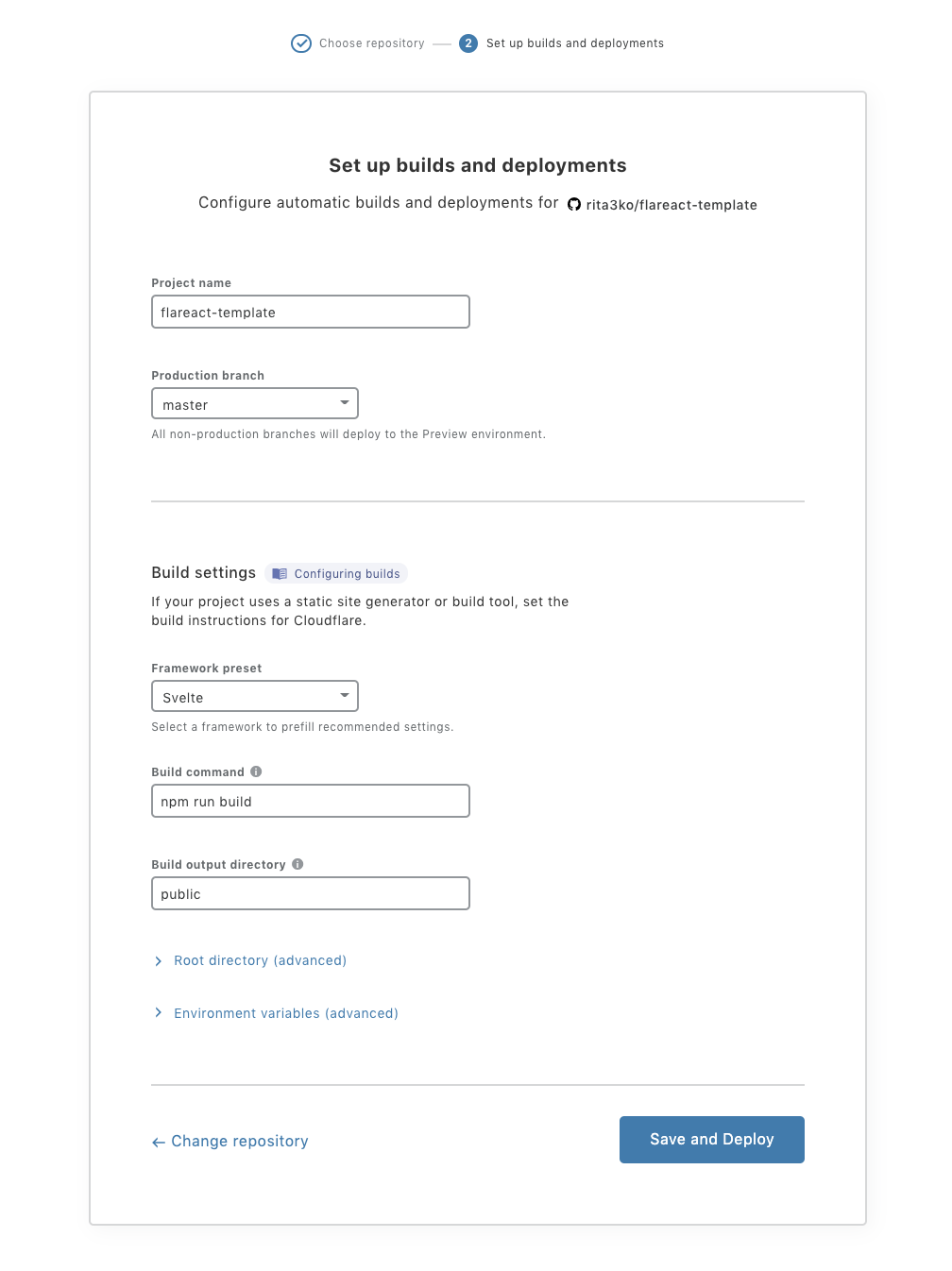
    Cloudflare Pages, for example, enables developers to select their preferred repository, identify what types of frameworks they are using, and then automatically deploy their applications on the Cloudflare CDN. The goal is to automate the continuous integration process in a way that enables developers to focus more of their time and effort on developing code, said Prince.

    Linc’s technology, meanwhile, will make back-end services more accessible to front-end applications using Front-end Application Bundles (FABs) that accelerate server-side rendering by combining front-end and back-end logic. The result is better performance across any type of application that relies on JavaScript, application programming interfaces (APIs) and markup languages, otherwise known as JAMstack, a framework for building complex applications.

    Prince said JAMstack adoption is accelerating because it allows developers to continuously modify the user experience (UX) without the need to modify back-end services. The CDN, meanwhile, has emerged as a platform for continuously deploying applications closer to the point where they are consumed by the end user, said Prince.

    That’s become especially critical at a time when digital business processes require data to be processed in near-time, and as closely as possible to the point where it is generated, said Prince. That’s not possible when application logic runs on a public cloud, Prince added.

    Cloudflare currently has points of presence in 200 cities worldwide, and is actively courting developers as part of an effort to usurp CDN rivals. Most recently, Cloudflare added a Durable Objects capability that makes it possible to run stateful applications across a distributed, serverless Cloudflare Workers service.

    Ultimately, Prince said the goal is to automate the majority of the DevOps process, as code moves from a Git repository to the network edge. A CDN will also provide the means to monitor and secure applications running at the network edge, Prince added.

    It’s not clear how much application logic will be pushed to the network edge via CDNs; however, it’s apparent CDNs are emerging as an important deployment platform that should be incorporated with DevOps processes. How providers achieve that goal is, in part, dictated by the framework used to build an application.

    Cloudflare’s moves are indicative of the larger trends of automating DevOps processes, a development that should make DevOps best practices more widely accessible to many more developers.

  • BMC Expands Scope of Mainframe Management Portfolio

    BMC Expands Scope of Mainframe Management Portfolio

    BMC this week updated its portfolio of mainframe tools as part of an effort to make mainframe platforms more accessible to IT operations teams and developers.

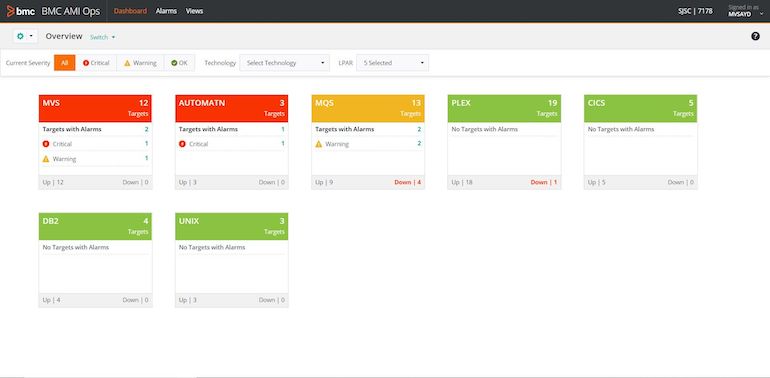
    At the core of these offerings is BMC Automated Mainframe Intelligence (AMI), which embeds machine learning algorithms in mainframe platforms to automate a wide range of processes. BMC AMI supplants the company’s existing MainView tools with a framework that promises to make artificial intelligence (AI) more accessible via a revamped user interface.

    BMC AI Ops

    John McKenny, senior vice president and general manager for ZSolutions at BMC, said an AI model based on the data collected by BMC AI can now be spun up in a matter of minutes, and can identify a potential issue days before it might otherwise occur.

    BMC AMI also exposes a REST application programming interface (API) through which more mainframe tasks will be automated.

    McKenny said as organizations accelerated digital business transformation initiatives in the last year, the need to modernize mainframe platforms became more acute. Mainframes are now the backend for multitier application environments that need to be managed in concert with other platforms, McKenny said.

    BMC is also adding Compuware zAdviser dashboards to the DevOps platform it gained with the acquisition of Compuware last year. BMC also updated Compuware Topaz for Total Test to streamline test creation for mainframe applications. There’s a growing need for better tools to test digital business processes created for the mainframe, noted McKenny.

    Other updates include Control-M job scheduler and Compuware ThruPut Manager integration, to ensure jobs run at or before their expected times on a mainframe, and an update to BMC AMI Data for IMS that simplifies database management in mainframe environments.

    Finally, BMC updated the BMC AMI Security offering with the Compuware Application Audit tool; this update allows for better capture of relevant user access and behavior data.

    McKenny said while mainframes remain one of the most secure platforms available, administrators must ensure security policies are properly implemented. IT organizations should avoid complacency and ensure zero-trust security in mainframe environments, McKenny said.

    McKenny added that, despite their long tenure and the rise of cloud computing, mainframes remain relevant. Many organizations determined that the fastest way to achieve their digital business transformation goals is by extending their mainframe platforms – platforms many of them already rely on to process and analyze transactions.

    What’s changing is the IT professionals that manage mainframes alongside other platforms, such as the cloud. Many of those IT professionals naturally expect integrated AI capabilities that enable the average IT administrator to manage a platform that was once the sole realm of dedicated IT specialists.

  • Report: Software Quality Issues Costing U.S. Companies $2.08 Trillion

    Report: Software Quality Issues Costing U.S. Companies $2.08 Trillion

    A report published today by the Consortium for Information & Software Quality (CISQ) estimates poor software quality collectively cost companies in the U.S. an estimated $2.08 trillion in 2020.

    The report, co-sponsored by software quality and security tools provider Synopsys, attempts to calculate, at least theoretically, the cost of known software failures. The report identifies operational software failures, estimated to be $1.56 trillion, as the single largest cost. The next-largest cost contributor is unsuccessful development projects, which totals $260 billion, an estimated 46% increase since 2018, according to the report. The project failure rate remained steady, at about 19%, for over a decade, according to the report.

    Finally, legacy systems issues contributed $520 billion to costs in 2020, a significant decrease from the $635 billion these issues cost in 2018.

    That estimate does not include technical debt, which CISQ estimates at another $1.13 trillion. Technical debt costs have been growing at a rate of 14% per year since 2018, the report noted.

    Joe Jarzombek, director for government and critical infrastructure programs for Synopsys, said it’s apparent there’s not enough focus on quality assurance within software supply chains. However, as organizations begin to realize how dependent their digital business transformation initiatives are on quality software, business executives will be forced to shift focus.

    Unfortunately, most business executives today still don’t understand or appreciate how software is constructed. Most organizations don’t even have a bill of materials describing the components that make up an application, noted Jarzombek.

    That issue becomes especially problematic in the event of a security breach, because too many organizations can’t draw a correlation between vulnerabilities and the impact on specific components of an application, added Jarzombek. At the same time, however, cybercriminals are becoming more efficient at scanning applications to discover and exploit those vulnerabilities, said Jarzombek.

    Many organizations also don’t appreciate how adept cybercriminals have become at exploiting what are perceived as low-level vulnerabilities to distribute malware laterally across an application, said Jarzombek. There is a tendency to patch only the most critical vulnerabilities within an application, while the rest are left to future updates. When fixing low-level vulnerabilities is not prioritized, these vulnerabilities may remain over multiple release cycles.

    Ultimately, Jarzombek said, rather than treating security separately from the application development process, it should be addressed as part of a comprehensive approach to software quality assurance. The immediate challenge, however, is that not enough developers have access to the tools they need to address these ongoing cybersecurity issues.

    The impact of poor software quality on individual companies will vary widely, but poor software quality is itself a universal issue. Most software development teams are not deliberately ignoring these issues; instead, the processes currently employed to build software are not especially robust, mature or, for that matter, automated, leaving organizations vulnerable.

  • The Biggest Motivators and Barriers for SD-WAN Adoption in 2021

    The Biggest Motivators and Barriers for SD-WAN Adoption in 2021

    The SD-WAN market has exploded in 2020, driven by the need to support increasingly remote workforces, the emergence of the AI-driven WAN and the requirement to deliver branch performance that matches campus networks. As enterprises look at the year ahead, support for the distributed workforce remains a top priority, and SD-WAN is a crucial technology that businesses need to invest in to thrive in the “new normal.”

    As we head into 2021, these are the biggest motivators for the enterprise to adopt SD-WAN:

    • Increased demand for robust video quality: The days of in-person conferences and meetings have been traded with back-to-back Zoom calls. Though lags and connectivity issues are understandable, they can be frustrating and ultimately lead to decreased productivity. Experiencing these issues has increased the demand for more robust and higher bandwidth network connectivity, which is critical for video communications. This increasing demand is expected to continue to rise—although some businesses are planning to return to the office, many are adopting a hybrid work model that will require at last part-time remote work.
    • Boosting bandwidth without breaking the bank: Outside of video calls, the surge in remote work has increased pressure on overall network bandwidth. The solution for organizations is, of course, to add more bandwidth, but doing so can be expensive. SD-WAN is an attractive option for increased bandwidth pressure because it’s a solution that can meet bandwidth pressure demands while remaining cost-effective.
    • Centrally operated networks needed for distributed sites: Once enterprise video quality and bandwidth needs are fulfilled, the next step is to ensure that IT teams have the resources they need to effectively operate remote networks and deliver a great user experience from client to cloud. SD-WAN is a useful IT tool for network management because it provides full visibility into what’s happening across the network. And with the recent emergence of AI-driven WAN solutions, IT teams have more tools than ever before to get insight into user experience, enabling them to proactively and remotely resolve issues.

    Despite the many benefits of SD-WAN, there are still a number of barriers that are keeping enterprises from adopting this technology, including:

    • Concerns about quality of service (QoS) for applications across WAN: With SD-WAN solutions shifting traffic away from dedicated private circuits towards the public internet to reduce cost, businesses are often concerned about their ability to assure QoS for their critical applications. These businesses should look for solutions that provide insights into the experience from client to cloud as well as leverage data science and AI to detect anomalies. They should also automate the root cause determination and resolution through self-driving or IT actions.
    • Lack of insight into user experience: Many SD-WAN solutions lack the insight into both user and app experience from wireless to wired to WAN, whether due to the use of link-based VPN connections rather than session-based protection and/or the lack of rich streaming telemetry from the network devices to a modern cloud-based AI system. New AI-driven solutions and session-based technologies are now available that can improve this insight to simplify network operations and assure great user experiences from client to cloud.
    • Securing remote sites from potential security threats: By further extending the threat surfaces with a more distributed workforce, many organizations are concerned about the potential security threats that a distributed network could introduce. To mitigate this, it is critical to look for solutions that embrace a connected security paradigm that delivers insight into threats across the network while automating mitigation and enforcing security policies at the edge.
    • Limited technical skills and knowledge: A common perceived barrier to SD-WAN adoption is the concern that there is a significant learning curve for the technology and not enough existing skills to plan and manage it. This is a valid concern, though there are solutions. First, some SD-WAN providers offer managed services and can oversee deployment for customers through an outsourced or hybrid IT model. Second, organizations can invest in closing the skills gap via training. Though the latter option can be more time-consuming, investing in employees to learn the skills can help enterprises save money in the long run and move the industry forward by up-leveling important technical skills that are increasing in demand.

    Though there are notable barriers to SD-WAN adoption, there are also solutions for each one. If enterprises can overcome these barriers, implementing SD-WAN has the potential to improve scale, bring agility, unify policy and boost security efficacy through a collapsed and integrated AI-driven network. Deploying SD-WAN can be a significant investment for companies, but in the long run, the technology is an important step in moving enterprises into the next generation of networking.