Category: IT as Code

  • CircleCI Bets on Webhooks to Streamline DevOps Integrations

    CircleCI Bets on Webhooks to Streamline DevOps Integrations

    CircleCI today announced CircleCI webhooks, a feature that enables software engineering teams to build integrations that react to CircleCI job and workflow status notifications in near-real-time.

    Tom Trahan, vice president of business development at CircleCI, said this latest iteration of the company’s implementation of webhooks, which send messages any time an event occurs, will become the foundation upon which CircleCI will expand the ecosystem surrounding its continuous integration/continuous delivery (CI/CD) platform.

    For example, the CircleCI platform can now employ webhooks to integrate with a CI visibility tool from Datadog that can now be used to surface CicleCI metrics. Sumo Logic is similarly employing webhooks to enable its Continuous Intelligence observability platform to track events on the CircleCI platform. Those capabilities are now available via the software-as-a-service (SaaS) edition of the CircleCI platform.

    Trahan said the primary goal is to reduce the amount of friction within DevOps workflows that span multiple platforms by increasing the level of orchestration DevOps teams can take advantage of without having to create and maintain integrations using low-level application programming interfaces (APIs).

    Webhooks make it possible to streamline developer workflows while also increasing overall engineering velocity, he added. In addition, it should also become simpler for DevOps teams to triangulate events in a way that results in incidents being resolved faster, noted Trahan.

    CircleCI is relying on webhooks to strengthen its case for a best-of-breed approach to DevOps that enables organizations to mix and match tools as they best see fit rather than getting locked into a single integrated DevOps platform. The best-of-breed approach often makes it simpler to take advantage of new tools as they become available. The downside is the level of integration that DevOps teams need to maintain after they integrate all the tools that make up a DevOps workflow.

    It’s not clear what impact relying on webhooks to share messages in real-time about events as they occur across multiple platforms will have on integrations. However, any effort to streamline DevOps environments without requiring DevOps teams to abandon one tool for another is likely to be well-received. After all, every minute spent managing a DevOps platform means much less time that can be applied to building and deploying applications.

    It will be up to each DevOps team to decide to what degree a best-of-breed approach to DevOps suits their organization. As more organizations realize how dependent they have become on software to, for example, drive digital business transformation initiatives, many IT leaders are making a case to standardize DevOps platforms across their organization. Achieving that goal, however, may be difficult given all the various departments within an enterprise that have already adopted a wide range of tools and platforms.

    In the meantime, the focus on developer and engineering productivity will only increase as organizations look for ways to further accelerate application development and deployment at a time when software updates can now have a profound impact on profits and revenue. In fact, a delay to one software project can have a cascading impact on a wide range of initiatives that can’t go forward because of their dependency on a delayed project. Given the impact all those delays might have on revenue, the tolerance organizations have for delays to software development projects is understandably lessening by the day.

  • Avoid Security Apathy with DevSecOps

    Avoid Security Apathy with DevSecOps

    Against the backdrop of rapid digital transformation accelerated by the pandemic, every industry has seen an increase in high-level cybersecurity breaches. As organizations continue to support distributed and remote work, organizations must address the risk of incomplete security policies and procedures resulting in exposure to IT risk of all kinds. SolarWinds recently revealed findings of its SolarWinds IT Trends Report 2021: Building a Secure Future, which analyzes the degree to which organizations are prepared to manage, mitigate and prevent risk in the future.

    Measuring Risk

    The survey found 46% of tech pro respondents admitted to having medium exposure to enterprise IT risk over the past 12 months. The level of perceived risk differs by size of the organization, where a sense of high or extremely high-risk exposure is perceived at enterprise organizations (19%) compared to their small business (11%) and mid-sized business (7%) counterparts. With the rise of high-level cybersecurity breaches this past year, this is a concerning reality for security within enterprises.

    However, the findings highlight a possible disconnect—although enterprise IT risk exists within their organizations, tech pro respondents are confident in their risk management and mitigation preparedness strategies. In fact, 73% of tech pro respondents “agree” or “strongly agree” their IT organization is prepared to manage, mitigate and resolve risk factor-related issues due to the policies and/or procedures they already have in place.

    How to Avoid Security Apathy

    As a tech pro, it’s easy to think of security as an afterthought or to expect ownership to fall solely on the shoulders of a dedicated security team. This is especially true for tech pros who have been with a company for a long time and are resistant to change.

    As we emerge from the pandemic, those continued perceptions reflect apathy and complacency when it comes to security and will only increase their business’ level of risk. They’ll be more apt to limit exposure to new technologies, ignore better ways of working, or worse continue to be oblivious to other areas of less obvious risk within an organization. Something needs to change.

    Tech pros must shift their mindset and accept security as one of their responsibilities. To start this process, IT teams must examine current processes from the outside in and apply rigor when evaluating solutions. Since it’s common to be bombarded with marketing messages, this means spending time verifying a tool or solution’s functions and capabilities to help separate fact from fiction.

    Next, tech pros must focus on providing complete visibility into all systems to identify areas of risk and opportunity. Even small adjustments, like speedier upgrades and patches, the adoption of password managers and multi-factor authentication (MFA) solutions can help improve an organization’s overall security posture.

    Most important of all, tech pros should be continuously assessing their risk management, mitigation, and protocols to avoid complacency and becoming “blind” to risk.

    After a year of “crisis mode” induced by the pandemic, it’s easy to be complacent and sidestep the responsibility of risk assessment and aversion. As the security landscape continues to evolve, tech pros must remain vigilant and deploy solutions that provide better visibility into systems to identify risk and opportunity. This year’s study reveals the opportunity ahead for tech pros and IT leadership to align on priorities and policies that can best position not only individual organizations but the industry at large to succeed in managing, mitigating and preventing risk in the future.

  • How to Achieve Cloud Operational Excellence

    How to Achieve Cloud Operational Excellence

    Cloud operational excellence means delivering the right mix of cloud-based services at the optimal cost and quality to support your organization’s mission and strategy. You might be thinking, “Why go to the trouble? Isn’t ‘almost good enough’ sufficient?” It turns out that it matters—a lot. The difference between the top 10% and the bottom 10% in cost per relevant delivery metric can vary by an order of magnitude or more.

    In the mid-1990s, Gartner acquired an IT metrics firm called Real Decisions. They offered benchmarking services so customers could compare their IT efficiency with similar organizations. With hundreds of “Global 2000”-sized customers, their database was rich. Over time, the Real Decisions team refined their catalog of metrics and enriched their data with repeat studies over time, to develop indices of efficiency. 

    Within their user population, the difference in cost per unit of productive work was 11 times better in the top 10% compared with the bottom 10%. That doesn’t mean 11% better, it means 1,000% better. 

    Note that the user base was self-selected. All participants wanted to get objective metrics of performance relevant to their business goals and paid for extensive studies involving questionnaires, financial audits and technical benchmarks. Notably, all participants had cost recovery programs (beyond chargeback) in place. The bottom 10% of this segment is still within the top 10% of the IT industry—and their score is 11 times worse than the best of the best. 

    Which raises the question: What is the industry average for IT efficiency? Is it possible that the hundreds of benchmarking users are all doing IT wrong, and the search for relevant metrics is misguided? I think not. 

    Choosing the Right Metrics

    In 1911, Fredrick W. Taylor published The Principles of Scientific Management, which discussed approaches to optimizing two important variables: Output quality and worker compensation. Taylor recognized that successful firms work collaboratively, with management and workers jointly setting goals and developing methods and tools to achieve both profitability and proportionate compensation. Nowhere in this text—or in any of his recorded speeches or documents—does he say, “If you can’t measure it, you can’t manage it.” He never said that for two reasons: First, he did not believe it; second, it is not true. What he did emphasize was that if you do measure it, you will manage it. That was a warning: Pick the right metrics or you will exert effort pursuing a meaningless goal. 

    Here are some potential cloud performance metrics compiled from several cloud providers and users across various industries, not-for-profits and governmental agencies: 

    • Service Metrics 
      • Reliability – mean time between failure (MTBF)
      • Availability – Uptime, expressed as a meaningful percentage of demand
      • Serviceability – Mean time to repair (MTTR)
    • IT Metrics
      • Capacity 
      • Latency
      • Bandwidth
      • Response time
    • Strategic Metrics  
      • Business agility 
      • Customer engagement 
      • Customer reach 
      • Financial impact 
      • Solution performance 

    The journey to cloud excellence starts with developing the metrics that are most relevant to your business goals. Picking the right metrics with the right scale matters. As a rule of thumb, generally right beats precisely wrong. 

    Sustaining Excellence 

    After you agree on a set of metrics that are both statistically reliable, repeatable, objective and aligned with your firm’s mission, how do you achieve and sustain excellence? 

    In the 1970s, the U.S. Department of Defense bought a lot of custom software. Sometimes it worked well, other times it didn’t. So, the DoD funded research on code quality. It turns out that the key difference between great and mediocre quality code flowed from how the organization managed problems. More specifically, how did the team react to an unexpected event? The spectrum runs from confusion and dismay through fire drill chaos to calm, rational assessment and remediation. That methodology gets baked into the code itself. This study produced the Capability Maturity Model (CMMi), which was created by the Software Engineering Institute at Carnegie Mellon University. 

    The CMMi framework identifies five levels of process maturity. A simplified assessment of an organization’s process maturity level comes down to two questions. First, is there current comprehensive documentation for the process, including how to deal with defects? If the answer is yes, the organization is at level three or higher. If the answer is no, the second question is, “Does anyone know what’s going on?” If the answer is yes, that’s level two; if no, level one. 

    A level one organization has no standard method in place to deal with problems. When something goes wrong, everybody grabs tools and tries to figure out what went wrong and how to fix it. Organizations like this do not spend much on training or analysis. Their focus is continuing to produce whatever they are trying to make. Over time, an individual may develop expertise in diagnosing a component, and when things go wrong, the call goes out to “Get Fred in here!” to troubleshoot the problem. Organizations with pockets of expertise are moving into level two. Most organizations fall within one of these two levels. 

    Organizational transformation is very difficult, and often requires significant changes in the management team, as well as funding different activities. Training and communications skills are crucial to proceeding beyond level two. Management rewards heroes who can shoot the most difficult bugs. They get the big bonus, the promotion, the better office, a parking space near the door. This behavior reinforces the culture of heroes. But moving forward requires the heroes take on a new role.  

    Once the organization creates documentation, it is on the path to level three. Note that these transformations are wrenching. It is not easy to tell the heroes that their greatest value to the organization is now how well they can write or teach. But with proper management attention, it can be done. And the benefits of moving forward are many: 

    • Dramatically fewer crises. Staff could make plans and keep them – no emergencies interrupting a family gathering, a school event, or a get-together with friends. 
    • High quality code. Maintenance tasks became much simpler, and customers experienced improved reliability. The documentation was helpful, and troubleshooting became routine rather than overwhelming. 
    • Reliable planning. In a mature organization, plans hold true because they are based in proven metrics, continuously validated processes and uniformly high competence within the team. Project estimates are accurate because the data stems from reliable, repeatable evidence. 

    Cloud excellence is not a phantom or an unachievable goal. It is the result of clear thinking and sound documentation. Over time, practices improve, skills build. To quote Macklemore, “The greats weren’t great because at birth they could paint, the greats were great because they painted a lot.”  With practice and focus, your organization can achieve cloud excellence.

  • Federal IT Must Embrace Automation

    Federal IT Must Embrace Automation

    In the private sector, an automation explosion is underway.

    One major retailer, for example, is using a new automated system to increase speed and accuracy in how freight is handled at its regional distribution centers. Another retail giant is relying on new automated processes to replenish store shelves more efficiently, reduce excess inventory and free employees from mundane sorting tasks.

    They are among the retailers using automation to make the networks that interconnect all their locations easier to deploy and manage. But what about federal agencies, which are among the largest enterprises in the world?

    The story there is more of a mixed bag.

    At first glance, it may seem like apples and oranges to compare government agencies with some of the world’s largest retailers. But both are responsible for serving millions of people during a time of dramatic digital advancement, which requires significant reengineering of operations, systems and processes.

    In the case of federal agencies, digital pressures have intensified as citizens have come to expect service experiences similar to those they encounter every day in the commercial sector, and as the volumes and types of data that agencies must deal with have surged.

    The Benefits of Automation

    Agencies can leverage intelligent automation for a range of benefits, from relieving employees of rote, low-value work so they can contribute in more meaningful ways to making digital services faster and more responsive through the automation of manual, backend processes.

    Let’s say, for example, that a government website serving millions of citizens is prone to slowing down and even crashing. Automated software tools that analyze huge volumes of network data can proactively identify a potential issue and fix it before it becomes a problem.

    Sounds great, right? But uptake of automation technologies in federal agencies remains a work in progress.

    A recent survey found that 63% of federal agency executives thought they could benefit from intelligent automation and that 38% have already started implementing it. However, a large number–30%–remain on the fence and said they didn’t know if automation could help them.

    Interestingly, automation’s top benefits as perceived by the survey respondents were: Moving employees away from redundant or low-value work, reducing errors and offering a better experience to citizens and other users. Reducing costs was lower on the list, which is a good sign because it shows that more in the government sector are recognizing automation’s strategic value rather than fearing it as a job killer.

    Federal Adoption of RPA

    As a reflection of how automation is changing the nature of work and making employees’ jobs more interesting and productive, the federal government has stepped up a push to adopt robotic process automation (RPA) over the last few years. RPA is a technology that uses software robots to automate highly repetitive tasks that people would otherwise perform manually. This frees up human employees for higher-value work.

    These tasks can include extraction of data from websites and email text into a structured form for processing, data reconciliation and monitoring and responding to common IT and networking issues.

    In 2018, the White House Office of Management and Budget directed federal agencies and heads of executive departments to identify more opportunities to streamline operations via RPA.

    In 2020, the General Services Administration estimated that current automation programs “operating within agencies are achieving roughly five hours of workload elimination per employee. If the government deployed RPA at scale and achieved only 20 hours of workload elimination per employee, the net capacity gained would be worth $3 billion–and that is only scratching the surface.”

    The GSA leads the federal RPA Community of Practice to help agencies overcome the technical, management, and operational challenges in designing and deploying RPA programs.

    “At a government-wide level, RPA can represent a profound change, with the potential to empower non-IT professionals and process owners with the tools to automate a significant share of their workload,” the group’s report said. “RPA is considered transformative because it establishes the building blocks for artificial intelligence in terms of information technology infrastructure and task standardization. With effective RPA deployment, machine learning and intelligent automation are only a few, manageable steps away.”

    According to the group, “many agencies across the federal government have initiated RPA programs to automate tasks of varying complexity. Automations developed to date have focused on multiple functional areas including finance, acquisition, IT, human resources, mission organizations and security/mission assurance.”

    My own experience in working with federal customers is that many are at least dipping their toes into the automation waters, but not quickly enough and certainly not at the pace seen in some parts of the private sector.

    Why the continued reluctance? I think much of it comes down to trust. Worries remain that automation will take jobs when, in fact, machines should be thought of as non-human team members who take care of the drudgery while the humans contribute their knowledge and creativity to more important work. Federal enterprises should embrace the opportunity to test automation to prove it works as they expect, similar to interviewing a new employee. This is how to gain the trust needed to deploy automation to augment humans’ work.

    Automation also faces resistance from older employees who, on the verge of retirement, aren’t interested in learning new technology.

    The fact is, though, the federal government is on the cusp of an automation boom. More and more, it will become critical to agencies’ success. The time for fear and mistrust is over.

    Automation is here to stay, and agencies should embrace it.

  • Majority of Organizations Now Adopt Multi-Cloud

    Majority of Organizations Now Adopt Multi-Cloud

    As IT’s digital footprint grows, its cloud footprint is rising both in size and complexity. As a result, most organizations have matured into multi-cloud operators. A multi-cloud approach empowers different divisions with the autonomy to select the right computing environment for their needs. It also enables a lift-and-shift ability to port workloads across cloud service providers (CSPs) when needed. Adopting a multi-cloud model could bring performance benefits, cost savings or better scalability, all while encouraging a more vendor-neutral stance.

    We’re in a multi-cloud world. A recent HashiCorp study found three out of every four organizations are already multi-cloud. This is a staggering increase from just a few years ago when mono-cloud was more accepted, and operators had zombie-like allegiance to AWS. The uptick in multi-cloud signals the maturity of offerings at other CSPs, like Azure and GCP. It also signals differentiation among clouds as each hones in their unique value propositions.

    HashiCorp’s inaugural State of Cloud Strategy Survey offers some very clear results about the state of multi-cloud adoption. Below, I’ll review major takeaways from the report to better understand the state of multi-cloud adoption. To sum it up, large organizations tend to benefit most from multi-cloud adoption, as there are still significant roadblocks to truly reaping a sizable return from a multi-cloud status. Yet, more infrastructure automation may help companies of all sizes respond to multi-cloud complexities.

    The Multi-Cloud Era

    DevOps truly operates in a multi-cloud era. The report revealed 76% of organizations are already multi-cloud; that leaves only one in four companies leveraging a single cloud. And, that trend won’t stop—within two years, 86% predict they will be multi-cloud operators. The study also confirms that the larger a company is, the more likely it will adopt multi-cloud—94% of large enterprises with 5,000 or more employees are multi-cloud.

    So, what’s driving this cloud fragmentation? Well, 34% of respondents cite digital transformation as a top driver for multi-cloud adoption. In the race to meet new digital innovation demands, multi-cloud has emerged as a strategic force. To enact this rapid change, many organizations are investing in a cloud center of excellence (CCoE) to guide cloud transformation efforts. A CCoE is most common within large companies with a cloud budget of $5 million or more.

    Speaking of budgets, cloud spending is going through the roof. In 2020, only half of companies met their projected cloud spend, and 39% of companies overspent their allotted cloud budgets. As I’ve covered before, cloud-native costs are notoriously difficult to identify and trim. Without the proper guardrails to manage spending, surprise data egress fees or hidden server costs can strain the cloud checkbook. As it stands now, 40% of companies lie in the $100,000 to $2 million per year range, and 6% of enterprises are investing $50 million a year or more into multi-cloud. This spending will likely increase in the coming years as cloud reliance expands.

    Enterprises Benefit Most

    So, which clouds are companies using? If we compare cloud adoption, AWS is a clear market leader; 88% of companies use AWS, 74% use Azure and 61% use GCP. AWS’s hegemony is not expected to fade in the next two years. Yet, while AWS usage will remain the same, competing CSPs will experience modest increases. This is likely due to Azure and GCP making gains in geographical zones outside North America, such as Asia-Pacific and Africa.

    In terms of technology used in cloud environments, open source software (OSS) is a popular choice. Cloud-native open source projects, such as Kubernetes, OpenStack and Terraform, have taken on a life of their own, with vibrant community support. However, not all shops build upon OSS and run it themselves. Somewhat ironically, we’re seeing more managed OSS emerge. One stand-out area is provisioning, where 42% of organizations build with open source and run it themselves.

    On the whole, multi-cloud is working at most enterprises, with 53% of survey respondents saying multi-cloud has helped achieve their business goals. The top benefit of multi-cloud is digital transformation, at 34%. This is followed by avoiding lock-in (30%), reducing cost (28%) and scalability (25%). But multi-cloud does not treat all companies as equals; the likelihood of multi-cloud success increases as the company size increases. Less than half (42%) of small companies say they have multi-cloud success, which jumps to 64% for large enterprises. With fewer resources for support, multi-cloud may be less beneficial for startups and small to medium businesses. In fact, 41% of professionals say a lack of in-house skills inhibits their cloud success.

    Challenges in a Hybrid Multi-Cloud World

    An ongoing talent gap is just one potential challenge to cloud success. Just over half (51%) say cost concerns are a top inhibitor to their cloud program success. Hybrid cloud complexity is another prominent challenge, with 35% of organizations citing it as a major cloud obstacle. Many enterprises are still grappling with the remnants of legacy on-premises estates. But technical debt is not the only reason for hybrid modalities. Surprisingly, large platforms even have constructed their own data centers or used colocation as an intentional strategy.

    Security is a top cloud inhibitor, according to 47% of IT professionals. The leading cloud security concerns include data protection (40%), data theft (33%) and regulatory compliance (31%). The myriad cybersecurity threats evolve each day, and cloud technologies are not immune; for example, web APIs are now a significant threat vector. A separate report found a 300% increase in malicious API traffic in the past six months. Other issues, such as exposed keys, insecure defaults and misconfigurations are known to hamper cloud-native infrastructure.

    Contrary to popular belief, nearly half (46%) of companies reported that COVID-19 has not quickened their cloud adoption. This reality could indicate that cloud migration has been planned for years, and recent adoption is only part of an ongoing trend. The study found that the pandemic did, however, accelerate things like infrastructure-as-code (IaC), container orchestration, compliance and governance and other operational factors.

    Infrastructure Automation Supports Multi-Cloud

    Multi-cloud feels like an inevitable result of accelerating cloud adoption in a more diversified market. Rising multi-cloud use is also arguably in line with Conway’s Law. As organizations develop more and more digital experiences across new verticals, the platforms and backend processes to support these initiatives will inevitably grow more and more complex.

    To mitigate some of the issues posed by multi-cloud, many organizations are turning toward increased infrastructure automation. In fact, 70% of those surveyed said infrastructure automation tools are extremely important to their organization. Of these tools, provisioning automation (75%) is the most popular kind in use. Automation for other areas, like networking (58%), security (50%) and app development (69%) follow.

    Hashicorp’s State of Cloud Strategy Survey boldly announces, “Welcome to the Multi-Cloud Era,” and its findings back up that sentiment. For further insights, you can view the results freely on this website.

  • Popular iOS Apps Request Excessive User Data Permissions

    Popular iOS Apps Request Excessive User Data Permissions

    Most apps require some sort of user data to function properly. Google Maps needs location data to offer routing services. Twitter needs photo library access to upload a photo, and so on. Many users are quick to allow access to personal information without hesitation. However, in recent years, it’s become apparent that many apps are collecting (and leaking) an excessive amount of personal data, resulting in serious privacy issues. This has led Apple to give user privacy a heightened focus in recent iOS updates and marketing campaigns.

    Often, user data is being collected in the background for legitimate use cases, such as tailoring personalized user experiences and refining app performance. But, many apps are also monetizing user data by reselling it to third-party advertising data brokers without explicit user consent. More seriously, recent studies show that commercially available “anonymous” data can be de-anonymized. If location data is exposed, it could put at-risk people in actual danger. These are nuanced privacy violations that U.S. regulators have yet to respond to and address.

    To shed light on the data that apps are collecting, a recent study conducted by Jamf analyzed the iOS permissions requested by nearly 100,000 popular apps on the App Store. The study found the four most-requested mobile app permissions to be photo roll, camera, location data and microphone. The findings also revealed that popular apps are consistently requesting access to data that does not serve the application’s core purpose.

    Users should consciously be aware of the data they allow apps to access. Yet, the onus is also on business leaders and app developers to limit unnecessary data collection and reduce the potential for data overexposure. In the wrong hands, access to device hardware, such as a microphone or camera, could be used to steal sensitive material. And, if leaked, personally identifiable information (PII) exploits could be disastrous to the business.

    Below, I’ll review the key takeaways from the Jamf study and consider if the constant barrage of permissions requests is exacerbating privacy issues during the application development process.

    Four Most-Requested App Permissions

    The Jamf research found the top four types of app permissions were photo library access, camera access, location data and microphone access. In addition, other popular areas included calendar information, contacts and Bluetooth. Less-requested app permissions included voice processing, health data and local network access. The study arranged apps by their App Store categories, such as business, education, entertainment, news, shopping, travel and other areas.

    user data permissions

    1. Photos

    By far, the most requested data access type is photos. At least half of apps across all categories request access to user photo libraries. Naturally, this request is most common among photo and video apps such as YouTube, FaceApp or Splice; 96% of such apps request access to photos. This is followed by 87% of shopping apps (Amazon, Shop, eBay, etc.), and 84% of social networking apps (Facebook, Instagram, Twitter, etc.).

    At issue here is that the level of intended photo library access can be highly variable. For example, granting access to an entire camera roll along with decades of old personal photos just to upload one picture grants a rather invasive privilege. This has led Apple to enhance privacy controls—users can now choose to allow access to select images only or their entire roll.

    With these new constraints in mind, app developers should take steps to respect user privacy. Be aware of potential photo limitations and design apps to only collect necessary photos for the task at hand.

    2. Camera

    The next-most requested permission is for camera access. This is most common among photo and video apps, among which 90% request camera access. This is also common among shopping and social networking apps (83% each) and business apps (75%) like Zoom, Slack or WebEx. Similar to findings about photo library access, enabling camera access is ubiquitous. However, it is also one of the most dangerous permissions to grant indefinitely. If a bad actor obtained account access, this vulnerability could enable them to spy on users.

    Again, developers should consider introducing camera functions only when it’s essential for the task at hand. Obviously, it’s unethical to invoke camera access when users are unaware. Even camera-related bugs can have extreme repercussions. For example, a 2020 lawsuit against Instagram argued the app was spying on users. Due to its threat potential, high-security facilities have disabled camera hardware entirely.

    3. Location

    Location tracking is another permission that can be very useful but is, at times, overprescribed in modern app development. Location data includes cellular, Wi-Fi, GPS and Bluetooth data used to determine a user’s approximate location. The categories that collect location data most often include shopping and food and drink, both at 81%. Social networking and photo and video app categories follow at 72% and 68%, respectively.

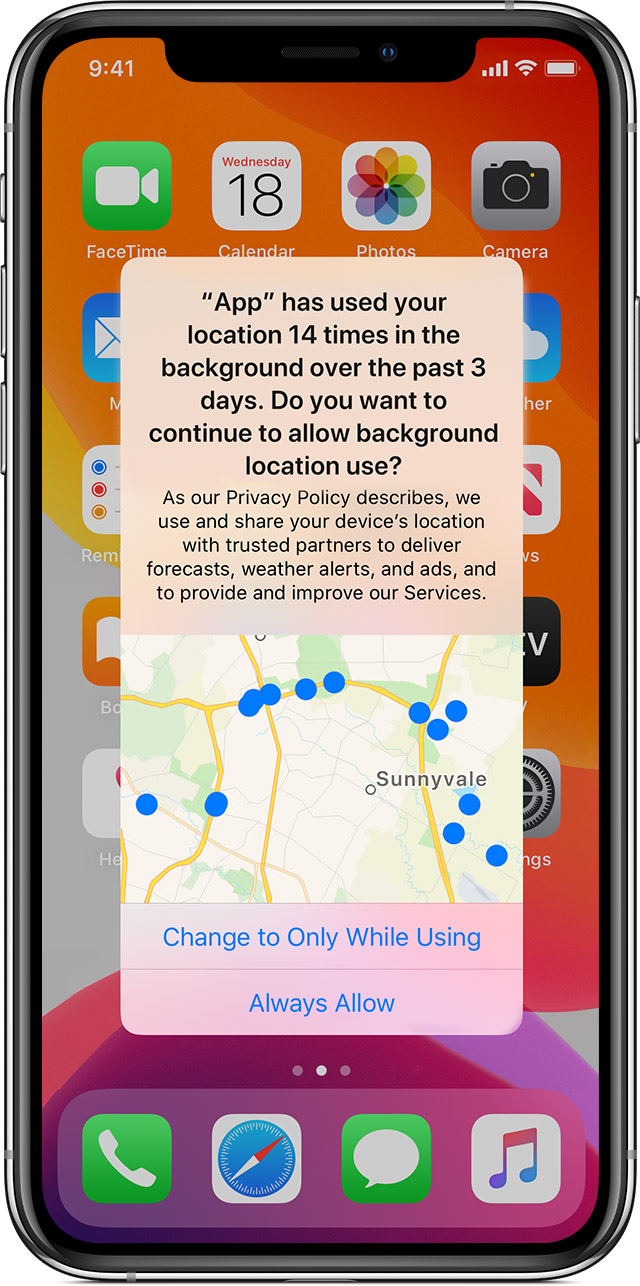
    Nowadays, iOS privacy settings offer a check against tracking location data in the background. iOS users can now choose between: ‘Allow While Using App’, ‘Allow Once’ or ‘Don’t Allow’.

    user data

    When an app tracks data in the background, a blue indicator now displays in the status bar to increase user awareness. iOS also reminds users when apps use significant amounts of location data and offers ways to turn location services completely off. Android has followed suit with an ‘Allow only when the app is in use’ function, too.
    user data

    Location tracking feels a bit creepy. In the wrong hands, it could easily be leveraged for nefarious purposes. Out of all the permission-granting options, location data presents much more of a physical safety concern for the end user. From the user’s standpoint, they should only enable access to location tracking while using an app. From a developer’s standpoint, they should be extremely careful when collecting and storing such PII to ensure regulations aren’t broken.

    4. Microphone

    Lastly, access to the user’s microphone is the fourth most commonly requested permission. The survey found 69% of social networking apps, 64% of photo and video apps and 41% of both business and productivity apps (Asana, Google Calendar, TimeTree, etc.) all want to be handed the mic.

    Here, potential privacy concerns are similar to those involving camera access. Bad actors could potentially activate the mic to listen to private conversations, record ambient noise and sell findings to advertising brokers. To increase user awareness, iOS 14 now requires an orange dot to display, indicating when the mic is in use.

    Other User Privacy Concerns

    User behavior tracking and app-to-app information exchange is another ongoing area of privacy concern. Companies often resell such information to data brokers, which is then used to refine highly targeted ad campaigns on third-party sites. This is how your search on Google results in product advertisements popping up in your Instagram feed. Apple is just starting to counter this practice with their App Tracking Transparency feature. In iOS 14.5, app devs must ask whether they can track your activity.

    Recent analysis has confirmed that commercially available consumer data, though labeled as “anonymized,” can successfully be used to piece together an accurate picture of a user by corroborating behavior on other apps. For example, users were able to track and pinpoint behavior that resulted in the outing of a catholic priest on Grindr. Smartphone app data could similarly be used by predators to spy on celebrities or politicians, posing a tangible security threat.

    Another cause for concern is metadata associated with photos. People often enable GPS-embedding into images to help organize their photo memories. If this is inexorably linked to photos, it essentially permits location data sharing to parties with photo library access who might not otherwise have location tracking permissions.

    From Big Data to Big Problem

    Perhaps the most curious finding of this report is that all apps are requesting permissions that seem irrelevant to their core value proposition. For example, why do 87% of shopping apps need access to a user’s entire photo library? Do 46% of food and drink apps really need access to a user’s personal contacts to place a food delivery order? Do navigation apps really need your personal calendar information to calculate a route downtown?

    The answer is not a pretty one. There has been a business imperative, for years, to track and collect large amounts of user data. There is undoubtedly an argument to be made for enhancing the user experience with innovative features and the role of big data in AI. However, this ongoing practice continues to creep into ethical gray areas. The fact is, the more personal data an app collects, the more potential privacy issues and security threat vectors are created in the process.

    Requesting permissions to on-device hardware and data collection is not always necessary. Thus, to stay safe and limit data overexposure, don’t overprescribe data collection. If it’s not fundamental to your app’s core function, don’t collect it, and don’t store it. Think twice before requiring many device permissions, and regularly audit app permissions requests to keep them to a minimum. As iOS and Android introduce new platform guidelines to elevate user privacy, developers should be prepared for users to grant fewer and fewer data collecting permissions. This is their right.

    It would be great if tech companies invested in honest, ethical business models that didn’t rely on harvesting and reselling user data to shady advertisers. And for those that mine user data but say it’s anonymous, I would point to reports that show anonymous data is nothing but pure myth.

  • Infrastructure-as-Code Security will Improve Your Cloud Security

    Infrastructure-as-Code Security will Improve Your Cloud Security

    Moving to the cloud creates a tremendous opportunity to get security right and reduce the risk of a data breach. Most organizations start their cloud security efforts by ‘shifting security left’ thereby addressing issues in the CI/CD pipeline. Fixing known vulnerabilities and risky configurations before pushing images to production makes sense. But there is an opportunity to shift security even further left—as you set up your cloud infrastructure—to reduce risk. Infrastructure-as-code (IaC) security allows you to define security controls as you configure your cloud infrastructure.

    Getting Started on Your Cloud Journey

    Before we dive into IaC security, let’s talk about why platform teams want to deploy infrastructure-as-code as they move through their cloud journey. Most organizations have not yet tackled IaC. They start their journey by experimenting with cloud configurations until they have defined a stack that works for their teams. In this early stage, application teams may be defining their own cloud stacks. They are manually configuring infrastructure or using scripts. Configurations may not be standardized across teams.

    Standardization of Infrastructure Saves Time

    Although experimentation is reasonable early on in the journey, standardization of infrastructure saves time. Cloud services are no different than applications that run on premises. When your teams are using different versions of tools in their stack, getting an application up and running can be a nightmare. Interoperability between services is challenging, and it can feel like you are fixing a different flavor of the same problem over and over.

    Mature cloud platform teams typically prefer to create a ‘golden image’ with a baseline set of services for development teams. They may create a menu of a few standard options to meet different teams’ needs. Because they are standardized, the platform team can take time to validate that they interoperate and are secure. For example, these golden images will be regularly scanned for vulnerabilities and updated to ensure they meet internal security standards and any relevant regulatory requirements.

    IaC security cloud

    Automating Infrastructure Deployment Reduces Errors

    Manually configuring the environment in the cloud for each team is tedious. Once these configurations have been standardized, the cloud infrastructure can be provisioned as code using templates. A declarative approach defines the desired end state, whereas an imperative approach defines the detailed steps to achieve the end state. The templates are normally stored in a Git repository and version controlled. Automating the configuration of infrastructure not only saves time but also reduces errors that can disrupt operations.

    IaC Security Shifts Security Further Left

    Once you have templates that define your infrastructure, standardizing permissions and access rights for services-as-code is a logical next step. The security team typically defines the guardrails or policies for accessing cloud services. These policies can then be defined as code along with the infrastructure configurations. This IaC security is a further ‘shift left’, allowing security to be embedded into infrastructure, even before an application can be deployed. Implementing policy-as-code minimizes the opportunity for human error in configuring security services. By defining these policies and enforcement guidelines together, the DevOps and security teams can establish a trusted partnership.

    Although some organizations may start their journey by implementing IaC security, for most organizations it happens later in the cloud journey. The order is less important than ensuring you take a DevSecOps approach and embed security at each stage to manage risk. Be sure to address the following areas as part of your cloud and container security program:

    Continuously Check Cloud Permissions and Configurations

    Even if you have IaC templates, you need a program to regularly take inventory of all cloud assets and confirm permissions and configurations. The Center for Internet Security (CIS) benchmarks are commonly used to check passwords and access rights. Beyond enforcing these best practices for security on cloud services, continuously checking for changes to permissions and suspicious activity is critical. The cloud vendors capture logs across all of their services, and your security tool should continually monitor and alert using those logs.

    Scan Images for Vulnerabilities and Risky Configurations

    Scanning for vulnerabilities and ensuring configurations use best practices allows you to shift security left into the development pipeline. Scan everywhere you have images—including within registries, pipelines and also check for new vulnerabilities identified for images running in production. Be sure to scan hosts as well as containers. Defining scanning policies and enforcing through the development process creates guardrails for the development team and clarifies expectations. Most regulatory compliance standards have image scanning requirements as well.

    Detect Threats and Respond to Alerts

    Prevention is fundamental but must be supplemented with threat detection and response. Alerting on unexpected behavior can identify the presence of a threat. Initially, teams may use out-of-the-box detection rules as a way to get started and then customize rules over time. Checking configs against dockerfile best practices is a good way to get started. Overly permissive access rights for containers is common in Kubernetes environments and should be allowed only when required.

    As your team develops more expertise with containers and Kubernetes, you can also implement zero-trust network security policies to block unexpected communication between pods, services and applications.

    Some DevOps teams handle triage of alerts, as they can quickly determine if the issue is a configuration issue or an indicator of compromise. Teams often map detection rules to the MITRE ATT&CK framework, allowing their security teams to manage alerts consistently across their environment. For any team to effectively respond to a security alert, it is important to capture a detailed record of exactly what happened before, during and after that event. This visibility can be particularly challenging with containers but it is critical because containers have short lives. The 2021 Sysdig Container Security and Usage Report revealed that about half of containers live less than five minutes.

    Complying with Regulatory Standards

    Complying with regulatory standards can be painful. Some standards were written with cloud computing in mind, like NIST 800-53 and SOC2, and others were not. With those broader standards, it is important to understand the controls that are relevant to containers and the cloud.

    As you consider your compliance program, be proactive—don’t wait until you are ready to roll into production. Start early by engaging your compliance team and helping them get up to speed. Your role is to provide evidence of compliance to pass an audit at any time using the documentation from your security platform.

    Getting Cloud and Container Security Right

    The move to the cloud creates a tremendous opportunity to get security right and reduce risk. The fact that physical security and a chunk of operations are delegated to cloud vendors frees up security and development teams to focus on their more narrow scope within the shared security model. By taking a secure DevOps approach and inserting security into every stage of the application life cycle, your team can confidently and securely run cloud and containers.

  • Kentik Open Sources Five Projects to Advance Network Observability

    Kentik Open Sources Five Projects to Advance Network Observability

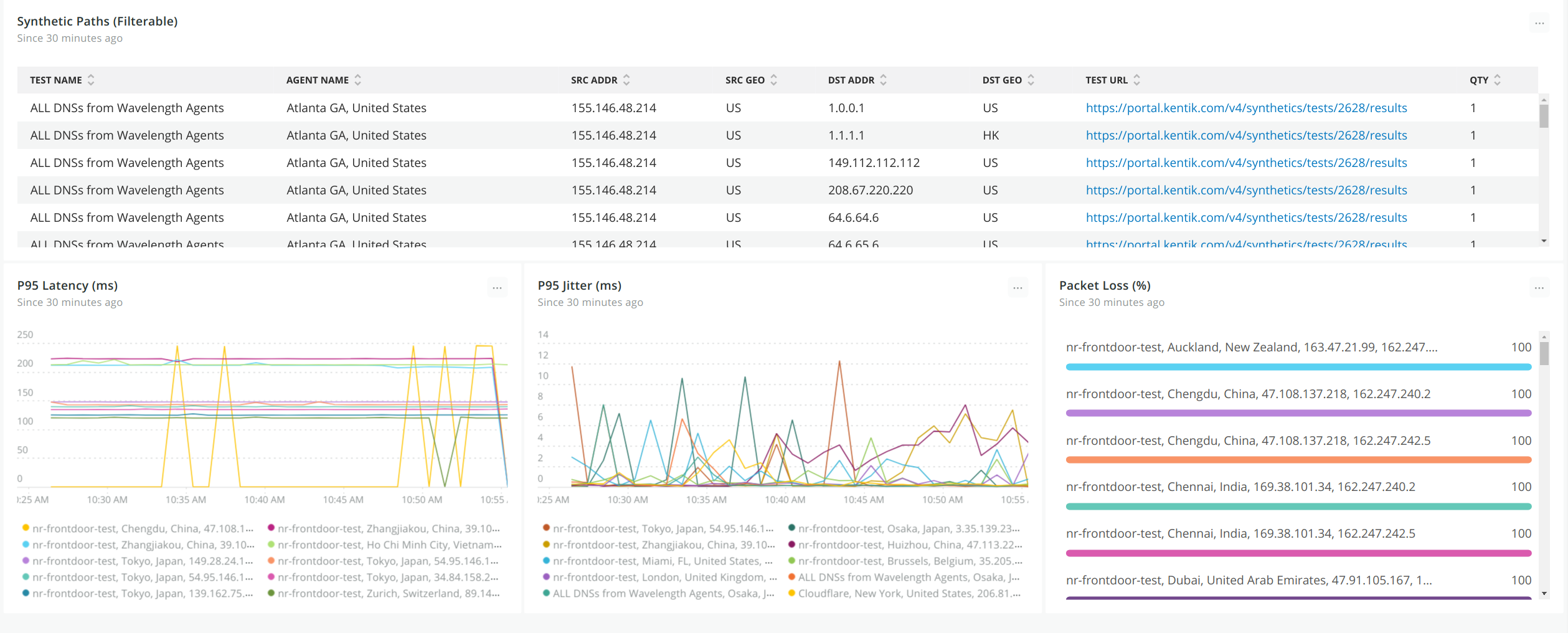
    Kentik today unfurled a developer hub, dubbed Kentik Labs, through which it is making five open source projects available as part of an effort to advance observability across network operations (NetOps).

    The five projects are:

    kTranslate: A system for pulling and pushing network data that is the basis of the Kentik Firehose integration the company created for the New Relic observability platform

    NetDiag: Scalable, asynchronous implementations of low-level network diagnostics

    Convis: Example code showing how to attribute process and container information to network traffic via the Linux kernel using eBPF

    kProbe: A high-performance host and sensor network probe (PCAP)

    Grafana App: A real-time tool for ingesting and querying network data

    Nick Stinemates, vice president of business development at Kentik and co-chair of Kentik Labs, said the goal is to enable DevOps teams to incorporate NetOps within the workflows already being employed to programmatically manage the rest of IT.

    Stinemates noted that, as IT environments become more distributed, managing NetOps has become more challenging. If there is a failure, it can be difficult for DevOps teams to determine if the issue is due to application code, the underlying infrastructure or some other root cause. Kentik Labs is committed to providing tools that will help DevOps teams reduce their mean time to recovery (MTTR), he added.

    Most NetOps teams increasingly rely on software to manage distributed networks either in the form of graphical tools provided by router and switch vendors or by using the Python programming language and the open source Ansible automation framework that enables IT teams to declaratively manage IT infrastructure.

    As the teams that manage network operations gain more proficiency with those tools, it becomes simpler to incorporate them within the construct of a larger DevOps team. While DevOps teams have been programmatically managing IT infrastructure-as-code (IaC) for years, network management has largely remained in a separate silo. However, as more applications are deployed in the cloud, it’s clear NetOps needs to become more integrated with the rest of the workflows employed to deploy and manage a highly distributed IT environment, said Stinemates.

    Less clear is to what degree the networks that make up a hybrid cloud computing environment will continue to be managed by network administrators versus site reliability engineers (SREs) that are starting to assume responsibility for managing compute and storage.

    Regardless of who manages the network, the next generation of microservices-based applications that are dependent on application programming interfaces (APIs) to call various services are much more latency-sensitive than previous generations of applications. Many of those applications will regularly experience performance issues due to networking issues that are often not readily apparent to DevOps teams. The goal should be to, at the very least, arm those DevOps teams with the tools required to confirm the source of those issues before a “war room” is convened to determine how to address the issue.

  • 5 Ways to Embed Accessibility in Your SDLC

    5 Ways to Embed Accessibility in Your SDLC

    Developing an accessible software development life cycle (SDLC) requires a commitment to inclusion from everyone at the beginning of every project. By committing to developing accessible products, you will avoid costly and timely remediation prior to deployment at the end of your product roadmap.

    Creating An Accessible Software Development Life Cycle (SDLC)

    An accessible SDLC is one in which accessibility is integrated into every stage from planning through maintenance. This includes accessibility policy, automated testing against that policy, incorporation into your QA processes as well as verifying and documenting conformance requirements such as voluntary product accessibility template (VPAT) creation.

    Integrating accessibility isn’t really all that different from testing for any other quality standard, like cross-browser compatibility or other bugs. Here are the five key elements required to support your efforts:

    Policy – Start by establishing your accessibility goals, then prioritize based on importance (which is helpful for future sprint planning). Define these goals and priorities in your policies so that you can use them to measure your successes and understand where you need improvements.

    Automated and Manual Testing – Automated testing works by using software to scan your digital assets—whether in production, dev or staging—with an accessibility rules engine to check for errors. It can quickly and efficiently catch machine-detectable web content accessibility guidelines (WCAG) failures—the accessibility standard—that engineers can fix during the development process. Automated testing can be performed in many ways; however, the approach that will work best for you will depend on the level of integration that your DevOps team can facilitate. Manual assessments are far more comprehensive than automated scans. They also take essential user experiences into consideration, and they can catch errors far beyond what is machine-detectable today.

    Integrated User Story Development or Continuous Integration/ Continuous Deployment (CI/CD) – Once you’ve found the failures, what do you do with them? They should be treated like any other bug or glitch that prevents customers from accessing or using your website or application. You’ll want to capture this information in your ticket tracking system. Many organizations use agile sprints and project management software to create tickets, which are then fed into the development pipeline and prioritized, assigned and completed. Finding a solution that will let you easily convert WCAG failures into user stories (either manually or, better yet, through automation) is key for feeding a prioritized pipeline of work to be done.

    Knowledge and Resources – There are specific development techniques used to solve accessibility failures. Without access to a comprehensive library of accessible code techniques, developers will spend a lot of time scouring the web for solutions. Yes, you can find good solutions if you look long enough, but even so, how do you know whether that solution is legitimate or optimal for your case? Having the relevant solutions for an issue at your fingertips (negating the need to do a ton of online research) lets your DevOps team work more smoothly with fewer disruptions.

    Accountability – Accessibility analytics establish accountability. How effective are your DevOps teams at reducing WCAG failures? Tracking failures across your digital properties on a defined cadence lets you see and document trends over time. You can also track activities like the volume of tickets that are tagged as accessibility remediation or bugs, or new features or capabilities to represent active efforts.

    Whether you’re on a small or large development team at any size organization, adopting an accessible SDLC by implementing continuous accessibility checks at each phase of your development cycle is the most efficient and effective strategy to ensure that your website or applications are WCAG and ADA conformant.

  • The Future of IT: Smart Tools, Intelligent Technology

    The Future of IT: Smart Tools, Intelligent Technology

    In the last few years, the lines between information technology and development have been blurred. Developers need to know about infrastructure, and administrators need to know how to code. Advances like containerization, orchestration, continuous integration and infrastructure-as-code (IaC) happened in tandem with DevOps’ rise. The advantage of DevOps is that you can quickly build and deploy products. That comes at a cost, though, and that cost is infrastructure complexity. The answer to managing that complexity lies in technologies such as artificial intelligence (AI) and machine learning (ML).

    How can AI Help IT?

    Intelligent technology has come a long way in recent years. Machine learning and artificial intelligence are finding their way into more and more technology. New tools are beginning to emerge that can monitor and manage complex systems with relative ease. There are several clear upsides to using these systems in IT:

    • Instant notifications when there is a problem.
    • The automation of tedious IT tasks.
    • Dynamic infrastructure adjustments to help with traffic spikes and other changes.

    Training an AI to keep systems running optimally, apply updates and alert IT staff to problems in real-time is entirely possible today. By automating away a lot of tedious, manual work like digging through logs, IT is free to focus on mission-critical objectives instead of babysitting servers and monitoring dashboards.

    What Does That Mean for IT Jobs?

    Some people worry that advances in AI will lead to a world where robots take human jobs. While there will undoubtedly be some domains in which AI and ML make more sense than a person, those same technologies will also create new jobs. As IT teams are unburdened from tedious tasks, they can expand into working with ML and AI technology. IT teams are ideal for guiding business decisions about what tasks benefit the most from intelligence technology. So while IT jobs may be transformed by AI, there is no reason to believe that they will disappear. It is more helpful to think of AI as a new tool for IT instead.

    Where can IT Implement AI Tools?

    AI is best used for tasks where there is a lot of data. Having a human comb through log files, databases and dashboards is a slow process. An AI could continuously monitor everything, all the time, freeing up the IT staff to focus on the solution instead of tracking down which piece of the infrastructure is experiencing a problem.

    One area in particular that could benefit from AI/ML is fraud detection. Machine learning can analyze data to find fraudulent transactions much faster than a person ever could. And over time, it will get faster and more accurate at detection.

    Another area with potential for AI is the customer-facing helpdesk. Intelligent systems that have access to ticket resolution histories and device data may be able to handle a majority of requests without needing to use the time of an actual technician. If the AI fails to solve the problem, it can escalate the issue to a technician. As these tools mature, they’re impacting customer service processes, too; let the AI go as far as it can and then escalate less common and/or more complicated issues to a technician. This is an excellent example of how AI and IT can work together to provide the best possible outcome.

    AI and ML tools are the future for IT teams. These tools will be able to handle a lot of the tedious work that is currently done by people such as parsing logs, monitoring traffic and providing some measure of technical support. That leaves IT to focus on mission-critical issues and problems that AI and ML  cannot easily solve.