Category: Features

  • Microsoft Outage Outrage: Was it BGP or DNS?

    Microsoft Outage Outrage: Was it BGP or DNS?

    Welcome to The Long View—where we peruse the news of the week and strip it to the essentials. Let’s work out what really matters.

    This week: All of Microsoft’s cloud services go down, everywhere except China. Redmond’s IaaS, PaaS and SaaS—including GitHub—were dead for several hours, and are still running unreliably—despite Microsoft saying it’s fixed the problem. (more…)

  • Harness Acquires Propelo to Surface Software Engineering Bottlenecks

    Harness Acquires Propelo to Surface Software Engineering Bottlenecks

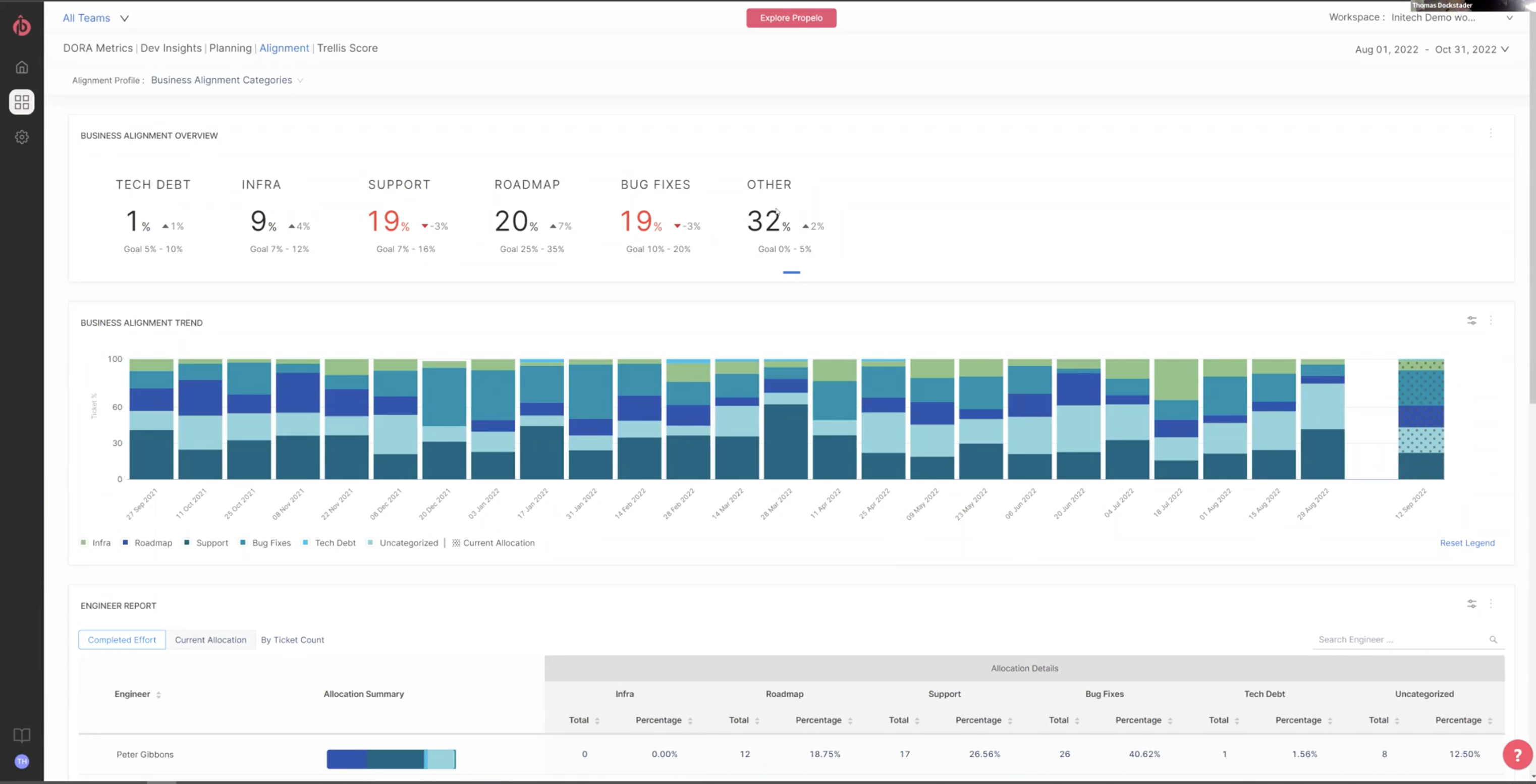
    Harness this week announced it has acquired Propelo, a provider of an analytics tool that identifies bottlenecks in software engineering processes. Terms of the acquisition were not disclosed.

    The Propelo offering will be made available as a module, dubbed Harness Software Engineering Insights, that organizations can choose within the company’s overall continuous integration/continuous delivery (CI/CD) platform.

    Scott Sanchez, chief marketing officer for Harness, said Propelo is unique in that all the integration required to collect data from a wide range of DevOps platforms is already baked into the tool. As a result, DevOps teams can instantly collect telemetry data from not just the Harness platform but also CI/CD platforms such as Jenkins, GitLab and Azure. In addition, there are integrations with more than 40 third-party tools, such as the Jira project management software from Atlassian.

    Those integrations enable the Harness Software Engineering Insights module to surface insights aligned with the DevOps Readiness Assessment (DORA) metrics from Google and the satisfaction, performance, activity, communication and efficiency (SPACE) frameworks.

    In an uncertain global economy, there is more focus than ever on increasing the productivity of DevOps teams, noted Sanchez. More organizations are going to be reluctant to hire as many full-time employees as they once did, so more attention is being paid to getting the most out of existing investments, he added.

    That focus on productivity will naturally lead to a re-examination of workflows to identify bottlenecks in DevOps workflows that, if eliminated, would help increase the pace at which software is being developed, said Sanchez. In some instances, the software development life cycle (SDLC) processes companies are using are as much as 20 years old, he noted.

    The acquisition of Propelo is the latest addition to a portfolio of DevOps tools designed to be deployed alongside existing platforms, noted Sanchez. Organizations that have been using platforms such as Jenkins are not going to rip and replace overnight, he added. The Harness portfolio is designed to be deployed alongside existing platforms to enable organizations to modernize their DevOps workflows in a much less disruptive way than rival DevOps platforms, said Sanchez.

    Harness initially developed a CD platform before acquiring Drone to add a complementary CI capability. It then acquired ChaosNative to add a chaos engineering tool, based on the LitmusChaos open source tool, that is now being advanced under the auspices of the Cloud Native Computing Foundation (CNCF).

    It’s not clear how quickly organizations will modernize legacy DevOps platforms. Still, in many cases, workflows and pipelines that were designed for a different era of application development are not able to support the pace at which modern cloud-native applications are being developed. It will, of course, be up to each DevOps team to determine whether adding additional DevOps tools and platforms makes economic sense; application developers tend to naturally gravitate toward organizations that reduce as much development friction as possible.

    In an era where organizations are counting on developers to drive digital transformation initiatives, the underlying DevOps tools and platforms employed to build applications can easily make the difference between success and failure.

  • What DevOps Needs to Know About ChatGPT

    What DevOps Needs to Know About ChatGPT

    OpenAI’s generative pre-trained transformers (GPTs) bring powerful AI language models to every IT community. Within the past few months, ChatGPT has become an incredibly popular derivative of GPT. GPT also has the potential to shake up the DevOps and DevSecOps communities. This article will provide an overview of GPT, its history, current status and future effects on IT, especially DevOps. 

    Learning Overview

    Understanding the difference between supervised and unsupervised learning is essential before understanding GPT. Machine learning and artificial intelligence (AI) use unsupervised and supervised learning approaches. A supervised model uses labeled data to predict outcomes, while an unsupervised model does not. In general, supervised models have some limitations. They need a large amount of annotated data to learn a particular task, which is often unavailable, and they also need to generalize beyond the task for which they were trained. 

    A generative language model is a class of statistical models that differ from discriminative models. You can, for example, generate photos of animals that look like real ones using a generative model. Whereas with a discriminative model, you can determine whether an animal is a dog or a cat. Generative models can assign probabilities to a series of words, such as those that predict the next word or sentence. A generative pre-trained transformer is unique because it uses both unsupervised and supervised learning from unsupervised unlabeled text and follows up with discriminative supervised fine-tuning. 

    GPT-based models—ChatGPT, for example—always return the text “I am” when asked, “I think, therefore …” On the other hand, if you ask ChatGPT, “Why did the rabbit cross the road?” it may respond thusly: 

    “The age-old riddle still awaits an answer: Why did the rabbit cross the road? It’s a mystery that has stumped people for centuries and will likely remain an enigma for years to come.” 

    In this way, we can better understand how GPT-3 works. When asked, “Why did the rabbit cross the road?” most humans will answer, “To get to the other side.” A Google search for “Why did the rabbit cross the road?” mainly yields joke punchlines on the first page of the results. GPT doesn’t differentiate between humorous or cynical answers or specific matter-of-fact answers. The model makes only guesses based on the data. Since, in this example, most of the highest-ranked answers are jokes, GPT’s answer is enigmatic at best. GPT is not pixie dust; it doesn’t have a sense of humor, is not sentient, doesn’t understand juxtapositions and, most importantly, doesn’t evaluate context. As another example, I asked a GPT-3 tool to provide biographical information about two individuals. Abraham Lincon was the first. Approximately ten paragraphs of accurate facts were generated by the GPT-3 tool. Second, I used Gene Kim, the author of The Phoenix Project and The DevOps Handbook. GPT-3 began inventing facts about the companies he worked for by the second paragraph. Additionally, it suggested that he had spoken at TEDx. While a Dr. Gene Kim has spoken at TEDx, that Dr. Kim is an opthamologist.

    History of GPT

    GPT was released for the first time on June 11, 2018. Sometimes it is referred to as the  GPT-1 model. A large dataset of online books was used to train it. A database called BookCorpus also was used for training. There were 7,000 unpublished books in the original BookCorpus dataset at the time of training. 

    OpenAI’s GPT-2 model was created in 2019 as a direct scale-up of the original GPT model. There were ten times as many parameters and ten times as much data in that training set. The GPT-2 dataset was based on an internal OpenAI dataset called WebText. A focus was placed on the quality of the documents when scraping web pages for this tool. The authors scraped all Reddit outbound links receiving at least three upvotes. GPT-2 used about 40GB of Internet text, 8 million web pages, and 1.5 billion parameters. In neural networks, parameters are often used as synonyms for weights (found more often in statistics literature). Parameters in GPT are the weights and biases of the dataset and generally indicate the power. 

    As the third-generation language model, GPT-3 was introduced in May 2020. It has 175 billion parameters, making it more accurate than its predecessors—an increase of tenfold in capacity over the next largest NLP model available. Sixty percent of GPT-3’s weighted pre-training dataset is filtered Common Crawl. Common Crawl is a nonprofit organization that crawls the web and makes its archives and datasets freely available. Since 2011, Common Crawl has collected petabytes of data. About 37% of the GPT-3 sources were WebText2 and other sources, while about 3% came from Wikipedia. OpenAI Codex was also included with GPT-3, which generated code and served as the basis for GitHub’s Copilot. 

    As part of its training, GPT-3 used data available until November 2019. Thus, GPT-3 was unaware of events beyond January 2020. COVID-19, for instance, was unknown to it. Even so, it did have extensive knowledge of coronaviruses, pandemics, Wuhan and SARS. As of September 22, 2020, Microsoft, through a considerable investment, received exclusive permission to use GPT-3; others can still access GPT-3’s public API, but Microsoft is the only one with access to the underlying model. OpenAI developed DALL-E in January 2021, which generated images using GPT-3. OpenAI introduced models in the “GPT-3.5” series on November 30, 2022, including the now-famous ChatGPT, derived from a model from the GPT-3.5 series. Unlike GPT-3, GPT-3.5 includes data up until November 2022.

    Current Status

    I have used several AI language model tools in the past few years based on GPT-3. It is used by Grammarly and by some useful writing tools like Jasper.ai and Wordtune. I also have had great success with GPT-3 research tools like Frase.io and Genei.io. One of my more recent go-to tools is called QuillBot. In my experience, these tools are aids, not replacements for writing. When I first started using these tools, I was writing a book about Dr. W. Edwards Deming. I would get inaccurate information about Dr. Deming’s childhood from a GPT-3-based tool. One time, it said he had six siblings. In fact-checking, GPT-3 confused Dr. Edwards Deming with Dr. Richard Deming. With surgically precise input, the results could be more accurate. One of my findings was that if I used a GPT-3 on a well-known subject, the information was primarily precise; however, lesser-known topics produce fewer facts. Furthermore, I learned from the documentation that when people talk about training GPT-3 models, what they really mean is that you can input a maximum of 2,048 linguistic tokens, which is about 1,500 words. In GPT-3, content is predicted by analyzing past context, one word at a time. The content you input to GPT-3 significantly impacts its output. As a result, it pulls words from a shortlist and calculates their probability of being used. A great set of tutorials on using GPT-3 can be found on Jasper.ai. This figure shows how Jasper (which is based on GPT-3) word prediction works.

    Image source

    People have accomplished some remarkable things by using the 2,048 tokens creatively, but complex training still needs to be improved. Due to the Microsoft deal, the original GPT models were close sourced, and robust training of GPT-3 models is unlikely to happen any time soon. 

    Future Effects on IT

    Where does all the hype come from? Despite its limitations, GPT-3 has created some unique industry artifacts. DALL-E and Copilot by Github are excellent tools. On September 8, 2020, the Guardian published an article titled, “A robot wrote this entire article. Are you scared yet, human?” This article was written by GPT-3. Using GPT-3, some full-blown novels have also been written; they’re not horrible, but they could have been better. According to a study conducted by Drexel University in 2022, systems based on GPT-3 could be used to screen for Alzheimer’s disease at an early stage. Just five days after its launch, ChatGPT surpassed one million users. It took 41 months for Netflix to reach one million users and 10 months for Facebook to reach one million users. By the end of the first quarter of 2023, ChatGPT will have over one billion users. Based on GPT-3.5, ChatGPT is more robust and up-to-date. 

    How smart is ChatGPT? Using a verbal-linguistic IQ test and Raven’s ability test, ChatGPT has an IQ of 147. GPT-3.5 has passed the United States bar exam, CPA exam and U.S. medical licensing exam. People often ask if it is plagiarism to use GPT-3. Technically, the answer is no. The GPT datasets are estimated to represent 300 years of pre-training with a connection of trillions of words. However, using these tools for rewriting other people’s work is, from an ethical viewpoint, plain and straightforward plagiarism. A recent set of tweets by Greg Brockman, president and co-founder of OpenAI and Sam Altman, CEO of OpenAI, sums up the current status of ChatGPT.

    What Does This Mean for DevOps Practitioners?

    AI learning models based on GPT-3 are here to stay. From grammar correction to proposal writing to code generation, GPT-3 has revolutionized everything. In my opinion, GPT-3 still needs to solve some challenges before it is of actual value to DevOps and DevSecOps patterns and practices. For example, a great use case for GPT-3 is training it to deal with organizational incidents. If a GPT model could be trained this way, it would become an excellent tool for providing adaptive diagnostics. Based on the current GPT implementation, this is very difficult or impossible. Another example would be to train the model with the organization’s IT risk policies and enable predictive solutions. The opportunities are endless. 

    An alternative to GPT-3 is InstructGPT, which OpenAI describes as more truthful and less toxic. It has also been noted that GPT-3 can generate untruthful outputs. GPT models aren’t generally aligned with their users. InstructGPT models follow instructions much better than GPT-3. Furthermore, InstructGPT produces more truthful and less toxic outputs. Therefore, they generate fewer harmful outputs and more facts.  The InstructGPT models use human feedback as part of the training model. Some of the real power behind ChatGPT is that it uses InstructGPT along with GPT-3.5. Some of my upcoming research will focus on prototyping some of the complex opportunities DevOps and DevSecOps practitioners currently face using InstructGPT. 


  • Dynatrace Survey Surfaces State of DevOps in the Enterprise

    Dynatrace Survey Surfaces State of DevOps in the Enterprise

    A global survey of 1,300 CIOs and DevOps managers working for organizations with more than 1,000 employees published today finds more than three-quarters of respondents work for organizations (78%) that deploy software updates into production every 12 hours or less, with more than half (54%) say they do so at least once every two hours. A total of 20% report they are deploying updates every minute or less.

    Conducted by the market research firm Coleman Parkes on behalf of Dynatrace, the survey also finds 90% of respondents reporting that the pace of digital transformation within their organization has accelerated in the past 12 months. More than a quarter (26%) expect the pace of digital transformation to continue to accelerate, the survey found.

    However, 55% of respondents work for organizations that make tradeoffs between quality, security and user experience to meet the need for rapid transformation. A total of 41% of respondents said they must sacrifice code quality and user experience due to meet demands for faster innovation, while more third (34%) also need to sacrifice code security.

    Overall, DevOps teams, on average, spend nearly a third (31%) of their time on manual tasks involving detecting code quality issues and vulnerabilities that conspire to slow the pace of innovation, the survey found.

    To address these issues, organizations plan to increase their spending on automation across development, security and operations by 35% by 2024, as they invest more in continuously testing software quality (54%) and securing production environments (49%), automatic vulnerability detection and blocking (41%) and automating release validation (35%). The average budget allocated to these activities in these large organizations is $9.1 million, the survey finds.

    A full 88% of CIOs said the convergence of observability and security practices will be critical to building a DevSecOps culture, with 94% noting that extending a DevSecOps culture to more teams is key to accelerating digital transformation. Only 27% of respondents claimed to fully adhere to a DevSecOps culture today. The biggest obstacles to achieving that goal are that security teams don’t trust developers (55%), developers perceive security teams to be blockers of innovation (49%) and the silos that exist between teams (36%).

    Organizations expect to increase their annual investment in DevSecOps automation by 2024 an average of 35%, but only a quarter (25%) said applying artificial intelligence to security was a priority. At the same time, only 28% of respondents said they are fully confident applications are fully tested for vulnerabilities before they are deployed.

    A total of 90% said increasing the use of AI for IT operations (AIOps) will be key to scaling up these practices. However, 70% of respondents said they need to improve their trust in the accuracy of AI’s decisions before they can automate more of their continuous integration/continuous delivery (CI/CD) pipeline.

    Bob Wambach, vice president of product marketing for Dynatrace, said there is a clear correlation between that accelerated pace of digital transformation and a need to deliver more frequent software updates that is driving those investments. Most organizations, however, are going to find it difficult to achieve all their goals unless they break down the silos that prevent them from automating and observing modern DevSevOps workflows, he added. Achieving that goal will also require DevOps teams to reevaluate which platforms they are employing as they move to reduce the current level of friction encountered when building and deploying applications, he added.

    It’s too early to say just how soon DevSevOps workflows will define the next era of software development. One way or another, it’s certain that every organization that embraces DevOps will need to address lingering application security issues.

  • Optimizing Cloud Costs for DevOps With AI-Assisted Orchestration

    Optimizing Cloud Costs for DevOps With AI-Assisted Orchestration

    Kubernetes continues to grow as the leading container orchestrator for high-performance, cloud-native DevOps, DevSecOps and site reliability engineering (SRE) use cases. While Kubernetes offers excellent orchestration capabilities, it does not, by itself, assure cloud computing costs are optimized.

    The current state of cloud expenditures for many organizations indicates a lot of waste. So much so that there is a trend to replatform from the cloud to private infrastructures to save money—escalating cloud costs are too high and the deep level of real-time optimizations are too hard and too slow.

    According to an article from VentureBeat, Cloud computing: Cost at scale, “Large enterprises have started exploring cloud repatriation. What is worse, the forecasted trends are that “cloud spending could go up as high as 80% of the cost of the revenue for software companies. Moreover, the $100 billion market value among 50 software companies is lost due to the impact of the cloud on their margins.”

    An article by CAST AI indicated 60% of cloud costs could be eliminated by being smarter about the use of cloud resources and augment Kubernetes with AI tooling, no matter the size of the deployments. Given the large number of human and automated users associated with DevOps, DevSecOps and SRE use cases for enterprise cloud resources, the savings potential can equate to tens of thousands of dollars per month.

    However, typical optimization methods are not fast enough nor smart enough to process the resource changes quickly enough to achieve these optimizations at speed. An AI-assisted Kubernetes orchestration is needed to achieve this.

    Kubernetes Landscape

    According to 2021 State of Cloud Native Development Report, Kubernetes is used by 31% of all backend developers. Currently, 5.6 million developers use Kubernetes. The edge computing category has experienced rapid growth in the adoption of Kubernetes and has the highest usage rates of both containers and Kubernetes at 63%.

    A report from the Cloud Native Computing Foundation (CNCF) indicated that spending on Kubernetes, the primary means of orchestrating containerized applications, was up year-over-year from 2020 to 2021. Of those surveyed, 67% reported an increase of 20% or more over the last 12 months, and 10% spent more than $1 million per month on their deployments. Fewer than 25% accurately predicted how much they’d spend to within 5% of the actual cost. And over 20% could not predict their cloud bill. That’s no way to run an operation.

    Cloud Cost Use Cases for DevOps, DevSecOps and SRE

    DevOps, DevSecOps and SRE have many use cases for orchestrating cloud computing. The list of computing tasks below is only a partial set of computing resources that need to be orchestrated for every value stream.

    • Communication—emails, chats
    • Experimentation, planning and research-related computing tasks
    • Configuration tasks associated with infrastructure-as-a-service, platform-as-a-service, software-as-a-service and serverless.
    • Version and artifact repositories transactions
    • Application and microservice transactions
    • API transactions
    • DevOps administration tasks
    • Developer pre-commit builds and testing
    • Continuous integration commits, builds, scans, tests, and tools
    • Continuous delivery—pre-prod tests and deployment development
    • Continuous deployment automation and deployment strategies
    • Production operation, backups, rollbacks, production testing
    • Replication of hybrid cloud and multi-cloud instances
    • Software repositories, data lake transactions
    • Monitoring, logging, synthetic monitoring
    • Tracing, metrics, collectors, analytics and dashboards
    • Release and value steam management
    • Anti-fragility—Chaos engineering, disaster recovery, fire drills, security red/blue/purple teams
    • Diagnostics, issue reporting and tracking
    • On-call support and retrospectives
    • Documentation and training (computer-based) transactions

    Sources of Waste and Potential Savings

    According to the State of Kubernetes Report: Overprovisioning in Real-Life Containerized Applications, 37% of cloud compute capacity is not used. The primary reasons behind cloud waste are:

    • Lack of visibility into cloud usage and costs
    • Overprovisioning
    • Leaving cloud resources idle
    • Fragmentation of usage between teams and departments

    One of the major drivers of wasted cloud spend is the inability to scale back once application demand drops. By eliminating this sort of overprovisioning, organizations stand to reduce their monthly cloud spend by almost 50%. By adding spot instances to the mix, organizations could cut their cloud spend by 60% on average.

    Complexities Impacting Ability to Optimize

    According to the article Cloud Cost Management for DevOps, “When properly done, cloud cost management can truly save organizations significant amounts of money. But, there is a learning curve and traditional approaches cannot keep pace with the rapidly changing requirements for DevOps, DevSecOps and SRE use cases.”

    Trial and error are needed to identify optimization challenges that DevOps team members can anticipate. Before you can even begin planning around cost optimization, you need an accurate picture of your current infrastructure and spending landscape. Cost attribution cannot be done by simply opening your AWS bill. Cost data from monthly bills is not granular and cannot attribute costs to projects and teams. Furthermore, there are additional expenses that are included in your bill that are not tied to your cost of goods sold, such as research and development expenses.

    Accurately allocating costs requires accurate and disciplined tagging infrastructure. The act of tagging infrastructure requires a fair amount of manual work for each piece of infrastructure in each sub-account. Enforcing tag hygiene can be a challenge of its own.

    Opportunity for an AI-Assisted Kubernetes Orchestrator

    Overcoming the complexity of optimizing cloud compute resource orchestration for the many uses cases for DevOps, DevSecOps and SRE requires a smarter, more responsive approach than traditional approaches that require manual planning and implementation. There is an opportunity to save an average of 60% of cloud spend by using an AI-assisted Kubernetes orchestrator.

    What This Means

    While Kubernetes offers excellent orchestration capabilities, it does not, by itself, assure cloud computing costs are optimized for the many use cases required for DevOps, DevSecOps and SRE. An article by CAST AI indicated 60% of cloud costs could be eliminated by being smarter about the use of cloud resources, no matter the size of the deployments. Given the large number of human and automated users associated with DevOps, DevSecOps and SRE use cases for cloud resources in enterprises, the savings potential can equate to tens of thousands of dollars per month.

    An AI-assisted Kubernetes orchestration capability is needed to process cloud resource changes quickly enough to achieve optimizations at the speed needed for DevOps, DevSecOps and SRE use cases.

    This article explained the landscape of requirements for an AI-assisted Kubernetes orchestrator to optimize cloud costs for DevOps, DevSecOps and SRE use cases. Future articles will discuss a solution for such an orchestrator and detail specific applications of the AI-assisted Kubernetes orchestrator for DevOps, DevSecOps and SRE use cases.

  • Five Great DevOps Job Opportunities

    Five Great DevOps Job Opportunities

    DevOps.com is now providing a weekly DevOps jobs report through which opportunities for DevOps professionals will be highlighted as part of an effort to better serve our audience.

    Our goal in these challenging economic times is to make it easier for DevOps professionals to advance their careers.

    Of course, the pool of available DevOps talent is still relatively constrained, so when one DevOps professional takes on a new role it tends to create an opportunity for others.

    The five job postings shared this week are selected based on the company looking to hire, the vertical industry segment and, naturally, the pay scale being offered.

    We’re also committed to providing additional insights into the state of the DevOps job market. In the meantime, for your consideration:

    LinkedIn

    Major League Baseball
    New York, New York
    Senior DevOps Engineer
    $150,000 to $190,000

    SimplyHired.com

    JP Morgan Chase
    Senior DevOps Engineer
    New York, New York
    $137,750 to $225,000

    Indeed.com

    MORI Associates
    Pasadena, California
    Senior DevOps Engineer
    $118,000 to $150,000

    Monster.com

    United Nations Federal Credit Union
    Queens, New York
    DevOps Engineer
    $88,170 to $140,000

    ZipRecruiter

    Blue Rock Software
    Carlsbad, California
    DevOps Engineer – AWS
    $80,000 to $100,000

    Image Source: Photo by Mike Bowman on Unsplash 

  • 6 Ways To Empower Developers and Increase Productivity

    6 Ways To Empower Developers and Increase Productivity

    A big goal of DevOps is to increase productivity. Yet many organizations still struggle with the efficiency of their software release processes. In fact, 54% of engineers stated they have too many manual steps within their deployment process, according to an Armory survey. And with the pervasiveness of multi-cloud, developers now face an escalating number of deployment environments, each carrying their own nuances.

    Development teams want to move as quickly as possible without barriers. Yet, there are often hurdles to seamless deployments. For example, the code might be 100% ready to deploy, yet someone still must validate it before it reaches production. Manual bottlenecks like this in the CI/CD process can make developers feel like their code isn’t worthy of deploying and may even amplify feelings of burnout.

    I recently met with Anna Daugherty, senior product marketing manager at Armory, to see what technology leaders can do to remove barriers within their software release cycles and increase productivity. According to Daugherty, many of these strategies boil down to having empathy for developers and their needs. “Developers aren’t machines; they’re people, and people deserve to have a quality of life when they’re doing their jobs.” Below, we’ll highlight tips and tricks to keep in mind to improve release fluidity.

    1. Identify Where Your Manual Checks Are

    The first step to speeding up CI/CD is identifying where manual steps exist within the development workflow. The DevOps life cycle, often visually depicted as an infinity loop, includes many states, such as design, build, test, deploy, assess and monitor. But if each step has one or more manual steps, you accrue a lot of manual debt, said Daugherty.

    Therefore, engineering leads should seek to remove manual checks whenever possible. Of course, this may not be realistic within certain situations, such as financial institutions that require manual approvals at the last mile. However, everything should be smoothed out and automated up to that point, said Daughtery.

    2. Shift From Continuous Delivery to Deployment

    Depending on who you ask, the ‘CD’ in ‘CI/CD’ may stand for continuous delivery or continuous deployment. As part of reducing friction in the software release process, Daughtery encourages teams to begin to embrace the latter whenever possible. If deployment remains inhibited by unnecessary manual steps, it can decrease scalability and interoperability.

    3. Increase Confidence With Testing

    Of course, if we introduce more automation into the CI/CD pipeline, we must ensure the software is rigorously tested for errors and vulnerabilities. Daugherty encourages development to embrace automated, continuous testing approaches at every juncture, whether pre-production, inter-production, or throughout the application lifecycle. There are also advanced deployment strategies to consider, such as canary testing, which rolls out new changes only to a small subset of users or blue-green deployment can deploy to different places at different times.

    These deployment strategies can help build confidence while reducing the risk of disrupting a majority of your user base with untested production updates. “The more you can integrate testing into your process, the more confident your process will become,” said Daughtery.

    4. Chose The Right Toolsets

    So, how do we implement more automation into the DevOps cycle? And what sort of tools should we look for? According to Daugherty, when scouting for DevOps tools, technology leaders should prioritize open solutions that aren’t closed-off environments. Instead, they should offer flexibility and the ability to integrate with the tools you already use every day. “You can have all the tools in the world, but if they don’t fit together, that can drag down the process.”

    5. Consider Open Source Software (OSS)

    On that note, consider open source software (OSS) where possible. OSS like Argo or Spinnaker has the potential to empower developers and bridge gaps in the CI/CD process. Other projects from the Cloud-Native Cloud Native Computing Foundation (CNCF) and Continuous Delivery Foundation (CDF) are mature with proven stable adoptions.

    And although there is some weariness around OSS, particularly around unknown vulnerabilities and project maintenance concerns, “you can still be successful, secure, and scalable with open source,” said Daugherty. Open source also delivers community benefits and helps engineers feel like they are part of a bigger picture. “[OSS] is the opposite of burnout. It brings people together. It’s a community builder.”

    6. Become Developer-First

    Transitioning into a developer-first organization is another way to increase developer satisfaction and efficiency. But to become a developer-first organization, developers will need more say in the processes—this will involve balancing top-down requirements with total developer control. For example, leaders should suggest tools to enhance productivity but accept feedback on an ongoing basis to see what works best.

    To support these efforts, the concept of developer experience (DX) has entered the lexicon in recent years. Building with developer empathy can result in more usable, frictionless software that increases productivity. DX is crucial within the burgeoning area of platform engineering, as the goal is to create reusable, internal self-service platforms for developers to leverage.

    Interestingly, Netflix extolls what it calls full-cycle development, in which a developer oversees the building and operational aspects of a single component throughout its entire life cycle. “It’s an interesting way of addressing burnout because you feel more connected to what you create,” said Daugherty.

    Final Thoughts: DevOps Isn’t Dead

    Above, we’ve highlighted some potential strategies to increase developer productivity. By replacing manual bottlenecks with more automation, you can increase deployment fluidity. Considering how tools are acquired and iterating upon feedback from engineers can also help improve consistency while retaining quality talent.

    Looking to the future, Daughtery hopes that similar roles such as DevOps, site reliability engineering and platform engineering can come together and join forces. Because, at the end of the day, they share many goals. And contrary to some grabby headlines, DevOps is far from becoming obsolete. DevOps is not dead. It’s very much alive and increasingly important.

  • 8-Bit Floating Point for AI/ML? | Amazon and Microsoft Shed Tech Jobs

    8-Bit Floating Point for AI/ML? | Amazon and Microsoft Shed Tech Jobs

    Welcome to The Long View—where we peruse the news of the week and strip it to the essentials. Let’s work out what really matters.

    This week: New ideas bring low-power ML inference, and more big-tech jobs are going. (more…)

  • Top Three DevOps Tools for Cloud Infrastructure

    Top Three DevOps Tools for Cloud Infrastructure

    A survey from Canonical of 326 IT executives found the most widely employed DevOps tool for managing cloud infrastructure is the Bash shell and command language (53%), followed by the Ansible automation platform (47%) and Terraform (40%). Another 27% reported they used tools they developed themselves.

    The survey also found 58% managed their cloud infrastructure entirely on their own rather than relying in part or entirely on some type of managed service.

    Not surprisingly, the survey also found that 83% have seen spending on cloud infrastructure expenses increase over the last two years, but 23% have no visibility into how much they are actually spending. Well over half (57%) do feel they are paying “a lot” for cloud infrastructure.

    Tytus Kurek, a product manager at Canonical, said during uncertain economic times, there’s now more focus on the total cost of IT. Cloud costs have become a much larger percentage of the IT budget, so more scrutiny is being brought to bear, he added. As such, there’s more interest in FinOps as a framework for programmatically managing cloud costs more effectively, noted Kurek.

    However, only 58% said they believed their public cloud costs were predictable. Well over half (53%), however, noted they qualified for discounts on cloud services offered by providers. In comparison, 73% said their private cloud costs were predictable.

    The most widely deployed software on cloud infrastructure are web applications (57%), followed by file storage (52%) and databases (51%). The most widely employed cloud service providers were Amazon Web Services (AWS) at 60%, Microsoft Azure (49%) and Google Cloud Platform (GCP) (33%). In terms of private cloud platforms, the most dominant is VMware (40%), followed by OpenStack (28%) and Azure Stack (15%). Only 25% of respondents managed less than 1TB of data.

    In general, cloud computing environments are evolving as more cloud-native applications are built and deployed. The bulk of applications running in the cloud today are monolithic. As such, they typically consume a set of IT infrastructure resources dedicated to running that application. Cloud-native applications take advantage of Kubernetes to scale consumption of IT infrastructure more efficiently; over time, the cost of running a cloud-native application should be less than a monolithic application. It’s still early days as far as deployment of cloud-native applications is concerned, so the bulk of applications running in the cloud will continue to be monolithic for many years to come, noted Kurek.

    In the meantime, there is a clear need for more automation. Many cloud infrastructure resources are currently provisioned by developers. There is an opportunity for DevOps teams to automate that process so that it is more efficient and more secure. Developers tend to make mistakes when provisioning cloud resources that, for example, result in data being exfiltrated by cybercriminals via a port inadvertently left open.

    One way or another, the management of cloud computing is becoming more structured in an era where IT organizations are rediscovering the importance of capacity planning. The challenge is that many organizations have never known anything other than the cloud, and they may not even know how to achieve that goal. On the plus side, however, it may not be too long before the whole process is automated by an artificial intelligence (AI) model that optimizes the allocation of resources without any human intervention required.

  • State of DevOps Report Finds a Rise in Platform Engineering

    State of DevOps Report Finds a Rise in Platform Engineering

    The speed of software development velocity is increasing, and to enable this, platform engineering is emerging to evolve the DevOps practice. Interest in platform engineering is rising—so much so that Puppet emphasized platform engineering in its 2023 State of DevOps Report.

    A whopping 94% of respondents agreed that platform engineering is helping their organizations better realize the benefits of DevOps. The move toward platform engineering has increased over time, bringing benefits such as increased release velocity, reliability and efficiency.

    Below, we’ll highlight some of the key takeaways from the report. We’ll define what platform engineering is and highlight its benefits. We’ll also consider obstacles on the path to embracing a platform-based development culture.

    Platform Engineering Supplants DevOps

    DevOps has been in use for a decade or more at most institutions, maturing steadily with new automation and infrastructure abstraction. The latest evolution of DevOps is a practice known as platform engineering—51% of organizations have already adopted this practice within the last three years and 93% said it’s a step in the right direction.

    Platform engineering is the discipline of designing and building self-service capabilities to minimize cognitive load for developers and to enable fast-flow software delivery.

    In essence, platform engineering is the process of creating standardized, self-service infrastructure that helps developers get up and running quickly. These self-service platforms typically handle capabilities like deployment (43%), operation of infrastructure (43%), monitoring production applications (42%) and security and compliance (42%).

    These shared internal platforms are maintained by a central platform team that embraces a product mindset to iterate the technology based on user feedback.

    State of Platform Engineering

    Platform engineering is relatively new— 27% of platform teams have formed within the last two to three years. Notably, big tech companies hopped on the bandwagon years ago, and non-tech companies are now following. Regardless, 70% believed their timing was “just right.”

    The goals of a platform engineering team are numerous. According to the Puppet report, 54% said problem-solving is the top goal. This is followed by educating and empowering developer teams (47%), setting best practices (46%) and optimizing iteration (44%). A platform engineering team’s scope of work is primarily focused on automating workflows and building and managing infrastructure.

    The ‘correct’ number of internal platforms is a moving target. The majority of organizations (57%) have between two and four platforms, and 30% have five or more internal self-service platforms. This demonstrates that although platform engineering is somewhat centralized, it’s also flexible to the needs of an organization.

    Benefits and Hurdles

    So, what are some benefits as opposed to traditional DevOps? Well, the most common benefit is improved system reliability, at 60%. This tracks, as a standardized platform could reduce human error and missteps in the development workflow. Following this benefit is improving efficiency (59%), speeding up delivery time (58%) and improving workflow and process standards (57%).

    The most common driver of adoption is increasing the speed of delivery. Slight more than half of respondents (51%) said development speed has somewhat increased since the inception of the platform team, and 42% say it’s increased by “a great deal.” Other top drivers include the need to scale, free up engineering time, control infrastructure spending and avoid duplication across teams. Those with more mature adoption tend to be more satisfied with the result, indicating that results increased over time.

    Of course, no new technological introduction comes without its hurdles, and platform engineering is not immune from certain pain points. For example, 34% said that cycle time is slower than expected. This might be due to nascent industry adoption and a lack of best practices.

    Just under one-third (32%) also noticed resistance to platform team adoption, and 32% reported a lack of communication around changes. Organizations will likely have to increase transparency and reduce siloing to encourage productive platform adoption that satisfies the needs of various stakeholders.

    According to the report, product management skills can help realize these goals. Some of the most fundamental product management skills here include strong communication skills (61%), problem-solving expertise (60%) and the ability to foster collaboration (54%). Many companies will also have to convince senior management to invest in platform engineering—nearly half agreed that senior management doesn’t yet understand its value.

    Future Outlook

    Confidence around platform engineering is increasing, especially for teams with mature DevOps approaches. As a result, the practice will likely gain more traction in the coming year—71% of respondents reported their firm plans to hire people with platform engineering experience over the next 12 months.

    Over the next year, organizations that adopt the practice will want to increase awareness of platform capabilities and set expectations across the organization. This will also include setting governance policies and satisfying the needs of specific developers, departments and the organization as a whole.

    Above, we’ve scratched the surface of the current state of platform engineering, its benefits and its pain points. For plenty of other insights, you can pick up a copy of The State of DevOps Report 2023: Platform Engineering Edition from Puppet by Perforce here.