Category: Enterprise DevOps

  • Replication: Complementing Disaster Recovery, not Replacing

    Replication: Complementing Disaster Recovery, not Replacing

    Many people believe that replicating a distributed database is a replacement for having a solid disaster recovery (DR) plan or backup system. While there are certainly elements of truth to this, it is missing the mark. Replication is a complement to a well thought-out DR plan, not a replacement.

    What is Replication?

    Replication is the act of copying data from one database server or data center to another database server or data center. In other words, replication creates an exact copy of the data in a different storage array. Replication always copies exactly what is in your database. This is important because if your data is corrupt or somehow bad data has gotten into your system, then you are basically just replicating garbage.

    What is Backup?

    Backups, on the other hand, are creating a point in time snapshot of the operational state, architecture and stored data in the database. This distinction is incredibly important given that a backup could be the difference between restoring good data or bad data into your database to recover from an outage (or even just bad data).

    Backup is also important from a regulatory standpoint. Many organizations have contractual clauses in their MSAs (master service agreements) that require a vendor to have backups. While this certainly in the best interest of the vendors to do anyway, this is a function of how organizations are attempting to protect themselves from external events that they have little control over. Many of the backups requested are ones that fall under the requirements of regulations including HIPAA or Sarbanes Oxley, which have important requirements such as the following:

    • Data must be backed up offsite frequently and be fully recoverable at a point in time
    • Backed up data must be encrypted at rest and transported in an encrypted fashion
    • Backups must be stored in multiple locations and each location must be deemed physically safe
    • Backups must be tested regularly for validity

    What is the Difference Between Replication and Backup?

    Replication can and sometimes does handle parts of the backup solution. Data is stored and transported in an encrypted fashion between physical locations. The location of the data is spread out and your servers are likely in locations that are deemed physically safe.  Most importantly, with replication, your data is available in another location almost instantly.

    However, replication also means that any errors or corruption issues are also propagated across all replicas. Thus, replication cannot be used to hedge against issues such as logical corruption, application schema corruption, ransomware, fat finger mistakes, operator errors, compliance and so on.

    After all this, there is a caveat that one version of replication comes very close to backups: CDP or continuous data protection. This is where backups and replication meet. CDP logs the changes in the data and ships them off to a secondary storage location in near-real time. This allows for point-in-time recovery, one of the reasons that backups are so important.

    Backups and Replication are Not Interchangeable

    They are complementary processes that are components of having a complete disaster recovery plan. Knowing when to take proper advantage of each type is important when setting up your application and your organization for success.

    — Michael Colby

  • Boots and Sandals: Know the Market

    Boots and Sandals: Know the Market

    Boots and sandals are basically the same thing—something to protect your feet while you walk about. The thing is that they are intended for slightly different purposes. You wouldn’t wear sandals outside in the middle of a Wisconsin winter*, and you wouldn’t wear boots to your day off, hanging at the beach. The thing is that boots and sandals have been around forever, and it is relatively simple to gauge the merits of each in a given setting. The same is not true of DevOps tools.

    Cowboy Boot Sandals.

    * Every few years there is a news report about someone found only in sandals in sub-zero weather, they’re not the norm, and there’s a reason they’re in the news.

    Rate of Change

    The rate at which DevOps markets are maturing is a pace that few enterprises can keep up with. When both development processes and operations processes are changing, new tools are being introduced and the two groups are increasingly working in tandem to support the business, yet another market space is not what they want to study and yet another tool in the tool chain is not something that they want to just “pop in.”

    But the DevOps space is young, and there is a lot coming that can help achieve the goals. I have had reason to look into application release automation (ARA), cloud security auditing and global file systems (GFS) in the last few months, and all three bring something to the table in terms of helping IT adapt and automate. The problem is that in each case, the market is a bit muddied. ARA must explain why it does more than Jenkins alone, cloud security auditing must explain why it is better than calling the cloud vendor APIs to do the same task, and GFS must explain why it is more than a cloud storage gateway and how that helps the enterprise.

    And they can. But when considering them, you need to do the research and figure out the market and how that market applies to your organization. Which is a bit unfortunate. devopsy.kinsta.cloud and other sites can help by talking about the tools over time, and the vendors’ own promotional pages can help you understand what gap they’re filling, but it’s legwork (though, in many cases, the legwork is worth it). ARA marries app provisioning tools with CI tools, giving a unified workflow, for example. And it makes the deployment process more agile. If you are running many projects that deploy on a regular (not hourly or even weekly, but regular) basis that you may one day want to deploy to a different environment, ARA can help, along with the wealth of other functionality it provides, bridging the two sides of the DevOps coin is probably its largest driver. The same type of thing is possible with the other two toolsets I mentioned, but trying to keep this short enough to read, so will leave it to those interested in GFS or Cloud Security Auditing to research them.

    The Key is Knowing Why and Which

    In the end, if you’re building out DevOps, you want to automate the process as much as possible. That means as the markets mature, you will want to explore what’s new. These tools can help many organizations provide a smoother or more secure process, but knowing the reason the market exists is the first step, and only then can you decide if you want to evaluate products. They do not all help all customers, so seeing which are right for you—there is no need for either GFS or Cloud Security Auditing if you are a single office with no cloud presence, for example—will help you narrow which toolsets might improve your DevOps efforts.

    And whatever you do, don’t buy the “sandal cowboy boot” of IT. It might look good, but won’t be very useful in either of the environments it’s intended for. 😉

    — Don Macvittie

  • Scaled Agile: Faster Feature Cycle Time, Improved Time to Value

    Scaled Agile: Faster Feature Cycle Time, Improved Time to Value

    Do you remember when the business imperative was improving feature cycle time? As if we just needed to deliver more stuff faster to win in the marketplace. I wouldn’t say that times have changed, but I would say we were just scratching the surface, and rightfully so. After all, we have to start somewhere. The adoption of agile methodologies have proven successful in helping redefine the characteristics and behavior of development teams and, in the process, have certainly helped speed feature delivery cycle time. Great! Is your business more successful now?

    Our goal then, and now, should have been to improve time to value. What good is it to deliver more stuff faster if it’s not the right stuff? How do you know whether it’s the right stuff? How do you make smarter decisions so that you know?

    Agile & Lean at Scale

    The Agile Manifesto explains the key tenets of agile transformations that lead us to this thought: It’s all about value, vision and quality—and rethinking what quality means—in terms of customer value. I didn’t make this up … a team of really smart people from different organizations and industries collaborated and the result is a truly inspiring set of guidance to help teams focus to deliver faster, smarter and better. The thing is, without adopting this guidance at scale, without thinking about what value means and how to prioritize investments into the delivery of value from the top down, we’re back to the same old decision-making process that often takes us off track.

    Business owners, portfolio managers, analysts, solution architects, product managers … all of these roles that operate largely on the “business” side need to think lean and agile and collaborate with engineering continuously to drive the organization as a whole to work faster, smarter, better. Aristotle said: “The whole is greater than the sum of its parts.” Think about that in terms of creating a unified, collaborative organization that marches to the same drum beat, uses the same language, follows the same process to make decisions and drive change. Regardless of whether you are operating at the portfolio or team level, or somewhere in between, you are essentially planning and executing, planning and executing. Your deliverables may be different but the goal is the same: deliver value faster, get feedback, rinse and repeat.

    Addressing the Whole Transformation

    Convinced? Maybe just intrigued? Fair enough. Let’s talk about how to do this, starting with my warning: Change is hard, especially when you’re trying to transform the mindset of an organization and do real work at the same time, so it’s not for the weak or meek. I’m not trying to scare you, just making sure you enter this with eyes wide open.

    With that out of the way, let me enforce the need to consider the whole transformation to be successful; this is not just about the process and it’s even less about the tools that support that process. It’s about the cultural change, first and foremost. There is no tool or magic pill for that. A well-defined, cohesive process is key, however, in uniting the tribes, so in this way it helps with the culture issue. Finally, embedding a well-defined process in tooling just makes things easier because you knock off the requirements related to collaboration, traceability and reporting with the tooling. Remember: people, process, tools.

    SAFe is the Recipe

    So what scaled agile process should you use? Well, I can tell you that you do not need to develop your own process, there are several out there. I favor the Scaled Agile Framework (SAFe) for a number of reasons: it is extremely well-defined, it covers nearly any size and complexity, and it is flexible despite what some may think. At the same time, it’s just a framework—there is no one size fits all and you do not have to adopt every aspect. But you don’t need to start from scratch, either. Be smart about this and take advantage of the invaluable insight that went into the development of SAFe 4.0. My team has done that and I’ve worked with several large enterprise organizations that have as well.

    I love analogies to illustrate a point and simplify what might otherwise be complex, so let me leave you with this one: scaled agile transformations are like cooking. Start with a simple recipe (especially if you’re an inexperienced cook), learn the art and how to adjust seasoning as you go, and fine-tune the dish after feedback from your family. Then try it again. Do you get it? Same with scaled agile: Start with a good framework (SAFe), learn about it, take what is valuable from it for your organizational needs and try it out for an iteration, get feedback from your team and make adjustments to the process for the next iteration. Simple.

    Please visit our SAFe landing page on jazz.net for all things “SAFe”! We are here to help you with your scaled agile transformation (SAFe or not), so don’t hesitate to reach out.

    The IBM SAFe Team (safeinfo@bg.vnet.ibm.com)

    About the Author/ Amy Silberbauer

    Amy is a Solution Architect charged with the definition and delivery of the Enterprise Scaled Agile and IBM DevOps Plan solutions and strategy for the IBM Watson IoT line of business. She is a recognized subject matter expert on scaled agile and software development lifecycle solutions, including enterprise modernization, SOA and collaborative DevOps. She has been with IBM for 29 years and has two decades of software development experience as an engineer, architect and manager. She is a certified SAFe Program Consultant experienced in leading and consulting on multiple internal and external SAFe (Scaled Agile Framework) transformations.

    Connect with Amy on LinkedIn.

  • DevOps in Legacy Systems: A Mission Impossible?

    DevOps in Legacy Systems: A Mission Impossible?

    The word “legacy” evokes mixed reactions from the IT and business crowds alike. For those who depend on legacy systems such as the zSeries and iSeries platforms, it is a way to deliver stable and reliable applications into production. Business stakeholders who may not know the intricacies of the technology often take a view of, “Why fix it when it ain’t broken?”

    mainframe

    On the other hand, for those who haven’t experienced the joys and pains of legacy systems , legacy world will continue to defy their logic and assumptions because their view of the world is shaped by the open system world which has completely different characteristics: being more malleable to change and easy to maintain etc. Hence there is this great divide between the legacy and new worlds. Add Agile and DevOps to the equation with the lofty goals of increased release frequency and reduced lead times, we end up with a divide that is too far to bridge.

    cobol code

    The likes of Gartner have come up with constructs such as two-speed delivery to help deal with this legacy challenge. In my view, there is a problem with the idea of dual-speed because it is based on a wrong analogy to start with — that of allowing vehicles to move at different speeds depending on whether you are on the motorway or a city road. That analogy works well for traffic management scenarios but not for complex IT architectures we see in the enterprise. The dependencies across the systems in the enterprise landscape are just too intricate and too tightly coupled to be defined using such a binary logic. In my experience, I find that many Agile and DevOps transformations hit the roadblock and never achieve the desired levels of productivity and effectiveness because of an oversimplified view of these complex dependencies across legacy and open systems.

    The three biggest challenges that prevent a legacy DevOps transformation are mindset problems, architectural constraints and tooling limitations.

    The Mindset Problem

    “There are no legacy systems, just legacy thinking.” That’s a great quote I heard recently from an engineer in a large organization trying to adopt DevOps at enterprise scale. The initial resistance from teams to move into DevOps ways is due to reluctance to change, emerging from an inertia of doing things a certain way for years if not decades. The mindset problem is as much a problem for those outside the legacy world as those inside. The “outsiders”—typically leadership, management team and consultants—tend to oversimplify the problem and, too often, rely on examples from the open systems world. This just alienates the incumbent legacy teams and makes them even more skeptical of DevOps driven change. The outsiders need to have a genuine appreciation of the challenges with legacy architecture and need to work in collaboration with the legacy teams if they really want to transform their organization.

    Architectural Constraints

    Legacy systems have certain characteristics such as being static, tightly coupled and monolithic blocks of procedural code. These systems were not built for the modern Agile workflows that focus on incremental and iterative deliveries. A significant majority of these systems are written to operate in batch mode.Testing the systems requires cycling through multiple business days, which simply limits the level of agility you want to introduce in the organization. I am currently working with a legacy engineering team in the financial services space where you have to cycle through a minimum of 20 business days to simulate even 70 percent of the test scenarios. However, there are a number of solution options to overcome the architectural challenges; they range from killing applications to migrating to modern platforms or re-engineering legacy code. Not surprisingly, the right approach depends very much on your context.

    Tooling

    Tooling in the legacy world to support a DevOps ways of delivery has always been a challenge. But it is fast changing now, thanks to a number of startups and even old-school IT product companies investing in this space. If you consider zSeries as an example, there are better IDEs (integrated development environments) such as RDz that can replace traditional code editors typically based on “green screens.” These IDEs provide great features such as better navigation, debugging, split views and searches on the legacy code. One of the CIOs I worked with made it clear to his team that he wanted to get rid of “green” screens from the IT floor. There are tools such as SmartBear Collaborator that support a great peer review experience and help bring one of the original XP practice of pair programming to the legacy world. There are tools such as endeavor from CA that promise automated build and deployments in the z-series world. Similarly, there are tools that support test automation of mainframe applications and tools for code coverage and code quality checks on legacy programming languages like COBOL. XATester looks like a promising tool for unit test automation from a Danish startup called Xact.

    While this write-up is not intended to be a compendium of all DevOps and engineering tools, the central message is that there are a number of DevOps tools emerging on the legacy landscape which can help your legacy delivery teams get on to the DevOps and Agile journey.

    What is more important is for organizations to realize that many of these legacy systems will remain part of their IT landscape for the next foreseeable future and it is time to invest in these core systems. They may not look as appealing as the digital platforms, but they are fundamental for businesses and you cannot ignore them on your DevOps journey. DevOps in the legacy world is not going to be smooth, but it is certainly not a mission impossible!

    — Aditya Vadaganadam

  • All Day DevOps: DevOps at Massive Scale

    All Day DevOps: DevOps at Massive Scale

    When you have a billion users, people notice. That’s where our story about DevOps and Yahoo! starts. For Kishore Jalleda and Gopal Mor, both engineers at Yahoo!, when something goes wrong on a Yahoo! page, people will notice. Correction: a lot of people will notice.

    Of course, Yahoo!, like all services on the internet, constantly improves its products. In fact, it has 100+ iterations and experiments happening at any given time. Some changes bring new innovation to the forefront and others alter the user experience.

    When iterations and experiments are served in front of loyal users who have become comfortable with a specific user experience, they sometimes react with a natural resistance to the change. When change causes, or appears to cause, breaks in service, the backlash can be crippling. Frequent spurts of backlash resulting from these changes became known to some Yahoo! Insiders as “the bad years.”

    At the recent All Day DevOps conference, Kishore and Gopal shared how Yahoo! turned to DevOps practices to recover from “the bad years.” In their presentation, “Launching Products at Massive Scale: The DevOps Way,” Kishore said, “DevOps is about eliminating technical, process and cultural barriers between idea and execution, using software.” Specific to each of these, Kishore recommends the following:

    Culture of ownership and excellence: Own life cycles within Development, fix root causes and have pride in the product.

    Processes: Design or engineer processes to be fast and agile. Work should be iterative, support learning and provide fast feedback cycles. Let the machines to the heavy lifting.

    Tools: Solve operations problems with software. Use open-source tools that are self-service, reusable, friendly and easy to use.

    At Yahoo!, the DevOps practice is built on three functional pillars: deliver products to market quickly; prevent defects from reaching customers; and, repair production issues quickly.

    Speaking of repairing production issues quickly, Gopal discussed resiliency. With its user base, downtime (or lack thereof) is critical to Yahoo! and the challenges are many:

    • Distributed multilayer architecture
    • 100s of subsystems
    • Complex request flow
    • Change is the only constant

    While it may be counterintuitive, Gopal demonstrated how the combined system is weaker than the weakest subsystem.

    To ensure optimum uptime, Gopal said we need to:

    1. Analyze the entire range of failure types
    2. Understand their rate and impact level
    3. Plan to cover all failure types
    4. Conduct fire drills – test, test and test.

    Specifically, how does Yahoo! ensure high availability? It maintains four layers of resiliency in the serving stack:

    Speculative retry – Deliver the page again after a predefined latency is exceeded. This addresses longtail latency and intermittent failures.

    Per-module fallback – Cache non-personalized modules to front-end servers and serve cached content for failed modules. You need to ensure the cache is refreshed often, that you implement strong validation of the cache’s data and you check for backward compatibility if the TTL is high.

    Fullpage failsafe – Cache the entire page without personalized data and ads and with minimal interaction. This is used when the entire page cannot be served. Yahoo! uses auto-scale AWS servers to serve these pages so its servers are not negatively affected.

    Failwhale page –  The “we will be right back” page that lets users know, yes, your internet is working, but our service isn’t – temporarily. Please try again. Obviously, a last resort, but a necessary one.

    There is a lot here and you don’t have to have a service at the scale of Yahoo! to benefit for the experience. You can dive into Kishore and Gopal’s full All Day DevOps conference session (just 30 minutes) to learn more about their learnings from the DevOps front lines. The other 56 presentations from the All Day DevOps Conference are also available online, free-of-charge here.

    This blog series is reviewing sessions from the All Day DevOps conference from November, which hosted over 13,500 registered attendees. Last week I discussed, “Docker, the New Ordinary.” Next week, look for “System Hardening Using Ansible,” from Akash Mahajan.

    — Derek E. Weeks

  • Maintaining Control in a Cloud-Dependent Environment

    Maintaining Control in a Cloud-Dependent Environment

    AWith digital transformation changing the face of businesses worldwide, we have increased our reliance on public cloud providers and their services. As we host and deliver our software applications and services to our customers, a failure like the one recently with Amazon’s S3 storage subsystem can paralyze operations for innumerable companies, large and small, around the country and possibly worldwide.

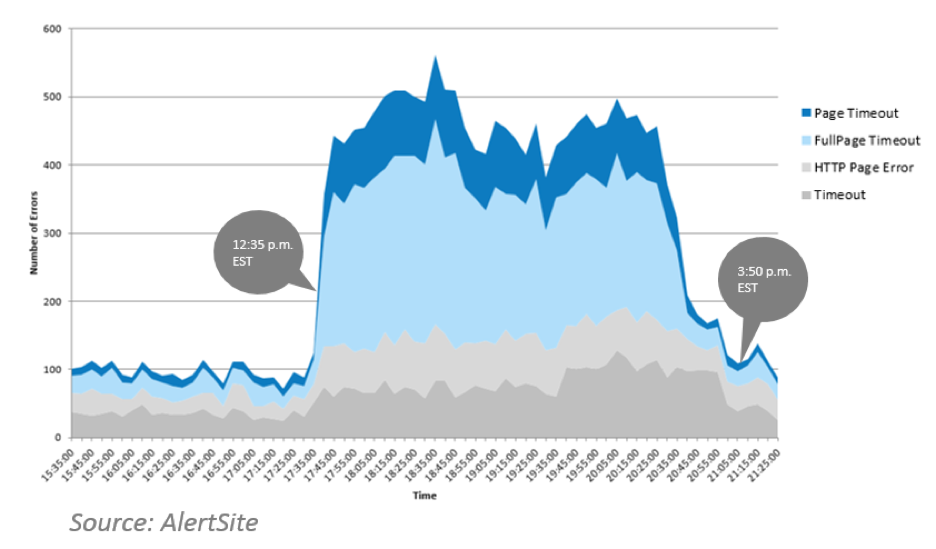
    Amazon presumably also had its own internal operations come to a grinding halt, as so much of its platform and delivery infrastructure is likely built using its own services. So much so that from 12:37 p.m. EST till 3:37 p.m. EST, Amazon could not update its SHD (service health dashboard) due to its dependency on S3, and had to resort to Twitter to let customers know what was going on!

    The root cause of the outage was a failure in its Simple Storage Service (S3) as is explained here: https://aws.amazon.com/message/41926/. What most people most likely missed, however, is the impact it had on other AWS services that were dependent on the availability of its S3 service.

    The multiple AWS services that were also disrupted during the outage included:

    • Amazon Athena – used to analyze data in S3 using SQL
    • Amazon Elastic MapReduce (EMR) – Elastic Map Reduce used for big data processing
    • Amazon Inspector – used to detect vulnerabilities of your applications deployed on AWS
    • Amazon Kinesis Firehose – used to deliver real-time streaming data to S3, Redshift or Elastic Search
    • Amazon Simple Email Service (Amazon SES) – used to provide email service for applications running on AWS
    • Amazon WorkMail – Amazon’s email and calendaring service for businesses
    • Amazon Auto Scaling – allows scaling your EC2 capacity up and down based on conditions
    • Amazon CloudFormation – allows creating and managing a collection of related AWS resources

    Multiple services that saw degradations to the point that their performance was severely impaired during the outage window included:

    • Amazon AppStream – streaming service from the cloud for Windows apps
    • Amazon CloudSearch – managed search service
    • Amazon Cognitio – identity service for mobile and web apps
    • Amazon EC2 Container Registry (ECR) – managed Docker container registry
    • Amazon Elastic Compute Cloud (EC2), Amazon Elastic Transcoder – media transcoding
    • Amazon Glacier – data archiving and backup
    • Amazon Lightsail – easy-to-manage VPS
    • Amazon Mobile Analytics – analyze and track mobile usage data
    • Amazon Pinpoint – push notifications
    • Amazon Redshift – data warehousing service
    • Amazon Simple Workflow (Amazon SWF) – workflow service for developers
    • Amazon WorkDocs – document collaboration
    • AWS Batch – batch computing jobs
    • AWS CodeBuild – managed service that compiles code, tests and produces software packages
    • AWS CodeCommit – managed source control service
    • AWS CodeDeploy – managed code deployment service
    • AWS Data Pipeline – data workflow service
    • AWS Electric Beanstalk – automatic deployment, load balancing and scaling
    • AWS Key Management Service – centralized control of encryption keys
    • AWS Lambda – serverless computing
    • AWS OpsWorks – automated AWS config management
    • Stacks – AWS resource collection as a single unit
    • AWS Storage Gateway – hybrid cloud storage

    What Lessons Can we Learn from This Outage?

    This outage was not something unique to only cloud service providers. Having a service or set of services getting disrupted can easily happen even when hosted in your own data centers. An outage like this ends up having expansive impact is when a principal provider of services to numerous enterprises experiences disruptions in major services that they offer.

    Another consideration into the enormous impact of outages is the way we are building software. We are no longer building everything by ourselves. We build essential components and use third-party capabilities when possible. With the breadth of services and products that Amazon offers, it is not outside the realm of possibility that there are entire companies whose software offerings are built and run entirely on AWS.

    Our customers have applications running on Amazon’s infrastructure, and we all felt the effects of the outage right away. The graph below shows the co-relation between when failures were noticed in applications being monitored on our system and when Amazon had the outage.

    This outage could have been caused by a hardware failure. It could have been caused by a software update that was not ready for prime time. Or as Amazon pointed out to us in this case, it was due to human error. We have all lived through experiences where human error has resulted in hardship to customers. What is imaginably happening at Amazon is the tightening of the processes around testing live services, what can be done, who can do it and what type of fail-safes are built into the tools used so that these large scale unintended outages can be avoided.

    What can you do help yourself, even with this dire dependency on your cloud provider?

    1. Test frequently and early in dev/test, staging and production to ensure that all the critical pathways through your applications and your services (your own and the ones from third parties) are working correctly.
    2. Do performance acceptance before pushing your software to production because it is a lot more expensive to catch problems in production than it is in dev/test or staging.
    3. Monitor services from your cloud providers so that you know right away when there is an issue.
    4. Understand the policies and procedures that your cloud provider follows regarding how they deal with changes to their production systems. The maturity of their processes and controls and their recovery mechanisms should let you rest easy that an outage of this magnitude will result in a speedy recovery.

    About the Author / Anand Sundaram

    With nearly 25 years of experience building and growing several technology businesses, Anand Sundaram is Vice President of Products, AlertSite at SmartBear Software. He is the co-founder of three startups including RSW Software that was valued at more than $240 million with more than 160 employees. He has extensive background in software quality, security and post deployment monitoring having built two load testing products and invented the first post deployment deep transaction monitoring product.

  • Boosting Time-to-Market by Improving Software Development

    Boosting Time-to-Market by Improving Software Development

    Today’s business environments require “agility” in terms of being able to quickly understand and adapt to information, trends and new developments. For example, a company might employ a business intelligence suite that provides them with real-time information on product sales, which allows them to dynamically adjust content or strategy.

    Set a Baseline

    You can’t measure improvement in a business process without first establishing a baseline. The first step in reducing the time-to-market for software development is to look closely at the current development process. Review the steps involved in turning an idea into a live product or product feature and identify any bottlenecks, inefficiencies and constraints. Once this review is complete, set realistic goals that reflect the current situation and the improvements you want to see within a certain time period.

    Eliminate and Optimize

    During the review and baseline phase, you might come across activities that do not add value and do not speed up the process. Perhaps there are some unnecessary meetings during the mid-phase of the development process that typically do not uncover any problems and hold no real value. Or, there’s a documentation step that is a drain on human capital and takes away valuable time from testing and innovation.

    Identifying problems and bottlenecks is vital, but the efforts will be wasted if there aren’t open lines of communication. Poor communication causes software release delays, so establish efficient processes, set up the right team structure and adopt tools and technologies that allow transparent and fast communication between cross-functional teams. When it comes to teams, you want to find the right balance of staff. Generally, a winning team includes the right analysts, marketing managers and DevOps resources who can work together towards a common goal.

    Streamlining and Developing Incrementally

    As the team moves into development, there are steps you can take to increase efficiency. Independent tasks should be performed in tandem; for example, test scenarios built while various features are defined. Do not wait until development is completed before creating test environments; encourage the team to split parallel tasks that best match with their individual talents.

    When it comes to enhancements for business apps, there’s an inclination to go for the “home run” by greatly changing the application and including many new features with every update. For reliability and speed to reaching the market, you instead want an incremental approach, by which you develop controllable enhancements and bug fixes that provide immediate value to the users. Prioritize the “wish list” of feature sets so you can better manage and plan the updates that will go into future releases. Get buy-in from other departments and then build and create an enhancements schedule.

    Test Often and Embrace Automation

    In addition to having testers test the application, you should actively engage with clients and select users early in the development process so they can provide input on the overall functionality and user interface as well as help discover bugs. Your time-to-market can be greatly impacted if bugs aren’t caught early on, and you might even need to pull a newly launched application if the glitches impact users adversely.

    Improving this process requires defined and repeatable testing procedures and, to reduce time-to-market, these procedures must be automated at least partially.

    Consider these other benefits of software testing that will improve your DevOps:

    • Discovering bugs and software errors can improve the system’s capacity
    • Testing can improve the security of your applications
    • Improve customer engagement and satisfaction through a high QoE score
    • Reduce the total cost of ownership
    • Better meet industry standards and compliance regulations

    Other automated processes should be introduced into the development cycle, including environment provisioning, data or API mocking; builds management; and standards enforcement. For instance, automated deployment solutions give DevOps a repeatable process so engineers have more time to focus on crafting new features. Another example is release automation tools that manage workflow as software moves between development, production and testing. These tools not only speed up the process, they also eliminate potential for human errors.

    The modern business relies heavily on applications to communicate, complete sales and operate more efficiently. Companies strive to bring these apps to the market quickly so they don’t miss opportunities and can adjust to market conditions. To accomplish these goals, companies must adopt the right software development processes and tools to improve their time-to-market speed and capture a competitive advantage.

    About the Author / Ajay Kaul

    Ajay Kaul is managing partner at AgreeYa, bringing more than 27 years of experience in sales, consulting and managing small to large IT projects worldwide. Kaul has led AgreeYa through 16+ years of success, leading the company in highly competitive and complex markets and driving significant profitable growth with global workforce of more than 1,500. Prior to founding AgreeYa, he was responsible for managing engagements for Deloitte serving private and public sector clients across United States. Connect with him on LinkedIn.

  • Dispelling the Myths Around Continuous Testing

    Dispelling the Myths Around Continuous Testing

    You may have seen the term “continuous testing” and thought it was just the DevOps flavor of the month. Some might even think it isn’t part of DevOps or isn’t for cloud or hybrid cloud applications. Well, think again.

    As it turns out, there are a few more fallacies around the idea of continuous testing floating around the application development community. Ready to find out?

    Chapter five in the new, free eBook “Continuous Testing for Dummies, IBM Limited Edition,” lists 10 myths. Here are a few to ponder:

    Continuous testing is only about executing test scripts

    Limiting the term “testing” to only the execution of test scripts is a misnomer. As my co-author, @Al_Wagner and I point out, testing and checking application functionality are not equal. There’s a long list of testing items to check off one’s list, the least of which is collaborating.

    Continuous testing is merely a buzzword

    Guess what? It’s a core part of that essential DevOps practice, continuous delivery. And, with customers demanding higher quality software faster, it isn’t going anywhere soon. In short, invest in continuous testing.

    Only agile teams do continuous testing

    False! Some or all parts of continuous testing are critical for any type of team as well as all players. This includes test automation, production-like test environments and realistic test data. A related myth—only testers contribute to testing—is also not true at all. The idea of continuous testing includes all team members. The book describes the roles everybody has to play. For example, did you know that designers can improve testing? They can work with testers to help them understand where the fragile parts of the application are.

    Automating tests means we need fewer tests

    No, the machines are not taking over. Automating tests does not mean cutting back on testing jobs. To the contrary, automation is reducing testers’ needs to act like cyborgs and spend more time doing what they do best: learn and experiment.

    Continuous testing isn’t for large, complex systems

    Au contraire! The best thing you can do for large or complex systems is leverage continuous testing practices and tools such as service virtualization to conduct end-to-end testing earlier and more frequently, rather than having each subsystem do all its own testing in isolation until just before deployment to production.

    To read more myths about continuous testing, check out “Continuous Testing for Dummies, IBM Limited Edition,” here.

    About the Author / Marianne Hollier

    MarianneMarianne Hollier is an IBM and Open Group Master Certified IT Specialist in application development. She has strong, practical expertise in measurably improving the software development life cycle and driving the necessary cultural changes to make it work. She is instrumental in architecting, tailoring and deploying the IBM DevOps best practices as well as appropriate software development tools on many types of projects, from large to small, long to fast-track, agile to traditional. Marianne is especially passionate about all things testing—process, tools, culture and automation. Her experience is broad-based, spanning both custom projects as well as standard software packages that apply to many industries, including refining, pharmaceutical, telecommunications, health care, financial, automotive, government and retail. Connect with Marianne on LinkedIn or Twitter.
  • All Day DevOps: Exploring the New Ordinary

    All Day DevOps: Exploring the New Ordinary

    There you were. You heard about Docker, become mesmerized, floated into its new, special world … and then all chaos broke out. Things were not that easy and you scrambled for knowledge. Some folks saw the light and stepped forward, while others are still trying to figure the out the happy path home where containers will become part of their new ordinary.

    This is the true story of Daniël van Gils (@foldingbeauty), a developer at Cloud 66, and the 12 steps he laid out in his Docker journey. He shared this journey during his presentation at the recent All Day DevOps conference, and I’ll share a summary of his steps here. His journey will take you full-circle, from your “ordinary IT world” to the “very special container world” and back, to where the container world is the new ordinary.

    Containerization continues to be a hot topic in the software world, and one that is only going to grow and mature. As it matures, questions still abound:

    • How can you implement containerization into your organization?
    • Have you already started but run into roadblocks?
    • How can you be the hero of your organization’s journey?

    Daniël addressed this journey in his talk, “Docker Inside/Out,” at the recent All Day DevOps Conference.

    Daniël’s journey started in the Ordinary World (#1), the world you might be in now. You are at a conference, you read a book, you talk to some colleagues and you want to jump into containers. You receive the Call to Adventure (#2) … but you are human, you like the safe, you fear the unknown, so you want to Refuse the Call (#3).

    Thankfully, others—including Daniël—have taken the journey. They can take you under their wings, coddle you and then push you out of the nest. You Meet a Mentor (#4) and follow your heart. The heart is the good stuff—it is the core. Like most people probably would have, Daniël chose an artichoke to illustrate his point.

    The heart of the artichoke is the good stuff, but the outer leaves protect the heart and make up the whole artichoke. Each aspect of an organization has something that drives them—their heart:

    • Development – building elegantly performing code
    • Operations – stable, performing code
    • Business – delivering the right services to customers
    • Customers – consuming the service they want

    Your drive to satisfy the heart’s desire gives you the courage to Cross the Threshold (#5). You have a containerization machine, such as Docker. You put code in, creating nice little containers.


    Now that your infrastructure is set up, you test and know where your allies and enemies are (#6). The most important lesson here is that shortcuts are your enemy. Shortcuts are evil, promising a life of ease but delivering a life of pain.

    Daniël offers his Approach (#7) through the Docker journey to ensure you’re successful. You must KISSSSS:

    Keep It…

    • Slim – remove what you don’t need
    • Secure – ensure you have the latest updates; remove all secrets
    • Speedy – Follow best deployment practices and run performance tests
    • Stable – Use version numbers for your Docker files
    • Set – Immutable. Don’t put databases or complicated volumes into your containers. You can, but the the technology is still too new.

    The next steps in his journey cover Ordeals, Death and Rebirth (#8). Once you pass this point in the journey, you’ll understand what it takes to run Docker in production and have shown the proof of concepts. You’ll then reap the Rewards (#9) and have clear visibility to your Road Back (#10) to the new ordinary.

    For the successful heroes on this journey, now is your moment to shine.  The next steps: your Resurrection (#11) and to Return with Elixir (#12) where containers are now the new ordinary.

    If you want to learn more about Daniël’s Docker journey, be sure to watch his full All Day DevOps conference session (only 30 minutes). The other 56 presentations from the All Day DevOps Conference are available online, free-of-charge here.

    This blog series is reviewing sessions from the All Day DevOps conference from November, which hosted more than 13,500 registered attendees. Last week I discussed, “One Team, 5,000 Jobs: Life in the DevOps Jungle.” Next week, look for “Launching Products at Massive Scale: The DevOps Way” presented by Kishore Jalleda and Gopal Moore.

    — Derek E. Weeks

  • One Team, 5,000 Jobs: Life in the DevOps Jungle

    One Team, 5,000 Jobs: Life in the DevOps Jungle

    Damien has 5,000 jobs. While you might gasp at that workload, Damien is not stressing out. All 5,000 jobs are automated within his team’s Jenkins pipelines. How does he do it? Damien follows four key principles to keep his cool in the job jungle: self-service, security, simplicity and extensibility. But you might be surprised that one of his most important survival techniques is treating his pipeline as “not code.”

    At the recent All Day DevOps Conference, Damien Coraboeuf (@DamienCoraboeuf, nemerosa.com) discussed how his organization got out of the job jungle. Even with 5,000 jobs in Jenkins, Damien has a tiny team of six running it while supporting a large band of developers around the world.

    During his session, Damien laid out how a pipeline, the backbone of a Jenkins job, is constructed. Spoiler alert: It is pretty simple; hence, the magic of Jenkins. However, it gets complicated quickly, so Damien shared four principles his team strives toward:

    • Self-service. They don’t want the Jenkins team to be a bottleneck, and they don’t want to have to deploy an army just to run Jenkins.
    • Security. With teams of developers—many of whom they have never met—security and control is critical.
    • Simplicity. Developers can focus on developing rather than Jenkins.
    • Extensibility. As they grow and capabilities are dreamed up or implemented, their system needs to be able to adapt.

    Core to their implementation and their goals of self-service, simplicity and extensibility is the Job DSL Plugin. While Jenkins has a robust user experience, as jobs are added, it can get cumbersome and clumsy. The Job DSL Plugin brings order, automation and consistency to the jobs. Damien walks through the basics of the plugin and its benefits, noting that it treats the pipeline as code.

    Treating the pipeline as code allows the team to reuse code through versioned libraries and easily manage thousands of jobs. Requiring developers to manage more work as code does offer benefits, but giving that many people access to the code also produces security risks. So, Damien’s team actually treats the pipeline as “not code” by describing the pipeline using properties files. It also allows them to use the pipeline as metadata, so queries and reports are almost enjoyable.


    Damien’s team also utilizes the Seed plugin, which they maintain, to “help automate the generation and management of pipelines,” tighten security by keeping projects locked to teams and increase automation through hooks.

    The Seed plugin shares some functionality with the popular Pipeline plugin, which is maintained by a large community. However, the Pipeline plugin does not allow for treating the pipeline as “not code.” Damien’s vision is that one day Seed will be an extension of Pipeline.


    Damien’s team has done a tremendous job of running Jenkins across the enterprise. In fact, he just wrote me with an update that since November, his company has scaled to 7,000 jobs while still following the same principles.  If you want to learn more about how his team does it, be sure to watch his full All Day DevOps conference session (only 30 minutes). The other 56 presentations from the All Day DevOps Conference are available online, free of charge, here.

    — Derek E. Weeks