Category: Enterprise DevOps

  • Get Ready to Become a Full-Spectrum Engineer

    Get Ready to Become a Full-Spectrum Engineer

    The more things change, the more they stay the same. In software development, change has been a constant. I’ve been a software engineer for more than 25 years and have had to morph, pivot and learn new things to remain current and in demand. Plus, the industry swings like a pendulum between the need for specialists and generalists and that cannot be ignored: The advent of new architectures, methodologies and disciplines drives the need for specialists. Once assimilated, the market drifts back toward generalists.

    Back in the day, it was not uncommon to have 50+-person teams building applications using the Waterfall methodology. From a technology perspective, development was kept in silos for each specialty. It was uncommon for a developer to straddle specialties such as GUI, business logic, database and quality assurance.

    The swing back to generalists was driven by the shift to Agile. When the Agile methodology became prevalent, we saw the teams of 50 reduced to teams of six to 12. The reduced team size also reduced the number of specialist you could have on a team. Developers needed to know more and do more. Today, most companies are looking for generalists who can do it all—otherwise known as the full-stack engineer. These developers work on web applications and can operate in any vertical tier of the application. They write HTML, CSS and JavaScript for high-performing and functional UI for the front end. They can also work from the server side to develop the business logic to support the UI. Behind that are the database schema and queries they write to move data in and out of the application.

    Enter the Full-Spectrum Engineer

    DevOps has ushered in a new trend. Teams are moving from batched releases of functionality to single-piece flow. In other words, we no longer think about collecting the work of multiple engineers over multiple sprints into a release. Our ability to bring value to the customer as soon as possible and out-innovate the competition will be driven by releasing the work of a single engineer as soon as it is ready. This typically is accomplished through a continuous integration/continuous delivery (CI/CD) pipeline directly from the source repository through automated testing and finally deployment into production, preferably without any human intervention.

    What does this mean for developers? Plenty. Here’s a look at the major capabilities needed by software engineers who want to thrive as full-spectrum engineers (FSEs.)

    1. Be a good software engineer. That means keeping up with the latest trends in design and implementation. You need to assimilate new frameworks and open-source libraries into your first party code to build software quickly. Furthermore, you must understand scale and performance of the system under load. Creating services that scale out and back based on demand will enhance the user experience.
    2. Have an eye toward quality. This means testing both the functional and non-functional aspects of the application. Well-written unit tests are just the beginning. An FSE must think about how to create automated regression tests that can run in a staging environment to assure that the entire system will not be negatively impacted by their deployment. Testing for non-functional aspects such as performance are a must as well.
    3. Understand the complexities of deployment. Whether that be containers, cloud or infrastructure as code, you need to know where and how the software runs and be able to create those environments from scratch. Using stable, version controlled configurations for the running environment will ensure that Dev, QA, Staging and Production all look and behave the same. That makes testing repeatable and operations more straightforward.
    4. Don’t forget about operating the software. As part of a DevOps team, you will be expected to take part in pager duty. When writing new functionality, consider how to debug it remotely and whether your teammates will be able to do the same. That means logging and other telemetry are critical but insufficient. Turn that data into information that can be consumed by both people and machines. Can the software detect that it is not running properly? Can it heal itself? Can it call for help?
    5. Make security a priority. The fast pace of software development means that there is no longer time to wait for a security analysis or pen test when your release candidate is ready to deploy. Security standards should be part of the acceptance criteria and security scanning must be added to your definition of done. Use tools that can provide quick feedback and diagnosis of security vulnerabilities while writing code as well as identify vulnerabilities in your open-source components. This preventative scanning will not only train you to write secure code, but it will also allow the software to run successfully through the assurance scans that are part of any good CI/CD pipeline.

    DevOps is turning the concept of a full-stack engineer on its side. Now the vertical tiers of technology and architecture are secondary to the horizontal disciplines that must be mastered to create software at the speed of DevOps. While I am eager to tell you that the future of software development is generalist, it does not mean that we should get rid of our specialists. What it does mean is that we will need fewer of them—the skills and capabilities of a full-spectrum engineer are the future of software development. DevOps has smashed the velocity barrier but to reach the full potential will require a new breed of multi-disciplined generalists—Full-Spectrum Engineers.

    About the Author / Peter Chestna

    As Director of Developer Engagement at Veracode, Pete provides customers with practical advice on how to successfully roll out developer-centric application security programs. Relying on more than 10 years of direct AppSec experience as both a developer and development leader, Pete provides information on best practices amassed from working with Veracode’s 1,000+ customers. Pete joined Veracode in 2006 as a platform developer and was instrumental in delivering the first version of Veracode’s service to customers. Later, as Director of Platform Engineering, Pete managed the Agile teams responsible for delivering Veracode’s SaaS platform and built the first DevOps team. Follow him on Twitter @PeteChestna.

  • It’s About Communication, not Silos

    It’s About Communication, not Silos

    Too often, when enterprise folks talk with DevOps aficionados, we get a loud chorus of “Culture Change” and “Take down the silos,” and frankly that scares any sane enterprise IT person. Not because they fear change, but because they fear that those of us who are fans of end-to-end DevOps have no clue what we’re talking about.

    Don't throw the baby out with the bath water.
    Baby vs. Bath Water – By Richfife (Own work) [Public domain], via Wikimedia Commons
    And to some extent, that impression is not misguided. There will still be a development team. There still needs to be a selection of operational specialists. Eliminating these are not changes anyone is proposing for enterprise use. Indeed, if an organization has an investment in Cisco UCS, they still need a UCS specialist. The system is complex, and the more knowledge you have of it, the better it can be managed. Sure, automating as much as possible is a worthy goal for all such specializations, but even automated, the UCS person still needs to be able to expand/modify/maintain the automation. Another good example is NetOps (or whatever we’re calling it today): The person with in-depth knowledge of your ADC will still need to have in-depth knowledge of your ADC.

    So, then, what we’re really talking about is increased communication. We’re talking about a small, cross-functional team to smooth the areas that DevOps is very good at, but specialized knowledge is still needed. Increasing communication is key to every DevOps implementation, regardless of tool set; the ability to predict future work based on updates is almost essential in any faster-moving environment. Indeed, Lori and I were discussing this morning, wondering how many of those enterprise Slack channels are being used to provide a running commentary across the team of what is happening upstream. But that’s another blog, I think.

    It is not that DevOps people are clueless, nor is it that they want to eliminate specializations (well, some claim to want to, but they have a marketing reason to do so), but rather, it seems that many of us DevOps folks have gotten so wrapped up in change (it is a big change to streamline both Dev and Ops) that the baby is being thrown out with the linguistic bathwater.

    If you’re talking DevOps, talk about increasing communication, not destroying silos. Secure DevOps is evolving now, and shows the model more clearly because of it—developers and ops are given more of a role in security and auditing, but they are taught and overseen by the security team. This does not eliminate security, but does increase the security of what is being produced.

    While we’re at it, switch from bulk “Culture Change,” too. While there is a fair amount of culture change—moving to proactive and more frequent, with roadblocks minimized or removed and non-essential changes treated as, well, non-essential. But “streamlined dev/operations” might just be a better way to talk about it. After all, the brazen voices still seem to sing of wrecking balls from on high crashing down, and that’s not an effective way to get buy-in for change.

    In the end, the point is more repeatable, more stable, more manageable processes and systems. Let’s talk more about that, and less about Destructor, shall we? Sell the concept; don’t force-feed it. There’s a lot of good to be had, and using terminology that is both confusing (Define “Culture Change” in a generic, applicable sense) and often frightening is not helping people understand (or want to understand) how it can help.

    — Don Macvittie

  • SRE vs. DevOps vs. Cloud Native: The Server Cage Match

    SRE vs. DevOps vs. Cloud Native: The Server Cage Match

    This post supports my DevOpsDays Austin Presentation on May 4

    I don’t believe in DevOps shaming. Our community seems compelled to correct use of DevOps as an adjective for tools, teams and teapots. The frustration is reasonable: DevOps clearly taps into head space for both devs and operators who see a brighter automated future together. For example, check out this excellent DevOps discourse by Cindy Sridharan.

    As an industry, we crave artificial conflict so it’s natural to try and distill site reliability engineering (SRE), DevOps and cloud native into warring factions when they are not. They all share a focus on Lean process.

    Very simply: SRE is a job function, DevOps is a process approach and Cloud Native is an architecture.

    These three concepts have tremendous alignment because they all have the same fundamental goal: increase product delivery through improved flow. It’s really that simple. We are looking to enhance productivity using system thinking concepts from Lean manufacturing.

    SREs improve productivity by eliminating manual operations, reducing errors and improving infrastructure quality. They do this starting from the production infrastructure and working backwards. Highly automated delivery, integrated logs, systemwide monitoring and blameless root cause analysis are key tools. Before we get wrapped up in tools, the distinguishing factor for SRE teams is that they take ownership of the production infrastructure.

    There is tremendous power in assigning ownership for delivery. That’s why I see industry benefit in defining an SRE job function. A DevOps strategy is a system approach and it becomes an anti-pattern to making an individual or team responsible to own “the DevOps.”

    In DevOps, we look for ways to streamline the entire product creation flow. That often drives toward tools and techniques that SREs require; however, our goals are not department-specific. We want to work with all stakeholders including developers, product managers, testers, SREs, executives and customers. This system focus for developers becomes CI/CD pipelines, platforms, work tracking tools and other workflow elements. These tools are not specifically DevOps tools, but confusion is natural since they are often pulled into organizations due to DevOps thinking.

    This SREs should expect to collaborate deeply with other functions under a DevOps process.

    Cloud-native architecture also falls under the DevOps mandate because it strives to decompose large application stacks into highly automated collections of services. There is no magic “DevOps platform” in cloud-native design; however, teams using the architectural approach get modularity, strong APIs, service orientation, simplified configuration and build automation practices that fit perfectly into DevOps thinking.

    For example, using containers does not mean a dev or SRE team is following DevOps process or using cloud-native architecture; however, it is an indicator that they are leaning toward smaller deliverables and improved dev-production fidelity.

    Yet, SRE, Cloud Native and DevOps do have a shared enemy: Complexity.

    We’re doing a great job creating best practices and abstractions that accelerate developers and creating innovative infrastructure options in both cloud and physical. That means we are seeing dual explosions in developer productivity and infrastructure complexity. Unfortunately, this wealth has not made it into operations automation, which has been delivering incremental improvements at best. Even worse, the added workload and complexity adds pressure to SRE functions.

    Ultimately, all three of these concepts are aspects of Lean business practices; however, acceleration from DevOps and cloud native is outpacing progress by SREs. This imbalance creates risk for everyone involved because Lean is about system performance. Delays and failures cannot be isolated to a single silo.

    The mistake of seeing Dev and Ops as silos means creating false contention between SRE, DevOps and cloud native.

    If you are hearing that in your organization, then take it as a warning about how your teams are integrating Lean systems thinking into your processes.


    — Rob Hirschfeld

  • 5 Common Misconceptions of Serverless Technology

    5 Common Misconceptions of Serverless Technology

    The rapid growth in serverless technology affords companies opportunities to save money on server costs and allows developers to save time and focus on coding rather than back-end operations. A challenge with such swift adoption is the difficulty in maintaining a standard understanding. In anticipation of the Serverless Conference, which was held last week in Austin, Texas, we asked experts in Heavybit’s community about common misconceptions.

    Myth #1: Serverless is a Revolutionary New Direction for Software

    “A common misconception is that it’s a revolutionary new direction for software,” says Nick Martin, co-founder and CTO at Meteor. “Really, it’s just the next step in the evolution of making software development faster and easier. Like the compiler, the database and cloud computing did in previous eras, serverless further abstracts away the complexities of modern app development and is part of an ongoing trend to free developers from entire classes of concerns.”

    As for the benefits for developers, Martin notes that developers can now “focus on their application logic and avoid undifferentiated work like provisioning, server management, or load-balancing.” Serverless ultimately “promises to let developers ship apps faster and at a lower cost,” he says.

    Myth #2: Serverless is a Gadget Technology for Hobbyists

    Nick Gottlieb, head of Growth at Serverless Inc. believes that one of the biggest myths is that it’s a ‘gadget’ technology that’s not mature or only for a hobbyist. “While serverless compute is still a very early technology, it’s built on the same core infrastructure that providers like AWS, Google, and Microsoft have been investing in and selling to enterprises for years,” says Gottlieb. Furthermore, “because the underlying infrastructure is battle tested, and the value it provides around cost savings and faster time to market are so great, there is already huge amounts of mission-critical enterprise workloads being done on serverless compute.”

    Myth #3: Serverless Will Hurt the Movement Toward Containers

    “Containers will continue to be front and center in terms of the underlying infrastructure, but that doesn’t mean they will be the primary unit of deployment for developers,” says Lawrence Hecht, author at The New Stack. “Take, for example, a cloud provider that may build its FaaS (function as a service) on top of containers and use Kubernetes to manage that deployment,” he says. “Individual developers would then deploy application components to functions instead of to container images.”

    Hecht notes that this will not happen right away and in the meantime, “We’re seeing emerging companies build dashboards that allow developers to choose which VM, container or function they want to deploy to. Those dashboards are becoming the gateway to the CI/CD pipeline.”

    Myth #4: Serverless is Free of Security Vulnerabilities

    “The biggest security misconception is thinking you no longer need to worry about known vulnerabilities,” says Guy Podjarny, co-founder and CEO at Snyk. While serverless addresses the risk of known vulnerabilities in OS dependencies, such as OpenSSL’s Heartbleed vulnerabilities, “These ‘unpatched servers’ account for the vast majority of successful attacks today. Serverless applications still contain a large and growing number of application dependencies, pulled from npm, Maven, PyPI and more. These components often carry known vulnerabilities, and require diligent monitoring and preventative tools.”

    Myth #5: Serverless Means No More DevOps

    “A common misperception is that it completely absolves development teams from the harsh realities of operating software,” says Joe Ruscio, partner at Heavybit. “While it does promise to almost completely do away with the ‘undifferentiated heavy lifting’ of provisioning and managing infrastructure, understanding how your application code performs in production remains of paramount importance.”

    — Malia Powers

  • DevZone and Bluemix Garage @ the IBM InterConnect Expo Floor

    DevZone and Bluemix Garage @ the IBM InterConnect Expo Floor

    Things have been so busy here at devopsy.kinsta.cloud, I have not really had a chance to report on what a great event IBM InterConnect 2017 was. Once again this year this year the IBM InterConnect expo floor showcased the latest developments in cognitive, cloud, DevOps, security and more. But this year there was definitely a vibe of DevOps, agile and cognitive are now firmly mainstream and not just the latest shiny objects.

    We have over 40 videos of interviews and updates from this years InterConnect over on our DevOps TV Youtube channel. Included in this playlist are some great interviews with Jeff Sussna, John Comas of NBCUniversal and more.  Check them out if you have some time.

    For this article though I wanted to give you a flavor for what it was like on the expo floor at InterConnect 2017. We took our video team mobile and toured several of the areas that the floor was broken into. Two of the most crowded was the Dev Zone, that featured development trends across many areas and the IBM Bluemix Garage which was expanded this year.

    Over at the Bluemix Garage area we had a special tour guide Bluemix Garage CTO, Rachel Reinitz as well as some of her friends.  This video is pretty long, almost 30 minutes, but it really captures everything that is happening with the Bluemix Garage including some new offerings and some of the design thinking that is shaping a lot of what is happening at the garage.  Have a watch below:

    While the Bluemix Garage was all things Bluemix garage, the DevZone was some of this and some of that. It had some Watson stuff, lots of automation and more. It was broken into two main areas.  One was hands on working on laptops in a lab type of area. The other parts of the zone were more exhibits of some of the cool things being done with IBM dev tools.  Robots, beer, food and lots of other good stuff.

    Again we were lucky to have a VIP tour of the DevZone from Brian Bryson and some special guests. Have a watch of this and get a great sample of what it was like on the DevZone as they served up “steak and sizzle”.

    If you like these looks at the show floor, be sure to check out our tour of the Watson area and the DevOps and ITSM Zone from the expo floor.

    We will be following up with a few more articles highlighting some of the other great videos from InterConnect 2017 in future articles, but you can check them all out now here.

    — Alan Shimel

  • Think of the Future When Building Delivery

    Think of the Future When Building Delivery

    We’re in a strange state of the pendulum swing right now, where speed of delivery is king and all else seems to take a back seat. Many orgs even place quality behind speed in the claim that “we’ll get it right later,” but I’m talking about the more universal rush to deploy and the infrastructures we’re building to do it.

    In short, look around your organization. Do you have apps more than 10 years old? Are you working on the same type of app? Then spin your mind ahead and consider what it will be like for someone in that time.

    Future-Proofing Delivery

    You cannot stop the advance of technology, but you can make the environment adaptable. There are some easy tricks to provide for the future when it comes to your DevOps toolset.

    COBOL Still Needed. Source: Hackerrank.com

    Virtually Perfect

    First, build your continuous integration/continuous deployment/application release automation (CI/CD/ARA) architecture on virtual machines (VMs) or cloud instances. If your standard is containers, then use them—but on top of a VM. The reason is simple: Given the vagaries of business environment and IT priorities, a fully installed VM gives you a buffer—you have everything needed to run the environment in a contained package. Containers alone won’t be good enough, as the underlying OS impacts container operations. As an extreme example, the switch to Red Hat Enterprise Linux (RHEL) 7.0 was massive and broke things. A DevOps environment based solely on containers would break with it, while a VM running RHEL  5 or 6X would keep clipping along, as long as your virtualization environment ran.

    Get Versions In-House

    While the executables for any CI/CD/ARA toolset and development languages will be in-house, there is far more to a modern development environment than just those parts. The libraries/modules your code relies on must be available. Increasingly, we pull them on build, but that becomes a problem when suddenly they are significantly changed or downright missing. There is a market of hosted, verified module vendors out there these days that guarantee availability of a given version of each module they support, and that is an option; however, a better one is to pull them once and put them into your own enterprise repository. Is it another thing to maintain? Yes. But it might save your project from having to emergency patch—and frankly, that kind of insurance is worth it.

    Choose Wisely

    Like any relatively new market, there are a lot of CI/CD/ARA toolsets out there. Do evaluations; don’t just grab the one that a team member likes or is familiar with. Look at the longevity and stability of the project/vendor as much as the tool, because we’re talking about hedging for the future. In the early days (and even occasionally today), open source aficionados would say “We have the source, we’ll do fine,” which is technically true, but most organizations aren’t in the business of maintaining their dev/deploy tools and don’t want to be, so a little research goes a long way.

    Plan as Though You Chose Poorly

    Know what you’ll do if, in spite of evaluations, the project/product you chose goes away. While it’s not CI/CD, I was on a team that selected Mambo right before the big team split that created Joomla and doomed Mambo. Our choice was intelligently made based upon available information, but things still came around to burn us. And it could happen to your choice, too, whether you choose open source or commercial. So have an idea of what you would do in that scenario and document it. If we adopt enough IT tools, it’s guaranteed that some of them will fail over time, so this is not a totally wasted exercise. And should you ever need it, knowing what the plan is before things are falling apart helps keep level heads.

    Quality Over Speed

    Remember that time to delivery is super hugely important, and for decades was not given the credence it deserves. But as I mentioned above, recognize that right now the pendulum has swung so far the other way that many shops have a “just get it out, we’ll make it better later” mentality. Don’t join in where your DevOps environment is concerned. The architecture you are constructing should be for the long run—unless you enjoy rebuilding it regularly and the delays to production code such rebuilding threatens, then ignore this point.

    Security, Security, Security

    DevOps and security has had a rough relationship, but let’s talk about your DevOps environment instead of security’s impact on rapid delivery. Once you’ve thrown all of your build into one easy-to-use tool, the risk from a successful outsider or a risky insider is commensurately larger. Use tools that support role-based access control (RBAC) and make sure application programming interfaces (APIs) are properly locked down. Give security the time it needs to build a list of recommendations for DevOps toolsets that will protect them in almost any eventuality. Because the combined ability to mess with the build process and the deployment process through one automated toolset is powerful and dangerous, make sure you’re monitoring and it’s secure.

    Consider a Modicum of Standardization

    In my entire career, “We are an X shop” has never seemed to work. I’ve been at places that tried to use a single database vendor or a single development language, and inevitably, other forces override these directives. But there is a benefit to keeping the number of languages or database variants down, and that benefit is most felt in the CI/CD space. Keeping track of which DB goes with this project, or keeping that DB up to date—or determining the new release will introduce incompatibilities—all falls on the DevOps environments. Keeping the amount of accumulated future change down is in the organization’s best interests.

    Make Cool Stuff

    Every time I think I’ve maxed out on awe, something new comes along. We are on the cusp of fully automated build/test/deploy with ARA tools calling both CI/CD tools and application provisioning tools. Keep pushing the edge, give vendors your feedback or projects your mods, and making it better. Because there’s a fundamental change here that we want to see through to the end. And I love playing with the toys.

    — Don Macvittie

  • ITV, Allianz, UK DWP and 2 Authors Take a ‘Deep Dive into DevOps’

    ITV, Allianz, UK DWP and 2 Authors Take a ‘Deep Dive into DevOps’

    On the heels of our latest DevOps Enterprise Summit London speaker and programming announcement, I had the pleasure of being joined by Tom Clark, head of Common Platform at ITV; Andrea Hirzle-Yager, head of Department, IT at Allianz Deutschland AG; Mark Schwartz, CIO and author of  “The Art of Business Value” and “A Seat at the Table“; and Mayank Prakash, Chief Digital and Information Officer at Department for Work and Pensions for a live video chat—already our third installment for 2017! We huddled up for an hour and took a “deep dive into DevOps,” as my fellow panelists shared keen insights into their technology transformation experiences and leadership lessons learned from pioneering DevOps adoption in their own organizations. And as you’ll find out, these are all such great people!

    WATCH THE REPLAY

    [youtube https://www.youtube.com/watch?v=lwBneJ-KnkA?feature=oembed]

    For a limited time only, you can receive 20% off the ticket price for
    DevOps Enterprise Summit London with code DEEPDIVE20.

    REGISTER HERE 

    Lessons Learned

    Clearly, one of the responsibilities of technology leaders in DevOps transformations is enabling a culture of continuous and lifelong learning. In fact, this characteristic is one of the more profound conclusions after having seen nearly 200 leaders share their stories over the past four years. And holy cow, if there’s a great time to learn, it is now; personally, I can’t overstate how much I’ve learned since co-authoring “The Phoenix Project.” (For example, in Dr. Steven Mayner’s DOES16 San Francisco presentation last year, he confirmed that this seems to be a critical element of successful transformation—you can see what we learned about the role creating a culture of learning and transformation plays in successful Agile and DevOps transformations.)

    These were among several questions that I had to privilege of asking Andrea, Tom, Mark and Mayank.

    • What will you be presenting on this year?
    • What can you share about what’s happened in your own journeys since 2016?
    • What can you tell us about your DevOps journey and technology transformation?
    • Can you tell us about where you decided to start, and why you chose there?
    • It’s been observed that DevOps transformations are easier in smaller organizations—what are the toughest obstacles that you’ve overcome as leaders in your journeys?
    • What are your favorite lessons learned that you think would be applicable for all leaders endeavor in to do similar things in their organization?
    • What are your favorite resources you look to (past and present) for leveraging the best practices and principles—this could be in the form of research, books, events, articles, etc.
    • Can you share you impressions of your two days at DevOps Enterprise Summit London last year?

    It was fantastic hearing the specific lessons they’ve learned in their journeys that they thought would be  applicable for all leaders doing similar things in their own organizations. It was interesting to hear how books and conferences play such a critical role for them, as it has for me—and I always love getting a glimpse of the bookshelves of technology leaders, because certain books keep keep showing up up again and again

    Be sure to watch the video replay of the chat—there are some great nuggets of information about where these leaders are in their own transformation journeys and what you as DevOps Enterprise Summit attendees can expect at the event this June.

    DevOps Enterprise Summit London Update

    Plenty has happened since our previous live video chat with Jonathan Fletcher, Cornelia Davis and Jonathan Smart. The programming committee has made its final selection of speakers to round out the conference program, and we’re in the final planning stages for the event this June. One item on the agenda that I am particularly excited about is the “Ask the Speaker” portion of the program. This year, we are opening up an hour of time each day of the conference for question and answer sessions between our plenary speakers and conference attendees. It’s going to be a great way for attendees to pick the brains of the folks just coming off of the main stage.

    Additionally, we have added another format (tested during DevOps Enterprise Summit San Francisco last year) that we called “DevOps Workshops.” These are small-group discussions using the Lean Coffee format, with a small army of trained facilitators at each table.

    We’re expecting a phenomenal turnout for each of these sessions and we’ll have some world-class people helping to lead the discussions. More to come on that soon!

    Want to join us in London this June? Save 20% on tickets using code “DEEPDIVE20” today!

    REGISTER HERE 

    We look forward to seeing all of you June 5-6 at the QEII Conference Centre, an amazing venue in the center of Westminster in London. Stay tuned for all the conference updates online at http://events.itrevolution.com/eur/.

    — Gene Kim

  • The Postman Delivers More

    The Postman Delivers More

    Most of us use Postman during API development. The company claims 3 million users, and as one of them, that number doesn’t raise my eyebrows any. But if you are like me, you’ve figured out collections, how to back up your data and perhaps looked at tests, but not done much more. As a tool for API development, Postman is powerful and useful, but that means many of us don’t look very far beyond how quick and easy it is to set up an out-of-browser test environment to evaluate request/response.

    We use collections to separate projects, but really only as a way to group calls together and keep a single copy of each call close to hand while the history list scrolls through multiple copies.

    But for DevOps, there’s more. And they’ve just added to it again.

    Packing in the Features

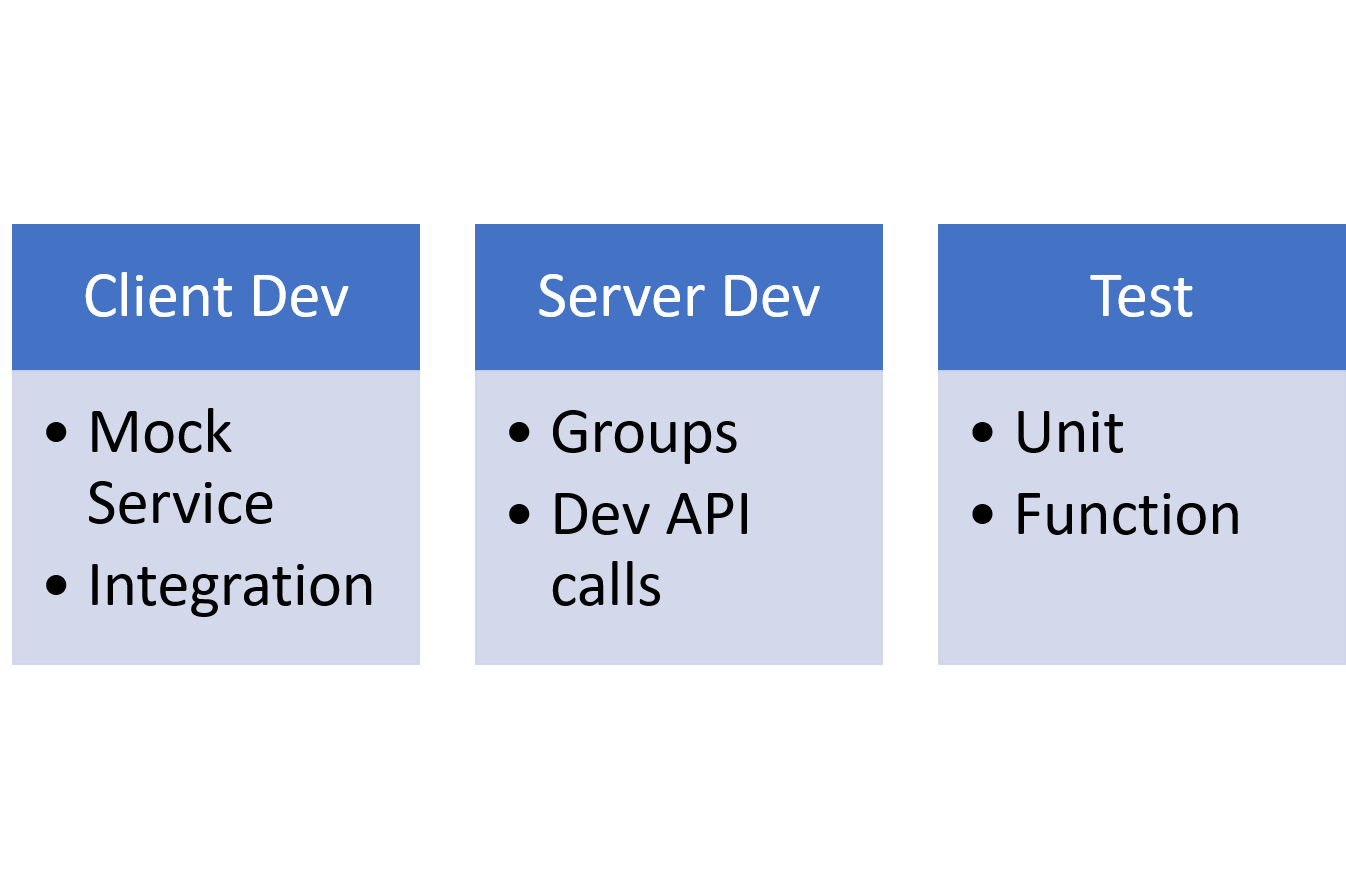
    Groups can be used for grouping calls with tests, for example, and a command line tool can perform automated testing. If, like us, you use Postman to test as the API is developed, and use groups to keep those calls pulled together in one place, then testing from the source that already contains your entire API makes sense.

    And as of this week, Postman also includes the server side. Postman Mock service allows you to mock up the API calls and specify a valid return value. That means client-side developers can use Postman Mock for testing their app/page, while server-side developers are using the original Post

    man to develop the APIs that Mock emulates and testing is running tests from the real-world APIs that already are in Postman for development purposes.


    Dev, DevOps, Testing and Ops: Something for Everyone

    So a quick diagram shows that the entire development process has a bit of Postman in it if that’s your tool of choice:

    While all assist with agile development, for DevOps, the pieces that are the most beneficial are Test combined with Groups and the new Mock service. As long as the Mock service is configured for a group of calls, test can call them and the logged output can reflect that the test succeeded but ran through the mock service. Once the service is completed and the group is directed to point at the server, testing will run tests against the real API. Using Newman, the command line tool, these tests then can be integrated with your build toolset.

    The Mock service can take imports from SOAPui, if you are converting from SOAP calls or use SOAPui for REST and are moving to Postman. I’m told the Postman toolset also supports SOAP calls, but truth in writing, I’ve never even looked to see how that would be done. I’ve used both tools, but never on the same project.

    There’s a Cost, but There’s Also Value

    This next bit sounds a bit salesy, and I try not to do that. But for the price, there aren’t a lot of value-add tools out there that deliver this kind of value. Lori and I are talking about going Pro, as we both use Postman in projects. And considering we’re regular users, I figured if we didn’t know about most of these features, many of you wouldn’t, either.

    Mock is part of Postman’s Pro package, along with sharable team collections, and API documentation tools. That means it will cost you a little bit of money, but if you’re on a team and have been cobbling together a way to share collections, team collections and associated collaboration tools are worth the price—particularly since built-in auditing will show all of the changes made to Postman collection items. That means fixing a change-based error on the Postman side is easier.

    As of this writing, the cost for Postman Pro was $8 per user per month. My guess is sharing groups (or worse, each team member re-creating/maintaining them) costs more than that per month in many cases. Consider that documentation can be generated and shared to a private URL and the fact that Mock service enables parallel development, and $8 sure seems like a steal. Finally, Pro offers API monitoring, so performance and uptime can be tracked to better adjust to the realities of production. There’s more (such as integrations with some great Dev/Ops/DevOps tools), but I’ll stop.

    Summary

    Design, Development (both client and server, in parallel), Test, Monitoring … as long as you can get it deployed, Postman can help with the rest. Postman Pro has a reasonable price for the functionality it offers, and the introduction of the mock service makes agile development, tight timelines and consistent “start to deployment” testing easier. I’d venture to say it is worth taking a look at. And if you’re developing APIs without it, pop out and get the free version, you’ll quickly find why so many of us use it.

    You can find out more about the various editions of postman on Postman’s Product page.

    — Don Macvittie

  • Using Load Balancing in Blue/Green Deployment

    Using Load Balancing in Blue/Green Deployment

    One of the biggest pains of automating the deployment process is that final step, when everyone agrees it is time to take the accumulated changes and expose them to the public. This process is the point at which systems go down and users find themselves suddenly cut off. Scheduling such changes for off periods may be useful, but “off period” is rarely “no users impacted” period. One of the goals of DevOps should be to minimize impact to users, as the point is to make things more repeatable and consistent. Blue/Green deployment is one of the processes introduced to make the final rollout step of continuous delivery (CD) smoother.

    This process, first (to my knowledge)  proposed by Jez Humble and David Farley in the book, “Continuous Delivery,” proposes that you have two environments—one testing and one production—that mirror each other. Then, when it is time to release, the router is changed to send users to the “test” environment, and it becomes, for all intents and purposes, production. The problem with this simplistic description is that everyone on the system at the time of “cutover” is “cut off,” since the new system doesn’t know what they were doing. That’s not the best solution for users; in fact, it’s downright disruptive.

    Like Load Balancing Quiesce

    This is not that far off from the type of thing I’ve talked about using load balancing for, and F5 Networks (where I got the idea) has talked about it for a while. You can tell a good load balancer to stop offering connections to server X in the pool to let it settle and then be taken out of service for maintenance. The same technology could be used to say, “Let existing users finish off on their existing connections, but do not allow new connections to these servers,” directing all new connections/users to the new deployment while not dropping the connections of the existing users that presumably are in the middle of doing something.

    Now in load balancing, you have to consider how long to allow users to stay connected before arbitrarily ending their session, but in the world of REST APIs this is not as important as it is in longer-lived, client-server style connections. In the end, though, there must be a defined point where everyone is forced to the new systems. At that time, merely making the switch on the load balancer and taking the old production systems out of the pool will force users to connect to the new systems.

    It Works for A/B Testing, Too

    A similar process can be used to try out new features on a subset. Once there is a load balancer in place, and you know what you want to measure to determine if a new feature is enjoyed by users, an instance or two behind the load balancer can be spun up and start accepting connections. The load balancer will naturally start putting those servers to use, and soon you’ll have a subset of users seeing the new features, while most blithely continue on with the old. When testing is done, the decision of whether to withdraw the servers/instances with the new code or move all servers in the pool to the new code can be made.

    Overall, offering less deployment disruption will be required as your organization moves into more frequent releases under CD. Look for solutions like blue/green deployment to make those releases as non-disruptive as possible.

    — Don Macvittie

  • The Top 10 Reasons to Use Cassandra

    The Top 10 Reasons to Use Cassandra

    The Apache Cassandra database is the right choice of database if you are looking for scalability and high availability without compromising performance for your mission-critical applications. Additionally, Cassandra’s support for replicating across multiple data centers is best-in-class, providing lower latency for users and the peace of mind of knowing that you can survive regional outages. To that end, we’ve compiled a list of the Top 10 reasons why enterprises onboarding and deploying mission-critical applications should use Cassandra (Apache Cassandra, DataStax Enterprise).

    1) Requirement for fast writes: Easily deals with data velocity, data variety and data complexity issues

    Many of the challenges associated with next-generation cloud applications center around data volume and data velocity. Is Cassandra able to handle the speed of data coming into the system? The answer is “yes” based on the amount of data and cluster size. Not only does Cassandra come with this ability out of the box, but there are systems of data pipeline architectures being built around ingestion speed. And to top it off, it scales linearly, making it easy to determine the right amount of capacity based on data flow.

    But, there are also two often overlooked components it provides: 1) data variety and 2) data complexity. Data variety is an alternate way of saying that data coming into one database can come in different forms. An example of this would be sensor input from a heart monitor and sensor input from an IV both for the same patient. The second component, data complexity, extends the previous example. The heart monitor might report 100 metrics twice per second under normal operating circumstances and up to 125 metrics once per second while the wearer is sleeping. This means the write patterns, locations, and frequencies can vary. Cassandra handles these situations gracefully.

    2) Can handle massive data sets

    If there were any questions about whether Cassandra is capable of handling large data sets, there is no need to look any further than the companies using it. They operate at massive scale—Netflix, Hulu, Instagram, eBay, Apple, and Spotify all have Cassandra working in interesting ways as part of their offerings.

    The other way you know Cassandra is up to the challenge is in use case examples. Many organizations use it for applications where data grows in an unbounded way very quickly. These include Twitter clones, a web log analytics data warehouse and telemetry or sensor data.

    3) Homogeneous environment

    Unlike some of the legacy distributed systems, Cassandra does not require outside support for synchronization. All of the required components for basic operation are built in. Since Cassandra also operates in a peer-to-peer fashion, this means that there is no master-slave or sharding setup and that all nodes in the ring are equal. Additionally, there is only one machine type that an administrator needs to worry about.

    4) Highly fault-tolerant

    Cassandra employs many mechanisms for fault tolerance. Since it is masterless, there is no single point of failure. There is also the potential for zero downtime rolling upgrades. This is because Cassandra can support the temporary loss of multiple nodes (depending on cluster size) with negligible impact to the overall performance of the cluster.

    The safety net Cassandra offers extends outside of your data center as well. Cassandra allows you to replicate your data to other data centers and keep multiple copies in multiple locations. This helps satisfy many regulatory requirements in addition to being a part of an strong disaster recovery and business continuity plan.

    5) Proven success across enterprise applications and in many use cases already

    There are already many examples where Cassandra is being used effectively. Banks and other financial institutions are storing large quantities of financial data in Cassandra. Analytics companies are using Cassandra to store web analytics data. Medical companies are using Cassandra to store sensor data and other time series inputs. There are also many companies making use of Cassandra for storing internet of things (IoT) data.

    6) Ease of administration

    Cassandra is a straightforward system to administer. With Cassandra being a masterless system, all nodes in the ring are the same—a homogenous system. It’s fault-tolerant and can support the temporary loss of nodes with minimal impact to production performance. This means that nodes are easy to replace and the requirement to replace downed nodes immediately isn’t as strict.

    7) Custom tuning

    There are a lot of knobs and levers that can be turned to get Cassandra to perform optimally for your workload and environment. You can set it up to operate in a way that is consistent with your workload. For example, if you write lots of log data and read infrequently, then there are configuration tweaks to be made for write-heavy systems. If you write heavily to one data center and then do all your reading from another data center, then you can adjust the settings on a data center-by-data center basis.  This idea of tuning isn’t just available at the application level; you can also tune the JVM and Java settings, including GC and logging levels. Changes can even be made by the drivers at connection time to aid in the performance of your system.

    8) Easy to integrate core applications

    A lot of work has been done on data manipulation and parsing systems to integrate with Cassandra. For instance, the full text search engine Apache Solr has been packaged to work with Cassandra to provide full featured search capabilities to an existing Cassandra database. Apache Spark, a big data analytics engine, also has been plugged in to work on an existing database. There are entire suites of tools that can be integrated or bolted on to increase its capabilities. These include Apache Mahout, Kafka and Zipkin, to name a few. This is important because the more tools you have available to you, the more powerful your data becomes. You also have the ability to gain more insight about your data without having to build and maintain the application systems that were previously required.

    9) Excellent Monitoring Options

    Included in the system of tools referenced in No. 8 are monitoring packages. If you are a user of automated monitoring platforms such as Datadog or Netuitive, you’ll find examples of prepackaged agents to monitor the important parts of Cassandra. You can then tack on your own additions of other metrics that are important to you. This is made possible by Cassandra taking advantage of Java MBeans and exposing them to the client. You can use these to get at much of the internal information Cassandra uses to make its own decisions and decide on its own health. Datastax also offers its own monitoring and control application called Opscenter.

    10) Amazing community

    One of the best things about any piece of software is having a great community of developers and experts available to you for help or guidance. There is a huge yearly database summit put on by Datastax, the primary backer and largest contributor of code to Cassandra. It also sponsors community events all over the world so you can meet and interact with other developers around you.

    For open-source software to be successful, there needs to be an ecosystem that develops around it. In the case of Cassandra, there are consultancies, monitoring and troubleshooting systems, plugins, instrumentation systems and backup systems. That is all a set a competencies that your organization no longer needs to own and can use what the greater community has already created. There are even PaaS companies that will completely take over the management for you, leaving you just the development of your application to focus on.

    Given the sizable number of organizations and people that are a part of the ecosystem and the Cassandra community as a whole, there is no shortage of articles, documentation and people willing to help. A welcoming and helpful community isn’t always a given, but in the case of Cassandra, it’s alive and thriving. This is important because software is always about people.  The more of them that you can interact with that have shared your experiences, the better. It also will be easier to find solutions to your problems having a network of people who might have faced them before.

    There are many reasons why Cassandra could be the right tool for your application. Knowing your systems requirements, workloads and future will help you make the right choice. As you can see, if you do choose Cassandra, you are bound to be in good company.

    — Michael Colby