Category: Enterprise DevOps

  • Top 5 Issues Curtailing DevOps Adoption

    Top 5 Issues Curtailing DevOps Adoption

    DevOps may seem simple and logical on the surface, yet most of the companies we talk to are struggling in one aspect or another. This is no surprise: Successful DevOps initiatives require putting together a full toolset and simultaneously creating a smart team of developers, testers and project managers who are well-versed in cloud and agile technologies.

    Those tasks alone can take many months of trial and error until you are ready to start DevOps in earnest. After a period of experimentation, it’s time to refine and optimize. Focus shifts to more mature issues such as creating a fully integrated tools stack, supporting a rich test data environment that doesn’t undermine privacy and security, and determining the best DevOps infrastructure strategy for your company.

    Regardless of your DevOps maturity, we’ve outlined some top issues to consider and mitigate, as your DevOps practice evolves.

    Integrating Tools

    As the practice of DevOps matures, we have seen an explosion of tools, both open-source and commercial. These tools serve every discrete need in the process: requirements management, test management, defect tracking, agile planning, source code management, build, deployment, monitoring and more. We calculate there are at least 1,500 such tools available today.

    So, while developers, testers, project managers and business analysts have many sophisticated capabilities to streamline DevOps, those tools must work together. It’s imperative that tools and groups don’t work in silos, but are part of an integrated pipeline. This allows the code to flow seamlessly according to business objectives, from requirements definition to test and dev, production and deployment. Organizations may choose to create these integrations themselves—although that gets costly fast, both at the onset and with ongoing maintenance. Some vendors offer out-of-box integrations with popular tools, although you must consider if these will fit your workflows and needs. A few vendors now offer the best of both worlds—connectors that are simple to set up and with the ability to easily customize the integration when needed.

    Configuration as Code

    A common problem in DevOps is the need to align the environment configuration present when/where the code is written with the environment configuration used in production. By adopting configuration as code (consisting of tools and processes), you can store all configuration data as a file alongside the code. This is valuable because if there are bugs or UI issues, your staff can quickly locate the version of the configuration that matches the code/feature in question and load it into that environment quickly. If we are confident that the environment configuration is accurate, we can narrow down the app failure being most likely due to the code itself.

    Having both code and the configuration setup information in one place is also useful for testing purposes, as infrastructure configurations sometimes differ between development and testing worlds.

    Fast is Not Free

    Software teams have always wrestled with the need to balance speed with quality and cost. You can’t get the best of everything, so teams should figure out where they can compromise and where they can’t. In DevOps, however, the emphasis is almost always on speed. Once you reach maturity, you usually go fast and achieve high-quality results, yet this requires investing in tools, process and people.

    Working smartly can go a long way toward moving faster without sacrificing quality. If your team can figure out how to be efficient and precise, with clear objectives, then you won’t have to do much rework, which adds cost and time. Many people will flaunt the benefits of full automation to work faster. In many cases, however, automation ends up being a more expensive solution to the problem. Automation adds additional maintenance and overhead that needs to be outweighed with saved effort; you will have more tools and integrations to maintain, and more pieces that will break.

    Justify how much automation you need and acquire only the tools necessary to meet your goals. Ideally, organizations should determine the need for speed based on business requirements. Many industries are not driven by speed to market and benefit more by working in a steady, iterative fashion. Make sure you have a sound business reason for working faster and releasing faster, and that you can effectively manage the automation and staff needed to work at that pace.

    Acquiring Test Data

    For high-stakes applications, such as a new e-commerce site or mobile customer app, there is a great deal of risk in launching an app that hasn’t been tested on representative data. Accumulating enough high-quality test data to find bugs and optimize all the key features and scenarios before going live can be a monumental task given today’s big data initiatives, fragmented DB technologies and data privacy/security concerns. Specifically, when companies are dealing with sensitive data, such as customer information and credit card numbers, this is a tricky endeavor.

    One common option is to use real customer data and “scrub” it to remove identifying characteristics. If the cleansing process is not thorough, however, you’re creating tremendous security risks for customers. Another basic option is to create fake data that’s representative of production data. However, that data might not be accurate in all key scenarios, nor comprehensive enough to meet your QA objectives.

    Our analysis is that test data is a complex problem that no one tool can solve, and should be handled with importance as a cross-functional initiative. It’s not unusual to see security, compliance, testing, development and business personnel involved in test data management activities, especially for companies handling sensitive data.

    Internal vs. External Hosting

    DevOps environments seem to run optimally in the cloud. Cloud infrastructure gives organizations the optimal scale, flexibility and speed to run more builds and test faster through highly automated services. Top providers including AWS and Azure offer a full range of DevOps-oriented services to manage infrastructure for you, such as load balancing, log and instance monitoring and automatic backup/failover. With many DevOps vendors hosting their products and services in the cloud as well, it’s logical to host the entire environment there.

    However, this isn’t possible for many organizations with strict security and compliance requirements. Running a DevOps infrastructure internally requires a great deal of configuration, maintenance and software, not to mention staff to maintain it all. Automated testing often can be time-intensive when limited machines are available in the internal network for testing. Running those tests may require waiting for the weekend to free up resources, given the many hours required to complete those jobs. This, in turn, causes significant delays in testing and code quality feedback.

    One solution to this problem is using containers to scale the internal DevOps infrastructure. This allows more tests to run at once and reduces the overall build process time. Companies strictly doing web development can use open-source tools to do this. Conversely, large enterprises with apps on multiple platforms will need to build out a great deal of their own infrastructure.

    It’s a Process

    All of this might seem overwhelming to organizations just getting started with DevOps. But remember that DevOps is a journey taken over time; it is more than just new tools and skills. DevOps is a dramatic and evolving way to develop software and services that meet the frequently changing demands of customers. DevOps is the only way organizations can truly become data-driven operations, supporting new revenue streams and product innovation. When viewing it through this lens, we know that change will be gradual. Celebrate the small wins with low-risk projects first, and work to drive efficiency wherever possible.

    About the Author / Kevin Dunne

    Kevin Dunne pic

    Kevin Dunne is vice president of strategy and business development at QASymphony. Prior to joining QASymphony, Dunne was a business technology analyst at Deloitte. He can be found online at Twitter and LinkedIn.



  • Dev & Ops: These Are Reconcilable Differences

    Dev & Ops: These Are Reconcilable Differences

    The new world of IT requires a different approach from what worked in the past. As usual, the technology is the easy part, but without people and processes being aligned, it won’t deliver value. When evaluating how data science and machine learning can help manage highly dynamic IT environments, old reflexes may be actively harmful.

    By their nature and due to their experiences, Ops people tend to be a pretty (small-C) conservative bunch. Rule No. 1 of Ops is “If it ain’t broke, DON’T TOUCH IT!” and if we’re honest with ourselves, most of the rest of the rulebook is just variations and commentaries on that theme.

    One of the ways in which Ops people try to control their world is through automation. DevOps mostly looks to the moment of release and deployment, as that is where the handover to Ops typically occurs—and this is a big focus of the drive to automate. However, there is another part of Ops where automation is key, something that Dev is not always nearly as involved in; namely, day-to-day operations. Which alerts should even be sent, whom they should be routed to, what are the valid responses and so on—all these have been automated over the years, to a greater or lesser extent.

    Ops people have laboriously documented their architecture and spent a long time in meetings planning which information is relevant to share and who should respond to alarms. Much of this is implemented in various pieces of software, whether commercial, open-source, home-grown or that special grey area, where something that started out as a standard component has been so customized that it is effectively bespoke. Rules, filters and thresholds determine what action to take in which case.

    These approaches have been in place for years or even decades, but now they are starting to fail. Simply put, IT’s increased complexity and the ever-accelerating rate of change are outpacing administrators’ ability to keep up and reconfigure their management systems.

    The Coming ‘New Normal’

    New approaches are emerging to deal with the new normal, but as ever, the technology is the easy part. For new technology to be a success, people and processes need to be in sync.

    Right now, the emerging approach is to use data science and machine learning to process events, instead of the old deterministic rulesets and databases. The results speak for themselves, especially at scale and in highly dynamic environments. People building container-based or SDN architectures no longer assume that there will be a database of configurations that will always be up to date; quite the opposite.

    The new way is to throw out all the filters and rules, feed all the alerts into a single place, and then use data science and machine learning techniques to sift them and identify relationships with them. The result will be a shift in focus from individual alerts to the business problems those alerts are the symptoms of.

    Algorithms are great at these sorts of repetitive, high-volume tasks. They can look at massive volumes of events and figure out which are even relevant and worth taking a second look at, and then identify how those events relate to each other and what they really mean. This is where the humans come in, with their strengths in low-volume and unpredictable situations. Because they are not constantly drowning in irrelevant noise, they can work together effectively to understand the actual problem and get it fixed quickly.

    Where’s the Catch?

    The difficulty is that for many Ops people, there is a big cultural change required to adopt this model. The old deterministic systems may have required laborious maintenance, but at least it was possible to model them and understand why a specific result was achieved. New algorithmic techniques take a radically different approach, and while the results are impressive, they come from a black box. This does not inspire confidence for people who are very comfortable with the old approaches.

    Often, the response of Ops people coming from legacy tools is to get stuck into the minutiae of what is going on inside the black box and to look for traditional failure modes. The problem is that these approaches are no longer valid in the new world, as I discussed in my last post about getting to SRE.

    For instance, while it is indeed important to make sure that no issues are missed due to over-aggressive filtering, this does not mean that we need to see every single alert. As long as we know about the actual business problem, we don’t actually care about the single alerts, except insofar as they help us debug the underlying issue and resolve it.

    The other direction is even more insidious, where people spend a lot of time chasing down “extraneous” events that they think they should not be seeing. The risk is, of course, that the Ops team ends right back up in the same place that they were trying to escape, where they are only able to identify expected problems, but are getting blindsided on a regular basis by the “unknown unknowns,” the conditions that simply should not happen.

    Ultimately, Ops needs to let go of reflexes that were good in the old world, and focus on the goal: ensuring the uptime and stability of business-supporting systems. The how is less relevant than the what and the why; the algorithmic black box might as well be full of magic leprechauns, as long as they are telling Ops what they need to know, when they need to know it. Call it the “Chinese Room” theory of Ops: For as long as the results are useful to Ops, it does not matter what is inside the room.

    The benefit for Ops is precisely that they no longer need to focus on the minutiae of individual alerts, but can concentrate on solving actual business problems. That is how IT can make itself a value generator and avoid being viewed as another undifferentiated cost center.

    Pay no attention to the algorithm behind the curtain.

    — Dominic Wellington

  • Is DevOps Making Life Better for Data Scientists?

    Is DevOps Making Life Better for Data Scientists?

    The path to success and happiness of the data science team working with big data project is not always clear from the beginning. It depends on the maturity of the underlying platform, their cross skills and DevOps processes around their day-to-day operations.

    The past few years have been like a dream come true for those who work in analytics and big data. There is a new career path for platform engineers to learn Hadoop, Scala and Spark, while Java and Python programmers have a chance to move to the big data world. There they find higher salaries and new challenges and get to scale up to distributed systems.

    But recently, I have started hearing some complaints and dashed hopes from engineers who have spent time working there.

    Their expectations are not always met. Big data engineers spend most of their time in extract, transform and load (ETL), preparing data sets for analysts and coding models developed by data scientists into scripts. They have become cogs between data scientists and big data.

    I see the same feedback from data scientists. Real big data projects differ from Kaggle competitions. Even minor tasks require Python and Scala skills as well as multiple interactions and design sessions with big data engineers and operation teams.

    DevOps engineers get to go no further than just using the basic tools and running through tutorials. They grow weary of being given nothing more to do than deploying the next Hadoop cluster through the Cloudera wizard and semi-automated Ansible scripts.

    In this environment, the big data engineer will never get to work on scalability and storage optimization. Data scientists will never invent a new algorithm. And the DevOps engineer will never put the entire platform on autopilot. The risk is the team’s ideas might not make it beyond proof of concept.

    How do we change this situation? There are three key points:

    1. Tools evolution—the Apache Spark/Hadoop ecosystem is great. But it is not stable and user-friendly enough to just run and forget. Engineers and data scientists should contribute to existing open-source projects and create new tools to fill the gaps in day-to-day operations.
    2. Education and cross skills—when data scientists write code they need to think not just about abstractions but also consider the practical issues of what is possible and what is reasonable. For example, they need to think how long their query will run and whether the data they extract will fit into the storage mechanism they are using.
    3. Improve the process—DevOps might be a solution. Here DevOps does not just mean writing Ansible scripts and installing Jenkins—we need DevOps working in optimal fashion to reduce hand-off and invent new tools to give everyone self-service to make them as productive as possible.

    The Continuous Analytics Environment

    With continuous analytics and self-service, data scientists own the data project from the original idea all the way to production. The more autonomous they are, the more time they can dedicate to producing actual insights.

    Data scientists start from the original business idea and work through data exploration and data preparation. Then they move to model development. Next comes deployment and validating the environment. Finally, there is the push to production. Given the proper tools, they could run this complete iteration multiple times a day without relying on the big data engineer.

    Big Data engineers, in turn, work on scalability and storage optimization, developing and contributing to tools such as Spark, enabling streaming architectures and so on. They provide an API and a DSL for the data scientist.

    Product engineers should be given analytical models developed by data scientists as neatly bundled services. Then they can build smart applications for business users to allow them to use those in self-service.

    Working like this, no one is stuck waiting on the next person. Each person is working with their own abstractions.

    This might sound like a utopia. But I believe this could motivate big data teams to improve their existing big data platforms and processes, with the added benefit of making everyone happy.

    About the Author / Stepan Pushkarev

    Stepan Pushkarev is the Head of DevOps Practice at Squadex.com and CTO of Hydrosphere.io. Co-founded and managed engineering teams for eCommerce, IoT and Ad-tech companies. He has been responsible for the full products stack: math models, infrastructure & operations, enterprise applications as well as hiring, establishing engineering culture and delivery process. Stepan combines strong technology, management skills and entrepreneurial spirit. Connect with him on LinkedIn.

  • All Day DevOps: Capital One Gives Credit Where It’s Due

    All Day DevOps: Capital One Gives Credit Where It’s Due

    Listening to his talk, it seems as though George Parris and his team at Capital One aren’t keeping “banker’s hours.” George is a Master Software Engineer, Retail Bank DevOps at Capital One. At the All Day DevOps conference, George gave a talk, titled “Meta Infrastructure as Code: How Capital One Automates our Automation Tools with an Immutable Jenkins,” describing how the team automated the DevOps pipeline for its online account opening project for Capital One, a major bank in the United States. Of course, there is a lot to learn from their experience.

    George started by pointing out that software development has evolved, coming a long way even in just the last few years. Developers now design, build, test and deploy, and they no longer build out physical infrastructure—they live in the cloud. Waterfall development is rapidly being replaced by Agile, infrastructure as code and DevOps practices.

    Where we see these technologies and methodologies implemented, IT operations teams are acting more like developers, designing how we launch our applications. At the same time, development teams are more responsible for uptime, performance and usability. And, Operations and Development work within the same tribe.

    George used the Capital One Online Account Opening project to discuss how they automate their automation tools, now a standard practices within their implementation methodology.

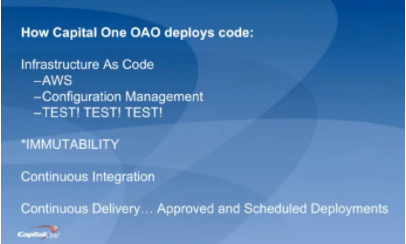
    For starters, George discussed how Capital One deploys code (hint: they aren’t building new data centers). They are primarily on AWS; they use configuration management systems to install and run their applications; and they “TEST, TEST, TEST, at all levels.” Pervasive throughout the system is immutability; that is, once created, the state of an object cannot change. As an example, if you need new server configurations, you create a new server and test it outside of production first.

    They use the continuous integration/continuous delivery model, so anyone working on code can contribute to the repositories that, in turn, initiate testing. Deployments are moved away from the scheduled release pattern. George noted that, because Capital One is a bank, regulations prevent its developers from initiating a production change. They use APIs with the product owners to automatically create tickets, and then product owners accept tickets, making the change in the production code. While this won’t apply to most environments, he brought it up to demonstrate how you can implement continuous delivery within these rules.

    Within all of this is the importance of automation. George outlined their four basic principles of automation and the key aspects of each:

    Principle #1 – Infrastructure as Code. They use AWS for hosting and everything is in a Cloud Formation Template, which is a way to describe your infrastructure using code. AWS now allows you to use CFTs to pass variable between stacks. Using code, every change can be tested first, and they can easily spin-up environments.

    Principle #2 – Configuration as Code. This is also known as configuration management systems (they use Chef and Ansible). There are no central servers, changes are version-controlled, and they use “innersourcing” for changes. For instance, if someone needs a change to a plugin, they can branch, update and create a pull request.

    Principle #3 – Immutability. Not allowing changes to servers once deployed prevents “special snowflakes” and regressions. Any changes are made in code and traverse a testing pipeline and code review before being deployed. This avoids what we all have experienced: the server that someone, who is no longer around, set up and tweaked differently than anything else and didn’t document what was done.

    Principle #4 – Backup and Restore Strategy. A backup is only as good as your restore strategy. You know the rest.

    George also dives into how they do continuous delivery/continuous integration in his talk, which you can watch online here.

    If you missed any of the other 30-minute long presentations from All Day DevOps, they are easy to find and available free of charge here.  Finally, be sure to register you and the rest of your team for the 2017 All Day DevOps conference here.  This year’s event will offer 96 practitioner-led sessions (no vendor pitches allowed).  It’s all free, online Oct. 24.

    — Derek E. Weeks

  • Moving That Big Project to CI/CD

    Moving That Big Project to CI/CD

    Any organization that has been around for more than a few years (and many who haven’t) have a massive system that would cost a fortune to replace. Most midsized enterprises have several of them. Those systems are one of the reasons that enterprises don’t adopt CI/CD at the same rate as startups. Sure, any new project or small things go there, but the elephant in the room just hangs out.

    So what happens when you get called upon to move one of these systems into CI/CD?

    Lets’ start with the easy case: the rewrite. In that case, you’re almost greenfield from the start and can build CI/CD into your development and test processes as you would for any brand new project.

    The harder case is when the org has seen the benefits of CI/CD and decides it wants to apply them to the monster that slows every project it touches to a crawl. These big systems are generally mission-critical, so there’s an added layer there. But this is doable.

    Yes, It’s Daunting, But…

    First, get a copy of the app building in a separate environment. Containers are good for this, since it’s just a development environment anyway. Replicate the entirety of the system (except unscrubbed real data, whether you use that in testing or not is a per-org question) to this new environment, make sure it builds and passes the existing test environment.

    Next, configure Dev/CI/CD tools (for a project of the size we’re talking, I recommend configuring application release automation [ARA] also to help track dependencies), and get the system building and testing under them. This will take time—time to configure the CI/CD tools, time to get the build environment to work reliably under them and time to figure out how to integrate existing test structures into the CI tool. That’s okay, the point is investing now to save later. Note that this is also the time to upgrade your dev tools. If you’re on J2EE 5, for example, it is time to upgrade. It’s been a decade, and you’re working on a copy of the project.

    Once that reliably builds and passes tests, the next step is to move those pieces into a more CI/CD-friendly format. Traditional test scripts can be called out in CI, but consciously building the tests within the CI environment is more resilient. A close look at tests, what’s missing, what could be better, what needs to stay as it is and just report back are the biggest parts of this test.

    Note that change requests will have to be copied to the new environment’s change request system, too. Some projects are lucky enough to lock out changes to the source application while the new one is brought up to speed, but for most, changes made in the original will need to be replicated. Once you start modifying code, they can no longer be just pulled from the source tree.

    Then start fragmenting the app. Apps of that size inevitably have massive functions/methods that do a lot of things. Not a terrible plan in single-processing days, but if you’re moving to CI/CD and upgrading dev tools, you may as well optimize code, too. Breaking a 5,000-line subroutine into a master and four child subroutines, each of 1,000 lines (yeah, it’s never that easy, but you get the idea) might offer room for parallelization, and definitely reduces your change footprint when you have to go in there and modify code.

    Fear Pundits Bearing Advice

    It is relatively common in DevOps for someone to offer the advice, “Get the newest of X every time.” Don’t follow that advice. Pick a version and hardcode it. It is anathema to hardcode versions of tools/OS/libraries in DevOps, but the point of DevOps is to control change, and anyone offering that advice missed the havoc that their advice would have created with the release of Python 3 or RHOS/CentOS 7.0, both cases where backward compatibility was left in favor of progress. Plan updates; don’t come in to, “The entire build failed last night,” and have to fix it then.

    By this point, you’ll have a better understanding of the app, and will know (or at least suspect) where monitoring points will be best placed. Add them in to do active monitoring instead of logging. Your first set of points won’t be perfect, and you’ll want to review them to see what improvements you can make, but the weak points of the system should be monitored at a minimum, and alerting or corrective action automatically take place.

    Test, Test and More Test

    As soon as things are stable in the new CI/CD environment, bring in beta testers from the user community to help you find issues where it doesn’t behave like the original. The point here is to copy the original first, most likely to enable faster changes in the future, so just ask users to do what they would normally do when interacting with the app, and see what happens. Anywhere there are issues is a good place to add testing (I don’t know any monolithic app that has 100 percent code coverage, and honestly have only heard rumors of new apps that do, so there’s always room for more testing at known weak points).

    Before you know it, the system will be moved into CI/CD, and you’ll have a list of things you want to improve under the new environment. At that point, you’re covered, and can move the process to replace your old build process.

    Voilá!

    It is work to move a large app into CI/CD, and more work to keep from letting it get out of hand. In the new environment, it is easy to want to change everything at once. But don’t make that part of the move; build change requests for after the move to CI/CD is done, to keep project lines clean and evaluate those desired improvements in the light of all the other change requests building up.

    — Don Macvittie

  • Container Considerations on Your DevOps Journey

    Container Considerations on Your DevOps Journey

    Containers are things for your things. That is true in the development world, too—containers are things for your software, and, like containers for your things, software containers can help you be organized, efficient and secure.

    Chris Morgan (@cmorgan_cloud), the Technical Director, OpenShift Partner Ecosystem at Red Hat, delivered a keynote at the 2016 All Day DevOps conference. Chris lives and breathes containers and recently discussed how they are transforming DevOps pipelines.

    Chris started with an encouraging figure: DevOps has a 74 percent adoption rate (at least on a path toward full adoption) at the enterprise level. The reason is that DevOps helps solve issues around:

    • Slow service delivery
    • Poor service quality
    • Frequent down times

    However, the needs of development and the desires of IT can often hamper full DevOps adoption, which is where containers can help. Containers allow apps to be easily shared and deployed with:

    • Consistent environment and tools
    • Predictable building tools
    • Faster deployment

    In short, containers can act as a common language between development and IT operations. And when configured properly, the operations team can utilize containers to assemble environments without compromising security.

    The survey that revealed a 74 percent adoption rate for DevOps in the enterprise also shows an 18 percent adoption rate of containers in the enterprise. Why the difference? Containers sometimes can be difficult to implement across multiple hosts.

    If you are gearing up to consider the use of containers across your IT environment, Chris offered up some things to consider:

    • Where do you store the container image?
    • Which container on which host? Which has enough capacity?
    • How do you monitor the health of the containers?
    • What do you do if a container crashes?
    • How can I address scale?

    When you have large apps that span multiple containers?

    • Which containers can access others?
    • Which containers should be deployed together?
    • How do I limit certain containers?
    • How do they find each other?
    • Is there malicious software on any containers?
    • How do I handle persistent storage?

    The bottom line is that you need more than just containers. You need a host, a platform, management and persistent storage.

    Is your organization ready to at least consider containers for DevOps? Chris reminded us, “Technology should not dictate the process. Identify the ideal process first, and then ensure the technology is flexible enough.” Start by finding some low-hanging fruit, assess skills and capabilities on your team and engage in a discovery session.

    Chris’ full keynote went into more detail, notably some solutions to implementing containers at the enterprise. You can watch Chris’ full All Day DevOps conference session (just 40 minutes) or you can view the other 56 presentations from the 2016 conference online and free of charge here.  This blog series is reviewing sessions from the 2016 All Day DevOps, which hosted over 13,500 registered attendees. Next week, look for “Ops Happens: DevOps Beyond Deployment” with Damon Edwards.

    Finally, be sure to register you and the rest of your team for the 2017 All Day DevOps conference here. This year’s event will offer 96 practitioner-led sessions (no vendor pitches allowed).  It’s all free, online Oct. 24.

    — Derek E. Weeks

  • In Product Development, Transparency is the New Agility

    In Product Development, Transparency is the New Agility

    The rise of DevOps has shown that agility and speed are key drivers for turning a business into a high-growth company. But as product managers, that’s not all we can take away from the DevOps culture. Those same methodologies that enable DevOps to function, such as having cross-functional teams and embracing a culture that embraces transparency, can also help product teams adopt experimentation.

    The product cycle should be an ongoing opportunity to try new ideas, gather data, make changes and celebrate failure. Teams with an experimentation mindset are better-suited to accept these goals, knowing that they lead to learning and succeeding quickly. Yet, experimentation and developing innovative products will succeed only when there’s a foundation of transparency—and not just about financial data and company successes, though that certainly helps. Everyone on the team needs the freedom, insight and tooling to make big bets, as well as the accountability to see them through.

    This is where DevOps comes in. Leaders at the C-suite and VP level need to apply DevOps systems to product development to stay agile. Here are three ways to do so:

    Make Development a Collaborative Process

    DevOps brings IT and engineers together to meet customer and business needs. Product development teams should adopt a similar cross-functional team culture to remove silos. When product managers, sales managers, success managers and developers have regular and open conversations about industry trends, customer requests and big successes, they’ll have more insights in the customer experience and product road map that can help each team be more effective. For example, sales managers interact with customers daily and bring a broad perspective about customer problems, while product managers can gauge whether the ideas align with the business goals and developers can assess whether ideas are feasible to implement.

    At Optimizely, I encourage my team to brainstorm several big bet ideas on a quarterly basis and discuss whether these ideas are new offerings we need to build or buy or whether we can build on into our current offerings. This collaborative process gives the product, sales and developer teams insight into what other teams are thinking about and encourages all of the teams to put their heads together to experiment with new ideas. Recurring brainstorm sessions that incorporate recent trends will ensure the team stays agile.

    We also have a collaborative product feedback process that allows go-to-market teams to suggest features to the product team at any time and have a conversation around the business benefits of feature delivery. This is accomplished with pods of product areas comprised of product, design, engineering, product marketing, success and sales. The members of the pod meet weekly at standups and biweekly at product reviews to ensure alignment between what is being built and what the go-to-market teams are hearing from customers and prospects.

    Shop Around Your Proof of Concept and Be Ready to Course-Correct

    Product development isn’t a one-and-done process. It requires building minimum viable product, collecting feedback and revising. At Optimizely, we try new ideas and first get feedback from our internal teams and around five trusted customers to start. We implement their feedback and updates before rolling the feature or product out with a slightly larger subset of beta customers, around 20 or 30. With even more feedback, we continue to improve and build on the product, rolling it out to larger and larger customer groups under beta before making it generally available.

    As feedback is collected, it’s important to bring our cross-functional teams together to analyze the comments and bring their different perspectives, whether it be customer-centric or developer-focused. We have to be willing to accept the feedback we get and make changes based on it. A recent example is when we rolled out Optimizely X Experimentation, which was built with reusability in mind to overcome some of the issues of Optimizely Classic. While this was a worthwhile goal and customers wanted reusability, we ended up overcorrecting and having to build new workflows after the fact. These ended up looking more like Classic and were more user-friendly but less reusable across experiments.

    Hire Product Managers who Prioritize Trust and Transparency

    People underestimate the importance of getting along with your colleagues and building trust with them. That doesn’t mean you can’t disagree or have different approaches. It simply means you’ve established trust and open communication—and you’re open to hearing and considering these differing opinions. These two elements are key for staying agile and quickly adapting to industry trends. You often heard the phrase “strong opinion, weakly held” at Optimizely, which encourages lively debate.

    At Optimizely, we evaluate trust and transparency by having engineers and marketers interview prospective product managers to make sure the candidate can build trust with different teams and see pain points and priorities from various perspectives. During the interview process, it’s equally important that people acknowledge their mistakes and are able to learn from them. If a candidate can’t think of a mistake or explain what they learned from one, they likely aren’t taking enough risks or reflecting on their failures. Opening up about failures creates trust that leads to better teamwork and ultimately better business decisions.

    Ultimately, we can all take a page from the DevOps playbook to make trust and transparency a priority on our teams. Those who do will see new business ideas flourish and team members work in a more cohesive way.

    About the Author / William Gradin

    William Gradin is the VP of product management at Optimizely and is responsible for building the Experimentation Platform to help businesses boldly test their assumptions and respond more quickly to ever-changing market dynamics and customer expectations. Prior to joining Optimizely in 2015, Will worked in Product Management at Salesforce, where he owned the Platform teams for the Salesforce Communities product. Connect with him on LinkedIn.

  • How IT is More Like an ATV Than a Sedan

    How IT is More Like an ATV Than a Sedan

    There is an analogy for IT being like a car and it often goes something like this:

    IT should run like a well-oiled machine. I don’t get in my car and think about how it works, I just work some controls and it does what I need it to and it goes where I need it to go. No assembly required!”

    When people think IT, it seems they’re hoping for their IT department to work like a Tesla luxury sedan that drives for you. They like to think of IT in this “it should just work” kind of mentality. The internal dialogue of some may be, “I have this goal, IT is this tool to get it done, and I have paid for it! It should just work by itself! Heaven knows, I have spent enough on it!” They want something that’s comfortable, doesn’t require much interaction and gets them where they need to be.

    The problem with the sedan metaphor is that sedans are not really what companies need.

    Sedans are built for paved roads, made to go to places that others often go. The average sedan can’t really explore much else other than what is well-paved and well-traveled by others. They’re a comfortable ride for drivers who want all the amenities of the home wherever they are. Anything too far off of the beaten path and the car is being torn to pieces by the rough terrain. Sedans perform consistently and reliably in consistent and reliable environments.

    This is not to say that IT should not be reliable. By all means, IT has to be reliable. If IT isn’t operating reliably, much like a broken car it should either be fixed or replaced. Why would anyone pay for something that can’t perform the tasks you need it to do?

    However, organizations know they have to take calculated risks, and the larger the risk, the larger the payout. This means going into unfamiliar territory and going down paths that are not mapped out. Even a Tesla is going to struggle over terrain that isn’t already mapped out.

    On top of that, we know customers and technologies are constantly changing. There is very little consistency from the world outside of the enterprise. Every day brings new fluctuations and challenges that companies need to anticipate and adjust to.

    So why do we expect IT to behave in a consistent way when the environment around us is constantly shifting? We can’t act as though our business can succeed riding around in a comfortable sedan! We need something that can be flexible and can still move us forward.

    Think ATV, Not Sedan

    The ATV fits this kind of unpredictability perfectly. ATVs can adjust to a variety of terrain. They don’t need paved roads nor beaten paths. They can go almost anywhere and can get there quickly. These machines are rugged; they can adjust to a variety of terrain and, most importantly, they can go anywhere—if the driver knows what they’re doing.

    But ATVs are not comfortable. An ATV takes knowledge to drive and it takes engagement. One can’t sit back disengaged and hope to have a smooth ride on an ATV that is going full speed. The places these machines are made to go are not for the complacent or for those seeking comfort.

    The business-IT relationship should look more like an autocross driver and his ATV than a suit in a Lexus. In this analogy, both machine and driver are adjusting in unison to the environment around them. The driver (the business) guiding the ATV (IT)  where to go and pushing through hills, mud and dirt to make sure both arrive safely and quickly despite the dangerous and uncertain environment around them. At the end, the driver and his machine will have pioneered places many feared to tread and will be rewarded appropriately.

    To extend the analogy, this is not a problem only between business and IT; this is the same attitude Dev often takes with Ops. Dev says, “Here’s a build, your environments should be good enough,” and Ops is expected to just make it work. Isn’t this the same disconnect as the IT and the business?

    It is so important to collaborate in a large enterprise. It takes investment of not just money but also time. If we have an agile team with no product owner, we essentially have a car with no driver. If we have Devs who don’t talk Ops, don’t we have a car body with no engine?

    In today’s world of Agile and DevOps, the companies that build that bridges between Devs, Ops and the business are the ones who take the calculated risks and succeed. These companies win bigger market shares and know confidently what their customers need. They can experiment fast with different business ideas, use the latest and the greatest technology and not comprise on security. These same companies can leverage their IT function to accurately monitor spending while minimizing waste.

    When businesses interact with IT, they shouldn’t just toss something at them like an external vendor and expect quality. Collaboration and engagement is the key. When all the necessary members in an organization are talking, communicating and engaged with one another, then we begin to see the true power of IT.

    The power of IT is the ability to go over terrain that would destroy other organizations. It is the ability to set any vision and know that your people will have the tools to tackle whatever comes their way. It is the ability to adapt, change and continuously improve while watching organizational goals become reality.

    About the Author / Caleb Wolfe

    Caleb is an IT professional with a passion for DevOps and transforming the way IT organizations work. As a member of Delta Air Lines, Caleb has a variety of experience from working as a baggage handler, business analyst, software developer and as a technical analyst in IT transformation. Caleb uses his multidiscipline experience to identify and remove constraints, create effective throughput and work to break down barriers both internally and externally. Caleb is a perpetual student of process improvement and IT technology and uses his knowledge for the betterment of Delta’s employees and customers worldwide.

  • ShiftLeft & DevOps: A Narrative Within a Narrative?

    ShiftLeft & DevOps: A Narrative Within a Narrative?

    I procrastinated watching the season finale of “Westworld” just because I ended up reading a day later how Dolores ended the episode! I don’t know who to blame: my inquisitiveness or that guy who couldn’t hold himself. It kind of feels stale when you know the ending.

    Finally, I finished weeding through the multiple narratives across the episodes, and the flashback narrative merged seamlessly with the current one. That got me thinking about using that as an analogy and maybe understand whether the concept of ShiftLeft is really actually a “narrative within a narrative” of #DevOps.

    Ok, so what is ShiftLeft?

    I came across the term at my fav go-to source, @devopsy.kinsta.cloud, where Alan wrote on how much to Shift Left and its diminishing returns, and another very old article on the continuous testing approach, which primarily seeks to test early and often, to catch defects, yeah, early!

    Then it was thrown at me in the context of identifying repeatable activities, often manual with consistent results, performed by the Support & Operations team, and moving that work left from Level-3 all the way to L-0. Empowering the help desk, I would say!

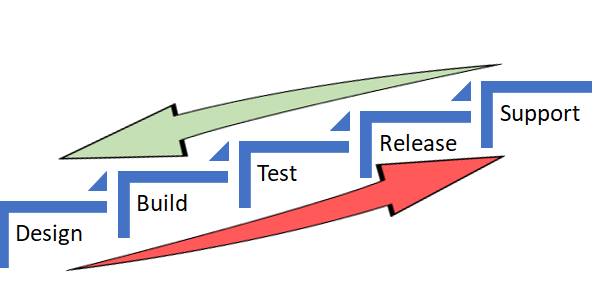
    In both the scenarios, the underlying objective was to catch defects and or reduce life support activities early in the cycle (below) which costs more and more as we move up the food chain, which in turn makes a release and subsequent maintenance cheaper.


    As Alan also referred in the same article to the IBM Study, it’s almost 100 times more expensive to fix an eventual production defect which cost about six times more if caught at Implementation stage or about 15 times more if found during testing. Thus, “Early identification and prevention can improve reliable software delivery” would be the mantra.

    Now, to the crux of this article, Is ShiftLeft not what we aim to achieve via DevOps?

    DevOps basically creates a collaborative, non-siloed cultural change to bring both Development and Operations together early in the game.

    Throw in a bunch of tools to facilitate CI/CD, pull in the security guys early, expand automated testing coverage, include change and release—who are the catalysts, as I call these functions in my earlier article here—squeeze in a few monitoring tools and dashboards and voila! You have a complete and mostly successful DevOps team to dish out the most appetizing feast of quality software repeatedly.

    A table for two (Dev & Ops) has become a party of six! Yaaay!!

    So, from DevOps standpoint, ain’t we doing the same as ShiftLefting (If I may coin the word) with the resulting cost effectiveness, more efficiently?

    We do when we as a team make shorter and frequent sprints; gain insight, not just on how to code better or leaner but also by learning from the masters in Operations who run that software on the infrastructure they monitor and support daily. Or perform the VA scan early, or push a scenario as unit test instead of regression, and/or raise flags on potential capacity challenges.

    So again, isn’t DevOps team already doing that ShiftLefting as part of its charter?

    There is a limit to moving things left, but then, if your organization is still doing wireframes under a waterfall or is in the process of setting up a DevOps team, then this approach could be a stop-gap arrangement, an eventual merging of a narrative within a new narrative.

    But then my argument would be, Why stop-gap and why not a full frontal? Why not embrace the DevOps model, which comes preinstalled with all the ShiftLeft possibilities?

    Even if we are aware how an episode ends, procrastinating raises the risk of being left behind in the race to deliver quality, cost-effective product quickly.

    Technology is redefining businesses: Transportation is an app and soon probably will be driverless; banks are rebranding as tech companies in FinServ business; a fridge can reorder milk; trash cans can be Wi-Fi-enabled! Ah, the internet of things. Is Alexa listening?

    My other relevant posts are here and here.

    Thank you for the time.

    — Abdul Salaam Khurram

  • Puppet Solidifies Enterprise Provider Status With Bevy Of Announcements

    Puppet Solidifies Enterprise Provider Status With Bevy Of Announcements

    Puppet has been maturing from a company with an enthusiastic base of users of an open source tool, to a leading provider of enterprise DevOps solutions for the last few years. Things really accelerated with the appointment last year of Sanjay Mirchandani, as CEO and the group of experienced, A+ players he brought to the executive team. Today Puppet took another step towards solidifying their position as a leading provider of enterprise DevOps solutions with a string of news announcements highlighting new products, accelerated growth and new/expanded presence.

    Lets start with what for many of you will be the most important. Puppet today announced “the general availability of Puppet Enterprise 2017.2, and upcoming availability of Puppet 5 Platform, the latest version of Open Source Puppet.” I had a chance to chat with Puppet CTO Deepak Giridharagopal, Chief Product Officer, Omri Gazitt and VP of Marketing, Tim Zonca. In their considered opinion this new version of Puppet Enterprise, more than just another upgrade, may in fact be the most significant upgrade to Puppet ever.

    From the press release, the most significant of these new capabilities are:

    • Package inspection: Users get started with automation by quickly identifying packages that aren’t being automatically managed, but should be. With package inspection, Puppet Enterprise users report on unmanaged infrastructure, making it easy to see the systems that would benefit most from automation to ensure their most critical software has the right maintenance updates, security patches and licenses.
    • Visual orchestration workflows: Users orchestrate infrastructure and application deployments entirely from within the Puppet Enterprise web UI, without writing a single line of Puppet code. Enterprises can target specific infrastructure environments using drop-down menus and filters, define workflows, monitor deployment status in real-time, and start, stop or restart deployments as needed, all with the click of a button.

    Both of these are much deeper than the few words from the press release. In addition to these though, there are also even more new capabilities packed in to 2017.2. Additionally, the open source Puppet platform 5 has many new innovations and hooks that will continue to keep the large base of open Puppet users happy, if they don’t require or need the greater feature set of the enterprise version.

    Speaking of those many users, that is the lead in to the second announcement. Puppet is growing and growing fast. Over the last 12 months they have added more than 250 enterprise customers to the business. Today over 37,000 companies use Puppet, with over 75 of the Fortune 100 also relying on Puppet. To help satisfy this increasing demand, Puppet announced the opening of a new Asia-Pacific office in Singapore, a large expansion of their existing office in Sydney and the opening of a new R&D center in Seattle.

    Puppet also announced significant additions to its partner program and participants:

    • New AWS Marketplace offering: As enterprises continue to recognize the value of cloud-based environments, they are turning to AWS and other cloud platforms for efficiency, savings and scalability. To support cloud efforts, AWS and Puppet deepened their partnership, making Puppet Enterprise available on an hourly, pay-as-you-go basis. The new offering simplifies installation, provides secure configuration and delivers immediate ROI.
    • Extended Cisco partnership: As software defined networking continues to evolve as a key tenet of the modern data center, Cisco customers want the power of Puppet Enterprise as a unified way of defining, deploying and operating all the software they run. Joint customers can now buy and get support for Puppet Enterprise directly from Cisco and any Cisco VAR.
    • New partners for security and DevOps: Puppet has added a number of important partners as part of its inaugural class to the Technology Alliance Partner Program (TAPP). By collaborating with F5, Splunk, Cumulus Networks, CloudPassage, Conjur, CyberArk, Onyx Point, Intelliment and Sensu, Puppet and its partners collectively deliver a better architecture around security and DevOps.

    Again, all signs point to Puppet’s ascendence to enterprise provider status as it matures into its market leader position.

    The third and final announcement from Puppet is by no means the least of the three. In addition to the first two announcements, Puppet also announced two new offerings, Lumogon™ and Puppet Cloud Discovery™. With these the company expands its enterprise offerings beyond Puppet Enterprise, empowering companies to overcome challenges associated with modernizing infrastructure and application stacks.

    These are first offerings independent of Puppet Enterprise offered by the company. The represent significant new capabilities in two quickly growing markets, cloud and containers.

    Lumogon empowers “anyone involved in running containers, like site reliability engineers (SREs), release engineers, DevOps engineers, and the application developers themselves, now have a tool to gain operational insights into what makes up their containers with Lumogon. Lumogon provides a transparent window into each Docker image and running container, and offers a way to collect, query and report on container application metadata.”

    “Puppet Cloud Discovery collects and visualizes a rich set of system data to give users better awareness of the state of their infrastructure. Unlike other tools on the market that were built for traditional on-premise infrastructure, Puppet Cloud Discovery is cloud-first and is designed to model ephemeral cloud infrastructure. Puppet Cloud Discovery is delivered as a service, making it easy for users to see immediate time-to-value.”

    So Puppet has raised the bar and solidified its position in the marketplace. When taken together these three announcements illustrate that Puppet is accelerating in almost every facet. It will be interesting to see how they continue to build in the months and years to come.

    — Alan Shimel