Category: Enterprise DevOps

  • Why Your Test Automation Is Failing

    Why Your Test Automation Is Failing

    If you have been investing in test automation, but it’s not getting you where you think it should, it could be that you approached it superficially.

    One of the most common issues is that the test part of test automation is rather straightforward to automate, especially with today’s abundance of great automation tools. But jumping straight into automated testing leaves you with a big heap of automation scripts, and often not the best ROI. Understanding why requires looking into the automation process.

    When an engineer builds an automated test, they do it in a test environment that they (or someone in the organization) set up. Usually, this is the same way manual testers get access to test environments.

    Before the engineers start automating, they have a working copy of the product they are testing, with relevant data on it. They have a good idea of the test they want to write. Everything looks promising.

    They write the test and give it a few runs. Everything is looking nice and stable. Now, to provide the ROI we were hoping for, the test must run a million times. Or, at least, a few thousand times, right?

    To reap the benefits of automation, it needs to happen frequently enough. However, the bottleneck is often discovered after creating a bunch of tests. Because the tests must run on a similar test environment to the one used to create them, with the new versions of the product or with any introduced changes that are being tested, you need access to hundreds of environments. This requirement makes it difficult to test effectively.

    Below are three test environment approaches that inhibit test automation.

    Manually Setting Up an Environment Each Time to Run Automated Tests

    For tests that don’t need to run as frequently, such as security testing and performance testing, it’s common to set up an environment for automated tests every time the test needs to be executed. As a result, testers must wait for the environment to be ready, perhaps do some additional configurations and then run a suite of tests. And, if they’re trying to optimize utilization, the environment is left to run overnight or weekend.

    The problem with this approach is it takes the “auto” out of automated testing. When automation depends on a manual step, the test is only as efficient as this manual step.

    If the manual step isn’t very efficient, automation may not be helping at all. I’ve seen companies take so long to get an environment to work that running automated tests on it didn’t make any difference from a time perspective.

    Setting Up a Static Environment That Automation Always Runs On

    When setting up an environment takes a long time, it’s natural to assume it’s worth leaving an environment running so test automation can run on it. The preparations were made, the infrastructure is all in place, the product is configured and the data is ready, so let the automation party begin.

    While complex, static test environments may seem ideal, but the party doesn’t last long. First, since it usually takes some time to put the environment together (same as the previous case), it often becomes high-maintenance. It can be scary to make changes that could ruin things, and you can end up needing someone to manage change full-time. Much like chocolate cake in the office kitchen, an environment that mimics production with good data on it tends to attract everyone. Soon, these nice environments become shared assets and tests start conflicting for the same resources. The natural next step is to set up another static environment. This loop usually ends with an angry manager saying something about cutting CAPEX.

    Automating the Environment and Cutting Ourselves Some Slack

    With the rise of infrastructure as code (IaC) and immutable infrastructure, there are more ways to spin up a test environment. Resourceful test teams will try to automate the environment creation or use built-in test tool or CI system capabilities to run tests on a public cloud instance or a container, if the product they test allows that. This is cheap and useful—and could work for some simple tests. The challenge usually starts with everything this approach doesn’t cover. It can be difficult to use IaC to spin up a test environment and handle all aspects of it—from security and isolation to dependencies, data, third-party integration and more. This is where this approach is often blocked and sends us back to the previous two approaches for a big part of the testing load—which again makes test automation investment less fruitful.

    The Right Way to Set Up Test Environments: Test Automation on Dynamic Environments

    The test automation world needs a game changer. You can make your car faster, but if the road is full of potholes, you won’t be able to get that fast or far. Test automation is similarly limited by the pace of environment creation, with its infrastructure, application, data and all.

    This challenge becomes critical when adopting DevOps and testing stops being a stage in the pipeline, instead becoming an overall pipeline service. QA is no longer about being the gate between development to operations. It’s about overseeing the quality of the product during its entire life cycle. This means automated tests should always be able to run, and the environment they run on must be dynamic.

    The solution to this challenge is environments as a service (EaaS). EaaS is all about packaging the environment, including the application, infrastructure and data, as an entity that can be provided as a service to a business process. Once defined, it can be provided on-demand for manual or automated users. Since it’s a well-defined entity, it also can be decommissioned when the process finishes using it. Playing an important role in making infrastructure horizontal, EaaS is also the key for paving the road for brilliant test automation.

    If you think you should get more from your test automation initiative, it may be a good time to make EaaS part of your automation strategy.

    — Maya Ber Lerner

  • Citizen Developers Drive Productivity and Innovation

    Citizen Developers Drive Productivity and Innovation

    It was once written that “software is eating the world,” “APIs are eating the world” and “APIs are eating software.” In 2019, a more accurate statement might be, “APIs (or application programming interfaces) fuel the software that’s still eating the world.”

    In today’s world, there is an ever-constant demand for software, enterprise applications and mobile applications, and most company IT departments can’t keep up. Enter the citizen developer. Citizen developers are helping organizations close the demand gap and innovate more quickly. But who are they and what role do they fill within an organization? And how do they contribute to overall technology innovation within a company?

    Citizen Developers and the Need for Speed

    The ongoing need to develop software quickly and efficiently has given rise to a new type of developer. A citizen developer is a non-professional developer who builds new business applications using existing tools, development and runtime environments sanctioned by corporate IT. They also can access various online tutorials to learn and master their application-building skills.

    Today’s software development environment, powered by APIs, is ripe for the citizen developer. APIs, mobile application development kits and the cloud have created a no-code/low-code, building block-like approach to building software. Less code and a more simplistic software development path allow citizen developers to create much-needed apps quickly. This building-block approach cuts development time, translating to faster time-to-value.

    Speed is critical not only in the creation of new apps, but also in the end user experience of these apps. With the building-block model, citizen developers use best-of-breed technologies for each block—making the resulting UX optimal (and fast) for an internal user or customer end user. Internal users are able to use fast, effective search within employee directories, company intranets and project management solutions, for example.

    For end users, this need for speed addresses their ever-growing expectations. When someone searches for hotel deals in Phoenix, for example, they expect accurate, personalized and fast results. Even a one- or two-second delay can translate to lost opportunity and revenue.

    The Workplace

    In the digital workplace, citizen developers serve a key purpose. For starters, they know firsthand about the challenges employees face at work; they also know which applications or tools are critical to getting the job done. These non-IT developers (perhaps in a business or marketing role) help create apps for timesheet entry, productivity tracking, project workflow reporting and more. In one study, 76% of businesses stated that at least some of their apps were developed outside of their IT department—and 20% even stated that most of their applications were created outside of IT.

    Citizen developers often use low-code tools or visual tools with some degree of coding required. Low-code allows developers to design and develop software applications with minimal hand-coding, while low-code platforms enable users to build applications with modern user interfaces, integrations and data quickly without writing thousands of lines of complex code. Also, citizen developers may work alongside software developers and database experts to develop apps with custom coding to meet specific enterprise or company needs.

    Citizen Developers and IT: Working Together

    When citizen developers work alongside IT, two things happen. First, by creating simple apps on their own, they enable IT to focus on developing more complex applications. Second, when building more complicated or customized applications, IT can use citizen developers to derive valuable insight. This data helps with testing or tweaking business app prototypes. With low-code, citizen developers with some technical skill start with a prototype and then can iterate with the IT team during the developer phase and later integration of systems, custom coding and security processes. Also, developers, who are often asked to understand more of the business side of the organization, gain this insight working with workplace citizen developers. And the results are promising: 82% of citizen developers said they witnessed a reduction in inefficient tasks while 71% reported an increase in team productivity.

    In the past, IT spearheaded application development projects from beginning to end. Now, with citizen developers becoming an integral part of the workplace, IT’s role changes a bit. While no longer in full control, IT does give recommendations to the business department and selects development components and building blocks.

    Just the Beginning

    When it comes to search software, citizen developers have the potential to create personalized and customized experiences. While some types of front-end search are simple to create, developing a personalized and customized search experience is more complicated. This is where the current work lies and in doing so, we can build a new community of search-focused citizen developers.

    This is only the beginning, as there will always be a demand for developers (both traditionally trained and citizen developers). In the coming years, we will see more citizen developers as there literally aren’t enough engineering schools to train students to meet business demand. They are helping to democratize application and software development across the board—and we can expect to see businesses and consumers continue to benefit.

    — Julien Lemoine

  • IBM Extends z/OS Toward DevOps Again

    IBM Extends z/OS Toward DevOps Again

    A few months ago, I wrote about the release of Zowe, the first Open Source project based on z/OS. Zowe is a framework for including z/OS in your applications with less pain than we have traditionally suffered. IBM supported this project as part of its view that enterprises need to have interoperability between platforms.

    This belief also drove IBM’s recent announcement of new pricing models, along with enhanced cloud and container support that will help users tie mainframe access directly into the DevOps toolchain.

    First, let’s cover the pricing. IBM has brought “Pay as you grow” type pricing to the mainframe. While owning a mainframe means you are already expending funds, the new model is designed to simplify licensing and adjust what you are paying based upon actual consumption. It’s not a revolutionary idea, but it is wholly new to the mainframe scene and places mainframe pricing in the same pre-determinable model as cloud. IBM signed on some of z/OS’s biggest developers to offer similar pricing with Broadcom, BMC and Compuware either joining with IBM or offering similar programs.

    And Containers!

    But that’s not the exciting part for those of us in DevOps. The exciting part is the announcement of IBM z/OS Container Extensions. The ability to drop standard containers onto a z/OS partition and use them as an interface to traditional mainframe data/subsystems is huge from a DevOps perspective. This puts both the processing power of the mainframe and the stable data/subsystems into the DevOps cycle by allowing containers to be treated like any other container. Of course, I haven’t (and due to current work requirements probably won’t) played with it, so I’m likely glossing over some issues that users will run into, the potential is staggering. To finally have mainframe access that fits into the DevOps toolchain like any other system would is huge, and shows that IBM is listening to the market. I’ll be following along to see how it rolls out; I’ve got a fair number of associates working in mainframe shops who will keep me posted, but if you roll out Container Extensions, please let me know how it went.

    Cloud Interop?

    I’m less excited about IBM z/OS Cloud Broker. This announcement talks about the ability to spin up z/OS environments in IBM Cloud Private. It seems to me that this is counter to most users’ needs, but I can see that some larger z/OS environments might well have asked for it—rather than pull in another mainframe just for seasonal bumps, the ability to provision in the cloud is appealing. However, the number of organizations that fall into this category is small, though important from an “IBM customer” perspective, so it makes sense that the company went this route, but it’s less about new technology and more about giving important customers a tool to avoid large “forklift” upgrades, IMO.

    And Containers!

    I’m still thrilled to see Container Extensions. I’m looking forward to following where that goes. IBM has been pretty open about the fact that this is a road it is on, not a destination, so no doubt Container Extensions is just a stop along the way. But if it makes it easier for today’s crop of developers and DevOps engineers to access the mainframe sitting in their DC, I’m all for it, and can’t wait for the next stop on this road.

    — Don Macvittie

  • Get Testing Bottlenecks Out of Your Pipelines

    Get Testing Bottlenecks Out of Your Pipelines

    I first learned the term “deployment pipeline” when I read “Continuous Delivery: Reliable Software Releases through Build, Test and Deployment Automation,” by Jez Humble and David Farley back in 2009. End-to-end automation of the build, deploy, test and release processes kick in each time a team member commits a change to the source code repository.

    Chapter 5 of the book notes that the forms of testing common to all projects include manual test stages which “… assert that the system is usable and fulfills its requirements, detect any defects not caught by automated tests, and verify that it provides value to its users. These stages might typically include exploratory testing environments, integration environments, and UAT (user acceptance testing).”

    Humble and Farley include these manual stages in the deployment pipeline, also known as a continuous integration (CI) pipeline, build pipeline or delivery pipeline. However, from what I observe, I think a lot of times people forget about these important manual stages.

    Though we can do more and more with test automation, thanks to improving technology, manual testing activities are here to stay in most business domains. My own previous team realized this as we started to move toward continuous delivery (CD) a couple of years back, with twice-weekly deploys to production. Smaller changes and more frequent deploys means lower risk of regression failures. Yet, we still struggled with how to fit in important manual testing activities.

    Whenever my cross-functional delivery team has a problem, I look for a way to make it visible, to help us talk about it and brainstorm ideas to solve it. My “aha” moment around manual stages came when I learned techniques to visualize our pipeline from Abby Bangser and Ashley Hunsberger. My team knew we had these manual testing activities and that we wouldn’t feel confident about releasing changes without them, but we weren’t really thinking about them as stages in the pipeline.

    Visualizing Your Pipeline – Including the Manual Stages

    Continuous Delivery Pipeline
    Figure 1: A Continuous Delivery Pipeline (my diagrams are inspired by Katrina Clokie’s pipeline diagrams in “A Practical Guide to Testing in DevOps”)

    Getting your team together to visualize your pipeline is a great method to find ways to improve it. Gather around a table with cards or sticky notes, or draw on a whiteboard—what are all the steps in your pipeline, including the manual ones? In Figure 1, the manual stages in a team’s CD pipeline are shown in yellow. All the automated and manual things need to happen before the business decides to push the button and deploy to production. It’s easy to see that these manual stages can become a bottleneck. Manual exploratory testing is likely to take longer than the automated test suites. If user acceptance testing needs to be done by certain business stakeholders and they aren’t available at the right time, that holds up the release. If the team is looking to move to continuous deployment, where every change to the product goes out to production as soon as all stages complete successfully, these manual stages will be in the way.

    When you get your whole team including developers, database experts, operations specialists and product owners involved in solving these problems, you may discover innovative ways to approach them. In my team’s case, we decided everyone on the team needed to help with exploratory testing so we could do it in a timely manner. Testers helped the developers learn exploratory testing skills with hands-on workshops and by pairing with them. Then, each developer pair working on a story was tasked with doing the exploratory testing at the story level before declaring the story finished. We wrote exploratory testing charters at the epic or feature level as stories in our backlog. When enough stories were complete, anyone on the team, including testers and product owners, could pick up those charters.

    If we couldn’t complete all the necessary exploratory testing before the next production deploy, we used feature flags to hide the changes from customers until we could complete the testing. We could go ahead and deploy the changes and wait to release them once we felt confident they would not cause any customer pain.

    Asynchronous Testing Stages

    Using feature flags or toggles is a good way to allow the team to approach some manual testing activities asynchronously, so they don’t hold up the deployment pipeline. If some required manual accessibility, testing takes an extra day to complete or the UAT has to be postponed for a week, the deploy still happens. A change could be toggled on for a small percentage of users and observed in production to see if any unexpected behavior occurs. Whatever activities are needed to safely release a particular change don’t have to hold up other changes that are ready for customer use.

    Asynchronous stages in a deployment pipeline
    Figure 2: Asynchronous stages in a deployment pipeline

    Figure 2 is an example of a continuous deployment pipeline, but this asynchronous approach to the manual stages works for continuous delivery as well. Each time a team member commits a change, if all the automated stages in the pipeline pass, the release candidate build will be deployed to production. The manual testing activities are not inline with the other steps and don’t hold back the deployment.

    If we’re ready to deploy a feature but need to finish those manual testing stages before we release it, developers can put in a feature flag set to “off” to prevent it from being exposed to customers. When the asynchronous manual stages are all complete and successful, the feature flag can be flipped on in production. This is the actual release, customers can now use the feature. The feature flag should be removed as soon as possible, as too many feature flags at once has serious risks.

    Using feature flags or toggles to permit deploying changes to production before all testing stages are finished is one way to avoid bottlenecks and succeed with continuous delivery or deployment. Continuous delivery and deployment success depend on doing frequent small changes, not big-bang releases. A lean approach to feature flags, keeping the inventory low, is advisable.

    Visualize It With Your Team

    We’ve looked at one way to keep manual pipeline stages from holding up deploys, but there may be other solutions for your team. And there are lots of other key success factors for CD, such as keeping changes small and frequent. There’s lots to discuss and brainstorm about as your team, or a representational cross-section of it, gets together and experiments with a visual model of your pipeline. Talk about what you need to learn from each pipeline stage, who needs to know it and whether the pipeline is providing actionable feedback.

    As a tester, I’ve sometimes questioned aspects of the pipeline that nobody else had thought about. Having team members with development, operations, database and other skills present means more potential for creative solutions. Our pipeline provides a major feedback loop and we want that feedback as fast as we can get it. Writing each stage on a card and arranging them on a table or wall often triggers ideas for parallelizing more stages or realizing a particular stage isn’t necessary or can be done locally by developers.

    Automate all the things where it’s feasible. Use the time you save to optimize the way you accomplish manual testing activities and possibly automate more of them. Master techniques such as feature flagging so that you can take the time needed to feel confident about every new feature you release.

    References

    “Continuous Delivery: Reliable Software Releases through Build, Test and Deployment Automation,” Jez Humble and David Farley, https://continuousdelivery.com

    “A Practical Guide to Testing in DevOps,” Katrina Clokie, https://leanpub.com/testingindevops

    “Feature Toggles, AKA Feature Flags,” Pete Hodsgon, https://martinfowler.com/articles/feature-toggles.html

    — Lisa Crispin

  • Successful DevOps Initiatives Start With Company Culture

    Successful DevOps Initiatives Start With Company Culture

    What initially drove the need for embarking on the DevOps journey in your team or at your company in the first place? Was it:

    • Market shift?
    • New leadership or an acquisition?
    • New product or service idea?
    • Cost savings or consolidation?
    • All of the above?

    Whatever drove the need, my guess is there were pre-sales demos, reorganizations and training on new tools that were promised to solve all your DevOps problems along the way. Now, I must break your heart just a little: Buying new tools or apps will not, on their own, ensure positive DevOps outcomes.

    A tool-first approach is ineffective. In fact, it may actually generate backlash from the individuals or groups who are invested in protecting the status quo and result in a wasted implementation effort. Imposing new methodologies or processes across teams through new tools can cause people to dig in, generating responses ranging from passive-aggressive to overtly destructive—both contributing to failure.

    It Starts With Culture

    Your success on the DevOps journey starts with culture. Culture transcends tools, methodologies and processes, making use of all but not relying on any. Culture was, and always will be, present, and much like continuous development—routinely referenced in DevOps—it is continuously influenced by everyone and everything in its environment.

    The successful implementation of DevOps must begin with a conscious effort to reassess and evolve a company’s culture, supported by the tools. For example, continuous deployment as an initiative will only find traction when members of the team all believe, philosophically, it is best for the organization. It requires a certain kind of individual.

    A culture of rapidly evolving and adapting teams focused on continuously discovering, developing and delivering demands a commitment to evolving toward a more contemporary integral DevOps toolset, not the other way around.

    Culture Alignment as a Competitive Advantage

    Cultural alignment is not a buzzword bingo box that gets checked off. One’s sense of alignment with a clearly articulated mission and set of values, coupled with a way of working in a team and supported by the right tools, generates velocity and efficiency. This alignment becomes a competitive advantage.

    But, doing so demands all participants to be more conscious of how what they do affects everyone and everything else, in real time.

    Culture Change is Difficult but Achievable

    It can be very daunting or even scary if your company culture has a long history, producing images of the Borg or Hive, depending on your age bracket. Changing a culture is difficult. Here are some thoughts on where you might start.

    Learning agility: Focus on learning to dance with VUCA (Volatility, Uncertainty, Complexity and Ambiguity) instead of being consumed by it.

    Diversity: Commit to working with people with wide-ranging intellect, backgrounds, titles, CVs, life experiences, ways of learning, gender and energy, instead of working with your mirror.

    Trust: Build a work environment based on psychological safety—a sense of confidence that the team will not embarrass, reject or punish someone for speaking up. Knowing takes time and deliberate effort.

    Leadership: Adapt and promote a leadership style such as the 3 C’s of change leadership–communicate, collaborate and commit.

    Coaching Culture: Consider championing a coaching subculture by applying a methodology such as LACE to work through difficult conversations:

    • Listen to understand.
    • Ask powerful questions.
    • Challenge and support with feedback.
    • Establish next steps and accountability.

    Worth It

    We started with a little heartbreak. But I have had enough conversations about DevOps success and failure to believe that you already knew it was not just about tools. We have all felt the weight of culture when it is not in alignment. Employing some or all of these recommendations will set you down the path of creating your own language that is a requirement for building a culture. Now stop looking at the next great messaging protocol and start working on building an agile, aligned culture.

    — Joshua Platt

  • The Essential Toolbox for DevOps Analytics

    The Essential Toolbox for DevOps Analytics

    With DevOps teams under constant pressure to improve software delivery cycles while maintaining—and improving—quality, many have turned to continuous testing (CT), implementing it as part of their overall development strategy. CT offers a number of benefits to DevOps teams, but it also introduces new challenges, specifically infinite amounts of data that require analysis. As more teams integrate CT into their strategy, it is clear that analyzing, understanding and filtering the results data quickly is critical to preventing bottlenecks in the DevOps process. The problem is, teams simply don’t have the time needed to analyze data.

    Current research indicates that teams spend anywhere between 50 and 72 hours per regression cycle analyzing test results. This includes filtering out noise and assessing failures that may impact their software releases. However, the amount of time DevOps teams have to review and qualify test results has shrunk dramatically in recent years—from days to hours or even minutes, in some cases—leaving teams scrambling.

    With pressure to accelerate velocity and deliver consistent, high-quality experiences, DevOps team require new analytics solutions to help them manage large test-results datasets in a CI/DevOps environment.

    Let’s explore five essential tools that enable DevOps teams to quickly and efficiently analyze data, triage issues and act upon failures with the best possible insights.

    Executive Dashboards

    Dashboards have evolved immensely over the years, allowing dev managers and QA managers to easily examine the pipeline, see CI trends related to time, build health and more. When looking for the best solution, make sure it includes quality heat maps and CI dashboards, which make it easy to spot an anomaly in the CI pipeline and allow managers, DevOps teams and practitioners to quickly drill down into the single test report and the issue.

    Single Test Report Visibility With Advanced Reporting Artifacts

    With a single test report, practitioners have access to the entire flow of test steps, video, logs, screenshots and Jira–even the ability to drill down into the source code. This makes it quick and easy to locate an issue. For teams, these means more time fixing and less time searching.

    Cross-Platform Reports

    These analytics reports show the UI/UX simultaneously across multiple screen sizes, resolutions and platforms. Since the boundaries between the digital platforms need to be seamless, whether on desktop browsers or mobile devices, having the ability to see the UI/UX on multiple form factors (and layouts) at the same time is essential to assess overall quality.

    DevOps Noise Reduction Tools Powered by AI and Analytics 

    Today, finding which error classifications are true application bugs is critical to efficiency. Noise reduction tools that are powered by AI allow teams to filter out problems caused by various issues that are not software defects—for example, device connectivity issues and wrong scripting. Having a tool with the ability to locate each failed test execution, the root cause and the classification category is a huge productivity boost for both the test engineer and the developer.

    DevOps and Actionable Insights

    Analyzing data is one thing, knowing what to do it with it is another. Today, there are a number of analytics solutions on the market that provide teams with both capabilities. Once an issue is detected, classified and reported, having deep insight brings practitioners halfway toward the resolution of the issue.

    To succeed in software delivery, teams not only need better automation as part of their processes, test flows and CI/CD workflows, but also an analytics platform to manage all of their test results data. Since DevOps involves a collection of team members from all parts of the software delivery lifecycle (SDLC) process, the central platform needs to meet the needs of all team members. As you work to build your next test analysis toolbox, consider the five features above to efficiently evaluate the data, act upon it and deliver iterations and features with confidence.

    — Eran Kinsbruner

  • DevOps Security Champion: Who, What and Why?

    DevOps Security Champion: Who, What and Why?

    In general, DevOps is a process and culture of organizations to get applications out the door faster and with higher quality. To do so, security champions are essential. In DevOps, security champions work as a backup mechanism in various projects and take multiple leadership roles.

    Security champions make effective decisions and take projects forward while strengthening the best security practices. How do you enable security champions in DevOps? In this article, we will describe four practical ways of enabling them in DevOps. But first, we will discuss their role in more detail.

    Security Champions in DevOps

    Let’s suppose you are accountable for creating a mature security process across an organization. To fulfill this project, there are various teams working on different product and services, using multiple technologies and an active approach. However, some team approach security ad hoc security activities while others use existing security technologies and processes.

    After a few weeks of reading documents, learning about calendar releases and suggesting specific knowledge and best practices, you realize that your best efforts around security haven’t addressed myriad issues. You need help, but the central security team isn’t budgeted to help your team. This is where security champions come in.

    Security champions play a vital role in DevOps. They are dynamic members of a team who help in making decisions about the engagement of the security team.

    They act as a fundamental element of the security assurance process for the product and service, and are the main point of interaction within the entire team.

    By taking different leadership roles and decisions inside a smaller team, security champions form a shield of sorts for the team leaders. They give them the freedom needed to drive the project further while supporting and emphasizing the best security practices in the project.

    Enabling Security Champions in DevOps

    Here are four ways to build an efficient team of security champions.

    1. Identifying Teams

    The first and most important thing in building a competent team of security champions is to identify the team you are going to work with. In this phase, distribution of tasks occurs. It is important to note this step should be done before starting the project; otherwise, miscommunication and other problems could occur.

    It is essential to keep a record of the team so the other development departments also know who is reponsible for which of the various tasks.

    To implement this step, you need to talk with the decision-makers and technical managers, such as product owners and company heads to find out information such as the number of people working on different projects and how they can fit into the development teams already working on the project, what programming languages and various frameworks are being used and how they are being implemented.

    2. Role Distinction of Team

    It’s also important to define the role of each team member. Every team must have its security champion assigned to them and the security champions must know what they are supposed to do.

    The security champions should have well-defined goals and purpose, and the rest of the team should communicate with them to ensure best security practices are implemented. The security framework the project follows was selected during its planning phase. As such, the entire team must work with the security champions to ensure the security of the application.

    The security champion should also conduct security reviews regularly, especially at milestones during the project.

    It is important to note that protecting security best practices is not just the security champion. Rather, it is a collective effort of the entire project team.

    3. Select Champions

    Once you have identified the team and defined the roles, the next step is selecting the champions. To accomplish this step, you need approval from managers at all levels, from to-level to product owners and direct team managers. They can help you identify potential champions, choose eligible candidates and conduct interviews to judge their capabilities.

    Because this is the selection stage, you need to describe the role clearly to the selected candidate. You also may explain the strategy you plan to adopt as well as the advantages of becoming a security champion. These include:

    • The chance to attend various security conferences.
    • Being a part of the security meta-team.
    • Increased value in the marketplace.
    • Better product quality.
    • Personal development and the ability to look at things differently.

    4. Stay Connected and Communicate Clearly

    The security champions are required to communicate consistently with their team members and project leaders. They can use any of the various communication channels available to collaborate effectively:

    • Messaging apps
    • Email
    • VoIP apps
    • Mobile phone apps

    Security champions also need to combine as much of the technical data as possible to provide the team safe and secure access, thereby fostering a collective approach toward secure product development instead of keeping everyone in remote smaller groups who don’t exchange knowledge.

    Conclusion

    Security champions play a significant role in DevOps because they introduce a sense of responsibility of security within their department. Their participation starts small and increases gradually. Their presence benefits not only the company but also the application or service itself.

    There are different ways by which you can enable security champions in DevOps to add value to your project. By doing so, you are helping to create a culture of security awareness, which leads to secure applications and improved quality security features.

    — Zehra Ali

  • DevOps and Networking: Working to Achieve Nirvana

    DevOps and Networking: Working to Achieve Nirvana

    Enterprises don’t own the cloud, just the experience. If there’s an outage or even a hiccup in the performance or network service, it’s on the network and application teams (not the cloud provider) to fix it. But often with problems in the cloud comes finger-pointing, as network and application teams look to determine liability and responsibility when it comes down to crisis situations.

    There is no question that applications are growing more complex, as is the infrastructure to power those applications. According to the 2019 “Stack Overflow Developers Survey,” comparing year to year the amount of time it takes for software engineers to become effective on teams is increasing. This trend could be, in part, due to the amount of tooling and rise of an operate-what-you-build model (e.g., the dawn of the full lifecycle developer). As our applications become more distributed—and to cope with scaling and availability demands—skill sets that traditionally were infrastructure and development-based have begun to blur.

    Networking Shifting Left

    Networking-centric capabilities such as service meshes (e.g., Istio and Linkerd) and container networking interfaces (e.g., Calico and WeaveNet) are gaining a lot of traction and visibility in the cloud-native application development world. Though SDN infrastructure has been shifting left toward development pipelines, application development teams are learning networking concepts. However, the core networking infrastructure is still maintained by the networking teams.

    This paradigm of software-defined infrastructure is creating a learning curve for multiple teams. With the dawn of NetOps, software development lifecycle (SDLC) principles are being introduced to the networking teams. Traditionally, ticket- or service-driven networking teams can participate in iterations and they are now building the next generation of cloud-agnostic networking capabilities. With NetOps, there is more interaction and innovation. But change is not without resistance; the dynamic nature of modern infrastructure and the short-lived nature of pre-emptible/ephemeral infrastructure do not bode well for static networking rules.

    Networking Team Pressures Today

    With infrastructure headed to the trifecta of clustering, replication and load balancing, networking teams have to deal with many more dynamic addresses than before. Static ports and addresses that used to be loaded into networking tickets are now being replaced with wide ranges and service addresses powering the networking stack of our cloud-native and containerized workloads. Adding to the complexity, the networking team is leveraging public cloud infrastructure. The infrastructure that the networking teams are responsible for is leaving the data center and distributed web infrastructure technologies, such as distributed domain name systems (DNS) and content delivery networks (CDNs), are common for the networking teams to be involved with. Like the application development teams, the amount of new technology hitting the networking teams is increasing.

    One of the great advantages of using public cloud infrastructure is the ability to quickly expand or contract available resources. With this ability, we can spin up and down test environments to try out changes and even the infrastructure level that was not even possible. With this, we have the ability to integrate more. The application development team, which has been iterating for some time, now has common ground with the networking team to try out iterations.

    All in a CIDR

    To illustrate the needed collaboration between networking and application teams, let’s look at an example:

    In one of the biggest incidents of my career, my company was migrating pieces of our platform to a public cloud vendor. Because the organization was early on in this transformation, a lot of minutiae was yet to be flushed out. We were packaging classless inter-domain routing (CIDR) calculations into our first-time VPC configurations—a task the development team was responsible for at the onset of our cloud migration. It was my job to enter this for my service. Instead of a /8 CIDR, I implemented a /16 CIDR. A seemingly small miscalculation on several configs turned into an incident, blocking a majority of traffic hitting the service. The mistake was quickly corrected, but the incident response framework was well on its way to being executed.

    So, who was responsible? I was the one who created the configuration and pushed to production, so this was my fault. But in retrospect, the best solution would have been to involve the networking team immediately in these types of changes. Because the application development teams were vanguarding into the public cloud, however, we cut out the networking team. This was an organizational problem that needed to be addressed. If we were going to deploy into a data center successfully, the networking teams needed to look over my requests and catch my CIDR error.

    Silver Lining, Right?

    During this CIDR incident, I was trying to look at the silver lining: Since we can’t access our application, that means the instances/app must have a lot of extra capacity, right? Untimely, yes, but the analogy did make sense with the silver lining. We were getting billed by a public cloud vendor and because there was a drop in usage, our bill technically should have been lower. But it still impacted the customer. The money saved in our incident was outweighed by external measures (revenue and brand damage). A cloud outage and a subsequent dip in digital experience can have a massive impact on revenue, averaging $38,855 per hour of outage. During high impact or busier times, this number can be much more.

    DevNetOps Nirvana

    The adage of bringing everyone to the table early proves to be valuable. Each team in an organization can have a strategic impact and improve architecture in multiple parts of the stack. Different teams have different sets of skills and can have mutual respect for the vertical skills of each of the teams. In the end, a transparent and positive relationship between network and application teams will help with network remediation and outage prevention. And, the closer the teams can work together and the more they can communicate, the more their investments and efforts can contribute to the business bottom line and quicker remediation long term.

    — Ravi Lachhman

  • CTOs Should Embrace, Stick to a No-Meeting Day

    CTOs Should Embrace, Stick to a No-Meeting Day

    You know the feeling: You open your calendar in the morning to find a completely booked day, back-to-back meetings and not even 15 minutes of time to complete any of the items on your to-do list. In fact, your day tomorrow and the day after look just as booked.

    An HBR study conducted last year found that face-to-face requests are 34 times more successful than email when trying to effectively communicate or persuade someone. And, we all know that spending time with colleagues is critical to cultivating relationships and building company culture. But what if engineering team leaders took away just one day of these interactions to create more headspace for their teams?

    For the last seven years, I’ve opened space in my engineers’ schedules by mandating that one day per week must have zero meetings. While putting this rule into place successfully has been challenging, the benefits I’ve discovered consistently reinforce my decision to keep it alive and spread the word to other CTOs and engineering leaders.

    Here’s why you should consider implementing this rule and how your team can fully reap its benefits.

    Humans (Especially Engineers) Struggle To Re-Concentrate

    As technology advances and new tools provide us ways to reach each other faster throughout the day—and at all hours—the wealth of options to connect can cause communication overload. Add meeting after meeting into the mix, and focusing on one project without interruptions becomes nearly impossible.

    The phenomenon of feeling like you’re doing many tasks at once, but never truly finishing any of them, actually has a scientific explanation behind it: When you focus, the left and right side of the prefrontal cortex work in tandem. When you multitask, you switch between the two sides of your prefrontal cortex. Although this switch takes just a fraction of a second, it can actually take up to 40% longer to complete the same tasks than if you focused on each separately.

    While this multitasking phenomenon holds true for everyone, engineers especially feel the pain of multitasking, as most software development requires serious and uninterrupted concentration. As engineers figure out how parts of the system interact with other parts, distractions during this complex work might mean starting from scratch in the midst of a project.

    Removing meetings from the equation one day of the week provides them a window to take advantage of completely uninterrupted time. I’ve also noticed that my team now tends to organize projects of the week around this day off from meetings, reserving the no-meeting day to execute on critical tasks that require completely uninterrupted work, which contributes to increased productivity during that day. They slate in more complex work and time-consuming projects for this day and tackle smaller projects throughout the rest of the week.

    No-Meeting Days Encourage a State of Flow and Deep Work

    When people do what they love and feel passionate about their work (and don’t experience distractions while doing it), they often enter into what researchers have called a state of flow. In fact, psychologist Mihaly Csikszentmihalyi covered this topic in a recent TED talk, sharing his opinion that money can’t make us completely happy, but those who discover happiness have one thing in common: They find pleasure and lasting satisfaction in activities that encourage a state of flow. Giving your engineers just one day per week to reach this state could lead to increased and longer-term satisfaction with their overall work.

    Not only could a day without meetings enable your engineers to reach a state of flow for at least one day per week, it also could lead to enhanced skill sets. Cal Newport, a professor at Georgetown University, coined the phrase “deep work,” a state of activity performed in a distraction-free concentration zone that pushes cognitive capabilities to a new limit. By creating this deep work zone, you invite your engineers to unlock creative thinking and discover the solution to something new, simply through access to a deeper level of concentration.

    Commit to It and Stay Honest About It (I’m Talking to You, Managers!)

    The no-meeting day philosophy is not necessarily new. A number of companies talk about it in different ways, but when you look under the hood, you might find that not all managers enforce it well. I’ve discovered this lack of rule enforcement leads to a lack of employee respect for the rule.

    Therefore, it’s up to managers to weave it into their team’s culture. If you lead by example, you’ll set the tone and encourage other team members to follow.

    If you see meetings happening on a designated no-meeting day, encourage team members to move them. Re-state the benefits at recurring staff meetings (as needed) and ensure all new employees become well-versed in the benefits and reasons why the team participates in such a day. Most importantly, if you find a certain day doesn’t work well for the majority of your team, change it. Stay flexible and open to trying new ways to make this rule fit into your current team structure and schedule. The more you involve others in the creation of the rule, the more likely they’ll be to stick with it.

    Yes, every engineering leader wants his or her team to be as productive as possible. But often in striving to reach this overarching goal of peak productivity, managers miss the point: Scheduling less and taking a step back from day-to-day socialization and busyness is actually more—at least for one day a week.

    — Hector Aguilar

  • The Role of Bots in DevOps

    The Role of Bots in DevOps

    DevOps has evolved from its infancy into a mainstream focus area for a majority of CIOs. DevOps has become a main focus and has been shaping the world of software and infrastructure engineering and operations for the last few years.

    Some of the key DevOps trends include:

    • DevOps assembly lines automation.
    • Smart, actionable alerts from monitoring tools.
    • Monitor and orchestration infrastructure.

    Improved Collaboration

    With the increase of DevOps adoption, organizations today face many challenges in the end-to-end service delivery life cycle.

    • For applications with complex environment configurations, creating, setting up and deploying a new environment is costly, time-consuming and prone to errors.
    • Due to manual interventions, moving/promoting code across environments involves risks and may give rise to outages.
    • Development teams are looking to maximize change by writing new code or enhancing existing code, while operations teams are looking to minimize change to keep up with key performance indicators (KPIs) and service level agreements (SLAs). These goals are opposing in nature and create a culture of blame between dev and ops teams.
    • Organizations are unable to keep dev, test and production in synchronization due to process and tool gaps. A manual process cannot bridge this gap in consistency; thus, outages in production are common.

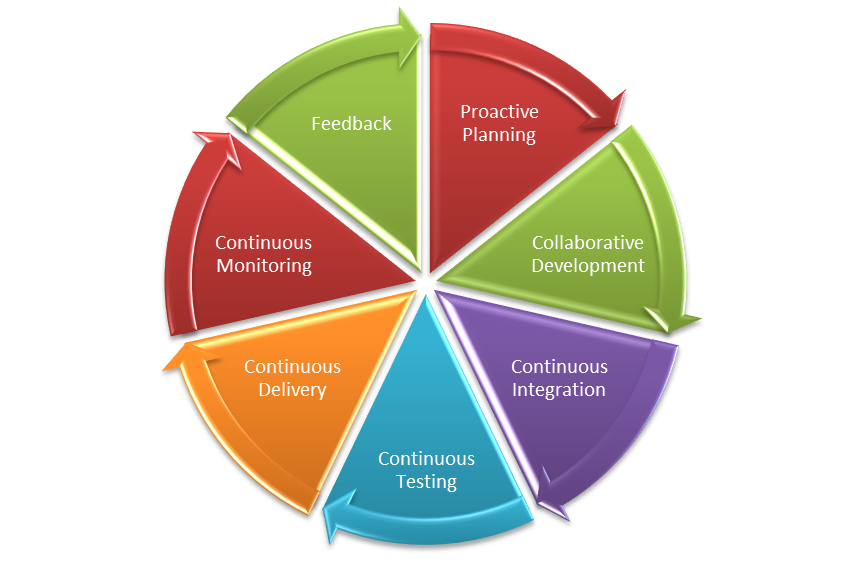
    Various collaboration mechanisms let teams work and learn together to produce better results. The figure below depicts the end-to-end life cycle of DevOps. Collaboration across the phases is essential to the success of your enterprise DevOps transformation.

    DevOps Lifecycle

    What are ChatOps and Bots?

    ChatOps is a term coined by GitHub to describe “putting tools in the middle of a conversation.” In a typical CI/CD pipeline, there are multiple tools that you interact with that have varied functionalities, such as source code management (SCM), defect management, continuous integration, continuous deployment and others. These are all discrete tools, but there is nothing that bridges them together. This is where ChatOps comes into play.

    A bot is a bridge between the collaboration tool and the DevOps tools. The bot receives a request from the user in the form of a chat command through a collaboration tool, analyzes the request and executes a set of commands on the target DevOps tool.

    The main components of ChatOps and bots are:

    Chat app/collaboration tool: This is the front-end chat system that connects the various stakeholders and enables them to interact between themselves and the systems around them.

    The bot: This is the core of ChatOps. A bot is the glue between your collaboration tool and your systems. It facilitates a two-way communication channel where you can fetch relevant information from the systems and act on the information received. A bot fits in between your collaboration tool and the DevOps tools, e.g. Hubot, Lita, ErrBot or AWS Lex.

    Target platform/infrastructure: Integration with the target platforms/DevOps tools is a key ingredient to a successful implementation of bots. These are the target tools and platforms on which the bot will execute the required commands. The tools integration allows your bot to communicate with tools and execute actions such as build, deploy, test, provision and scale infrastructure directly from the chat window.

    Where Bots Fit in the DevOps Pipeline

    Bots can prove to be an accelerator in various stages of the CI/CD pipeline. Below are the details of the integration with various DevOps tools in each phase of the life cycle:

    • Proactive planning – JIRA
    • Requirements management – JIRA
    • Continuous integration – Jenkins
    • Continuous deployment – Ansible, Chef
    • Continuous monitoring – Nagios, Grafana, Splunk
    • Continuous feedback – JIRA

    A chatbot plays a major role in bringing the different teams together into a single, persistent chat room to triage and resolve the issue at hand. In addition to just troubleshooting and triaging issues, bots can be used for various other business-as-usual jobs including:

    • Cleaning up servers.
    • Kicking off build and deployment jobs.
    • Rotating server logs.
    • On-boarding application on the monitoring tools.
    • Collecting metrics from tools such as Nagios or AppDynamics.

    Bot Technical Blueprint

    To achieve the aforesaid targets, we need to have a supportive bot platform in place. How closely the tools integrate with the bot ensures the quality of the implementation and opens new opportunities of automation.
    Bot Blueprint
    As the diagram depicts, the chatbot is hosted on a chat tool such as Slack. This can be on the cloud platform or an existing chat/communicator application. The bot is integrated with a key-value pair reference database, which is fed with the responses depending upon the activities or capabilities that have been fed to it. The key could be the name of the application to retrieve data from or any unique ID that would reduce the number of reads. A lookup of the defined key corresponding to the secondary key is performed on the response database and a response is sent back to the chatbot. Depending upon the number of outputs, the queries can be defined and stored in the response database.

    DevOps Bots: Use Cases

    Below are some examples of use cases for bots. This includes the complete life cycle of DevOps:

    Proactive Planning
    Create new user stories in sprint planning tools and assign sprints to teams. Update sprints and product backlogs.

    Build and Continuous Integration
    Execute build jobs and report back statistics of the build job. Perform daily/nightly builds and report on the status of the build to the relevant teams.

    Continuous Deployment
    Run deployment jobs and perform deployments across environments. Roll back deployments in case of failures, status checks, perform post-deployment actions such as JVM restarts.

    Infrastructure Provisioning and Configuration Management
    Kick off Chef jobs to provision infrastructure or provision application environments. Enable monitoring and restarting services and servers.

    Continuous Monitoring
    Provide application statistics or performing daily data lookups and grabbing metrics.

    Continuous Feedback
    Monitor application health and perform analytics.

    Key Measurement Metrics

    To achieve optimization and enhance performance of the continuous delivery process, metric measurement is the key. These indicators will help in taking certain corrective and preventive actions based on the results. Below are some of the key metrics indicators that can be measured.

    Effort Reduction
    Indicates the reduction of human/manual efforts for tasks such as triggering a build or deployment or collecting metrics from monitoring tools.

    Human Error Reduction Rate
    Reduction in the effort required due to rework caused by human errors.

    Reduce Issue Triaging time
    Indicates the time taken to resolve issues where multiple parties are involved and triaging of problems is required.

    Conclusion

    DevOps bots can significantly improve team efficiency, as well as a team’s ability to respond to emergencies. They save time and money, are fun to build and use and can have a positive impact on team morale, as well as increases the overall productivity of teams. This applies to both the engineering and operations teams. Enterprises embracing digitization are looking for partners with an engineering mindset who know how to bring in collaborative agile teams with the very latest knowledge of open source platforms and DevOps toolchains.


    Contact the Authors

    For more details please contact the authors on LinkedIn @
    Shriniwas Sathe
    Saswati Mohanty

    — Shriniwas Sathe