xMatters Flow Designer is a drag-and-drop graphical tool that either developers or IT operation teams can employ to create incident management workflows on top of xMatters incident management software. Doug Peete, chief product officer of xMatters, said those workflows feed data into a variety of third-party IT management tools to enable IT operations and DevOps teams to consume the same data in different tools—for example, in an instance of ServiceNow for IT operations and as a message in Jira or Slack for DevOps teams.
Peete said the goal is to enable organizations to develop a more consistent approach to incident management. A recent survey of more than 1,000 IT professionals conducted by xMatters and Atlassian found that while 81 percent of developers and operation teams share information and tools, only 17 percent provide open access to information without time restrictions. The survey also found that 50 percent of respondents said the tools, processes and steps they employ vary from incident to incident.
Most of those organizations have very little in the way tools that enable them to effectively conduct a post-mortem analysis of those incidents, added Peete.
The arrival of the xMatters Flow Designer tool comes at a time when organizations are trying to find ways to meld the highly structured ITIL processes that most IT organizations rely on today and the inherently more agile approaches based on best DevOps practices. The most recent iteration of the ITIL framework incorporates some DevOps principles, but it’s apparent the two approaches to managing IT will be employed side by side in many organizations for many years to come. Developers these days tend to prefer DevOps methodologies, while IT administrators tend to appreciate the consistency of an ITIL framework that was designed to address IT governance concerns. By providing a set of workflow tools that span both those approaches, Peete said IT organizations can more easily meld those two approaches on their own terms.
At the same time, an extensible approach to incident management makes it possible for IT organizations to incorporate new tools into those workflows as their IT environment evolves. That capability also should make it easier to integrate incident management workflows across multiple organizations as well as incorporate a new IT environment as a result of acquiring another company.
Regardless of the path chosen, it’s clear that as organizations increasingly realize how dependent their business processes are on software in the age of digital business transformation, the more likely it is they will embrace DevOps practices. However, that doesn’t mean organizations need to abandon ITIL; there are plenty of IT processes that benefit from a highly structured approach. In fact, arguably the most important thing is to not let a philosophical debate over the merits of DevOps versus ITIL wind up becoming a major distraction that creates two isolated cultures who refuse to collaborate with one another.
TypeFox has launched a GitPod.io service that melds the integrated development environment (IDE) based in the cloud from TypeFox with the open source GitHub repository.
Sven Efftinge, co-founder of TypeFox, said this level of integration will make it easier for developers to navigate multiple projects from which they pull code from GitHub into an Eclipse-based IDE.
In addition, when developers open a Gitpod.io workspace, they will find that any build involving an update to an artifact housed in GitHub will have been automatically completed, said Efftinge. That will reduce substantially the amount of time developers spend waiting for build to finish, he noted.
TypeFox collaborated with Google, Ericsson, Arm and Red Hat to develop the open source Eclipse Theia project, which provides a foundation for building IDEs in the cloud using TypeScript, CSS and HTML for a desktop-like user experience. At the highest level, Theia consists of a front end running in a browser or in the local desktop application and a back end running on any host or locally within the desktop application. Both the front end and back end communicate through JSON RPC over WebSockets. TypeFox then leveraged that project to build its own cloud-based IDE.
Gitpod.io further advances the collaboration capabilities that are inherent of cloud-based IDE by adding the ability to capture and share snapshots of the development environment.
Efftinge said following initial support for GitLab, the next effort will be focused on integrating Gitpod.io with the GitLab repository, which is used widely in traditional enterprise IT organizations.
Regardless of the repository employed, more attention needs to be paid to reducing the daily friction developers encounter when developing applications. While best DevOps practices go a long way to accelerating application development and deployment, there a lot of wasted steps during the development process that, if eliminated, would increase developer productivity substantially. Of course, the more productive developers become, the more applications there are moving through the continuous integration/continuous development (CI/CD) pipeline.
It’s still a bit unclear to what degree application development will move to the cloud. It’s certainly easier to streamline development process in the cloud. But many developers remain attached to individual workstations because they may not always be in a location that has reliable access to the internet. However, as application development—especially in the age of microservices—becomes more of a team sport, it’s clear that more application development is being pushed into the cloud. Pushing application development into the cloud also provides the benefit of reducing the number of high-end PCs and workstations an organization may need to acquire for its developers.
Whatever the path chosen, it’s clear repositories such as GitHub and GitLab are now at the center of application development. Very few developers these days are writing raw code. Most of them are combining artifacts stored in repository to build their applications. The challenge organizations now face is bringing some consistency to what otherwise could easily become a chaotic process.
Chaos engineering traces its roots to a resiliency testing philosophy that posits applications should be able to keep functioning regardless of any service or infrastructure failure. Most IT organizations, however, don’t have the expertise required to build the tools required to testing resiliency based on those “chaos monkey” principles that randomly turn services off to see if an application fails.
Matt Jacobs, principal software engineer for Gremlin, said the decision to integrate with Spinnaker is being driven by the need to infuse chaos monkey resiliency testing directly into the application development and deployment pipeline at a more granular level. That capability is now a bigger requirement than ever because as organizations embrace microservices to build the next generation of cloud-native applications, it’s simply not possible for DevOps teams to manually track every dependency, he said, adding resiliency testing based on chaos monkey principles is just another type of testing that should be automated as part of a larger continuous integration/continuous delivery (CI/CD) platform to ensure an application doesn’t fail completely.
Integrating with a Spinnaker project that has drawn support from Google, Microsoft and Oracle provides the easiest path to achieving that goal. Spinnaker is also now a core element of a Continuous Delivery Foundation led by Alibaba, Anchore, Armory, Autodesk, Capital One, CircleCI, CloudBees, DeployHub, GitLab, Google, Huawei, JFrog, Netflix, Puppet, Red Hat, SAP and Snyk.
The Gremlin service is accessed via a user interface and comes in two forms: a free edition and an enterprise edition, which comes with support from Gremlin. While the concept of chaos monkey testing has been around for some time among the most advanced DevOps practitioners, enterprise IT organizations, which tend to be more conservative when it comes to introducing anything that might deliberately break their applications, will need a considerable amount of hand-holding. Gremlin is designed to learn the application environment in a way that introduces chaos in a controlled fashion before an application is deployed in a production environment.
On the positive side, resiliency testing based on chaos monkey principles tend to accelerate the rate at which IT staff learn how an application has been architected, said Jacobs. That can prove especially invaluable when training new members of a DevOps team, he noted.
Ultimately, the decision to embrace resiliency testing comes down to how proactive an organization wants to be when it comes to preventing downtime. When mission-critical applications are offline, there is a direct impact on the amount of revenue an organization generates. There are plenty of functional and performance testing tools, but the real difference between having an issue and a catastrophic event that requires DevOps teams to get out of bed in the middle of the night often comes down to how truly resilient any given mission-critical application really is.
Sauce Labs announced it is now moving beyond functional testing, adding a front-end testing tool it has dubbed Sauce Performance to make it easier to accelerate testing within the context of a DevOps process.
Lubos Parobek, vice president of products for Sauce Labs, said the goal is to enable developers or testers to begin testing both how well application functions work and perform much earlier in the DevOps process using the same testing tool.
Parobek said that as organizations embrace modern application development architectures based on microservices, it’s become crucial to test the capabilities of any module within an application because the number of interdependencies between modules continues to increase. That approach accelerates the rate at which applications can be developed. However, any flaw that impacts how the application works or performs can have a debilitating impact on any number of microservices that make up the application, he noted.
Sauce Performance makes use of debugging and performance trace logs to identify the root cause of an issue in addition to capturing metrics such as Time to First Meaningful Paint, Time to First Interactive, Page Weight and Speed Index. Sauce Performance also employs algorithms to automatically establish a baseline that can be used for regression testing.
Parobek said Sauce Performance serves to streamline testing processes as well. Most existing front-end performance testing solutions require integration with a load/stress testing tool or a separate application performance monitoring (APM) tool. However, Sauce Performance allows developers to use their existing Selenium test scripts to capture both functional and performance test data.
In addition, Sauce Performance has been designed to integrate with multiple continuous integration/continuous deployment (CI/CD) platforms to make it possible to feed test results directly back to developers, which can then decide to prioritize issues that need to be addressed.
Sauce Performance is available as part of the Sauce Labs Continuous Testing Cloud.
Parobek said organizations want to be able to make it easier for developers to test their own code as part of their DevOps best practices. That doesn’t eliminate the need for dedicated testers for evaluating functions, but potential performance issues today are being addressed often long before applications are deployed in a production environment.
One of the reasons applications are not as thoroughly tested as they might be is that many organizations require developers to learn how to use tools that have different user interfaces and then switch between testing tools. The result is a complex testing process that makes it more tempting to short-shrift elements of the testing process as application delivery deadlines loom.
More challenging still, many organizations still don’t continuously test applications after they are deployed to ensure new functionality does not adversely impact the user experience.
For as long as applications have been built, tension has existed between the developers who create applications and the people who test them. That debate may never be resolved, but everyone agrees in this age of DevOps that it’s better to test early and often.
In addition, VMware enhanced its capacity optimization tools to enable IT teams to run “what if” scenarios based on the amount of IT infrastructure available both on-premises and in the cloud. The company also embedded integrated compliance and automated drift remediation capabilities into VMware vSphere.
Finally, VMware added support for VMware NSX Data Center network virtualization software to the VMware vRealize Automation platform, and instances of Kubernetes clusters can now be seen by VMware vRealize Network Insight tools.
Taruna Gandhi, director of product marketing for the VMware Cloud Management business unit, said these efforts are part of a continuing initiative to drive intent-based computing that leverages automation across a software-defined data center (SDDC).
VMware views application and operating system monitoring capabilities as being critical tools for making informed decisions about those intents, said Gandhi. However, these tools are not intended to replace the need for classes of management technologies such as application performance management (APM) platforms, she said. Instead, VMware envisions using dashboards to more efficiently troubleshoot issues based on metrics gathered by Telegraf agents embedded in VMware vRealize. In effect, IT teams will be able to identify anomalies faster versus wasting time in “war rooms” trying to prove the innocence of any element of an IT stack.
VMware is pursuing a dual strategy where DevOps and automation are concerned. The VMware vRealize framework can be invoked either through application programming interfaces (APIs) or a graphical user interface (GUI), which tends to appeal more to traditional VMware administrators who don’t have extensive programming skills but still need to respond to rapidly changing IT operation environments.
Thanks to automation, operational costs are falling considerably, according to VMware. A report from Forrester Consulting commissioned by VMware found organizations that have adopted vRealize have seen a 30% productivity improvement and a 93% reduction in unplanned work. That same report also noted that, thanks to capacity optimization, VMware customers have also seen a 20% reduction in hardware cost savings, a 10% reduction in storage costs, and a 50% reduction in database software licensing costs.
In most cases, VMware is employing machine learning algorithms to automate IT operations whenever possible within its cloud management suite. But Gandhi said VMware is hesitant to embrace the term “AIOps” until it becomes clearer how employing machine learning algorithms represents a new class of IT management tools rather than an ongoing set of enhancements to existing management frameworks.
Whatever the outcome, it’s apparent that algorithms are here to stay. How much they will be employed to advance adoption of best DevOps practices across the enterprise, however, remains to be seen.
Using the following code, we can configure Jenkins Master to integrate Sonar, Nexus and Jira and manage them as a code. Code as configuration is a plugin in Jenkins, which is very popular and simple to use.
First, we need to install plugins from Jenkins Market place.
Manage Jenkins > Manage Plugins > Advance
After installing, got to Manage Jenkins and you will find Configuration as Code settings.
After opening this link, it will give us the Jenkins Configuration as Code screen.
Here, you have two steps:
URL or Path.
Export the Existing configuration.
Provide URL or Path
We have two options for storing Jenkins.yaml file:
Any directory Jenkins is running
Version Control (such as Git)
If we go with option one, then we need to place Jenkins.yaml file in JENKINS_HOME directory, place that directory path and click on “Apply new configuration.”
If we go for version controlling, we need a place for the Jenkins.yaml file and then we need to open the file in a raw format in GitLab, as shown below:
Now, place that link and click on Apply new Configuration.
Export the Existing Configuration
Export the current configuration into Jenkins.yaml, click the Export Configuration button to download the Jenkins.yaml file.
After opening this file, you may see some errors. Keep in mind, this is still in under development so the export function is now working properly.
We can write Jenkins.yaml file in simple YAML format.
Plugins
This is what the YAML format looks like:
Let’s move to next step tool’s installation.
Tool installations
This is what it would look like during the tool installation:
Tools Integration
The next step is the pipeline job configuration.
Setting Up Job with JCasC
Now, let’s bring everything together and see what happens in Jenkins:
After applying the new configuration, it will show the date, time and path of the configuration.
If there is an error in syntax format, it will throw the error as shown below:
Rest API Method to Submit the Configuration
Here, officially we have JCasC. There is a way to apply changes through CURL.
Here we have two CURL commands:
Validation
Applying the new
Validation
Here, I am using Jenkins YAML to store in version controlling tool with public repo:
In addition, Pivotal revealed it will be adding support for open source technologies including Envoy load balancing and Istio service mesh software developed outside the auspices of the Cloud Foundry Foundation (CFF) to its Pivotal Cloud Foundry (PCF) distribution. Envoy and Istio are being employed to add a new routing tier to tier to PCF to give developers more control over network traffic.
Richard Seroter, vice president of product for Pivotal, said Platform Automation for PCF consists of a series of building block modules that will be applied to all the components of PCF as well as eventually the distribution of Kubernetes that Pivotal curates in collaboration with sister company VMware.
Pivotal also announced that Pivotal Application Service (PAS), the runtime for PCF, will soon support Windows Server 2019 along with the ability to configure multiple custom ports per PAS container to make deploying containerized applications in a PaaS environment more efficient from a networking perspective.
Finally, Pivotal is adding more descriptive metadata to the application programming interfaces (API) it exposes across the PAS runtime.
Seroter said Pivotal continues to focus on automating as much of the IT operations pipeline as possible. Rather than allocating IT staff to create and manage these pipelines, Pivotal is making a case for relying on a set of managed services that span instances of Cloud Foundry and Kubernetes running on top of virtual machines deployed on either a public cloud or on-premises. That approach relies on a highly opinionated operational pipeline defined by Pivotal that IT organizations will need to adopt to benefit from a highly consistent and repeatable approach to managing IT operations at scale, he said.
The need for a more structured approach to managing IT operations is only becoming more acute as organizations embrace Kubernetes platforms alongside Kubernetes, Seroter added. In fact, a survey of 501 IT leaders published by the CFF finds almost half of respondents (48%) report using some combination of PaaS, containers and serverless technologies together.
It’s still unclear how much IT organizations will standardize on a particular application development platform. PaaS environments typically have a more robust set of application development tools, but they can consume tens of virtual machines to stand up. Development tools for Kubernetes platforms are still evolving, but the platform provides a more efficient way to consume both virtual machines and bare-metal servers. It is apparent that for some time to come that many IT organizations will find themselves managing multiple platforms. The challenge that creates for DevOps teams is finding a way to manage those platforms consistently using a common framework rather than having to deploy and master separate management. It may take quite a while for IT leaders to rationalize their management platforms, but with each passing day it becomes clearer that goal increasingly is within reach.
A part of that effort, Chef also launched the Chef Enterprise Automation Stack—which combines Chef Infra for managing infrastructure, Chef InSpec for maintaining compliance, Chef Habitat for managing applications, Chef Automate for managing hybrid clouds and Chef Workstation, a starter kit for launching Chef—within a single distribution of Chef software. Chef Infra is the original Chef project around which the company was launched.
Corey Scobie, senior vice president of product and engineering for Chef, said the company previously offered a mix of open source and proprietary software that made engaging with some customers overly complex from a licensing perspective. This approach aligns the entire Chef business model around providing support for open source software, he said.
At the same time, Chef is now open to collaborating more closely with developers who want to contribute code to its various projects. That’s critical because code contributions are now the primary means through which many IT organizations help shape the direction of products as they continue to evolve, Scobie noted.
Of course, many IT organizations today either mandate the use of open source software or have instituted an “open source first” policy that makes it challenging for any proprietary software to be adopted.
Chef expects that by making its software easier to consume via a unified open source transition it will be able to further accelerate adoption of what is described as a “Coded Enterprise” to managing IT. Rather than manually configuring IT assets in isolation, that approach encourages organizations to adopt best DevOps practices that treat all aspects of IT, including infrastructure, as code, said Scobie, adding that capability is more important than ever as IT organizations are increasingly require to manage heterogenous cloud computing environments.
Chef claims that approach has already resulted in more than half of the Fortune 500 having adopted at least one module of its software and, in the fourth quarter of 2018, the highest level of bookings in the company’s history.
While Chef helped pioneer the IT automation category, competition across this sector has intensified. Chef and its primary rivals Puppet and Red Hat are the leading proponents of frameworks for automating IT operations. Although adoption of those frameworks has increased substantially in recent years, use within IT organizations often remains fragmented, often resulting in islands of automation. Chef is clearly hoping that IT organizations will increase adoption of its software stack now that it’s based entirely on open source software. Many organizations face challenges teaching their IT operations teams enough programming skills to automate their processes. In absence of those skills, adoption of IT automation frameworks within the context of a set of well-defined DevOps best practices often remains uneven, at best.
Compuware has updated its Topaz for Total Test suite to enable organizations applying best DevOps practices to the development of mainframe applications to combine unit, functional, integration and regression testing within a single test scenario.
In addition, Compuware is making it easier to test multiple applications simultaneously. The latest update to Topaz for Total Test adds the ability to not only orchestrate a sequence of steps, but also design tests to measure how programs interact with each other and various data sets.
Also added is the ability to automate several testing functions, including the ability to launch functional tests within a browser and execute unit, functional and integration tests without having to manually create their own Job Control Language (JCL). According to Compuware, testers now can design test cases upfront based on program specifications before developing a program. What’s more, Topaz for Total Test has been integrated with the DevOps pipeline management platform developed by XebiaLabs.
Finally, Compuware announced that the Topaz 3270 Emulator now makes it possible complete one-off “green screen” tasks without leaving Topaz. Initiating a CICS transaction or accessing REXX utilities through the Emulator within Topaz, for example, makes it simple for developers to quickly resume Eclipse-based tasks without having to exit its testing environment or toggle between tools.
Compuware CEO Chris O’Malley said the pace at which IT teams in mainframe environments have been adopting DevOps practices has accelerated considerably in the past year. Not only are applications being developed and deployed faster, the quality of those applications has increased because DevOps tools provided by Compuware make it easier to both visualize a complex application development process and then test those applications as they are being developed. Given the often mission-critical nature of mainframe applications, it’s crucial that any increase in development velocity doesn’t have a negative impact on application quality, he noted.
DevOps has become a greater imperative in mainframe environments, O’Malley added, as organizations look to leverage investments in existing mainframe applications rather than try replicating functionality that already exists on a mainframe in a distributed computing environment. That approach helps to reduce sharply the amount of technical debt an organization needs to service when they duplicate functionality across two or more platforms. Mainframe teams that historically have relied on waterfall developments process have been challenged by keeping pace with the rate of change. As applications that are deployed on a distributed system look to invoke a mainframe application function, organizations that have deployed those applications need to keep pace with a much faster rate of development, especially when it comes to application programing interfaces (APIs).
It may take a while longer for DevOps practices on mainframes to become adopted widely. But as the rate of innovation continues to increase, thanks to the rise of various digital business transformation initiatives, it’s apparent that mainframe application development will need to become more agile. The challenge at this point is not so much the availability of DevOps tools for the mainframe, but rather training the teams that build and deploy those applications on when and how to implement DevOps practices.
With serverless, you delegate the responsibility of running your infrastructure to a platform provider as much as possible. This frees your engineers to focus on building what your customers want from you—the features that differentiate your business from your competitors’. For this philosophy to work, however, the platform needs to not only give you the tools to build those features, but also deliver the performance that will keep engineers satisfied.
Yes, services such as AWS Lambda are powerful, but they have a number of well-documented limitations that make them unsuitable for some workloads. These include:
Cold starts and high latency make them unsuitable for real-time applications that require consistent and millisecond-level response times.
The pay-per-invocation model makes them costly in high throughput scenarios.
The event-driven model, coupled with a max execution time or data size restrictions, makes them unsuitable for long-running tasks or heavy data or AI processing.
They are limited to triggers and event sources that are specific to the cloud provider.
Enter Nuclio, an open source serverless platform that is built on top of Kubernetes and comes in both managed platform-as-a-service (PaaS) and self-hosted flavors. In this post, we will compare Nuclio with AWS Lambda, see how Nuclio addresses the above limitations and explore the new use cases Nuclio is unlocking, such as:
High throughput data processing pipelines or ETL.
Serving machine learning models in real time.
Real-time applications such as multiplayer games.
Long-running jobs and services.
Nuclio vs. AWS Lambda
Concurrency
One of the biggest shifts from traditional application development to AWS Lambda is how concurrency is managed. An Express.js web application running in a container/VM can handle multiple requests concurrently. In other words, your application manages its own concurrency. You scale the application by increasing the number of concurrent requests it can handle (scaling up) and then increasing the number of containers (scaling out).
Figure 1: Traditional applications scale up the currency within the application, then scale out the number of nodes running the application.
With AWS Lambda, concurrency is managed by the platform, and a concurrent execution would process only one request at a time—much like an actor in the actor model, which would process one message at a time. The application can scale out by increasing the number of concurrent executions of the function.
Lambda’s concurrency model has its advantages:
It simplifies application development. Concurrency is a constant source of bugs and performance issues, as developers struggle with writing highly concurrent applications.
It allows you to price each invocation individually because you don’t have resource contention from handling concurrent requests. This enables the pay-per-use pricing model and is one of the cornerstones of findev.
Still, Lambda also has some disadvantages:
You can’t make use of idle CPU cycles when a function is waiting on IO. Since most functions are IO-heavy, this results in significant inefficiencies.
It requires more scaling, which means more cold starts. To handle X concurrent requests, you need X concurrent executions, which equates to X cold starts. This makes it nearly impossible to achieve predictable performance.
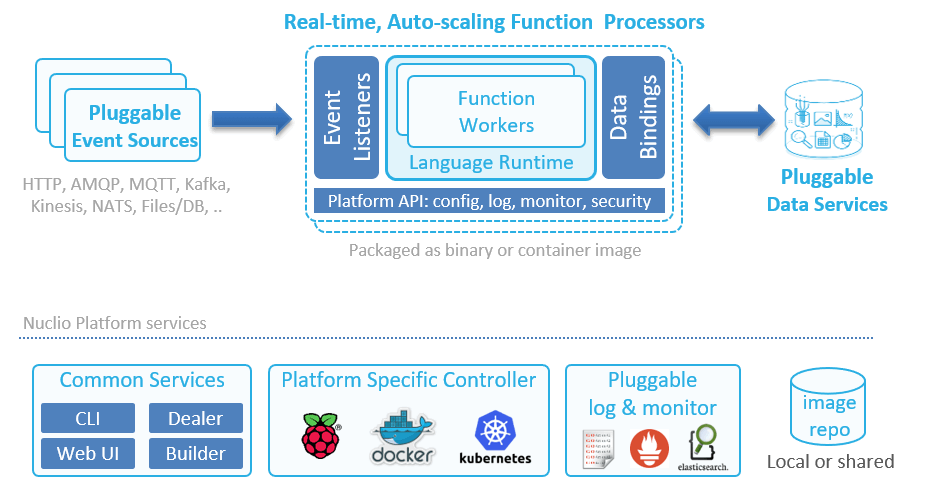
Nuclio, on the other hand, can scale up as well as out. A function processor (analogous to a container) can host multiple function workers. Each worker is then able to process one message at a time. This system supports concurrency within the same processor, and then autoscales the number of replicas of the processor based on load.
Figure 2: The architecture of a Nuclio function.
Another interesting difference between Lambda and Nuclio is that Nuclio lets you specify both the minimum and maximum number of replicas. And as an aside, Nuclio also supports GPUs.
Figure 3: Nuclio lets you configure both the minimum and maximum number of replicas.
With Lambda, you can configure a reserved concurrency for a function, which (counterintuitively) sets its max concurrent executions. But there is no way to tell the system to always keep a certain number of concurrent executions running at all times. The system always scales to zero when there is no traffic—behavior that is highly undesirable for systems that experience regular spikes in traffic.
For example, my employer, DAZN, is in the sports streaming business. We see huge spikes in traffic all the time, as millions of users flood in seconds before a sporting event starts.
Figure 4: Sports streaming platforms, such as DAZN, experience huge spikes in traffic just before a sporting event kicks off.
Without the ability to configure the minimum number of concurrent executions, these spikes result in large numbers of cold starts. Also, in these cases, Lambda has to scale out the number of concurrent executions quickly to meet the surge in demand. Here, we also run into the 500/minute limit on how quickly Lambda is able to scale out. As such, we are currently not able to use Lambda on the critical path of our system, which has to shoulder these spikes.
With Nuclio, you can programmatically update the minimum replica count prior to the event so that when the spikes come, you don’t have to worry about hitting scaling limits or enduring the performance hit from cold starts. You can also tell Nuclio to scale to zero immediately via API calls, which saves resources.
Figure 5: Adjusting the minimum number of replicas enables you to deal with predictable spikes in traffic.
Timeout
Another major difference between Lambda and Nuclio is how timeout is handled. With Lambda, an invocation can run for up to 15 minutes. While it’s possible for you to use recursive functions or step functions to extend this limit, both approaches have their own problems. As such, Lambda functions are great for event-driven architectures and performing short, ephemeral tasks.
With Nuclio, there is no max execution time. The containers can keep on running, which in turn allows you to go beyond the constraints of the event-driven model. You can now turn a function into a long-running service, which unlocks some interesting use cases such as long-running ETL jobs and training machine learning (ML) models.
Caching State Between Invocations
Both Lambda and Nuclio functions accept an event and context during an invocation.
Figure 6: Both Nuclio and Lambda functions accept an invocation event and context as arguments.
With Lambda, the context object is ephemeral and does not persist between invocations. If you want to persist data between invocations (e.g. static configurations, database connections), then you need to declare them as global variables outside of the function handler.
With Nuclio, the execution context itself is persisted between invocations and can be used to cache state. The context object also includes a built-in logger, which supports structured logging with JSON and four log levels: DEBUG, INFO, WARN and ERROR.
You can configure the default log level for a function and can even override this default log level per invocation—which is very useful for debugging. You also have the ability to export your logs to external services such as Elasticsearch.
Figure 7: With Nuclio, you can select the default log level for every function.Figure 8: You can also override the default log level for an invocation.
In addition, there are hooks for performing context initialization, which is called before the first invocation on the function. This allows you to perform initialization logic before the container is put into active use and removes the dreaded cold start problem that Lambda suffers from.
Data Volumes and Persistent Data Connections
With Lambda, functions only run when they are triggered by events. Furthermore, concurrent executions are garbage-collected when they have been idle for a few minutes. This behavior makes life difficult when you are working with relational database management systems (RDBMS) and other systems that require persistent connections. Indeed, a set of guidelines has been developed to help you avoid the many pitfalls of using Lambda with RDBMS. Furthermore, Lambda doesn’t allow you to use persistent data in standard file system mounts, which forces you to copy to/from object storage before working on large files such as images, logs, ML models, etc.
With Nuclio, however, you can use the context object to maintain persistent connections to databases. Since the context is maintained at the processor level, you get better reuse, as they are shared across invocations. You can also take care of other aspects of data-fetching with data bindings, including batching and caching, which helps improve IO performance of the application. Additionally, you can mount volumes to functions, which is useful for working with ML models or Tensorflow, and you can mount Kubernetes secrets as volumes. Indeed, Nuclio supports all of the volume types that Kubernetes supports.
Runtimes
Both Lambda and Nuclio support popular languages such as Go, Node.js, Python, .Net Core, Java and Ruby. Also, both platforms offer a way for you to customize the execution runtime.
With Lambda, you can create a custom runtime and distribute it through AWS Lambda Layers. This lets you introduce additional language runtimes that are not natively supported by the Lambda platform. Several vendors have published runtimes for PHP, Rust, Erlang and Elixir, to name a few.
With Nuclio, you can run functions on your own Docker image (see Figure 9), which can come from a private image repository. This allows you to tailor the execution environment itself.
You can also support additional language runtimes through a Shell function, which allows you to handle invocation events with any executable binary. See this example for more details.
Figure 9: Nuclio lets you run functions on top of your own Docker image, which can come from a private image repository.
Nuclio ships with 13 triggers, including cron, HTTP, Kafka, Kinesis and RabbitMQ. Since Nuclio is open source, you can also write your own trigger for services that you want to integrate with and leverage other people’s contributions. The HTTP trigger gives you an easy way to integrate Nuclio with other event sources that support HTTP as target, such as SNS. Also, since Nuclio supports the CNCF CloudEvents standard, it can arguably support many more event sources that are CloudEvents-compliant.
Nuclio triggers are all normalized to the same Event object. This removes the need to understand the specific event signature for each event source, which is often confusing when working with Lambda. It also makes it easy to switch a function between different triggers.
Built-In HTTP Trigger
With Lambda, you need to use API Gateway to create an HTTP endpoint for your functions. API Gateway is a feature-rich service, but it’s also complicated and often costs more to run than the Lambda invocations themselves. It also adds another source of latency to your API, which, at the minimum, is around 5ms to 10ms, and it can overhead spike to more than 100ms. This cost and latency overhead make it unsuitable for applications with high throughput or hard real-time requirements.
With Nuclio, every function gets a private HTTP interface by default. To expose the endpoint publicly, you need to specify an HTTP trigger similar to API Gateway. However, unlike API Gateway, this HTTP trigger does not incur extra costs and has minimal latency overhead.
Figure 10: With Nuclio, every function gets a private HTTP interface by default.
Unlocking New Use Cases with Nuclio
As you can see from our comparison, Nuclio differs from Lambda in a number of important areas, such as its concurrency model and that it has no max execution time. This opens the door to a whole range of use cases. Let’s take a moment to look at a few.
High-Throughput Data Processing Pipelines or APIs
For a high-throughput API, the cost of both API Gateway and Lambda is drastically higher than an equivalent application running in containers. This cost discrepancy has lead many to rewrite their applications.
Nuclio’s concurrency model makes more efficient use of available resources, which significantly reduces operational cost when running at scale. Functions have built-in HTTP interfaces so you also don’t need to pay for an expensive API Gateway service.
The ability to mount a volume to your function also lets you read and write data to/from a mounted volume at high speed and enables building stateful applications. Again, you can’t do this with Lambda today, as it doesn’t allow you to attach Amazon Elastic File System (Amazon EFS) volumes to functions.
These features make it economically feasible to run high-throughput and high-performance APIs on Nuclio functions. The same can also be said about high-throughput data processing pipelines that have to process multiple terabytes of data per hour.
APIs with Predictable Spikes in Traffic
Nuclio gives you the ability to configure a minimum number of replicas. This allows systems that experience predictable spikes in traffic to reserve sufficient resources ahead of time and avoid degrading the user experience when the spikes happen. Examples include food ordering services such as Just Eat or Deliveroo or sports streaming services such as DAZN.
At the same time, Nuclio still lets you scale to zero by setting the minimum number of replicas to zero. It gives you the control to optimize for resource usage or latency, depending on the situation.
Real-Time Applications
Nuclio does not suffer from cold starts and is able to deliver consistent and sub-millisecond response times on invocations. This makes it a suitable solution for applications with a hard, real-time requirement such as multiplayer games and real-time bots.
Serving Machine Learning Models in Real Time
To serve ML models in real time, you need to have both strong and predictable API latency and the ability to load and work with ML models that often are large in size (GBs).
Nuclio lets you attach Kubernetes volumes to your functions, and there are no size limits on these volumes. Combined with the performance characteristics, it’s possible to implement these demanding workloads with Nuclio functions.
Nuclio also has native integration with Jupyter, and lets you automatically deploy Jupyter notebooks and ML models as Nuclio functions.
Long-Running Jobs and Services
Nuclio does not impose a max execution timeout on function invocations. This allows you to turn your functions into long-running services and perform long-running ETL jobs.
Nuclio’s init_context() hook lets you create long-running services, such as an application that constantly reads off a Twitter feed (e.g. loads the TwythonStreamer with the context, which is polling an external service, versus becoming triggered by an event).
Conclusion
As we discussed, Nuclio is one of the few open source solutions that are also business-viable. It has key architectural advantages for higher performance or data-driven applications, including:
Nuclio is cloud-agnostic. It can be used in multi-cloud/hybrid-cloud scenarios. You can also run Nuclio on a laptop using plain Docker, which makes debugging easier.
Nuclio’s concurrency model and the ability to mount file volumes lets you build high-performance APIs and high-throughput data processing pipelines.
Nuclio gives you greater control over the concurrency of your application, which makes it viable even for applications with very spiky traffic.
Nuclio’s execution contexts are persisted between invocations, and it doesn’t impose a max execution time on invocations. This allows you to create long-running stateful applications such as ETL jobs.
Nuclio lets you attach Kubernetes volumes to your functions and has no limitations on the size of the volume. This makes it possible for you to work with large ML models that often are GBs in size. Nuclio also has native integration with Jupyter and can automatically deploy your Jupyter notebooks and models as functions.
Nuclio provides a good out-of-the-box developer experience. It has a built-in logger with structured logging support, and you can easily export your logs to an external log aggregation service.
If you are looking for a serverless platform that is not tied to a specific cloud provider, Nuclio is worth a look.


 Here, you have two steps:


 Also added is the ability to automate several testing functions, including the ability to launch functional tests within a browser and execute unit, functional and integration tests without having to manually create their own Job Control Language (JCL). According to Compuware, testers now can design test cases upfront based on program specifications before developing a program. What’s more, Topaz for Total Test has been integrated with the DevOps pipeline management platform developed by XebiaLabs.