Category: DevOps Toolbox

  • Using Automation Tools to Drive Collaboration, Innovation

    Using Automation Tools to Drive Collaboration, Innovation

    How automation can help business move past the walls of confusion between dev and ops

    In the current state of things, businesses are leaning more than ever on the collective intelligence of their tech teams to drive innovation within their respective organizations. These teams are always comprised of developers and operations professionals. With the foray into automation and the desire for companies to do more with less, it has never been more critical that all individuals, regardless of team, come together to do amazing things. Of all of the services available, Chef is a great example of a suite of tools that want to empower teams to do just that: come together and innovate. It is all about bridging gaps, which can range from simply redefining how teams think about each other to more complex things such as knowledge gaps.

    The first gap that almost always seems to come up when bringing teams together and driving business value is the duties gap. For too long we have sat on opposite sides of the coin. In operations in particular, too often we see ourselves as the ones that have to deal with the aftermath of unfortunate problems within code. But the fact is, we should all care about our systems, we should all care about our code and we should all be ensuring the longevity of both.

    Once you’ve moved past the first hurdle, then comes the gap in knowledge.  Scripting has become pretty common as companies press for automation, but in some instances, it becomes necessary to build up existing team members. Using enterprise automation tools such as Chef, entire teams and entire companies can begin caring about a shared thing: the configuration, health and state of their infrastructure and applications. In doing so, those same teams can begin speaking a shared language. Once this knowledge and shared language are in place, developers no longer view the ops team as an “other,” but rather as collaborators. They can each use their various areas of expertise and speak the same language without having actually having to speak the same language.

    The third common gap is the process gap. Process can represent all of those past processes that a company is reluctant to let go of, which can hinder the ability of the developers and operations humans when they’re attempting to collaborate. The process gap can become particularly difficult to move past without leadership buy-in; as such, it is critical to involve business decision-makers in this transformation. While nearly the entire industry is beginning to move toward more collaborative environments, the entire leadership team must be onboard with the requirements to make changes happen. With the use of automation tools in particular, though, processes can begin to shift more toward collaboration-friendly policies and you can then make the case for further expansion with proof that it can aid in your transformation.

    Empathy is the final gap that must be overcome. The great part about the other gaps is that they work hand in hand to solve each other’s problems. By promoting collaboration, resolving these gaps are also facilitating collaboration. The empathy gap is largely caused by silos of the past that have led to the commonly talked-about “wall of confusion.” Closing the knowledge and duties gap, developers and operations humans can now communicate and understand the same language and processes each is following. This allows the wall to be broken down and operations humans and developers alike can care about both code and stability.

    It’s easy to start getting dev and ops teams working together and on a more even playing field once these gaps have been eradicated. This becomes a big driver for innovation and is, in many cases, a true recipe for success within the company. During my career, I’ve both watched and been involved in these transformations. Working with solutions such as Chef has allowed me to cross the bridge myself, and likewise, be able to share with others how that can be scaled out to entire organizations.

    — Brittany Woods

  • The Role of Bots in DevOps

    The Role of Bots in DevOps

    DevOps has evolved from its infancy into a mainstream focus area for a majority of CIOs. DevOps has become a main focus and has been shaping the world of software and infrastructure engineering and operations for the last few years.

    Some of the key DevOps trends include:

    • DevOps assembly lines automation.
    • Smart, actionable alerts from monitoring tools.
    • Monitor and orchestration infrastructure.

    Improved Collaboration

    With the increase of DevOps adoption, organizations today face many challenges in the end-to-end service delivery life cycle.

    • For applications with complex environment configurations, creating, setting up and deploying a new environment is costly, time-consuming and prone to errors.
    • Due to manual interventions, moving/promoting code across environments involves risks and may give rise to outages.
    • Development teams are looking to maximize change by writing new code or enhancing existing code, while operations teams are looking to minimize change to keep up with key performance indicators (KPIs) and service level agreements (SLAs). These goals are opposing in nature and create a culture of blame between dev and ops teams.
    • Organizations are unable to keep dev, test and production in synchronization due to process and tool gaps. A manual process cannot bridge this gap in consistency; thus, outages in production are common.

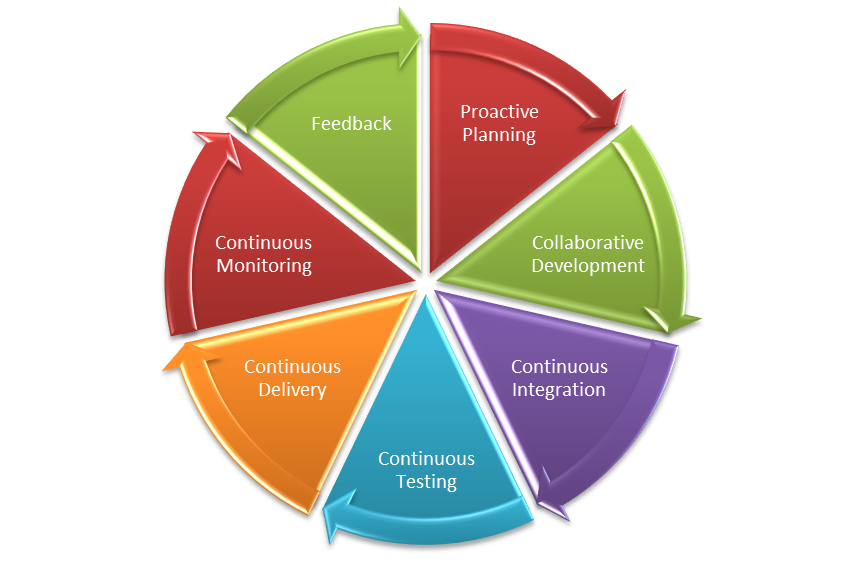
    Various collaboration mechanisms let teams work and learn together to produce better results. The figure below depicts the end-to-end life cycle of DevOps. Collaboration across the phases is essential to the success of your enterprise DevOps transformation.

    DevOps Lifecycle

    What are ChatOps and Bots?

    ChatOps is a term coined by GitHub to describe “putting tools in the middle of a conversation.” In a typical CI/CD pipeline, there are multiple tools that you interact with that have varied functionalities, such as source code management (SCM), defect management, continuous integration, continuous deployment and others. These are all discrete tools, but there is nothing that bridges them together. This is where ChatOps comes into play.

    A bot is a bridge between the collaboration tool and the DevOps tools. The bot receives a request from the user in the form of a chat command through a collaboration tool, analyzes the request and executes a set of commands on the target DevOps tool.

    The main components of ChatOps and bots are:

    Chat app/collaboration tool: This is the front-end chat system that connects the various stakeholders and enables them to interact between themselves and the systems around them.

    The bot: This is the core of ChatOps. A bot is the glue between your collaboration tool and your systems. It facilitates a two-way communication channel where you can fetch relevant information from the systems and act on the information received. A bot fits in between your collaboration tool and the DevOps tools, e.g. Hubot, Lita, ErrBot or AWS Lex.

    Target platform/infrastructure: Integration with the target platforms/DevOps tools is a key ingredient to a successful implementation of bots. These are the target tools and platforms on which the bot will execute the required commands. The tools integration allows your bot to communicate with tools and execute actions such as build, deploy, test, provision and scale infrastructure directly from the chat window.

    Where Bots Fit in the DevOps Pipeline

    Bots can prove to be an accelerator in various stages of the CI/CD pipeline. Below are the details of the integration with various DevOps tools in each phase of the life cycle:

    • Proactive planning – JIRA
    • Requirements management – JIRA
    • Continuous integration – Jenkins
    • Continuous deployment – Ansible, Chef
    • Continuous monitoring – Nagios, Grafana, Splunk
    • Continuous feedback – JIRA

    A chatbot plays a major role in bringing the different teams together into a single, persistent chat room to triage and resolve the issue at hand. In addition to just troubleshooting and triaging issues, bots can be used for various other business-as-usual jobs including:

    • Cleaning up servers.
    • Kicking off build and deployment jobs.
    • Rotating server logs.
    • On-boarding application on the monitoring tools.
    • Collecting metrics from tools such as Nagios or AppDynamics.

    Bot Technical Blueprint

    To achieve the aforesaid targets, we need to have a supportive bot platform in place. How closely the tools integrate with the bot ensures the quality of the implementation and opens new opportunities of automation.
    Bot Blueprint
    As the diagram depicts, the chatbot is hosted on a chat tool such as Slack. This can be on the cloud platform or an existing chat/communicator application. The bot is integrated with a key-value pair reference database, which is fed with the responses depending upon the activities or capabilities that have been fed to it. The key could be the name of the application to retrieve data from or any unique ID that would reduce the number of reads. A lookup of the defined key corresponding to the secondary key is performed on the response database and a response is sent back to the chatbot. Depending upon the number of outputs, the queries can be defined and stored in the response database.

    DevOps Bots: Use Cases

    Below are some examples of use cases for bots. This includes the complete life cycle of DevOps:

    Proactive Planning
    Create new user stories in sprint planning tools and assign sprints to teams. Update sprints and product backlogs.

    Build and Continuous Integration
    Execute build jobs and report back statistics of the build job. Perform daily/nightly builds and report on the status of the build to the relevant teams.

    Continuous Deployment
    Run deployment jobs and perform deployments across environments. Roll back deployments in case of failures, status checks, perform post-deployment actions such as JVM restarts.

    Infrastructure Provisioning and Configuration Management
    Kick off Chef jobs to provision infrastructure or provision application environments. Enable monitoring and restarting services and servers.

    Continuous Monitoring
    Provide application statistics or performing daily data lookups and grabbing metrics.

    Continuous Feedback
    Monitor application health and perform analytics.

    Key Measurement Metrics

    To achieve optimization and enhance performance of the continuous delivery process, metric measurement is the key. These indicators will help in taking certain corrective and preventive actions based on the results. Below are some of the key metrics indicators that can be measured.

    Effort Reduction
    Indicates the reduction of human/manual efforts for tasks such as triggering a build or deployment or collecting metrics from monitoring tools.

    Human Error Reduction Rate
    Reduction in the effort required due to rework caused by human errors.

    Reduce Issue Triaging time
    Indicates the time taken to resolve issues where multiple parties are involved and triaging of problems is required.

    Conclusion

    DevOps bots can significantly improve team efficiency, as well as a team’s ability to respond to emergencies. They save time and money, are fun to build and use and can have a positive impact on team morale, as well as increases the overall productivity of teams. This applies to both the engineering and operations teams. Enterprises embracing digitization are looking for partners with an engineering mindset who know how to bring in collaborative agile teams with the very latest knowledge of open source platforms and DevOps toolchains.


    Contact the Authors

    For more details please contact the authors on LinkedIn @
    Shriniwas Sathe
    Saswati Mohanty

    — Shriniwas Sathe

  • Nutanix Eases Development of IoT Apps

    Nutanix Eases Development of IoT Apps

    Nutanix, a vendor of hyperconverged infrastructure solutions, has released a new developer environment that allows developers to try and test IoT and AI apps in the cloud. Starting May 7, developers can sign up for a free 10-day trial of this experience.

    The developer environment is built under Nutanix’s Xi IoT Platform and gives developers access to a rapid development environment for creating internet of things and artificial intelligence apps in the cloud. The Rapid Development Environment for IoT includes features such as Xi IoT Cloud Instance, Xi IoT Sensor App and Xi IoT App Library and supports the ability to easily deploy IoT software in the cloud or at the edge, according to the company. The environment has been tuned specifically for IoT and AI, eliminating many of the configuration chores developers had to perform using other cloud-based development environments, and enables single-click deployment via a management console.

    For developers targeting production-edge environments, the new environment brings forth the ability to develop for the edge or for the cloud, bringing application portability into the development and testing process. By being able to use a common set of APIs, cloud and edge development becomes relatively seamless and deployment friction is vastly reduced, according to the company.

    Beyond ensuring compatibility across platform services and APIs, the environment enables development and production environments to use the same components, so recoding is not needed as part of the transition from dev to ops. That helps to simplify lifecycle management as well as fit agile practices better into the dev process.

    Nutanix also offers an extensive library of applications that can be used to ease development chores. The Xi IoT App Library offers  individual components (message bus services, time series databases, etc.) and full solutions that developers can use to address various business problems.

    Nutanix is framing the new delivery mechanism as a new experience to get more developers—from novice to advanced—creating AI and IoT scenarios.

    — Frank Ohlhorst

  • With RHEL 8, Red Hat Adds More Automation to IT Ops

    With RHEL 8, Red Hat Adds More Automation to IT Ops

    At the Red Hat Summit 2019 conference, Red Hat today announced the general availability of Red Hat Enterprise Linux (RHEL) 8, which includes among other things a Smart Management add-on designed to make it easier to manage RHEL 8 across hybrid cloud computing environments.

    In addition, RHEL 8 includes Application Streams, a set of utilities for updating languages, frameworks and developer tools without impacting the core resources, as well as updating RHEL 7 to RHEL 8 in place.

    RHEL 8 also adds Red Hat Enterprise Linux System Roles, which provides modules to automate complex tasks using the Ansible automation framework along with support for the Red Hat container toolkit and the general availability of the Red Hat Universal Base Image, a userspace image derived from RHEL that makes it easier to build Linux containers certified to run on RHEL.

    Red Hat also revealed that Red Hat Insights, a set of predictive analytics tools, will be included with the RHEL 8 subscription and that RHEL 8 supports both the OpenSSL 1.1.1 and TLS 1.3 cryptographic standards.

    Gunnar Hellekson, director for product management for Red Hat, said Red Hat is focusing on automating as many tasks as possible as part of an effort to make the life of IT operations teams simpler. As part of that effort, Hellekson said Red Hat is moving to lower the barrier to becoming a RHEL administrator by abstracting away many of the complexities historically associated with trying to manage Linux environments using a command line interface (CLI). Much of that focus will manifest themselves via ongoing enhancements to the Compose and Cockpit tools Red Hat provides for deploying and managing instances of RHEL, said Hellekson.

    Red Hat is making it clear it wants to make RHEL much more accessible to a larger number of IT administrators, especially those that historically have favored a more graphical approach to managing operating system environments. At the same time, however, Red Hat is infusing more automation into RHEL 8 as part of an effort to make it easier to manage deployments at scale. That latter capability is crucial for DevOps teams that, for example, need to be able to update a development environment without waiting for an IT operations team to reconfigure and reboot an operating system. Via add-ons to the core RHEL platform, Red Hat is now starting to expand those automation capabilities across both on-premises and public cloud computing environments.

    It’s unclear going forward how many instances of RHEL any one IT administrator might be able to manage on their own. Trying to determine that number might not even be worth the effort because advances in automation are now coming so rapidly that trying to determine that right number of IT administrators per environment is not possible to determine consistently. Instead, IT organizations should just assume that, thanks to automation enabled by machine learning algorithms and predictive analytics, the operating system environment is now flexible enough to scale up and down as needed.

    — Mike Vizard

  • IT Operations: PagerDuty Unveils Hybrid ITSM Platform

    IT Operations: PagerDuty Unveils Hybrid ITSM Platform

    PagerDuty today unveiled a framework intended to make it possible for organizations to bridge multiple styles of IT service management (ITSM) methodologies for IT operations.

    Rachel Obstler, vice president of product for PagerDuty, said PagerDuty Solution for HybridOps provides a comprehensive incident management framework capable of spanning both ITIL and DevOps processes for IT operations.

    PagerDuty Solution for HybridOps combines existing and new product capabilities such as Event Intelligence and Modern Incident Response with machine learning algorithms and bi-directional integrations the company has developed between its incident management software and more than 300 third-party products.

    Those capabilities make it possible to facilitate real-time communications between platforms that tend to be favored by IT shops relying mainly on ITIL processes, such as ServiceNow, and DevOps teams that rely on Slack to communicate with one another, Obstler said.

    IT Operations: PagerDuty Unveils Hybrid ITSM Platform

    Rather than forcing an entire IT organization to transition to single framework for IT operations, PagerDuty Solution for HybridOps allows organizations to selectively apply each model where and when they best see fit, she said.

    The latest version of the ITIL framework goes a long way toward injecting some flexibility into what historically has been viewed as a rigid approach to managing IT. The ITIL framework is still a long way from being as agile as the various forms of DevOps that many organizations have adopted over the last several years to accelerate application development and deployment.

    Obstler said PagerDuty is moving to bridge that divide by leveraging machine learning algorithms to group all the various alerts generated by all the tools in an IT environment. That capability not only reduces the amount of alert fatigue any IT operations group is likely to suffer, but it also makes it easier to identify the root cause of any IT incident, she noted.

    One of the primary reasons DevOps has been adopted evenly in the enterprise is that IT operations teams are expected to be able to programmatically adapt IT infrastructure to meet the demands of developers. The number of IT operations that have those skills, however, is limited. In theory, IT operations teams without programming skills could rely on automated frameworks to achieve that goal. But that approach requires IT organizations to standardize on a single IT automation framework across compute, storage and networking services. The number of organizations that have been able to bridge all the islands of automation that have been adopted across all the services they deliver are few and far between. Put it altogether and it’s clear that both legacy and modern approaches to ITSM will need to coexist well through the next decade.

    In the meantime, IT leaders might want to consider that old proverb about leading a horse to water. IT leaders can issue all the mandates they want. But when it comes time to accomplish a task, most IT professionals are naturally going to fall back on what they know. The challenge is to create ways to wean the IT operations staff off those legacy processes in a way that doesn’t necessarily result in everything grinding to a halt because nobody knows how to fix an issue that simply wouldn’t otherwise wait.

    — Mike Vizard

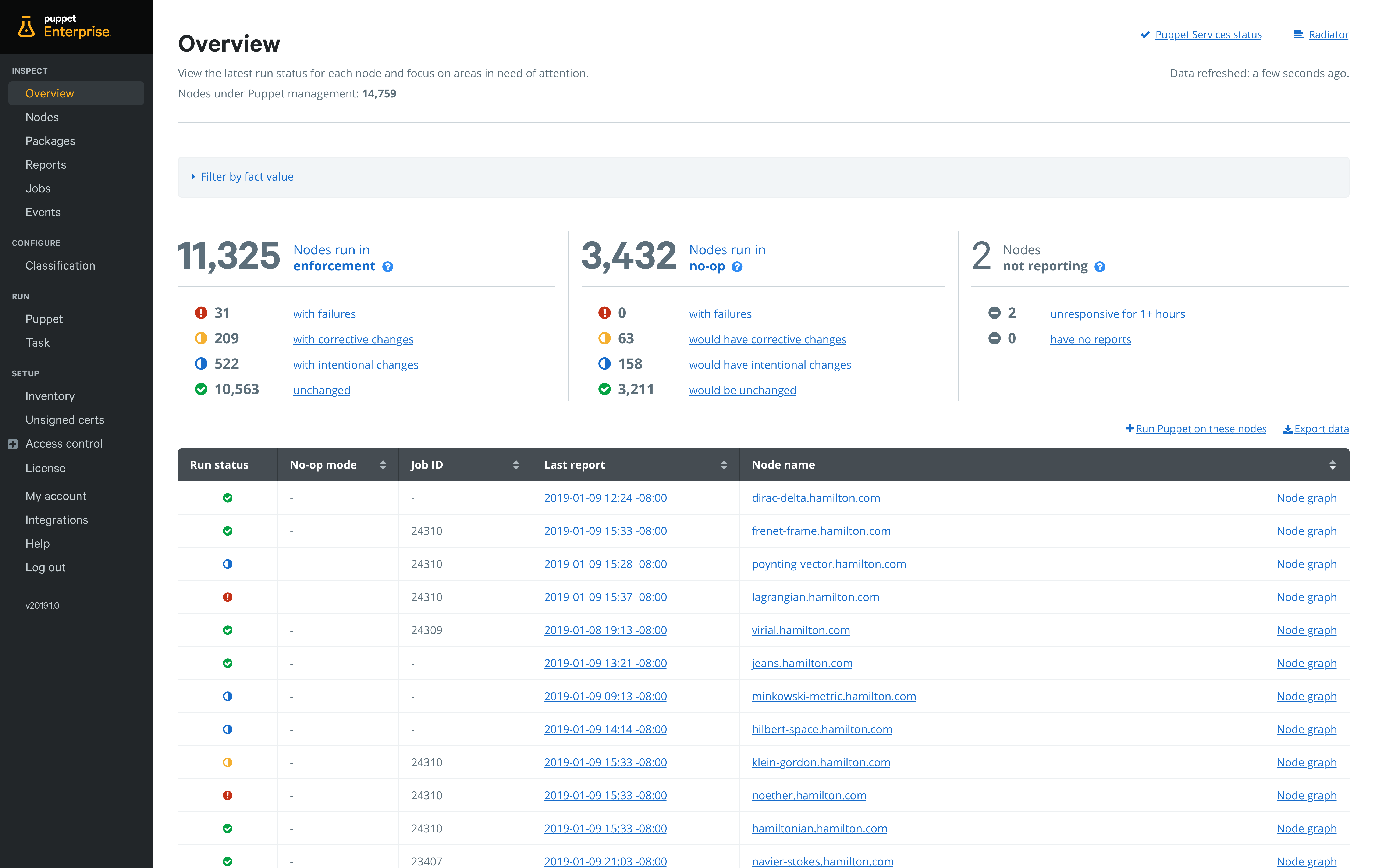
  • With YAML Support, Puppet Dives Deeper Into DevOps

    With YAML Support, Puppet Dives Deeper Into DevOps

    Puppet this week announced an update to Puppet Enterprise that adds additional DevOps capabilities, including integration with Bolt, an open source agentless task runner that Puppet employs to make IT automation more accessible to IT administrators.

    Matt Waxman, vice president of products at Puppet, said adding integration with Bolt will make it easier to integrate DevOps processes that rely on YAML to deploy applications.

    Available this month via a Puppet Enterprise 2019.1 update, Bolt provides an agentless approach to automation that enables IT teams to execute existing commands and scripts written in any language within the context of an IT automation framework that is designed to be accessible to the average IT administrator, Waxman said.

    At the same time, Puppet is providing the ability to set up pipelines for deploying automation code directly from within Puppet Enterprise. Rather than having to set up a separate continuous integration/continuous deployment (CI/CD) platform, Puppet is embedding the capability it acquired from its purchase of Distelli in 2017. In doing so, Puppet is making it possible to accelerate deployment of automation software in a way that doesn’t  require every change to be approved by a master Puppet administrator. Default pipelines guide organizations new to continuous delivery practices through setting up their first pipeline in less than 30 minutes.

    Puppet is also including an Impact Analysis capability that enables teams to assess the impact of a proposed Puppet code change before it is deployed.

    One of the issues that has held back adoption of DevOps practices has been the simple fact that most IT administrators have limited programming skills. By making available an IT automation framework that provides the ability to manipulate YAML files at a higher level of abstraction, it should become easier of organizations to incorporate IT administrators into any set of DevOps process they care to define, Waxman said.

    Puppet via this upgrade is also extending the reach of the agentless Bolt framework to include support for network devices running Cisco NX-OS and Cisco IOS, as well as firewalls from Palo Alto Networks. As network operations continues to be more integrated with DevOps processes, IT organizations increasingly need to be able to apply workflows across compute, storage and networking platforms, Waxman said.

    The challenge many IT organizations now face in terms of achieving that goal is each provider of a platform creates their own automation framework, which winds up creating islands of automation across the enterprise. Longer term, Waxman said that, in addition to invoking the application programming interfaces (APIs) that many platforms already expose, Puppet will be working toward integrating domain-specific automation frameworks with its cross-platform framework.

    Overall, Waxman said Puppet remains committed to providing a mix of agentless and agent-based approaches to IT automation based on the nature of the IT tasks that need to be automated. It will be up to each IT organization to determine when to employ one of those options. But regardless of the path chosen, Puppet is clearly trying to make its core automation platform a lot more accessible to everyone in IT.

    — Mike Vizard

  • Application Monitoring Using Stagemonitor

    Application Monitoring Using Stagemonitor

    This article covers important steps to monitor a typical Java application using Stagemonitor tool, Kibana as a dashboard viewing tool and Elasticsearch as a data processing engine.

    Stagemonitor is an open source Java application performance monitoring (APM) tool that provides everything you need in development, quality assurance and production to monitor the performance of your Java web application.

    Using this tool, we can have different dashboards such as JVM dashboards, application server, request metrics, host, request analysis, web analytics, etc.

    Architecture of the Stagemonitor

    Figure 1

    The Stagemonitor agent sits inside the application and sends metrics and details about requests (request traces) to Elasticsearch. Metrics can optionally be sent to Graphite, Influx DB and Prometheus.

    Prerequisites

    • Minimum of 2GB RAM and 200GB hard disk
    • Java version of 1.8 or more
    • Install latest versions of Kibana and Elasticsearch

    Steps to Monitor Java App with Stagemonitor

    Dev Time Monitoring With Browser Widget

    This step illustrates how to enable a widget in dev time monitoring, adding the Stagemonitor plugin inside the Java app. We can do this in two ways: We can directly edit the pom.xml/build.gradle file by adding the required stage monitor plugins, or we can add dependencies in the application’s LIB directory.

    Some of the important plugins we must have in pom.xml/build.grade to get monitoring dashboards are Stagemonitor configuration, Stagemonitor tracing Elasticsearch, Stagemonitor tracing, Stagemonitor-jdbc, Stagemonitor-jvm, Stagemonitor-os, Stagemonitor-web-servlet and Stagemonitor alerting.

    We’ll get the Stagemonitor plugins from the following location: https://mvnrepository.com/search?q=stagemonitor

    After installing the agent, will have to create one Stagemonitor configuration file as stagemonitor.properties file under src/main/resources in case of maven application. Otherwise, the file must be located at the root of class path. At the end, it has to be under the WEB-INF/classes section.

    The following is what the stagemonitor.properties file looks like:

    stagemonitor.applicationName=My Application

    stagemonitor.instanceName=dev

    stagemonitor.instrument.include=org.example.app

    Request Dashboard

    In this section, we focus on setting up the time series database to collect the data and visualization tool to view the metrics in detail. Here we’ll use Elasticsearch as the time series database engine and Kibana as the visualization tool.

    To get the data from Elasticsearch database, we will include properties in the stagemonitor.properties file:

    stagemonitor.reporting.elasticsearch.url=value,

    stagemonitor.reporting.elasticsearch.username=value

    stagemonitor.reporting.elasticsearch.password=value

    stagemonitor.reporting.interval.elasticsearch=60

    After adding all the required values and restarting the server, we will be able to open the (automatically added) request analysis dashboard in Kibana. Along with that, we will be able to see different dashboards automatically.

    To use Influx DB as a time series database, we’ll have to configure the values in stagemonitor.properties file:

    #following the details contains influxDB

    stagemonitor.reporting.influxdb.url=http://localhost:8086

    stagemonitor.reporting.interval.influxdb=60

    stagemonitor.reporting.influxdb.username= value

    stagemonitor.reporting.influxdb.password=value

    Logs Monitoring using Kibana/Stagemonitor

    We can track logs using Kibana/Stagemonitor. In the metrics dashboard, we can see matrices such as what URL address we’ve hit and the time to complete the request (Figure 2). We can track the host details such as how many servers our applications are running, the status of the server, memory stats, CPU stats, network stats, disk usage stats, networks processed, network packets errors, network packets dropped and how many cores of the CPU the host is using.

    Stagemonitor provides all the required dashboards under the request analysis dashboard. To open the request analysis dashboard, click on: Dashboard – Load Saved Dashboard and select “Request Analysis.”

    Figure 2

    Figure 3 shows the details of the CPU, such as CPU usage and CPU load.

    Figure 3

    Below, Figure 4 shows total page views, unique number of visitors to the site and call tree, and how much time it takes to complete.

    Figure 4

    Figure 5 shows the transaction history and individual transaction details.

    Figure 5

    Figure 6 shows the JVM details and all the other memory matrices.

    Figure 6

    As mentioned above, we can monitor various application metrics and infrastructure metrics.

    — Sai Babu Tanguturi

  • Wavefront Provides Map for Microservices

    Wavefront Provides Map for Microservices

    VMware announced it is adding a service mapping capability to the Wavefront 3D Observability platform it provides with the Wavefront by VMware monitoring tools.

    Stela Udovicic, senior director of product marketing for Wavefront, said Wavefront Service Maps will make it easier for IT organizations to visualize what will soon be thousands of microservices running highly distributed computing environments, including those based on containers running on Docker Engine, connected via service meshes such as Istio or spanning proxy servers such as Envoy.

    Capabilities provided by Wavefront Service Maps include packaged visualization of request flows with a map of service dependencies, built-in tracking of health metrics and view into individual traces to pinpoint performance bottlenecks.

    Accessed as a set of software-as-a-service (Saas) applications, Wavefront by VMware relies on an agentless approach to monitoring that supports all the major public clouds along with providing integrations with platforms such as Kubernetes, GitHub, Slack, PagerDuty, Kafka and Pivotal Application Service.

    Udovicic said by making it easier to visually identify and troubleshoot microservices, IT organizations should be able to accelerate their transition to modern cloud-native applications. Building and deploying a single application based on microservices is complicated enough. Trying to support hundreds of those applications is simply too daunting without the ability to visualize all the interdependencies between those services. Troubleshooting any issue then becomes easier because Wavefront Service Maps is designed to enable DevOps teams to drill down to the traces being employed to monitor the application, she said.

    Earlier this year, Wavefront added support for distributed tracing and machine learning algorithms that also make it easier to identify anomalies within a microservices-based application.

    In terms of adoption of cloud-native applications, Udovicic said there are basically two classes. The first are early adopters who are already highly committed to developing cloud-native applications. The bulk of the enterprise IT community, however, is still in the early stages of building and deploying these types of applications, said Udovicic.

    There’s naturally a high correlation between organizations that have adopted cloud-native application development using microservices aggressively and those that have implemented best DevOps practices. In fact, one of the benefits of a visualization tool is that it makes it easier to bring new members on to those teams. Rather than having to piece together what is occurring in the environment, a new member of a DevOps team can visually inspect each microservice they might be responsible for managing.

    It may be a while before DevOps processes become the dominant default method for managing IT. But as DevOps tools become easier to use, the number of DevOps practitioners should increase steadily. Arguably, one of the reasons DevOps adoption is not as far along as it might be is that the learning curve is still too steep. But as visualization capabilities gets added to the analytics frameworks baked into those tools, it’s now only a matter of time before the number of IT professionals that might be intimidated by DevOps processes starts to decline steadily.

    — Mike Vizard

  • Dell Technologies Drives Automation Deeper into Platforms

    Dell Technologies Drives Automation Deeper into Platforms

    Dell Technologies this week launched a series of initiatives intended to provide IT organizations with multiple deployment options for Dell EMC appliances and servers, including forthcoming managed service offering through which Dell will manage private cloud platforms based on VMware software on behalf of customers.

    Announced at the Dell Technologies World 2019 conference, Dell EMC also unveiled a new appliance series and revealed an alliance with Microsoft under which its VMware arm will make available cloud software on the Microsoft Azure cloud, in addition to existing support for Amazon Web Services (AWS), IBM Cloud and servers deployed on-premises.

    Jon Siegal, vice president for product marketing for converged platforms and solutions at Dell EMC, said Dell EMC plans to make it easier for IT organizations to consume IT infrastructure in an on-premises IT environment as a service or continue to use their capital budgets to acquire servers and appliances.

    To advance that latter approach, Dell EMC is launching VxFlex, a set of appliances that include an operating system that enable compute, storage and networking separately. In contrast, the existing VxRail series of appliances are optimized for VMware and assume compute, storage and networking will be scaled in tandem, said Siegal. Dell EMC is also now unifying a set of hyperconverged appliances and converged infrastructure servers under a common VxFlex brand, and Siegal said in the future those offerings will be extended to add support for Kubernetes alongside platforms from vendors other than VMware.

    At the same time, Dell EMC is previewing a VxRail Analytical Consulting Engine (ACE) that will be embedded in VxRail HCI system software that Dell EMC provides in its appliances optimized for VMware. That analytics engine employs machine learning algorithms to maximize application performance, while also providing self-optimization recommendations and capacity forecasts.

    The Dell Technologies Data Center-as-a-Service offering, meanwhile, is scheduled to be generally available in the second half. It marks the first time Dell has launched a managed service under its own brand. VMware, however, has been providing managed services for the past year. The Dell Technologies Data Center-as-a-Service offering extends that concept to include Dell EMC VxRail appliances.

    Automation is clearly at the heart of the evolving Dell Technologies strategy. The challenge organizations that have embraced DevOps will face is aligning their processes with the automation frameworks Dell Technologies is embedding in both VMware and the underlying infrastructure on which VMware gets deployed. To address that issue, Dell Technologies over time will bundle frameworks such as the open source distribution of the Pivotal platform-as-a-service (PaaS) environment from Pivotal Software, an arm of Dell Technologies, on its platforms, Siegal said.

    These moves signal Dell Technologies is trying to fulfill a promise to make it as easy to manage IT infrastructure deployed in an on-premises IT environment as it is to manage on a public cloud. There’s obviously still a gap. But as Dell Technologies starts to make IT infrastructure available as a service, it may one day become challenging for DevOps teams to tell where any one cloud happens to be running at any given moment.

    — Mike Vizard

  • Sauce Labs Acquires Screener Visual Testing Tool

    Sauce Labs Acquires Screener Visual Testing Tool

    At the SauceCon 2019 conference, Sauce Labs today revealed it has acquired Screener to add a visual testing tool to its portfolio of automated testing tools.

    Lubos Parobek, vice president of product for Sauce Labs, said the addition of Screener will make it possible for DevOps teams to not only test functions and performance using existing Sauce Labs tools, but also now confirm things such as the colors of a visual element of an application are being rendered correctly, for example.

    In addition to building their own visual tests, DevOps teams can employ Screener to automate the running on those tests and store baselines in the cloud to create a visual testing life cycle.

    At the same time, Sauce Labs announced the general availability of Sauce Headless, which leverages container technologies to make it possible to leverage a cloud service through which developers can now run tests via a Chrome or Firefox browser every time they commit code. Parobek said the goal is to make it easier for organizations to embrace continuous testing as an extension of the pipelines constructed using a continuous integration/continuous deployment (CI/CD) platform.

    The acquisition of Screener, he said, is part of an ongoing Sauce Labs effort to extend the reach of its testing portfolio beyond functional testing. Sauce Labs earlier this month launched Sauce Performance, its first set of application performance testing tools.

    The rise of DevOps is challenging traditional approaches to application testing as organizations move to combine various types of testing into a single continuous process. To meet that requirement, Sauce Labs is expanding its portfolio of automated testing tools at a time when the emergence of microservices-based applications is significantly increasing the level of dependency between all the components that make up an application. That increased level of dependency will require DevOps teams to rely more on automated testing tools. In fact, Parobek said the day is not far off when DevOps teams will include digital assistants that leverage machine learning algorithms to enable DevOps teams to continuously run those tests at the right moment in an extended DevOps pipeline. Those digital assistants will not replace the need for human testers anytime soon, but they will augment their capabilities to make is feasible to implement continuous testing at scale, he noted.

    In the meantime, as application testing continues to shift further left in the DevOps process, more developers will be building and running their own tests during earlier stages of the application development process. At some point, either another developer or dedicated tester still will need to evaluate that code to provide an unbiased opinion. But the number of common mistakes making it into the latter stages of the application development process should be substantially reduced. Ultimately, that shift to the left should result not only in more development projects meeting deadlines, but just as significantly higher levels of overall application quality. The challenge now, of course, is figuring out how to implement a best DevOps practice that pushes application testing as far to the left as possible.

    — Mike Vizard