John Wyss, vice president of product for Chef, said Chef Desktop enables IT teams to write their own configuration and compliance requirements as human-readable code using YAML files to manage and secure entire fleets of endpoints via a centralized console. It includes pre-written configuration code and curated content that can be employed to both audit and harden desktop operating systems.
IT teams will now avail themselves of a zero-touch process for enrolling and provisioning endpoints while at the same time automating software deployment and management, Wyss said. That includes being able to enforce security policies using configuration profiles, data encryption and system updates.
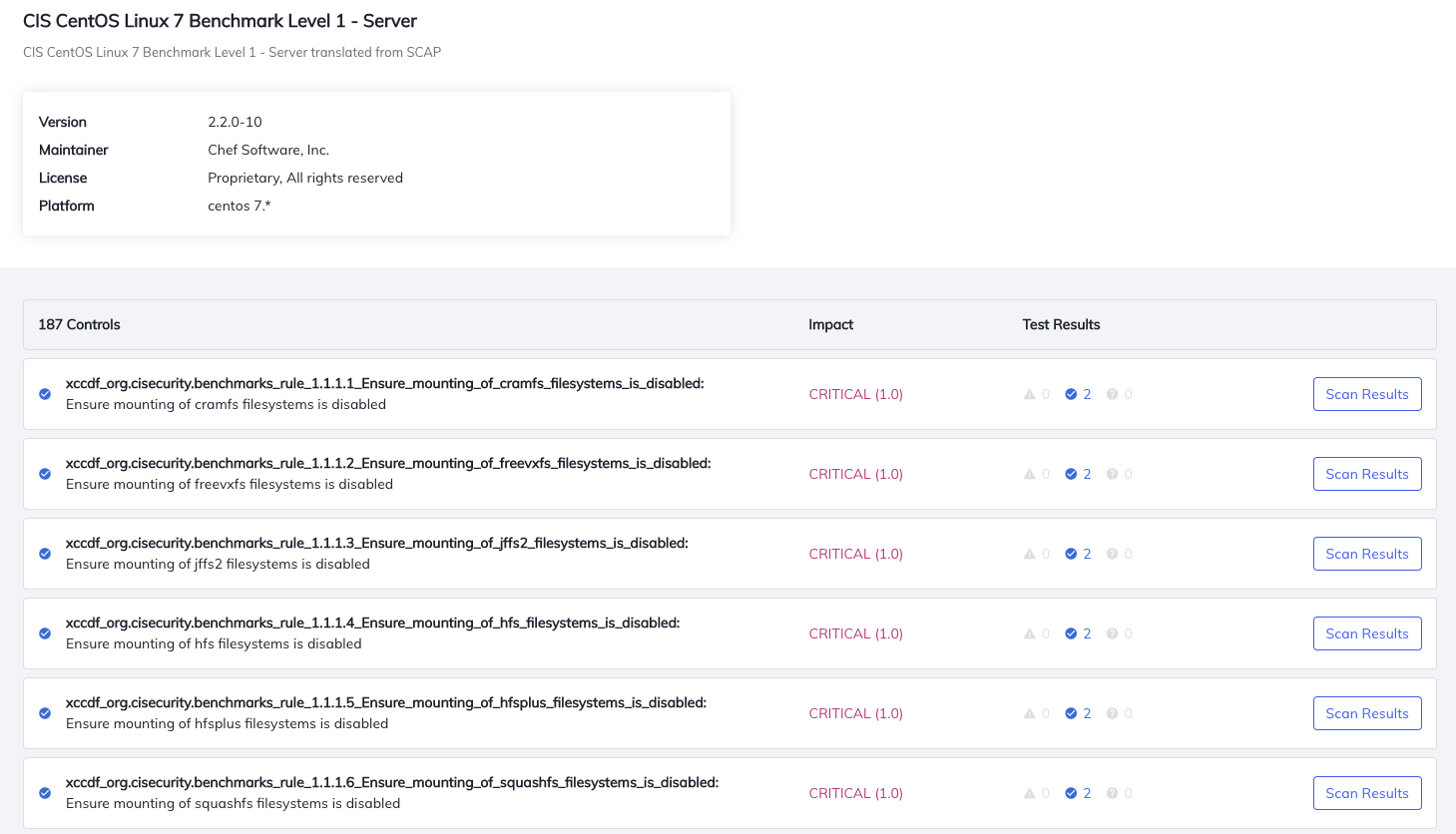
Chef Compliance, meanwhile, is built on top of Chef InSpec, an open source framework for testing and auditing applications and infrastructure. Chef Compliance takes Chef InSpec further by including tools to automatically audit IT environments based on the specifications defined by the Center for Internet Security (CIS) and Security Technology Implementation Guide (STIG).
Those audits can then be applied to automate the remediation process without having to write code if IT teams so choose, said Wyss. The goal is to provide DevSecOps teams with a unified language for managing security and compliance, he added.
Finally, Chef has updated Chef Enterprise Automation Stack to include analytics to filter and update views for disconnected services and receive real-time health-check messages and status alerts. Chef has also added rapid rollback, package cleanup and layered container support, and has made it easier to manage package settings and deploy packages across multiple platforms.
Collectively, these capabilities should make it easier for DevOps teams to reduce process friction across the entire DevOps life cycle.
In the wake of the economic downturn brought on by the COVID-19 pandemic, interest in IT automation is on the rise. Many organizations are either freezing IT headcount or, worse, yet, reducing the size of their IT staff. At the same time, IT environment is becoming more complex, especially if most employees continue to work from home. IT teams now need a common set of tools for managing not only application deployments on servers or in the cloud but also endpoints. Ultimately, that approach should also go a long way toward reducing the total cost of IT.
In fact, in the wake of the downturn more organizations than ever are receptive to automating IT processes. What was once viewed as potentially an existential threat to the existence of the IT staff has become the only way to manage IT at scale, at a time when cutbacks are broad-based. Organizations that don’t find a way to automate the management of IT are likely to incur significantly higher costs than those that do. Arguably, the issue is no longer what to automate and when, but rather how much and how soon, as both applications and the end users accessing them become ever more distributed.
Bill Miller, president of ZSolutions at BMC, said now that the deal has been closed the combined companies will be able to more tightly integrate Compuware’s Topaz application development and deployment platform with the BMC Automated Mainframe Intelligence platform, as part of an Autonomous Digital Enterprise (ADE) initiative based on ongoing investments BMC is making in AIOps.
The goal is to make the mainframe just one more target platform on which DevOps teams can build and deploy applications faster, added O’Malley. That’s becoming a bigger requirement in the wake of the economic downturn brought on by the COVID-19 pandemic, he said, as organizations prioritize digital business transformation initiatives that will inevitably require updates to mainframe applications.
Rather than increasing technical debt by duplicating existing capabilities, O’Malley said more organizations will look to modernize mainframe applications to make them more accessible to a wide variety of front-end applications.
The rate at which IT organizations that deploy applications on mainframes have been adopting DevOps has been uneven at best. Mainframe applications are often considered to be among the most mission-critical in the enterprise. Therefore, IT teams have relied on waterfall processes to build and deploy mainframe applications in a more deliberate fashion.
At the same time, however, the use of Linux on mainframes has increased considerably in the last several years. The applications deployed on Linux operating systems on the mainframe frequently employ the same DevOps processes to deploy applications on Linux running on distributed computing systems.
BMC’s ambitions, of course, far exceed the mainframe. The company has a portfolio of tools for managing both distributed computing and mainframe platforms. During the economic downturn, BMC is betting many IT teams will be under increased pressure to reduce the total cost of IT by centralizing the management of mainframes and distributed computing systems, among other moves.
Of course, BMC is not the only IT vendor with similar ambitions. IBM and Broadcom, which acquired CA Technologies, are moving down a similar path. IT organizations will need to determine which providers enable them to best streamline management processes.
In the meantime, it remains to be seen how much organizations remain committed to the mainframe. It’s generally not feasible for most organizations to move a transaction processing application running on zOS into the cloud. However, it doesn’t necessarily follow that those IT organizations will continue to invest in building and deploying new applications on mainframes instead of making them more accessible via application programming interfaces (APIs).
Regardless of the strategy adopted, however, it is not likely that after being around for more than 50 years, mainframes will be disappearing anytime soon.
Jonathan Rende, senior vice president of product at PagerDuty, said the general release of Intelligent Triage advances the level of AIOps that can be applied to incident management by eliminating a raft of manual tasks.
Intelligent Triage aggregates signals from more than 375 monitoring, observability and ticketing tools, which are then grouped based on relationship and elevated depending on the impact on the business. That level of contextual data makes it possible for IT teams to increase productivity while dramatically reducing alert fatigue, said Rende.
At the same time, PagerDuty is adding support for integration with Microsoft Teams alongside existing support for Slack. IT teams are increasingly relying on these collaboration tools to process requests for help from end users, he noted.
In some cases, IT teams are communicating with one another via these media or employing built-in tools embedded in the PagerDuty incident management platform. In either case, workflows across IT teams are now occurring in near real-time, said Rende.
Finally, PagerDuty is adding a Dynamic Service Directory to give DevOps teams a central knowledge base that identifies owners and experts for each service and their associated run books, in addition to making available a mobile status dashboard to allow remote teams to collaborate more effectively when incidents arise. That capability is especially critical at a time when many IT staffs continue to work from home as part of the effort to combat the COVID-19 pandemic, said Rende.
In general, IT organizations are looking to automate incident response whenever possible to both minimize costs and potential disruptions. Businesses are more dependent on IT services than ever. However, as more applications are deployed the nosier the IT environment becomes. Discerning which alerts are stemming from the same root cause issue becomes more relevant as organizations either limit headcount or even look to reduce it during a time of widespread economic uncertainty.
Of course, regardless of the state of the economy, most IT professionals would rather not have to waste time on manual tasks that don’t add a lot of value to the business. Most IT professionals need to free up more time to achieve more pressing goals. Every minute spent on chasing down an alert that winds up being yet another wild goose chase just piles on more stress.
Advances in automation and AIOps have been coming at a steady pace for the last several years. The adoption of these new capabilities to manage incidents has been uneven at best. In the wake of the economic downturn brought on by the pandemic, it’s now more a question of how soon IT organizations will be tapping into these capabilities to streamline the management of IT. After all, many IT managers are going to conclude there’s no sense in letting a good crisis go to waste.
Company CEO Kyle Campbell said many DevOps teams are embracing Slack to share updates with one another. SlackOps takes that preference for DevOps a step further to enable complex DevOps processes, also known as ChatOps, to be launched from the Slack command line.
That approach allows any member of the DevOps team to write a workflow once and securely share it regardless of what language is employed, added Campbell.
SlackOps also provides access to a public registry that CTO.ai already makes available for sharing developer shortcuts within a specific community.
Beyond streamlining communications processes across DevOps teams, Campbell said DevOps teams will be able to surface additional insights into workflows using DevOps research and assessment metrics to make them more efficient. SlackOps also makes it easier to onboard new members of a DevOps team, he noted.
SlackOps is deployed as a container on the Slack platform and can be downloaded via the Slack marketplace in a couple of minutes.
The goal is to enable organizations to embrace a lean approach to DevOps that enables them to quickly adjust processes as required, said Campbell. Rather than having to commit to a single tool or platform, developers should be able to advance the overall state of DevOps within their organizations without having to be concerned whether a new tool or platform will disrupt communications across the DevOps team.
It’s too early to say to what degree Slack might emerge as a control plane for managing DevOps processes. It is, however, becoming more popular as a way to communicate across members who employ a broad range of tools. Rather than attempting to force DevOps teams to standardize on a single set of tools and platforms, Slack provides a more flexible means of communicating in real-time that is delivered as a cloud service.
Of course, there are now plenty of alternatives to Slack. It will be up to each DevOps team to decide which communications medium best suits them. However, embedding a DevOps workflow application within a communications platform could serve to make Slack a more compelling option for many DevOps teams. Regardless of the communications medium, DevOps teams should expect to be more continuously engaged with one another. That may prove to be a critical requirement with most members of a DevOps team working from home for the foreseeable future in the wake of the COVID-19 pandemic.
As workflows built around asynchronous email messages increasingly are giving way to real-time communications, the challenge many DevOps teams face is finding a way to embrace that higher level of interactivity without members of the DevOps team becoming overwhelmed by the volume of messages being shared. Making the transition to DevOps was enough of a cultural challenge for many organizations. Inundating DevOps teams with real-time messages, not all of which may be pertinent to a DevOps workflow, needs to be tempered by tools that help identify the DevOps signal within all the noise.
In addition, GitLab announced it is making generally available Gitaly Clusters, which enable DevOps teams to create a warm replica of a Git repository.
Brendan O’Leary, senior developer evangelist at GitLab, said with release 13 GitLab continues to build on a single code base that allows the platform to be managed and accessed as an integrated set of applications rather than disparate components that DevOps teams need to pull together and then manage.
In terms of core DevOps capabilities, the latest release adds the ability to customize the Value Stream Analytics module to specific workflows. GitLab is also planning to make it possible to visualize stages of a workflow.
GitLab is also improving traceability between requirements and has added the ability to visualize the workflow associated with a specific release. A future release will enable DevOps teams to employ feature flags to conduct both A/B testing based as well as create feature flags from merge requests and to filter feature flags by status, according to the company.
Other capabilities added include more customizable dashboards, with security dashboards now being shareable outside of GitLab to foster collaboration with IT security teams. Future releases will add Kubernetes Clusters to the dashboard to show all clusters and pods in use.
DevOps teams now can route existing monitoring alerts to GitLab for triage and incident resolution. At the same time, GitLab has moved design management to the core platform.
GitLab is also now making AutoDevOps, which provides pre-defined CI/CD pipelines, available on Amazon Web Services (AWS).
In terms of cybersecurity, GitLab has revamped the way the platform manages vulnerabilities to make it easier in a future update to prioritize remediation efforts.
GitLab also has static application security testing (SAST) support for .NET frameworks and has expanded support for offline environments. There’s also now support for dynamic application security testing (DAST) for REST application programming interfaces (APIs) and access to full commit history scan for secrets. Fuzz testing support will be introduced later this year, according to the company, along with an ability to secure secrets across services. GitLab also plans to add integration with security tools that track container behavior analytics, as well as an out-of-the-box container network policy.
Thanks to GitLab’s collaboration with Okta, there is now also tighter integration with Okta’s System for Cross-domain Identity Management, which can be provisioned for a GitLab group.
In terms of compliance, GitLab also plans to enable DevOps teams to establish a compliance framework, adopt its regulatory controls and simplify audit reporting. The company is also working on an initial security policy user interface to simplify setting up security guardrails.
Finally, GitLab has become a Common Vulnerabilities and Exposures (CVE) ID Numbering Authority (CNA). GitLab users can request a CVE from GitLab, either for GitLab itself or for any project hosted on GitLab.com. In the future, users can request CVE IDs directly from within GitLab.
O’Leary said GitLab is working toward increasing developer confidence in their security skills. By making it easier to embrace best DevOps practices, developers no longer will have to tiptoe around security issues that they today largely have little to no familiarity with, he said.
In general, O’Leary said GitLab’s biggest challenge is getting organizations to move beyond simply using it to manage source code. Once organizations do make their first foray beyond source code management, however, it’s not too long before they are employing a wide range of modules, he noted.
Of course, encouraging organizations to dive deeper DevOps has as much to do with the culture of the organization as it does the capabilities of the CI/CD platform employed.
Moritz Plassnig, senior vice president cloud and general manager for SDM at CloudBees, said these integrations with Google Cloud Build and Tekton pipelines are being provided as part of a long-standing alliance between the two companies to advance the adoption of best DevOps practices. The CloudBees SDM service runs on the Google Cloud Platform (GCP).
As part of that effort, CloudBees has been making investments in an SDM platform that enables DevOps teams to pull metrics from any tool or platform. That data is then fed into an analytics cloud service through which CloudBees surfaces insights that identify, for example, how delays to a project might impact overall revenue goals.
Interest in software delivery analytics has risen in the wake of the COVID-19 pandemic as organizations accelerate the building and deploying of digital business applications, said Plassnig. With employees and customers alike working from home to combat the pandemic, organizations are investing more in creating applications that provide digital alternatives to engaging end users, he noted, adding delays to any of those projects are likely to have a much bigger impact on business continuity strategies today than they did just a few short months ago.
The CloudBees SDM service provides DevOps teams and business managers alike a real-time view of all product and feature development occurring across the organization, as well as a policy engine to trigger actions to better optimize the software delivery process. Organizations can also model and visualize the software delivery process while measuring overall DevOps performance.
Rather than requiring organizations to standardize on a single platform to achieve that goal, Plassnig said CloudBees is leveraging application programming interfaces (APIs) to integrate metrics across a broad range of DevOps tools. That approach, he said, makes it possible to meet organizations wherever they are in terms of DevOps maturity.
Support for Tekton pipelines is significant, Plassnig noted, because it’s expected that most continuous integration/continuous delivery (CI/CD) platforms in the future will be built using Tekton pipelines, which provide an open source framework for building platforms that are designed to be deployed on Kubernetes clusters. Jenkins X, originally developed by CloudBees, is one of the first CI/CD platforms to support Tekton pipelines, which were originally developed by Google. Jenkins X and Tekton pipelines are now being advanced under the auspices of the Continuous Delivery Foundation, an arm of the Linux Foundation.
As more CI/CD platforms embrace Tekton, the platforms themselves will become less of a black box from an analytics perspective, noted Plassnig.
In the meantime, CloudBees also expects Google to continue to gain momentum as a cloud service provider, he said. While Google trails Amazon Web Services (AWS) and Microsoft in terms of overall market share by a wide margin, Plassnig noted that with the arrival of Anthos, a cloud operating system capable of being deployed on multiple cloud and on-premises IT environments, it’s only a matter of time before services such as Google Cloud Build are employed more widely.
Whatever the platform used, the one thing for certain is the rate at which software is being generated and deployed on various platforms will be watched much more closely.
Even before the onset of a global pandemic, IT professionals were coming to the conclusion that their legacytools were no longer fit for the demands of today’s modern organizations. Their tools have likely met the needs they were originally purchased for, but chances are they’re insufficient to help organizations grow, innovate and move their IT teams from a cost-center to an engine for digital transformation and business success for one simple reason: those tools weren’t built for it.
If you look at typical legacy IT monitoring and management tools, you’ll find point solutions that were built in-house are more likely purchased from smaller, point-tool companies. They’ve been augmented, updated and patched as far as they can stretch. Any integration is most likely of the swivel-chair variety, relying on your IT team to jump back and forth among different tools and screens in an attempt to piece togetherthe bigger picture. Bolting afterthought add-ons onto an outdated system is not an effective way to deliver a unified, predictive, automated, machine learning-driven IT management system that can meet the challenges and demands of today’s increasingly digital enterprises.
So, with that being said, let’s take a look at five reasons why your legacy tools are holding your IT team back.
Legacy Tools Weren’t Built for the Cloud
Legacy tools were built for a physical or virtual IT infrastructure that resided within the walls of your data center and under the control of your IT team. They were designed to manage monolithic applications — a single system that scales or changes very slowly and is disconnected from other services and systems. Plus, they were built to deliver data the IT department cared about, not the key performance indicators (KPIs) that drive your organization’s success. The tools you use today that provide domain-specific capabilities already struggle to track and manage complex systems. This difficulty increases when those tools need to manage an infrastructure that comprises multiple hosted cloud solutions or loosely coupled microservices.
Whether your IT operations are completely or partially on-prem, you know your future investments will be in the cloud, and senior leaders are keeping a keen eye on that investment. You’re committed to the cloud journey, but your current tools don’t map your new application destinations. You need to make appropriate investments in tools built to monitor and manage more than physical and virtual IT infrastructure. The tools you invest in today must be able to keep you and your business informed regardless of where your key applications reside and operate, and be future-proofed for whatever technological disruptions come next.
Legacy Tools Have Stretchedas Far as They Can
Have the demands on your IT department and your network changed since your current tools were planned and implemented? Legacy tools weren’t designed to handle the demands you face every day. The tools themselves are likely operating at the limit of their capabilities, and they certainly weren’t built to take advantage of the new world of data. Today’s environments produce data from increasingly diverse sources — including containerized workloads, microservices and unique SaaS provider APIs. Applications themselves are now highly distributed, making it even more difficult to collect and use incoming data to gain actionable insights in the environment.
Inflexibility in tools often becomes a key limitation in your organization’s ability to rapidly adopt and operationalize new technologies. And if they’re already struggling today, what does that mean for next year, or three years from now? What happens when your tools prevent you from capitalizing on your business’s most critical services? They become barriers to success. The tools you use will often dictate your outcomes. Modern tools need to be as agile and flexible as the demands you put on them. They can bend, but they should not break.
Legacy Tools Were Not Built for Empowering Digital Transformation
If we’re honest, many of the legacy tools still in use today aren’t very different in design or function than the first IT monitoring and incident management tools that defined the market. In fairness, the demands on those tools did not change much once they adapted to virtualized workloads. Back then the demands on IT were simpler and mirrored the organization’s mission: keep everything up and running.
Management tools gave you numerous dashboards to identify specific issues in limited context. You would seldom be able to get an end-to-end perspective on your applications and infrastructure. If the environment was large or complex, you typically had to choose between moving between numerous instances or having significant gaps in coverage.
These days you may find your IT organization judged by very different criteria, including cost metrics and revenue goals, in a much more complex and diverse landscape. That’s because the mission has changed. You’re expected to be a primary driver of digital transformation, including the adoption of new technology distributed across multiple environments. You won’t be able to do that effectively with tools designed before broad cloud adoption and mobile customer engagement. Modern tools must empower both the IT organization and the business, because technology has become a critical component of every organization and a direct line to the customer.
Legacy Tools Are Domain-Centric
Systems built over time often include a variety of tools, most of which were designed to only handle specific tasks. Combine this with the tooling sprawl that occurred with the adoption of agile development and DevOps and you have a kaleidoscope of complexity, making it very difficult to collect, aggregate, correlate and analyze all the data necessary to view and manage overall business service health and performance. IT departments need a single tool that can handle diverse use cases and provide the right information for the right context. True AIOps platformswere built specifically to address that need.
Legacy Tools Lack Intelligence
Legacy tools are still mostly reactive rather than proactive, let alone predictive. The “AI” in AIOps stands for “artificial intelligence” (even if the functionality is actually machine learning-based). The value of machine learning for IT is pretty well established. The machine learning at the core of AIOps solutions allows them to automate repetitive monitoring and incident management activities and, as they learn, predict an incident before it happens.
While some vendors will tell you they can graft AI-like features onto their legacy systems, at best they’re trying to fill gaps and plug leaks. Only a system built from the ground up with machine learning at its core is able to offer true AIOps functionality and quickly adapt to meet future needs. Learning systems must not be an afterthought, but core to your tooling strategy with intelligence present at every stage of the operational life cycle.
Now Is the Best Time to Investigate AIOps
This is a difficult and challenging time for everyone that raises unique challenges for IT professionals. Recent events have highlighted both successful technology implementations and lingering legacy challenges. I would suggest it’s never been more important for IT teams to ensure alignment with the overall business and show their value beyond the basics.
An AIOps approach can help you succeed in today’s complex technology landscape and reduce cost by consolidating outdated tools that have been holding you back from your true potential. AIOps is the best option to make your IT department more efficient and cost effective while improving your overall customer experience. I’d argue that these are the KPIs that matter most to your organization during these uncertain times. Most of us have a new perspective on the impact unexpected conditions can have on our technology systems. If you think you’ll be asked to reconsider your IT priorities and goals in the next few months, now is the time to build an informed plan.
Datical today announced that it will now operate under the moniker Liquibase to better reflect the open source tool it provides for automating database releases.
At the same time, the company is promising to make it easier to upgrade from the Liquibase Pro edition of its software to Liquibase Business, a new edition that provides enhanced visibility into code changes across the pipeline to improve workflows across teams.
Dion Cornett, formerly president of Datical, has been appointed CEO of Liquibase. Current Datical CEO Derek Hutson will remain an advisor to Liquibase.
Company CTO Robert Reeves said since Datical took control of Liquibase in 2012, the open source project has steadily gained traction to the point where it now makes sense to rebrand the company. Since 2012, there have been more than 15 million downloads of Liquibase, he said.
The company now offers four editions of Liquibase ranging from Liquibase Enterprise, formerly known as Datical DB, and Liquibase Business to Liquibase Pro and Liquibase Community, a free offering. Liquibase Pro and Liquibase Community are aimed at developers, while Liquibase Enterprise and Liquibase Business are aimed at IT operations teams, said Reeves.
Previously, developers were able to upgrade from Liquibase Community to Liquibase Pro via a single click. The company is now committing to providing the same level of frictionless upgrade path between Liquibase Pro and Liquibase Business, he added.
In general, Reeves said there is a much greater appreciation for database schema change management and version control among organizations that have adopted best DevOps practices. Many database providers sometimes promote their databases as being platforms that developers can simply download and manage on their own, he noted; however, from a practical perspective, DevOps teams need a tool to consistently manage both database schema updates spanning multiple types of databases.
Historically, databases were managed by database administrators. However, in recent years developers have been downloading a variety of open source databases to build applications that in most cases are simple to set up and don’t require someone to approve a purchase order. As those databases proliferate, however, DevOps teams need a tool to manage databases that have proliferated across the environment. Liquibase provides a tool for managing databases that is designed from the ground up for DevOps workflows, Reeves said.
Most organizations are still working through the respective roles DevOps teams and DBAs will have as DevOps processes are adopted more widely. As IT environments become more complex, there is a clear need for more automated approaches to managing fleets of databases. In the wake of the economic downturn brought on by the COVID-19 pandemic, many organizations may not have the IT staff that would allow them to manage databases in any other way.
The paradox, of course, is that the time and effort to automate database management often requires the expertise of members of the IT team who are many times too busy keeping the IT lights on to really think through how to automate the update process once and for all.
Don’t Repeat Yourself (DRY) is a fundamental tenet of modern computer programming. Just about every CS student is taught that duplicating code in an application is an accident waiting to happen. The hazard is that you might alter a piece of code in one place, only to leave another identical instance of that code unchanged. Then when you run the code all sorts of strange things happen. In some cases, the changed behavior is in force. In other cases, it’s not. Maintenance becomes a nightmare.
These days adhering to the principle of DRY is not that difficult. Object-oriented languages such as Java, C# and Objective-C make it easy to encapsulate a set of functions into a class that can be reused throughout an application. Also, technologies such as RPC, XML-RPC and gRPC make it possible to expose distinct functions to the network in a sharable manner. When a single piece of code can be easily shared at runtime, the risk of writing redundant code goes down. Why reinvent the wheel when you can just use one that is pre-existing and well known?
However, this has not always been the case. In the early days of programming, lines of code executed sequentially. You started at line 1 and ended at line 200. There were no side trips in the middle.
Language designers were aware of this shortcoming and made it so programs could jump around the lines of code. You could start at line 1 and run to line 20, then jump to line 190 and run to line 220, coming back to line 21 and then jump again to exit out at line 240. It was definitely hopscotching, but it worked.
Procedural programming arrived soon after and with it came the early forays into segmenting code into a discrete unit of execution, the function. Functions introduced the concept of code sharing within an application. Still, a framework of sharing a single unit of code among an entire system, let alone many systems, on the network took a while to develop. As a result, in the early days of programming code redundancy was rampant.
The thing to remember is that the proliferation of redundant code was not so much a reflection of professional incompetence. Rather, it was due to the absence of a programming framework by which to avoid code redundancy.
But, that was then and this is now. Today, DRY is a standard operational mantra. This is good. On the other hand, there’s still a lot of redundant code out there, particularly in shops that have a lot of legacy COBOL. Remember, COBOL just celebrated its 60th birthday. It’s been around for a while.
Fortunately, the world of redundant code in the COBOL is about to become a whole lot smaller with the introduction of Duplicate Code Detection Technology Preview that’s built into IBM Developer for z/OS.
The Duplicate Code Detection Technology Preview (DCD) is a feature supported by IBM Developer for z/OS (IDz) that automatically discovers duplicate code within a given codebase. It’s an optional feature, available as of version 14.2.2, that needs to be added during IDz installation. DCD is an enterprise-level tool that’s intended to be used with very large amounts of COBOL source code, at the level of a million lines of code or more (See Figure 1).
Figure 1: Duplicate Code Detection Technology Preview for IBM Developer for z/OS exposes duplicate code for elimination or refactoring.
Once duplicates are identified, developers can use DCD to justify whether the given redundancy is appropriate or if it’s a duplication that needs to be removed. Thus, DCD can be used as a tool to assess code quality and as a tool to refactor the codebase.
See Duplicate Code Detection Technology Preview in Action
At IBM’s upcoming webinar, “Duplicate Code Detection — Simpler & Faster Thru’ Out the Lifecycle Webcast,” on May 20, 2020, from 9 a.m. to 10 a.m. (ET) you’ll get an in-depth look at Duplicate Code Detection Technology Preview for IBM Developer for z/OS. Architects Herve Le Bars and Jean-Yves Rigolet will be on hand to go over the details for using DCD to eliminate duplicate code and improve code quality.
The webinar is free and it’s filled with important information that’s sure to enhance the productivity of developers using IBM Developer for z/OS. You can register for the DCD webinar here.
How Duplicate Code Detection Technology Works
Duplicate Code Detection Technology is an optional feature that can be fully integrated into IBM Developer for z/OS. Developers can use DCD as a standalone application to search for duplicates in his or her workspace. Also, developers have the added benefit of sharing duplicate code detection results among a team. In order to have a collaborative experience with Duplicate Code Detection, three additional components need to be installed on the server-side. These components are:
IBM Websphere Liberty Server
Duplicate Code Detection Feeding Agent
Source Code Management System
Let’s take a look at how it all fits together.
As mentioned above, developers can use DCD with IBM Developer for z/OS to examine the individual developer’s workspace for code duplication. In this case, DCD is essentially a stand-alone tool (See Figure 2, callout 1).
Figure 2: Duplicate Code Detection works standalone and as a collaborative tool.
While it is beneficial to have an individual developer detecting duplicate code in his/her workspace, it’s limited in scope. There is only so much work a single developer can do. Where things get really powerful is when the result of searches for code duplication can be shared among the team. This is where using DCD in a client-server architecture comes into play.
Central to the DCD client-server architecture is the DCD Server which is an IBM Websphere Liberty Server and the DCD Web Application.
The DCD Server is used to share the results of duplicate code detection across members of the development team. Developers interact with the DCD Server using the DCD component running within IBM Developer for z/OS (See Figure 2, callout 1, above).
On the server-side, there is an independent client, the Duplicate Code Detection Feeding Agent that acts as a bridge between the source code stored under a source control management system and the DCD Server.
The feeding agent asks the SCM for the changed COBOL files in the source code management system (See Figure 2, callout 2). Then the DCD Feeding Agent sends the changes to the DCD server (See Figure 2, callout 3).
The DCD server keeps track of duplicate code (See Figure 2, callout 4). As mentioned above, team members access the DCD server using IBM Developer of z/OS to visualize the duplicate code information. The DCD feeding agent works incrementally: Only changed COBOL files are transferred for examination, thus reducing operational overhead.
You can read the details for installing and configuring Duplicate Code Detection by downloading theDCD Installation Guide.
The Benefits of Using Duplicate Code Detection Technology
There are many benefits to using Duplicate Code Detection Technology. Automated duplication detection simplifies refactoring. Duplicate Code Detection Technology identifies redundancies that occur throughout millions of lines of code automatically while leaving it up to the developer to judge if the code duplication is justified or not. If duplicates do need to be removed, DCD allows developers to make the changes at once, thus saving time while improving productivity. Remember, Duplicate Code Detections works at lightning-fast speeds. It takes on average 100 milliseconds to search 100,000 lines of code.
Also, when distributed collaboration is enabled using the DCD Server, searches can be shared with team members and stored for later use, thus improving collaboration efforts among teams and team members.
Duplicate Code Detection enhances search efficiency by examining code stored directly in source control management repositories. DCD improves code readability while reducing complexity. In addition, it supports versioning using standard source control management frameworks, such as GitHub.
Putting It All Together
The principle of DRY is commonplace these days. While it’s been a principle that’s easier to implement in younger companies, those businesses with codebases that go back decades have found adopting DRY to be difficult. Refactoring can be risky. Many companies think that unless there’s a compelling reason to refactor the old code, most times it’s better to leave well enough alone, particularly if that code is written in COBOL.
But as the dramaticneed for COBOL programming talent at the New Jersey Department of Labor recently revealed, COBOL matters. And, when that COBOL code is refactored, which is sure to happen, applying DRY in the refactoring effort will be a driving principle. Hence, the opportunity exists for DCD to play a key role. It’s a compelling technology. Given the power that DCD brings to the COBOL programming experience, implementing the DRY principle against both current and legacy code requires no more labor than the work that goes with spell checking a large document.
Duplicate code has been the bane of developers since the first Hello World was written over half a century ago. Over time the situation has improved, but for many companies it’s still a problem, particularly companies with a large legacy of COBOL programs. Companies that make Duplicate Code Detection Technology part of their COBOL programming toolbox will not only have the benefit of creating code that is more elegant, more readable and of higher quality, they will be well on their way to placing the DRY principle at the forefront of their software development activities.
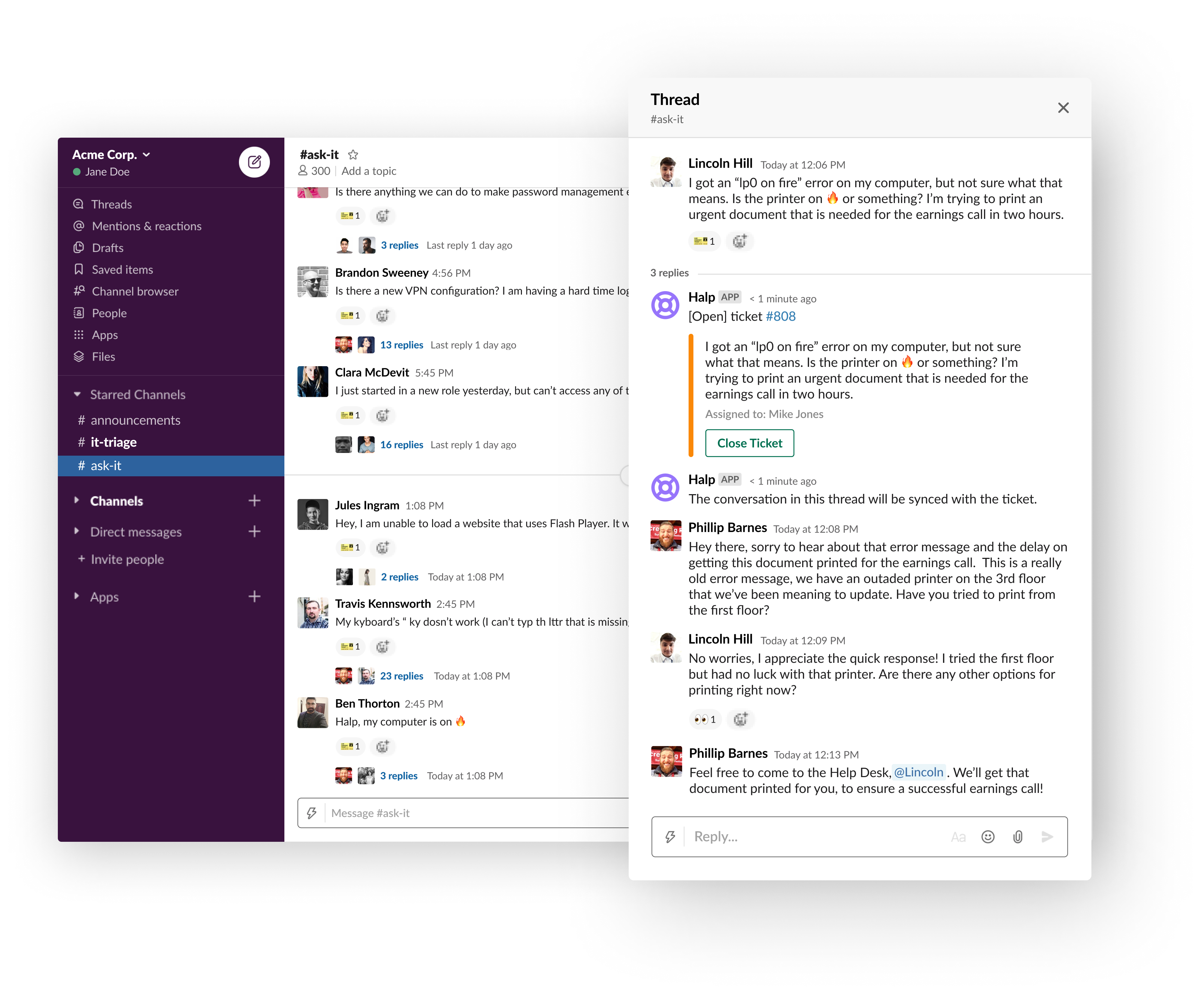
Atlassian this week announced it has acquired Halp, a provider of a help desk platform that employs Slack as its user interface.
Steve Goldsmith, head of product integrations at Atlassian, said Halp will provide organizations with a way to manage lightweight processes via an interface that is already commonly used within many organizations. The goal is to provide a level of integration between Halp and the JIRA Service Desk platform from Atlassian to handle more complex requests, he said.
The Halp platform has already been integrated with Confluence, a knowledge base platform from Atlassian that enables help desk staff to share best practices for resolving known issues. Deeper integrations with JIRA and Confluence will be forthcoming, added Goldsmith.
At the same time, Atlassian is working on tighter integration between its service desk platform and Microsoft Teams, which has emerged as a popular alternative to Slack, he noted.
Halp CEO Fletcher Richman said that approach has gained traction because the biggest challenge when it comes to help desks is making it as easy as possible for an employee to generate a help ticket. Halp addresses that issue by enabling end users to simply drag and drop on an emoji to generate a help desk ticket.
The help desk staff is then provided a web interface through which they can remotely manage tickets and respond to requests via Slack. That approach eliminates the need for the help desk staff to be physically located in an office or employ a virtual private network (VPN) to access a help desk platform running on a local area network, he said.
Richman noted too often employees wind up supporting each other because the process of generating a ticket is too complex. At a time when many employees are working from home to help combat the COVID-19 pandemic, it’s not really possible for employees to currently provide that mutual support.
It’s not really clear to how many employees might ever be heading back into an office at this point, so Halp also provides a way for remote employees to more easily remain productive, he added.
Slack and JIRA, of course, are already de facto standards among many DevOps teams. Halp should provide developers with a means to instantly resolve a wide range of low-level issues in near real-time by generating a help desk ticket via Slack.
Richman noted that for any IT service management (ITSM) platform to be successful, it needs to meet users where they are. If the platform is too complex or intimidating, users will look to their fellow employees for help first. Before long, however, all the mutual support saps productivity. By making help just a simple Slack message away, many more issues will be resolved by help desk personnel who already know the right answer, he said.
It’s too early to say how many more help desk tickets might be generated because of Slack. However, in the wake of the rush to remotely enable the entire enterprise, the need for an easier way to provide support is now more apparent than ever.

 IT teams will now avail themselves of a zero-touch process for enrolling and provisioning endpoints while at the same time automating software deployment and management, Wyss said. That includes being able to enforce security policies using configuration profiles, data encryption and system updates.


 Beyond streamlining communications processes across DevOps teams, Campbell said DevOps teams will be able to surface additional insights into workflows using DevOps research and assessment metrics to make them more efficient. SlackOps also makes it easier to onboard new members of a DevOps team, he noted.





 However, this has not always been the case. In the early days of programming, lines of code executed sequentially. You started at line 1 and ended at line 200. There were no side trips in the middle.