Category: DevOps Toolbox

  • Solving the DevOps Dilemma in the COVID Era 

    Solving the DevOps Dilemma in the COVID Era 

    The coronavirus pandemic is forcing businesses to double down on DevOps transformation initiatives across the enterprise, pushing companies to be more agile and implement software changes throughout their organization at a much faster rate. However, too many IT departments rely on older, complex processes to approve software changes coming from DevOps teams and simply cannot keep pace with this accelerated rate. This is because many parts of the delivery process remain heavily manual, time-consuming and siloed. In other words, rather than realizing enterprise-wide transformations, the value from DevOps initiatives is remaining localized and doesn’t come close to delivering on the promise DevOps held in the first place.

    But because of the profound and sudden changes to the way we work, the industry is reaching an inflection point. Increased demand and competitiveness for modern digital experiences and ways of working are forcing businesses (even those within highly regulated industries) to rethink how they build software and get it approved faster. The need is clear among developers to reduce time-to-approval for new features, yet organizations must remain steadfast in protecting the business against rushed features that may not contain the proper safeguards and could negatively impact business operations.

    To help strike a balance during this critical time, a new trend to expedite software development and deployment is emerging: a platform-based approach to DevOps.

    Driving Visibility With Platforms

    The potential for platforms to streamline aspects of DevOps is profound. Platforms are able to model data and workflows to connect developers and IT continuously all along the development and delivery process. For example, the platform can leverage information from the flow to automate the manual and time-consuming change approval process, enabling them to release features rapidly and safely.

    But the benefits of platforms transcend beyond workflows. The vast number of tools used by developers and IT makes it difficult for leaders to get a holistic view of how each team is performing. This lack of visibility slows the behavioral and cultural change needed to succeed with DevOps. However, with the system of record and engagement that the right platforms provide, stakeholders on both sides of a project can easily view and audit the release process, which means shorter development cycles, increased deployment frequency and more dependable, high-quality releases.

    Companies, and even teams within the same company, are at many different stages of DevOps maturity. Some are fully adopting distributed teams based around products and simple development pipelines that make rapid, incremental changes, potentially multiple times per day. However, most organizations still have more complex releases that are still on a longer cadence such as weekly or monthly. Those releases may involve multiple teams and a wide range of development tools so again, the platform approach provides visibility and the ability to automate across the entire release.

     DevOps at Scale

    While many businesses are leveraging DevOps in various capacities, they have yet to be able to scale adoption across their entire organizations. This is the Achilles Heel for DevOps as a whole—after all, the goal with any transformative initiative is to scale, and traditionally DevOps has been difficult to scale past initial early successes.

    The challenge in scaling DevOps is that while there are many tools at developers’ fingertips, the actual processes around audit, compliance, security and change management are still often performed manually, and many of the tools are disconnected, meaning fragmented data and, yet again, limited visibility across numerous teams within an organization. At a time when controls should be becoming more decentralized, with more operational parameters ‘moving left’ to the control of development teams, we are instead seeing delays during deployment, difficulty driving best practices and DevOps adoption across the enterprise, and a lack of trust across teams.

    However, with a platform approach, the ability to scale is built into the technology since software approvals can be automated, enabling IT teams to allow more decision-making in development with appropriate guardrails. The IT teams can ensure the release of features rapidly and safely—and more importantly—focus on strategic, business-critical work.

    Resolving Data Configuration Challenges With Platforms

    In addition to unlocking visibility and scale with DevOps platforms, there’s a growing practice of leveraging platforms to improve configuration data. As companies shift to working in the COVID-19 era, they’re using more applications that require frequent updates. To ensure the applications don’t break in production, developers are automating application testing and deployment with platforms, allowing this process to occur earlier in the software delivery life cycle.

    However, ensuring configuration data accuracy during this process can be challenging. By using a platform for developers to add and consolidate configuration data, users can better control the application environment, prevent issues in production and quickly correct post-deployment problems. All this is possible by integrating machine learning into the platforms to prevent incorrect configuration data settings from reaching production environments. The machine learning identifies potential misconfigurations earlier, before apps are moved into production, ultimately helping users avoid app and infrastructure deployment inconsistencies.

    With platforms, developers can both improve the quality of configuration data and identify incorrect configurations using machine learning ultimately to prevent software changes from causing outages and incidents during a highly critical time.

    The Bottom Line

    The coronavirus pandemic has magnified the importance of agility and quickly adapting technology to meet changing customer and employee needs. As a result, enterprises are trying to figure out how to navigate and embrace new technologies that help ensure business resiliency. When done right, DevOps should help accelerate and scale this innovation, while still maintaining compliance and security. Adopting a platform-based approach to DevOps helps organizations reduce time-to-approval of new features so they can effectively drive digital transformation across the business—the North Star of all IT initiatives in this new work environment.

  • Puppet Launches Relay to Simplify Automating DevOps Workflows

    Puppet Launches Relay to Simplify Automating DevOps Workflows

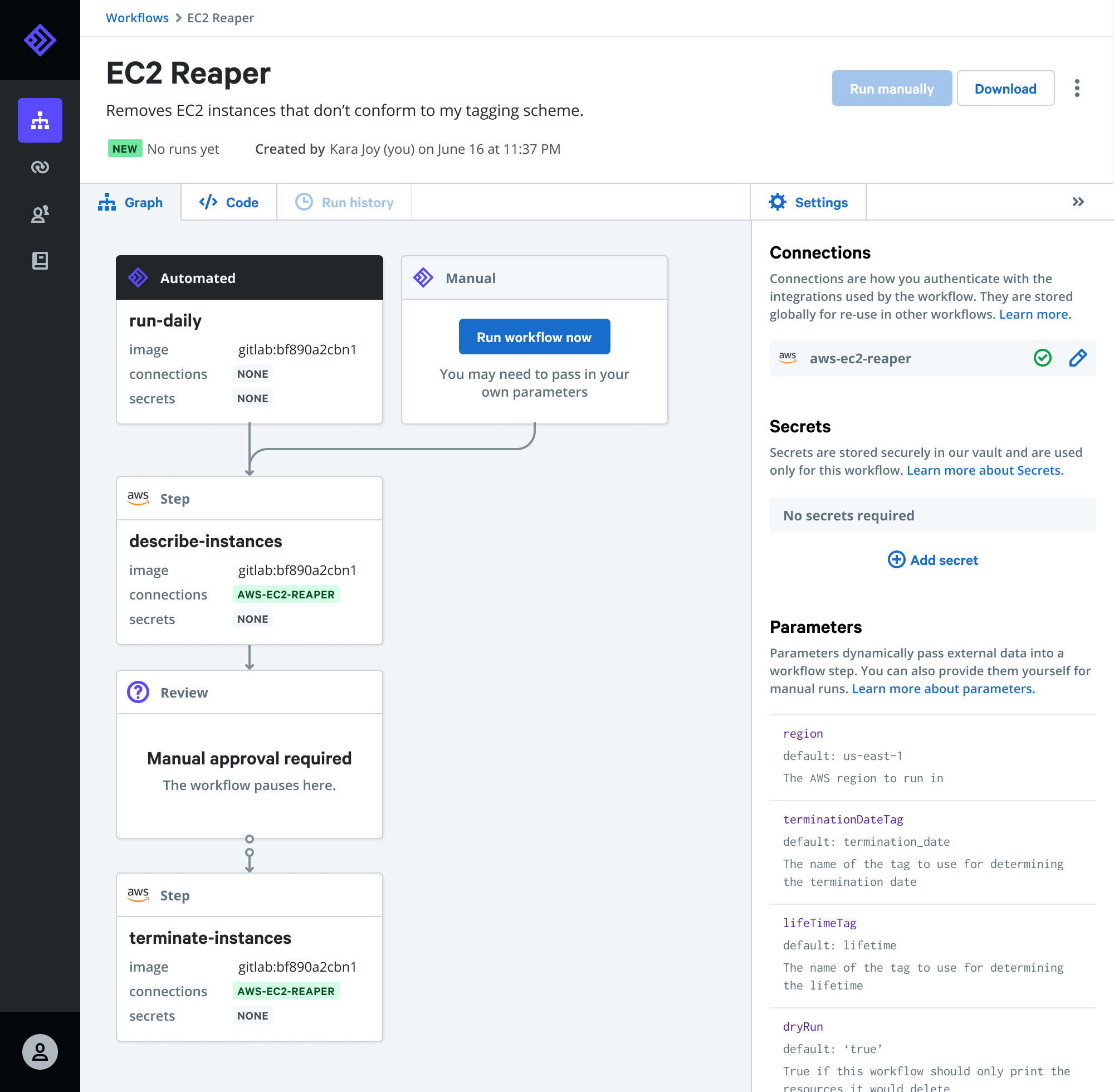
    Puppet today made available a public beta of Relay, an event-driven platform through which DevOps teams can automatically invoke pre-configured workflows.

    Company CTO Deepak Giridharagopal said Relay listens for DevOps events that can then trigger an automated workflow such as automatically deleting underutilized cloud resources, enforcing cybersecurity controls or remediating known issues.

    Relay connects to dozens of DevOps tools, cloud services and application programming interfaces (APIs) to automate workflows across a wide range of platforms, including PagerDuty, GitHub, Datadog, Jira, Terraform, Slack and others.

    Giridharagopal said Relay will also enable IT organizations to reuse workflows versus continually cobbling together one-off workflows for processes that address routine use cases that can be tackled using existing content.

    At the root of that issue is tool sprawl within DevOps environments. Each DevOps team tends to create their own workflows using their preferred tools, even though they may be replicating a workflow process that has already been addressed using other tools. Relay provides a means to reuse workflow across disparate DevOps tools, which Giridharagopal said should significantly increase overall DevOps productivity.

    The Relay platform is also designed to be extensible in that it also allows DevOps teams to create custom workflows that can then be reused by other members of DevOps teams, he added.

    Giridharagopal said with the rise of microservices it’s apparent workflow automation within DevOps environments is about to become a more pressing issue. As the number of individual services that need to be managed increases, the need to automate workflows across more complex IT environments becomes more critical. DevOps teams can’t effectively manage modern cloud-native applications relying on manual workflow processes, he said.

    Relay is part of a broader shift toward event-driven architectures, which are gaining increased traction within IT environments. While event-driven architectures have been around as a concept for decades, the emergence of platforms based on, for example, serverless computing frameworks are changing how IT resources are invoked. Via any number of APIs, it’s feasible to automate a wide range of IT functions using these types of platforms.

    Of course, the biggest challenge for many organizations has been building automated workflows that work consistently across multiple platforms. The level of process expertise required to build those workflows is not inconsequential. Puppet, via Relay, is providing pre-configured workflows to address some of the more common use cases in a DevOps environment. DevOps teams will still need to build their own custom workflows to address more complex use cases. However, platforms such as Relay promise to sharply reduce the time spent creating scripts and associated workflows to address routine tasks.

    In the meantime, interest in all forms of IT automation is on the rise in the wake of the economic downturn brought on by the COVID-19 pandemic. IT organizations are moving quickly to reduce the total cost of IT by automating as many processes as possible. In many cases, it’s not clear when some IT organizations might be able to add additional headcount anytime soon. Automation, as such, is now as much about survival as it is simply trying to increase productivity.

  • Pinpoint Dives Deeper into Software Delivery Analytics

    Pinpoint Dives Deeper into Software Delivery Analytics

    Pinpoint has extended its platform for managing software delivery to include the ability to analyze historical events to facility team reviews as well as more accurately predict where bottlenecks are likely to emerge based on the past performance of the DevOps team.

    Company CEO Jeff Haynie said the company’s namesake software is employed today mainly to identify existing software development bottlenecks. Pinpoint is now making greater use of machine learning algorithms and advanced analytics to surface additional insights and recommendations, he said.

    Designed to collect data from multiple tools and platforms spanning a DevOps process, Pinpoint automates most of the tedious tasks associated with collecting the metrics required to manage a distributed development team, Haynie said. With more developers working from home in the wake of the COVID-19 pandemic, that ability to collect metrics automatically also plays a key role in allowing application development managers to set more meaningful agendas for meetings that now occur via videoconference rather than in a physical conference room.

    In effect, the application development process can no longer be managed by simply walking around the office to find out what everyone is working on, he noted.

    The analytics should also serve to make events, otherwise known as ceremonies, more meaningful because they can include metrics detailing what was actually required to achieve a specific goal, he added.

    Ultimately, the goal for any DevOps team should not be to simply write more code faster. IT leaders need to make sure the right code is being delivered at the right time to ensure application development projects stay on track.

    Providers of various DevOps platforms have been investing in tools to manage the software delivery process. However, each of those offerings is optimized for a specific platform. The Pinpoint dashboard can be integrated with any platform, including Azure Team Foundation Server (TFS), GitLab, GitHub and Bitbucket. Assignments made in Pinpoint can also then be automatically reflected in these platforms as well as project management applications such as Jira, said Haynie.

    One of the biggest issues with software engineering is that, from a business perspective, it’s been a “black box” that has made it difficult to plan. The more dependent a business is on software, the more problematic that issue becomes. Many issues could be avoided if only there was more visibility into how software development resources are being applied when and where. In fact, as more organizations prioritize digital business transformation in the wake of the COVID-19 pandemic, the more critical it becomes to maximize use of limited software development resources.

    Of course, organizations have been trying to manage software development projects using spreadsheets and project management applications for decades. The tools are not likely to be replaced anytime soon simply because of the level of process inertia attached to them within most organizations. However, given the current state of application development, it should be apparent those tools are not enough to get the job done on time.

  • Participate in the Checkmarx 2020 Survey

    Participate in the Checkmarx 2020 Survey

    Checkmarx, the global leader in software security solutions for modern enterprise software development, and devopsy.kinsta.cloud are conducting a survey about the implementation of DevOps and related automation and security tools.

    The purpose of the survey is to help organizations evaluate their DevOps maturity, find out what are the most used DevOps tools and the most common challenges organizations are facing with their current DevSecOps model.

    The survey consists of 16 short multiple-choice questions. The results will depend on several factors including:

    • The organization’s progress on their DevOps adoption journey.
    • The role of the respondents in their organization and their responsibilities for DevOps transformation.
    • Automation and security tooling capabilities respondents are using for DevOps and cloud-native applications.
    • The respondents’ ability to overcome challenges and obstacles standing in the way to successfully implementing DevOps.

    We urge everyone in the DevOps space to participate in this survey. The more data we can gather, the more we’ll find out about the adoption of DevOps and AppSec tools. We’re counting on you to make this report even more valuable. Invite your friends and colleagues to contribute to the survey, too — the more the merrier.

    Click on this link to complete the survey.

    We will make an announcement when the report is ready. Stay tuned!

  • Rookout Extends Reach of Debugging Platform to On-Prem

    Rookout Extends Reach of Debugging Platform to On-Prem

    Rookout, a provider of a software-as-a-service (SaaS) platform designed to simplify the debugging of applications, has extended the reach of its tools into on-premises IT environments.

    Company CTO Liran Haimovitch said its new Data On-Prem capability extends the reach of a bytecode manipulation capability developed by Rookout to insert a snapshot capture of a specific line of code to an on-premises IT environment. This eliminates the need for DevOps teams to upload code and associated data to the Rookout platform manually.

    The Data On-Prem capability is made available via a software development kit (SDK) provided by Rookout, he said.

    Legacy approaches to debugging code are essentially broken because the processes employed to fix code are too cumbersome, said Haimovitch. Rookout is designed to collect full-stack data without requiring code to stop running or impact code execution. That approach allows developers to debug live code on the Rookout platform and then reinsert the code into their applications.

    Haimovitch said Rookout is making a case for transforming how application debugging is addressed within a DevOps process. Rather than relying on tools that need to be tightly integrated and maintained within a continuous integration/continuous deployment (CI/CD) pipeline, it will be easier for developers to debug live code on the Rookout platform, said Haimovitch.

    That approach will enable DevOps teams to go well beyond simple observability to embrace true understandability of how applications work down to individual lines of code, he added.

    Debugging applications has always been problematic. In an ideal world, developers would have a much better handle on what bugs need to be fixed earlier rather than later. By making it easier to debug live code, the number of issues that developers could address before an application is deployed in a production environment should increase. It may never be possible to address every issue before an application is deployed; however, the number of critical issues theoretically should decline. Many code issues go unaddressed simply because the effort required to debug that code is too great. Many developers too often put off fixing those issues until the next update usually because they are rushing to meet a delivery deadline.

    At the very least, developers should repeat the same mistakes less often as they work to debug live code.

    Regardless of how the debugging issue is addressed, issues within code in the age of microservices are starting to have a bigger impact. An issue within a line of code in a single microservice can have a cascading impact on all other elements of an application that depend on that microservice.

    Debugging application code is never going to be enjoyable. The challenge is finding a way to make the entire process less painful. There may come a day soon when machine and deep learning algorithms help automate much of the debugging process. In the meantime, DevOps teams might want to re-evaluate existing approaches to debugging code that clearly leave much to be desired.

  • AWS Aligns With Slack to Foster Dev Team Collaboration

    AWS Aligns With Slack to Foster Dev Team Collaboration

    Amazon Web Services (AWS) and Slack Technologies have formed an alliance through which they are moving to transform the way development teams collaborate.

    Under the terms of the multi-year agreement, Slack will migrate voice and video calls to the Amazon Chime real-time communications service.

    In addition, AWS and Slack are integrating Amazon AppFlow integration with Slack, which enables data to be transferred securely between Slack and AWS services such as Amazon Simple Storage Service (Amazon S3) and Amazon Redshift. The two companies are also promising to make it possible to transfer data bi-directionally between multiple Slack channels and AWS services in a single flow.

    AWS and Slack have also integrated the AWS Key Management Service with Slack Enterprise Key Management (EKM) to distribute and control cryptographic keys. That capability builds on an instance of EKM for Slack’s Workflow Builder automation tool that was released last month.

    Finally, the two companies are committing to make the AWS Chatbot service accessible from directly within Slack.

    Slack, which already makes extensive use of the AWS cloud, has emerged as a de facto collaboration tool within many organizations that have embraced best DevOps practices. Eron Kelly, head of product marketing for AWS, said this alliance will make it easier for development teams to employ a wide range of communications tools at scale.

    Many DevOps teams already rely on Slack Calls to launch video and voice calls whenever a subject being discussed using text messages requires a deeper level of interaction. As reliance on Slack Calls increases, the software development kit (SDK) for the AWS Chime service that Slack will invoke will ensure the quality of the video and voice calls, said Kelly.

    In many ways, DevOps processes revolve around a mix of asynchronous and synchronous communications. The challenge has been to find a way to enable DevOps teams to use those tools in a way that enhances rather than detracts from productivity. Managing multiple Slack communications channels can easily become overwhelming, especially if developers are working on multiple projects at the same time.

    Ideally, DevOps teams will eventually become more adept at determining, for example, what messages, such as status updates, are best delivered asynchronously versus urgent requests that need to be made via a communications medium such as Slack.

    In the meantime, the COVID-19 pandemic has clearly increased reliance on communications services delivered via the cloud. With most members of DevOps teams working from home, tools such as Slack have become a virtual substitute for walking over to the next cube in an office to resolve an issue. Once development teams return to the office, it will be interesting to see to what degree tools such as Slack have become the default means of communication, even with fellow employees who may be only a few feet away. In fact, such tools may play a critical role in helping organizations adhere to social distancing policies even after employees return to the office.

    As philosopher Marshall McLuhan once observed, the medium is the message. Today, however, those messages increasingly are being delivered within a stream of real-time communications that is becoming more challenging to manage.

  • Appian Infuses Low-Code Platform With AI

    Appian Infuses Low-Code Platform With AI

    Appian this week released an update to its low-code application development and deployment platform that employs artificial intelligence (AI) to recommend best next steps, including how to address cybersecurity issues.

    In addition, the latest version of Appian also makes it easier to incorporate robotic process automation (RPA) modules to automate rote tasks in addition to adding support for Google Cloud Document AI, which makes extracting documents for use within an application that employs RPA easier.

    Malcom Ross, vice president of product strategy for Appian, said the machine learning algorithms embedded with the Appian cloud platform make it possible to embrace best DevSecOps practices to accelerate the development of secure applications. With the rise of automated machine learning (autoML) it’s also becoming easier to automate the process of applying machine learning algorithms to application development and deployment, he said.

    While low-code platforms go a long way toward simplifying application-building, Ross said not enough attention is being paid to the deployment process. The goal is not necessarily to roll out more applications faster but to ensure whatever applications are deployed achieve a level of quality that eliminates the need to address cybersecurity issues post-deployment.

    Appian achieves that goal by running automated tests for an application, which now also include Appian Plug-ins to detect potential mismatches in plug-in versions or plug-ins that are missing.

    Ross said that when it comes to AI there always will be some trepidation. However, there are many manual tasks that many developers would just as soon see automated using AI. As AI becomes more widely relied on to drive consumer application experiences, the more acceptance there will be among IT teams to automate internal processes, he noted, adding cybersecurity is one area in which most developers will appreciate whatever help AI can provide.

    AI is not likely to replace the need for a DevOps team or cybersecurity professionals anytime soon. However, at a time when many organizations are massive amounts of economic pressure, it’s clear AI has a significant role to play in reducing the total cost of IT. Despite advances in IT automation, the cost of labor remains one of the most expensive elements of any IT budget. As such, IT organizations have a keen interest in making sure DevOps teams and cybersecurity teams are not wasting time on tasks that might be better handled by a machine.

    Obviously, the way AI systems and IT teams will interact with one another is still being defined. However, the one thing that is certain is platforms such as Appian will be making more recommendations about what needs to be done when. It may take some time for IT professionals to have confidence in those AI recommendations; however, in terms of mistakes that are routinely made it’s also apparent IT teams will soon be running out of excuses.

  • Logi Analytics Simplifies Dashboard Development

    Logi Analytics Simplifies Dashboard Development

    Logi Analytics launched a tool that promises to make it easier to design, build and embed interactive dashboards and data visualization within applications.

    Company CEO Steven Schneider said Logi Composer helps ease the task of creating data visualizations within the context of a DevOps workflow.

    Based on technology Logi Analytics gained via its acquisition of Zoomdata last year, Logi Composer enables DevOps teams to create interactive self-service dashboards for end users as part of a microservices architecture based on Docker containers, he said.

    To help achieve that goal, Logi Composer includes support for a range of Smart Data Connectors constructed as a set of microservices to access databases and other things.

    Schneider said as applications evolve developers increasingly are being required to embed business intelligence (BI) functionality within their application. However, he noted, most end users don’t want to move data into a separate BI application to analyze trends when they could be surfaced more easily within an application they are already using.

    The challenge has been finding a way to provide developers with a set of tools for building self-service visualizations in a modular fashion that makes them easier to build, maintain and update, he said.

    Of course, developers have been adding visualizations to applications for years. But most of those visualizations don’t let end users interrogate data—users now expect to be able to manipulate visualizations with a modern application at a much deeper level, said Schneider.

    A recent market study published by Dresner Advisory Services finds 62% of respondents consider self-service BI to be either “critical” or “very important.” A separate report published by Allied Market Research estimates the market for embedded analytics will generate revenues in excess of $60 billion by 2023.

    Data visualization is a critical aspect of every digital business transformation initiative. As organizations look to digitize more processes in the wake of the COVID-19 pandemic, the need for more robust data visualization capabilities within applications has become more acute. Most end users are unable to make sense of massive amounts of data without the aid of visualization tools.

    It’s unclear to what impact embedding BI capabilities within applications will have on standalone BI applications. There may always be analysts who want to pull data from multiple application sources to analyze trends. However, the bulk of users are likely to have their BI requirements met within an application that includes connectors to pull in external data when required. Applications that don’t include data visualization capabilities are not likely to be widely employed by users.

    Ultimately, embedded data visualization will reduce reliance on both spreadsheets and standalone BI applications. However, like most substantial changes to end user behavior, it may be a while before that cultural shift takes hold.

    In the meantime, DevOps teams should expect to see a lot more analytics functionality being embedded within applications. The challenge now is finding a way to streamline the development and deployment of those modules within the context of a larger application development project.

  • The Top 5 Challenges to Overcome with Heroku Logging

    The Top 5 Challenges to Overcome with Heroku Logging

    Heroku can be a very powerful tool for monitoring the massive amount of data generated by your applications, systems, APIs and add-ons.

    One thing you may have discovered with Heroku logging is that making sense of data within your log files can be time-consuming. When you’re running large numbers of applications which process tons of data each day, the sheer volume of data that appears in the logs can seem overwhelming.

    Managing Massive Log Output 

    Due to the sheer amount of data that is gathered, it’s important to find ways of making the process a little bit easier, limit information to what is useful and organize what you have into digestible pieces.

    Parsing with Drains

    Using Logplex and log drains can help you filter out large chunks of your logs. Syslog drains will help you move any system messages to another server for archiving purposes.  HTTPS drains can help you better take control of your system messaging for sending it to third-party apps for analysis. 

    By assigning clear indicators that identify the application, system or API that creates a log, these can be streamed into channels that can be better understood in relation to their given purposes. 

    Log Retention Period

    While we may think that more information is always good, there is a limit to the amount that we can process. Some log data becomes meaningless or redundant after a certain length of time. It is wise to set realistic log retention periods on data based on business needs.

    Limit Verbosity

    Don’t log everything. Turning on debugging is appropriate during development and if there is a specific problem that needs investigating, but in most cases, these shouldn’t be stored. 

    Complexity in Stream Patterns

    The challenge with large amounts of data is that there may be subtle differences between successful activity and erratic behavior. The details may be small, and essentially invisible to the naked eye unless examined carefully. 

    Use Regex for Identifying Patterns

    Through the use of log analytics tools, you can set these to pick up specified regex patterns to subtle changes or variations in your logs that can provide meaningful insights. 

    Different Log Data Needs

    You may have people with different needs who wish to make use of the information you gain in your Heroku logs. While you have data that is of interest to developers and QA engineers, there are other tech-savvy users who may wish to gain business intelligence (BI) from the massive output of data, to be able to identify key performance indicators (KPI).

    Analytics Tools

    Using intelligent add-on analytics applications can help by filtering and sorting information into usable chunks that can be understood by users in different roles. By accurately filtering, you can provide intelligent real-time alerts for a specific application or system behavior to those who may wish to make use of it. 

    Application Issue Forecasting

    One of the best potential uses of your detailed Heroku logs involves the opportunities to spot patterns of problems that have occurred in the past and use them to predict problems that may occur in the future.

    As an expert, you may be able to spot patterns in your logs, however, even the smartest and most attentive engineers will not be able to manually define every scenario worth detecting.

    Occasionally patterns will occur that are only detectable through the rote process of comparing and contrasting working behavior with non-working behavior. Often, the subtleties are too small for a human to be able to notice the difference.

    Machine Learning Assistance

    Naturally, utilizing ML-powered techniques can help catch the unknowns. By investing in ML, using some of the better libraries or choosing a Heroku logging add-on with these capabilities, you can monitor your applications and infrastructure with less effort. 

    Securing Sensitive Data

    With the rapid pace of CI/CD, a large amount of activity regularly flows through your pipelines from development into production. Throughout this process, it’s possible for sensitive data to start appearing in logs. While your teams may be diligent about keeping control over OAuth credentials, security keys, authentication tokens and more, nobody is perfect. Sensitive security credentials can accidentally make their way onto production servers. Sensitive customer data can also accidentally find its way into public logs if mistakes are made.

    Credential Detection and Security Alerts

    Logs can serve as a saving point for the identification of sensitive information. Using a parsing engine, these can be immediately redacted for compliant log management. By monitoring your log files for any patterns which could include secret keys or other potential security breaches, you’ll be able to continue ingesting critical log data without increasing business risk.

    Heroku Private Spaces

    With Heroku Enterprise, you can make use of Heroku Private Spaces which are an isolated network of private apps and data services, which will help you keep sensitive data separate from public interference. If you are handling a large amount of sensitive customer data, ensuring that any information gets filtered into these places will help you remain compliant with GDPR and other privacy-related regulations.   

    Conclusion

    Heroku can be a fantastic solution for monitoring the activity which goes on in your cloud clusters.  However, unless you have solid analytical tools in place, you may find yourself spending a lot of time wondering how to make use of this sea of data that has been collected. Consider using an add-on as an analytic layer to help spot patterns, organize data better and create smart alerts to make sure your operations continue to run smoothly.

  • Atlassian Unfurls Bevy of DevOps Updates

    Atlassian Unfurls Bevy of DevOps Updates

    Atlassian today made a dozen updates to its DevOps portfolio as part of an effort to better unify workflows spanning disparate tools.

    Suzie Prince, head of product for Bitbucket at Atlassian, said the latest updates are intended to enable DevOps teams to streamline workflows without requiring everyone in the organization to standardize on the same set of tools.

    Updates to the Atlassian DevOps portfolio include DevOps Automation Triggers, which makes it possible to create automation to keep development activities synchronized, such as reassigning issues surfaced in the Jira project management application from Atlassian to code review or sending a message to a Slack channel.

    Atlassian DevOps

    The Bitbucket repository from Atlassian has also been updated to make it easier and faster to review code changes after a pull request. New features such as a consolidated list of tasks, integrated Jira issue creation and activity feed filters make it possible for developers to complete their code reviews faster and juggle multiple pull requests at once, said Prince. A Your Work dashboard in Bitbucket Cloud has also been expanded to include assigned Jira issues.

    The Atlassian VS Code integration is also being made available to make it easier for developers who use the Microsoft integrated development environment to more easily track and visualize Bitbucket Pipelines.

    A Code Insights in Bitbucket Cloud has also been added to bring scanning, testing and analysis tools into the code review process, including Mabl for test automation and Sentry for automated monitoring. Bitbucket is also now providing integration with Snyk scanning tools to make it easier to discover vulnerabilities.

    Available in a preview mode is an automated change management capability across Jira Service Desk Cloud and Bitbucket Pipelines that can be used to pause CI/CD processes, create a change request in Jira Service Desk and trigger deployment once it is approved.

    A Risk Assessment Engine in Jira Service Desk Cloud also allows IT teams to score the risk of a change and automatically approve and deploy low-risk changes. A Change Management View has also been added to Jira Service Desk Cloud to streamline approvals for high-risk changes by pulling all of the relevant information together in traceable change requests.

    Atlassian has also tightened integration between its Opsgenie incident management software and Bitbucket Cloud to centralize alerts and filters. Via an Incident Investigation Dashboard, members of a DevOps team can look at the deployment that happened right before the incident, add it as a potential cause, and contact the developer who made the change if it needs to be rolled back.

    The company has also extended integrations with Slack and Statuspage to facilitate both members of DevOps teams and external stakeholders.

    Finally, Atlassian is making available a resources hub to make it easier to share DevOps best practices, templates and guides.

    Prince said it’s not ever going to be feasible for most organizations to standardize on one set of DevOps tools. The goal should be to enable organizations to construct DevOps processes in ways that allow developers to employ whatever tool is their favorite at the moment. Only then will organizations get developers to buy into a DevOps process that doesn’t necessarily change the way they are most comfortable working, she noted.

    The challenge, of course, is often getting IT leaders to be as equally comfortable with what, from their perspective, might be an experiment in controlled chaos.