Category: DevOps Toolbox

  • EU Data Privacy: Try Again | SkyPilot: Choose Cheapest Cloud | WFH: Better Meetings

    EU Data Privacy: Try Again | SkyPilot: Choose Cheapest Cloud | WFH: Better Meetings

    Welcome to The Long View—where we peruse the news of the week and strip it to the essentials. Let’s work out what really matters.

    This week: EU-U.S. Data Privacy Framework reemerges, Berkeley brings cloud selection box, and proof that remote work is good work. (more…)

  • New Relic Extends Observability Reach to More DevOps Platforms

    New Relic Extends Observability Reach to More DevOps Platforms

    New Relic today expanded its ecosystem by adding integrations between its observability platform and a wide variety of DevOps and cybersecurity tools. The New Relic observability platform now integrates with offerings from Atlassian, Amazon Web Services (AWS), CircleCI, Confluent, GitHub, JFrog, Lacework and Snyk and the open source Jenkins continuous integration/continuous delivery (CI/CD) platform.

    Peter Pezaris, senior vice president for strategy and experience at New Relic, said the goal is to make it simple to share analytics based on telemetry data collected from IT operations environments with the tools organizations rely on to build and deploy applications.

    In total, there are now more than 500 integrations with the New Relic observability platform, he noted.

    Only 27% of respondents to a recent New Relic survey reported that they have achieved full-stack observability and only 5% claimed they have a mature observability practice in place. A third (33%) of respondents also said they still primarily detect outages manually or based on complaints from end users. More than half (52%) of respondents said they experienced high-business-impact outages once per week or more and 29% said they take more than an hour to resolve those outages.

    On the plus side, nearly three-quarters (72%) of respondents expected to maintain or increase their observability budgets next year, with more than half (52%) expecting observability budgets to increase over the next year.

    Observability, in one form or another, has always been a tenet of any DevOps practice. For the most part, the best that could be achieved until recently was continuous monitoring of a set of pre-defined metrics. With the arrival of observability platforms, it’s becoming much simpler to not only monitor metrics but also launch queries that surface issues long before an IT service can be disrupted.

    An observability platform achieves that goal by making it possible to query logs, metrics and distributed traces in a way that surfaces patterns that have not been pre-defined. In effect, an observability platform makes it simpler to debug application environments where the number of dependencies that exist between services are becoming too complex to track or decipher manually.

    Of course, those applications will need to be instrumented using agent software capable of generating the data observability platforms require. Fortunately, open source projects such as OpenTelemetry are helping to drive down the total cost of instrumentation by making agent software more accessible to a wider range of application developers.

    It’s not clear how quickly IT teams will be embracing observability platforms, but there is now a clear opportunity to narrow the divide between IT operations teams and application developers, noted Pezaris. As each DevOps platform makes it easier to collect data via application programming interfaces (APIs), richer telemetry data can be collected, he added.

    In the meantime, as application environments continue to become more complex in the cloud-native era, most DevOps teams will need additional tools. Existing legacy monitoring tools don’t make it easy to discover, for example, which microservice might be adversely impacting the overall performance of an application because calls are being rerouted. The frustrating thing, as always, is that it can take days or weeks to pinpoint an issue that might take only a few minutes to fix.

  • Get Comfortable with Shifting Right to Improve Resiliency

    Get Comfortable with Shifting Right to Improve Resiliency

    The operations team receives a page at 2:00 a.m. Something isn’t working correctly. Do they know how to fix it? Perhaps more importantly, do they know whether it matters to customers or how it impacts the business? There are different techniques that companies implement to maximize the quality of their software. We talk about shifting left or right, chaos engineering and others. While they each have their own goals to improve quality, there’s an underlying common goal as well: All three techniques increase your team’s knowledge of the system and their ability to resolve problems quickly.

    Here, we’ll walk through the software life cycle and discuss the common challenges to software quality, running complex systems and managing dependencies between teams. The common thread is a proper observability strategy which can help software quality, hand-offs between different teams and resolve problems quickly by ensuring whole-system resiliency from design to maintenance.

    Techniques for Improving Quality

    Shift left is a concept that has attracted much attention recently. The practice revolves around the idea that detecting and correcting problems sooner minimizes their impact. As the thinking goes, they’re easier to fix, they wind up costing less and there are fewer ongoing issues with bad code.

    The rise of DevOps and DevSecOps has propelled the popularity of shift left. Yet, there’s a fact that development teams often miss: no matter how early an organization spots errors, problems will inevitably remain. Early testing can’t catch everything. As a result, some organizations have begun to rebel and move to a shift-right framework. It normalizes errors and aims to better resolve issues across the development process, including post-production.

    Shift right is the perhaps less-extreme cousin to its rebellious relative, chaos engineering. With chaos engineering, team members cause problems on purpose to keep everyone on their toes and test the limits of the system. They shut down servers, disconnect wires, delete files, etc. The goal is to confirm system resilience–from a user perspective, there should be no impact even with all of this chaos. A resilient system means that teams can fix failed components at their leisure during the day. With a resilient system, critical failures are less likely to happen and it becomes second nature to fix them when the dreaded 2:00 a.m. page does occur. Unlike chaos engineering, shift right doesn’t explicitly break things–it just makes the assumption that broken things will exist so teams need to be ready to handle them.

    Both concepts (and yes, even chaos engineering) are valid—but each company needs to carefully analyze which is right for them. One variable to consider is the complexity of the system you’re building. Working on a rocket launch or a surgery robot? Probably should shift left as much as possible. Changing the color of a button? Maybe it’s not the end of the world to verify the fix in production. For most of us, projects fall somewhere between these two extremes–so sometimes shifting left is necessary, and other times shifting right is pragmatic. A careful analysis of the risks should be performed to determine what kind of testing is needed.

    Although teams tend to be pretty good at analyzing the complexity of their software and making development process decisions, they often forget the complexity of other companies’ code which they depend on. Even a simple web application deployed today has tons of dependencies: The server it’s running on, the local ISPs, transit ISPs, load balancer, DNS provider, TLS certificate, CDN and browser, just to name a few! After analyzing the complexities of all of the dependencies across the internet, it becomes clear that finding every possible issue that might impact their application is a daunting task.

    The goal, again, is to find any issues before they reach production. Or if they reach production, fix them before they impact customers. Or if they impact customers, fix them as soon as possible after that. To do any of these things quickly, the level of observability of the overall system is paramount. With simple systems—or even complex systems that are entirely under one company’s control—tools such as application performance monitoring (APM) are common. But when the scope of the system is as big as the internet, internet performance monitoring (IPM) tools are necessary instead.

    With both APM and IPM tools, the goal is to know as much about the system as possible – enabling teams to identify problems quickly, pinpoint the root cause, and fix it. When an organization is equipped to monitor development and operational processes effectively from application to delivery, there’s a shift toward higher quality code, fewer errors, improved security and lower costs for the enterprise. There are also fewer disruptions and distractions for engineers, DevOps teams and others.

    Dealing With Disconnects

    Whether shift left or shift right is used, there will be problems that enter production. There is an invisible wall in many organizations–where engineering teams “throw code over the wall” to the team which is now responsible for running it. In some companies, this is the operations team; in others, it’s site reliability engineering or production engineering–the common trend is that in most companies, it’s not the same team who created the software.

    These operations teams often lack the nuanced information they need to resolve production issues. They might spend hours or even days attempting to track down the source of the problem. There’s often finger-pointing between different teams who created or own different portions of the system. Things can quickly devolve into chaos—and tempers can fray. After all, these kinds of problems always happen at 2:00 a.m., right?

    That’s where end-to-end observability enters the picture. Imagine a framework with proof that the development team has performed sufficient knowledge transfer to the operations team. That the operations team has asked all of the relevant questions about running and maintaining the application. Using the right tools, engineering and operations teams need to monitor every aspect and every component of the system. Creating this monitoring strategy means that everyone involved also builds an understanding of the system–everyone is on the same page. All of a sudden, there is a common language to discuss problems, and teams operating the software in production can take debugging a lot further before they need to ask for help.

    Ultimately, shifting left or shifting right is a personal choice for every organization. Even if every possible test case is executed before deployment to production though, issues will happen–so take the opportunity to implement a robust system-level monitoring strategy that can be used to solve technical questions during that 2:00 a.m. call.

  • Shift Left Testing in Microservices Environments

    Shift Left Testing in Microservices Environments

    By now, it’s common knowledge that the later a bug is detected in the software development life cycle (SDLC), the longer it takes and the more expensive it is to fix that bug.

    In 2017, the Ponemon Institute found that it cost around $80 on average to fix a defect detected early in the SDLC and around $7,600 to fix the same defect if it was detected in the production stage.

    Relative Cost of Fixing a Defect Based on Development Stage

    Design

    Implementation

    Testing

    Maintenance

    Cost of Fixing Defects

    1x

    6.5x

    15x

    100x

    While these numbers can be debated, it’s clear that early detection of defects can save organizations significant time and money while enabling those organizations to deliver higher quality software more rapidly. For these reasons, many organizations are implementing shift left testing practices, including in microservices environments.

    Shift left is a set of practices intended to find and prevent defects early in the software delivery process instead of during the testing and maintenance stages. The idea behind shift left testing is to improve software quality by making actionable test signals and feedback available as early in the SDLC as possible.

    Here, we’ll highlight how shift left testing, in combination with test automation, can better enable both innovation and fast delivery of high-quality software. We’ll also address some of the challenges involved in implementing shift left testing in microservices environments, as well as introduce a valuable strategy for successful microservices implementation.

    Shift Left Testing Benefits

    The waterfall model of development involved the explicit passing of responsibilities between highly specialized design, development, QA, and release teams. It also involved lengthy feedback loops.

    Scrum and agile methodologies made the entire SDLC more flexible and nimble by introducing sprints and allowing more frequent iterative development and delivery. Further, DevOps and DevSecOps focus on removing the silos between development, operations, and security through tooling and automation. As a result, the time to market and quality have improved dramatically. Adding shift left testing into the mix better positions teams to handle the broad range of responsibilities from the design stage through the maintenance stage as effectively as possible.

    Shift left testing focuses on prevention rather than detection. Shift left benefits include the following:

    • Increase efficiency by eliminating bugs earlier in the SDLC.
    • Reduce human errors and associated costs.
    • Increase delivery speed and reduce the time between releases.
    • Improve the quality of software.
    • Gain a competitive advantage.

    It may be helpful to think of shift left testing like this: Test early and in parallel with development, instead of the traditional waterfall model of development followed by QA testing. 

    Shift Left Testing Challenges in a Microservices Environment

    By structuring an application as a collection of loosely coupled, independently deployable services, a microservices architecture enables frequent delivery of large, complex applications.

    While shift left testing practices bring many benefits, shift left testing also comes with three challenges that organizations must address when implementing it across a decentralized, microservices-based stack:

    1. Building and managing each microservice separately reduces development time. However, implementing shift left testing at the microservices level means shift left practices must be applied to each individual microservice.
    2. Microservices developers can choose the programming language and service dependencies best suited to their development needs. However, as a result, shift left testing practices need to be implemented and managed across different programming languages and dependencies.
    3. To ensure that microservices function as expected, teams usually run integration tests, end-to-end tests, and performance tests that assess functionality in the context of the larger stack. Shift left testing is especially challenging in the microservices context because of the complexity of testing against the stack.

    Microservices, each with their own SDLC pipeline

    Pipeline Scaling Considerations

    Several classes of automated shift left tests can be integrated into the DevOps pipeline, including unit tests, integration tests, performance tests, and security tests. Different microservices will have different testing needs.

    The key is to apply shift left testing practices to each microservice while maintaining the flexibility and decentralization of those microservices. The ideal workflow system and DevOps pipeline implementation must simplify pipeline creation while enabling development teams to manage the pipeline and requiring minimal input from DevOps and platform teams. In other words, shift left practices must be tailored to the specific needs of the microservice in question to make the testing process scalable and easy for development teams to manage on a continuous basis.

    As just one example, GitHub Actions and similar CI/CD pipeline tools enable development teams to use GitOps-based practices to configure, manage, and administer the entire pipeline for their microservice while leaving infrastructure testing and testing that relies on or affects other parts of the system to DevOps teams.

    Test Environment Considerations

    Test environments are environments where unit tests, integration tests, performance tests and security tests can be run on an isolated collection of microservices and configurations. The nature and quality of these test environments directly correlate with the effectiveness of shift left testing.

    A cloned production or staging environment can be used for testing when the number of microservices is low and overall complexity is relatively low. However, once an organization reaches a threshold number of microservices or a threshold level of complexity, runaway infrastructure costs and operational burdens make such environments untenable.

    In response, some organizations rely upon smoke testing (minimal viable stability testing) and mock-based integration testing early in the SDLC. While such tests can prove useful in the near term, deferring essential testing to a later stage in the SDLC often introduces test signal and validity problems in the staging environment and can lead to delivery delays and serious issues with software quality.

    So how can shift left testing be used successfully in a microservices environment? The solution involves the use of scalable, ephemeral test environments.

    Ephemeral Shift Left Testing Environments

    The availability of high-quality test environments is a common bottleneck for organizations looking to scale shift left testing practices. Using a few high-fidelity staging environments for signal testing can slow the release process. More to the point, it tends to slow down the entire SDLC and increase stack instability over time.

    Ephemeral test environments offer a fundamentally different approach. These sandbox environments use isolated environments that enable users to test independently without impacting other users. In particular, they enable isolation while sharing resources (e.g., external cloud dependencies and hosted databases) using application-level multitenancy instead of the resource duplication approach in traditional environments.

    The idea is that microservice test environments can be used to test changes against a much larger stack of services. Because multiple tests can be conducted at the same time, test coverage and resource efficiency vastly increase.

    High-quality sandbox environments can spin up in seconds and scale to tens of thousands of microservices. In fact, each pull request, branch, or commit can have its own test environment without significantly increasing infrastructure and operational costs. Any change, no matter how small, can be tested in isolation to ensure performance and stability against the entire stack.

    Shift Left Testing Solutions for Microservices

    A microservices-based organization looking to scale shift left testing across the organization must first address several challenges. Considerations include the need to apply testing practices to separate microservices, the need to accommodate different programming languages and service dependencies and the need to test against the stack.

    The right tooling and automation are needed before shift left testing practices are scaled across the organization. In addition, a cultural shift may be required in order to help developers understand the ways in which shift left testing can expedite and improve the core functionality that they are developing.

    To apply valuable shift left testing practices in a microservices environment, organizations should consider using ephemeral sandbox environments. Using the right set of tools in a sandbox environment can enable development teams to test microservices throughout the SDLC. In doing so, organizations can ensure those services follow security best practices and perform exactly as intended, both independently and against the stack–all while reducing costs, speeding time to market and improving software quality and user satisfaction.

  • 5 Tips to Consider When Introducing Infrastructure Automation

    5 Tips to Consider When Introducing Infrastructure Automation

    Although we discuss infrastructure automation often, the fact is that a lot of manual processes still exist throughout DevOps. Whether it’s rewriting scripts to spin up new servers, updating cloud-native policies or configuring computing environments, manual toil is an all-too-common reality. To make matters worse, engineers commonly create lengthy scripts that work in isolation but are too bulky to be reusable by other developers working with slightly different constraints.

    More infrastructure automation is the key to increasing deployment agility, but setting aside time to automate your daily workflow can easily take a back burner, especially when developers are already behind on their long list of to-dos. So, for the time-pressed, where should they start? What exactly should be automated? And how can we effectively reuse and share automation to help other areas of the business?

    I recently connected with John Laffey, technical product marketing director, Puppet. Laffey has thirty years’ worth of tech support and engineering operations knowledge under his belt and was “doing DevOps before it was called DevOps.” He shared with me five helpful tips to think about when introducing more infrastructure automation into your workflows. Below, we’ll expand on each of those points and consider other best practices around automation as the industry moves toward platform engineering.

    1. Automate Things That Interrupt Your Day

    First, Laffey recommended starting with the things that are easy to fix. These are the tedious actions that interrupt your day. Perhaps a disk runs out of space and troubleshooting takes 15 or 20 minutes. Minor interruptions like this might seem like part of the job, but they definitely add up over time.

    2. Automate Things You Can Reuse

    Secondly, try not to automate things for an ultra-specific purpose, said Laffey. Instead, focus on building automation that is more generic and can have more value to others. This follows the DevOps mantra of teamwork and collaboration. One-off automation that is too verbose or specific to a certain condition won’t apply well across groups.

    3. Automate Stuff That Doesn’t Change Much

    Next, automate the infrastructure that isn’t prone to change. These are fairly reliable things that you’re sure will be part of your systems for the foreseeable future. Because if a component does end up having to be updated often, supporting the automation could be more hassle than it’s worth. “Don’t trade fixing problems for fixing automation,” said Laffey.

    4. Start Small

    Here’s some sage advice applicable to most new projects with a big scope—start small. Laffey recommended starting by automating the easy stuff that has proven immediate value. These tasks should be modular and do one specific thing, like rebooting a machine or draining a log file. “Automate things in chunks that you can put into a toolchain.”

    Too often, teams try to automate everything all at once. But by taking big bites, you can quickly get off track and potentially add to technical debt. If you keep things modular, you’ll find it easier to change and reuse this automation.

    5. Share and Be Open

    This last tidbit is more of a cultural change—don’t code so that you’re the only one who knows about it! Sometimes, engineers don’t necessarily want the world to know about the automation they create. They might worry about automating their job away. Yet, Laffey said, these worries are misplaced. There will always be more work to do, and automating toil away can free up time to help you focus on more exciting projects.

    So, Laffey encouraged DevOps and SREs to be open about the automation they create. Ensure they’re well documented and stored in a centralized repository to allow other departments to reuse your code. This can avoid the duplication of having five different versions of the same script written in different languages within the same organization!

    Next Step: Move From Scripts to Industry-Standard Tooling

    It can be challenging to argue for investing time and energy into infrastructure automation, especially when engineers are hard-pressed to keep the lights on. Yet, small gains in automation can make huge waves in the long term.

    Eventually, said Laffey, you’ll want to move away from using scripts within your toolchain, which he describes as a low-end DevOps maturity. But as you update your process, you’ll want to replace these scripts with more modern industry-standard tools like Terraform or Puppet’s DSL. He recommended slowly revamping scripts in a toolchain as you update them one by one. “Start where you are and avoid a monolithic approach.”

    In essence, platform engineering, Laffey explained, is wrapping DevOps principles at a higher level to make them more efficient. And we will likely see an increased emphasis on infrastructure automation as platform engineering gains more mindshare. “It’s going to become a necessity.”

  • Introduction to Flutter

    Introduction to Flutter

    Flutter is a development tool for creating cross-platform applications. Flutter was created by Google to help developers create frontends that run on almost any operating system, including Android, iOS, Mac, Linux, Windows desktop and the web.

    Ready to check it out? You’ll first need to install the Flutter software development kit (SDK).

    Installing Flutter

    To use the Flutter SDK, you need to have git installed on your computer; here are some tips for installing it based on your OS:

    • Windows: Download it here.
    • Mac: Although you can install Git manually, your best bet is to simply install Xcode, which includes Git; you’ll need XCode later.
    • Linux: In addition to Git, you’ll need several other tools listed here. If you’re using Ubuntu or Debian, you can get them all with this single command: sudo apt install git zip unzip curl xz-utils libglu1-mesa
    • ChromeOS: This option requires you to enable Linux on ChromeOS. Then you’ll want to install the same packages that I just listed for Linux.

    After the above prerequisites are met, you can download Flutter by going to this link.

    You can either download the SDK for your operating system or you can obtain it from GitHub. Only attempt the GitHub option if you’re familiar with cloning Git repositories.

    In this example, I’m going to download the Windows version by clicking the Windows link, which brings up the screen shown below. For Windows in particular, pay close attention to the warnings about where to install the SDK. (I like to have a folder called c:\dev where I put all my dev work, and under that a folder called c:\dev\tools. So the latter is the folder where I’ll put the SDK.)
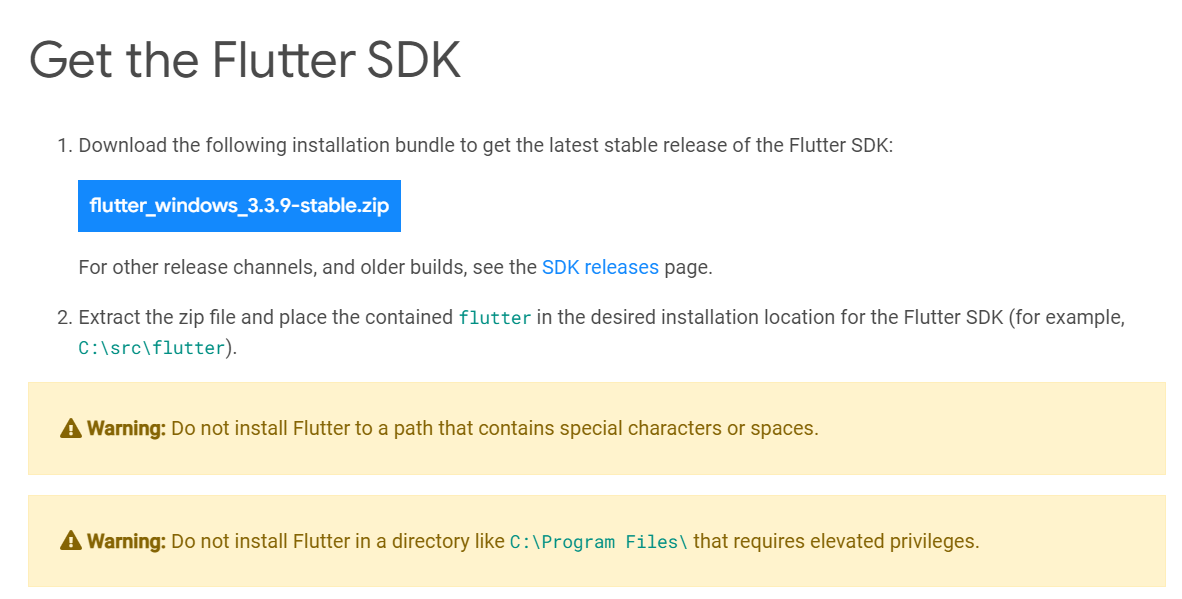
    After the file is downloaded, extract it to a location such as c:\dev\tools.

    For Windows, Linux and ChromeOS, the next step is to update your path so that the system can find the tools found in the Flutter folder’s bin folder. (Mac users don’t need to do this step.) The Flutter installation docs are helpful here:

    • Windows: Make sure you use the full path, starting with the name of the folder you extracted the zip file into. For example, on my machine, that would be C:\dev\tools\flutter\bin, as shown in the image below. Then after you update the path, you’ll need to close and reopen your command-line shell (either Windows CMD or Powershell). For detailed instructions, go here.
    • Linux: Follow the instructions here.
    • ChromeOS: Follow the instructions here.
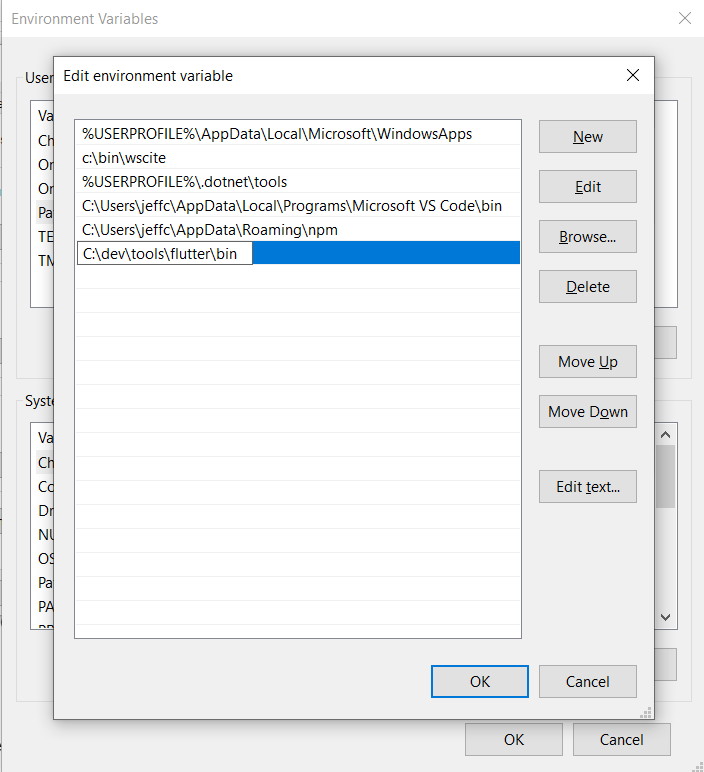
    Now test out the Flutter command to make sure it works by going to a folder outside of the Flutter’s bin folder and typing:

    flutter --version

    You should see a message such as this:

    Flutter 3.3.9 • channel stable • https://github.com/flutter/flutter.git
    Framework • revision b8f7f1f986 (2 weeks ago) • 2022-11-23 06:43:51 +0900
    Engine • revision 8f2221fbef
    Tools • Dart 2.18.5 • DevTools 2.15.0

    This will tell you if the installation is possibly ready. If instead, you see a message that the command is not found, double-check that you have your path correct; that’s typically the most likely cause for that error.

    Now, why did I say ‘possibly’? Because Flutter itself can tell you if there are any other tools you’ll need by running this command:

    flutter doctor

    Here’s an example of what I saw when I ran it:
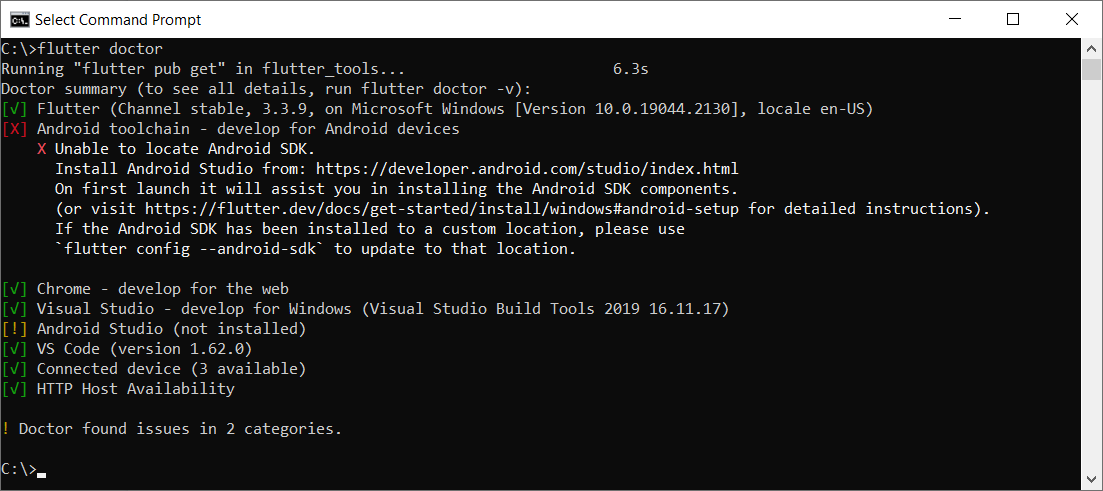
    This tells me I have some of the necessary tools installed, but not all:

    • Flutter itself, as well as all the tools that came with it
    • Android toolchain: I don’t have this one.
    • Chrome browser: You’ll need this for debugging web versions of your app.
    • Visual Studio: This is the full IDE from Microsoft; you’ll need it if you want to develop your app for Windows Desktop. You can use the free Community version. For that, go here and choose the free Community version.
    • Android Studio: I don’t have this one.
    • VS Code: This refers to Visual Studio Code, the free editor/IDE from Microsoft, which is not the same as Visual Studio. It’s a separate tool and neither is dependent on the other. Before you install it, read my notes below.

    Before installing anything else, you’ll want to decide what platforms you’ll be targeting. If you’re going to include Android in that list, you’ll need to download and install both the Android toolchain and Android Studio. In that case, you’ll be developing from within Android Studio.

    But if you’re not targeting Android, you do not need to install the Android toolchain or Android Studio. The official installation docs are a little vague on this point, so I tested it out myself. I was able to target Windows desktop and a browser without needing to install any of the Android tools.

    If you’re not targeting Android, then you’ll want to install VS Code to do your development from within. You can find it here.

    Building an App

    For this example, I’ll continue with Windows, and I’ll build a quick Windows desktop app.

    In a command shell, I’ll first create a folder in my c:\dev to hold my projects by typing these commands:

    cd c:\dev
    md projects
    cd projects

    I’m going to make a Flutter app called flutter_demo by typing the following. (Make sure you’re in the projects folder before typing this):

    flutter create flutter_demo

    Note that the name for your project must be in all lowercase letters, and it can contain underscores. So, for example, using uppercase letters results in an error:

    If I type this:

    flutter create FlutterDemo

    I see this:

    "FlutterDemo" is not a valid Dart package name.
    See https://dart.dev/tools/pub/pubspec#name for more information.

    When done correctly, you’ll see output such as this:

    Creating project flutter_demo...
    Running "flutter pub get" in flutter_demo... 1,186ms
    Wrote 127 files.
    All done!
    In order to run your application, type:
    $ cd flutter_demo
    $ flutter run
    Your application code is in flutter_demo\lib\main.dart.

    Before we open the code, let’s run it! First, go into the new folder flutter created:

    cd flutter_demo

    Then run it by typing:

    flutter run

    This command runs whatever Flutter application is in the current folder. In this case, that’s the app you just created.

    When you start it, it will ask for some choices. Because I don’t have Android or an emulator installed, I only see options for Windows Desktop and Chrome and Edge. (Edge is based on Chrome, so it works, as well.) Here’s what I see:

    Multiple devices found:
    Windows (desktop) • windows • windows-x64 • Microsoft Windows [Version 10.0.19044.2130]
    Chrome (web) • chrome • web-javascript • Google Chrome 107.0.5304.107
    Edge (web) • edge • web-javascript • Microsoft Edge 106.0.1370.37
    [1]: Windows (windows)
    [2]: Chrome (chrome)
    [3]: Edge (edge)
    Please choose one (To quit, press "q/Q"):

    Press the option for Windows. This will build the Windows desktop version (which might take a minute or so) and launch it, resulting in a window that looks like this:
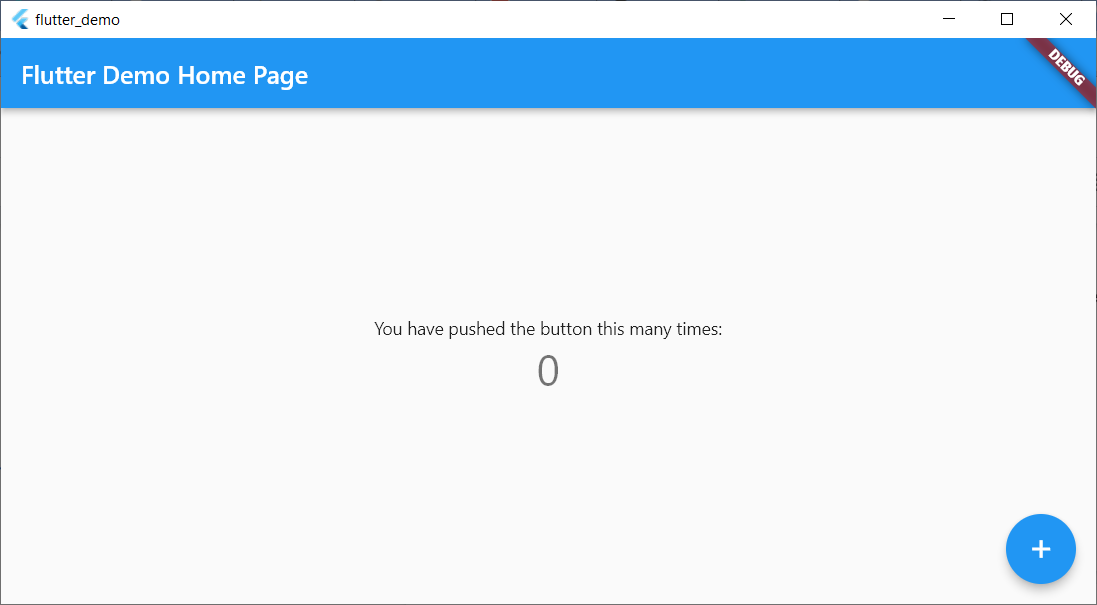
    This isn’t much, but there’s a sample in it where you can click the plus sign and see the number in the middle increment. That’s all.

    Now let’s try running the same app in Chrome. First, close the app window and press Arrow-Up or re-type:

    flutter run

    This time, choose the option for Chrome.

    Now Flutter builds a web-ready version that runs on Chrome, starts a local web server to host the app, launches Chrome and pushes a URL to Chrome to load the app from the local web server. Here’s the browser window:
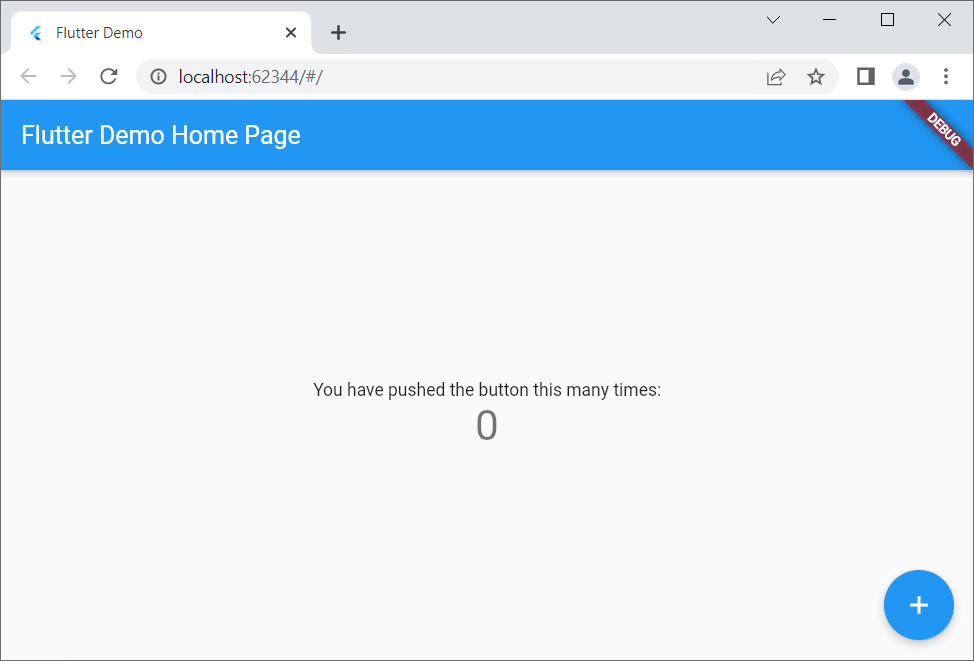
    Notice that it looks virtually identical to the desktop version but is inside a browser this time.

    If you’re a web developer, I encourage you to right-click inside the browser app and select View Page Source. Notice there’s a line that loads a file called flutter.js, and there’s some JavaScript code that responds to the window’s Load event that calls into Flutter. You won’t be writing JavaScript code, but it’s always good to have at least some understanding of what your front end is doing!

    Adding to the Code

    Now let’s add just a bit to the sample code. For this, I’ll use VS Code. From within the app’s main folder (in my case, c:\dev\projects\flutter_demo) type

    code .

    (Make sure to include the dot after the word code; otherwise, VS Code will open in whatever folder it last ran.)

    Before delving into the code, you’ll want to install a special Flutter extension for VS Code. Click the gear in the lower left and click Extensions. In the box labeled Search Extensions in Marketplace, type flutter. (Don’t click Enter; just pause a moment and the search will begin.) Find the one called Flutter that has over five million downloads, as shown here:
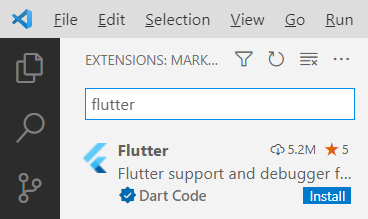
    Click the Install button. The button will show “installing” while the extension is being downloaded and installed.

    After the extension is installed, VS Code will ask whether you want to use it with your current project. You might also see a message regarding updating the Dart extension, which came alongside Flutter. Click Yes for the Flutter one; click Get packages for the Dart one. (You can ignore the message about opening the settings file.)

    Now you have all several flutter tools available VS Code’s Extensions Palette. Press Ctrl+Shift+P to open the palette. Type flutter and you’ll see the full list.

    For now, however, let’s first just run the app. Click the Run menu, and then click Run Without Debugging. You’ll see the Windows app open again.

    Now go back to VS Code. Even if you’re not familiar with Dart, if you know other “curly bracket” languages such as C++, C#, Java, JavaScript and so on, you’ll probably be able to read the code. There’s a function called main() that starts the app, providing a class called MyApp. That class is farther down in the code. Look closely at all the comments. Read them carefully and learn from them. The MyApp class contains a build function that returns an object with a “home” member; that member is an instance of MyHomePage, which is also a class in this file. Continue studying that code, and you’ll see mentions of widgets and layouts. Look closely at the function called _incrementCounter and how it’s triggered later on through an onPressed event.

    Conclusion

    Play around with the code; try changing some of the string literals, for example, until you’re quite familiar with it. Then dive into the first demo provided by the Flutter folks at Google, which you can find here. Soon you’ll be up and running with your own Flutter app that you can run on any device!

  • AWS re:Invent — Top 4 Things We Learned This Week

    AWS re:Invent — Top 4 Things We Learned This Week

    Welcome to The Long View—where we peruse the news of the week and strip it to the essentials. Let’s work out what really matters.

    This week, four things that caught my eye from Amazon Web Services’ re:Invent 2022 conference: SnapStart turbocharges Lambda, Graviton3E ARM HPC SoC, AWS continues hiring, and AWS’s origin story. (more…)

  • GraphQL Vulnerability Analysis: The Top Threats

    GraphQL Vulnerability Analysis: The Top Threats

    Publicly available vulnerability data can be a goldmine for insights into how DevOps and DevSecOps teams can prioritize threats and improve security across the pipeline. With this in mind, Inigo recently performed a deep-dive analysis of known vulnerabilities affecting GraphQL components—including GraphQL clients such as Relay and GraphQL servers such as Apollo, Graphene, Ariadne, GitLab Enterprise, Magento and others. Our main data sources for this investigation were the MITRE CVE database and the HackerOne Hacktivity portal.

    Analysis and Findings From the MITRE CVE Database

    First, a few caveats about the MITRE CVE database. While it’s considered the source of truth for CVEs and the best data source available for understanding these vulnerabilities, it has its limits. Not every vulnerability gets reported, and not every reported vulnerability gets an assigned CVE identifier. Vulnerabilities generally receive a CVE identifier when an impacted software vendor or researcher recognizes a vulnerability and files a CVE request with MITRE. Large software vendors including GitLab, GitHub, Adobe and many more also serve as CVE Numbering Authority (CNA) partners, authorizing them to issue CVE identifiers themselves (often only for the scope of their own software). All this is to say that the MITRE CVE database is a strong data source for our analysis, but it shouldn’t be considered comprehensive.

    Inigo started its investigation by searching the MITRA CVE database for the term “GraphQL,” revealing 45 CVE records (at the time of the research) relevant to GraphQL clients, servers, and other components. Interestingly, the first tracked GraphQL vulnerability was CVE-2019-1000011 from 2019: Most likely not the first vulnerability ever discovered in GraphQL software, but the oldest available in this database.

    Researchers were curious to know which classes of GraphQL vulnerabilities were most common, and which GraphQL software has the most known CVEs. The following chart displays the results of the analysis answering the first question.

    Authorization bypass vulnerabilities are far and away the most common vulnerability class, and a majority representing 54.8% of all GraphQL vulnerabilities. At 16.7%, denial-of-service (DoS) vulnerabilities stand out as the second most common vulnerability class, followed by information disclosure (9.5%), code execution (7.1%), cross-site request forgery (CSRF) (7.1%) and injection (4.8%).

    Analysis into which GraphQL software has the most CVEs revealed the following:

    To be clear, these findings don’t necessarily speak to how hardened or how safe a particular GraphQL component is. Popular GraphQL servers simply draw more attention and have more eyeballs searching for vulnerabilities, whether they belong to attackers or security personnel. While this fact skews these results, viewing this data at a glance remains interesting.

    Analysis and Findings From the HackerOne Vulnerability Database

    The HackerOne Hacktivity portal offers a robust database resource that collects information on vulnerabilities as reported by researchers. The analysis looked at public reports of GraphQL vulnerabilities, finding 74 results since 2018.

    As the graph shows, identified GraphQL vulnerabilities fell mostly into the authorization class (87%), with DoS (7%) a far second and race condition and session management vulnerabilities each coming in at 2.8%.

    Bug bounties offer an interesting and likely influential factor here. Over the 2018-2022 timeframe, bug bounties granted for these vulnerabilities ranged from $250 to more than $20,000. At the same time, authorization vulnerabilities carry a high risk to sensitive data such as personally identifiable information (PII). This drives organizations to place premium bounties on these authorization flaws and motivates security researchers to focus on earning those prizes. Therefore, white-hat hackers will naturally test for authorization flaws first, perhaps leading to their overrepresentation in the data. It’s also important to note that bug bounty programs tend to prohibit testing for DoS vulnerabilities for obvious reasons, possibly reducing their representation here.

    Open-Eyed GraphQL Security

    For developers, DevOps and security teams tasked with safeguarding GraphQL deployments, the first step is knowing what you’re up against. The findings above should serve as an eye-opener that helps teams to prioritize threats, whether they be authorization, DoS and other classes of GraphQL vulnerabilities. As more and more organizations rush into GraphQL (increasingly migrating from REST APIs), security cannot be put on the back burner. There’s too much at stake, and ensuring the security of GraphQL deployments isn’t nearly as difficult or time-consuming as many teams currently think.

  • Key Findings From the 2022 State of GraphQL Report

    Key Findings From the 2022 State of GraphQL Report

    GraphQL, the open source query language, has been steadily growing in popularity over the past few years. The language is excellent for frontend development, as it creates a usable interface to fetch precisely the data required for the specific client at hand. You can also use it to aggregate multiple backend services and data sources.

    Studies show that the ecosystem around GraphQL is maturing—it has a very global user base and a growing number of tools exist to aid in its adoption. The 2022 State of GraphQL Report found that 61.8% of developers are happy with the overall state of the ecosystem. Yet many native GraphQL features go unused by developers, which suggests there is a wide range of experience levels, from novice to advanced users, working with the technology. This indicates there is plenty of room for growth and knowledge sharing.

    Below, I’ll review the key takeaways from the 2022 State of GraphQL Report, considering overall usage data and focusing on the popularity of specific features. We’ll also highlight the state of standard tools used in conjunction with GraphQL to get the job done.

    Analyzing Overall Usage Statistics

    First off, there is a wide variance in the types of GraphQL APIs in production today, ranging from private to public endpoints. The report found 47.9% of developers use GraphQL for exposing an API intended for a personal website or app, 40.4% use it for private unexposed APIs for internal usage and 19.5% use GraphQL for publicly available APIs intended for third-party developer consumption. This demonstrates its flexibility to cater to multiple scenarios. And while the majority of clients that connect to GraphQL APIs include browsers (62.3%), it’s commonly consumed by other client types such as native mobile apps, other servers and desktop apps.

    Previously, we discussed using GraphQL as a composition layer to combine underlying APIs and services. And the report backs up this idea that developers commonly use it to aggregate various data sources: 55.4% of GraphQL APIs hit databases, while 35% consume REST APIs and 14.6% eat other GraphQL endpoints.

    In terms of benefits, one strong point is the ability to enforce and validate types for every object in the API. Users find other top benefits to be avoiding overfetching and aggregating requests. Yet, some hurdles still present themselves. These top drawbacks include error handling, performance issues, client-side caching and security woes.

    Regarding user base statistics, most users have been working with GraphQL for less than five years. If we look at the type of sector utilizing GraphQL, we see it primarily leveraged in the programming and technology sector. This is followed by e-commerce and retail (16.4%), finance (8.9%) and news, media and blogging (7.2%).

    Many Advanced Features Go Unused

    Many of the more advanced GraphQL features still go unnoticed by the majority of users. For example, live queries is a feature that helps obtain live data from a GraphQL server, yet only 25% who know about it have used it. Over half of respondents had never heard of @skip, a directive that skips a field based on a value passed to it. Similarly, other directives like @specifiedBy, @defer and @stream also share little-to-no awareness or use.

    Analyzing feature usage becomes a bit more serious if we consider the unadopted security and performance features. For example, only 43.2% of respondents have disabled query introspection. Disabling query introspection is a suggested security best practice to limit a hacker’s ability to perform surveillance. But as we’ve previously covered, security by obscurity isn’t enough to protect GraphQL, and an additional security emphasis is often needed.

    As most GraphQL APIs are intended for personal or private scenarios, you would think that more security features would be leveraged to limit the threat of introspection and denial-of-service attacks. Yet, the report discovered low usage and awareness of security and performance features like query timeouts, query rate limiting and query cost analysis, all of which could be turned on to curb malicious behaviors.

    Tools Used In Conjunction With GraphQL

    Developers often seek to combine, aggregate or merge GraphQL schemas from different APIs. To do so, Apollo Federation is the most common solution, used by 22.5% of respondents. This is followed by Schema Stitching (16.9%), GraphQL Modules (4.4%), and GraphQL Mesh (2.9%).

    Looking at other technologies used in connection, Next.js is the most popular framework and PostgreSQL is the most common database used. TypeScript and JavaScript comprise the most common languages used to write a GraphQL backend. Developers also use a balanced mix of IDEs to query and test endpoints, including GraphiQL, GraphQL Playground, Postman, Apollo Studio, and Insomnia.

    The report also found relatively high usage and retention for tools like the GraphQL Code Generator schema builder, Apollo Client and Apollo Server. The data shows a crowded solution market with Apollo as an industry-leading outlier—many other clients, servers, API generators and schema builders have medium-to-high retention rates yet experience far less use.

    Final Thoughts

    The 2022 State of GraphQL Report sheds some interesting light on the state of GraphQL, validating a lot of the interest and trends we’ve covered lately on the blog. Of course, there is more to be said about many areas, such as smoothing the transition to GraphQL.

    One key finding is the low number of security features being leveraged by developers. A greater emphasis on API security is required to avoid incidents and retain a zero-trust approach. This emphasis is part and parcel of responding to ongoing software supply chain threats and will require more awareness and thought leadership around GraphQL security best practices.

    The 2022 State of GraphQL survey ran from June 15, 2022, to July 15, 2022, and collected 3,094 responses. The above analysis only scratched the surface and there are many other insights. For more findings, you can read the full results here.

  • GitLab Unfurls Dedicated SaaS Edition in the Cloud

    GitLab Unfurls Dedicated SaaS Edition in the Cloud

    GitLab today made available to a limited number of customers a single-tenant version of the software-as-a-service (SaaS) edition of its continuous integration/continuous delivery (CI/CD) platform.

    David DeSanto, vice president of product at GitLab, said the GitLab Dedicated option provides all the benefits of a cloud platform without running afoul of any potential compliance issues.

    Designed to be deployed on a cloud platform selected by the customer, DeSanto said the single-tenant edition of the platform makes sure that all the data stored in the cloud is isolated. In addition, the access to GitLab Dedicated is provided via a private network connection, he added.

    Initially, GitLab Dedicated is being made available on the Amazon Web Services (AWS) cloud with support for other cloud platforms planned for 2023 once it becomes generally available.

    GitLab is, in effect, trying to strike a balance between a lower-cost multitenant edition of the platform or, alternatively, requiring organizations to deploy an on-premises edition of the platform themselves, DeSanto said.

    In general, GitLab expects this latest version of the platform to appeal most to organizations that operate in highly regulated industries. However, the number of organizations looking to isolate their data in a private cloud to better protect their software supply chains is expanding, he noted.

    In the wake of a series of high-profile breaches and vulnerability disclosures, the number of organizations that are reviewing their software supply chains has increased. Less clear is the degree to which organizations will look to lock down their existing CI/CD platform versus replacing it with a more secure modern alternative that can be more easily accessed via the cloud.

    The challenge, of course, is replacing a CI/CD environment is not trivial, so organizations will need to consider the time and effort made over the years to customize their CI/CD environment. In some instances, that customization provides a meaningful competitive advantage. In other cases, however, the weight of maintaining all those customizations has become more troublesome than it’s worth.

    Each individual organization will need to decide to what degree they will want to manage the DevOps platforms used to construct applications. More organizations are deciding they prefer to devote as much of their resources as possible to writing code instead of managing the underlying CI/CD platform used to create their applications, said DeSanto.

    Regardless of approach, the number of organizations adopting DevOps best practices to build and deploy applications faster continues to increase. A CI/CD platform accessed via the cloud lowers the barrier to entry for smaller organizations that typically don’t have the skills and resources required to manage DevOps platforms.

    In the meantime, SaaS-based approaches should significantly increase the number of applications being constructed using DevOps workflows. The level of DevOps adoption will naturally vary by organization. However, the total number of custom applications being used to drive, for example, digital business transformation initiatives should considerably expand in the months and years ahead as more applications are built and deployed at incredible speed.