Category: DevOps Toolbox

  • Closing the Gap Between Database Continuous Delivery and Code Continuous Delivery

    Closing the Gap Between Database Continuous Delivery and Code Continuous Delivery

    The most important feedback I get about the current state of database delivery is directly from the DBAs I meet with. Their DevOps teams are stuck in manual database delivery purgatory. Development managers just want the database delivery to work like their software delivery already does. However, databases are a different beast altogether. Unfortunately, DevOps for Database has taken a back seat to source code, as we see the tools and methodologies perfected, leaving database automation to play a game of catch up.

    Another issue is that DBAs don’t trust deployment automation like code developers do. All DBAs have been burned by breakdowns or conflicts at one point or another, and most of them just feel they need to take matters into their own hands to ensure the release is done right. We recently surveyed over 200 DBAs, and the largest percentage of them noted mistrust of automation as the biggest barrier to adopting continuous delivery for their databases. In the same survey, only half of the companies doing continuous delivery of their code said they are also doing DevOps for Database. This needs to change soon or database delivery will be stuck in the past and slow down all company releases.

    Databases hold the most vital company information and they need to start being treated like they matter as much, if not more, that the code being written for a company’s software. So, the question is, how do we close that gap between source code automation and database automation?

    The answer is simpler than you might think. We need to bring the same processes for source code continuous delivery to DevOps for the Database. What a novel concept!

    DevOps for Database requires best practices just like source code. Deployment practices need to be enforced. Version control needs to be enforced. Safe automation processes need to be created. You need to include the database in the continuous process and feedback loops. The most important thing is to make sure you have a way to control these processes, and if something needs to be handled there will be automated notifications and red flags to point out the issue.

    That being said, ensuring safe continuous delivery of databases is not so simple. Databases are not a collection of files; they hold client information, transaction data, application content, etc. To make automation really work there needs to be a solid transition code created to handle database schema structure, database code, and content such as metadata.

    Furthermore, there are organizational-level changes that will be required in order to ensure proper continuous database delivery. Both DBAa and C-level management will be required to adopt these development methods for databases. It can’t be and isn’t a one-person job. Both sides need to advocate for database automation.

    Everyone recognizes the importance of the database to the organization. That is the reason DBAs are so afraid to automate and management is not forcing it. It should be just the opposite! Their sentiments on database control and automation need to be more positive. The question they are asking is – what could go wrong if we bring continuous delivery to our database? The question should be – what could go wrong if we don’t bring continuous delivery to our database?

    Yes, database deployment automation is not a simple process, but the fact is that ensuring continuous delivery means increased productivity, faster time to market, reduced risk for new releases, and higher quality with fewer bugs. Otherwise your database will keep lagging and eventually you can find yourself in a difficult situation down the road.


    About the Author

    Yaniv Yehuda, CTO, DBmaestro (http://www.dbmaestro.com/)

    Yaniv is the Co-Founder and CTO of DBmaestro, the leading provider of DevOps for Database solutions which enable control of database development and deployment. Yaniv is also the Co-Founder and the head of development for the Extreme group, a leading IT services solutions provider group.


  • Supporting Production Applications the DevOps Way

    Supporting Production Applications the DevOps Way

    Software applications are more complex than ever. If your application is slow or down for even five minutes customers will blow up on Twitter for the whole world to see. To prevent this, developers and operations have to work together in lockstep when deploying and supporting applications. Preventing and fixing application problems quickly is critical to keep your outage from becoming a trending topic on Twitter.

    The DevOps Movement Begins

    For software developers, ensuring early success of your new application starts with keeping IT operations in the loop. Traditionally a lot of software development teams have worked for months on new projects and then thrown them at the IT operations team at the last minute when it came time to deploy them. If you want a good example of this, look no further than the big healthcare.gov debacle. The DevOps movement started originally to try and solve that problem. It fosters a culture of keeping development and IT operations working together from the beginning to the end of the project so software deployments go more smoothly.

    Long-term success of your application depends on proper maintenance and monitoring of your applications as you continue to roll out new features.  Thanks to agile development, that is usually a weekly or monthly cycle at most companies. A constant stream of new features is awesome, but with that comes some risk in introducing new bugs, performance problems, or instability. This constant stream of change coupled with the overall complexity of today’s applications makes them difficult to support

    Application Support: “It Takes a Village”

    Collaboration between developers and IT operations is needed to keep your applications running and your customers happy. If you only have a couple senior developers who handle all the production support issues they will have little time to deal with more important issues like architecting new features.

    The key to supporting production applications is removing the bottlenecks and getting more people involved in application support. Operations needs to make sure that the development team has visibility of  basic troubleshooting information like errors, logs, and key metrics while ensuring security.. Without this information it is hard for developers to fix basic bugs and improve application performance. They must contact other developers or system administrators for help which creates a huge bottleneck. You could say “It takes a village.”

    Granting access to production data raises both  security concerns and fear of unauthorized changes to the servers without going through proper release processes. However, developers don’t really need administrator level access to servers (jumping between dozens of servers is not very efficient anyways), they just need visibility to the aggregated information. This will allow them to find the source of the problem fast, while not creating any security risks or letting developers create new issues while fixing others.

    DevOps Should Include Production Support

    The goal of DevOps is to create collaboration and improve the working relationships between development and operations. The DevOps movement initially started focusing on software deployment and continuous delivery. However, support of production applications is the second and equally important component in the application lifecycle that is sometimes overlooked. To solve production problems quickly, developers and operations can not be pointing fingers at each other. They need to work together as a team.

    To help support production applications, developer need access to lots of data:

    • Visibility and notifications around all application errors
    • Access to centralized aggregated log files for viewing and searching
    • Basic server utilization trends and stats. (e.g. CPU, memory, etc)
    • Recording and alerting of key application metrics (KPIs)
    • Tracking of application web page load times
    • Ability to access the application database and run test queries

    Most companies utilize several different tools to track all of this data. This makes it difficult to correlate and identify issues. It is also very hard to train all team members on how to effectively use all the available tools, not to mention the economic inefficiency. Companies should look for solutions that combine these features into one dashboard so that solving issues can be done quickly and with minimal training.

    Companies should look for tools that gives developers access to all the data they need to monitor and troubleshoot production applications, without giving them administrator type access to all the servers. One application dashboard that will show them where the app is deployed, the current health, performance stats, recent errors, full logs, and key metrics. This is what we try to do here in Stackify – to make it easy for companies to embrace DevOps when it comes to supporting production applications. Some of our customers have shared with us how DevOps affected their organization. We would love to hear how DevOps has affected your company.


     About the Author/Matt Watson

    2014-11-05 20.36.01

    Matt Watson founded Stackify in 2012 and as CEO provides the vision and leadership for the direction of the company. Prior to founding Stackify, he was the founder and CTO of VinSolutions. VinSolutions’ innovative product offering led to rapid company growth and was even featured on the Inc. 500 (#447) in 2010. Matt is an entrepreneur at heart and excels at product and software development.

    Feature photo by JD Hancock

  • IBM Webcast Nov 12: Use Discovery to accelerate testing and virtualization

    IBM Webcast Nov 12: Use Discovery to accelerate testing and virtualization

    Many of today’s business applications offer a multitude of services (APIs) across many different technologies. These same applications also reach out into a web of already-existing services in order to retrieve and update information necessary to successfully deliver the end to end business processes. In many cases, these applications are being built by multiple development teams distributed around the world with architectural approaches and middleware changing over time and yet we point test teams at the mere tip of the iceberg and say, “Test it!”. Testers know the benefits service-based testing and service virtualization bring but to successfully use these capabilities they first have to understand not only the application’s architecture but also the way in which it communicates with everything around it. Finding this information can be a forensic-like exercise; even if there is documentation there is only one real truth – the environment itself. Watching and interrogating the real systems allows testers to understand what’s really happening under the surface, sometimes with surprising results.


    Date: Wednesday, November 12th, 2014

    Time: 1:00pm – 2:00pm eastern standard time

    Registration link: https://ibm.biz/BdEqEf

    About the Speakers:

    Join Nick Portalski, IBM Development Manager for Integration Testing and Service Virtualization solutions as he explains the rationale for using various discovery techniques and explains how their use can accelerate project initiation making it possible to reduce testing cycles and mitigate risk. Al Wagner will be your host for this event. Al drives thought leadership, strategic initiatives, and tangible solutions with a specific focus on quality management, test automation, and service virtualization.


  • Improve your Orchestration to Deliver More Features to Customers, Faster

    Improve your Orchestration to Deliver More Features to Customers, Faster

    The big business challenge facing all companies today is how to deliver more features to their customers, faster. The expectations of today’s end-users are increasingly shaped by the experience of web and mobile applications that ‘just keep doing more’ automatically or at the click of a button.

    With competitors able to release new features within days or even hours, companies can no longer afford unpredictable, lengthy and inefficient release processes that barely support one update every couple of months.

    Unsurprisingly, companies are accelerating and streamlining their delivery pipelines to stay “ahead of the game” and succeed in today’s competitive marketplace.

    The Situation Now — Inefficient Orchestration of Processes and People

    The current reality in most companies is that orchestrating all the steps needed to get a completed feature into production is a time-consuming and effort-intensive process.

    Even if the first part of the delivery pipeline, such as deployment to test or QA, is already automated, the “last mile” to production is generally a complex, manual effort. Typically, the release manager spends long meetings with all the teams participating in the release. Then, they draw up a spreadsheet or document that defines the release plan which is subsequently modified numerous times following comments from the planning team.

    When the time comes to execute the release, the technical teams will use a whole bunch of tools to actually carry out the work – different tools from those that are used to plan and track the release.

    Since there is generally no direct link between the planning tools and the tools used to execute the release, the release manager must constantly keep chasing the technical teams to find out how things are going.

    This lack of integration and shared insight between the “technical track” and the “management track” ensures that releases in enterprise environments are typically highly reactive and stressful events. Release managers have little or no warning of potential conflicts, delays or bottlenecks within and especially across releases, and hence little ability to act early to prevent surprises.

    One level up, service delivery managers and business owners are unable to compare and analyze the planning and evolution of releases across the entire service portfolio to identify the areas of the process that need to be improved in order to accelerate and streamline feature delivery.

    Streamline and Accelerate: a Roadmap for Enterprise Releases

    The first step towards achieving an accelerated, streamlined release process is to provide integrated insight into the technical and management tracks – a single, shared pane of glass for the entire release team. This pane of glass enables all manual and automated activities to be tracked and executed.

    Once the release manager is freed from the dual chores of catching up and fire-fighting, he/she is better able to identify and prevent conflicts and bottlenecks in advance. In addition, the entire team benefits from a full audit trail that tracks the evolution of releases, visualizes the degree of deviation from the original plan, and quickly highlights unpredictable applications or projects.

    Any technology you consider to assist your push for pipeline orchestration should promote process and data analysis, and provide comprehensive metrics and reporting — allowing you to track the effectiveness of your efforts.

    DevOps and Continuous Delivery Growing Popular

    The technical track of releases rarely proceeds flawlessly in most enterprises. Many tasks, especially in application deployment, environment provisioning, and configuration are still manual or semi-scripted — consequently slow and error-prone. Those tasks are immediate candidates for improvement.  Savvy companies seek improvements via DevOps and/or Continuous Delivery (CD) initiatives.

    Those initiatives usually involve introducing Continuous Integration and Application Release Automation, a measure of test automation, and on-demand provisioning and configuration of virtualized environments. The goal then is to integrate these to create an “end-to-end” pipeline that can orchestrate the appropriate build, environment provisioning, deployment and testing steps.

    These steps can be linked using something as simple as chained jobs or builds in your Continuous Integration tool, or you can make use of one of a number of dedicated automation orchestrators.

    If you are starting a greenfield project or working in a small, highly flexible organization, end-to-end automation all the way to production is often possible. In most enterprise environments, though, releases still require a mixture of manual and automated tasks to be coordinated across multiple teams, as well as the ability to deviate from the original plan in a controlled, auditable manner.

    Since a streamlined, highly automated release process remains your end goal, it is critical that your orchestration tooling supports fully automated CD-style pipelines and DevOps-style automated platforms. Technology focused solely on the management track – planning and analysis – or on the automation track – no ability to handle manual tasks or deviate from the plan – will not enable you to reach that goal.

    To start accelerating and streamlining your release process, ensure that all steps – manual and automated – are agreed upon by the entire team, and that everyone works from a single, updated release plan.

    Next, ensure the technology you choose supports this collaborative planning and visibility and, critically, can unify the management and technical tracks of your release by supporting both assignment and tracking of manual tasks as well as automated execution.

    Use the analysis capabilities of your technology to identify unpredictable and slow elements of your release process and initiate improvement projects to accelerate and streamline these. Track the progress and effectiveness of these projects using metrics provided by the tool.


    About the Author/Andrew Phillips

    andrew_PhillipsAndrew Phillips heads up product management at XebiaLabs. Andrew is an evangelist and thought leader in the DevOps, Cloud and Continuous Delivery space. He sits on the management team and drives product direction, positioning and planning.

  • CI and CD Across the Enterprise with Jenkins – CloudBees

    CI and CD Across the Enterprise with Jenkins – CloudBees

    We are happy to announce the next devopsy.kinsta.cloud Webinar, in partnership with CloudBees :

    CI and CD Across the Enterprise with Jenkins

    Delivering value to the business faster thanks to Continuous Delivery and DevOps is the new mantra of IT organizations.  In this webinar, CloudBees will discuss how Jenkins, the most popular open source Continuous Integration tool, allows DevOps teams to implement Continuous Delivery.

    You will learn how to:

    • Orchestrate Continuous Delivery pipelines with the new workflow feature,
    • Scale Jenkins horizontally in your organization using Jenkins Operations Center by CloudBees,
    • Implement end to end traceability with Jenkins and Puppet and Chef.


    Date: November 19th

    Time: 1:00pm eastern, 10:00am pacific

    REGISTRATION LINK: (Limited registration, so don't wait!) 

    About the Speaker:

    Cyrille Le Clerc  is Director of Product Management at CloudBees with more than 15 years experience in Java.  Prior to CloudBees, Cyrille was Chief Technology Officer at Xebia.  As an early adopter of  the “you build it you run it” model, he put it in place for a number of high volume web sites.  He naturally embraced DevOps culture.  He is also very active in the Java community, creator of the open source project “embedded jmxtrans” and a speaker at various conferences.


    cloudbeesjenkinslogo72

  • DevOps with Purpose: It’s about your tools!

    DevOps with Purpose: It’s about your tools!

    This is Part Three in a four-part series. In Part One, I focused on the critical first step of defining DevOps with a purpose by thinking about DevOps in the context of your organization’s applications. In Part Two, I provided four tips to fostering a DevOps culture in your organization.

    By now you’ve hopefully noticed the emphasis on “your” in this series, because, at the end of the day adopting DevOps is about your business, your applications, and your culture. In this third part of the series, I’m going to discuss your tools.

    In IT, we’re indundated with tools. Developers have their favorite tools and sys admins do too, so do the project office, the service support group, and the QA team. There are IT tools purchased by our organization years ago that we are using and others we aren’t, tools we’ve recently started using, and others we are considering at any given point in time. There are also general-purpose tools the company wants us to use for things like document sharing, instant messaging, and so on. It’s got to the point where a lot of IT organizations say, “we have two of everything like Noah’s ark”, yet they still want more tools.

    Part of the reason is that, as IT practitioners, we like gadgets and tools. We like the fact that they can help us do things and can amplify our own abilities, but we also know they can fragment information and can blindside us when someone uses a tool to do something that others weren’t aware of.

    Do we really need more tools to do DevOps?

    DevOps has a close association with the Agile Software Development movement, and one of the core tenets of the Agile Manifesto is to value “Individuals and Interactions over processes and tools”. Nevertheless, it’s hard to find a DevOps talk or article that doesn’t discuss the need for tools like git, docker, jenkins,  puppet, chef, and so on. The reason for this is actually pretty straight-forward: continuous integration and continuous delivery are best done through automation so we can follow a repeatable method and roll things back quickly if there are issues.

    At a more basic level, however, we need to acknowledge that there are really two types of tools:

    • Tools that help us amplify our abilities as individuals (e.g. I can drive a nail into a board with a hammer much more effectively than with my hand or a rock because of the strength of the hammer’s material and the principle of leverage)
    • Tools that help us coordinate work across many humans, thereby, amplifying our individual abilities (e.g. I can build a house much faster and with better quality by leveraging different experts’ skills and using a shared set of blueprints for building construction, plumbing, electrical, heating/cooling, and so on)

    The same distinction holds true for software development, deployment, and operations. One individual can theoretically gather requirements, build the software, test the software, deploy the software, and support the software  while simultaneously project manage their personal time. Most computer science students have done this in fact at one time or another, but when we are talking about enterprise applications that support core business functions it clearly doesn’t make sense because of the amount of effort required at each step and the specialized skills necessary for a high level of competency in each area.

    What this means is that we absolutely need tools that amplify our abilities, or that of our individual teams, i.e. the hammers; but we also need to invest in tools that help us coordinate work across teams, i.e the shared sets of blueprints.

    Tools That Amplify Individual / Team Abilities

    A lot of the tools attention in the DevOps community has been focused on: source code management systems like git or bitbucket; requirements planning tools like jira or rally; build tools like Jenkins; automation tools like puppet, chef, and ansible; and project management tools like MS project or AtTask. These tools help us amplify work in each of these respective areas just like hammers, saws, drills, and screwdrivers perform specific functions when building a house and often follow a natural sequence (first you hammer boards in place to create a wall, then hammer on the sheet rock, then saw or drill holes in the sheetrock, screw in electrical outlets and fixtures, and so on.)

    Just like building a house has a natural sequence, so does the sequence of tools from code to deployment and it’s often referred to as the DevOps “tool chain”. This brief article isn’t intended to cover each area of the typical DevOps tool chain (I could have also added bug tracking, automated testing, and other categories too), the point is you need to take time to define what the DevOps tool chain should be for your organization and to do so intentionally with a purpose, taking into account the tool investments your organization already has, the needs and skillsets of your organization, and your own practical budget realities.

    Do you have experience in using and self-supporting open source tools or do you have a preference for commercially provided tools?, Are you comfortable having multiple requirements tools in different teams or business units, or do you want a single standard? Only you can answer these questions for your organization. There is no prescriptive formula for these types of DevOps tools, although I’ve mentioned a number of commonly used ones.

    Tools that Amplify Work Across Teams

    The second area you should focus on are tools to help coordinate work and amplify our abilities across teams, i.e. bridging the inherent gaps in the DevOps tool chain, a subject that has received less attention in the DevOps community to-date. This makes sense because it’s human nature to think first about our own function and team. However, this silo thinking is one of the core problems DevOps was developed to address; the long-time focus on tools for specific IT “work stations” has actually entrenched the cultural silos of development, QA, operations, and project office in IT. For example, most IT organizations have two totally separate systems for tracking issues – in operations, it’s the service desk application and for code issues in development it’s the bug tracking application – and there is little or no relationship between them. In fact,  you are lucky if an incident in the service desk can be tied to a bug tracking number.

    If we are adopting DevOps in order to optimize the flow of new software releases to support business agility, then we need to look at how we will coordinate work and avoid information distortion and loss when different teams are using different, disconnected tools. In addition to your tool strategy for optimizing individual DevOps workstations, therefore, you also need to have a strategy for the tools that are going to help you effectively manage flow across those workstations.

    Most DevOps transformation efforts start small with a core team of perhaps a dozen or so members, and their often located in one physical location. In this scenario, you might be able to make do with regular face-to-face meetings and general-purpose communication tools like email, instant messaging, and a SharePoint site or Wiki with MS Office documents. The scope of your cross-team collaboration tools aligns with the scope of your DevOps effort and you might be able to rely on people interactions to unify the tool chain.

    But as you scale your DevOps efforts to larger, distributed teams across time zones and multiple business units and applications, your cross-team tools approach should scale as well. The point-to-point nature of instant messaging, ignored reply-all emails, and SharePoint ‘document dumps’ aren’t effective in coordinating the efforts of dozens or hundreds of developers, testers, admins, and project managers.  Information gets lost, information gets overlooked, and the gaps in your tool chain expand. A feature misses a commit and doesn’t get into the build and isn’t deployed. An operational requirement is missed so the test environment isn’t configured properly and the release gets pushed. Three weeks are spent solving a performance issue through code when it could have been addressed faster via hardware. A legacy application dependency in production is overlooked and the new mobile app doesn’t work in production as it did in test.

    There is an emerging class of purpose-built IT collaboration tools, such as ITinvolve, that enable the creation of cross-team workspaces where information is proactively shared as IT teams and tools get work done. This helps large, distributed cross-functional teams collaborate more effectively with each other in-context to raise questions, provide answers, and incorporate what’s happening up and down the DevOps tool chain in their individual work.

    For example, the developer will have better visibility into when the next build is going to occur and can ensure the feature is committed in time or can reach out to the build engineer in the workspace to request a delay in order to ensure the feature makes it in. The operations engineer can have earlier and better visibility into operational requirements so he can ensure the test environment is configured properly and avoid unnecessary delays. The legacy application dependency in production can be reproduced in test to ensure the application works properly once moved to production. And so on. By eliminating the handoff gaps and information loss across the DevOps tool chain, you can reduce risk of communication issues, solve problems more holistically rather than individually, and better achieve the goal of improving business agility.

    In the final part of this series, I will bring together the themes of the first three articles to demonstrate how you can chart a DevOps plan based on your Applications, your Culture, and your Tools to A.C.T. with greater agility.

    About the Author

    matthew Matthew Selheimer is Chief Technical Evangelist and SVP of Marketing at Houston-based ITinvolve. Reach him at matthew@itinvolve.com

     

  • Share Your Thoughts about On-Call

    Share Your Thoughts about On-Call

    We all know that being on-call sucks. What we don’t know is how other people are dealing with the problem.

    It’s time to dig deep, ask the hard questions and collect data around what it’s really like to be doing the hard job of keeping the machines up & running. That’s why VictorOps needs you!

    We’re conducting the first State of On-Call survey and would love to hear what you have to say about the topic. Whether you’re currently on-call or manage a team of on-call folks, we’d like to know what tools you’re using to make the process easier and what sort of pain points you’re still experiencing.

    On-Call-600x150

    We’re thanking you in advance for your time & feedback. Additionally, your survey response gets you automatically entered into a drawing for a Nexus 7 tablet. Help us to better understand the problem so that we can help you make on-call suck less.

  • BlazeMeter Adds New Relic Insights to Drive Testing

    BlazeMeter Adds New Relic Insights to Drive Testing

    BlazeMeter  a performance / load testing as a self-service platform for mobile apps, websites, and APIs lets developers test mobile and API backend performance and view KPIs in a dashboard. BlazeMeter tools simplify testing, reducing the time to test while running many tests per day. Customers use BlazeMeter as a self-serve and on-demand service.

    “All they need is a web browser to generate massive loads from various geographical locations and view the test results in real-time,” says Alon Girmonsky, Founder & CEO, BlazeMeter. BlazeMeter lets developers simulate any size and configuration of device (Android, iOS, etc) and network (AT&T, Verizon, etc) user groups from any country using their app or browsing their website in order to test the backend.

    Developers can run simulations from minutes to hours in length, gaining real-time performance intel. Developers can test and fix the backend repeatedly until they are satisfied they have a version that is ready for release. Developers can then test continuously throughout the product lifecycle. Developers can script automated tests, test what-if scenarios, and examine user interactions with their backend technologies. BlazeMeter can scale simulations to satisfy very large customers who need to test for the kinds of loads that come with up to a million users.

    Irdeto Perfects Multiscreen With BlazeMeter

    Irdeto (http://www.irdeto.com/), a Naspers (http://www.naspers.com/) subsidiary and solutions provider for Pay-TV operators needed to performance test its Multiscreen mobile app, which enables TV viewing on a variety of devices and screens online. The Netherlands-based company had to examine broad simultaneous use of its app across many systems and complex, variegated usage patterns. Irdeto selected BlazeMeter to load test its Multiscreen technology backend while scaling user group size and changing test scenarios in real-time.

    Irdeto must enable a seamless, low latency UX across all devices while enabling audiences to access media content on-demand on new mobile devices as they appear in the marketplace. To do this, Irdeto partnered with BlazeMeter for additional support to test the app against “real world” scenarios, simulated by JMeter scripts (Apache JMeter http://jmeter.apache.org/). The JMeter scripts had to be created and entered into the system, leaving a lapse in an otherwise automated process. Tested scenarios included surfing, buying, and running premium content and interacting with Google Wallet (https://www.google.com/wallet/). Irdeto tested ramp up using JMeter’s Ultimate Thread Group (http://jmeter-plugins.org/wiki/UltimateThreadGroup/).

    Applying BlazeMeter and JMeter tools, Irdeto pinpointed and opened bottlenecks based on results from scaling tests to hundreds of thousands of users running a labyrinth of usage patterns. BlazeMeter enabled Irdeto to alter test schemes “on the fly” including adjusting weighting for one user activity over another. Irdeto was able to use BlazeMeter to drill down to less apparent bottlenecks and then resolve those as well.

    Speaking The Language of DevOps

    BlazeMeter is partnering with New Relic Insights (http://newrelic.com/insights) to add functionality to BlazeMeter’s testing and dashboard including the ability to query application data after testing using natural language questions, query data sets over time, audit test activity, and answer questions that relate to data coming from BlazeMeter and NewRelic combined. “New Relic Insights enables developers to create new dashboards that run in real-time. Insights can add five more dashboards to the 20 that BlazeMeter provides,” says Girmonsky.

    “BlazeMeter and New Relic Insights speak the language of DevOps, the language of continuous development and improvement by automating the development process, removing bugs, and reducing the time to project completion,” says Girmonsky. Developers can use these tools to follow performance trending, to see whether and where performance is improving or degrading, and why.

    The partnership helps operations, too. “The ops guy needs to see that all apps are up in production and not affecting each other or the overall user experience. These tools enable regression tests to do just that with every new software release,” says Girmonsky. The ops guy can use his New Relic Insights dashboard to build trends from continuous testing and improve response times as they discover issues using big data analytics.

    According to Girmonsky, enterprises should expect ROI in time, cost, and person-hours savings using these tools. “We didn’t conduct these specific kinds of analyses, however, prior to the availability of these tools enterprises had to export data into Excel and do the calculations that way. Now, they can run automated calculations in minutes,” says Girmonsky. According to Girmonsky’s estimates, BlazeMeter offers the enterprise the equivalent of building its own infrastructure to do testing, which would require a commitment of about two professionals for a full year to build that out.

    BlazeMeter alternatives include Flood.io (https://flood.io/), Load Impact (http://loadimpact.com), and HP LoadRunner (http://www8.hp.com/us/en/software-solutions/loadrunner-load-testing/). There are several other load testing platforms.

    [*Irdeto data compiled from Irdeto / BlazeMeter customer reference. New Relic was not a participant in that case study.]

  • CloudBees nurtures the Jenkins community to new highs

    CloudBees nurtures the Jenkins community to new highs

    One of the linchpins in the DevOps tools box is Jenkins.  Just about everyone knows Jenkins. For those few not familiar with Jenkins, here is an excerpt from the “What is Jenkins” page:

    What is Jenkins?

    Jenkins is an award-winning application that monitors executions of repeated jobs, such as building a software project or jobs run by cron. Among those things, current Jenkins focuses on the following two jobs:

    • Building/testing software projects continuously, just like CruiseControl or DamageControl. In a nutshell, Jenkins provides an easy-to-use so-called continuous integration system, making it easier for developers to integrate changes to the project, and making it easier for users to obtain a fresh build. The automated, continuous build increases the productivity.
    • Monitoring executions of externally-run jobs, such as cron jobs and procmail jobs, even those that are run on a remote machine. For example, with cron, all you receive is regular e-mails that capture the output, and it is up to you to look at them diligently and notice when it broke. Jenkins keeps those outputs and makes it easy for you to notice when something is wrong.

    Jenkins offers the following features:

    1. Easy installation: Just java -jar jenkins.war, or deploy it in a servlet container. No additional install, no database.
    2. Easy configuration: Jenkins can be configured entirely from its friendly web GUI with extensive on-the-fly error checks and inline help. There’s no need to tweak XML manually anymore, although if you’d like to do so, you can do that, too.
    3. Change set support: Jenkins can generate a list of changes made into the build from Subversion/CVS. This is also done in a fairly efficient fashion, to reduce the load on the repository.
    4. Permanent links: Jenkins gives you clean readable URLs for most of its pages, including some permalinks like “latest build”/”latest successful build”, so that they can be easily linked from elsewhere.
    5. RSS/E-mail/IM Integration: Monitor build results by RSS or e-mail to get real-time notifications on failures.
    6. After-the-fact tagging: Builds can be tagged long after builds are completed.
    7. JUnit/TestNG test reporting: JUnit test reports can be tabulated, summarized, and displayed with history information, such as when it started breaking, etc. History trend is plotted into a graph.
    8. Distributed builds: Jenkins can distribute build/test loads to multiple computers. This lets you get the most out of those idle workstations sitting beneath developers’ desks.
    9. File fingerprinting: Jenkins can keep track of which build produced which jars, and which build is using which version of jars, and so on. This works even for jars that are produced outside Jenkins, and is ideal for projects to track dependency.
    10. Plugin Support: Jenkins can be extended via 3rd party plugins. You can write plugins to make Jenkins support tools/processes that your team uses.

    But beyond the wiki how did Jenkins become one of the most successful open source projects of all time? The answer to that has a lot to do with CloudBees, a little to do with Oracle and even more to do with an architecture that supports an ecosystem that has allowed almost a thousand plugins to be developed to the core project.

    First let’s get the little do with Oracle out of the way.  Jenkins was originally known as Hudson. Hudson was started by Sun Microsystems. When Oracle bought Sun it inherited a lot of open source projects (OpenOffice and Java among them). Many in the open source community questioned Oracle’s intentions regarding open source. It didn’t take long for a dispute to arise between many of the Hudson developers and Oracle. Oracle claimed they owned the term Hudson and that had an easy answer. There was a vote taken and Hudson became Jenkins. When Oracle objected, Jenkins became a fork of Hudson (or Hudson became a fork of Jenkins). Oracle still maintains Hudson, which is a shell compared to Jenkins.

    In the meantime Sacha Labourey former CTO at JBoss, started CloudBees in 2010. This was after JBoss was acquired by Red Hat. CloudBees created a PaaS that was one of the first PaaS to support the entire application lifecycle from development to deployment. A key part of CloudBees offering was the Jenkins Continuous Integration (CI) engine. Labourey brought in Kohsuke Kawaguchi, a founder and key contributor to Jenkins. Along with Kawaguchi, several other key Jenkins contributors also came to CloudBees.

    CloudBees and their employees contributed more than 80% of the code to Jenkins. Jenkins and the community that supports it is thriving. I had a chance to speak with Kawaguchi about this. He is very proud that there are over 1000 plugins now for Jenkins. I was blown away by a number of something like 500k downloads a month from the Jenkins website.

    Of course a thriving open source community does not necessarily translate into a thriving commercial business. There have been many companies that never cracked the formula to monetize there open source success.

    This is where CloudBees appears to be winning. I spoke to Kwaguchi about CloudBees commercial success. With offices around the world CloudBees has been able to translate an iconic open source project into a thriving business.  They have a set of enterprise (ready pay for) plugins that enhance Jenkins in a number of ways. Additionally, the offer hosted versions of Jenkins, CI-a-a-S if you will. They call in Jenkins Operations Center. They also offer Dev@cloud, which is an umbrella for other services and software that enhance and make Jenkins easier to use across different platforms, with different languages and other options. Of course they offer support for your Jenkins installs as well.

    All in all, Labourey and Kawaguchi have built a thriving commercial entity on top of Jenkins, while at the same time keeping Jenkins as a healthy, growing open source project. Kudos to them for a job well done.

    That is not to say that there aren’t competitors to Jenkins. There are some open source projects and some commercial projects that claim to do CI better and faster. Of course many of them benefit from having Jenkins already there as a template and just improving incrementally on this already there. You can see a full list of Jenkins competitors at: https://www.g2crowd.com/products/jenkins/competitors/alternatives

    While some of these competitors offer an improvement here or there, by and large Jenkins is still the standard against which they are measured. With CloudBees guiding and managing Jenkins, it will probably stay that way for the foreseeable future.

  • JumpCloud launches new Directory-as-a-Service offering

    JumpCloud launches new Directory-as-a-Service offering

    The cloud is a great equalizer that enables startups and smaller companies to scale quickly, and play on a more or less even playing field with larger organizations. Managed cloud services free businesses up from implementing, configuring, and maintaining the underlying infrastructure, and allow individuals to focus on the business. With all of the freedom cloud services provide, though, there is still a need for a directory service that defines who the users are, and controls which individuals have access to which resources. JumpCloud wants to move that to the cloud as well.

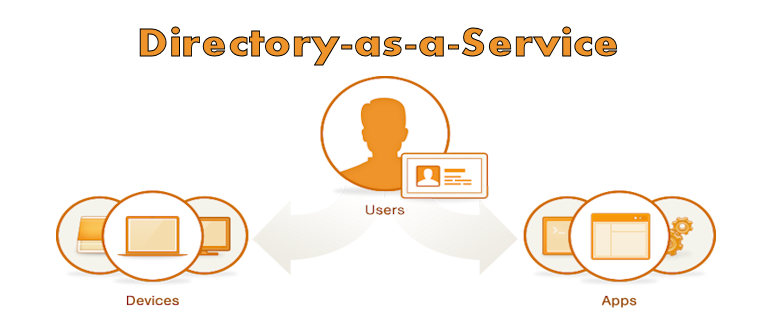
    JumpCloud has established itself as a leading solution for managing security across a vast, rapidly-changing, virtual ecosystem in the cloud. Today, JumpCloud is announcing a new offering that takes builds on that foundation, and applies its experience to deliver Directory-as-a-Service (DaaS). JumpCloud claims its new service will allow organizations to stop managing directory services locally, and enable them to move to a fully-managed, cloud-based alternative to LDAP (Lightweight Directory Access Protocol) or Microsoft AD (Active Directory).

    “As we have seen with the transitions from Siebel to SalesForce, Exchange to Gmail, and file servers to DropBox, JumpCloud is enabling the transition of one of the last on-premise technologies to a fully managed service: the user directory,” says Rajat Bhargava, JumpCloud’s President and CEO in a press release statement. “Directory-as-a-Service brings IT teams the simplicity, ubiquity, and security of user and device management, all from the cloud.”

    The JumpCloud DaaS services can act as the sole user store for an organization, or it can extend existing AD or LDAP user stores to the cloud. JumpCloud DaaS also integrates with single sign-on (SSO) providers so that IT admins are not forced to manage multiple directories.

    “JumpCloud understands the need for directory services in the cloud,” said Salvatore D’Agostino, CEO of IDmachines. “Building on their secure shell configuration management tools, this offer puts in place cloud-to-machine, user authentication and other directory services. At IDmachines, we see this as a big need in current XaaS.”

    JumpCloud DaaS promises to help organizations be more agile and more effective whether they’re just implementing a directory service, extending an on-premise directory service to the cloud, or migrating locally-managed directory services to the cloud.

    A cloud-based DaaS offering makes sense. No matter what size an organization is, managing the user directory through local, manual processes is an obstacle to realizing the full benefits of other cloud services. It creates complexity, and introduces reliability and security issues. Cloud-based services need a cloud-based directory service—a directory service that can keep up in terms of availability, scalability, and flexibility.

    JumpCloud DaaS—like other managed cloud offerings—takes the burden off of local IT to manage the backend of the directory services infrastructure, and places it on JumpCloud. Customers can focus on building things, and authenticate and authorize cloud infrastructure, servers, applications, users, and devices.

    JumpCloud’s Directory-as-a-Service is available immediately. Pricing plans start at $10 per user per month, and the first ten users are free forever. JumpCloud supports the LDAP protocol and works with Windows, Mac, and Linux devices.