Category: DevOps Toolbox

  • Cycode Discloses GitHub Actions Vulnerability in Google Bazel Project

    Cycode Discloses GitHub Actions Vulnerability in Google Bazel Project

    Cycode today revealed it discovered a command injection vulnerability in the way the GitHub Actions continuous integration/continuous delivery (CI/CD) platform was used to update the open source Bazel project that many organizations employ to build and test software.

    The vulnerability, now remediated, could have been used to create a backdoor through which malicious code could have been inserted into a codebase that is managed by Google.

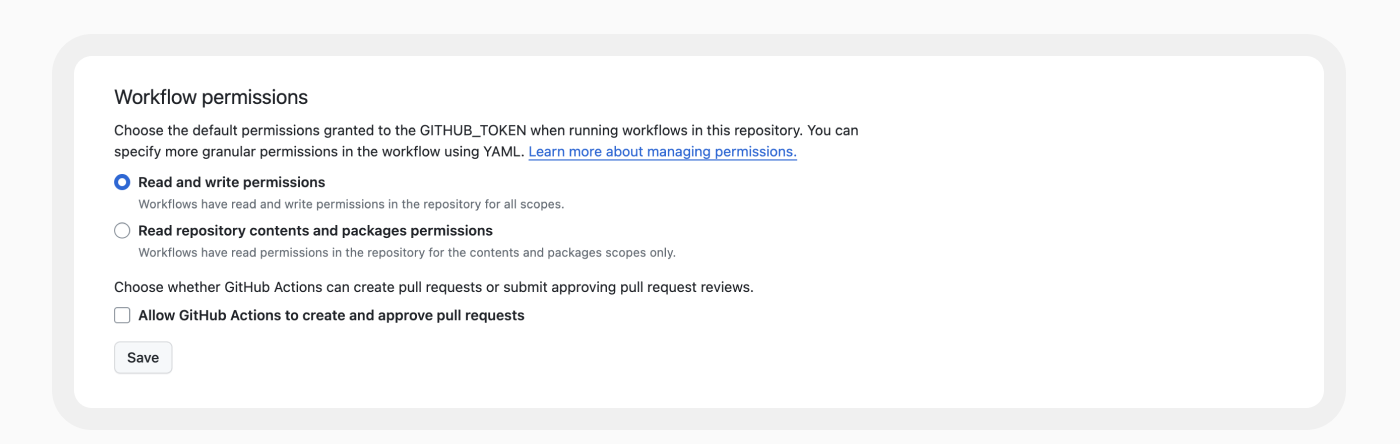
    Cycode researchers shared their discovery with Google, which has since updated the way it employs GitHub Actions to manage the Bazel codebase. Specifically, Google updated the base permissions to embrace least privilege principles to resolve the vulnerability discovered by Cycode.

    The vulnerability was discovered using RAVEN, an open source tool for scanning CI/CD platforms for vulnerabilities that Cycode makes available.

    Elad Pticha, senior security researcher for Cycode, said the vulnerability is the latest example of an instance of an open repository for building software that has been shown to be potentially vulnerable to an attack on a software supply chain that could theoretically impact any number of downstream applications and projects, including Kubernetes, Angular and platforms and services provided by Uber and LinkedIn.

    A Custom Actions capability that enables application development teams to create their own workflows presents any cybercriminal attempting to compromise of software supply chain with a tempting target, noted Pticha. A few changes to lines of code in a workflow can translate into thousands or even millions of lines of code, many of which an organization may never detect. Out of 3.4 million workflows examined by Cycode, nearly all (99%) make use of one or more Custom Action.

    Cycode has previously identified dozens of vulnerabilities in open source projects by mainly focusing on vulnerabilities within workflows. This latest research shows those vulnerabilities extend to indirect dependencies, such as Custom Actions, noted Pticha.

    Each DevOps team should review its own workflows for similar vulnerabilities at a time when more cybercriminals than ever are intent on compromising software supply chains. While many organizations have embraced DevSecOps workflows to improve application security, there is a natural tendency to overlook vulnerabilities that might exist in the workflows used to build and deploy software. The challenge is that DevSecOps workflows are still immature. A recent survey of 500 U.S. CISOs, AppSec directors and DevSecOps team members conducted by Cycode found 78% admitted application security attack surfaces are unmanageable, with 90% acknowledging relationships between their security and development teams need to improve.

    It’s not apparent if the vulnerability discovered by Cycode was actually ever exploited, but as most cybersecurity professionals know, if it can be imagined, someone has tried it. As such, any organization that uses Bazel might be well-advised to conduct a code review.

    In the meantime, it’s already apparent that regulations pertaining to securing software supply chains are only going to become more stringent in the months ahead. In the wake of the executive order from the Biden administration requiring federal agencies to lock down their software supply chains, it’s now only a matter of time before similar requirements are baked into legislation and various other regulations are implemented. The challenge and the opportunity now is to get ahead of this issue before a mandate with a hard deadline that can’t be ignored winds up disrupting the entire software development life cycle.

  • Azure Cost Optimization: A Complete Guide

    Azure Cost Optimization: A Complete Guide

    Microsoft Azure is one of the “big three” cloud providers, and is a primary part of IT expenditure for many companies. Azure cost optimization is a strategy that involves managing and controlling Azure costs to ensure efficient usage and spending. It requires a thorough understanding of where and how your resources are being used, as well as insight into the various pricing options available.

    Azure cost optimization involves implementing best practices related to managing cloud costs, such as turning off resources when not in use, choosing the right-sized resources, taking advantage of Azure discounts and more. By optimizing these aspects, you can ensure that you are only paying for the resources you need and are using them efficiently.

    Azure cost optimization is an ongoing strategy that involves constant monitoring and adjustments as your usage and needs evolve. This means that you need to be proactive and vigilant in your cost management efforts, regularly reviewing your usage patterns and making adjustments as necessary.

    Why is Azure Cost Optimization Important?

    As organizations migrate more and more of their workloads to the cloud, the costs associated with Azure usage can quickly escalate if not properly managed. This can lead to budget overruns and decreased profitability.

    By leveraging Azure cost optimization strategies, businesses can gain greater control over their Azure spending. This not only helps in reducing costs but also enables businesses to more accurately predict their future cloud spending. This can be a major advantage when it comes to financial planning and budgeting.

    Moreover, Azure cost optimization can also lead to improved operational efficiency. By ensuring that resources are used efficiently, businesses can avoid wasted spend and focus their resources on the tasks that truly add value to their operations. This can lead to increased productivity and better overall performance.

    Azure Cost Optimization Tools

    Azure provides several free tools designed to help customers optimize their cloud spending. These tools provide insights into your usage patterns, help you identify potential cost savings, and guide you in implementing best practices for cost management.

    Azure Cost Management and Billing

    Azure Cost Management and Billing provides detailed insights into your Azure spending. It allows you to track your spending by resource, location, service, and more, enabling you to identify where your money is going.

    With Azure Cost Management and Billing, you can set up budgets to control your spending and set up alerts to notify you when you’re nearing your budget limits. You can also analyze your spending trends over time, which can be useful for forecasting future costs.

    Azure Advisor

    Azure Advisor provides personalized recommendations based on your usage and configurations, helping you optimize your resources for cost, performance, security and reliability.

    Azure Advisor can identify unused or underutilized resources you can shut down or resize to save money. It also provides recommendations for purchasing reserved instances or using Azure Hybrid Benefit, which can lead to significant cost savings.

    Azure Pricing Calculator

    The Azure Pricing Calculator is a tool for estimating the cost of Azure services before you use them. You can input your expected resource usage, and the calculator will provide an estimate of the costs.

    This tool can be especially useful when you’re planning a new workload or considering a migration to Azure. By understanding the potential costs upfront, you can make more informed decisions and avoid surprises.

    Azure Monitor

    Azure Monitor is a comprehensive service that provides insights into your application performance, infrastructure, and network. While primarily used for performance monitoring, it can also provide valuable insights for cost optimization.

    For example, Azure Monitor can help you identify overutilized or underutilized resources, enabling you to make adjustments to optimize your costs. It can also help you track your resource usage over time, providing insights into your spending patterns.

    Azure Resource Graph

    Lastly, Azure Resource Graph is a service that enables you to explore your Azure resources at scale. It provides a unified view of your resources across all your subscriptions, making it easier to manage and optimize your resources.

    With Azure Resource Graph, you can quickly identify resources that are not in use or are underutilized, allowing you to reduce unnecessary spending. It also enables you to visualize your resource usage, helping you understand your spending patterns better.

    6 Strategies for Azure Cost Optimization

    Now that we are familiar with the basics of cost optimization on Azure and the tools the platform provides, let’s review some strategies that can help you optimize and reduce costs in Azure.

    1. Right-Sizing Azure Resources

    One of the simplest yet most impactful strategies for Azure cost optimization is to right-size your Azure resources. This involves matching your business requirements with the appropriate Azure resources in terms of type, size and quantity.

    Too often, organizations over-provision their Azure resources, which leads to unnecessary expenditures. By right-sizing, you ensure that you’re only paying for what you need. This can be achieved by closely monitoring your Azure resources usage, identifying any underutilized resources, and scaling them back accordingly.

    Remember, Azure provides a range of resource types, each with its own set of capabilities and costs. Always cross-verify whether the selected resource is the most cost-effective one for your specific use case. For instance, if your application doesn’t require high compute power, choosing a lower-tier virtual machine could significantly reduce your costs.

    2. Utilizing Azure Budgets and Alerts

    Azure Budgets and Alerts are powerful tools for cost management. They provide you with the ability to set a budget for your Azure spending and receive alerts when your spending approaches or exceeds your budget.

    Setting up an Azure budget is a proactive approach to cost management. It allows you to allocate your finances effectively and avoid any unexpected charges. Furthermore, with Azure alerts, you can instantly get notified when your consumption is nearing your budget. This gives you ample time to adjust your usage or increase your budget, preventing any service disruptions due to overspending.

    Moreover, Azure Budgets and Alerts are highly customizable. You can create multiple budgets for different scopes (like management groups, subscriptions, or resource groups), set your alert conditions, and even automate actions based on these alerts using Azure Logic Apps.

    3. Tagging and Resource Organization

    Azure tagging and resource organization is another crucial strategy for Azure cost optimization. Tags are user-defined key-value pairs that you can assign to your Azure resources. They help you categorize and manage your resources based on your business needs.

    By effectively tagging your Azure resources, you can gain visibility into your resource consumption at a granular level. This can help you identify any high-cost resources, track your spending by project, department or environment, and make informed decisions about cost optimization.

    Organizing your resources into logical groups can also simplify management and governance. For instance, you can group your resources based on their life cycle or purpose and apply consistent policies and access controls across the group. This not only improves security and compliance but also helps in identifying any redundant resources that can be eliminated to save costs.

    4. Utilizing Storage Tiers Based on Usage Requirements

    Another effective strategy for Azure cost optimization is to utilize different storage tiers based on your usage requirements. Azure Storage provides three access tiers – hot, cool and archive, each designed for different types of data.

    The Hot tier is for data that is frequently accessed and requires low latency. It has higher storage costs but lower access costs. The Cool tier is for infrequently accessed data, offering lower storage costs but higher access costs. Finally, the Archive tier is the most cost-effective solution for long-term retention of rarely accessed data.

    By carefully analyzing your data usage patterns and selecting the right storage tier, you can significantly reduce your Azure storage costs. Moreover, Azure offers automatic tiering options like blob-level tiering and life cycle management policies, which can further optimize your storage costs based on your data lif ecycle.

    5. Leveraging Azure Hybrid Benefit

    If you’re an existing Microsoft customer, leveraging Azure Hybrid Benefit can be a game-changer for your Azure cost optimization. Azure Hybrid Benefit allows you to bring your on-premises Windows Server and SQL Server licenses with software assurance to Azure, offering significant cost savings.

    With Azure Hybrid Benefit, you can run Windows Server and SQL Server workloads on Azure at a reduced rate, providing substantial savings as compared to pay-as-you-go prices. Furthermore, Azure is the only cloud provider that offers such benefits, making it an ideal choice for businesses looking to optimize their cloud costs while leveraging their existing Microsoft investments. Azure Hybrid Benefit is starting to support software from other companies, including Oracle and Red Hat.

    6. Regularly Reviewing and Optimizing Subscriptions

    Lastly, regularly reviewing and optimizing your Azure subscriptions is a must for Azure cost optimization. This involves keeping track of your Azure usage and costs, identifying any inefficiencies and making necessary adjustments.

    Azure provides several tools like Azure Cost Management and Azure Advisor that can help you gain insights into your Azure spending and offer personalized recommendations for cost optimization. For instance, Azure Advisor can identify idle resources that can be shut down to save costs or suggest reserved instances for predictable workloads to avail discounts.

    Moreover, consider exploring Azure Cost Management Power BI App for advanced reporting and analysis of your Azure spend. It offers a rich set of visuals and filters that can help you uncover deep insights into your cost data and drive cost efficiency.

    In conclusion, while Azure offers a plethora of services and capabilities, managing costs effectively requires strategic planning and continuous monitoring. By implementing the above strategies, you can ensure that you’re making the most out of your Azure investments while keeping your costs under control.

  • Dynatrace Extends Data Reach and Scope of Observability Platform

    Dynatrace Extends Data Reach and Scope of Observability Platform

    At its Perform 2024 event today, Dynatrace unfurled a Dynatrace OpenPipeline that makes it possible to apply analytics to multiple types of data sources in real time.

    The company also unveiled a Data Observability offering that can be used to vet the quality and lineage of data being exposed to the Davis artificial intelligence (AI) engine at the core of the Dynatrace observability platform to reduce false positives that otherwise might generate an alert in addition to helping reduce the volume of data that might need to be stored.

    Finally, Dynatrace announced it is starting today extending the reach of its observability platform to the large language models (LLMs) that are used to create generative AI platforms. That capability will, for example, make it simpler to monitor the consumption of tokens that are used to provide access to these models.

    Steve Tack, senior vice president for product for Dynatrace, said Dynatrace OpenPipeline will enable organizations to streamline the collection of data in a way that will enable them to apply observability more broadly by applying stream processing algorithms to petabytes of data.

    Scheduled to be available in 90 days, the Dynatrace OpenPipeline capability enables IT teams to ingest and route observability, security, and business events data from any source and in any format at the point of ingestion, including unstructured data that is automatically converted into a usable format. That data can then be enriched to enable deeper analytics.

    It also provides IT teams with more control over which data they analyze, store or exclude from analytics, which in turn helps reduce the total cost of observability, noted Tack.

    Finally, it presents IT teams with the ability to apply more customizable security and privacy controls to how that data is employed, he added.

    Dynatrace is pursuing a multimodal approach to AI that spans predictive, causal and generative models. Collectively, that approach makes it simpler to identify the root cause of issues, identify anomalies that might disrupt services and streamline incident management by, for example, providing summarizations of events in a natural language format.

    It’s not clear how broadly observability will be applied beyond the data collected to manage DevOps workflows and other IT processes, but it’s clear there is a high correlation between IT events and business outcomes as organizations become more dependent on software. As AI becomes more pervasively employed, it should become simpler to apply analytics to a much wider range of types of data to surface the relationship between IT events and business processes. In effect, Dynatrace is making it simpler to apply best data engineering practices to collect, manage and analyze that data, noted Tack.

    In the meantime, DevOps teams should revisit how their pipelines are currently constructed to make it simpler to capture all relevant data. As critical as telemetry data collected from the DevOps platform is to ensure application development and delivery occurs as fast as possible, that data is only one factor in a larger equation. The challenge and the opportunity now is determining how best to apply AI to correlate it all.

  • Anima Adds Ability to Personalize Generative AI Code

    Anima Adds Ability to Personalize Generative AI Code

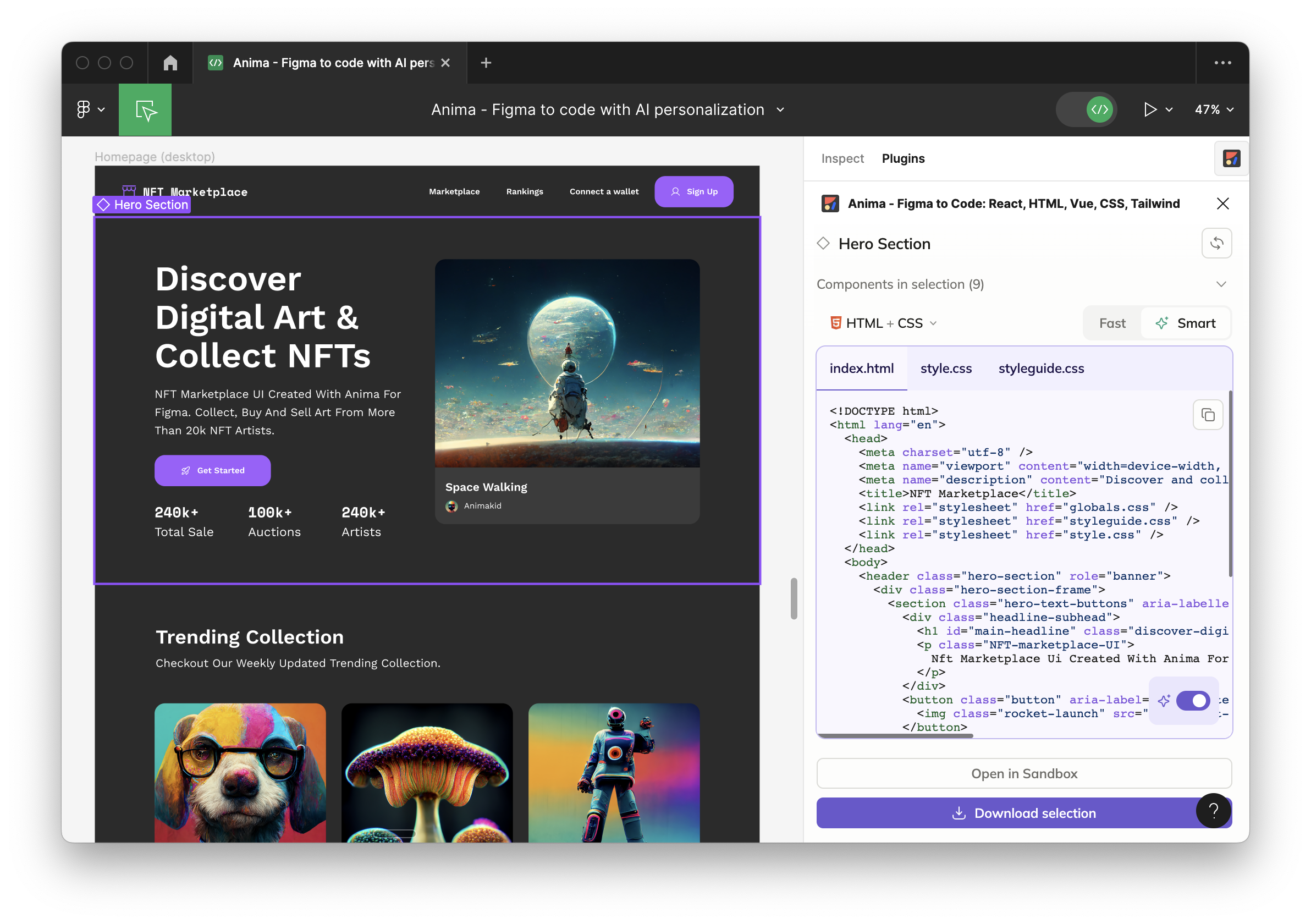
    Anima today revealed is has added an ability to personalize the code its generative artificial intelligence (AI) platform creates based on how an application is described using tools from Figma and Adobe.

    That capability makes it possible for the code being generated to resemble the coding style of an organization or specific developer more closely.

    Anima CEO Avishay Cohen said the company developed this capability to reduce the editing time that is otherwise required when trying to embed code generated by a large language model (LLM) within an application that has a well-defined coding methodology.

    The platform that Anima provides is based on a mix of LLMs and heuristics that the company developed to generate code. In this case, the code being generated is written in React or HTML to make it simpler to build an application’s front end. In contrast, a general-purpose LLM such as ChatGPT is not optimized for creating these types of graphical applications.

    Developers no longer need to worry about, for example, making sure each pixel is perfectly placed because the Anima platform automates that part of the application development process, including adding responsive behavior, animations and logic, noted Cohen. In addition, customized instructions may be applied to an entire project or even a specific component.

    In effect, the platform enables backend developers to automatically create a front-end for their application from a description in tools provided by Figma or Adobe. As a result, developers can allocate more time to writing business logic and optimizing application performance, said Cohen.

    Later this year, Anima will integrate its platform with GitHub and other continuous integration/continuous delivery (CI/CD) platforms as part of an effort to extend the reach of the platform across an entire codebase, he added.

    There is, of course, already no shortage of generative AI tools for writing code, but the degree to which they have been incorporated into DevOps workflows varies from one organization to the next. Much of the code created using platforms such as ChatGPT can vary widely in terms of quality. These platforms were trained using code collected from across the web so it’s not uncommon for the code generated to include known vulnerabilities that DevOps teams need to scan before incorporating into a build. In other cases, the code generated might simply break when installed.

    Regardless of these issues, however, the amount of code being generated by machines is only going to increase, especially as more LLMs that are specifically trained to create code based on examples that have been closely vetted become more widely available.
    In the meantime, developers who never especially enjoyed building the visual front ends of applications can now focus more of their time on tasks they prefer. Alternatively, developers who specialize in the front ends of applications will find that much of the toil involved will soon be automated in a way that should provide more time for them to create customized experiences.

    One way or another, the overall pace at which applications are built is about to exponentially increase. The challenge now will be finding ways to take advantage of AI to enable DevOps teams to keep pace.

  • Snyk Acquires Helios to Extend Reach of ASPM Platform

    Snyk Acquires Helios to Extend Reach of ASPM Platform

    With its acquisition of Helios, Snyk plans to add an ability to capture application runtime data to extend the capabilities of its application security posture management (ASPM) platform.

    Manoj Nair, chief product officer for Snyk, said Snyk AppRisk will soon provide real-time insights into runtime environments using a Helios observability platform that provides them with deeper insights into issues that need to be resolved. That capability will provide developers with additional context as more responsibility for application security continues to shift left toward application development teams, he added.

    Armed with that insight, it then becomes simpler to prioritize remediation efforts based on the level of risk a vulnerability actually represents to the organization, said Nair. That’s critical to close a longstanding divide between cybersecurity and application development teams that, in the absence of any real ability to determine the severity of a vulnerability, results in developers wasting what limited time they have to allocate to remediation, he noted.

    Nair said the overall goal is to enable organizations to deploy more secure applications while minimizing adverse impacts on developer productivity.

    Snyk last year acquired Enso Security to add an ASPM platform to its portfolio that serves as the foundation upon which Snyk AppRisk was built. It also includes Insights, a Snyk tool that makes use of multiple types of artificial intelligence (AI) models to identify, prioritize and fix vulnerabilities.

    There’s often not a lot of love lost between cybersecurity teams and application developers who typically don’t have a lot of cybersecurity expertise. Most of the issues that cybersecurity teams are tasked to address start with mistakes made by developers that cybersecurity teams then need to convince developers to allocate time to fix.

    Thanks to the rise of DevSecOps best practices, the overall security of software supply chains is improving, but there is still a long way to go before application security truly improves. The one thing that is certain is the level of accountability for vulnerabilities is only going to rise as more stringent regulations go into effect in the months and years ahead.

    In the meantime, DevSecOps teams should assume there will be many more vulnerabilities to remediate. Developers are increasingly using generative AI tools to write code. The challenge is general-purpose large language models (LLMs), such as the one used to drive ChatGPT, were trained using examples of code of varying quality collected from across the web. A lot of the code these platforms generate, not surprisingly, contains vulnerabilities that many developers will not immediately recognize without the aid of some type of scanning tool.

    At the same time, cybercriminals are becoming more efficient at discovering and exploiting vulnerabilities that exist in applications that have already been deployed in production environments. DevSecOps teams should expect that, as a result, more zero-day vulnerabilities requiring immediate attention will soon be discovered.

    One way or another, the percentage of time allocated to application security issues is only going to increase. The only thing left to determine is how best to go about reducing the time and effort needed to make applications as secure as possible.

  • Diffblue Integrates Generative AI-Based Testing Platform With GitLab

    Diffblue Integrates Generative AI-Based Testing Platform With GitLab

    Diffblue this week generally made available an integration between its automated unit testing platform for Java and the DevSecOps platform from GitLab.

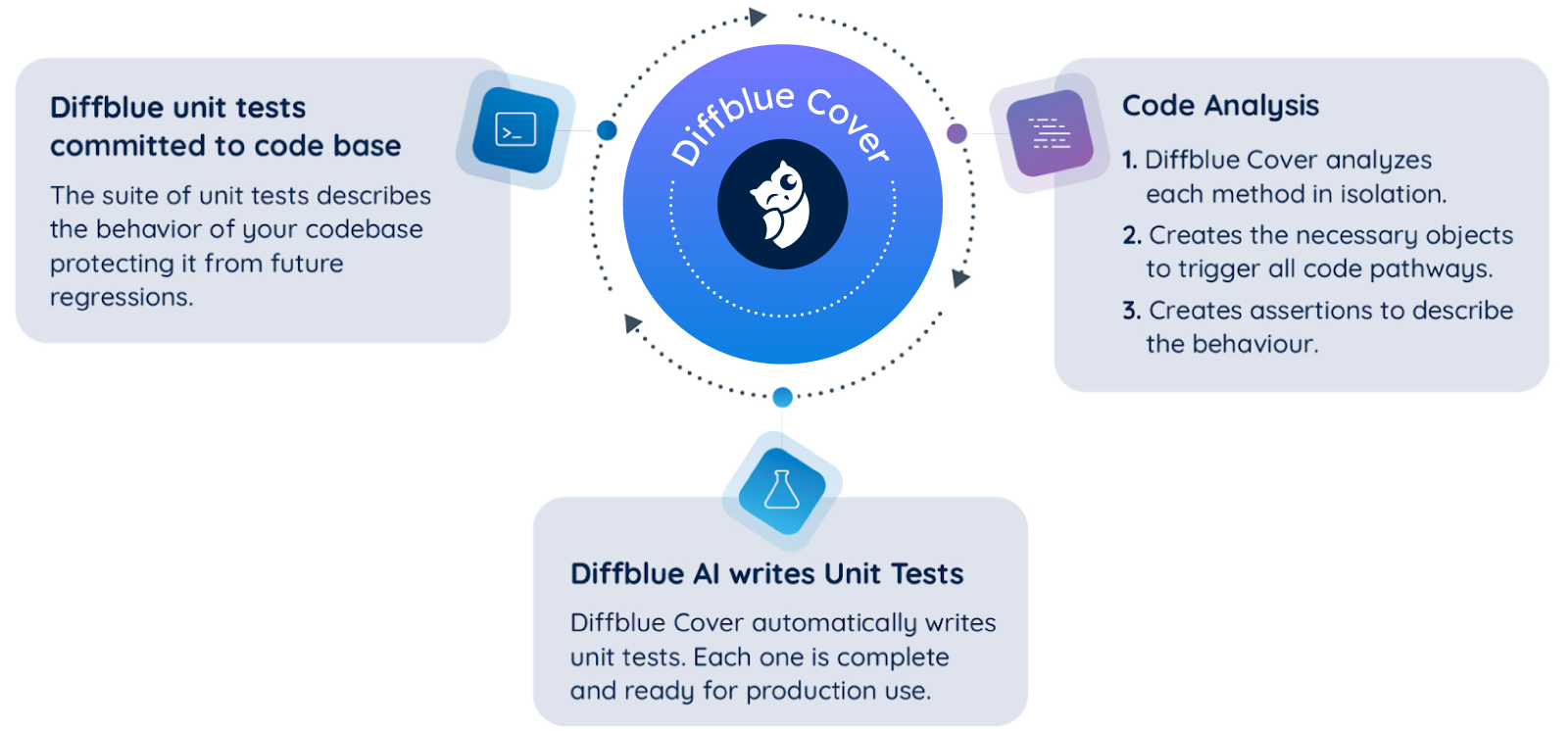
    The Diffblue Cover platform makes use of generative artificial intelligence (AI) to automatically create unit tests based on reinforcement learning technologies that don’t rely on LLMs—avoiding their drawbacks of sometimes introducing hallucinations and also requiring human review.

    Diffblue CEO Mathew Lodge said the integration with the continuous integration capabilities found in the premium and ultimate editions of the GitLab platform would, for example, streamline regression testing in a way that should ultimately improve both application quality and security. Diffblue Cover, for example, can update tests as much as 250 times faster than a human developer can write them manually without developer review.

    That approach also serves to reduce the level of friction many DevSecOps teams encounter when bottlenecks involving testing processes emerge, noted Lodge. The overall goal is to make it simpler for developers to test as much of their own code as possible before integrating it into a build, he added. Otherwise, developers will get fed up because testing is continuously breaking the build, noted Lodge.

    Ultimately, instead of having to write unit tests, developers become supervisors of a platform that automatically generates them on their behalf, said Lodge. The job of a developer doesn’t go away, but it does fundamentally change, he added.

    To achieve that goal, developers need to be able to access a platform that writes the tests and can then also execute them automatically. If it takes too long to create the test, chances are high that most developers won’t run it. On average, writing and evaluating a single unit test can take a developer 10 minutes. Over the course of any project, thousands of tests need to be written, so the amount of time testing takes away from coding is often much greater than most IT leaders fully appreciate.

    Automating those tests should improve developer productivity as more time is available to focus on writing code rather than testing. That doesn’t necessarily eliminate the need for a dedicated testing team, but it does mean that more tests will be run without slowing down the overall pace of application development.

    Developers naturally want to be able to test code at the very instant they create it. AI platforms can make that happen by, for example, employing reinforcement learning to write unit regression tests.

    Most developers are not going to resist assuming more responsibility for testing if the tools to automate that task are more accessible. Instead of merely shifting responsibility for testing left toward developers, DevOps teams need to find ways to streamline the process. Otherwise, testing just becomes one in a series of tasks that are being shifted to developers in ways that many of them are coming to resent.

    It may take some time before AI is fully integrated into software engineering but it’s clear with each passing day more previously manual tasks are being automated. Among the lowest hanging fruit for applying AI to software engineering are clearly testing processes that, if truth be told, few indeed enjoy conducting.

  • Survey: Widespread Inability to Remediate App Vulnerabilities

    Survey: Widespread Inability to Remediate App Vulnerabilities

    A survey of 621 IT and security professionals published this week found only 20% are confident in their ability to detect a vulnerability before an application is released.

    Conducted by the Ponemon Institute on behalf of Security Journey, a provider of cybersecurity training services for developers, the survey finds 61% struggling to remediate vulnerabilities effectively, with 55% blaming misalignment between development, security and compliance teams for delays.

    A third of respondents (33%) said teams lacked a common view of applications and assets, with 38% acknowledging they lack the ability to hold departments accountable for patching applications. Only 11% of organizations believed they patch vulnerabilities effectively in a timely manner, the survey finds.

    In the 12 months prior to the study, 54% of respondents suffered a security incident due to an unpatched vulnerability, with 51% experiencing more than eight incidents.

    Overall, half (50%) admitted they fail to test the security of their applications after they have been released. Only 36% specifically teach developers to write secure code. Just one-fifth (21%) educated developers on vulnerability remediation. Less than half (43%) have invested in training provided by a third party.

    When training is provided, 68% of respondents also admitted immediate feedback is not provided and less than half (47%) said secure coding training is customized to meet developer needs. Half (50%) of those who provided training have no formal assessment to measure knowledge gain, the survey found.

    Amy Baker, chief marketing officer and security education evangelist for Security Journey, said the survey makes it clear much work still needs to be done in terms of teaching developers how to write secure code.

    In addition, too many software development teams are overly optimistic about their ability to remediate known vulnerabilities the next time they plan to update an application, said Baker. Many developers move on to the next application simply because either the pressure to meet delivery deadlines is too intense or there is some other emerging technology, such as large language models (LLMs), that needs to be learned, she added. In fact, too many organizations are far too focused on the rate at which applications are built and deployed at the expense of cybersecurity, Baker noted.

    That’s especially problematic because cybercriminals have become much more adept at monitoring application deployments and updates, she added.

    The amount of time between when code is deployed and when cybercriminals begin scanning it for vulnerabilities is now measured in hours rather than days. Developers, unfortunately, are deploying more insecure code than ever. In fact, much of that code is insecure by design, noted Baker.

    Overall, nearly half of respondents (48%) only train developers annually, bi-annually or when an incident occurs. More than two-thirds (68%) only train developers on how to implement secure coding practices to meet compliance requirements. In effect, because developers are not taught security in school, what training they do receive is on the job, said Baker.

    Clearly, there is still much work to be done when it comes to implementing DevSecOps best practices to improve application security. In the meantime, the amount of code that needs to be patched has already reached proportions that most application development teams are never going to be able to effectively address.

  • Mobb Extends DevSecOps Reach of Tool to Generate Patches

    Mobb Extends DevSecOps Reach of Tool to Generate Patches

    Mobb today added an ability to instantly surface patches for vulnerabilities at the time when code is being committed during a DevSecOps workflow.

    Previously, the tool provided by Mobb to create validated patches based on the scan results of third-party SAST tools would only surface issues to individual developers.

    Mobb CEO Eitan Worcel said organizations can now address these issues within the context of DevSecOps workflow.

    The Mobb platform combines proprietary security research and traditional semantic analysis with generative artificial intelligence (AI) to automatically create patches for vulnerabilities. The overall goal is to make it simpler for DevSecOps teams to consistently ensure applications with known vulnerabilities are remediated before they are deployed, said Worcel.

    The Mobb approach eliminates the need for IT teams to sort through static application security testing (SAST) scans themselves. Each vulnerability typically requires at least 30 minutes to fix, so the Mobb platform improves application security while simultaneously making developers more productive.

    Historically, one of the reasons for the wide divide between application development teams and cybersecurity professionals is that many of the vulnerabilities discovered don’t actually impact applications running in production environments. Development teams then find themselves wasting time investigating vulnerabilities and, when they do determine a vulnerability is an issue, spending time developing a patch. The Mobb tool automatically creates the necessary patch, so there is less of a need to debate which vulnerabilities are worthy of the time required to create a patch.

    For decades, application development teams have been attempting to find a way to remediate vulnerabilities as quickly as possible. With increased focus on adopting DevSecOps best practices to address those vulnerabilities, more organizations are now reviewing software supply chains as part of a larger effort to improve application security.

    There will, of course, be vulnerabilities that the Mobb tool will not be able to address simply because there may not be enough affected applications to warrant pre-building a patch. Even with the most robust set of rules, it is improbable that an automated tool can, with 100% certainty, safely fix every issue. However, given the number of routine vulnerabilities present in applications, such as SQL injections, there’s plenty of opportunity to improve developer productivity by relying on patches that address common vulnerabilities.

    The process by which patches are prioritized, developed and then applied has, of course, long been a source of DevOps frustration. Anything that streamlines that process will go a long way toward improving the overall state of application security at a time when cybercriminals are becoming more adept at exploiting vulnerabilities. The challenge is finding a way to remediate vulnerabilities that developers will embrace rather than resist. The Mobb approach still provides them with control over what patches are applied but the toil involved with creating a patch in the first place has been substantially reduced.

    It’s not clear how long it might be before automated approaches to building patches might improve the overall state of application security but, as always, every journey needs to begin with a first step in the right general direction.

  • Legit Security Applies AI to Detect Vulnerable Application Secrets

    Legit Security Applies AI to Detect Vulnerable Application Secrets

    Legit Security today announced it has expanded the scope of its application security posture management (ASPM) platform to make use of artificial intelligence (AI) to discover secrets more accurately in applications that cybercriminals can actually exploit.

    Scanners typically generate high false positive rates to the point where developers often start to ignore them. As a result, it’s not uncommon for secrets to be discovered in an application even though an alert was generated.

    Legit Security CTO Liav Caspi said the company is now applying a large language model (LLM) specifically trained for source code along with prompt engineering techniques and heuristics to reduce the level of alert noise that developers would otherwise see when scanning for secrets. The overall goal is to correctly identify access keys, passwords, application programming interface (API) keys and other personally identifiable information (PII) that should not be exposed once an application is deployed in a production environment, he noted.

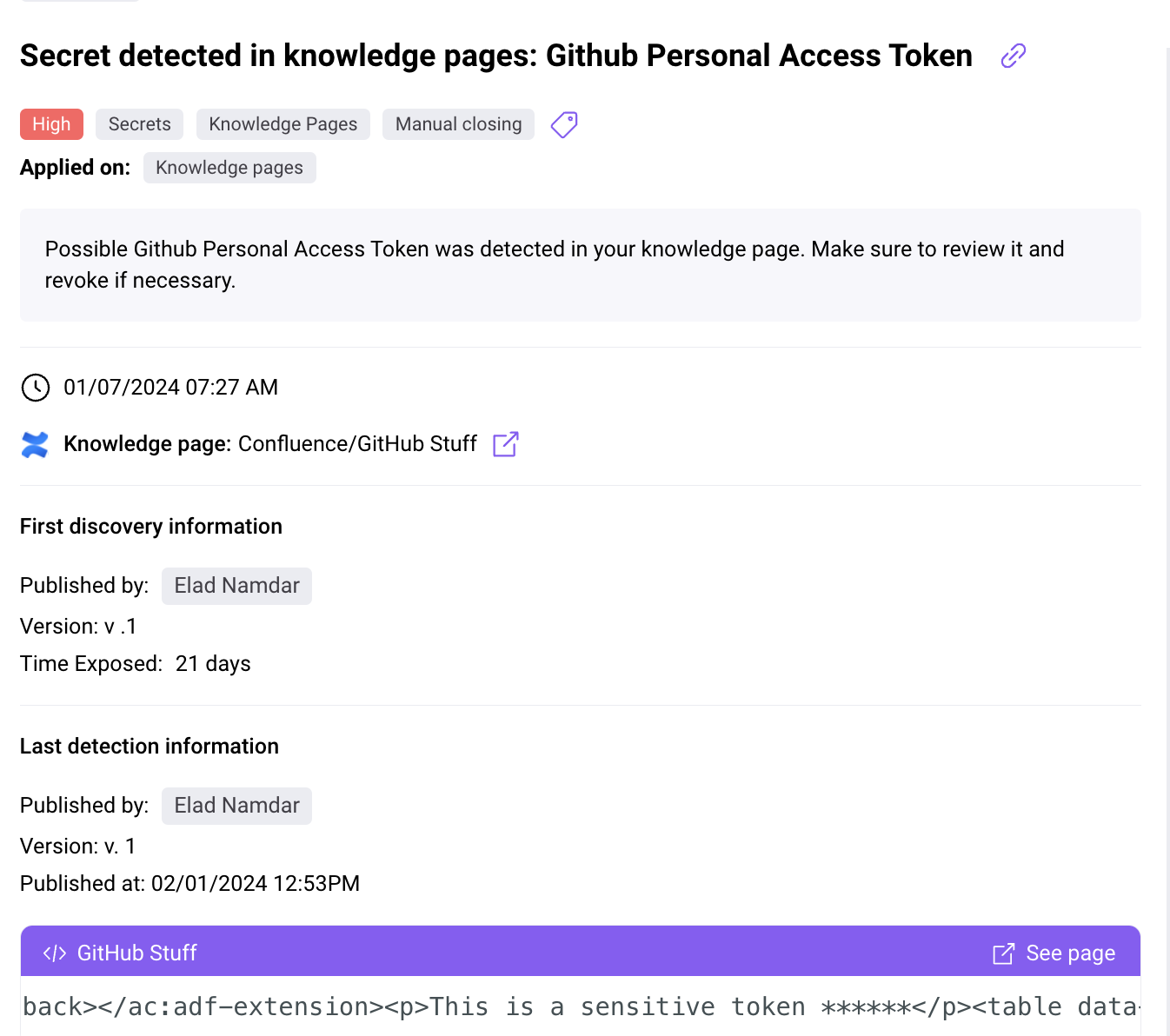
    That capability can be applied to detect secrets across all development assets, including code repositories, source code management (SCM) tools, build tools and logs, artifacts and private and public documentation. In addition, this approach also uncovers toxic combinations of secrets or ones that might lie buried within assets such as source code history or modified Confluence pages that developers often forget exist, noted Caspi.

    Legit Security also enables DevSecOps teams to apply preventive guardrails on developer endpoints using the Legit command line interface (CLI) to stop secrets from being exposed before code is pushed. In addition, automated workflows can reach developers as part of a pull request or create Slack messages or Jira tickets to streamline remediation. DevSecOps teams can also continuously triage results to create a baseline that includes exceptions.

    As part of a larger effort to secure software supply chains, Legit Security has developed a software-as-a-service (SaaS) platform designed to apply security policies across an entire software development life cycle. The company is now extending the capabilities of that platform using AI technologies to detect secrets in both source code and all the components that make up a development pipeline as they are added.

    In the wake of an executive order requiring federal agencies to better secure software supply chains, there is now more focus than ever on application security. Unfortunately, many developers are a little too cavalier when it comes to managing secrets during the application development process. They often leave secrets in plain text to facilitate workflows, but more often than many care to admit, those secrets are not removed before an application is deployed. Knowing this, cybercriminals have learned to scan applications for those exposed secrets. Once gained, they then appear to be just another legitimate user of an application that might not be discovered until malware is activated.

    It may be a while before the cultural and technical issues that conspire to make the software supply chain insecure are fully addressed. In fact, the problem may get worse before it gets better—simply because the pace at which distributed applications are being built and deployed only continues to accelerate. At the same, the cost of making a secrets mistake is also only going to increase as regulations become more stringent. In fact, it’s now only a matter of time before stiff fines intended to make an example of one or more unfortunate organizations are eventually going to be levied.

  • Chronosphere Acquires Calyptia to Process Log Data More Efficiently

    Chronosphere Acquires Calyptia to Process Log Data More Efficiently

    Chronosphere today announced it has acquired Calyptia to add additional pipeline management capabilities to its observability platform.

    Calyptia created Fluent Bit and Fluentd, a set of open source log processors that are now being advanced under the auspices of the Cloud Native Computing Foundation (CNCF).

    Chronosphere CEO Martin Mao said these log processors will be embedded into the company’s namesake observability platform to enable the routing, transformation and optimization of log data at scale. That issue has become problematic because cloud-native applications based on microservices create exponentially more telemetry data than legacy monolithic applications. If it becomes too costly to analyze that data, then DevOps teams will begin to limit the number of applications they will observe, noted Mao.

    The Calyptia platform achieves that goal using filters at the data source to reduce the volume of data that might otherwise be shared by 30% or more.

    The shared data can then be analyzed in real time rather than waiting for it to be stored and indexed. In addition, DevOps teams can enrich that data in flight to include additional context.

    Calyptia cofounder Anurag Gupta added that the primary mission for the company has always been to make log data more accessible to developers as they build and deploy applications.

    The acquisition of Calyptia comes on the heels of a log management alliance between Chronosphere and CrowdStrike through which a log storage and virtualization capability, dubbed Logs powered by CrowdStrike, has been added to the observability platform. The overall goal is to simplify the management and analysis of logs via a single click of a graphical tool or within the context of a larger DevOps workflow based on a command line interface (CLI) without requiring data engineering expertise, said Mao.

    It’s not clear how fully DevOps teams have embraced observability, but it’s apparent the legacy monitoring tools that collect a set of predefined metrics are not able to keep pace with the complexity of cloud-native application environments. An observability platform makes it simpler to query log data and discover the root cause of an issue—hopefully before a catastrophic event occurs. The challenge, of course, is providing that capability without incurring massive increased storage costs for log data.

    Despite those concerns, the need for observability is becoming a more pressing issue with each passing day. Organizations have never been more dependent on applications to drive revenue. A degradation in performance is usually an early indicator of a disruption that often has a direct impact on revenue and profitability.

    There is, of course, already no shortage of observability platforms. The issue most DevOps teams encounter is finding the funding needed to employ one at a time when organizations have become much more sensitive to IT costs. There may be an opportunity to rationalize some monitoring tools to help pay for the cost of a more modern observability platform, but regardless of approach, an ounce of prevention is always going to be worth a pound of proverbial cure.