As more IT organizations embrace low-code application development platforms, many of them are discovering that accelerating the rate at which they develop applications can be too much of a good thing.
António Barros, product manager for OutSystems, says most of the organizations that have adopted the company’s namesake low-code platform are just now coming up to speed on automated testing. Barros estimates that only 20 percent of the organizations using the OutSystems platform are also employing automated testing tools. The majority of OutSystems customers continue to rely on manual testing even though it’s apparent low-code platforms will produce applications much faster than manual testing can keep pace with. OutSystems has identified five stage of DevOps maturity, he notes, but none of its customers has achieved that level of DevOps maturity.
To help them get a little further down the DevOps path, OutSystems, at its recent NextStep 2017 conference, announced an extension of its partnership with Indigo to provide tighter integration with the OutSystems platform. In addition, OutSystems plans to make available digital transformation playbooks, including one for DevOps, beginning in 2018. Outsystems has already integrated its platform with the Jenkins automated server to provide continuous integration and continuous development (CI/CD) capabilities.
Barros says it’s not only critical to engage in continuous testing, but the application needs to be designed to make it easier to isolate user interface, application programming interface (API) and unit testing. Otherwise, automating the testing process becomes more difficult than it should be, says Barros.
Developers for years have resisted low-code platforms, which automatically generate much of the code that needs to be written for an application. Some fear the platforms can’t build applications that scale. Others have simply decided they prefer to write code themselves. But these days, organizations are under more pressure than ever to deliver applications faster, which has led many organizations to rely more on low-code platforms such as OutSystems.
It’s not clear just how popular low-code platforms will become. OutSystems revealed at its conference it has signed up 122 new customers in the last quarter alone. On average, it now takes organizations eight weeks to build and deploy an application on the OutSystems platform, with new release cycle updates occurring every 48 hours, says OutSystems CEO Paulo Rosado.
Michael Facemire, an industry analyst with Forrester Research, told conference attendees that adoption of low-code platforms is now a matter of economics. The starting salary for a developer in the San Francisco Bay area is $145,000, says Facemire. As the salary of a developer with a few years of experience now reaches more than $200,000 in the Bay area, companies in that geography will have no other option but to employ low-code platforms, he says.
Obviously, developers might be less expensive in other regions. But Facemire notes that no matter what the region, developers are in short supply. That need for speed, he adds, is also why organizations are rapidly adopting containers and serverless computing framework. The challenge IT organizations will face is finding a way to put quality control processes in place to don’t compromise either the speed of the development process or the quality of the end user experience, he says.
By the same token, however, no one really appreciates code that arrives late, no matter how great it might be.
You have a classic car. You’re in the middle of restoring it, and it looks mighty sweet. Paint is polished, wheels are stock, hubcaps (or spokes) are shiny, engine is completely restored to original spec.
But it has no gas tank.
A bit of a stark comparison, but that’s where we’re at with application release automation (ARA)—at least in terms of portability. And where we’re likely to stay.
Hold on, I’m a Fan
Before the DevOps aficionados get out the torches and pitchforks, let me be completely clear that I’m a huge fan of ARA, and explain again why.
Tools such as Jenkins allow DevOps teams to automate the entire build/test stack—or, as much of it as their organization requires. That is a huge step forward, for all the reasons we’ve covered in the past, including the one I think is often overlooked or underemphasized. With frequent build/test feedback, the code is still fresh in the developers’ head when they learn of problems. Most of the time, they are fixing before moving on to the next task, which is a huge plus compared to waterfall, where many problems show up long after the developer in question has forgotten what the code is doing because they’re off on other things.
Likewise, tools such as Puppet, Ansible and Chef (to name a few) allow DevOps and security to set standards via script, and use those scripts to deploy over and over. This has all the benefits we’ve discussed, too—speed of delivery, reduction of human error, repeatability that becomes stability, etc. This gives operations the ability to answer, “Is server X set up to do this new thing?” by looking in deploy scripts and quickly updating things if the answer is no, but X will be required going forward. That’s one of my favorite bits of Application Provisioning.
Riding the Gap
For those unfamiliar, ARA simply bridges the gap between DEVops and devOPS. Tying code being released to platforms and configurations it will be released under. It has the ability to rapidly re-target a release to a new environment, and it can do predictable and repeatable releases, offering the benefits of application provisioning for the actual release segment. Most tools do this by tying together your favorite build tools and provisioning tools, and giving Ops a control panel that can manage the process end-to-end.
The benefits are huge. Particularly for Operations and Security (who have another place to standardize and insert essential monitoring), but also for development because it offers one further step in testing and by doing so reduces the surprises six months down the road, when you’ve forgotten what
Bubblegum += 10
Is in your code for.
So don’t take my intro as offensive. I am a fan. But I’m a realist. There is no panacea.
It’s About the Data (as Always)
The two weakest parts of most ARA systems are server provisioning and data issues. Server provisioning is setting up OS/hardware, and many ARA systems tend to assume you magically did elsewhere, but this problem is only an issue in highly physical environments and there are tools to handle the problem; they’re just not integrated well with most ARA systems. Data issues are the bigger problem.
It’s cool that we can drag and drop a couple boxes, and magically switch our deployment from inside the DC to a cloud provider in the time it takes the ARA to build/deploy. But we all know that’s not how the world works. Now you have an application, complete with database that is correctly configured and security that does AAA solidly … and no data.
“Just move the data, then!” the choir sings. No, that’s really not how it works in an enterprise. Data itself is an object of security and compliance, and some source databases are so massive that moving them is a nearly impossible chore in and of itself. Amazon tips its hat to this fact with its import/export service.
This was the reason why I gut reacted to the “No more physical data centers!” crowd back in the midst of the hype with an eye roll. The amount of data stored in data centers is staggering, and often not portable at all. Add to this the fact that such data isn’t going to reduce, and we have a quandary.
What About Moving Forward?
Sometimes, it is necessary to accept that the current state is not changeable, but take steps to improve the future state. I don’t see this as a reasonable approach in this case, because the rules of data aren’t changing in a way to change future state in a positive way. We’re generating more data every day, and that data will end up stored somewhere. Be careful where you store it, think long-term strategic. Having ARA doesn’t magically make that data portable, so make sure that where you store it today, while it’s small, is where you’ll want to store it in five years, when it is a massive, largely immobile asset.
What to do … What to do
Use ARA to multitarget all of those apps that are portable without terabytes of data, and make sure data generation/collection/analysis apps are on the architecture you will want them on moving forward. ARA offers a ton of other benefits, so data portability isn’t a deal breaker—or even a significant negative, since you probably already knew some datasets weren’t going anywhere—but don’t expect miracles out of it. It can’t make your large datasets portable, so don’t expect it will. And use it to target the platform your organization feels is most appropriate for apps that will generate or collect a lot of data.
VMware over the last two years has been making steady advances in automating the management of IT. At the VMworld Europe 2017 conference VMware unveiled a vRealize Suite 2017 offering that combines the latest releases of vRealize Operations, vRealize Automation, vRealize Business for Cloud and vRealize Log Insight software into a single offering designed to optimize lifecycle management across a software-defined data center (SDDC).
Mahesh Kumar, senior director of product marketing for cloud management at VMware, says the driving force behind the development of vRealize Suite 2017 is to enable the automation of IT operations in support of an IT organization’s larger DevOps strategy.
The elements of VMware vRealize have been upgraded as follows:
vRealize Operations 6.6 adds tools to help organizations analyze workload placement decisions to automate the balancing of workloads across clusters and data stores. It includes a predictive distributed resource scheduler (pDRS) and native VMware vSAN management and monitoring capabilities.
vRealize Automation 7.3 adds support for Admiral 1.1, the lightweight container management portal that VMware previously announced. Virtual Container Host instances generated by VMware vSphere Integrated Containers, Docker hosts, and for Docker volumes can employ vRealize Automation to create and attach volumes to containers. It also delivers increased support for VMware NSX network virtualization software.
vRealize Business for Cloud 7.3 is now being exposed as a tab in vRealize Operations 6.6 to better drive cost efficiencies by making operational and cost metrics readily available. It also delivers improved insights into the costs of Amazon Web Services (AWS) and Microsoft Azure public clouds alongside VMware-based private clouds.
vRealize Log Insight 4.5 now provides integration with vRealize Operations to provide root-cause analysis of logs and metrics.
Resistance to IT automation continues to decline. Many IT operations professionals naturally are concerned that IT automation will lead to unemployment. But managing IT operations at the present level of scale required simply can’t be accomplished using manual processes. In addition, developers are voting with their code to employ public clouds that have already been automated. IT teams who want to make a case of continuing to deploy application workloads in a local data center need to be able to provide a cloud-like experience, which can be accomplished only by employing automation. Kumar notes that VMware is trying to arm IT administrators with the analytics required to make a financial case for continuing to deploy applications on instances of VMware running on-premises or in a public cloud.
Most IT organizations today are focused on automating disparate deployments of IT infrastructure and software. While that represents an advance over manual processes, many of those same organizations now are wrestling with various islands of automation. VMware is trying to unify automation across all the compute, storage and networking technologies it delivers to fashion an SDDC that enables IT organizations to be more agile. Longer term, however, IT organizations that employ stacks of software other than VMware will need to find a way to automate DevOps across heterogeneous IT environments.
“What’s in a name?” wrote the greatest Bard who ever lived.
All I can say is, he lived in simpler times, when DevOps and the confusing world of continuous integration (CI), continuous deployment (CD), CI/CD, the other CD, application release automation (ARA), pipelines, assembly lines, etc., didn’t exist.
The biggest challenge today is that vendors use overloaded terms to describe completely different use cases. CI vendors claim to support CI/CD, even though the “D” here is just a deployment to a development environment and not staging or production. ARA vendors claim to enable continuous delivery, even though they do not include critical steps such as infrastructure provisioning, security patches or configuration management.
The terms “pipelines” and “assembly lines” are relatively new. Multiple vendors have recently announced pipelines and assembly lines, and the differences aren’t obvious at first glance. So let’s do a deep dive.
What are CI Pipelines?
Continuous integration has evolved tremendously over the last few years. What started as a simple process of automating build and unit tests for each code change has evolved into a pretty complex workflow.
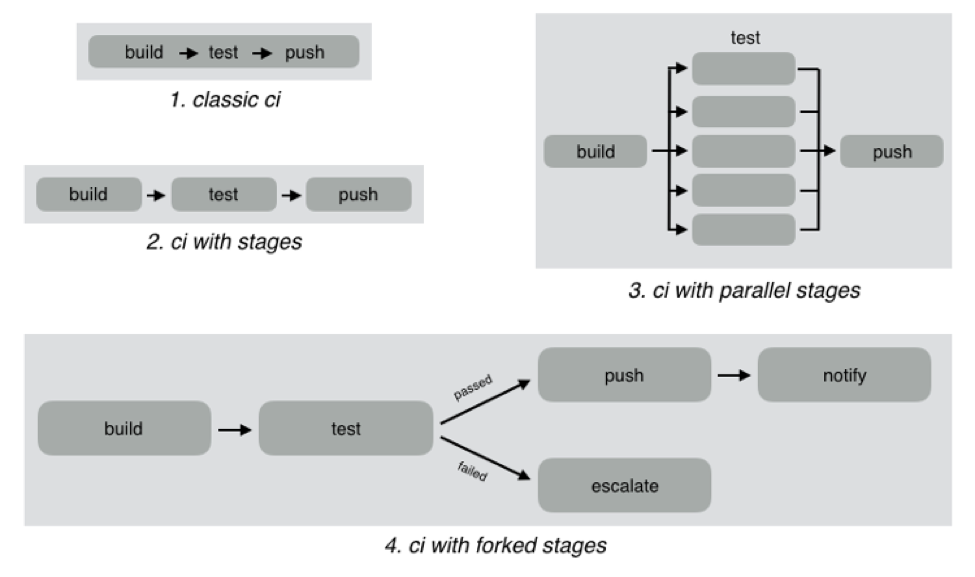
As an example, look at the different CI workflows shown below:
In classic CI, all build and test instructions were included in a single blob and instructions were executed serially. If all instructions executed successfully, CI was successful, and if anything failed, then it was marked failed. Almost all CI providers, until recently, offered just classic CI.
However, as CI became mainstream, developers wanted to define more complex workflows with decision trees and parallelism. CI pipelines support this complexity, such as:
Defining the CI workflow in stages, so you can get results from a stage faster without having to wait for the entire workflow to finish. This also enables scenarios such as running a basic test group and only running the extended test suite if the basic tests pass.
Running stages in parallel, so you can split tests or test your code against different environments or language versions, and get faster feedback.
Forking your CI logic based on the results of a stage.
While CI pipelines are a huge improvement over classic CI, they are still limited to developer-focused workflows. Jenkins, Teamcity, Shippable, Gitlab and CircleCI all support some form of CI pipelines.
What are DevOps Assembly Lines?
DevOps assembly lines are focused on automating and connecting activities performed by several teams, such as CI for devs, infrastructure provisioning and configuration management for ops, test automation for test, security patching for SecOps, semantic versioning and approval gates for release managers, deployments for multiple environments, and so on.
Today, most organizations use various tools for automating specific DevOps activities. However, the DevOps toolchain is fragmented and gluing it together to achieve continuous delivery is a challenging task.
Most teams adopt one of the following approaches:
Using cultural collaboration as the glue between silos. As an example, when a new application version is available, the test team creates a JIRA ticket and assigns to ops. Ops then copies the application version information into their deployment scripts and run them.
Writing ad-hoc scripts to trigger one activity from another, including passing state information through intermediate storage such as S3. In this case, the DevOps engineer would likely write a Jenkins job that runs automated tests, and then pushes application version information to S3. Another Jenkins job polls the S3 bucket, and when a change is detected, runs the deployment scripts.
The first approach introduces inefficiency and unnecessary human-dependent steps. The second approach is better, but only works well for small teams working on a single application. It creates a Frankenstein of spaghetti automation when you have many applications or even a single application with microservices.
DevOps assembly lines address this problem by focusing on gluing together these various DevOps activities into streamlined, event-driven workflows with the ability to easily share state and other information across activities.
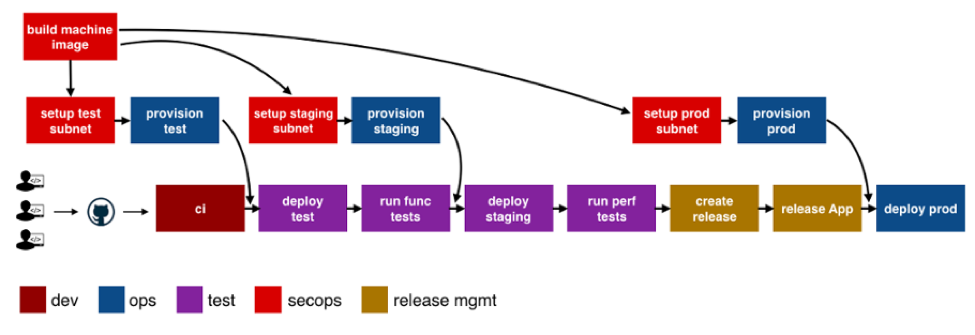
The following image shows a typical assembly line for a single application or service:
See the difference? The CI pipeline is just ONE activity in the assembly line. Each of the boxes in the picture above is a pipeline, just for different activities! Each has specific needs with respect to tools integration, runtime, configuration, notifications, etc. In addition, each pipeline is owned by a different team, yet needs to interact with other pipelines and exchange information. For example, if the ops team changes provisioning scripts for staging environment, the test team needs to redeploy the application and run performance tests.
A DevOps assembly line is, therefore, a “pipeline of pipelines.”
DevOps assembly lines need to support the following:
Ability to easily define workflows across multiple pipelines.
Versioned and reusable workflows, enabling rapid changes and scaling for multiple applications and/or microservices.
Integrations with all popular source control systems, clouds, artifact repositories, DevOps tools, languages, services, etc.
Runtime to execute every pipeline, including pre-installed tools and CLIs, and the ability to use the right runtime, depending on pipeline type.
Accelerators/playbooks for common pipelines and tools.
Ability to pass state and other information while triggering dependent pipelines.
Automatic triggers or manual approval gates between each pipeline.
Configurable notifications for each stage of every pipeline.
Release automation features such as semantic versioning of packages.
Audit trails for each pipeline, with the ability to go back or forward to a specific state.
Abstraction of all sensitive information like passwords, tokens, keys, etc. for security reasons.
Roles and permissions restricting assembly line and pipeline actions.
Manage DevOps infrastructure, including spinning VMs and containers up and down as required.
Visibility into each pipeline and stage, including logs, status and versioned data.
Metrics and Analytics across pipelines to help identify bottlenecks.
In short, DevOps assembly lines help automate and scale end-to-end workflows across all teams and tools, enabling continuous delivery.
About the Author / Manisha Sahasrabudh
Manisha Sahasrabudhe is co-founder and vice president of product management at Shippable. Prior to Shippable, Sahasrabudhe was senior program manager at Microsoft. She can be found online at Linkedin.
Think of DevOps tools as stepping stones to releasing new functionality into the hands of your customers faster and more frequently. Working together, tools automate processes and help companies become modern software factories. But isolated tools, like a lone rock in the middle of a river, are much less useful.
Disparate tools may help an individual or a team do their job, but they impede the progress of the larger organization. To achieve desired efficiency across the application life cycle, companies may waste time and amass technical debt by integrating tools with scripts.
The other answer is that organizations get restrictive. They may establish a “center of excellence” for DevOps that prescribes a toolchain that works together, but are those tools going to be the best fit for all individuals and teams, supporting an agile mindset?
The ideal scenario is for a DevOps toolchain to become an integrated, dynamic continuous delivery powerhouse where “best fit” tools work in concert to enable better performing teams and better customer experiences.
Start with the Right Tools for the Job
DevOps teams are focusing on automating and streamlining all aspects of the application life cycle. It makes sense to choose the tool that’s best for the job. And teams should feel free to experiment and take advantage of new tools emerging every day that solve new problems or do a better job solving existing problems.
Typical areas of DevOps tool investment include:
Planning and managing development work
Managing, tracking and documenting all code changes
Automating the deployment of applications into environments at all stages
Provisioning, configuring and monitoring environments
Managing all types of testing with the right requirements and data
Validating security before vulnerabilities become a problem
Promoting better agile team collaboration
Monitoring and managing an application in production
These tool categories each serve a vital role in the application life cycle. However, there remains a significant lack of coordination and shared knowledge across the DevOps toolchain to generate the value stream velocity that can keep businesses competitive and customers engaged. For example, if a testing function is isolated, it becomes a black hole of activity and often a bottleneck to delivery.
Build the Smarter DevOps Toolchain
When teams can visualize, orchestrate and track the continuous delivery value stream from development through production, the pipeline becomes an intelligent entity of its own. How is the pipeline performing? How is it adding value to the organization? How do you improve the pipeline?
For example, by integrating the planning and management solutions as part of the value stream, you can keep track of the user stories—including where they are deployed, what tests have been done and the results. Bi-directional integration enables automatic updates in the planning/management tool. Layer in collaboration tool integrations, and dev teams can get instant feedback and respond more quickly, shifting quality left.
The result: real-time information and the ability to plan and prioritize more effectively. Release and development teams now have a shared view and understanding of release status and business implications.
The testing function is another area where tools can work better together. Instead of sequential and separate functional, integrated, performance, API or security testing, you can build a testing workflow that runs in parallel, automatically promotes tasks, monitors progress and sends feedback of testing status. This can include orchestrating the generation of the right test cases, test data and virtual services for the app under test. With all the testing knowledge gathered in one place, it’s easy to see testing gaps and determine the risk of a release.
Launch DevOps Mission Control
A control center that manages the continuous delivery value stream can help teams not only manage the health and schedule of an active release more effectively, but it can also provide the visibility and analytics to help teams iteratively improve.
There are a number of tools on the market that look beyond the silos of the application life cycle to connect and extract value from an end-to-end toolchain. As you assess tools that can enable a dynamic value stream, ensure they have capability in these five areas:
Plug and play integrations: Does the tool support common DevOps plug-ins? How easy is it to integrate tools, whether they are open source, commercial or home grown?
Full pipeline visibility: Does it enable orchestration and tracking of all releases at all stages—planning, development, test and production—including feedback loops and planning for the next release?
Continuous quality: Does it support a shift-left testing model to ensure testing happens continuously and rigorously? Does it help you prioritize your testing and automate risk assessment for your releases?
Business value alignment: Does it provide intelligence about the app content in the pipeline? Can you see what code is deployed where in the pipeline and its status? Can you map how the content of a release aligns to business priorities?
Actionable analytics: Does it extract meaningful data points from pipeline operation to provide analytics that support real-time decisions, as well as inform improvements over time? Can you get insights into release and pipeline performance, testing coverage and speed, release readiness, team productivity, and so on?
With intelligent integration of your DevOps toolchain you can increase your value stream velocity and deliver the best quality apps—every single time.
I spent a large portion of my career in the networking industry, marketing routers, switches and other gear that makes the internet work. Networking—like many industries—is currently undergoing a revolution that is in large part driven by software. Functions that used to be delivered as a standalone device can now run in software (not unlike the apps on your smartphone); and software is also being relied on more to make decisions about how traffic is routed through the network.
I still read up on the networking industry occasionally, and if you’re looking for an expert opinion or just good journalism in this space, you’d be hard-pressed to find a better source than Craig Matsumoto. Craig wrote an interesting opinion piece called “NFV, SDN, Big Data – It’s All About Automation.” You don’t have to know what those acronyms mean to understand the premise.
What’s interesting is that the same premise can be applied to many of the things that promise to make software development easier, faster and cheaper. DevOps, continuous delivery, continuous testing—all rely on automation to be successful.
DevOps, of course, requires more than just automation—as it’s also a cultural shift—but automation plays a huge role. The three main components of successful DevOps are commonly cited as tools (or technology), process and people (or culture). Automation is the primary goal of the first two: tools that enable you to automate previously manual tasks, and then establishing the processes that allow you to take advantage of this automation.
The same can be said of continuous delivery or continuous testing. Continuous testing relies on being able to automatically generate test cases, automatically create virtualized testing environments and create automated calls for testing.
The premise of a modern software factory also relies on automation. Any modern factory, whether it’s producing cars or toothbrushes, strives to improve efficiencies by eliminating as many manual tasks as possible.
The fact that software development and operations are lagging behind other industries in terms of automating the production of its goods (i.e., software) is maybe a bit ironic, given that software development is typically seen as more technologically advanced.
However, it’s also a result of the maturity of the industry and that fact that coding, by its nature, cannot be automated. But the tasks that surround the actual writing of code certainly can be automated, and that’s what the modern software factory promises. The more you can automate, the more successful you will be in delivering quality software faster, with reduced risk and costs.
Automation seems to bring with it concerns about employment—that is, there is a not-unfounded fear that it’s possible to automate oneself out of a job. However, there was an interesting study that came out, focusing on the automobile industry—one of the most well-known examples of factory automation. The study concluded that:
In the last six years, (2010–2015), according to the IFR (International Federation of Robotics), US industry has installed around 135,000 new industrial robots. The principal driver is automation in the car industry. During this same period, (2010–2015), the number of employees in the automotive sector increased by 230,000.
Essentially, automation not only improved production velocity and quality, it also resulted in a net increase in employment.
The message is clear: Automate what you can and only rely on manual tasks for what you must. If you focus on automating your software development life cycle, not only will you be able to deliver software faster, cheaper and with better quality, but you also will be well on your way to achieving continuous delivery and DevOps.
Trying to integrate applications on your own can eat your project alive. A seemingly simple project may look harmless when you start, but in the end do-it-yourself software delivery tool integrations can devour your entire software process.
The problem may be that building simple integrations appears easy. How hard can an integration be? But let’s look at what typically happens with integrations down the road using the example of one developer’s story.
A developer needs to send defects from Zendesk to JIRA, so he builds a one-way integration based on a workflow action (just a trigger). Soon enough, he realizes he is now managing two tools, and keeping them updated has become a big issue—a very manual process and a huge time-sink. So he designs something to support two-way updates. But that’s just the beginning; each tool changes every few months and an integration that seemed so simple on the surface becomes very complicated.
Then our developer tries to modify a simple JIRA workflow. Again, it seems straightforward, but it’s not, because the tools involved are constantly changing. There are complexities with workflows, and organizations undertake endpoint system upgrades. As a result, one change to the tool breaks everything he’s done. On top of this, it’s difficult now for him to know the hierarchy or how one item relates to another.
He starts to consider some of the challenges he’s facing. He needs to consider how the description is written in each tool. They are all different, so how does he make sure he conveys the information correctly every time? And each “simple” integration seems to create more pain points, creating auditability and traceability problems. Meanwhile, he has to manage other tools that are continually added to the mix.
He’s taken a look at both API and custom-tool approaches. He’s found that API integrations are brittle or they become too popular and then have to be maintained for an entire organization. But the alternative—custom tools—typically fall apart quickly.
And what happens when our developer decides to leave the company? There’s no one left who knows how to maintain the integrations he created. Meanwhile, new tool replacements mean someone has to build new integrations—and the puzzle becomes even more complicated.
This short scenario illustrates the unexpected challenges developers face in creating and maintaining integrations. The cost of building and maintaining tool integrations in an always-evolving landscape is deceptively high. And when an integration fails and the organization suffers critical downtime, costs (and tempers) skyrocket.
Many of the common pitfalls are readily evident, such as rich text problems, but the following three areas may be the most challenging to developers addressing integration issues and can’t be easily avoided:
Endpoint system upgrades and schema changes
Workflow rules and differences
Relationships
Endpoint system upgrades and schema changes: Much of the time, a different team from the one that developed an integration will perform the upgrade. Perhaps a new field was added. Regardless, simple changes to APIs can blow up an integration. API responses may change formats or the expected values for a field may change. When the team upgrades the system the URL may change, so avoiding duplicates is tough. So, too, is ensuring that the change is seamless. Changing some of the underlying features could result in unexpected behavior (and it will be hard to detect where the problem actually is). It may be that JIRA made API changes that caused custom select fields and comments to fail when using the “old way”; however, other features may continue to work as expected, making this failure silent.
Workflow rules and differences: Workflows are the complexities between systems. It is hard enough to reconcile teams, let alone the tools they use. Tools may require you to enter required fields, and this can constantly change. And workflows may not match up at all. How can you handle these differences without bouncing field values and allowing complex mappings to reconcile these? What happens when a system has a special action to change a status and fields are required at the same time, but the other system is open and doesn’t reflect this?
Because of these issues, it is critical to get the teams being integrated (e.g. testing and development) to discuss workflows and where the two teams align. These teams need to understand where workflows overlap so they can undertake proper integrations.
Relationships: These are not always apparent. As you grow and want traceability, you need to have synchronized relationships. How does this requirement trace to a test? How will you manage those relationships? The tools don’t match the way they manage relationships. Some allow one value, others multiple. Some allow relationships across projects and types, others are more restrictive. In addition to the rules of the system, how do you know what items to link once you have synchronized the artifacts? What happens if only one side of the link is synchronized or the items are not synchronized in the order that you expected?
Getting this all right requires intelligent systems that can look at one system and translate properly to another
Avoiding Integration Pitfalls
The first obvious step in avoiding pitfalls is to identify what they will be and when they’ll pop up. To do this, focus not just on the current problem, but also on the future. Consider the bigger picture, understanding that systems constantly change and teams work differently so there will be additional layers of complexity in any integration project down the road.
As such, my best advice is for development organizations to focus on the software their organizations are counting on them to deliver, not creating and managing tools to build that software. Put internal resources to work in IT areas where you can create competitive advantage for your company. And consider using third parties to address issues such as integrations.
About the Author / Shawn Minto
Shawn Minto is the senior director of Technical Services and Support at Tasktop and one of the original team members working with CEO and co-founder, Mik Kersten, on Mylyn prior to Tasktop’s founding. Shawn began his career at Tasktop as a software engineer, working on all aspects of the product and directly with our customers to support their needs. Currently he works with customers to understand their tool environments and offers suggestions on how to best leverage Tasktop through deployments and support. In his free time, he enjoys being outside, cooking, and renovation projects. Connect with him on LinkedIn and Twitter.
You know the feeling: You’ve put in hours of work developing a new feature. It has gone through QA, been tested and passed all stakeholder inspections, and now you’re ready to deploy. Despite your experience and preparation, you have a pit in your stomach. What if something goes wrong and it brings your app to its knees? What if it doesn’t function in your production environment the way it’s supposed to? We’ve all been there. Fortunately, we also have some ways to help.
Electric Cloud CTO Anders Wallgren recently participated on a webinar with Gene Kim, CTO, researcher and co-author of “The Phoenix Project” and “The DevOps Handbook.” Hosted by devopsy.kinsta.cloud Editor in Chief Alan Shimel, the webinar addresses lessons learn from large-scale DevOps transformations, the business value of DevOps and some of the best tips and tricks for fighting deployment anxiety. We pulled out the top five tips and tricks from Kim and Wallgren for making deployment worries a thing of the past.
Tip 1: Automate Your Deployment
A theme throughout the webinar from both Kim and Wallgren was “automation.” One of the big reasons for this is that typically, when you automate your deployments, you’re also automating the diagnosis of problems in those deployments. You can’t always just rely on the exit code of a command-line tool to tell you whether something went right or went wrong. To help keep your deployments healthy, you’ll want to do testing along the way, possibly as a blue-green deployment or a partial deployment. However, if you don’t have automation behind that, it can be difficult to get that accomplished at speed. Without automation, you may start to rely on heroic efforts by individuals—so that every time you are doing a deployment, someone is having to do a figurative tightrope-walk to get everything accomplished. This creates a tough environment for your employees, and can lead to extensive downtime (and lost profits).
Tip 2: Enable Self-Service Deployments to Any Infrastructure
You’re probably wondering why this is a separate topic from automated deployments. That’s because the majority of deployments that occur in a given release pipeline aren’t going into production. Most deployments end up in testing environments (for performance testing, regression testing or just developer testing). It’s also important that you give your engineers the ability to use the same deployment methodology (artifacts, process definition, environment definition, etc.) regardless of the location to where they are deploying. From a cost perspective, allowing QA to test on a local Kubernetes cluster might be more cost-effective for your enterprise than running tests on Amazon Container Service. But, allowing teams to use the same approved automation as part of every deployment—to any location—means a more thoroughly rehearsed and therefore less anxiety-inducing deployment.
The ability to do self-service deployments also gives your teams the ability to move substantially faster when they need to deploy something for testing by avoiding the need to open a ticket and get your Ops teams involved. By allowing self-service deployments, you can avoid the process of running around to find the right person to accomplish the deployment you need to run, and empower your organization to react and build more autonomously across different groups. The result is better-tested and built deployments (resulting in lower deployment stress and fewer errors).
Tip 3: Self-Service Environments
We’re continuing to roll with the theme of automation, but this time we’re talking about self-service environments. More often than not, we’re working with complex distributed apps. This means things such as a containerized microservice application, DBMSs, messaging, key value stores, legacy applications and third-party vendors that we need to integrate with—all things that make our deployments complicated. Being able to consistently provision complex environments is a very important part of being able to successfully recreate a deployment as you promote the application through its life cycle.
It’s important to make sure that your engineers, and in particular, your QA and development engineers, have easy access to environments and that they’re not standing around waiting for access. When you don’t have the ability to get VMs or containers provisioned and configured correctly to receive your application, you run into problems. One of these problems is that your ability to test rapidly just became much more difficult. When you can’t get a near-production quality environment stood up in a few minutes, it means that your bug fix that requires just a few lines of code could potentially take weeks to test. Suddenly you need to requisition a set of VMs to test on (which could take weeks) and another day or two to do the deployment, and only then can you complete your tests. Things become painfully slow. And, when it comes to testing and fixing bugs, slow equals stress.
Tip 4: Artifact Repositories
Want to feel more confident about your releases? Look at your artifact repositories. Use of a shared artifact repository in production environments has been shown to be a good are a really good predictor of deployment success. If you’re not versioning your binaries, and have little insight into where binaries are coming from and how they were built, it can lead to failed deployments.
It may not be easy or simple to get your artifact repositories in line, but it’s a labor that will pay massive dividends in the long term. Electric Cloud worked with a massive online mortgage company that had the challenge of deploying large artifacts (gigabytes) into multiple data centers. To get everything up to speed, it was necessary to transfer those artifacts out of their build and test infrastructure and into their pre-production and production infrastructure. Because of the size of the artifacts and concerns about worldwide availability for the files, Electric Cloud worked with this financial services company to use Amazon S3 as the backing store for the repository server to create a long-term solution that is flexible and scalable.
Tip 5: Security and Auditability
If you work in a regulated industry, already know the heartburn auditability and governance can cause. Security is one of—if not the single—most important aspect of many application delivery pipelines. The reality is, we are just beginning to scratch the surface of the problems we will see the in the future when it comes to infrastructures getting hacked. So what’s our tip? Again, it comes back to automation. At ElectricCloud, there is a saying: Automation is auditing, automation is documentation.
The idea behind this is that by automating your deployment tasks, you are essentially creating a very real and tangible paper trail that shows what you intend to do (the automation definition) and a report of exactly what happened (the automation logs). When you rely on manual deployments, you suddenly take an aspect of repeatability and predictability out of your workflow. At that point, you are forced to report based on people’s spreadsheets, emails and memories. This is one of those things that doesn’t become a big deal until it’s a really big deal, and—to borrow another saying—an ounce of prevention is worth a pound of cure. In the case of auditability and security, being able to retrace your steps because your steps are always the same is a fairly foolproof method to making your audits much more smooth.
To provide a real-world example for how automation can make auditing and security much less painful, one of ElectricCloud’s clients is an aerospace customer with very stringent and demanding security standards. In the past, at the end of each release, it would have a two-week process where everybody had to sit down and compile a list of every single check-in deployed as part of that release. They had to understand where it got built and exactly how it was tested, and then assemble all of that information in a report. It was an extremely time-consuming, but seemingly necessary process. However, by automating many of the steps in the pipeline, the audit response effort went from a two-week process to just a few hours. They accomplished this because 99 percent of the information they needed was in the automation system and was simply scraped as part of process. The task went from manually pulling that data to just getting into it consumable formats.
Summary
By now you’ve certainly seen a theme emerge in our recommendations for reducing the stress of deployments—namely, automate! By putting effort into automation and streamlining your pipeline, you can take what was once a very labor-intensive and sometimes stomach-churning process and make it much more enjoyable. Not only will this save you time and money in the long run, but it will also allow you to focus on building better software, doing more deployments and focusing on the tasks that bring your business and your customers real value.
For more details on how you can relieve your deployment anxiety, and to hear the rest of the discussion focusing on the lessons learned from large-scale enterprise DevOps transformations and the business value of DevOps, watch the full replay.
About the Author / Sam Fell
Sam Fell is the Head of Marketing at Electric Cloud, responsible for driving awareness and demand for our DevOps Release Automation and Acceleration solutions. For 20 years, Sam has helped companies achieve success by marketing, selling, and implementing DevOps Release Automation, IT Change Management and Application Performance Management solutions. Prior to joining Electric Cloud, Sam held leadership roles at BMC, CA, Marimba and Nimsoft. Follow him on Twitter and connect with him on LinkedIn.
As cloud and DevOps have heated up, enterprise need for cloud portability and deeper DevOps integration have become pretty clear. The need for portability to avoid cloud lock-in has been a desire of enterprise cloud users from day one. A variety of people are attempting to address this need, but the market is still very much evolving.
In the area of DevOps integration, the two topics currently causing struggles are security and networking. Continuous deployment inevitably requires both to be part of the DevOps package, and those are the newest additions to the field, so it is still maturing.
Enter appOrbit
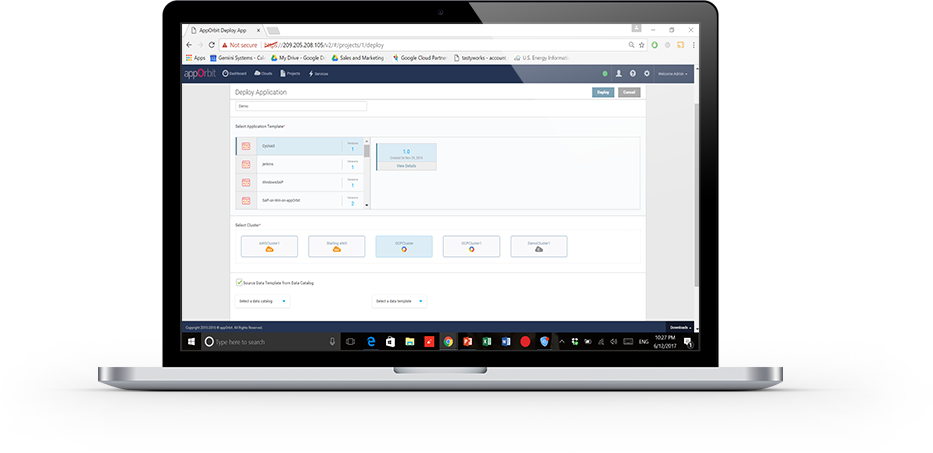
appOrbit recently came out of stealth mode with an overarching architecture to enable hypercloud and extend the DevOps process across the entirety of the dev/test/deploy ecosystem. The idea is to offer a platform that doesn’t care what languages or deployment tools you use, or even what databases you’ve tossed data into, and covers the process from first line of code to management and monitoring post-deployment.
That’s a big claim, so I got on the phone with appOrbit to poke around a bit. Better would be to take the time and use the toolset, but I’ll settle for our questions about the traditional weak spaces in the process, and about how they achieve some of the company’s claims. For now.
My first impression was that this was application release automation/application release management (ARA/ARM), and Rahul Ravulur, CEO of appOrbit told me I wasn’t far off; I just wasn’t thinking big enough. A large part of the process is ARA, but additionally, appOrbit worries about networking, security policy and long-term monitoring and management, all while offering deployment portability.
Finally, the End Game is in Sight
From the beginnings of the Ops side of the DevOps movement (what I like to call devOPS), the end goal was pretty obvious: to improve the entirety of the process. It was clearly going to take time—good network engineers are wizards that can make a network do astounding things—and we had to figure out how to make that more repeatable. On the DEVops side, repeatable was relatively painless: We already did a predefined sequence of steps over and over; the point was to break them into smaller iterations and automate what was ripe for automation. Much of Ops was the same, but networking and security had many more variables to take into account, and less history of “here’s a prescribed sequence, do it.”
If appOrbit can do as it claims—and its customer list includes some customers I’ve worked with that probably wouldn’t be there if the product was vaporware—then we’re seeing the culmination start. The culmination will include limitless portability, sort of a “we don’t care where you deploy, just tell us and we’ll do it”; it will include development tool agnosticism—“We don’t care what tools you used, we’ll deploy it”; and it will include complete solutions—“We’ll move your data, we’ll move your app, we’ll configure the target network, we’ll run the security checks relevant to the target platform.” It sounds like appOrbit has traveled quite far down that path already.
What, Exactly, Did You Intend?
One interesting bit appOrbit talked to me about and I’d like to take out for a spin is the idea of adding “intents” to security and networking. Tell it what you’re after, and through a combination of built-in functionality and plug-ins it will deploy your application as you intended. For things like opening a port, this seems pretty straightforward, but security and networking are complex topics. What is/isn’t covered by security policies/intents? What if my intent is for the system to create a VPN, lock down all the ports, then open just a few and connect the VPN back into the data center over an encrypted port? Who manages certs? Where does it get the credentials to get back into the data center? What happens if I take this whole VPN-based deployment and decide to put it inside the data center after all? Do I have to rework the networking intents to remove the VPN? The questions are endless.
But assume this is the beginning of a road that truly can end up with “deploy anywhere, and deploy as you intended.” That’s what we’ve been waiting for, and it’s inevitable, so I for one am glad to see us set off meaningfully down the path.
Improvement Makes Movement
The mere act of someone talking about having pulled all this together will be good for customers. Ravulur’s stress that “a lot of what we do is ARA” will no doubt make ARA vendors step up their attempts to be as inclusive as appOrbit is, and the market will move forward. appOrbit’s use case of “legacy app migration” without changing the app alone offers an avenue for enterprises to begin to move to new platforms. That in and of itself will be a help to the huge number of enterprises that want to move to a more modern environment but aren’t ready or able to rewrite entire systems. And again, it will spur on competitors—in this case in the application provisioning space, most likely—to try and implement similar functionality in a relatively short time frame.
Beyond Hope
In a nutshell, I hope that appOrbit can do all that it claims, but even if it falls short in some areas (I honestly have only touched on a few of the areas it has pulled together; there’s a lot here), it is a step forward, and I think the company will drive the market more toward the end goal of application portability from both the Dev and deployment sides, while automating a more complete solution.
To me, that’s all good. Not everyone is pure cloud, and a far fewer number want to be pure public cloud brand X. The automation tools I’ve been knee-deep in all have been massively complex under the covers, and no doubt this one is, too; simplifying automation so it is easy to adapt to a given environment is a huge part of the task these tools perform. Figuring out the weaknesses is what we customers have to do, but in the end, we’re moving forward.
I, for one, will look for a chance to play with appOrbit’s toys, validate some of its claims, and see how well it suits enterprise needs. But I don’t have a timeline, so if you’re interested, you should check them out yourself.
This article’s purpose is to compare the “big two” in the log analytics world—Splunk and the ELK Stack. But before we go into details, a short introduction to the competitors is required.
Splunk is the “Google for log files” heavyset enterprise tool that was the first log analysis software and has been the market leader ever since. The open-source ELK Stack of Elasticsearch, Logstash and Kibana is an up-and-coming rival that is a consolidated data analytics platform. The two compete in terms of features, usability and cost.
Overview
Splunk and the ELK Stack use two different approaches to solve the same problem. People typically choose one or the other based on how their organizations are structured and how much time they want to devote to log analytics. Splunk takes a pile of data and allows people to search through the information to extract what they need. ELK requires more work and planning in the beginning, but the value extraction is easier at the end.
The three key components of Splunk are its forwarder, which pushes data to remote indexers; indexer, which has roles for storing and indexing data and responding to search requests; and search head, which is the front end of the web interface where these three components can be combined or distributed over servers. Splunk also supports the integration of its functionalities in applications via SDKs. Common use cases include operational monitoring, security and user behavior analytics. Splunk is a paid service wherein billing is generated by indexing volume.
The ELK Stack is a set of three open-source products—Elasticsearch, Logstash and Kibana—all developed and maintained by Elastic. Elasticsearch is NoSQL database that uses the Lucene search engine. Logstash is a data processing and transportation pipeline used to populate Elasticsearch with the data (though also it supports other destinations including Graphite, Kafka, Nagios and RabbitMQ). Kibana is a dashboard that works on top of Elasticsearch and facilitates data analysis using visualizations and dashboards.
Both Splunk and the ELK Stack can be used to monitor and analyze infrastructure in IT operations as well as for application monitoring, security and business intelligence.
ELK vs. Splunk
Loading Data
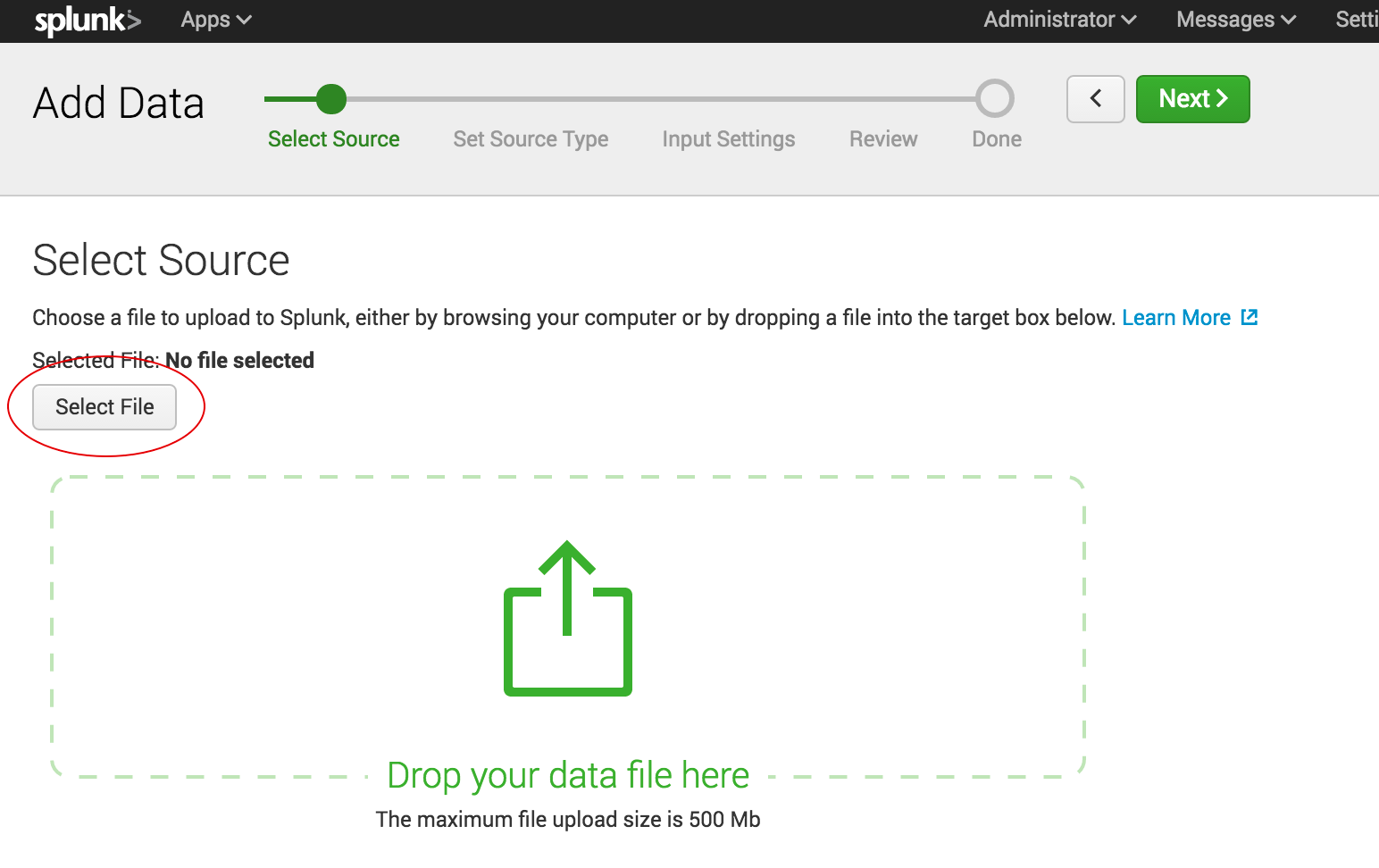
Shipping data to Splunk is fairly easy. After installation, the forwarders come pre-configured for a wide selection of data sources such as files and directories, network events, windows sources and application logs, and they are used to import data into Splunk as shown:
In the ELK Stack, Logstash is used to ship data from the source to the destination. However, Logstash needs to be configured so that each field is identified before the data is shipped to Elasticsearch. This kind of configuration can be tricky for those who do not work with scripting languages (such as Bash, Python or Ruby), but there is good support online that can be found quite easily.
Visualizations
The Splunk web UI includes flexible controls that allow you to edit and add new components to your dashboard. Management and user controls can be configured differently for multiple users, with each having a customized dashboard. Splunk also supports visualizations on mobile devices with application and visualization components that are easy to customize using XML.
Kibana is the visualization tool in the ELK Stack, and like Splunk, the platform supports the creation of visualizations such as line charts, area arts and tables and the presentation of them in a dashboard. The search filter is always shown above the different views: If a query is used, it is automatically applied on elements of the dashboard. Splunk also has a similar option, but it involves configuration in XML. Still, Kibana does not support user management, but hosted ELK solutions provide it out of the box.
Search Capabilities
The search function is a key capability of any log management platform. Both the Splunk and ELK Stack’s web UIs support searching using a dedicated search field. The query syntax on Kibana is based on the Lucene query syntax while Splunk uses its own Splunk Search Processing Language (SPL). Those familiar with scripting languages may already be familiar with Lucene while SPL is proprietary and must be learned.
One other difference is that Splunk offers dynamic data exploration to help users to find and extract everything as a searchable field when formatted in a manner that allows searching for non-configured fields. Elasticsearch fields, on the other hand, need to be defined in advance to use aggregation over the log properties.
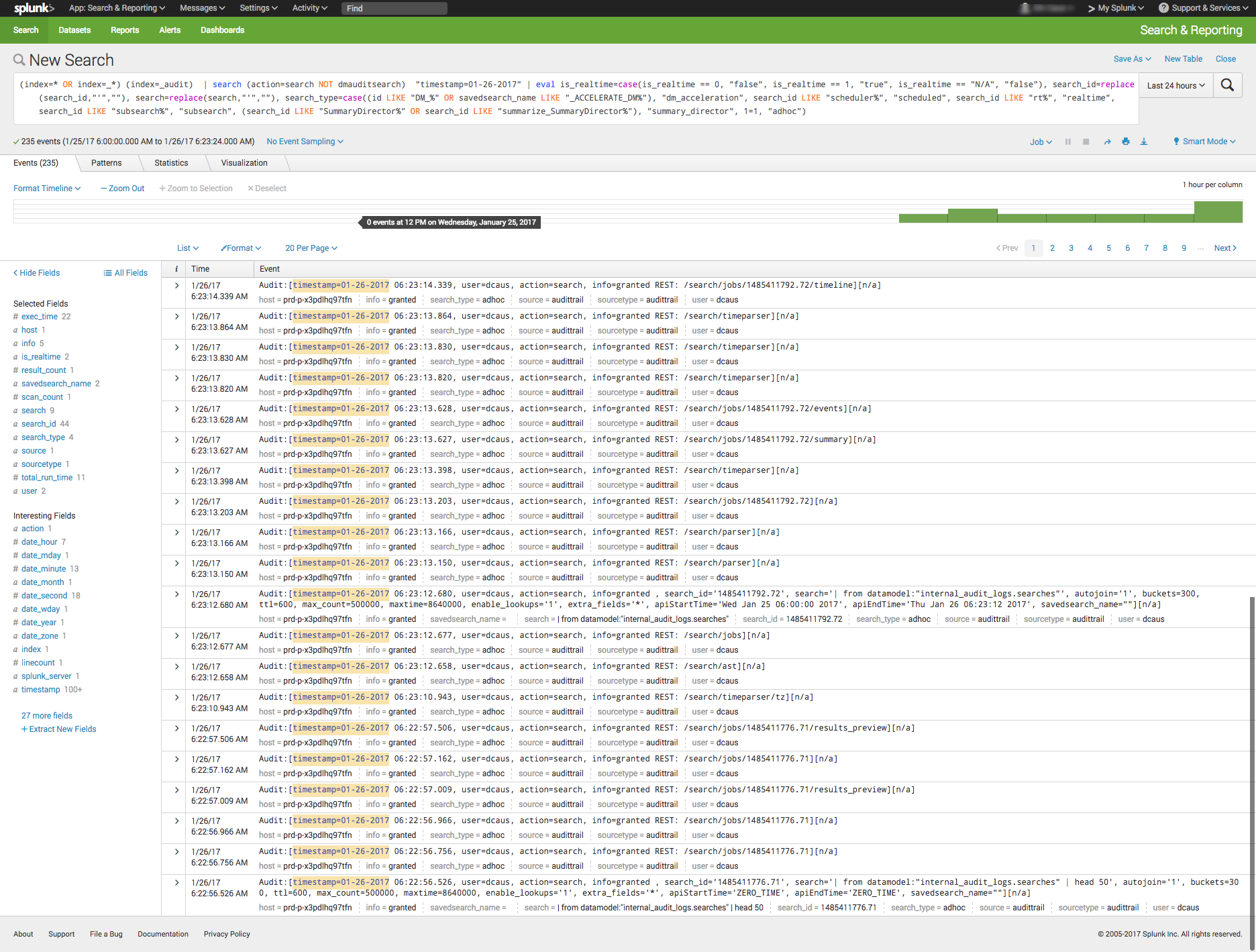
Here is one example of a query for each platform.
Kibana:
(beat.hostname: ES1 AND metricset.name: process) AND (system.process.username: root OR system.process.username: admin)
Splunk:
(index=* OR index=_*) (index=_audit) | search ( action=search NOT dmauditsearch ) "06:54"
The difference between SPL syntax and Lucene queries is that SPL supports the search pipeline (as in the example above) in which consecutive commands are chained together using a pipe character that allows the output of one command to be used as the input of the next one. Lucene query syntax is more straightforward and can work to generate the output from the query without additional transforming.
Traction and Community Support
Both Splunk and ELK Stack have large communities of users and supporters. ELK also has its own clear and extensive documentation for each separate tool, making it easy to get started. In addition, Elastic itself offers educational sessions worldwide.
In addition to having good documentation and a forum, Splunk, too, has customer and support platforms that offer various professional services. Splunk’s education program and instructors are available virtually or on site.
The Learning Curve
The ELK Stack’s learning curve is flat for what it’s meant to do. Elastic offers paid courses, but there is a lot of free material online due to the popularity of the open-source platform.
For Splunk, the learning curve is moderate in size, especially when carrying out more specialized analyzes. The company offers a trial period with extensive documentation, but the advanced Splunk educational courses are fairly expensive.
User Management
The ELK Stack provides role-based security as a separate paid tool. Splunk and managed-ELK services offer user management out of the box with user auditing included.
Pricing Levels
As already mentioned, Splunk is proprietary software with a price tag. After one integrates several data sources with the platform, the cost will increase greatly as data is continuously generated.
The open-source ELK Stack is free, but the true picture is not so black and white. The cost of the platform’s hardware and maintenance also adds up. To lower the cost of using ELK, features, plugins and tools must be developed.
Vendor Lock-In
Splunk’s high price tag comes with the benefit of offering an overall, well-rounded product. Users might be locked into a vendor, but that one vendor is all that is needed to do nearly anything. The open-source ELK Stack is seemingly free, but it does not provide many functionalities such as alerting out of the box—and it costs money to develop and maintain them.
One way to look at the Splunk-versus-ELK discussion is to frame it as the old Microsoft-versus-Linux debate. If you like Microsoft, you will probably prefer Splunk. If you like Linux, you will likely want to use the ELK Stack.
Final Thoughts
When one decides between these solutions, the ultimate choice should reflect not only on the platform but also on the customer’s specific needs.
Both Splunk and the ELK Stack are currently popular. But what might the future hold?
Splunk (Blue) vs. Elasticsearch (Red) on Google Trends
According to Google Trends, the ELK Stack has now overtaken Splunk in terms of the proportion of Google searches. But ELK’s traction does not stop there. As mentioned earlier, Splunk self-reports 12,000 total users. Elasticsearch is reportedly downloaded 500,000 times every single month. In IT departments, then, it is far more likely to meet people who are familiar with ELK than with Splunk, meaning that the adoption rate of the ELK Stack could “snowball” and increase even more in the future whenever ELK users join new companies or teams. People tend to use whatever software they already know or is already being used.
It’s clear that many functionalities are being added to the open-source ELK Stack. This, in turn, is shrinking the gap between it and Splunk. hose features currently found only in Splunk are likely to be added to ELK at some point in time.
So, if a more mature product is what you need, go with Splunk. But if you like a product that is more flexible, ELK is the way. Either way, it’ll be interesting to see how these two continue to compete.


 Manisha Sahasrabudhe is co-founder and vice president of product management at


 Shawn Minto is the senior director of Technical Services and Support at
 Sam Fell is the Head of Marketing at Electric Cloud, responsible for driving awareness and demand for our DevOps Release Automation and Acceleration solutions. For 20 years, Sam has helped companies achieve success by marketing, selling, and implementing DevOps Release Automation, IT Change Management and Application Performance Management solutions. Prior to joining Electric Cloud, Sam held leadership roles at BMC, CA, Marimba and Nimsoft. Follow him on
 appOrbit recently came out of stealth mode with an