Category: DevOps Practice

  • Nobl9 Adds Service Level Analyzer to SLO Management Platform

    Nobl9 Adds Service Level Analyzer to SLO Management Platform

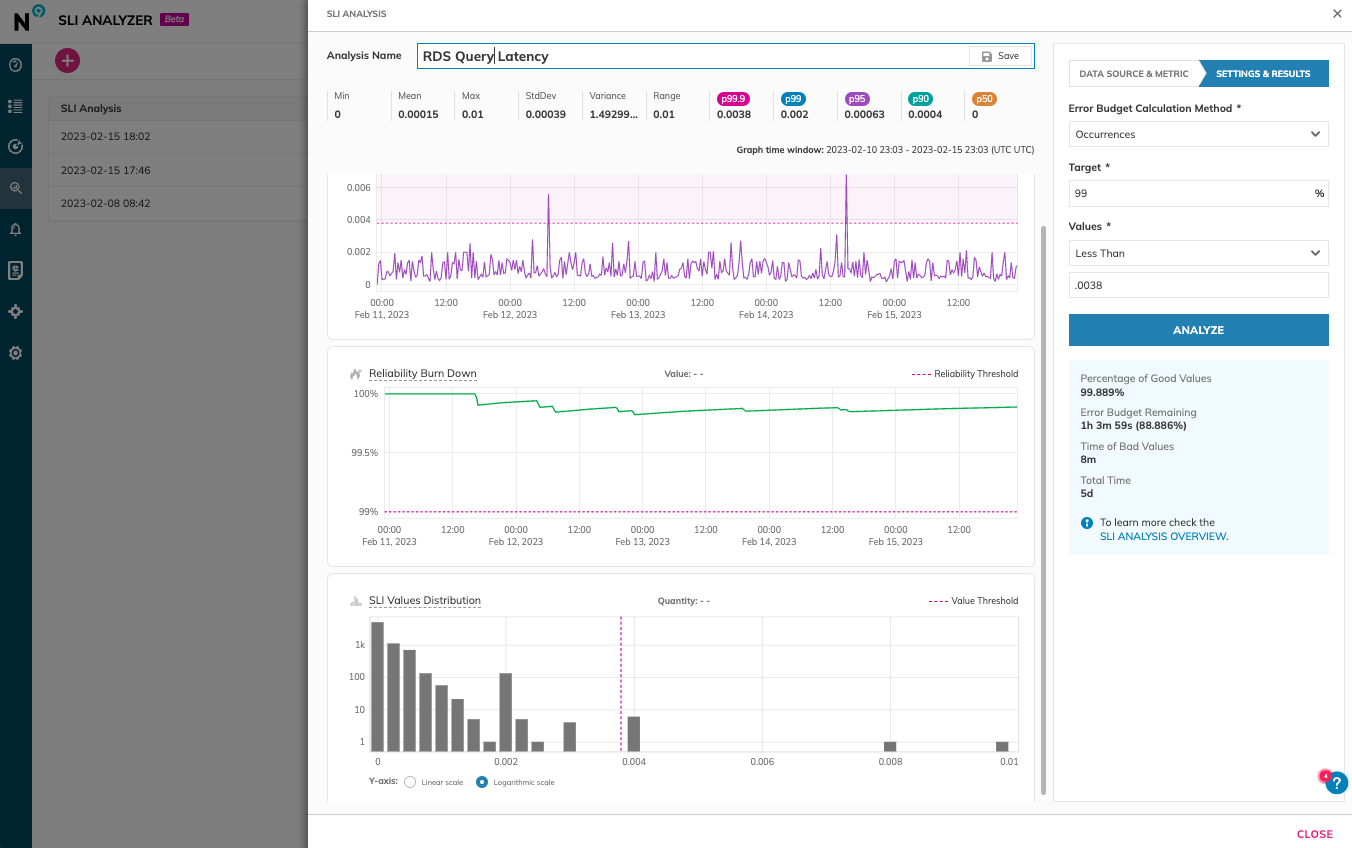
    Nobl9 today added a free tool for analyzing service level objectives (SLOs) to its platform to enable DevOps team to more accurately set reliability goals.

    Brian Singer, chief product officer for Nobl9, said Service Level Analyzer collects metrics and observability data from more than 24 DevOps tools and platforms that can then be used to create an SLO via a single click.

    Included as part of the free tier of the Nobl9 service, Service Level Analyzer also enables DevOps teams to more easily update SLOs as error budgets and error budget burn rates change over time based on actual incidents that have occurred, added Singer.

    DevOps teams can also perform “what-if” analysis to test out the impact of different targets and thresholds on error budgets, he added. That capability ultimately reduces costs because DevOps teams become less likely to overprovision resources to ensure application performance and resiliency, noted Singer. In effect, Service Level Analyzer is providing DevOps teams with an observability tool that spans the entire software development life cycle, said Singer.

    Nobl9 is trying to spur greater adoption of SLOs by making available an open source SLO specification that defines a common interface for constructing SLOs across a DevOps workflow. SLOs, of course, are not a new idea. They have been employed as a metric to track the performance of IT services for decades. However, as more microservices-based applications are built and deployed, it’s becoming more challenging to maintain SLOs across applications because they have many more dependencies than legacy monolithic applications.

    Ultimately, each DevOps team needs to provide some sort of objective benchmark that assesses their overall effectiveness at delivering application services. SLO-as-code is intended to make it simpler to gather the metrics that confirm whether service levels are being achieved. As organizations become more dependent on software to drive digital processes, those SLOs are then tracked across everything from financial services to supply chains.

    In general, DevOps teams are more comfortable with the SLO concept, said Singer. The biggest challenge is making them simpler to implement, he added. The Service Level Analyzer lowers the bar for implementing an SLO by making historical data stored in DevOps tools and platforms more accessible, noted Singer. Rather than having to manually collect that data and then normalize it in an external repository, Nobl9’s Service Level Analyzer automates that process on behalf of a DevOps team using actual data versus relying on less precise statistical analysis, said Singer.

    As IT environments become more distributed, the number of dependencies that exist across application environments only continues to expand. IT teams can spend weeks trying to discover the root cause of issues that are negatively impacting application performance, only to discover that, for example, calls to an application performance interface (API) are being rerouted in a way that significantly increases latency. Tools that enable DevOps teams to more easily understand the relationships between all the services that make up an application environment are more crucial than ever.

  • Benefits and Challenges of DevSecOps for Business

    Benefits and Challenges of DevSecOps for Business

    Almost every day, there is a new tactic or technique discovered that hackers can use to disrupt a company’s systems, obtain critical data and information or steal money. Often attackers look to exploit vulnerabilities in code to carry out their attacks. Ironically, it’s usually a small piece of code that helps a business perform very simple tasks that can become the root of this serious issue (e.g., logging, report service and glue for application). In fact, it only takes one exploitation, vulnerability or human error to cause a data breach that, on average, costs $4.35 million. Some experts projected that by 2025, these breaches could cost a total of $10.5 trillion. Therefore, CEOs and other corporate executives should reflect on these incidents to ask themselves what would happen if someone entered their systems to exploit code and what it could mean for their company.

    The Problems That a Business Faces

    In traditional development practices, security serves a ‘gating’ function. Security checks are performed prior to releasing an application to production and, if issues are found, security stops rollouts. This can have disastrous ramifications.

    The unknown can be frightening, but that’s where DevSecOps can help. DevSecOps incorporates security into every step of the software development life cycle (SDLC) from requirements to architecture and design, coding, testing, release and deployment. By automating and integrating security practices into the software development life cycle, development teams can react to vulnerabilities sooner, automate security checks and proceed into production with a more reliable and secure product.

    The benefit is felt when a tactical vulnerability is discovered and the DevSecOps practice is already in place to ensure that it can be remediated with limited impact on the business.

    The Business Benefits of DevSecOps and Best Practices

    Streamlining the SDLC and including security checks (often automated) in the process early in the development cycle can identify a problem before it can negatively affect the bottom line of the development effort and the business. Having a vulnerability remediated early in the development cycle is an order of magnitude less expensive than one discovered just prior to production.

    DevSecOps works best in an organization where Agile practices have been adopted to swiftly enable continuous integration, deployment and scalability. The road to streamlining and automating these practices can be long, but when effectively applied, DevSecOps best practices reduce costs for the company and accelerates time to market.

    For DevSecOps to be effective, security must have a seat at the table when requirements are gathered and architectures are planned. This integration of work practices ensures that risks are identified early and can be mitigated well before an application is launched in production.

    Using that same connection with operations, security procedures should be established to feed new vulnerability discoveries into the pipeline for remediation. However, implementing DevSecOps isn’t a magic fix and it won’t happen immediately. But why can it be so hard to implement?

    Overcoming the Challenges of DevSecOps

    There are many difficulties when it comes to implementing DevSecOps. Here are two of them:

    1. Cultural Shift:
    Leading with a DevSecOps approach requires a huge culture shift within the organization that challenges the way many departments operate today. Many employees might find it difficult to drastically change what they’ve been doing for years. Another roadblock is the belief that better protection slows down processes and restricts innovation. Quick code production is a goal for developers who want to meet the demands of businesses, while on the other hand, security teams are focused on making sure the code is secure.

    Thorough training for both security and development experts will help overcome some cultural obstacles but integrating the goals and objectives of both teams will push the adoption of DevSecOps practices. Organizations will begin to see security align to faster time and flexibility of solutions while developers will begin to adopt a security-first mindset.

    2. Complex Tool Integrations:
    Most DevOps toolchains are produced by different vendors. Teams select source code management, continuous integration/delivery (CI/CD), build tools, binary libraries, code review and problem monitoring solutions based on their unique needs. Adding security tools into that pipeline can create a challenge for ensuring the best results for both teams.

    Security analysis in the development pipeline is done with tools that perform software composition analysis (SCA), static application security testing (SAST), and some form of dynamic testing. Integration into the pipeline of these tools is significant and creates difficulties for developers. The developer must know the intent of the scan and what to do with the problems they uncover. It is important that developers have an accurate understanding of where the problem arose and what the issues mean. However, combining and comparing the results and data of many vendors’ resources might be challenging.

    The best course of action would be to consolidate your solutions. This will not only make things simpler for the developer and the organization, but it may also reveal threats that the organization wasn’t previously aware of.

    Overcoming these obstacles is not an easy task, but it is possible. Once a DevSecOps approach is accepted and fully implemented across your company, you can expect code to be developed with fewer bugs and security risks. The cost of deploying code will also eventually decrease, and at a pace that helps the organization maximize its return on investment. Overall, systems created within this process will be significantly more flexible and capable of adjusting to modern-day threats and change in the midst of a digital transformation.

  • Tricentis Extends Mobile Testing Reach

    Tricentis Extends Mobile Testing Reach

    Tricentis has added the ability to test native iOS and Android applications to its Testim software-as-a-service (SaaS) platform.

    Previously, the Testim platform was designed to test web applications, but is now being extended as organizations build and deploy more native mobile applications. Capabilities of the Testim Mobile platform include codeless authoring of mobile tests to eliminate the need to write and maintain Appium, Espresso or XCUITest scripts and the ability to set up, configure and manage mobile devices in minutes using the Tricentis Mobile Agent.

    Additionally, applications can be uploaded to the cloud to enable collaboration across testing teams as they opt to run tests on real or virtual devices. DevOps team can also customize tests with JavaScript, branch tests, and run tests from a scheduler or continuous integration (CI) build.

    Tricentis CTO Mav Turner said Tricentis is moving to implement a consistent set of mobile testing services across its entire portfolio of testing platforms now that mobile applications are equal, first-class citizens alongside web applications. The primary driver of that shift has been the COVID-19 pandemic, which saw more organizations relying on external-facing mobile applications to engage customers, partners and employees working remotely, he added.

    Testing those applications is more critical than ever because the cost of failure—in terms of impact to the business—is now much higher as more organizations depend on software to drive business processes, noted Turner.

    The goal is to make it simpler to test these applications as they are being developed to ensure quality, he added. The challenge is that many developers don’t have a software engineering mindset. Hence, they need to rely more on testing platforms infused with artificial intelligence to discover issues relating to, for example, scalability and security, said Turner.

    Most organizations are trying to shift more responsibility for testing toward developers as part of an effort to remediate issues earlier in the software development life cycle. It’s more challenging for developers to remediate issues after an application has been developed simply because they have lost context. Testing platforms infused with AI capabilities make it easier for developers to identify issues at the time they are writing code. In the future, Tricentis expects to take advantage of generative AI platforms to make it easier to author tests using a set of best practices that can be easily reused, noted Turner.

    That approach doesn’t necessarily eliminate the need for a dedicated quality assessment review, but it does allow testing teams to focus more of their time and effort on testing the application experience versus identifying lower-level errors that many developers routinely make.

    Over time, the quality of applications should steadily improve as many of the low-level mistakes that developers make are eliminated. That should improve everything from application security to the user experience as applications are continuously updated. In the meantime, organizations that embed testing within DevOps workflows are steadily reducing the number of issues that need to be addressed just before applications are supposed to be deployed.

  • Platforming the Developer Experience

    Platforming the Developer Experience

    This article is part three of three on the boom in platform engineering and its role in supporting a streamlined, positive developer experience.

    In a perfect world, the developer experience would be on that is completely free of obstacles. In the previous articles in this series, I argued that supporting and improving the developer experience is a critical business requirement. To continuously improve and keep up with the constant change that typifies the cloud-native development landscape, platform engineering is–at least for now–the golden path to reducing developer toil and increasing productivity.

    I’ve also countered the controversial idea that DevOps is on life support because centralized developer platforms eliminate the need for DevOps. If anything, DevOps and developers share a symbiotic relationship, and the developer platform is where their functions converge. In this third and final article of the series, I will explore this relationship, examining the considerations for how the developer experience is “platformed” and by whom.

    Optimizing Developer Experience: The Circular Economy of the Developer Platform

    Let’s put it this way: The more relevant and useful the developer platform, the likelier the developer is to use it. If it reduces toil, cognitive load and makes shipping software easier, the developer has more time to focus on their core task: Developing features. With intuitive, self-service workflows and all the tools developers need, they rarely, if ever, have to think about ‘the how’ of getting their software into the hands of users. And this works if and when an organization does at least a couple of things right:

    • The organization prioritizes the developer experience and empowers other parts of the organization to answer the question, How can we create the optimal developer experience?
    • The organization puts resources behind understanding and building the best developer experience–and that’s where both the developer platform and DevOps teams as “fixers” ideas emerge.

    Does this mean the “optimal experience” can’t be optimized? Does that mean developers cannot have input into their own (or more general) developer experience(s)? No. In fact, part of what makes the developer platform idea compelling is that developers don’t have to weigh in or make decisions on the platform or tooling. Still, it’s possible to let them have that freedom if the team or organization wants to. Bottom line: There is no one-size-fits-all developer platform any more than there is a single developer experience. This is why DevOps, along with PlatformOps, is an ideal complement to facilitating the “circular economy” of the developer platform. The platform is unlikely to stay static. And to keep it dynamic and responsive to the changing needs of the developer teams using it, the DevOps teams of the future can proactively remove, recycle, repurpose and restructure the way the platform runs and what tools are available in it, automating and evaluating … almost like a feedback loop on the platform itself.

    Your Developer Platform is the Golden Path to Developer Productivity

    The developer experience is built around the tools and workflows developers use and, in the case of a developer platform, the tools and processes you define and provide, i.e., a “golden path” to productivity.

    Whatever that platform includes, it will demand that you answer questions about what tools, processes and best practices will be most effective for delivering the optimal developer experience. For example, what and how much should you build yourself? How should the platform be assembled to best serve the needs of your developer team? What is the most effective configuration? How much freedom can or should be given to your developers, depending on your business goals and the security, stability and scalability requirements of your organization and products?

    Boiling down the route to the golden path, there are three critical points to help guide the creation of an effective internal developer platform:

    • Treat your platform as a product. This is key to reducing cognitive load and paving the way to shipping software fast and safely. This also means that you are guaranteed to have an MVP and alpha, beta, etc. version of the product–and subsequent versions serve their purpose temporarily but are always works in progress.
    • Realize you can’t have good DevX without good UX and develop accordingly.
    • Focus on workflows and tooling interoperability; that is, a developer(-led) control plane. What is going to work for developers in practice to ensure that they can focus on key deliverables? How will you gather intelligence to discover when it’s time to make changes to the platform? Who will be responsible for this?

    Paving and Using the Golden Path Developer Platform Simultaneously

    Developer platforms can significantly improve developer productivity and the overall developer experience. But you can’t just build a platform and hope for the best without seeking developer input or understanding how developers work. Nor can you build a platform and decide it’s finished and forget about maintenance, enhancements and inevitable change. Developer platforms don’t exist as one-and-done items on a checklist and are themselves productivity tools that are in a constant state of flux.

    Misunderstanding why you would platform the developer experience in the first place defeats the purpose.

  • How Will Low-Code and AI Coexist?

    How Will Low-Code and AI Coexist?

    Over the last few years, low-code solutions have become important to help organizations widen programming accessibility to a broader base of users and help fill development gaps. And these technologies are still gathering steam—Gartner estimated the market for low-code development technologies would grow to a total of $26.9 billion in 2023 and that 65% of applications would be developed using low-code by 2024.

    However, AI-based code generation is set to further level the playing field with advanced auto-completion and AI coding assistants. Take GitHub’s Copilot, a helpful AI pair programmer, or OpenAI’s ChatGPT, which can generate complex functions given natural language prompts. Other AI tools trained on UIs, like Galileo, can derive frontends for any project in a matter of seconds. So, are low-code development platforms still relevant in this new paradigm of AI-driven software development? If so, how will low-code solutions and AI coexist?

    Well, generic algorithms can only go so far in creating truly unique and innovative experiences that solve real-world business cases. And since most programmers don’t have the skills to train machine learning or deep learning models from their own datasets, this is one area where low-code solutions could lower the barrier, enabling users to tag unstructured data, generate models, run simulations and share reusable AI across departments.

    I recently chatted with Johanna Pingel, MathWorks AI product marketing manager, to discuss the role of AI in low-code programming. According to Pingel, low-code solutions can lower the barrier to AI functionality, both in quickly integrating AI-driven functionality into applications and seamlessly generating new AI algorithms based on unique datasets. Below, we’ll consider some additional use cases for AI and how low-code platforms may work alongside it.

    Use Cases For AI

    First off, what are application developers using AI for these days? Well, AI has an increasingly wide range of uses. It began with computer image and processing, such as identifying cats and dogs or postal codes. Now, voice recognition, voice-to-text and text-to-voice are commonplace, and AI is being used to create ever more sophisticated applications. One area that Pingel is excited about is applying AI to help with battery life management, predicting the lifespan of batteries for electric vehicles and consumer electronics.

    “Anywhere there’s data, there’s an opportunity to create models and make predictions based on that data,” said Pingel. This especially rings true for scenarios involving data and visualization. For example, consider visual inspection in a pharmaceutical production line to ensure there are no defects with any pills. Another use case is visual inspections of parts in automotive assembly lines. Applied to these scenarios, AI can remove grunt work and make production safer and more efficient.

    ChatGPT is another example of an AI application quickly becoming mainstream, not only for content creators but for scientific research. For example, ChatGPT can spin up MATLAB code and create functions and unit tests, which can be copied and pasted into IDEs. However, code written by ChatGPT should still be checked and verified by engineers and scientists to ensure its accuracy, said Pingel.

    How Low-Code Lowers the Barrier to Bespoke AI

    Low-code solutions can bring many benefits—these platforms help to speed up tedious tasks and level the playing field for those with different coding abilities and desires, said Pingel. Low-code platforms can also be a great tool for engineers looking to incorporate AI into their business systems. For example, having a low-code method could be helpful in generating code for machine learning algorithms and new models, which can help companies create their own algorithms and incorporate them into their own platforms.

    More people are interested in incorporating AI into their applications, but the use cases are growing increasingly more sophisticated. Businesses may start with simple needs, such as identifying faces or identifying text from handwritten letters. These rely on simple datasets, and algorithms already exist to accomplish most of these tasks. Off-the-shelf AI is helpful at the start, but eventually, companies tend to want to use their own data and settings far more specific to their applications, said Pingel.

    For example, a more niche case could be as specific as identifying cracks in a windshield. Or, in a financial industry, it might be analyzing mass amounts of loan applications to determine approval rates. In these situations, using your own internal data becomes necessary to create AI that understands the situation at hand. Yet, the hard part is assembling this data in a way that is accessible for a model to comprehend. Analysts estimate that upwards of 90% of data held within enterprises is unstructured, meaning it requires a heavy amount of tagging to become usable for AI/ML.

    Low-code is a perfect solution to avoid the point-and-click aspects of cleaning, cropping and structuring this data, said Pingel. This can introduce automation into the process of labeling data while still involving some human intervention to fix mistakes. Machine learning models can take a while to train and simulate, underlining the need for a fast way of iterating on models. A common platform could help companies develop custom machine learning algorithms and models and keep track of experiments. This helps to ensure that the most effective model is used for the final application.

    End Benefits of Democratized AI With Low-Code

    Overall, low-code platforms can provide a number of benefits that lower the barrier to unique AI creations. Low-code platforms like MATLAB and Simulink are useful for structuring and labeling data and quickly generating ML models. Low-code also makes it easier to bridge different programming languages and quickly generate code for a variety of different languages, such as C, C++ and Java.

    Additionally, low-code platforms enable users to collaborate easily with other users. But low-code doesn’t mean no-code, Pingel explained. In fact, “you can learn to be a better programming through low-code tools, too,” she said. For example, it could enhance understanding of the structure and syntax of code.

    In general, democratized AI is an important capability for businesses to take advantage of. Although AI-based solutions are coming to market to displace old tools and processes, there is still an argument to be made for low-code—namely in empowering non-technical users and lowering the barrier to creating custom AI-driven functionality.

  • How to Rethink Your Website Uptime

    How to Rethink Your Website Uptime

    COVID-19 rapidly accelerated e-commerce, almost shutting down in-person shopping during the lockdown. Ordering from Amazon became second nature. The online giant accounted for approximately 33% growth—50 million new Amazon Prime members.

    While there are concerns that consumer spending will fall short this year, according to Adobe’s 2022 holiday shopping predictions, online discounts are already playing a big part in creating record sales. Customers are concerned about their site’s availability. Are your stakeholders saying your service is running too slowly? Look at the latency metric and you may not see a change noted from the week before. With no real decrease in latency, your team is unaware of what “running too slow” means.

    Revisiting Technology Vendor Contracts

    Page latency is not new. Many retailers have increased their website conversion by improving page load time. The problem with some sites is that no one really knows what was defined as being fast enough and not too slow. And, of course, every stakeholder has different expectations of what the service should deliver. Internet traffic surged during COVID-19 and networks responded at different levels. While not unusual, the rapidity of growth was staggering. Globally, traffic in April 2020 grew 38% with upstream traffic skyrocketing up to 123.18% before leveling off.

    Service level objectives (SLOs) can create a common understanding of service capabilities to help define site requirements from the start. Unlike service level agreements (SLAs) which are engineering-driven, SLOs are a business decision that requires input from multiple stakeholders. SLOs allow retailers to match IT delivery models to business outcomes.

    Uptime is only one of an organization’s business objectives. First, service level indicators (SLIs) must be measured to identify users’ expectations of reliability. When you combine these individual data points into your SLO, then you’re set to meet your team’s business goals.

    SLOs for Existing and New Services

    Once your SLOs have been established, you should review all your existing and new services to make sure that your systems are running according to the objective. Moving from SLAs to SLOs isn’t simply a rebranding exercise.

    SLOs become the target for the availability of the system. Instead of looking at every individual data point, you can now look at the SLIs over a certain period — to establish an event and success criterion — and, for example, report that for 99% of them, the operation has less than five seconds to succeed, if that’s your goal. The SLO will indicate if a large portion of your SLI events were good. At 99%, there’s still a gap, but aiming for 100% reliability is unrealistic.

    No retailer can guarantee that their system will always be up and running 100% of the time. There are too many factors you can’t influence. And aiming for a higher number may not speak to your business case as it will contribute to unnecessary costs. Additionally, if your users have no expectations of the reliability of your service, it’s not prudent to make the investment. Your 1% gap, known as an error budget, is the number of negative events your system can withstand before violating your SLO—when negative events happen but are completely acceptable and fine.

    By using SLOs and error budgets, you will deliver less noise for engineers. Often engineers are paged too much which results in alert fatigue. You’ll have happier engineers who will not receive pages in the middle of the night, get fewer alerts and not have to deal with being alerted about small website spikes.

    Implementing SLOs

    While reliability is the single most important decision when making SLOs, teams are also faced with internal development challenges. Engineers would like to prioritize technical debt to rework existing services versus focusing on the business side demanding new features. When looking at SLOs, they should be based on your user expectations, not an arbitrary value.

    Undercutting the reliability of objectives also means that you’re not meeting user expectations. And not meeting user expectations will generate a direct business impact because unhappy users might move away from your service. Create this direct link between reserving tech debt and having a positive business impact by bringing reliability back up to the value which was defined. This approach will help prioritize between tech debt and new feature development.

    Getting started with SLOs for existing services is a good jumping-off point. Most likely, there will be information expectations as to what’s a service. Document the services and think about what users expect. You won’t have to deliver anything near 100% but be reassured that by making the informal formal, seeing the user perspective, and not trying to aim for perfection are areas to hone in on when delivering value for your SLO. Once defined, how often, what you want to achieve, and measuring the actual reliability of your service are the next logical steps to knowing how good you’re delivering in comparison to the objective defined.

  • Logz.io Integrates ChatGPT With Observability Platform

    Logz.io Integrates ChatGPT With Observability Platform

    Logz.io has integrated the ChatGPT generative artificial intelligence (AI) platform with its Open 360 observability platform to extend its automated recommendation capabilities to reduce mean-time-to-remediation.

    ChatGPT, developed by OpenAI, is based on a large language model that Logz.io uses to enrich crowdsourced data. That approach enables ChatGPT to surface links to related information and best practices for resolving IT issues.

    Logz.io CTO Asaf Yigal said the company has integrated ChatGPT with its existing AI engine, dubbed Cognitive Insights, that applies machine learning algorithms to identify anomalies indicative of potentially critical IT issues. The company expects to be able to add other generative AI capabilities as additional advances are made, he added.

    The Logz.io Open 360 platform is based on open source OpenSearch, Prometheus and Jaeger software that the company has infused with machine learning algorithms. The integration with ChatGPT is enabled via an application programming interface (API) that OpenAI has provided.

    The overall goal is to employ AI to surface the most relevant issues a DevOps team needs to focus on without having to search huge volume of logs, tracing and metrics data, said Yigal. Generative AI platforms solve a fundamental cognitive load problem created today as DevOps teams collect more data, noted Yial. The more data a DevOps team collects, the harder it becomes to determine what’s going on in an IT environment, said Yigal. He added that generative AI platforms make it possible to analyze massive amounts of data at a scale that isn’t otherwise achievable.

    AI tools should make it possible to manage IT at a level of scale that eliminates many of the low-level data engineering and analytics tasks that previously required manual effort from a DevOps engineering team. It’s not clear how many other DevOps tools and platforms will be invoking generative AI capabilities in the months ahead, but DevOps teams should assume that large language models will soon be augmenting DevOps teams in ways that previously would have been thought unlikely.

    For example, discovering vulnerabilities in software running in production environments is about to become trivial as artificial intelligence (AI) platforms such as ChatGPT evolve. A generative AI platform can identify code vulnerabilities in much the same way as a traditional scanning tool. An AI platform, however, could theoretically monitor code repositories and scan them for vulnerabilities as updates and commits are being made in real-time. DevOps teams should be able to use generative AI platforms to discover and remediate these issues before code is deployed in a production environment.

    It’s just as probable bad actors will use the same platform to achieve the same goal, so from that perspective, many DevOps teams will now find themselves in an AI arms race to improve DevSecOps workflows.

    There are still lots of issues to be worked out in terms of the overall accuracy of generative AI platforms, but they will only become more intelligent as processors continue to advance. The issue now will be determining precisely where the man-machine interface for DevOps teams is today and in the future.

  • Five Great DevOps Job Opportunities

    Five Great DevOps Job Opportunities

    DevOps.com is now providing a weekly DevOps jobs report through which opportunities for DevOps professionals will be highlighted as part of an effort to better serve our audience.

    Our goal in these challenging economic times is to make it easier for DevOps professionals to advance their careers. Of course, the pool of available DevOps talent is still relatively constrained, so when one DevOps professional takes on a new role, it creates an opportunity for others.

    The five job postings shared this week are selected based on the company looking to hire, the vertical industry segment and, naturally, the pay scale offered.

    We’re also committed to providing additional insights into the state of the DevOps job market. In the meantime, for your consideration:

    Dice.com

    Pyramid Systems
    Remote
    AWS Cloud DevOps Platform Engineer
    $160,000 to $200,000

    Monster.com

    Apidel Technologies
    Los Angeles, California
    Software engineer
    $140,000 to $160,000

    SimplyHired

    Cox Communications
    Atlanta, Georgia
    Senior DevSecOps Cybersecurity Architect
    $120,000 to $150,000

    LinkedIn

    EdgeLink
    Beaverton, Oregon
    DevOps Engineer
    $110,000 to $120,000

    Indeed.com

    CrowdStrike
    Remote
    DevOps engineer
    $105,000 to $195,000

  • How to Modernize a Data Warehouse in Months, Not Years

    How to Modernize a Data Warehouse in Months, Not Years

    Modernizing a data warehouse ranks among the worst imaginable tasks for IT. The end result is immensely desirable. The benefits of moving from an on-premises to a cloud data warehouse are well-documented. But database migrations require huge efforts and the stakes are high. What makes it so difficult? All applications, including ETL, BI, analytics and reporting, are designed to work with a specific legacy system. Hence, moving these applications to a different system requires extensive rewrites.

    Database migrations may well be the world’s most underestimated problem. In particular, data warehouse migrations are notorious for their horrendous cost overruns. Even when organizations plan for these projects to take several years, they tend to miss even the most generous deadlines. Worse, the vast majority fail to meet their objectives.

    In this article, we report on the exceptional success one major enterprise had migrating its systems. They managed to modernize their system in record time with little to no downtime at all. We’ll take a look at their journey and what sets this organization apart from their peers.

    The Big Challenge

    They don’t get much bigger. The system in question was long regarded as one of the largest, most complex data warehouses in EMEA. It is the backbone of a market-leading integrated container logistics and shipping company.

    The company’s 165TB of highly compressed data is used to track goods and shipping vessels around the world. Uninterrupted availability 24×7 is critical for this kind of operation, of course. As the central data hub, this system connects thousands of users that execute over one million queries every day.

    Migrating the workloads off an aging Teradata system to Microsoft Azure Synapse was key to modernizing the data estate. IT leadership found itself faced with the question of whether it would be possible to move without disrupting their business users.

    Database Virtualization is the Game Changer

    Database virtualization (DBV) is the extension of server virtualization to the database stack. Over the past two decades, we’ve seen a similar development in other spaces too. For example, networking and storage have been completely transformed by virtualization.

    The principle of DBV is as simple as it is powerful. At its core, it is software that sits between the applications and the database and translating between the two in real-time. Applications connect to the DBV component instead of the database and DBV provides the same language surface and APIs as the legacy system. DBV converts and optimizes all queries and data formats for the new cloud database. Applications can’t tell the difference between the original system and the virtualized one.

    Viewed in the context of migrations, DBV eliminates the most labor-intensive tasks. Instead of rewriting applications over the course of years, point them to DBV.

    Planning the Implementation—There is no ‘Easy’ Button

    If DBV eliminates the need for a rewrite, doesn’t that make database migrations easy? Indeed, it makes it simple. But easy it is not. Remember, DBV is only the runtime. As with other kinds of virtualization, the implementation requires extra effort.

    DBV, in this case, had over 99.75% coverage. In theory, there is no limit to what DBV can emulate. In practice, developers of DBV systems have to weigh each feature request. In our case, of the 0.25%, the customer decided to redesign the application that was outside of the current coverage.

    Another decision criterion is the choice of the destination system. For DBV to be successful, the new destination must be powerful enough to stomach the incoming workloads. This seems obvious, yet the failure of the Hadoop craze of the past decade showed it isn’t. In our case, the customer chose Azure Synapse, which was perfectly capable of processing these workloads.

    The biggest task during an implementation, though, is the data transfer itself. As a runtime, DBV relies on the data transfer to the new system being complete.

    People and Processes Are Your Biggest Obstacle

    Conventional migrations are the open heart surgery of the IT world. In contrast, DBV is a non-invasive procedure, but heart surgery, nonetheless. Implementing DBV is a team sport.

    To be successful, everybody must pull in the same direction. Executives must set the course and, once underway, relentlessly cheer on the team. Developers must refrain from wanting to rewrite code “just because.” Everybody else must execute in their clearly defined roles.

    Divide and conquer is the key principle. By structuring the implementation in tranches, the scope remains manageable at all times. Moving a limited number of applications at one time reduces distraction and keeps the team focused.

    Then, there are the naysayers. These are members of the organization who want to preserve the status quo. And finally, there is the legacy vendor. To them, DBV is a clear threat and they will do anything in their power to stop your project.

    Upfront alignment across the organization keeps the team on course even when there’s pushback.

    Move Fast to be Successful

    Because a data warehouse is constantly under development, it remains a moving target throughout the project. The longer the project takes, the more complex things tend to get.

    For each workload tranche, the team needs to execute two distinct steps. Check for functional correctness, then tune the performance of the workload. The latter concerns physical design choices such as indexes or table geometries.

    Rarely do queries need to be adjusted.

    At the end of the project, the team needs to catch up the data transfer so the new system is fully equivalent. Catching up on data transfer between tranches reduces the load in the home stretch.

    The time needed to implement the full virtualization of a system varies. For a mid-range system, this can be a calendar quarter; for a large system, it could take six to 12 months. In our case, the full implementation took 10 months.

    A New Way of Modernizing Data Estates Emerges

    What is most remarkable was the final cutover from the old to the new system. Our customer made the transition without telling their thousands of business users. Instead, they flipped the switch on a weekend, repointing all business users to the new stack.

    Business users coming back on Monday noticed their applications mysteriously running faster. But they had no idea of the magnitude of the change. That is unheard of. Even simple database upgrades cause more downtime.

    Looking back, how does this new way of modernizing a data estate compare to the conventional approach?

    Instead of 10 months, a conventional approach would have taken years. Instead of a small agile team of about 20, it would have required hundreds or even thousands of people to make changes. Coordination alone would have made the cutover a project for several calendar quarters.

    In the end, the customer saved an estimated nine figures on their five-year TCO over a conventional approach, assuming that a conventional approach would have succeeded at all. Given the high failure rate of conventional migrations, this is a very optimistic assumption.

    This project can serve as a blueprint for data warehouse migrations. Whenever time, cost and risk are of the essence, DBV is a strong contender.

  • Tips For Standardizing API Life Cycle Management

    Tips For Standardizing API Life Cycle Management

    Software life cycle management is becoming more critical for today’s technology-fueled organizations—because you can’t just release software into the world and expect it to work perfectly for years to come. More often than not, development teams must constantly adapt their software, progressively add features and cater to new use cases as they arise. This is nothing new for web APIs, which are prone to continual evolution and whose integrations require regular upkeep to avoid breaking changes.

    As such, the discipline of API life cycle management has gathered steam. This concept focuses not only on the design and development of APIs, but on the entire life cycle, including testing, monitoring, documentation, maintenance, versioning, CI/CD and even deprecation. Localizing a strategy for API life cycle management from the get-go can increase the longevity and usability of a platform. It also helps software providers treat their APIs as an iterable product rather than a one-and-done offshoot of a digital platform.

    I recently met with Rakshith Rao, co-founder and CEO of APIwiz, to gather insights on standardizing API management across an organization. According to Rao, there are many ways to implement governance to make these interfaces more consistent. For example, automated security analysis, contract-driven development and implementing style guides are just a few ways to wrangle an increasingly extensive API portfolio. Below, we’ll review these tips and others to consider how to best manage API life cycles, hopefully, before sprawl sets in.

    Four Tips to Increase API Governance

    Medium-to-large organizations might be handling thousands of APIs, said Rao. This new paradigm brings many opportunities for digital transformation, but it can also be a nightmare to manage. Too often, APIs aren’t built with tangible business requirements taking center stage.

    Many of these initiatives didn’t begin with consistent policies from the get-go. For example, it’s also easy to skip out on documenting internal services. But, fractured practices harm discovery and reusability. To rectify this issue, Rao shared many ways in which technical leads can promote better API hygiene.

    Enable Visibility of API Usage With API Monitoring

    The API life cycle spans stages of design, deployment, deprecation and eventual retirement. And throughout this life cycle, developers will likely release new versions of the same service. But although you want consumers to adopt the latest version, some large organizations must support legacy versions for years to come, explained Rao. As a result, different API versions are often developed and run simultaneously by various internal or partner teams. Sometimes, “no one turned the tap off and the water’s still running,” he said.

    To enhance visibility for all active (and non-active) sessions, it’s important to conduct ongoing monitoring. This will help discover individual client usage patterns and help avoid shadow or zombie APIs from forming. These forgotten endpoints could pose security vulnerabilities, said Rao, as you might not enforce best practices on older versions if you don’t know they exist.

    Automate Security Analysis to Capture Vulnerabilities at the Design Level

    Not having consistency between APIs could pose data compliance issues. One method to avoid errors is to conduct design reviews on an ongoing basis, and to automate this security analysis at the design level, said Rao. Perhaps authentication tokens need to be encoded, logging requests aren’t coming in, or payloads are structured incorrectly. Whatever the case, having a complete checklist to scan and performing ongoing security analysis early on to catch these inconsistencies can be a big boon to overall governance and long-term cybersecurity.

    Adopt Style Guides but Allow for Flexibility

    Very simple data modeling errors could severely impact a system, said Rao. Thus, it’s in an organization’s best interest to use standard taxonomies and ensure data governance is an overall aspect of life cycle management. One way to ensure consistency is by using specification-driven development—OpenAPI is a common standard for this need.

    Rao also suggested developing API design style guidelines but admitted that these guides become challenging to enforce and limit as an organization scales. This is because various teams in different departments will have different API needs and often design their interfaces for various front-end requirements. His takeaway is to centralize practices but take a GUI approach to configuring and sharing them. This way, API style can be “minimally intrusive but uniformly enforced.”

    Use an Abstraction Layer for Multi-Cloud

    A full 98% percent of enterprises are using at least two cloud infrastructure providers, according to a recent Oracle report. Nearly everyone is adopting a multi-cloud strategy, but this new reality brings novel pressures for DevOps, especially when overseeing the deployment of APIs across different cloud platforms. An API life cycle management platform decoupled from these CSPs could help wrangle polyglot deployments.

    Sticky Notes Aren’t Enough for API Management

    API life cycle management goes well beyond the development and runtime phase. And as more API-first development occurs within organizations, maintaining standard interfaces will naturally require more effort. Rao also advocates for increased infrastructure automation and low-code solutions to meet these new challenges. Automating various parts of the API life cycle so there is less manual work “helps to bring down the guesswork of ensuring reliability when you release an API,” said Rao.

    We’re seeing some enterprises move from supporting hundreds to thousands of APIs. In this new paradigm, “API sprawl is imminent,” said Rao. As such, it will become virtually impossible to manually keep these interfaces in line, understating the need for more automation. Especially during times of economic uncertainty and leanness in the tech market, the democratization of such API management automation will be vital in helping organizations move faster.

    Having broken pieces of information and scattered API contracts will lead to a messy and potentially insecure adoption. As such, API management can no longer be done using sticky notes on the edge of a computer screen, said Rao. Taking the guesswork out, centralizing common policies and shifting more legwork behind the scenes will be required to avoid a splintered portfolio of services.