Category: DevOps Practice

  • Unnatural DevOps Delivers Supernatural Results

    Unnatural DevOps Delivers Supernatural Results

    DevOps is not necessarily a “natural” process. Asking people to function outside of their comfort zones and prescribed roles is a challenging task for any organization, and requires a shift in organizational behavior. At Trace3, we believe that while DevOps is not natural, a supernatural result is achievable with the right cultural transformation supported by good tools that drive collaboration and automated flow between people and tools in the application delivery workflow.

    We define DevOps as the application of the principles of continuous flow, feedback and improvement to people, process and technology for increasing agility, stability, security, efficiency, quality and satisfaction. Or, to quote from Michael Schmidt’s article, “Ten ways DevOps will benefit your IT department“: “When implemented properly, DevOps can transform your software engineering process and create value for both employees and customers, producing business performance and value.” These are huge “supernatural” benefits that every business would like to achieve.

    Implementing DevOps properly is challenging. DevOps depends on collaboration; smooth process flow from conception through deployment; and feedback between people, processes and technologies. It’s more natural for people and departments to hoard information and centralize control—traits that are contrary to DevOps best practices. People tend to trust their own abilities and are skeptical when they need to trust dependencies on others. People view competition with others as a means to personal advancement. Compounding this, organizations often manage, measure and reward success at the silo level instead of recognizing a successful delivery as a result of successful execution across the end-to-end DevOps value stream.

    Breaking down silos through transparency and the free exchange of information helps organizations implement the unnatural DevOps processes needed to achieve supernatural results. Fortunately, the transformation is assisted with technology. For example, continuous automation tools liberate sharing of infrastructure, application and compliance information. Pauly Comtois, Hearst’s vice president of DevOps, describes the role of strong tooling in successful DevOps transformations in his article, “Enterprise DevOps at Hearst Digital Media“: “Tools can be an incredible asset in this regard. We deploy Chef across multiple teams in the value stream, automating the deployment, configuration and state of environments in Dev, QA and Production.”

    In scenarios such as the example above, tools support integrated and automated processes for builds, configuration, infrastructure and deployment management. Information managed by continuous automation tools is available for DevOps uses by providing a single “public yet controlled” source of truth for configuration data useful by all processes and tools in the toolchain across the end-to-end pipeline. Those who were concerned and hoarded configuration data can trust that the tools will keep the information secure, reliable and available on demand as readily accessible code.

    Moving beyond the natural behavior of organizations and individuals is difficult, but success can create supernatural results for long-term growth and team effectiveness.

    — Marc Hornbeek

  • SMEs Can Benefit from DevOps, Too

    SMEs Can Benefit from DevOps, Too

    The DevOps approach has several clear-cut benefits with the value centered in several key business areas: improved market agility, increased quality and revised culture of cooperation and effectiveness in staff operations. By promoting and implementing a DevOps culture in your SME’s business, Dev and Ops teams align much closer together and can better share in-between knowledge. This lets you create products more fluidly and increase deployment rates. The time for evaluating the business idea, development, testing and moving the finished product into the operations department is reduced dramatically. Quality margins improve, and this feeds back into the ability of your teams to continually fine-tune the products you offer.

    Businesses see a point in adopting DevOps only if it is directly contributing to the company’s increased effectiveness, productivity and, of course, profitability. The only way that it is possible for small and medium enterprises (SMEs) is when their IT and DevOps teams are working in sync and streamlining the provision of tech solutions that solve the business needs. And only a successful and timely DevOps adoption inside your organization will help your company beat competitors and stay afloat as the development across the industry speeds up.

    In the last years, we’ve seen a tremendous application delivery shift in businesses. We’ve moved away from the old ways of having large-scale system implementations based on one single project and its continued maintenance. SMEs now perceive application delivery as a continuous evolution. DevOps plays a leading role, as this software engineering trend ensures that such a major shift is possible. It brings all of the different parts of the enterprise together: business, development and operations teams collaborate on a different, more in-depth level with a goal of automating processes. This helps eliminate the usual constraints and takes the time-to-market issues off the table.

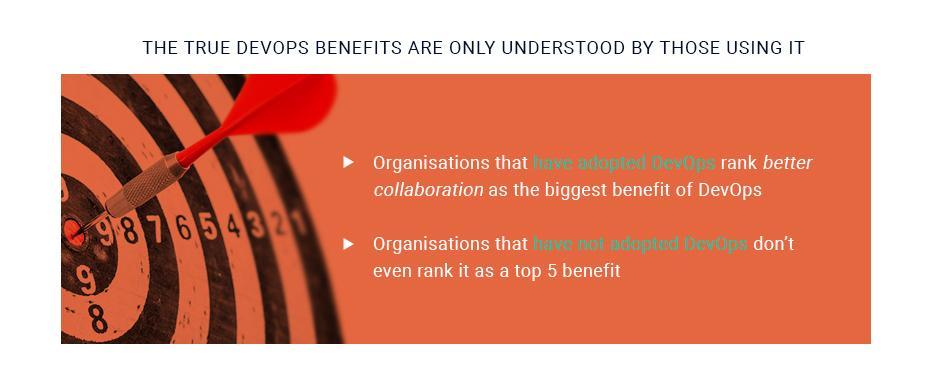
    In the latest ECS-Digital research on adopting DevOps in businesses, 57 percent of SMEs have partially implemented DevOps practices in their daily routine. The key benefit of DevOps for them is improved inter-departmental collaboration. But for the 43 percent that haven’t yet adopted DevOps, the collaboration issues are among the last priorities on the list.

    Step-by-Step Guide to a High-Level DevOps Life Cycle

    According to IBM Cloud Director, the end goal of a relevant DevOps practice is to cut the development time and improve enterprise’s efficiency. A growing business has to start from the “business needs” of the company and go down the road to make it come to life. The goal of adopting DevOps in your company is to push your business needs into production at a quicker pace more reliably. The goal in any DevOps practice is to cut the time and increase the efficiency of processes. You need to move from the “business need” to the “it’s live!” stage.

    Business Needs are a DevOps Priority

    But does your business have to get involved? Of course, your SME leadership focuses on the “business needs” of your company. But when we look at organizations that have implemented proper DevOps practices, the internal structure of the company shifts to focus on delivering great business results across the whole life cycle of your product/services offering.

    DevOps also ensures that employees have the ability to correct their work direction during the whole lifetime of a project. Things and goals tend to change, competitors may roll out some features that may make some of your project’s parts trivial, and all of this makes the need to adjust your project accordingly. This is easily done when your business need is close to both the Development and Operations teams that are able to steer and drive this alignment of goals.

    Have a look at the infographic below that clearly shows how a DevOps delivery cycle looks like:

    The Clash Inside Organizations

    Measuring the impact of DevOps on the things that matter to business is vital. Most SMEs are experimenting with DevOps, and there are some within the company who want to prevent DevOps adoption. The culture within enterprises is shifting too drastically and dramatically, although the effects are mostly positive.

    Such a shift is impacting all operations, with software development impacted the most. SMEs have it easier to change and adapt compared to larger businesses, and this lets them move the workplace culture a step ahead of their larger counterparts.

    If we look at business, operations and developer teams from a historical point of view, it was never a goal to establish inter-connection between them. The teams started cooperating only when it was absolutely necessary to get the other team’s input. SMEs are still faced with such a separation, as most responsibilities are set in stone for each team and the individual employee. All business units are used to working in their closed-in niche, and there is a lack of will to leave the comfort zone and act outside the predefined roles. Such actions in the past could have been viewed negatively.

    While most businesses that want to implement DevOps have employees who want the business to prosper, it can be difficult to force people to act outside their duties. However, to reach the end goals of any business—namely, ensuring fast and quality product delivery—and solve issues on the go, people must interconnect their duties and reach outside their business unit. With proper DevOps application, such collaboration can be smooth and result in the improvement of cross-functions.

    DevOps Represents Change in Internal Business Structures

    Many SMEs are faced with internal structural issues that limit the company’s prospects: Engineers are not willing to be on-call, the Ops team has a negative attitude toward those who write code and executives are slow to embrace automation. Organizations must overcome the culture war to be able to approach the agility and productivity gained by a DevOps model. The faster they can get there, the faster these organizations can take the competitive edge away from traditional enterprises.

    DevOps culture looks very different from organization to organization. However, regardless of the business implementing a DevOps approach, the potential benefits are the same. From faster deployments to increased efficiency and cultural changes toward experimentation and away from rigid planning, a DevOps culture has the ability to transform an organization completely. Wholeheartedly adopting a DevOps culture has real implications on how well a business is positioned to take on the market. With many industries facing uncertainty and a host of upstarts disrupting the status quo, shifting to a DevOps culture can be an important weapon in repositioning your business.

    Empathy is the Core of DevOps Adoption

    One of the foundational ideas behind DevOps is mutual empathy. Having empathy from operations toward developers and vice versa, as well as empathy in other business-related and non-technical company units, remains vital. It’s not about patting your colleague on a shoulder. We are talking about the moral mandate of a developer who just creates their part of the software and doesn’t care about how it can be deployed in production. The goal is to push employees to think outside of their small task, and to take into account the outcome of their work: Is the developed app secure? How hard is it to deploy it? Is it easy to keep it running? etc. If those questions are not accounted for, the developer’s colleagues on the Ops side will pay the price if something goes wrong past the release.

    By ensuring that the SME has empathy for each other at its core, businesses will deliver better products/services. And doing just that is what DevOps aims to bring to companies. Until this idea is ingrained, DevOps will face a cultural war of sorts.

    Your Most Valuable DevOps Resource

    By considering to adopt the DevOps approach to running your SME, you can better rethink the ways your organization operates—how it deploys its teams across the enterprise and how often it addresses structural problems that appear over time. Now you can lay out a new foundation for your SME based on the culture of cooperation and experimentation. With proper guidance in the application of DevOps culture, you can address the waste of time, human resources and money in your business.

    Becoming a DevOps organization is no easy task and taking up on such a challenge requires faith that changing the existing processes will bring its benefits. Reworking and optimizing organizations is the new norm, regardless of their size, industry, and goals. The faith in DevOps culture is driven by the firm and quantifiable statistics, but the intangible benefits to corporate culture are just as compelling. Many businesses are looking at implementing DevOps, and even more, SMEs are in the active process of its application. When your company is delivering quality ahead of time, there is a strong chance your competitors will be left behind as you are getting the bigger piece of the pie.

    Key Takeaways

    • To stay current, businesses need to adapt to an ever-changing environment, respond to competitors and stay on top of the innovation cycle, increasing customer value via responsiveness to change.
    • Increased service quality depends on both the availability of the service and being able to restore the service to an error-free state. Thanks to fast feedback loops and high release velocity, service breakdowns can be removed much more quickly than in the past.
    • DevOps are built on the sound principle of waste reduction such wait times and process overhead due to continuous improvement. This helps to improve agility and has a positive impact on costs.
    • Fostering continuous learning and improving culture through efficient principles is what DevOps is all about. In a fast-paced, unpredictable environment, non-stop improvement is paramount for sustaining your competitive advantage. It is also important for attracting exceptional talent and keeping employee satisfaction at a high level.

    About the Author / Stephan Pushkarev

    Stepan Pushkarev is the Head of DevOps Practice at Squadex.com and CTO at Hydrosphere.io. Co-founded and managed engineering teams for eCommerce, IoT and Ad-tech companies. He is responsible for the full products stack: math models, infrastructure & operations, enterprise applications as well as recruiting, establishing engineering culture and delivery processes. Stepan combines strong technical and managerial skills, and entrepreneurial spirit. Connect with him on LinkedIn.

  • Sometimes It is More Than Culture, It’s About Gains

    Sometimes It is More Than Culture, It’s About Gains

    Almost since the beginning, there has been a tug-of-war between whether better toolchains or increased communications were “real” DevOps. The answer to that question is, Yes.

    Better tools undeniably speed the delivery process and streamline operations. Anyone who claims differently is not living in the real world. Jenkins alone can make your development world a better place, and it is but one tool—with hooks into like a million more, but still one tool.

    Increased communications speed the delivery process and streamline operations, if they are frank and honest. A developer who knows that his choices for included dependencies can make life easier or more difficult on maintenance is far more likely to include that consideration in their choice, for example.

    Gains Are In the Doing

    But the rock-star gains that some shops have seen from DevOps? Are a bit of both, and something else. The sudden improvement of 4x delivery frequency most often comes from no longer avoiding that thing you don’t talk about, or the legacy piece of software that eats an increasing amount of time just being kept alive because it’s necessary.

    And I would argue that is the best place to start. I’ve touched on this tangentially before, so I thought I might be more direct.

    You have it. That thing in the process that is a bottleneck. No one talks about it. There are reasons—some because a few years ago you tried to resolve it and couldn’t; some because the bottleneck is a natural outgrowth of some requirement; some because “it’s always been that way,” But there is that step (or more often three or four steps) in the develop/test/deploy cycle that consumes a huge chunk of time to do little work.

    There are also those tools/processes so old that they consume an inordinate amount of resources. Most shops more than a few years old have them. I’ve worked in a couple of 100-plus-year-old companies and frankly, these bits of outdated software were part of the genotype of the org because they’d been in IT so long.

    Manual processes are known to take time, simply because they’re manual. Development itself, even when broken into smaller pieces and implemented piecemeal in the manner of Agile, still takes time. Testing, too, is still (or again, depending upon your background) a largely manual process. And security checks are also in a ton of shops.

    These are known. And if you’re approaching the problem from the “find the bottlenecks,” I would exclude them. Better tools or more automation can help all three, streamlining who does what can help test and security, but these aren’t the places that I’m thinking of.

    Aging Support Software

    I worked in a shop once that spent an inordinate amount of time keeping a “database” alive that was in existence before RDBMS. Yep. There was mission-critical software that used the database, so it was maintained as well as possible internally. Internally because the vendor no longer existed.

    Several analyses were done, and each time it was decided that the DB couldn’t be gotten rid of without a major rewrite of the systems it supported. But as time went on more and more resources were poured into those systems and the database. Eventually, it was forced from above that the database had to go. The estimate to do so came in at an insane number and the project was dropped. Meanwhile, an increasing amount of resources were being poured into the DB and the systems that supported it. All were outdated, and all required special skills that were also outdated. Soon the org was paying exorbitant rates for the few people who could work on the system to do so via contract.

    Finally, with hard dollars attached to the preservation of this system, a forced upgrade was a viable project, and it went forward.

    This is all pretty standard enterprise stuff, it’s kind of the way IT has functioned in the past. But had IT management gone to business units with improvements that could be offered during the upgrade, all of the resources poured into not upgrading over the years could have been used for new product/feature development. Identifying the fact that replacement was inevitable and wouldn’t get cheaper for waiting is the type of outdated software issue I’m talking about.

    Bottlenecks

    From the bottleneck side, there is often a “this monster log file must be reviewed by a human” step on the way to production, too. Think about simple automation. What is the human scanning for? Talk to those responsible and see if they can offer guidelines concerning how they would train a new person to review the file. Then write a small script to do it—not as a final solution, but to show that a person doesn’t have to if the review is well-bounded. People won’t trust it, so run it in parallel for a while, and learn from what it misses, point out what it finds. Long term, eliminate the delay of someone pouring over logs looking for the same things over and over. Take time to make it possible. It won’t be a ton of time, but it will reap gains. Just talking to the team that must accept the log output might reap gains.

    There isn’t a need to immediately install 15 DevOps tools or reorg all of IT before starting your DevOps journey. Just look for the places resources are being invested to little long-term gains, or where the process is held up in a manner easily eliminated. And keep rocking it.

    — Don Macvittie

  • Google Launches Software Supply Chain Initiative

    Google Launches Software Supply Chain Initiative

    Maintaining the integrity of a software supply chain is an issue that has long bedeviled IT organizations. With the rise of microservices based on containers, however, this issue has become more acute. As a result, software supply chains are an issue that Google now plans to tackle.

    Google, along with JFrog, Red Hat, IBM, Black Duck, Twistlock, Aqua Security and CoreOS, is taking the lead on an open-source Grafeas initiative that aims to create a standard application programming interface (API) through which metadata about the software components that make up an IT environment can be more easily captured. The whole software supply chain issue has become even more challenging now that enterprise IT organizations regularly make use of open-source software within larger applications. There are now more dependencies on software modules that are being created and updated outside the IT organization, most of which are not prepared to keep track of the modules’ history.

    One of the first instances of Grafeas is going to manifest itself in the form of Kritis, a policy engine that Google has developed for the Kubernetes container orchestration engine. Because of its long history with Kubernetes, Stephen Elliott, product manager for developer platforms at Google, says Google tends to approach every issue these days through a container prism. But the expectation is that the Grafeas API will be more broadly applied to collect data about and enforce policies across a broad range of types of software components, he says.

    Elliott says that while there is no shortage of tools for managing software life cycle, each of those tools generate their own proprietary metadata. Grafeas promises to provide a consistent means to, for example, identity developers, determine when the code was checked in and built, what vulnerabilities have been detected, and what tests were passed or failed. Trying to manage those issues is at the heart of any approach to DevOps. A standard API would not only go a long way toward simplifying those issues, it also should also serve to make many of the tools DevOps teams rely on today more interoperable. That would also go a long way toward preventing IT organizations from finding themselves locked into a specific set of DevOps tools.

    Obviously, the launching of an initiative represents only the beginning of a process that should extend well into 2018. The number of IT vendors that have a vested interest in software supply chain issues exceeds that number that has signed on to the Grafeas initiative, and when this API issue is addressed by an industry standards body remains to be seen. Google is betting that as IT organizations become more familiar with microservices-based containers, there will be lot more support for addressing these issues now than anytime in the past. In the meantime, IT leaders should take some comfort in the fact that, at the very least, the IT vendor community is starting to better appreciate their software supply chain pain.

    — Mike Vizard

  • Finishing the Pipeline: Monitoring, Tools, Automation and …

    Finishing the Pipeline: Monitoring, Tools, Automation and …

    It is true that DevOps has grown to be the beast in the room. I’ll co-opt the “cloudwashing” term to call it “DevOps-washing” because it seems every tool you’ve ever used to develop and deploy applications now has a DevOps angle to it. For example, the Jenkins update center is kind of overwhelming. While I can’t be certain, there’s a chance that our new coffee maker has a plugin for Jenkins.

    But it’s also true that DevOps really is coming of age. The success of Jenkins is largely based on CI/CD, and the tools built both up and downstream from it are folding in more and more of the DevOps process, making life easier—if not exactly easy—for IT.

    Even with platforms, the choices are growing and the automation is, too. Whether one of the major cloud vendors, where deployment can be fully automated or hyperconverged infrastructure and where deployment can be fully automated, we’re moving toward a future of not caring about physical infrastructure but rather, “Can I get a connection to it?” Of course, it’s not that simple, but running Docker or Kubernetes on hyperconverged infrastructure means we have on-demand deployment, and the cloud does much the same.

    Tooling for monitoring is also getting better, whether you are monitoring user experience or a particular API’s CPU usage. For the most part, we are not yet to the point where automation can deal with the majority of alerts from monitoring, but that boundary is being pushed daily. We certainly can tool our systems—both the infrastructure and the app sides—to offer us more data about application health than we’ve been able to get in the past. From physical hardware all the way up through containers we have a wealth of options for monitoring, and application monitoring is getting even more attention than infrastructure monitoring.

    Heading Down the Trail: Monitoring and More

    Which leaves one wondering where this is bound. Let’s assume that the areas that are a bit behind—like over-arching network configuration from ARA tools—catch up. They will, and that’s pretty obvious, so I’m trying to remove the short-term roadblocks to talk about what we might be planning for and facing moving forward.

    If we can assume a place to deploy that has reasonably unlimited capacity—such as the cloud, where cost is the limit, or hyper-converged, where capacity is a limit but expandable in chunks—and we can assume that ARA is running the Dev/Test side, then pairing it to a preferred server configuration (be that VM or container, depending on app, group, company, etc), and pushing out the deploy, then we’re left with the monitoring piece, and automating the responses to monitoring issues. That is growing, too.

    Right now, the standard in the DevOps world for a server that is malfunctioning in some way is to kill it and start a new instance. This often masks real-world problems, and if it appears to “fix” the problem, reduces the priority of resolving what went wrong. This is, in a nutshell, the real error for Cloudbleed. They were seeing servers spew errors, when one appeared to core, they simply started another. It allowed a simple programming error to persist over months and become a security issue.

    So the next great leap will be to find a quick way for monitoring to determine exactly where problems are occurring, and force a developer to fix it. There are tools that can auto-generate bug reports, but they’re rudimentary at this point in time, and we need them to be more advanced. There will also always be the trade-off of how much in resources you use for monitoring when the point of the app has nothing to do with monitoring. And like so many things, the hidden cost of keeping that monitoring up to date will be a technical debt—one of many that the DevOps community seems slow to acknowledge.

    There Always Seems to be More

    On the “time we waste” side, the fight over internal/external needs to end. The fact is that internal cloud isn’t going anywhere anytime soon, and if you’re running in containers, you don’t have to care. My company is currently looking at a tool that can run hundreds of containers in a very (physically) small space. We can deploy to the cloud or deploy there, as long as we have container templates. It doesn’t matter what the business need forces us to use; containers really will run pretty much everywhere. It does no one any good, harping about internal/external. A deployed app is a deployed app.

    Now, talking about the differences in networking between internal/cloud, external/cloud, and container manager (regardless of where it sits): That is a discussion worth having.

    — Don Macvittie

  • Operations Management Puts the ‘Ops’ in DevOps

    Operations Management Puts the ‘Ops’ in DevOps

    Awareness and anticipation of operational management, best practices can improve your app at every stage of its life cycle

    How important or interesting you find the “operations management” aspects of DevOps methodologies likely depends on your background, experience and how many operational horror stories you have lived through. If you have been on the hot seat when services are impacted, woken up in the middle of the night when major outages occur or dragged into blame-battle war room calls while you and your team scramble to restore service, then the importance you place on operations management may be very high.

    However, if you have avoided such experiences, it would surprise no one if the operations management aspects of DevOps are not top of mind. When everything is smooth sailing, then it is understandable that you might be reluctant to make any significant changes to your daily routine. However, in agile, fast-moving environments, things can go wrong very fast, even if your organization separates duties intentionally to create an “operational firewall” to keep ill-advised code or configuration changes to a minimum. Using effective ways to lend your app expertise to assist during impactful situations can make your life much easier and limit disruption to conducting your other duties.

    You may work in an organization which is new to owning and managing operations management tools. It is becoming more common for organizations outside of a central IT operations team to do so as scopes of responsibility expand. Several analyst firms have published recent studies that nearly half of purchase and usage of operations tools is already done outside of IT operations teams. This trend is predicted to grow to the majority in a few years.

    Configuration and automation tools are also becoming more commonly owned outside the data center. Such shifts in responsibility make efforts of operational skill-building, incident readiness and resolution more challenging. As the number of different groups deploying these tools expands, the likelihood of overload of notifications, alerts, events and general operational noise starts to rise dramatically. Note: I will be presenting a webinar on how new operations management tools can help you carry out the best practices, join me in this conversation Thursday, Oct 26.

    Organizations deploying new apps and management tools in the cloud naturally look to manage those workloads from the cloud as well. Other organizations with legacy applications often are managing digital transformation leading to transformative projects for operations management. Whether your organization is already leveraging cloud-based tools or you are part of an organization undergoing transformation, you may have the challenge of a hybrid set of workload deployments, both cloud-based and on-premises. For your organization, this could mean finding a pragmatic complementary approach to deploy and manage the new, cloud-based applications and their associated management tools. Such an approach may not need to be isolated from your current tools and methods. Sufficient tool interoperability could support a federated, phased path.

    In this blog series, we will explore the common operational challenges many DevOps teams are facing today, how traditional IT operations best practices could be leveraged for use in a DevOps methodology and how new operations management tools can help you carry out those best practices to meet your goals on an on-going basis.

    Here’s a preview of the forthcoming blog topics:

    Let the Noise Wail Without Going Deaf

    Unless your applications and services exist in a vacuum sealed chamber of silence, agile development, continuous rollouts and updates and infrastructure system changes create a plethora of events that range in severity of impact, validity and meaningfulness. Those events tend to come from multiple monitoring and configuration tools or reflect many different parts of your applications and underlying services. This mixture of events and alerts leads to what is commonly known as operational “noise.”

    Smart Ops Action: Taking the Right Action for Ops Traction

    Empowering anyone in your organization who contributes to restoring service when incidents occur can ensure their time is well spent, with the intended results. All too often, operations teams effectively identify and triage incidents, yet fall short of empowering first responders to actually resolve problems. Bolstering your team’s efforts to take the actions necessary to resolve the situation at hand and restore service promptly is achievable—if done right.

    Boring is Best! How Can You Thrill Your DevOps Stakeholders with Boredom?

    Strive for stability and structure in production without stifling development agility. Don’t try to thwart the innovation and chaos that results from agile development and constant rollouts—get structure and stability where you have control so you can focus your talented team members to be supportive, valuable contributors to innovation and agility.

    Fuel innovation and make your stakeholders smile with boredom by effectively turning chaos into stable operations.

    If you’re a veteran IT operations practitioner with years of experience helping your company’s applications, services and underlying infrastructure run efficiently, these tips may be obvious. Hopefully you’ve been successful advocating these best practices to your development and line of business colleagues.

    If you are new to operations—and especially if you are amongst the growing population of DevOps professionals who are understandably reluctant to conduct triage, investigation, diagnosis or resolution of operational incidents—rest assured there is relief. Tried-and-true best practices carried out with new, easy-to-use tools can empower your team to conduct these unwanted tasks like a seasoned veteran, regardless of operational experience. Learn more.

    About the Author / James Moore

    James Moore is Principal Offering Manager, IBM, responsible for offering management and strategy for IBM HybridCloud Operations Insight solutions including IBM Cloud Event Management, Runbook Automation and Alert Notification. James joined IBM from the Candle acquisition in 2004, where he was product manager for Candle’s Application Response Time product lines. James has over 15 years’ experience in event management, application performance management, and business service management. Connect with him on LinkedIn and Twitter.

  • How an Integrated Tool System Helps Implement DevOps

    How an Integrated Tool System Helps Implement DevOps

     DevOps is the marriage of application development teams with system operations teams, their philosophies and actions.

    In an agile environment, development, testing and operations all must work together to meet frequent iterations, releases and delivery goals. This calls for a collaborative development environment that supports data orchestration with other lifecycle tools.

    The article will explain how multitool integration support can help organizations perform the DevOps life cycle, which includes continuous planning, continuous integration, continuous testing, continuous monitoring, continuous delivery and continuous feedback mechanism.
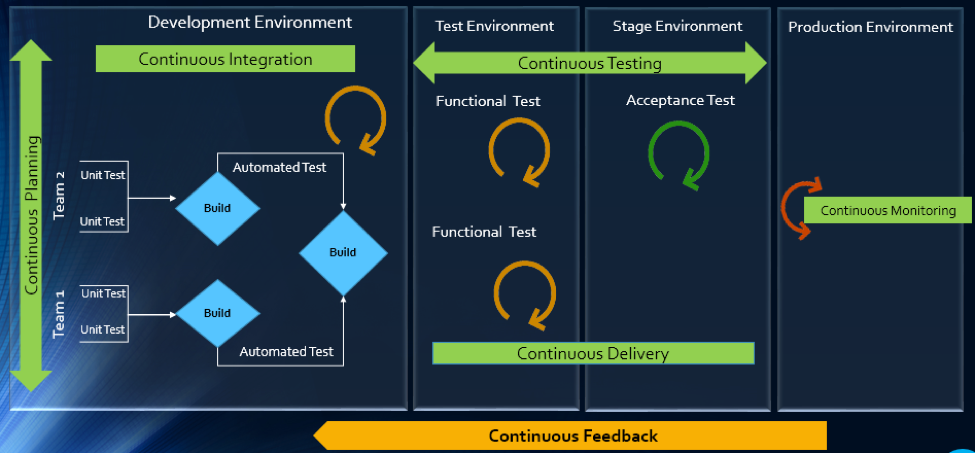
    The Drivers of DevOps

    Today, with the increasing competition and the need for an early market release, the software development industry is undergoing a paradigm shift. Agility has become an inevitable process across all organizations. In addition, shorter ROI cycle spans, frequent releases, increased CRs and different IT systems and tool technologies have made the situation critical.

    The industry demands higher transparency, maximum visibility, minimum turn-around time, lesser human intervention and efficient processes at every stage, from development to delivery.

    However, organizations that use specialized tools to manage builds, deployments and delivery processes continue to face difficulties when it comes to data orchestration and process automation across the tool chain.

    In an agile environment, developers and testers need to ensure not only that code changes work and integrate well, but also  that frequent iterations do not make the product unstable. Hence, seamless cross-tool collaboration is very important here.

    The process chain consisting of Code –> Build –> Provision –> Test –> Defect Fix –> Deploy –> Release needs to run continuously and smoothly without compromising delivery deadlines or the product quality.

    Automation is the Catch Line

    With the rising demand for continuous delivery and sprint-based development, manually setting up a test, build and deployment environment is burdensome and time-consuming.

    Software teams need to automate the entire cycle of build, provisioning and deployment of test environments, including the tools, scripts and test data to ensure rapid delivery. They also need to collaborate around the application architecture and monitor event-action-based mechanism for seamless data flow across the tool chains.

    Reports show the most important DevOps components are IT automation, agile development and collaborative teaming of personnel. Therefore, without centralized orchestration of tools, achieving DevOps is not a realistic situation. Since organizations spend around 73 percent of their DevOps budget in tool acquisition, it is important they know how to get the tools working together to overcome DevOps obstacles.

    In the process of connecting their existing and new toolsets, most organizations search for an integration methodology that is scalable, reliable and easy to maintain. Point-to-point integration between tools help, but to a limited extent. Even a single change in integration rules involves complex coding and high maintenance across development, test and deployment cycles.

    How ESB-based Integration Can Help

    An enterprise service bus (ESB)-architected integration hub connects both the existing and the new tools to support a seamless data flow between them across the DevOps life cycle.

    Once integrated, the data from both the development and the operations tools become readily available for use to every stakeholder. The benefit of using ESB-based integration is that you can add or remove any tool based on your connectivity requirements.

    In a typical scenario, DevOps teams use a series of cross-functional tools starting from project planning to delivery and operations. Neither of these tools comes with built-in integration features, which results in inconsistent flow of information among tool users.

    Project managers use application lifecycle management (ALM) or Agile planning tools to detail the scope of work and tracking progress reports. Upon unit testing, developers use a different tool to check in a code from their integrated development environment (IDE) to the source code management (SCM) repository. They also perform a code quality analysis before committing to the SCM.

    In such a scenario, continuous integration (CI) can be achieved only when developers bring these planning, unit testing, code analysis and SCM tools under one roof. That is, connecting the tools through a common integration hub. It also helps developers to manage everything from within the IDE.

    After successful check-ins, build engineers trigger the SCM tools for automated build and testing. Upon a successful build, testers engage in continuous testing using manual and test automation tools, followed by provisioning for continuous deployment. They also perform load testing, API testing and security testing using separate tools. An integration support helps to keep the real-time data flowing between the build and the testing tools uninterrupted and seamless.

    A DevOps system also includes application performance monitoring (APM) tool for continuous monitoring of memory consumption, CPU usage, database health and release tracking. Operations team use help desk/ IT service management (ITSM) tools for continuous feedback generation and customer support. And delivery managers use continuous delivery tools for defining and tracking release pipeline through graphical interface.

    When all these tools are connected to a central integration hub, product release and help desk operations become faster and efficient. The integration between development and ITSM tools facilitates continuous feedback generation, which helps to improve the product quality.

    Through an integrated tool ecosystem, project managers can create a DevOps workflow based on business logic and automate the data movement across tool systems. Business analysts, developers, testers and delivery managers can also get real-time update on development progress and keep track of actionable items. Supervisors can route cross-tool data to a central repository and generate meaningful reports and analytics before taking business decisions.
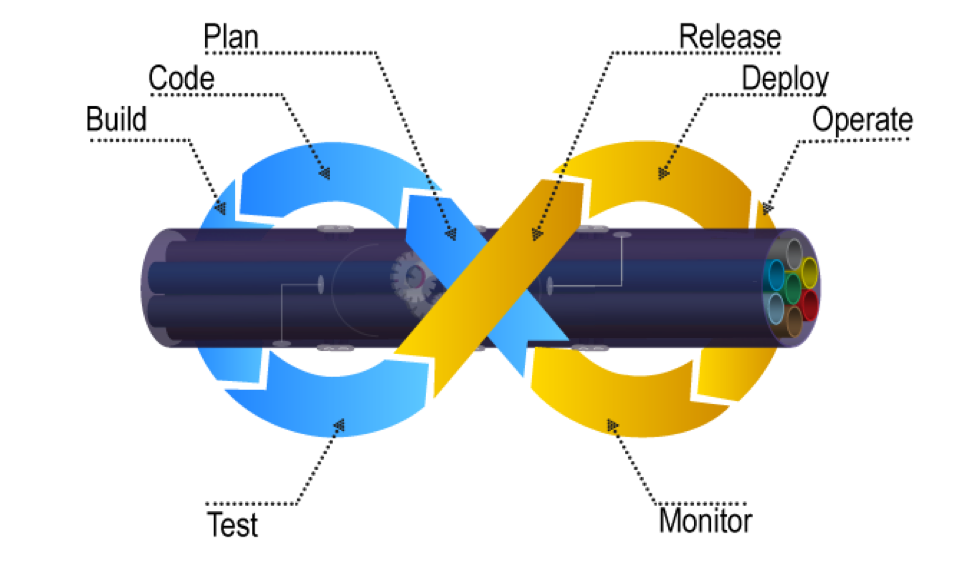
    Fig: ESB Integration Bus Facilitating Adoption of DevOps

    An ESB-based integration tool helps organizations to implement and leverage the best DevOps practices by establishing connections across all participating tools. An integrated tool ecosystem helps achieve the following:

    • Real-time collaboration between development, delivery and operations tools
    • Continuous planning from requirements capturing and review to design and code analysis
    • Cross-tool traceability for defining relationships between various data objects
    • Test strategy implementation for continuous testing
    • Continuous integration through automatic triggering of build on successful completion of code check-in
    • Continuous testing through workflow based automatic triggering of both manual and automated test cases
    • Scheduled test automation script execution enabling continuous delivery
    • Continuous monitoring of release quality through reports and dashboards
    • Automated defect identification and resolution for faster help desk response
    • End-to-end traceability providing better release predictability and change impact analysis
    • Meaningful reports, metrics and KPIs for quick decision-making
    • Continuous delivery through tracking release pipeline

    How Inter-tool Connectivity Brings Continuity

    To understand the stages of engineering practice, let us consider a sample DevOps scenario in an IT service organization.

    The organization uses an ITSM tool to manage support tickets submitted by customers. On submission of a ticket, it is automatically passed on to an ALM tool as user stories or defects for internal development.

    On allotting to a sprint, developers and testers view the user stories or defects from IDE, SCM and test tool. Once the coding is complete and codes get checked in at an SCM tool, an automatic build gets triggered using a build tool. Upon successful completion of the build, tool provisioning is done through a virtual machine.

    The successful build can be automatically deployed using a deployment tool and automated tests can be executed through a test automation tool. The test results are then captured and linked with test cases and the source requirements for traceability.

    The defects that are raised in the defect tracking tool for failed test cases can be automatically routed to developers for fixing.
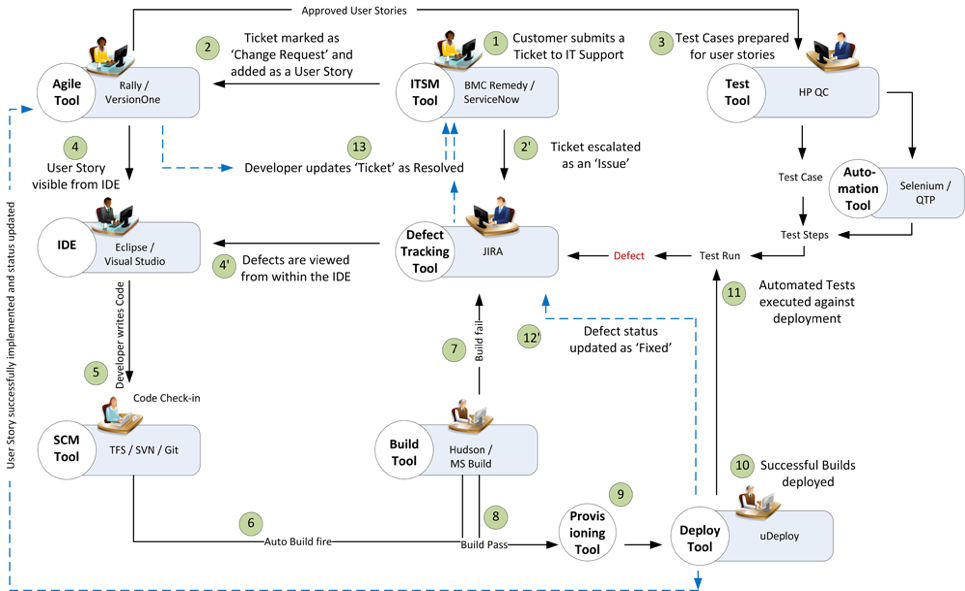
    Fig: DevOps scenario achieved in a collaborative tool environment

    Once connected to an integrated tool system, users get a complete visibility of the tool records and their relationships from within their own tools. Developers, testers and help desk managers can get complete traceability view between development artifacts and change requests or defects.

    When all the tools participating in DevOps sync with each other, developers can easily view the support tickets reported by the operations team right from their own IDE.

    The help desk team also gets a real-time update whenever a change request gets implemented or a defect is resolved by the development team. It eliminates the latency in communication between the Dev and Ops teams to a great extent.

    In addition, customers get frequent updates from the help desk team, which makes them happy and confident about the product performance.

    Conclusion

    Implementation of DevOps is not a “Do once and forever” type of task. Just deploying the right set of tools to the right users will not serve the purpose. Proper connectivity between and across the DevOps tools chain is necessary if you want to create a collaborative work environment around the Dev and Ops teams.

    An integrated tool system saves considerable amount of time and effort, which would otherwise be wasted on manual execution, monitoring and reporting of data during DevOps implementation.

    About the Author / Sanat Singha

    Sanat Singha is a senior technical and web marketing writer. He takes special interest in ALM process, technologies and tools integration as an industry. Sanat does content marketing, professional blogging, social media promotion and website analytics.

  • Learn DevOps from 57 Experts for Free

    Learn DevOps from 57 Experts for Free

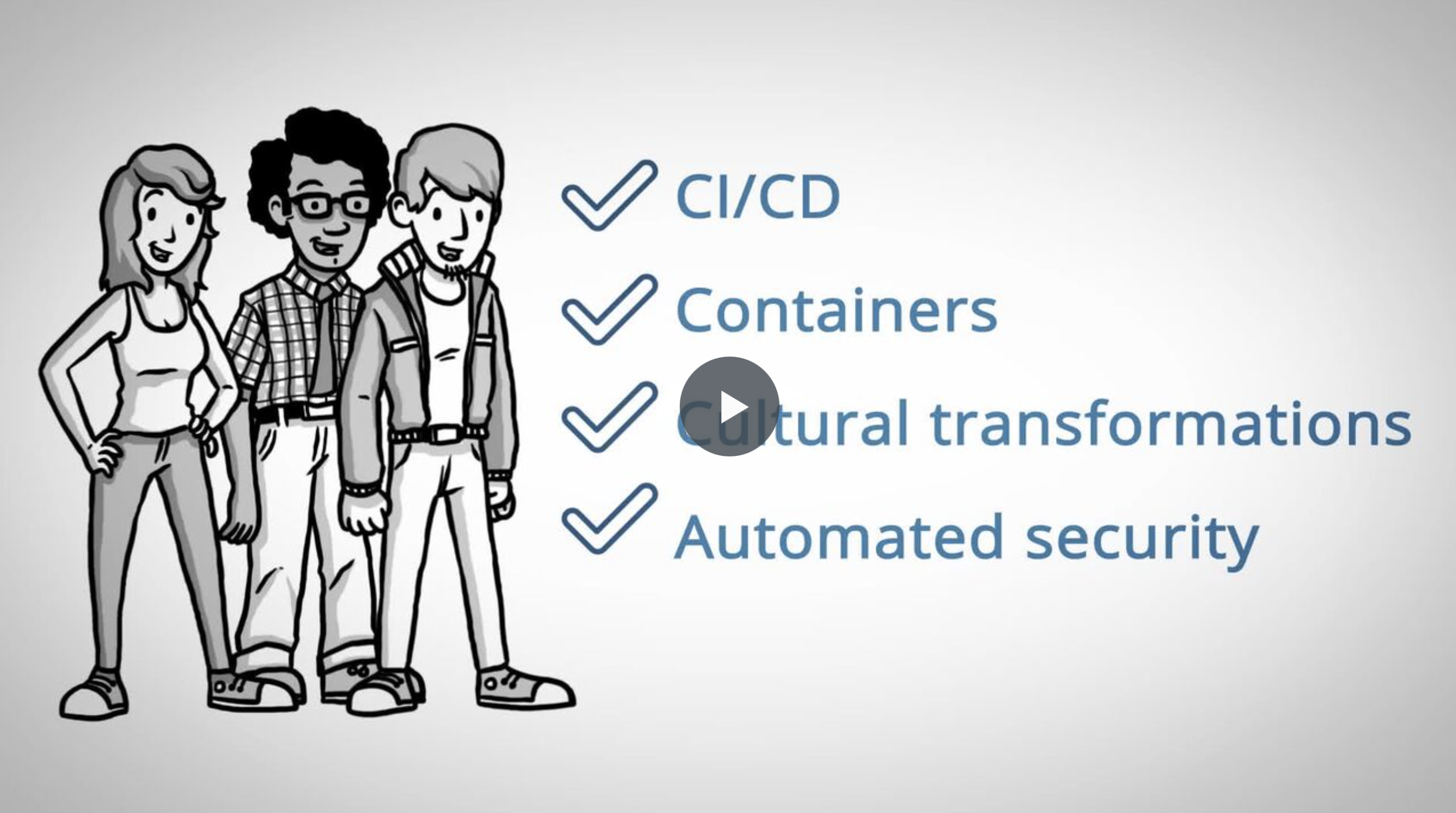
    Need to brush up your knowledge of continuous integration/continuous delivery (CI/CD), automated security, modern infrastructure or cultural transformations?

    All Day DevOps just released its Summer School program offering 57 online sessions delivered by DevOps practitioners.  Every session is free to watch, and absolutely no registration is required.

    Image title

    Watch as many or as few sessions as you would like at: https://www.alldaydevopsy.kinsta.cloud/addo-on-demand

    Courses are delivered by these awesome DevOps practioners who will share their real-world experiences and lessons learned with you.

    Image title

    — Derek E. Weeks

  • QA/Testing and DevOps: Partners, Not Adversaries

    QA/Testing and DevOps: Partners, Not Adversaries

    Software testing and QA is sometimes given low priority during development. The idea of treating software testers as adversaries by the developers seems old-fashioned and is short-sighted. It’s hard to believe that such an attitude can still exist, and yet it still persists, even in a modern DevOps team. But a DevOps-focused software team benefits when it considers QA/testing as an integral part of developing high-quality applications.

    In a business setting, the hidden costs of buggy or unsecure software are lost productivity, revenue and extra work by the development team (and even extra work by users, if the software isn’t running right). QA/testing helps test for system flaws, vulnerabilities and security issues, so why wouldn’t a DevOps team be supportive?

    QA/testing can help an enterprise avoid big mistakes. In fact, the DevOps Institute notes, “With the advent of DevOps and the movement to break down silos between developers and operations, it becomes critically important that all members of an IT team—regardless of what tools they use, or role they play—understand the essentials of testing.” And, according to Puppet, a standard for automating the delivery and operation of software, high-performing enterprises build quality testing into each stage of their software development process.

    Make QA/Testing a Priority

    Whether your DevOps-focused developers are handling the QA/testing themselves or passing it along to QA/testing specialists, it’s something that must be done. Ideally, developers themselves would handle QA/testing in an integrated DevOps environment, and that’s why some developers see it as an unwelcome chore. It’s not something they’re usually trained in, and they might struggle with it or see it as a burden. That could be the reason why some DevOps teams hit a “software testing bottleneck.” As data from a Vanson Bourne survey commissioned by Appvance shows, 73 percent of 200 enterprise IT decision makers in the United States have adopted DevOps processes, but 57 percent of those adoptees experienced a bottleneck during software testing that impacts how quickly new and updated software can be released.

    On the flip side, the developer’s company may have QA/testing professionals in-house, so the developers are hands-off in that area. Needless to say, the relationship between developer and the QA/testing pro could get a little rocky. Just think about it: The role of the QA/testing specialist is to find problems and point out issues with the developer’s code. Or, perhaps the developer or engineering staff is lagging behind schedule, so the team inevitably needs QA/testing to rush its processes, further creating a tense or adversarial relationship between the two groups.

    At one of my startups a while back, we worked for months on our first software release of a web application for an online marketplace. Late on a Wednesday night, we let the CEO of our company try it out—and the app immediately crashed. “Gee,” I said, “It was working on my computer.” Of course, it really wasn’t. We had synchronization problems, which are common in multi-threaded applications that access the same information for multiple users. And we made the mistake of letting the CEO be the first simultaneous user to try it out (creating a bad impression), instead of making organized QA/testing a priority at our company.

    QA/testing in a DevOps environment can help your team avoid mistakes, so passion for app functionality doesn’t supersede quality and robust bug-free software. In the end, what you need from your team is passion for both functionality and quality/testing. Otherwise, you’ll deliver a faulty product and lose customers or users—unnecessarily—because of a bad first impression by your software.

    Two Approaches for Integrating QA/Testing with DevOps

    When you’re integrating QA/testing into your DevOps environment, there are two different approaches or procedures to ponder. First is the more traditional test of the full system, sometimes called integration testing. The second is test driven development (TDD), which is popular in Agile and Scrum methodologies. The main difference between the two is in how software code is tested. During integration testing, developers review and test the code. Then, for critical facets of the software, a peer review of code is completed. Afterward, testers create scripts and deploy an array of integration and system tests. These could include scalability testing, load testing, stress testing and very importantly, security testing. Code vulnerability, SQL injections and malicious code would be things to think about.

    Under TDD, the order in which testing appears in the cycle is reversed. Each developer first writes “unit tests” and then writes the code. This is done iteratively in such a way that every discrete section of code is automatically tested. When new code is sent to the integration server, the tests go with it. The server itself runs unit tests for all the code that developers deposit in the server. On top of this, testers design system and integration tests to run automatically by the integration server. Finally, testers perform any manual tests that are impossible to automate. In this way, the integrity and quality of the code is constantly guaranteed.

    Academic studies and field experience suggest that TDD increases development time by approximately 15 percent … but hold on. Experience also shows that total cost of ownership of TDD-developed software is lower than software using integration testing only. It’s worth noting that by using TDD and integration testing, a company can deploy software of world-class quality that exhibits less than 0.3 errors per 1,000 lines of code during 18 months of use.

    QA/Testing: A Partner in Your Software’s Success

    If you’re hesitant about integrating QA/testing into your DevOps team and instead tempted to outsource it, you may want to push pause. It’s actually quite challenging if you do development in-house and expect to simply outsource what you think is independent QA with cheap testers. Outsourcing QA/testing and assuming that piece is done is not really outsourcing—it’s staff augmentation at a distance and it usually doesn’t work. You don’t want a “siloed team” to handle a critical component such as QA/testing. Instead, outsource QA/testing and bring your in-house and outsourced teams together around a common DevOps culture and mindset.

    DevOps experts Bob Aiello and Leslie Sachs, in an IBM report, say quality software “… requires not only a shift in behavior, but a dramatic shift in the organizational culture as well.” So whether you outsource or have an in-house squad, your developers and the entire team should take ownership of QA/testing, and remain open to new ways to test code efficiently.

    Ultimately, QA/testing should not be viewed as a time-consuming, disruptive chore by anyone on your team or in your enterprise. Think of it as a partner in your software’s success—not an adversary.

    About the Author / Steve Mezak

    Steve Mezak is founder and CEO of Accelerance, a leader in global software development outsourcing, as well as the author of “Software Without Borders,” co-author of, “Outsource or Else: How a VP of Software Saved His Company,” and a CIO columnist.


  • Making the Data Work for You: Data Visualization Techniques

    Making the Data Work for You: Data Visualization Techniques

    When Peter F. Drucker, the father of modern management, performed a two-year in-depth analysis of the General Motors corporation in the 1940s, he undertook what may have been the world’s most ambitious big data analysis ever at that time. However, when he gave the results to GM chairman Alfred Sloan, Al was not happy.

    In fact, Sloan refused to acknowledge Drucker’s work. He never mentioned it again and banished his colleagues from referencing the resultant book (Concept of the Corporation) around him.

    Alfred Sloan may not have been ready to act upon the harsh reality of his company’s data, but modern businesses thrive on this sort of analysis. Big data has consumed every industry on earth, from automobiles to cosmetics to hotels and far beyond.

    Businesses that use the power of data visualization will outperform the ones that don’t, every time. If you are responsible for the success of a B2B business, this article is going to show you why data visualization is one of the most powerful tools at your disposal.

    The Goal of Data Visualization

    There are two ways you can use big data visualization tools to make your data work for you. You’ll make it easier to parse your own data, identifying trends and finding opportunities to improve your business. You’ll also use it to convey your ideas to other people, improving your conversion rate for B2B sales that can make or break your bottom line.

    Understanding Your Data

    When it comes to better understanding your own data, visualization is everything. Even a small business has an incredible amount of data at its disposal. Social media statistics, front-end stats such as how long users spend on certain web pages, sales and refund statistics by time of day and product … the list goes on and on.

    You have to start by figuring what data is most relevant. Ed Baker, former head of growth at Uber, points out that every great business needs a “north star metric.” This is the single variable that, if it improves, the entire business does better. Once you identify your north star metric, you can see how other variables feed into that metric. Data visualization is crucial for parsing the information and making these big decisions.

    Conveying Ideas to Other Businesses

    You can use well-visualized data to convey ideas to other people that might be near-impossible to express otherwise. Have you ever sat in a meeting, desperately trying to show somebody why your idea makes sense, and yet completely failing to do so?

    I’ve had conversations where my brain is about to melt out of my ears, because I think I’m making perfect sense yet the other party simply does not grasp the idea. In a B2B context, this failure to communicate can cost hundreds of thousands of dollars. That’s a critical failure to get the job done. Data visualization is a very cost-effective way to improve your odds of making the sale.

    When you’re trying to sell a premium service or product to another business, don’t just tell them why it makes sense—show them. Use the visualization techniques in the rest of this article to remove all doubt that you’ve got the right idea.

    The 7 Basic Tools of Quality

    There are dozens of different ways to visualize data. It depends on what kind of information you want to look at. However, the best way to start is by understanding the “seven basic tools of quality.”

    Made famous in post-war japan by Kaoru Ishikawa, these tools are simple yet potent data visualization methods that most people can learn in a few hours. While not the most intricate or powerful visualizations available, they are elegant and widely understood. When you use one of these tools, you can rest assured that everybody at the table will be comfortable following along.

    You want to use these methods of visualization whenever it is possible. Only move into more esoteric or powerful tools when the situation necessitates it. By the time you are working with complex multi-variate data visualizations, you’ll probably need a dedicated data scientist to make it all work. These tools are an easy and cost-effective way to get started.

    Here are the seven basic tools, with a brief synopsis of how each one works:

    Cause-and-Effect/Fishbone Diagram

    A quick and simple method to use when you are working backwards from a known outcome, asking the question: “Why did it happen?” This tool is often too simple for detailed analysis, but can be great for mid-conversation visualizations on the back of a napkin.

    Check Sheet

    We’ve all used check sheets in our day-to-day lives. This is a great way for small groups to keep track of simple data, such as, “How often are the following conditions being met?”

    An example of a check sheet in action would be a coffee shop that wants to track common issues with customers. You could have the barista check a box whenever something goes wrong: Customer says drink tastes bad, customer leaves before drink is ready, customer gets confused while ordering and becomes agitated, etc.

    Control Chart

    This is a X & Y axis chart where the horizontal axis is the flow of time and the center of the vertical axis represents the average value of the other variable. The top and bottom of the vertical axis are the outer bounds for that variable. The control chart is a simple way to visualize data for a single variable moving through time.

    Histogram

    You’ve probably heard the word “Histogram” a lot, but may not know what it is. This is a chart where the horizontal axis consists of columns representing one variable and extending upwards to show the relationship with a second variable on the vertical axis.

    Pareto Chart

    A chart consisting of columns and a line, sort of like a blend between the Histogram and the Control Chart. However, Pareto charts do not necessarily reflect the passage of time. The columns are always ordered from largest to smallest and the line is the sum of the data represented by the columns.

    Scatter Diagram

    This is a simple diagram that plots two different variables with lines across an X and Y axis, meant to show correlations between them.

    Flow Chart

    Also known as an “if-than” chart, this shows the potential sequence of actions or thoughts within a mental or physical process. For example: If the client likes coffee, ask them how they like it. If not, offer them water. If the client says they like the coffee with cream, add cream. If not, prepare it black. This sort of data is awkward to express through pure language, but quite easy to grasp when placed in a flow chart.

    Advanced Data Visualization

    There are many, many forms of advanced data visualization. This is the stuff that Peter Drucker was trying to do back in the 1940’s—capturing huge amounts of data across an entire corporation and then synthesizing it into the most elegant possible form.

    If you want to go beyond the seven basic tools, you’ll need help. This isn’t the sort of thing that an employee or even an ambitious executive can tackle over the course of a few days. A team of data experts will need to spend a lot of time and energy to craft the perfect visualizations for you. With that said, here are a few advanced techniques to consider:

    Heat Maps

    Heat maps are used to show density of activity across a geographical space. This can be utilized to understand city traffic, or to look at where your employees spend time within an office building.

    Beyond the physical world, you can use heat maps on websites to see where users tend to move their mouse, or even where they tend to glance at. For example, video game developers and social media platforms use heat maps of user eye-gazing data to optimize their visual layouts.

    Word Clouds

    A word cloud is a visualization where many different words are scattered about in a “cloud,” with larger words being more common. You can use these to understand the most common sentiments being expressed in customer reviews, company emails or other text communication.

    While cheap word-cloud-generators exist, there are many reasons why they do not work. An effective word cloud needs to deal with factors ranging from color to glyph shape and beyond.

    Comparative Graphs

    Comparative graphs combine several copies of the basic power tool charts, by for example putting several control charts on top of each other to compare larger numbers of variables and factors. While comparative graphs are simple to understand in theory, they are difficult to put together in a way that is practical.

    Using Data Visualization for Your Business

    The best way to understand data visualization is to give it a try. You can get started with basic visualizations on your own, but you’ll want to contact an expert to really make your data work for you.

    After all, it isn’t enough to put a few variables into a chart. You need to understand how to collect the right data, compile it into useful visualizations, and then act upon that data in an effective way.

    About the Author / Alexey Semeney

    Alexey Semeney is the CEO of DevTeamSpace, where he leverages his knowledge and expertise in product design and remote team management to build a unique software development platform. Connect with him on LinkedIn.