Category: DevOps Practice

  • DevOps Security Champion: Who, What and Why?

    DevOps Security Champion: Who, What and Why?

    In general, DevOps is a process and culture of organizations to get applications out the door faster and with higher quality. To do so, security champions are essential. In DevOps, security champions work as a backup mechanism in various projects and take multiple leadership roles.

    Security champions make effective decisions and take projects forward while strengthening the best security practices. How do you enable security champions in DevOps? In this article, we will describe four practical ways of enabling them in DevOps. But first, we will discuss their role in more detail.

    Security Champions in DevOps

    Let’s suppose you are accountable for creating a mature security process across an organization. To fulfill this project, there are various teams working on different product and services, using multiple technologies and an active approach. However, some team approach security ad hoc security activities while others use existing security technologies and processes.

    After a few weeks of reading documents, learning about calendar releases and suggesting specific knowledge and best practices, you realize that your best efforts around security haven’t addressed myriad issues. You need help, but the central security team isn’t budgeted to help your team. This is where security champions come in.

    Security champions play a vital role in DevOps. They are dynamic members of a team who help in making decisions about the engagement of the security team.

    They act as a fundamental element of the security assurance process for the product and service, and are the main point of interaction within the entire team.

    By taking different leadership roles and decisions inside a smaller team, security champions form a shield of sorts for the team leaders. They give them the freedom needed to drive the project further while supporting and emphasizing the best security practices in the project.

    Enabling Security Champions in DevOps

    Here are four ways to build an efficient team of security champions.

    1. Identifying Teams

    The first and most important thing in building a competent team of security champions is to identify the team you are going to work with. In this phase, distribution of tasks occurs. It is important to note this step should be done before starting the project; otherwise, miscommunication and other problems could occur.

    It is essential to keep a record of the team so the other development departments also know who is reponsible for which of the various tasks.

    To implement this step, you need to talk with the decision-makers and technical managers, such as product owners and company heads to find out information such as the number of people working on different projects and how they can fit into the development teams already working on the project, what programming languages and various frameworks are being used and how they are being implemented.

    2. Role Distinction of Team

    It’s also important to define the role of each team member. Every team must have its security champion assigned to them and the security champions must know what they are supposed to do.

    The security champions should have well-defined goals and purpose, and the rest of the team should communicate with them to ensure best security practices are implemented. The security framework the project follows was selected during its planning phase. As such, the entire team must work with the security champions to ensure the security of the application.

    The security champion should also conduct security reviews regularly, especially at milestones during the project.

    It is important to note that protecting security best practices is not just the security champion. Rather, it is a collective effort of the entire project team.

    3. Select Champions

    Once you have identified the team and defined the roles, the next step is selecting the champions. To accomplish this step, you need approval from managers at all levels, from to-level to product owners and direct team managers. They can help you identify potential champions, choose eligible candidates and conduct interviews to judge their capabilities.

    Because this is the selection stage, you need to describe the role clearly to the selected candidate. You also may explain the strategy you plan to adopt as well as the advantages of becoming a security champion. These include:

    • The chance to attend various security conferences.
    • Being a part of the security meta-team.
    • Increased value in the marketplace.
    • Better product quality.
    • Personal development and the ability to look at things differently.

    4. Stay Connected and Communicate Clearly

    The security champions are required to communicate consistently with their team members and project leaders. They can use any of the various communication channels available to collaborate effectively:

    • Messaging apps
    • Email
    • VoIP apps
    • Mobile phone apps

    Security champions also need to combine as much of the technical data as possible to provide the team safe and secure access, thereby fostering a collective approach toward secure product development instead of keeping everyone in remote smaller groups who don’t exchange knowledge.

    Conclusion

    Security champions play a significant role in DevOps because they introduce a sense of responsibility of security within their department. Their participation starts small and increases gradually. Their presence benefits not only the company but also the application or service itself.

    There are different ways by which you can enable security champions in DevOps to add value to your project. By doing so, you are helping to create a culture of security awareness, which leads to secure applications and improved quality security features.

    — Zehra Ali

  • Tech Pros: Plan for Failure to Breed Success

    Tech Pros: Plan for Failure to Breed Success

    Veteran tech pros will tell you: Failure does not always mean failing at something; it often means failing to do something. Failure can be unpredictable and accidental, but usually, a lack of preparedness causes the most significant incidents. Data centers go down, huge bursts of bot activity generate too many requests for a network to handle and every systems engineer knows that one day—probably sooner rather than later—AWS will go offline. Not preparing for the worst increases the likelihood of the outages, attacks, breaches and downtime that keep tech pros up at night.

    While this spans every aspect of technology, recently there has been a surge in app development failure planning through something increasingly known as “plannable catastrophes.” This pragmatic approach to failure involves considering catastrophes during the application design stage—anticipating disasters on the front end so an app can still perform even under duress. Preparing for catastrophes in this capacity can decrease the amount of time an app is down and give companies the upper hand if an unprepared competitor is experiencing a similar issue simultaneously.

    Plan for Failure

    The first step in planning for failure involves designing a way for processes to fail gracefully—for example, by switching the processes to a degraded service option rather than failing. If one service goes offline, the rest of the application will continue to work. A real-world example of this is enabling users to log in and view documents even if the search process is offline. Another way to plan for failure involves building in request buffering, so the components servicing the requests do not become overloaded. This is designed to prevent possible bottlenecks, especially if there is a spike in requests.

    The second step is to detect failure conditions quickly, so you know when to switch over to the degraded service option. Having full visibility is essential to developing early warning signals for system issues.

    Business Considerations

    Every time an application is down or running slowly, there is a direct impact on the business, either in lost productivity or lost revenue. It’s crucial to bring business context into monitoring performance metrics and to prioritize issues based on business impact, ultimately helping ensure that end users or customers have an optimal experience.

    It’s also key to include endpoint monitoring tools to quickly see if all the functions are online and load times are within range. Monitoring spikes in load or processing times, as well as resource utilization, is also crucial. Together, this will allow you to detect failure conditions quickly, ultimately helping you know when to switch over to the degraded service option—hopefully via automation.

    Creating a Holistic View of a Cloud Environment

    How does planning for failure come to fruition in app development and deployment? The answer lies in creating a holistic view of a cloud environment. Implementing this holistic view from the start of the process involves knowing that an application is going to fail—not if, but when—and planning accordingly. Top best practices include:

    • Shift Left: Integrate operations and monitoring considerations in application design and system architecture, coding, testing and preproduction. This helps both development and operations teams identify issues early, cut down on troubleshooting app issues later and react quickly to keep applications up and running even during spikes in demand or service failures.
    • Adopt an application performance monitoring (APM) tool: Full-stack visibility, from the end user through to the applications and infrastructure, is essential to having the ability to spot the early warning signs of a potential service disruption. To create that view, you should select an APM tool that can monitor the performance of the application holistically and allow you to design meaningful performance metrics and alerts. Implementing a curated collection of easy-to-use tools that seamlessly provide full-stack performance management without the cost or complexity of traditional APM solutions is key.
    • Be pragmatic in app development: Leverage APM tools in the staging or dev environment to measure the effect of variables on performance before the app goes live. Use APM tools to set up baselines at each phase, creating valuable metrics to flag when issues are about to take place and to detect failure before an app goes completely offline. Understanding the app’s baseline activities and response time enables tech pros to identify if the app is performing at the level it was designed. Tech pros can leverage platform capabilities to meet and exceed initial goals.

    Conclusion

    Failure is inevitable. Tech pros must ensure end users continue to have the best possible experience in the application and that business goals and service level agreements (SLAs) are met even amid crises. Preparedness comes in the form of taking preventative measures to help avoid and mitigate failure and having a plan in place to get back online as quickly as possible if preventative measures fail.

    Shifting left, building failure mitigation into the design phase and implementing an APM tool helps create a holistic view of the cloud environment and achieve these goals. Planning and building for failure help tech pros avoid and mitigate potentially detrimental issues, ultimately using failure to breed success.

    — Melanie Achard

  • DevOps and Networking: Working to Achieve Nirvana

    DevOps and Networking: Working to Achieve Nirvana

    Enterprises don’t own the cloud, just the experience. If there’s an outage or even a hiccup in the performance or network service, it’s on the network and application teams (not the cloud provider) to fix it. But often with problems in the cloud comes finger-pointing, as network and application teams look to determine liability and responsibility when it comes down to crisis situations.

    There is no question that applications are growing more complex, as is the infrastructure to power those applications. According to the 2019 “Stack Overflow Developers Survey,” comparing year to year the amount of time it takes for software engineers to become effective on teams is increasing. This trend could be, in part, due to the amount of tooling and rise of an operate-what-you-build model (e.g., the dawn of the full lifecycle developer). As our applications become more distributed—and to cope with scaling and availability demands—skill sets that traditionally were infrastructure and development-based have begun to blur.

    Networking Shifting Left

    Networking-centric capabilities such as service meshes (e.g., Istio and Linkerd) and container networking interfaces (e.g., Calico and WeaveNet) are gaining a lot of traction and visibility in the cloud-native application development world. Though SDN infrastructure has been shifting left toward development pipelines, application development teams are learning networking concepts. However, the core networking infrastructure is still maintained by the networking teams.

    This paradigm of software-defined infrastructure is creating a learning curve for multiple teams. With the dawn of NetOps, software development lifecycle (SDLC) principles are being introduced to the networking teams. Traditionally, ticket- or service-driven networking teams can participate in iterations and they are now building the next generation of cloud-agnostic networking capabilities. With NetOps, there is more interaction and innovation. But change is not without resistance; the dynamic nature of modern infrastructure and the short-lived nature of pre-emptible/ephemeral infrastructure do not bode well for static networking rules.

    Networking Team Pressures Today

    With infrastructure headed to the trifecta of clustering, replication and load balancing, networking teams have to deal with many more dynamic addresses than before. Static ports and addresses that used to be loaded into networking tickets are now being replaced with wide ranges and service addresses powering the networking stack of our cloud-native and containerized workloads. Adding to the complexity, the networking team is leveraging public cloud infrastructure. The infrastructure that the networking teams are responsible for is leaving the data center and distributed web infrastructure technologies, such as distributed domain name systems (DNS) and content delivery networks (CDNs), are common for the networking teams to be involved with. Like the application development teams, the amount of new technology hitting the networking teams is increasing.

    One of the great advantages of using public cloud infrastructure is the ability to quickly expand or contract available resources. With this ability, we can spin up and down test environments to try out changes and even the infrastructure level that was not even possible. With this, we have the ability to integrate more. The application development team, which has been iterating for some time, now has common ground with the networking team to try out iterations.

    All in a CIDR

    To illustrate the needed collaboration between networking and application teams, let’s look at an example:

    In one of the biggest incidents of my career, my company was migrating pieces of our platform to a public cloud vendor. Because the organization was early on in this transformation, a lot of minutiae was yet to be flushed out. We were packaging classless inter-domain routing (CIDR) calculations into our first-time VPC configurations—a task the development team was responsible for at the onset of our cloud migration. It was my job to enter this for my service. Instead of a /8 CIDR, I implemented a /16 CIDR. A seemingly small miscalculation on several configs turned into an incident, blocking a majority of traffic hitting the service. The mistake was quickly corrected, but the incident response framework was well on its way to being executed.

    So, who was responsible? I was the one who created the configuration and pushed to production, so this was my fault. But in retrospect, the best solution would have been to involve the networking team immediately in these types of changes. Because the application development teams were vanguarding into the public cloud, however, we cut out the networking team. This was an organizational problem that needed to be addressed. If we were going to deploy into a data center successfully, the networking teams needed to look over my requests and catch my CIDR error.

    Silver Lining, Right?

    During this CIDR incident, I was trying to look at the silver lining: Since we can’t access our application, that means the instances/app must have a lot of extra capacity, right? Untimely, yes, but the analogy did make sense with the silver lining. We were getting billed by a public cloud vendor and because there was a drop in usage, our bill technically should have been lower. But it still impacted the customer. The money saved in our incident was outweighed by external measures (revenue and brand damage). A cloud outage and a subsequent dip in digital experience can have a massive impact on revenue, averaging $38,855 per hour of outage. During high impact or busier times, this number can be much more.

    DevNetOps Nirvana

    The adage of bringing everyone to the table early proves to be valuable. Each team in an organization can have a strategic impact and improve architecture in multiple parts of the stack. Different teams have different sets of skills and can have mutual respect for the vertical skills of each of the teams. In the end, a transparent and positive relationship between network and application teams will help with network remediation and outage prevention. And, the closer the teams can work together and the more they can communicate, the more their investments and efforts can contribute to the business bottom line and quicker remediation long term.

    — Ravi Lachhman

  • Fostering ‘The Third Way’ via Learning

    Fostering ‘The Third Way’ via Learning

    Learning is an integral part of the DevOps process. Dojos can be critical in transforming the process.

    With so many new and evolving technologies, practices and approaches to product delivery, how can organizations possibly keep up? From infrastructure as code to cloud-native and microservices through product thinking (and don’t forget testing!) as well as chaos engineering, how can teams possibly adopt and benefit?

    Courses and training are fine but rarely result in the impact that today’s enterprise organizations had hoped for. Sometimes what is practiced and learned in courses doesn’t quite work in our organizations. Other times, people come back from courses with great ideas that are not shared and spread across their various teams. And in most cases, the learning is a special event, and when the people come back to work, there is no time or space to try and apply those learnings.

    Traditional approaches to training are weak and never transformational.

    So what is an enterprise organization to do?  The answer is simple: Embrace learning. Make it part of what we do every day. Gene Kim, one of the authors of “The DevOps Handbook,” mentions embracing “The Third Way”—the path of continual learning and improvement. In this book, Kim explains how The Third Way is about creating a culture that fosters two things: continual experimentation, which involves taking risks, and learning from failure. Being able to recognize that and practice are prerequisites to mastering DevOps practices.

    It all sounds great, but are any companies actually doing this? And if so, how?

    This is where an approach like the Dojo, an immersive environment where whole teams come to learn a variety of skills all while delivering their real work, can play a critical role. In this dojo environment, teams “learn by doing” and are guided by dojo coaches. These coaches aren’t the typical drive-by, tell-you-something-and-leave-materials type; these coaches sit with each individual, teach when needed and help teams learn by doing. These coaches need to be from within the organization.

    Teams leave this type of learning environment with not just new skills and better code, but also with an approach to move their learning forward. They can also share this knowledge with others as well as a way to continue learning as a team. This dojo-type of environment doesn’t have a standard curriculum—it is pragmatic by nature and meets teams where they are. For example, one team may learn TDD and product thinking along with a pipeline to production while another may learn how to migrate batch work to the cloud. Another team might learn DDD and microservices. But the teams all learn in the context of their work.

    Learning isn’t only for the team, though. Organizations learn by having their teams in the dojo. All of the friction that team members are experiencing becomes very visible. The dojo works with leadership to help resolve organizational friction that is frustrating teams and impeding their delivery flow.

    Today’s digital markets are moving so quickly that traditional course-based training does not scale both in terms of time and cost. Certification programs do not always provide enough information and can be very costly. Additionally, these types of programs are not always attuned to your company’s specific product development needs. To increase the effectiveness of your digital development teams, today’s enterprise organizations need to deliver high-quality, hands-on learning that takes place within the context of your own company. Further, this environment must be able to focus on your products, geared to your processes and driven by your market imperatives. The payoff includes shorter cycle times, reduction of production incidents, better overall products and a happier, more engaged team. It’s great to see more and more companies continuing to invest in continual learning through dojos as a way to achieve these outcomes.

    — Joel Tosi

  • The Role of Bots in DevOps

    The Role of Bots in DevOps

    DevOps has evolved from its infancy into a mainstream focus area for a majority of CIOs. DevOps has become a main focus and has been shaping the world of software and infrastructure engineering and operations for the last few years.

    Some of the key DevOps trends include:

    • DevOps assembly lines automation.
    • Smart, actionable alerts from monitoring tools.
    • Monitor and orchestration infrastructure.

    Improved Collaboration

    With the increase of DevOps adoption, organizations today face many challenges in the end-to-end service delivery life cycle.

    • For applications with complex environment configurations, creating, setting up and deploying a new environment is costly, time-consuming and prone to errors.
    • Due to manual interventions, moving/promoting code across environments involves risks and may give rise to outages.
    • Development teams are looking to maximize change by writing new code or enhancing existing code, while operations teams are looking to minimize change to keep up with key performance indicators (KPIs) and service level agreements (SLAs). These goals are opposing in nature and create a culture of blame between dev and ops teams.
    • Organizations are unable to keep dev, test and production in synchronization due to process and tool gaps. A manual process cannot bridge this gap in consistency; thus, outages in production are common.

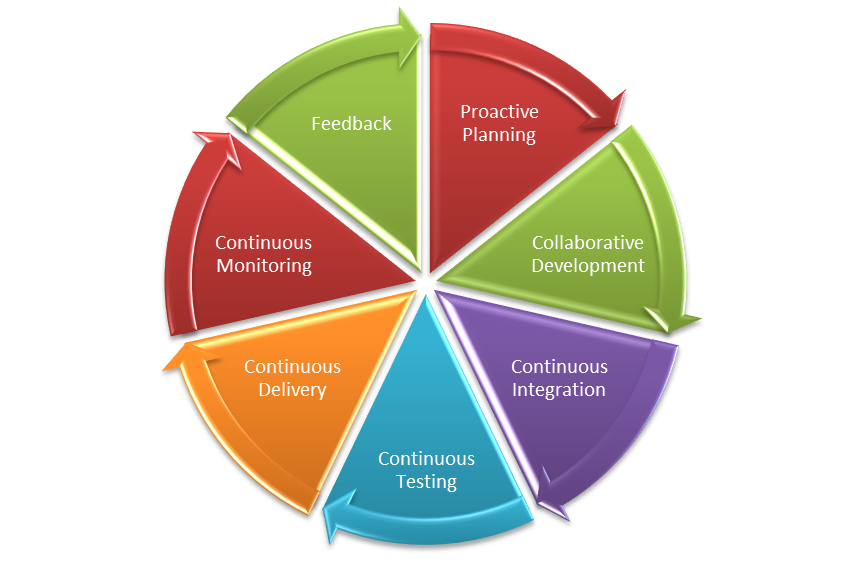
    Various collaboration mechanisms let teams work and learn together to produce better results. The figure below depicts the end-to-end life cycle of DevOps. Collaboration across the phases is essential to the success of your enterprise DevOps transformation.

    DevOps Lifecycle

    What are ChatOps and Bots?

    ChatOps is a term coined by GitHub to describe “putting tools in the middle of a conversation.” In a typical CI/CD pipeline, there are multiple tools that you interact with that have varied functionalities, such as source code management (SCM), defect management, continuous integration, continuous deployment and others. These are all discrete tools, but there is nothing that bridges them together. This is where ChatOps comes into play.

    A bot is a bridge between the collaboration tool and the DevOps tools. The bot receives a request from the user in the form of a chat command through a collaboration tool, analyzes the request and executes a set of commands on the target DevOps tool.

    The main components of ChatOps and bots are:

    Chat app/collaboration tool: This is the front-end chat system that connects the various stakeholders and enables them to interact between themselves and the systems around them.

    The bot: This is the core of ChatOps. A bot is the glue between your collaboration tool and your systems. It facilitates a two-way communication channel where you can fetch relevant information from the systems and act on the information received. A bot fits in between your collaboration tool and the DevOps tools, e.g. Hubot, Lita, ErrBot or AWS Lex.

    Target platform/infrastructure: Integration with the target platforms/DevOps tools is a key ingredient to a successful implementation of bots. These are the target tools and platforms on which the bot will execute the required commands. The tools integration allows your bot to communicate with tools and execute actions such as build, deploy, test, provision and scale infrastructure directly from the chat window.

    Where Bots Fit in the DevOps Pipeline

    Bots can prove to be an accelerator in various stages of the CI/CD pipeline. Below are the details of the integration with various DevOps tools in each phase of the life cycle:

    • Proactive planning – JIRA
    • Requirements management – JIRA
    • Continuous integration – Jenkins
    • Continuous deployment – Ansible, Chef
    • Continuous monitoring – Nagios, Grafana, Splunk
    • Continuous feedback – JIRA

    A chatbot plays a major role in bringing the different teams together into a single, persistent chat room to triage and resolve the issue at hand. In addition to just troubleshooting and triaging issues, bots can be used for various other business-as-usual jobs including:

    • Cleaning up servers.
    • Kicking off build and deployment jobs.
    • Rotating server logs.
    • On-boarding application on the monitoring tools.
    • Collecting metrics from tools such as Nagios or AppDynamics.

    Bot Technical Blueprint

    To achieve the aforesaid targets, we need to have a supportive bot platform in place. How closely the tools integrate with the bot ensures the quality of the implementation and opens new opportunities of automation.
    Bot Blueprint
    As the diagram depicts, the chatbot is hosted on a chat tool such as Slack. This can be on the cloud platform or an existing chat/communicator application. The bot is integrated with a key-value pair reference database, which is fed with the responses depending upon the activities or capabilities that have been fed to it. The key could be the name of the application to retrieve data from or any unique ID that would reduce the number of reads. A lookup of the defined key corresponding to the secondary key is performed on the response database and a response is sent back to the chatbot. Depending upon the number of outputs, the queries can be defined and stored in the response database.

    DevOps Bots: Use Cases

    Below are some examples of use cases for bots. This includes the complete life cycle of DevOps:

    Proactive Planning
    Create new user stories in sprint planning tools and assign sprints to teams. Update sprints and product backlogs.

    Build and Continuous Integration
    Execute build jobs and report back statistics of the build job. Perform daily/nightly builds and report on the status of the build to the relevant teams.

    Continuous Deployment
    Run deployment jobs and perform deployments across environments. Roll back deployments in case of failures, status checks, perform post-deployment actions such as JVM restarts.

    Infrastructure Provisioning and Configuration Management
    Kick off Chef jobs to provision infrastructure or provision application environments. Enable monitoring and restarting services and servers.

    Continuous Monitoring
    Provide application statistics or performing daily data lookups and grabbing metrics.

    Continuous Feedback
    Monitor application health and perform analytics.

    Key Measurement Metrics

    To achieve optimization and enhance performance of the continuous delivery process, metric measurement is the key. These indicators will help in taking certain corrective and preventive actions based on the results. Below are some of the key metrics indicators that can be measured.

    Effort Reduction
    Indicates the reduction of human/manual efforts for tasks such as triggering a build or deployment or collecting metrics from monitoring tools.

    Human Error Reduction Rate
    Reduction in the effort required due to rework caused by human errors.

    Reduce Issue Triaging time
    Indicates the time taken to resolve issues where multiple parties are involved and triaging of problems is required.

    Conclusion

    DevOps bots can significantly improve team efficiency, as well as a team’s ability to respond to emergencies. They save time and money, are fun to build and use and can have a positive impact on team morale, as well as increases the overall productivity of teams. This applies to both the engineering and operations teams. Enterprises embracing digitization are looking for partners with an engineering mindset who know how to bring in collaborative agile teams with the very latest knowledge of open source platforms and DevOps toolchains.


    Contact the Authors

    For more details please contact the authors on LinkedIn @
    Shriniwas Sathe
    Saswati Mohanty

    — Shriniwas Sathe

  • The State of Low-Code Development

    The State of Low-Code Development

    As enterprises continue to play catch-up when it comes to meeting their internal demand for new software services and applications, more enterprises—but still, only a minority—are turning to low-code development platforms to try to fill the gap.

    Low-code development platform provider OutSystems released its sixth annual “State of Application Development Report.” The report is based on surveys conducted in March of 3,300 IT professionals.

    The report found that a sizable minority (41%) of respondents are already using low-code platforms, while another 10% stated they were about to start using a low-code development platform. For comparison, in the 2018 report, 34% of respondents said they were using low-code development platforms and 9% said they were about to start using these platforms. Clearly, interest in these platforms is rising, if not modestly.

    Low-code development platforms strive to make software development more accessible. They do so by removing traditional coding interfaces with graphical user interfaces. And they typically target development toward a specific functionality, whether that be web applications, business process automation, IoT and, quite often, databases. The low-code development platform market is expected to grow to $27.2 billion by 2022 from $4.3 billion in 2017, an annual growth rate of 44%.

    The demand for software has never been higher. According to the OutSystems report, 64% of IT professionals said they have an application development backlog. For 19% of respondents, that backlog is deeper than 10 apps. While 50% said their backlogs have remained the same, 39% report that their app backlogs have improved over the past year.

    The time to deliver web apps and mobile apps is mixed. The 2018 OutSystems report found that 54% of respondents took four months or less to deliver a web application. This year, 61% said it takes them four months or less to deliver a web application. Mobile app development has changed a little: 55% on average said they deliver apps in four months or less.

    According to OutSystems, enterprises using low-code development platforms are 12% more likely to report that their backlogs have improved year over year.

    Those findings echo similar surveys. For instance, a survey released earlier this month from low-code provider Appian found that nearly 80% of its respondents believe that using low-code can free developer time to work on higher-level projects. That survey also found 86% of IT developers agree that emerging technology is increasing the pressure on the IT organization.

    One thing is certain, the demand for software isn’t going to let up anytime soon. According to the OutSystems report, the number of applications respondents plan to deliver this year is 60% higher than last year. For those with more than 500 employees, 65% said they had plans to deliver 10 or more apps, 38% plan to build 25 or more apps and 15% said they plan to develop 100 or more apps this year.

    Despite the high demand for enterprise software, only 36% of organizations have larger development teams than they did a year ago. However, that’s likely not due for lack of trying to hire and retain development talent. The OutSystems survey found only 15% of respondents described developer recruitment as easy. “For many organizations, retention of developer talent appears to be an equally grave challenge,” according to the report.

    With conditions like that, it’s only reasonable to expect low-code development platform popularity to continue to rise.

    — George V. Hulme

  • Kubernetes Adoption: Are You Ready?

    Kubernetes Adoption: Are You Ready?

    Enterprises are rapidly embracing a cloud-first strategy and microservices play a pivotal role in this journey. But enterprises are achieving various levels of success, measured by many factors includingmaturity of DevOps in the enterprise, ability to identify the right candidates for microservices, selecting the appropriate container management platform, adequate tooling and, finally, cultural shift in design thinking.

    As there is plenty of material around microservices adoption and strategy, this article focuses on the container management ecosystem, which plays a critical role in the success of microservices adoption. Today, Kubernetes has become the de facto platform for container orchestration. Most public cloud providers offer Kubernetes as a service in some form to abstract the complexities of managing Kubernetes as a platform.

    Currently, we see three broad patterns of how enterprises are adopting Kubernetes within their organizations.

    Pattern 1: Kubernetes as a Managed Service

    While Kubernetes makes container management somewhat simple, it is still a complex beast to understand and manage as a platform. Enterprises that have already embarked on a cloud strategy find it easy to test the unchartered waters of Kubernetes by leveraging Kubernetes-as-a-service provided by their cloud providers. It enables them to understand the impact of Kubernetes on their respective application architecture strategy and identify the gaps in their systems (such as the maturity of DevOps management, security management and release management) as well as their monitoring capabilities.

    Pattern 2: Kubernetes as a Turnkey Solution

    Certain enterprises driven by industry regulations and are technology-focused (with considerable experience in other container technology solutions), have shown interest in setting up Kubernetes as part of a private cloud or on–premises with a view to avoid vendor lock-in and limited control associated with managed Kubernetes. There are many such turnkey solutions out there to choose from.

    Pattern 3: Self-hosted Kubernetes Platform

    This category is small compared to the other two categories. However, there are a few enterprises that fully embrace the open source software development model and contribute to Kubernetes community. There are tools and frameworks that can enable the enterprises to setup and manage Kubernetes on their own.

    There are advantages and constraints in adopting any of the above approaches. The decision regarding which strategy to choose depends on the maturity of the enterprise and their business strategy.

    Challenges in Adoption

    Some of the key challenges to be considered, irrespective of the adoption pattern selected, include:

    1. Namespace management: Namespaces play a key role in managing the isolation across application domains and environments, providing controlled management of resources and user management. Bounded contexts can be linked with namespace definitions and standards. It is important to define proper naming guidelines to drive namespace management across clusters.
    2. Resource management: It is necessary to define resource utilization (resource quota) guidelines to ensure the containerized applications co-exist without being eliminated due to resource violations at runtime.
    3. Policy management: It is critical to define appropriate policies including cluster access controls, service access controls, resource utilization controls and secret access controls.
    4. Audit and compliance: It is important to audit the platform for patch levels, secret stores, compliance against the security vulnerabilities, encryption of secret stores, storage volumes, cluster policies, role binding policies and user management controls.
    5. Chaos testing your platform: It is necessary to subject the platform to chaos testing to ensure the robustness of the cluster. It also helps to test the stability of the containerized applications and the impact of crashing these containers. It will also provide vital information about how the platform behaves during high loads or when resources are unavailable for the platform.
    6. Managing the deployment manifests: Kubernetes follows declaration-based management, which means that every object or resource instruction is described through declarative manifests. This leads to versioning complexities, prone to human errors and data corruptions. It is necessary to leverage tools or create custom utilities to manage these manifests.
    7. Observability of the platform: While Kubernetes provides various mechanisms to monitor its own internal components, it does not recommend a standard monitoring approach. It is necessary to introduce well-defined health management standards while designing the microservices. Include appropriate probes for liveness and readiness probes in every containerized application deployed on Kubernetes cluster. Integrate the probe-generated metrics and platform-generated metrics with an external monitoring platform to have comprehensive observability of the cluster.
    8. Continuous deployment of services: It is not recommended to use kubectl-based deployments in a large-scale production setup. Instead, use some of the established open source frameworks specifically built for Kubernetes (such as Helm or JenkinsX) to manage seamless deployments.
    9. Archiving and backup: Kubernetes uses etcd as its internal metadata management store to manage the objects across clusters. It is necessary to define a backup strategy for etcd and any other dependent persistent stores used within the Kubernetes clusters.
    10. Container security management: Kubernetes deploys the applications by downloading the respective images from a pre-defined image repository. It is the responsibility of the repository ecosystem to ensure the image provenance of the images being deployed. Continuous security must be included as part of DevOps pipeline to ensure containers are well-managed.
    11. Service mesh support: Service mesh plays a critical role in streamlining the service to service communication. It abstracts the service level access controls and security management between services through externalized policies. It also provides routing and load balancing features. It is necessary to choose an appropriate service mesh that is compatible with the Kubernetes cluster as well as the underlying infrastructure.

    Conclusion

    Kubernetes makes the container operational aspects simpler, but it requires a methodical approach and best practices to ensure smooth maintainability, as well as seamless developer interaction. For any enterprise which are in a transition journey toward adopting Kubernetes, it is imperative to have a strategy for Kubernetes adoption to ensure success.

    — Sreekanth Nyamars

  • The Bug in Production: What You Don’t Know Can – and Will – Harm You

    The Bug in Production: What You Don’t Know Can – and Will – Harm You

    Despite the risk of unplanned downtime, many organizations that develop software and services push them live without adequately testing for bugs that will manifest against production traffic. This is a huge gamble: Those bugs could lead to errors that bring down the service altogether. Pushing live without sufficient testing can be detrimental to your business.

    The Problem of Going Live With Bugs in the Code

    Software downtime leads to loss of revenue and of reputation. In fact, Gartner analysts have estimated that the average cost of downtime is $5,600 a minute—that’s well over $300,000 an hour. To provide a real-life example of what this looks like, Microsoft Azure suffered a major outage in November 2018 caused by issues introduced as part of a code update, lasting for 14 hours and affecting customers throughout Europe and beyond. With migration from legacy systems to micro-environments in the cloud, outages and downtime pose a growing and serious problem.

    As companies switch to DevOps and CI/CD models to move faster and provide application updates sooner, software developers continually release new features and often push code updates as fast as they’re written. The classic six-month development timelines of dev, quality assurance (QA) and beta testing have been compressed to days and sometimes hours. Gone is the time when teams could beta test with customers for extended periods to flag real-time bugs.

    With current quality testing tools, developers don’t know how a new software version will perform in production—or whether it will even work in production. The Cloudbleed bug is an example of this problem—in February 2017, a simple coding error in a software upgrade from security vendor Cloudflare led to a serious vulnerability discovered by a Google researcher several months later.

    Flaws can lead to serious security issues later, in addition to having the immediate impacts mentioned above. Heartbleed, a vulnerability that arose in 2014 and stemmed from a programming mistake in the OpenSSL library, left large numbers of private keys and sensitive information exposed to the internet, enabling theft which otherwise would have been protected by SSL/TLS encryption.

    Standard QA Testing Isn’t Enough: Test With Production Traffic

    The way QA testing is typically done is no longer sufficient for today’s increasingly frequent and fast development cycles. Traditionally, DevOps teams haven’t been able to do side-by-side testing of the production version and an upgrade candidate.  The QA testing used by many organizations is a set of simulated test suites, which may not give comprehensive insight into the myriad ways in which customers may actually make use of the software. Just because upgraded code works under one set of testing parameters, doesn’t mean it will work in the unpredictable world of production usage.

    As in the case of the Cloudflare incident, the error went entirely unnoticed by end users for an extended period of time and there were no system errors logged as a result of the flaw. Just as QA testing isn’t sufficient, relying on system logs and users also has a limited scope for what can be detected.

    It is estimated that fixing flaws after a software release can be five times as expensive as fixing them during design—and it can lead to even costlier development delays. Enabling software teams to identify potential bugs and security concerns prior to release can alleviate those delays. Clearly, testing with production traffic earlier in the code development process can save time, money and pain. Software and DevOps teams need a way to test quickly and accurately how new releases will perform with real (not simulated) customer traffic and while maintaining the highest standards.

    By evaluating release versions side by side, teams can quickly locate any differences or defects. In addition, they can gain real insight on network performance while also verifying the stability of upgrades and patches in a working environment. Doing this efficiently will significantly reduce the likelihood of releasing software that later needs to be rolled back. Rollbacks are expensive, as we saw in the case of the Microsoft Azure incident.

    Some organizations stage rollouts, which requires running multiple software versions in production. The software teams put a small percentage of users on the new version, while most users run the status quo. Unfortunately, this approach to testing with production traffic is cumbersome to manage and costly, and still vulnerable to rollbacks. The other problem with these kinds of rolling deployments is that while failures can be caught early in the process, they are—by design—only caught after they’ve affected end users.

    This brings more questions, including: How do you know whether the new software is causing the failures? and, How many failures does the business allow before recalling or rolling back the software, since the business does not observe side-by-side results from the same customer? This disrupts the end user experience, which ultimately affects business operations and company reputation. And staging may not provide a sufficient sample to gauge the efficacy of the new release versus the entire population of customers.

    Cost is still an issue as well. If you stage with 10% of customers on the new version and a failure costs more than $300,000 an hour, then a failure affecting 10% of users could potentially still cost more than $30,000 per hour. The impact is reduced, of course, but it’s still significant—not counting the uncertainty of when to rollback.

    Looking Ahead

    Standard QA testing is no longer enough. To reduce the risk injected into the software development life cycle by today’s rapid iterations, DevOps teams can test in production and evaluate release versions side-by-side. This will help prevent costly rollbacks or staging while still releasing a quality, secure product. The old way of doing things is not sufficient, but fortunately, there is a better way.

    — Frank Huerta

  • Open Source Versioning: The Race to Stay Up-to-Date

    Open Source Versioning: The Race to Stay Up-to-Date

    Open source libraries, once shunned as risky and not ready for prime time, are now used extensively across major corporations, including insurers. The reason is simple: In time- and resource-constrained companies trying to stay technologically competitive, it doesn’t make sense anymore to try to reinvent a wheel that’s already been battle-tested. However, having made the commitment to open source code and solution sets, it’s imperative to keep up-to-date with open source library maintenance and updates.

    The Risk of Open Source

    Some active open source libraries are updated multiple times a year. Getting out of date means missing out on newer features. Also, if the gap between upgrades bridges several iterations, some future upgrades may not be backward-compatible, causing functional problems at best and risk exposure problems at worst. On occasion, an out-of-date open source library version can expose a system and a company to attack. In 2017, a major U.S. financial company was hit by a hack that exposed the information of millions of customers. The hackers had exploited a software vulnerability that had been public for a month, but the company had not patched its system in time. There are several other well-known examples of a similar vein.

    Keeping current is not easy. Upgrading may be costly, but falling behind can make it costlier to catch up. The question is, How frequently should one upgrade to the newer versions?

    The Effort and Cost

    One of the reasons companies choose not to upgrade every time there’s a new release is the cost involved. While the open source code itself is free, the effort required in time and resources can be substantial and can take valuable resources away from higher priority business-technology initiatives. An additional concern is that, even though the upgrade is supposed to be backward-compatible, there is no way to verify that without actually performing the upgrade. If there are compatibility problems, then a larger effort ensues involving upgrading, restoring or rebuilding a system. Any large system has to be tested thoroughly after upgrading, and without the help of automated tools, testing can be costly and time-consuming.

    One approach for mitigating these costs and risks is the process of continuous integration (CI) for open source libraries. A good suite of automated testing tools provides a high degree of confidence that nothing has been broken by the most recent upgrade, before it is implemented into any production environment. However, without automated tests that flush out potential issues from upgrading, the risks and costs are high enough that companies have a hard time keeping up and managers become more motivated to delay upgrades than to perform them. That’s why it’s important that companies employ CI and continuous delivery (CD) processes that include robust automated testing.

    Additionally, the use of microservices—an increasingly effective and popular way to construct systems—puts another twist into the efforts and costs of keeping open source libraries up to date. Individually, each microservice might be quick to test. However, if an application has been broken into 50, 100 or even more microservice components, even a small amount of manual work testing each component will add up quickly. Additionally, in an environment that has deployed microservices broadly, there may not be a business need to change some services for months—that is one of the benefits of using microservices.

    The Right Approach to Open Source

    There is a right way to deal with open source library updates that has the benefit of taking advantage of new functionality and code stability in a low-risk, low-effort and low-resource manner as follows:

    Planning: Enterprise and application architects should be vigilant regarding the road maps of any large frameworks that employ open source libraries as a key component to any project or initiative. Proactive identification of open source libraries that may need to be upgraded is key. Likewise, application project managers should make open source library upgrade part of a regular and ongoing project plan. For example, when microservices are involved, they should be classified proactively as services by the libraries they use, as a way to identify the few services that would normally be upgraded first. This has the benefit of providing a few sprints’ worth of feedback before rolling out the upgrades to other libraries.

    Monitoring: Open source version monitoring is essential. There are products that can help to identify and report library versions that have vulnerabilities. Such monitoring can and should be used as part of the CI/CD pipeline and also to monitor artifacts that already are deployed in production. Monitoring processes also can report when newer open source library versions are available, even if the incumbent library has no reported vulnerabilities.

    Automated compatibility triage: It is often too risky to set up production builds to always use the latest version of an open source library. However, separate automated processes can identify new versions, run them through a build and test process and report back the results. If a test fails, the development team gets an early warning that their code is not compatible with the upgrade version. This helps to plan and schedule fixes, and if a vulnerability is discovered in the current version, this kind of proactive planning enables a quicker resolution and turnaround.

    Processes: Strong processes, preferably automated ones, are the foundation of open source versioning. For critical security upgrades, a process must be in place to triage and prioritize identified changes. For other version updates, good processes can help make upgrades easier. For example, a standard and repeatable process may incorporate minor version upgrades into the regular flow of sprint work, thus saving time while mitigating risk.

    Open source versioning can be difficult, but it doesn’t have to be. With automated testing, good monitoring tools and some proactive planning, the costs and risks of staying up to date can be kept to a minimum, allowing companies to reap the benefits of new features and functions.

    — Darius Cooper

  • The Terrain of DevOps is Strewn with Pitfalls

    The Terrain of DevOps is Strewn with Pitfalls

    As Gene Kim, one of the leading thinkers in DevOps, once said, “DevOps is not about what you do, but what your outcomes are.” What he’s telling us is that DevOps is about enabling a rapid flow of work that transitions from development to testing to operations, but the bottom line is that it’s about achieving results. Unfortunately, this too often gets lost in modern-day DevOps practices.

    In this article, I will discuss five common pitfalls that occur in DevOps if you don’t pay attention to the endgame and how your organization can avoid falling victim to them.

    DevOps and Automation: Measuring the Wrong Outcomes

    Some people believe that, at its core, DevOps is about trying to automate everything. But ask yourself this: Once you automate, are you really delivering a better outcome?

    The answer is not always yes. While metrics such as deployment frequency or mean time to repair (MTTR) are interesting DevOps indicators, they are no more interesting to determining if your team is delivering actual value than measuring the number of lines of code submitted or counting the number of keystrokes by the development team. You measure outcomes by determining a baseline from where you start and compare that with where you end.

    We need to understand that DevOps is about much more than automation; it’s about the entire pipeline and how your team moves from ideation to delivery to production. Even large companies with world-class DevOps teams don’t always clearly see the problem and can struggle managing the value stream and putting together multiple pipelines. An anonymous but real-life example of this is an organization I know that had been doing DevOps for 18 months, yet hadn’t delivered anything into production in that span. Are they really doing DevOps? DevOps is a process, but if it produces zero value, it’s not delivering on its promise.

    The key is focusing on delivering value and measuring value delivery into production. However, before you can begin measuring value, you have to define what it means to each individual deliverable. Common metrics include the number of story points, actual revenue from product comparison and customer satisfaction. With your clearly defined metrics in place, you can measure value as it gets delivered to the customer.

    DevOps and Fragile Environments

    One Achilles’ heel in the DevOps process is the pre-production environments where code gets deployed and tested. Automating a delivery pipeline relies completely on code being built and deployed to various environments. Fragile environments mean that the developers and testers are wasting time dealing with problems originating from the environment and not the code itself.

    While we wish all environments could be on-demand; the fact is, most are not. Another DevOps expert, Randy Bias, has an analogy about pets versus cattle in describing servers, and the same analogy can be used for environments. If environments are not standardized and repeatable, you have to be willing to move on from it like a farmer moves on from livestock; you can’t hold onto sentimental attachments like we have with our pets. What’s most important is that in no case can an environment be singular in nature.

    One element of the solution is to create code and automate, but the key is building up environments that are complete. Every environment needs proper builds, proper data and proper tests validating the environment. Additionally, the automation must have the stability to perform successfully every time. If you have piece of automation that fails even just 5% of the time, that’s unacceptable.

    The only way automation works in an environment is if you can trust the environment. When the environment is unstable, it’s like playing Russian roulette: No one knows exactly where the danger lies. It could be in the environment, the code, the data, the middleware … a number of places. When a problem arises, developers are often the last line of defense, but dealing with an issue such as this pulls them away from getting real work done.

    Disconnected Teams

    On this point, I’d like to share a warning: Disconnected toolchains lead to disconnected teams. The planning, development and testing teams can lack cohesion, and the release and operations teams often struggle to be on the same page. Each of these groups have their own tools and management, but they need to be able to communicate with each other effectively to make things work smoothly. In an ideal world, planning initiatives would flow into features for the development and testing team, which would flow into release pipelines and operational changes. Every team still can speak its own language, but the tools need to be interconnected and unified across the teams.

    Mismanaging Hybrid

    The term “hybrid” has many different uses in the software development space. Hybrid methodology refers to combining waterfall, agile and DevOps practices. Hybrid environments means your environment is housed in multiple locations such as the cloud, on-premises, virtual or code. There’s also hybrid geography, hybrid architecture, hybrid style—the list goes on.

    The key to transitioning to DevOps is properly managing the different types of hybrid. If you can’t manage hybrid delivery, you can’t manage your entire delivery and you can’t improve your delivery holistically. Organizations must learn to manage in a world of hybrid delivery and be able to handle cloud and on-prem, as well as teams all over the planet.

    Fixing Non-Constraints

    The Theory of Constraints is about pinpointing the bottlenecks in your process and fixing them. Any work that’s not focused on eliminating the constraint will not result in improvement and could be considered a waste of time.

    It’s important to remember that if you haven’t fixed the bottleneck, you haven’t improved anything. At the same time, if you’re automating the non-constraints, you’re wasting efforts by trying to improve what doesn’t need improving.

    As we’ve pointed out, DevOps does not equal automation. If an organization has messy processes and tries to automate them, they’ll be left with an automated mess. Therefore, organizations will see the best results from automating their constraints and just as important, not automating the non-constraints.

    — Jeffrey Keyes