Category: DevOps Practice

  • SREs: Stop Asking Your Product Managers for SLOs

    SREs: Stop Asking Your Product Managers for SLOs

    One of the fundamental premises of software reliability engineering is that you should base your reliability goals—i.e., your service level objectives (SLOs)—on the level of service that keeps your customers happy. The problem is, defining what makes your customers happy requires communication between software reliability engineers (SREs) and product managers (PMs) (aka business stakeholders), and that can be a challenge. Let’s just say that SREs and PMs have different goals and speak slightly different languages.

    It’s not that PMs fail to appreciate the value that SREs bring to the table. Today, in the era of software as a service, features such as security, reliability and data privacy (which used to be considered “non-functional requirements”) are respected as critical features of the service-product a SaaS company delivers. Modern application users and customers of software services care a lot about data privacy, cybersecurity and uptime; therefore, PMs care, too. In fact, it’s not uncommon to see these features touted prominently on a company’s website (I saw one today claiming “99.99% uptime for every customer!”) because the folks in marketing know that customers are making purchasing decisions based on whether the company can deliver reliability, speed, security and performance quality. So, yes, PMs do care.

    The difficulty lies in the negotiation between the PM and the SRE about the value of providing that level of service and the cost associated with it:

    The people and infrastructure costs associated with providing the next level of reliability increase geometrically for a host of reasons, but the expected value to a $10 million business of losing out on that one in 1,000 transactions versus one in 10,000 is only $1,000.

    But translating “customer happiness” into actual objectives derived from observable metrics is easier said than done, particularly for companies that are just getting started with SLOs. Let’s face it, all the talk about “nines” can be difficult to conceptualize. Fortunately, there’s an easy way for PMs and SREs to get on the same wavelength.

    Engineers, stop asking your PMs for SLOs!  Instead, convert user stories into reliability goals.

    User stories are a great way for PMs to express a customer’s experience and expectations to the engineering team. SREs can then translate the user stories into SLOs in a few simple steps.

    What is a User Story?

    User stories are narratives that describe how a particular type of user engages with the service. The first-person plotline might go like this: I am this type of person, and this is what I need and expect to be happy, and if I’m not happy, this is what it’s going to cost you.

    Note: In this user story, we’ve taken the liberty of including empathy for the reliability expectations of the user.

    Retail example: I’m a shopper on your online store on Black Friday, and I want to take advantage of your Black Friday sale. I want to log on, peruse your Black Friday deals, pick the products and features I prefer, and make my purchase in just a moment or two. If it takes too long to log on, or if I get hung up in the system, I’ll easily get frustrated and move on to other retailers. I don’t want to miss the deals!

    An SRE can take that user story, ask the PM a few questions to gather just a few more critical bits of information, then do some simple math to derive the SLO for your Black Friday.

    Ask Your PM These Questions

    To determine the reliability goals for a user story, you need to add three pieces of context:

    Step 1 – Identify the Top Critical User Transactions

    First, determine the relative priority or criticality of the transaction being successful. Not all transactions are created equally, so we need to understand what kind of transaction we’re talking about here. For example, browsing a catalog page (which could be refreshed if unsuccessful) is different from the shopper’s checkout experience.

    Retail example: We have several transactions in a retail business, including:

    1. Inventory catalog search.
    2. Order fulfillment.
    3. Payments processing.
    4. Price and discount.
    5. Checkout experience/shopping cart abandonment.

    For our example, let’s develop the SLO for payments processing, which is a throughput metric—the total number of transactions a retailer can handle in a given period of time.

    Step 2 – Estimate the Volume of Transactions at Various Times

    Now that we know the transaction we’re talking about (payment processing throughput), we can estimate the rough volume of transactions or user interactions that will occur in each of those categories, rounded to the closest order of magnitude (see Fermi Estimation). How much of your business happens during this time? Do you have a critical time of day? Do you have a critical season? Do you have a critical day(s) of the year?

    The same transaction at a different time may be more or less valuable. Think about an ad playing during the Superbowl or stock prices while the market is open. Or when your CEO is giving a critical customer presentation. Timing matters.

    Retail example: Our hypothetical retailer has critical periods in the holiday shopping season and a critical day called Black Friday. Typically, 4% of annual business happens during Black Friday weekend, and 16% of annual business happens during the remaining holiday season.

    Adobe Analytics estimates that sales for the full weekend (Thanksgiving through Cyber Monday) is 20% of total revenue for the full holiday season. According to the National Retail Federation, 2019 holiday sales were $730.2 billion, accounting for 20% of annual sales.

    Step 3 – Estimate the Business Value of Transactions in Each Circumstance

    Finally, we can now understand how the reliability of this transaction affects business outcomes. This could be the risk of lost revenue or perhaps a brand reputation metric such as reduced CSAT. Now you have a pretty clear picture of the business impact of unreliability.

    Retail example: If our imaginary retailer has revenue of $10 million, it would make $400,000 of that during Black Friday weekend, and $1.6 million during the rest of the holiday season. On Black Friday shopping carts are worth $100, $80 during the holiday season and $50 the rest of the time. There are 800 transactions per day on Black Friday, 625 per holiday season day and 488 any other day.

    Now that you have this input, you can start to calculate appropriate SLOs based on the value at risk and the cost to meet that reliability goal.
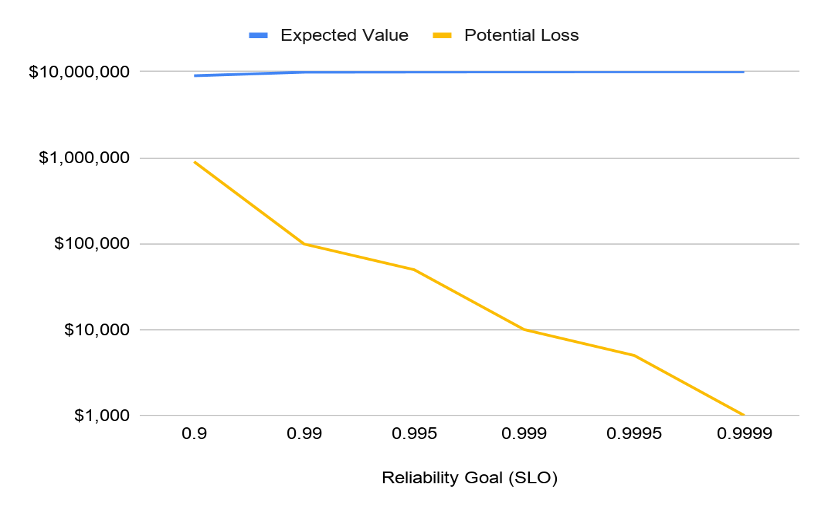
    If possible, you can estimate the cost to deliver each level of reliability. Consider not only the cloud computing and direct operational costs, but also the reliability investments in testing, performance, security, chaos engineering, release management, rollback, monitoring, on-call, automation, etc., that would be required to achieve the reliability level at each point. By plotting this cost (at least to the order of magnitude) you can find a break-even point where the value at risk and cost of reliability crossover. This is the business-justifiable SLO for these transactions.
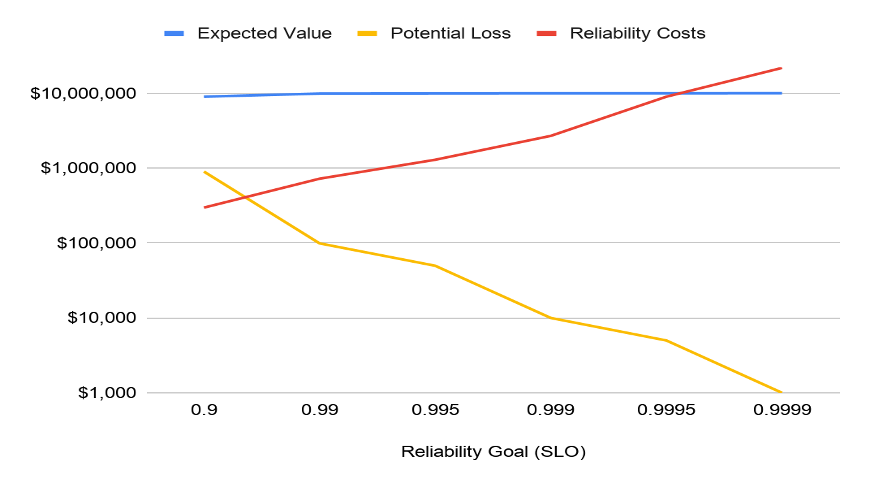
    Plot the value-at-risk as a function of value x volume x SLO. The value-at-risk will decline sharply as the reliability is increased; however, the cost to achieve this reliability also increases exponentially. It’s simply not worth investing more than that at-risk amount for any given user story, so the SLO determination is clear. Note that the SLO may not be achievable for the team currently, but you have a precise idea of what matters to the business and the break-even point of your reliability investments.

    Instead of asking PMs to “speak SRE,” span the communication gap by using the common language of user stories to build business-cogent SLOs.

  • The Role of DevOps Feedback Loops in Your Value Stream

    The Role of DevOps Feedback Loops in Your Value Stream

    Feedback loops are found in all systems, organic or inorganic. They propel the recirculation of hot or cold air to raise or lower temperatures; they drive the idea exchange that helps businesses fine-tune operating strategies. Yet, nowhere are feedback loops more important but also misunderstood than in software delivery.

    Attaining the “holy grail” of software development—gaining maximum efficiency and maintaining velocity while reducing or eliminating wait times and waste—involves a variety of value stream activities that generate complex feedback loops. These loops are not sequential. They must operate in tandem and in sync with one another within a constrained environment or delivery flow will be disrupted. Understanding, mapping and optimizing this “ecosystem” is essential to ensuring all feedback loops are timed appropriately and no software activity is thrown off schedule.

    Misperceptions of Software Feedback Loops

    Much confusion arises among business leaders regarding the role of feedback loops in software delivery because they are also invaluable in other business activities. There, feedback loops operate in both open and closed systems. A system, whether open or closed, is a set of elements that take inputs through a phased transition to the emergence of an output.

    For example, assume a bank is developing a new depositor service, and although it announces the service will be available soon, it does not solicit specific feedback on how the service will work. Even if it receives random feedback from the public, it is coming from outside the controlled environment. That’s an open system. If the bank hosts customer focus groups and monitors the outcomes of specific variables without any opportunity for outside influences to impact the process, the activity is taking place in a closed system.

    The use of a closed system, whether in business or software development, embraces the principles of systems thinking—the shift in mindset away from linear to circular. With systems thinking, there are a half-dozen defined components, one of which is feedback loops. Understanding feedback loops is an essential part of value stream management to achieve the goal of delivering value to customers faster.

    Feedback loops can have a very positive or negative impact on software flow because awareness of and action on effective feedback impacts all parts of the system. But, before software leaders and teams can address their feedback loops, they must identify them in the value stream and understand the causality of each loop. As you identify feedback loops, patterns start to develop. These patterns can be direct or indirect, and feedback may need to be amplified or throttled, automated or removed altogether based on the loop’s causality.

    Optimizing the System

    Right now, feedback loops are likely disrupting software delivery flow and impeding velocity for millions of companies around the globe because software professionals, from project managers to software engineers, don’t understand them. Even though they recognize that software activities are taking place and that one activity may impact others, they don’t adequately consider the fact that information and material flow are interconnected, as are request flow, development flow and operations flow. They don’t perceive that software delivery is like a three-dimensional game of chess, with the pieces moving around the board multi-dimensionally.

    They also haven’t analyzed their feedback loops in detail so they can adjust based on reality, not perception or plan. Even if they have mapped the flow and the loops, most are unaware of the severe negative consequences even a seemingly minor issue can cause.

    Follow a Real Example

    Here’s an example that mirrors real-life scenarios I have witnessed time and again. Assume that for a new feature request, Epic 1 has entered Intake. The project gets into the Design phase and other work starts moving across the organization. Since everything is interconnected, the User Story ends up in Backlog waiting for the Epic to be completed. Two more User Stories are completed but the Epic has not moved, so they all sit in Backlog.

    Once the Epic clears Design, the User Stories start moving to the Plan phase and the Epic can go straight to Development. Soon, User Stories are In Progress and Material Flow kicks in. Somebody is working on a sprint, and someone else is working on those two pieces of code to make the change or implement a story. The DevOps pipeline is flowing, but not as efficiently as it could.

    Let’s assume instead that teams and managers now understand the feedback loops, and they have been automated to the greatest extent possible. User Stories are automatically moving from Backlog to In Progress once the Epic enters Development.

    When code goes from Build to Test, if a defect is discovered, automated feedback loops can connect to the right User Story and move the code back to In Progress. The developer fixes the defect and it goes right back to In Progress. The company meets its release window.

    In addition, once these elements are connected, and everyone understands these loops, management gains traceability across the value stream, which makes everyone, including customers, happy.

    Beyond the Basics

    The effort described here may sound like a lot of work to the uninitiated, but in practice, the effort more than pays for itself. That’s a great thing because it doesn’t stop here. In our example, as in virtually every software project, there is a lot of valuable human feedback beyond what I have mapped. It could be the information flow from a product manager through a product owner and on to someone tasked with the development portfolio. Or it might flow from testers to the product owner.

    Companies don’t have to map all this flow, but they should understand and address its potential impact. Furthermore, as project specifics, customer mindsets and other variables change, teams should adjust accordingly. That may mean creating, amplifying, throttling or automating feedback loops—or removing them altogether.

    Once organizations have attained a solid footing, they can explore more options. For example, tools, especially with integrations between and among them, can propel and automate the feedback loops, but they should be aligned, from a systems perspective, with the organization’s project workflow.

    Final Thoughts

    Streamlining flow through more efficient feedback loops is only a piece of the puzzle, but it opens up new opportunities such as more easily recognizing and removing waste. It enables organizations to release software faster, which is an imperative for digital transformation.

    Even if they don’t develop software in-house, firms that use enterprise software, from Salesforce to SAP S/4HANA, often have teams that modify it. Plus, customers and end users are all clamoring for a no-touch, self-serve digital experience. If a firm doesn’t provide, its competitors will.

    In mastering the science of delivering quality code at the right level of velocity, companies propel greater innovation, deliver ROI faster, ensure higher quality with lower costs and deliver products that better fit their intended audience and use. They also position themselves to be value stream leaders, and that pleases everyone from the board room to the sales floor.

  • Nobl9 Ties Business Goals to Observability Data

    Nobl9 Ties Business Goals to Observability Data

    Nobl9 today announced it has made available via an open public beta program a software-as-a-service (SaaS) platform for correlating business goals against data collected by observability tools.

    Unlike observability platforms that only aggregate metrics, the Nobl9 Service Level Objective (SLO) Platform applies that data to specific reliability targets defined by the business, company CEO Marcin Kurc said.

    Compatible with monitoring platforms such as Datadog, New Relic and Prometheus, Nobl9 SLO Platform calculates uses monitoring data to calculate acceptable rates of error per service threshold and can be configured to trigger alerts and even workflows in anticipation of outages, Kurc said. The critical difference is knowing which metrics are truly impacting customer experiences.

    The platform also enables DevOps teams to create business rules and define “facets” of users based on application experiences required. DevOps teams can identify users who are being serviced poorly in addition to tracking groups of users. They also codify contractual service level agreements (SLAs) down to critical business periods, said Kurc. The Nobl9 SLO Platform is accessible via a CLI/GUI/API for everything, Kubernetes-like YAML SLO-as-code or a sloctl command line.

    This approach also has a significant impact on the cost of monitoring because the Nobl9 SLO Platform makes it easier to identify what data needs to be stored versus deleted, noted Kurc.

    Armed with those insights, Kurc said it then becomes easier for DevOps teams to either determine how to make systems more reliable or lower reliability goals to reduce costs when possible. IT organizations will also spend much less time finger-pointing because the root cause of any issue will be much more readily apparent, he noted, adding the Nobl9 SLO Platform provides access to both real-time and historical reports to enable DevOps teams to achieve both those goals.

    In the wake of the COVID-19 pandemic, there’s a lot more focus on observability than ever. Organizations are relying more on digital business process to survive. The difference between surviving and thriving in this new era will come down to observability of not just the IT environment but also the entire digital business process.

    It may be a while before most organizations fully equate profit and revenue to the performance of their IT environments. However, it’s becoming increasingly clear that it’s not enough to simply make sure IT environments are available. Customers are judging organizations by their ability to drive a quality experience within the context of a digital business process spanning multiple applications. Organizations that are unable to meet those expectations will soon find themselves being cast aside in favor of those that can.

    Naturally, those requirements will put a lot of pressure on IT teams that often don’t have a lot of visibility into a business process. There is no end of alerts being generated by the system that are closely monitored, but the bulk of those alerts lack business context. Undoubtedly, there soon will be plenty of ways to gain that context. The challenge now is explaining to business leaders now why it’s needed before it’s too late.

  • Mob Programming During a Pandemic: Lessons Learned

    Mob Programming During a Pandemic: Lessons Learned

    Despite limitations, mob programming can be effective, even during COVID-19

    The COVID-19 pandemic has many of us considering the long-term impact on our personal and working lives. Shaking hands with new colleagues or clients? Buffet lunches? I’ve recently wondered how social distancing will affect mob programming, which is a development practice we implemented at Bonitasoft late last year.

    What is mob programming? It’s a software development approach where an entire team gathers around one keyboard and one projector screen at once, according to Agile community organization Agile Alliance. It’s an extension of the idea of pair programming, which involves two team members collaborating to complete a development task in the same space.

    In an August 2013 CodeBetter.com post, Marcus Hammarberg, head of Quality & Curriculum at the School of Applied Technology in Sweden, equated mob programming to driving. The driver uses the keyboard, writing the code and following coding standards. Other team members are navigators, advisers and researchers who assist the driver and focus on higher-level tasks such as determining if the team is solving the right problem. They also tag in to take over as the driver.

    “I’m not saying that mob programming is for everyone, neither is pair programming,” Hammarberg write. “It might not be for all types of tasks either … But I am saying that getting your team into a room, with one computer and one screen, the whole team is working together on one feature—that there is no more effective way to get that feature out.”

    Of course, much has changed over the past several months, including people’s comfort level with being in close proximity. Before I get into my recommendations for how mob programming can work in the current situation, let me share why Bonitasoft embraced it to begin with and the benefits to my company.

    Embracing Mob Programming

    About a year ago, I saw Agile coach Woody Zuill deliver a presentation titled “Mob Programming: A Whole Team Approach,” at MixIT 2019. I was intrigued by what I saw as a promising development approach. However, I had my doubts about the effectiveness and logistics of gathering five people in front of one screen. I also suspected it wouldn’t be compatible with remote work—a premonition of today’s situation?

    Running development projects in sprints made it a low-risk investment, so I introduced mob programming to the other members of my five-person team, which is responsible for the development of the Bonita platform portal for delivery of applications and is comprised of a mix of introverts and extroverts. The team took a mob programming approach to design and test an application page. It was a medium complexity project built with Gradle, using the UI Designer web page development tool and tested with Cypress.

    After discussing the project’s objective and methodology, the team worked on a laptop and a standard-size screen in the open office space. Pros: Fast development completion, better implementation and good test coverage. Cons: Decreased focus because of lengthy discussion and the distraction of phone notifications, communication style differences and paused cross-cutting topics.

    My team members and I loved the result of mob programming but needed to iron out the format. We also skipped the first stage of agility in our excitement to try mob programming: starting with a strong framework and basic rules. These include spelling out the roles of the pilot, navigator and researchers on a team.

    Among other adjustments, we moved to a quieter spot in the office to work. We swapped out the small screen for a giant screen and replaced the laptop with a desktop, keyboard and mouse. We scheduled more breaks. We adhered to the basic rules. We rotated roles every 15 minutes, which meant all team members were more attentive and involved. Recognizing that timid team members might not speak up, we distributed speaking time more fairly. And we were more selective when choosing projects for the mob programming method (bug fixes, for instance, are best solved through pair programming).

    How We Benefited from Mob Programming

    The process required a little tweaking at the beginning but it was well worth it. We’ve realized a lot of benefits from the mob programming methodology. One of the biggest benefits is all the time we save on development projects. Mob programming eliminates merge conflicts, decreases the time spent in standup meetings and pull request reviews and reduces external interruptions (people are less willing to interrupt an entire group than just one dev working independently).

    Here are a few more mob programming benefits:

    • Global knowledge sharing: All members of a mob programming development team receive the same level of knowledge on new developments. New team members are able to quickly ramp up on the legacy code.
    • High-quality solutions: The solutions from mob programming efforts tend to be better tested with fewer bugs in the final product. Since the code is made modularly, it’s easy to modify if needed.
    • Team growth: Mob programming has taught us to communicate in a way that works best for each team member. We appreciate the diversity of thought and personality among team members rather than viewing it as a disadvantage.

    Can Mob Programming Work in a Pandemic?

    Now that you know why I recommend mob programming let’s look at whether it’s possible to continue using this methodology safely during the pandemic. Bonitasoft devs are all working remotely so I base this on experience. We apply the basic rules using videoconferencing tools and duplicate the development environment for everyone. Communicating via videoconferencing was an adjustment but it works. Each team can adapt mob programming to what works best for them over multiple iterations, whether they’re working in the same space or remotely.

    Here are a few mob programming tips:

    • Define when it involves remote work versus when it will involve everyone working in the same space (with social distancing procedures in place, of course).
    • Apply the basic rules strictly, so you have a solid foundation on which to build a mob programming practice.
    • Limit potential distractions by opting for a large screen, mouse and keyboard in a quiet location.
    • Factor free time into your non-sprint work schedule so that team members can check their email and work on other projects.
    • Define break times (the Pomodoro technique could be one option).

    Mob Programming is Worth Exploring … Even Now!

    During the past few months, I’ve learned a lot about mob programming and believe there’s a certain magic to it. At Bonitasoft, smart implementations have resulted from the development team embracing the value of collective intelligence and mob programming. We’re delivering projects faster and enjoying greater satisfaction in our work lives. With some adaptation, it’s possible to realize its value by adding it to your development methodology options.

  • Application Modernization Video with IBM’s Rosalind Radcliffe

    Application Modernization Video with IBM’s Rosalind Radcliffe

    Application modernization is the process of updating existing legacy applications and modernizing their infrastructure, architecture and features, by using modern technology stacks. Monolithic applications are difficult to update and expensive to scale.

    In response to today’s business requirements of growth and innovation, enterprises must deliver new applications in an agile fashion while minimizing risk. Many have turned to a hybrid or multicloud strategy where choice and flexibility are foundational.

    In this interview, Rosalind Radcliffe, distinguished engineer at IBM, explains the benefits of modernizing applications and how IBM provides all essential components to update your legacy applications.

    Rosalind will take a deeper look at application modernization during her session at IBM DevOps Virtual Summit. During the virtual event, attendees will learn how to keep their applications running smoothly with automation and data-driven solutions that can reduce mean time to resolution and explore IBM solutions to help innovate hybrid environments, disrupt cloud native development and transform existing mainframe infrastructures. The free virtual event will take place on Oct. 29 at 10 a.m. ET.

    For more information and to register, please visit the IBM DevOps Virtual Summit website.

  • Azul Adds OpenJDK Migration Services

    Azul Adds OpenJDK Migration Services

    Azul today announced today it will provide migration services for IT organizations looking to transition from the proprietary Oracle Java Standard Edition (SE) developer platform to the Zulu edition of an open source OpenJDK equivalent.

    OpenJDK is based on the HotpSpot edition of the Java virtual machine, the Java Class Library and the Java compiler. The Zulu edition was originally developed by Azul and Microsoft and has since been supported by Oracle, IBM, Apple, Amazon, SAP and Red Hat.

    Azul CEO Scott Sellars said that while OpenJDK is compatible with Oracle Java SE there are some minor differences that enterprise IT organizations need help with to make the transition. While distributions of OpenJDK have been around for years now, Sellars said the fees for support that Oracle has been charging for Oracle Java SE have reached a point where more organizations are now ready to make the jump to OpenJDK.

    In the wake of the economic downturn brought on by the COVID-19 pandemic organizations of all sizes are looking to reduce costs by transitioning to open source software whenever possible, he added. Rather than reduce the size of their IT staff most organizations would prefer to rein in their IT budgets by reducing their dependency on proprietary software, Sellars noted. The United States Transportation Command (USTRANSCOM), for example, earlier this month revealed it is replacing Oracle Java SE with Azul Zulu builds of OpenJDK to in part lower Java support costs. Taboola, an online advertising platform, also made a similar switch.

    Azul is now offering two classes of migration services. A Level 1 offering helps organizations migrate directly from Oracle Java to Azul Zulu builds of OpenJDK and includes creating an inventory of the Java estate by vendor, by Java version, by Java security patch level and by which Java runtimes are currently being employed. A Level 2 service brings in a third-party IT services firm to enable organizations to migrate older implementation of Java Virtual Machines (JVMs) to either the Java 8 or Java 11 platform.

    A recent Forrester Consulting study commissioned by Azul finds the Azul Zing Java Virtual Machine pays for itself in less than three months by reducing development and infrastructure costs, with a three-year 224% return on investment (ROI).

    Regardless of the open source instance of a Java platform, it’s clear that going forward most of the ongoing innovation is shifting to platforms that multiple vendors are now contributing to more frequently. OpenJDK, for example, is now on a release cadence of every six months. Each distribution of an open source Java platform serves to reduce costs in a way that enables IT organizations to achieve backward compatibility.

    Despite first being employed in the enterprise more than two decades ago, reliance on Java platforms remains high. There has been widespread adoption of multiple programming languages but most back-end systems in the enterprise are still based on Java. Many developers that have mastered Java have also been reluctant to abandon it no matter how many other programming languages they may learn.

  • How To Foster a Culture of Citizen Developers

    How To Foster a Culture of Citizen Developers

    What can leaders do to encourage a thriving environment of citizen developers in their organization?

    Over the last several months, businesses of all sizes have had to embrace rapid change, as have their workforces. When it comes to IT departments, even before the pandemic many were fielding requests to implement new technology, customize solutions to niche problems and automate specific tasks at rapid rates. Unfortunately, these increased demands coincide with an ongoing developer drought, and paired with the pandemic, have put an added strain on some already thinly stretched IT teams.

    As a result, there has been an observable rise in citizen developers being tapped to relieve some of this burden. “Citizen developer” here is used to describe any programming novice or non-developer who has been tasked with the responsibility of constructing custom applications. This person has some familiarity with programming but may not have been formally trained and, therefore, may use their own set of tools and workarounds to complete the work. If leaders don’t make an effort to create standardization, the consequence can be high variability in quality, efficiency and output.

    And it doesn’t seem to be a passing phase. I recently spoke with Dave Garrett, chief strategy and growth officer at Project Management Institute. As we look to the future, Garrett believes that citizen developers will play a critical role in helping organizations stay agile and ensuring projects move forward without delay.

    Though it won’t solve all of your pressing technical concerns, the good news is that with smart strategies, a citizen development emphasis can ease the burden on IT teams and improve output. Garrett spoke to a sea change of new techniques being developed to respond to these growing needs.

    4 Elements of Strong Citizen Developers Culture

    1. Standard Toolsets

    To start, build a solid foundation by choosing standard toolsets. Be sure all development staff is made aware of the toolsets you’ve deemed standard, clarify that adopting them is a priority and ensure that all have access. Standard approaches to using these tools should also be established and communicated, such as programming languages and stylistic standards.

    “If you have a standard toolset and approach, then you have many people who can help,” Garrett said, emphasizing that by doing so, you are building a broader base of support. Having a larger pool of employees to pull from helps an organization stay on top of the necessary tasks and creates more freedom for open collaboration. As a bonus, professional developers are freed to focus on more advanced tasks, such as machine learning and or mathematically complex programming.

    In deciding which toolsets and approaches to make standard, Garrett said, ask yourself, What will get them from A to B most quickly and efficiently? One approach to this is low-code or no-code tools. He considers such platforms transformational in empowering citizen developers to express ideas tangibly without a great deal of coding.

    2. Technical Training

    From here, ensure that all development staff, especially your citizen developers, have been technically trained in adopting the standard toolsets and approaches that have now been established. This may include offering training in low-code UIs and instilling fundamental programming concepts such as boolean logic and conditional programming such as If/Then/Else statements.

    “Set a foundation of success for learners,” he said. For example, have them build something of value during training, making it as actionable as possible for the use cases they will be handling.

    3. Discouraging Use of Shadow IT

    Once you have established toolsets and training, leadership should do whatever’s possible to enforce the established standard’s adoption and discourage the use of shadow IT—tools, applications and workarounds not approved by leadership within the company. Shadow IT, as a practice, can be messy, creating high variability and making quality-control and collaboration difficult. “You want to avoid it,” Garrett said.

    4. Good Mentorship and Governance

    Another benefit of having a standard toolset and eliminating shadow IT use is that it enables more efficient mentorship—critical for inspiring citizen developers. IT teams are advised to identify a mentor or group of mentors proficient with the standard tools to offer ongoing guidance to the team’s citizen developers.

    Quality mentorship goes hand in hand with quality governance. “Governance” here is used to mean technical admins who enforce the use of technical standards, tools and programming styles. No-code tools require access control that reflects a citizen developer’s permissions.

    Building in Hyper Agility + The Two-Pizza Rule 🍕🍕

    One way to think, Garrett said, is hyper agile. This can apply to team size, smart PM cycle lengths and brainstorming techniques.

    Team Size

    In thinking of ideal team size, ask: How can the team be optimized to work quickly and efficiently? One suggestion Garrett had was to ensure your team isn’t too large to effectively train, mentor and govern. For example, as a rule of thumb, he mentioned the old “two pizzas” rule: A team size shouldn’t require more than two pizzas to share a meal.

    Sigh. Remember things like in-person training? Pizza parties? Obviously, old meetups can’t be executed exactly to plan these days, except with some clever contactless delivery tactics, but you get the idea. A strategically sized team will create an efficient workflow and collaboration in your team dynamics.

    Cycle Length

    As projects come in, an agile cycle length, or sprint, for completing a specific set of work should be determined. What is an efficient amount of time to expect a team to turn out a project? To determine this, sprints should start with a planning meeting during which the product owner defines the work criteria. The development team determines a realistic time frame to complete the work scope. The scrum master or team manager typically makes this call.

    The lengths of agile sprints can vary—some may be two weeks, while others may be 30 days—depending on the scope of work. Most project management experts recommend you aim to keep your cycle length consistent, so teams get used to working within a set amount of time.

    Brainstorming

    Bringing attention to how your team ideates together is an excellent way to build agile collaboration. Brainstorming as a development team fosters collaboration and allows you to aggregate the talent and pull ideas together for the best output, whether you’re trying to solve a niche problem or simply join forces around how best to complete the sprint.

    Garrett recommended bringing people together in smaller groups for round-robin brainstorms and creating as you’re ideating. “Thus, iterations happen fast,” and all team members are given a chance to express their ideas in a tangible way.

    Once citizen developers see success, you can then use the excitement of building applications and solutions together to drive things forward, he said. Your anchor is a cool product that gets people excited—great for both morality and high-quality output.

    When Are Citizen Developers Appropriate?

    The question should be asked: When is it appropriate to call on citizen developers? Garrett recommended performing a suitability assessment to identify the best use cases for citizen developers. This will help the organization understand when it’s smartest to bring them in.

    The easiest way to answer this may be to consider: When isn’t it appropriate? Assigning advanced processes to citizen developers such as algorithm-heavy, mathematically complex programming or core product functionality is usually inappropriate, he said. Instead, utilize citizen developer talent for constructing internal business utilities that can be automated easily.

    There are formal suitability assessment tools that look at scores and attributes for applications to help you make this call. “However, everyone’s different,” Garrett noted. “You have your own ways of working, given context, goals and what you’re trying to accomplish.” So it may make the most sense to perform your own internal suitability assessment.

    Do the Numbers

    According to a recent PMI report, over the past five years half of organizations have recognized team members who brought innovative ideas forward, but:

    • Only 25% required dedicated time for innovative thinking and idea generation.
    • Only 19% hosted a creativity lab or hackathon facilitated by a professional.

    By contrast, their research shows that those promoting innovative practices see stronger results. Case in point:

    • 80% of organizations that encourage project leaders to expand their role have invested in at least one innovative idea in the past five years.

    The trend PMI sees on this front is that organizations want to innovate, but don’t always know how to make it happen. So, how might they push innovation forward? If you can implement a strong citizen development toolset, you can “enable innovation to bubble up,” Garrett said. The hope is this guide offers a blueprint for fostering just that.

  • Winning DevOps in the Finance Industry

    Winning DevOps in the Finance Industry

    DevOps is making its impact on almost every software-powered company these days. Companies in the finance domain, however, have been perhaps the slowest to embrace DevOps because of concerns regarding governance, security, compliance and regulatory regulations. But it is safe to say that they are currently leading the digital innovation in this era of cloud-native technology.

    Why DevOps for the Finance Industry?

    Higher customer engagement and continuous transactions make the finance industry one of the busiest and naturally requires uninterrupted infrastructure. DevOps implementation helps companies develop fast, fail fast and learn fast so they can fulfill customer expectations and deliver features faster to market than their competitors. Technology in the finance sector has not evolved much, as many companies have assumed it is too risky to embrace DevOps because of the amount of legacy code and old methodologies still in practice. As a result, digital innovation has lagged.

    Challenges of Implementing DevOps in Finance

    Unlike other industries, regulated industries imply several challenges:

    • Strong restrictions on secured networks.
    • Fine-grained audit trails.
    • Strong ACLs models.
    • Full lifecycle governance.
    • Integration with third parties.

    Security and compliance are top concerns in financial companies, and DevOps practices are, in fact, viewed as risk factors to security. Plus, the increased frequency of software releases in DevOps is seen as a threat to governance and regulatory controls.

    Is the Needle Moving Toward DevOps?

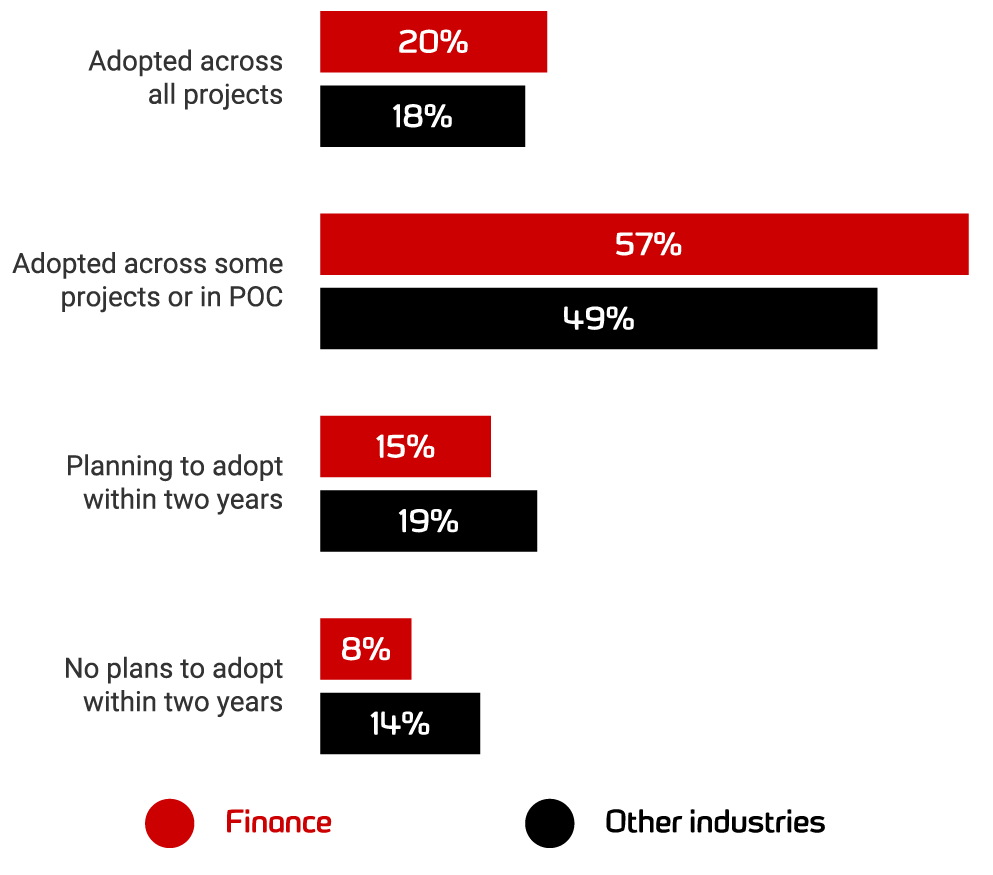
    According to the “2020 State of Database DevOps report“ by Redgate, financial services organizations report the highest levels of database DevOps adoption this year, with proportionally higher rates than any other sector. That shows financial sector maturity in terms of digital innovation. 

    Image source credit: Redgate

    Case Studies of Financial Companies and Their DevOps Journey

    Barclays DevOps Adoption

    In 2015, Barclays announced it was adopting DevOps for its digital transformation journey. Barclays processes payments that equate to around 30% of the UK’s gross domestic product. The developers’ morale and quality of code increased because of DevOps and the leadership team at Barclays credited DevOps with significantly reducing the complexity of its codes, which has allowed the company to reduce delivery risk and ultimately, improve the quality of services.

    DevOps the Lunar Way

    Lunar Way’s journey shows you don’t have to be big to use Kubernetes. The company started its cloud-native DevOps journey by splitting its massive monolith application into smaller microservices. To spin up these microservices, Lunar Way used Ansible, Terraform and Jenkins and to deploy these microservices as a whole unit. 

    Then Lunar Way started to experience scaling issues with microservices and didn’t experience any of the microservices benefits. 

    The company started looking for ways to move past this complexity by shifting its focus from machine-oriented to application-oriented architecture. It chose Kubernetes as the abstraction layer along with AWS, not worrying about where the containers are running, and this is how it was able to manage and unlock the velocity of microservices. Lunar Way also chose Kubernetes from a security perspective and to specify how the applications should run. Now the company runs around 80+ microservices in production with the help of Kubernetes. Watch and learn how Lunar Way did it: “Two years in production with Kubernetes.”

    Italy’s Biggest Bank Embraces DevOps

    A conventional bank running its real business on such a young technology? No way, are you kidding me? Nope, I am not kidding. 

    Italy’s banking group, Intesa Sanpaolo, has made this transition. Banks still run their ATM networks on 30-year-old mainframe technology, so embracing the hottest trend and tech is nearly unbelievable. 

    Even though ING, the banking and financial corporation, changed the way the banks were seen by upgrading itself with Kubernetes and DevOps practices very early in the game, there was still a stigma attached to adopting Kubernetes in highly regulated and controlled environments including health care and financial services. The bank’s engineering team came up with an initiative strategy in 2018 to throw away the old way of thinking and started embracing microservices, container architecture and migration from monolithic to multi-tier applications. Today, the bank runs more than 3,000 applications. Of those, more than 120 are now running in production using the new microservices architecture, including two of the 10 most business-critical for the bank. 

    HSBC Going the DevOps Way

    HSBC is changing the way typical banking works with cloud-native technology and DevOps, as an early user of Google’s Cloud Services Platform to provide core banking services to its business customers. 

    HSBC plans to build its all-new business banking service to run on a Kubernetes-managed container infrastructure using Google’s toolset. HSBC also has excellent partnerships with AWS and Microsoft, favoring the multi-cloud strategy. The company’s engineering team believes that moving to a container model under the umbrella of Kubernetes is significant because it means the environment is similar across different clouds. HSBC also hired people from outside of the banking sector because it wanted to change its culture from within. HSBC is said to have invested $10 million so far in its DevOps initiative.

    Capital One’s Agile to DevOps Journey

    Capital One’s Agile journey started in late 2011, with just two teams, which expanded slowly as more teams were trained in Agile development. The developers at Capital One were following the Scaled Agile Framework (SAFe). Initially, since the teams were new to the automation methodologies, integration testing, security testing, unit and performance testing were all done outside of development sprints by separate test teams. Later, once they understood how important it is to have a collaborative culture, they integrated testing into the dedicated DevOps teams and automated it well. Then slowly, they moved all testing into development sprints, adopting a culture of DevOps and uniformity and wiring integration, security and performance testing into a continuous delivery pipeline. As of 2016, the company had more than 700 Agile teams following continuous delivery.

    DevOps at Bank of America

    Bank of America is one of the world’s biggest financial institutions following DevOps practices, and its digital enterprise operations support nearly 4,300 retail financial centers and approximately 16,600 ATMs worldwide. The award-winning digital bank has nearly 38 million active users and approximately 29 million mobile users.

    Automating Security and Compliance

    As DevOps continues to evolve and become mainstream, it will continue to be of interest for many senior managers across financial services. The above case studies show they are already making DevOps a priority. But security and compliance remain barriers slowing the innovation in the financial companies. 

    Organizations should start small and keep security high priority, first using continuous integration and then adding continuous delivery and deployment using the available tools in the market. Over time, the more a company automates, the higher return on investment it can achieve.

    Automating security permissions and controls will help financial companies remove some of their most common software barriers and get their releases out quicker than before, while still maintaining the necessary governance and compliance. 

    Take a Step Forward

    Financial services companies need complex and rigorous software development processes to meet intense corporate and regulatory requirements. Yet, they are expected to release software faster than ever to meet expectations and beat the competition. By starting small and keeping security and compliance in mind, DevOps in finance can be achieved with great success.

  • Survey Surfaces Lots of Edge Computing Diversity

    Survey Surfaces Lots of Edge Computing Diversity

    A global survey of 1,652 published today by Eclipse Foundation suggests a flood is lifting all platform boats as IT organizations begin to build and deploy a wide range of edge computing applications.

    The survey finds artificial intelligence (30%) is the workload organizations plan to deploy on edge computing platforms, followed closely by control logic (29%), data exchange between multiple nodes (27%) and data aggregation and filtering (27%), also known as sensor filtering.

    The battle among providers of platforms for building and deploying these workloads is heated on all fronts. In terms of operating systems deployed, Linux (43%), FreeRTOS (35%) and Windows (31%) lead the way.

    The most widely employed developer tools are integrated development environments (IDEs) or text editors for the desktop from the Eclipse Foundation (38%) and Visual Studio Code (35%) from Microsoft. Java (20%) is the No. 1 programming language being employed at the edge and in the cloud (24%), followed by Python (17%), while C (20%) followed closely by Java (19%) is the primary language for constrained devices.

    Container images (36%), native binary (33%) and script files (30%) are the top edge computing artifacts, while MySQL/MariaDB (31%), MongoDB (22%) and PostgreSQL (21%) are the top three databases.

    IoT middleware is a tight race between Amazon Web Services (AWS) Internet of Things (35%), Microsoft Azure IoT (31%), and Google Cloud IoT Platform (30%). The top public IoT and cloud platforms are Amazon AWS (AWS), Microsoft Azure (31%) and Google Cloud Platform (26%).

    When it comes to building and deploying these applications, the top concerns are security (39%), connectivity (27%), data collection and analytics (26%), performance (24%) and privacy (23%). Communication security (43%), data encryption at rest (41%) and JSON web tokens (30%) and distributed ledgers (22%) are the most widely employed security technologies.

    In terms of communications, HTTP/HTTPS (51%), MQTT (41%) and TCP/IP (33%) are most widely employed. The dominant connectivity protocols are Wi-Fi (44%) and Ethernet (39%), with cellular and Bluetooth tied for third (37%).

    Cloud-managed over-the-air updates (48%), locally managed over-the-air updates (42%) and network cable (38%) are ranked as the top means for deploying artifacts.

    Mike Milinkovich, executive director for The Eclipse Foundation, said it appears that best DevOps processes are being extended to create an “EdgeOps” discipline around which edge computing applications are built and deployed. A wide variety of open source technologies will play a critical role in advancing EdgeOps—nearly two-thirds of respondents (65%) of respondents either experiment with, use or contribute to open source projects, with the Apache Software Foundation (51%), Eclipse IoT/Eclipse Foundation (49%), Linux Foundation (49%) and IEEE (41%) cited as being the most relevant open source bodies.

    In terms of vertical industry sectors, agriculture (26%) leads, followed by industrial automation, education, automotive and connected/smart cities all tied at 21%.

    There is, of course, multiple definitions when it comes to edge computing. However, as edge computing continues to evolve, the day when there are more workloads deployed at the edge than in the cloud or local data centers may not be all that far off. Chances are also very high that legacy approaches to managing edge computing platforms will also need to be updated to support what, by definition, are highly distributed application environments.

  • Bootstrapping DevOps for the Internet Computer

    Bootstrapping DevOps for the Internet Computer

    All startups face unique sets of challenges and issues at each stage of their existence. The DFINITY Foundation, a Swiss-based not-for-profit with the remit to extend the functionality of the internet, is no exception. Like any new organization, we have had to evolve and adapt our DevOps and other practices in response to different obstacles.

    After learning to clearly communicate our vision for an open development platform where software runs directly on the internet, we created a road map to translate this vision into a decentralized architecture with distinct features that could be built and shipped on a periodic cadence. Consisting of five milestones, the road map culminates in a public launch in Q4 of 2020—and we haven’t missed a single deadline despite the disruptions of a global pandemic.

    Incorporating a focus on operational responsibility on top of our focus to ship features without losing speed was a major challenge this year ahead of the release of our developer network, called Tungsten. Sustainably bootstrapping operational responsibility for this release, as well as future releases, was imperative.

    We’ve all heard horror stories about operational teams that run through a checklist in a perfunctory fashion without identifying the root cause of a problem. Even worse, they are quick to give up and are resistant to launching changes, increasing the complexity of their workload.

    Pushing Forward With DevOps

    We were determined that this wasn’t going to happen to DevOps at DFINITY, so we embedded these core cultural touchstones into the organization.

    1: Create SLOs and SLIs for cross-functional clarity

    At the end of 2019, well before there was a service to operate, we started thinking about service level objectives (SLOs) and service level indicators (SLIs). These are critical for providing a common, quantifiable vernacular for R&D and Operations teams to measure how a service should be performing.

    An SLI is a clearly defined indicator for one aspect of a service’s performance, ideally focusing on user-visible service behaviors. The SLO sets the target for the indicator, as well as a window of time over which it is measured.

    To communicate the SLIs and SLOs, training materials were presented across the organization, including speaking with various engineering teams, discussing best practices at management meetings and giving an overview at an organizationwide meeting. In addition, the leadership of R&D teams signed off on the approach.

    To provide clear operational expectations as well as a forcing function, we established an early version of the SLOs as a high-priority OKR.

    As an additional consideration, it is crucial that your SLOs reflect aspects of your service that are visible to the user. As Charity Majors, CTO of Honeycomb.io, noted, “Nines don’t matter if your users aren’t happy.” SLOs are not a one-and-done deal; they need to be updated as the service evolves and as your ability to capture the UX improves.

    Having SLOs in place gave staffers with operational responsibility clear expectations to fulfill. If the service is performing within the SLOs (and if the SLOs are representative of user happiness), then things are running smoothly.

    #2: Engineers developing the software should also help run the software in production

    To bootstrap the team with operational and support capabilities, we needed to ensure that we didn’t create a siloed team lacking engineering skills. Operations in this context is a software engineering problem, which meant we needed to involve developers.

    The same engineers developing the software should have skin in the game in terms of how the software is running in production. If there are problems, these engineers are in the best position to diagnose them and propose and implement the necessary fixes. Getting organizational buy-in for this took some time.

    We emphasized the need for senior engineers to be able to operate the software being built. We didn’t want to fall into the trap of throwing a handful of junior engineers into the deep end without proper supervision or training, so we also established an expectation that all engineers should be able to operate the software irrespective of seniority.

    We built two teams of between five and 10 developers in each of our office locations in Palo Alto, California; San Francisco; and Zurich, which were initially staffed with volunteers across the organization. Each week, one team member at each site managed primary operational responsibility for the service instead of their regular project work, and they knew that the entire staff would help if there were any problems. We plan to rotate new people into these ad hoc teams every six to nine months.

    #3: Create optimally sized, communicative teams

    Operational team size is also important. If the team is too small, people are on-call too frequently. If the team is too large, they will be on-call so infrequently that they will either forget how to operate the production stack or their knowledge will become outdated.

    We share status updates through a daily log and informal shared communication channels such as Slack. There is also a weekly meeting to relay responsibility from one person to another.

    This has helped us identify capability gaps. With team members based across the world, we’ve come to acknowledge that if a problem requires a team’s expertise outside of its working hours, then rolling back first and investigating later is absolutely fine.

    The DevOps team decided early on that we weren’t going to start with 24/7 support, instead providing support during business hours in Europe and the U.S., where the majority of our early-access customers are located.

    We’ve been transparent to the wider organization throughout this process, calling out what is and what is not working well, and how we’re working to improve our processes.

    Conclusion

    We were fortunate that unprecedented global events like COVID-19 didn’t significantly affect our operations. That said, shaping our processes in-person and being physically present for people when they first go on-call would have been valuable, and we definitely felt the impact of losing that. But we’ve successfully bootstrapped our DevOps teams nevertheless, and we look forward to continuing to evolve as a team.