Category: DevOps Practice

  • How to Cut Design Sprints in Half

    How to Cut Design Sprints in Half

    Any company that has created a product in the digital sphere will no doubt be familiar with the purpose of design sprints. Traditionally both back-end and front-end developers, designers, marketing teams and other stakeholders in the company come together over the course of five days to prototype ideas, gather insights on users and validate them before building solutions with company resources.

    Like most startups we are always extremely busy and getting people to work for five days felt like a lot—even two days was a stretch for some, so we decided to see if we could come up with a way to get the same results in a fraction of the time.

    Traditional design sprints are held over five key days to help:

    • Understand –  Map a challenge and particular focus area.
    • Ideate – Come up with many design solutions.
    • Decide – Turn those design solutions into a storyboard.
    • Prototype – Create a prototype based on those storyboards.
    • Test – See how live users interact with the prototype and learn to iterate further.

    For our design sprint this time, we wanted to test another approach for the first three steps in the process (understanding, ideating and deciding). Instead of taking three days to complete the majority of the design sprint, we wanted to test if we could deliver similar results in four hours. We did, handing off storyboards to our designer for testing and iterating with live users. This cut a normal five-day design sprint in half. This is how we did it.

    The Purpose of Our Design Sprint

    We were creating a top-secret brand new feature we wanted to add to our product that required the design sprint in the first place. At Usersnap, as a customer feedback company, it is probably no surprise that we use our product to collect feedback from people using our products, do extensive research on that feedback and take our findings directly to a design sprint for ideation and prototyping.

    Preparation Is Key for Shortened Design Sprints

    If you want to cut your design sprint in half, make sure you have the following in advance:

    1. Research on our target personas (we conducted 20 interviews and collected 130 survey responses).
    2. A clearly defined and agreed-upon challenge for your design sprint team to tackle.
    3. The deliverables at the end of the session.

    Desired outcome: Make sure everyone is clear and aligned on the challenge to tackle.

    You may wonder: “Why would you prepare these things beforehand when all of this could be discussed during the design sprint?”

    We wanted to give people time to sit with the challenge and have ideas to present during the design sprint, and save the time that was used just getting everyone up to speed.

    Understand (1 hour)

    Instead of a full day to understand the challenge, we used one hour. How is this possible, you ask? Our participants came prepared in advance and our in-house researchers had extensively analyzed the findings from our research stage.

    Presentations (15 minutes)

    First, each expert presented the findings of our target persona and their pain points. There were three researchers who each had five minutes to present the qualitative, quantitative and nuanced aspects of the persona’s pain points. With a short period of time, our researchers were forced to focus on the most important problems of our persona.

    While presenting, the other participants wrote down “How Might We’s” (HMWs) on post-it notes. HMWs frame challenges in question form and these post-it notes are integral to the ideation stage.

    Desired outcome: Understand the persona of the chosen design sprint challenge.

    Expert Interviews (45 minutes)

    Second, researchers were interviewed by the participants to learn more about the persona’s challenges. We set the timer for 15 minutes for each researcher and fired away with our questions.

    Desired outcome: Expand on particular points that participants wanted to know more about.

    While Q&A continued, respondents continued writing HMWs on post-it notes.

    Ideate (1.5 hours) and Decide (1.25 hours)

    Ideation and decision takes two days in total, according to the design sprint manual, and we gave ourselves less than three hours.

    Problems Worth Solving (30 minutes)

    First, we set the timer for three minutes, and all of us came up with our top three HMWs to put on the wall. When time expired, we presented our HMWs and placed them on the wall in order of our persona’s job steps. If a HMW is repeated, we either replaced it because it’s more relevant, or threw it away.

    From there, we all received three stickers, set the timer for three more minutes and proceeded to vote on which three HMWs were most relevant to the persona’s pain points. The voting is not meant to eliminate less relevant HMWs, but to clarify what the group thinks is most important.

    Desired outcome: Focus the group on problems to solve within the persona’s challenges.

    Crazy 8s (1 hour)

    Next, we did two rounds of Crazy 8s. At this point, we were breezing along, and even my own expectations were exceeded: We were getting close to designing something in a fraction of the time it normally takes!

    The steps to Crazy 8s are simple:

    1. Take a large piece of paper, and fold it into eight parts (“tiles”).
    2. Set the timer for eight minutes, and begin.
    3. Provide up to eight screen designs based on any of the HMWs written down (those that made it to the wall and those that didn’t).
      • Less than eight screen designs? No problem.
      • Want to present a flow with multiple tiles? Go for it.
    4. When the eight minutes are up, place each piece of paper on the wall.
    5. Present three of your eight ideas to the group and explain what problem the design should solve.
    6. Repeat the process a second time; combine ideas from others or expand on them.

    Desired outcome: Demonstrate how we could solve a problem related to the persona’s pain points.

    Decide (1.25 hours)

    Storyboards (1 hour, then 15 minutes)

    Next, we broke up the design sprint team into two groups, making sure there weren’t too many participants with substantial design sprint experience in a group.

    We set the timer for one hour, and each group came up with a storyboard flow with five sheets of paper. We didn’t give clear guidance on how to design the storyboard, but it should represent five key steps to reach a goal. If both groups approached the problem in the same way, it provided good insights on the nuances of the problem. If each group approached the problem differently, it provided perspective to the problem itself.

    Desired outcome: Design screens in an order that tackle the challenge of the design sprint for our persona.

    We then presented our storyboards. Each group had five minutes (set your timers!), and time for quick Q&A afterwards.

    Retrospective (15 minutes)

    Finally, it was time to conduct a quick retrospective. Each participant had three minutes to provide their thoughts:

    • What did you like?
    • What didn’t you like?
    • What could we improve?
    • Any additional comments?

    Handover for Prototyping and Testing

    From there, we handed the HMWs, Crazy 8s solutions and storyboards to our designer to develop a prototype, do user testing and iterate on the design. From previous prototypes, we knew that we would hear a lot of the same feedback from the participants. So we decided to change relevant and obvious flows right away and test an already modified version with the next participant. This process allowed us to achieve a more relevant flow in a shorter time.

    In the end, none of this was or would be possible without customer research. It was the foundation of our design sprint, and we used our own product to collect feedback and organize it in a way that gave us sound insights leading up to our design sprint.

    Those four hours yielded great results for the type of challenge we wanted to solve, and we didn’t use three days to get there. It took us longer to get to a tested prototype, but only one or two people were involved and they didn’t dedicate 100% of their time to the prototype iteration. This process fits better to our day-to-day schedule.

    Trimming Design Sprint Time

    We found the process very helpful and will do it again, always re-evaluating where we can improve. For anyone who would try this method:

    1. Be sharp and clear on the goal.
    2. Have well-prepared participants.
    3. Keep your timers handy.
    4. Question the quality of your results.
    5. Let us know if we’re onto something.

    Happy sprinting!

  • How Low Code Is Transforming Software Development

    How Low Code Is Transforming Software Development

    Low code/no code is a business catalyst enabling technologies to automate processes and allowing developers to create real-time solutions for their business. With low code, businesses are able to build, customize and deploy apps with little to no coding.

    In this interview, Rackspace CTO Jeff DeVerter explains how low code is transforming software development and how Robotic Process Automation (RPA) complements low-code application platforms.

    Jeff is one of our distinguished speakers presenting at Low Code Today Virtual Summit. During his keynote presentation, he will explain the newfound prominence of low code and outline how enterprises can best utilize the technology to accelerate the delivery of software and applications.

    Find out why low code doesn’t mean “lone-coder” and why it’s important to have capabilities increased for the citizen developer by attending Jeff’ session at Low Code Today Virtual Summit on Nov. 19. To check out the full agenda or to register for free, visit the Low Code Today website.

  • Accelerate Digital Transformation With Low Code

    Accelerate Digital Transformation With Low Code

    This year many organizations have gone through a lot of changes due to the COVID-19 pandemic. Businesses need to be more agile, adapt to the new normal and accelerate their digital transformation. We have a new future of work we need to be ready for, and that requires more automation than ever before. Low code enables organizations to accelerate their innovation, automation and transformation efforts. Low-code platforms enable developers and non-technical teams to quickly deliver applications by automating the creation of apps with a drag-and-drop interface.

    In this interview, ServiceNow CIO Chris Bedi shares the main benefits of low code and talks about the ServiceNow Citizen Developer Program.

    Chris is one of our distinguished keynote speakers presenting at Low Code Today Virtual Summit. During his keynote presentation, Chris will share a CIO perspective on rolling out low-code applications at scale, best practices from rolling out ServiceNow Citizen Developer Program and suggested guardrails to ensure a successful and secure implementation.

    To find out more about the future of work with low code and how it can benefit your business, attend Chris’ session at Low Code Today Virtual Summit on Nov. 19. To check out the full agenda or to register for free, visit the Low Code Today website.

  • DevSecOps Implementation: Static Analysis

    DevSecOps Implementation: Static Analysis

    One of the things I’ve done for Accelerated Strategies Group recently is looking into DevSecOps toolsets. This is a fun area for me, as development and security fit together well in my mind. Having a separate security group is useful, even necessary in some scenarios, but letting developers crank out code and looking for vulnerabilities only after has always seemed terribly inefficient. Whenever I’ve managed developers, security training is just part of the package I bring. It’s far easier to write it well the first time (the equivalent of shift-left) than rewrite it.

    I won’t name names here—this is work I did for ASG, it is not mine to give away—but I will talk about DevSecOps today, and moving into the future. I’m planning three to four installments for this series, discussing the different aspects of DevSecOps tools.

    For clarity, we’re defining DevSecOps tools as “developer-enabled security tools.” This means that in some way, they help developers improve overall security posture while leaving them to be developers. We all know security has to shift left in every way if it’s to be useful in a DevOps world, but most organizations haven’t seriously started the move to shift security. Hopefully, this series helps.

    Depending upon which financial analyst firm you prefer, projections are that the DevSecOps market will grow 28% to 33% a year for the next few years. While this is good news for DevSecOps vendors, it implies very few organizations have systemically adopted DevSecOps, or there would not be room for that level of growth.

    Whether a traditional team or a DevOps team, the static analysis portion of DevSecOps is (generally) easy to set up and configure and most products offer feedback at both coding time and build time. IDE plugins have come a long way, some even offering advice as-you-code and others allowing developers to run on-demand static scans of their work. The industry as a whole has worked hard to lower the false-positive rates that made most organizations reluctant to deploy them broadly, and prioritization of issues is possible in the best products, making identification and remediation pretty easy. Try a pilot out: Pick a vendor and project, grab the IDE plug-in and check out what they can do. Most do not yet directly support code smells, but I suspect that is coming rapidly, as the systems are already designed to look at source and determine issues. Adding to the collection of possible issues will be a differentiator that quickly turns into a market requirement.

    Things to check for:

    • Language support: Do the languages you use have a scanner? While most of the tools on the market offer support for a breadth of languages, there are differences, so check the corner cases. This truly is a make or break decision—the best product on the market is useless to your org if it doesn’t support the languages you use.
    • IDE integration: This is pretty straightforward, are the IDEs your developers use day in and day out supported? Most of these tools offer command-line variants also, so it is possible that even without support directly in the IDE, the security functionality of a given product dictates that command-line is better. In that scenario, a process to ensure developers are even running scans is a good idea.
    • Vulnerabilities detected: At a minimum, support for whatever is currently in the National Vulnerability Database (NVD) should be required, along with OWASP compliance. Most vendors offer support beyond the NVD, so a bit of research to see what types of vulnerabilities are detected will be in order.
    • Click-through support: With IDE plug-ins, one of the great strengths of scanning is the ability of the developer to simply click on the vulnerability in the results list and go to the offending code. Make certain this works—and works as advertised.
    • False-positive rate: This has historically been a problem, but the industry has brought it down overall. Ask your prospective vendors to share their numbers. Our experience shows low single-digits for a percent, which is far better than the past, but still leaves room for improvement.

    The other part of static analysis is plugging static analysis into the build process. Most of these products have integrations into the most popular build management tools. Scanning the entirety of the application allows the static analysis to see a broader vision of the app and note issues with interactions between portions written by different developers. Reporting for build-time scans is generally at the application/team level, and the best tools will show results of development-time scans side by side with build-time scans if you want them to.

    Things to check for:

    • Language support: Again with the languages. It’s pretty simple here: The core of the application may be built using languages a given vendor supports but critical parts might not. Integration is where that becomes a real issue. Make sure what needs scanning can get scanned.
    • Integrations: Most of these tools offer automated scans through integration with build tools or manual scans that the build manager can kick off. Automation is preferred by a long shot, so check if your tool of choice is integrated into your organization’s build tooling.
    • Depth: We’re not going to get into source composition analysis (SCA) here—that’s for another blog—but we are going to observe that vulnerabilities can come from your source’s sources. How far does the scanning tool trace in a static analysis situation? Is it deep enough to cover a given application’s integrations and inter-relationships? While SCA will detect a lot that static scanning won’t, things such as “unsafe values sent to [insert external API]” should be available in static code analysis.
    • Reporting: This is where you’ll find the most variety in popular tools. Look at their reporting and click-through support to find what best suits your needs.
    • False-positive rate: Same as IDE integrations above—make certain it is low enough for your organization’s comfort.
    • Scan run location: This is becoming a differentiator in the space—do you want your scans run in the cloud? In the data center? Some mix of both? Check your vendors; there are significant differences in the level of support for these options.

    This is just the tip of the iceberg, of course. It is an entire market segment, and static analysis tools have been around a long time. Many organizations have not taken dev-time security seriously yet, even though we all know we need to; I’m just offering a place to get started.

    DevSecOps just makes sense. Static scanning is mature and generally well-integrated. This is a great place to start shifting security left. We get it: Developers don’t want to be security analysts or they’d have filled one of those many security openings. But IDE integration makes these scanning tools more interactive and less intrusive, showing developers how to do it securely as they code. This is great to me because good coding practices will become second nature with real-time, on-the-spot reminders and pointers. It also means that if the developer acts upon the tool’s recommendations, the code is developed more securely the first time and there will be no need to revisit it for security proofing.

    You’re all keeping the lights on in a terribly tough time. DevSecOps attempts to make it more likely that your astounding work isn’t interrupted. It just makes sense to get these tools to protect your organization’s portfolio and your hard work.

  • Empowering Citizen Developers With Low Code

    Empowering Citizen Developers With Low Code

    Adopting low-code/no-code technologies enables businesses to quickly build and deploy applications. Low code empowers non-technical teams to build custom applications for their business and customers, accelerating their digital transformation efforts.

    In this interview, Kianda Chief Operating Officer Derya Sousa explains how low code accelerates digital transformation and empowers citizen developers. 

    Derya is one of our outstanding speakers presenting at Low Code Today Virtual Summit, along with Kianda CEO Osvaldo Sousa. During their session, Derya and Osvaldo will discuss how organizations use low-code/no-code platforms to build fully responsive, easy-to-deploy enterprise applications – all without the need for any coding.

    To learn how low code empowers citizen developers and to hear about a real-life use case of how no-code solutions are accelerating digital innovation, attend Derya and Osvaldo’s session at Low Code Today Virtual Summit on Nov. 19. To check out the full agenda or to register for free, visit the Low Code Today website.

  • CircleCI Report Finds DevOps Teams Adjusting to New COVID-19 Normal

    CircleCI Report Finds DevOps Teams Adjusting to New COVID-19 Normal

    An annual State of Software Delivery report published today by CircleCI suggests that after a spike in developer activity last spring at the beginning of the COVID-19 pandemic, the pace at which code is moving through a continuous integration/continuous delivery (CI/CD) platform has returned to normal levels even as developers continue to work from home.

    CircleCI CEO Jim Rose said after any initial rush last spring, it appears maintaining that level of productivity is simply unsustainable for most organizations. If heroic measures are continuously required, Rose noted it’s only a matter of time before DevOps teams start to burn out.

    Based on an analysis of 55 million data points gathered from 160,000 projects spanning more than 44,000 organizations, the CircleCI report finds that despite the ability of a handful of organizations that can deploy code multiple times per day, most organizations on average run workflows less than once (0.7 times) per day.

    However, Rose noted, there is too much focus on the number of times per day code is being deployed. The more important metric is duration. Half of the 11 million workflows measured by CircleCI finished in less than four minutes. Three-quarters finished in less than 11 minutes, with 95% of all workflows measured finishing in less than 35 minutes.

    Rose said durations are longer than in previous years, which suggests more testing is being included in workflows. In an ideal world, Rose said workflow durations should be in the range of five to 10 minutes.

    The report also finds 50% of the workflows went from failing to being successfully deployed in 55 minutes on average, with the median success rate 61% of workflows. Splitting the workflows by the ones run on default branches versus the ones run on non-default provides more insight, and the median rates are 80% for the default branch and 58% for the non-default branch. Failure rates for the non-default branch are higher because that’s the branch most developers employ to experiment in a way that doesn’t impact the primary workflow.

    Rose said the report also suggests there is a correlation between larger team size and better overall engineering performance. In times of uncertainty, IT leaders should consider increasing the size of teams to reduce burnout and maximize flexibility. Depending on the scope of the project, Rose said the CircleCI data shows that somewhere between five and 20 code contributors is the optimal number of team members. IT organizations would also be well-advised to consider how those team members are geographically distributed to maximize the number of hours in a day any project is being worked on without having to overwhelm a small number of developers working in the same time zone.

    As has always been the case, DevOps success over the long term requires organizations to balance multiple factors and metrics. After all, the primary goal for most organizations is not so much to increase the amount of code being deployed as much as it is to increase the quality of the code that ultimately gets deployed in a production environment.

  • Low Code and Change Management with Max Rudman

    Low Code and Change Management with Max Rudman

    Many organizations trying to accelerate their digital transformation are turning to low-code technologies to respond quickly to the constant market changes. Low-code technologies facilitate application development by offering drag-and-drop components that require little to no hand-coding. Low code creates a seamless integration between cloud platforms, tools and utilities.

    As low-code applications increasingly become a shared responsibility between IT and business units, it’s incumbent upon IT to ensure changes are delivered consistently, reliably and without disrupting end users — no matter who makes the change.

    In this Q&A session, Prodly CEO Max Rudman answers a few questions about low-code applications and change management.

    Max is one of our distinguished speakers presenting at Low Code Today Virtual Summit. During his session, Max will discuss how to implement an agile change management process to low-code applications and accelerate time to value for low-code apps.

    How do low-code applications boost productivity?

    The simplest answer is: It’s just faster to configure and make changes to low-code applications. Low-code apps leverage declarative programming, meaning you assemble a solution by dragging and dropping predefined components together like Lego blocks instead of writing code line by line. Everyone knows how to use Legos, which brings us to the far greater productivity benefit of low-code apps — they expand the number of people on your development team.

    Low-code applications have given rise to the citizen developer — someone who deeply understands the business problem and how to design the desired solution but previously lacked the programming skills to make it a reality. With low-code applications, business analysts, project managers, operations teams and other business users are empowered to implement solutions for themselves. Consequently, technical developers have more time to focus on projects that require specialized skills. Because developers are now able to focus on tasks that really do require programming expertise, they become more productive, too. It’s a win-win for both IT and business.

    How does low code drive change management? How can you carry out an effective change management process?

    Low-code applications highlight the need for change management within an organization, especially as application configuration and maintenance becomes a shared responsibility between IT and lines of business. This should not be a free-for-all approach to application development where anyone can make changes to applications at any time. More and more businesses rely on low-code apps to manage critical and often complex business processes, like revenue and customer service. Changes must be made in a predictable way that mitigates the risk of errors, downtime and other disruption to users. At the end of the day, users don’t care if an application is built with code or clicks, but they do expect it to work reliably and securely for them to do their jobs. 

    Change management processes address these issues and foster greater collaboration between IT and the business. The low-code revolution has accelerated the pace of change, and it’s causing organizations to rethink their change management processes to accommodate non-technical developers to participate. It’s an opportunity and a responsibility of IT to establish the guardrails and guidelines to empower citizen developers to move fast without breaking things. 

    What can we expect from your session?

    We’ll be discussing the implications of low-code applications on existing change management practices and why that’s causing IT leaders to rethink the people, processes and tools for managing change. Attendees will get practical tips for change management strategies that decrease application time, accelerate time to value and mitigate risk. We’ll also dive into how to give CIOs and IT managers the visibility they expect into the change process.

    To learn more low-code adoption and change management, attend Max’s session at Low Code Today Virtual Summit on Nov. 19. To check out the full agenda or to register for free, visit the Low Code Today website.

  • Accessibility and Feature Flags

    Accessibility and Feature Flags

    Being able-bodied is a temporary condition. Some of us are born with disabilities, and some of us develop them. At some point in your life, you will get old enough to need reading glasses, or you will break your arm, or you will develop hearing problems. Are you reading this page through glasses? Are you using a wrist brace or ergonomic mouse? Is your operating system set to dark mode? Those are all accessibility modifications.

    The Web Was Born Accessible

    One of the things I love and appreciate about the world wide web’s governing body, W3C, is that they are constantly working to make and keep the web open and accessible. The standards that browsers and other software use are derived from the W3C recommendations. Your current browser can serve pages from 1998 and they are perfectly legible, and even pretty, if the images were captured.

    The W3C has a group dedicated to accessibility, and their new set of standards, WCAG 2.2, will take effect this month. In December, a website’s accessibility will be rated based on the new standards.

    > WCAG 2.0 and WCAG 2.1 are stable, referenceable technical standards. They have 12 to 13 guidelines that are organized under four principles: perceivable, operable, understandable and robust. For each guideline, there are testable success criteria, which are at three levels: A, AA and AAA.

    There are lots of easy accessibility fixes for web pages, such as using semantic headings instead of text styling and using HTML buttons instead of DIVs. Many times, however, even the lowest level, A, is missing from an organization’s web pages. But like everything in software, progressive improvement and rapid feedback are more useful than a large transformation project that requires a massive commitment.

    Some Web Accessibility Needs Conflict

    Sometimes, accessibility needs conflict. For example, in the example users listing in the WCAG documentation, some of the users need their text to reflow around increased-size buttons and some users need the buttons to stay in a stable location for findability. If you’ve ever been frustrated when a phone update reorganizes all your apps, you can identify with how difficult it can be when an everyday interface changes without permission.

    Low-vision users are often helped by high-contrast text, black-on-white or white-on-black. However, users with dyslexia and other text-processing disabilities can find the contrast too jarring and need a lower contrast to help them read comfortably—something like dark grey on off-white. It’s difficult for a site or application to meet those conflicting needs, so users often have browser extensions or settings that help them manage their web experience.

    Site and application developers need to be aware that not everyone is using their site or app exactly the way the developer sees it. Users may have smaller screens, or be on a mobile device, or have installed browser extensions the developer has never heard of or imagined. This system works as long as we develop according to the accessibility standards that keep the web semantic. It seems contradictory that making the web accessible to machines helps humans, but it does because the humans are using the computer’s concepts to translate information in a way that works for them.

    How Feature Flags Can Help

    I’ve been thinking about how feature flags could make designing for accessibility easier, especially around the problem of trying to serve populations with different needs.

    When it is possible to serve everyone, that should be the default and the main page code. Everyone is served by standards such as semantic headings, image alt text and text that is not an image. Some people need further accommodations, such as reduced motion, tab navigation or large buttons. Those needs could be flag variants.

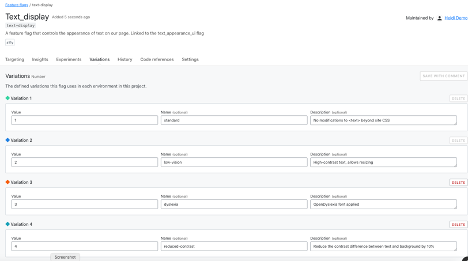
    In the image below, I have configured a flag with four variations for text display:

    • Standard (no changes to CSS behavior)
    • Low-vision (high contrast text, allow resizing)
    • Dyslexia (use OpenDyslexia font in CSS)
    • Reduced contrast (Reduce the contrast between text and background)

    This flag variation could be tied to a user-configurable setting so that every time they logged into the site, they would get the text the way they need it, even if they were on a different browser or device.

    That’s a simple example, of course. Ideally, developers and accessibility advocates would work together to determine which part of the site or app should be modified, and how it would work in combination with other modifications.

    Lack of Planning Is Technical Debt

    Even if your team doesn’t have user research or accessibility experts available all the time, you can code proactively to make room for them. Accessibility flags would be permanent—you wouldn’t want to remove them as you would a rollout flag. Since they are permanent, there is no harm in using them as a placeholder; they won’t add more testing demand empty than they will full.

    At the start of a project, most teams don’t have the resources to do everything they want, even though they know it will need to be done eventually. We don’t do localization for proof-of-concept applications, we don’t write API documentation for strictly internal tools. But if a product succeeds, then we do need to add those elements and they become technical debt that we have to pay off without adding new value to the product.

    One of the ways to reduce the cost of this debt is to add placeholders for future modifications. Trying to refactor an application with hard-coded interface elements to accept localization is like trying to add chocolate chips to cookies that are already baked—it’s much less effective. Using flags set to only return a default value (for now) is a way to plan for future changes in your code, without making the full investment.

    The Future Is Here

    The WCAG standards are not arbitrary or imposed without meaning. They exist to help everyone access the information, services and capacity they need. When we build sites that don’t meet those standards, we are losing customers, clients and users—and not in small numbers.

    Using feature flags to make your site accessible is a smaller, cheaper intervention than creating entirely separate sites. Feature flags also help build the framework to provide other elements of your site on an on-demand basis, allowing you to meet user needs with precision and efficiency.

  • How to Solve 3 Significant Development Challenges

    How to Solve 3 Significant Development Challenges

    As products, systems, and software grow in complexity, so does the development process. This can lead to an increased risk of flaws and can result in expensive and potentially reputation-harming mistakes or recalls.

    These new complexities have shifted the product development process entirely, requiring optimization from end to end. Engineering and design teams need solutions that answer the most common challenges they face in this process. This means being provided purposeful, structured collaboration tools; connecting distributed team members; and accurately capturing and facilitating feedback, decision-making and context for requirements under review.

    Navigating Development Challenges

    To do this, teams developing complex products, systems and software must first overcome some significant obstacles. To help navigate this journey, let’s examine some of the most prominent product development challenges engineers are facing today.

    Outdated Legacy or Document-based Solutions

    The traditional approach to managing risks and requirements is highly manual, operating in an old mindset in which numerous spreadsheets and versioned documents are shared via email. This method has serious drawbacks, including no guarantee that data is up to date. This results in valuable time lost deciphering different versions or painstakingly making changes manually to achieve cross-team alignment.

    Additionally, without a clear path of traceability—which can be difficult to achieve for those who rely on static documents—teams often end up referencing older and often outdated versions of requirements. This inevitably leads to misalignment, increased risk and costly rework.

    The solution? Uplevel your traceability practices. Moving on from outdated legacy solutions to a modern requirements management tool is the first step to bolstering creativity, productivity and collaboration.

    Compliance, regulations and standards processes 

    Product, systems and software development has become much more complicated over time. As a result, so has product risk and the accompanying regulatory compliance required.

    To ensure the long-term success of organizations developing these complex systems, software and products, strong collaboration between teams, knowledge of applicable regulations and effective requirements management platforms are necessities. These tools provide a simple path and single source of truth for defining, verifying and validating key regulations. However, despite numerous industry studies indicating that requirements issues are a prominent factor of project distress, not everyone is convinced their team needs to focus on requirements development and management. Further, they’re unsure of how it will all pay off.

    To address these challenges, companies need to streamline their quality and risk management strategies. This can be done by incorporating detailed traceability across the development life cycle—from the high-level user needs and systems requirements through to validation and verification.

    Effective Review Cycles

    Review cycles are often time-consuming and fragmented. For example, when approaching requirements management manually and with disparate documents, a cycle can be repeatedly delayed due to versioning issues and lack of a single source of truth updated in real-time. It also reduces team visibility throughout the review process; individuals end up spending hours per week in review meetings just to ensure everyone is on the same page.

    To up-level this process, it’s necessary to have:

    • One source of truth for requirements and tests.
    • A straightforward way to send items such as requirements, user stories or test cases for review.
    • Best practices for each major role involved clearly outlined (i.e., reviewer, approver, moderator).
    • Real-time collaboration within a shared, dynamic requirements management platform.
    • An outline of a formal approval process to capture and record sign-off.

    Collaboration is Key to Development Success

    At the end of the day, collaboration is at the core of all product development work. The ability to effectively work together is critical to ensure innovation doesn’t stop. In this era of rapidly accelerating change, structured and strategic team collaboration is the means for improving the product development process for all involved. By updating your legacy traceability solutions, establishing effective review cycles, and streamlining your regulations, compliance and standards processes, your team will be well on its way to a much more effective and unified product development process.

  • DataOps: The Key for Real-Time Data Application Development

    DataOps: The Key for Real-Time Data Application Development

    Data engineers and developers face challenges every day to help their organizations digitally transform. To do this, they must deliver real-time data applications faster, better and cheaper. With businesses in every industry now data-driven, data professionals must work more efficiently and accelerate time to market for their products. That’s where DataOps comes in.

    Development of real-time data applications slows down when strategic business project teams are dependent on small, centralized engineering or IT teams for basic data operations such as exploring data or even building most data processing applications. Needlessly, engineering teams are notorious for being a bottleneck for strategic digital transformation initiatives. Rather, they can become known as strategic project enablers that provide the best tooling to their customers—instead of building it and being known as gatekeepers.

    Business users, outside of IT and engineering, need access to data but lack the necessary deep technical knowledge to work with the latest data technologies. DataOps brings people closer to data, helping organizations accelerate the delivery of their strategic projects, reduce costs and minimize the need for hard-to-source engineering skills.

    To accelerate digital transformation initiatives, teams and organizations should onboard new users directly onto a data platform quickly with the right tooling and resources required to get to work on their projects. DataOps empowers these business-focused users to work with data tools on their own to self-serve. A DataOps approach makes it easier for more people across an organization to work with its data, resulting in better alignment for data engineers and developers with their business and technical partners and improved data access.

    Serious new security, compliance and governance risks are introduced when less-technical users increase their interaction with technology, such as onboarding to a data platform. More people now understand that personal data has tremendous value. Initiatives such as the General Data Protection Regulation (GDPR) and California Consumer Privacy Act (CCPA) have brought the need to respect data privacy to the forefront. The stakes for safeguarding data are increasingly high and regulators are unforgiving—costing some organizations several billion dollars in fines, lawsuits and loss of market cap for some data breaches.

    When providing access to data, stringent management, control and real-time monitoring must be applied from a governance perspective. A surprise compliance auditor visit can result in questions such as which applications are reading credit card data, how an organization is keeping customer data safe, who has access to data and what are they doing with it. While locking down for compliance, you must help your business stay agile and avoid any slow down in data initiatives.

    Build vs. Buy to Streamline Operations

    In addition to adopting a DataOps approach, a key step is to onboard users to a data platform. This will optimize your data strategy and will help take the worry out of managing data projects, putting you on a path to faster execution and accelerated time to market.

    When onboarding users to a data platform, you need to choose between building your own or buying. It takes time and resources to develop your own system to onboard users and clients and can take years to build your own technology in-house. If your engineers are spending all their time working with open source technology to build tooling for onboarding, they’re not focusing on better ways to use data and get solutions to market fast—which is an inefficient approach.

    When your users are onboarded, the cycle begins again, as users request access to more data sets. More time at the command-line console means less time for your engineering teams to focus on higher-value work and strategic initiatives.

    Get a Leg Up on Competition With a DataOps Approach

    Buying a solution requires an upfront investment to support onboarding and, when combined with DataOps principles, is formidable to remain competitive. Together they enable support and manage the onboarding of clients to a data platform at scale and to maintain security and compliance. A DataOps approach fosters improved communication between data and business professionals to share data more effectively and to build a data mesh architecture.

    A Swedish digital bank, Avanza, needed to ensure the continuous improvement of the customer experience of its digital services to remain the leader in the Swedish market. Doing so required giving developers direct and constant access to real-time business data in Apache Kafka.

    The organization applied a DataOps approach and intelligent data masking rules to meet GDPR and protect customer confidentiality, featuring a large single data platform to address how it delivered data access and applied data governance to support more than 20 strategic projects. Using the platform, tenants who build streaming applications gained visibility into the health of their Kafka clusters and improved insight into data flows. This self-service approach means fewer support calls to data engineers, minimizing bottlenecks and freeing them up to work on more strategic initiatives.

    Data is the fuel that propels insights by tying back to analytics, decision-making and business systems. The better the shared data, the more it can be applied to supporting better business decisions, better customer experiences and execution of strategic business objectives and goals.

    DataOps also builds compliance and governance into your processes. It provides the visibility needed to understand who is accessing data and how to maintain governance and ensure people are acting ethically with the data they are enabled to access.

    The daily challenges faced in data-driven organizations only continue to grow. A DataOps approach helps data engineers and developers meet these challenges to digitally transform and build real-time data applications that help organizations gain a competitive business edge in their respective marketplaces.