Category: DevOps Practice

  • Bringing DevOps to SAP, With Basis Technologies

    Bringing DevOps to SAP, With Basis Technologies

    DevOps has not only reached mainframe groups in enterprise but also to large applications such as SAP. Organizations are moving away from waterfall methods and mega releases that take many months to deliver. What’s needed are many more rapid release cycles and deployments that support the accelerating pace necessary to do business.

    In this conversation on TechStrong TV, David Lees, CTO of Basis Technologies, joins MediaOps CEO Alan Shimel to explore how organizations implement DevOps into their SAP integration and deployment cycles. Having lived through this transition, David shares his unique perspectives on the necessity to break through bottlenecks and make changes in supply chains, finance and many other business processes needed to support the business.

    The audio file of our conversation is below, followed by the transcript. Enjoy!

    Transcript

    Alan Shimel: Hey, everyone. Thanks for joining us on another segment here for TechStrong TV. In this segment, we are joined by David Lees. David is the CTO at Basis Technologies. David, welcome to TechStrong TV.

    David Lees: Thanks, Alan. Great to be here.

    Shimel: Great to have you here. So, David, I don’t think we’ve done an interview here with Basis Technologies before, so I think we should start right there.

    Lees: Okay. So –

    Shimel: Go ahead.

    Lees: Basis is a company that’s been around for about 20 years. We are a global organization that works with hundreds of customers around the world, and the thing that they all have in common is that they run SAP software, as I’m sure many of your audience do.

    Shimel: Yep.

    Lees: We specialize in solutions around the application life cycle management space. We kind of started up the whole trend in terms of the DevOps for SAP by really helping people to manage their change in a much more Agile way than SAP is traditionally known for.

    Shimel: Excellent. And of course, you know, David we were talking off-camera before we got started, I’m doing DevOps.com seven years, right? And when I first started everyone said, “Oh, DevOps is something for startups; I don’t know about large organizations.” And then sure enough every large – not every, but most large organizations in the world started recognizing the benefits of doing things in a DevOps fashion, and we fought this battle with DevOps in the mainframe, DevOps on things like SAP. How could something like SAP benefit from DevOps?

    But of course they can, of course they can, and I think SAP themselves has recognized it and they’ve come out with a lot of DevOps-related solutions, products, services, but also companies like Basis are recognizing that, hey, my customers are asking me about DevOps but they’re not going to throw away tens of millions of dollars and years and years of tribal knowledge that they’ve developed in doing things on SAP. It’s just impractical. And so, you know, they have to put a little chocolate in the peanut butter and it’s got to work together, right? I would imagine, you know, Basis has – this is a real specialty that the market’s calling for and Basis has a real role to fulfill here.

    Lees: Yeah. I think it’s as relevant in the SAP world as it is elsewhere for exactly the same reasons; customers are looking to become more Agile, they want to be able to deploy in kind of just in time, moving away from the whole annual or six-monthly mega release delivered in a very waterfall way in order to respond to market changes, customer needs, in order to drive more efficiency within their application development and application management space and to deliver that with quality that a business-critical system like SAP mandates, to be honest.

    Shimel: Sure. So David, I always like to ask our guests a little bit about their own personal background because people out here are wondering, right? So they look at David Lees, the CTO of Basis Technologies, they’ve been around 20 years in the SAP space, they deal a lot. David, what’s your personal background like?

    Lees: So I actually joined Basis only about 18 months ago, and prior to that I spent the majority of my career on the other side of the fence. I was with Proctor & Gamble, a large global consumer goods company, and pretty much most of that time was connected to SAP in some shape or form from implementations through support, upgrades, getting ready for transformation to things like S/4HANA, and it was in that role as a customer that I first came across Basis a few years ago and actually brought in one of their products into Proctor & Gamble. So I kind of first had that experience as a customer of Basis before deciding to kind of make the step in to working here as CTO.

    Shimel: Excellent. So you literally have a career in SAP that you bring to Basis, and as you said, from the other side of the fence; not as a vendor but as a user, a consumer, a customer of SAP.

    Lees: And like you were saying before, I think many of the customers of SAP that have been running with SAP software for now 10 if not 20-plus years have developed the knowledge, they’ve developed their solutions and their processes exactly how they like them, but that’s come with massive investment, massive investment in custom code, custom solutions, investment in the way they’re managing those developments, those projects and maintaining them on a going basis, and so I lived through firsthand this whole lifecycle, let’s say, plus the last few years where the old way of managing things was simply not going to be the right way to continue to manage in the future because at the end of the day, while the rest of the architecture around SAP is evolving at a much faster rate you can’t kind of retain the bottleneck image that SAP has and you have to find a way of breaking that bottleneck and being able to move at a similar pace to the other elements in the architecture. It’s not as easy as saying, okay, well let’s just not touch the back end and keep that totally frozen. It’s simply not possible. You need to make as many changes in your supply chain and finance and legal entity structure, et cetera, as you do in your ecommerce platform.

    Shimel: Fair enough. Excellent. Again, the parallels to what we saw in the mainframe space is also – but I think there’s something else you gotta remember. People don’t use SAP just because of their prior investment or just because it’s what they’ve done before, right? Organizations of a certain size use SAP because it offers real advantages and allows you to do things in such a way that you can’t have or you can’t get with just about any other solution out there. So it’s not just because this is what my grandpa did or this is what we’ve done for 10 years, 20 years; it’s because we are an organization of a certain scale that we require this.

    Lees: Yeah. I think they’re a market leader for a reason.

    Shimel: A reason, right.

    Lees: They have the products that, like you say, run some of the largest enterprises in the world; many of the Fortune 500 or FTSE 100 or what have you. And it’s in spite of that that we need to find a way of being able to manage that in a much more modern way. There’s certain elements of SAP that I’m sure some of your kind of more pure DevOps listeners or audience would struggle to understand in terms of, for example, the way version management is handled in SAP inside like a single database, hard to manage branches in terms of parallel developments, the way changes are deployed through the use of things like transports, create to some extent an ecosystem in SAP that is different than a lot of the cloud native and more modern applications, but at the same time we want to be able to help customers to manage the risk, to manage the agility, and to be able to move things through with confidence and with speed in keeping their changes across their architecture orchestrated in a controlled way.

    Shimel: Absolutely. So David, if you don’t mind, I think we’ve laid the groundwork here well, let’s look at, if you will, the anatomy of an SAP-DevOps engagement, right? We spoke about maybe it’s an existing SAP customer who – right? – doing that big yearly release or twice-a-year release is not going to cut it anymore. They need to be more agile – nimble agile, not necessarily Agile software development, though that too, but they need to be more nimble, they need to be more responsive, they need to – they want to utilize a modern CI/CD pipeline type of delivery system.

    Lees: Yeah. I think as with anything here you’ve got the three normal components. It’s about the people, the process, and the tools. So there’s no kind of silver bullet that’s going to say, yeah, I’m suddenly DevOps in my SAP space. You need to have similar best practices around automating as much as possible within that pipeline, and some of that’s available natively inside SAP to do things like automated unit testing, automated code inspection, but the piece of the jigsaw, let’s say, where we come in is to create effectively the pipeline portion for SAP using one of our products called ActiveControl, and that’s about being able to deploy in an automated way within the landscape to the point where the customer is comfortable and being able to kind of highlight and manage all of the interdependencies or identify where it is safe or isn’t safe to move changes in a more accelerated way.

    So I think some of the best practices I would say are common across the SAP and the cloud native world, and when it comes down to some of the tooling you need to start looking at SAP-specific tooling where it’s not possible to leverage some of the kind of off-the-shelf open source best practice tools like best-of-breed ones such as Jenkins or Git, but equally this is where we can integrate and we can help a customer in managing their SAP side of their estate, their architecture, in a coordinated or orchestrated way with the non-SAP world that they’re managing using some of these more traditional DevOps-based pipeline tools or CI/CD tools.

    Shimel: Yep. Agreed. So David, when Basis comes in – let’s talk about the engagement now, right? Is it more of like a classic consulting where we come in with bodies or is it more of an architectural and here’s the processes and kind of maybe software we’re going to introduce or both?

    Lees: Yeah. So we are primarily a software company in terms of providing the solutions, although we do recognize and we do work with some of our customers that they also need help on what are the process changes or architectural changes that they should make in order to go further, in order to become more Agile, what are some of the, again, best practices that they should be doing without switching on or without investing in? They won’t be able to go as far as they want to or need to. So whilst we are today primarily a software company and we will come in to help our customers activate those solutions and deploy them, we are starting to kind of branch out a little bit more into the consulting side to help customers on that journey, to define what that journey looks like for them based on where they are today and based on where they want to get to.

    Shimel: Fair enough. So I’ve got to kind of ask it only because you have to in these days – how’s COVID affected all of this?

    Lees: I think we’re affected to some extent like many companies; however, we are to a certain extent well insulated. We have a subscription-based model, so the companies that tend to deploy our solutions continue with those solutions. We have an incredibly high renewal rate which we’re very proud of, and that gives us a very strong cashflow and a very strong platform in which we can continue to invest in new products and solutions as well as to continue to invest in identifying and adding new customers. I think to some extent there is – some of the pursuits, some of our prospects have been impacted by budget restrictions, but I think at the same time COVID is accelerating significantly the pace at which companies realize they need to transform. So I think it’s probably as much as one side kind of slowdown and budget restrictions as it is kind of companies coming in saying we have to modernize, we have to change the way we’re doing things and we need our SAP application development to be as flexible as we have elsewhere in our organization.

    Shimel: Agreed. And, you know, I kind of suspected that but I wanted to kind of confirm it with you, is yeah, you know, on the one hand it definitely – everyone working remote and everything that went on you could see it slowing down, but on the other hand it becomes very much a catalyst for transformation, right? There’s no waiting for tomorrow; we’ve got to do this now, and so it happens in there. What about working remote though, David? I mean you’re obviously in your home office right now.

    Lees: I am and I [laughs] was always set up in a home office kind of gig here at Basis, so I’m based in Spain whereas the headquarters is in London. So even pre-COVID I was kind of used to working a few weeks from home and then going into the office for a week or so every month. Now it’s just all at home for the foreseeable future. We’ve had to adapt. Development teams that used to be very – used to kind of working together, whiteboards and daily standups and that sort of thing have found ways of doing that remotely like everyone else has had to do, and yeah, I think we’re all getting used to a very interesting new world, and I would be very surprised if we go back to exactly how it was previously.

    Shimel: I don’t disagree with you. But the good news is, you know what, you’re still able to do your work, stuff gets done, and it could be worse, as they say. Hey, we’re about out of time but I wanted to mention one other subject. You guys are doing a webinar here on DevOps.com. It’s probably about a month from now, maybe even a little more than a month from now. It’s on SAP and DevOps.

    Lees: Yeah.

    Shimel: I’m not going to put you on the spot here and spill the whole beans, but who should be – you know, talk to us about it.

    Lees: I think the intended audience for that is people who are traditionally on the DevOps side of the fence who’ve grown up outside of SAP who need to or are realizing that SAP should become part of what they’re including in their plans and in their strategies. Now I would still say SAP kind of long-timers would get some value out of that webinar, but it’s more about helping people understand how SAP is relevant, why it’s relevant, and how we can help customers bringing the SAP world together with the more modern side of the application house for customers, and so I think it’s primarily tailored towards that audience.

    Shimel: Cool. More information on this will be available on DevOps.com under our webinar section. David, I look forward to that webinar. I want to thank you for joining us on TechStrong TV today. Where in Spain are you based, by the way?

    Lees: Near Málaga on the South Coast, so a nice little town.

    Shimel: Oh, it’s terrible, terrible, terrible.

    Lees: Like yourself in Florida.

    Shimel: Yeah, I was gonna say, in Boca Raton I really can’t complain either. But anyway, hey, thanks for joining us, look forward to the webinar in October, and keep up the great work.

    Lees: Great. Well, thanks a lot, Alan. I look forward to coming back on, talking to you again in the future.

    Shimel: Absolutely. David Lees, Basis Technologies, SAP and DevOps. It’s real. It’s something you need to be thinking about, especially if your organization is already an SAP shop. This is Alan Shimel. We’ll be right back with our next guest here on TechStrong TV.

  • New Survey Highlights Codebase Size Problems

    New Survey Highlights Codebase Size Problems

    Sourcegraph and Dimensional Research have released a survey of developers at large organizations, which shows a massive growth in codebase size, number of repositories in use and complexity concerns.

    “The Emergence of Big Code – A 2020 Survey of Software Professionals” is definitely intriguing reading, and a few of the results are eye-opening—such as the difference between what development managers think developers are using to search code and what developers say they are actually using. But most of it simply validates what we all knew: Codebases are growing at an alarming rate, through a variety of growth vectors—support for new platforms, use of open source and internal development. Adding environment to code à la GitOps, systems reliability engineering and/or environment automation is adding a layer of completely new source and a layer of complexity not normally in the developer’s realm of immediate concern.

    I’ve been working with Accelerated Strategies Group over the last few months, and we’re looking at tools in this market. The ability to quickly get up to speed on large codebases and the ability to find a specific area in a codebase that is massive and/or spans repositories is a very real need that is not currently well-served. This piques my interest in what Sourcegraph brings to the table, but at the moment we’re focused on the survey, so perhaps in a future blog we’ll talk about Sourcegraph.

    While there is a lot packed into the survey, I think my favorite part is crammed in with other “What would you find useful?” results (the slide is below). Fifty-eight percent of respondents—all of whom are developers—chose, “Finding code by querying semantic relationships, not just matching a string.” As developers, these respondents no doubt are aware of the complexities of this type of feature, particularly in environments with a variety of programming languages and scripts (be they bash, SQL, whatever) all working together. This is huge, and first iterations would be shallow, but is a worthy goal. I’m intrigued to see how well SourceGraph et al solve it.

    Source: The Emergence of Big Code – A 2020 Survey of Software Professionals

    It is also intriguing to see more than half of respondents want the ability to explore ” … both known and unknown code with code intelligence that provides contextual understanding.” That, too, is a tall order. Code analysis has gotten better over time, but contextual analysis of large codebases is notoriously difficult. I’ll be intrigued in the near future to play with this concept and tools that offer it to see how reliable they are and how much human guidance is accepted and/or required to make it a reality.

    Code change velocity reporting and contextual information about code are both available and pretty solid from the majority of full-stack DevOps vendors. Perhaps that is why that particular response only netted 45% and 43% of responses, respectively—the other 50+% are already using them.

    We’re in an interesting time when consolidation appears to be on the upswing and the needs of developers and DevOps teams working in large codebases are becoming more clear and more complex at the same time. Over the next few years the needs reported in this survey will likely be replaced by more specific needs as these are fulfilled and find general use. The question of databases and database integration in large codebase migrations, for example, has these needs, but has other needs closer to the problem domain. As these general issues are resolved, expect your vendors to turn to those more specific, but every bit as complex, problems.

    And just keep rocking it. Find out what the tools and companies already in use at your org have added, and if those capabilities fit with your needs or can enhance your Dev/DevOps exercises. Keep the lights on, keep customers happy and watch for tools to help you make it even better.

  • Gitpod Allies with GitLab to Automate Setting Up Dev Environments

    Gitpod Allies with GitLab to Automate Setting Up Dev Environments

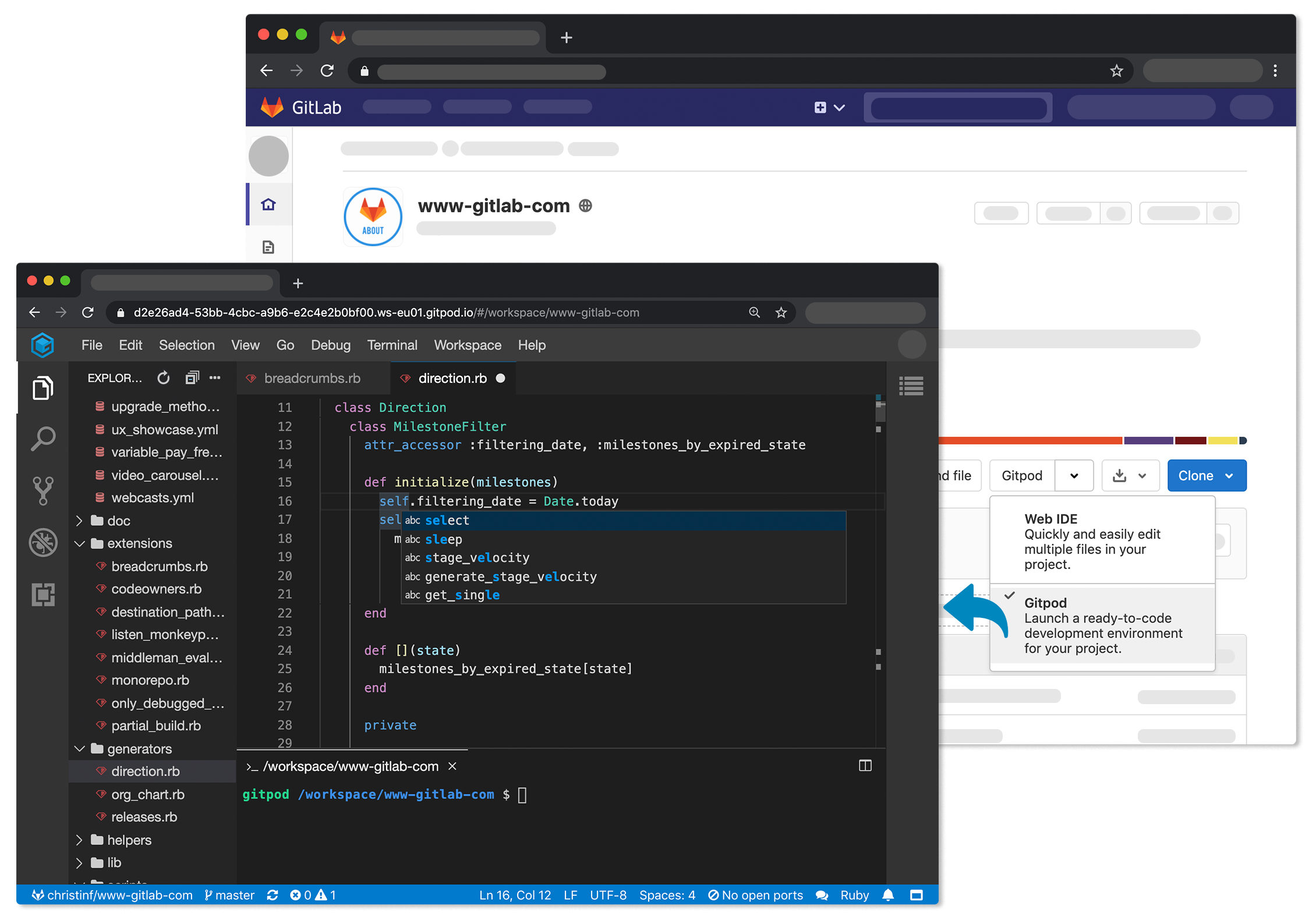
    Gitpod announced today that its open source tool for automating the setup of development environments is now integrated to the GitLab continuous integration/continuous delivery (CI/CD) platform.

    The Gitpod platform treats a version control system as the canonical source of truth from which it then automates everything a developer needs to start coding, including the integrated development environment (IDE), plugins, compilers, build tools, code generators, databases and application servers.

    Fresh off raising an additional $3 million in funding, Gitpod CEO Sven Efftinge said instead of wasting a half an hour or more waiting for a bunch of libraries and tools to get installed, a developer can click a button that allows them to begin coding within a few minutes.

    With the next release of GitLab, developers will also be able to connect their self-managed installation of GitLab to gitpod.io, which is a capability through which multiple git repositories can be registered. In addition, it’s possible to self-host Gitpod on a Kubernetes cluster in a way that integrates with GitLab or install the GitLab VS Code Extension in Gitpod to interact with GitLab.

    Efftinge said Gitpod provides DevOps teams with a tool to automate the setting up of development environments across any Git repository that is equivalent to the Codespaces tool that GitHub recently made available. Rather than having that capability for only one repository, Efftinge noted most developers work on projects spanning multiple types of repositories.

    By automating that process of setting up development environments it also become easier to align them with production environments. One of the reasons why code doesn’t work in a production environment when it is first deployed is because the local development environment has been manually configured in a way that doesn’t accurately reflect the production environment. That issue becomes even more problematic when developers are working on multiple projects involving, for example, separate microservices constructed using different repositories that might not even run in the same production environment. Collaboration also becomes easier when the members of the teams have standardized on the same instance of a local desktop environment.

    Gitpod, formerly TypeFox, collaborated with Google, Ericsson, Arm and Red Hat to develop the open source Eclipse Theia project, which provides a foundation for building IDEs in the cloud using TypeScript, CSS and HTML. Theia, now being advanced under the auspices of the Eclipse Foundation, consists of a front end running in a browser or in the local desktop application and a back end running on any host. Both communicate through JSON RPC over WebSockets. Gitpod leveraged that project to build its own cloud-based service in addition to the core open source project.

    In the wake of the COVID-19 pandemic, there’s naturally a lot more focus on automation and developer productivity. Most developers will be working from home for the foreseeable future to help combat the spread of the virus. Of course, most developers have been writing code outside the office for years. The challenge now is enabling teams of developers to develop applications as efficiently as possible regardless of where they are located. Eliminating inefficient manual tasks such as maintaining development environments is emerging as a significant step in that direction.

  • Developers Are Running With Scissors. Here’s How to Do It Safely

    Developers Are Running With Scissors. Here’s How to Do It Safely

    We’ve all heard the stories. It takes too long to make changes to applications, right?

    Well, until COVID-19, that was true.

    Many enterprises have found that the global pandemic brought on by the novel coronavirus has given them the will to find the way to move faster. As one customer recently relayed: “Before COVID it would take us six months to a year to roll out a new app, but with COVID it took just six weeks. An existential crisis will do that for you.”

    Enterprises have always felt compelled to go faster, improve online experiences and bring new applications to market. But COVID ratcheted up the urgency, to put it mildly. All the processes and politics were pushed out of the way and companies just told their developers to run. Developers planned, prototyped and pushed code into production in a fraction of the time.

    The problem? These enterprise developers are running with scissors. We all recall our favorite kindergarten teacher telling us not to do so. But if you’re facing an existential crisis, do you really have a choice? The fact of the matter is that a developer’s new code (the scissors) could break something, potentially taking down mission-critical applications, affecting the company’s reputation or its revenue, or even compromising customer data. However, if we yell at the developers to slow down and walk, then we risk revenues falling too precipitously.

    Moving at that speed works fine for cloud-native companies built entirely on modern architectures. They have no legacy. They were architected from the get-to to roll out several changes per day. But in normal times a large bank or insurance company might make the same number of changes per month, not per day. Like your favorite teacher, these enterprises prohibit their developers from running with scissors.

    This leads to almost-diametric friction between the developers and the infrastructure teams, whose job is to improve reliability and uptime and make sure the business doesn’t get breached.

    Now that we’ve had COVID as a forcing function in the world, the time-to-market and time-to-change pressures are forever going to be too fast for manual governance processes. So companies need to resolve this tension. They need to allow developers to run safely with scissors.

    Luckily, all the team, tools and technology know-how exists. We know that DevOps teams help automate the release process. We know that continuous integration and continuous delivery (CI/CD) and orchestration tools are mature. And we know that technology shifts in containers, Kubernetes and cloud-native architectures are production-ready. It’s really just a matter of pulling it all together.

    At the epicenter of this is the concept of microservices: breaking an application down into small, discrete functions. Each is reusable and optimized for the teams, tools and technologies described above. With microservices, if the developer breaks something, they’re breaking one small piece. The vast majority of any given app—and therefore the business runs it—is not going to go down. Enterprises deploy these microservices environments alongside their legacy apps, creating a hybrid architecture.

    Decoupling from the architecture allows developers to self-service the capabilities they need to test and deploy new app features that require changes to traffic rules. They can conduct canary testing, blue-green testing and A/B testing without ever having to contact their infrastructure counterparts or opening up an IT ticket and waiting for a change window.

    Presto, right? But no. It’s a good solution, but it only takes you halfway. There is still the challenge of visibility and stitching the workflows together so everyone is on the same page. For many companies with complex workflows, it almost doesn’t matter how quickly developers can move on a change—it still winds up in purgatory, waiting for a security person to audit the code or change a firewall rule. It’s not uncommon that 50 separate app teams, each working on their own microservice, need to coordinate changes with security acting as a shared services team and, unfortunately, the new bottleneck. At least it’s not the network team’s fault anymore.

    Investing in the abstracted layer that sits above the application delivery infrastructure solves the software-versus-network integration issue, but if those layers aren’t talking, then you’ve really just introduced another silo. You’ve moved the same problem out of the hardware and into the software. Half the equation can go fast, but the other half can’t.

    If latency is how long it takes to complete a round trip, then think of this as human latency. As technologists, we love to measure application latency. We can take an app down from 100 milliseconds to 10 milliseconds and congratulate ourselves on a job well done. But if your security team is still taking 60 days to approve code and implement new policies, then you still have more than 5 billion milliseconds of human latency. Your 90% reduction in application latency only compressed a tiny portion of the problem.

    To solve for the ultimate problem of human latency, there needs to be a way to provide visibility, orchestration and automation that removes the handoff points and the resulting friction across the different teams of Dev, DevOps, Infrastructure and Operations and Security—just like cloud-native companies have done.

    Previously, one way to solve this would be to get a vertically integrated platform that does it all for you. This is the approach that platform-as-a-service (PaaS) and infrastructure-as-a-service (IaaS) providers take. The downside is you’ve coupled your application services to your underlying infrastructure. The simplicity of the all-in-one approach allows you to go fast in the beginning, but you may find later that you have hampered your ability to adapt. If there’s a major change like an acquisition, for example, you can’t quickly merge systems, port to a new cloud or repatriate an app back on-premises.

    Think of this as vertical integration, in which the app, the app services and the infrastructure are all tightly coupled. Now consider a different approach where you horizontally integrate across your silos. There is more value in integrating left to right across people rather than top to bottom across the technology stack. The solution is to invest in new technologies, but in a way that provides visibility, workflows and APIs across all the stages of the application life cycle. Now you have a relay race where each team runs with scissors, enabling security to ensure it’s done safely.

    Fortunately, the technologies to enable this model in an open, loosely coupled way are here today. For enterprises with legacy and hybrid infrastructures, your capability to go fast and compete with cloud-native companies has arrived, and you don’t have to hire a thousand Silicon Valley software developers to compete with cloud-native organizations.

    By investing in the abstraction layer that automates and maintains application delivery and application security left to right across your organization, you can encourage your developers to run faster. Take that, Mrs. McGonagle. Kindergarten will never be the same.

  • Kong Previews Application Connectivity Service

    Kong Previews Application Connectivity Service

    Kong Inc., at its online Kong Summit 2020 conference, unfurled Kong Konnect, a cloud service through which developers can leverage application programming interfaces (APIs) and microservices to integrate distributed applications.

    Available as a private beta, Kong Konnect promises to make it easier for developers to create complex workflows spanning API gateways, Kubernetes Ingress controllers and service mesh runtimes.

    Company CTO Marco Palladino said Kong Connect makes it possible for developers to consume integration runtimes as a service via an interface that allows them to invoke only the specific services they require.

    Scheduled to be generally available early next year, Kong Konnect is based on a ServiceHub platform that creates a single source of truth for all services via a catalog that any organization has developed. Kong Konnect also provides access to a runtime manager that enables self-service provisioning based on roles in addition to enabling IT teams to manage Kong runtimes across hybrid cloud computing environments.

    Kong Konnect also integrates the company’s API Gateway, Ingress Controller and Kong Mesh, a service mesh based on open source Envoy proxy software, and Kong Vitals, a tool for monitoring Kong services and transactions in real-time. Kong Konnect is also integrated with Insomnia to design APIs using a tool that integrates with any Git-based repository and the Kong Developer Portal, through which developers can publish their own services.

    Palladino said the goal is to provide a turnkey service that automatically provides all the Layer 4 through 7 networking services that developers require to integrate both monolithic applications running on virtual machines as well as emerging microservices-based applications running on Kubernetes clusters. Kong Konnect makes available universal service connectivity on-demand via a single API to any class of developer, he said.

    As application environments become more distributed, developers are spending more time than ever on basic connectivity issues. The company is making a case for a cloud service that unifies all those services under a common control plane it manages on behalf of developers. That service will then free up developers to spend more of their time writing code versus integrating application services, said Palladino.

    That capability will be especially critical as IT organizations begin to deploy more applications on edge computing platforms that need to be integrated with a wide array of application services running on public clouds and on-premises IT environments, added Palladino.

    It’s too early to say to what degree IT organizations may be ready to rely on a service versus continuing to manage connectivity themselves. In effect, Kong is making a case for abstracting all the underlying complexity of connectivity and networking using an API to invoke everything from a simple API gateway to a service mesh designed to integrate hundreds of microservices.

    Regardless of the path chosen, the one thing that is clear is a new application connectivity as a service era has finally arrived.

  • Sumo Logic Extends Observability Reach

    Sumo Logic Extends Observability Reach

    Sumo Logic, at its online Illuminate conference today, announced the availability of a bevy of extensions to its observability and security information event management (SIEM) cloud services that span everything from hybrid cloud computing to cloud-native platforms such as Kubernetes.

    The company also announced the general availability of a free Software Development Optimization (SDO) service, a business intelligence application that integrates and analyzes data collected from multiple DevOps tools to provide insights into software development pipelines in real-time. Based on metrics defined by DevOps Research and Assessment (DORA), a research arm of Google, SDO comes integrated with Jira, GitHub, Jenkins, Bitbucket, PagerDuty and OpsGenie and can be extended to other DevOps tools.

    Sumo Logic also updated its Application Observability service to be able to consume data generated by open source Prometheus monitoring tools as well as both Telegraf and Open Telemetry agent software for collecting and correlating traces with relevant logs and metrics. Dashboards and topology and entity models also have been added to create more intuitive workflows and cross-linking among troubleshooting playbooks.

    The company also announced the Sumo Logic Multi-cloud Observability service, which provides monitoring and troubleshooting capabilities across Amazon Web Services (AWS), Microsoft Azure, Google Cloud Platform (GCP) and hybrid cloud environments. In addition, it announced the general availability of Sumo Logic AWS Observability, a service that automatically ingests, collects, unifies and analyzes telemetry data from AWS services such as Application Load Balancer, Amazon Elastic Compute Cloud (EC2), Amazon Relational Database (RDS), AWS Lambda, Amazon DynamoDB and Amazon API Gateway. It is designed to detect anomalous events, including the timeline and scale of those anomalies, and then employs machine learning algorithms to surface the root cause of the issue.

    Sumo Logic is also making generally available a Kubernetes Observability service that automatically instruments and discovers topology and entities of microservices-based applications and automatically collects logs, metrics, traces and metadata to populate preconfigured dashboards and alerts. The company also launched a Sumo Logic Web and Edge Observability service to monitor and troubleshoot content delivery network (CDN) services from Akamai, CloudFlare and Fastly, as well as similar services provided by AWS, Microsoft Azure and GCP.

    Finally, Sumo Logic has enhanced its SIEM service to add support for chain, threshold and aggregation rule types and the ability to schedule searches of specific types of security events. The reporting and data ingest capabilities of the platform have been enhanced as well.

    Bruno Kurtic, vice president of product management and strategy for Sumo Logic, said observability takes traditional monitoring to the next level because as applications are instrumented, observability becomes a property of the application. That approach provides IT teams with the context required to resolve issues faster. Existing monitoring tools are isolated silos that generate data which IT teams then must correlate on their own to find the root cause of an issue. That approach results in time wasted that could otherwise be applied to more value-added tasks, such as developing applications faster, said Kurtic.

    Fresh off raising capital by becoming a public company, Sumo Logic is differentiating itself via a more unified approach to observability that provides deeper analytics, is more secure, and affordable through the usage of credits that IT teams and purchase and apply to any service as they see fit, Kurtic said.

    Of course, Sumo Logic is not the only IT vendor aiming to take IT monitoring to the next level. DevOps teams have no shortage of observability options. The challenge now is determining how best to act on that intelligence once it’s presented.

  • Maintaining Progressive Delivery Quality With Feature Flags

    Maintaining Progressive Delivery Quality With Feature Flags

    How does Netflix know exactly what you want to watch? How do social networks ensure major software updates are smoothly deployed across millions of users? The answer, in part, lies in progressive delivery. Progressive delivery, the incremental introduction of new features, has become key to rolling out new features. By testing unproven features on a small subset of users, platforms can advance quickly while keeping rapport with the main userbase. But, where does QA fit into the progressive delivery cycle?

    As software development teams face the need to iterate rapidly, the role of QA engineers is evolving as well. QA teams are increasingly assigned to support new customer experience initiatives and meet developer consumer needs. They must do so while understanding which customer metrics to monitor as developers introduce new features.

    I recently chatted with Jeff Sing, lead software QA engineer at Optimizely, recently acquired by Episerver, to explore how feature flags could be used to maintain quality and respond to user feedback throughout a progressive delivery life cycle.

    Defining Progressive Delivery and Feature Flags

    Progressive delivery is is a software release style that emphasizes very early code pushes and rapid feedback. By testing features among small subsets of a greater user base, developers can quickly gauge what works and what doesn’t.

    Feature flags are a necessary component to make progressive delivery work. Also called feature toggles, feature flags are switches that enable developers to turn a feature off or on, helping engineering teams test unfinished features or alpha features while avoiding maintaining multiple branches. “Feature Flags are a powerful technique, allowing teams to modify system behavior without changing code,” wrote Pete Hodgson in a post on MartinFowler.com.

    Feature Flags Enable Experimentation

    Adopting feature flags for progressive delivery allows for a lot of experimentation, said Sing. For example, companies could test a new user interface adjustment on a small subset of users. If it works well, the team could further and optimize it for specific user tastes.

    “Why would you want to build something that no one wants to use? How do you know you’re building the right thing?” asked Sing.

    Iterative release strategies are nothing new—and they go by other names: canary release, A/B testing, targeted rollouts and feature gating. However, what seems unique about feature flags is the ability to optimize granularly.

    For example, if you compare a friend’s Amazon home page with your own, you will likely find the dashboard, product recommendations and overall UI vastly different. These companies are continually “running active experiments on a per-user basis,” said Sing. This enables them to personalize experiences to niche user tastes, in real-time.

    Many other companies are utilizing progressive delivery tactics. Blue Apron, for example, adopts experimentation to find and refine business value. Experimentation is core to how HelloFresh distills its customer experiences. Compass also uses progressive delivery tooling to enable feature flagging within a suite of apps serving various platforms.

    For QA teams, this means shifting right—from business testing to nano-testing at the pace of constant delivery. Thus, QA teams must have an active role—“continually test customer feedback and continually reiterate on that feature,” said Sing.

    Implementing Feature Flags: QA Shifts Right

    By adding customer feedback into the continuous delivery loop, feature flags aid incremental deployment strategies and become essential for DevOps. So how do we implement feature flags in our application development processes?

    If we’re testing a single function within a small product, an obvious idea would be to comment out or uncomment code. But, that doesn’t scale well. Developers could, instead, program a conditional variable. However, there is still more dynamic feature-toggling options. More advanced solutions may involve a toggle router and/or a UI-driven alternative.

    Sing described a system using switches written as YAML files and adopting a visual dashboard to toggle on/off features. This setup can enable a process whereby the developer checks in code and passes it to site reliability engineers (SREs) or QA managers. They can then initiate testing in production, view data from beta users in real-time and respond accordingly.

    Integrating with a CI/CD pipeline would be the next logical step. Each build could carry many potential features within each build. If a flag in the code is on, the system would execute all code and components can easily be turned off or on remotely. This way, engineers “can control how things are represented in real-time without a code deploy,” said Sing.

    Melding feature flags and progressive delivery returns extremely valuable data, Sing said. If teams can see metrics such as system behavior, bounce rate, customer NPS score and business conversions, they can better increase the quality of future deployments. “You can’t argue with hard data,” he noted.

    Benefits of Feature Flags

    Utilizing feature flags within continuous development appears to afford many benefits. In the process, QA plays a more present role in how engineering teams roll out (or roll back) new features. “QA must understand the business impact and customer story,” said Sing. “It’s not just about uptime; it’s the experience, too.”

    As you can see from the use cases above, progressive delivery with feature flags brings many benefits:

    • Quick validation: Bring new product features and proof of concepts faster to market faster by improving testing.
    • Experiment and iterate: Release incremental software versions. Experiment with new or unfinished features that consider fringe cases.
    • Development: Avoid constant merging of branches.
    • Reflect customer journey: Gather more heuristics on the customer journey to test and measure customer data.
    • Optimize per-user: Test and optimize for user tastes. “Why would you want to build something that no one wants to use?” For Sing, targeted rollouts can answer that user imperative immediately.
    • Limit blast radius: If new features introduce outages, easy togglable capabilities mean they can quickly be turned off and put back into development, thus increasing service reliability.

    Drawbacks of Feature Flags

    Feature flags introduce many efficient methods for testing new features, but they don’t come without side effects in other areas. One potential drawback of feature flags is supporting a vast number of intricately defined user scenarios.

    With each segmentation comes new optimization requirements and support must adapt to a quickly growing archive of various feature sets. Companies need advanced tooling to support the easy addition or removal of features. “You need the power to understand what’s going out and how you manage it,” Sing noted.

    A fractured ecosystem with thousands of microservices can become difficult to support continuously. Engineering teams must draw the line somewhere between endless optimization and retaining a cohesive product. Ideally, developers can reuse base components but represent them in different ways.

    Another negative side effect is public opinion. With the release of Social Dilemma and related tech industry critique, many user-facing tech networks are under harsh criticism due to the unethical use of user data to develop hyper-targeted ad campaigns. Optimization tactics that disrespect users should be frowned upon.

    This is not to mention regulations around user data and privacy. If users do not grant consent to share user data to “improve the user experience,” engineering teams won’t have the necessary metrics and tracking data required to decide which features to implement.

    While feature flags appear to help optimize business value, there are many potential “gotchas” to carefully consider before implementation, from technical logistics to service fragmentation, user ethics and legal ramifications.

    Final Thoughts

    “As with any new technology, if you don’t use it correctly, it’s almost better if you don’t use it,” said Sing. If progressive delivery isn’t managed correctly, with a QA mindset, it could come back to bite them.

    As we continually build new tech to ship faster and smarter, it’s also important to consider customer needs. “Automation is great, but a computer can’t understand what a customer really wants,” Sing noted. To avoid the technical hurdles and social dangers of hyper-personalization, QA should be customer champions that consider customer happiness.

  • How to Consolidate Your IT Operations Management Tools

    How to Consolidate Your IT Operations Management Tools

    If your organization has more than 20 tools for IT operations management and DevOps, you’re not alone. According to one source, nearly 40% of IT teams are using more than 10 monitoring tools. There comes a time when you simply must clean house. This can be a painful chore, akin to cleaning out the garage or basement after a few years of neglect. It requires deep analysis, an in-depth understanding of business requirements and political finesse.

    Operations Management Tools: Cleaning House

    Avoiding this exercise can be fraught with danger. Your organization is likely wasting money and time maintaining and integrating legacy and/or disconnected tools that aren’t worth the effort. As well, operations management tools overload contributes needlessly to data noise rather than focusing on the data sets that are most critical to maintaining healthy service levels for the business. In this article, I’ll discuss the major battles and offer some ideas to simplify and accelerate a tools rationalization and consolidation exercise.

    Battle 1: Politics

    I’ve worked in enterprise architecture and IT operations for more than 15 years, as an internal team member and directly with clients. I can say with confidence that in most cases, 75% of the tools deployed in an IT organization have redundant capabilities or are considered to be nearing the end-of-life road map by the vendor. I understand the reluctance that team members have in letting go of tools they are comfortable using, as well as the time and effort it takes to learn completely new technology and the feeling of a loss of control when the business owner of a tool changes hands. Yet, a regular tools assessment and consolidation exercise is best for the organization over time.

    Typically, the unstated issue of teams not wanting to change tools relates to control. The teams that have the most data or the most important data tend to get more budget. It can be tough to relay the message that simplifying the tools ecosystem and centralizing access to larger data sets for everyone in the know can bring long-lasting benefits to both the organization and to individual careers.

    This is why it’s imperative for the senior IT or engineering leader to lead the charge in operations management by communicating the goal of the tools consolidation initiative and benefits to individuals, teams and the business at large. Here are a few of those benefits:

    • Eliminate unnecessary tools to reduce maintenance spend/time and complexity.
    • Develop a framework for evaluating future tool acquisitions.
    • Bring more control and visibility into bugs, issues and infrastructure/code status with the right set of tools.

    Battle 2: Inventory

    Maybe you already have your tools categorized and qualified in an asset management system such as a CMDB—but maybe you don’t or the information is outdated and incomplete. Doing an inventory is not just about categorizing tools by functionality and teams but also providing even more detail that can help make a data-driven assessment. With better data, IT organizations will be able to rationalize tools without heavy politics. Here’s what to include:

    • Primary and secondary functionality.
    • Product road map.
    • EOL dates.
    • Core user groups.
    • Relationship to business service/applications.
    • Customer support contracts.
    • Required skills/internal staff for support and maintenance.
    • Existing issues.
    • Vendor relationship.
    • TCO/ROI metrics.

    In enterprise architecture circles we call this application portfolio management/rationalization and it can be quite a task if you’ve never embarked on it before. It’s fine to start the process using Excel but whatever tool you use, be sure to share the inventory document with all of your stakeholders for enrichment and feedback. Arriving at the TCO or ROI analysis may not be easy for legacy applications, but do your best to collect as much data as possible for your calculations; information around previous support and maintenance contracts, hours to support issues, patch and maintain; and the hardware and software costs required to support will help provide an understanding of the TCO.

    From there, determining the “R” in your ROI will be based upon many factors, both tangible and intangible. For example: Does the tool save significant manual time to do the same process and eliminate toil? Does the tool increase accuracy, thereby minimizing rework? Does the tool improve the work-life balance or morale of employees?

    Battle 3: Review Board

    A technical or architectural review board helps evaluate and approve requests for new tools and technologies. Typically, these boards have cross-functional employees from operations, application development, application management, EA and even security. The job of the board is to understand the business requirement for the request and mitigating factors such as cost, time to implement and security considerations. The board also ensures that a similar tool already in place in the organization couldn’t satisfy the request. While boards with the right individuals can defuse politics and ensure a balanced approach to evaluation, boards can also encourage politics if special favors are granted. Senior IT leaders should discourage that behavior (obviously).

    Battle 4: Shadow IT

    It is true that employees can easily find workarounds these days to processes that you put in place, no matter how objective and sensible they are. Technical folks love to experiment with new tools, and it’s difficult to break the habit. One idea is to apply control by prohibiting the use of personal credit cards to make purchases and requiring review board assessments and security reviews prior to acquisition. Employees who choose to violate those requirements will face certain consequences. You may also want to reward those who follow the rules with bonuses or other perks.

    Battle 5: Predicting the Future

    At the rate of change and unpredictability in business today, it can be difficult to plan too far ahead. But some part of planning is necessary because business and overall IT requirements drive the tools strategy. Understanding the 12-month technology road map is reasonable, but if you can extend your vision further to 24 months or longer, it can provide important decision-making factors. For instance, if your organization is planning to embark on a cloud migration effort in the future but need to upgrade a legacy system now, delaying the expense of a pricey upgrade and expediting the cloud migration initiative would be an easy way to reduce IT risk and deliver more sustainable capabilities for the future.

    Modernizing Operations Management Tools

    In summary, everything revolves around the data. If you leverage concepts of enterprise architecture and application portfolio management, you’ll quickly be on your way to helping your organization make better IT decisions. Through EA and APM disciplines, you’ll learn how to establish governance processes to reduce IT risks and vulnerabilities, cut operational spend through rationalization and make the IT organization more agile for future go-to-market strategies by reducing support and maintenance complexity.

  • Low-Code, High Risk? Closing the Security Gap of Exposed Source Code

    Low-Code, High Risk? Closing the Security Gap of Exposed Source Code

    There’s no denying that low-code is a rising trend in application development that’s likely to stay for the long run. Its impressive benefits in terms of agility and development time are convincing the enterprise, so it’s no wonder that the industry is on its course to achieve fivefold growth between 2017 and 2022.

    In low-code platforms, building custom cloud applications can be achieved by reusing components through a simple drag-and-drop interface, which means reduced engineering efforts. Then, APIs can be used to hook components together and maximize compatibility.

    Although many steps of the way can be achieved without actively writing a single line of code, many low-code apps include advanced logic written in JavaScript. So, when it comes to understanding the threat model of low-code platforms, we must consider security considerations that arise from using JavaScript code.

    Low-Code and JavaScript

    Because JavaScript needs to be interpreted by a browser to work, it is exposed and anyone can access, read and modify it. This becomes problematic because companies store important business logic on the client-side, which is often unavoidable due to the inexistence of a back end or the need to avoid performance losses. So, companies’ proprietary algorithms and logic end up running on an adversarial environment, which opens the door to a series of attacks—namely, automated abuse, piracy, intellectual property theft and data exfiltration.

    When it comes to protecting code, typically we’re led to the concept of encryption. However, JavaScript encryption is not a feasible strategy; the browser always needs to interpret JavaScript so that it works. If we have a decryption key, we need to supply it to the browser; if that key becomes compromised, all the code will be easily accessed.

    A suitable approach to protect JavaScript is transforming it into a new version that is extremely difficult to understand while also preventing attackers from debugging or tampering with the code.

    When it comes to enterprise or commercial applications, JavaScript must be protected with maximum resilience—that the protected code will prevent attackers from using automated tools against it. On top of this, the code should contain runtime defenses that break the application whenever attackers try to debug or tamper with the app’s source code.

    Conclusion

    Low-code still means a lot of code. Even though most of it will not appear on the front stage, development teams must not forget that it should always be protected. Attackers love low-hanging fruit and unprotected source code of enterprise apps is certainly a low-effort, high-gain venture.

  • Financial Services Rise Above in Database DevOps

    Financial Services Rise Above in Database DevOps

    Financial services, pat yourselves on the back. A new study from Redgate shows financial services have superior database DevOps and database monitoring compared to other sectors.

    Financial IT appears to outperform other industries with high-quality database monitoring benchmarks consistently. For example, financial services on average are far quicker to detect and remediate failed deployments.

    Below, we’ll cover the main takeaways from Redgate’s latest 2020 State of Database Monitoring in Financial Services report, and bring in Grant Fritchey, Product Advocate at Redgate, to better understand why the financial sector is performing so positively in database DevOps.

    2020 State of Database Monitoring in Financial Services

    Redgate has released a special financial services edition of its 2020 State of Database Monitoring Report, a study that surveyed 971 database professionals across a wide range of sectors. This financial segment report highlights how database monitoring practices within banking, investment and insurance groups compare to other industries. Here are the main takeaways:

    Frequency and Remediation

    Financial services deploy more frequently and detect and resolve issues more rapidly.

    Financial services are quickly updating their databases. Sixty percent of financial services deploy once a week, whereas 43% of other sectors deploy once a week and some (10%) only update their databases once per year.

    Financial services are quicker to detect issues and respond. For example, 49% of financial institutions detect failed deployments within 10 minutes, compared to 39% across other sectors. The average Mean Time to Recovery (MTTR) is less than 10 minutes for 32% of financial services compared to 24% for different sectors.
    [su_note]Want to learn more about DevOps in Financial Services? Join us Thursday, Dec. 3, for FinConDX, a daylong virtual event dedicated to the latest in DevOps, DevSecOps and Digital Transformation practices and tools to help FinServ companies thrive. Register today![/su_note]

    It is impressive that financial services deploy more frequently yet still maintain higher Mean Time to Detection (MTTD) and MTTR than other sectors.

    Growth and Tools

    Financial services have a larger data footprint and a higher demand for database monitoring tools.

    The survey also demonstrates significant growth in overall database footprints, reflecting the sheer accumulation of data year after year. Whereas 26% of other sectors have 50 to 500 database instances, 36% of financial services have this many. Large financial data estates with more than 1,000 instances have grown 8 percentage points year over year.

    To help track these data estates, 66% of financial services use paid database monitoring tools. In other sectors, only 39% use paid database monitoring tools. The report predicts ongoing cloud migration and hybrid cloud modes will push these rates higher.

    Sixty-eight percent of customers report general satisfaction with database monitoring solutions. Yet, financial services cite a lack of features and time-consuming processes as top drawbacks, reflecting a need for financial services to utilize advanced functions and innovate quickly.

    Database Usage

    Financial professionals perform more tasks and grant more non-IT members database access.

    Working with more rigid security benchmarks, database professionals at financial services are often responsible for an increased number of tasks.

    Across all sectors, performance optimization and backups are the most common tasks performed by 70% and 60% of database professionals, respectively. However, if we look at financial services, tasks such as optimization, availability checking, user permissions management, patching and auditing are more common, all 8% to 11% higher.

    The report also found financial service databases, on average, are more widely accessed across the whole business, including database admins, management and business teams. According to the report, this could reflect a higher skill standard across the board at financial organizations.

    Issues

    Human error spikes moderately as financial IT innovates.

    Human error, capacity problems, bad deployments and software failure are top database issues across sectors. However, human error raises slightly within financial services, to 27% from 23%.

    “This spike [in human error] is just showing how fast our financial services institutions are changing to meet the needs of a changing business environment,” said Fritchey. Though there is a high demand to fill roles with data management skills, there is a talent shortage. “Recruitment is one of the biggest challenges,” he noted.

    That said, financial services do report fewer issues in other areas. For example, database access management is handled more efficiently at financial services. Whereas ad hoc user access issues have doubled in other sectors, financial services reported no significant change.

    Looking to the future, respondents indicate cloud migration, migrating to new server versions and improving performances as the top three impending challenges.

    Why Do Financial Services Outperform?

    Data demonstrates financial services on a superior overall curve when it comes to database DevOps. But why is this?

    “The answer is pretty simple,” said Fritchey. “Finance is driven by data. Therefore, they’ve always put the time and effort into protecting that information, and monitoring your systems is a fundamental aspect of data protection.”

    The financial sector is also prone to more security exploits and data privacy issues. Such concerns amplify the need for quality monitoring.

    “Organizations with good monitoring in place either also have better security or can spot vulnerabilities faster,” said Fritchey. With such measures in place, if a breach does occur, such organizations can react rapidly.

    International regulations such as GDPR or PSD2 mean financial services must meet stringent compliances. For Fritchey, active investment in quality database monitoring is part of this process.

    “The need to be able to operate across borders means that your systems must meet multiple compliance regimes. It simply makes sense to set the most stringent standards to ensure you can easily operate in the international sphere,” he said. “Monitoring is a fundamental aspect of meeting these compliance requirements.”

    The Future of Database Monitoring

    Financial services inherently require greater fault tolerance, and database monitoring is helping such services reach bank-grade security. As most respondents estimate their deployment frequency to increase in the next year, a greater focus on database integrity will be essential to keep pace.

    The financial services sector appears to be well-positioned for continued growth. With a shorter MTTD and a faster MTTR, financial IT is significantly more advanced than other sectors when it comes to database change frequency and issue remediation.

    “The fact that those with monitoring in place are also those who can more quickly deliver value through some type of DevOps process should cause people to pay attention,” added Fritchey. “All of this combines to make for a better overall organization who does more for their clients.”