Category: DevOps Practice

  • How to Successfully Scale Agile

    How to Successfully Scale Agile

    Agile has proved its value to businesses across industries and geographies. In fact, the pandemic elevated it to an absolute necessity for organizations’ success and survival. Business leaders around the world invested aggressively in Agile transformation as they scrambled to meet changing customer demands through newly hybrid and remote workforces. Not surprisingly, the faster they adopted Agile methodologies at scale, the higher the value it delivered for them. Research indicates that the value Agile delivers can be a chance to grow ahead of peers as high as 63%.

    What enterprises in the U.S. now need is to move the right Agile levers to maximize business outcomes. The same research prescribes an agenda to make that happen:

    Mapping Customer Journeys

    This involves assessing what purpose the company’s offering serves and how value flows through the systems that surround it to the customer. By identifying the critical path of value flow and prioritizing Agile investments at the nodes of value, both volume and velocity of value to customers can be impacted. For example, at Marcus by Goldman Sachs, every team, no matter which department they belong to, responds to the question about what they do with an answer that has clear customer focus: Enabling customer onboarding, improving the customer service experience or helping with the customer password journey.

    Using Customer Insights

    This can be achieved through A-B testing techniques and analytics platforms to unearth the attitudes and motivations that cause customer churn, build loyalty and convert emotions to action. This involves gathering customer feedback through surveys, discussions, and, in the case of digital channels, insight from the channel itself. Additionally, this lever enables diverse perspectives as customers are onboarded, with inputs all the way from design to operations. Kraft Heinz, as an example, leverages Snowflake’s platform to leverage data to drive new digital experiences for consumers. Snowflake gives them real-time ability to sense, respond and evolve, with insights resulting in more meaningful interactions with customers.

    Organizing Teams Around Offerings Rather Than Functions

    This involves bringing together skills and capabilities to launch disruptive products in the market and win back market share. Product-centric agile value delivery is especially helpful in scenarios that involve multiple handovers between internal teams that could lead to delays and siloed developments. For instance, Daimler draws on the principles of swarm to pull in expertise from various departments and create cross-functional teams to collaborate when developing new products.

    Upskilling the Workforce

    It’s imperative for organizations to upskill their workforce for continuous delivery, strategic vision and skill alignment within autonomous, cross-functional teams. The rapid pace of development required to meet changing customer needs often creates a skills gap that needs to be bridged. Siemens is a great example. They accelerated their digital transformation journey in 2020 and realized how vital it is for every employee to easily access upskilling and reskilling opportunities. To stay ahead of the curve, they deployed an agile digital learning platform for their employees while leveraging and simplifying their existing learning ecosystem.

    Taking the Minimum Viable Product (MVP) Approach

    This lever assesses real value delivery, validates hypotheses and enables quick course correction as required. Budgets are always limited, and an agile MVP approach also maximizes investment value with faster delivery, optimized processes and increased flexibility. A recent case in point is the approach bp took when started work on an integrated energy-as-a-service (EaaS) offering that will provide end-to-end management of a customers’ energy assets and services. Their first step was to pilot the plan in an innovation center/work campus before exploring opportunities to manage energy more broadly at industrial and business parks.

    Expanding the Agile Workplace

    Companies need to extend and adapt the agile workplace concept for a hybrid reality by creating remote analogs for meetings, sales execution and IT support along with advanced collaboration tools. A great example is GE Appliances; at the very start of the pandemic they accelerated their workplace with automation-driven agile services support across their global command centers and service desks.

    Amplify Agile with Cloud

    Scaling Agile without sound cloud infrastructure is a good job half done, especially when firms want to buttress speed and utility with business resilience. In fact, the very best firms stand to take a good share of the $414 billion in profits cloud generates across industries and regions every year.

  • Majority of Software Engineers Want Remote Work Options

    Majority of Software Engineers Want Remote Work Options

    The pandemic brought unprecedented change to the digital ecosystem, impacting users, companies and software engineers alike. COVID-19 accelerated ongoing digital transformation and forced many organizations to innovate rapidly. Newfound reliance on digital experiences increased demand for software programmers, exacerbating demand in a market already short on talent. In this era, work-from-home (WFH) became commonplace and most engineers moved toward full-time remote work positions.

    Having had a taste of freedom from corporate settings, most developers now want remote work options in a post-pandemic future. A significant amount also desires to work 100% remotely. As a result, many companies have instituted permanent work-from-home policies. Yet, they are still grappling with the repercussions of a fully remote workforce. For example, there are differences of opinion about whether to adopt location-based salary adjustments and whether or not those remote workers should be granted unique employee benefits.

    The 2021 State of Remote Engineering Report, conducted by Terminal, surveyed 1,100 software engineers in North America and explores how the pandemic has affected the remote developer workforce; showcasing both the positive and negative effects of remote work on engineers. Interestingly, the report exposes international talent’s declining interest in physically moving to the U.S. as domestic conditions worsen and remote work becomes more globally accessible. Below, we’ll explore the key takeaways from the study to posit how this new normal is influencing the productivity, morale and recruitment of software engineers in North America.

    The New Normal: Remote Work

    The new normal has dramatically shifted the status quo. Impressively, findings show that 86% of engineers are currently working 100% remotely. This is in stark contrast to the pre-pandemic numbers, which showed 19% working remotely 100% of the time. Many of these employees prefer to keep these new working arrangements and standards in place going forward. The study found that 80% of engineers surveyed want options for working from both home and the office, and one out of three want to work remotely 100% of the time.

    There are many reasons why engineers prefer the flexibility of remote work to the traditional workplace. For one, there is no need to commute, thus saving time and energy. Engineers also cite an improved work-life balance and appreciate the increased autonomy. It also appears that many organizations handled the shift to remote work effectively—74% of engineers say their companies adapted well to remote work. Due to these positive results, 76% of engineers would be happy working fully remote 60% of the time or more.

    Remote work not only benefits software engineers but could also bring productivity enhancements to help achieve business goals. Without workplace distractions, 70% of engineers surveyed reported they are more productive when working from home. Yet, this new normal isn’t without its drawbacks. As the traditional corporate firewall diminishes, CISOs struggle with a dilemma: striking an ideal balance between granting new IT freedom and locking down systems and restricting access to adopt a zero-trust mindset.

    Issues With the Pandemic and Remote Work

    Of course, there are some other drawbacks associated with full-time remote work. A lack of day-to-day interaction with coworkers is a challenge cited by 58% of participants in this study. For 39% of engineers, it’s harder to collaborate or feel part of a team in this new dynamic. Burnout or lack of motivation and home-based distractions can also be barriers for remote-working engineers. The loneliness of at-home work can take its toll; 38% say their mental health has gotten worse amid the pandemic.

    Companies also face challenges recruiting within this new paradigm. The talent shortage remains a big issue for many companies trying to rapidly deliver new software; 64% of engineers say there is a software engineer shortage and 65% say this gap holds back technical development. Though there is a clear skills gap, most companies are not offering adequate benefits coverage to entice full-time workers. Of these benefits, 23% of engineers would like a home office stipend for utilities, internet and other expenses; 22% also want more flexible work hours and 11% desire new technology and productivity tools. And 26% of engineers also ranked support for mental health as one of their top three sought-after benefits.

    The report also addresses some inefficiencies associated with hiring engineers for remote positions. For 59% of engineers surveyed, recruitment involves far too many interviews. Many of us working in IT can likely attest to being approached by LinkedIn scouts with irrelevant offers. As such, 40% of engineers say they are often interviewed by people who don’t understand the technology. Other recruitment issues include generic interviews and long delays, both of which could frustrate candidates. It appears companies must fix their hiring practices or risk losing potential talent.

    The Era of Employee Choice

    If anything, the State of Remote Engineering report drives home the imperative to consider full-time remote work as a viable option for prospective hirees. To fill engineering labor shortages, some U.S.-based companies have historically flown in international talent. Yet, the desire to move to work in the U.S. is declining. In fact, 39% of engineers have no interest in moving to the U.S. for a job. Engineers cite crazy politics (56%), gun violence and safety concerns (55%), racism (47%) and mishandling of the coronavirus (51%) as reasons not to move to the U.S. The idea that employees must remain in physical proximity with a company’s headquarters is changing; thus, companies will have to go where the existing talent already lives.

    In addition, today, engineers have more bargaining rights than they did in the past. “The era of employee choice is here,” said Clay Kellogg, CEO, Terminal. If we’re in a seller’s market, engineers are the ones to profit. Increased bargaining rights could mean remote engineers may demand equal pay, no matter their location. The study found that, on the whole, engineers are not in favor of location-based salaries; 49% say they would only accept a location-based salary if their cost of living dropped by 20%.

    In addition to offering competitive wages, teams are finding creative ways to maintain culture and avoid burnout. For example, 55% of engineers think virtual get-togethers like happy hours and social activities help stave off burnout. With all these findings in mind, companies should consider instituting a work-from-anywhere policy wherever possible and provide additional benefits and support for remote workers to attract more engineering talent.

    The State of Remote Engineering surveyed over one thousand software engineers across the U.S., Canada and Latin America. For more granular details, consider viewing the full report here.

  • Edge Computing: Tech’s Next Trillion-Dollar Opportunity 

    Edge Computing: Tech’s Next Trillion-Dollar Opportunity 

    Even as technology continues to move into the cloud, a simultaneous shift is already underway in the opposite direction as computing increasingly moves to the edge. One key reason: by 2025, the number of connected devices in use is expected to exceed 56 billion units, according to IDC. Edge computing is not a successor to the cloud, but another expansion of technology’s reach that represents an exceptional opportunity for investment and growth.

    As edge-device and computing adoption continues to skyrocket, organizations need to process the proliferating data from these devices locally so they can act on it in real-time. This will require investments in edge-adapted infrastructure and related tools and platforms. Enterprise technology is about to be transformed yet again — the need to process and analyze some data at the point where it is both created and consumed is becoming a business requirement as mandatory as moving other parts of the technology stack into central locations in the cloud.

    Organizations already must deliver compelling customer experiences with edge devices based on data that must be continuously refreshed. The alternative—uploading and downloading data to and from a cloud service or local data center—often takes too long. Whether the data is on a consumer’s smartphone or a manufacturing floor, organizations need to process and analyze data as near as possible to the point where a real-time data-driven response is required.

    The competition to provide these capabilities is already intense. Many vendors—ranging from cloud service providers to telecommunications carriers to longtime providers of server and storage infrastructure—view edge computing as their next trillion-dollar opportunity.

    Why We Compute at the Edge

    Edge computing has been around for decades in various forms. There are countless examples of standalone software being deployed on, for example, devices used on factory floors that automate various aspects of a manufacturing process. In recent years, many of those systems have been connected to the Internet to enable organizations to collect and share data more easily. The challenge now is that the amount of data being generated at the edge often exceeds the point where it is practical to transfer that volume of raw data across a wide area network (WAN). Platforms that can process and analyze large amounts of data at the network edge are required. The aggregated results of data processed on an edge platform can then be shared more efficiently with other applications running in the cloud, in an on-premises IT environment or even on the network itself.

    Low-latency requirements are today’s biggest challenge. In many scenarios, an application running on a gateway at the edge of a telecommunications network needs to be able to respond in a fraction of a second to a mobile computing application’s request for data. In other circumstances, an edge application is driving an automated factory operation that needs to dynamically adjust to analytics processed at the edge of an extended enterprise.

    There are even more advanced use cases, some of which are described below. These include in-car computers that process computer-vision data in real-time for driverless vehicles and robotics applications that promise to transform manufacturing.

    Hardware Advances Enable Edge Computing

    The often competing demands of low-latency network connections, high-power computing and large storage requirements are driving innovations in edge hardware.  Electric carmaker Tesla, for example, has added custom-made devices to its processors capable of pre-processing massive amounts of data, performing machine learning inference to make quick driving decisions and predictions and even do some deep learning model training on the vehicle itself–before sending a subset of the data to central systems to do even more training.

    Earlier this year, Tesla unveiled a processor with six billion transistors. According to the company, its device boosts performance by 21 times compared to the Nvidia GPU it replaced in its Tesla Model S, Model 3 and Model X models. These powerful devices are used in addition to CPUs from traditional providers such as AMD and Intel for workhorse applications like infotainment.
    With this computing power at the edge, a Tesla car can process sensor data that allow it to recognize and self-pilot around pedestrians, other cars on the road, emergency roadside signage and potentially hazardous moving objects. This sensor data is also processed with pre-loaded mapping data and GPS connectivity. Additionally, Tesla’s in-car computers relay information over Tesla’s network to massive storage facilities where the data is analyzed to improve Tesla vehicles’ self-driving and other functions. Improvements to the vehicle’s software stack are then downloaded to it over the network.

    Healthcare is an example of a sector with similar needs for advanced machine learning-taught devices and software. Images from MRI and other scanning devices with inference-computing capabilities deployed at numerous locations would also require computing power and network infrastructure similar to that which Tesla’s cars need. Most hospitals, however, don’t have the interest or wherewithal to build their own powerful edge computing hardware and will need to consume this capability from technology vendors.

    As advances in semiconductor circuits approach seven nanometers and smaller, the ability to run applications at the edge in an energy-efficient manner becomes more realistic for a wider range of organizations. With each new iteration of processors, the total cost of edge platforms will continue to decline while the amount of horsepower available to run applications steadily increases.

    Networking at the Edge

    Regardless of how much data is processed and analyzed at the edge, the sheer volume of data creates more demand for network bandwidth and, consequently, the potential for bottlenecks. One main bottleneck is at the backhaul—the stretch between the edge towers and central servers and network. Whether tomorrow’s edge network infrastructure will consist of 5G, more ultra-powerful WiFi connections and devices, low-latency daisy chain systems, fiber systems such as those that Google is developing, satellite connectivity, yet-to-be-created technology or a combination of these is still unclear–but one thing is certain: Data volumes are increasing faster than network bandwidth.

    Today, organizations have a choice of connecting edge platforms among several available wired and wireless network alternatives. The number of use cases involving edge computing is expanding in part because wireless 5G networks make it possible to share data across multiple interconnected edge platforms. For example, manufacturing employees wearing augmented reality headsets that can share data and analytics in near-real-time not only with their coworkers on the floor but with colleagues hundreds of miles away.

    As telecom carriers continue to virtualize the network infrastructure they employ to deliver 5G services, the cost of delivering them should steadily decline across a widening range of geographic areas. Today, a 4G network can support roughly 4,000 devices per square mile. A 5G network could pack up to three million devices in the same area.

    It’s still early days as far as 5G is concerned. A Capgemini survey of 1,000 industrial organizations that plan to incorporate 5G into their operations finds less than a third (30%) have progressed to trials and real-world implementations. Yet, carriers are already at work defining the next generation of 6G wireless standards that promise to deliver another giant leap for wireless networks in another decade.

    Regardless of the network employed, organizations will still need to strike a balance between how much data needs to be processed, stored and eventually disposed of at the edge versus the amount of aggregated data that needs to be transferred over a WAN and incorporated within various other platforms that process data centrally or function as systems of record.

    Factoring in Security

    Arguably, the biggest obstacle to edge computing is security. Each time an organization deploys an edge platform, the attack surface they need to defend grows. Many of these edge platforms are also managed by operational technology (OT) teams that don’t have as much cybersecurity expertise as does, say, the data center security team at Google. Most organizations are trying to meld their OT and traditional information technology (IT) teams in an effort to deploy, manage and secure edge platforms. However, the cultures of these two teams are significantly different. It takes time for organizations to harmonize the efforts of these two groups.

    More challenging still, cybersecurity expertise is hard to find and retain. Cybercriminals have discovered how vulnerable OT environments are. Attackers affiliated with various nation-states have already demonstrated that industrial control systems controlling electricity grids and other critical infrastructure systems are primary targets should war erupt. From their perspective, each edge computing platform connected to a network is yet another vehicle through which malware can be introduced into an IT environment. It only takes a few minutes for malware to propagate laterally across an entire platform.

    Ultimately, organizations will soon spend billions of dollars securing edge platforms. Once the edge systems are locked down and secure, edge processing can improve overall cyberdefense—processing more data at the edge without moving it around as much can dramatically reduce the attack surface.

    How the Edge Computing Ecosystem is Evolving

    Once the right level of infrastructure is in place, the next challenge is building applications. The widespread adoption of container technologies has allowed developers to build applications using artifacts that require much less memory and storage. Most container environments today, like those based on Docker and Kubernetes, are decentralized, in a sense, but are run in centralized environments like data centers. But work is progressing on even smaller container formats that make it even easier to deploy application software on, for example, an oil rig hundreds of miles from any server or gateway.

    Lighter-weight instances of the open source Kubernetes container orchestration engine are starting to gain traction. Kubernetes, by surfacing a consistent set of application programming interfaces (APIs) regardless of what platform it is deployed on, provides an opportunity to centralize the deployment and management of modern microservices-based applications across highly distributed computing environments.

    Industry API specifications and frameworks are also beginning to emerge for machine learning, data science and other technologies that empower edge computing. An example is oneAPI, supported by Intel and others, which provides a framework for developing edge applications.

    Providers of development platforms are also racing to create frameworks that make it simpler to build applications within edge architectures that seamlessly invoke backend application services running in the cloud. Distributed event-streaming platforms like Apache Airflow and Kafka can play a role in allowing edge computing platforms to share data with those backend platforms at scale. Some organizations will also invoke the services of content delivery networks (CDNs) to improve the performance of applications deployed across a global network of points-of-presence (PoPs) that have already been constructed.

    Finally, stateful applications deployed at the edge can require local databases that provide access to persistent forms of data. The bulk of container applications deployed today are stateless—they store data on an external storage system. Building stateful applications that access data in containers on a local Kubernetes cluster is more challenging.

    There are already millions of developers familiar with container platforms who are standing by until improved hardware and software simplifies and secures deployment of highly portable applications as far out on the edge as possible.

    The Coming AI and Data Management Challenge

    The most exciting edge innovations ahead will likely be driven by the rise of machine learning and AI. Today, AI models are typically trained within centrally located cloud computing platforms. An AI and machine learning inference engine can then be created and deployed in a production environment, where a trained AI engine deduces what actions to take as new data is discovered.

    Over time, those inference engines are subject to drift as the amount of new data collected exceeds the parameters on which the original AI model was based. Data science teams working in collaboration with IT and OT teams then need to train a new AI model to replace the inference engines at the edge. Advances in new AI and machine learning capabilities, in conjunction with lower-power and higher-performance processors and other components to help lower costs, can improve the accuracy and performance of prediction systems, but typically doesn’t reduce the degree to which this drift happens.

    If AI models can be at least partially retrained at the edge, this can help to reduce prediction accuracy drift. However the software and hardware infrastructure required to retrain an AI model efficiently within an edge platform is still very early-stage. That said, as the cost of increasingly high-powered hardware declines and edge machine learning software systems improve, the ability to train at the edge will become more feasible.

    The Economic Impact and Investment Opportunity

    The global edge computing market was valued at approximately $3.6 billion in 2020 by Markets and Markets. The research firm forecasts this market will reach $15.7 billion by 2025, representing an astounding 34.1% compound annual growth rate (CAGR).
    McKinsey forecasts that the economic value generated by use cases involving internet of things (IoT) applications alone will be somewhere between $3.9 trillion and $11.1 trillion per year by 2025. Add in all the other use cases for edge platforms and the potential for positive economic impact becomes enormous.

    Increased computing at the edge will be a huge technology market in its own right and will also drive increased demand for centralized cloud computing. Gartner notes that by year-end 2023, 20% of installed edge computing platforms will be delivered and managed by hyperscale cloud providers. The other 80% of this massive emerging market opportunity is up for grabs.


    Lonne Jaffe co-authored this article.

  • The Pace of Change Requires Better Testing

    The Pace of Change Requires Better Testing

    The COVID-19 pandemic in 2020 created a pressing need to give people additional ways to do their jobs and handle the tasks of day-to-day life via mobile devices and forced the growth of app innovation at a never-before-seen rate. Thanks to new application development technologies and agile processes along with open source and embedded libraries, organizations are delivering greater functionality, faster, and for multiple devices (think web, mobile, tablet, etc.). And while a never-ending stream of new apps and updates has been great for consumers, it’s proven to be a pain point for many enterprises whose testing processes aren’t up to speed, literally and figuratively.

    While test automation is an essential component of agile development, it’s not addressed in published agile methodologies such as Scrum and Kanban. Of course, testing tools and methodologies have changed along with modern development practices, but they haven’t always kept up with today’s rapid-fire pace of AppDev, and the past 18 months have only served to elevate the need for improved testing. For companies to keep up with and move beyond their competition, testing must be conducted in parallel with development.

    Automated and Continuous Testing: Analogous, not Synonymous

    There are many ways to test software, including manual, user interface (UI), automated and continuous testing (CT), but most enterprises today employ some form of automated testing and, increasingly, continuous testing. All too often, people throw the terms automated and continuous around as if they are synonymous, but they aren’t. So, before we delve into the merits of one over the other, it’s important to have a clear understanding of what each of the terms means.

    Automated testing refers to conducting software tests programmatically with little to no human interaction. It measures actual outcomes in relation to predicted outcomes, and, as it’s less time-consuming to execute than manual testing, has become the norm for modern enterprises. Continuous testing, meanwhile, uses automated tests to provide uninterrupted feedback at every stage of the software development life cycle and, therefore, plays a key role in DevOps.

    Automated and continuous testing work hand-in-hand to ensure software quality, cost-savings and speed time to market and should be conducted in lockstep with development. Whereas it’s possible to have one without the other, it’s far from advisable, however.

    The Upside of Continuous Testing

    Continuous testing takes automation to the next level and, as such, holds several advantages over automated testing alone.

    • Early and actionable feedback at each development stage means issues can be addressed sooner—before they evolve into larger, more complex issues.
    • Agile teams’ velocity is measured by how much they can complete in a sprint. Because of this, a team’s testing focus is narrowed to the sprint they are immersed in, meaning that problems affecting functionality previously deployed often aren’t discovered until later in the development life cycle, or they are discovered by users after deployment.
    • An automated and continuous approach means more problems are identified and fixed before deployment.
    • Release cycles are accelerated as organizations can respond to market changes faster and in real-time.
    • Correcting problems early reduces rework, which translates into cost and time savings.
    • Continuous integration requires continuous testing.
    • CT tests not only the parts of the application that have changed but also how those updates work within the app’s entire functionality.
    • Unlike automated testing, CT requires no human intervention.

    What’s the Holdup?

    Despite numerous benefits, CT isn’t as widespread as one would hope. One of the reasons for the disconnect comes down to investment, whether it’s hiring the right people, training or tools.

    Perhaps the greatest stumbling block comes at the hiring stage. CT requires a specific set of technical skills coupled with a natural aptitude for test development and a mindset focused on resiliency. Beyond investing in staff, there are upfront (and ongoing) automation costs to consider. Unfortunately, it’s not as if you can implement CT and never touch it again—CT becomes its own software delivery pipeline that must be developed, maintained and enhanced to ensure it doesn’t become obsolete.

    Continuous Testing: What Could go Wrong?

    As the pace of AppDev quickens, so does the imperative to integrate it into DevOps. Failure to do so has serious implications, the most obvious of which is that without CT, companies fail to test as much and as frequently as they should. Regression tests aren’t done as deeply, for instance, so when a new app or update is released, it’s more likely that something will break. Further, without the right skill sets, teams have a tendency to examine whatever is new and fail to see how it fits into the whole. Moreover, without proper testing, you may inadvertently introduce bugs or discover too late that functionality doesn’t work as planned. Relying on manual and slow, fragile UI testing will only hinder progress in organizations that don’t adapt.

    Negative consequences go beyond the confines of an agile team or enterprise as poor software design and implementation feed into the all-important issue of customer (dis)satisfaction. As everyone knows, unhappy customers aren’t loyal customers, and that translates to a lower bottom line. Another equally serious (perhaps more serious, depending on your perspective) ramification is the potential impact on data security, exposing organizations to a very different but significant risk posture.

    Thanks to DevOps, ideas are moving from deployment to business value at lightning speed. It stands to reason, then, that testing also must be faster than ever.

    When you consider that what you see today is the least amount of change you’re going to experience and that tomorrow is guaranteed to bring more, it should be abundantly clear why continuous testing is so important: The less testing you do, the more problems will occur downstream.

    Businesses develop software for a reason—to get business value. If your app isn’t working, you aren’t reaping its full value. So, instead of asking yourself if you should implement continuous testing, you need to be asking yourself why you haven’t done it already. By failing to invest in CT now, you will undoubtedly pay for it later.

  • How to Prepare Your DevOps Environment for DevSecOps

    How to Prepare Your DevOps Environment for DevSecOps

    The COVID-19 pandemic has created a deep, irreversible change within work environments, as most organizations are reimagining this “new normal” with a combination of fully remote or hybrid work. DevOps practices are being increasingly normalized and relied upon to respond to the needs of modern, digitized companies. Coming out of the pandemic, organizations now better understand the need to efficiently deploy the software applications necessary to thrive in this new world of work.

    This isn’t surprising given organizations have realized the value of DevOps to help product teams deliver quality code at a fast pace. DevOps enables them to be more agile and move more quickly to respond to evolving market changes and business demands. To maintain the speed of software delivery, product teams are integrating various tools within their CI/CD pipelines and minimizing tool citations and validations outside of their pipelines.

    As the rate of change increases alongside these DevOps practices, automating compliance to enterprise security controls becomes more important than ever, especially given that security vulnerabilities in code and configurations present dire business risks. For DevOps to truly succeed, organizations need to modernize and automate security processes, making them an integral part of the DevOps build and delivery pipeline—readying the overall DevOps environment for DevSecOps.

    But successful DevSecOps deployments depend heavily on the maturity of an organization’s current DevOps environment and security operations workflows. This includes prioritizing the core principles of automation, measurement and collaboration because these same principles also drive positive security outcomes. Referencing these principles, here are four best practices organizations should consider incorporating when evaluating how to mature their DevOps ecosystem and security operations processes to be ready for DevSecOps.

    Embed Security Tools in Developer Workflows and Governance Processes

    The first step in the journey prioritizes a “security-first” mindset and related skills for development teams. Security shouldn’t be an afterthought, and development teams shouldn’t rely on security teams to check vulnerabilities later in the life cycle. Instead, security experts need to become an integral part of the development phase so that the code accounts for security from the get-go.

    This can be achieved either by moving responsibility for security skills into the development teams or by having the security team play an advisory role earlier in the life cycle. Development teams can then automate the necessary security vulnerability checks—like static application security testing (SAST), software composition analysis (SCA) and dynamic application security testing (DAST). But more importantly, sharing insights and streamlining communication between development and security teams is crucial to ensure policies are working and are being consistently applied across the organization.

    Continue Automation Beyond the Pipeline

    Puppet’s 2020 State of DevOps Report revealed that organizations have matured their DevOps environment by improving governance processes such as change management, preparing enterprise infrastructure and applications for organizational change. In fact, they found that organizations with automated change management and governance processes are nearly three times more likely to outperform competitors in DevOps transformations.

    This is because automation improves change management processes, which in turn eliminates barriers to applying governance to DevOps. This is also backed by Puppet’s survey, which cited that automation makes organizations more confident that their change management solutions are effective. A comprehensive, automated change management process instills governance by applying policy-based rules to a code or configuration change before allowing it into production. It does this in real-time by leveraging data collected from the pipeline. When applied correctly, DevSecOps tools prevent vulnerabilities and automated change management conducts a ‘last mile’ check to ensure the correct scans were run and adhere to compliance policies.

    Provide End-to-End Traceability Across DevOps

    Product teams—and all involved in the delivery of an application—should have an accessible audit trail, providing visibility into security checks, users, code and configuration changes, code quality, testing and more. This paints a clear picture of what happens to the software from ideation to production. In an ideal world, product teams include both operations and security personnel, but these functions often remain siloed in large organizations.

    Companies can break down these silos and make it easier for teams to collaborate by centralizing visibility. Providing visibility and centralizing security policies makes it easy for teams to efficiently operate the delivery process of software since they are provided a single source of truth. Additionally, an automated system for gathering audit data improves the consistency and reliability of audit information. Automatically collecting data from the entire pipeline and eliminating the need for developers to enter information diminishes the likelihood of data anomalies—saving valuable time and resources.

    Empower Cross-Enterprise Collaboration to Address Security Issues in the DevOps Pipeline

    Applying artificial intelligence and machine learning to DevSecOps processes helps organizations quickly identify and remediate security issues before they are manifested in production, enhancing proactive and actionable collaboration and coordination across product teams.

    As Puppet cited in its 2019 State of DevOps Report, sharing and collaboration are two of the most impactful things teams can prioritize to improve DevOps initiatives, including DevSecOps, and this still holds true today. The 2020 survey results signaled how many more organizations are reaching this peak point of DevOps maturity.

    Ultimately, we’re already seeing how operational activities—like checking software for security vulnerabilities—are moving into the DevOps pipeline and are being handled as “code.” But organizations should take this a step further by keeping in mind factors such as reliability, predictability, measurability and observability across DevOps deployments to foster more secure environments and pipelines.

  • Yeah, You’re Doing DevOps

    Yeah, You’re Doing DevOps

    The Stack Overflow annual survey of developers came out this month, and it has a lot of interesting data points in it. There is a lot that I wish was different about their questions/methodology, but one thing caught my attention. Docker, Kubernetes and similar tools (Ansible and Terraform are in there at lower percentages, for example) make up more of the responses than can be accounted for by people with “DevOps” in their title.

    Sometimes by a lot.

    That means we have a fair number of developers that are doing DevOps, but who aren’t DevOps team members. Yeah, there are a few systems admins in the ranks of the respondents also, but not enough to cover the discrepancy. If every respondent that was in DevOps and sysadmin roles used Kubernetes, there would be just enough to cover the number of respondents that said they used Kubernetes “extensively” over the past year. It’s unlikely that all of them are Kubernetes specialists. And that doesn’t touch on Docker, with a whopping 40% of respondents saying they use Docker extensively. Any developer with recent experience can explain away Docker—though “extensive” is a bit strong for your average developer’s usage, it is becoming part and parcel of development, using containers to host dev environments, test, even build tools. And, of course, some deployments. But 40% is still a lot.

    So, if your title is developer, and you’re using deployment tools on a regular basis, go ahead and call yourself DevOps. That’s not the only criteria, but if you were going to pick one, the breadth that using deployment tools represents combined with the implication that there isn’t an ops person worrying about that type of thing makes “uses deployment tools” a good stand-in test.

    To the nearly 18% (20% of pro developers) of you using Yarn, I tip my hat. I used it for a couple of years early on in its life, and am happy to say I do not need to use it any longer. I assume your usage is not tied to Hadoop and that it has greatly improved over my 2015-2016 experience. Still, y’all rock, just by definition of using it to get resource scheduling down. It ain’t easy.

    Across the board, the number of DevOps/Ops tools that make these lists is amazing for a developer survey – nearly 9% of respondents use Ansible, and nearly 9% use Terraform. There is undoubtedly overlap, so the actual number that uses one or the other is less than 18%, but still, nearly one in 10? That’s huge. And that’s DevOps or Ops, not purely developers. Regardless of title.

    And that’s been a hallmark of development since the field took off—doing what needs to be done to deliver software. This is just another iteration, and you’re rockstars, regardless of title. You keep delivering apps that run the business—let them call you whatever they like. Money talks; titles are pretty much meaningless. Not like you’ll retire on a title, but bonuses or stock grants? Those you might retire on.

  • How CIOs Can Measure Digital Transformation ROI

    How CIOs Can Measure Digital Transformation ROI

    To fully grasp how to measure success and gauge progress toward goals in any digital transformation, it’s important to understand the shifting expectations of CIOs who must report these objectives and outcomes. The pandemic has substantially changed the role of the CIO, giving them heftier goals and a shift away from IT.

    Today’s CIO is no longer solely responsible for the IT department. Instead, the expectation is for them to have a greater influence in solving strategic business challenges. CIOs are now held to higher standards and have great responsibilities, with the assumption that they excel at communication and facilitation. Today’s CIO role also includes business planning and monitoring, transformational development, testing and security and compliance.

    Gartner states that, in a technology-driven workplace, 41% of tech producers are within other business units, not in IT. Solutions are being created from those in charge of the bottom line, who make organizational and business decisions. Further, the rise of low-code platforms has accelerated the shift from IT to the business. Finally, as Generation Z moves into the workforce, there will be a significant shift in what this workforce wants and needs to be their most productive and fulfilled. Typically, this generation of workers are masters of autonomy and they strive to impact everything they touch and have greater control over what they handle and take on.

    Within this shifting landscape, it can be difficult to understand how to measure and set goals.

    Acquire the Right Tools and Frameworks

    The first thing CIOs need to provide to this decentralized organization is the right tools and frameworks. These tools, such as value stream delivery platforms (inclusive of CI/CD, testing, artifact management, etc.) coupled with agile frameworks like SAFe provide a consistent method to deliver apps within the organization.

    CIOs need platforms that allow them to visualize, manage and monitor progress on an ongoing basis. While this was largely a manual process before, solutions have vastly improved and, luckily, we no longer need to sit in a room and manually whiteboard progress.

    Leverage Value Stream Management

    This is often new territory for CIOs and can be daunting. CIOs need to be able to protect the organization, facilitate the quality of its solutions and take accountability for the tools being used and sold to its customers. Fortunately, this new power and influence can be managed with value stream management. It is what allows CIOs to keep track and monitor the bottlenecks in the development process. Further, the CIO can provide collaboration tools to help connect users around common processes.

    Value stream management can be a powerful improvement tool for organizations. It can serve as a material and information flow map that helps workers and executives continually view their performance and improvements. “Value” emphasizes that the purpose of the work process can prove the value and worth to the customer, while the term “stream” means that the flow of this value is being measured throughout the process.

    Set Business Goals, Not Just IT Goals

    Digital transformation success for the CIO not only means that technology works, but that it works for the business. That means the goals CIOs set for technology need to meet whatever bottom-line goals are set for the business, too.

    Define KPI objectives that align specifically with the business’ goals and focus on relevant metrics that matter. There are a number of types of metrics that CIOs should consider, but each organization will have to choose which are most relevant to their unique business, industry and their business goals: User engagement, customer experience, reliability, availability, active usage (think: Conversion rates, repeat customers/users, daily active users) are all examples.

    When choosing your metrics, find those that you can accurately benchmark against past performance. A baseline will prove your worth; without it, it’s difficult to understand value gained. Ultimately, the CIO must ensure that these metrics are valuable to everyone, and stakeholder buy-in is critical. Finally, everyone in the organization needs to be on board with these goals and metrics.

  • 5 Ways to Embed Accessibility in Your SDLC

    5 Ways to Embed Accessibility in Your SDLC

    Developing an accessible software development life cycle (SDLC) requires a commitment to inclusion from everyone at the beginning of every project. By committing to developing accessible products, you will avoid costly and timely remediation prior to deployment at the end of your product roadmap.

    Creating An Accessible Software Development Life Cycle (SDLC)

    An accessible SDLC is one in which accessibility is integrated into every stage from planning through maintenance. This includes accessibility policy, automated testing against that policy, incorporation into your QA processes as well as verifying and documenting conformance requirements such as voluntary product accessibility template (VPAT) creation.

    Integrating accessibility isn’t really all that different from testing for any other quality standard, like cross-browser compatibility or other bugs. Here are the five key elements required to support your efforts:

    Policy – Start by establishing your accessibility goals, then prioritize based on importance (which is helpful for future sprint planning). Define these goals and priorities in your policies so that you can use them to measure your successes and understand where you need improvements.

    Automated and Manual Testing – Automated testing works by using software to scan your digital assets—whether in production, dev or staging—with an accessibility rules engine to check for errors. It can quickly and efficiently catch machine-detectable web content accessibility guidelines (WCAG) failures—the accessibility standard—that engineers can fix during the development process. Automated testing can be performed in many ways; however, the approach that will work best for you will depend on the level of integration that your DevOps team can facilitate. Manual assessments are far more comprehensive than automated scans. They also take essential user experiences into consideration, and they can catch errors far beyond what is machine-detectable today.

    Integrated User Story Development or Continuous Integration/ Continuous Deployment (CI/CD) – Once you’ve found the failures, what do you do with them? They should be treated like any other bug or glitch that prevents customers from accessing or using your website or application. You’ll want to capture this information in your ticket tracking system. Many organizations use agile sprints and project management software to create tickets, which are then fed into the development pipeline and prioritized, assigned and completed. Finding a solution that will let you easily convert WCAG failures into user stories (either manually or, better yet, through automation) is key for feeding a prioritized pipeline of work to be done.

    Knowledge and Resources – There are specific development techniques used to solve accessibility failures. Without access to a comprehensive library of accessible code techniques, developers will spend a lot of time scouring the web for solutions. Yes, you can find good solutions if you look long enough, but even so, how do you know whether that solution is legitimate or optimal for your case? Having the relevant solutions for an issue at your fingertips (negating the need to do a ton of online research) lets your DevOps team work more smoothly with fewer disruptions.

    Accountability – Accessibility analytics establish accountability. How effective are your DevOps teams at reducing WCAG failures? Tracking failures across your digital properties on a defined cadence lets you see and document trends over time. You can also track activities like the volume of tickets that are tagged as accessibility remediation or bugs, or new features or capabilities to represent active efforts.

    Whether you’re on a small or large development team at any size organization, adopting an accessible SDLC by implementing continuous accessibility checks at each phase of your development cycle is the most efficient and effective strategy to ensure that your website or applications are WCAG and ADA conformant.

  • The Future of IT: Smart Tools, Intelligent Technology

    The Future of IT: Smart Tools, Intelligent Technology

    In the last few years, the lines between information technology and development have been blurred. Developers need to know about infrastructure, and administrators need to know how to code. Advances like containerization, orchestration, continuous integration and infrastructure-as-code (IaC) happened in tandem with DevOps’ rise. The advantage of DevOps is that you can quickly build and deploy products. That comes at a cost, though, and that cost is infrastructure complexity. The answer to managing that complexity lies in technologies such as artificial intelligence (AI) and machine learning (ML).

    How can AI Help IT?

    Intelligent technology has come a long way in recent years. Machine learning and artificial intelligence are finding their way into more and more technology. New tools are beginning to emerge that can monitor and manage complex systems with relative ease. There are several clear upsides to using these systems in IT:

    • Instant notifications when there is a problem.
    • The automation of tedious IT tasks.
    • Dynamic infrastructure adjustments to help with traffic spikes and other changes.

    Training an AI to keep systems running optimally, apply updates and alert IT staff to problems in real-time is entirely possible today. By automating away a lot of tedious, manual work like digging through logs, IT is free to focus on mission-critical objectives instead of babysitting servers and monitoring dashboards.

    What Does That Mean for IT Jobs?

    Some people worry that advances in AI will lead to a world where robots take human jobs. While there will undoubtedly be some domains in which AI and ML make more sense than a person, those same technologies will also create new jobs. As IT teams are unburdened from tedious tasks, they can expand into working with ML and AI technology. IT teams are ideal for guiding business decisions about what tasks benefit the most from intelligence technology. So while IT jobs may be transformed by AI, there is no reason to believe that they will disappear. It is more helpful to think of AI as a new tool for IT instead.

    Where can IT Implement AI Tools?

    AI is best used for tasks where there is a lot of data. Having a human comb through log files, databases and dashboards is a slow process. An AI could continuously monitor everything, all the time, freeing up the IT staff to focus on the solution instead of tracking down which piece of the infrastructure is experiencing a problem.

    One area in particular that could benefit from AI/ML is fraud detection. Machine learning can analyze data to find fraudulent transactions much faster than a person ever could. And over time, it will get faster and more accurate at detection.

    Another area with potential for AI is the customer-facing helpdesk. Intelligent systems that have access to ticket resolution histories and device data may be able to handle a majority of requests without needing to use the time of an actual technician. If the AI fails to solve the problem, it can escalate the issue to a technician. As these tools mature, they’re impacting customer service processes, too; let the AI go as far as it can and then escalate less common and/or more complicated issues to a technician. This is an excellent example of how AI and IT can work together to provide the best possible outcome.

    AI and ML tools are the future for IT teams. These tools will be able to handle a lot of the tedious work that is currently done by people such as parsing logs, monitoring traffic and providing some measure of technical support. That leaves IT to focus on mission-critical issues and problems that AI and ML  cannot easily solve.

  • Foundation Proposes Advancing eBPF Adoption Across Multiple OSes

    Foundation Proposes Advancing eBPF Adoption Across Multiple OSes

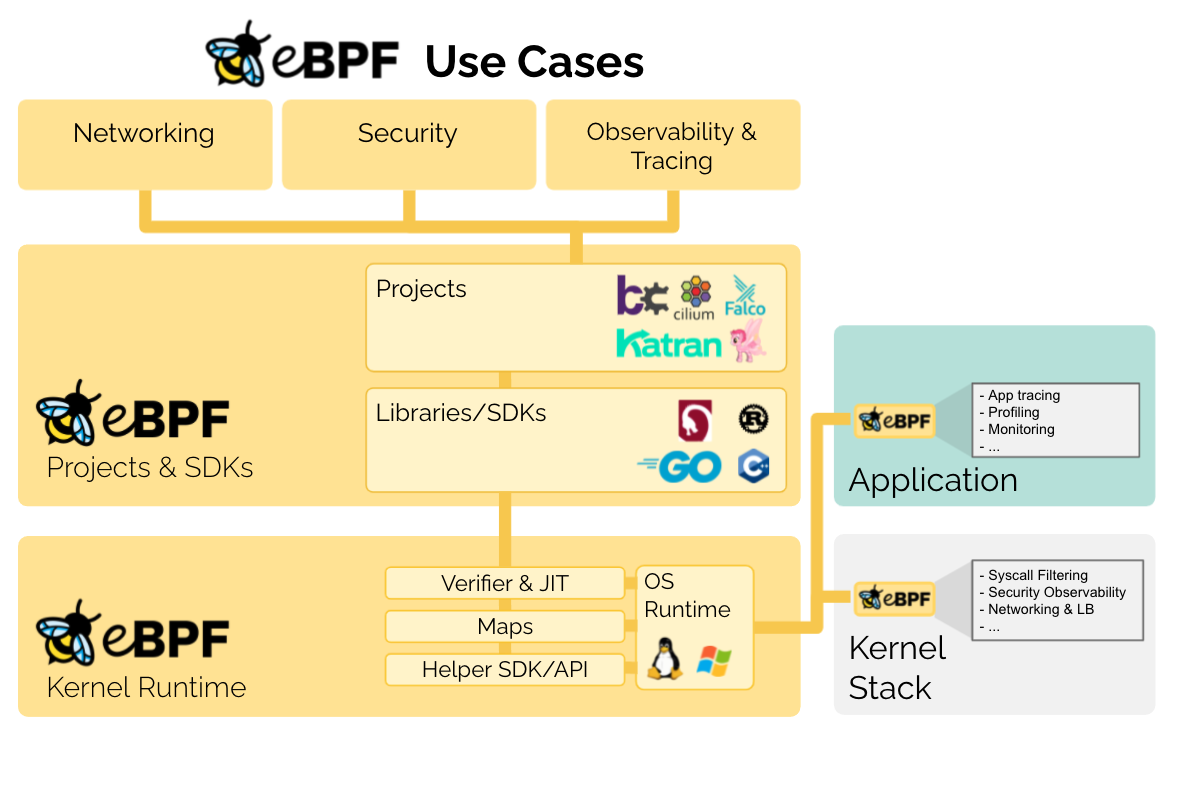
    The eBPF Foundation, which proposes to advance adoption of an approach that enables sandbox programs to run faster at the kernel level, is being launched today as an arm of the Linux Foundation.

    The technology known as eBPF was originally developed for Linux. The eBPF Foundation is now committed to expanding use of eBPF across all operating systems. Members of the eBPF Foundation include Facebook, Google, Isovalent, Microsoft and Netflix.

    Thomas Graf, CTO and co-founder of Isovalent, a provider of networking and security tools that leverage eBPF, said IT organizations should expect to see the technology become part of Windows, along with other operating systems, as the core technology is tested and validated across a much wider range of platforms.

    In effect, eBPF changes the way operating systems are designed. It bridges the boundary between kernel and user space by enabling developers to combine and apply logic across multiple subsystems that, historically, were completely independent of one another. That approach enables, for example, a security tool to scale to the point where it can identify threats at much higher levels of throughput to improve overall scale at a time when the volume of cybersecurity attacks being simultaneously launched continues to increase.

    Currently, eBPF is widely employed by web-scale companies such as cloud service providers. Facebook is using it as the primary software-defined load balancer in its data centers while Google is using open source Cilium networking software within its managed Kubernetes offerings.

    However, adoption within on-premises IT environments that have deployed Linux has been more limited simply because the number of vendors that have optimized networking, security and storage offerings to take advantage of eBPF is still fairly limited.

    Sysdig, for example, recently launched made available an instance of the open source Falco container security platform available that employs eBPF. Tigera has also made available an instance of its container networking platform that leverages eBPF at the kernel level of Linux.

    Ultimately, Graf notes the biggest benefit of eBPF is efficiency. The total cost of processing for security, networking and storage platforms should decline as more vendors take advantage of a capability that will one day be widely employed across multiple operating systems.

    In the meantime, IT organizations would be well-advised to ask their vendors when they plan to support eBPF. Cloud service providers generally require it to deliver their own managed services more efficiently, so any vendor that hopes to sell a platform to those providers will need to support eBPF to drive performance at scale. The issue then becomes determining which platforms that have embraced the technology are also available in on-premises IT environments looking for similar benefits.

    Regardless of approach, it’s clear there will soon be a reason to upgrade not just networking, storage and security platforms but also instances of operating systems that don’t yet support eBPF. DevOps teams would be well-advised to plan accordingly because the number of platforms that will ultimately benefit from eBPF spans the entire enterprise.