Category: DevOps Practice

  • Managing Technical Debt is a Balancing Act

    Managing Technical Debt is a Balancing Act

    Technical debt is a nightmare for product managers. It can slow down teams and inhibit response time for delivering quality products to market. Yet, there are times when technical debt can be beneficial; but turning it from a headache to a positive is a balancing act. 

    Nimble project managers and developers should strive to develop an equilibrium that balances creating, reducing and accepting technical debt. The good news is: That’s attainable.

    The Shape of Technical Debt

    It’s essential for PMs to understand how technical debt can arise so they can identify its characteristics and manage the amount to carry or avoid to the team’s advantage.

    Laying too much brick and mortar will take software features too long to develop. It risks their rollout arriving well past due dates. But fixating on speed threatens to underdeliver on functionality. Circumstances like these will diminish the ability to deliver powerful results over time.

    Similarly, ignoring the power of third-party solutions to slot in and satisfy customer needs and speed-to-market is outdated thinking. For example, software like embedded analytics can arrive off-the-shelf to complete an architecture task quickly and affordably while freeing up the team to address other challenges. Remaining agile with all options available to the team is critical.

    Overall, the project manager’s goal should be to identify the indicators of technical debt and hone their skills to address each type.

    Building Architecture

    When a team is tasked with delivering new features or functionality, building upon the existing structure to support the new capability is not unusual. Lack of foresight or diligent planning about what’s necessary to enable this function can be a critical oversight that leads to a void in need resolution, i.e., incurring debt requiring payment.

    Speed versus Quality

    Delivering at the speed of modern business often means facing time constraints that can impact the quality of work. Faced with such limitations, teams may take shortcuts. Ultimately, those shortcuts can lead to an increase in technical debt.

    Quantity versus Speed

    On the opposite end of the spectrum, eagerly attacking a project that requires significant lead time can result in overbuilding. This leads to a different form of technical debt. Longer projects can be affected by technological change—an evolution that makes some previously completed structures outdated. Debt takes the form of teams forced to return upstream to make necessary changes when they should instead remain downstream.

    Near-Sightedness

    Unlike the oversight or overbuilding described above, if the team fails to consider future needs and focuses only on current tasks alone, it risks creating debt that arises by starting from scratch. If teams don’t anticipate the next feature or prepare for future functionality while in development, they will likely pay for this near-sightedness down the road.  

    To Build or Buy

    Developers want to build. It’s what they do. But it’s not always in the organization’s best interests. When a team faces complicated requirements, is extended beyond its capabilities or is simply well outside its repertoire, debt can be avoided by looking toward existing platforms that fulfill its needs. In such instances, a third-party solution saves significant time and money. For example, an embedded analytics tool built with the latest technologies and deployed turnkey frees the development team to remain focused on its expertise and apply its talents there. Think: Does the team need to invent a new wheel, or does one already exist? While choosing the former risks taking on debt, selecting the latter holds the promise of reducing it.

    Manageable Debt

    Still, technical debt can be a benefit. 

    Consider this example: You want to roll out a platform that delivers to the customer and market, but it’s a ground-breaking product. You don’t yet know everything you want or need to know about how end users will engage with it and what they’ll ask it to do. In situations like these, it’s reasonable to get the functional framework of the software into the hands of the market so that you can absorb reams of feedback, return to the platform and then build out or fine-tune its features and functionality. Actions like these are wise. PMs haven’t mortgaged the farm for a bag of magic beans—they’ve taken on a reasonable amount of debt to fertilize team knowledge into a product that will ultimately deliver the most value.

    Recognizing technical debt and its approach, avoiding or accepting it accordingly and then managing it with deliberate efforts to pay it down within acceptable limits is where PMs want to be. If you invest in paying it down or seek and accept third-party solutions to avoid it altogether, you’ll maintain team focus and velocity on the projects they excel in. 

  • Mona Allies with New Relic to Converge MLOps and DevOps

    Mona Allies with New Relic to Converge MLOps and DevOps

    New Relic and Mona, a provider of a platform for monitoring the models used to provide artificial intelligence (AI), announced today they have formed an alliance to help bridge the divide between DevOps teams and data scientists.

    Most data science teams today build models based on machine learning algorithms using operations platforms that enable them to manage the life cycle of those models, otherwise known as MLOps. Mona provides a set of monitoring tools that are employed to detect drift that can occur as some of the underlying assumptions that were made when building the model are discovered to be less accurate or when new data sources become available.

    New Relic, meanwhile, provides an observability platform that is widely employed by DevOps teams to monitor and observe an IT environment. IT teams that have access to New Relic One can now also view dashboards provided by Mona that detect anomalies involving data integrity issues and model performance issues.

    The integration also enables users to create custom Mona alerts that are shared via the New Relic Alerts and Applied Intelligence service. That capability reduced the volume of alerts generated by correlating anomaly detection to specific IT events.

    Yotam Oren, CEO of Mona, said that level of integration provides a bridge between DevOps and data science teams that typically have widely divergent cultures.

    Incorporating AI models within applications is the next major DevOps challenge. There is almost no application being built today that won’t incorporate some level of AI. The challenge is AI models are built by data scientists that employ a wide range of machine learning operations (MLOps) platforms to construct those models. The pace at which those AI models are developed, deployed and updated varies widely. However, all organizations will eventually need to confront the problem of how to insert AI models within applications both before and after they are deployed in a production environment.

    There are two schools of thought about how best to achieve that goal. The first is to assume an AI model is just another type of software artifact that can be managed as part of an existing DevOps process. In that context, there may be no need for a separate MLOps platform. Conversely, proponents of MLOps contend AI models are built using pipelines created by data engineering teams working in collaboration with data scientists. Developers only become part of the process when an AI model needs to be inserted into an application environment. AI models may ultimately need to be incorporated within an application, but the proponents of MLOps platforms maintain building models requires a unique platform to manage a software artifact that is built by training algorithms.

    It’s only a matter of time before compliance issues force some form of convergence between DevOps and MLOps teams, noted Oren. The longer it takes to address both the cultural and technical issues that are required to meld DevOps and data science teams, the more challenging it will become as both teams are set in their respective ways.

  • Defining Availability, Maintainability and Reliability in SRE

    Defining Availability, Maintainability and Reliability in SRE

    In the world of reliability engineering, you’ll frequently encounter the three “-ability” words: Availability, maintainability and reliability. They sound similar and have similar meanings. In fact, these words may seem so similar that it can be tempting to use them interchangeably.

    That would be a mistake. Availability, maintainability and reliability all have distinct—if related—meanings, and they each play different roles in reliability operations.

    Definitions of Availability, Maintainability and Reliability

    Let’s start by succinctly defining each of the terms.

    Availability, Defined

    Availability is the extent to which an IT resource is ready to perform a task when requested.

    Thus, an application or server that is responding to requests is available (even if it takes longer to respond than desired or otherwise operates suboptimally, in which case it may have a reliability issue but not an availability issue).

    Availability is usually measured as a percentage. A resource that has 99% availability, for example, is one that is up and responding 99% of the time.

    Maintainability, Defined

    Maintainability is a measure of how quickly and easily a resource can be fixed when something goes wrong.

    If a buggy application release can be quickly fixed by rolling back to a stable version, the application would have a high degree of maintainability. On the other hand, if you have a server that needs to be rebuilt manually after it fails, it’s not very maintainable.

    Reliability, Defined

    Reliability is the extent to which a resource functions as required upon request (as opposed to simply being available).

    For example, if your users require an application to process each transaction within one second, and it does this 99%of the time while also maintaining a 99% availability level, that would be a relatively reliable application. In contrast, an application that responds to almost all requests but that suffers from high latency or error rates would not be very reliable, although it might be highly available.

    Differences Between Availability, Maintainability and Reliability

    The simplest way to spell out the differences between availability, maintainability and reliability is to highlight what’s unique about each concept.

    Availability

    Unlike maintainability and reliability, availability is an essentially binary metric, in the sense that a system is either available or it’s not. Although availability status can change over time, there is no such thing as varying degrees of availability.

    Availability also stands out because it is often the most important metric in defining SLAs and SLOs. Contracts typically specify that resources will achieve a certain level of availability, defined in percentage terms. They may sometimes also specify metrics like response times, which are a reflection of reliability, but availability is more likely to be the most important metric within service agreements.

    Maintainability

    Maintainability is unique in that it’s a pretty subjective concept. A system that one SRE considers easy to maintain could seem difficult to maintain to another SRE. The methodologies that engineers leverage to optimize maintainability could vary, too; for instance, someone from a DevOps background may be more likely to focus on optimizing maintainability within the software delivery chain than someone trained in classic site reliability engineering, which focuses on automating IT operations through code more than on the software delivery process.

    That said, automation tools help virtually every team maximize maintainability, no matter their preferences or background.

    Reliability

    Reliability stands out because it reflects how well a system performs. Here again, this is a somewhat subjective metric, because performance requirements may vary from one user to another. Nonetheless, reliability is the most effective means of measuring whether a system meets the performance levels it needs to, even if those requirements change over time.

    Why do availability, maintainability and reliability matter?

    Because availability, maintainability and reliability each measure different aspects of a system’s status, putting them together is a useful means of gaining insight into the overall reliability of a system.

    In order to be reliable, a system requires both availability and maintainability. A system can’t be reliable if it’s not available. It’s also unlikely to be highly reliable if it takes a long time to fix issues due to low maintainability.

    At the same time, by focusing on availability, maintainability and reliability individually, you can drill down into specific issues within the IT resources you manage. For instance, you might have systems that are high-performing when they’re available, but that have low reliability rates because of availability issues. In that case, you’ll know that an investment in increased availability is likely to yield the greatest reward for increasing overall reliability.

    The Bottom Line

    The bottom line: While availability, maintainability and reliability are all reflections of the quality of an IT resource, they measure quality in different ways. Tracking each category separately is important for ensuring that you know where your weakest links exist within overall system performance and health.

    At the same time, however, it’s important to compare and correlate availability, maintainability and reliability data so that you can achieve continuous insight into a resource’s status. When you can track each item separately but also combine them together to gain a complete picture of your system, you are in the best position to optimize reliability operations.

  • Authentication in Serverless Apps—What Are the Options?

    Authentication in Serverless Apps—What Are the Options?

    Serverless applications are growing in popularity among DevOps engineers. They provide a convenient, predictable way to run simple processes like CI/CD builds or automation scripts with no need to stand up infrastructure. They are also commonly used to deploy microservices. However, serverless applications present unique security challenges, one of them being authentication. 

    How can you ensure services communicate with other services or with the outside world only if authorized to do so? How can you ensure users can conveniently and securely access multiple instances of a serverless function?

    In serverless applications, there are many components interacting—not only end users and applications but also cloud vendors and applications. This is why common authentication methods, such as single factor, two-factor and multifactor authentication offer only a bare minimum foundation. Serverless authentication requires a zero-trust mentality—no connection should be trusted, even communication between internal components of an application should be authenticated and validated.

    To properly secure serverless authentication, you also need to use authentication and authorization protocols, configure secure intraservice permissions and monitor and control incoming and outgoing access. In this article, I’ll cover all these briefly and demonstrate a practical example—setting up authentication in the AWS serverless ecosystem.

    What Are the Most Common Authentication Methods?

    Here is an outline of the standard authentication methods used by most applications.

    Single-Factor Authentication

    Also called primary authentication, this is the most prevalent and straightforward type of authentication. Single-factor authentication asks for only one authentication method; for example, a security PIN, password or PIV card, to gain access to a service or system.

    These methods are solid in relation to familiarity and usability; however, they are generally linked to poor security and credentials can readily be stolen or guessed through phishing, data breaches or by using keyloggers.

    Two-Factor Authentication

    Two-factor authentication (2FA) adds another layer of intricacy, as it needs an additional factor to authenticate a user’s identity. Common verification methods include one-time passwords, tokens created by a registered device or PIN numbers. The presence of two verification methods significantly improves your level of security. 

    Multifactor Authentication

    This is the most complex process of authentication. It makes use of two or more independent factors to verify a user’s identity and authorize access to the system. In common scenarios, multifactor authentication (MFA) makes use of at least two of the following factors:

    • A PIN or password (something known)
    • Security token or mobile phone (something owned)
    • FaceID or fingerprint (something you are)
    • Location information, typing speed or the like (something you can do) 

    Authentication and Authorization Protocols

    An authentication protocol is a communication protocol that protects authentication data as it transfers between two entities. It enables a receiving entity to authenticate a connecting entity as well as authenticate itself to a connecting entity. This is achieved by declaring the type of information required for authentication and syntax.

    There are several types of authentication and authorization protocols, including:

    • Lightweight Directory Access Protocol (LDAP)—a software protocol that enables anyone to find data about individuals, organizations, and resources like files and devices within a network. LDAP allows this whether a user uses the public internet or a corporate intranet.
    • The Security Assertion Markup Language (SAML)—an open standard that allows sharing security information about authentication, authorization and identity across several different systems. 
    • Open Authorization (OAuth)—an open standard authorization framework designed for token-based authorization established over the internet. OAuth enables third-party services to use end-user account information without exposing user account credentials to the third party. This blog post can help you understand the differences between SAML and OAuth.
    • OpenID—enables authentication services and websites to exchange security information in a standardized manner. OpenID Connect—the newest version of the protocol—provides improved identity management, support for mobile application development, and interoperability. Learn more in the official OIDC FAQ.

    Secure Authentication on Serverless

    In serverless systems, there are four forms of access—four forms of communication that should be secured. An individual service won’t have to include all four, but the categories that it does feature should be well-protected. 

    Intraservice Access

    Creating a system by uniting serverless services has many advantages. However, you should consider the security of every additional service. 

    A service with excess permissions is a liability. Unnecessary permissions provide excessive access to data, actions or services, and a bug might let malicious users exploit that service and use its permissions to endanger your system. Hence, you should give careful consideration to the permissions required by each service.

    Effectively overseeing intraservice access permissions is often an overwhelming job. Luckily, all of the top-tier cloud providers have native access management services to make this task simpler. AWS has AWS IAM, Azure has Azure Active Directory and Google Cloud Platform (GCP) provides Cloud IAM. 

    Incoming Access

    A network is made accessible through a SaaS offering to external users. Access will be restricted, and every user will require the official credentials to achieve that access. 

    However, this brings up the same problems raised above—the secrets must be stored somewhere. You cannot manage how your users access and store the credentials that you provide them with; therefore, you should assume that their credentials are not being kept securely and that they may be compromised at any point.

    This would appear to be an unmanageable issue, but there is a solution—to provide temporary credentials. This means that even if the secrets were revealed, they would expire shortly afterwards. 

    The cloud providers have services for this. Google Cloud IAM offers short-lived credentials, AWS IAM lets you create temporary credentials and Azure Active Directory lets you configure expiration dates for its signatures that have shared access.

    Outgoing Access

    When your organization’s serverless function has access to an external third-party service, it typically needs some sort of access credentials. These credentials need to be kept somewhere, but this storage is sometimes not as secure as it should be. Today, certain web applications continue to store secrets in databases, text files or hardcoded within the function code. 

    Cloud providers have services for securely retaining credentials and secrets. AWS has AWS Secrets Manager, Azure offers Azure Key Vault and GCP offers Google Cloud Secret Manager.

    End User and Customer Access

    The issues with this access type are akin to those for incoming access, though the solution is different. Whether in B2B or (particularly) B2C environments, not many users would put up with a requirement to continuously regenerate or refresh their credentials. Thus, another approach is needed. 

    The top-tier cloud providers all have a user authentication service—Azure Active Directory B2C, AWS Cognito and Google Identity Platform. You should also consider using third-party end-user verification, as this will help you avoid vendor lock-in. Third-party offerings also tend to offer a better developer experience. The most common third-party authentication providers are Okta and Auth0.

    AWS Lambda Authentication Solution Example

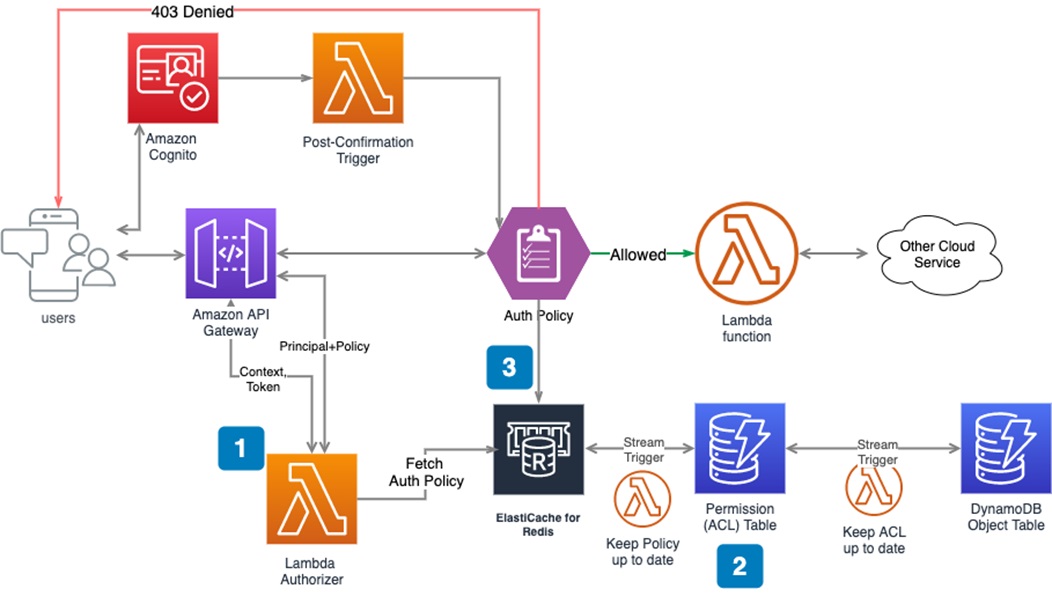
    Amazon Cognito offers managed authentication and authorization that can help you build secure web services in a serverless architecture. It is typically used in combination with Amazon API Gateway when building complex serverless applications that require permission control.

    For example, a payroll system may have a manager and two additional employees. The three employees can use their unique usernames and passwords to log into the payroll system—this process is called authentication.

    To retrieve paystubs, the three employees undergo role-based authentication:

    REST API GET /api/employee/{employee_id}/paystubs

    However, the permissions they get through this process should be unique to their needs. This may involve setting up the following conditions:

    • The manager can access the paystubs of all employees.
    • Employees cannot access the paystubs of other employees, only their own. 

    You can use AWS managed services to fulfill the above requirements and also meet future scaling needs.

    Image Source: AWS

    Step One: Setting Up AWS Lambda Authorizer

    The Lambda authorizer is the brain that centrally determines whether the requester has the relevant permissions for the requested API resources.

    Here’s how you can set it up:

    • Navigate to the Amazon API Gateway and create an authorizer.
    • Select the API resources you want to secure and assign the AWS Lambda function to them.
    • Configure your new AWS Lambda authorizer.

    Step Two: Building User Access Control List (ACL)

    It is crucial to establish user permissions and keep them up-to-date. The approach might differ according to your identity provider. Here is an example of the process if you use Amazon Cognito as your IDP. 

    1. Initialize the ACL

    Every user has a unique ID, so you can describe each user’s permissions by inserting items in the permission table in Amazon DynamoDB when you register with Cognito. The DynamoDB permission table stores the access control list for all users, although the implementation may differ based on the use case. 

    For this example, let’s use a single integer ID for each employee (the UUID strings in real applications tend to be much longer). 

    Manager:

    uuid: xxxx-xxx-xxx-xxxx-xxxxxxxx

    employee: {“allow”: [“/5”,”/5/*”]}

    paystubs: {“allow”:[1,2]}

    Employee 1: 

    uuid: xxxx-xxx-xxx-xxxx-xxxxxxxx

    employee: {“allow”: [“/6”,”/6/*”]}

    paystubs: {“allow”:[3,4]}

    Employee 2: 

    uuid: xxxx-xxx-xxx-xxxx-xxxxxxxx

    employee: {“allow”: [“*”],”deny”:[“/7”,”/7/*”]} // employee_id=7 is the manager of employee 2

    paystubs: {“allow”:[1,2,3,4]}

    2. Manage the Access Control List (ACL)

    The user permissions in a complex project are constantly changing. Employees can be promoted, demoted or terminated, with different access requirements depending on their changing roles. A new manager, for example, needs access to all pay stubs, which means you have to create a new pay stub object for every employee. 

    You can manage user permissions using the Amazon DynamoDB stream:

    Lambda functions can easily be integrated when you insert or modify items in the permissions table. A Lambda function might include code that modifies permissions according to changes to the role of a user.

    3. Build an ACL policy

    Once you’ve established an ACL with user permissions for every object, you should create an authorization policy document. The Lambda function authorizer uses this policy to evaluate whether user API requests should be allowed or denied.

    Amazon API Gateway offers a mechanism for evaluating policies internally. internal policy evaluation mechanism. The Gateway will automatically evaluate any policy JSON returned by the authorizer. For details about Lambda authorizer’s output standard, see this document.

    In this article, I covered the basics of authentication in serverless applications:

    • Single-factor authentication
    • Two-factor authentication
    • Multifactor authentication
    • Intraservice access
    • Outgoing access
    • Incoming access
    • A real-life example with Amazon Cognito

    I hope this will be of help as you gain a better understanding of authentication and authorization techniques that help secure serverless applications.

  • Bridging Departmental Divides for Successful Automation Projects

    Bridging Departmental Divides for Successful Automation Projects

    For too long, IT has been largely isolated from an organization’s core business. Any division between IT and lines-of-business (LOB) is even more detrimental when speed is not just a competitive advantage but an existential necessity in today’s accelerating digital economy. 

    As business leaders streamline and turbocharge every facet of their operations, savvy organizations are rushing to eliminate inefficient and damaging gaps between departments by putting more software tools in the hands of more employees. Analysts predict 80% of technology products and services will be built by those who are not technology professionals by trade by 2024. 

    This hits home amidst the booming trend toward robotic process automation (RPA), low-code/no-code and other automated solutions, which have only continued to grow as more businesses realize the vast benefits of automation: Accelerating operations while also reducing costs; elevating customer experiences and shifting employees to higher-value positions and laying the foundation for new data-driven revenue streams.

    Squandering Automation’s Advantages

    But these advantages are quickly squandered if there’s a turf battle between the business unit looking to optimize processes and the IT department responsible for deploying the tools to make that happen.

    When there isn’t collaboration and plenty of trust on both sides, automation initiatives are more prone to disappointments and delays. 

    This may happen if the IT department comes across as too smart for their own good, putting less value on feedback from their LOB colleagues and rushing to implement software with a focus on speed rather than outcomes. On the LOB side, leaders may assume their IT counterparts are too technical and don’t understand business objectives and choose to override important IT input about which vendors are best qualified when it comes to support, integration and security.

    The problem here is not the technology; hundreds of thousands of businesses across the world have successfully deployed process automation solutions. It’s the execution.

    When an automation initiative fails, there’s almost always blame to be shared on both sides of any divide. Likewise, success typically boils down to people across IT and every business department working better together to achieve a common goal. 

    To embrace a collaborative mindset and set up your automation projects for success from day one, I encourage you to follow these clear steps:

    1. Reinforce a shared mission: Whether it’s automating the customer onboarding process or deploying RPA bots to automate a repetitive, time-consuming process, communicating a shared mission is the crucial first step to pulling off a successful project. On the IT side, that involves talking with the LOB about their goals, objectives and business strategy. LOB leaders, meanwhile, can emphasize that IT is an equal business partner that has valuable insights and expertise to contribute.
    1. Establish visibility and transparency: Armed with a full understanding of business objectives, IT leaders can now evaluate tools built to give all stakeholders a full view of the processes that will be affected. By documenting and mapping out each process within an organization, leaders can better understand current processes and gain insight into areas that are ripe for standardization and automation. 
    1. Tailor solutions that match the problem: With heightened visibility across the organization, LOB and IT teams can then determine the scope of each problem and tailor solutions accordingly. Some processes can be kept and optimized; some can be tweaked with automation. Other processes may need to be reconfigured significantly before automating or shut down entirely because they are outdated or unnecessary. 

    A great example of this collaborative approach comes from Coca-Cola Beverages Florida, LLC (Coke Florida): Encumbered with a legacy process repository — a collection of PDFs, videos, pictures and spreadsheets outlining more than 600 processes — Coke Florida standardized and leveraged visual process mapping software to establish an easily accessible document repository that provides visibility and control over key processes, encourages collaboration and increases accountability. 

    Coke Florida continued an organization-wide initiative to digitize and automate its business processes with digital workflows, forms and RPA software, driving further efficiencies across its entire organization. As the company discovered firsthand, shared goals result in shared success. 

    When speed and high-quality outcomes become the norm, companies master the essential arts of urgency, resilience, visibility and collaboration. By bridging the divide between departments, organizations not only drive internal efficiencies but also gain a competitive advantage that is indispensable in today’s burgeoning digital economy. 

  • Atlassian Survey Shows Lack of Collaboration in Software Development

    Atlassian Survey Shows Lack of Collaboration in Software Development

    A survey of 750 IT and engineering leaders found that while a full 83% of respondents agree that interdepartmental communication is critical for successful software development, only 41% of respondents view cross-collaboration to be a priority.

    The survey gathered responses from within organizations that generated more than $50 million in annual revenue and was conducted by Forrester Consulting on behalf of Atlassian.

    Overall, more than two-thirds of respondents (68%) said more departments than ever are involved with software development. Overall, 80% said they need to improve collaboration with other departments, but 82% don’t feel particularly confident about their ability to accomplish that goal. Three quarters (75%) also noted the need to improve collaboration within their own department.

    Well under half of the respondents (42%) said their culture, processes and tools enable the real-time teamwork and free-flowing information that help leaders make sound decisions.

    Among the subset of respondents that are highly collaborative, however, more than (53%) said they see greater customer satisfaction, with 59% reporting increased revenue because of that increased customer satisfaction.

    Suzie Prince, head of product for DevOps at Atlassian, said the challenge organizations face is finding a way to successfully employ a mix of synchronous versus asynchronous communication mediums to better enable collaboration. In fact, collaboration as part of any DevOps culture needs to be a C-level discussion to consistently accelerate the rate at which software can be developed and deployed, she added. The core issue is that not every management team is equally comfortable with open communications between the various departments that make up an organization, said Prince.

    It’s critical for C-level executives to set that tone and lead by example; DevOps best practices can’t only be adhered to by development teams. The entire business needs to embrace DevOps best practices as an operating model for the business to really attain the maximum benefit.

    Unfortunately, DevOps practices within development teams have been unevenly adopted, so it’s often very difficult to get the rest of the business to embrace DevOps principles. Organizations that do embrace DevOps, however, tend to be much further down the path toward becoming a digital business and can more adroitly take advantage of business opportunities as they arise or shift strategy as changing business conditions may warrant. In fact, organizations that embraced DevOps best practices arguably fared better during the economic decline that followed the onset of the global COVID-19 pandemic that took every business and IT leader by surprise.

    It’s not clear from the Atlassian survey results if a DevOps divide is starting to emerge that makes some organizations more competitive than their rivals. In theory, at least, if every organization is now a software company that happens to build something or deliver a service, then the faster they can reliably build and deliver applications the greater the competitive advantage they can attain and sustain.

    There are, of course, a whole host of factors that determine how competitive any organization might be. However, in the age of digital business transformation, it’s clear that being able to build and deploy software at a fairly regular cadence is the new table stakes required for simple survival.

  • Learn a Bit About AI

    Learn a Bit About AI

    Every once in a while, a trend becomes broad enough that I feel the need to offer career advice. This year it will be simple: Know enough about AI/ML to be dangerous. We are past the point where not having at least a basic understanding is a good idea. Looking around the data center, AI is in use from the earliest stages of development through production network performance evaluation. Somewhere in your environment, you are using AI and ML. More to the point, somewhere in the places you may interview going forward, they are using AI and ML.

    I’m not suggesting you become an AI/ML expert—though you certainly could; I have a relative that is a data scientist and that’s all he does—design and tweak algorithms. He’s learning new things pretty much daily, so if you like that (as I do), it’s an option. But for those of us doing DevOps or SRE or even regular old operations, we’re only going to have to understand a bit.

    Understand what tools like Jupyter are, and what the most commonly used ML algorithms in your space are. Then, learn about how AI and ML help with what you are doing. Just as knowing more about the compiler/interpreter of your chosen language helps you solve more odd problems, AI is going to have that same issue. Think about how those folks who understand the guts of routing are the ones we want solving our routing problems. Again, same scenario.

    Moving forward, AIOps, NetOps, DevSecOps … All intend to increase the amount of work offloaded onto the AI in question. In a lot of cases that is great. We have enough to do; if you can paw through those logs and give me relevant summary info, go for it. But it doesn’t end there—some AI engines are making the calls and implementing changes. In both network and application security, a fair number of vendors will tell you there is no time to wait for humans to stop an attack, and they encourage their customers to turn on automated responses. That’s the first of many applications for AI/ML. We will see an increasing number of AI/MLOps tools being used for full-on automation. We all do difficult jobs with a complex—sometimes bewildering—number of inputs. But we use pattern recognition and experience to make determinations and do what’s best for our organization. Our software has reached the point where sometimes, it can do that for us on the easier tasks so we can focus on the more complex ones. When the AI/ML fails—and it will, because pattern recognition and historical trends are not always indicative of normal usage—knowing what is going on under the covers can help you determine if it did the right thing in the wrong way, or simply did the wrong thing. And it can help you to quickly recover. I can’t speak for every organization, but I’ve never seen one that lamented, “Sure wish that outage had lasted another couple of hours!”

    And keep rocking it. Somewhere in the distant future, an  AI may be able to do your job as well as you. But that isn’t today. Even if it can handle one bit, it certainly isn’t rocking the entire breadth of your responsibilities like you are. Thank you, from all the users that don’t realize you’re keeping them live.

  • A Blueprint for Securing Software Development

    A Blueprint for Securing Software Development

    Software development has changed dramatically in recent years, as technologies like DevOps, application containers, and cloud-native transform how software is built and distributed. Unfortunately, attackers have been paying close attention to these changes, and have retooled their attack strategies to take advantage of relatively weak security controls in software development and build environments. Attackers recognize that security teams are more focused on protecting infrastructure and less focused on software development and supply chains. This is how damaging attacks like SolarWinds happen – and it’s likely that attackers will strike again to yield even more successful outcomes.

    A new approach is needed to secure the software development pipeline. What’s more, this approach needs to be put in place by the engineers developing the software—and not by information security teams. Engineering teams need to be responsible for design and implementation while giving security teams visibility and assurance that controls are operational and that policies are being enforced.

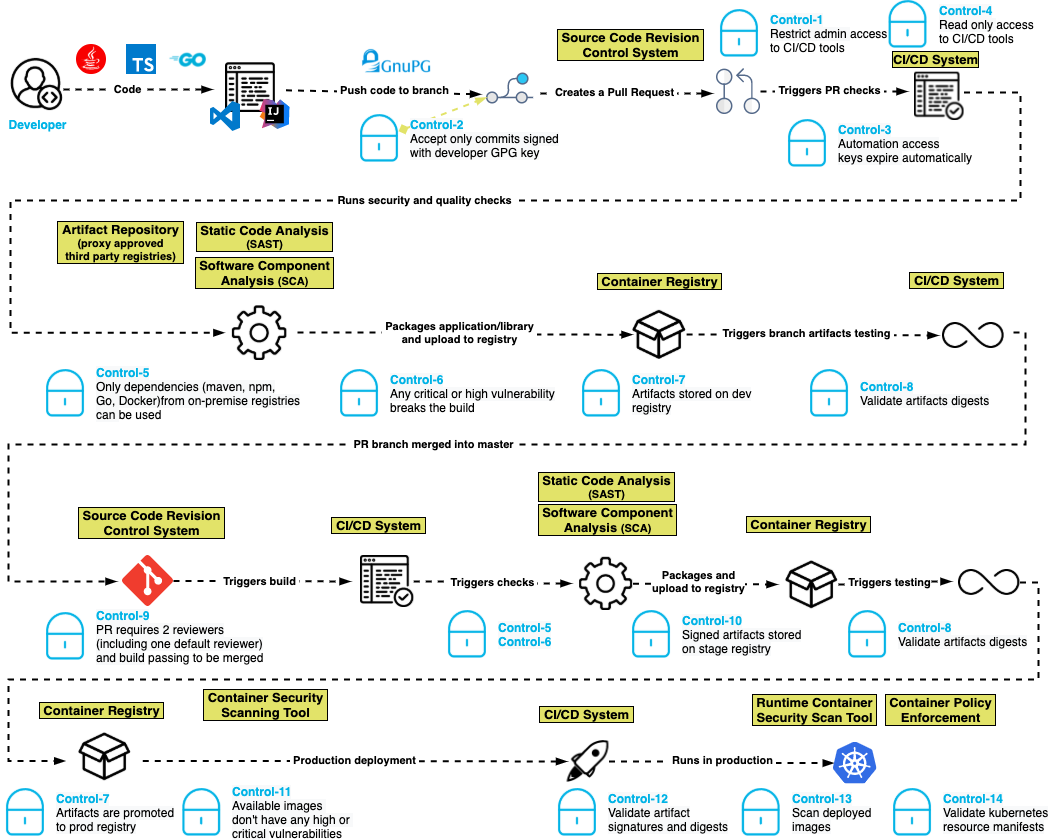
    A new blueprint for securing the pipeline centers on a flexible set of controls that secure the software build pipeline by ensuring that authentication and authorization are properly managed, that the integrity of software artifacts are tested at appropriate stages and that controls are placed on third-party and open source solutions incorporated into the software. The result: Software innovation and delivery at lower risk of supply chain tampering, and reduction of attacks during development.

    A Pragmatic Design Philosophy

    This modern software security blueprint is based on the following design philosophy:

    • Least-privilege: Only grant the access and permissions required to accomplish a job, and no more.
    • Immutability: Artifacts and infrastructure are not modified after deployment to an environment. If a change is required, it’s done in the image or script in the development environment and then promoted through the higher environments.
    • Everything-as-code: Infrastructure, security policies and other parts of the pipeline are also implemented as code and subject to the same controls as the software artifacts.
    • Traceability: All changes, whether to infrastructure or business code, are version-controlled. 

    Controls Blueprint for Software Development Pipelines

    The basis for this software security blueprint centers around a set of 15 controls that are built for modern development pipelines where developers, pipelines and execution can happen anywhere in the world.

    Control one: Restrict administrative access to CI/CD tools. Ensure that only authorized people can make administrative changes to the CI/CD system, which prevents unauthorized changes to pipeline definitions.

    Control two: Only accept commits signed with a developer GPG key. Unsigned code commits are challenging, if not impossible, to trace and pose a risk to the integrity of the codebase. 

    Control three: Automation access keys expire automatically. By ensuring that access keys used by automation expire periodically, developers create a shorter window of attack when keys are compromised.

    Control four: Reduce automation access to read-only. CI systems should have read-only access to source code repositories following the principle of least-privilege access.

    Control five: Only dependencies from trusted registries can be used. By configuring the dependency manager to only allow connections to an authorized list of registries, attacks can be blunted by keeping malicious packages in public registries from entering the pipeline.

    Control six: Any critical or high-severity vulnerability breaks the build. Supply chain attacks may introduce code with vulnerabilities into the software pipeline. Static application security testing (SAST) helps to identify serious security issues, including poor cryptographic practices, hard-coded credentials and injection vulnerabilities. 

    Control seven: Artifacts are stored in a repository in development, staging and production. This control helps to enforce the immutability of the artifacts so they can be compared in the development, staging and production repositories.

    Control eight: Validate artifact digest. Before an artifact is deployed in any environment, its digest should be validated against the artifact in the repository to ensure that it has not been compromised.

    Control nine: Pull requests require two reviewers (including one default reviewer) and a passing build to be merged. In addition to supporting good coding practices, this control also helps ensure that no commits are made without competent human oversight. 

    Control 10: Artifacts in higher repositories are signed. Requiring artifacts to be signed in a repository throughout the process ensures visibility and traceability for whatever is deployed to production. 

    Control 11: Available container images don’t have any high or critical vulnerabilities. Just as applications need to be tested for vulnerabilities before being placed in production, so do the container images into which they are packaged for deployment. Container images could have open source vulnerabilities if they contain open source software. 

    Control 12: Validate artifact signatures and digests. Validating the signature of the artifact against the digest ensures that the artifact was not tampered with in the repository and that the artifact being deployed is the same one that was tested.

    Control 13: Scan deployed images in production. This helps to ensure that the prior controls were followed for all software in production.

    Control 14: Validate Kubernetes resource manifests. If the resource manifests are tampered with, they could be tricked into deploying a container of the attacker’s choice. 

    Control 15: Ensure build environments are ephemeral and immutable. Build environments should be defined in code with automated creation and teardown and a fresh environment created for every build. Build hosts should not be accessible using interactive logins.

    We believe this blueprint provides engineering teams with an actionable architecture that security teams can rally behind and support. By adopting these standards, engineering teams are promised the delivery of assured software at lower risk of supply chain tampering, reduction of attacks during development and manipulation in staging and production.

    Here’s what it looks like:

    blueprint

    To learn more about the suggested blueprint, read our GitHub post about the project. Our goal is to prioritize speed and agility for software development while incorporating a security-always mindset.

  • Splunk Donates eBPF Telemetry Data Collector to CNCF

    Splunk Donates eBPF Telemetry Data Collector to CNCF

    Splunk Inc. announced during the KubeCon + CloudNativeCon North America conference that it donated a data collector to the OpenTelemetry project run by the Cloud Native Computing Foundation (CNCF).

    Splunk’s data collector runs as a sandbox-level program at the kernel of a Linux operating system and takes advantage of extended Berkeley Packet Filter (eBPF) technology to make it simpler to collect networking telemetry.

    The OpenTelemetry initiative itself spans a range of open source tools, application programming interfaces (APIs) and software development kits (SDKs) that are used to instrument applications. Previously, Splunk contributed the SignalFx Smart Agent and Smart Gateway to the OpenTelemetry project along with more than 64,000 code contributions.

    Morgan McLean, a director of product management for Splunk, said that while OpenTelemetry is officially in beta, some elements of the project are more mature than others. For example, tools for capturing metrics and traces are already being employed, while another set of tools for capturing log data will be ready sometime next year, he said.

    The data collector contributed by Splunk is among the first that operate at the kernel level to collect data, added McLean. That approach makes it possible for some types of data to be captured by default rather than requiring developers to always instrument their applications using agents to enable an observability platform. It will also contribute toward the eventual convergence of network operations and DevOps processes.

    Going forward, DevOps teams should expect to employ a mix of open source data collectors that operate at both the eBPF and application level, said McLean. The eventual goal is to instrument every application by default by making it much simpler to collect data. Today, most DevOps teams are employing a mix of proprietary and open source agent software to collect data that then must be deployed and then integrated with all the applications they build. Given the cost and level of effort required, the percentage of applications that are actually instrumented is, not surprisingly, fairly low.

    However, as agent software becomes more readily accessible, the percentage of applications that are instrumented should increase considerably in the years ahead. For DevOps teams that depend on that data to optimize application performance, that capability should prove to be a boon for improving overall observability in IT environments.

    Observability, in one form or another, has always been a core tenet of any DevOps best practice. Initially, DevOps teams focused on continuous monitoring as the most effective way to proactively manage application environments. However, it can still take days, sometimes weeks, to discover the root cause of an issue.

    Monitoring focuses on predefined metrics to identify when a specific platform or application is performing within expectations. The metrics tracked generally focus on, for example, resource utilization. Observability platforms combine metrics, logs and traces—a specialized form of logging—to instrument applications in a way that makes it simpler to troubleshoot issues without relying on a limited set of predefined metrics focused on a specific process or function.

    Those observability platforms then make it possible to correlate events so that it is easier to identify anomalous behavior indicative of an issue’s root cause. Armed with these insights, it becomes a lot simpler for IT teams to resolve issues faster.

    It’s unclear when OpenTelemetry tools will become more widely employed, but as more tools for collecting data become available, the impact on DevOps will be nothing short of profound.

  • Why Observability and Monitoring Matter to SREs

    Why Observability and Monitoring Matter to SREs

    Site reliability engineers, or SREs, do many things. They help developers build reliability into applications. They manage SLAs and SLOs. They play a leading role in incident management and incident response.

    For all of these tasks, SREs draw heavily on observability and monitoring. Although other parts of the IT organization also typically help to manage observability and monitoring, it’s virtually impossible for SREs to do their jobs effectively in today’s cloud-native world without observability and monitoring tools and data.

    Here’s what observability and monitoring mean, why they’re so important for SREs in particular and how SREs can systematically measure the success of their monitoring and observability practices.

    Defining Observability vs. Monitoring

    Monitoring is the collection of data from applications, infrastructure or other IT resources to track the status and performance of those resources. Monitoring has been a core IT practice since the late 1990s when the first modern monitoring tools, such as Nagios, appeared.

    When compared to monitoring, observability is more intensive. Observability is the collection of discrete types of data from multiple systems and the correlation of those data sets to achieve actionable visibility into IT resources. One thing to note: Observability has a more technical definition in the field of control theory that has to do with using external outputs to make inferences about the internal state of a system; however, when people talk about observability in the context of IT and SRE, they usually mean the collection and correlation of broad sets of data in order to understand complex systems.

    The debate about the differences between observability and monitoring is ongoing, but the consensus is that they boil down to:

    • What versus why: Monitoring helps SREs determine that a problem exists. Observability goes further by allowing them to understand why it exists.
    • Context: Observability provides context around what is wrong with a system. Monitoring, for the most part, offers surface-level information about the existence of a problem.
    • Actionability: Observability empowers SREs to respond effectively to outages, performance degradations or other problems. Monitoring merely lets them know that something is wrong and that it may require intervention.

    In most respects, monitoring is one step in the greater observability process. But observability involves additional practices, such as the correlation of various types of data, to achieve a level of context and actionability that monitoring alone can’t deliver.

    Why SREs Should Understand Observability

    Again, observability has become a core practice for engineers in a variety of roles. Developers can use observability tools to help measure and optimize application performance before deployment. IT engineers can leverage observability to gain visibility into issues that exist in a production environment. Observability tools can help QA engineers determine why an application failed a test.

    But no group has more to gain from observability than SREs. Given that maximizing the reliability and performance of systems is the core mission of SREs, the ability to not just detect problems via monitoring but also to understand them through observability is critical for modern SRE teams.

    That’s all the more true for SREs tasked with managing reliability for complex systems, like those based on microservices. In complex applications, identifying the root cause of a reliability issue—such as which specific microservice contains buggy code or which type of request triggers a performance bug—can be very difficult. By maximizing context into reliability problems, as well as allowing teams to trace requests across complex, distributed systems, observability places SREs in the strongest position to find and fix reliability problems quickly.

    What’s more, beyond detecting issues in systems that have already been deployed, SREs can also leverage observability tools to help build reliability into applications before they are put into production. By observing applications in dev/test environments, SREs may be able to identify reliability risks and then use that insight to find ways to make the application inherently more reliable. Observability might reveal reliability weaknesses that stem from an application’s architectural design, for instance, or from the orchestration tool that manages the application.

    How to Measure Observability and Monitoring

    Getting the most from observability and monitoring requires systematic measurement of observability and monitoring initiatives. It’s only by collecting metrics about observability and monitoring outcomes that SREs can ensure they are improving reliability rather than merely collecting and analyzing data to no particular end.

    While a full discussion of observability and monitoring measurement is beyond the scope of this article, consider the following types of metrics for assessing these practices:

    • Incident frequency: How often do incidents (especially severe incidents) occur that impact production systems? Ideally, SREs will see a decrease in incident frequency that correlates with increased use of observability and monitoring tools.
    • Rollback frequency: The less often an application release is rolled back to a previous version, the more effective the SRE team’s observability and monitoring practices likely are.
    • Mean-time-to-remediate (MTTR): MTTR is a measure of the overall time it takes to resolve a reliability problem. It reflects how well you monitor (which determines how quickly you detect problems) and how well you observe (which is the key to resolving problems).
    • Total data analyzed: Tracking the total volume of data that you collect and analyze through observability and monitoring tools helps you assess the overall scope and scalability of your practices.
    • Total systems analyzed: In addition to tracking total data volume, consider measuring how many discrete applications, hosting environments, CI/CD tools and other systems you are managing as part of observability and monitoring workflows.

    The ultimate goals of SREs extend beyond observability and monitoring. However, observability and monitoring serve as essential means to the broader ends that SREs are tasked with achieving: Maximizing uptime and performance. And while monitoring alone was once sufficient for supporting the goals of SREs, it’s very difficult to imagine an SRE team today that doesn’t also make extensive use of observability, which takes monitoring to the next level.