Category: DevOps Practice

  • Turning Off DevSecOps Noise for Functional Fidelity

    Turning Off DevSecOps Noise for Functional Fidelity

    Analyzing the DevOps and DevSecOps software marketplace demonstrates the high demand for tools and platforms that reduce false positives. As businesses and organizations adopt a rigorous, disciplined software development life cycle and ascribe to strict compliance frameworks, they quickly realize that automated tools can generate a substantial amount of noise, in the form of false positives, that pollute their efforts to maintain a lean and focused operation.

    True Positive Vs. False Positive Vulnerabilities

    Static application security testing (SAST) is fundamentally about using pattern recognition to identify vulnerabilities in code. The more aggressive the scan rules, the more likely a snippet of code will be flagged as a vulnerability; in other words, a “true positive” finding. Automated scanning is fundamental to effective DevSecOps. But if the scanning is too aggressive, it may generate findings that aren’t actual problems; in other words, false positive findings 

    You want your scan to return true positive findings—actual vulnerabilities that can be fixed and remediated. A false positive is a finding that isn’t actually a vulnerability. The ideal tool catches all the true positive vulnerabilities and returns a minimal number of false positives.

    Many platforms give their users granular control over which rules run and are applied to their code. This first layer of control is similar to allowing your team to tune their scans to focus only on certain frequencies while ignoring others. Often, this is used to increase the speed with which a platform might complete a scan. It can also be used to tune out “noisy” rules. It’s perfectly legitimate to use controls like these, but it’s important to recognize that those completed scans aren’t comprehensive.

    Speeding Up Can Slow You Down

    Positive findings, whether they are true or false, take more time and resources to evaluate and remediate. Investing resources to remediate true positives is worthwhile. It would be ideal if they had been caught earlier in the process, but catching a vulnerability before it hits production is the entire reason you are doing DevSecOps in the first place! False positives may not require actual remediation, but reviewing them and then manually confirming their false nature is directly counterproductive to the reasons an organization adopted automated SAST in the first place.

    SAST Plus DAST Keeps You Ahead

    The gold standard for effective security testing is to pair SAST with dynamic application security testing (DAST), sometimes also called interactive application security testing (IAST). This process will correlate the positive findings from the SAST scans and test them using simulated data in an emulated runtime environment. 

    DAST/IAST actually tests each bit of code that looks problematic because of a particular pattern and then tests whether the code is actually vulnerable. DAST provides an automated, testable, repeatable and provable method to test those positive findings for trueness and falseness. If you are only doing SAST scanning, then the noise-to-signal ratio from your platform is governed strictly by the intelligence embedded into their pattern-matching code. Depending on the quality of the tool being used, your actual mileage may vary.

    DevSecOps Is the Right Path

    Businesses and organizations clearly understand the problem of potential vulnerabilities. Guarding against a security breach is critically important to protecting proprietary information and the privacy of their customers. DevSecOps is clearly the right path to take to reach that goal. However, it is critically important that the vehicle(s) these teams use to get there (in this case, SAST and DAST/IAST) have built-in functionality to focus their efforts on real problems and not waste it on phantom issues.

  • More Than Half of DevOps Pros Have Backdoor Access to IT Infrastructure

    More Than Half of DevOps Pros Have Backdoor Access to IT Infrastructure

    A survey of 600 DevOps professionals conducted by strongDM, a platform for managing access to IT infrastructure, found nearly two-thirds (64%) had productivity impacted on a daily or weekly basis because of access issues.

    It’s not surprising that, as a result, DevOps teams created a number of workarounds to gain access, even though those methods don’t comply with cybersecurity best practices, according to the survey. More than half of respondents (55%) maintained backdoor access to systems, and 42% have embraced shadow IT to get access to tools and systems they needed for their roles, the survey found.

    Worse yet, the survey found that 53% of respondents admitted they are sharing credentials across teams.

    Well over half (57%) of respondents said it could take days or weeks for access requests to be approved, with 40% reporting it takes days to add tools to existing access solutions. Nearly three-quarters (73%) of respondents also noted it requires 15 minutes or more to gain access to infrastructure.

    More than half of respondents (52%) said they have missed deadlines due to issues with accessing infrastructure, with 53% of those respondents being held accountable for the missed deadline even if it was caused by their lack of access to infrastructure.

    Justin McCarthy, CTO for strongDM, said despite all the hype surrounding identity management and zero-trust IT, it’s clear many organizations are still struggling with the basics of access control. That issue has been further exacerbated by the need to enable more DevOps professionals to work from home since the start of the COVID-19 pandemic more than two years ago, he added.

    Many of those organizations are still relying on virtual private networks (VPNs) even though it’s been shown that stealing the credentials to access those VPNs is relatively trivial, McCarthy added.

    In place of those approaches to access IT infrastructure, strongDM is making a case for a dedicated infrastructure access platform that manages and audits access to databases, servers, clusters and web apps. It is based on local client software, a gateway intermediary and configuration tools that track roles and permissions.

    The benefits of that approach span everything from lower IT support costs to faster onboarding of new IT staff, noted McCarthy.

    Managing infrastructure access for DevOps teams is, of course, always going to be a challenge. DevOps teams are made up of engineers—among the most challenging types of end users to support. Many of them will use their own expertise to circumvent any process they deem to be inefficient. The trouble is, many of those end-runs would not pass muster with cybersecurity teams responsible for access management. The challenge each of those cybersecurity teams needs to come to terms with is the amount of time they want to spend time looking for these cybersecurity policy workarounds versus making it easier to securely access IT infrastructure.

    The sad truth is both DevOps and cybersecurity professionals are wasting a lot of time and effort trying to outwit each other when that time could be put to better use.

  • Survey Shows Increased Reliance on DORA Metrics

    Survey Shows Increased Reliance on DORA Metrics

    A new survey found just under a quarter (23%) of respondents are now tracking all four of the DevOps metrics defined by the DevOps Research and Assessment Team (DORA), with another 17% now tracking three.

    The State of Developer Experience survey polled 129 IT professionals that play a role in software development and was conducted by LeanIX, a provider of a platform for managing the building of enterprise applications.

    Dominick Rose, vice president of product management and strategy for LeanIX, said the ability to track DORA metrics such as deployment frequency (77%), failure rate (73%), lead time for changes (63%) and mean-time-to-recovery (MTTR) (55%) are leading indicators of DevOps maturity.

    DORA metrics, which are defined and maintained by a unit of Google, are being used most frequently to drive agile planning (69%) and optimize continuous integration/continuous delivery (CI/CD) platforms (58%), the survey found.

    Overall, the survey revealed just under half of the respondents (47%) said their organization had a high level of DevOps maturity, defined as having adopted three or more DevOps working methods. Those working methods are: Being flexible to changes in customer needs; having implemented a CI/CD platform; all engineers build, ship and own their own code; teams are organized around topologies and each team is free to choose its own technology stack.

    Of course, each individual organization will determine for itself what level of DevOps depth is required. For example, not every organization would see the need for teams to be organized around topologies or be free to choose its own technology stack. In fact, Rose said the survey made it clear that larger enterprise IT organizations tended to have a lower overall level of DevOps maturity. One reason for that is many larger organizations are still employing legacy processes to build and deploy software, noted Rose.

    Most developers are also further along in terms of embracing continuous integration (CI) than IT operations teams are in adopting continuous delivery (CD), added Rose. However, as the number of applications being developed using low-code and no-code tools continues to increase, it’s only a matter of time before application delivery needs to become more automated, he said. Achieving that goal will become easier as more artificial intelligence (AI) is incorporated into IT operations, Rose added.

    Nevertheless, the survey made it clear there is still a long way to go in terms of bridging the divide between DevOps teams and the rest of the business, with only 20% of respondents indicating that they use a value stream management (VSM) platform to track engineering efficiency to tie development activities to actual business results.

    A total of 71% of respondents, however, tracked open support tickets as a measure of customer value, followed by 66% that tracked monthly users and 45% that tracked feature adoption.

    It remains to be seen how DevOps will be further promulgated throughout organizations but as more organizations realize how dependent they are on software, it then becomes a question of how fully they embrace DevOps best practices as the pace at which applications are being built and deployed continues to accelerate.

  • TechStrongCon: Time to Build an Army of Citizen Developers

    TechStrongCon: Time to Build an Army of Citizen Developers

    DevOps teams need to start drafting a strategy to support what will soon become an army of citizen developers.

    Speaking at the virtual TechStrongCon event, JP Morgenthal, global director for modern applications development at DXC Technology, told conference attendees that the time to build an army of citizen developers is now.

    Citizen developers are typically end users that have developed enough expertise to build an application using low-code or no-code tools. Most organizations don’t have enough professional developers to address their application development backlogs, so it’s imperative that they enable end users to build applications, noted Morgenthal.

    Those citizen developers, however, need to be supported by DevOps teams to ensure guardrails are in place for building secure applications that scale. In addition, DevOps involvement also reduces the friction that a citizen developer will most certainly encounter when building an application, he added. “DevOps is fundamental, “ said Morgenthal. “We need to invest in it heavily.”

    Otherwise, citizen developers—who typically have other tasks that require their attention—will simply abandon their application development efforts, he noted. “This is not their primary task,” said Morgenthal. “They are going to need to be nurtured.”

    Most professional developers are focused on applications that are systems of record. The problem is that there simply are not enough of them to build necessary applications to drive systems of engagement, noted Morgenthal.

    That increased reliance on citizen developers is, in fact, part of a larger wave of democratization of IT in which individuals that don’t have advanced technology degrees take advantage of automation to build and deploy applications, he added.

    Organizations, however, run into issues when they fail to test those applications, make sure that configurations are not manually changed or don’t address the technical debt that inevitably accrues over time, said Morgenthal.

    Burnout can also become an issue, so Morgenthal said organizations need to make sure that agile development practices are used to first create a minimally viable product (MVP) and then plan development sprints to update and maintain it.

    Finally, there also needs to be a plan in place for shifting responsibility for the application to someone else when the individual that created it eventually leaves the organization, he added.

    Citizen developers, of course, are not the only ones using low-code and no-code tools. Many professional developers are using those same tools to build applications faster. In fact, it’s not clear how many end users have the skills required to successfully build applications, even though low-code and no-code tools automate much of the process. One way or another, many professional developers are now also collaborating more frequently with end users to build applications using low-code/no-code tools that make it easier for end users to, at the very least, describe the workflow of the application they want to build and deploy.

    Regardless of who builds the application, it’s a given that a lot more code will be moving through DevOps pipelines in the months and years ahead. DevOps teams, as a result, will inevitably need to revisit workflows and platforms to continuously update and maintain those applications at scale.

  • Clinical Trials: Programming for Scale, Speed and Success

    Clinical Trials: Programming for Scale, Speed and Success

    According to the Journal of the American Medical Association (JAMA), the median cost of bringing a new drug to market is $985 million and the average cost is $1.3 billion. However, those in health care hoping to harness promising new treatments, and patients facing steep prescription costs, see this as progress. After all, previous studies estimated the average price for developing a drug to be as high as $2.8 billion, a cost usually recouped at the expense of consumers. While savings are being realized, trials still come with quite a price tag—but the reasons why are understandable. First, clinical trials are complex and, simply put, time is money. The final stage alone, the Phase 3 clinical trial, can involve tens of thousands of participants, each with hundreds or thousands of data points that need to be tracked over a number of years. This can produce hundreds of millions of data points that must be protected, secured and blinded, and all of which must be analyzed by numerous applications.

    Many cite the fast development of a COVID-19 vaccine as proof that the process can be expedited. While the vetting of these vaccines was thorough, the processes benefited from unprecedented resources, industry and government cooperation and global pressure to quickly find a way to slow a highly infectious disease. Even so, one can’t help but wonder why clinical trials typically take six to seven years? Haven’t we learned how to speed up trials without jeopardizing health or draining budgets?

    The short answer is yes—there is a way to reduce the time and resources needed for clinical trials. Pharmaceutical companies use dozens of software platforms from an array of vendors in their trials. As a result, crucial data gets trapped in unconnected silos, adding complexity and stalling progress. However, by unifying apps and data stores in one integrated system, trial efficiency can be raised and time-to-completion reduced by over 20%.

    Raising a Platform

    Deloitte noted that COVID-19 revealed health care’s need for structural and technology transformation, adding that its future will be “enabled by radically interoperable data, artificial intelligence (AI) and open, secure platforms.” The same holds true for clinical trial data software platforms; however, creating a unified system is an enormous undertaking for software developers and software engineers. Most importantly, any unified system must be able to provide the following four capabilities.

    ● Security: Data in platforms must not only be protected from external threats such as hackers and ransomware but it must also be blinded. The ideal is a double-blind clinical trial in which neither participants nor their physicians know who received the actual drug and who received the placebo.
    ● Modeling: A platform must be capable of extending a data model for each clinical trial to prevent the need to rebuild every time. The models, and the platform overall, must be flexible but still capable of managing hundreds of millions of records across multiple trials.
    ● Extensibility: Over the course of years, data collected—even in a single trial—may change. The ability to extend a scheme on the fly to fit evolving needs can save an enormous amount of time versus building a platform and transferring data. This is especially true when you have millions upon millions of data points.
    ● Ease: A platform must be easy to modify by non-programmers. If a trial designer can implement rules without having to bring in a programmer, the trial will move ahead much more quickly.

    Key to being able to raise an effective clinical trial platform are software engineers and developers. According to the Bureau of Labor Statistics, software developer jobs alone will grow more than 22% by 2029—faster than all other occupations combined. While this is good news for software pros, demand will create a shortage exceeding 1.2 million by 2026, which isn’t so great for the pharmaceutical companies that need talent.

    Then again, there are purpose-built platforms available that provide data, software, services and an ecosystem of partners to support functions from research and development through commercial availability. They’re designed to bring such products to market faster and more efficiently while maintaining complete compliance. The platforms can not only be comprehensive, but they can also mitigate reliance on developers and engineers, with regular provider updates future-proofing operations and decreasing investments.

    Programming for Success

    First and foremost, pharmaceutical companies are achieving faster trial goals by leveraging the cloud and DevOps. In doing so, all data can reside in a central repository that’s accessible from anywhere. There’s no hardware requiring time-consuming manual configuration. What’s more, modern cloud infrastructures are resilient, secure and robust. And all of this is largely being made possible by software-as-a-service (SaaS) platforms.

    Despite this progress, the need to technologically bolster trials continues. AI is now being applied to auto-classify documentation. Naturally, these types of developments require the implementation of programmability and extensibility at scale. The best minds in software engineering have made considerable gains. It’s now up to pharma to ensure their trials and operations continue to be programmed for success.

  • Rust in Linux 5.20 | Deepfake Hiring Fraud | IBM WFH ‘New Normal’

    Rust in Linux 5.20 | Deepfake Hiring Fraud | IBM WFH ‘New Normal’

    Welcome to The Long View—where we peruse the news of the week and strip it to the essentials. Let’s work out what really matters.

    This week: Linus says next release will support Rust, FBI warns scammers are getting hired in deepfake interviews, and 80% of IBM staff stay at home. (more…)

  • Buildkite Adds Analytics Tools to Identify Flaky App Tests

    Buildkite Adds Analytics Tools to Identify Flaky App Tests

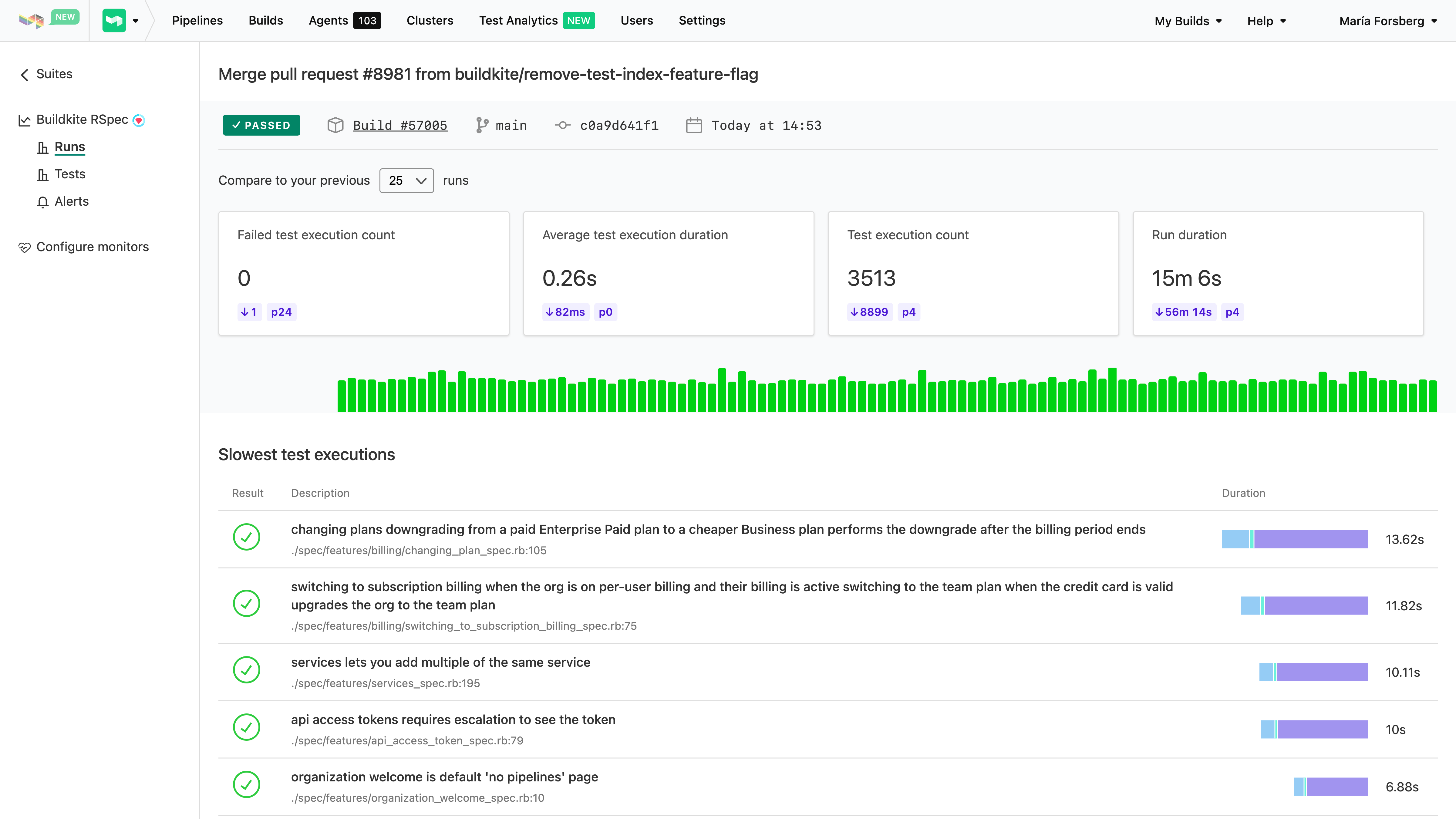
    Buildkite has added an analytics tool to its continuous integration/continuous delivery (CI/CD) platform that identifies flaky tests.

    Buildkite’s co-CEO Keith Pitt said the company’s Test Analytics tool enables continuous performance monitoring and real-time insights for test suites that, when not properly written, only serve to waste DevOps teams’ time. Rather than eliminating those tests, most DevOps teams just opt to run them again on the assumption that the code they are testing will eventually pass because the test is poorly constructed, noted Pitt.

    Buildkite reports there are more than 800 million seconds—or the equivalent of 25 years—of flaky tests manually re-run on its platform by developers each month.

    In addition to being integrated with the Buildkite CI/CD platform, the Test Analytics tool can also be applied to tests residing in CI platforms such as CircleCI, GitHub Actions and Jenkins.

    Test Analytics includes a dashboard that identifies the slowest and least reliable tests to help prioritize test remediation efforts. Historical views and trend graphs are also available to provide further insight into recurring issues.

    DevOps teams can also take advantage of user-defined thresholds to define whether a test is slow or unreliable, which generate custom alerts when discovered. Finally, there are integrations with commonly used testing frameworks to determine where tests are, for example, wasting time running database queries against application programming interfaces (APIs) that have timed out.

    Pitt noted that most tests today are created by developers and software engineers rather than dedicated testing teams. As such, the chances there will be an issue with a test that is returning flaky results are high.

    Organizations are, of course, trying to determine how far left to shift application testing. Developers can write their own tests, but how thorough and objective those tests are is debatable. There are also certain tests that should be applied to all applications that organizations can embed within their DevOps workflows to make sure they are always run.

    Obviously, the more testing that occurs the fewer issues DevOps teams will encounter after an application is deployed. However, when tests are flaky, it becomes easier for developers to justify not running them even though that test might still surface an issue they should address. In addition to increasing confidence in the quality of those tests, knowing which tests are flaky allows a DevOps team to determine which tests should be run first. That’s critical at a time when more organizations are trying to increase developer productivity; that productivity is often adversely impacted by waiting for tests to be completed before more code can be written.

    Eventually, the overall quality of tests should improve as machine learning algorithms and other forms of data science are applied. In the meantime, however, the onus for improving application testing is clearly on the engineers that create them. The challenge is many of those engineers may not even be aware how flaky a test really is until someone shows them some empirical data that can’t be disputed.

  • The Two Types of Code Vulnerabilities

    The Two Types of Code Vulnerabilities

    Spell checkers, grammar checkers and predictive keyboards all help reduce errors in written communication, but in a creative medium where writers need to innovate new expressions, nothing can eliminate all errors. The same is true in the code we write.

    Of course, your code is probably perfect but, on average, all code has bugs. Some of those bugs are benign. Some will cause unexpected early termination. A few will cause runaway resource consumption. And some bugs lead to security vulnerabilities that let users do things that are unexpected and sometimes undesirable.

    Those security bugs are behavioral vulnerabilities because they depend on how the code behaves when executed. Another type is an intelligence vulnerability, something that’s part of the correct behavior of the code, but which gives away details about how to exploit a system. These are the two main types of code vulnerabilities; both come with risks.

    Behavioral Vulnerabilities at Runtime

    Tl;dr: How the code works and how attackers can leverage what it does to their advantage.

    This covers a broad range of problems, but all of them are a result of the behavior of the code leading to undesirable outcomes in specific circumstances. Most of these are unintentional. An unescaped user input sent to a database can lead to a SQL injection vulnerability or an unsanitized string sent to a browser could create a cross-site scripting (XSS) vulnerability. Some behaviors are intended, but have unexpected consequences; the Log4j string substitution behavior that allowed it to output environment variables or read data from external resources was intentional, but the malicious usage we now call Log4Shell was not. In another recent example, a combination of behaviors could be exploited to gain root privileges on Linux desktop computers.

    Intelligence Vulnerabilities in the Content

    Tl;dr: What the content of the code tells an attacker about the system and how to access it. 

    In the 1950s, the phone company—there was pretty much just one at the time—began implementing completely automated dialing that didn’t require a human operator at the switching station to connect the call. The details were first published in a technical journal in November 1954 (see pages 1209 and 1309 here), and the information gleaned from that led to the creation of “blue boxes” that used insider knowledge to allow outsiders to control telephone equipment and make free long-distance calls.

    That’s hardly the first example of insider knowledge being leveraged for outside advantage, but its role at the heart of computer hacking and the origins of the PC (the ‘hack’ inspired Wozniak and Jobs) is so legendary that it demands recognition here.

    The phone system’s intelligence vulnerabilities were published in the company’s technical manuals—manuals that many thought were only for internal use, and nobody realized were available to untrusted readers. Today, though, intelligence vulnerabilities are in our code.

    Secrets abound in code, along with the details about which systems those secrets connect to. These secrets were once difficult to manage and putting them in code was the only practical choice. Now we have tools like Hashicorp Vault, as one example, and secure keystores in almost every cloud, but the legacy and security debt of all those secrets in legacy code are a goldmine for attackers like Lapsus$ and others who specifically target code.

    Security Is a Process, not a Product

    There’s a lot hidden under the surface in the two categories outlined here. Each of us can name many types of behavioral vulnerabilities—many more than the different types of intelligence vulnerabilities—but the two classes of vulnerabilities represent relatively equal risk. Recent events have demonstrated how an attacker with inside knowledge gleaned from code—and with passwords and keys taken from it—can move quickly despite firewalls and other access controls.

    Identifying secrets and other intelligence risks in code is relatively easy, but few teams do it because detection is the easy part. Integrating detection in developer workflows so they can take action in-context while working on and reviewing code is the most effective way to eliminate creating new security debt. And tools that give developers the information they need to understand the overall picture of intelligence risks in their code, the areas of highest risk—and that point them to actionable issues they can fix immediately to improve their code health—are necessary to help teams mitigate historical risks, ideally by rotating any secrets found.

    Tools exist that can automate that process and help teams to eliminate more than half the risk in their code—but the first step is recognizing where that half resides.

  • Survey Reveals High Cost of Application Modernization

    Survey Reveals High Cost of Application Modernization

    A survey of 250 software developers and architects in the U.S. found nearly three-quarters of respondents (74%) reported that the average cost of an application modernization project is nearly $1.5 million, with 79% noting that at least one of these projects has failed.

    Conducted by Wakefield Research on behalf of vFunction, a provider of a platform that automatically converts monolithic applications into microservices, the survey polled developers and architects at organizations with 5,000 or more employees that have been in business for at least 15 years and are maintaining Java applications. The survey found that the primary reasons application modernization projects failed were expectations not being set correctly (43%) and the need for organizational structural changes (37%).

    Despite the cost and inherent risks, however, the survey also found a full 92% of respondents planned to or are currently modernizing applications. Nearly two-thirds (62%) said having the right resources and tools is the key to application modernization success.

    Well over half of the respondents (58%) also noted that, on average, it takes 16 months to complete these projects, with more than a quarter (27%) noting it takes two years or more. Not surprisingly, a full 97% said they expected someone in their organization would push back on a proposed project.

    Application modernization, of course, is something of a catch-all phrase that can involve everything from providing applications with a web frontend to lifting-and-shifting them into the cloud or completely refactoring them to run natively on a cloud platform.

    vFunction CEO Moti Rafalin said that regardless of the scope of the initiative, most organizations should first pick these projects based on what makes the most sense for the business. Once identified, it then becomes critical for IT teams to have a deliberate strategy in place to achieve that goal given the high cost of failure, he added.

    Organizations would also be well-advised to determine how job roles will evolve, because one of the biggest inhibitors to application modernization is concern over how any job might be impacted, noted Rafalin.

    It’s not clear how quickly organizations are opting to modernize existing applications versus replacing them outright. However, as more organizations opt to run applications in the cloud, the level of interest in using microservices to build applications has risen sharply. The goal is to employ microservices to make applications both more resilient and secure. The tradeoff is that microservices-based applications tend to have lots of dependencies that make them more challenging to manage and secure.

    Regardless of approach, it’s more a question of when an application will be modernized or retired versus if. The level of technical debt that accrues over time for each application eventually becomes unsustainable. The issue, of course, is that most organizations don’t have the resources required to modernize every application at once, so it may take a decade or more to work through an entire application portfolio—even as that portfolio continues to grow. In fact, as technologies continue to evolve, it may turn out that application modernization is not a task to be completed as much as it is a permanent state of IT affairs.

  • GitLab To Embed Observability in CI/CD Platform

    GitLab To Embed Observability in CI/CD Platform

    The latest version of the GitLab continuous integration/continuous delivery (CI/CD) platform added a range of monitoring and visualization capabilities as part of an effort to embed a full set of observability capabilities in the core platform within the coming year.

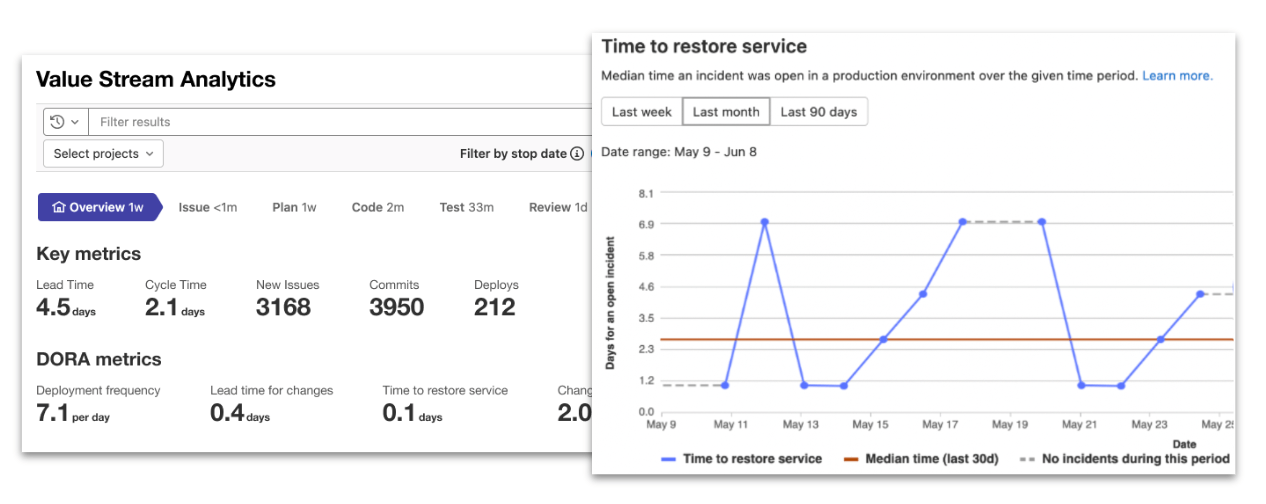
    As part of that effort, the latest version of GitLab, 15.1, has now added support for all the metrics defined by the DevOps Research and Assessment (DORA) team that is also part of Google.

    In total, the 15.1 version of the GitLab platform has more than 30 updates. These include additional security capabilities in the form of support for the security assertion markup language (SAML) Group Sync and the Supply chain Levels for Software Artifacts (SLSA) framework defined by Google.

    Finally, GitLab added links to all configuration files and templates included in the CI/CD platform to the pipeline editor to make it easier to manage large and complex pipelines.

    Cindy Blake, director of product marketing for GitLab, said the monitoring, observability and security capabilities added to the platform are part of an ongoing effort to eliminate the ‘digital duct tape’ that many DevOps teams currently rely on to extend a CI/CD platform. In fact, as many DevOps teams look to better secure their software supply chains, many are now taking advantage of the moment to replace do-it-yourself (DIY) approaches with an integrated CI/CD platform based on a common codebase, noted Blake.

    As part of that effort, Blake said GitLab is building its own dynamic application security testing (DAST) tools that are more tightly integrated with its CI/CD platform.

    In general, there is now an expectation that the tools required to secure software supply chains should be made available within a CI/CD platform, but organizations are still working through the processes that will need to be implemented to achieve that goal, added Blake.

    It’s not clear to what degree organizations are looking to replace legacy CI/CD platforms as they modernize application development and deployment. In many cases, however, the technical debt associated with maintaining custom integrations across their DevOps environment has become considerable. Many organizations are revisiting their DevOps workflows as part of an effort to increase overall developer productivity. The challenge, of course, is that migrating from one CI/CD platform to another requires considerable time and effort.

    In the meantime, the number of organizations embracing DevOps best practices continues to grow. GitLab is betting that as the total size of the CI/CD market continues to expand, most of those organizations will prefer an integrated platform rather than writing and maintaining custom integrations themselves.

    Regardless of approach, the ability to monitor and observe workflows is an essential element of any DevOps workflow. There is, of course, no shortage of observability platforms available. It’s not clear whether IT organizations will adopt one of those offerings versus taking advantage of observability and monitoring embedded within a CI/CD platform. One way or another, however, it’s getting easier to discover the root cause of any IT issue.