Category: Doin’ DevOps

  • How to Scale Microservices CI/CD Pipelines

    How to Scale Microservices CI/CD Pipelines

    As opposed to a traditional monolith, microservices architecture can theoretically bring many benefits. Microservices decouple software elements, enable reusable components and allow independent development cycles. However, in practice, microservices are prone to many issues.

    For example, teams accustomed to a traditional monolithic build process may find it difficult to reshape their established practices. Furthermore, as the number of microservices increases into the hundreds, managing separate CI/CD pipelines for each service becomes untenable, especially as DevOps components aren’t always optimized to fit every pipeline precisely.

    These are some of the real-world problems that Dan Garfield, chief technology evangelist at Codefresh, brought up in episode five of the DevNetwork Dev Professional Series. In this article, we follow his talk to examine the benefits of microservices, their hangups in a real-world CI/CD case study and solutions for scaling delivery as complexity and numbers increase.

    Monoliths in Space

    To get a better idea of why we need microservices, Garfield uses an analogy from space—the Apollo 13 mission. Apollo 13 was made of two ships: the lunar module and the command module. In software terms, these were essentially two giant monoliths.

    When the command module experienced an oxygen failure, its crew needed to repurpose oxygen filters from the lunar module. However, the lunar module engineers designed their oxygen filters differently, causing a major headache to reassemble and retrofit these parts.

    This analogy goes to show how monolithic-style development can create tunnel vision. When teams adopt guidelines that work only for the monolith, they are usually incompatible externally. This stifles the possibility of reusable components, thus decreasing code value and extending overall development effort.

    “Being able to reuse components and scale independently is the benefit of microservices,” said Garfield.

    Expedia’s Microservices Journey

    To see real-world microservices architecture in action, take Expedia. Previously, Expedia services had existed within monoliths, which meant much duplication. Services were detrimentally tethered, meaning if a service broke you had to fix the entire monolith.

    Garfield describes how Expedia isolated its architecture into individual microservices to represent abilities such as car search, car sorting, bookings, airline search and others. While this aided elasticity and usability, the microservices journey came with issues.

    Problems in Microservice Heaven

    Expedia ran into multiple problems within their microservices journey. Though Expedia had valid business reasons to adopt microservices, “they didn’t have a plan for how to scale their CI/CD that was realistic,” expressed Garfield.

    Foremost, as the number of microservices expanded into the hundreds and thousands, standardizing CI/CD became quite difficult. The organization was using one CI/CD pipeline per service, meaning they now had to support thousands of pipelines, each connected to an individual Git repository. A microservice may also have different pipelines for production, internal use or testing environments, leading to even more duplication.

    When you scale microservices, you also encounter a new set of roadblocks related to network and storage. This became extremely evident when Expedia realized the sheer network bandwidth and related costs from running validation and integration testing on thousands of separate CI/CD pipelines.

    “The scale of automation itself is where most people have the biggest bottlenecks,” said Garfield.

    Consolidating codebases with plugins and shared libraries became a common issue. Expedia developers experienced issues with Jenkins and were forced to programmatically or manually edit each pipeline, copy and pasting code from one to the next. In short, the flow was not easy, and differing approaches between teams led to shadow IT.

    Solutions For Scaling Microservices

    To help ease large-scale microservice environments and CI/CD pipelines, Garfield recommended taking a few approaches:

    • Use a container-based pipeline: The first principle Garfield suggested is using a container-based pipeline. If a pipeline is containerized, you can run it independently with different language versions. According to Garfield, “shared libraries are not the solution,” as they create version-specific conflicts. Using a Docker image is better than shared libraries because users can self-serve images with whatever version they want.

    There are many resources on Docker Hub to ease common CI/CD steps such as building a Docker image, git clone, running unit tests, linting projects and security scanning. Using these images can help avoid wasted development effort.

    • Consolidate to a single pipeline that operates with context: Instead of managing thousands of pipelines for all your microservices, Garfield suggested you use a single malleable pipeline for all integrations and deployments. His method involves Triggers, which carry information to direct actions.

    In this setup, Triggers carry context, or metadata, allowing a pipeline to change its behavior accordingly. These Triggers could be time-based or centered around actions like a repo Git commit, or pushing a new image. When a trigger is initiated, the trigger brings in relevant dependencies to perform an action, such as cloning a repository or cloning a codebase. Further steps can then consume these unique criteria.

    Garfield demonstrated how this is accomplished in practice within the Codefresh CI platform with native Kubernetes integrations. The platform also enables you to filter and view by certain criteria; a window into commits and changes.

    Garfield acknowledged this overall strategy does mean making microservices a bit more uniform, but perhaps the ease of deployment could outweigh the development constraints.

    • Adopt canary release testing: If an organization has hundreds or thousands of microservices, spinning up each microservice to run independent tests can quickly become cost-prohibitive. As Garfield noted, “testing early becomes less useful as infrastructure complexity arises.”

    To solve this issue, teams can adopt a canary release strategy. Canary release is a practice in which new software is first released and tested among a small subgroup of users. It’s a good way to “limit the blast radius of a change that goes wrong,” said Garfield.

    Lasting Image: Pipeline Reusability

    Adopting a single container-based CI pipeline could help resolve the expanding set of issues with large-scale microservices testing and deployment. By templatizing pipelines, many microservices could abstract complexity and reuse the same modular components. Essentially, make CI/CD reusable in the same way microservices are.

  • Decoding the Self-Healing Kubernetes

    Decoding the Self-Healing Kubernetes

    A business application that fails to operate 24/7 would be considered inefficient in the market. The idea is that applications run uninterrupted, irrespective of a technical glitch, feature update or a natural disaster. In today’s heterogeneous environment where infrastructure is intricately layered, a continuous workflow of application is possible via self-healing.   

    Kubernetes, which is a container orchestration tool, facilitates the smooth working of the application by abstracting machines physically. Moreover, the pods and containers in Kubernetes can self-heal.

    In the Avengers movie, Captain America asked Bruce Banner to get angry so he could transform into The Hulk. Bruce replied, “That’s my secret Captain. I’m always angry.” You must have understood the analogy here. Let’s simplify: Kubernetes will self-heal organically, whenever the system is affected. 

    Kubernetes’s self-healing property ensures that the clusters always function at the optimal state. Kubernetes can effectively self-detect two types of objects—podstatus and container status. Kubernetes’s orchestration capabilities can monitor and replace unhealthy containers as per the desired configuration. Likewise, Kubernetes can fix pods, which are the smallest units encompassing single or multiple containers. 

    The Three Container States Include

    1. Waiting: created but not running. A container, which is in a waiting stage, will still run operations such as pulling images or applying secrets, etc. To check the waiting pod status, use the following command:
      Checking waiting status
      Along with this state, a message and reason about the state are displayed to provide more information.
      Waiting before entering running stage
    2. Running Pods: containers that are running without issues. The following command is executed before the pod enters the running state:
      postStart
      Running pods will display the time of the entrance of the container.
      Time of entrance of the container
    3. Terminated Pods: a container that fails or completes its execution. The following command is executed before the pod is moved to terminated:
      prestop
      Terminated pods will display the time of the entrance of the container.
      Terminated pod - time of entrance

    Kubernetes’ Self-Healing Concepts – Pod’s Phase, Probes and Restart Policy

    The pod phase in Kubernetes offers insight into the pod’s placement. We can have: 

    • Pending Pods–created but not running.
    • Running Pods–runs all the containers.
    • Succeeded Pods–successfully completed container lifecycle.
    • Failed Pods–minimum one container failed and all containers terminated.
    • Unknown Pods.

    Kubernetes execute liveness and readiness probes for the pods to check if they function as per the desired state. The liveness probe will check a container for its running status. If a container fails the probe, Kubernetes will terminate it and create a new container in accordance with the restart policy. The readiness probe will check a container for its service request serving capabilities. If a container fails the probe, then Kubernetes will remove the IP address of the related pod. 

    Liveness probe example:

    Liveness probe example

    The probes include:

    • ExecAction–to execute commands in containers.
    • TCPSocketAction–to implement a TCP check w.r.t to the IP address of a container.
    • HTTPGetAction–to implement a HTTP Get check w.r.t to the IP address of a container.

    Each probe gives one of three results:

    • Success: The container passed the diagnostic.
    • Failure: The container failed the diagnostic.
    • Unknown: The diagnostic failed, so no action should be taken.

    Demo Description of Self-Healing Kubernetes

    We need to set the code replication to trigger the self-healing capability of Kubernetes. 

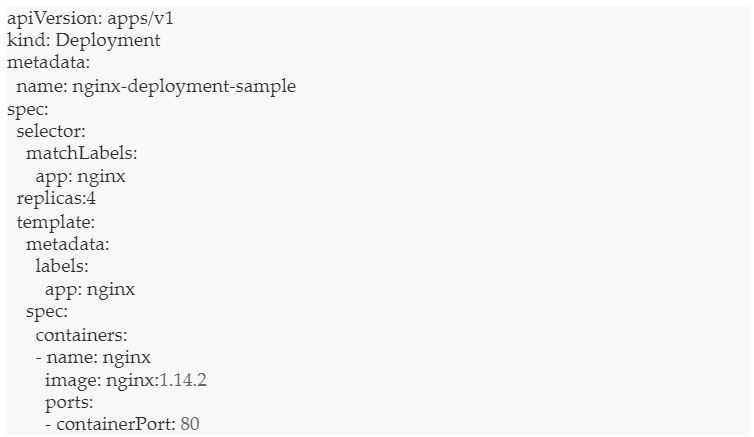
    Let’s see an example of the Nginx file:

    Nginx example

    In the above code, we see that the total number of pods across the cluster must be four.

    Next, let’s deploy the file.

    kubectl apply nginx-deployment-sample

    Let’s list the pods, using:

    kubectl get pods -1 app=nginx

    Here is the output:

    output_nginx-deployment-test

    As you see above, we have created four pods. 

    Now, let’s delete one of the pods.

    deleting a pod

    The pod is now deleted. We get the following output:

    pod deleted

    Let’s list the pods again.

    get pods

    We get the following output:

    Output: 4 pods

    We have four pods again, despite deleting one. Kubernetes has self-healed to create a new node and maintain the count to four.

    Conclusion

    Kubernetes can self-heal applications and containers, but what about healing itself when the nodes are down? For Kubernetes to continue self-healing, it needs a dedicated set of infrastructure, with access to self-healing nodes all the time. The infrastructure must be driven by automation and powered by predictive analytics to preempt and fix issues beforehand. The bottom line is that at any given point in time, the infrastructure nodes should maintain the required count for uninterrupted services.

  • 5 Capabilities Network Infrastructure Must Have to Support DevOps

    5 Capabilities Network Infrastructure Must Have to Support DevOps

    According to the Accelerate 2019 State of DevOps report, high-performing DevOps organizations achieve over 200 times more frequent deployments and over 2,600 times faster recovery times than low performers. These outcomes have been realized by both forward-leaning organizations such as Amazon, which deploys code every 11.6 seconds, and more traditional enterprises that have been in existence for a long time. For instance, Nordstrom, a well-known American retailer, increased the release frequency for its mobile app from twice per year to monthly.

    Embracing DevOps results in significant advantages, including improved team collaboration, cooperation and productivity. Companies can get digital products, applications and services to market faster because of the higher deployment and release frequency. Because development and operations teams are not operating in silos, unaware of each other’s constraints, there are lower failure rates within production environments. Cooperation leads to faster recovery times when there are issues with deployment.

    To achieve DevOps success, teams must engage in a new approach to network infrastructure, and the network infrastructure must have the following five attributes.

    Automation

    Automating repetitive tasks, such as configuring DNS or a firewall, saves a lot of time and effort. It eliminates manual errors by standardizing deployment and configuration of network infrastructure. Automation can be achieved by using Infrastructure as Code (IaC), which entails using an application programming interface (API) to create, modify and shut down infrastructure. This ensures that a repeatable, consistent configuration can be created. This code can be version-controlled, which serves as a form of documentation—it’s easy to detect what changes were made by whom in case there’s an issue—and rollback to a stable state is quick and easy.

    Standardization puts an end to “It worked in my environment” or “It worked on my machine” as any issues can be easily reproduced, resulting in faster resolution times. Support for IaC tools, such as Terraform, is essential for network infrastructure to advance DevOps practices.

    Continuous Integration/Continuous Delivery (CI/CD)

    CI is a coding best practice wherein code is checked into version control repositories frequently. It provides a consistent and automated way to build, package and test applications. CD picks up where CI ends and deploys applications in an automated fashion in a variety of environments, including production, development, test and sandbox.

    There are a variety of tools, such as Jenkins and Ansible, that DevOps teams use for CI/CD integration. It is imperative for network infrastructure to integrate with these tools to accelerate deployment velocity.

    Elasticity

    DevOps teams spin up and spin down test/development/sandbox environments routinely. Infrastructure may also be needed for short periods to account for seasonality or for handling sudden surges in traffic and demand. DevOps-friendly network infrastructure must be elastic to support these activities.

    Appliance-based vendors who provide network services are not scalable as they impose artificial limits on their usage (such as queries per second or leases per second) and require organizations to anticipate their needs in advance. When there is a need, organizations have to spend time procuring these appliances, waiting to receive them and, finally, deploying and managing them—a very inefficient way to manage demand.

    Support for Containers

    Containers are the foundation for developing cloud-native applications. Containers allow developers to package up application code and all its dependencies, including libraries and other binaries, as well as configuration files needed for running the application. This enables applications to be executed quickly and reliably across a variety of environments.

    Containers provide flexibility and portability of applications across public, private, hybrid cloud and even bare-metal environments. They are lightweight, as all containers share the underlying machine’s OS system kernel. They also lend themselves to greater modularity, which is essential for developing microservices-based applications.

    Instead of a monolithic application consisting of a three-tiered architecture, a microservices-based application consists of several smaller services that perform one function and one function only. It’s easier to scale, easier to manage and faster to develop such applications. Because containers have a small footprint, they are most suited for microservices architecture.

    In order to support containerized applications, network infrastructure must first be compatible with containers. Network infrastructure must be able to configure DNS, allocate IP addresses for containerized applications, route traffic intelligently between containers and balance loads for optimal performance. Network infrastructure must also support Kubernetes, the most widely deployed orchestration platform. To ensure that the needs of DevOps teams are met, it is important to inquire with network services vendors about compatibility with containers and Kubernetes, as many legacy, appliance-based solutions cannot support this technology. 

    Self-Service Access

    To move quickly, development teams may need to configure network infrastructure for test/development/sandbox environments. Having to submit tickets to network operations teams that use legacy appliances for delivering network services significantly slows down application development and deployment. Providing self-service access to network infrastructure, such as firewalls, load balancers, DNS and DHCP for development teams, eliminates the reliance of these teams on network operations teams. Self-service with robust role-based access controls reduces the deployment time and increases efficiency while freeing up network teams for more strategic projects.

    Conclusion

    DevOps attempts to minimize friction in application deployment by providing autonomy to development teams so that they don’t have to rely on network administrators to provide the necessary infrastructure needed for development and testing. But, the move to DevOps requires more than a consolidation of teams.

    Success requires best practices such as automation, CI/CD and self-service access to infrastructure, as well as support for containers and Kubernetes, which are key to building modern, cloud-native applications. Teams that incorporate these capabilities will see increased agility and speed that lead to shorter delivery time, higher-quality applications and improved communication and collaboration throughout a product’s lifecycle.

  • Top iOS Security Gotchas

    Top iOS Security Gotchas

    Ensuring the security of user data within your app is critical to building trust in your business and contributing to the online safety of customers.

    Here’s a list of the top 10 essential security mechanisms that Apple offers to up the security posture of your iOS applications. Adopting these technologies and APIs within your products is an effective step toward writing more secure applications, giving you a lower risk of potential data compromise and increased confidence in your security posture.

    Opting Out of System Data Protection

    iOS provides the data protection setting, a robust way to automatically encrypt any files created by your app. This is an important security setting, however, it is turned off by default and many developers never enable it. Leveraging the system’s data protection mechanism is an easy win for increasing the security of user data within your app.

    Transmitting Data Over Insecure Connections

    It’s critical to ensure that any data-in-flight is transmitted over secure connections. By using encrypted HTTPS connections for all apps’ network activities, a wide variety of data-in-flight compromises are mitigated. Additionally, organizations are recommended to leverage SSL pinning for maximum transport-layer security.

    Deserialization Fails

    The default protocol to serialize and deserialize data on iOS, NSCoding, is vulnerable to object substitution attacks, which could potentially allow an attacker to gain remote code execution. Apple offers a near drop-in replacement, NSSecureCoding, which is not vulnerable to this attack. To convert a serialized class to use the NSSecureCoding mechanism, Apple has outlined steps in its documentation. Making the recommended changes allows the system to enforce safe deserialization.

    Opting Out of App Transport Security

    App Transport Security (ATS) is a mechanism provided by Apple to mediate all network connections made by the app and validate that data is being transmitted securely. Opting out of ATS by use of NSAllowArbitraryLoads, or similar exemptions, is an easy way to shoot yourself in the foot and turn off a powerful security mechanism.

    Cryptography API Misuse

    Encrypting user’s data is a no-brainer, but care must be taken to ensure that it’s done in a cryptographically secure way. Some system APIs, such as CommonCrypto, are easy to misuse. This results in the illusion of security, while still allowing an attack vector for user data to be compromised. Be sure to use these APIs with secure options, and never statically embed encryption keys or use an encryption key which is trivially derived.

    Leaking PII to NSUserDefaults

    When handling personally identifiable information (PII) within an app, it can be tempting to store it in a convenient and straightforward way, such as using an NSUserDefaults entry. However, this approach allows any other app on the device to read this potentially sensitive data. Sensitive data, especially identifiable user information, should always be stored in a secure location, such as the device’s keychain, and encrypted when necessary.

    Unsafe Keychain Usage

    While the keychain is the most secure store of data on the Apple device, developers must still take care to ensure they’re using it correctly. It’s possible for developers to save data to the keychain in such a way that the data is always unencrypted and accessible, even when the device is locked and data would otherwise be encrypted. When saving sensitive data to the keychain, ensure that you’re using the strongest possible data-protection settings to maximize security.

    Wherever possible, utilize “kSecAttrAccessibleWhenUnlocked,” the strongest protection class, when saving items in the keychain. This protection class tells the system that data should be encrypted when the user is not actively using your application. If your app needs to access this data while running in the background, you may need to fall back on the “kSecAttrAccessibleAfterFirstUnlock” protection class, which ensures the data is encrypted only until the user has unlocked the device after boot.

    Embedding Vulnerable SDKs

    When an SDK is linked into your application, you’re also implicitly exposing your app to any potential vulnerabilities in the SDK. Compromised SDKs have led to a variety of mobile app attacks, such as a vulnerable AFNetworking version leading to data compromised through a MitM attack. Without a security audit of the SDKs used within the app, developers are blind to the potential vulnerabilities they are introducing.

    Allowing Third Party Keyboards on Sensitive Input Fields

    While installing third party keyboards are useful for user customization, they introduce a new vector for data leakage. This is because the developer of a third party keyboard may be able to extract any information typed on the keyboard. As a result, it’s in the user’s best interest to disable these keyboards when handling sensitive data, such as identifiable information or credit card numbers.

    Leaking PII to Device Logs

    It’s all too easy to leave debug logging, which may include PII, in production builds. Before release, validate that any log statements which might include sensitive data are scrubbed from the code. This might be achieved by way of flags, which only enable these log statements in debug builds. Since logs may be visible to anyone with physical access to the device, it’s paramount to exclude sensitive data from them.

    Since adopting the newest technologies often introduces unforeseen risks, defensive security is a constant endeavor. However, following these top 10 tips will increase your organization’s security posture and reduce vulnerabilities introduced by iOS risks.

  • Practical Advice on How to Use Lead Time

    Practical Advice on How to Use Lead Time

    Many ALM tools and Value Stream Management platforms graph lead time, but few really tell you what to do about it, how to use it and why you shouldn’t use the average. In fact, so much of what is written on this subject is rather vague and hand wavy. Part of the reason is that Value Stream Management is a big job, and it isn’t something a tool can provide. Rather, it’s a human endeavor. Another driver for the hand waving may be that the writers really don’t know much about lead time because they’ve never actually used it.

    Improving the value stream is a big topic but there are definitely things we can cover in this space: how to use lead time, how to get it, prerequisites to using it well, techniques or approaches and references for further study. I’ll start with the simplest, most mechanical topic, and move to the harder topics last.

    What Is Lead Time?

    Lead time is how long it takes a work item to get through a system, such as your IT development value stream. If your system is under control, recently measured lead times can be a good predictor for lead time in the future. People want to know when stuff will be done so they can make plans.

    Lead time is also a lagging indicator for many of the actions used to improve, well, lead time and flow. It’s what some people call an output metric—you make a bunch of improvements to the system and improved lead time is what you get out of your efforts. 

    Where to Start

    Measure lead time separately for the few types of work where it really matters, such as production defects and epics or initiatives. For every work item, record the start and end dates. But first you have to define what you consider the start and end. If you are using the measure to communicate with a customer, use dates from the customer’s perspective. If you are trying to improve the development part of the pipeline, post planning, then start the clock when it’s scheduled for dev. In that way, some people distinguish flow time from lead time. Cycle time is sometimes used for an even smaller slice of the value stream, usually just one step—I’m not going to debate here whether that’s a proper or official use of that term.

    Whatever you do, for heaven’s sake, don’t use the average lead time. Instead, use a percentile. I use the 80th percentile. For illustration, the 25th percentile is the point at which 25% of the observations fall below that point. The 80th percentile of your lead time observations (measures) is the point at which 80% of your historical lead time observations fall below that point. The 50th percentile is not always the median, but for the sake of this article we can say it’s close.

    Average, however, could be materially off. It’s worse to use the average than the median because the average can be thrown off by outliers more than the median and 80th percentile. If you are good enough with statistics to correctly identify and remove outliers, that’s great, but few people do that at all (much less with statistical precision) and it’s really not necessary for most IT work.

    The only thing I’d use the median for is to monitor the trend—to see if the median is improving. But using it for forecasting or expectation setting would be bad. You see, when using median, 50% of observations took less time, but 50% took longer. You wouldn’t want to tell a customer that he has a 50/50 chance of getting a fix in two weeks. Telling them they have an 80% probability of getting a fix in three weeks, in my experience, is more palatable.

    You want to be able to tell your customers (or marketing, management, support or program management) that 80% of the time you resolve this kind of issue in “n” weeks. Most people are happy with those odds. Anything higher takes in so much of the long tail of the distribution that it makes forecasts not terribly useful for planning.

    How to Get the Graph

    Use the lead time graph in your existing tooling if you can; get the data into a data warehouse and use a BI tool if you must; or use Excel only as a proof of concept or if your organization is small. More on this below. Compute your 80th percentile lead time expectation every sprint or month, and graph it in a bar chart so you have a new bar every period.

    How to Get the Data

    It’s easy to find the 80th percentile in your dataset. If your tooling can give you your choice of percentiles for lead time, that’s fantastic. If not, you’ll need to gather all of your lead time observations. You can do it in Excel, but then you’ll be forever updating Excel with fresh data or re-importing the data. That’s workable if you have a small number of teams and observations to input each sprint. Otherwise, you’ll want to get it into a database and make a BI dashboard. 

    How Much Data to Get

    You don’t need a whole lot of data.

    “Data beyond 24 weeks is most likely out of date,” said agile data and probabilistic forecasting guru, Troy Magennis. 

    How to Compute It

    In Excel, use the percentile.inc function. Generally, order your lead time data from smallest to largest, multiply your number of observations by 0.8, round up to an integer, then identify the observation at that location. Technically, you should average the two observations at that point if you didn’t have to round, but I’ve not found that materially significant in any of my data for these purposes so I don’t do it.

    What to Do with It

    I publish my 80% lead time expectation. I talk about it with the people who are anxiously waiting for the delivery. I talk about it with my engineering team. I talk about it with my management team, PMO, project managers and program managers. I talk about it with my lean and agile coaches and consultants and scrum masters. I talk about it with my team leads. I want everyone in the loop and on board with the improvement goal. I use it to explain how certain behavior, such as expedites and high work-in-progress (WIP), work against improving the lead time expectation.

    Look at your bar chart showing the changes in your lead time expectation over time. See if it’s moving in the right direction. Use A3s, Toyota Kata, lean principles and systems thinking to improve the system. Engage your upstream and downstream neighbors in the improvement process and in making process policies explicit.

    What if the Data Isn’t in One Tool?

    Change your process before you change your tooling, and don’t tool up a bad process. A common problem is when an organization doesn’t have the beginning and ending lifecycle states of a given class of work in a single tool. I didn’t say value stream here because you don’t need the whole value stream mapped for every class of work in order to get lead time. You can combine data from multiple tools in order to get the end-to-end, but the simplest thing that could possibly work is to have your top-level item reflect or approximate that end-to-end flow.

    Before deciding you need a new tool, there are a couple of easier approaches to try first:

    • Add the starting or ending date to the items of interest, whichever of those is missing. Sometimes I see those planning an initiative only track the item until it’s approved and released to engineering. It may be easier to add another date to that item and track it to delivery to production than to change tooling.
    • Add more steps to an existing kanban. Likewise, it may be easier to add additional columns to a kanban and keep the items on the board until they are in production. Or get them on the board earlier in their lifecycle.
    • Add another kanban. It may be that you don’t have a kanban. Your initiatives or your production requests aren’t tracked well. Get them in a kanban. This is not the same as changing tooling. You probably already have a tool that can give you a kanban. Use it. Every organization should have an epic kanban.

    Prerequisites

    You can use lead time as a lagging indicator of your process improvement efforts without any of these prerequisites. However, if you are using lead time to set completion date expectations, you should attend to these matters first: stable teams, predictable teams (stable throughput), a stable system (few process changes) and low WIP.

    If you are trying to make predictions, being predictable is helpful. A leading indicator for predictability is velocity variance or throughput variance. I compute that as the standard deviation divided by the average, and I want that to be 0.2 or lower. That 0.2 is the point at which the numbers are more reliable, in my experience with many organizations’ data.

    You need to have stable teams. Your organization will not be predictable if your team makeup is changing all the time, or if you are moving people around between projects or if you are allocating people to multiple projects.

    You need to control your WIP at every level. Put all of these on your metrics dashboard:

    • The number of items being worked on per individual. This should be one per individual, or less. It’s usually easier to gather this data at a team level. At a team level, the number of items being worked on should be less than the number of individuals. Encourage working together. If you are pair-programming most of the time, your WIP should be less than the number of pairs. With TDD, good test coverage and good continuous integration practices, you should be able to get multiple pairs on one user story.
    • The number of epics or initiatives each team is working on. This should be on your metrics dashboard, and list teams with more than one epic in progress. But remember, it’s not the team’s fault. Fix the system. Don’t blame the team.
    • The number of open sprints. This should be 1 per team. On your dashboard, list the teams with more than 1 open sprint.
    • The number or epics or initiatives the organization is working on. Graph this measure each sprint on a bar chart so you can see the trend. Work to improve (lower) the trend.
    • The number of releases being maintained (fixed, patched, level 3 support). Graph the trend and work to lower it.
    • The number of releases being supported (help desk, service desk, level 1 and 2 support). Graph the trend and work to lower it. 

    Conclusion

    Lead time, if tracked and used correctly, is a great predictor for how quickly work will be completed, allowing you to more accurately forecast delivery dates. You should measure it, talk about it and review it often to see what improvements have been made, and can be made. And remember:

    • Measure lead time separately for the few types of work where it really matters.
    • Use percentiles rather than averages for more accurate forecasting and expectation setting. 
    • Adjust your process before you change your tools.

    — Andrew Fuqua

  • GitHub Makes Private Repositories Free for Unlimited Users

    GitHub Makes Private Repositories Free for Unlimited Users

    GitHub this week announced is making available private repositories for an unlimited number of collaborators available to all GitHub accounts for free.

    Kelly Stirman, vice president of product strategy and marketing, said that subsidiary of Microsoft could make this move because it is now generating enough revenue from the enterprise edition of its platform to sustain its business model.

    Previously, organizations that wanted to use GitHub for private development needed to subscribe to a paid plan. DevOps teams that need access to advanced features such as code owners or secure access markup language (SAML) support will still need to upgrade to a paid plan. However, the cost of a paid Team plan has been reduced to $4 per user/month from $9 per user/month, effective immediately, as part of an effort to increase the use of paid plans around the globe. Existing customers of paid plans will also see their bill reduced, added Stirman. Alternatively, existing customers can downgrade their current plan to take advantage of a free service.

    The overall goal is to increase the number of projects being developed on GitHub, said Stirman. Many open source projects generally get started by small groups of developers that are not initially ready to share their code publicly. GitHub provides an affordable way to launch those projects among a core set of developers that may not have ever met one another.

    Stirman also noted private repositories on GitHub provide a much more cost-effective alternative to standing up a private repository in an on-premises IT environment that requires IT teams to provision and manage their own infrastructure.

    GitHub also tracks all the vulnerabilities that are discovered in open source projects hosted on the platform, which is information that is shared with every developer on the platform, added Stirman.

    Additionally, GitHub provides access to a content delivery network (CDN) to more easily share code across geographically distributed teams of developers, Stirman said.

    It’s hard to forecast how much pent-up demand there is for access to a free private repository for an unlimited number of collaborators. GitHub has previously made private repositories available for a limited number of collaborators. Nevertheless, Stirman said there was a massive spike of adoption on the first day the new plan was available.

    In addition, Stirman noted there has been a marked increase in the number of teams that are working on projects related to COVID-19 research.

    Of course, the more development teams that are exposed to repositories such as GitHub the more likely it becomes more of those teams will find themselves to varying degree embracing best DevOps practices. Invariably, those bet practices will then find their way into a larger number of enterprise IT projects. Undoubtedly, GitHub views making private repositories available for free as a method to create increased demand for the enterprise edition of its platform down the line. Of course, rival providers of continuous integration/continuous delivery (CI/CD) platforms will be seeking to convert as many of those projects into enterprise customers as well.

    — Mike Vizard

  • Defining the Database Requirements of Dynamic JAMstack Applications

    Defining the Database Requirements of Dynamic JAMstack Applications

    Zero-configuration hosting solutions such as Zeit Now and Netlify are taking the frontend community by storm due to their ease of use. If we add static site generators such as Gatsby/Next.js/Nuxt.js/Hugo/Jekyll to the mix and deploy our statically generated pages to a content delivery network (CDN), we get something highly desired with minimal effort: distributed auto-scaling applications with zero configuration.

    The usage of static site generators and CDNs became quite popular, so much so that Netlify decided to give it a name: JAMstack. At first, this might not strike you as something very newsworthy. Haven’t we all deployed static sites such as blogs or documentation on CDNs? What is different about this approach?

    To answer that, let’s first look at the definition that is typically used to explain JAMstack: The JAMstack is a static HTML site, rebuilt automatically every time you update the content, and deployed directly to a CDN.

    Of course, that still does not explain why this approach is different. The first time I read this definition, I wondered how I could ever build something more dynamic than a blog with such a stack. However, note that nothing in the previous description says that every element of our site has to be statically generated. In fact, the JAM acronym stands for JavaScript, APIs and Markup, where the letter A is the answer to dynamic content.

    The idea is to pregenerate markup where you can and then enrich these statically generated pages with dynamic content fetched from APIs. The APIs of choice in a JAMstack application are typically APIs from third-party services (SaaS platforms) or custom-built with Functions as a Service (FaaS). Both Netlify and Zeit have great zero-configuration FaaS offerings to write APIs for your JAMstack.
    In essence, developers in the JAMstack community are often looking for a specific set of requirements:

    • Zero configuration—easy setup, easy deploy, no server management.
    • Scaling—your application can handle sudden spikes of increased traffic without extra effort. 
    • Speed—low latencies and fast page loads (thanks to the distributed nature of CDNs).
    • Pay as you go—only start paying when your page actually serves customers.

    By combining easy-to-use hosting solutions, static site generators, CDNs and scalable APIs in one stack, we can relatively easily get these requirements.

    What If My Application Requires Highly Dynamic Data?

    Imagine that you are building a social network for professionals on which professionals can create profiles. Professionals create profiles to promote their skills, and companies search the network to hire professionals for specific projects. For such an application, you need to store, search, filter and paginate data.

    To build such an application, you need a database, but not just any database. Ideally, you want to avoid losing the zero-configuration, pay-as-you-go, scaling and speed benefits that a JAMstack application typically delivers. There are several features a database can possess that make it a perfect fit for a JAMstack application.

    In this article, we will describe these features and explain how each of them makes a database a better candidate for a JAMstack application. Since such applications often rely on serverless functions, many of these properties also apply for applications built with FaaS.

    Database Properties that Work Well with JAMstack and FaaS Applications

    Multi-Region, Globally Replicated

    To understand why multi-region distribution is desirable, let’s revisit why static websites on CDNs are incredibly fast. A CDN is fast to deliver your content because it contains copies of your content at different locations. When content is requested from the CDN from a specific location, it will attempt to deliver that content from the closest location to the requestor. In order to get an idea of how much that matters, take a glance at the Zeit CDN status page which shows you the difference in latency between your current location and other locations. By deploying our applications to a CDN, our pages automatically load from the closest location to the user, which results in low loading latencies. And low latencies result in a great user experience.

    In order to keep this user experience, the dynamic data that will be loaded from our APIs has to exhibit low latencies as well, and the best way to achieve this is to use a distributed database. Databases that feature multi-region replicas such as FaunaDB, Google Spanner or Amazon Aurora not only provide the dynamic querying that you need, but also deliver your data from the closest location, just like a CDN.

    Connectionless

    Many traditional databases are not connectionless, which means that they require persistent connections with the process that queries the database. There is often a limit on the number of connections that a database can handle, and setting up a connection takes time and puts more strain on the database. A database that supports a JAMstack application will either be called from the frontend (if it’s possible to do securely) or from serverless functions. An increase in the number of users increases the number of running functions or frontend calls.

    Having a limit on connections and/or creating/destroying many connections then quickly becomes a problem. An ideal JAMstack database behaves like an API; it does not require connections. There is an excellent article on this topic that describes the connection problem from a FaaS perspective.

    Flexible Security

    Providing security out-of-the-box takes away tedious configuration from developers. If this security layer can also provide a means to securely access the database from the frontend, we can potentially write our application backendless, eliminating an extra hop and reducing the low latency we’ve gained from distribution even more. When a database is connectionless and can be accessed securely from the front-end, we consider it to be frontend-friendly. However, security requirements can be complex. If we completely rely on the database security layer, it has to be flexible enough to express custom rules. Firebase Cloud Firestore, FaunaDB and the upcoming Userbase offer direct access via clients, like browsers.

    Scaling and Pay-as-You-Go

    Before we add a database, our typical JAMstack application is completely auto-scaling and pay-as-you-g(r)o(w), which is considered an advantage for many startups. We only pay for the CDN bandwidth and function calls that our application actually uses. If our database is also pay-as-you-go and scales automatically, we do not lose this advantage.

    Strong Consistency

    Strong consistency is quite a technical matter, so we’ll explain it briefly, and for the technical details, this article is a great resource. Strong consistency is important in distributed databases when your application stores and updates data. In that case, there are two requirements to preserve a great developer experience:

    • You never lose data: When a write or update is acknowledged, it can no longer be dropped.
    • Data updates are predictable: When you save or update data, a consequent read will reflect these changes. 

    Strong consistency (or strict serializability) is the opposite of eventual consistency. By adopting a database that does what you expect it to do, you can focus entirely on your application. Only a few distributed databases provide strong consistency without limitations.

    Conclusion

    JAMstack applications are not limited to pages that are entirely static; they can be partly static and partly dynamic by retrieving data from APIs. A distributed database can be one of these APIs and is essential in case your application contains dynamic pages with filtered or paginated data. Ideally, such database fulfills the six described requirements so that we can build dynamic JAMstack applications without losing speed, scalability, pay as you go or the zero-configuration approach that we love.

    In case you wonder how a partly static, partly dynamic JAMstack can be created in an elegant way with modern frontend frameworks, take a look at hydration, which might be the topic of a forthcoming article.

    — Brecht De Rooms

  • Universal Code Search Combinations

    Universal Code Search Combinations

    More potential searches than there are stars in the universe.

    Source code search is not like searching for text on the web—it is more complex and has many more nuances. When we set out to create a Universal Code Search engine, we knew there were many permutations that we had to account for—so many. So we began speculating over how many search permutations we would have to account for.

    First, let’s cover what Universal Code Search is. Search today is not just “Grep and go.” The modern era of big code requires code search to cover many dimensions: repositories, file formats, programming languages, etc. Universal Code Search ties together information from many tools, from repositories on your code host to dependency relationships among your projects and application runtime information, to give developers a single place to quickly explore and better understand all code faster.

    A Universal Code Search must satisfy the following requirements:

    • Search through repositories on any major code host.
    • Search across all commits, making both the current (up-to-date) and past codebases discoverable.
    • Support all programming languages.
    • Support code intelligence for all major languages.

    To quantify how expansive Universal Code Search is, the best metric is the number of search combinations. 

    Developers can search across more than 18 dimensions of code to navigate, explore and understand code.

    Repositories

    Sourcegraph can search across any repository, spanning all Git providers in addition to other source code version control systems. GitHub hosts over 100 million repositories, so using a 17.31% market share, we can estimate there are 577,700,751 searchable repositories. 

    Commits

    Sourcegraph can search any repository, and any commit within the repository. For instance, if the average repository has five developers contributing five commits for 300 days per year over five years, Sourcegraph would be able to search all 37,500 commits using repo:<REPONAME>@<COMMIT>. 

    Branches

    As with commits, Sourcegraph can search all of a repository’s branches. Using the same methodology, we can assume that each of the five developers works on five feature branches per month over five years. This would lead to 1,500 branches on the repository that could be searched using repo:<REPONAME>@<BRANCHNAME>.

    File Type

    Sourcegraph supports all programming languages and developer files, in addition to other text files. Between text and developer files, we conservatively estimate this number to be 1,155 total file types supported.

    Pattern Type

    Sourcegraph allows your search to be interpreted three ways: literally, as a regular expression (regex) or as a structural search pattern. Structural search lets you match richer syntax patterns specifically in code and structured data formats like JSON.

    Search Type

    Four search types are permitted. Whether you need to search over all your code at a given point in time, changes to code or commit messages (diffs or commits), Sourcegraph gives you access to all depths, past and present, of your codebase. *file* *repo*

    Repo Forks and Archives

    Include repository forks in your search, or don’t. Include repository archives, or don’t. These are the four options for searching forks and archives among your codebase in Sourcegraph search. *yes, no, only*

    Case

    Sourcegraph search supports both case insensitive and sensitive search. And when performing a diff or commit search type, there are five more filters you can use.

    Developer

    Search for the author of the code, or for the committer. These are the two options when performing a diff or commit search.

    Time

    Sourcegraph supports searching both before and after a time frame, such as before: “last Thursday,” after: “6 weeks ago” or after: “November 1, 2019.”

    Message

    You can also search diff and commit searches for which the commit message contains a particular string.

    IDE

    Four IDE integrations are supported: VS Code, Atom, IntelliJ and Sublime Text. This helps improve developer productivity by reducing context-switching. The limitations on Sourcegraph’s IDE integrations are limited in performing structural searches, use filters and search past commits. Therefore, most of the dimensions described above don’t apply to IDEs.

    What does this add up to? 2,702,343,531,371,460,001,448 potential code searches across all repos, all programming languages, all code changes, all file formats and all code hosts. Universal Code Search makes it easier and faster to explore, navigate and better understand all code, everywhere. Don’t believe it? Go ahead and see for yourself. Change the assumptions to match your organization.

    — Quinn Slack

  • How to Build a Home-Screen Worthy CX

    How to Build a Home-Screen Worthy CX

    I’ve built apps, in some shape or form, for about 20 years now. During this time, I’ve always started the same way—design the user interface, build the backend services and connect everything together, adding in appropriate logic along the way. Recently, however, I’ve noticed that my design philosophy has changed. It’s less about how screen A interacts with screen B and more about how the app works naturally with the way the user interacts with everything else on their phone and the world around them. 

    Consumer expectations of apps have changed to something far less rigid than individual app silos. It got me thinking, what does this new consumer experience mean for app developers like me? I realized that I had started designing apps based around this notion that I wanted my apps to be worthy of being on someone’s home-screen. The more I thought about it though, the home-screen was my way of defining a design philosophy that I had unknowingly been building for. 

    Get on the Home-Screen

    The Google.com homepage used to be considered the most valuable space on the internet. Today, this is the home-screen of mobile phones, with companies such as Facebook, Google, Apple and Amazon all battling for dominance. In fact,  2 in 3 users in the U.S. keep their most used app front and center on the home-screen, with 21% of 18-34 year olds deleting apps because they didn’t like the way it looked on their home-screen. That’s a scary thought.

    As much as we would love to create the next app which users can add to their home-screen, the likelihood of that is pretty slim. It doesn’t mean you can’t tap into the success of these apps, though. Rather than trying to build an app which competes against social giants, you can use their reach to get your service in the hands of more users.

    When designing your UI, don’t think of your app as a walled garden that users have to open to use. To be successful, think about the CX of your service as it may appear in other apps—specifically those already on the home-screen. Digital disruptors, such as Lime and Uber, are leading the charge through integrations with apps like Google Maps.

    We are also seeing more traditional companies like Spirit Airlines allowing airlines to buy flights and change reservations directly through WhatsApp. Vero, the new kid on the social media block with an estimated 3 million users since it’s launch in March 2018, offers app developers an amazing opportunity for their service to be discovered early, and secure a place on the home-screen.

    Build for the Message, Not the App

    With social media now a part of the fabric of our lives, it is no surprise that communications and social apps are the most popular category of mobile apps. This gives mobile app developers a huge opportunity to improve the CX of their apps—as it is a pretty safe bet that almost every user has the capability to receive some sort of social media message, and every single phone has the ability to send and receive text messages. 

    When building your next app, in addition to designing the screens, make sure you design the message flow. Ask yourself, is the message urgent? If so, utilize text messages or push notifications to immediately capture a user’s attention. If the message is not urgent and more likely something a user may want to search for, rather than forcing the user to log into your app to find an order or receipt, why not use email as that archival system of record? With nearly 4 billion email accounts worldwide, and 90% of users checking their emails at least once a day, even if a user doesn’t have your app installed, they will still be able to find important records about your service. What’s more, most customers want the option to choose which channel they receive messages on. Knowing a user’s preferred channel for engagement helps developers build a better experience.

    The Lock-Screen Is the Next Battleground

    Let’s take a step further. What happens if you design the app without a UI at all? Doing so removes all of the distractions and forces you to think about how a user will gain value from your app. What are the services you need? What is the process you would follow? How will you get users’ attention? This last point—attention—is critical. With people’s attention span lasting approximately 8 seconds, building your app to grab someone’s attention at the right time is important. We’ve all been bombarded with spam and robocalls that constantly fight for a slice of that 8 seconds. Our natural inclination is to block out all messages. To solve this, I’ve started designing my apps around the notion of getting on the lock-screen.

    If you think about it, the lock-screen is even more valuable than your phone’s home-screen. To have your app or message appear on the home-screen, the user has to explicitly allow it, thereby signaling the importance of your service. This is incredibly powerful for an app developer to consider, especially when wearables, smart homes, connected devices, cars, etc., continue to grow and expand the potential surface that your users could engage with your app. Next time you build an app, consider how your app will grab someone’s attention via the lock-screen, then challenge yourself to think how you would do it if there was no UI at all.

    Winning the CX Battle

    A home-screen worthy design breaks down the boundaries of traditional mobile app development. Gone are the rigid constraints that a user must do everything with your app. By approaching app design that leverages how users already expect to interact with their phones—preferred apps, preferred channels and immediate attention—developers can make something different, something more engaging, something that immediately adds more value to the customer. When consumer expectations change, you’ll already be two steps ahead of everyone else.

    — Quinton Wall

  • How to Secure Your Kubernetes Cluster on GKE

    How to Secure Your Kubernetes Cluster on GKE

    Google Kubernetes Engine (GKE) is easy to get going with, but requires additional security controls. The documentation is hard to grasp as there are many features and changes that tie to specific Kubernetes versions that will require using beta feature enablement, as well as some out of date documentation that can catch people out.

    There is also an outstanding bug that we have raised on Kubernetes that is hit by GKE. This is an edge case situation if you end up running pods directly and not deployments, and only happens if you enable pod security policies (which we recommend doing for security reasons).

    If you are looking at production and have sensitive workloads, we advise that you implement everything inside of this article.

    Securing Your Kubernetes Infrastructure

    When you deploy a default GKE cluster with no additional options provided, you’ll get some sensible security defaults:

    1. Basic authentication is disabled.
    2. Encryption at rest for the Operating System (OS) image is enabled.
    3. Client certificate issuance is disabled.
    4. Secure Operating system (Using Container-Optimized Operating System; COS).
    5. VM Integrity monitoring to protect from malware/rootkits.
    6. Restricted Service Account.

    So, why did Google enable these things by default? Essentially it means:

    • You can only authenticate via Google Cloud Platform (GCP) Single Sign On (SSO) to the Kubernetes API. That means, no basic authentication or client certificate can be used.
    • The OS is locked down and container optimized with a limited and read-only root filesystem with integrity checks. Integrity monitoring of the OS is enabled, to protect against rootkits and malware.
    • The service account that the Kubernetes nodes are using is restricted and will only have privileges to access cloud services it needs, such as Stackdriver for logging and monitoring. 

    The things you need to make sure you enable:

    • Enable secure boot to validate the authenticity of the OS and kernel modules. (If you decided not to use the default OS, then it might cause issues).

    Using the virtual trusted platform module (VTPM) to sign kernel images and the OS, means that authenticity can be established. It also guarantees that nothing has been tampered with, and kernel modules have not been replaced with ones containing malware or rootkits inside.

    • Enable intranode visibility so you can see the data flowing between pods and nodes.

    Making sure all traffic is logged and tracked between pods and nodes will help you identify any potential risks that may arise later on. This isn’t necessarily something you need to do for development, but, something you should do for production.

    • Put the Kubernetes API on a private network.

    • Put the node pool on a private network.

    • Provide a list of authorized networks that should be allowed to talk to the API.

    Making your nodes and Kubernetes API private means it isn’t subject to network scans that are happening all the time by bots, hackers and script kiddies.

    Putting it behind an internal network that you can only access through a VPN is also good, however, this is a much more involved process with GKE and isn’t as simple as a feature flag like the others. You can read about what is involved here.

    Securing Your Application Containers

    Again, Google enables some default features to get you started. However, there are still gaps that you will need to fill. 

    What do you get?

    • Managed certificates
    • Role Based Access Controls (RBAC)

    What you will want to enable:

    • Pod Security Policies. This is Beta and requires you to inform Google that you’re wanting to run the cluster creation in beta mode:

    • Network Policies.

    This sounds great, but what does it actually mean? Basically, some of these roles are split into two, one is for application development teams to own and the other is for the cluster administrator.

    Application Developer

    • Set network policies at an application level so you only allow the right level of access, i.e., AppA can talk to AppB but AppC can’t talk to either of them.
    • Have encryption to your service endpoint for your desired domain, i.e., https://www.mydomain.com.

    Kubernetes can be a bit of a learning curve, there are technologies that make it simpler in terms of dependencies such as helm, that will allow you to deploy application dependencies with pre-defined deployments. But there is no real substitute from understanding the main components of Kubernetes;  Network Policies, Ingress, Certificate Management,  Deployment, Configmaps, Secrets and Service resources.

    The main security components are network policies, secrets and certificate management. Network policies will allow you to control the traffic to and from your applications. Secrets are base64 encoded, so there is no real security in terms of how they are stored; therefore making sure the cluster administrator has enabled secret encryption, (as mentioned further down), will add that additional layer.

    Certificate management will make sure the traffic to your service is encrypted, but if you’re communicating between services, then you should also add TLS between your applications. Having the cluster administrator install something like cert manager, will allow an easier way to encrypt between services. There are also services like Istio, but as that product does a lot more than just certificates, it can add more complexity than necessary.

    Cluster Administrator

    • Have the ability to control what users can do and in what namespaces (RBAC), i.e., maybe Bob the developer can do deployments, (create, update, delete), but can’t view secrets in namespace our-teams-app1-dev.
    • Implement a deny all network policy for both egress and ingress (outbound and inbound). This can be controversial, as it can catch teams out, so making sure you’re communicating this is key. It will, however, force teams to define network policies to get their application working.
    • Force an application deployment security stance with Pod Security Policies. This means preventing containers running in the cluster escalating privilege, mounting in devices (including binding to the host network) on the nodes or running more privileged kernel system calls.

    You want to make sure that development teams can’t deploy insecure applications or make attempts to escalate their privilege, mount in devices they shouldn’t or make unnecessary kernel system calls. Pod Security Policies offer a way to restrict how users, teams or service accounts can deploy applications into the cluster, enforcing a good security posture.

    RBACs and Pod Security Policies go hand in hand. Once you define a good Pod Security Policy, you then have to create a role that references it and then bind a user, group and/or service account to it, either cluster wide or at a namespace level.

    Note: GKE uses a webhook for RBAC that will bypass Kubernetes first. This means that if you are an administrator inside of Google Cloud Identity Access Management (IAM), it will always make you a cluster admin, so you could recover from accidental lock-outs. This is abstracted away inside the control plane and is managed by GKE itself.

    We recommend the below to be a good PSP.  This will make sure that users, service accounts or groups can only deploy containers that meet the criteria below.

    If you wanted to create a role to use the defined PSP above, then it would look like something below, this is a cluster role as opposed to a standard role. To then make this enforced on say all authenticated users, you would then create a role binding to apply to the “system:authenticated” group.

    Remember that as this is cluster wide, any applications that may need more privileged permissions will stop working, some of these will be things Google adds into kubernetes; such as kube-proxy, that runs in the kube-system namespace.

    You can read more information on RBAC and PSP’s on kubernetes.io.

    Securing Sensitive Data and Application Cloud Services

    We’ll break this down into two.

    1. Encrypting Your Secrets in Kubernetes

    The recommendation for encrypting secrets using Google Clouds KMS service, is to have segregated roles and responsibilities, and to define a new Google project outside of the Google project that will host Kubernetes and applications. This is to make sure the encryption keys and, more importantly, the key that is signing the other keys (envelope encryption) isn’t residing in the same project that could potentially get compromised.

    For encrypting secrets you need to:

    • Setup a new Google project to implement segregation of duties (if necessary).
    • Create the master key ring and key inside that project.
    • Only allow the GKE service account in the Kubernetes hosted project access to the key in the dedicated key project.
    • Only allow just the right permissions (encrypt and decrypt) of the service account.

    The documentation on how to do this can be found here. But the main things to remember are:

    • The key has to be in the same location (zone) as the cluster (this is to reduce latency or loss of a zone).
    • Access permissions have to be correct for the service account.
    • The binding is a KMS IAM policy binding.

    Once this is setup you can pass the path to the key, to the “gcloud container clusters create” command:

    Note: If any of the above is incorrect, you will get a 500 internal server error when you go to create a cluster. This could be the path is incorrect, the location is wrong or the permissions are not right.

    2. Consuming Cloud Service Inside of Kubernetes

    There are four different ways to allow application containers to consume cloud services. All of these have limitations in some way, i.e., being less user friendly and unautomated for developers (making developers wait for the relevant access to be provisioned), or have less visibility and more complexity in tying together auditability for Kubernetes and cloud administrators.

    1. Workload identity (this is still in Beta and is the more long-term direction Google are going in): Require a constant process of managing google IAM as well as Kubernetes Service Accounts to tie them together. This means managing Google IAM roles, policies and service accounts for specific application service lines as well as Kubernetes Service Accounts. It does, however, improve auditability.
    2. Google Cloud Service Account keys stores as secrets inside Kubernetes namespaces (where the application will be living): Similar to the above, but without the binding. This means provisioning a service account and placing it as a secret inside of the applications namespace for it to consume natively. This has the downside of not having full auditability within Google Cloud and Kubernetes.
    3. Use something like Vault to broker between Cloud and Applications: Using Vault provides an abstraction to cloud and will generate short lived access keys to applications. However, there is still a secret required to be able to speak to the Vault service, hence, the permissions are still the same but just abstracted down one. It also disjoints audibility between Google Cloud and Kubernetes.
    4. Using the default service account node role of GKE: Much simpler and more developer friendly, but more risky. It would mean allowing applications to use the default node service account and modifying the role to cater for all the service policies applications would need, increasing the scope and capability of the node service account to most Google Cloud services.

    Having Good Visibility; Current and Historic

    Note: As of today, there is no access transparency on when Google accesses your Kubernetes cluster (Google Access Transparency). This could be problematic for a lot of organizations who want assurances around the providers data access.

    When the cluster is provisioned, all audit logs and monitoring data is being pushed to Stackdriver. As the control plane is managed by Google, you don’t get to override or modify the audit format, log or extend it to your own webhook.

    It does mean that you can search your audit logs for things that are happening inside of Kubernetes in one place, for example; to query all events against a cluster inside of a specific Google project against your user ID, you can do the below:

    From this point on, you could take it further and add additional security rules such as setting custom metrics to alert when cluster admin changes are made or specific modifications are happening on roles (cluster-admin roles).

    Summary

    Security is something everyone wants but, as you can see, it can be quite an involved process to achieve. It also requires domain knowledge to get enough context to assess the risk and what it might mean to your applications and business.

    Security without automation can slow down productivity. Not enough security can put your business at risk. Enabling security features that require Beta feature enablement may also not be suitable for the business and only General Availability features are acceptable, which compromises on security.

    As a general rule, hardening your clusters and enforcing secure ways of working with Kubernetes, containers, cloud services and your applications will get you the best outcome in the end. There may be frustrating learning curves, but as the industry matures, these will slowly be remediated.

    To learn more about containerized infrastructure and cloud native technologies, consider coming to KubeCon + CloudNativeCon EU, in Amsterdam. The CNCF has made the decision to postpone the event (originally set for March 30 to April 2, 2020) to instead be held in July or August 2020.

    — Lewis Marshall