Category: Doin’ DevOps

  • Linux Foundation Adds Professional DevOps Certificate Program

    Linux Foundation Adds Professional DevOps Certificate Program

    The Linux Foundation this week made an addition to its professional certificate program that trains IT professionals on the fundamentals of best DevOps practices.

    Clyde Seepersad, senior vice president and general manager for training and certification at The Linux Foundation, said the goal is to increase the number of IT professionals that have been exposed to DevOps fundamentals at a time when demand for DevOps expertise is surging. A survey published by The Linux Foundation finds 65% of organizations are currently looking for more IT personnel with open source DevOps skills.

    The Introduction to DevOps: Practices and Tools program combines three existing online training courses into a more structured program. Those existing courses are Introduction to DevOps and Site Reliability Engineering; Introduction to Jenkins and Introduction to Serverless on Kubernetes. Each course will continue to be available to audit at no cost.

    However, the $547 certificate fee provides unlimited access to the courses for one year, including all content and labs, as well as a verifiable certificate upon completion of all three courses.

    Longer-term, Seepersad said The Linux Foundation hopes to work with vendors that offer more advanced DevOps certifications. Ideally, recipients of a Linux Foundation certificate would receive some credit toward achieving other DevOps certifications or digital badges, he noted.

    Seepersad said DevOps training for IT professionals is now as much about staying relevant as it is about potentially commanding a higher salary. As IT organizations accelerate digital business transformation initiatives in response to the economic downturn brought on by the COVID-19 pandemic, there is a renewed sense of DevOps urgency, he noted.

    Regardless of experience levels, human resources professionals have always preferred job candidates who have attained professional certificates. The Linux Foundation survey found more than half of hiring managers (52%) said they are more likely to hire someone with a certification.

    IT professionals who have demonstrated DevOps experience can, of course, still land jobs, but the job interviews they get tend to be the result of personal contacts. Obviously, professional certificates don’t guarantee a job will be offered but they do tend increase the number of interviews extended. Naturally, there is, of course, no guarantee that anyone who can pass a certificate exam is going to ultimately have a successful career. Nevertheless, every DevOps journey needs to start with the fundamentals.

    In the meantime, there are plenty of IT professionals that previously worked in vertical industry segments that were hit especially hard by the COVID 19 pandemic. As many of those IT professionals look to migrate to vertical industry segments that are more vibrant, the need for a DevOps certificate becomes more apparent as competition for open positions during the worst economic slumps of modern times intensifies.

    The most important thing to remember is the certificate itself is only the first step toward achieving the hands-on DevOps experience that really matters.

  • Winning DevOps in the Finance Industry

    Winning DevOps in the Finance Industry

    DevOps is making its impact on almost every software-powered company these days. Companies in the finance domain, however, have been perhaps the slowest to embrace DevOps because of concerns regarding governance, security, compliance and regulatory regulations. But it is safe to say that they are currently leading the digital innovation in this era of cloud-native technology.

    Why DevOps for the Finance Industry?

    Higher customer engagement and continuous transactions make the finance industry one of the busiest and naturally requires uninterrupted infrastructure. DevOps implementation helps companies develop fast, fail fast and learn fast so they can fulfill customer expectations and deliver features faster to market than their competitors. Technology in the finance sector has not evolved much, as many companies have assumed it is too risky to embrace DevOps because of the amount of legacy code and old methodologies still in practice. As a result, digital innovation has lagged.

    Challenges of Implementing DevOps in Finance

    Unlike other industries, regulated industries imply several challenges:

    • Strong restrictions on secured networks.
    • Fine-grained audit trails.
    • Strong ACLs models.
    • Full lifecycle governance.
    • Integration with third parties.

    Security and compliance are top concerns in financial companies, and DevOps practices are, in fact, viewed as risk factors to security. Plus, the increased frequency of software releases in DevOps is seen as a threat to governance and regulatory controls.

    Is the Needle Moving Toward DevOps?

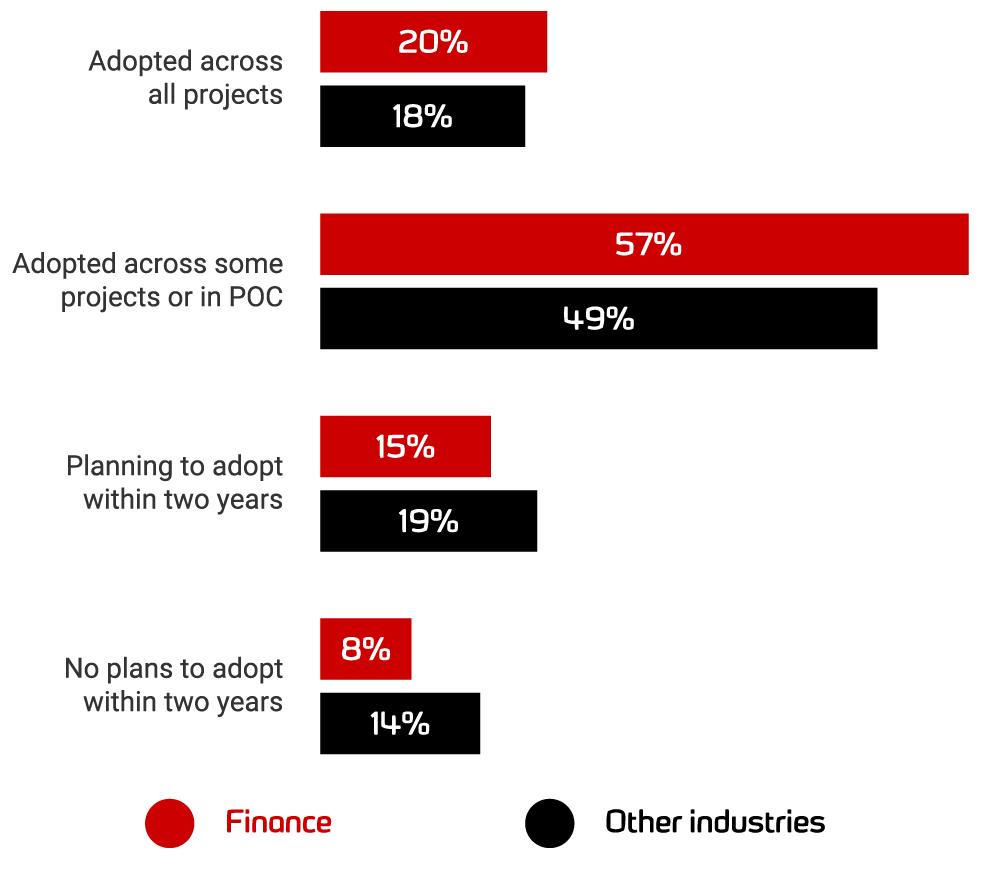
    According to the “2020 State of Database DevOps report“ by Redgate, financial services organizations report the highest levels of database DevOps adoption this year, with proportionally higher rates than any other sector. That shows financial sector maturity in terms of digital innovation. 

    Image source credit: Redgate

    Case Studies of Financial Companies and Their DevOps Journey

    Barclays DevOps Adoption

    In 2015, Barclays announced it was adopting DevOps for its digital transformation journey. Barclays processes payments that equate to around 30% of the UK’s gross domestic product. The developers’ morale and quality of code increased because of DevOps and the leadership team at Barclays credited DevOps with significantly reducing the complexity of its codes, which has allowed the company to reduce delivery risk and ultimately, improve the quality of services.

    DevOps the Lunar Way

    Lunar Way’s journey shows you don’t have to be big to use Kubernetes. The company started its cloud-native DevOps journey by splitting its massive monolith application into smaller microservices. To spin up these microservices, Lunar Way used Ansible, Terraform and Jenkins and to deploy these microservices as a whole unit. 

    Then Lunar Way started to experience scaling issues with microservices and didn’t experience any of the microservices benefits. 

    The company started looking for ways to move past this complexity by shifting its focus from machine-oriented to application-oriented architecture. It chose Kubernetes as the abstraction layer along with AWS, not worrying about where the containers are running, and this is how it was able to manage and unlock the velocity of microservices. Lunar Way also chose Kubernetes from a security perspective and to specify how the applications should run. Now the company runs around 80+ microservices in production with the help of Kubernetes. Watch and learn how Lunar Way did it: “Two years in production with Kubernetes.”

    Italy’s Biggest Bank Embraces DevOps

    A conventional bank running its real business on such a young technology? No way, are you kidding me? Nope, I am not kidding. 

    Italy’s banking group, Intesa Sanpaolo, has made this transition. Banks still run their ATM networks on 30-year-old mainframe technology, so embracing the hottest trend and tech is nearly unbelievable. 

    Even though ING, the banking and financial corporation, changed the way the banks were seen by upgrading itself with Kubernetes and DevOps practices very early in the game, there was still a stigma attached to adopting Kubernetes in highly regulated and controlled environments including health care and financial services. The bank’s engineering team came up with an initiative strategy in 2018 to throw away the old way of thinking and started embracing microservices, container architecture and migration from monolithic to multi-tier applications. Today, the bank runs more than 3,000 applications. Of those, more than 120 are now running in production using the new microservices architecture, including two of the 10 most business-critical for the bank. 

    HSBC Going the DevOps Way

    HSBC is changing the way typical banking works with cloud-native technology and DevOps, as an early user of Google’s Cloud Services Platform to provide core banking services to its business customers. 

    HSBC plans to build its all-new business banking service to run on a Kubernetes-managed container infrastructure using Google’s toolset. HSBC also has excellent partnerships with AWS and Microsoft, favoring the multi-cloud strategy. The company’s engineering team believes that moving to a container model under the umbrella of Kubernetes is significant because it means the environment is similar across different clouds. HSBC also hired people from outside of the banking sector because it wanted to change its culture from within. HSBC is said to have invested $10 million so far in its DevOps initiative.

    Capital One’s Agile to DevOps Journey

    Capital One’s Agile journey started in late 2011, with just two teams, which expanded slowly as more teams were trained in Agile development. The developers at Capital One were following the Scaled Agile Framework (SAFe). Initially, since the teams were new to the automation methodologies, integration testing, security testing, unit and performance testing were all done outside of development sprints by separate test teams. Later, once they understood how important it is to have a collaborative culture, they integrated testing into the dedicated DevOps teams and automated it well. Then slowly, they moved all testing into development sprints, adopting a culture of DevOps and uniformity and wiring integration, security and performance testing into a continuous delivery pipeline. As of 2016, the company had more than 700 Agile teams following continuous delivery.

    DevOps at Bank of America

    Bank of America is one of the world’s biggest financial institutions following DevOps practices, and its digital enterprise operations support nearly 4,300 retail financial centers and approximately 16,600 ATMs worldwide. The award-winning digital bank has nearly 38 million active users and approximately 29 million mobile users.

    Automating Security and Compliance

    As DevOps continues to evolve and become mainstream, it will continue to be of interest for many senior managers across financial services. The above case studies show they are already making DevOps a priority. But security and compliance remain barriers slowing the innovation in the financial companies. 

    Organizations should start small and keep security high priority, first using continuous integration and then adding continuous delivery and deployment using the available tools in the market. Over time, the more a company automates, the higher return on investment it can achieve.

    Automating security permissions and controls will help financial companies remove some of their most common software barriers and get their releases out quicker than before, while still maintaining the necessary governance and compliance. 

    Take a Step Forward

    Financial services companies need complex and rigorous software development processes to meet intense corporate and regulatory requirements. Yet, they are expected to release software faster than ever to meet expectations and beat the competition. By starting small and keeping security and compliance in mind, DevOps in finance can be achieved with great success.

  • Why It’s Time for Site Reliability Engineering to Shift Left

    By adopting a multilevel approach to site reliability engineering and arming your team with the right tools, you can unleash benefits that impact the entire service-delivery continuum

    In today’s application-driven economy, the infrastructure supporting business-critical applications has never been more important. In response, many companies are recruiting site reliability engineering (SRE) specialists to help them improve reliability, availability, latency and a host of other metrics that impact customer satisfaction. These vital new people resources are focused on keeping sites and services running in peak form.

    There are clear limitations to this operations focus, though. A service is made up of many application components that can impact business-critical services. How do you ensure reliability is baked into each app and each code change if your engineers focus only on backend performance?

    Some trailblazers are beginning to tackle this issue head-on, tasking their SREs with taking on new roles that support key stages of the DevOps life cycle. The goal is to take early, proactive steps to ensure quality and reliability are built in from the beginning.

    A Path Pioneered by Test Teams

    To understand why this “shift left” is so important, consider recent revolutionary changes in the software testing function. Not that long ago, testing was considered a distinct phase in the software life cycle, timed to begin well after the work of application developers was done. Testing Centers of Excellence uncovered defects and passed code back to the development team for rework.

    As developers moved to agile sprints, though, this approach to testing quickly became a bottleneck. By the time Centers of Excellence uncovered issues, developers had moved on to other projects. In response, new continuous testing programs emerged, staffed by a new breed of software development engineers who had honed their testing skills.

    These individuals are now embedded with development teams to ensure applications are built better from the start. Open source test automation tools help them test early and often, without impeding agile delivery schedules.

    It’s important to note that Testing Centers of Excellence haven’t gone away. Instead, they have taken on a broader leadership role and are now responsible for coordinating testing across the enterprise in support of continuous software integration and delivery.

    A 3-Level Model for SRE

    There is much that SRE teams can learn from the experiences of their testing colleagues. To produce optimal results, it is important to integrate reliability experts into your organization’s overarching agile framework. Consider adopting the following three-level model that shifts the function to the left and integrates skilled engineers at key points in the DevOps life cycle:

    1. Application level. Embed SREs with development and testing teams to ensure application components and new releases won’t disrupt reliability. These individuals focus on application-level service objectives, error budgets and integration into the DevOps pipeline.
    2. System level. Assign SREs to focus on the applications in your organization’s release train. These individuals support release and launch coordination, evaluate system architecture readiness and ensure your organization meets systemwide service-level objectives.
    3. Enterprise level. Establish a Site Reliability Engineering Center of Excellence, staffed by engineers who oversee the governance of your enterprise architecture. These individuals establish best practices and select the tools and resources required to support your site reliability function companywide.

    An Expanded Toolset

    To support this broadened role, you will need tools that can support your engineers across the entire DevOps life cycle. You will need to be able to see and track issues engineers uncover and to evaluate system-level readiness and performance against your service-level objectives. You will also need a big-picture view that spans activity across the entire enterprise.

    Fortunately, a new generation of solutions is now available to help, powered by artificial intelligence, machine learning and intelligent automation. These resources can help your team process massive amounts of data from disparate toolsets and turn that data into actional insights. As a result, you’ll have all the lifecycle analytics you need to be effective in your new and broadened role.

    SRE and Shift Left: Broad New Benefits

    By adopting a multilevel approach to sire reliability engineering and arming your team with the right tools, you can unleash benefits that impact the entire service-delivery continuum.

    You can build a continuous cycle of feedback, collaboration and governance that spans design, development and the launch and operation of new services. You can better manage configuration changes, service levels and error budgets. You can get a clearer view of application reliability and production readiness to guide planning initiatives and to help you prioritize investments.  And you can build better-informed business cases to move your organization forward. Shifting left is clearly a win-win move.

  • Do Cloud Desktops Have a Place in DevOps?

    Do Cloud Desktops Have a Place in DevOps?

    If you were asked to name the most important cloud-based tools and services for doing DevOps, chances are that cloud desktops would not make it on the list. Your mind would probably instead go to IAM frameworks, cloud-based CI/CD suites and cloud IaC tools.

    But for DevOps practitioners, as well as the end users they support, cloud desktops offer just as many advantages as these other types of cloud-based solutions. By moving your entire desktop to the cloud, you can achieve stronger collaboration across teams, gain security benefits, streamline app deployment and more.

    What is a Cloud Desktop?

    A cloud desktop is a desktop environment that is hosted by a virtual machine running in the cloud. Just as you can use VM instances on a cloud platform such as Azure Virtual Machines or AWS EC2 to host virtual servers, you can do the same thing with desktops.

    Cloud desktops have been around for a while. Amazon, Azure and Google Cloud all offer versions of this type of service. So do companies such as Citrix and VMware.

    Chances are, however, that these types of cloud services have remained under your radar if you work in DevOps. They haven’t received nearly as much fanfare as trendier types of cloud solutions, such as virtual servers or serverless functions.

    How They Can Benefit DevOps

    Cloud desktops can be just as useful to DevOps teams as other types of cloud services. There are a number of reasons why:

    • Universal access: First, cloud desktops ensure that you can access your apps and data from anywhere and at any time. You don’t need physical access to your development PC to modify code and you don’t need to worry about using a VPN to log into on-premises management tools. This anywhere, anytime access is especially useful if you are troubleshooting an issue from out of the office. During downtime, you don’t want to have to travel on-site to access your tools.
    • Scalability and performance: When your desktop is hosted in the cloud, you get all of the scalability and performance that the cloud brings. Do you need to add more RAM or CPU power to make your CI/CD tools run faster? Do you need more storage? These resources are just a click away for a cloud desktop. You can even use specialized configurations such as GPU-arrayed cloud instances if you need to run special workloads. The flexibility that virtual desktop hardware offers is a huge advantage over physical workstations, which require costly and disruptive hardware upgrades (or migration to new hardware) if you want to add resources.
    • Deploy to the cloud: If your DevOps tools and code live in a cloud desktop, you can deploy and manage applications to the same cloud without letting network bandwidth limitations get in the way. In other words, there is no need to upload code to a cloud platform before you can deploy it or to connect an on-premises tool to the cloud. Everything is running in the cloud already if it’s hosted on a cloud desktop.
    • Shared development environment: If you wish, you can share a single cloud desktop among multiple developers or DevOps engineers. This is advantageous if you have multiple people on a team who are working on the same project or app or who need to access a shared toolset to help manage CI/CD processes. Instead of trying to coordinate efforts across multiple machines, everyone can literally use the same device—although you can maintain security by assigning a different account to each user, of course.
    • Security: Whether you share cloud desktops between users or assign one desktop to each member of your team, you gain security advantages compared to on-premises workstations. You don’t need to worry about someone stealing your laptop and gaining access to all of your data or development tools when they are hosted in the cloud instead of on a local device. You can also use cloud IAM policies to control access to your cloud desktops, which makes it easier to streamline and consolidate security operations. You don’t have to maintain separate security regimes for your workstations and your cloud resources; instead, you can manage the security of both types of assets from the cloud.
    • Run on-premises tools in the cloud: In some cases, you may have a development or management tool that doesn’t run natively in the cloud. Your favorite IDE might run only on-premises, with no cloud IDE equivalent, for example. With a cloud desktop, you can host any app you want in the cloud by installing it within the cloud desktop environment. That way, you get the accessibility and performance benefits of the cloud, even for software that can’t run directly as a cloud service.

    These are the advantages that apply to DevOps teams in particular. The list would be longer if we were discussing the benefits of cloud desktops in general, which also include things such as a reduced need to maintain physical hardware and the avoidance of upfront capital expenses to purchase desktop hardware.

    Even though cloud desktops haven’t traditionally been thought of as a solution for DevOps teams, they offer a range of advantages for DevOps professionals. CI/CD tooling, storage management solutions and other DevOps tools have moved to the cloud, why not the entire desktop as well?

  • Embedded Analytics Essentials: A Checklist for Success

    Embedded Analytics Essentials: A Checklist for Success

    Integrating the analytics capabilities into your application can be easier than you think

    Today, the ability to create and explore dashboards and reports, embedded directly into the apps your customers use every day, is no longer a luxury but a necessity to keep your product competitive and deliver value to users.

    Embedded analytics brings many benefits for different groups. For end users, it’s a valuable tool to explore their data and discover new insights. For analysts, it’s an integral capability for advanced performance analysis. For product managers, it’s the best way to enrich and cultivate a data-driven experience for your customers with the latest analytical capabilities, built-in.

    Moving away from decisions based on instinct toward decisions based on analytics and metrics delivered by centralized systems is one of the most impactful changes you can drive today. But for product managers in the business of delivering software or utilizing an application to drive customer interaction, the choices available for embedding analytics is a looming challenge.

    This article covers the key challenges, scenarios and checklist considerations product managers need to tick off before implementing any type of embedded analytics solution.

    Embedded Analytics: A Business Case for Buy vs. Build

    Typically, the decision around embedded analytics boils down to build or buy.

    Even with a need for fast technical integration and time-to-market pressures, many product teams first lean toward getting in-house developers to build embedded analytics into their app.

    It’s an understandable first thought, given many have a specific vision for their app that a third-party might not ‘get’ immediately. But opting to build-in analytics more often than not leads to long-term challenges that aren’t always initially obvious.

    The fact is creating an analytics platform from scratch is a complex task that takes years of work to create and refine. Aside from the advanced data expertise and technical integration required, having your developers focus on embedding analytics means they now have to:

    • Face a very high investment cost to recruit the necessary skills for implementation.
    • Provide all support, maintenance and upgrades for your homegrown BI functionality.
    • Replicate the look and feel of your core application to ensure UX consistency.
    • Match the analytical features of specialist BI solutions—a near impossible task.

    With the time and skills needed to build your own analytics into your app from the ground up, you could face higher costs, increased risk and delayed time-to-market for your product—not to mention less time innovating and improving the core product experience for your users.

    Your users ultimately expect to have data accessible to them for their day-to-day work. When they use your product, they will demand a certain level of reporting and analysis comparable to the BI tools they may already use in their own businesses at the moment—and yes, it will go beyond just having basic dashboards. If you don’t have confident answers for the most common questions required before building an embedded solution in-house—do you have the expertise, the manpower, time and knowledge—it’s not advised to pursue the build path.

    So, what about buying an embedded analytics solution for your application?

    What to Look for in an Embedded Analytics BI Solution

    Buying an established embedded analytics solution often does away with many of the problems of building it.

    You can shift away from home-grown reporting to a proven platform that can seamlessly integrate custom analytics into your app, amplify the reach of your product by engaging new and existing users with the latest analytical features, and even automate data discovery and analysis so you gain competitive advantage—though the last capability depends on the particular vendor.

    However, buying comes with its own very important considerations that your product team and business as a whole need to evaluate and answer before making a decision. Below, we list the most important things to look for in both the embedded solution and the partner behind it.

    Does it include everything I need to meet end-to-end operational reporting needs?

    Your users will have a range of functional needs from the embedded analytics solution you buy, so the first thing you must answer is whether it can cater to their day-to-day work and provide access to advanced analytics. For instance, your customers want to know what to do next: Some might only need tabular reports (traditional), while others will demand richly visualized and interactive dashboards that drive action (modern). Eventually, some may look to use automation and AI in their analysis (augmented). The best options are those vendors that let you embed it all—dashboards, authoring, charts, collaboration, data preparation and modelling, admin and security. How each element is embedded (iFrames, JavaScript libraries with REST API calls) and where embedded code can run (cloud, desktop, mobile, web) is just as important to factor in, too. It’s not just about having dashboards in your app, but ensuring you have future-proof capability that continuously scales with your users as their data needs grow.

    Can the solution be embedded seamlessly?

    It’s not just all about having the best and latest features. A cohesive, seamless user experience between the analytics portion of your product and the core software itself is a big part of delivering an exceptional product, so when choosing to embed analytics, ensure the solution allows your team to have exceptional control to make it look like a part of your app rather than like one different app hosting another. Many modern embedded solutions allow you to white-label; this is recommended to allow for consistent design across your platform, as you will eliminate your users’ potential concerns around security, performance or support with using another product.

    Can it help me ensure faster time to market?

    A common problem with creating an embedded analytics solution in-house is the investment in time and money it takes to get your product to market with the new capabilities. It’s also difficult to ensure the integration process can be done as quickly and efficiently as desired. The embedded tool you buy should accelerate that process and significantly reduce the development cycle, so your team is able to begin using your new analytics within days instead of weeks and your devs stay focused on improving your product’s core value instead of configuring reports.

    Next Steps

    Selecting an embedded analytics product can be a difficult task, but so long as you keep your product and analytics objectives aligned and follow best practices checklists, integrating the latest analysis capabilities into your application is not as far-off a future as you may think.

  • Gitpod Allies with GitLab to Automate Setting Up Dev Environments

    Gitpod Allies with GitLab to Automate Setting Up Dev Environments

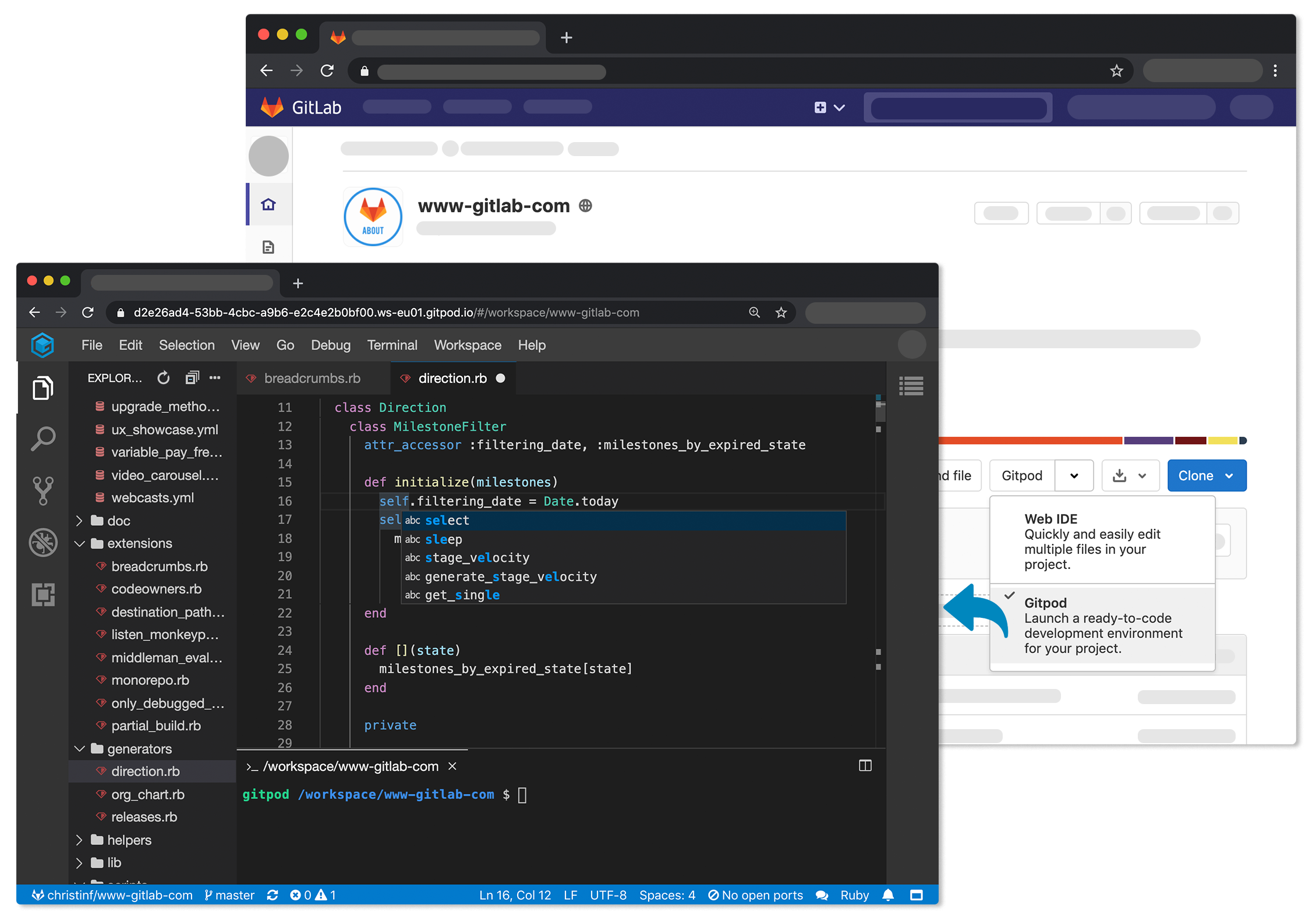
    Gitpod announced today that its open source tool for automating the setup of development environments is now integrated to the GitLab continuous integration/continuous delivery (CI/CD) platform.

    The Gitpod platform treats a version control system as the canonical source of truth from which it then automates everything a developer needs to start coding, including the integrated development environment (IDE), plugins, compilers, build tools, code generators, databases and application servers.

    Fresh off raising an additional $3 million in funding, Gitpod CEO Sven Efftinge said instead of wasting a half an hour or more waiting for a bunch of libraries and tools to get installed, a developer can click a button that allows them to begin coding within a few minutes.

    With the next release of GitLab, developers will also be able to connect their self-managed installation of GitLab to gitpod.io, which is a capability through which multiple git repositories can be registered. In addition, it’s possible to self-host Gitpod on a Kubernetes cluster in a way that integrates with GitLab or install the GitLab VS Code Extension in Gitpod to interact with GitLab.

    Efftinge said Gitpod provides DevOps teams with a tool to automate the setting up of development environments across any Git repository that is equivalent to the Codespaces tool that GitHub recently made available. Rather than having that capability for only one repository, Efftinge noted most developers work on projects spanning multiple types of repositories.

    By automating that process of setting up development environments it also become easier to align them with production environments. One of the reasons why code doesn’t work in a production environment when it is first deployed is because the local development environment has been manually configured in a way that doesn’t accurately reflect the production environment. That issue becomes even more problematic when developers are working on multiple projects involving, for example, separate microservices constructed using different repositories that might not even run in the same production environment. Collaboration also becomes easier when the members of the teams have standardized on the same instance of a local desktop environment.

    Gitpod, formerly TypeFox, collaborated with Google, Ericsson, Arm and Red Hat to develop the open source Eclipse Theia project, which provides a foundation for building IDEs in the cloud using TypeScript, CSS and HTML. Theia, now being advanced under the auspices of the Eclipse Foundation, consists of a front end running in a browser or in the local desktop application and a back end running on any host. Both communicate through JSON RPC over WebSockets. Gitpod leveraged that project to build its own cloud-based service in addition to the core open source project.

    In the wake of the COVID-19 pandemic, there’s naturally a lot more focus on automation and developer productivity. Most developers will be working from home for the foreseeable future to help combat the spread of the virus. Of course, most developers have been writing code outside the office for years. The challenge now is enabling teams of developers to develop applications as efficiently as possible regardless of where they are located. Eliminating inefficient manual tasks such as maintaining development environments is emerging as a significant step in that direction.

  • Maintaining Progressive Delivery Quality With Feature Flags

    Maintaining Progressive Delivery Quality With Feature Flags

    How does Netflix know exactly what you want to watch? How do social networks ensure major software updates are smoothly deployed across millions of users? The answer, in part, lies in progressive delivery. Progressive delivery, the incremental introduction of new features, has become key to rolling out new features. By testing unproven features on a small subset of users, platforms can advance quickly while keeping rapport with the main userbase. But, where does QA fit into the progressive delivery cycle?

    As software development teams face the need to iterate rapidly, the role of QA engineers is evolving as well. QA teams are increasingly assigned to support new customer experience initiatives and meet developer consumer needs. They must do so while understanding which customer metrics to monitor as developers introduce new features.

    I recently chatted with Jeff Sing, lead software QA engineer at Optimizely, recently acquired by Episerver, to explore how feature flags could be used to maintain quality and respond to user feedback throughout a progressive delivery life cycle.

    Defining Progressive Delivery and Feature Flags

    Progressive delivery is is a software release style that emphasizes very early code pushes and rapid feedback. By testing features among small subsets of a greater user base, developers can quickly gauge what works and what doesn’t.

    Feature flags are a necessary component to make progressive delivery work. Also called feature toggles, feature flags are switches that enable developers to turn a feature off or on, helping engineering teams test unfinished features or alpha features while avoiding maintaining multiple branches. “Feature Flags are a powerful technique, allowing teams to modify system behavior without changing code,” wrote Pete Hodgson in a post on MartinFowler.com.

    Feature Flags Enable Experimentation

    Adopting feature flags for progressive delivery allows for a lot of experimentation, said Sing. For example, companies could test a new user interface adjustment on a small subset of users. If it works well, the team could further and optimize it for specific user tastes.

    “Why would you want to build something that no one wants to use? How do you know you’re building the right thing?” asked Sing.

    Iterative release strategies are nothing new—and they go by other names: canary release, A/B testing, targeted rollouts and feature gating. However, what seems unique about feature flags is the ability to optimize granularly.

    For example, if you compare a friend’s Amazon home page with your own, you will likely find the dashboard, product recommendations and overall UI vastly different. These companies are continually “running active experiments on a per-user basis,” said Sing. This enables them to personalize experiences to niche user tastes, in real-time.

    Many other companies are utilizing progressive delivery tactics. Blue Apron, for example, adopts experimentation to find and refine business value. Experimentation is core to how HelloFresh distills its customer experiences. Compass also uses progressive delivery tooling to enable feature flagging within a suite of apps serving various platforms.

    For QA teams, this means shifting right—from business testing to nano-testing at the pace of constant delivery. Thus, QA teams must have an active role—“continually test customer feedback and continually reiterate on that feature,” said Sing.

    Implementing Feature Flags: QA Shifts Right

    By adding customer feedback into the continuous delivery loop, feature flags aid incremental deployment strategies and become essential for DevOps. So how do we implement feature flags in our application development processes?

    If we’re testing a single function within a small product, an obvious idea would be to comment out or uncomment code. But, that doesn’t scale well. Developers could, instead, program a conditional variable. However, there is still more dynamic feature-toggling options. More advanced solutions may involve a toggle router and/or a UI-driven alternative.

    Sing described a system using switches written as YAML files and adopting a visual dashboard to toggle on/off features. This setup can enable a process whereby the developer checks in code and passes it to site reliability engineers (SREs) or QA managers. They can then initiate testing in production, view data from beta users in real-time and respond accordingly.

    Integrating with a CI/CD pipeline would be the next logical step. Each build could carry many potential features within each build. If a flag in the code is on, the system would execute all code and components can easily be turned off or on remotely. This way, engineers “can control how things are represented in real-time without a code deploy,” said Sing.

    Melding feature flags and progressive delivery returns extremely valuable data, Sing said. If teams can see metrics such as system behavior, bounce rate, customer NPS score and business conversions, they can better increase the quality of future deployments. “You can’t argue with hard data,” he noted.

    Benefits of Feature Flags

    Utilizing feature flags within continuous development appears to afford many benefits. In the process, QA plays a more present role in how engineering teams roll out (or roll back) new features. “QA must understand the business impact and customer story,” said Sing. “It’s not just about uptime; it’s the experience, too.”

    As you can see from the use cases above, progressive delivery with feature flags brings many benefits:

    • Quick validation: Bring new product features and proof of concepts faster to market faster by improving testing.
    • Experiment and iterate: Release incremental software versions. Experiment with new or unfinished features that consider fringe cases.
    • Development: Avoid constant merging of branches.
    • Reflect customer journey: Gather more heuristics on the customer journey to test and measure customer data.
    • Optimize per-user: Test and optimize for user tastes. “Why would you want to build something that no one wants to use?” For Sing, targeted rollouts can answer that user imperative immediately.
    • Limit blast radius: If new features introduce outages, easy togglable capabilities mean they can quickly be turned off and put back into development, thus increasing service reliability.

    Drawbacks of Feature Flags

    Feature flags introduce many efficient methods for testing new features, but they don’t come without side effects in other areas. One potential drawback of feature flags is supporting a vast number of intricately defined user scenarios.

    With each segmentation comes new optimization requirements and support must adapt to a quickly growing archive of various feature sets. Companies need advanced tooling to support the easy addition or removal of features. “You need the power to understand what’s going out and how you manage it,” Sing noted.

    A fractured ecosystem with thousands of microservices can become difficult to support continuously. Engineering teams must draw the line somewhere between endless optimization and retaining a cohesive product. Ideally, developers can reuse base components but represent them in different ways.

    Another negative side effect is public opinion. With the release of Social Dilemma and related tech industry critique, many user-facing tech networks are under harsh criticism due to the unethical use of user data to develop hyper-targeted ad campaigns. Optimization tactics that disrespect users should be frowned upon.

    This is not to mention regulations around user data and privacy. If users do not grant consent to share user data to “improve the user experience,” engineering teams won’t have the necessary metrics and tracking data required to decide which features to implement.

    While feature flags appear to help optimize business value, there are many potential “gotchas” to carefully consider before implementation, from technical logistics to service fragmentation, user ethics and legal ramifications.

    Final Thoughts

    “As with any new technology, if you don’t use it correctly, it’s almost better if you don’t use it,” said Sing. If progressive delivery isn’t managed correctly, with a QA mindset, it could come back to bite them.

    As we continually build new tech to ship faster and smarter, it’s also important to consider customer needs. “Automation is great, but a computer can’t understand what a customer really wants,” Sing noted. To avoid the technical hurdles and social dangers of hyper-personalization, QA should be customer champions that consider customer happiness.

  • COBOL Is Taking Heat, but These Other Legacy Languages Could Burn You

    COBOL Is Taking Heat, but These Other Legacy Languages Could Burn You

    COBOL is under fire, and as states such as New Jersey make headlines following vital system crashes that its citizens depend on—such as unemployment benefits—organizations are pointing fingers at the programming language as the source of their technological woes. However, while COBOL is a 50+-year-old programming language, there are still many use cases for it today. In fact, systems programmed in COBOL can modernize and continue to thrive in today’s business environment, even without transitioning to a new language or platform.

    While COBOL itself isn’t the problem child that most IT leaders and government entities say it is, there are a variety of other legacy languages—such as CA Gen, CA Telon and Natural—that pose a far greater threat to an organization’s overall functioning and long-term success. That said, there is still hope for organizations utilizing systems coded in legacy languages.

    Get on the CASE

    Two of the top languages that enterprises should be alert to—CA Gen and CA Telon—are Computer Aided Software Engineering (CASE) application development environments that were developed in the late 1970s and early 1980s and offer code generation, enabling the power of abstraction on the mainframe, essentially serving as an early stage ancestor of the “low-code” concept. This approach offered significantly more agility to developers at the time, but these programming languages have since fallen from the spotlight and, similar to COBOL’s limited pool of talent, have an even smaller pool of skilled developers that can assist with updating and maintaining these systems. This challenge traps many organizations in long-term contracts that they can’t seem to escape from.

    A major selling point of the CA Telon and CA Gen product lines was that its services were often offered within bundles—granting users with access to other mainframe utilities and services within a single licensing contract—but as time goes on and new technologies emerge, the advantages of this approach have fallen by the wayside. However, many organizations are trapped within expensive licensing fees and complicated bundling programs that make it difficult to sever ties with the legacy platform entirely.

    CA Gen and CA Telon act as generators of COBOL code, meaning that developers utilize tools in a language like CA-Gen but when it runs on the mainframe the system is running on COBOL. The COBOL within the mainframe then references CA-Gen and CA-Telon libraries, which makes it easy for developers to reference specific functions but ultimately produces code that is unable to be read by a human person. This creates significant complications for doing anything outside of the CASE environment—even tasks as simple as routine updates—but especially for digital transformation initiatives.

    While few organizations are purchasing CASE development solutions as new products, those that utilize these tools are constantly renegotiating the terms of their agreements to keep costs down, enable easy updates to their own unique systems and meet the emerging demands of today’s market. If they can successfully pull it off, they have another challenge: finding the talent who understands these obscure languages to implement necessary system changes. That said, the best solution for these organizations is to break away from these languages entirely—and this can be achieved relatively easily with automation through carefully selected modernization solutions.

    Why Natural Isn’t a Natural Choice

    In addition to CA-Gen and CA-Telon, one legacy language that all organizations should be alert to is Natural. Similar to the look and feel of COBOL but more abstract and powerful, Natural is a fourth-generation language (4GL) that was originally designed to enable agility and efficiency—but today, there are fewer than 100 companies utilizing this language. As a result, there is a scarce number of developers who can address and assist with any issues that arise within systems utilizing Natural. What’s more, most of these organizations don’t know they have a way out. This puts organizations at risk any time that a change to their operational systems is made, as the limited availability of specialized developers can make it especially difficult to achieve these updates.

    In most cases, Natural is utilized in tandem with the Adabas database, which can exacerbate the maintenance and extensibility issues that come from a shrinking talent pool—and when it comes to modernizing these environments, they’re often peppered with other programming languages such as COBOL and assembler, adding complexity to the job.

    Beyond COBOL: Choosing the Right Modernization Strategy

    For organizations looking to break away from obscure languages and mainframes, the best option for both their immediate and long-term goals is to pursue some form of modernization—and in most cases, the best result is to translate these languages into cloud-ready languages such as Java or C# via an automated refactoring initiative. Automated refactoring can also be utilized to consolidate these applications to a single language such as COBOL while remaining on the mainframe—although moving from an abstract language to a more procedural alternative can present challenges.

    By pursuing an automated refactoring strategy, organizations can move mountains of information, records and personalized code away from their mainframe and translate their system into a modern architecture. This allows organizations to untangle the “black box” of personalized code that exists within their systems and replace them with languages such as Java, C# or even COBOL, which unshackle companies from high licensing costs and have a much broader talent pool of developers. The resulting modernized system is easier to maintain, escapes high licensing costs and moves the business closer to cloud readiness, opening the door to modern development practices and tools. What’s more, in addition to saving significant funds by eliminating the costs associated with maintaining these legacy systems, an automated refactoring solution can help an organization to save years on its overall modernization process.

    While languages such as CA Gen, CA Telon and Natural are less common in the industry, these archaic languages can present significant challenges for businesses as they work to meet the demands of customers and partners. In the world of information technology, the only constant is disruption—and organizations need to get started on their modernization journey before it’s too late.

  • SOFIHUB Relies on DevOps to Support Independent Seniors

    SOFIHUB Relies on DevOps to Support Independent Seniors

    How DevOps is helping one company ensure an active older population can remain independent

    SOFIHUB home is designed to support older people who wish to live as independently as possible. However, its sensor-based system needed an upgrade to improve the user experience.

    The SOFIHUB technology connects wirelessly to sensors placed around the home and learns the individual’s habits. When it detects deviation from the user’s routine or other issues, it asks if they are OK. Unless the answer is affirmative, it automatically contacts a nominated carer.

    However, the existing products were created with a risk-aversion mindset and built to standards rather than user requirements, which sometimes impacted the user experience. “The market required a change,” said SOFIHUB CTO Ian Aitken.

    For example, personal alarm pendants intended to detect falls generated four false alarms for every real fall they detected. A common cause of false alarms was the pendant accidentally hitting a piece of furniture.

    In any case, only 4% to 12% of pendant owners actually used their devices, he said, mostly because they forgot to put them on after showering or dressing in the morning. Plus, many often regard pendants negatively, referring to them as “cowbells.”

    So SOFIHUB changed its approach, placing movement sensors around the home to detect when the person moves from one room to another.

    The SOFIHUB System

    The sensors communicate via Z-Wave with the Raspberry Pi-based SOFIHUB home, which processes the data. The Raspberry Pi is capable, stable and cheap, said Aiken. But the finished product required additional custom electronics to provide power management and other functionality. The designers also added a microcontroller that monitors the Raspberry Pi and restarts it if necessary.

    Caregivers receive alerts if the person is late to bed, late to rise or spends longer than usual in the bathroom, or if there is a lack of movement for longer than usual. Machine learning algorithms developed in conjunction with Monash University detect these patterns.

    SOFIHUB is also able to deliver reminders such as those for appointments and birthdays or, working with a medicine cabinet sensor, when it’s time to take medications.

    The optional SOFIHUB beacon is a panic alarm that can also generate alerts when it detects the user has left a geofenced area or has fallen. Since the hardware is basically a mobile phone without a dial pad, caregivers can call it to converse with the user.

    Where the use of conventional pendants was about 10%, the use of the SOFIHUB beacon is around 60%, partly because the system reminds people to keep the beacon charged and take it with them. For example, it suggests they pick up the beacon from the charger once it has reached 80%.

    The system transfers data collected by the SOFIHUB home to cloud-based infrastructure for longitudinal analysis and other purposes.

    SOFIHUB Under the Hood

    The company developed and must maintain several layers of software: code for the main board and the microcontroller within SOFIHUB home, code for managing Wi-Fi and cellular communications, and the code that runs in the cloud. SOFIHUB uses containers and infrastructure as a service (IaaS) rather than platform as a service (PaaS), so it can easily move from AWS to another host if necessary.

    “We’re reasonably sophisticated,” said Aitken. For example, the company created a separate domain for a new corporate customer in around a day and a half, thanks to the level of automation within its DevOps processes.

    The SOFIHUB service is also available through alarm center companies to ensure someone is always available to react in emergencies. Onboarding a new alarm monitoring company is usually a quick process, even if custom features are required. Sometimes implementing old protocols still used by some alarm centers takes longer.

    “We are a highly skilled team of developers” and database experts, said Aitken. This “small, very agile team” works without dedicated operations staff, although two people specialize in building and maintaining implementation scripts.

    The AppDev Toolkit

    The team has adopted widely used tools (eg, Jira, Confluence, Slack, GitHub and CircleCI), and a well-developed release mechanism sees code start in a developer’s instance before moving into the AWS environment for additional testing.

    From there, it progresses to the user acceptance testing environment to deal with any UI and browser-specific issues. After that, the code goes into production.

    SOFIHUB does not do automated testing. Aitken said that’s because it actually slows development to an unacceptable degree, roughly doubling development time due to the effort needed to write the tests.

    New releases occur every Wednesday with two fortnightly development cycles running side by side. Aitken said he expects the pace will slow as the product becomes mature and foresees monthly releases starting sometime in 2021.

  • OverOps Taps Into Git Repos to Accelerate Code Reviews

    OverOps Taps Into Git Repos to Accelerate Code Reviews

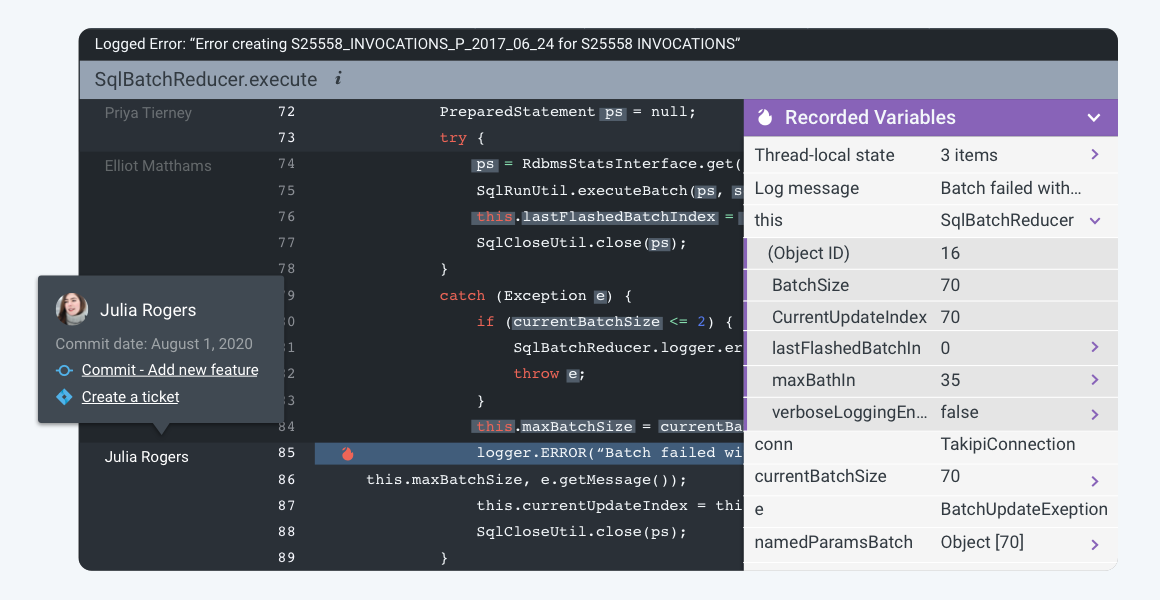
    OverOps this week announced it has added support for a git blame and automated source attach capability to its namesake platform for analyzing code that surfaces both root cause data for every error as well as the identity of the developer who owns that code.

    Eric Mizell, vice president of solution engineering at OverOps, said once those developers are identified, the OverOps platform will automatically alert them about the errors in the code.

    Every Git repository provides access to a git blame tracking command that identifies the authors of source code and the last time files were modified source file. The git blame and automated source attach capability extends that tracking command to accelerate the process of fixing errors that are discovered by the OverOps platform, which leverages machine learning algorithms and other forms of advanced analytics to perform static and dynamic analysis of code to detect errors in code before a DevOps team promotes code into a production environment.

    Mizell said this latest capability accelerates the remediation process by automatically routing critical alerts to the developers responsible for the last commit.

    Ultimately, DevOps teams should be able to spend less time in “war rooms” trying to resolve issues in a production environment because errors in code will have been addressed much earlier in the application development life cycle, he said.

    Naturally, there’s a lot of sensitivity when it comes to analyzing code. It will be up to each IT organization to determine the level of visibility into the quality of the code being created by each developer. Most organizations will simply route alerts to individual developers to address without making each issue the topic of a team review. However, organizations may want to track what types of errors are being made consistently to better inform training requirements.

    Regardless of approach, most experienced developers don’t want to spend a lot of time discovering the same issues multiple times when reviewing code someone else wrote. Tools that automate the discovery of those issues should enable development teams to focus their efforts on the more complex issues that inevitably arise when building modern applications.

    In the wake of economic downturn brought on by the COVID-19 pandemic, there’s a lot more pressure on DevOps teams to become more efficient. In many cases, the velocity at which applications need to be built, tested and deployed in the wake of the economic downturn has increased as organizations invest more in digital business transformation.

    Not every developer will enjoy have the code they wrote analyzed by a machine. However, most coders take pride in their work and would prefer to address in their own way any issue that may arise. The challenge is putting in place a code review process that results in better code being deployed faster without unnecessarily antagonizing the most valuable contributors to the digital success of any organization.