Category: DevOps in the Cloud

  • What Amazon’s New CEO Means for IT’s Future

    What Amazon’s New CEO Means for IT’s Future

    Amazon is placing its bets on the future of cloud. The announcement that CEO Jeff Bezos will be stepping down and passing the torch to Amazon Web Services (AWS) leader Andy Jassy at the start of Q3 2021 signals a major shift in the future of technology – and not only for organizations specializing in IT, storage and web hosting. Rather, the growth of AWS signals a multi-industry-wide demand for cloud services as the new normal for conducting business – and those that continue to rely on legacy technologies could soon see their businesses falter in the shadows of competitors in the near future. However, every company’s individual systems are entirely unique, and modernization doesn’t happen with a one-size-fits-all approach. So why should organizations invest in new technologies – and how?

    Setting Sights on the Cloud

    The pandemic has made painfully clear the need for organizations to get away from their aging legacy systems and to embrace the cloud for a variety of reasons. First, COVID-19 has forced almost all businesses, across all industries, to embrace more distributed networks – requiring business-critical systems and functions to be accessed from countless different sources at any given moment. This can prove a major pain point for organizations with IT infrastructures that are prone to difficulties and outages. These shortcomings can have a detrimental impact on customers and citizens, as well. In light of major IT outages in states like New Jersey, California and Oregon, it’s clear that pursuing a more modern approach to IT systems is no longer just an option – it should be the only option. This is because, in addition to the benefits for users and enhanced business function, there are added benefits for the company itself and the world at large.

    Shifting systems away from data centers requires significantly less energy to power – and as data centers are responsible for as much greenhouse gas emissions as the airline industry, the environmental impact coupled with operational cost savings enable businesses to meet customer demands for greener practices while reducing overall operational costs. What’s more, this change to cloud services will allow for horizontal scalability within organizations, ensuring that businesses are able to meet demands for their offerings in real-time.

    The Sky is the Limit: Strategies for Improving IT Infrastructure

    If your organization is relying on a mainframe, it won’t be able to reap the many benefits that cloud infrastructure has to offer – and organizations that shy away from making these vital updates run the risk of running their business offline entirely. As a result, the time to act is now – but in the rush to get IT departments in order, it’s vital that organizations choose a modernization strategy that is best suited to their unique business. For most organizations, a modernization journey begins with one of the four following approaches:

    • System Replacement: Sometimes, organizations aim to expedite their modernization journeys by doing away with their aging legacy systems entirely. Through a system replacement, organizations purchase off-the-shelf solutions from third-party vendors and conduct business via the new software while their existing infrastructure and applications are taken out of service. While this approach enables a speedier shift toward the cloud, it should be noted that these solutions aren’t tailored to a specific company’s needs or functions, and that these solutions can be especially costly.
    • Rewriting: In an effort to retain key legacy knowledge while enabling better business function, some organizations pursue a rewrite of their existing systems within a more modern environment. Through this approach, a team of professional developers work to manually recreate the system and its applications – which often results in an extended timeline for modernization, exorbitant costs and an especially high risk of complete project failure.
    • Automated Refactoring: Through looping in a team of IT experts, this strategy enables an organization to migrate their legacy system’s procedural code bases into object-oriented languages within modern environments that are more appropriate for today’s business demands. Using specialized and automated tools designed for the project at hand, this modernization strategy ensures that an organization has a system designed for its unique business cases and an immediate pathway to the cloud.
    • Rehosting: To help companies maintain their legacy information, many organizations pursue rehosting as part of their modernization strategy. In this approach, a company’s existing legacy codebase is transferred away from their mainframe and their unchanged procedural code bases, data and other core functions into a new computing environment that is more suitable for current needs. This fast-paced process helps to set organizations on track toward the cloud as quickly as possible.

    Aiming for the Cloud(s)

    Amazon’s shift in leadership is a testament to the growth potential and overall importance of the cloud – not only for companies that manage web services, but for all industries around the world. However, by proactively taking the steps to move away from legacy systems and pursue a cloud-first approach to business, organizations will be better positioned to maintain their revenue streams, improve scalability, drive customer satisfaction, reduce operational costs and even protect themselves from potential disasters down the line. By setting and sticking to a set strategy and timeline for modernization, companies can ensure the success of their most mission-critical applications and functions to ensure their continued success and survival in a world or rapidly changing business demands.

    The sky is the limit – are you ready to aim for the cloud(s)?

  • Red Hat Survey Reveals More Confidence in Open Source

    Red Hat Survey Reveals More Confidence in Open Source

    A recent Red Hat survey revealed how DevOps teams increasingly depend on open source to support their shift to cloud-native environments and digital transformations, and to maintain security in these highly distributed environments.

    Based on a survey of 1,250 IT professionals, Red Hat maintains that the survey respondents — from organizations that were Red Hat customers — were unaware that Red Hat sponsored the study to help avoid “biased or influenced responses,” Red Hat said in a statement. 

    During the past two years, the number of organizations that deemed open source necessary for their digital transformations increased 11% to 53%, representing the majority of the respondents’ organizations. 

    The vast majority (87%) of the respondents considered open source to be “more secure” than or “as secure” as proprietary software, while 84% indicated that enterprise open source “is a key part of my organization’s security strategy.”

    While the survey reflects open source’s importance for security for IT professionals in DevOps, its support of the overall business mission is key, as well, says Momodou Jaiteh, application security consultant at nVisium, an application security provider.

     “Information security is about reducing and mitigating risk to enterprises, from technology, people and process perspectives. It helps enable the business to operate securely in the best interest of its shareholders and customers,” Jaiteh said. “Thus, security typically plays a supporting, [but] nonetheless critical role in the success of the business, especially in a digitally connected world.” 

    Open source software often helps businesses reduce overhead cost in delivering services to their customers through reduced time to market, Jaiteh said. One major additional advantage is “visibility and input from a lot of different people,” Jaiteh added. 

    “Greater visibility often translates to more observing eyes on all aspects of the open source software, which often translates to better security. This is even better for mission-critical software that deals with sensitive information, such as cryptographic algorithms, etc.,” Jaiteh said. “It is not a surprise to see open source used more in infrastructure modernization, because as we move to DevSecOps models of software delivery, infrastructure often is the bottleneck. Therefore, solving for infrastructure helps developers focus on aspects that are unique to their business.”

    While survey respondents ranked improving collaboration between IT and business stakeholders to achieve a digital transformation as their highest priority, implementing cloud technologies or infrastructure ranked second. Infrastructure modernization is thus seen as a prerequisite for a full digital transformation, said Dirk Schrader, global vice president, security research at New Net Technologies (NNT), a cybersecurity and compliance software provider.

     “Open source plays a vital, pivotal role in almost all digital trends driving any industry sector today,” Schrader said. “Cloud computing or containerization is rooted in open source technology, many development libraries are open source, and the market for open source solutions has been a model for servitization; the changes in one’s business model away from selling a product to selling a service, or an integration of service, and product that focus on additional value-add for the customer.”

     For security, the main advantages consist of being able to review, inspect and audit “each and every piece of code,” Schrader said. 

    “The ability of open source to be a base for services makes it the natural companion for any digital initiative,” Schrader said.

  • Sysdig Adds CSPM Module to DevSecOps Platform

    Sysdig Adds CSPM Module to DevSecOps Platform

    Sysdig today announced it added a cloud security posture management (CSPM) module to its Sysdig Secure DevOps Platform for monitoring application performance and security to enable IT teams to continuously detect threats.

    Pawan Shankar, director of product marketing for Sysdig, said this CSPM capability is based on an open source Cloud Custodian tool that enables IT teams to define rules for accessing cloud infrastructure. In addition, the tool enables IT teams to collect utilization metrics that could be used to turn cloud resources off when they are not being employed. IT teams can now also automatically discover all cloud services being employed, including identifying which ones are misconfigured or might have compliance and regulatory issues that need to be addressed, via a software-as-a-service (SaaS) platform.

    The overall goal is to help reduce the friction that organizations encounter today as they embrace DevSecOps best practices, added Shankar.

    Sysdig is making its CSPM offering available for free, for one account, to encourage DevOps teams to make use of a CSPM capability along with Sysdig’s open source Falco threat detection capabilities. Sysdig today also announced that it extended its implementation of Falco to consume audit logs created on the Google Cloud Platform (GCP). Sysdig donated Falco to the Cloud Native Computing Foundation in 2018. More recently, Sysdig also contributed a sysdig kernel module, along with libraries for the Falco security platform for Kubernetes, that runs in the extended Berkeley Packet Filter (eBPF) microkernel to further improve Linux security.

    The free tier includes a daily check against CIS benchmarks as well as support for inline scanning of up to 250 container images per month running on either the Fargate or Elastic Container Registry (ECR) services provided by Amazon Web Services (AWS).

    Sysdig has been making a case for the convergence of traditional IT monitoring functions and security for several years now. In the wake of some recent high-profile breaches involving software supply chains, the company is betting that more DevOps teams will soon be revisiting how their software supply chains are managed at a time when it’s become easier for malware to move laterally across an entire IT environment. In fact, Sysdig cited research that estimates that malware moving laterally through an organization is involved in 70% of cyberattacks.

    Of course, with the rise of applications based on microservices, the average IT environment is about to become a lot more integrated, which naturally makes it easier for malware to move laterally. IT organizations now require greater visibility across an entire potential attack chain to combat those threats, Shankar noted.

    As DevSecOps continues to evolve, the relationship between developers and cybersecurity teams is also clearly evolving. Now that developers are being held more accountable for cybersecurity, many of them are gravitating toward tools that can be easily integrated within the context of a larger DevOps toolchain.

    It remains to be seen exactly how security tools will be integrated within those tool chains, but for DevOps teams that already rely on Sysdig to monitor their IT environments, the ability to access a raft of additional security services is only a few mouse clicks away.

  • Solvo Automatically Crafts Cloud Security Policies

    Solvo Automatically Crafts Cloud Security Policies

    Solvo today announced general availability of a namesake tool that automatically creates a least-privilege policy and applies it to application workloads deployed in the cloud.

    Previously available only as a private beta, Solvo will also continually analyze a workload after it’s been deployed to enable IT teams to adjust security policies as additional updates to an application are made.

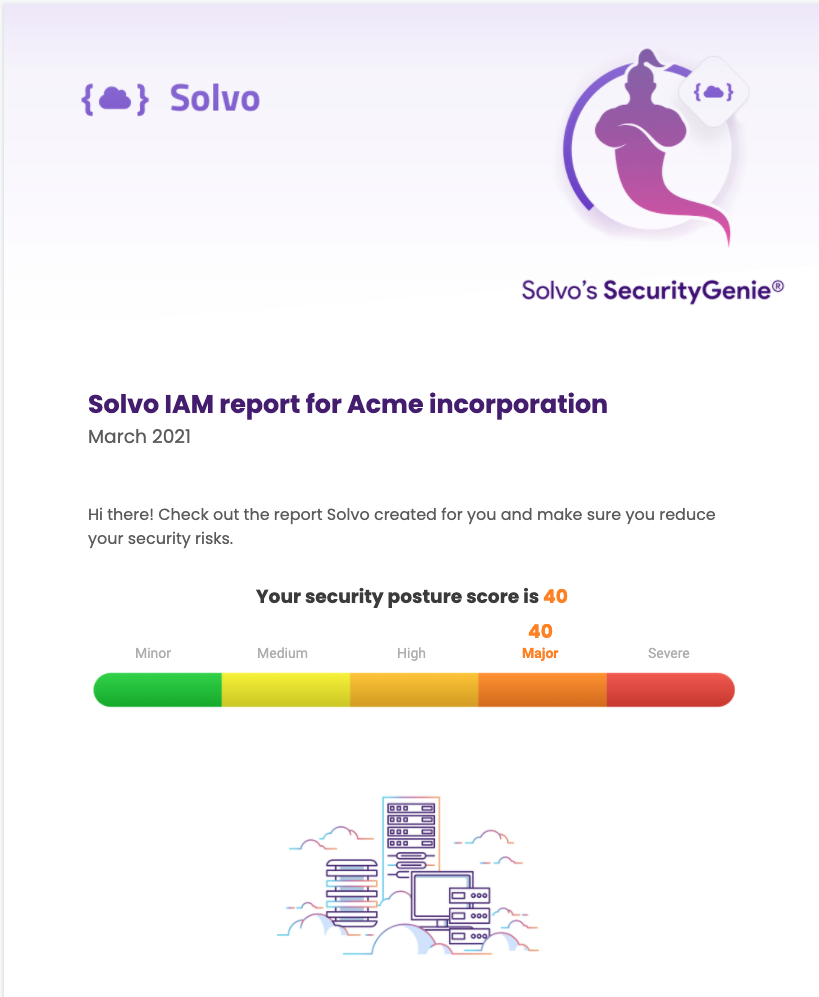
    In addition, Solvo is making available for free the Solvo Security Genie, which IT teams can use to identify misconfigurations, excessive permissions, privilege levels and third parties that may have access to accounts on the Amazon Web Services (AWS) public cloud.

    Shira Shamban, Solvo CEO, said the primary reason there are so many cloud security issues today is because developers – that lack cybersecurity expertise – are being asked to define policies. Solvo removes that burden by analyzing a workload and creating a cybersecurity policy before applications are deployed in the cloud. That cybersecurity policy can then be automatically applied by the developer.

    Shamban said that approach will reduce a lot of the DevSecOps tension that organizations are currently experiencing as they try to shift responsibility for cybersecurity further left toward developers. While no developer deliberately sets out to deploy an insecure application, shifting responsibility for cybersecurity to a developer who doesn’t really understand what’s required creates a lot of additional stress.

    The Solvo platform, available as a paid subscription or under a freemium model for individual developers and teams, addresses a lot of the cloud security issues that inevitably arise when infrastructure is provisioned as code by developers. It eliminates that stress by automating the creation and application of cybersecurity policies within the context of a DevOps workflows, said Shamban.

    However, a cybersecurity team can also manually edit those cybersecurity policies after an application is deployed, Shamban added.

    As DevSecOps best practices continues to evolve, it is clear the relationship between developers and cybersecurity teams needs to evolve, as well. For a long time, many cybersecurity teams viewed developers as the primary source of the problems they encountered. Getting used to the idea that those same developers are now going to solve those issues on their own requires a level of trust that will take time to build.

    Developers, for their part, are generally accepting of the idea that they should take more responsibility for security, so long as the tools provided to them are not selected by cybersecurity professionals that don’t appreciate application development workflows.

    In time, there is no doubt the cultural divide that exists between developers and cybersecurity teams will narrow. However, it’s arguable that more progress will be made, more quickly, if developers are allowed to choose their own security tools rather than accept an edict from on high mandating a specific approach. In fact, the best course of action for many IT teams is simply to offer words of encouragement to developers that elect to set an example for the rest of their colleagues.

  • LeanIX Extends Application Management Reach

    LeanIX Extends Application Management Reach

    LeanIX today unveiled a catalog that enables DevOps teams to more easily track the relationships between microservices as they are built and deployed.

    At the same time, the company also revealed it has acquired Cleanshelf, a provider of a platform for managing software-as-a-service (SaaS) applications.

    LeanIX CEO André Christ said the Microservice Intelligence catalog will make it simpler for IT organizations to keep track of their ongoing software development efforts, while Cleanshelf provides the mechanism for centralizing management of SaaS applications that are now widely employed across the enterprise.

    The Microservice Intelligence catalog is the latest addition to the LeanIX Continuous Transformation Platform used to manage enterprise applications. It automatically captures and correlates metadata being generated across disconnected toolchains, pipelines and Kubernetes clusters to create a 360-degree view of microservices and their dependencies, said Christ.

    In addition to being integrated with the LeanIX Enterprise Application Suite, Microservice Intelligence comes with out-of-the-box connectors for Kubernetes, Jenkins, GitHub Actions and Red Hat OpenShift platforms.

    By monitoring deployment frequencies, mean-time-to-recovery (MTTR) and failure rates, Christ noted it will become easier to make software engineering decisions based on data and insights surfaced via the Microservice Intelligence catalog. DevOps teams can also annotate the microservices recorded by the catalog to provide additional information, Christ added.

    The Microservice Intelligence catalog provides the added benefit of making it easier to onboard new developers, said Christ. Each new member of a development team can, on their own, explore the overall application environment without requiring an IT team to dedicate someone to describe it each time a new member of a DevOps team is hired, Christ noted.

    At the same time, other stakeholders, such as cybersecurity teams, can explore the application environment to better understand dependencies as well as the potential impact of a newly discovered vulnerability, Christ added.

    In general, Christ said, as application life cycle management across the extended enterprise becomes more complex it’s clear new platforms will be required to manage legacy monolithic applications, emerging microservices-based applications and SaaS applications that, in the wake of the COVID-19 pandemic, are being used to enable employees to work from home. The Cleanshelf platform, in particular, will be rebranded as LeanIX SaaS Intelligence to address that latter issue. A SaaS discovery and cataloging capability will also be made available as a free component of the LeanIX Application Portfolio Management module in the second quarter.

    IT environments have never been more distributed, and it’s clear most organizations are under pressure to reduce the total cost of IT by centralizing management functions. It’s too costly to dedicate a management platform for each type of application deployed across an extended enterprise. LeanIX is making a case for a platform that enables IT organizations to finally centralize the management of application environments.

    It’s unclear at what rate that centralization may occur, given the level of inertia that exists within most IT organizations today. However, as application lifecycle management continues to evolve, the centralization of the management of application portfolios that continue to grow is all but inevitable.

  • The Evolution of Technology Driven Banking

    The Evolution of Technology Driven Banking

    History repeats itself with every technological revolution, sparking the same old fears about job loss and human redundancy. Much of this is unfounded because each time, when routine and repetitive jobs got mechanized, those who were displaced often were elevated into bigger, better roles. The pattern was consistent across industries; whether it was manufacturing, retail, entertainment or banking, the technology of the day – from the steam engine to the mainframe – augmented and amplified, rather than eliminated, the work of human beings.

    This time around, the debate is about cloud-driven banking shaking up employment in the financial sector. But the reality is the same, as always.

    A Look at Banking Functions

    To understand what is happening, let us segregate various banking functions from an inside-out perspective. Strategy definition occurs at the top, at the level of the board and senior management. Lower down the order, the strategy is converted into plans, which are then executed by various teams. All these activities involve data operations such as collection, comparison, tracking, monitoring and course correction. There is no interaction with the end customer just yet.

    The second set of functions is aimed at achieving strategic and financial goals. These functions relate to business execution – expanding the corporate, retail or investment banking business, adding branches, acquiring customers and so on. The desired outcomes are defined as KPIs for individual managers, expressed as growth targets and budgets.

    The moment of truth is when these internal functions flow out of the bank to the last mile – in other words, when a frontline employee, such as a branch manager or relationship officer, comes in contact with the end customer. Not much has changed in the way banking has been transacted since 14th century Greece. The counter has been replaced by the teller window, but the interactions are still about facilitating lending, borrowing and payments. What has changed, however, is the number and type of participants. In addition to the money lenders and joint stock companies of old, today there are banks, of course, but also fintech firms and big tech companies. The mode of service delivery also has changed (perhaps beyond recognition) to include branches, mobile phones, websites, wearable devices and even social media applications.

    The Role of Machines

    Let us examine the role of machines (which includes software and digital technology, including cloud) in each set of functions. Strategy visioning and implementation clearly need human intelligence; however, machines can provide rich, accurate and timely data so the people in charge can make better decisions. Similarly, while planning activities – involving interpretation, visualization and application of past experience – too cannot be handed over to machines, they can certainly leverage machine learning to do what-if analyses and simulate various scenarios in real-time.

    Business execution functions offer more potential for humans and machines to actually work together, by farming out repetitive and routine work, such as data collection, comparison and analysis, to the latter. Following that, the human workers will apply their wisdom to machine-generated insights to take course-corrective actions to, say, improve revenue, lower cost, enter new markets, etc. In each case, far from taking over the role of human workers as feared, the machines are actually elevating them.

    Several operational goals are set up as part of business functions, with managers at the head office, zonal or branch level assigned responsibility for achieving them. While the managers make the decisions – for example, which channels to employ – implementing those decisions at scale is only possible with the help of machines – think origination, onboarding, document verification, KYC checks, credit rating analyses etc. This is how Paytm onboarded 200 million customers when India announced demonetization, and RBL acquired massive digital deposits during the pandemic lockdown. Without support from machines, their human employees would only have been able to handle a fraction of the business volume.

    That being said, there are some jobs that can, and should, be given to machines. A good use case is technical resolution – attending to issues in databases, networks, servers or applications – that can be performed proactively, preemptively and efficiently by AI-driven systems at a scale that is out of reach of human workers. What’s more, the systems will continue to learn and improve over time, so humans need only step in to resolve complex or exceptional issues. When a customer calls a contact center, call tracking, tracing and auditing, as well as caller identification, are best left to the machines, which will also route the call to the best available agent; the system can also suggest the best solution based on past history. Note that while the machines take over these jobs, no roles are actually lost. The agent remains in charge of making the final decision and communicating it to the customer.

    Cloud-Driven Banking

    Now let’s look specifically at the impact of cloud-driven banking on human workers. When it comes to lowering cost while improving agility, the cloud is unbeatable. Today, when banks are under immense pressure to reduce cost from both a low-interest environment and new competitors operating at half their cost-to-income ratios, it is unviable for them to maintain expensive physical infrastructure, such as data centers. Cloud service providers and hyperscalers are the answer for managing everything from servers and systems to databases and data centers. Outsourcing these functions relieves the banks’ operators but does not make them redundant, because they can be redeployed in higher roles, such as planning for growth. This means that instead of providing services to the business organization, they will demand services from the cloud providers; in other words they will become “service seekers” instead of “servicers.” In this role, they will require higher-level skills like negotiation, critical thinking and decision making.

    To sum up, whether it is artificial intelligence or machine learning, when technology takes over a routine banking function, it always opens the doors for human workers to elevate themselves into a more rewarding role. Cloud-driven banking is no different.

  • Languages and DevOps: To The Cloud!

    Languages and DevOps: To The Cloud!

    Cloud and DevOps are almost a match made in heaven. Cloud started truly gaining steam in the age of DevOps and Agile, and has adapted – or grown up in it – well, depending on your viewpoint. If not for the combined issues of data gravity and data (im)mobility, we might have gone even farther than we did into the cloudy world.

    While the breadth of possible cloud apps means a wide variety of languages is in use, Node rules this roost. Every conceivable language is used in cloud development – because, in the end, they’re just servers – but Node is the go-to language of today. The broad use and appeal of JavaScript make it an obvious choice for enabling full-stack development, and the pool of developers is larger than any other language today. Other languages are used, but not in the numbers that Node is. Python is the challenger, and a surprising number of PHP sites still exist, but forward-looking development aims at Node or Python. Considering the distance from the hardware, there is less call for C in cloud than there is in other areas of development, but it isn’t gone, since interfacing to the OS is also often done in C.

    Targeting cloud is not so much about language as it is DevOps tooling, though. All of the major Git companies have cloud-centric extensions (this is the core of GitOps) that raise the level of “fully automated.” Cloud environments, by their nature, provide APIs for infrastructure, and the Git vendors (and many, many others) have hooked into those APIs to make deployment an integrated part of DevOps at a level of detail that other environments (with the exception of containers) require a lot of work to match.

    The negative to cloud-centric development is lock-in, of course. Creating an entire DevOps toolchain and process that supports vendor X will not work directly with vendor Y. Tools can help with this issue, but the real solution is in our next installment – container development.

    The part of development that arguably benefits the most from cloud-centric development is testing. It is easier to spin up a test environment as-needed and spin it back down when testing is done – no need for a spare set of hardware or a stand-alone VM server; just redirect the DevOps ecosystem and spin it up, then account for data (scrubbing, copying, etc), and you’re off. Codify the steps for data, and you have a re-spinnable environment for test-on-demand.

    The part of cloud that is arguably the weakest is security. Let’s face it, far more of your infrastructure is publicly (or semi-publicly, if running in a VPC) exposed than in a data center. There are far more places to lock down, and a sometimes-bewildering number of options to secure. But the flexibility of pay-as-you-grow makes it an appealing option, and there are tools to help manage all those lockdown points. Just make sure that you’re not the weak point in the shared security model.

    You. Rock.

    Cloud makes a lot of things easier, and Node makes development of any step in the stack easier by using the same underlying language on the server that is used in browsers and in many mobile development platforms. Node “feels” more right for web development, at least because one connection, one call … even if it makes long-running processes require a bit more work.

    Whatever you choose, pay attention to how deeply invested in the cloud vendor’s proprietary interfaces you are, because, like all technical decisions, one day you or your replacement will have to get around those interfaces. And keep making the software the org needs.

  • Teleport Adds Database Support to Security Gateway

    Teleport Adds Database Support to Security Gateway

    Teleport announced today it has added support for databases to a security gateway, delivered as a cloud service, that is currently used to secure Linux servers and Kubernetes clusters.

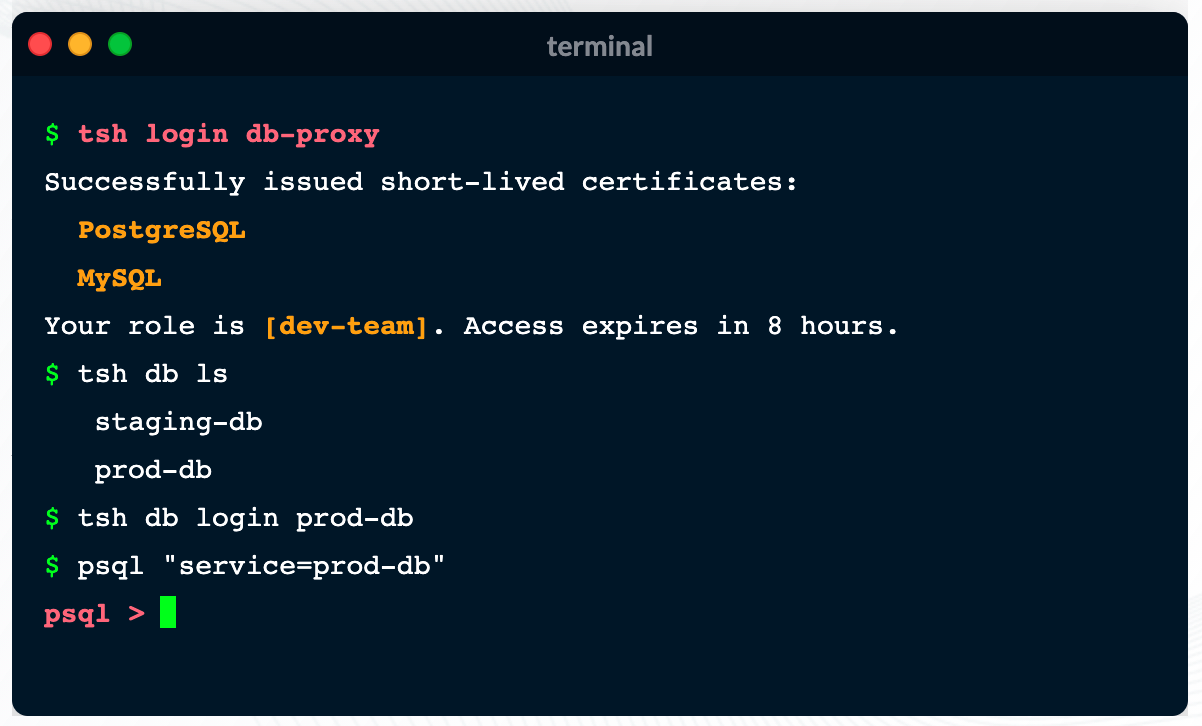
    Ev Kontsevoy, CEO, said Teleport intends to extend the reach of the security gateway up the entire stack of IT infrastructure that developers routinely use to remotely access databases. Initially, Teleport 6.0 adds support for open source PostgreSQL and MySQL databases.

    Teleport has gained traction as an access management tool because it provides a single binary that can be easily deployed by developers to encrypt IT platforms and enforce session controls. It automatically discovers all the resources in an IT environment, along with the protocols needed to access them. Teleport also provides a unified audit log, in a JSON format, that enables IT teams to track what resources are being accessed, when and by whom.

    Other features include the ability to authenticate identities via built-in single sign-on (SSO) and multi-factor capabilities, discover and see all database instances, integrate with command line interfaces (CLIs) and a set of workflows for managing privilege escalation.

    Access control is becoming a bigger issue due to a number of factors. The overall IT environment is becoming more complex as the infrastructure stack required to run applications continues to grow; most IT teams continue to work from home to help combat the COVID-19 pandemic. Teleport provides a fine-grained approach to streamlining access management across servers, clusters and databases in a way that eliminates the need to rely on virtual private networks (VPNs). In effect, Teleport enables IT teams to move toward a more identity-centric approach to unifying the management of access, Kontsevoy said.

    That’s critical at a time when the rise of DevSecOps is pushing responsibility for security further left toward developers, Kontsevoy added. While the rate at which that transition occurs will vary widely, Kontsevoy said it’s clear developers are taking more control over access control as part of a broader effort to roll out secure applications, faster.

    It may be a while before DevOps teams are able to aggregate all the access control protocols they currently employ under a single proxy. However, Kontsevoy said, the massive amount of time and effort spent managing access control today will drive DevOps teams to look for ways to automate what is currently a very manual process.

    Less clear is what role cybersecurity teams might play in supervising access management. The days when a separate overlay was needed to manage access may be coming to a close.

    In the meantime, it’s clear VPNs were not designed to address access management, in an era where the bulk of IT teams – and the employees they support – are working from home. More employees may be soon be heading back to the office more frequently, but it’s likely that remote work will remain prevalent. That means legacy approaches to managing remote access that were never designed to scale will becoming increasingly obsolete.

  • How to Know if You Need Multi-Cloud — and Succeed if You Do

    How to Know if You Need Multi-Cloud — and Succeed if You Do

    There are many good reasons for running in multiple clouds, as well as times when multi-cloud environments are unavoidable due to organizational history or legal reasons. However, operating in multiple clouds adds complexity, increases operational overhead and can become expensive. Organizations should only pursue it when they have clear business reasons for doing so.

    In this article, I’m going to cover some common situations when organizations can get value out of multi-cloud as well as strategies for success. Because multi-cloud is hard, the first question organizations should ask themselves is, “Do we really need multi-cloud?” So, the first order of business is to outline when technology leaders are better off avoiding multi-cloud altogether.

    When Multi-Cloud is a Bad Idea

    A single application and its data should never span multiple clouds, if it can be avoided. Here are some common reasons organizations adopt a multi-cloud approach when they would be better off avoiding it.

    Short-term bursting (in hybrid cases). “I’ll just tap into a public cloud if my private cloud suddenly needs extra capacity.”

    Disaster recovery. “Let’s run this application on AWS and Google in case one of them disappears overnight.”

    Staying cloud-agnostic. “By running on multiple clouds, we are no longer locked in.”

    In all the cases above, network latency and egress cost will hurt your application and your business. In the best-case scenario, you will spend a lot of time and effort prematurely optimizing for unlikely scenarios.

    Unless you’re perfectly prepared, please, don’t go there.

    When Multi-Cloud is a Necessary Evil

    There are also plenty of times when multi-cloud is a drag on the engineering organization and a drag on the business — but can’t be avoided. Here are totally legitimate reasons to have a multi-cloud setup that will still require more effort to maintain than operating in a single cloud.

    Mergers and acquisitions. Some organizations can end up operating in public clouds and private clouds as they acquire other companies. The effort required to migrate everything to one cloud provider often isn’t worth it, so everyone continues using the same cloud they used pre-acquisition.

    Legal. Depending on the type of data you gather and the jurisdictions you operate in, you may have to worry about where your cloud provider has regions available. There will be times when you need a data center in multiple jurisdictions; none of the cloud providers are in all of them. In those cases, you don’t have much choice, you need to be multi-cloud.

    If you need to use multiple cloud providers, either for legal reasons or because of mergers, it’s best to focus on making multi-cloud management as painless as possible — while still accepting that it will not be as smooth an experience as running all workloads in a single cloud.

    When Multi-Cloud is a Solid Strategic Move

    There are also some very good reasons to adopt a multi-cloud approach on purpose. For example:

    Facilitating engineering speed. Engineering speed is paramount. Companies who focus on using multi-cloud to become cloud-agnostic and avoid lock-in often sacrifice development velocity, but if the organization instead uses multi-cloud to allow everyone on the team to use the tools and environment they are most comfortable with, it can increase velocity.

    Best-of-breed tooling. The cloud providers’ offerings are not totally identical. Multi-cloud can let organizations use the best tools from each cloud provider; for example, machine learning technology from Google, compute from AWS and business intelligence from Azure.

    Better customer experience. Especially if latency is a big concern, a multi-cloud approach can help organizations get physically closer to users, providing a better customer experience.

    There is a common thread here: When evaluating whether or not you have a legitimate need for multi-cloud, the key question is whether you will be fulfilling a psychological need, a theoretical need (in other words, something that you do not actually need at this moment but might at some future date) or a concrete legal or technical need that you can easily describe. If there are no concrete legal, technical or business reasons for pursuing multi-cloud, don’t. There are costs to pursuing multi-cloud, so organizations that won’t actually reap benefits from it shouldn’t attempt it.

    How to Succeed

    Multi-cloud is hard. Here’s how to increase your chances of success so you can get the business benefits of better tooling or better customer experiences from your multi-cloud deployments.

    Use a cloud management platform. Getting a single pane of glass for all your deployments is critical to managing multiple clouds without pulling your hair out. This abstraction, however, comes at the cost of supporting very deep and cloud provider-specific use cases, for example, using obscure service X.

    Standardize workflows with Terraform and Ansible. You need to have processes that are as repeatable and predictable as possible. Even with standardized workflows, you still have to adjust for each environment, but the more standardization the better.

    Use Kubernetes. Kubernetes lets you abstract the infrastructure layer and move workloads around more easily, even across clouds. The caveat here is that you have to adopt microservices and deal with the increased complexity of managing Kubernetes and its underlying infrastructure.

    Each of the above approaches has its merits and flaws. They are not mutually exclusive, and you should not treat them like they are. Be prepared to mix and match depending on your needs.

    Weigh the Costs and Benefits

    Sometimes companies are not realistic about their technical capacity or what their needs are. They want the ability to do the latest thing they read about without thinking about whether or not that technology or approach will provide business benefits.

    Multi-cloud adds a huge amount of complexity to your deployment. If multi-cloud truly is essential, however, use tools and platforms that hide that complexity from users and can simplify the management process.

  • Cloud Migration Monitoring: A Practical Guide

    Cloud Migration Monitoring: A Practical Guide

    Almost every organization has transitioned some operational systems to the cloud. DevOps professionals are an essential part of migration projects, facilitating the migration itself, and making sure applications work as expected and provide satisfactory performance after the migration.

    To make your next cloud migration a success, you must get monitoring right. Applications must be monitored at every stage of the migration—when the application is still running on-premises, during migration and once the new workload is running in the cloud.

    In this article, we will explain key metrics to track during your migration, monitoring considerations at every stage of the migration cycle, and free tools offered by the major cloud providers that can help you monitor your migration.

    What to Monitor During a Cloud Migration

    There are many components involved in a cloud migration process. There are several approaches to cloud migration—each migration is unique, and might necessitate setting up different metrics. However, there are several aspects that can be considered mandatory when monitoring your cloud migration process:

    • Tracking application traffic. Tracking application traffic can help you validate that application configurations are properly defined and validate the availability of the entire application. You should ensure that all requests arrive to the new server, and keep an eye on the error rate. Additionally, watch for response times to ensure your application is not exceeding the planned thresholds.
    • Tracking your costs. Tracking costs can help you ensure that you are not incurring unexpected losses. The majority of organizations migrate to the cloud to reduce their costs. However, incorrect implementation of cloud resources may lead to losses. You can gain visibility into your costs by leveraging first-party cloud tools, like AWS Billing, which natively integrate into the pipeline, monitor costs, and show visualized data in customized dashboards. You can also use these tools to set up alerts.
    • Monitoring application security. Application security monitoring can help you identify security vulnerabilities and incidents during and after the migration process. You should monitor infrastructure configurations, such as internal traffic, host open ports and instance processes that are actively accessing different services. Additionally, keep watch for API hits per second, which might indicate a distributed denial of service (DDoS) attack.

    Monitoring Aspects of the Migration Life Cycle

    Cloud service providers typically identify three main phases of the migration process, which are referred to as the plan, migrate and run phases.

    Plan Phase

    The plan phase helps you assess the performance levels of your applications before migrating. The goal is to achieve an in-depth understanding of how workloads are functioning pre-migration, as well as the current state of user experience. This data can then be used to establish performance benchmarks and baselines.

    Performance baselines, like error rates, page load times and slow transactions, can help you set up configuration alerts that keep track of outages across the cloud migration process. You can then quickly diagnose the situation and apply fixes that ensure application health during and after the migration.

    Here are several questions that can help you during the plan phase:

    1. What is the application baseline?
    2. How will the migration process affect user experience?
    3. What are the potential technical challenges expected during the migration process?
    4. Can the corporate network support additional bandwidth needs?
    5. What are the steps needed to start the migration process?

    Migrate Phase

    The migrate phase involves all processes required to securely move components from one location to another. During this process, you should continuously monitor performance to ensure user experience remains within the pre-established baseline. However, migrating to the cloud means you no longer have control over all configurations.

    To ensure application performance and stability during the migration process, you need to identify potential roadblocks and issues, and continuously monitor and validate the process. You should test critical aspects like application response time and call counts, and troubleshoot issues quickly.

    Run Phase

    The run phase starts right after the migration process is complete. During the post-migration phase, you need to establish proactive monitoring processes. The goal is to ensure your application performs well in the cloud; using the expected resources and without incurring overhead.

    When monitoring your application, keep track of service level agreements (SLAs) to ensure the cloud vendor meets the requirements agreed upon. You should also monitor for changes and review individual variables that might cause issues.

    Additionally, you should make sure all connections between applications are maintained after the migration.

    Free Cloud Migration Monitoring Tools

    The three major cloud providers—Amazon, Microsoft Azure and Google Cloud—provide tools that help automate migration to their clouds, and also assist with the crucial aspects of monitoring. These tools are offered free, because it is in the best interest of the cloud providers to allow easy, frictionless migration.

    The following table summarizes migration monitoring capabilities available from each cloud provider.

    Cloud Provider Tool

    What it Helps Monitor

    AWS Migration Services

    Helps automate migration of applications that rely on databases.

    • Continually monitors source and target databases
    • Able to restart failed migrations
    • Oversees continuous data replication
    • Integrates with first-party AWS monitoring tools

    Azure Migration Tools

    Provides a migration hub that lets organizations manage large migration projects.

    • Tracks migration process and current status for server and database migrations
    • Allows external tools to integrate and track migrations
    • Reports on compliance aspects of migrations

    Migrate for Google Compute Engine

    Formerly known as Velostrata, this tool automates migration of on-premises systems, with automated roll back in case of errors.

    • Validation of workloads for migration compatibility
    • Ongoing oversight of streaming data transfers
    • Ability to roll back migration to on-premises systems in case of error

    Monitoring is critical for a successful cloud migration, and it’s important to use monitoring at every stage of a cloud migration:

    • During the plan phase, establish a baseline of application performance before it is migrated to the cloud.
    • During the migration phase, carefully monitor application behavior and troubleshoot issues.
    • During the run phase, validate that the application performs as expected and is meeting SLAs.

    I hope this will be useful as you plan and execute your next cloud migration project.