Category: Continuous Testing

Continuous testing is the process of executing automated tests as part of the software delivery pipeline to obtain immediate feedback on the business risks associated with a software release candidate.

  • GitLab Gets an Overhaul

    GitLab Gets an Overhaul

    GitLab launched its next major iteration, GitLab 15, starting with its first release version, 15.0, which the company said pulls together new DevOps and data science capabilities into the platform. With GitLab 15, GitLab says it provides (or soon will provide) continuous security and compliance, enterprise Agile planning, visibility and observability, workflow automation and increased support for data science workloads.

    In an interview with DevOps.com, Hillary Benson, director of product management, detailed how GitLab 15 provides several security benefits, including the ability to automatically create an exportable software bill of materials (SBOM) and signed attestation for build artifacts, centralized security policy management including a two-step exception approval process, as well as providing compliance managers the ability to see project history changes and better enforce policy. “Supply chain security, especially, has become a major area of focus for us, both because it’s become a high priority in the industry and because GitLab is uniquely positioned to support customers well in this area,” Benson said.

    GitLab 15 also provides improved static application security testing (SAST) with stronger and more flexible rules and finding management, Benson said. Finally, users can pool together GitLab project data to create custom automations.

    According to Benson, GitLab 15 will also introduce more capabilities that interlink data across every stage of the DevOps life cycle from initial planning, implementation, deployment and monitoring. “Some of the things that will happen in this area are additional options for the types of work items that can be managed,” said Benson. That includes supporting a more diverse range of workflows and frameworks—including enterprise Agile frameworks. The platform will continue to support issues, epics and requirements and soon enable tasks, features and objectives.

    GitLab 15 provides new capabilities the company hopes will increase visibility and enable an end-to-end view of value delivery and application health, the company said. The unified collaborative context will help remove DevOps silos within organizations and decrease incident rates as well as provide comprehensive insights into issues that hinder performance in addition to real-time triaging of incidents. These new capabilities can help shorten lead times from code to production, reduce error frequency and severity, help development teams deploy more frequently and reduce mean-time-to-recover (MTTR) after an incident.

    Upcoming features include improved product analytics and experimentation, such as increasing the practicality of surfaced data by enabling testing and validating new ideas and measuring the adoption of DevOps best practices across teams and projects, Benson said. Expanded support for all DevOps research and assessment (DORA) metrics including improvements to value stream analytics for projects and groups is also addressed. “This is about making it easier to understand what value your product is bringing,” said Benson. “We’re introducing product analytics and experimentation to increase the practicality of the data that you’re using and the data you’re collecting to actually move your product forward,” says Benson.

    Finally, GitLab 15 will increase support for data science teams and their workloads. “This is about streamlining the development and deployment of machine learning models to train and test those and then get them into production. We’ll also be working on providing monitoring for those workloads so that it can be understood if those models are being used, how they’re being used and where there may be performance issues,” said Benson.

  • DevSecOps Deluge: Choosing the Right Tools

    DevSecOps Deluge: Choosing the Right Tools

    In the last few years, DevSecOps has become the security process of choice for many forward-thinking enterprises. 

    These organizations have come to understand that fixing bugs in the latter stages of product and application development offers no favors to anyone but cybercriminals. So, they have overhauled traditional processes and united development, operations and security teams to form DevSecOps where the teams now work in tandem, cooperating to embed security into the entire process of application and software development.

    The benefits of this are clear; finding and fixing bugs early closes doors on cybercriminals while bringing peace of mind, cost savings and better products to customers. However, one of the challenges many organizations face when transitioning to DevSecOps is making the process seamless, ensuring it doesn’t slow down the software development life cycle, make security checks more cumbersome or cause frustration among teams. 

    Security teams need to ensure their DevSecOps program is delivering value to the culture of the organization while speeding up time-to-fix, capturing the right metrics, and categorizing and prioritizing issues based on their risk so that nothing goes live that could cause major damage.   

    Additionally, they also need to select the correct DevSecOps toolkit to carry out application security testing while ensuring the tools easily integrate into software development and can be used across multiple projects. When identifying tools for testing, DevSecOps teams are often overwhelmed by the huge range and volume available, which makes choosing which ones to use and learning how to use them a minefield, even for those with the right training and know-how. 

    A DevSecOps automation program needs lots of technical tools and cultural aspects to come together to make it work. Security teams need static analysis tools to check the code, third-party library analysis to check the dependencies, separate analysis to check the infrastructure-as-code (IaC) configuration, scanners to check containers for issues, tools to test the running system, cloud security checks and infrastructure testing for patches and ports. They also need to match these tools up to the right technology each team is using and keep up with the constant changes.

    Given all of these complexities, how can DevSecOps teams overcome these challenges and build out an effective DevSecOps program with the correct toolset? 

    Here are some top tips to help them along the way.

    Keep Security Processes Flexible 

    Your teams are going to be using different technology stacks, different languages, frameworks, and so on. If you tie your process too tightly to a few tools, it’ll be harder to slot in new checks when things change. Remember that the aim is a consistent, repeatable security process with the right visibility—the technical tools feed into that, but they are not the whole process. What security checks will you need in 12 months that you don’t have now? What about 36 months? These are questions that must be asked continuously. 

    Automation is Your Friend

    If development pipelines are running smoothly and automatically, then any manual security steps are not going to fit in with the process. Automating security tools together—from orchestrating their running to aggregating their responses and managing issues—will save a lot of time and give you the results you need in line with your releases.

    Keep an Eye On Your ROI

    It’s very common for big-ticket commercial tools to be underused; you have the licenses for repeated testing and you have frequent code drops, but the processes or the integrations mean testing isn’t applied as often as needed or the results take time to collect and process. Explore ways to bring commercial tools easily into the existing processes.

    There’s No Such Thing as a Free Lunch

    The open source community provides great security tools, but remember: There is a cost associated with the time it takes your teams to use them and to manage the outputs. From developers learning how to run them to the time it takes to actually run them or extract the results or manage false positives—these aren’t free. A ‘free’ tool that costs two hours of work every release might not be worth it.

    DevSecOps is All About Collaboration

    Weaving security checks into development processes, CI/CD pipelines, ticketing systems and sprint meetings help security to be part of the development process, but not every developer is—or wants to be—a security expert. Think about how the aims of development and security can meet in the middle. How can developers include security without much effort or thought? How can security help supply the tooling and help triage issues in developer pipelines? How can the process conform to auditors’ tools and with correct profiles, not just turned down to zero to avoid reporting issues? How can security add value at scale to help developers fix issues faster regardless of the tooling being used?

  • Increasing Use of SLOs to Enable Observability

    Increasing Use of SLOs to Enable Observability

    Observability is a growing discipline among most IT and operations departments. To release stable software faster, operators need continuous visibility into metrics like performance, uptime and availability. As a result, engineers are increasing their use of service-level objectives (SLOs) across the board—a recent study found that 82% of companies are increasing their use of SLOs.

    SLOs enable deep visibility into specific applications’ performance and are often used by site reliability engineers (SREs) to ensure quality and avoid service interruptions. Not only that, but various teams are correlating SLOs to aspects of the business to reduce cost and help direct decision-making. But while many environments have visibility, there are still gaps present.

    Nobl9 recently released a global survey of IT professionals and executives that tracked the state of service-level objectives in 2022. Below, we’ll look at the key findings from the report and consider what they mean for the state of SLOs and observability in general.

    State of Observability and SRE

    In general, site reliability engineering is still maturing across organizations. Though only 31% of companies have adopted SRE, it’s slated for much future growth, as 46% said they plan to embrace SRE in the future.

    These operators are now faced with many cloud-native observability tools, which are producing a sea of data in the form of metrics, logs and traces. A full 39% of companies use anywhere from six to 10 observability and monitoring tools and 35% use more than 11.

    With so many tools now deployed, who is using this observability and monitoring data? Namely, at 74% of companies, observability data support operational requirements. Operations teams are the ones most likely to use SLOs to monitor uptime, performance and overall efficiency. After operations teams, security teams also use this observability data (71%), which makes sense as SLOs can inform incident response. Other areas that follow are customer support, compliance and capacity planning.

    One interesting finding is that only 42% of companies use SLOs for service-level agreement (SLA) adherence. This indicates that SLOs are most often applied to internal optimizations and decision-making.

    Hybrid Environments Complicate Visibility

    Companies are mostly tracking SLOs to increase their visibility into networks (83%), databases (76%) and applications (75%). Other top areas include private cloud environments and legacy computing arrangements. But although observability is trending, organizations still lack complete visibility across the entire stack.

    Of note is that nearly half (46%) of respondents said their monitoring and observability tools don’t provide full visibility into all of their company’s IT assets. For example, only 45% of companies have visibility into their containers and just 35% have visibility into their microservices architecture.

    A lack of full-stack visibility may be complicated due to rising hybrid and multi-cloud conditions, as 78% say a hybrid cloud environment makes monitoring infrastructure more difficult.

    Benefits of Tracking SLOs

    The report defined SLO as “a performance and availability target set for a given system, application [or] service over time.” And the benefits are readily apparent for organizations following such targets—they can help increase performances, direct decision-making and help avoid outages.

    As a result, 70% of companies are currently using SLOs in some fashion. Here are some benefits of tracking SLOs:

    • Increase microservice performance: 87% said using SLOs for microservices architecture would improve service performance.
    • Enable full-stack observability: 58% said some of their company SLOs are mapped to business operations.
    • Improve business decision-making: 91% agreed using SLOs can help drive better business decisions.
    • Prevent service interruption: 67% said their company prevented business interruptions thanks to SLO thresholds alerts.
    • Reduce expenses: 90% indicated SLOs saved their company money.

    Final Thoughts

    More teams are tracking service-level objectives than ever before. And most companies (71%) that aren’t using SLOs now plan on adopting them soon. The data demonstrated that the observability market is an evolving area with room to grow. And, the same can be said about the SRE role.

    Yet, it’s good to point out that not all companies will adopt precisely the same roles or monitoring procedures. Therefore, there will likely continue to be variance in who is using SLOs and how they are applied. Regardless, the study suggested that investigating SLOs has the potential to benefit the software life cycle in many ways.

    The study, “Adoption of SLOs Grow to Increase Visibility and Drive Business Improvements” surveyed 309 participants around the globe in various sectors. The study was sponsored by Nobl9 and conducted by Dimensional Research. For more information, you can download the report here.

  • 15 Ways Software Becomes a Cyberthreat

    15 Ways Software Becomes a Cyberthreat

    Software is an integral part of private and commercial life; there is no way around it. You need software to do your taxes, book a flight or browse the internet. Software has made our lives much easier in so many ways. However, as we become more reliant on software we also become more vulnerable to cyberattacks.

    This article will explore 15 different ways that software can end up becoming a cybersecurity threat. By understanding these risks, you can take steps to protect yourself and your business.

    Lack of Security Features

    Many popular software programs either lack basic security features or the features that are present lose functionality, leaving users vulnerable to attack. For example, Adobe Reader and Microsoft Word have both been found to have security vulnerabilities. If you use these programs, make sure you keep them up to date with the latest security patches.

    If you are worried about having to deal with downtime while installing new software updates, you can always schedule them for a time when you know you won’t be using your computer. This way, you can be sure that your software is always up-to-date and secure.

    Poor Password Security

    One of the most common ways users’ accounts get hacked is through the use of weak or easily guessed passwords. If you use a program that requires a password, make sure to use a strong one that would be difficult for someone to guess.

    Additionally, if you use the same password for multiple accounts, an attacker only needs to figure out that one password to gain access to all of your accounts. This is why it’s important to use different passwords for different services. If you can’t remember all of your different passwords, you can use a password manager to help you keep track of them.

    Consider using both a password manager—to take advantage of the more robust security these applications typically have—as well as a password randomizer, which will generate long, random passwords for you. Many password managers include a randomizer feature.

    Phishing Attacks

    Phishing attacks can impact any type of software program. In a phishing attack, an attacker will try to trick you into giving them your password or other sensitive information by masquerading as a legitimate website or program. Be very careful about any emails or messages you receive that ask for personal information, and never click on links in these messages unless you’re absolutely sure they’re legitimate.

    Phishing that takes place through software programs can also happen through messaging programs, like Skype or Facebook Messenger, or through email programs, like Gmail. Be sure to be cautious about any links or attachments you receive through these programs, as well.

    Keyloggers

    Keyloggers are malicious programs that are installed on your computer without your knowledge. Once they’re installed, they can track every keystroke you make, which means they can easily steal passwords and other sensitive information. Keyloggers can be installed through email attachments, malicious websites or even infected USB drives.

    To protect yourself from keyloggers, never install software from untrustworthy sources. Be very careful about what emails you open and what websites you visit. If you do get a keylogger on your computer, make sure to run a malware scan as soon as possible to remove it.

    Drive-by Downloads

    Drive-by downloads are another type of malicious software that can be installed on your computer without your knowledge. These types of programs are usually downloaded when you visit a malicious website or click on a malicious link. Once they’re installed, they can do things like steal your passwords or track your web browsing.

    To protect yourself from drive-by downloads, be careful about what websites you visit and what links you click on. If you think you may have downloaded a malicious program, run a malware scan as soon as possible.

    Malware

    Malware is malicious software that can infect your computer without you even knowing about it and, once it’s there, it can do things like steal your passwords or data or give an attacker remote access to your machine. From there, attackers can potentially access your organization’s IT infrastructure. Be very careful about what email attachments you open and what websites you visit, as these are two of the most common ways malware can end up on your computer.

    The software you use can also be used to introduce ransomware into your system. A malicious actor could create a fake version of a popular software program and distribute it online. When users download and install the fake software, they unknowingly grant the attacker access to their system. Or, an attacker could exploit vulnerabilities in software programs to gain access to a user’s system. Once inside, the attacker could install ransomware and encrypt the user’s files.

    Unsecured Wi-Fi Networks

    If you use public Wi-Fi networks to connect to the internet, you may be putting yourself and your organization at risk. These networks are often unsecured, which means that anyone else on the network can snoop on your traffic and see what you’re doing. If you need to use public Wi-Fi, make sure to connect to a secure VPN first so that your traffic is encrypted and private.

    Social Engineering

    Social engineering is a type of attack where an attacker tries to trick you into doing something that will give them access to your account or data. For example, they may pretend to be a customer support agent for a program you use and ask you for your password so they can “fix” an issue with your account.

    Or, they may send you an email that looks like it’s from a trusted source but actually contains a malicious link. Be very careful about any communications you receive, even if they appear to be from a legitimate source.

    Unsafe Browser Extensions

    If you use a web browser like Google Chrome or Mozilla Firefox, you may have installed some extensions to add additional features or functionality. But some of these extensions can actually introduce security risks. For example, an extension might have access to all of the websites you visit and the data you enter into them. Be very selective about which extensions you install, and only install ones from trusted sources.

    WordPress Plugins

    If you have a WordPress website, be careful about which plugins you install. Some plugins can introduce security risks, for example, by giving attackers access to your website or database. Install only trusted plugins, and make sure to keep them up-to-date. Also, while browsing new plugins, it is important that you ensure you are downloading and installing plugins that are regularly updated. Take a look at the last time the software was updated before deciding to install it.

    Adware

    Adware is a type of software that displays advertising on your computer, often in the form of pop-up ads. While not all adware is malicious, some forms of it can track your online activities and even collect sensitive information like your passwords or credit card numbers. Be careful about what programs you install, and always read the EULA before agreeing to anything.

    Google Docs

    Google Docs is a popular cloud-based word processing application that is part of Google Workspace. While it’s generally safe to use, there have been some reports of malicious actors using it to spread malware or launch phishing attacks. If you use Google Docs, be sure to only open documents from trusted sources and never click on any links in a document unless you’re absolutely sure they’re safe.

    Third-Party App Stores

    If you use an Android device, you may be tempted to download apps from a third-party app store instead of the official Google Play store. While there are some legitimate app stores out there, many of them are full of malware and other malicious programs. It’s always best to stick to the official app store for your device to avoid these risks.

    Outdated Software

    One of the most important things you can do to keep your computer safe is to make sure all of your software is updated to the latest version. Software developers regularly release updates that patch security vulnerabilities, so it’s important to install these updates as soon as they’re available. You can typically set your software to update automatically or you can check for updates manually on a regular basis.

    Commandeering For Loops

    Commandeering for loops is a type of attack where an attacker takes control of your computer by sending malicious commands through the command-line interface. This can happen if you accidentally download and run a malicious program or if you visit a website that has been compromised by an attacker. To protect yourself from this type of attack, be careful about the programs you download and run and only visit websites that you trust.

    Conclusion

    Software, in its myriad forms, is crucial to running both our businesses and enhancing our personal lives. There is almost no way to avoid using several, if not dozens, of different programs on a daily basis. But as we’ve seen, even the most innocuous-seeming software can pose a serious security risk if it’s not used properly. But understanding the attack vectors ahead of time can help protect yourself and your organization from these risks and keep your data safe.


  • Nobl9 Shares SLO-as-Code Methodology

    Nobl9 Shares SLO-as-Code Methodology

    Nobl9 has released version 1.0 of an open specification for defining service level objectives, dubbed OpenSLO, and, in addition, has defined a repeatable SLO methodology.

    Kit Merker, Nobl9 COO, said the Service Level Objective Development Lifecycle (SLODC) methodology represents an effort to create a set of best practices for achieving and maintaining SLOs that are implemented as code within an application environment.

    A survey of more than 300 IT managers and executives conducted by Dimensional Research on behalf of Nobl9 found only 29% of respondents had no plans to implement SLOs. A full 94% of respondents that have or plan to implement SLOs intend to map them directly to business operations, with 91% reporting they expect that effort to improve decision-making. More than 80% also said their organizations are planning to increase the use of SLOs, with 87% indicating SLOs should improve overall microservices performance.

    The challenge is that most organizations have limited visibility into their IT environments. The survey, for example, found less than half of respondents (46%) had visibility into all their IT environments. Only 45% and 35% claim to have visibility into containers and microservices, respectively. More than three-quarters (78%) said hybrid clouds make observability more difficult.

    Ironically, 45% of companies reported they already employed 11 or more observability and monitoring tools. On the plus side, 31% have hired site reliability engineers (SREs), while nearly half (46%) planned to create that role.

    Nobl9 is trying to spur greater adoption of SLOs by making available an open source SLO specification that defines a common interface for constructing SLOs across a Git-based workflow. Since OpenSLO was initially launched, more capabilities have been added including a DataSource object that makes it easier to reuse connection details and which makes creating SLOs less verbose and three alerts have been defined: AlertCondition, AlertPolicy and AlertNotifcationTarget.

    Nobl9 is also releasing an OpenSLO-to-Nobl9 converter to transition OpenSLO YAML files into Nobl9 YAML when required.

    SLOs, of course, are not a new idea. They have been employed as a metric to track the performance of IT services for decades. However, as more microservices-based applications are built and deployed, it’s becoming more challenging to maintain SLOs across applications that have many more dependencies than legacy monolithic applications. Ultimately, each IT team needs to provide some sort of objective benchmark that assesses their overall effectiveness at delivering application services. SLO-as-code is intended to make it simpler to gather the metrics that confirm whether service levels are being achieved. Those SLOs are then tracked and integrated across everything from financial operations to supply chains, noted Mercer.

    It’s not clear to whether reliance on SLOs has waned over the years or if application environments simply became too complex to track meaningful metrics. However, as applications are increasingly viewed as services, it’s now only a matter of time before SLOs become more widely adopted across a modern application environment. The challenge, of course, is that defining an SLO is a lot easier than maintaining it—especially within today’s highly dynamic application environments where services tend to come, change and eventually go unexpectedly.

  • Synopsys Sets Course After Agreeing to Acquire WhiteHat Security

    Synopsys Sets Course After Agreeing to Acquire WhiteHat Security

    Synopsys, Inc. plans to add dynamic application security testing (DAST) tools to its software-as-a-service (SaaS) platform in the wake of agreeing to acquire WhiteHat Security from NTT Security Corp. for approximately $330 million in cash.

    Jason Schmitt, general manager of the Software Integrity Group at Synopsys, said the DAST tools developed by WhiteHat will complement the existing static, interactive and software composition analysis tools that Synopsys currently provides.

    The goal is to provide an end-to-end application security platform, including consulting, to help organizations better secure software supply chains, he added. NTT Security Corporation previously acquired WhiteHat Security in 2019 to extend the reach of the services it provides. Since then, SaaS platforms for testing application security have become more widely available.

    The acquisition comes at a time when many organizations are trying to determine how far left to shift responsibility for application security toward developers. While developers have a role to play, Schmitt said that shifting responsibility for applications completely left is a fallacy. DevOps teams will need to rely more on platforms that provide guardrails that enable developers to build secure applications in a way that doesn’t create a lot of additional friction, he said.

    Unfortunately, cyberattacks against applications are increasing in complexity and volume. That makes it a challenge for both application developers, DevOps teams and security professionals to keep track of how threats to applications are evolving, said Schmitt. As more companies rely on software to drive digital business initiatives, Schmitt said the business risks those organizations will face are only going to increase. In an era where developers far outnumber security professionals, he added that the only way to rise to that challenge is to rely more on SaaS platforms that enable organizations to implement DevSecOps best practices within their existing application development workflows, he noted.

    Today, the challenge is that much of an organization’s security budget is allocated to networks and endpoints rather than applications, added Schmitt. It’s not clear to what degree that spending needs to shift toward application security or if a larger portion of the application development budget needs to be allocated to security. One way or another, however, it’s apparent that overall spending on application security needs to increase to combat the increasingly frequent attacks.

    In the meantime, the historical divide that has existed between developers and cybersecurity teams should narrow as more security tools are made accessible to developers and DevOps teams alike. Otherwise, security professionals will continue to point out security issues that might affect an application running in a production environment and developers will continue to ignore issues they don’t see as relevant or that they don’t have time to patch. Not surprisingly, most vulnerabilities in applications running in production environments remain unpatched; the only way forward is to rely on automation to eliminate them before the application is ever deployed.

  • This is Not Just a Test: DevOps and the Need to Automate

    This is Not Just a Test: DevOps and the Need to Automate

    Creating software is as much about the process as it is about the product. In recent years, we’ve seen the speed of innovation reach new heights due to more efficient development and quality control. DevOps has further accelerated development by combining software and operations in unified, self-improving teams. With automation taking care of rote tasks, developers can now tackle more difficult issues, resulting in even greater software quality and faster development. The need for speed to market is vital; a month or two can make or break a product launch. Then again, if a product isn’t tested thoroughly in the rush to get to market, flaws can slip through and an organization’s revenue and reputation can take a serious hit. In the U.S., software failures in businesses’ operations systems cost a total of almost $1.6 trillion in 2019. The problem is that it can be a bottleneck and create major delays in the release cycle. In fact, A recent survey of 4,300 developers revealed that it is the top reason that releases are delayed.

    In the past, the waterfall approach was common. Tests usually took place after code was written; carried out by testers who had no interaction with the original developers. As a result, bugs that could have taken moments to correct during development required days or even weeks to fix afterward. Even worse, the complexity of the finished software and its many dependencies meant that fixing a localized bug could introduce additional problems that needed to be fixed after another round of testing, further delaying the release.

    But even in a modern DevOps environment, testers and developers are still speaking entirely different languages. By and large, testers do not code and software developers are not expert testers. The two teams typically converse through multiple logs, event viewers and other operating system tools. It creates a great deal of friction and slows down the process.

    Shift Left 

    DevOps represented a big improvement over waterfall methods but, even so, it’s far from a set-in-stone process. It, too, has evolved and right now, shift left testing has moved into the spotlight.

    In this approach, the guiding philosophy is to test early and often, beginning very early in the development cycle and continuously throughout every stage whenever there’s an opportunity. As a result, bugs are caught early when the relevant code is still fresh in the developers’ minds, so it’s easier to fix. In the end, businesses are able to release higher quality software much faster and more frequently.

    Environmental Tests

    When it comes to the DevOps process, it’s not always clear where and how to automate the process. The following looks at how that can be incorporated into DevOps based on four different environments in a continuous delivery (CD) pipeline.

    These environments include local development (usually a coder’s personal device), a continuous integration (CI) or development server, test servers for user interface (UI) testing and the production environment itself. Each has stages with requirements that must be met for code to advance.

    Whenever any new software features or capabilities are entertained, though, developers and the QA team should begin by answering the question, “How can this be tested?”

    Moving Through the Stages

    Once code is created, it must be able to be built without error, passing all unit tests and local verification.

    This stage is particularly important because the development environment echoes the requirements of production; if it works here it’ll likely also work for the customer.

    At this stage, running early regression and developer verification tests ensures the build is ready while providing feedback about the reliability of the environment. It’s useful to have individual test cases as part of more than one schedule. This enables developers to test minor parts of the software without undergoing regression tests of all product features. These tests should be automated and triggered as part of the same process.

    Developers should have the ability to perform basic tests on their own code. After all, the sooner a flaw is identified, the easier it is to eradicate. Just as testers are not experts in coding, neither are developers expert testers. To shift left and effectively integrate tests at all stages of the development life cycle, it must be automated. This will allow developers to test larger quantities of code earlier and more frequently.

    Once through this stage, the software can advance to the test environment.

    This is where a variety of product tests take place, including those for function, load and performance. Passing this stage entails completing all automated functional UI tests, verification of visual appearance, an inspection of server logs and performance evaluation.

    This is where most regression tests are conducted and automation is crucial for scheduled tests to be triggered.

    Next, the product moves into the production stage.

    Tests still occur in this stage to pinpoint any remaining bugs. Automated tests are then run against the production environment to closely mirror interactions with real end users. At this point, it’s highly unlikely there will be major issues but, if there are, running tests at earlier stages could very well be the culprit.

    Throughout the process, ideally, testers will use a visual, no-code tool to create these automated tests. In this way, testers are able to more rapidly and intuitively implement test automation without having to tap into programming resources. Additionally, the integrated documentation of the actions taken during automation will be interactively connected to visual documentation of the test results. The upshot is that testers and developers gain a shared language for both building test automation and troubleshooting the issues it identifies.

    This is Not Just a Test

    Effective, scalable tests are crucial to delivering the reliable, high-quality software that today’s businesses rely on for day-to-day operations. This is why DevOps and development teams need to integrate tests at all stages of software development. Shift left speeds up the creation of better quality software, which provides a significant market advantage. After all, it’s not just about software quality; it can show which companies are best prepared to meet market demands.

  • Applause Report Surfaces Functional Testing Issues

    Applause Report Surfaces Functional Testing Issues

    An analysis of more than 340,000 bugs collected by Applause, a provider of a testing platform designed to integrate with a range of DevOps platforms, found functional bugs accounted for 68% of issues. The research gathered data from 13,000 mobile devices and 1,000 unique desktops running 500 versions of operating systems and found that the majority of issues could be traced to functional bugs compared to visual (17%), content (9%), crashes (4%) and lags and latency (2%) issues that, collectively, only add up to 32%, the report found.

    The report also found screen readers comprised 66% of all accessibility bugs compared to keyboard navigation issues and insufficient color contrast which accounted for only 12%. In terms of localization, poor and missing translations account for more than two-thirds (67%) of bugs, the report found. Based on ongoing feedback data that Applause also continuously collects from customers, nearly half of organizations (47%) identified currency and number formatting as the most valuable bugs to identify when it came to localization.

    Overall, organizations ranked the discovery of crashes (75%), functional bugs (61%) and lag and latency issues (53%) as exceptionally valuable, according to Applause.

    Luke Damien, chief growth officer for Applause, said when it comes to testing, in general, there is still not enough focus on user and customer journeys. That lack of focus is becoming a larger issue as more organizations invest in digital business transformation initiatives that are driven largely by mobile applications, he noted. Payments are especially problematic because they often rely on application programming interfaces (APIs) exposed by a third party in a way that results in suboptimal application experiences that have a direct impact on revenues, he added.

    The challenge is that it’s not entirely clear how far left responsibility for application testing is shifting. In some cases, developers are assuming responsibility. In other cases, a dedicated testing team is still responsible. Developers, of course, will test applications as they build them but application experiences on a local machine may not always be replicated in a production environment. The issue is that most end users today are not especially forgiving when a mobile application fails to meet expectations. Months of development effort can be wasted simply because a function was not tested in a production environment.

    Less clear is to what degree testing will be automated in the future. Machine learning algorithms are making it possible to automate testing of both functions and user interfaces. It’s not likely the need for humans to be involved in testing will be eliminated any time soon, but many of the routine tedious tasks that conspire to limit the rate at which applications can be tested should be sharply reduced in the months and years ahead.

    In the meantime, an organization’s entire brand reputation is now tied to the quality of the application experience it enables on a mobile device. Revenue targets can now be easily missed if users of a mobile device choose one application over another simply because a function was broken—even for a short amount of time. As such, testing has never been more critical given organizations’ dependency on software.

  • GitLab Adds Fourth DORA Metric API to CI/CD Platform

    GitLab Adds Fourth DORA Metric API to CI/CD Platform

    The latest update to GitLab’s namesake continuous integration/continuous delivery (CI/CD) platform has added support for the application programming interface (API) for measuring change failure rates. This addition supports the fourth metric as defined in the DevOps Research and Assessment (DORA) framework.

    Version 14.10 of GitLab also expands the GitLab Runner Operator for Kubernetes to any distribution of the open source platform in addition to making it possible to manually trigger incident responses when needed.

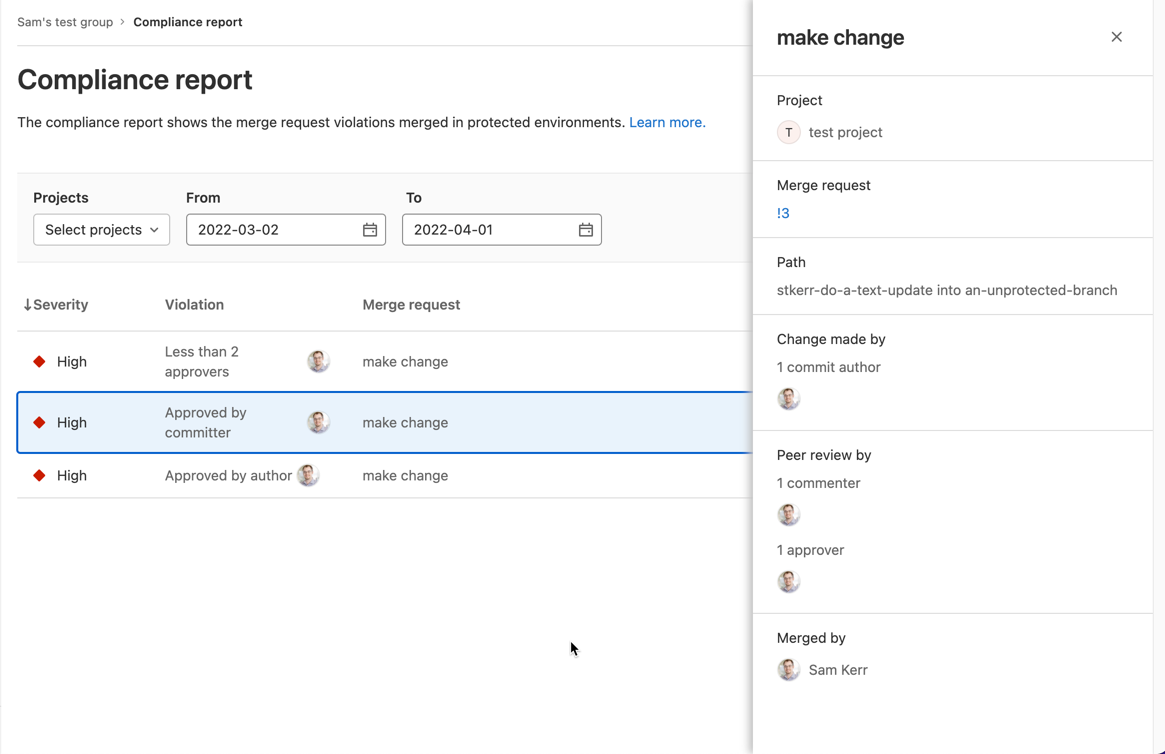
    Finally, a compliance report that surfaces every individual merge request violation has been added along with a tool for setting up streaming audit events.

    Brendan O’Leary, staff developer evangelist for GitLab, said that as DevOps processes continue to mature, DORA metrics make it simple for IT leaders to measure overall progress. While it’s not likely that any single set of DevOps practices will be universally implemented across an entire enterprise, O’Leary noted it’s important for DevOps teams to keep track of key performance indicators (KPIs) that enable teams to identify areas for ongoing improvement. For example, it’s not uncommon for technical debt to accumulate in the absence of metrics that track the progress of builds, he added.

    In general, a transition to microservices-based applications is increasing the need for CI/CD platforms that make it simpler to build them. Each of these applications is constructed using microservices that are typically built independently of one another. The challenge is that each microservice has dependencies on other microservices, so the need for DevOps workflows to optimally manage that development process is becoming more widespread, noted O’Leary.

    In some cases, organizations are deploying a CI/CD platform for the first time to build these applications. In other cases, they are looking to replace a CI/CD platform that was adopted to build legacy monolithic applications. Regardless of the type of application, there is a need to continuously refine and improve software engineering practices to increase developer productivity.

    It’s not clear to what degree developers are voting with their feet to work for one organization versus another based on the overall quality of developer experience. Organizations that do have a consistent approach to software engineering, however, make it easier for developers to spend more time writing code rather than managing the build process. The challenge is to make sure the DevOps platform itself does not become a bottleneck that hinders the rate at which developers can build code. It’s also not clear whether organizations are building applications faster than they can secure it and ensure overall quality. The only way to know for sure is, of course, to track metrics.

    Naturally, not every developer is a fan of metrics. Application development is still as much art as it is science. There is, however, a general appreciation that the amount of code that needs to be written far exceeds the available talent to write it; any effort to make software engineering more efficient benefits everyone involved. As such, given all the code that needs to be written, a software engineer is often today the best friend a developer can have.

  • SRE Vs. DevOps: The Wrong Question?

    SRE Vs. DevOps: The Wrong Question?

    The age-old question about the competition between DevOps and SRE sets up a false dichotomy. DevOps is a methodology while SRE is a team within operations. Although the two are often pitted against one another, developers also embody the skills and the capabilities to implement fixes. 

    Traditionally, application changes were reactive. The process of SRE formalizes problem resolution playbooks for better efficiency within the development life cycle. This has changed substantially over the past few years with DevOps seeing more traction and mainstream adoption.

    So what is the modern relationship between DevOps and SRE and how can they best be used together? Let’s understand DevOps first.

    Defining DevOps 

    According to Chef’s Embrace DevOps guide, DevOps is about transforming the way companies run; part of that transformation is understanding that companies should focus on managing people rather than products. DevOps evolved over the last decade and was originally born into the world of software. The adoption of cloud technologies, changes in the tech stack architecture, SaaS platforms, and security regulations have all impacted DevOps culture

    Some of the fundamentals of modern DevOps are:

    Everything-as-code: The current state of IT architecture has adopted an “everything-as-code” approach. Infrastructure, configuration, compliance and security can all be transformed into code.

    Automate everything: Codifying everything enables standardization of processes and policies across the organization. The processes are simplified into repeatable functional code, and this makes it easier to automate the development and deployment processes while significantly reducing human errors.

    Validation: There are many tools used for continuous integration, delivery and deployment in addition to other tools used for maintaining infrastructure and compliance. Without validation, there would be no way to know if everything is functioning as needed and it would be difficult to ensure seamless delivery in a highly agile environment.

    Above all, teams adopting DevOps methodologies take end-to-end responsibility of managing the application development life cycle (develop, deploy and maintain). They bridge the responsibilities gap between Dev and Ops into one team. 

    SRE Focus Areas 

    Successful site reliability engineering (SRE) teams focus on the volume of performance metrics and the process of shifting left the responsibility for managing and mitigating risk. Fundamentally, they share the same values as developers in creating efficient applications. However, SRE teams focus on introducing efficiencies based on incidents that occur and sometimes need development teams’ intervention to shift the risk left in the product development cycle. 

    Troubleshooting is one of the main responsibilities of SRE teams since they have to manage incidents. As a result, SRE teams have a strong knowledge of product design which is essential for product reliability, rollouts and reducing recovery time. Scalable automation is also a big part of the challenge SRE teams face. Oftentimes, tasks are done manually and this can increase the likelihood of human error. A solution is implementing a policy-as-code approach in concert with developer teams.

    It should be noted that when it comes to the responsibility and scope of work between SRE and DevOps, the lines are blurred—especially with the proliferation of APIs and when evaluating microservices. The types of tools being used are a differentiator since SRE teams measure efficiency through monitoring, detection and incident reporting systems. 

    Breaking the Silos 

    Modern organizations will fail when divided into silos. Developers understand that to optimize their internal processes, they need to use a DevOps methodology and involve SRE teams. For example, a startup growing and looking to scale needs development teams that are performing SRE functions with strong operational knowledge. It requires buy-in and understanding of every team member to know their role and the needs of the organization as it grows and responsibilities shift. 

    These fundamental values are crucial for an enterprise looking to achieve an efficient CI/CD pipeline. In a reactive cycle, SRE teams step in and are responsible for some parts of operations, but the DevOps paradigm is different because it integrates the responsibility of deployment, monitoring and remediation throughout the entire team. 

    Organizations embracing DevOps practices should embrace SREs’ expertise and welcome their practices into developer teams. SREs can leverage automation to fix issues as they occur and also make changes in software architecture to avoid such issues in the future. Compared to the reactive approach, developer teams are incentivized to keep things constantly running. 

    Scaling DevOps practices requires shared responsibility. Of note, developers have to answer when the phone rings and this can cause chaos in engineering teams responsible for large enterprise-grade applications with fast time-to-market and frequent update cycles.

    A Modern Perspective

    Efficiency is a core value shared by both SRE teams and the DevOps methodology. When organizations can fully integrate operations within the DevOps cycle, those silos can be broken down and integrate a shift left mentality. The traditional reactive remediation cycles won’t cut it anymore. Proactivity is essential for today’s lightning-fast application needs and continuous updates. 

    Application problems can be addressed immediately when approached with modern tooling and a policy-as-code approach enabling developers and SREs teams to work together. The modern relationship between DevOps and SRE teams should be one of coexistence. Both are needed for successful scalability within the enterprise. Many once thought SRE teams and developers couldn’t coexist in harmony, but debunking that myth helps organizations optimize their collaboration efforts.