Category: Continuous Testing

Continuous testing is the process of executing automated tests as part of the software delivery pipeline to obtain immediate feedback on the business risks associated with a software release candidate.

  • Scribe Security Unveils Pair of Tools to Secure Software Supply Chains

    Scribe Security Unveils Pair of Tools to Secure Software Supply Chains

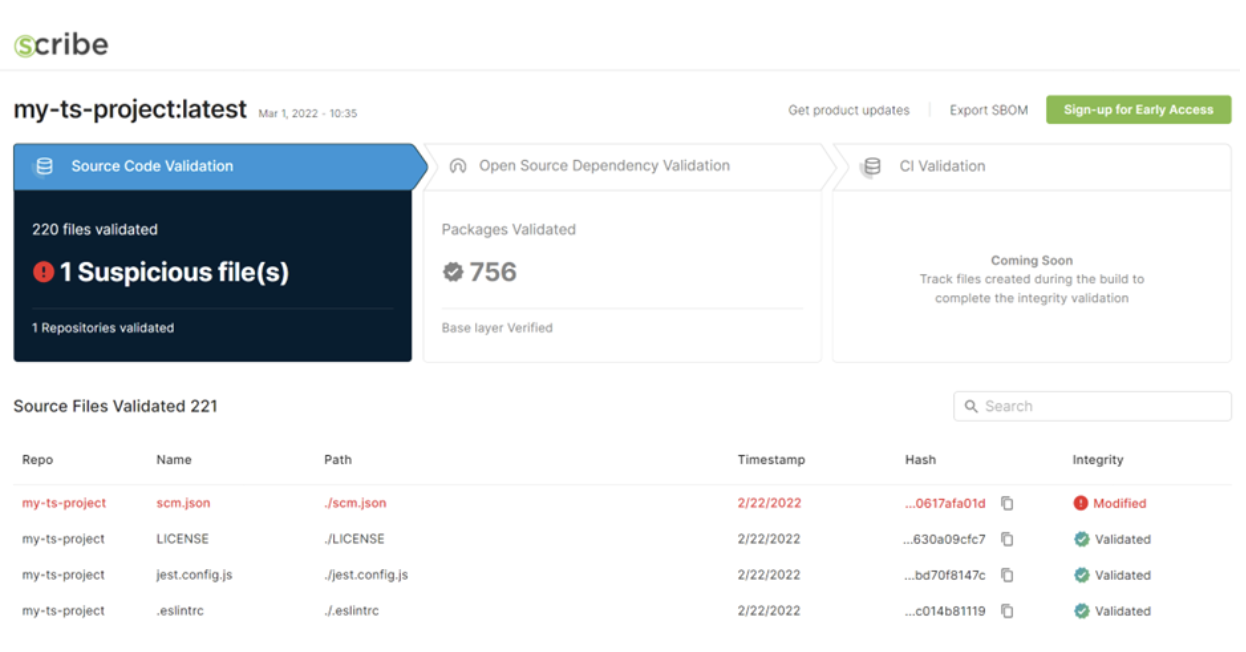
    Scribe Security today unveiled a Scribe Integrity tool that scans software artifacts to make sure they comply with IT organizations’ security policies before they are integrated into an application.

    The Scribe Integrity tool authenticates open source and proprietary source code before it is uploaded into a build. It assumes that all artifacts are “guilty” until they can prove their innocence, said Rubi Arbel, CEO of Scribe Security. That approach makes it possible to ensure the integrity of the overall software supply chain is maintained in a way that doesn’t adversely impact the productivity of developers, he added.

    In addition, the company launched GitGat, an open source policy-as-code tool based on Open Policy Agent (OPA) agent software that enables DevOps teams to periodically run reports that surface insights into the security posture of code residing in GitHub repositories.

    Arbel said that, in time, GitGat’s reach will be extended to add support for additional continuous integration/continuous delivery (CI/CD) platforms.

    The first release of Scribe Integrity addresses Node.js code and the npm package manager with support for additional types of code planned.

    The Scribe Integrity tool also identifies all dependencies to enable DevOps teams to generate an accurate software bill of materials (SBOM) as each software artifact is included in the application, he noted. That’s critical because it enables developers, IT operations and cybersecurity teams to simultaneously see what artifacts, including containers, make up an application, noted Arbel. In the future, the company plans to make available a Scribe Hub that will make it easier to share insights into those software artifacts, he added.

    A series of high-profile security breaches clearly demonstrated cybercriminals’ skill at injecting malware into software artifacts and compromise any application that incorporates that artifact into an application. That malware can then be activated at some later date to potentially compromise any number of downstream applications.

    Those incidents resulted in a greater appreciation for DevSecOps best practices to maintain the integrity of software supply chains. The issue that DevOps teams are trying to address is how to build more secure applications without slowing down the rate at which those applications are built and deployed. As such, DevOps teams are adding tools to the application development process that make it easier for developers to scan code before it is included in an application and verify the integrity of any software component that becomes part of a DevOps workflow.

    It’s unknown how long it may be before the adoption of DevSecOps best practices has a meaningful impact on application security. However, waiting to focus on security until after an application has been deployed is way too late. Cybercriminals today can discover flaws and misconfigurations in applications in a matter of minutes. As more applications are deployed, developers can find themselves spending more of their time fixing vulnerabilities than they do writing new code. A new approach to building applications that are secure from the ground up is clearly required.

  • A Full Pipeline: CI/CD for Network Automation and Orchestration

    A Full Pipeline: CI/CD for Network Automation and Orchestration

    The intersection of CI/CD and network automation has grown substantially over the past few years. Network teams have seemingly reached the point in their automation and orchestration journey where it has become critical to implement a strategy to manage the testing, version control and deployment of both network changes and automation assets. 

    While CI/CD has grown in popularity, there are—at least on the surface—many differences in the types of pipeline implementations to which network teams want to apply the technology: Different tooling, different scenarios and different problems being solved. Despite the seeming disparities, there are some key themes that are consistent throughout most pipeline implementations. For instance:

    Network teams either want to develop pipelines to better manage specific changes to the network or they want to use pipelines to better manage the testing and deployment of automation and orchestration assets like workflows or scripts. Where initially those teams may have turned to network infrastructure-as-code (IaC), a significant (and growing) number are investing in automation asset pipelines. 

    The trust and resources being dedicated to these pipelines is just one of a growing number of indicators that automation and orchestration solutions are maturing and moving beyond initial implementations to large-scale, business-as-usual technologies.

    How Pipelines and Network Automation Complement Each Other

    A close examination of recent pipeline developments provided more clarity about the respective strengths of CI/CD tooling and network automation tools for network change management and life cycle—GitLab, GitHub, Jenkins and CircleCI to name just a few. Most network teams would prefer to stick with a “right tool for the right job” philosophy, wherein the best tool for any given task can easily be integrated into an overall solution. 

    In this context, the “right tool” philosophy looks at pipelines and at network automation/orchestration tools to identify what they do best. Then, a strategy is developed that maximizes the benefit of both technologies. Using this approach, teams can avoid the pitfalls of trying to solve everything with one or the other, leading to a suboptimal process.

    Some good current rules of thumb are based on two simple points:

    • Pipelines focus on creating consistency and repeatability by managing activities related to code versioning, testing coordination, code merging, code validation and approval. The primary benefit of pipelines is the ability to automate the change process.
    • Network automation focuses on generating the network payload and applying that payload to the network elements. This may also include automation of engineering and business logic steps that typically must be performed in a specific order. The best uses of network automation within the change process require attention to business logic, order of operations and network engineering rules.

    By integrating both technologies into a common pipeline, network teams can get the best of both toolsets. 

    The example below illustrates an integrated model where network automation tools provide the engineering logic for the generation, testing and deployment of configuration changes, while the CI/CD tools (represented by the orange arrows) carry the activities through a repeated, automated process, ensuring that the changes go through a consistent path with proper version management, approvals and testing. Multiple teams have successfully implemented this model and they are beginning to iterate their solution to incorporate their unique experiences and improvements.

    The widespread expectation from the industry is that, in addition to the integration of CI/CD and automation into a common pipeline, we will begin to see other indicators of maturation of orchestration and automation. Some of these are areas that are already taking shape, such as the shift in skillsets and competencies outside of traditional CLI-centric engineering toward DevOps and CI/CD skills, or the growing importance of quantifying the business impact of automation and orchestration. 

  • Styra Unfurls Cloud Service for Implementing Compliance-as-Code

    Styra Unfurls Cloud Service for Implementing Compliance-as-Code

    Styra, Inc. today launched an authorization service based on the Open Policy Agent (OPA) software that can be invoked via an application programming interface (API).

    Torin Sandall, vice president of open source for Styra, said the Styra Run cloud service will make it much simpler to embed enterprise-grade authorization capabilities within applications. Today, developers spend too much time building, maintaining and operating their own authorization platforms to manage permissions across multiple applications.

    In addition to enabling developers to access pre-built OPA logic, Sandall noted the service also offloads storage and global replication of end-user permissions data to a cloud service.

    The service itself currently runs on Amazon Web Services (AWS), but Styra plans to make the service available on other cloud platforms in the future, he added.

    OPA makes use of a general-purpose policy enforcement engine that developers can embed within applications using the Rego language. OPA is now being advanced under the auspices of the Cloud Native Computing Foundation (CNCF) and is gaining traction among cloud-native application developers. OPA provides a means to enforce compliance-as-code across a wide range of microservices that now routinely access a wide range of distributed data.

    However, Styra Run should make OPA more accessible to a wider range of organizations, especially those that are looking to shift responsibility for security and compliance further left toward developers as part of a set of DevSecOps processes, noted Sandall. Developers that don’t have a lot of compliance expertise can now rely on a cloud service that enables them to focus more of their time and effort on writing code, he added.

    The arrival of Styra Run also comes at a time when more organizations are reviewing their software supply chain processes in the wake of a series of high-profile security breaches. It’s not clear to what degree compliance and cybersecurity teams have developed an appreciation for OPA, but as more organizations embrace compliance-as-code, the pressure on those teams should decrease as those applications are inherently more secure than legacy applications.

    There will, of course, be some developers that prefer to embed OPA into applications themselves, but a cloud service accessed via API will be the path of least resistance for most developers building software-as-a-service (SaaS) applications, said Sandall. The issue may simply be making developers aware that another low-latency option exists; one that doesn’t require them to deeply master the Rego programming language for the sole purpose of achieving compliance, he added.

    Regardless of approach, the general expectation going forward is that applications will more easily be able to meet a wide range of compliance mandates without requiring IT teams to deploy and maintain dedicated compliance infrastructure. As such, there may soon come a day when any application that doesn’t use some type of compliance-as-code framework will simply be rejected out of hand.

  • How Automated Testing Closes the Development and Delivery Gap

    How Automated Testing Closes the Development and Delivery Gap

    For the past two years, companies have leaned into digital transformation projects to keep their digital offerings at pace with their in-person operations. Rather than become a stopgap, this digital approach became the new standard for the modern employee and customer experience. It also creates friction between a company’s development team and its user base. How long should customers wait for new or updated applications in our increasingly fast-paced business environment? Companies need time for development and testing to deliver quality products, but will the demands of their users force them to cut corners?

    Consider each stage of a customer’s journey. Visiting a website or app and putting something into the shopping cart is only the beginning. Behind the scenes, systems that monitor availability, sourcing, loyalty and promotions come into play. Following checkout and payment, there are systems for picking the product, packing it and delivering it with timely notifications along the way.

    Businesses find themselves in a bind when they have to decide which of those areas to cut back on. There’s really no good answer—enter the continuous delivery mindset. We like to say there is no continuous delivery without continuous testing, but those two areas are often at odds with each other.

    The good news is that there is a way to close the gap between customer demand and necessary development time: Test automation. Here are three ways that test automation can help companies satisfy both the needs of their business and their customers.

    Relieving the Testing Bottleneck

    Moving fast is becoming a competitive advantage for many companies. That speed-to-market opportunity has been heightened as cloud-based, low-code/no-code apps like Salesforce, MS Dynamics, Workday and Oracle have become an industry standard. Today, while plenty of development activities may be handled by low-code/no-code platforms, the test automation of these apps remains a high-code, high-maintenance activity.

    To keep from becoming a bottleneck, teams should plan automation and testing strategies early in the process. This is where continuous development includes continuous testing. Suppose companies can make test automation accessible to more people by removing the need for specialized knowledge and daunting technical constraints. In that case, they will be able to streamline ongoing development cycles.

    Ensuring Higher-Quality Output; Aligning Development and Testing

    One of the keys to putting out a higher-quality product is by adopting in-sprint testing, which aligns development and testing efforts. Each feature is tested and automated as soon as it is implemented so that teams can more easily catch errors early rather than at the end of a development phase.

    The automation also elevates the area of regression testing, as teams make sure new changes haven’t broken existing functionality. As automation moves into the mainstream, a wider range of collaborators become more involved in testing each additional feature.

    Creating a Better User Experience

    Historically, testing has been extremely focused on function and is very technical while user experience efforts remain focused on the stylistic and usability end of the spectrum. But creating satisfying end-to-end user experiences is a critical part of any application adoption, so the two sides should work toward a common goal.

    That common link lies in a company’s business processes. Each process is the starting point for building and designing a test scenario. From start to finish, everyone understands the user’s journey and works together toward making that path as effortless as possible.

    Conclusion

    Today’s modern customers don’t expect a measurable difference in experience between online and in-person. Expectations are at an all-time high, leading companies to push updates to their websites and apps more quickly and more frequently. As companies increase their dependence on software, the way to test that software is evolving to keep pace with development speeds.

    Automated testing can simplify and speed up the testing phase, catching many of the basic errors and leaving testers to focus on more complex functionality.


  • CodeLogic Toolkit Increases Visibility Into App Dependencies

    CodeLogic Toolkit Increases Visibility Into App Dependencies

    CodeLogic launched today a toolkit that enables developers to scan binaries, runtime application behavior and database connections and then leverage graph technology to identify connections and dependencies in real-time.

    Brian Pierce, CodeLogic CEO, said the goal is to make it simpler for developers to identify the relationship between application elements to increase overall productivity and simplify the addition of new members to an application development project.

    In general, most developers add code to applications without really having much visibility into how that code might impact other components. The toolkit created by CodeLogic is an extension of the company’s existing continuous software intelligence (CSI) platform that employs server software to store and process data collected via its agent software. The goal is to make it easier for developers to directly consume those insights via a toolkit they can access directly from within, for example, an integrated development environment (IDE), said Pierce.

    As applications become more complex in the age of microservices, it becomes more challenging to understand all the dependencies between application components. Developers require greater visibility into applications to better manage the break/fix process that inevitably occurs when new code is added to any environment. The CodeLogic CSI platform provides an automated impact score for methods, classes and the overall health of an application as code is developed to provide that visibility.

    That information also plays a critical role in enabling IT teams to understand the implications any newly discovered vulnerability might have on the application environment, added Pierce.

    Overall, the level of technical debt that organizations accumulate over time saps developer productivity, he noted. The more difficult it becomes to add code to an application environment the less likely it is that developers will enthusiastically make the effort, said Pierce. Before too long, the number of updates made to an application environment starts to decline, he noted.

    Developer productivity has become a major issue simply because the number of applications that organizations now want to build and deploy is exceeding the financial resources they have available to hire or contract developers. The more time developers spend studying how an application has been constructed the less time there is to write code and drive innovation. In fact, the more frustrating it becomes to add code the more likely it becomes developers will move on to a company with much less friction involved in building and deploying applications, said Pierce.

    There are many senior IT leaders that also need visibility into application environments before approving projects. Many IT teams discover that there are multiple projects or other teams writing duplicate code or replicating existing functions. Regardless of the reason, more developers are voting with their feet when they feel their time and effort is not fully appreciated.

  • Rezilion Launches Vulnerability Prioritization Platform

    Rezilion Launches Vulnerability Prioritization Platform

    Rezilion today announced general availability of a platform that enables DevOps teams to better prioritize remediation efforts by identifying which vulnerabilities both run in memory and actually impact a class or function that can be executed.

    Liran Tancman, Rezilion CEO, said the biggest DevSecOps challenge organizations face today is that the bulk of vulnerabilities that developers are tasked with remediating don’t constitute a significant cybersecurity threat.

    Rezilion has created a searchable proprietary next-generation vulnerability database (NGVDB) that identifies which issues impact specific classes and functions. That capability enables DevOps teams to de-prioritize close to 95% of software vulnerabilities, said Tancman.

    In addition, the Rezilion platform will surface remediation suggestions that lower the amount of disruption and/or cost, he said. A fully-automated remediation capability, for example, will automatically upgrade and test vulnerable software components and packages within a continuous integration (CI) pipeline that were found to be exploitable. In the longer term, Rezilion is also working toward surfacing remediation suggestions that might be addressed using an alternative to patching, said Tancman.

    The Rezlion platform is also integrated with IT service management platforms such as ServiceNow and project management tools such as Jira to make it easier to address vulnerabilities as part of existing workflows, he added.

    Most developers today are simply overwhelmed by the number of vulnerabilities that cybersecurity teams routinely ask them to patch, noted Tancman. The goal should be to enable developers to focus their limited time and effort on remediating the vulnerabilities that truly matter to ensure application security, he said.

    In addition, developers need to have more confidence in the fact that the patch they are being asked to make won’t break their existing applications, added Tancman.

    Vulnerability prioritization is, of course, at the heart of the long-standing divide that exists between DevOps and cybersecurity professionals. Spreadsheets filled with long lists of vulnerabilities are regularly created, but there is usually no context provided in terms of how severe a threat any given vulnerability poses. As a result, developers would allocate a small portion of their time to applying patches that are prioritized based on intuition and level of complexity rather than severity.

    Naturally, developers are going to allocate most of their time to creating new applications and features. For any DevSecOps initiative to succeed, it’s critical to ensure optimal use of the time allocated to remediation. Cybersecurity teams will continue to compile lists of vulnerabilities, but that list can now be triaged in a way that causes the least amount of friction.

    In the wake of a series of high-profile security breaches, there is now more focus than ever on securing software supply chains. The challenge is to find a way to better secure applications both before and after they are deployed in a production environment. There will always be vulnerabilities that are discovered after an application has been deployed. However, just because a vulnerability exists, that doesn’t mean it’s exploitable. The trouble with application security today is that, all too often, remediation efforts turn out to be a waste of time.

  • Connections Matter: Gaining Visibility Into APIs

    Connections Matter: Gaining Visibility Into APIs

    Digital transformation is at the center of modern enterprise. Yet, as cloud initiatives take shape and the complexity of connecting systems and applications multiplies, the need to tie everything together and automate processes grows. APIs, otherwise known as application programming interfaces, fuel this automation. These small pieces of code—which connect and interconnect clouds, containers, microservices and applications—help organizations compress what used to be years of project development into months or weeks.

    As businesses connect functionality—often across companies and service providers—APIs lead to an enhanced user experience. Simply put, they make it possible for much of the magic of the internet to take place, including seamless authentication, data sharing, payments and collaboration.

    Today, it’s next to impossible to find an enterprise application that doesn’t rely on APIs. Yet, despite all the gains, APIs can cause plenty of pain. The slow performance or complete failure of an API can lead to an array of problems. These include customers who can’t complete transactions, employees who can’t collaborate through critical apps, and incomplete or incorrect supply chain data.

    Today, a typical organization relies on more than 1,200 cloud-based applications and hundreds or even thousands of APIs. For many businesses, 50% to 90% of revenues are linked to APIs. If a system underperforms or breaks, there’s often no way to identify the root cause and fix it promptly. Reputational damage and lost sales often ensue.

    When Good APIs Go Bad

    It’s important to recognize that the monolithic applications of the past are a vanishing breed. Today’s highly-distributed software and services environment taps a universe of more than 24,000 APIs. It isn’t unusual for a transaction to pass through several cloud containers and across numerous companies en route to the desired outcome. Along the way, these APIs encounter different hardware, code and conditions.

    When APIs work well, a process or transaction typically finalizes within milliseconds—and the digital experience usually excels. However, if a page loads slowly, a promotional code doesn’t work or payment doesn’t go through, the odds are high that somewhere along the line something went astray with an API.

    For many organizations, there’s no simple and fast way to identify the source of the problem, understand the current impact, and take steps to fix the failure post haste. In fact, it isn’t unusual for several thousand or more failed transactions to pile up before the issue hits IT’s radar and anyone begins to notice a problem. By then, shoppers have likely abandoned shopping carts and sales have evaporated.

    Adding to the challenge is the fact that APIs can fail in several ways. Not surprisingly, the number one problem is availability. If the API doesn’t function, the interaction or transaction cannot take place. In addition, an API might perform slowly or erratically, thus delivering highly inconsistent and frustrating experiences for users along with a problem that is difficult to diagnose and fix. Yet another problem is misconfigured or poorly functioning APIs that return incomplete data or the wrong data.

    The real-world fallout can be significant. In practical terms, a customer shopping at a clothing retailer’s website may find it impossible to add socks to a shoe order or use one or more payment services. It may be impossible to cash in points from a loyalty program or view delivery information. Broken APIs can disrupt or break shopping carts, customer accounts, supply chain data, collaboration links, security tools, and much more.

    Of course, when things go haywire, finger-pointing and conflicts with vendors, business partners and customers often ensue.

    Deep Visibility

    In today’s API-centric world, detecting problems early and often is critical. What makes the task so difficult is that API transactions do not unfold in a linear way. They bounce across servers and companies—often a couple dozen of them—scattered all over the world. Further complicating things: This routing can change at any given instant.

    Identifying specific issues that trigger a problem—traffic bottlenecks, bandwidth issues, code problems and more—requires the right tools. It’s vital to understand how an API-based transaction behaves across a dozen or even two dozen hops and touchpoints that extend through clouds, containers and microservices.

    Passive visibility tools, while useful for getting closer to the end-user, do not offer a comprehensive and granular view of events and processes. Today, businesses require broader and deeper observability capabilities that extend across an ecosystem of APIs and into the entire IT landscape—from network to device. It’s vital to understand how customers use websites, apps and other services.

    Making Integrations Matter

    As organizations delve deeper into clouds and digital interconnectivity, a more nuanced approach that incorporates both passive and active observability is in order. This approach makes it possible to emulate a user journey and quickly identify problem points. A business can detect problems as they pop up—after only a handful of failed transactions—rather than thousands or even tens of thousands of transactions later.

    With a best-practice observability and remediation framework in place, an enterprise can establish baselines and triggers for alerts and notifications. It can assemble a complete picture within a single pane of glass and troubleshoot across the delivery chain. Whether the API involves a collaborative task within the organization or a financial transaction that stretches across several companies, it’s possible to view the entire transaction—and experience.

    With both passive and active monitoring in place, a business can evolve beyond constant fire-fighting mode. Armed with the information and insight required to make vendors more accountable, businesses ensure they are getting the level of service (SLA) they are paying for. Make no mistake, as digital transformation initiatives accelerate and cloud complexity grows, it’s critical to ensure that APIs, microservices and other digital components are up to speed.

  • BMC Adds Support for DORA Metrics to Mainframe Tools Portfolio

    BMC Adds Support for DORA Metrics to Mainframe Tools Portfolio

    BMC this week announced it has added support for DevOps Research and Assessment (DORA) metrics within its portfolio of DevOps tools for mainframe environments.

    John McKenny, senior vice president and general manager for intelligent Z optimization and transformation at BMC, said the latest edition of BMC Compuware zAdviser now includes a DORA KPI Dashboard that aligns with the widely-adopted framework for measuring DevOps efficiency defined by an arm of Google.

    The DORA metrics track deployment frequency, failure rate, lead time for changes and mean-time-to-recovery (MTTR). Tracking those metrics is crucial for IT teams that have mainframes because they need to make sure applications continue to be deployed on the platform versus being usurped by another platform that is perceived to provide a faster alternative for builds and deployment, noted McKenny.

    BMC also added support for automated webhook notifications to its BMC Compuware Abend-AID offering. That includes diagnostic and root cause analysis to resolve defects in test and production faster. In addition, BMC provides a connector to the machine-identity management platform created by Venafi. That integration promises to eliminate certificate-related outages that can derail an application development initiative.

    In general, DORA metrics are being used to identify areas where DevOps teams can improve. It is up to each organization to determine to what degree those metrics will be used to coach teams versus enforce productivity mandates. However, given the overall shortage of available DevOps talent, few organizations are employing metrics to force DevOps teams to improve. In fact, there is no universal set of DevOps goals that every organization is trying to achieve. Rather, most organizations are trying to determine what set of DevOps best practices makes the most sense to implement given their own goals and internal culture. In the case of the mainframe, most organizations start with a few projects before they begin to employ DevOps more widely, noted McKenny.

    The metrics defined by DORA framework are, of course, only a subset of the total metrics that DevOps teams should track. BMC, for example, makes it possible to track tools usage to provide DevOps teams with insights into what tools may no longer be relevant or required, noted McKenny.

    Mainframe environments also have a long history of using waterfall-based approaches to building and deploying applications that many of them will continue to use alongside DevOps practices, depending on the type of application being built and deployed. In other instances, distributed applications built using DevOps practices are being integrated with mainframe applications that now need to be updated using the same workflow. The mainframe is no longer a platform that is managed in complete isolation from distributed computing environments.

    The major challenge is that many organizations using mainframes often overestimate how difficult it is to adopt DevOps  best practices, McKenny said. Regardless of the platform, there is no doubt the overall rate at which all applications are being built and deployed will continue to increase. The mainframe is proving to be no exception to that rule.

  • 5 Mean-Time Reliability Metrics To Follow

    5 Mean-Time Reliability Metrics To Follow

    Most folks working in DevOps or SRE roles are familiar with metrics like mean-time-to-recovery (MTTR). Keeping track of the average time a team takes to respond to incidents is crucial to identifying bottlenecks in the support process. It’s also something executives like to show higher-ups when sharing a snapshot of overall platform performance. However, focusing on one single metric might be missing the greater picture.

    For example, how long did it take to discover the incident? How long did it take from discovery until action was taken? What was the timeframe between filing a ticket and updating all clients that had a bug? When can you say you’ve completely resolved an issue? As you can see, there are many potential metrics that could inform software reliability and the platform engineering process. “One number is never going to tell you a complete story,” said Emily Arnott, community relations manager, Blameless.

    I recently met with the Blameless team for a closer look into mean-time reliability metrics. Below, we’ll explore the nuances behind five different types of MTTX metrics and consider the business value of keeping tabs on each type.

    1. Mean-Time-To-Detect

    Mean-time-to-detect is a measurement of how long it takes, on average, to detect that an incident is present. This often happens automatically within a monitoring system. Perhaps a tool sends out an alert when latency meets a certain threshold, for example. But, detection could also come from other sources, such as a customer complaint.

    For example, consider Log4j. Perhaps a runtime vulnerability scanning tool noticed one of your components is impacted by a novel CVE and automatically sent a notification to the appropriate team channel.

    2. Mean-Time-To-Acknowledge

    Now, just because an incident is detected doesn’t mean it’s immediately acknowledged. Mean-time-to-acknowledge, then, is a measurement of how long it takes a human being to realize the incident and begin to act on it.

    In our CVE example, this would be the time between vulnerability detection and initial response. For example, the on-call incident manager received a vulnerability notification, read the exposure details and then filed a JIRA ticket and contacted the relevant team members.

    Many factors might extend mean-time-to-acknowledge. Perhaps someone isn’t logged into Slack, or a hardware issue stalls the notification. Alert fatigue may also get in the way, or there may be a reluctance to file a ticket and introduce more toil. Depending on the severity of the incident, someone simply might not believe the alert is worth responding to.

    3. Mean-Time-To-Recover

    Now, the following metrics are a little more open to interpretation, but we’ll do our best to define each. Mean-time-to-recover is the average time it takes to introduce a temporary fix after discovering an incident.

    For example, if a particular region is experiencing outages, engineers might temporarily divert traffic to a more stable server. This is not a permanent fix, but the system recovers and operations are generally unaffected. This helps maintain the status quo while a more permanent solution is ideated, tested and applied.

    4. Mean-Time-To-Repair

    Mean-time-to-repair (or restore) is the mean time it takes to issue a permanent repair to a system after discovering an incident. In order for a system to be considered fully repaired, it has to not just be working, but working robustly.

    For example, let’s say the incident in question involves performance issues. Perhaps a patch is issued to the core branch to remove bulky code that’s causing slow load times for clients. Mean-time-to-repair introduces a more permanent solution but still might not be the complete resolution to the problem.

    5. Mean-Time-To-Resolve

    Mean-time-to-resolve can be thought of as the average time between when an incident occurs to when the issue is completely resolved. Not only is the core codebase patched, but all clients reliant upon the software have been updated, as well. Lessons are learned and mitigation plans are set to respond to similar incidents or vulnerabilities in the future.

    Mean-time-to-resolve is about resolving the incident entirely, said Jake Englund, senior site reliability engineer, Blameless. This includes addressing the underlying fundamental contributors, completing all logs that remain on the back burner and following up with a retrospective.

    Using Mean-Time Metrics

    Mean-time metrics can provide a quantitative picture of incident response performance, which can be valuable for overall business operations. Mean-time-to-acknowledge, for example, can expose gaps in the remediation process, such as cognitive strife in reporting incidents, said Matt Davis, intuition engineer, Blameless. Understanding these technical and human factors are the first step to making the resolution process swifter.

    Of course, the above metrics rely on incident data, which may not always be a top priority. According to Davis, encouraging a culture that declares incidents—even minor ones such as a configuration change—can improve knowledge sharing within a team. “If you declare an incident, you could enact more systemic change,” added Arnott.

    Limitations of Mean-Time Metrics

    These mean-time metrics do have some limitations. “A number is only one part of the story,” said Davis. As a result, teams might struggle with deciding precisely what to detect. MTTR can be a helpful metric, but it’s the context that matters, he explained. Therefore, tracking multiple metrics can help provide a more sophisticated, nuanced picture. This involves looking beyond averages to consider outlier events, added Englund.

    There are also semantic nuances between the MTTX metrics defined above. “There’s a lot of ambiguity around these words,” said Davis. As a result, organizations might compute each figure differently. Some of these figures use time-markers which may not be technically possible to track consistently, especially since each incident is unique. Demarcating the precise moment an incident began might require guestimation. You might know when a service is fully restored, but the lasting customer perception is harder to gauge.

    Also, another potential downside is that mean-time metrics could easily be manipulated or misinterpreted, whether deliberately or inadvertently. Operations leads might selectively recall specific windows when showing MTTX metrics to higher-ups, leaving out other statistics that paint a different picture.

    Treat MTTX As A Guidepost

    Improving incident response is becoming mission-critical to maintain fully-functional systems as things like outages, downtime, slow speeds and zero-day vulnerabilities can negatively impact user experience. Sometimes, these issues must be addressed immediately to maintain SLAs.

    But tracking reliability averages isn’t all that simple, and they will likely mean something different to each organization. “It’s about embracing complexity and asking the right questions,” said Davis.

    In summary, mean-time reliability metrics provide helpful insight into the ongoing state of incident response. Yet, such metrics shouldn’t be imposed as a strict target — instead, they should be viewed as an informative guidepost. “Metrics can help you find what is discussion-worthy, but it’s not a discussion itself,” said Arnott.

  • Turning Off DevSecOps Noise for Functional Fidelity

    Turning Off DevSecOps Noise for Functional Fidelity

    Analyzing the DevOps and DevSecOps software marketplace demonstrates the high demand for tools and platforms that reduce false positives. As businesses and organizations adopt a rigorous, disciplined software development life cycle and ascribe to strict compliance frameworks, they quickly realize that automated tools can generate a substantial amount of noise, in the form of false positives, that pollute their efforts to maintain a lean and focused operation.

    True Positive Vs. False Positive Vulnerabilities

    Static application security testing (SAST) is fundamentally about using pattern recognition to identify vulnerabilities in code. The more aggressive the scan rules, the more likely a snippet of code will be flagged as a vulnerability; in other words, a “true positive” finding. Automated scanning is fundamental to effective DevSecOps. But if the scanning is too aggressive, it may generate findings that aren’t actual problems; in other words, false positive findings 

    You want your scan to return true positive findings—actual vulnerabilities that can be fixed and remediated. A false positive is a finding that isn’t actually a vulnerability. The ideal tool catches all the true positive vulnerabilities and returns a minimal number of false positives.

    Many platforms give their users granular control over which rules run and are applied to their code. This first layer of control is similar to allowing your team to tune their scans to focus only on certain frequencies while ignoring others. Often, this is used to increase the speed with which a platform might complete a scan. It can also be used to tune out “noisy” rules. It’s perfectly legitimate to use controls like these, but it’s important to recognize that those completed scans aren’t comprehensive.

    Speeding Up Can Slow You Down

    Positive findings, whether they are true or false, take more time and resources to evaluate and remediate. Investing resources to remediate true positives is worthwhile. It would be ideal if they had been caught earlier in the process, but catching a vulnerability before it hits production is the entire reason you are doing DevSecOps in the first place! False positives may not require actual remediation, but reviewing them and then manually confirming their false nature is directly counterproductive to the reasons an organization adopted automated SAST in the first place.

    SAST Plus DAST Keeps You Ahead

    The gold standard for effective security testing is to pair SAST with dynamic application security testing (DAST), sometimes also called interactive application security testing (IAST). This process will correlate the positive findings from the SAST scans and test them using simulated data in an emulated runtime environment. 

    DAST/IAST actually tests each bit of code that looks problematic because of a particular pattern and then tests whether the code is actually vulnerable. DAST provides an automated, testable, repeatable and provable method to test those positive findings for trueness and falseness. If you are only doing SAST scanning, then the noise-to-signal ratio from your platform is governed strictly by the intelligence embedded into their pattern-matching code. Depending on the quality of the tool being used, your actual mileage may vary.

    DevSecOps Is the Right Path

    Businesses and organizations clearly understand the problem of potential vulnerabilities. Guarding against a security breach is critically important to protecting proprietary information and the privacy of their customers. DevSecOps is clearly the right path to take to reach that goal. However, it is critically important that the vehicle(s) these teams use to get there (in this case, SAST and DAST/IAST) have built-in functionality to focus their efforts on real problems and not waste it on phantom issues.