Category: Continuous Testing

Continuous testing is the process of executing automated tests as part of the software delivery pipeline to obtain immediate feedback on the business risks associated with a software release candidate.

  • Graduating From DevOps to MLOps? 5 Tools to Help

    Graduating From DevOps to MLOps? 5 Tools to Help

    DevOps is a set of practices that aims to bridge the gap between software development and operations. It aims to improve collaboration and communication between these two teams and to automate the process of software delivery so that changes can be made and deployed more quickly and easily. This can include continuous integration, continuous delivery and infrastructure-as-code. The goal is to enable faster delivery of new features and improvements to customers while also improving the reliability and stability of the software.

    What is MLOps?

    Machine learning operations (MLOps) is the practice of applying DevOps principles and practices to machine learning projects. It involves the collaboration of data scientists, machine learning engineers and operations teams to streamline the process of building, testing, deploying and maintaining machine learning models in a production environment. 

    The goal of MLOps is to increase the speed and reliability of deploying ML models while also improving the overall quality of the models. This can be done by using tools such as version control, continuous integration and automation of the model deployment process.

    Why DevOps is Not Enough: The Benefits of MLOps

    Machine learning models have unique requirements, such as data privacy, version control and model deployment that are not addressed by traditional DevOps practices. MLOps is specifically designed to address these unique requirements and to ensure that machine learning models are deployed and managed in a production environment in a way that is consistent with other software components. 

    There are several benefits to implementing MLOps in a machine learning project, above and beyond the benefits of DevOps:

    • Improved collaboration: MLOps promotes collaboration between data scientists, machine learning engineers and operations teams, which helps to ensure that models are deployed quickly and efficiently.
    • Faster deployment: By automating the model deployment process and using continuous integration and continuous delivery (CI/CD) practices, MLOps can help to speed up the time it takes to deploy a model to production.
    • Improved model quality: By using version control and automated testing, MLOps can help to ensure that models are thoroughly tested and of high quality before they are deployed to production.
    • Better monitoring and maintenance: MLOps can help to improve the monitoring and maintenance of deployed models by providing better visibility into the performance of models and enabling easy rollbacks if necessary.
    • Better model governance: MLOps can help to improve model governance by providing a clear process for the management of models, including versioning, testing, and deployment.

    5 MLOps Tools to Help Transition From DevOps to MLOps

    Making the move from DevOps to MLOps typically requires dedicated tools that can help manage the complexity of machine learning models and datasets. Here are a few tools, some open source and some commercial, that can help.

    MLflow

    MLflow is an open source platform for managing the machine learning life cycle. It aims to make it easier for data scientists and machine learning engineers to develop, deploy and track machine learning models. MLflow provides several capabilities that can help streamline the machine learning development process, such as:

    • Experiment tracking: MLflow allows data scientists to track and compare different versions of their models, including the code, parameters and metrics associated with each run.
    • Model packaging: MLflow allows data scientists to package their models in a format that can be easily deployed to a variety of environments, such as a local machine or a cloud platform.
    • Model deployment: MLflow provides tools for deploying models to a variety of environments, such as a REST API or a container.
    • Project management: MLflow allows data scientists to organize their work into projects, including multiple models and associated files.
    • Model registry: MLflow provides a centralized model registry that allows data scientists to store and manage models.

    Pachyderm

    Pachyderm is an open source platform that provides data versioning and pipeline management for machine learning and big data workloads. It allows data scientists and engineers to manage, version and collaborate on large datasets and create reproducible and reusable data pipelines.

    Pachyderm uses a version control system (VCS) like git to version data, which allows data scientists to track and collaborate on data sets and enables reproducibility and rollbacks. This allows tracking the changes in the data, seeing who made the changes and when they were made and rollback to previous versions if needed.

    It also provides a powerful pipeline management system, which allows engineers to create, test and deploy data processing pipelines. The pipeline management system is designed to work with containerized workloads, which makes it easy to deploy and manage pipelines.

    Pachyderm is built on top of Kubernetes, which allows for easy scalability and can be run on-premises or on any cloud provider. It also supports data processing frameworks like Apache Spark and Apache Flink, as well as machine learning frameworks like TensorFlow and scikit-learn.

    Amazon SageMaker

    Amazon SageMaker is a fully-managed cloud-based machine learning platform. It provides a suite of tools for building, deploying and managing machine learning models. It is designed to make it easy for data scientists and developers to quickly and efficiently build, train and deploy machine learning models in a production environment.

    Some of the key features of Amazon SageMaker include:

    • Model building: Amazon SageMaker provides a variety of tools for building machine learning models, including pre-built algorithms and frameworks for popular libraries such as TensorFlow, Apache MXNet and scikit-learn.
    • Model training: Amazon SageMaker allows data scientists and developers to train machine learning models on large-scale datasets, using distributed training and automatic scaling to improve performance and reduce training time.
    • Model deployment: Amazon SageMaker makes it easy to deploy machine learning models to production, with a variety of options for hosting models, including Amazon SageMaker hosted endpoints and Amazon Elastic Container Service (ECS) and Kubernetes.
    • Model management: Amazon SageMaker provides tools for monitoring, updating, and maintaining deployed machine learning models, including automatic A/B testing, canary deployments and automatic model rollbacks.
    • Experiment management: SageMaker experiment management is a feature that allows data scientists to keep track of the different versions of their models, the parameters and the metrics associated with each run.
    • AutoML: SageMaker AutoML is a feature that allows data scientists to automatically explore different algorithms and hyperparameters to find the best model for a given dataset.

    H2O MLOps

    H2O.ai’s MLOps is a platform that allows data scientists and engineers to collaborate and deploy machine learning models in production. It provides a set of tools for model development, management, and deployment, as well as monitoring and governance capabilities. 

    It aims to streamline the process of taking machine learning models from development to production while maintaining high standards of model quality and performance. Some of the main features include:

    • Model Development: It provides a set of tools for developing and testing machine learning models, including support for popular frameworks such as TensorFlow, PyTorch and H2O.
    • Model Management: It allows users to organize and manage models in a central repository, making it easy to track versions and collaborate with other team members.
    • Deployment: It provides an easy way to deploy machine learning models in a variety of environments, including on-premises, in the cloud or at the edge.
    • Monitoring: It offers monitoring capabilities that allow users to track the performance and quality of deployed models in real-time and automatically detect and diagnose issues.
    • Governance: It provides governance capabilities to help ensure compliance with regulatory requirements, such as data privacy, and to help manage the risks associated with deploying machine learning models in production.

    Neptune.AI

    Neptune.ai is an open source platform that provides a suite of tools for organizing, tracking and reproducing machine learning experiments. It is designed to help data scientists and machine learning engineers to keep track of their work, collaborate more effectively and improve reproducibility.

    Some of the key features of Neptune.AI include:

    • Experiment tracking: Neptune allows data scientists to track and compare different versions of their models, including the code, parameters and metrics associated with each run.
    • Experiment management: Neptune provides a user-friendly web interface for organizing and managing experiments, which makes it easy to keep track of progress and share results with others.
    • Reproducibility: Neptune provides a way to reproduce experiments by tracking the code, data, environment and dependencies used in each run.
    • Collaboration: Neptune allows data scientists to share and collaborate on experiments with others and provides a way to track who made changes and when they were made.
    • Model management: Neptune provides a centralized model management system that allows data scientists to store and manage their models, including versioning, testing and deployment.

    Conclusion

    In conclusion, MLOps is a practice that applies DevOps principles and practices to machine learning projects to streamline the process of building, testing, deploying and maintaining machine learning models in a production environment. The goal of MLOps is to increase the speed and reliability of deploying ML models while also improving the overall quality of the models. 

    There are several tools available that can help organizations to implement MLOps, including MLflow, Pachyderm, Amazon SageMaker, H2O MLOps and Neptune.AI. Each of these tools provides a different set of features and capabilities, but all aim to make it easier for data scientists and machine learning engineers to develop, deploy and track machine learning models.

    Image Source 

  • Leveraging Automation for Secure, Cost-Effective Mobile App Delivery

    Leveraging Automation for Secure, Cost-Effective Mobile App Delivery

    As businesses mobilize their customers and employees, they need to develop innovative mobile applications that safeguard user trust. But secure mobile development and manual security testing can be expensive and time-consuming—a bigger challenge in slowing economies. However, the latest innovations in security automation for mobile teams can drive down security costs by half while speeding release time, getting quality mobile apps to market faster to grow revenue faster.

    With mobile dominating all digital time spent online versus the web, businesses cannot compromise the safety of their mobile users and mobile data. Security automation integrated throughout the development process empowers developer, QA and security teams’ efficiency, enabling faster release cycles with built-in security. This approach powers success for digitally enabled businesses that depend on mobile apps to generate revenue, engage customers and tap new markets.

    A single security vulnerability within a mobile app can instantly damage a business’s financial stability, brand reputation and customer trust. Even highly respected brands like UnderArmour and British Airways experienced serious issues after their mobile apps were breached. Business leaders should consider the benefits of adding security automation directly into the development pipeline to drive quality and protect users in a cost-effective manner.

    Faster, Lower Cost Developer Cycles

    Suppose a business creates a 12-week plan to develop, test and release a mobile app software update with a labor budget of $60,000 per week. The development team creates a schedule to write the code in 10 weeks and allocates a two-week period for a manual security pentest. After developers finish writing the code, they must wait for the pentest results to point out any security issues. When testing uncovers security issues, devs, security analysts and QAs must determine which issues need to be remediated. Then the devs can fix the issue, retest to ensure it is properly fixed, then release it. Most of the time, finding any issues delays the release by weeks or months, delaying the expected revenue generation and other business benefits by weeks or months, in turn.

    Instead, businesses can take a cost-effective approach by running security automation continuously through the development life cycle. Dev teams can write code, allow security automation to run during off hours, and have tickets with built-in remediation info sent back to devs the next day. This can remove weeks of testing and remediation delays to ensure teams release on time and on budget. Businesses can cut costs further by establishing common coding, testing and remediation policies in advance and then deploying an automated policy engine to focus on just those security requirements and issues relevant to the policy to operate at the fastest pace possible.

    Integrating automated security testing into development tools enables DevSecOps teams to build, test, fix and release faster with security built in. Not only does this strategy increase the security and quality of the mobile app, it drastically lowers development costs by improving team efficiency.

    Faster, Lower Cost Security Testing Cycles

    Every organization with a mobile app has different security requirements. Those with low-risk mobile apps may outsource their security testing once or twice a year. Those in highly regulated industries like healthcare and financial services may have internal security analysts and test as often as every release and event outsource pen testing quarterly. Whether testing internally or externally, security testing costs can become a major pain point for companies looking to manage their finances efficiently.

    The average cost of a full-scope, two-week outsourced manual pentest costs around $15,000 to $20,000 per test. If an organization tests its mobile app on a quarterly basis, its pentesting costs jump to $60,000 to $80,000 per year. Internal pentesting teams can potentially be cheaper, but organizations still need to pay for analysts’ salaries and the tools and resources they need to conduct tests. Whether a business has an internal security team or relies on outsourced manual pentests, leveraging security automation can significantly reduce costs.

    Businesses with internal security teams can use automation to test builds immediately after devs release code. By continuously assessing code quality from start to finish, security teams can eliminate their testing time and speed up release cycles. Businesses that outsource security testing can use security automation to cut costs by reducing the frequency of full-scope manual pentests. Instead of testing on a biannual or quarterly basis, continuous automation can help reduce the testing frequency to once or twice a year with comparable coverage.

    The most efficient approach possible is the hybrid security automation approach of guided testing that combines daily automated security testing as mobile apps are built with periodic human security analysts for coverage of the parts of the mobile app that automation can’t cover. Guided testing starts below $20,000 per mobile app for unlimited automated security testing integrated into DevSecOps toolchain with four periodic guided tests per year, slashing outsourced quarterly pentesting costs by more than 75%.

    Mobile apps play an important role in helping businesses generate much-needed revenue, but running fast and cutting corners without security built in ultimately places the business and users at risk. So business leaders should take extra steps to keep them secure, and securing mobile apps can be achieved without breaking the bank. By incorporating security automation and innovations like guided testing into the mobile app development process, businesses can maximize the speed of delivery while simultaneously reducing costs and improving quality.

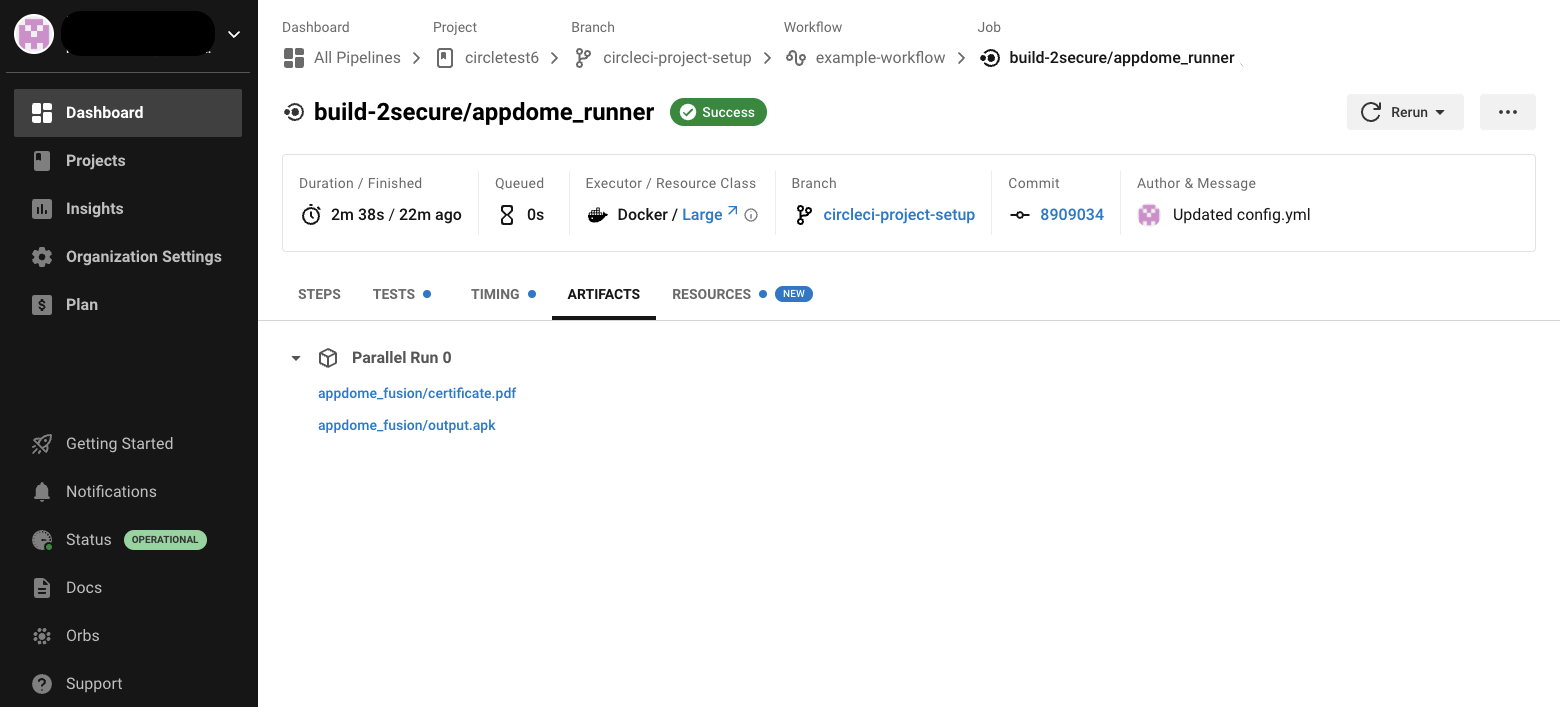
  • Appdome Integrates Mobile Security Platform With CircleCI CI/CD

    Appdome Integrates Mobile Security Platform With CircleCI CI/CD

    Appdome this week made available an integration for the continuous integration/continuous delivery (CI/CD) platform from CircleCI that promises to make it simpler to secure mobile applications before they are deployed.

    As a provider of a platform for securing mobile applications running on iOS and Android platforms, Appdome provides a runtime application self-protection (RASP) platform that, among other capabilities, provides code obfuscation, mobile data encryption, jailbreak detection, root detection, man-in-the-middle attack prevention, on-device anti-malware, anti-fraud, anti-cheat and anti-bot capabilities.

    The platform is now integrated with the Circle CI/CD platform via the Orb framework created by CircleCI to simplify integrations with third-party tools.

    Karen Hsu, senior vice president of mobile DevOps and security solutions for Appdome, said the Appdome Build_2Secure Orb for CircleCI is an example of a series of integrations the company plans to make involving DevOps tools and platform that will make it easier to apply DevSecOps best practices to the deployment of mobile applications. That’s critical because it’s not uncommon for teams using different DevOps platforms and tools to be involved in the development of the same application, she noted.

    A recent Appdome survey suggested consumers are about to force the DevSecOps issue for providers of mobile applications regardless of how mature their processes are. A full 94% of respondents said they would promote a brand if the mobile apps protected them versus 68% that said they’d abandon brands that offered no protection.

    Securing mobile applications is especially challenging because once an application is compromised, it’s relatively trivial for cybercriminals to also inject malicious code into other applications running on a mobile device. There are no automated remediation capabilities, so the best defense is to isolate applications in a way that prevents malware from executing in the first place, noted Hsu. At a time when it’s already clear cybercriminals will be using artificial intelligence (AI) platforms to launch attacks, organizations will not have the time required to remediate vulnerabilities before malware is activated, she added.

    That Appdome approach provides the added benefit of reducing tensions between developers and cybersecurity teams that otherwise would be requesting immediate fixes to mobile applications that have been compromised, noted Hsu. As more mobile applications are built and deployed, the overall goal should be to enable both teams to work collaboratively together without unnecessarily disrupting each other’s workflow, added Hsu.

    It’s not clear what percentage of the applications being built and deployed today are destined to run on mobile devices, but securing those applications clearly presents some unique challenges. Many of those applications are deployed on consumer-grade devices attached to wireless networks that are not especially secure. Cybercriminals are increasingly targeting these devices not only to access sensitive data but also because they often provide a gateway through which the rest of an IT environment can be compromised.

    The simple truth of the matter is, sadly, DevOps teams need to assume that most mobile applications are going to be running in the cybersecurity equivalent of a hostile environment where the odds are considerably stacked against them.

  • Running Serverless in Production: 7 Best Practices for DevOps

    Running Serverless in Production: 7 Best Practices for DevOps

    Serverless in production refers to the deployment and use of serverless architecture in a live, production environment. In this context, serverless refers to a cloud computing paradigm where the cloud provider manages the infrastructure and allocates resources as needed to run and scale applications and services.

    In a serverless production environment, applications and services are broken down into individual functions triggered by events, such as API requests or changes in data. These functions are executed in response to these events and the cloud provider is responsible for managing the underlying infrastructure, including servers, storage and network resources.

    In this article, I’ll describe some of the key use cases of serverless in production and provide important best practices DevOps teams can use to run serverless in production safely and effectively.

    Use Cases of Serverless in Production

    Serverless technology has emerged as a popular choice for delivering various applications and services in production. Here is a brief overview of serverless in production for four use cases.

    Microservices

    In a microservices architecture, an application is divided into small, independent services that can be developed, deployed and scaled separately. Serverless allows each microservice to be deployed as a separate function, triggering the function only when needed and scaling it automatically based on demand. This results in a cost-effective and flexible solution for microservices, as the user only pays for the exact amount of computing resources used by each function.

    IoT Devices

    Internet of things (IoT) devices generate large amounts of data, which need to be processed and analyzed in real-time. Serverless functions can process IoT data as it is generated, allowing for real-time analytics and decision-making. With serverless, the processing and analysis can be scaled dynamically, handling spikes in data volume without the need for infrastructure management.

    Multimedia Processing

    Multimedia processing tasks, such as image and video compression, often require significant computing resources. With serverless, these tasks can be performed as functions triggered by events such as the upload of a new image or video. The serverless functions can scale automatically to handle large amounts of data, reducing the costs associated with infrastructure management and increasing efficiency.

    This function-as-a-service (FaaS) is often used for storing and processing user inputs and other data types. For example, FaaS can be used to execute specific processes according to the category of media uploaded by the user. It’s easier to build these services because the developer can write one function that is applied to multiple processing tasks. 

    APIs for Mobile and Web Applications

    APIs are an essential component of many web and mobile applications, providing access to the underlying data and services. Serverless functions can build and deploy APIs, providing a cost-effective and scalable solution. The functions can be triggered by incoming API requests and automatically scaled based on demand, allowing for fast and reliable API access for users. 

    FaaS is especially useful for RESTful applications and event-driven architectures. Containers are also useful for performing processes like API calls, but serverless functions are best suited for highly fluctuating volumes of traffic.

    Best Practices for Running Serverless in Production

    1. Monitor the Serverless Environment

    Serverless monitoring refers to the process of monitoring serverless applications and infrastructure, including serverless functions and event-driven computing services, without the need for dedicated servers or virtual machines. In a serverless architecture, computing resources are dynamically allocated and managed by the cloud provider, so there is no need for organizations to manage and maintain their own servers.

    Serverless monitoring involves monitoring various aspects of serverless applications and infrastructure, including function execution, resource utilization and performance metrics. The goal of serverless monitoring is to identify and resolve issues that may impact the performance and reliability of serverless applications and to optimize resource utilization for cost efficiency.

    By implementing serverless monitoring, organizations can ensure that their serverless applications and infrastructure are performing optimally and that they can quickly identify and resolve any issues that may arise. This helps to improve the reliability and cost-effectiveness of serverless computing and enables organizations to take full advantage of the benefits of serverless architecture.

    2. Implement Authentication

    Serverless authentication refers to the process of authenticating users and applications in a serverless architecture, where computing resources are dynamically allocated and managed by the cloud provider. In a serverless authentication model, authentication is managed through cloud-based services and APIs without the need for dedicated servers or virtual machines.

    By implementing serverless authentication, organizations can ensure that their serverless applications and services are secure and that users are only able to access the resources that they are authorized to access. This helps to improve the security of serverless applications and services and reduce the risk of security breaches.

    3. Ensure Security with API Gateways

    API gateways provide a centralized point of control and security for incoming API traffic. API gateways allow for the implementation of authentication and authorization mechanisms, such as OAuth, to control access to serverless functions. This ensures that only authorized users and clients can access the functions, reducing the risk of unauthorized access.

    API gateways can also manage incoming API traffic, such as rate limiting and request filtering, to prevent overloading the serverless functions and protect against denial-of-service (DoS) attacks. They perform real-time threat detection, identifying and blocking malicious traffic before it reaches the serverless functions. This includes protection against other common attacks such as cross-site scripting (XSS) and SQL injection.

    Finally, an API gateway can enforce encryption for incoming and outgoing API traffic, ensuring that sensitive data is protected in transit. 

    4. Assign Appropriate Roles to Functions

    With serverless, there can be many resources that must be handled, making management potentially complex. Creating minimal suitable roles for each function makes management easier, enhances security and reduces the attack surface of the serverless architecture. This approach means that the least privilege principle is applied, where a function only has the minimum permissions required to perform its intended task. It reduces the risk of unauthorized access to other parts of the infrastructure, such as sensitive data or other functions.

    The right roles ensure that functions are isolated from each other and run in their own security context. This helps to prevent the spread of any security incidents, as well as ensure that the compromise of one function does not affect the security of the rest of the system.

    5. Ensure Dependencies are Secure

    It is common for serverless functions to have dependencies from various repositories like Maven and PyPI. These dependencies may contain known vulnerabilities which can be exploited by attackers. Securing application dependencies is important to prevent security incidents and ensure the reliability and availability of the serverless architecture.  

    This involves tracking and managing the dependencies used in the serverless applications. This helps to ensure that dependencies are used in a consistent and controlled manner, reducing the risk of conflicts or compatibility issues. By regularly monitoring and updating dependencies, organizations can ensure that their serverless architecture is secure and reliable.

    6. Sanitize Inputs to Prevent Injection Attacks

    Serverless applications often use data inputs from users or events. This data enables functions such as data streaming, but the user-supplied data can also pose security risks. Sanitizing event inputs helps to prevent injection attacks—these occur when an attacker injects malicious code or data into a serverless function through the event inputs. 

    By sanitizing inputs, organizations can remove or modify potentially malicious inputs, preventing the attacker from injecting malicious code into the function. One important form of sanitization is input validation—validating that the inputs conform to a specific format or type, such as checking that a string is a valid email address. This helps to prevent attackers from injecting malicious code into the function by ensuring that the inputs are in the expected format.

    Sanitizing data is only one aspect of a defense-in-depth security strategy, which involves implementing multiple security controls to protect against attacks. It is also important to enable data escaping for SQL and noSQL databases. Likewise, the data provided by events shouldn’t be used to evaluate code at runtime or spawn system processes. 

    7. Secure Data in Transit

    Securing and verifying data in transit helps to prevent data breaches and ensure the confidentiality, integrity, and privacy of data transmitted between different parts of the serverless architecture. Here are some guidelines for securing and verifying data in transit:

    • Use HTTPS: This is a secure protocol for transmitting data over the internet. By using HTTPS, organizations can ensure that data transmitted between different parts of their serverless architecture is encrypted, preventing unauthorized access to sensitive data.
    • Implement SSL certificate verification: Verify the identity of the certificate owner and the authenticity of the certificate. This helps to prevent man-in-the-middle attacks, where an attacker intercepts and alters data transmitted between the server and the client.
    • Enable signed requests: These involve adding a digital signature to a request, which is then verified by the recipient. This helps to prevent tampering with data in transit and ensures the integrity of the data.

    Conclusion

    In conclusion, running serverless in production requires careful planning and execution to ensure the security and reliability of the architecture. By following the best practices described here, DevOps teams can reduce the risk of security incidents and ensure the reliability and availability of their serverless architecture. These include:

    • Monitoring the serverless environment
    • Implementing authentication
    • Deploying API gateways
    • Creating minimal suitable roles for each function
    • Securing application dependencies
    • Sanitizing event inputs
    • Securing and verifying data in transit 

    Additionally, regularly monitoring and updating dependencies and implementing a defense-in-depth security strategy can help organizations ensure the security and reliability of their serverless architecture over time. 

  • Platform Engineering: Creating a Paved Path to Reduce Developer Toil

    Platform Engineering: Creating a Paved Path to Reduce Developer Toil

    This article is part one of a series of three on the boom in platform engineering and its role in reducing cognitive load and creating a better developer experience.

    Developer toil and cognitive load in the cloud-native space is real. The complexity posed by microservices, Kubernetes, and “software-defined everything” almost necessitated that ops needed to solve many of these issues to support cloud-native development.

    Developers taking on full dev life cycle ownership and the requirement to shift left have resulted in cross-functional and operational concerns that have added even more complexity to already challenging workloads and unclear workflows.

    To fuel productivity and consistency and enable developers to build and ship apps faster and more securely, one must understand what a ‘paved path’ might look like and where responsibility for different aspects of the development life cycle resides.

    Supporting the Majority of Developers Without Alienating the Rest

    Most developers want and need paved paths, particularly as paradigms shift; the adoption of cloud-native development being one such shift. These paths must help them reach the “safety” and productivity on which they are measured in their daily output and provide focus for completing their tasks. Freedom to make choices about processes and tools is not a priority because it ends up being noise that adds to the cognitive load and, in most cases, does not serve the company’s software shipping goals. This majority needs tighter guardrails and guidelines to do their work and get their code into the world without having to figure out too many operational parameters for themselves.

    The cloud-native tooling landscape is vast, duplicative and overwhelming. Just trying to select and test tools could be a developer’s full-time job. Likewise, many organizations and developers have reported frustration—they are wasting a lot of time on repetitive work and routine tasks that deliver no business value, such as setting up environments and troubleshooting CI pipelines along with slow feedback loops in the development process.

    As organizations increase pressure to deliver more with less and do so more frequently, these responsibilities make for a poor and unproductive developer experience and a far-from-ideal use of organizational resources. Stack Overflow’s 2022 Developer Survey reported that 62% of respondents spend more than 30 minutes a day fixing problems and looking for answers, leading to somewhere between 333-651 hours of lost time per week across a team of 50 developers. This reinforces a need for upfront investment in the paved-path developer platform, which eliminates much of this frustration.

    It’s worth noting there is also a so-called 1% developer–one who wants to experiment and discover new tools on their own. Defining the developer experience within narrow guardrails ends up stifling this minority, which not only hampers their productivity but could stand in the way of innovation for organizations as a whole.

    Building quality software requires accommodating both kinds of developers. For most development teams, the goal is to give them a clear route to building apps faster and shipping safely by prescriptively paving the path. The path also must provide enough freedom for adventure, allowing developers to stray from the path (within reason and where it makes sense).

    Internal Developer Platforms: Paving Just Enough Path With Platform Engineering

    Platform engineering and internal developer platforms (IDPs) are much-touted approaches to taming the toil. It is a part of the solution, and as it gains traction, it is becoming more mature. That is, instead of developers and development teams taking on full responsibility for every phase of the software life cycle and potentially cobbling together something resembling a developer platform, the industry trend is moving toward more comprehensive, commercial out-of-the-box platforms. Whether or not this addresses the actual needs of the development organization, this shift works because developer experience is now a business-critical requirement, and a centralized developer platform facilitates that experience (with flexibility enough to house all types of developer experience and developers working across industries).

    The developer platform concept, supported by architecture, DevOps and SRE teams, contains the ingredients of transformation both for business and for developer experience. As the concept reaches critical mass and the “productifying” of developer platforms matures, one thing seems likely: By shifting to a platform model, development organizations are moving from ops-first to developer-first Kubernetes. The developer experience becomes defined by its optimized tools and workflows (and enables wider adoption of cloud-native development across larger organizations and broader industries).

    Refocusing Developer Efforts: Abstractions, not Distractions

    Cognitive toil will exist for developers regardless of the tools they’re offered. Technologies grow more complex and change frequently, and there are performance metrics that must be met. Taking the focus away from developers’ primary concerns—coding and shipping software and features—contributes to this toil without generating much return. As much as developers should be able to gain enough understanding of the way their code behaves and the consequences it can have downstream when shipping and running it, they should not need to become DevOps experts as a part of their work. This is why DevOps, despite predictions to the contrary, isn’t dead.

    The paved-path developer platform gives developers exactly that: The ability to shift left without drifting right. The platform provides much-needed abstractions and tools that enable developers to refocus on priority work without distracting or overwhelming them with too many choices.

    Becoming dev-first doesn’t kill off ops, either. Dev-first Kubernetes and a centralized developer platform elevate the importance of the developer experience while continuing to highlight the importance of DevOps in supporting and optimizing the developer experience. This is an entire topic in and of itself, which will be explored in part two of this article series.

  • Five Great DevOps Job Opportunities

    Five Great DevOps Job Opportunities

    devopsy.kinsta.cloud is now providing a weekly DevOps jobs report through which opportunities for DevOps professionals will be highlighted as part of an effort to better serve our audience.

    Our goal in these challenging economic times is to make it easier for DevOps professionals to advance their careers. Of course, the pool of available DevOps talent is still relatively constrained, so when one DevOps professional takes on a new role it tends to create an opportunity for others.

    The five job postings shared this week are selected based on the company looking to hire, the vertical industry segment and, naturally, the pay scale being offered.

    We’re also committed to providing additional insights into the state of the DevOps job market. In the meantime, for your consideration:

    LinkedIn

    Apple
    San Diego, California
    Site Reliability Engineer (SRE) – Video
    $115,000 to $217,500

    SimplyHired

    ScientiaMobile
    Reston, Virginia
    Senior DevOps Engineer
    $110,000 to $150,000

    Monster.com

    Larsen & Toubro Infotech Ltd.
    Farmington, Connecticut
    DevOps Engineer
    $110,000 to $130,000

    Indeed.com

    TherapyNotes.com
    Remote
    Senior DevOps Engineer
    $105,000 to $155,000

    Dice.com

    MRoads
    Dallas, Texas
    Platform Engineer – SRE
    $100,000 to $120,000

  • Red Hat Brings Ansible Automation to Google Cloud

    Red Hat Brings Ansible Automation to Google Cloud

    Red Hat today announced that the Red Hat Ansible Automation Platform is now available on Google Cloud to simplify the management of yet another cloud platform.

    Using the Ansible Automation Platform, it’s now possible for IT teams that invoke Google Cloud to access pre-integrated services such as Google Virtual Private Cloud, security groups, load balancers and compute and instance groups.

    Pete Cruz, head of product and technical marketing for Red Hat Advanced Cluster Management for Red Hat, said Google Cloud—alongside existing support for rival cloud services—will make it simpler to consistently apply automation across multiple cloud and on-premises IT environments.

    In addition, IT teams can also count the consumption of the Ansible Automation Platform toward any existing enterprise spend agreements with Google.

    Ansible has emerged as a de facto standard for IT automation and is widely embraced by IT vendors and cloud service providers. That level of support has fostered the creation of a level of automation content that is now unrivaled by any other automation framework, noted Cruz.

    In the meantime, the pressure to automate IT processes is building during uncertain economic times. As IT environments continue to become more complex—thanks, in part, to the rise of cloud-native applications—many IT organizations are finding it more challenging to convince business executives to hire additional full-time employees. As a result, many of those IT organizations are now looking to automate as many processes as possible as more workloads are distributed from the network edge to the cloud.

    Rather than create a single playbook to automate every IT process on an end-to-end basis, organizations generally mix-and-match content created by others to automate workflows across highly distributed computing environments, noted Cruz.

    The biggest challenge when automating IT processes is simply overcoming inertia. Many processes are still manual simply because they always have been. In other cases, IT teams are still relying on undocumented scripts created by IT administrators who have left the organization. As the IT environment continues to evolve, it’s not likely those scripts will continue to scale.

    One way or another, IT is becoming more automated. The irony is that after using IT to automate almost every business process imaginable, it’s only recently that IT teams are getting around to automating their own workflows. Many of the rote tasks that used to be performed by entry-level personnel have been steadily disappearing thanks to automation.

    DevOps teams, of course, have always been ruthlessly committed to automating as many IT processes as possible in the name of efficiency. The rise of Ansible, however, makes it easier for every IT organization to achieve that same goal because they don’t have to wait for a specialist to create a playbook to automate a process. An Ansible playbook that can be easily customized or extended often already exists. The real issue may simply be knowing where to look for it.

  • Automation Challenges Holding DevOps Back

    Automation Challenges Holding DevOps Back

    A survey of 500 IT and engineering leaders in the U.S. published today finds organizations build an average of 6.7 internal applications per year themselves in addition to investing in 7.7 separate platforms to build applications.

    Commissioned by Internal, a provider of platforms for building application development environments, the survey also found organizations are spending 40% of their time building and maintaining these internal tools and workflows. While more than three-quarters (76%) of respondents said that this work is necessary, it distracts from building applications that drive business revenue. A total of 82% said a lack of true flexibility and customization is the top reason so much time is spent on building and managing internal tools and workflows.

    A full 94% of respondents said they want a more collaborative platform that enables technical and non-technical users to build internal tools/workflows faster together. The survey also found 91% of respondents believe a platform that encompasses application development and workflow automation would save development time.

    Internal CEO Arisa Amano said one thing that holds IT teams back is that managing the platforms used to build applications requires too much programming expertise. Internal is making a case for a graphical approach to building application development environments so IT administrators can easily construct them using a drag-and-drop interface on behalf of an application development team. That approach makes it possible to allocate more programming resources to building applications, she said.

    More organizations than ever are revisiting how applications are built as the number of projects increases despite an uncertain global economy, noted Amano. Organizations of all sizes are reluctant to hire additional full-time engineers even as digital transformation initiatives demand a growing number of custom applications, she added. The only way to effectively address those conflicting goals is to adopt a platform that automates much of the workflow associated with building an application development environment, said Amano.

    It’s not clear how willing DevOps teams are to replace the platforms they use today to build those environments, but many organizations are still relying on bespoke platforms they built and continue to maintain. Many of those platforms are made up of a collection of tools that DevOps teams cobbled together over the years. However, many of the software engineers that initially built those integrations may have since moved on and the documentation left behind is likely to be scant, noted Amano.

    Most DevOps teams in 2023 will continue investing in higher automation levels to accelerate application development. The quandary they all face is whether to continue to invest in the platforms they have already or migrate to a platform that makes it simpler to build and maintain an application environment using automated workflows built and maintained by a vendor. Regardless of what they choose, it’s certain the days when organizations could afford to throw engineers at every integration challenge have come to an end.

  • 5 Unique Challenges of Mobile App Testing

    5 Unique Challenges of Mobile App Testing

    At first glance, testing a mobile app may not seem to be very different from testing a conventional desktop app. Mobile and desktop apps are often written in the same languages and hosted on the same servers. They must also meet the same basic user expectations in areas like loading speed and accessibility.

    But when you dive into the details, you realize that mobile apps are fundamentally different beasts from desktop apps–and that, by extension, mobile testing requires a unique approach. You can’t simply take a software testing strategy that works for desktop apps and graft it onto your mobile apps.

    This article breaks down five of the main reasons why mobile testing necessitates a different strategy from desktop application testing and which unique needs QA engineers should consider when testing apps.

    1. Mobile Configuration Variability

    Perhaps the biggest difference between mobile and desktop testing is that with mobile apps, engineers have a much wider set of possible configurations to contend with.

    In the desktop world, there are just two main operating systems – Windows and macOS – and a relatively small number of OS versions for each family. And although there are many types of PCs and laptops, they all conform to the same basic hardware standards.

    In contrast, there are over 24,000 distinct types of Android mobile devices out there – to say nothing of iOS devices, which add to the diversity of hardware. There is also a wider selection of mobile operating systems and versions.

    What this means for QA teams is that there are many more variables to test for with mobile devices. It also means testing must be more efficient so that engineers can test for as many potential configurations as possible without delaying software release cycles.

    2. Lack of Mobile Testing Standards

    With a traditional, web-based desktop app, there is a consistent set of standards that the app is supposed to comply with when rendering content – specifically, the standards set by the W3C, a consortium that advocates for a standards-based, interoperable World Wide Web.

    In the mobile realm, however, there is nothing equivalent to the W3C standards. Apps can render content in widely varying ways, many of which are device-specific.

    Here again, this increases the need for specific testing teams to account for more variations and edge cases. With desktop apps, ensuring that the app complies with the W3C standards is often sufficient, but mobile testing is not so simple.

    3. Unique Mobile Accessibility Requirements

    Accessibility testing, which ensures that accessibility features like the ability to increase text size function properly, is important for delivering a great experience to all users, whether they access apps using desktops or mobile devices.

    But with mobile devices, accessibility testing is harder, because there is more room for error when implementing accessibility features. For instance, the smaller screen sizes of devices – and the greater variation in average screen size – could mean that an increase in text size will cause the app to render some text off the screen. Or, a “nighttime mode” feature on a screen could result in lower-than-expected contrast between text and backgrounds, causing accessibility challenges for some users.

    A mobile testing strategy needs to be able to accommodate risks like these, which aren’t as pronounced for desktop apps.

    4. Mobile Environment Differences

    By definition, mobile devices may be used in a wide range of physical settings. Depending on the location from which a user accesses a mobile app, application performance could be impacted by a variety of environmental factors that don’t typically apply for desktop apps.

    For instance, limited network connectivity might undercut application performance when users who travel too far from cell towers. Or, energy-saving features on mobile devices that are running on low battery could decrease the speed at which apps render content.

    Once again, these factors create additional risks that QA teams need to address when planning testing routines.

    5. Higher Stakes for Mobile Testing

    It’s a best practice to strive to deliver the best possible experience to all users, whether they are on desktop or not. But the reality is that poor user experience in mobile apps tends to have a more negative impact on a company’s brand.

    The reason why is that it’s easy for users to highlight poor app performance by giving apps low ratings or leaving negative comments in marketplaces. They can’t do these things for most desktop apps, because, unlike mobile apps, most desktop apps are not downloaded through centralized marketplaces with user-rating features.

    This difference doesn’t make mobile testing more technically challenging, and to be clear, I’m not saying you can skimp on desktop testing because users will abandon your desktop apps if they don’t work as they should, but it does increase the stakes of perfecting a testing strategy. Businesses simply have more to lose, reputationally speaking, from delivering buggy apps than they do from low-quality desktop apps.

    Conclusion: The Need for Purpose-Built Testing Solutions

    All of the above is why we need more testing strategies and solutions that are designed specifically for mobile.

    Historically, QA teams have frequently tried to extend desktop testing strategies to address mobile as they’ve added apps to their catalogs, but that approach simply doesn’t work. Mobile apps and devices are too different in fundamental respects to be shoehorned into a desktop-centric testing routine. The sooner QA engineers realize this, the sooner they’ll optimize their user experiences.

  • Jellyfish Adds Tool to Visualize Software Development Workflows

    Jellyfish Adds Tool to Visualize Software Development Workflows

    Jellyfish today unveiled a tool that identifies bottlenecks in software engineering processes using data the company collects via Git repositories and project management software from Atlassian.

    Krishna Kannan, head of product for Jellyfish, said Life Cycle Explorer provides managers with a tool that makes it simpler to identify the root cause of a process breakdown.

    Life Cycle Explorer goes beyond providing simple top-level metrics to calculate the time consumed at each stage of a workflow for any given process and then visually map it to surface trends, noted Kannan.

    That makes it possible to identify gaps, see where work areas overlap—indicating parallel processes—and drill into how outlier events may be impacting the overall life cycle of a development project.

    The launch of Life Cycle Explorer comes at a time when there is more focus on the efficiency of DevOps teams than at any time in recent memory. During uncertain economic times, organizations of all sizes are looking to optimize DevOps workflows to ensure maximum efficiency because many organizations are hesitant to hire additional full-time engineers.

    The important thing to remember when analyzing DevOps workflows is there is no such thing as the optimal “Goldilocks” workflow that can be universally applied, noted Kannan. Instead, most DevOps leaders will discover one team excels at one segment of a DevOps workflow while others are more efficient elsewhere. Life Cycle Explorer makes it easier to identify those best practices in a way that makes them simpler to replicate when appropriate, said Kannan.

    Life Cycle Explorer follows the addition of a benchmarking tool and DevFinOps offering that addresses cost capitalization reporting for research and development. The core Jellyfish engineering management platform is designed to ingest data from the tools an organization already uses to build applications and then applies proprietary algorithms to create a comprehensive view of workflows across an organization. The challenge many organizations encounter today is they often lack visibility into workflows that have each been individually constructed by a diverse range of DevOps teams working on very different types of software projects.

    At the very least, DevOps teams need to establish a baseline that surfaces the current rate at which software development occurs. Once that baseline is established it then becomes possible to measure the impact changes to software engineering practices are having. Today many organizations make educated guesses about what changes are needed without really understanding the impact they might be having across the entire software development life cycle.

    Of course, it will be up to each organization to determine the degree to which they want to measure workflows. The Jellyfish platform makes it simpler to identify workflow issues, but there are also value stream management (VSM) platforms that track the impact software engineering workflows are having on specific business goals. Those VSM platforms are typically much more challenging to implement and maintain. The Jellyfish approach focuses more narrowly on improving the efficiency of DevOps teams.

    Regardless of approach, things that are not measured are not being managed. At a time when organizations are more dependent on software than ever, the need to manage software development life cycle as efficiently as possible has become a lot more important.