Category: Continuous Testing

Continuous testing is the process of executing automated tests as part of the software delivery pipeline to obtain immediate feedback on the business risks associated with a software release candidate.

  • HPE to Acquire OpsRamp to Gain AIOps Platform

    HPE to Acquire OpsRamp to Gain AIOps Platform

    Hewlett-Packard Enterprise (HPE) this week revealed it is acquiring OpsRamp to gain access to a platform for embedding artificial intelligence in IT operations (AIOps).

    Latha Vishnubhotla, chief platform officer in the office of the CTO for HPE, said the company would embed the machine learning technology developed by OpsRamp across its entire portfolio in addition to leveraging it to automate IT processes the company manages via its GreenLake service for HPE customers.

    Ultimately, HPE will be applying machine learning across the entire IT stack, including applications, to reduce the total cost of IT, she said.

    The acquisition of OpsRamp is expected to close in the third quarter of this year. Terms of the deal were not announced, but it comes at a time when more organizations are getting comfortable with AIOps.

    A recent OpsRamp survey polled 138 IT leaders working for enterprise IT organizations and 127 representing managed service providers (MSPs) that generate at least $25 million in revenue and have more than 500 employees. The survey found the primary reason organizations are embracing AIOps is to improve service and application availability and performance (60%), followed closely by automation of operations (58%) and processes (54%).

    The survey found that the greatest IT operations challenge for enterprises in 2023 was automating as many operations as possible (66%), followed by driving greater efficiency and productivity of IT operations teams and processes (61%). Application-to-infrastructure dependency mapping is the top incident management challenge (64%), the survey found.

    The primary operational benefit cited was reducing open incident tickets (65%), followed by reducing mean-time-to-discovery (MTTD) and mean-time-to-remediation (MTTR), tied at 56%, and automation of tedious tasks (52%).

    In general, organizations are choosing one of two AIOps paths, said Vishnubhotla. Some are waiting to evaluate the recommendations made by the AIOps platform before implementing, while others are looking to completely automate processes so they can focus more of their time and effort on application development and deployment, she said. In much the same way a driver of an autonomous vehicle learns to trust the AI over time, there is a similar transition occurring with AIOps, noted Vishnubhotla.

    The challenge is that it takes an AIOps platform a few months to learn an IT environment. The more dynamic that IT environment is, the longer that process can take. At the very least, however, AIOps platforms have the ability to automate many low-level IT tasks today that conspire to increase the amount of toil DevOps teams would otherwise encounter.

    It’s difficult to determine how pervasive AIOps may be within IT environments, but there is no doubt as organizations look for ways to manage IT at scale, there will be increased reliance on automation. Most organizations can’t afford to continue to hire armies of IT personnel, especially as the global economic outlook remains uncertain.

    In fact, one of the benefits of an AIOps platform is that, unlike an employee, it does not take any days off or suddenly decide to take another job. It also, for better or worse, doesn’t forget anything once it’s been learned. As such, it’s now only a question the degree to which AIOps platforms will be trusted over time to manage increasingly more complicated IT tasks.

  • Awareness of Software Supply Chain Security Issues Improves

    Awareness of Software Supply Chain Security Issues Improves

    A global survey of 167 software professionals suggested that, while there is a lot more awareness of application security issues, the adoption of DevSecOps best practices is still not pervasive.

    The survey, conducted by Chainguard, the Eclipse Foundation, the Rust Foundation and the Open Source Security Foundation (OpenSSF), found that just over half (51%) of respondents are either concerned or are extremely concerned about software supply chain security.

    In addition, only a third of respondents (33%) reported they are familiar with the Supply-chain Levels for Software Artifacts (SLSA) framework for building more secure applications. Well over a third (36%), however, said they had never heard of it.

    Only a quarter of respondents (25%) reported that their team always signed built artifacts, the survey found.

    The survey identified the most challenging issues developers are encountering and found they are reproducing builds (64%) followed by creating hermetic builds that are isolated from other software libraries (62%).

    Mikaël Barbero, head of cybersecurity for the Eclipse Foundation, said while awareness of software supply chain issues is higher, it’s apparent that other priorities are still getting in the way of adoption of DevSecOps best practices. For example, software bills of materials (SBOMs) may generate a lot of headlines, but their adoption remains mixed, he added.

    John Speed Meyers, a security data scientist for Chainguard, noted that incentives still need to change; too many managers that hire developers still emphasize performance and delivery times over application security. Many developers, as a result, still tend to view cybersecurity as an obstacle to be overcome or worked around rather than a core capability that they will be graded on, he added.

    In theory, as responsibility for application security shifts left toward developers, overall cybersecurity will improve. Most developers, however, have little to no cybersecurity training, so the odds they will be able to resolve these issues are low. Instead, many organizations are either trying to embed cybersecurity professionals within DevOps workflows or, at the very least, deputize at least one developer to advocate for cybersecurity within those teams.

    Regardless of commitment level, it’s apparent that organizations need to address everything from locking down developer environments to thwart phishing attacks to ensuring application builds are not inadvertently infected with malware. The challenge organizations face is both technical and cultural, so the amount of effort required should not be underestimated.

    In the meantime, organizations should expect to see cybercriminals increase their attempts to compromise software supply chains. Infecting malware into software components that will be used by multiple downstream applications is, from their perspective, one of the most efficient means of wreaking havoc. Right now, organizations make it too easy for cybercriminals to compromise application environments.

    Organizations should also recognize that tolerance for insecure applications is also declining, as evidenced by the National Cybersecurity Strategy put forward by the Biden administration. It’s not so much a question of whether organizations that create software will be held liable for application security issues as much as it is to what degree.

  • Why Observability is Important for Development Teams

    Why Observability is Important for Development Teams

    Observability, which allows development teams to understand better how their systems behave in production, is critical to successful software delivery. According to Gartner, by 2026, 70% of organizations that successfully applied this practice will achieve shorter latency for decision-making, enabling competitive advantage for target business or IT processes.

    Observability allows development teams to identify and diagnose issues quickly to make decisions that improve overall software delivery performance. Let’s take a closer look at why this practice is critical for development teams.

    Differentiating Observability and Visibility

    To better understand observability, it’s essential to clear up a common misconception – that observability and visibility are the same. Two critical differences exist between the two. Visibility allows development teams to look at the surface-level aspects of an application or system. In contrast, observability provides deeper insight into what an application is doing in production. Being equipped with a deep knowledge of observability allows developers to be more productive within their respective organizations.

    Impact on Developer Productivity

    With observability, developers can identify and diagnose issues within applications quickly, giving them more time to fix bugs and time for resolution, which are both critical success factors for software delivery. Observability allows organizations to quickly identify and respond to potential problems, such as operational issues or security breaches, before they become issues that impact customers or users. While there is no such thing as perfect software, observability helps developers quickly find and fix issues, bottlenecks, inefficiencies, etc., so they can get back to doing what they love: Creating new software.

    With the benefits of observability, developers naturally gravitate toward tooling and technology. There are many tools available for developers to take advantage of, and development teams must learn how to use these tools to integrate them into their applications and services. Let’s explore some of the more popular options.

    The Shift to Cloud-Native Tools

    The shift to cloud-native tools is driven by the increasing popularity of cloud computing and its benefits, such as scalability, cost-effectiveness and flexibility. The move to cloud-native has made an enormous impact on observability efforts. Having good tooling and processes available positively impacts observability efforts because it’s a critical aspect of the developer communities’ systems. Overall, the shift to cloud-native tools is driven by the need for organizations to take advantage of the benefits of cloud computing and the need for more efficient and flexible deployment and scaling of applications.

    Some of the most common tools in observability include:

    These tools offer developers greater insight and knowledge into how applications behave. The cloud-native approach necessitates a new way to aggregate all of these operations.

    Conclusion

    With observability, developers can understand how their systems work in production. These systems act in different ways depending on the environments they run in. Therefore, organizations must do more to provide developers with sufficient observability because of the limited visibility into the overall system performance.

    Observability allows developers to act quickly and remedy issues before they go into production and organizations can better measure success relative to the application’s performance. Hours of developers’ time are spent manually debugging and troubleshooting when organizations could have a system in place to do this automatically and allow developers to get back to what they love doing most: Creating software. Observability helps organizations make better-informed decisions, improve operations and performance and achieve their objectives more effectively.

  • 5 Unusual Ways to Improve Code Quality

    5 Unusual Ways to Improve Code Quality

    Code quality refers to how well-written and maintainable software code is. It encompasses factors such as readability, efficiency, scalability, reliability, maintainability and security. High code quality ensures that software is easy to understand, modify and extend, has fewer bugs and is less likely to break down. It also reduces development time and costs and improves the overall user experience. One common approach to determine code quality is to use automated tools that analyze the code based on predefined quality standards and generate a report with a numerical score.

    Why is Code Quality Important?

    Generating high-quality code ultimately enhances the end user’s experience. Focusing on creating quality code can also help consumers understand the safety and reliability of the software or program they’re using.

    Low-quality code can affect user experience and satisfaction, making it critical to write high-quality code that functions properly. When developers write low-quality code, it can create vulnerabilities that expose the software to cybersecurity threats, resulting in bugs and functionality issues and impacting the software’s reliability. 

    Here are some additional reasons high-quality code is important: 

    • Enhances code readability: Readability is important because it leads to higher rates of understanding among other developers. A code that’s easy to read is also easy to improve.
    • Improves the level of program sustainability: Program sustainability measures how long a code can survive with minimal changes. High-quality code can last for years, making it more sustainable.
    • Increases transferability: Transferring code from one platform to another is a complicated process. It’s much easier for developers to transfer high-quality code, as they only need to make minimal changes.
    • Lowers costs related to program or software: When software lasts for a long time with few errors, it can save a company money. Instead of paying for additional time to rewrite low-quality code, the company can rely on the original, high-quality source code.

    5 Unusual Ways to Improve Code Quality

    Here are a few ways you may not have thought of which can help your development team improve code quality and end-user satisfaction.

    Bug Bounty

    A bug bounty program is a type of crowdsourced security testing in which an organization offers rewards to independent security researchers or ethical hackers for identifying and reporting vulnerabilities in their software or systems. By offering rewards for vulnerabilities, organizations can incentivize security researchers to find and report security issues before they can be exploited by attackers.

    Bug bounty programs can improve code quality in several ways:

    • Incentivize security testing: Bug bounty programs incentivize security researchers to test an organization’s software or systems for vulnerabilities. This can increase the amount and quality of security testing that is done, leading to a more secure product.
    • Encourage responsible disclosure: Bug bounty programs encourage security researchers to report vulnerabilities directly to the organization rather than publishing them publicly or selling them on the black market. This allows organizations to fix vulnerabilities before they are exploited by attackers.
    • Provide feedback on code quality: Security researchers who participate in bug bounty programs can provide feedback on code quality which can help organizations to improve their development practices and write more secure code in the future.

    Auto-Generated Documentation

    Auto-generated documentation is a type of documentation that is generated from code comments and metadata as part of an automated development pipeline. It is typically generated using tools such as Javadoc, Doxygen, or Sphinx, which parse code comments and metadata to generate HTML, PDF, or other formats of documentation.

    Auto-generated documentation can improve code quality in several ways:

    • Improved code readability: Auto-generated documentation can provide clear and concise descriptions of code functionality, making it easier for developers to understand the code and its purpose.
    • Better code organization: Auto-generated documentation can help developers organize their code by providing a clear hierarchy of classes, methods, and functions, making it easier to navigate and maintain the codebase.
    • Consistency: Auto-generated documentation can ensure that documentation is consistent across the codebase, reducing the risk of errors and misunderstandings.
    • Quality assurance: Auto-generated documentation can be used as a quality assurance tool, helping developers to identify errors and omissions in their code comments and metadata.

    Coding Conventions

    Coding conventions are a set of guidelines and standards that outline how code should be written and formatted to promote consistency and readability. They typically cover aspects such as naming conventions, code structure, formatting, and documentation. 

    By following coding conventions, developers can improve code quality and make their code easier to read and understand, which makes it easier to maintain and modify. They also help ensure that code is consistent across a project or organization, which can make collaboration and integration of different code segments easier.

    Typical elements that coding conventions dictate include:

    • Naming conventions for variables, functions, and classes.
    • Indentation and formatting of code blocks.
    • Use of whitespace and comments to improve readability.
    • Guidelines for handling exceptions, errors, and input/output.

    Quality Gates

    Quality gates are a set of checkpoints or criteria that software must meet before it can progress to the next stage of development. They are typically used in software development processes to ensure that the software is of a certain quality and is ready for release.

    Quality gates can be automated or manual, and they are typically implemented at key points in the development process, such as after unit testing, integration testing, or acceptance testing. They can include metrics such as code coverage, code quality, functionality, performance and security.

    By enforcing quality gates, development teams can catch and address issues earlier in the development process, which can reduce rework, save time and ensure that the final software product meets the required quality standards.

    Smart Code Snippets

    Smart code snippets, also known as intelligent code snippets or live templates, are pre-written code fragments that can be inserted into a code file with placeholders for variables or user-defined inputs. They are designed to help developers write code more efficiently and accurately by reducing the amount of repetitive or boilerplate code they need to write and by providing contextual awareness and intelligence.

    Regular code snippets are static pieces of code that can be inserted into a file as needed. They typically contain pre-written code blocks or templates that can be customized to fit the specific use case.

    In contrast, smart code snippets are dynamic and can adapt to the context of the code being written. For example, a smart code snippet might include placeholders for variables that need to be defined or automatically fill in common code constructs based on the context of the code. 

    Conclusion

    The five lesser-known ways to improve code quality discussed in this article offer a starting point for teams looking to take a fresh perspective on their development process. Improving code quality is critical for the success of any software development project. While there are many established methods and best practices for improving code quality, there are also some less conventional approaches that can be surprisingly effective. By adopting a creative and open-minded approach to software development, teams can identify new ways to improve code quality and build more reliable, efficient and secure software.

    Image Source 

  • Bug Bounty Vs. Crowdtesting Programs

    Bug Bounty Vs. Crowdtesting Programs

    Digital quality and excellent user experiences are more important today than ever. When a digital experience doesn’t work as expected or is rife with friction points or glitches, customers are quick to give up and move on to a better, easier solution. Bugs and defects often come with high stakes and can result in loss of revenue, dissatisfied customers and potential damage to a brand’s reputation.

    With this in mind, software testing is tasked with the important role of catching and fixing bugs and defects before they hit production. There are several approaches to finding bugs in software, two of which are bug bounty programs and crowdtesting. In this article, we’ll examine the values of each.

    Bug Bounty Programs

    A bug bounty program typically involves people outside an organization with software testing experience, leveraging their expertise to hunt down product defects in exchange for money. Bug bounty programs can be a cost-effective way to find defects that otherwise go unnoticed. They provide an outside perspective and a sanity check for digital products to find vulnerabilities and defects.

    From a security perspective, bug bounty programs are also valuable. Today’s security teams have trouble managing the sheer volume of software vulnerabilities found in software. That’s part of the reason behind the growing number of cyberattacks and breaches that continue to be a topic of discussion. Bug bounty programs leverage white-hat hackers to find and report vulnerabilities in an effort to improve overall security posture and support the organization’s own cybersecurity team.

    Bug Bounty Benefits

    Bug bounty programs offer a variety of benefits to organizations, including:

    ● Helping with blind spots: It doesn’t matter how well your software is designed and coded. Defects and bugs, whether minor or major, will find their way into applications. The developers themselves and internal testing teams may only test certain paths based on organizational norms. Bug bounty testers offer a fresh perspective that can help reduce overall blind spots in application testing.
    ● Resource flexibility: Most organizations don’t have the flexibility to scale internal resources on short notice. Bug bounty programs offer outsourced help and are flexible. They can be scaled up if needed to help with finding defects before a major launch. Or, if a business needs to save money, it can be scaled down by either reducing payouts or limiting testers to high-value defects.
    ● Continuous evaluation: Whether an application is in use by customers or is just a prototype, a bug bounty program can go to work finding and revealing bugs and vulnerabilities. Bug bounty programs can continuously search for bugs that help improve the quality of an application.

    Bug Bounty Challenges

    While there are some great benefits to using bug bounty programs, there are challenges, as well, including:

    ● Money focus: As the name suggests, this is a bounty program. High-severity defects come with a higher payout. If a large percentage of bug bounty hunters are focused on high-severity bugs and vulnerabilities because of the higher earning potential, they may miss the smaller defects. This can add up and result in a less-than-ideal user experience, with smaller issues going unfixed.
    ● The perspective of the tester: No matter how experienced and skilled a tester is, everyone is limited by their own blind spots and perspective. A diverse group of testers can help offset this, but there is still no guarantee that they will test the product in the same way that customers will use them. This challenge is multiplied when we add in different devices, operating systems, languages, and locations. Bug bounty hunters may be more focused on finding high-value issues to earn more, while an internal tester may be more invested in a specific product or feature and making sure it works as it should.
    ● Communication: Many have gotten used to working from home or from anywhere and collaborating remotely. Bug hunters work like this too, but they are outsourced assistance from an organization, which requires a bit of extra thought for communication, project scope and qualifications to make sure misunderstandings or lags in progress are kept to a minimum.

    Crowdtesting

    A crowdtesting model leverages skilled testers and testing teams that can be sourced from a globally dispersed community of independent digital experts. Depending on the size and diversity of the community, testers can apply a nearly limitless variety of demographic characteristics, locations, skill levels, spoken languages, abilities, devices, browsers and operating systems into a testing scenario. This breadth of feedback provides valuable insights into how real users will interact with an app, device or digital experience—which may not necessarily be the “typical” way it is intended to be used. This real-world interaction can unearth bugs, friction points and localization issues that may otherwise go unnoticed before the experience is released to actual customers.

    The remote and on-demand nature of crowdtesting provides scalability and timely results in comparison to more traditional testing methods, like offshoring or lab-based testing, which are typically more limited in scope and flexibility. Plus, the crowdtesting model inherently provides the ability to scale testing services up or down as needed to meet the project-based requirements of a company’s internal teams.

    Crowdtesting Vs. Bug Bounty Programs

    Both bug bounty and crowdtesting programs involve digital experts looking for app defects and vulnerabilities with the goal of improving digital quality. These programs can be aligned in this goal and even work in tandem, but there are some notable differences between them worth mentioning.

    ● Scope: Bug bounty program scopes will always be somewhat limited. Defects can be found outside of the payment scope and go unflagged. Crowdtesting allows for either a broader or more specific scope, depending on needs. Organizations can give specific instructions, like making sure UX considerations are taken into account.
    ● Volume: Both crowdtesting and bug bounties rely on skilled professionals who know how to root out bugs and defects. Crowdtesting, however, allows for as many or as few testers as needed. Instead of gathering a moderate amount of defects from a more technical audience, crowdtesting enables testing for any amount of defects from a diverse and vast pool of testers. As a result, crowdtesting finds a larger variety of defects, and across more devices, locations, and OS versions. This can also be a challenge, as internal staff can become overwhelmed by so many bug reports to look through and address. Therefore, prioritization is key.
    ● Flexibility: Digital quality is a multi-faceted process. It’s not just about functional and security bugs but also accessibility assessment, making sure to test using specific devices and use cases, and more. Bug bounties fall short here, while crowdtesting delivers the flexibility to test and address situations your potential customers may face when an application is live.
    ● Specificity: Most bug bounty programs are not tailored. They can be application- or region-specific, but that doesn’t always reflect a target customer use case. Crowdtesting enables an organization to focus on specific demographics in terms of user experience. An organization can specify testers in certain locations with a certain device or devices and who speak specific languages. Crowdtesting isn’t always just about technical ability; it’s about finding the correct group of people needed for the task at hand.

    Both bug bounty and crowdtesting programs provide unique benefits that help organizations improve overall digital quality. Bug bounty programs offer help with organizational blind spots while leveraging testing professionals in a flexible way. Crowdtesting enables businesses to harness the power of real people using actual devices out in the world to test for use cases. It delivers the power to augment internal testing initiatives, helping to improve overall quality, usability, accessibility and more. When improving digital quality and user experience are the goal and end result, bug bounty and crowdtesting programs can each be impactful and helpful for today’s businesses and for improving the user experience.

  • What NetOps Teams Should Know Before Starting Automation Journeys

    What NetOps Teams Should Know Before Starting Automation Journeys

    Automation has captured the human imagination since the earliest days of recorded history. A fanciful example of this comes from Homer’s classic “The Iliad” in the form of a bronze robot called Talos, which was designed to automatically monitor and defend the island of Crete from marauding intruders. The appeal of automation for IT organizations, including network operations (NetOps) teams, may not be so life-and-death but it’s undeniable, nonetheless. More and more NetOps teams are turning to automation to achieve higher network uptime (by reducing manual errors), increase efficiency and reduce costs and help deliver a better and more consistent operational experience for all users.

    Due to the allure of these promised benefits, the temptation for NetOps teams to integrate automation as soon as possible may be strong. However, it is important for these teams to remind themselves that automation is a tool, not the destination itself. Indeed, simply overcoming the technical challenges of deploying automation may not result in the successful outcome teams want, without identifying and defining the intended outcome of what their automation journeys should be.

    This article will explore some practical steps and best practices that NetOps teams should use throughout their own automation journeys.

    Getting the Journey Started on the Right Step

    A well-known maxim in business is that you should visualize success and start with the end in mind when embarking on a major project or initiative. This is a good reminder for NetOps teams as they begin their automation journey. That is, these teams should be able to answer the question, “What is our desired end state when it comes to automation?” before they even evaluate what tools or technologies they may want to consider.

    Teams who have this mindset will have a clearer understanding of their overall mission as well as an enhanced view of the various projects, processes and products they can improve through automation. It is critical for NetOps teams to take the time to put in the work of defining the desired IT experience at the end of the automation journey, even if the task itself may be difficult. For example, this experience may help define how NetOps engineers will interact with an automation tool through its code, its dedicated user interface, or even its generic service portal. As the saying goes, “no pain, no gain.” The teams who invest in the time and effort to plan ahead will be far more likely to maximize the benefits of automation.

    What to Automate?

    In addition to visualizing what success looks like, it is important for NetOps teams to identify what tasks or processes they should be automating. This is important because there is a vast universe of NetOps tasks that can be automated. Taking the time to identify tasks to be automated will generate huge benefits for the NetOps team as it will help them select the correct automation strategy and toolset that will deliver them the results in an efficient way. And while specific projects may be unique to each NetOps team, in general, there are two broad categories of tasks that are ideal for automation:

    1. Highly repetitive tasks. These are manual or semi-automated tasks that are not necessarily hard but can be cumbersome for NetOps teams. Examples of repetitive tasks that can be automated include assigning an interface into a specific VLAN or perhaps updating network security policies or rules.

    2. Highly complex tasks. These can be more strategic and difficult tasks that can be prone to human error due to their scope, scale, and complexity. Automating these tasks may require additional planning and steps to ensure success. Examples of complex tasks that are ideal for automation include service redirection from one device to another or BGP peering with third parties.

    Think Big, Start Small With NetOps

    Like all people, NetOps professionals enjoy the results of a job well done. So, while the vision of their automation journey may be big, it’s important to start with a small, short-term project that can be completed quickly. There are a couple of benefits to this approach:

    1. Quick automation wins will give NetOps teams confidence for future projects.
    2. Projects like this can generate data and feedback that NetOps teams can convert into learnings and insights for the next project.

    This approach can also be applied to bigger, more complex automation projects. Instead of taking on the entire scale of the project at once, NetOps teams can break it down into smaller components. For example, infrastructure-as-code (IaC) is a broad category of automation entailing the managing and provisioning of systems through machine-readable definition files. There are many considerations to large-scale IaC projects such as identifying the use case, e.g., Day 0 or Day 2 operations. The advantages of this approach are the same as with the quick-win scenario: There is a better likeliness of success and more immediate feedback and data to guide the NetOps teams through this entire process.

    Finally, as talented as most NetOps teams are, they are not likely to have all of the automation expertise in-house at any given time. So, it is important that they address skills gaps (automation, programming) through strategic vendor partnerships, internal/external recruitment and additional training for their teams. Again, instead of recruiting or investing en masse, NetOps teams are well-advised to take the time to plan, execute, learn and modify as they go along.

    Summary

    The human fascination with automation is stronger than ever. The industry buzz around one particular form of automation—especially artificial intelligence and machine learning—is indicative of this. NetOps teams have much to gain from investing in the tools and skills required to do automation right.

    Automation of data center network pods, self-contained zones that represent a section of the overall data center, is a good example of a strategic project requiring forethought and planning to execute well. A logical first step in this process might be to anticipate how to manage future changes when automation is in place. Options for this may include code manipulation, Git (open source code management) or CI/CD pipelines, all elements of infrastructure-as-code automation. Or it may involve improving user experience through a specific UI interface or through a self-service portal. The next step then might be to decompose this large configuration into smaller bits starting with the registration of the new switches into the controller. Once this is done, we can now go into port configurations and then eventually move toward larger and more sophisticated elements such as the automation of VLAN assignments and L3 peering.

    For long-term and large-scale automation projects like this, it is especially important to follow the recommended key steps outlined in this article, which are:

    1. Start with the end in mind. It’s critical that the teams take the time and effort to define what success looks like, especially in the form of the IT experience they want to achieve.
    2. Know what you want to automate. There is an endless supply of tasks and processes that can or should be automated. Prioritizing automation projects that NetOps wants to take on is a major milestone in any automation journey.
    3. Think big, start small, learn as you go: Quick automation project wins are key to building confidence and “muscle memory” for future projects. For bigger projects, the best approach is to break them down into more manageable projects that can provide vital data and insights during the journey.

  • DevOps Adoption in Salesforce Environments is Advancing

    DevOps Adoption in Salesforce Environments is Advancing

    A global survey of DevOps professionals building apps in Salesforce environments found 44% of respondents reported their organization has a continuous integration/continuous delivery (CI/CD) platform in place, with another 39% planning to adopt one.

    The survey, conducted by Gearset, a provider of a DevOps platform for building custom applications in Salesforce environments, polled 1,254 DevOps professionals that are building and deploying custom applications on top of the Salesforce software-as-a-service (SaaS) platform. The survey also found nearly half (49%) implemented change monitoring, with another 33% planning to follow suit. More than half (52%) implemented source-drive workflows, with another 33% similarly planning to follow suit. A total of 41% of respondents noted that, over the last 12 months, they have more custom code to manage.

    Overall, the survey found 54% of respondents reported increased productivity, followed by improved quality and faster releases at 41% each. Nearly three-quarters (72%) reported they are able to deploy changes from one environment to another within four hours. Well over a third (39%) of this group are able to complete a deployment in less than an hour. Just under a quarter (23%) are also able to release code multiple times a week.

    However, only 18% can release a new feature to production in less than a day. Nearly half can complete the release within one day to a week. A total of 43% claimed that less than 10% of releases include a bug or error, with 46% reporting they can roll back a release in a day or less, if needed. Just over a third can restore a process in a day or less.

    The biggest obstacle to DevOps adoption is lack of experience (41%), followed by a third (29%) of respondents that reported difficulties with collaboration and another 29% that experienced limited buy-in from the rest of the application development team. Only 30% received DevOps training once a month, with 50% citing additional CI/CD and automation training as their biggest need.

    Despite these issues, a full 98% are generating a return on their DevOps investments, with 59% of teams reporting returns of over $10,000 per month and 40% reporting returns in excess of $50,000 per month. The top two priorities for the next 12 months are to consolidate systems and processes and improve flexibility, tied at 47% each, followed closely by 43% that noted that digital business transformation is a top priority.

    David Runciman, technical content manager for Gearset, said that while Salesforce applications are based on unique object architecture, it’s apparent that organizations are extending those applications using, for example, low-code tools more quickly. The issue that creates is, as organizations move to deploy these applications, they are encountering bottlenecks that conspire to slow the pace of innovation, he noted.

    The maturity level of DevOps teams building these applications will naturally vary. However, as the number of applications being built—especially by professional developers—increases, it’s only a matter of time before more organizations embrace DevOps best practices to bring order to the chaos, noted Runciman. While there may be some citizen developers building applications in Salesforce environments, the bulk of enterprise-class applications are built by professional developers that typically appreciate DevOps best practices, he added.

    The issue remaining is just how quickly those DevOps teams will be able to implement DevOps best practices as demand for additional applications grows.

  • NETSCOUT Taps F5 to Optimize Custom App Performance

    NETSCOUT Taps F5 to Optimize Custom App Performance

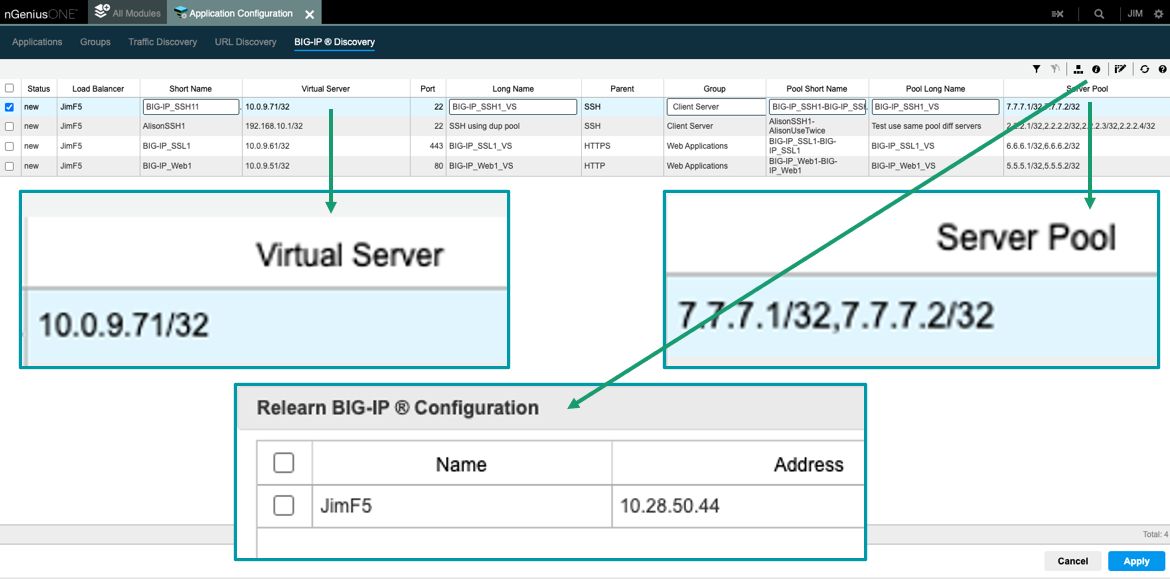
    Through its alliance with F5, NETSCOUT Systems has extended the reach of its nGeniusOne enterprise performance management platform to support custom applications.

    The nGeniusONE platform supports more than 1,000 voice, video and business data applications using NETSCOUT InfiniStreamNG appliances in combination with nGeniusONE to provide visibility into any infrastructure environment, including data centers, private and public cloud and co-location facilities. The integration with F5 extends those capabilities to add support for custom applications via integration with F5 BIG-IP server pool definitions that can now be directly imported into nGeniusOne.

    Eileen Haggerty, area vice president for enterprise product and solutions marketing for NETSCOUT, said that approach enables nGeniusOne to access clear, unencrypted traffic from the BIG-IP Local Traffic Manager.

    As more cloud-native applications built using microservices are deployed across distributed computing environments, network latency is becoming a bigger DevOps challenge. A wide range of networking issues can adversely impact application performance, but without any visibility into network traffic, it can be challenging to determine the root cause of an issue. NETSCOUT has deployed a global network of appliances to surface those issues.

    A recent report published by Cloud Security Alliance (CSA) found the average enterprise uses 464 custom applications and expects to deploy 37 new applications in the next 12 months. At that rate, the number of organizations likely to encounter networking issues is only going to increase, noted Haggerty.

    It’s not clear to what degree network operations (NetOps) teams are becoming integrated with DevOps teams that build and deploy custom applications. The need for both teams to collaborate more effectively is becoming more apparent as more application code is deployed at the network edge. In some cases, developers are now programmatically invoking network resources directly, while other organizations provide developers access to a portal to self-service their requirements within the context of a set of pre-defined guardrails. Regardless of approach, the need for greater visibility into the underlying networks that custom applications depend on has become critical.

    Exactly how much that need will drive organizations to embrace one networking vendor over another remains to be seen. DevOps teams are starting to exercise more influence as organizations realize how much they depend on custom software to drive digital business processes. DevOps teams need to be able to understand whether an issue is the result of a networking problem or an inherent problem with the code written or the way an application has been deployed.

    Of course, DevOps and NetOps teams don’t share a common nomenclature so the cultural divide between these teams can be wide. The simpler it becomes for NetOps teams to share visibility into networking services the easier it becomes to bridge that divide. Developers should be able to see for themselves how changes to application code might potentially improve network performance. In the absence of any proof to the contrary, most DevOps teams will simply assume there is a fundamental flaw in the networking services being provided.

  • GitGuardian: 10M Exposed Secrets on GitHub

    GitGuardian: 10M Exposed Secrets on GitHub

    GitGuardian published an analysis of more than one billion commits to GitHub repositories that found 10 million occurrences of secrets, with one out of 10 developers exposing a secret.

    Mackenzie Jackson, a developer advocate for GitGuardian, said more than 80% of all the secrets caught by live monitoring GitHub were exposed through personal repositories, with a large share of them being corporate secrets. In fact, three million of the secrets discovered were unique instances, with 5.5 commits out of every 1,000 made exposing a secret.

    On a year-over-year basis, the report also found that the number of hard-coded secrets discovered in these repositories increased 67%. More than half the secrets discovered (56%) contained a generic password.

    There appeared to be no correlation between developer experience and the number of secrets exposed. Junior and senior developers are equally predisposed to making the same mistakes, said Jackson. The most common mistake is secrets left exposed because developers used them to simplify access to components and resources when building their applications and then forgot to remove them when the application was deployed in a production environment.

    Secrets management is, of course, getting more attention as more organizations review their software supply chain processes in the wake of a series of high-profile security breaches. The issue with secrets management is cybersecurity teams are usually a lot more focused on discovering vulnerabilities than looking for instances of poorly secured credentials. Once an application is deployed in a production environment, it may be months before anyone discovers an issue—if it’s discovered at all. In fact, the number of existing applications running in production environments that have issues with how secrets are managed could be staggering.

    In theory, at least, the adoption of DevSecOps best practices should be mitigating this issue, but as the volume of code stored in repositories continues to increase, it would appear more fundamental mistakes are being made. Cybercriminals, meanwhile, have a greater appreciation today for weaknesses in software supply chains, so many of them are scanning repositories for secrets that will enable them to breach an application.

    Of course, there’s a lot more attention being paid to secure software supply chains, especially in the wake of the Biden administration creating a National Cybersecurity Strategy that requires Federal agencies to, among other things, lock down software development life cycles on an end-to-end basis. Most enterprise IT organizations, if they have not done so already, are expected to follow suit.

    As a result, DevOps teams should expect to see more cybersecurity professionals focusing more on secrets management. Developers, naturally, will not want to be called out for mismanaging secrets, so over time, the overall state of application security should steadily improve. The issue, of course, is the volume of attacks against software supply chains is expected to increase. Many previous mistakes are likely to come back and haunt developers and the organizations that rely on their code and wreak havoc downstream.

  • Balance Software Quality, Dev Speed and Cost With CI/CD

    Balance Software Quality, Dev Speed and Cost With CI/CD

    In many cases, success in the business world relies on software, be it a compelling mobile app, desktop application suite, interactive website or even an embedded system for the IoT. Because of this need, companies with mature software development processes enjoy a significant competitive advantage over those without. Part of fostering this maturity involves crafting quality software with high velocity but low costs.

    Modern software development methodologies, like Agile and its variants, play a key role in crafting applications in an effective fashion. As more companies adopted an Agile approach, the movement also fostered DevOps, a management structure combining software engineering and network administration teams while leveraging automation to build apps more quickly. In many cases, the ultimate goal for these adopters involved achieving the programming Holy Grail of continuous integration and continuous delivery (CI/CD).

    So, let’s take a closer look at continuous integration and delivery and how it helps companies successfully balance quality, speed, and cost in their software development projects. In a competitive global economy, adopting this approach remains a crucial differentiator, whether or not a business also fully adopts DevOps. In either case, understanding the benefits of CI/CD helps your software company achieve its business dreams.

    A Closer Look at DevOps

    As noted earlier, DevOps somewhat grew out of the Agile movement, but it isn’t a software development methodology in and of itself. Instead, it involves a company merging its software development team and its network administration staff largely responsible for helping the process of building applications. It increasingly leverages modern technologies like containers and virtualization for development, QA and production servers and automation for builds and testing processes.

    This organizational structure and mixture of tools combine to help companies build high-quality software with high velocity and at a lower cost. A mature community grew around DevOps, including tools, best practices, process experts and more. While DevOps originally served as the sole domain of large enterprises, now businesses of all sizes involved in software development benefit from adopting this approach.

    Defining Continuous Integration and Continuous Delivery (CI/CD)

    Continuous integration effectively automates the critical software development processes of builds and testing. It especially makes sense for shops using multiple programmers, as it works with the team’s source code version control system to ensure all programming changes are merged and remain in sync whenever a developer checks in their code.

    Any check-in typically kicks off a process where unit tests and a build are automatically run to ensure those changes don’t “break the build.” In pre-DevOps days, this tended to be a highly manual effort, leading to inefficiencies in any software development project. In short, the team only discovered any integration issues after a manual test. Automation now plays a crucial role in making this aspect of application building significantly more efficient. CI remains a critical best practice in any DevOps shop.

    Continuous delivery shares many similarities with continuous integration, especially its use of automation and the latest software development tools. However, instead of performing builds for internal developers and the QA team, CD focuses more on delivering a software product for release to a user community, customer or the public at large. Again, this is another part of the software development process that led to inefficiencies in the days before DevOps and automation.

    In terms of software development for mobile apps, CD ends up being the last part of the development process before the app gets delivered to the App Store or Google Play. It also comes into play with any fixes or feature improvements after the app is on the market. A key aspect of engendering goodwill among your customers directly relates to the speed of app improvements. Adopting a CI/CD approach plays an important role in making app changes with high velocity.

    CI/CD is the Heart of Successful Modern Software Development

    Simply stated, if your company wants to be a successful software developer, adopting both continuous integration and continuous delivery remains crucial. Following an older, manual approach causes too many bottlenecks and inefficiencies to thrive in a highly competitive industry. No matter how great your startup’s idea or app design is, failure to deliver it with high velocity ultimately results in failure. Once again, this same concept applies to fixes and feature enhancements after the app’s launch.

    At the same time, you don’t need to fully embrace the DevOps organizational structure by creating a separate team made up of software engineers and network administrators. At many startups with a small headcount, your developers might handle many of those network tasks, including managing virtual servers and containers. Hiring a network admin or two might be an unneeded luxury.

    In the end, if you want to build your startup’s app in the most efficient manner, adopting the CI/CD approach makes perfect sense. It provides speed that allows your team to effectively balance quality, speed and cost, resulting in a great app without overspending. It’s the right approach for any successful software project.