Category: Continuous Testing

Continuous testing is the process of executing automated tests as part of the software delivery pipeline to obtain immediate feedback on the business risks associated with a software release candidate.

  • Considering Scriptless Automation: iOS App Dev in 2023

    Considering Scriptless Automation: iOS App Dev in 2023

    According to Statista, over 31,000 apps were released on Apple’s App Store in March 2023. As impressive as that is, it’s considerably smaller than the number of apps submitted to the Apple store during the same month.

    And it’s probably less than the number of apps removed from the App Store.

    Why?

    According to Apple, most submissions fail because of common issues like bugs, crashes, incompleteness, placeholder data and broken links.

    But getting app approval is just one of many challenges faced by iOS developers today.

    Contemporary iOS App User Expectations

    The truth is, even if you slip by Apple, there’s an even greater critic to be concerned about: Your audience. Users are much less forgiving and have high expectations. If your app isn’t perfect, you’ll lose your chance at meaningful adoption and your users will just go elsewhere.

    For iOS users, perfect is simply the status quo, and users have grown to expect it. In practice, this means that apps must be stable across devices and versions, see regular improvements. and provide a great user experience at all times.

    Seamless experience between devices, versions and iterations
    iOS users expect the same experience across multiple devices. From one iPhone to the next, from version to version and from screen size to screen size. It’s the responsibility of developers to prioritize a consistent experience across devices.

    Fast release cycles and regular updates
    Contemporary app users demand feature-rich applications that go above and beyond the simple functions they expect from an app. Given the statistics above, chances are that the competition is fierce. Achieving success usually requires an efficient and speedy release cycle with more planning, more deployments and more testing.

    Easy and frictionless user experience
    User experience (UX) and functionality are one of the big reasons iOS adoption is so strong. People have come to expect high quality from anything under the Apple banner: Users expect an intuitive and trouble-free user experience on every app with which they interact. Every user’s experience needs to be intuitive, issue free and consistent with other iOS applications.

    Challenges Abound

    Meeting those escalating user expectations comes with a wide variety of challenges. For example:

    Device landscape fragmentation
    With so many device types and form factors in circulation, how do you test across all of them? With dozens of iterations of the iPhone combined with an array of versions, screen sizes and configurations, app developers need a way to test on enough devices to cover the majority of their user bases.

    This leads many developers to turn to simulators and emulators to cover devices they lack access to.

    This poses another problem. Simulators aren’t perfect. A simulator doesn’t replicate the functions of the actual device; it can only mimic certain aspects of an iOS device. And it simply can’t effectively mimic hardware, component functionality or network.

    Using a simulator, you can’t test how an application will respond to factors like low battery, a rising network spike, or limited memory, not to mention GPS and camera functionality. You also can’t monitor usage metrics or run meaningful performance tests.

    Real devices present their own challenge. The vast majority of the time, developers will have to worry about the cost of acquiring, storing, maintaining and updating devices. In addition, they’ll have to centralize and control access to them. In an increasingly remote workforce, it’s not a great strategy.

    Manual tests
    Today, most organizations are over-reliant on manual testing. The result? Running test cases becomes the bottleneck that holds up releases. Sure, manual testing is unavoidable in some cases, but their ad-hoc, inconsistent nature leaves room for error. No matter how detailed the instructions may be, people test differently, and that’s a disaster waiting to happen in today’s complex software world.

    Maintaining complex test scripts
    If you’re automating test cases, you’ve experienced the pain of maintaining code-based test scripts. Every release requires coinciding updates to countless unit tests, integration tests and UI tests. The smallest changes can break test cases, causing false negatives and more deployment delays.

    On top of that, you’ve also got to worry about retaining talent that understands your language-specific testing framework. Given the economic uncertainties of today, that’s certainly not a good situation to be in.

    Constant iOS updates
    Each year sees Apple deliver iOS major releases and a variety of minor releases, patches and bug fixes. Organizations have to test after two release cycles: Their own and Apple’s. Failure to do so can lead to compatibility and App Store compliance issues.

    App store guidelines
    As I mentioned above, Apple maintains strict guidelines for any apps published on the App Store. Excellent testing can mean the difference between releasing an app or waiting another few weeks for the next approval. When time is money, this adds up fast.

    Security at scale
    As requirements change, scope increases and features add up, it’s easy to see how it can become more and more challenging to monitor for potential security flaws. In turn, testing needs to be continually updated to reflect the latest security risks.

    A Shift Toward Scriptless Solutions

    Scriptless automation is part of a growing industry of no-code automation tools, often dubbed the no-code revolution. It’s everything test automation is without the reliance on code-based frameworks.

    Scriptless test automation involves recording user interactions with app elements, asserting expected outcomes and assessing the results. The test is then automated, templatized and extended to test other scenarios.

    With scriptless test automation, you can walk through test cases step by step. Some tools even allow you to test on live devices and choose from real iOS devices that are hosted in the cloud.

    Scriptless testing allows you to:

    ● Easily reuse and templatize test scripts. Scriptless automation makes it easier to reuse test cases, create templates and compose new test cases.

    ● Enable faster time to value. Write test cases quicker, make changes without knowing how to write code and integrate directly with your CI/CD tool. As soon as you make changes to your application, your testing team is right there. Some no-code testing tools can analyze your source code and identify testing gaps so that you can address them right away.

    ● Untangle the web of code-based dependencies. With scriptless iOS test automation, testers don’t have to lift and shift their code every time they make a big change. Instead, the no-code framework provides a visual, easily-navigated UI that tells you simply what’s passing, what’s failing and what needs to be updated.

    ● Improve collaboration between teams. Scriptless iOS test automation improves collaboration between testers and developers by making it easy for all teams to visualize test cases.

    Real Device Testing

    When the pain points of fragmentation meet the shortcomings of simulation, developers are wise to test on real devices. At the end of the day, live device testing is the only way to accurately capture an end user’s experience.

    Yet it’s no secret that managing your own device lab is expensive and unrealistic for modern remote work environments. A real device cloud setup solves this problem: A device cloud hosts devices for you that you can access from your desktop, from anywhere.

    Given the ever-increasing complications of today’s mobile app landscape and the incredibly cut-throat mobile app landscape, it’s worth keeping in mind that you may only get one chance at making the right impression on your audience. Getting testing right is the key.

    Into the Future

    Everyone expects more. As a competitive organization, you have to do more with less: Fewer resources, less time and less room for error. Scriptless automation and real device testing won’t guarantee that your app stands out from the crowd, but it will certainly help.

  • Extending the GitOps Pipeline: DevSecOps and Trusted Application Delivery

    Extending the GitOps Pipeline: DevSecOps and Trusted Application Delivery

    We live in a fast-paced world of rapid changes and uncertainty where every aspect of our daily lives changes often, including the way we work and communicate. Organizations must deliver value to their customers at a much faster pace than ever before to thrive in such an environment. However, the decentralized nature of cloud infrastructure expands the threat landscape and poses several security risks that enterprises should address in light of recent data breaches.

    Organizations must combat security threats and address challenges arising from cloud misconfigurations. Several recent tools, strategies, practices and technologies have emerged that can help you handle such security threats. This article discusses how the fusion of DevSecOps and trusted application delivery can extend the GitOps pipeline and add business value.

    What is GitOps?

    Coined by Weaveworks in 2017, GitOps thrives on a source code management system built on Git and adheres to the belief that Git is the single and definitive source of truth. Since all changes are stored in Git, anyone can see the audit trail if necessary. This enables you to use Git-based version control to manage your application’s code, environment and processes.

    Figure 1: CI/CD with Git-based Version Control

    GitOps leverages Git repositories as the one and only source of truth and embraces DevOps and infrastructure-as-code (IaC) best practices. Using GitOps, your developers can spend more time developing applications than configuring or maintaining Kubernetes clusters.

    GitOps strategies are gaining traction with enterprises for various reasons, including improved productivity, increased deployment frequency and improved security. While it’s true that GitOps continues to be a transformative trend, the increased speed and automation can also lead to misconfigurations that compromise application stability and security.

    Figure 2: CI/CD using GitOps

    Often, these security vulnerabilities delay development as developers spend significant time and effort investigating them. Since this poses a hindrance to progress, the question that arises is how enterprises can maintain the frequency and speed of deployment while remaining secure and reliable. This is where trusted delivery comes in.

    An Extension of DevOps

    DevOps is a software engineering practice and culture that blends development and operations to provide a shared and collaborative approach to developing and maintaining software. This can boost productivity, lower costs and increase customer value through increased collaboration.

    GitOps extends DevOps to bring the deployment workflow closer to developers. GitOps integrates code and configuration management for cloud-native application deployment and administration, while DevOps fosters shared ownership, transparency, and rapid feedback.

    GitOps uses DevOps-proven practices like version control, code review and CI/CD pipelines with any Git-based repository, including GitHub, GitLab or BitBucket. It builds on DevOps and applies DevOps best practices for infrastructure automation.

    What is Policy-as-Code?

    When deploying and managing cloud-native infrastructures, adhering to security best practices and regulatory standards is critical without hindering development. Policy-as-code is an approach to infrastructure security in which rules are codified and enforced, thereby reducing or eliminating human errors. You can use it to write applications using a high-level language to control, manage and automate policies. With policy-as-code in place, developers may create applications to manage security, compliance and other regulations seamlessly.

    Here are the types of policies that you can codify:

    • Security Policies: By adhering to these policies, you can protect your software from data breaches caused by misconfigurations.
    • Resilience Policies: The use of these policies in your Kubernetes clusters will help you create highly available, fault-tolerant systems as well as maintain business continuity.
    • Coding Standards Policies: These policies can enforce coding consistency, i.e., any code that violates these policies will be rejected automatically by the system.

    What is Trusted Application Delivery?

    Trusted delivery entails codifying security policies within your software delivery pipeline for security and compliance and introducing guardrails at every stage. By ensuring the security, integrity and reliability of your applications deployed in production environments, unauthorized access, tampering or malware introduction is minimized. It establishes and maintains trust in application source code, artifacts and deployment pipelines throughout the SDLC process.

    The key objectives of trusted application delivery are:

    • Security: It protects the application from security threats and vulnerabilities
    • Integrity: It verifies the authenticity and integrity of the source code of your application, together with the dependencies, and any artifacts
    • Reliability: It ensures that the applications deployed to the production are stable and are devoid of any security loopholes so that they can perform as desired

    Trusted application delivery helps development teams release applications early and secures them with automated protections or guardrails. It extends the GitOps pipeline by integrating security, governance and verification with policy-as-code. These security measures are implemented with policy-as-code. The policy-as-code approach encompasses the entire SDLC, including the design, development, testing and deployment stages.

    According to your organization’s security and compliance policies, compliance and security rules are codified and integrated into the system. Throughout the life cycle of your application, you can manage its security, compliance and other regulations using policy-as-code. These code-defined policies prohibit the provisioning of non-compliant resources. You should implement trusted application delivery practices to secure your organization’s application delivery process and reduce the likelihood of unauthorized access.

    Here are the key benefits of trusted delivery:

    • Faster and more frequent releases
    • Enhanced security
    • Protect against misconfigurations
    • Avoid compliance violations
    • Improved collaboration

    What is DevSecOps?

    DevSecOps is a software development methodology that blends development (Dev), security (Sec) and operations (Ops) at all phases of the SDLC by incorporating mandatory security checks. An organization of any size can benefit by creating a culture of shared responsibility and collaboration by bridging the gap between development, security and operations teams.

    A DevSecOps pipeline adds practices such as scanning, policy enforcement, static code analysis, threat intelligence and compliance validation to the SDLC process. Contrary to traditional software development processes that treat security as an afterthought leading to security vulnerabilities and breaches, DevSecOps is a paradigm shift that fosters a culture of proactive and continuous security approach to help address security concerns and vulnerabilities.

    DevSecOps and GitOps help organizations adapt quickly to changing emerging trends and requirements. DevSecOps is an offshoot of DevOps that focuses primarily on security throughout the development process. It helps detect and resolve security issues and vulnerabilities easily and quickly while fostering a culture of continuous improvement.

    Here are the benefits of DevSecOps at a glance:

    • At the outset, determine which points in the SDLC process are susceptible to security flaws and vulnerabilities in the SDLC process
    • Streamlined compliance
    • Secure supply chain
    • Reduced risk of the attack surface
    • Complete visibility of potential threats

    Why DevSecOps?

    DevSecOps is a proven way to secure your CI/CD pipelines, deliver secure, trusted, high-quality software and foster an environment where security is the responsibility of everyone in the organization. By shifting security left—i.e., introducing security into the CI/CD pipeline earlier—organizations can be much more productive and the teams can be more cooperative and collaborative.

    Given the threats to the security of the software supply chain, DevOps practices have given way to DevSecOps practices, where safety is paramount and a fundamental and ongoing component of software development. At the outset of the SDLC, you should ensure that software components and dependencies are secure to avoid potential software supply chain hazards.

    Additionally, it would help if you had built-in security gates in each step of the SDLC to ensure consistent, repeatable and automated processes from the software build phase to deployment. Remember, DevSecOps isn’t an option; instead, it is a necessity.

    Trusted Delivery With GitOps

    Automated software delivery pipelines are based on Git as the only source of truth. Policy-as-code is a great way to ensure that misconfigurations and errors are detected, alerted, and deployments halted automatically. Next, we’ll cover how a typical GitOps workflow determines where multiple checkpoints can be implemented for trusted delivery.

    In a typical workflow based on GitOps, a developer commits the source code to a Git repository. The CI tool then builds the container images. These container images are then tested and then uploaded to an image repository. At the end of this process, these container images will be deployed to a Kubernetes cluster. GitOps agents compare the current cluster state with the desired state on a continuous basis.

    Hence, you should implement security guardrails at the following points:

    • Git repository
    • CI stage
    • Configuration repository
    • Kubernetes cluster

    Creating a Trusted Software Supply Chain With DevSecOps

    You can build a trusted software supply chain by incorporating security practices throughout the SDLC to ensure the integrity and security of the software delivered by DevSecOps. Here is a step-by-step guide to building a trusted software supply chain by leveraging DevSecOps principles:

    • Security by Design: You should integrate security right from the outset of the SDLC and identify the key threats to the security of the pipeline.
    • Application Dependency Scanning: When building applications, we often use third-party dependencies to accelerate the development process. You should monitor security vulnerabilities and patches as they become available for these dependencies. You can leverage OWASP Dependency Check, Firewall from Sonatype, etc.
    • Secure Coding Practices: You should adhere to and enforce these practices among your development teams. You can integrate static code analysis tools into your DevSecOps pipeline, conduct regular code reviews and identify and fix security issues.
    • Container Security: You should scan container images regularly for security vulnerabilities, implement strategies to secure your containers and use container registries with access controls.
    • Continuous Compliance: You should ensure the software supply chain adheres to the relevant standards and guidelines for compliance requirements. In this regard, you should conduct audits regularly to check if compliance requirements have been satisfied.
    • Collaboration and Communication: You should be able to foster a culture in your organization that facilitates collaboration and communication across the development, operations and security teams.

    DevOps, DevSecOps and GitOps: The Future

    As organizations strive to optimize the efficiency of their software supply chain, DevOps, DevSecOps and GitOps are approaches that can improve collaboration, efficiency and security, to help software developers and IT operations succeed. These practices would become more critical and widely used in the future. GitOps provides teams with better tools for managing configurations so they can focus on more strategic activities.

    While GitOps is an approach that advocates Git-based version control systems as the single source of truth, DevOps is concerned about a cross-functional team that can work together. DevSecOps goes a step further by blending security into all stages of the SDLC process.

    The future of DevOps, DevSecOps and GitOps will see increased automation, tighter security integration and a sustained emphasis on efficiency and collaboration. Your organization should adopt these approaches to provide reliable software and services to its customers.

    Conclusion

    Trusted application delivery is essential for securing applications, protecting user data, meeting compliance requirements and preserving market credibility and trust. It helps enterprises and end consumers by ensuring that software is distributed securely and reliably. Organizations can ship high-quality applications with guaranteed security and performance by adopting trusted delivery practices.

  • Palo Alto Networks Extends CNAPP to CI/CD Platforms

    Palo Alto Networks Extends CNAPP to CI/CD Platforms

    Palo Alto Networks has extended the reach of its cloud-native application protection platform (CNAPP) to include the ability to secure continuous integration/continuous delivery (CI/CD) platforms.

    Daniel Krivelevich, CTO for application security for Prisma Cloud at Palo Alto Networks, said this extension of the Prisma Cloud platform would make it easier to better secure software supply chains as software builds are continuously updated by application development teams.

    Previously, Palo Alto Networks provided the ability to secure runtimes and secrets and scan code for vulnerabilities as it is being developed. This latest extension now adds the ability to secure the CI/CD platforms that drive DevOps workflows, he noted.

    While more organizations than ever are shifting application security responsibility further left toward developers, many of them overlook the need to secure the CI/CD platform itself. Most developers are not cybersecurity experts, so the chances they will miss something that can find its way into a software build are still high. Extending the reach of Prisma Cloud to the CI/CD platform will ensure the build that forms the foundation of the code is free of vulnerabilities when it finds its way into a production environment.

    That’s critical, because cybercriminals are becoming more adept at injecting malware into software supply chains in the hopes of being able to eventually compromise multiple downstream applications. In fact, this issue has prompted governments around the world to hold more organizations legally responsible for the security of the applications they build and deploy.

    There are, of course, multiple approaches to securing software supply chains, but Palo Alto Networks is making a case for an integrated platform that provides a comprehensive approach to securing the entire IT environment. Rather than integrating multiple point products, a CNAPP ultimately reduces the total cost of cybersecurity on an end-to-end basis, noted Krivelevich.

    It’s not clear how quickly organizations are transitioning to CNAPPs, but as that transition occurs, the overall state of application security should improve. One of the issues that has historically plagued application security is no one in an organization has been specifically tasked with ensuring it. Application development teams assumed cybersecurity professionals were allocating funds to it. Cybersecurity teams, however, tended to focus on areas they directly controlled, such as network firewalls. A CNAPP makes it simpler to deploy a cybersecurity framework in a more extensible way.

    Of course, there’s still much work to be done when it comes to prioritizing vulnerability remediation efforts. The truth is developers only have so much time to allocate to developing patches, so the focus needs to be on identifying the vulnerabilities that are the most severe in terms of the amount of damage that might be inflicted. At the very least, however, a CNAPP should provide the means by which the context required to identify those vulnerabilities could be more easily shared.

    One way or another, however, the number of vulnerabilities finding their way into production environments should steadily decline as more focus is put on securing software supply chains.

  • New Relic Adds App Security Testing Tool to Observability Platform

    New Relic Adds App Security Testing Tool to Observability Platform

    New Relic today made available a public preview of an application security testing tool that will be integrated into its observability platform.

    Esteban Gutierrez, CISO and vice president of information security for New Relic, said the New Relic Interactive Application Security Testing (IAST) will provide DevSecOps teams with the context needed to identify the root cause of a cybersecurity issue down to specific lines of code.

    DevSecOps teams will be able to take advantage of IAST to identify vulnerabilities both in code as it is written and after it has been deployed in a production environment without any false positives, he noted.

    New Relic achieves that goal using deterministic testing techniques that surface an actual proof-of-exploit using observability data collected from both applications and the underlying infrastructure upon which they depend, said Gutierrez. DevSecOps teams are then provided with guided remediation suggestions, guardrails and tracking tools to both remediate the issue at hand and prevent it from reoccurring, he noted.

    New Relic IAST takes advantage of the agent software New Relic provides to collect observability data, which reduces the total cost of DevSecOps by providing IT teams that have adopted the New Relic platform with an integrated set of application security testing tools that doesn’t require them to acquire and manage a separate additional platform, added Gutierrez.

    That approach also ensures that application security testing is integrated with the continuous integration/continuous delivery (CI/CD) platforms that New Relic already observes, he added.

    The reason most vulnerabilities are not remediated in a timely fashion is the DevOps teams responsible for creating and deploying the required patches lack any context. They often don’t know, for example, how many instances of a vulnerability there might be or the actual level of severity. Without those insights, it becomes exceedingly difficult to prioritize remediation efforts, noted Guttierrez.

    As application security requirements become more stringent in the wake of forthcoming legislation, it’s now more of a question of when than if organizations will be required to better secure their software supply chains. The issue DevOps teams face now is finding a way to integrate application security testing tools into existing DevOps workflows without slowing down the pace at which applications are being developed.

    Of course, not every vulnerability discovered requires the same level of attention. Depending on its severity and likelihood of being exploited, DevOps teams need to prioritize which vulnerabilities need to be remediated first. There simply are not enough resources available today to fix every vulnerability an application might have. For the foreseeable future, there will remain technical debt involving vulnerabilities that will need to be addressed after an application is deployed in a production environment.

    The issue, of course, is that cybercriminals are getting more adept at exploiting those vulnerabilities. The amount of time any DevOps team has to resolve issues before they result in a breach continues to dwindle.

  • Shift Left With DAST: Dynamic Testing in the CI/CD Pipeline

    Shift Left With DAST: Dynamic Testing in the CI/CD Pipeline

    Dynamic application security testing, or DAST, is a process used to evaluate an application’s security while it’s running rather than while it’s in a static state. This method involves simulating attacks on an application, identifying vulnerabilities and analyzing the responses. DAST focuses on the exposed HTTP and HTML interfaces of web-enabled applications, making it an excellent tool for spotting security vulnerabilities that may occur during an application’s active runtime.

    DAST is a ‘black-box’ testing method, meaning it tests the application from the outside in—much like a potential attacker might. It doesn’t have access to the source code and instead focuses on the application as a whole rather than its individual components. This external perspective enables DAST to discover potential security threats that static testing methods might miss.

    While DAST is an effective security testing tool, it becomes even more potent when paired with a shift left approach.

    Understanding the Concept of ‘Shift Left’ in Software Testing

    Shift left is a practice in software development where testing is conducted earlier in the life cycle—that is, it’s ‘shifted left’ on the project timeline. Traditionally, testing was seen as the last phase before the release of a software product. However, with the shift left approach, testing becomes an integral part of every stage of the development process from planning to deployment.

    This approach has several advantages. It allows for the identification and resolution of issues earlier in the development process, reducing the cost and effort required to fix them later. It also encourages collaboration between developers and testers, fostering a more cohesive, efficient development environment.

    Shift left is not just a testing strategy but a philosophy that promotes preventive measures over reactive solutions. It’s about building quality and security into software from the get-go, rather than tacking it on at the end.

    DAST in the Context of Shift Left

    Importance of DAST in Early Stages of Development

    The integration of DAST in the early stages of development is crucial for several reasons. First, by conducting dynamic security testing from the onset, teams can identify vulnerabilities earlier, making them easier and less costly to fix. This proactive approach helps to prevent security issues from becoming ingrained in the code, which can lead to significant problems down the line.

    Second, early integration of DAST encourages a security-focused mindset from the beginning of the project, promoting a culture of security within the team. This cultural shift is crucial in today’s cybersecurity climate, where threats are increasingly sophisticated, and the stakes are higher than ever.

    How DAST Complements Other Testing Methods

    DAST doesn’t replace other testing methods; rather, it complements them. While DAST focuses on external vulnerabilities, other testing methods like static application security testing (SAST) can target internal issues. By combining these methods, teams can achieve a more comprehensive view of their application’s security.

    In a shift left approach, this combination of testing methods can be very powerful. By conducting these tests early and often, teams can ensure that both the external and internal aspects of their application are secure. This layered approach to security testing can help to catch any vulnerabilities that might otherwise slip through the cracks.

    Incorporating DAST Into the CI/CD Pipeline

    1. Understanding the Application Structure

    Before we can integrate DAST into the CI/CD pipeline, it’s crucial to understand the structure of the application we’re working with. This involves understanding the layers of the application, the technologies used and the data flows. By analyzing the application’s architecture, you can identify the critical components that need more attention during the security testing phase.

    Understanding the application structure is not just about knowing the technology stack. It’s also crucial to understand the business logic and the functionality of the application. This will allow you to create better test cases during the DAST process. Additionally, understanding the application structure will enable you to make better decisions when configuring the DAST tool, leading to more efficient and effective security testing.

    Finally, understanding the application structure will help you prioritize the vulnerabilities found during the DAST process. Not all vulnerabilities are created equal; some might be more critical due to the data they expose or the potential damage they could cause to the application. 

    2. Configure the DAST Tool

    The next step is to configure the DAST tool. This involves setting up the scanning parameters, defining the test cases, and tuning the tool to reduce false positives.

    When configuring the DAST tool, it’s important to strike a balance between thoroughness and speed. You want the tool to be able to identify all potential vulnerabilities, but you also want the scanning process to be fast enough not to slow down the development process. This balance can be achieved by carefully selecting the scanning parameters and continuously tuning the tool based on the results of the scans.

    Additionally, when configuring the DAST tool, you should consider the unique characteristics of your application. For example, if your application uses a specific technology or framework that is known to have certain vulnerabilities, you should ensure that the DAST tool is configured to test for these vulnerabilities. Similarly, if your application handles sensitive data, you should prioritize testing the components that process and store this data.

    3. Integrating DAST Into the CI Pipeline

    The next step is to integrate DAST into the CI pipeline. The CI pipeline is a sequence of steps that developers follow to merge their changes into the main codebase. By integrating DAST into this pipeline, we can ensure that every code change is automatically tested for security vulnerabilities.

    Integrating DAST into the CI pipeline can be achieved using various tools and plugins. Most DAST tools provide APIs that allow you to automate the testing process. By using these APIs, you can trigger a DAST scan every time a new code change is pushed to the repository. This allows you to catch vulnerabilities early in the development process, reducing the cost and time needed to fix them.

    However, integrating DAST into the CI pipeline is not a one-time task. It requires continuous monitoring and tuning to ensure that the testing process remains effective. You will need to update your DAST configurations as the application evolves, add new test cases as new features are developed, and fine-tune the testing process to reduce false positives. 

    4. Scan for Vulnerabilities

    After integrating the DAST tool, you can start scanning for vulnerabilities. The scanning process involves executing the test cases defined during the configuration phase and identifying potential security issues in the application. Depending on the size and complexity of your application, this process can take from a few minutes to several hours.

    During the scanning process, the DAST tool will interact with the application just like a real user would. It will send inputs to the application, observe the responses and analyze them for signs of security vulnerabilities. This dynamic approach allows the tool to identify vulnerabilities that static analysis tools might miss, such as runtime vulnerabilities and issues related to the application’s business logic.

    5. Analyze and Prioritize Findings

    Once the scanning process is complete, the next step is to analyze and prioritize the findings. The DAST tool will provide a report of the identified vulnerabilities, including their type, location and potential impact. This information should be used to prioritize the vulnerabilities based on their risk to the application and the business.

    Analyzing and prioritizing the findings is not an easy task. It requires a deep understanding of the application, the business, and the threat landscape. You need to consider various factors, such as the potential impact of the vulnerability, the likelihood of exploitation, the sensitivity of the affected data, and the complexity of the remediation process. By considering these factors, you can prioritize the vulnerabilities and focus your efforts on those that pose the highest risk.

    In addition, analyzing and prioritizing the findings should involve all relevant stakeholders. Developers, security teams, and business leaders should all participate in this process, as they each bring unique perspectives and insights that can help make better prioritization decisions.

    6. Remediate and Retest

    After analyzing and prioritizing the findings, the next step is to remediate the vulnerabilities and retest the application. Remediation involves modifying the application’s code or configuration to eliminate the identified vulnerabilities. Depending on the complexity of the vulnerabilities, this process can involve simple code changes or significant architectural modifications.

    After remediation, it’s crucial to retest the application to ensure that the vulnerabilities have been effectively addressed. This involves running the DAST tool again and verifying that the previously identified vulnerabilities are no longer present. Additionally, retesting allows you to check for new vulnerabilities that might have been introduced during the remediation process.

    Remediation and retesting is a continuous process. As new vulnerabilities are discovered and new features are developed, you will need to repeat this process to ensure the ongoing security of your application. This continuous effort is a critical component of the shift left with DAST strategy.

    7. Continuous Monitoring and Updates

    The final step in incorporating DAST into the CI/CD pipeline is continuous monitoring and updates. This involves regularly checking the effectiveness of the DAST tool, updating its configurations as the application evolves, and tuning it to reduce false positives.

    Continuous monitoring and updates are crucial to maintaining the effectiveness of your shift left with DAST strategy. As the application evolves and the threat landscape changes, the DAST tool needs to be updated to remain effective.

    Conclusion

    In conclusion, incorporating DAST into the CI/CD pipeline is a powerful strategy to enhance the security of your software. By understanding the application structure, integrating DAST into the CI pipeline, configuring the DAST tool, scanning for vulnerabilities, analyzing and prioritizing findings, remediating and re-testing, and continuously monitoring and updating, you can unleash the power of shift left with DAST. This comprehensive approach will allow you to identify and address security vulnerabilities early in the development process, leading to more secure and reliable software.

  • State of API Report Highlights Productization and Generative AI

    State of API Report Highlights Productization and Generative AI

    In today’s software landscape, an API-first strategy is increasingly popular. It’s the bedrock of how applications are built and connected. APIs help promote internal tech reusability, helping developers do more with less. Due to this increasing API reliance, maintaining quality control is increasingly important for internal and partner integrations and ensuring the reliability and security of these connections remains a top priority.

    Due to the rising API ubiquity, nearly half of the total development energy is spent working with APIs. And to continually improve these interfaces, taking a product mindset is proving helpful. In fact, 60% of API developers now view their APIs as products. Generative AI has also shown incredible promise and is now being used in tandem with traditional tools to increase API code quality.

    Postman recently released its fifth annual State of the API Report. The 2023 edition, which surveyed thousands of developers and API professionals, found subtle changes in tooling preferences and styles. It also sheds light on the ongoing API productization movement and API developers’ use of generative AI. Below, I’ll focus on these two key areas and review the report for its other key takeaways.

    API Productization is Hot

    The majority of API developers now view their API as a product, and this figure rises to 68% in large companies. A full 65% of respondents said their API generates revenue, too. This news is significant, as it demonstrates the industry is maturing its view of APIs. They are no longer offshoot developer toys but fully functional services contributing to overall business growth.

    But how much growth? Well, of those monetizing APIs, 43% now say APIs generate a quarter of company revenue. For some companies, APIs generated more than 75% of total revenue! There also appears to be a parallel between API revenue generation and large companies.

    Do you view your APIs as products? Most developers say "yes."
    Do you view your APIs as products? Most developers say yes.

    Other industry reports unearthed similar API productization potential. Rapid’s 2022 State of APIs report found that 42.6% of organizations are now monetizing APIs. And investment into API-first products remains strong even amidst a broader contracted tech investment climate. These findings come as social media giants like Reddit and Twitter attempt to monetize their APIs.

    That said, for 28% of companies, API revenue still equates to less than 10% of total revenue. APIs still don’t get the lion’s share, perhaps because they’re packaged with an existing platform or because of the many other indirect ways APIs might benefit the business. Furthermore, consumers are becoming more cost-conscious, as 60% cite pricing as a factor before integrating with an API. Still, the numbers are significant firsts for the burgeoning economy.

    Most API Developers are Using Generative AI

    Generative AI interfaces like ChatGPT and Bard have certainly taken the tech industry by storm due to their ability to generate code snippets, debug code and more. And for the first time, the State of the API Report spotlighted generative AI and its use within the API economy.

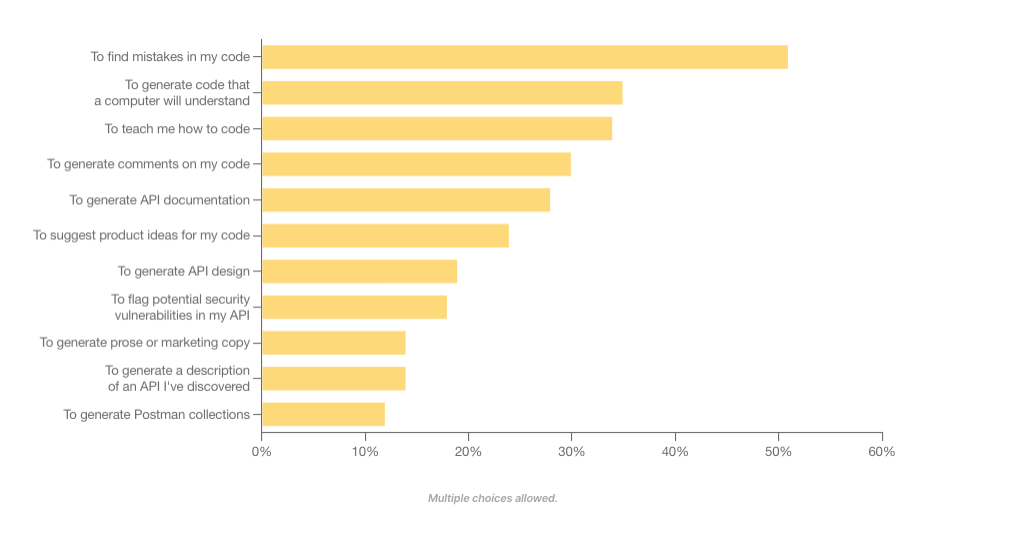
    Today, 60% of API professionals are using generative AI on the job. API engineers commonly use generative AI to find mistakes in code, generate machine-readable code and increase learnability around their programs. Some even use generative AI to suggest potential security flaws in their APIs.

    Compared with other app development endeavors, developers are by far most excited about building generative AI-powered applications in the year ahead. Yet, the efficiency gains are modest—many engineers forecast productivity improvements of 10% to 25%.

    How are API developers using generative AI in their work?
    How are API developers using generative AI in their work?

    Generative AI is set to accelerate many areas, including DevOps and API operations. Yet, contrary to some headlines, generative AI can’t automate all aspects of the software development life cycle. Rather, the technology is more likely to augment the API developer’s workflow than replace the need for seasoned professionals altogether.

    Other Key Takeaways

    Similar to last year’s report, integrating between internal applications, programs or systems remains a top concern for integrating an API or producing an API. The good news is that these integrations continue to increase in quality.

    The report found that deployment failures and times-to-recovery are improving on average. More than half (56%) of respondents said API security incidents occur less than once a year within their organization. This shouldn’t overshadow the significant impact API security breaches can have but signals that DevSecOps is beginning to respond to persistent API vulnerabilities.

    There are more API-first leaders than ever before. And API owners continue to evolve how their services are built and deployed. For example, REST is still by far the most common API style, used by 86% of developers. Webhooks made second place at 36%. However, GraphQL rose in usage, bumping SOAP into fourth position.

    SOAP slips on API architectural styles
    REST is still the dominant style, but GraphQL makes gains as SOAP slips.

    Other Quick API Factoids

    • More non-developers are becoming interested in APIs, as evidenced by 53% of survey takers being non-developers.
    • Most APIs are private—61% percent of businesses’ APIs are for internal use only.
    • After the technology group, business/IT services, financial services and health care are the most common sectors to adopt APIs.
    • Microservices is still the dominant architectural style of APIs, at 42%.
    • Performance, security and reliability are the top factors evaluated when integrating with a new API.
    • Improper authentication, authorization or access control is the most commonly cited API risk.
    • Common API tools include Postman, SwaggerHub, Datadog, SoapUI and Insomnia. Top gateway and API management platforms include AWS API Gateway, Azure API Management, Apigee and Kong.
    • JSON Schema is by far the most popular API specification.
    • The financial industry is a leader in API-first strategies—32% of respondents spend more than 20 hours a week working with APIs.
    • Most developers deploy APIs to production once a week to once a month.
    • When developers leave a company, their departure can cause outdated documentation, zombie APIs and a loss of institutional memory.

    API Obstacles Remain

    Looking to the future, investment in APIs is projected to climb. In fact, 92% of developers said their organization plans to invest the same or more time and resources into APIs in the coming year. Yet, some obstacles remain—a lack of documentation and poor service discoverability are still prominent roadblocks to API consumption. Furthermore, a lack of time and talent are major concerns that might stunt API development.

    The Postman State of API Report surveyed over 40,000 developers and API professionals, making it the largest study conducted on APIs to date. It should be noted that, given Postman’s specific focus in the market and its surveyed pool, figures may be skewed to represent increased API enthusiasm. For deeper insights, you can read the entire report here.

  • Is ChatGPT Helping or Hurting Your Developers’ Productivity?

    Is ChatGPT Helping or Hurting Your Developers’ Productivity?

    ChatGPT’s ability to translate natural language into working code has sparked tremendous interest in the programming community. Developers are exploring ways to use ChatGPT to reduce redundant tasks, from creating code snippets to analyzing and debugging programs. This also allows them to focus on more complex tasks like data analysis and monitoring with the help of a strong full-stack observability platform. Despite ChatGPT’s impressive capabilities, developers and their employers are split on whether the AI chatbot significantly boosts developer productivity.

    We will explore how to use ChatGPT to benefit your developers’ productivity and go over the advantages and disadvantages of ChatGPT to help you make the right decision for your business.

    How to use ChatGPT for Better Productivity

    ChatGPT has quickly become the most popular intelligence chatbot, with over a million user signups in its first five days and over 100 million in the first two months. Here are a few ways ChatGPT, developed by OpenAI, can help boost productivity in your organization.

    Improve Their Code
    Sometimes manually written code snippets consume additional CPU resources. Using ChatGPT, developers can optimize their functions for better performance. Additionally, ChatGPT can also write test cases and spot security vulnerabilities in their code, helping developers work faster.

    Simplify Documentation
    ChatGPT can give a simple explanation for the layman, avoiding technical jargon to a large extent. For instance, a developer at Twitter fed ChatGPT their code and it responded with a pretty detailed explanation. Using ChatGPT to generate the first draft of a company’s internal documentation would make knowledge transfers easier. New hires could quickly get up to speed on the company’s codebase. Further, ChatGPT could also be used for external-facing documents where other developers can learn how to use the company’s APIs and frameworks.

    Test and Understand Code
    ChatGPT can write automated tests for code that is fed into it. Although many developers consider testing boring and stressful—and sometimes a waste of time—it’s a critical step in ensuring that published applications are bug-free.

    With ChatGPT, developers can output reliable, well-tested code much more quickly and easily. ChatGPT can also give high-level and line-by-line explanations of code and even teach developers how to use external modules and APIs in their own code, helping them build much faster.

    Debug Code
    ChatGPT makes a great debugging tool for developers. It can take in error messages and output information on the likely cause of the error and how to fix it. This is typically a lot more time efficient than browsing forums and blogs for a solution.

    The tool can also suggest helpful code alternatives. Many developers claimed that ChatGPT can be much faster and less mentally challenging than the conventional approach of searching the web for a solution.

    As the CEO of Replit, Amjad Masad, put it, “ChatGPT could be a good debugging companion; it not only explains the bug but fixes it and explains the fix.”

    Code Comprehension
    ChatGPT’s terabytes of training data come from various sources, including common crawl and WebText2. This training data makes it easy for ChatGPT to simplify explanations of complex pieces of code for developers. Therefore, developers can save time deciphering any code’s underlying logic and structure.

    For instance, Stanford instructor and well-known developer Matt Harrison used ChatGPT to build a simple graphic design tool. He explained, “I’m using ChatGPT to create a GUI program for drawing lines. I haven’t used QT [a development framework] in years, yet I can throw this together really quickly.”

    Generate Documentation
    Writing code documentation is often considered a mundane task by developers. With ChatGPT, developers can significantly cut down on the amount of time needed for documentation. For instance, they can expedite the creation of troubleshooting guides, tool user manuals and test cases by asking ChatGPT to perform code analysis and generate detailed technical reports. Accelerating this documentation process allows for easier onboarding of new developers and faster product release times.

    Writing Tests
    ChatGPT can analyze code snippets and automate testing for them, saving developers lots of time and helping them output reliable code. Test coverage is an essential metric for most enterprises, and ChatGPT could help streamline the process.

    ChatGPT Disadvantages

    While many developers have praised ChatGPT for increasing developer productivity, others have criticized it as unreliable. Let’s understand some key areas where the tool falls behind.

    Outputting Buggy or Unusable Code
    Developers have complained that the chatbot would sometimes output plausible-looking code that doesn’t work. This might result from misunderstanding the user’s requirements or simply being unable to come up with a correct answer—then faking it.

    Programming Q&A forum Stack Overflow even issued a temporary ban on ChatGPT-generated answers. The ban was because the chatbot generated an influx of answers whose average accuracy was pretty low. ChatGPT sometimes uses nonexistent commands and outdated modules in its code, so while they theoretically might make sense, they don’t work in practice.

    Writing Outdated Code (and Forgetting Previously Written Code)
    Since ChatGPT’s training data cut off in September 2021, the chatbot has no knowledge of the recent developments in programming languages and modules after that. As a result, ChatGPT often needs to use outdated commands, modules and paradigms in its code.

    ChatGPT also occasionally forgets the context within which it is working, affecting code output. Some users have reported that ChatGPT sometimes forgets about the task at hand and begins generating incompatible code.

    Security Concerns
    Security concerns are the biggest drawback to having developers work with ChatGPT. Open AI uses the data users input into ChatGPT to train the underlying AI model.

    Research by cybersecurity firm Cyberhaven has shown that 11% of the data employees input into ChatGPT is confidential. This presents a significant risk, as such data can be used in the chatbot’s next responses. Corporations like JPMorgan and Verizon have even gone as far as to block employees’ access to ChatGPT because of these concerns.

    Lacks Problem-Solving Skills
    A developer’s job is to understand the business problem and develop customized solutions to address it. Although AI/ML tools like ChatGPT help developers code faster, they can’t help in problem-solving or implementing a software application.

    Furthermore, when developers become overly reliant on AI-generated code, they’re discouraged from upskilling on new programming frameworks and languages. This can hurt the organization in ways that might not be evident immediately.

    To ChatGPT or not to ChatGPT

    As Google’s head of developer experience Bret McGowen said, “While AI will transform software development in many ways, human judgment, intuition and creativity will remain essential to building great products.”

    While ChatGPT may not be a perfect solution for every aspect of software development, it can be a useful addition when combined with human problem-solving skills. However, companies should be careful while allowing the usage of AI in day-to-day processes. Guidelines educating in-house developers on the fair usage of AI are a must to protect sensitive information and maintain a high-quality control process.

  • Tricentis Acquires Waldo to Further Advance Mobile Testing

    Tricentis Acquires Waldo to Further Advance Mobile Testing

    Tricentis has acquired Waldo as part of an effort to expand the scope of the automated testing capabilities it provides for mobile applications.

    Waldo adds a software-as-a-service (SaaS) platform that provides IT teams with a no-code tool for generating mobile application tests. Waldo uses a virtual environment to simulate iOS and Android devices in a way that eliminates the need for physical devices to conduct tests. Instead, DevOps teams record their applications and then use the no-code tools to generate tests directly from within a browser.

    Tricentis CTO Mav Turner said Tricentis opted to acquire Waldo because it makes it simpler for IT teams to generate tests that can be integrated across a DevOps workflow.

    There currently is a lot of debate over how far application testing should be shifted left toward developers. In theory, the more developers test applications themselves the fewer issues there should be once an application is deployed in a production environment. However, there is still going to be a need for dedicated testing teams to conduct tests across multiple stages of the application development process to ensure quality, noted Turner.

    The difference is more of those tests can include edge use cases that previously there would not have been enough time to conduct, he added.

    Earlier this year, Tricentis added the ability to test native iOS and Android applications to its Testim software-as-a-service (SaaS) platform as part of an effort to extend the reach of that platform to applications that run natively on a mobile device.

    Testing mobile applications is more critical than ever because the cost of failure—in terms of impact on the business—is now much higher as more organizations depend on software to drive business processes. The challenge is that many of these app developers don’t have a software engineering mindset, so they need testing platforms that automatically create and run tests on their behalf in a way that can be customized for specific use cases.

    Over time, the quality of applications should steadily improve as many of the low-level mistakes that developers make are eliminated. That should improve everything from application security to the user experience as applications are continuously updated.

    In addition, organizations that embed testing within DevOps workflows are steadily reducing the number of issues that need to be addressed before applications are deployed.

    Hopefully, as more artificial intelligence (AI) is applied to the testing process, the number of reasons tests are not run as frequently as they should be will steadily decline. Today, it is still too difficult for many developers to author tests, so they don’t conduct as many as they should. Of course, many of them also simply run out of time when writing the code that drives the application takes longer than anticipated.

    One way or another, developers will run out of excuses for not running tests as accountability for code quality increases.

  • Loft Labs Makes Tool for Creating Dev Environments Open Source

    Loft Labs Makes Tool for Creating Dev Environments Open Source

    Loft Labs has made available an open source software project that enables DevOps teams to programmatically create developer environments using a tool that runs entirely on a local client.

    Lukas Gentele, Loft Labs’ CEO, said DevPod provides an alternative to cloud-based approaches such as Codespaces from GitHub that lock organizations into a specific platform for building applications.

    Instead, DevPod can automatically spin up developer environments as code on any public cloud or on-premises IT environment that can run a devcontainer.json file, he added.

    In addition, DevPod will also automatically put developer environments to sleep when not being used to reduce costs, noted Gentele. Other capabilities include support for prebuilds, Git and Docker credential synchronization.

    DevPod was created by Loft Labs to streamline the development of a virtualization platform for Kubernetes clusters. The company is now making DevPod available as open source software that any DevOps team can use to manage developer environments as code more easily than complex server-side alternatives, said Gentele.

    It also makes it easier for developers to switch between cloud-hosted and local environments as needed seamlessly, he noted. That’s critical because it enables organizations to reduce dependencies on cloud computing environments for writing code by allowing developers to use their local machine whenever they prefer, noted Gentele.

    Despite the ubiquitous availability of cloud services, most developers continue to prefer to write code on a local machine. The challenge is that replicating a developer environment elsewhere to foster collaboration has been problematic. DevPod provides a means for developers to collaborate with each other and with software engineers without giving up the inherent flexibility a local development platform provides.

    At a time when organizations are more dependent on software than ever, there is much more focus on developer productivity. DevOps teams have historically tended to focus on DevOps Research and Assessment (DORA) metrics that focus more on deployment frequency and mean-time-to-recovery than they do on developer productivity.

    Of course, measuring developer productivity is an inexact science. An organization might once have tracked lines of code written to gauge productivity, but that is not especially good metric. In more recent times, metrics have been developed that, among other things, keep track of how much time developers spend actually coding versus maintaining their software development environment.

    The issue that most IT leaders will immediately encounter is that every minute developers spend on these tasks, however, is one less minute they spend writing the business logic that drives an application.

    Obviously, there’s no way developers are going to write business logic daily for eight hours straight; there are maintenance windows. However, application development is as much art as it is science. No one knows for sure when inspiration might strike, but if developers are busy maintaining code created to provision infrastructure, it’s less likely they’ll have a flash of brilliant insight that allows them to make an application better. The easier it is to spin up a development environment, the more likely it becomes that inspiration will one day turn into code that runs in an actual production environment.

  • Threads: Twitter Killer or Ad-Infested Hellscape?

    Threads: Twitter Killer or Ad-Infested Hellscape?

    Welcome to The Long View—where we peruse the news of the week and strip it to the essentials. Let’s work out what really matters.

    This week: Meta launches its much-leaked Threads microblogging app. A spinoff from Instagram, it’s already reached 30 million signups at the time of writing—even before it’s available in the EU. But how is Meta’s DevOps team making it scale? (more…)