Category: Continuous Testing

Continuous testing is the process of executing automated tests as part of the software delivery pipeline to obtain immediate feedback on the business risks associated with a software release candidate.

  • JFrog Extends DevOps Reach to Manage and Secure AI Models

    JFrog Extends DevOps Reach to Manage and Secure AI Models

    At its swampUP 2023 conference, JFrog today added additional security capabilities to its continuous integration/continuous development (CI/CD) environment as well as making it possible to manage machine learning models within the context of a DevOps workflow.

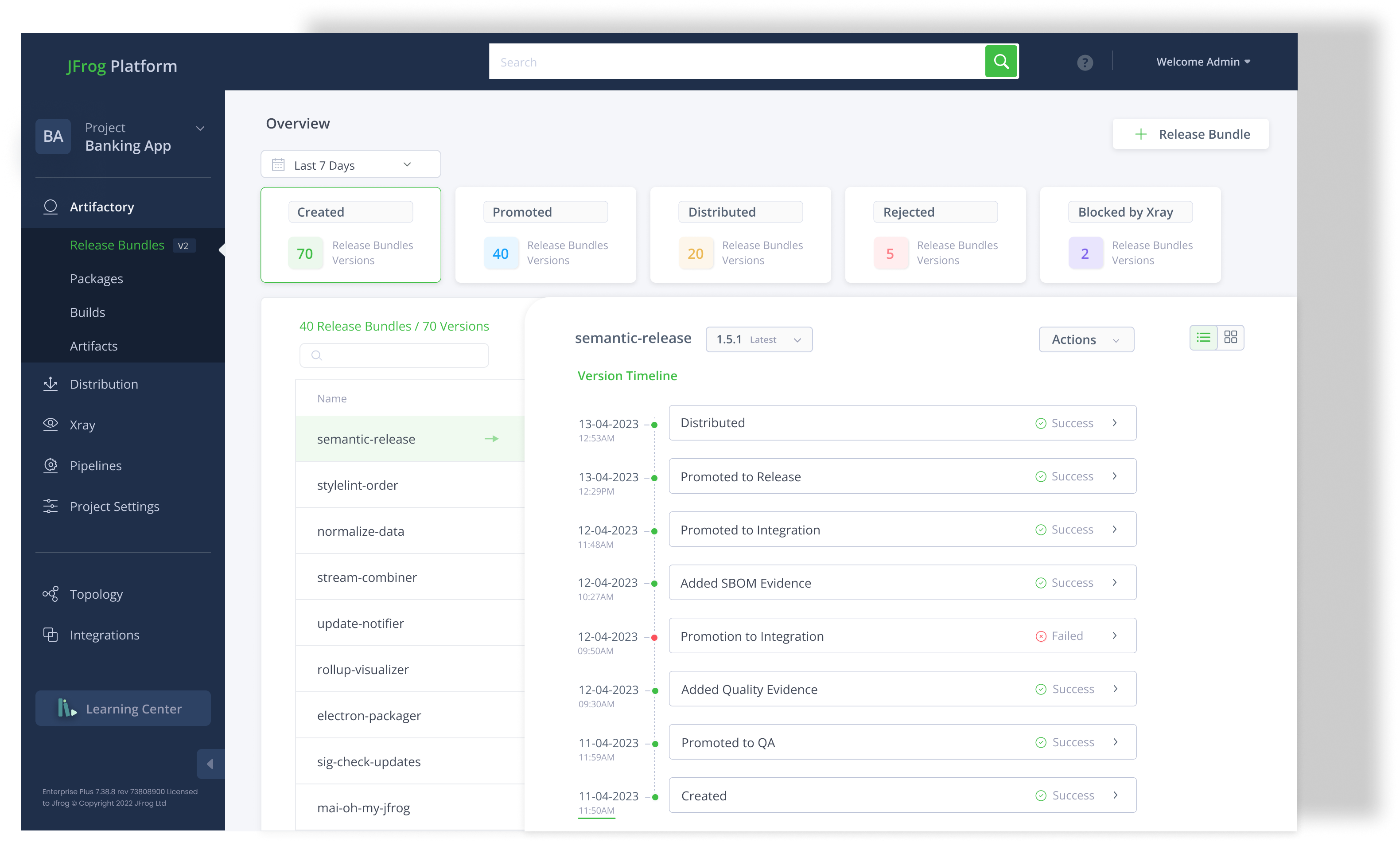
    The latest edition of the JFrog Software Supply Chain Platform adds an integrated static application security testing tool (SAST) to scan source code alongside the existing JFrog Xray tool for scanning binaries.

    JFrog has also added an Open-Source Software (OSS) Catalog to the JFrog Curation service to make it simpler for DevOps teams to discover specific packages that have been determined to be secure. JFrog is also adding Release Lifecycle Management (RLM) capabilities that enable aggregating software artifacts into an immutable software package that serves as the single source of truth as multiple iterations of an application are developed. JFrog RLM uses anti-tampering systems, compliance checks and evidence capture to collect data and insights to ensure the immutability of signed binaries.

    Finally, ML Model Management capabilities, available in beta, are being added to the platform to make it possible to store AI models, run AI models from Hugging Face, a provider of open source AI models, as a proxy in cache via an application programming interface (API) and apply DevSecOps best practices to govern, secure and ensure licensing compliance.

    JFrog CTO Yoav Landman said that as DevOps teams become more familiar with AI models, it’s becoming increasingly clear they are managed like any other software artifact incorporated into a DevOps pipeline. He noted that the approach provides the added benefit of helping to ensure AI models have not been poisoned by malicious data and prompts that would deliberately cause a hallucination.

    Most AI models today are created by data scientists using machine learning operations (MLOps) best practices that each organization defines. In some instances, those processes include what is known as a feature store that enables data scientists to track which components are being used at any given time. However, once a model is completed, it needs to be integrated into an application—a process that, from a DevOps perspective, is best facilitated by storing an AI model in a Git repository alongside other components that need to be managed.

    It’s still early days as far as the convergence of DevOps and MLOps practices are concerned. Going forward, as it becomes apparent almost every application will be invoke some type of AI model, the need to integrate these workflows is becoming a more pressing concern.

    It’s now only a matter of time before AI models become a pervasive element of the software development life cycle as they are continuously retrained and updated. It will generally fall to DevOps teams to manage the deployment and updating of those AI models in collaboration with the data science teams that train them. The immediate challenge, of course, will be to bridge the significant cultural divide between two very different types of IT professionals.

  • Unused Code: Proving a Negative

    Unused Code: Proving a Negative

    We have a ton of code that is no longer being exercised. We really don’t talk about it much, but it’s out there. From feature flags shutting off code to API versioning making an interface obsolete, it’s just hanging around out there. Like an albatross. Waiting for someone to misuse it. Or, to address the more pedestrian concerns, confusing people new to the codebase. But that code is not contributing a thing.

    Easy example. You are on version 3.2 of your API. Version 2.1 is not called by anything, but the code is still hanging out there. It is not that 2.1 cannot be called, but that it is not currently called. The problem with that is that new devs have to work through what’s current, and since 2.1 and 3.2 probably share 95% of their code bases, what portion of that code base is unused? And the API is sitting there, waiting for someone to penetrate your network and find malicious uses for it.

    Proving a Negative

    But here is the problem: Identifying that a bit of code–be it an API, a method, just a few lines in an if statement, whatever–is never exercised is terribly difficult and, in highly complex environments, borders on the impossible (it is never impossible, assuming IT owns all of the code that could exercise that bit). The old adage about proving a negative absolutely applies. We can–and testing tools in both the functional and security spaces do–generate a list of code that is exercised, or identify code that isn’t being exercised. But not a list of code that is never exercised. That functionality in test tools is super useful, because it helps prioritize issues that are being used a lot and leaves the ones not seeing a ton of traffic for later resolution.

    But I’ll say that in most organizations, that’s no longer far enough. The cruft in your code causes problems, and you need to clean it up. If you’ve worked in IT for any length of time, you’ve been through the “Oh, that bug is because the developer called something no longer used” scenario at least once. And it is a straight-up waste of time.

    So here is my proposal. Test tools generate a list of what isn’t called from systems under test. Pick one–security testing or functional testing–and require it for any bit of code, no matter how small, to go into production. That means that the system knows about all source code and thus knows definitively if a bit of code has been exercised.

    Clean Up as You Go

    Is that a tall order? Yes. Testing isn’t free. But given a scenario where you reduce technical debt by eliminating excess code, I think it will pay for itself. And that is not counting the security posture improvement that reducing the code base implies.

    You’re running the systems that present your organization to the world, so you may as well do some due diligence on yourselves. Keep making cool new stuff and upgrading the old, but clean up as you go with some form of monitoring, this or a more procedural one, so the quality is high and the excess is low.

  • Survey Surfaces Spike in Generative AI Usage Across IT

    Survey Surfaces Spike in Generative AI Usage Across IT

    A survey of 800 DevOps and application security operations (SecOps) leaders published today found nearly all (97%) are making use of generative artificial intelligence (AI).

    Conducted by the market research firm Sago on behalf of Sonatype, the survey found that beyond writing code, a full 45% of the 400 security operations professionals have already embedded generative AI into their workflows compared to 31% of the 400 DevOps professionals.

    Security operations teams also reported greater time savings than their DevOps counterparts, with 57% saying generative AI saves them at least six hours a week compared to only 31% of DevOps respondents that saw the same benefit.

    The top benefits cited by security operations teams is increased productivity (21%) and faster issue identification/resolution (16%) compared to faster software development (16%) and more secure software (15%) cited by DevOps professionals.

    It’s still early days as far as embedding generative AI in workflows is concerned, but it’s clear the ability to write code faster is trumping concerns about the increased number of vulnerabilities that might find their way into application environments. The most widely used generative AI platforms are trained on a massive corpus of data that includes code of varying quality. As such, a lot of the code generated by a general-purpose AI platform will likely have as many errors, including vulnerabilities, as the code used to train it.

    The level of faith organizations will place in that code will be heavily influenced by use cases. A script used to automate DevOps workflows that are not externally facing may be one example of where a general-purpose AI platform can boost productivity. In other instances, code that contains vulnerabilities that find their way into a web application might be much more problematic.
    Despite those concerns, however, the survey finds nearly three-quarters (75%) of all respondents feel pressure to use generative AI.

    There are, of course, already large language models trained on code that has been vetted by software engineers. In the months ahead, the code generated by AI platforms specifically designed for that purpose should significantly improve.

    Sonatype CTO Brian Fox said it’s only a matter of time before IT organizations focus more on ensuring the generative AI platforms are tuned for specific tasks. In the meantime, however, application security may get worse before it gets better, with more than three-quarters of DevOps respondents noting that generative AI will result in more vulnerabilities in open source code. Only 58% of security operations professionals are similarly concerned.

    It will be up to the engineers that make up these teams to bring discipline to code quality practices and make sure the code running in a production environment is of high quality, regardless of how it was created, noted Fox. For the moment, the issue is that AI augmentation is now occurring at a faster pace than the AI advances that should one-day help DevOps teams cope with increasingly larger codebases, he noted.

    Survey respondents are also concerned about who might own the code generated by AI. A total of 40% said developers or the organizations they work for should own the copyright for AI-generated output, and most of them agreed developers should be compensated for the code they wrote if it’s used in open source artifacts in LLMs (DevOps 93% versus SecOps 88%). A total of 42% of DevOps respondents and 40% of SecOps respondents said a lack of regulation could deter developers from contributing to open source projects.

    DevOps and SecOps leads both want more regulation: Asked who they believe is responsible for regulating the use of generative AI, 59% of DevOps leads and 78% of SecOps leads said both the government and individual companies should be responsible for regulation.

    At this point, the proverbial generative AI genie is out of the bottle, so there is no going back. The issue that remains to be seen is how DevOps and security operating teams will adjust to that new reality.

  • Generative AI and Software Testing Tools to Manage Technical Debt

    Generative AI and Software Testing Tools to Manage Technical Debt

    It is easy to take a pessimistic view of generative AI and large language models (LLMs), especially when a growing list of AI experts and public figures have voiced concern about their potential to lead to dire consequences—even to human extinction. But we must also consider how these same technologies might mitigate these risks. There is no doubt that we are living in an accelerated cycle of technological progress and repercussions. However, the intelligence, speed and agility of AI—and particularly machine learning (ML)—may be just what we need to roll with the punches.

    As the speed of development outpaces our ability to mitigate potential risks posed by the systems we build, we are set on a path to accruing massive technical debt—the ever-increasing costs associated with modernizing code later rather than sooner. Too often, organizations in the private and public sectors are reluctant to pay off this debt, choosing an “if it ain’t broke, don’t fix it” mentality toward software maintenance and security. The problem is that as technology outgrows and outpaces our critical infrastructure systems, the potential for catastrophe escalates.

    Machine Learning: A Tool for the New “Space Race”

    Automated testing has proven superior in regression testing, especially in visually recognizing potential issues at the pixel level. If, for example, an important element of your interface is missing from the screen after an update, a visual test script can identify that faster than a human can. AI (and in particular, machine learning) generates test plans that provide more comprehensive coverage of the system under test and more practical coverage.

    Traditional testing methods usually begin with a broad and hypothetical analysis of user interactions. Test engineers begin by casting a wide net to cover the many possible user engagement scenarios they imagine. In contrast, AI-assisted systems learn from actual user interaction, building script libraries that focus on known points of weakness and vulnerability. It also does this at speed and scale. This technology is going to be essential to software test engineers as they inevitably find themselves unable to keep up with the abundance of code generated from LLMs using traditional testing methods.

    Technical Debt is Inevitable but not Unsolvable

    Every new iteration of software has the potential to introduce unforeseen problems ranging from glitchy bugs to catastrophic failures. The risks of releasing new software vary immensely between applications: It’s one thing if the latest release of your music streaming app crashes and quite another if the system that runs the regional power grid fails. One will result in unhappy customers; the other, the potential loss of life.

    The most critical systems (e.g., financial, transportation, safety, medical) are more likely to get frozen in time. Once a stable iteration is released, companies are generally not keen to make changes unless absolutely necessary—beginning the cycle of technical debt accumulation that grows until that debt is paid off by modernizing the code.

    Deciding when to pay off technical debt has always been a matter of weighing pros, cons, costs and benefits. But sometimes, such as in the case of an epic failure, that decision is forced. Both the risk of breaking the system and the cost of modernization compel developers to leave well enough alone. Meanwhile, the longer a system remains unchanged, the more isolated, outdated, and obsolete it becomes, setting the stage for failure.

    By introducing generative AI technology to the development stack along with other tools for authoring, compiling and testing software, developers will soon find themselves driving in the fast lane. With the security of knowing that code can be produced rapidly and released safely, owners of aging legacy systems will be more likely to modernize software sooner, helping them to pay off technical debt more quickly. That, in turn, could lead to increasingly rapid software development and release cycles, more work for developers, and more innovation. Such a workflow could very well become the embodiment of accelerating change, taking us from an “if it ain’t broke, don’t fix it” mentality to one where we anticipate the need for new code and avoid future catastrophic failures, or for that matter, human extinction.

  • Despite Concerns, AI Increasingly Used to Build Software

    Despite Concerns, AI Increasingly Used to Build Software

    A survey of 1,001 senior technology executives, developers, and security and operations professionals published this week by GitLab finds 67% are working for organizations already using artificial intelligence (AI) to build software, with 60% of those respondents reporting their organizations use it every day. A full 90% said their organizations are either already using or plan to use AI to build software.

    More than half (51%) have already identified productivity as a key benefit, but 32% are also “very” or “extremely” concerned about introducing AI into the software development life cycle (SDLC).

    Those concerns included AI-generated code introducing security vulnerabilities (39%) and whether that code may not be subject to the same level of copyright protection as human-generated code (48%). A full 95% of senior technology executives said they prioritized privacy and intellectual property protection when selecting an AI tool.

    Most organizations will continue to move forward with AI, but nearly two-thirds of respondents (65%) who use or are planning to use AI for software development said their organization hired or will hire new talent to manage its implementation.

    A full 81% cited a need for training to successfully use AI in their daily work, with 75% of respondents saying their organization provides training and resources for using AI. However, a roughly equal percentage also said they are finding resources on their own.

    David DeSanto, chief product officer for GitLab, said it’s already clear that AI will have a major impact on productivity simply because 75% of a developer’s time is typically spent on activities that have nothing to do with writing actual code.

    Less clear is the amount of expertise required to use AI to build software. In some cases, development teams may need to master, for example, prompt engineering to automate DevOps workflows at scale, but in many more instances, it’s likely the DevOps platform will automatically execute the commands required.

    Regardless of approach, it’s clear that as the amount of code being created by developers starts to steadily increase, the need to leverage AI to manage DevOps workflows will become more acute. The challenge is the pace at which developers can leverage AI to write code is, for the moment, exceeding the pace at which it is being embedded into DevOps platforms.

    In addition, organizations must determine whether to converge DevOps workflows with the machine learning operations (MLOps) workflows used to build AI models that are integrated into applications. As more MLOps capabilities are added to the GitLab platform, it will become easier to achieve that goal and enable data scientists to work more collaboratively with DevOps professionals, noted DeSanto. Today, a cultural divide between two distinct IT cultures is slowing down the pace of AI innovation.

    One way or another, DevOps workflows are about to be transformed. The challenge now is determining which tasks and bottlenecks are likely to be eliminated by AI to enable DevOps teams to focus on managing applications at an unprecedented scale.

  • Internal Developer Platform (IDP) Reference Architectures

    Internal Developer Platform (IDP) Reference Architectures

    If you’ve been following the DevOps space recently, you’ve probably noticed the excitement brewing around platform engineering. Despite uncertainty in other areas of tech, it seems like platform engineering is poised for growth—Gartner even expects that by 2026, 80% of software engineering organizations will have established platform teams.

    The platform engineering idea hinges on an internal tooling system known as an internal developer platform (IDP), which platform teams own and operate and is exposed to developers to improve their efficiency, satisfaction and release fluidity. IDPs have been the talk of the town. But what does an IDP actually look like? What sort of components are they usually composed of?

    Well, at PlatformCon 2023, McKinsey representatives shared a reference architecture for building out IDPs. This framework was modeled after hundreds of internal platforms and could be a helpful benchmark for other organizations as they begin developing and standardizing their internal developer platforms.

    Below, we’ll examine the sample IDP reference architecture and its components. We’ll also have a refresher on the platform engineering concept and offer some expert tips on overcoming potential obstacles while implementing platform engineering and IDPs.

    Why Engineer Internal Platforms, Why Now?

    First, for those new to the idea, let’s explain what platform engineering is. I’ve previously defined platform engineering as “maintaining an internal self-service platform that serves the needs of developer consumers.” The practice doesn’t necessarily supplant DevOps, rather, the experts I’ve spoken to view it as the next evolution.

    This trend is essentially a response to developers overseeing more and more aspects of software life cycle management. Complexity in enterprise-level software delivery workflows has escalated in the last decade, leading to what The State of Platform Engineering Report describes as “increased cognitive load on engineers.” This is negative, as it could lead to shadow operations and burnout.

    The fact is, most developers require the same sort of technologies, which could be standardized across the board. For instance, take the consolidation around containers and Kubernetes, infrastructure-as-code and the need to implement similar build configurations and security policies across applications.

    By outsourcing the maintenance of tools for shipping and running cloud-native applications to a common platform, you take the burden off developers and free them up to code. Also, by centralizing DevOps tooling, you can enforce more governance and build out internal standards. Which should help reusability and overall deployment agility … at least, that’s the promise of it all. 😉

    Sample IDP Reference Architectures

    So, let’s turn to some real-world examples to see how this is being implemented. Mike Gatto, senior DevOps engineer, McKinsey, shared an internal platform reference architecture for AWS-specific environments:

    McKinsey’s Internal Developer Platform reference architecture

    As you can see, the architecture is divided into these subgroups. At a high level, they perform the following functions:

    • Developer control plane: This is the version control, where developers publish their code. They provide a workload specification (in McKinsey’s case, a Score file) that codifies specific configurations.
    • Integration and delivery: This includes the CI pipeline to build application code into a container and publish it to a registry. This notifies the platform orchestrator to initiate a build. Then, resources are provisioned. This area also includes a CD pipeline and infrastructure control plane.
    • Monitoring and logging: This plane includes tools for observability, analytics, and application performance monitoring.
    • Security plane: This area includes tools for secrets management, policies, and security vetting.
    • Resource plane: This plane encompasses cluster management, database tools, networking, and messaging architectures.

    “By separating developer and platform team concerns and allowing them to control the respective areas they’re experienced in separately, without requiring too much overlap,” said Gatto, “we’re making deployments more compliant and better aligned with client initiatives.”

    Humanitec has also created internal developer platform reference architectures for GCP and Azure, displayed below.

    IDP Reference Architecture for GCP
    IDP Reference Architecture for Azure

    PlatformEngineering.org has also expanded McKinsey’s original IDP reference architecture with a tooling landscape that adopts the same umbrella subgroupings but includes other pluggable tools.

    The Internal Developer Platform tooling landscape

    Roadblocks to Developer Platforms

    Starting from a blueprint could be a big help to rapidly construct IDPs. Yet, there will still be some potential roadblocks associated with adopting an internal developer experience platform. One of them is creating common platforms that actually cater well to all environments.

    “You can not and should not try to please everybody,” said Kaspar von Grünberg, CEO and co-founder of Humanitech. “Platform engineering is an 80/20 game.”

    “Platform organizations often face a lot of pressure when it comes to meeting demands for building more services that are both agile and agnostic to cloud and data center environments,” said Venkat Ramakrishnan, VP, product management and engineering, Portworx by Pure Storage. “At the same time, almost all platform engineering teams are understaffed while facing the need to support large application development initiatives and developer teams twice their size.”

    Tips to Get Platform Engineering On Track

    Reference architectures for various clouds could help cater IDPs to different scenarios. But outside of that, it will take a product mindset approach to strategically accept feedback and iterate the platform. This will involve doubling down on developer experience and adopting cloud-native foundations that can scale.

    “Platform engineering teams must consider adopting Kubernetes as it enables them to manage and deploy applications in production at scale, without having to manage applications at the individual level,” added Ramakrishnan. “Additionally, it may not be realistic to expand platform engineering teams alongside growing platforms, so teams should also consider leveraging automation and self-service capabilities to help them better manage projects at scale.”

    Is ‘You Build It, You Run It’ Dead?

    The idea of ‘you build it, you run it’ is starting to look a little antiquated next to the new and shiny platform model. It’s tough to say, but I’ll be keeping an eye on this area to see if all the effort to standardize the internal engineering approach pays off!

  • Does Platform Engineering Make DevOps & DevSecOps Irrelevant?

    Does Platform Engineering Make DevOps & DevSecOps Irrelevant?

    For those of us old enough to remember, the DevOps movement came onto the scene somewhere around 2007/2008. Its proponents railed against the traditional software model at the time, which called for the developers who wrote the code to be organizationally and functionally separate from those who deployed and supported the code. The reasoning behind the movement is that these siloed teams, concerned only with their own objectives, resulted in botched releases, significant delays, poor communication and, ultimately, unhappy customers. It took a few years to gain traction, but when Gartner got on board with the concept in 2011, adoption soared, and Agile development practices like automated build and test and continuous integration and delivery became the new norm.

    Security and Compliance Join the Mix

    Agile, DevOps and its promise of continuous integration and continuous delivery … well, delivered. Development and operations teams were finally on the same page, each able to see a current phase’s end goal, providing the flexibility to make changes and improvements along the way, speeding the delivery of quality software. Unfortunately, in these early years of DevOps success, security and compliance generally remained siloed. That silo resulted in security being an afterthought—stuck near the end of the application development life cycle. Consequently, security took the blame for release-delaying bottlenecks.

    The year 2014 was notable for an exponential increase in security breaches compared to the year before. According to an article in Security Week, 2014 marked the year that, for the first time, one billion records were compromised in more than 1,500 notable data breaches, an increase of 80% from 2013. Home Depot, JP Morgan Chase and eBay were among the many exposed to attackers. Given these and other high-profile breaches, it was time to re-evaluate development processes and give security and compliance a seat at the table.

    With research by Microsoft and others showing that 80% of security breaches were related to configuration errors, the concept of DevSecOps, putting security front and center in the Agile development process, ensures that assets are configured correctly in the first place, providing continuous compliance by running constant scans to identify configuration drift.

    This approach can be extended beyond the data center to any cloud to any edge, where even applications can be managed and checked against compliance and security standards. You can even extend a single DevSecOps compliance framework to cloud native assets including Kubernetes and public cloud services. 

    Today, it is safe to say that the term “DevOps” is likely losing its relevance, but “DevSecOps” is alive and well, as long as the organization embraces the cultural, people and process changes necessary for success. Tools and technology are essential to DevSecOps, as is adopting a culture that security is everyone’s responsibility. That culture requires instigating a security-first mindset among teams as well as implementing essential automated security testing tools.

    What About Platform Engineering?

    Platform engineering has recently captured interest and is now generating considerable buzz due to its focus on building and operating self-service internal developer platforms (IDPs) for software delivery and life cycle management. The platform is supported by layered services or tools, created and maintained by a dedicated product team, designed to support the needs of software developers by essentially stitching together components to create a frictionless developer experience.

    As Gartner says, “Platform engineering is an emerging technology approach that can accelerate the delivery of applications and the pace at which they produce business value.” In fact, Gartner expects “[t]hat by 2026, 80% of software engineering organizations will establish platform teams as internal providers of reusable services, components and tools for application delivery. Platform engineering will ultimately solve the central problem of cooperation between software developers and operators.”

    In that context, platform engineering certainly builds upon the Agile concepts of DevOps and DevSecOps. Looking deeper at DevOps/DevSecOps and platform engineering shows that they both share many characteristics, while they can also be combined in a way that provides greater benefits to organizations that think about them in tandem. It is easy to see the integral link between platform engineering and DevSecOps and the broader infrastructure management landscape. For example,

    • Developer Experience and Productivity – DevSecOps extends experience and productivity support beyond the developer to IT Ops, security and compliance.
    • Automation – Automating infrastructure configuration as well as compliance tasks using a policy-as-code approach is the lynchpin of DevSecOps. Platform engineering provides the opportunity to extend automation to the other parts of the development lifecycle.
    • Self-service – This is another common concept where platform engineering can build off of the automation and services-oriented approach that DevSecOps uses to not only enable developer self-service for code/test/deploy, but also to enable developers to be more proactive and effective in the security/compliance realm.
    • Accelerate Value – Accelerating value is the focus of any tech enabler, from platforms to tools and processes.

    From an Agile development approach supported by DevOps/DevSecOps and extending now to platform engineering, the end game is all about speeding delivery of high-impact applications with continuous updates that are highly resilient, reliable and secure. Given the synergies and the pressure on organizations to rapidly deliver applications while combatting cyberthreats, any platform engineering effort should ensure that DevOps/DevSecOps plays a central role.

    While the term DevOps and, to some extent, DevSecOps, sound a bit dated and irrelevant and could maybe use a new moniker, the evolving role they are certain to play as platform engineering gains a foothold are not to be underestimated. 

  • CDF Report: Steady Growth in Number of Jenkins Jobs Run

    CDF Report: Steady Growth in Number of Jenkins Jobs Run

    The Jenkins project that operates under the auspices of The Continuous Delivery Foundation (CDF) reported this week that over a two-year period, usage of pipelines grew 79%, with total workloads defined in the continuous integration/continuous delivery (CI/CD) platform growing 45% over the same period.

    Based on analysis conducted from June 2021 to June 2023, the report found the number of jobs defined increased from 27,105,176 jobs to 48,625,398 jobs per month. The number of all jobs defined on Jenkins increased from 50,785,205 to 73,746,418 jobs per month (45%).

    Sacha Labourey, a member of the governing board for the CDF and chief strategy officer at CloudBees, a provider of commercially supported instances of the open source Jenkins CI/CD platform, said it’s clear that more applications are being constructed by more organizations than ever using DevOps workflows.

    At present, the CDF reported there are now more than 600 active contributors to the Jenkins project. That level of support has made it possible for Jenkins to become a standard CI/CD platform. DevOps teams know there is a substantial open source community they can count on for support, said Labourey.

    The challenge now is how to centrally observe DevOps workflows to accelerate application development while at the same time giving developers more freedom to innovate. Platform engineering principles represent an opportunity to achieve that goal, as long as developers still have an opportunity to innovate and collaboratively address bottlenecks in DevOps workflows as they occur.

    The platform engineering team should be observing processes and proactively making recommendations and define a set of guardrails that ensure DevSecOps best practices are followed, he added.

    Otherwise, application developers are likely to view platform engineering as another effort by centralized IT teams to take power away from the developer, noted Labourey.

    Striking that balance is especially critical as the number of cloud-native applications being built and deployed alongside classic monolithic applications has significantly increased, he added. DevOps teams need to be able to centralize observability of what are two distinct styles of application development that tend to occur at a significantly different pace from one another, Labourey said.

    Hopefully, advances in artificial intelligence (AI) will make it easier for DevOps teams to strike the right balance between management and innovation. In the meantime, however, as the pace of application development continues to accelerate, each DevOps team will need to determine how best to evolve their existing workflows. That’s especially critical at a time when economic headwinds are requiring organizations to find ways to increase existing developer productivity rather than hire or contract additional developers.

    In the meantime, it’s apparent that DevOps, as a methodology for building and deploying applications faster, is here to stay. The next major challenge is finding a way to achieve that goal at levels of scale that require automation everywhere from the network edge to the cloud.

  • Gremlin Adds Detected Risk Tool to Chaos Engineering Service

    Gremlin Adds Detected Risk Tool to Chaos Engineering Service

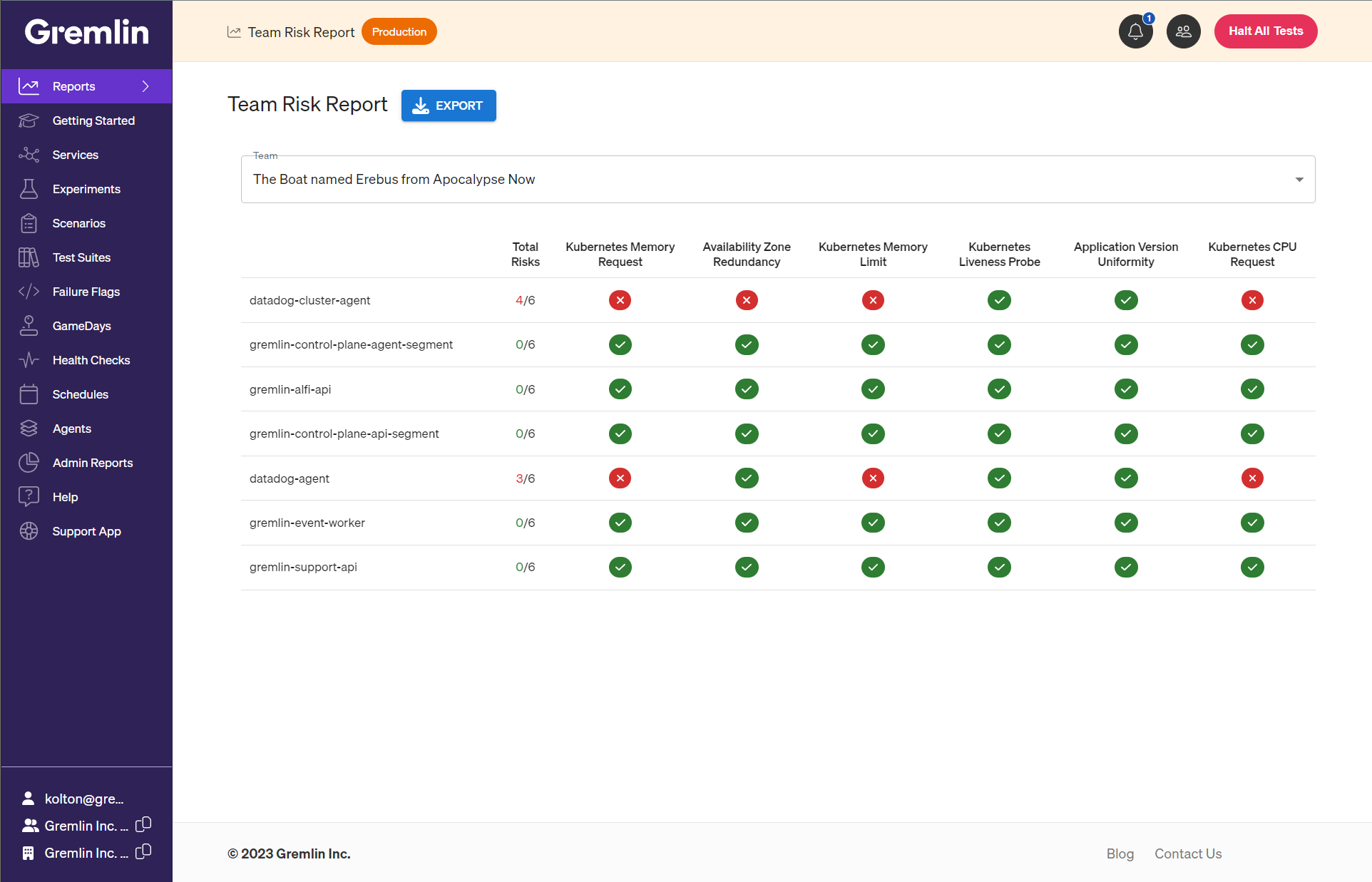
    Gremlin today added a risk detection capability to its chaos engineering service that automatically identifies issues that could cause outages along with recommendations to resolve them.

    Enabled by agent software deployed in an IT environment, the Detected Risk tool makes it possible to benefit from chaos engineering techniques without needing to construct experiments or run reliability tests.

    Gremlin CTO Kolton Andrus said that approach eliminates much of the friction that previously limited adoption of chaos engineering best practices to improve the resiliency of IT environments.

    Chaos engineering is rooted in a resiliency testing philosophy that posits applications should be able to keep functioning regardless of any service or infrastructure failure. Most IT organizations, however, don’t have the expertise required to build the tools required to test resiliency based on the “Chaos Monkey” principles—pioneered by a Netflix project by that name—that, for example, randomly turns services off to see if an application fails.

    Each DevOps team will need to evaluate Gremlin’s recommendations before implementing them, but the overall goal is to provide IT teams with a better understanding of the level of risk attached to, for example, a misconfiguration of a server. To do so, the tool uses a scoring mechanism provided by Gremlin, noted Andrus.

    The challenge is that as IT environments become more complex, the level of dependencies between applications and infrastructure continues to increase. It’s often impossible for DevOps teams to manually keep track of all the hidden dependencies that might exist when IT environments are continuously being updated.

    In theory, of course, adopting cloud-native applications based on microservices should make IT environments more resilient as calls to application programming interfaces (APIs) are rerouted in the event of an outage. Nevertheless, there are almost always dependencies that get overlooked as these applications evolve, which creates a potential single point of failure.

    Naturally, not every IT team is always comfortable with the concept of deliberately breaking things to better understand what issues might cause an outage. As organizations become more dependent on software to drive critical processes, however, a more proactive approach to ensure resiliency is required, added Andrus.

    In fact, business leaders are becoming less tolerant of outages that result in lost revenue, so DevOps teams are being held to a higher level of accountability. DevOps teams may appreciate the value of a blameless culture that encourages everyone to learn from their mistakes, but IT leaders still get fired when there are too many outages, noted Andrus.

    Less clear is the degree to which the rise of artificial intelligence might affect chaos engineering. At the very least, AI models should make it easier to assess levels of risk, but the cost of using those technologies to achieve that goal is substantial, especially when platforms that provide the same outcome already exist.

    Regardless of approach, however, when it comes to resiliency, everyone agrees that the value of application uptime is now beyond measure.

  • VS Code for Mainframe: The Enterprise Developer Tipping Point

    VS Code for Mainframe: The Enterprise Developer Tipping Point

    Optics matter. At a recent industry conference, a university lecturer reconfirmed what many in attendance already knew, “3270 [green screens] scare off the young generation of developers.” No matter how state-of-the-art the platform or mission-critical the applications, perceptions are formed largely based on optics, and green screens are not a good look.

    Beyond optics, though, a new option offers the promise of a more normalized developer experience (DevX) and DevOps productivity across platforms, along with the staffing flexibility it brings. In short, Visual Studio Code (VS Code) is a big step toward breaking down the mainframe silo.

    VS Code’s extensible, ‘any language, any platform’ design makes it the perfect tool for mainframe developers and with the free and open Code4z extension pack, VS Code is mainframe-ready. Developers are now using VS Code for mainframe AppDev just like their peers, taking advantage of the extraordinary ecosystem and the other many benefits that have made it a runaway success.

    Per my previous article, Git for Mainframe: Back to the Future, combining VS Code with Git (i.e., editor and source interfaces) makes the experience complete.

    So how does Code4z make VS Code mainframe-ready?  Let’s explore the answers from a functional perspective.

    Editing & Debugging

    Mainframe is closely associated with core languages like COBOL, Assembler and JCL, which are often ignored in the world of modern tooling. With VS Code’s extensible framework, however, incorporating these languages is simple and seamless.

    The Language Server Protocol (LSP), which was developed for VS Code, is now an open standard also used by the next generation of browser-based editors, providing a degree of future-proofing. LSP extensions provide a rich editing experience with a wide range of popular features including IntelliSense, which offers capabilities like syntax checking, verb formatting suggestions and variable name completion.

    Code4z offers LSP extensions for COBOL and High Level Assembler (HLASM) while additional extensions are available for languages like JCL, REXX, Db2, and Easytrieve. The extensibility of this technology has already been used to extend syntax awareness to specific language dialects.

    Similar to LSP, the Debug Adapter Protocol (DAP) provides a native interface and layer of abstraction for debug services. Code4z’s debugger extension facilitates the debugging of CICS and batch COBOL programs, an integral part of the end-to-end experience.

    Access & Security

    Mainframe applications, the lifeblood of many businesses, require rock-solid security throughout the entire SDLC. Code4z leverages Zowe, the award-winning open source framework that extends mainframe security and access controls to tools like VS Code. The Zowe Explorer extension, built on the Zowe CLI, provides access to data sets, jobs and USS files and developers also use it to issue TSO and MVS commands and to submit JCL. Zowe Explorer is packaged with Code4z as is a data editor for mainframe data sets including VSAM. This extension is built on Zowe Explorer, again leveraging the extraordinary extensibility.  A Zowe Explorer for CICS is also available.

    Similarly, developers can access a rich and growing set of conformant Zowe CLI extensions via the terminal and scripting.

    Access to SCMs tools is also supported. In addition to VS Code’s native Git integration, there are extensions for Endevor, ChangeMan ZMF, and related tools.

    DevOps Automation

    Since my introductory article a few years ago, Z is for Zowe – the Open Path to Mainframe DevOps, Zowe has enjoyed wide adoption with 69% of surveyed sites either currently using or planning to use it within the year.

    With mainframe teams now using Zowe to adopt modern shift-left practices, scripts for scanning, building, deploying and testing can be run manually by developers from VS Code, in addition to automatic triggers from code commits. This flexibility further empowers developers to own their code throughout the SDLC and beyond.

    With VS Code, mainframe developers can be equipped with more self-service capabilities like Db2 schema provisioning to accelerate the testing process. With capabilities like these, developers can remain in the VS Code experience focused on editing rather than being distracted by low-value infrastructure activities, like requesting and waiting for DBA action.

    Playing the Long Game

    While VS Code is the dominant tool today—almost 3 times as popular as its closest competitor according to Stack Overflow with the lead growing—what is the long-term opportunity?

    Demand for a modern, enterprise-aligned experience spans many domains, from increasing productivity to backfilling retiring staff. Elevating team morale and future-proofing vital mainframe assets ensure this adoption trend will only increase.

    But tools change. Browser-based editors and in-the-cloud collaboration are gaining greater acceptance and the AI-assist excitement is palpable. Bringing mainframe developers onto an enterprise platform ensures mainframe teams will be able to benefit from the same advances as distributed peers. Enabling VS Code and its cloud equivalents demonstrates a commitment to the long-term success of these applications and by reducing the idea-to-production cycle, product owners become champions.

    While not all mainframe developers will embrace VS Code, especially those close to retirement, the vast majority will, as we have experienced within our Broadcom engineering organization. The bottom line is that VS Code makes them even more productive, as illustrated in Confessions of a Career ISPF Programmer.

    Many of today’s developers are proficient with multiple languages (i.e., polyglot) so picking up an additional language like COBOL becomes less daunting if everything else—editor, repo, DevOps processes, etc.—is familiar.

    Getting Started

    For a closer look at the many free and open Code4z extensions, check out the Developer Cockpit, which simulates a COBOL/Db2/CICS developer configuration. And read From VS Code to Mainframe Developer Cockpit for more detailed use cases.

    Most importantly, try it! Code4z is available on the VS Code Marketplace.

    And stay tuned for additional Code4z extensions in the pipeline. There’s never been a more exciting time to be a mainframe developer!