Category: Continuous Testing

Continuous testing is the process of executing automated tests as part of the software delivery pipeline to obtain immediate feedback on the business risks associated with a software release candidate.

  • Raspberry Pi 5: Faster, Better, Stronger — Spendier

    Raspberry Pi 5: Faster, Better, Stronger — Spendier

    Welcome to The Long View—where we peruse the news of the week and strip it to the essentials. Let’s work out what really matters.

    In a cheeky extra post this week: Everyone’s favorite single-board ARM computer, the Raspberry Pi, has a new generation coming soon. Compared to the ’4, RPi5 has double the performance, quadruple the base RAM and far more capable I/O. (more…)

  • What DevOps Teams Need to Know About Responsive Web Design

    What DevOps Teams Need to Know About Responsive Web Design

    The role of DevOps in modern software development extends beyond just coding, testing and deployment. One of the significant areas where DevOps teams can bring value is delivering a positive user experience, a critical competitive advantage in the digital era. Responsive web design (RWD) is a cornerstone of a friendly user experience, allowing for seamless website functionality across various screen sizes and devices. 

    This article explores RWD and its fundamental principles and explains how RWD impacts web application development and deployment. We will review critical considerations for DevOps teams such as performance optimization across devices, the integration of responsive design into CI/CD pipelines, automated testing, the importance of a user-centric approach and consistent monitoring and troubleshooting. The objective is to equip DevOps teams with the necessary knowledge to effectively implement and support RWD, enhancing the user experience and significantly improving overall user satisfaction and engagement.

    What is Responsive Web Design?

    Responsive Web Design is a web development approach that makes your website layout adjust according to the size of the viewer’s screen. This means that your website looks and functions optimally on a wide range of devices, from desktop computers to tablets and smartphones. The primary goal of RWD is to ensure that users have an efficient and enjoyable experience, regardless of the device they are using.

    With the increasing use of mobile devices for internet access, it is essential that your website is accessible and user-friendly on all platforms. By implementing RWD, your organization can ensure that your website offers a seamless user experience, no matter the device.

    RWD removes the need for creating different versions of your website for different devices. Instead, you can have a single website that adjusts automatically to fit any screen size. This not only improves user experience but also saves you time and resources in website development and maintenance.

    Understanding the Principles of Responsive Web Design

    Fluid Grid Layouts

    A fluid grid layout is a key principle of RWD. It involves designing your website layout in relative units, such as percentages, instead of absolute units like pixels. This allows your website layout to resize dynamically to fit the screen on which it is viewed.

    The advantage of fluid grid layouts is that they offer more flexibility than fixed layouts. They allow your website to adjust smoothly to different screen sizes, ensuring that the user experience is not compromised. This is particularly important in today’s digital landscape, where users access websites from a wide range of devices with different screen sizes.

    Flexible Images and Media

    The second principle of RWD is responsive images and media. This means that your images and media files should be able to resize automatically to fit the screen size. This is essential to ensure that your images and media do not distort or overflow when viewed on smaller screens.

    Flexible images and media enhance the visual appeal of your website on different devices. They also improve the loading speed of your website, which is a crucial factor for user experience and search engine ranking.

    Mobile-First Design Philosophy

    Mobile-first design philosophy is another key principle of RWD. As the name suggests, this approach involves designing your website primarily for mobile devices and scaling it up for larger screens.

    The mobile-first design philosophy is based on the reality that a growing number of users are accessing the internet through their mobile devices. By designing your website with a mobile-first approach, you can ensure an optimal user experience on mobile devices.

    Progressive Enhancement

    Progressive enhancement is the fourth principle of RWD. It involves building your website in layers, starting with a basic layer that works on all devices and then adding more features and functionalities for devices with advanced capabilities.

    Progressive enhancement allows you to provide a basic, functional website for all users regardless of their device or browser. At the same time, it enables you to offer an enhanced website experience for users with modern devices and browsers.

    How RWD Affects Application Development and Deployment

    Responsive web design has a significant impact on the development and deployment of web applications. It affects various aspects of the process, including the codebase, development and testing process, user interface design and deployment and updates.

    Unified Codebase

    One of the main benefits of RWD is that it allows you to maintain a unified codebase. Instead of creating separate versions of your application for different devices, you can have a single codebase that works across all platforms.

    A unified codebase simplifies the development and maintenance process. It eliminates the need for duplicate coding and testing, saving you time and resources. It also ensures consistency in your application, as all users are accessing the same codebase, regardless of their device.

    Development and Testing Process

    RWD also influences the development and testing process. Since your application needs to work optimally on various devices and screen sizes, you need to incorporate responsive design considerations into your development and testing process.

    Responsive design testing involves checking your application on different devices and screen sizes to ensure that it functions and displays correctly. This can be done manually, using device emulators or through automated testing tools.

    User Interface Design

    The user interface (UI) design of your application is also affected by RWD. A responsive UI design ensures your application is easy to use and visually appealing on all devices.

    Responsive UI design involves creating a flexible layout that adjusts automatically to the screen size. It also requires you to design intuitive navigation and interaction elements that work well on touchscreens and desktop interfaces.

    Deployment and Updates

    Finally, RWD has implications for the deployment and updates of your application. With a responsive application, you can deploy and update a single version of your application for all devices.

    This simplifies the deployment and update process and ensures that all users have access to the latest version of your application. It also makes it easier to fix bugs and issues, as you only need to update a single codebase.

    Key Considerations for DevOps Teams

    Implementing RWD is not a straightforward task. It requires careful planning and consideration. Here are some key considerations for DevOps teams when implementing RWD.

    Ensuring Website Performance Across Different Devices

    One of the main challenges in implementing RWD is ensuring that your website performs well on all devices. This requires careful optimization of your website elements, including images, CSS and JavaScript.

    You also need to consider factors like loading speed and responsiveness, as these can significantly affect user experience. There are a number of available tools to help you analyze and optimize your website performance.

    Incorporating Responsive Design into CI/CD

    Continuous integration and continuous delivery (CI/CD) are key practices in DevOps. CI/CD involves integrating code changes regularly and delivering updates to users quickly and reliably. Incorporating responsive design in your CI/CD process can help you ensure that your application is responsive and user-friendly at all times.

    Automation in Testing

    Testing is a crucial part of the development process. With RWD, testing becomes more complex as your application needs to work on a wide range of devices and screen sizes. Automation can help streamline the testing process and ensure that your application is tested thoroughly and efficiently.

    User-Centric Approach

    A user-centric approach is essential in implementing RWD. This means considering the needs and preferences of your users at every stage of the development process. From the design phase to testing and deployment, the user experience should be at the forefront of your considerations.

    Monitoring and Troubleshooting Responsive Design Issues

    Finally, monitoring and troubleshooting are important aspects of implementing RWD. You need to monitor your website performance on different devices and troubleshoot any responsive design issues that arise.

    Analytics tools can provide valuable insights into how your website is performing on different devices. They can also help you identify and fix any issues that are affecting your website’s responsiveness.

    Conclusion

    In conclusion, responsive web design is an essential aspect of modern web development. It ensures your website is accessible and user-friendly on all devices, improving user experience and engagement. By understanding the principles of RWD and considering the key aspects of implementing it, you can unlock the power of responsive design and take your website to the next level.

  • Atlassian Strengthens Jira Navigation and Integration

    Atlassian Strengthens Jira Navigation and Integration

    Atlassian today made it simpler to navigate the Jira Software and Jira Work Management project management applications as part of an ongoing effort to make it simpler for DevOps teams to collaborate with other stakeholders of application development projects.

    Megan Cook, head of product for Atlassian, said the ability to share release dates across multiple calendars, overviews that aggregate views of and summarize multiple projects along with command palette and importer tools make it simpler for, for example, marketing teams and other individuals outside of a DevOps team to keep track of application delivery schedules.

    In addition, Atlassian has tightened integration between Jira and Confluence, a wiki-based collaboration application, and a previously launched Atlassian Intelligence capability that infuses generative artificial intelligence (AI) capabilities will also soon be added to Jira Work Management alongside existing support for Jira. There will also be connectors for Jira Work Management to integrate with Atlassian Admin, Atlassian Analytics, Access and Data Lake offerings, along with advanced security features.

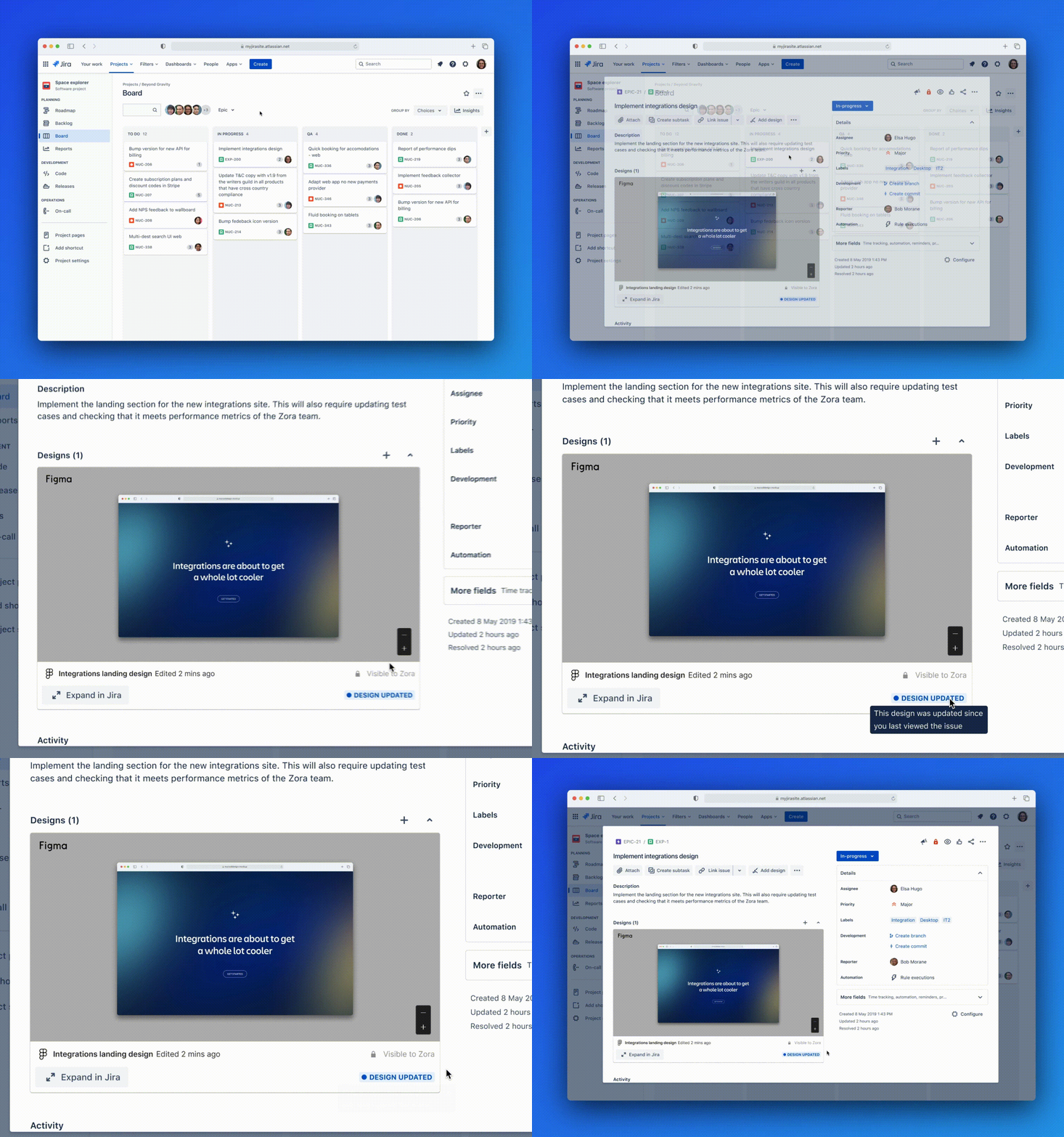
    Finally, Atlassian is adding support for a design tool developed by Figma that can now be directly installed in Jira.

    Collaboration between application development teams and the rest of the business is becoming more crucial as organizations increasingly realize how much they depend on software to drive revenue. One of the primary reasons Atlassian is investing in generative AI is to make it simpler for anyone to understand the status of any given project and the downstream impact any change to a delivery schedule is likely to have.

    Generative AI, of course, has already moved from being considered advanced technology to a set of capabilities that most end users will soon expect to be embedded within every application. One of the primary benefits generative AI provides is it makes a range of applications originally designed for specialists, such as a software engineering team, more accessible to a wider range of end users.

    It’s not clear how much generative AI will change the relationship between DevOps teams and the rest of the business, but with increased visibility, there should be a greater appreciation for the challenges developers and DevOps teams face. Any member of an organization should be able to plainly see, for example, why more resources need to be allocated to a specific project to ensure that an application is delivered on time.

    At the same time, application developers will find project management processes are about to become less disruptive as it becomes simpler to automatically import relevant data from the tools and platforms they use directly into a project management application such as Jira.

    One way or another, software engineers should expect that as generative AI continues to evolve, the divide between them and the rest of the business will narrow. There may be times when that level of additional scrutiny may feel burdensome, but on the whole, it should make it easier for DevOps teams to get the resources required to achieve any given goal. After all, the root cause of any given delay to a project will soon be plain for anyone to see.

  • 3 Steps to Secure Your CI/CD Pipelines

    3 Steps to Secure Your CI/CD Pipelines

    More and more software teams are waking up to the fact that their CI/CD pipelines are prone to risk. These pipelines often interface with various toolsets and automation, which may be prone to misconfigurations and abuse. This is not to mention the potential for insecure code being pushed through this funnel and external factors that threaten to circumvent the pipeline.

    In recent years, these risks produced some CI/CD tooling breaches—concerns that gained high-level attention recently after a joint CISA and the NSA alert about the importance of securing CI/CD pipelines. “This is something that moves the tectonic plates of the industry,” said Daniel Krivelevich, former founder of Cider Security and current CTO of AppSec at Palo Alto Networks.

    I reconnected with Krivelevich, the ‘godfather of CI/CD security,’ to reevaluate the CI/CD threat landscape and understand how IT should respond. According to Krivelevich, we’re now seeing more maturity around CI/CD security, both in terms of recognizing that these risks exist as well as emerging frameworks to help engineering teams respond. He shared a general three-step framework organizations can use to secure the CI/CD pipeline and surrounding areas, which we’ll explore below.

    The Evolving Threat Landscape

    The traditional approach to application security (AppSec) used to be simpler. Defenders could implement more standard controls to make their code more secure, said Krivelevich. However, throughout the years, the software engineering process has transformed dramatically. It’s become faster, dynamic and reliant upon third-party frameworks. “The entropy of the engineering ecosystem is very high,” he said.

    This paradigm shift has introduced a slew of new risks, which requires rethinking since most traditional security solutions deal solely with AppSec. “Software engineering is a big part of what makes the business tick,” said Daniel. Therefore, having a common language and understanding of this area is crucial to respond to evolving risks that threaten business operations.

    A Three-Step Framework For CI/CD Security

    Krivelevich is involved with creating the OWASP Top 10 CI/CD Security Risks; therefore, he has excellent insight into the types of vulnerabilities that most engineering practices and their CI/CD pipelines are facing. His three-step framework for CI/CD security, which Palo Alto Networks has applied in practice, looks to holistically secure not only the pipeline itself but also internal and external factors.

    1. Security in the Pipeline (SIP)

    SIP can be thought of as the traditional AppSec problem space. This involves ensuring developers are not shipping anything inherently insecure into production. Therefore, whatever code flows through the CI/CD pipeline must be vetted to ensure it has no security flaws or misconfigurations. Of course, this is easier said than done, given that teams are juggling more technologies and frameworks than ever, each of which has different knobs and requires unique security scanning capabilities.

    2. Security of the Pipeline (SOP)

    This area has to do with the security of the software delivery chain itself. Attackers may attempt to breach these pipelines by running malicious code within the pipeline or stealing credentials to CI/CD tools to harm the system. Poisoned dependencies, access management holes or insufficient credential hygiene could all be doorways to disrupting a CI/CD process. Therefore, SOP focuses on the security posture of the actual systems and tools that compromise the software delivery chain.

    3. Security Around the Pipeline (SAP)

    However, even if SIP and SOP are secure, what if hackers can bypass the pipeline altogether? That would render even a perfect set of controls null and void. Therefore, SAP is necessary to ensure that attackers can’t push code directly into production. It’s good to see the bigger picture so that everything that reaches production actually originates from the pipeline.

    To deploy SAP effectively, Krivelevich recommended leveraging both detective and preventative measures. You need detective measures to issue alerts when anomalies occur, such as an artifact deployed by a human account instead of a service account. You also need preventative measures that set the proper branch protection rules across all repositories. For instance, this could be a rule that no single developer can publish to production unless approved by two reviewers.

    The Role of AI in Software Security and CI/CD

    By using both detective and preventative measures, you can detect when settings are disabled or abused and have better configurations across all stages of the software delivery chain. But what other tactics can be used to secure CI/CD? For example, does machine learning have any merit in this area?

    Well, Krivelevich described AI as “both a blessing and a curse.” Attackers are already using AI to operate much faster and in a much more agile way. And unfortunately, he viewed the engineering ecosystem as the new path of least resistance. “I expect the power of AI will be used by sophisticated attackers who are motivated to get access to the ‘crown jewels’ by abusing the engineering ecosystem,” he said.

    On the defensive side, Daniel doesn’t see a specific opportunity for deploying AI to protect CI/CD. That being said, there’s a lot of potential for security builders to utilize AI to advance their efforts and accelerate the pace at which they detect anomalies, which could help respond more quickly to emerging threats.

    Final Thoughts on CI/CD Security

    The recent chatter around CI/CD threats appears to be garnering more attention around securing this niche area of agile software development. To thwart CI/CD attacks, it will be necessary to assess the settings of systems, understand their technical natures and analyze them against an attacker’s perspective, Krivelevich explained. Therefore, understanding what realistic attacks can be carried out will help build measures to correct these gaps.

    In doing so, the SIP, SOP and SAP descriptions serve as a solid reminder of what needs to be addressed when attempting to secure the software delivery process and the supply chain at large. Code that goes through the pipeline needs to be free from vulnerabilities, and the channel itself must be vetted for gaps that could be abused. We also need to consider the possible existential threats if the entire process can be undermined.

  • Digma Leverages ML to Bring Observability Insights to IDEs

    Digma Leverages ML to Bring Observability Insights to IDEs

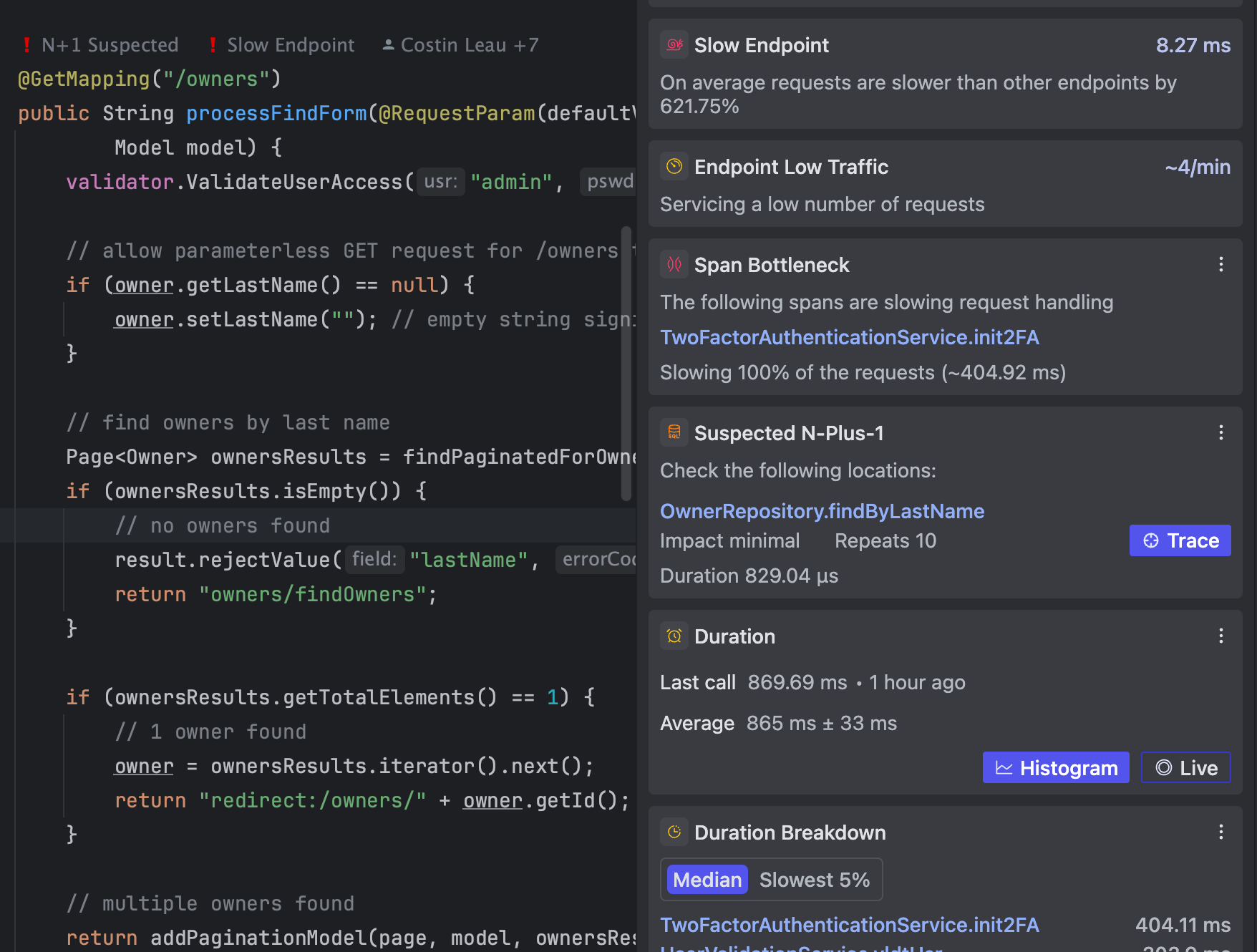
    Digma has launched a namesake platform the provides developers with continuous feedback from observability data that surfaces directly within their integrated development environment (IDE).

    Digma CTO Roni Dover said the Digma Continuous Feedback platform leverages machine learning algorithms to enable developers to easily analyze their code at runtime to identify issues, anomalies and regressions. Digma Continuous Feedback removes the need to consult a separate dashboard that requires developers to log into an observability platform.

    In fact, the reason developers often don’t make use of the data that observability platforms provide to write better code is that it’s not readily accessible at the time they are writing code, noted Dover.

    In general, it’s become much easier to collect logs, metrics and traces by using open source OpenTelemetry agents that can be embedded within software libraries. The Digma Continuous Feedback platform applies machine learning algorithms to that data to provide developers with insights on improving code in real-time, said Dover.

    The ultimate goal is to make it simpler for IT teams to distinguish when, for example, a software component actually needs more memory or is simply inefficient, he added. Those insights can be applied to code written by developers or code generated by an AI platform.

    Whether code is written by a human or generated by a machine, quality is often in question. Developers with varying levels of experience will naturally write code that can differ substantially in quality and efficiency. At the same time, developers may be asked to fix code someone else wrote; the original author no longer works for the organization, noted Dover. In either use case, the Digma Continuous Feedback platform immediately surfaces issues that will enable organizations to set higher baselines for code quality, he added.

    That baseline is especially critical as more code starts to be generated by generative AI platforms based on general-purpose large language models (LLMs) trained using code samples of varying quality collected from across the web. Developers will be able to immediately determine any issues that may arise should they choose to incorporate that code within an application.

    Developers, of course, don’t deliberately set out to write bad code, but the tools that enable them to identify issues are not easily accessible. In fact, too many developers tend to view observability platforms designed for IT operations teams as being overly complex, noted Dover. The Digma Continuous Feedback platform takes that issue off the table by identifying issues without increasing the level of cognitive load developers are expected to carry, he added.

    Eventually, thanks to the rise of machine learning algorithms and generative AI platforms designed specifically to write high-quality code, the overall state of software engineering will improve. The issue is determining the best way to get the benefits these technologies provide directly to the developers who write code—an issue that is at the heart of so many DevOps challenges.

  • Tray.io Automation Framework Leverages AI to Build Integrations

    Tray.io Automation Framework Leverages AI to Build Integrations

    Tray.io today added an automation framework to an integrated platform-as-a-service (iPaaS) service that leverages an existing Merlin artificial intelligence (AI) engine to identify the most efficient way to automate a workflow.

    The Tray Universal Automation Cloud service can be invoked via three distinct application programming interfaces (APIs) to programmatically create those workflows using a Tray Code low-code or Tray Build no-code tool or via a Tray Chat natural language interface. A Connectivity API provides access to more than 600 connectors, while a Trigger API enables developers to drive event-driven processes. An Authentication API provides a method for managing authorizations. The platform also provides access to testing, error handling and debugging tools.

    Tray.io CEO Richard Waldron said that approach provides IT teams with a composable framework for building integrations that leverages a set of large language models (LLMs) that the company has embedded within its Merlin AI engine to enable IT teams to optimize workflows.

    In addition, the underlying platform takes advantage of Kubernetes, Docker containers and serverless computing frameworks to dynamically scale as required, he added. In contrast, rival legacy iPaaS environments are not as elastic, which enables Tray.io to base its pricing on actual usage of a modern IT platform, noted Waldron.

    The overall goal is to provide a single platform that any type of developer, including business professionals, can invoke to automate workflows, said Waldron.

    As the overall codebase that DevOps teams manage continues to increase, the number of required integrations between applications and processes continues to increase exponentially. Rather than relying on lower-level code to create those integrations, an iPaaS provides the means to automate and simplify building integrations and enable developers to spend more time writing the business logic that will drive a new application. Historically, most of the integrations required to drive, for example, a digital business transformation initiative required a significant amount of low-level code to be developed and maintained.

    Tray.io is now making a case for an iPaaS that takes advantage of AI to more easily invoke generative AI capabilities to optimally create those integrations based on workflow attributes.

    Each organization will need to determine how heavily to rely on AI platforms to build integrations, but these advances—alongside generative AI tools that developers have already embraced to build software—are making developers more productive than ever. That accelerated pace of application development will require DevOps teams to automate as many processes as possible. One option for achieving that goal is for organizations to rely more on an iPaaS to enable developers to build integrations in a way that doesn’t necessarily always have to flow through a DevOps pipeline.

    One way or another, thanks to the rise of AI, the way software is built is about to change drastically. The challenge and the opportunity now is to determine how best to reengineer workflows in a way that best aligns with the goals of the organization.

  • Harness Launches Open Source Gitness Platform

    Harness Launches Open Source Gitness Platform

    At its unscripted conference today, Harness unveiled a streamlined open source git platform, dubbed Gitness, that is significantly lighter weight than the platforms DevOps teams traditionally rely on to build increasingly complex applications.

    At the same time, the company is adding four additional modules to its continuous integration/continuous delivery (CI/CD) platform to improve developer productivity and make it simple to build and deploy secure applications.

    Finally, Harness is launching an Engineering Excellence Collective, a consortium of 300 senior engineering leaders. The collective is developing a maturity model based on 11 pillars for achieving software engineering excellence; a FinOps Excellence community initiative was also announced to advance best practices for controlling cloud computing costs.

    Harness CEO Jyoti Bansal said the need for a modern open source Git platform—as an alternative to legacy platforms developed a decade ago—has never been more apparent. Gitness provides all the collaborations, performance, analytics and security capabilities DevOps teams require in a streamlined platform that reduces overall bloat by seamlessly integrating, for example, code hosting and automated pipelines, he added.

    Other core capabilities include automated status checks and mandatory reviews, branch protection rules, user access management tools and a semantic search engine that has been infused with generative artificial intelligence (AI) capabilities that invoke multiple large language models (LLMs).

    Collectively, the approach reduces the amount of time spent when attempting to integrate and manage disparate tools on legacy platforms that inevitably lead to the creation of additional bottlenecks, said Bansal. Rather than bolting on additional tools, the time has come to simplify software engineering by migrating to a platform specifically designed to address modern software engineering requirements, he added.

    Designed to be installed using Docker contains in a matter of minutes, DevOps teams can also take advantage of tools to automatically migrate their existing repositories and pipelines from platforms such as GitHub and GitLab.

    Gitness is also at the core of one of the four additional modules that Harness is adding to its portfolio. The Harness Repository is a premium tool, available in beta, that provides governance and compliance-as-code capabilities embedded within the repository.

    The three other modules being added are a Harness Internal Developer Portal based on open source Backstage software, Harness Infrastructure as Code Management that makes it simpler to implement GitOps workflows at scale and Harness Software Supply Chain Assurance to provide visibility into open source software components and manage the creation of software bills of materials (SBOMs).

    It’s not clear whether DevOps teams are ready to rip and replace existing platforms, but the pressure to improve developer productivity has never been higher. Organizations increasingly realize that developers are spending the bulk of their time managing development environments tied to legacy platforms that create bottlenecks and are becoming more costly to manage and sustain.

    Harness, in effect, is now calling for the establishment of an alternative approach based on open source software that promises to streamline software engineering workflows. As applications incorporate microservices, security controls and AI models, they are only going to become more challenging to build and deploy at scale.