Category: Continuous Delivery

Continuous delivery is a software engineering discipline that allows organizations to consistently develop and release quality software at a rapid pace. It is achieved by automating the software development lifecycle, enabling tasks such as development, testing and release to occur concurrently and continuously.

  • Contrast Security Adds Free Code-Scanning Tool

    Contrast Security Adds Free Code-Scanning Tool

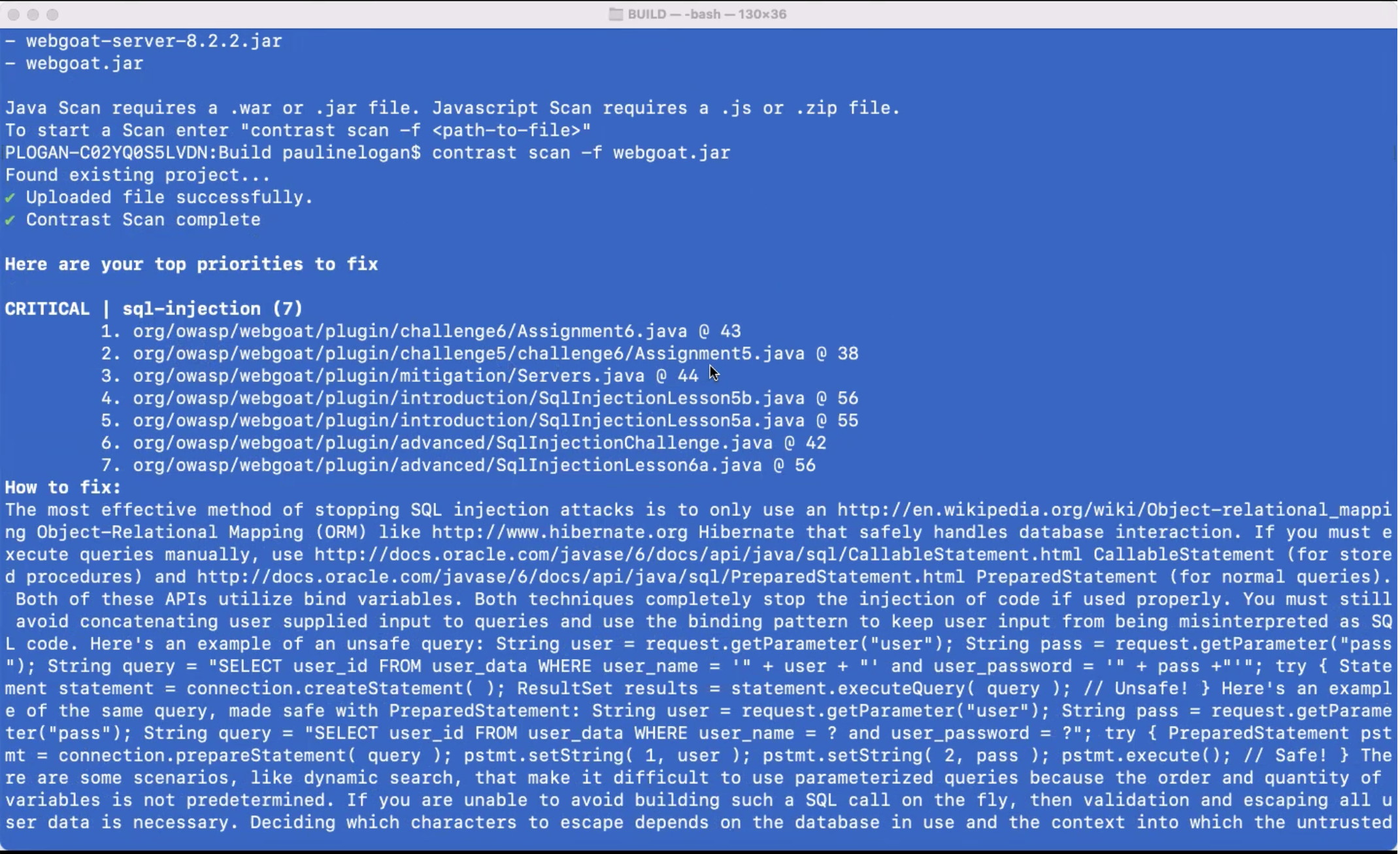
    Contrast Security this week made available a free security tool that enables developers to scan their code using the same core engine used by the cybersecurity team within their organization.

    Steven Phillips, vice president of product marketing for Contrast Security, said while there is no shortage of free tools for scanning code these days, the majority are not especially accurate. The scanning engine in CodeSec by Contrast Security is more than 10 times more accurate, Phillips said, because it is optimized to identify true positives versus generating a lot of false negatives, he claimed. He added that CodeSec is not just another freemium offering for developers that is a hobbled version of a commercial offering.

    CodeSec also differs from Contrast Security’s existing application security tool because it provides access to a command-line interface (CLI) that makes it easier to integrate within the context of a DevOps workflow. That approach makes it simpler for organizations to shift more responsibility for application security further left toward developers, noted Phillips.

    However, shifting responsibility left toward developers is not a panacea, Phillips said. The Contrast Security approach enables more collaboration between development and cybersecurity teams that are using the same scanning engine via a software-as-a-service (SaaS) platform to discover vulnerabilities, he noted.

    It’s difficult to determine just how far cybersecurity might shift left, but every vulnerability discovered by an application development team is one less for cybersecurity teams to ask developers to fix in a production environment. The challenge is making it as simple as possible for developers to discover those vulnerabilities.

    One way or another, the amount of time and effort being applied to application security has increased sharply in recent months following the disclosure of a series of high-profile breaches. Cybercriminals are now targeting software supply chains as part of an effort to compromise a wide range of downstream applications. Many of the modules that developers routinely reuse are being compromised by surreptitiously inserted malware. The fundamental challenge organizations are trying to address is how to build and deploy more secure applications without slowing down the rate at which they are built.

    Naturally, training developers to recognize security issues is a big part of the equation. However, no two developers are ever going to have the same level of cybersecurity expertise. Tools that identify vulnerabilities in ways that developers can act on are critical for advancing the adoption of DevSecOps best practices. Those tools require some level of acceptance among developers because they tend to prefer CLI tools.

    In the meantime, organizations will most likely have to scan a wide range of already-deployed applications for vulnerabilities. Applications running both inside and outside the cloud have been routinely deployed with a minimum level of scanning. The truth is that many developers have tended to view cybersecurity policies as an impediment to building and deploying applications. Unfortunately, cybercriminals now appreciate and take full advantage of the opportunity to wreak havoc.

  • Solving the Speed Paradox With Open Source PaaS

    Solving the Speed Paradox With Open Source PaaS

    The number of DevOps tools keeps growing, as does the number of cloud resources and options to manage those resources. On EC2 alone, AWS offers nearly 400 instance types across storage, networking and operating systems. Complicating this further is that users can choose from machines located in 24 regions and 77 availability zones.

    This proliferation is driving a ‘speed paradox’ wherein the faster you grow the more fragmented and complex your ecosystem becomes which, in turn, slows everything down. Most DevOps teams struggle to keep up with the demand for more environments from developers.

    The Speed Paradox

    The Rise of the Internal Developer Platform (IDP)

    One intriguing solution to the speed paradox is the internal developer platform (IDP). As its name suggests, an IDP provides a single place where developers can find all the resources needed to run their environments. An IDP allows developers to speed development processes by offering improvements in:

    • Efficiency – Simplifying access to development and testing infrastructure through a self-service experience;
    • Consistency – Providing a consistent way to consume infrastructure resources across teams; and
    • Visibility – Providing a single place to see all the pipelines, workflows and states associated with each environment.

    Gartner sums it nicely: “Product teams often struggle due to disparate tools and disjointed workflows as they accelerate digital transformation. Software engineering leaders leading platform teams must establish internal, self-service developer portals to enable consistency and scale cloud, agile and DevOps initiatives.”

    Lessons From the ‘PaaS-t’

    The idea of a developer platform isn’t new. Previous-generation PaaS—Google App Engine, Heroku Cloud Foundry, for instance—provided a simple interface to write applications by abstracting cloud resources. But early PaaS failed, perhaps mostly due to the long tail of developer needs. Back in 2013, I observed: 

    “Every Access project will eventually fail because, while 80% of what the user wants is fast and easy to create and the next 10% is possible with difficulty, ultimately the last 10% is impossible because you can’t get far enough underneath the built-in abstractions and users always want 100% of what they want.”

    You can sum up the failures of early PaaS in three points:

    • Too opinionated: It is hard (impossible?) to control the way the platforms run their infrastructure resources. You’re dependent on the platform vendor for customization.
    • Limited to simple web applications and language choices: Modern SaaS applications are complex and include backend services that don’t fit that architecture.
    • Maturity: Early PaaS attempted to abstract cloud when it was a young, moving target.

    What’s Changed?

    With early PaaS, we traded simplicity for flexibility. Finding the right balance between the two is the heart of the challenge. Kubernetes and Docker, as well as IaC tools like Terraform, Cloud Formation and Azure ARM are a great substrate: They provide a consistent framework to manage applications across a wide range of infrastructure resources among clouds. Maturity and adoption of these tools reduces barriers to build a developer platform. This opens the opportunity to create a custom platform for each organization, allowing teams to control how their platform fits into their organization’s environments. It also offers balance between simplicity and flexibility, because each organization can choose where to draw the line—and even redraw that line without being dependent on an external vendor.

    The next-generation platform 

    Enter Backstage

    Backstage is an open source IDP project led by Spotify. Its three main parts are:

    • Service Definition—Based on the Kubernetes template format, it provides a service descriptor that fits into a range of services: monitoring, CI/CD and Git repositories
    • Backstage service catalog—Basically a web application with a database backend providing a single point of access to manage resources
    • Integrated tooling via plugins —A marketplace of integrated resources

    Here’s how an IDP based on Backstage can look:

    An example of an internal development platform based on backstage

    We can use Backstage to organize all development services and resources such as our squad KPI, the development pipeline, API and Git repositories, all in one place.

    Turning Backstage Into a Full-Blown PaaS

    One of the missing pieces in Backstage is infrastructure provisioning. Adding it turns Backstage into something closer to a full-blown PaaS. Cloudify provides a remote execution engine that integrates with a variety of infrastructure resources and allows users to organize them into a self-service development or production environment. The integration of Cloudify into Backstage includes synchronizing the development environments into the Backstage service catalog and allowing self-provisioning of those services through the Backstage portal or through GitOps.

    Integrating Cloudify as a remote execution engine to Backstage 

    You can watch a demo or get more information on the integration from the Cloudify Backstage Git repo.

    The End of ‘Growth At Any Cost’

    Last year, Sarah Wang and Marti Cassado analyzed the impact of cloud spending on hypergrowth companies. As tech companies trade away efficiency in pursuit of velocity, they face a non-sustainable growth model where cloud costs surpass 50% of total revenue. Wang and Cassado’s analysis illustrates how this condition directly impacts a company’s profitability—and valuation.

    In today’s market upheaval, it’s even easier to see how a “growth at any cost” policy is unsustainable. Today, DevOps teams have to find ways to support growth while controlling costs. This forces organizations to better control how development teams use cloud infrastructure. 

    IDPs can become a major tool in this effort. Unsurprisingly they’re becoming the next hot DevOps trend. Backstage provides a great framework and ecosystem to shorten the time a team needs to build its own internal platform and Cloudify provides the open, remote execution engine with a single place to organize infrastructure resources into a self-service environment. The integration turns Backstage into a full-blown PaaS.

    The current Cloudify-Backstage integration is only an MVP release. Next, we’ll deepen the integration, providing more monitoring within the Backstage portal. Here, you can find more information on our open source contribution to Backstage and offer feedback.

    An Open Source Solution to the Speed Paradox 

    The “speed paradox”—where the faster you grow the more fragmented and complex your ecosystem becomes, which in turn slows everything down—need not grind our DevOps agility goals into the ground. By using open source Cloudify integrated into the Backstage project, DevOps teams can avoid becoming the new bottleneck in software development agility goals. 


  • 5 Testing Strategies For Deploying Microservices

    5 Testing Strategies For Deploying Microservices

    With rigorous development and pre-production testing, your microservices will perform as they should. However, microservices need to be continuously tested against actual end-user activity to adapt the application to changing preferences and requests. This article will cover five deployment strategies that will help developers and DevOps teams when releasing new features or making changes to microservices-based applications.

    Always Test in Production

    A staging environment is a necessary but insufficient step toward building a robust microservices infrastructure. Although indicative, it is not a substitute for evolving user traffic and behavior. When real users interact with the software during production, the services may not perform as efficiently.

    Users are unpredictable. They may make requests you have not accounted for when drawing up communication paths. Or your microservices architecture may not sustain the actual production traffic. When testing with real end-users, you are sure of your software’s performance and can improve it or add new functionality. 

    The disadvantage of working with real users is that they will be impacted by any errors. However, with specific deployment strategies, you can identify the issues and minimize their impact on those users. 

    Depending on your goals, you can implement the following testing strategies in the deployment stage. They can be performed individually or in various combinations, as each approach varies in its contribution to deployment.

    Blue-Green Deployment

    A blue-green deployment uses two distinct yet identical production environments. For example, you deploy an inactive version of your application in the blue environment. At the same time, the latest version available to end users runs in the green environment. Next, you push code to add new functionality to the blue environment. 

    At this stage, you test the services in the blue environment to ensure that they are running smoothly. You can automate this process by using basic smoke tests. When the microservices pass these tests, you can instruct the load balancer to gradually redirect user traffic to this new environment.

    If the new functionality poses no problems, the router moves all traffic from the green to blue environment, but can immediately revert traffic in case of any errors. 

    Due to the identical nature of both environments and their reliance on each other, there is little to no downtime. The end user’s experience is largely unaffected and the developers can move quickly to fix any bugs.

    The old environment serves as a backup, making it possible to execute a rollback without any downtime. After releasing the latest version, you can decide to kill the old instances, but only after you are confident that the new environment will continue running without errors. You can also clone both blue and green environments to repeat the process with other feature deployments in the future.

    Canary Deployment

    Canary deployment is similar to blue-green testing in that it protects against release-related risks.

    The phrase “canary deployment” originates from an old mining practice of placing caged birds in mine shafts to detect the presence of harmful gases. If present, the gases would kill the canary before affecting the miners, thus providing an early warning to vacate the mine immediately.

    A canary deployment works on a similar principle. Instead of creating two separate environments, a canary deployment operates within the same microservice or infrastructure. The developers roll out a new service or application version with changes only to a fraction of the end-users.

    You can quickly detect errors or vulnerabilities while using the new service. The impact is temporary and minimal as the experiment is only run on a subset of users with most remaining unaffected. Once they are working and have passed verification, you can scale up the changes. 

    The biggest challenge for those running canary deployments is the requirement to run multiple versions of the same microservices so that they can be deployed to a few users at a time. Implementing multiple versions also means you need to keep track of which users are on which versions to run accurate business metrics and analytics. Such monitoring can get increasingly complex with multiple canary deployments within the same application.

    Feature Flags

    A feature flag or feature toggle is a change or feature written inside conditional code. Developers can turn the feature on or off depending on their testing requirements while the application is running and in use.

    The code is already deployed and there are two code paths: One with the code that implements the feature and one without it. The developer only needs to choose one of the two paths. When the switch is toggled on, the code chunk is executed as part of the flow. When switched off, that code is skipped and the feature is not implemented. The rest of the source code continues to run as usual, independent of the feature flag’s condition, with no disturbances in the end user’s experience.

    Once integrated, a feature flag allows you to turn on a feature for a select group of users. Unlike a canary deployment where the selection is random, feature toggles are usually employed in specific cases. For example, developers do not create two separate applications to implement free and paid subscription tiers. Instead, operating a feature flag allows you to make a particular feature accessible only to subscription users.

    Feature flags are especially attractive during testing as developers can use them to run small experiments throughout the application without relinquishing control. Being able to flip the switch remotely also makes rollbacks easier. The risk is negligible as the application is self-sufficient in that it can continue to run without the feature. 

    Feature flags generate complex user-to-service paths by way of permutations and combinations. For a specific user, it is difficult to determine the exact route they took when using the services. Feature flags complicate this by allowing each user to have a different experience, ultimately making the application hard to debug. These toggles are easy to get started with minimal risks, but their maintenance can quickly become complex. It is best to use them only when needed and with other deployment strategies.

    Traffic Shadowing

    With traffic shadowing or mirroring, the router duplicates incoming traffic to an already-released service and gives the copy to another service. The request and response mechanism between the user and the existing service remains intact. On the other hand, the second service with a copy of the traffic contains new features that require testing. Consequently, it does not interfere with the existing process. Instead, the copy is used to test its functionality.

    Its most significant benefit is that it allows the new version to receive the same traffic that is currently being received by the service it seeks to replace. There is no need to create test data or worry about replicating scale. This accuracy comes with little risk, as there is no tangible impact on the existing services. Developers can run all relevant tests on this production environment, such as testing for errors and performance metrics. The new version’s responses, which are not sent to users, can also be compared to those of the production service. Both versions operate independently of each other with different end goals. This can happen in real-time or a copy can be saved and replayed for future testing.

    Traffic shadowing can be used with other deployment techniques like blue-green or canary deployments. After successfully shadowing a production environment, the changes can be rolled out gradually using a canary deployment to gain maximum confidence before a full release.

    Shadowing can have unintended consequences, though, so you should exercise caution when deploying this strategy with services that have third-party dependencies. 

    A/B Testing

    Unlike blue-green and canary deployments, A/B testing is focused on user perception and experience of new features. It measures if and how end users are interacting with these features, whether they are easy to notice and use and gauges the application’s overall functionality. It provides developer teams with business-level insight to improve their application as the features are ultimately implemented using code.

    A/B testing divides users into groups that access different features. Group A, for example, sees a different user interface than group B, although members in both groups are making the same requests to access the application. Traffic is routed to separate builds or different configurations on a common build. This is done by considering aspects like the users’ operating systems and user agents. It must be run on a sample that is representative of your end users. The test also needs to display statistically significant results to be valid.

    This test can be combined with blue-green or canary deployments as they handle the actual feature deployments that this strategy tests. After comparing the versions shown to the groups, the one that has performed better can be pushed to release for all users. 

    Building your Deployment Strategy

    Each strategy outlined can be used independently or together in a combination that best suits your goals, workflow and microservices requirements. They allow you to identify and reduce the impact of any vulnerabilities that may only surface at the final stage of your software’s release. Implementing them can be a somewhat complex process, especially with larger architectures and dependencies. But by implementing any of these strategies, your team will release the best possible version of your application. 

  • The Risks of Shadow Code

    The Risks of Shadow Code

    As the economy struggles to recover after the last two years of the COVID-19 pandemic, we have all learned a thing or two about supply chains—and what happens when they break down. But many people do not realize that modern websites also have digital supply chains, third-party ones that can be compromised in myriad ways. And just like the disruption of the physical supply chain affects things like pricing, availability and inventory, digital supply chains found on today’s websites play a big role in critical areas like site performance, customer experience and overall analytics. As a result, businesses today need to be aware of how the digital supply chain can introduce significant risk, especially when third parties do not adhere to their own set of stringent standards around security and compliance.

    According to a recent study by Source Defense, organizations that collect and use sensitive data—such as health care, finance, travel and online retailers—need to strengthen their focus on third-party risk management. As a result of mandates like GDPR and PCS DSS, these companies are now bound by compliance requirements to ensure their client-side threats are avoided and/or mitigated. This effort means recognizing more than just how to protect private data—it means understanding the properties of malicious code known as “shadow code” on modern websites and how it generates risk from dynamic and unpredictable scripts. Companies dealing in data today need to be aware of the different ways shadow code can affect their security, as well as the productivity and integrity of their DevOps teams.

    Third-Party Scripts and Shadow Code

    Shadow code refers to code that is baked into an application without proper vetting by the website’s IT department. This malicious code thrives in the cloud landscape, primarily because it allows for ease of deployment through CI/CD automation.

    When a web page calls in a third-party script, it loads directly into the browser from a remote server, which means general security controls such as firewalls and network monitoring tools are bypassed. And if one of these scripts has been compromised by a bad actor, shadow code can be embedded within. Sometimes these scripts include open source software that hasn’t been tested well—or at all. Other times, the code may be pulled from another layer of the organization where malicious code is hiding.

    Shadow code presents an array of threat opportunities, including the ability to mount an attack through digital supply chain partners. When these compromised scripts are used to steal data, redirect web traffic,or any other malicious activity, a clear path is essentially created into thousands of different websites, in almost every industry that collects data or deals in digital transactions. When a third-party script with shadow code enters a system, it gains the ability to:

    • Record keystrokes
    • Redirect visitors to malicious websites
    • Monitor clicks and track website activity
    • Change content on websites, including images and text
    • Steal credentials, such as personal logins and social security numbers

    As we know, these digital activities can lead to big consequences, like data breaches, fraud, theft, compliance violations, loss of reputation and hefty fines. Although code reviews can provide some software quality assurance, the process is not effective against shadow code, mostly because these scripts are constantly altered by third-parties. And when the threat is underestimated and unattended, these malicious scripts have the potential to permeate every area of a company’s web property.

    Because the benefits of using these types of third-party scripts are considerable, it can be hard to find a modern enterprise or agency that does not rely on at least a few to run web applications. In fact, many enterprises and government agencies today are running third-party scripts on every page of their sites. Even though these organizations are technically not responsible for this harmful code, regulators can (and do) hold web property owners accountable for any digital maleficence on their sites.

    DevOps Teams and Shadow Code

    Websites can provide rich experiences to visitors largely because developers use client-side JavaScript to improve the look and feel of these digital properties—all without the need for ongoing maintenance. Today, DevOps professionals can access vast libraries of these free and low-cost scripts from many different sources, such as allied coder groups, open source organizations, social media companies, web analytics firms, content delivery networks and more.

    But the reality is, code libraries accessed by DevOps teams are not always secure or trustworthy. Considering these packages often contain code from fourth and fifth parties, DevOps folks face the unavoidable possibility of tainted code—hard to identify and dangerous to use. In fact, the Source Defense report revealed that one in four scripts represented fourth- or fifth-party code, on average. Because developers tend to focus on keeping their code updated and as capable as possible, they often pull from the dynamic library from their repository. If there is a CI/CD process happening, DevOps teams will pull their library from that point. This is where shadow code introduces new vulnerabilities for developers.

    Shadow code also jeopardizes the integrity of DevOps work. Most developers take pride in what they do and are not interested in creating unsecure or low-quality code—not purposefully, anyway. And given that speed, productivity and constant innovation are all business goals for DevOps teams, it’s important to recognize how problematic shadow code can be for those in the business of building secure and high-quality software.

  • Architecting an Auth System for Applications

    Architecting an Auth System for Applications

    Applications today use many login and authentication methods and workflows. Here, I’ll share the most relevant and proven authentication workflows, which you can use as a basis for architecting and designing an authentication system for traditional web applications, single-page applications and native mobile applications.

    Authentication Workflows for Traditional Web Applications

    Traditional web applications load a web page and provide user functionality using a message-based model where a browser makes an HTTP request to a web server based on the URL in the address bar. The server responds to this request with HTML, CSS and JavaScript and then displays a resource in the browser. Along with traditional web apps, new web apps often still provide functionality in this manner.

    When a user submits a form or clicks a link or button, the browser sends a new HTTP request to the web server and changes the URL in the address bar. The server again responds by returning HTML, CSS and JavaScript and then displaying a resource in the browser.

    Browsers support only two HTTP methods for traditional web apps: GET and POST. GET is used to request data from a specified resource and POST is used to send data to a server to create or update a resource.

    Below are several workflows you can use for traditional web app login and authentication. Note that the application backend is the backend of the application (not the identity provider, or IdP) and native login form is a form built directly into the application instead of an external login form.

    Native login form to the application backend using …

    JWTs and refresh tokens stored in cookies

    Sessions

    Sessions plus refresh tokens stored in cookies

    OAuth 2 authorization code grant using …

    JWTs and refresh tokens stored in cookies (RECOMMENDED)

    Sessions (RECOMMENDED)

    Sessions plus refresh tokens stored in cookies

    OAuth 2 resource owner password credentials grant using …

    JWTs and refresh tokens stored in cookies

    Sessions

    Sessions plus refresh tokens stored in cookies

    Authentication Workflows for Single-Page Applications

    A single-page web app (SPA, pronounced as “spa” or “S-P-A”) runs entirely in the browser after loading the HTML, CSS and JavaScript source code from a web page. After retrieving the HTML, CSS and JavaScript that make up the application, the browser invokes a JavaScript framework that bootstraps and then renders the application.

    SPAs call APIs to handle user interactions and input. For example, if a user clicks a link or submits a form, the SPA might render a different page or form.

    APIs are invoked using XMLHttpRequest, a built-in browser object that can make HTTP requests in JavaScript. When the server responds, the JavaScript running in the browser updates the data dynamically without performing a  full page refresh.

    SPAs use a single request and response model. Since the browser uses XMLHttpRequest, it can support GET and POST, as well as other standard HTTP methods, such as PUT and DELETE. (PUT is used to replace all current representations of the specified resource and DELETE is used to, well, delete the specified resource.) The HTTP method chosen tells the server how to handle the request.

    Here are some workflows you can use for SPA login and authentication.

    Native login form to the application backend using …

    JWTs and refresh tokens stored in cookies

    Sessions

    Sessions plus refresh tokens stored in cookies

    Native login form to FusionAuth using …

    JWTs stored in local storage and refresh tokens stored in cookies

    JWTs and refresh tokens stored in cookies

    JWTs and refresh tokens stored in cookies

    OAuth 2 authorization code grant using …

    JWTs and refresh tokens stored in cookies (RECOMMENDED)

    Sessions (RECOMMENDED)

    Sessions plus refresh tokens stored in cookies

    OAuth 2 implicit grant using …

    JWTs stored in cookies

    JWTs stored in local storage

    Sessions

    OAuth 2 resource owner password credentials grant using …

    JWTs and refresh tokens stored in cookies

    Sessions

    Sessions plus refresh tokens stored in cookies

    When using OAuth for SPAs, note that the browser navigates away from the SPA to the OAuth provider. Once the OAuth workflow is complete, the browser is sent back to the SPA page where it quickly restarts the SPA with cached assets.

    Authentication Workflows for Native Mobile Applications

    Native mobile applications are usually installed on a mobile device or any smart device through an online marketplace like App Store and Google Play Store. Clicking the application icon on the device launches the device operating system, which starts the application and its user interface.

    Almost all native applications call APIs on the server to handle user interactions and input, such as button clicks and form submissions. Native applications often use libraries designed to directly access all of the classes, objects, functions and methods of the source code to communicate quickly with APIs and simplify API calls.

    auth mobile

    Here are a few workflows you can use for native mobile application login and authentication:

    Native login form to the application backend using JWTs and refresh tokens

    Native login form to FusionAuth using JWTs and refresh tokens (RECOMMENDED)

    OAuth 2 resource owner password credentials grant using JWTs and refresh tokens

    Note that native mobile applications can also use the OAuth authorization code grant to exchange an authorization code for an access token. This workflow works with many IdPs and is essentially the same as described in the preceding traditional web application and single-page application sections. The main difference is that the native application pulls the JWT and refresh tokens from the web view at the end of the OAuth workflow.

    Authentication System Best Practices

    The workflows listed above should give you a baseline for following authentication system best practices and architecting a sound login and authentication system for your applications. While these examples use FusionAuth as the IdP, any IdP can be used. Most IdPs are capable of a wide variety of login and authentication workflows, and the examples here are not meant to be exhaustive.

    As you’re designing an authentication system for traditional web applications, single-page applications or native mobile applications, keep in mind that some IdP login workflows can pose serious security risks. As with all things having to do with digital identities and user and data security, it’s important to choose both your IdP and your authentication workflow wisely.

  • Go Language is Popular? | VMware Sells to Broadcom? | Unlimited PTO?

    Go Language is Popular? | VMware Sells to Broadcom? | Unlimited PTO?

    Welcome to The Long View—where we peruse the news of the week and strip it to the essentials. Let’s work out what really matters.

    This week: Golang goes from zero to hero, will Broadcom buy VMware? And limitless vacation is still a Thing. (more…)

  • GitLab Gets an Overhaul

    GitLab Gets an Overhaul

    GitLab launched its next major iteration, GitLab 15, starting with its first release version, 15.0, which the company said pulls together new DevOps and data science capabilities into the platform. With GitLab 15, GitLab says it provides (or soon will provide) continuous security and compliance, enterprise Agile planning, visibility and observability, workflow automation and increased support for data science workloads.

    In an interview with DevOps.com, Hillary Benson, director of product management, detailed how GitLab 15 provides several security benefits, including the ability to automatically create an exportable software bill of materials (SBOM) and signed attestation for build artifacts, centralized security policy management including a two-step exception approval process, as well as providing compliance managers the ability to see project history changes and better enforce policy. “Supply chain security, especially, has become a major area of focus for us, both because it’s become a high priority in the industry and because GitLab is uniquely positioned to support customers well in this area,” Benson said.

    GitLab 15 also provides improved static application security testing (SAST) with stronger and more flexible rules and finding management, Benson said. Finally, users can pool together GitLab project data to create custom automations.

    According to Benson, GitLab 15 will also introduce more capabilities that interlink data across every stage of the DevOps life cycle from initial planning, implementation, deployment and monitoring. “Some of the things that will happen in this area are additional options for the types of work items that can be managed,” said Benson. That includes supporting a more diverse range of workflows and frameworks—including enterprise Agile frameworks. The platform will continue to support issues, epics and requirements and soon enable tasks, features and objectives.

    GitLab 15 provides new capabilities the company hopes will increase visibility and enable an end-to-end view of value delivery and application health, the company said. The unified collaborative context will help remove DevOps silos within organizations and decrease incident rates as well as provide comprehensive insights into issues that hinder performance in addition to real-time triaging of incidents. These new capabilities can help shorten lead times from code to production, reduce error frequency and severity, help development teams deploy more frequently and reduce mean-time-to-recover (MTTR) after an incident.

    Upcoming features include improved product analytics and experimentation, such as increasing the practicality of surfaced data by enabling testing and validating new ideas and measuring the adoption of DevOps best practices across teams and projects, Benson said. Expanded support for all DevOps research and assessment (DORA) metrics including improvements to value stream analytics for projects and groups is also addressed. “This is about making it easier to understand what value your product is bringing,” said Benson. “We’re introducing product analytics and experimentation to increase the practicality of the data that you’re using and the data you’re collecting to actually move your product forward,” says Benson.

    Finally, GitLab 15 will increase support for data science teams and their workloads. “This is about streamlining the development and deployment of machine learning models to train and test those and then get them into production. We’ll also be working on providing monitoring for those workloads so that it can be understood if those models are being used, how they’re being used and where there may be performance issues,” said Benson.

  • DevSecOps Deluge: Choosing the Right Tools

    DevSecOps Deluge: Choosing the Right Tools

    In the last few years, DevSecOps has become the security process of choice for many forward-thinking enterprises. 

    These organizations have come to understand that fixing bugs in the latter stages of product and application development offers no favors to anyone but cybercriminals. So, they have overhauled traditional processes and united development, operations and security teams to form DevSecOps where the teams now work in tandem, cooperating to embed security into the entire process of application and software development.

    The benefits of this are clear; finding and fixing bugs early closes doors on cybercriminals while bringing peace of mind, cost savings and better products to customers. However, one of the challenges many organizations face when transitioning to DevSecOps is making the process seamless, ensuring it doesn’t slow down the software development life cycle, make security checks more cumbersome or cause frustration among teams. 

    Security teams need to ensure their DevSecOps program is delivering value to the culture of the organization while speeding up time-to-fix, capturing the right metrics, and categorizing and prioritizing issues based on their risk so that nothing goes live that could cause major damage.   

    Additionally, they also need to select the correct DevSecOps toolkit to carry out application security testing while ensuring the tools easily integrate into software development and can be used across multiple projects. When identifying tools for testing, DevSecOps teams are often overwhelmed by the huge range and volume available, which makes choosing which ones to use and learning how to use them a minefield, even for those with the right training and know-how. 

    A DevSecOps automation program needs lots of technical tools and cultural aspects to come together to make it work. Security teams need static analysis tools to check the code, third-party library analysis to check the dependencies, separate analysis to check the infrastructure-as-code (IaC) configuration, scanners to check containers for issues, tools to test the running system, cloud security checks and infrastructure testing for patches and ports. They also need to match these tools up to the right technology each team is using and keep up with the constant changes.

    Given all of these complexities, how can DevSecOps teams overcome these challenges and build out an effective DevSecOps program with the correct toolset? 

    Here are some top tips to help them along the way.

    Keep Security Processes Flexible 

    Your teams are going to be using different technology stacks, different languages, frameworks, and so on. If you tie your process too tightly to a few tools, it’ll be harder to slot in new checks when things change. Remember that the aim is a consistent, repeatable security process with the right visibility—the technical tools feed into that, but they are not the whole process. What security checks will you need in 12 months that you don’t have now? What about 36 months? These are questions that must be asked continuously. 

    Automation is Your Friend

    If development pipelines are running smoothly and automatically, then any manual security steps are not going to fit in with the process. Automating security tools together—from orchestrating their running to aggregating their responses and managing issues—will save a lot of time and give you the results you need in line with your releases.

    Keep an Eye On Your ROI

    It’s very common for big-ticket commercial tools to be underused; you have the licenses for repeated testing and you have frequent code drops, but the processes or the integrations mean testing isn’t applied as often as needed or the results take time to collect and process. Explore ways to bring commercial tools easily into the existing processes.

    There’s No Such Thing as a Free Lunch

    The open source community provides great security tools, but remember: There is a cost associated with the time it takes your teams to use them and to manage the outputs. From developers learning how to run them to the time it takes to actually run them or extract the results or manage false positives—these aren’t free. A ‘free’ tool that costs two hours of work every release might not be worth it.

    DevSecOps is All About Collaboration

    Weaving security checks into development processes, CI/CD pipelines, ticketing systems and sprint meetings help security to be part of the development process, but not every developer is—or wants to be—a security expert. Think about how the aims of development and security can meet in the middle. How can developers include security without much effort or thought? How can security help supply the tooling and help triage issues in developer pipelines? How can the process conform to auditors’ tools and with correct profiles, not just turned down to zero to avoid reporting issues? How can security add value at scale to help developers fix issues faster regardless of the tooling being used?

  • Continuous Delivery Foundation Adds Interoperability Project

    Continuous Delivery Foundation Adds Interoperability Project

    At a CDEventscon event this week, the Continuous Delivery Foundation (CDF) announced it is hosting a CDEvents project through which it hopes to create a vendor-neutral specification for defining the format of event data across multiple services, platforms and systems.

    Andrea Frittoli, open source developer advocate at IBM, co-creator of the CDEvents project and member of the CDF technical oversight committee, said the open source consortium is launching this initiative to foster interoperability across continuous delivery (CD) platforms. In the context of the CDF, that mission spans both continuous integration and continuous deployment platforms that are subsets of CD.

    CDEvents itself is based on an existing CloudEvent specification created by the Serverless Working Group within the Cloud Native Computing Foundation (CNCF). As part of the effort, the CDF has already built a proof-of-concept implementation that enables Tekton pipelines and Keptn orchestration tools for managing application life cycles to communicate over a common event protocol.

    Collecting metrics from multiple DevOps platforms is a challenge because there is no standard for sharing event data. Analytics providers and value stream management platforms that collect metrics need to create connectors for each platform they support. CDEvents would provide a standard interface for collecting metrics from any developer tool or platform. That data would also make it easier to visualize workflows that describe artifacts and their metadata, he added.

    That lack of a common way to describe events means developers not only must constantly re-learn how to consume events, it also limits the potential for libraries, tooling and infrastructure to facilitate the delivery of event data across environments ranging from routers and tracing systems to software development kits (SDKs).

    Naturally, it may be a while before this continuous delivery specification results in increased interoperability across DevOps environments, but the need for one across what has become a patchwork of fragmented tools and platforms is self-evident. Many organizations are already investing in an assortment of analytics tools in the hopes of improving the rate at which applications can be developed and deployed. In too many instances, DevOps teams have inadvertently created bottlenecks that slow down the rate of development. The challenge is that, as new tools and platforms are added to a DevOps workflow, they are not likely to be able to share data with those applications until a connector is created.

    Not everyone, of course, is a fan of having more metrics. The goal should be to coach teams on how to become more efficient rather than implementing a set of draconian mandates. Arguably, such mandates are only going to drive away developers that are trying to strike a balance between coding as an art form and application development as a craft.

    Nevertheless, as organizations better appreciate the critical role software plays in driving business processes, the greater the desire to measure the pace and efficacy of their application development efforts—to justify the levels of investment in software development they are making.

  • Managing Hardcoded Secrets to Shrink Your Attack Surface 

    Managing Hardcoded Secrets to Shrink Your Attack Surface 

    The practice of hardcoding secrets—such as authentication credentials, passwords, API tokens and SSH Keys—as non-encrypted plain text into source code or scripts has been common in software development for many years. It is an easy way to save time and labor, but it is also highly insecure. The issue is that anyone with access to the code also has access to these hardcoded (or embedded) credentials, meaning your code is supremely vulnerable to attack.  

    Of course, today’s DevOps-oriented software development life cycles are all about velocity and efficiency—the goal is to advance and launch products not in weeks or months, but in days or even hours. Anything that might slow that pipeline is to be avoided, which is why hardcoded secrets are not going anywhere. They are going to be with us for many years to come.  

    At the same time, cybersecurity experts are right to be alarmed about the growing problem of secrets sprawl, which occurs when an organization stores secrets in a variety of locations, including source code, text files and spreadsheets. In today’s multi-cloud DevOps environments, it is simple arithmetic: As the number of users grows, your attack surface grows, too, in many cases expanding exponentially. 

    The Right Tools to Manage Secrets

    According to Gartner, “Hard-coded secrets embedded in source code and scattered throughout the DevOps pipeline pose significant risk. Technical professionals responsible for DevSecOps must introduce tools that securely store and manage secrets and enforce access controls without disrupting automated DevOps workflows.”

    What has come to the fore as many organizations have adopted cloud infrastructure, containerization and microservices architecture—especially regarding the software development life cycle (SDLC)—is that conventional technologies for secrets governance and entitlements management are not at all adequate in the cloud. Vault technology for static secrets is a well-understood set of capabilities that has been a cornerstone of cybersecurity best practices for many years. SecOps and DevOps teams realize that they need to adapt vaulting to cloud environments, but progress toward effective cloud secrets governance has been held back by several challenges.

    Just-In-Time For the Cloud 

    First, as noted above, disrupting continuous integration/continuous delivery (CI/CD) processes is not seen as an acceptable practice. DevSecOps teams very much expect to deploy secrets management capabilities without slowing or otherwise impeding the development process and without having to expend additional resources. Yet many standalone vaulting services are cost-prohibitive for most SMBs. Further, in many cases, conventional approaches to secrets management cannot deliver full governance capabilities, including clear visibility and attestation, across multiple vaults or within cross-cloud environments.  

    The good news is that today’s advanced dynamic permissioning platforms incorporate just-in-time (JIT) secrets provisioning capabilities and zero standing privilege (ZSP) enforcement mechanisms and can overcome these obstacles. The automated granting and revocation or expiring of permissions—JIT privilege grants—is highly effective at minimizing attack surfaces. These solutions—increasingly grouped under the banner of cloud infrastructure entitlement management (CIEM)—work based on the concept of zero-trust, which means no one and nothing is trusted with standing access to your cloud accounts and data.  

    With JIT, elevated privileges can extend either for the duration of a session or task, for a set amount of time or when the user checks the profile back in manually. Once the task is complete, those elevated privileges are automatically revoked—all without sysadmin involvement. Where a user previously had standing access privileges potentially extending around the clock for months or years at a time, converting to JIT granting compresses that attack surface to several hours per month.  

    Even better, as cloud-native entities, these solutions can support highly effective secrets governance initiatives for SMBs and enterprises alike. CIOs, engineering managers, CISOs and other IT security officers looking to better protect their multi-cloud DevOps environments should be looking to adopt an automated secrets governance platform that enables them to deliver on these four priorities: Visibility, enforcement, automation and investigation. 

    Visibility 

    Cross-vault visibility into all your secrets, secrets owners and secrets users is a must-have. You need to be aware, at any given time, of every human and machine user that has access to a secret, and you need to be able to uncover and monitor your highest-risk secrets or accounts across vaults.  

    Enforcement 

    You need to be able to enforce your secrets policies across vaults, which necessarily includes the ability to automatically rotate your static secrets across all vaults based on organizational policy. JIT permissioning is key here because it enables users to generate temporary credentials on the fly, and necessarily incorporates the automated granting and expiring or revocation of permissions—JIT privilege grants—which is highly effective at minimizing attack surfaces. 

    Automation 

    You need to be able to manage the identity life cycle for your secrets—preferably through an automated joiner/mover/leaver process. Consider, for example, if several people have access to a shared secret. Sharing accounts is not a best practice from a security standpoint, but it is common (and becoming more so) with the growing use of cloud resources within DevOps organizations. If one of those individuals in the shared secrets group leaves the organization, that permission/privilege then becomes a potential vulnerability. Automated shared secrets rotation that is invoked by policy directly addresses this issue. 

    Investigation 

    Security incidents are an inevitable eventuality in any organization. When an incident occurs—data breach, lost device, ransomware attack—you need to be able to tie secrets back to identities for proactive monitoring and post-incident investigation. Understanding which identities or individuals were exploited—and how—is essential for addressing vulnerabilities or bad practices. Analysis and reporting are also a critical capability for looking into access changes, addressing policy drift and identifying risky behaviors. 

    There’s no question that secrets governance in cloud environments requires rethinking and retooling established vault technologies and best practices for securing static secrets. JIT permissioning and secrets grants based on ZSP precepts provides an effective path forward. Consider that with JIT and ZSP, elevated privileges are circumscribed, and time-limited to minimize the permissioning and privilege threat surface. Taken together, these capabilities can deliver highly effective secrets governance to secure your entire organizations, without slowing or otherwise impacting your DevOps teams.