Category: Continuous Delivery

Continuous delivery is a software engineering discipline that allows organizations to consistently develop and release quality software at a rapid pace. It is achieved by automating the software development lifecycle, enabling tasks such as development, testing and release to occur concurrently and continuously.

  • Twitter/Bluesky ADX Algorithm | Cloud Energy Use ‘Tripled’ | Apple Staff are Revolting

    Twitter/Bluesky ADX Algorithm | Cloud Energy Use ‘Tripled’ | Apple Staff are Revolting

    Welcome to The Long View—where we peruse the news of the week and strip it to the essentials. Let’s work out what really matters.

    This week: Bluesky—Twitter’s research spinout—opens its ADX algorithm, Irish data center electricity worries grow, and Apple employees are the latest to rise up against hybrid working. (more…)

  • Synopsys Sets Course After Agreeing to Acquire WhiteHat Security

    Synopsys Sets Course After Agreeing to Acquire WhiteHat Security

    Synopsys, Inc. plans to add dynamic application security testing (DAST) tools to its software-as-a-service (SaaS) platform in the wake of agreeing to acquire WhiteHat Security from NTT Security Corp. for approximately $330 million in cash.

    Jason Schmitt, general manager of the Software Integrity Group at Synopsys, said the DAST tools developed by WhiteHat will complement the existing static, interactive and software composition analysis tools that Synopsys currently provides.

    The goal is to provide an end-to-end application security platform, including consulting, to help organizations better secure software supply chains, he added. NTT Security Corporation previously acquired WhiteHat Security in 2019 to extend the reach of the services it provides. Since then, SaaS platforms for testing application security have become more widely available.

    The acquisition comes at a time when many organizations are trying to determine how far left to shift responsibility for application security toward developers. While developers have a role to play, Schmitt said that shifting responsibility for applications completely left is a fallacy. DevOps teams will need to rely more on platforms that provide guardrails that enable developers to build secure applications in a way that doesn’t create a lot of additional friction, he said.

    Unfortunately, cyberattacks against applications are increasing in complexity and volume. That makes it a challenge for both application developers, DevOps teams and security professionals to keep track of how threats to applications are evolving, said Schmitt. As more companies rely on software to drive digital business initiatives, Schmitt said the business risks those organizations will face are only going to increase. In an era where developers far outnumber security professionals, he added that the only way to rise to that challenge is to rely more on SaaS platforms that enable organizations to implement DevSecOps best practices within their existing application development workflows, he noted.

    Today, the challenge is that much of an organization’s security budget is allocated to networks and endpoints rather than applications, added Schmitt. It’s not clear to what degree that spending needs to shift toward application security or if a larger portion of the application development budget needs to be allocated to security. One way or another, however, it’s apparent that overall spending on application security needs to increase to combat the increasingly frequent attacks.

    In the meantime, the historical divide that has existed between developers and cybersecurity teams should narrow as more security tools are made accessible to developers and DevOps teams alike. Otherwise, security professionals will continue to point out security issues that might affect an application running in a production environment and developers will continue to ignore issues they don’t see as relevant or that they don’t have time to patch. Not surprisingly, most vulnerabilities in applications running in production environments remain unpatched; the only way forward is to rely on automation to eliminate them before the application is ever deployed.

  • Internal Developer Portal: What it Is and Why You Need One

    Internal Developer Portal: What it Is and Why You Need One

    One main advantage of the cloud is that it offers developers flexibility and a self-service solution. Instead of having to contact the central infrastructure team whenever a dev team needs a new server or a cluster, the dev team can do it themselves through a simple web UI. This change drastically improves productivity. But there’s a caveat: Most companies don’t actually want to use the default portals provided by cloud providers. There are a few reasons for this: Security, simplicity or the need for custom, company-specific options, to name a few. That’s why we now see a move toward internal developer portals. In this post, you’ll learn what internal developer portals are and how they can make your developers’ lives easier. 

    What is an Internal Developer Portal?

    An internal developer portal is a self-service application and data store that lets developers and managers track and organize everything their engineering teams build and operate.

    Imagine that you need to create a new microservice. Your developers will first need to provision infrastructure for it; for that, they’ll use a cloud provider portal. Next, they’ll need to create new CI/CD pipelines or modify existing ones. Then, they’ll probably need to implement some changes to existing components like the API gateway and database. Lastly, they’ll probably need to add some documentation or make their new microservice visible to the rest of the company.

    Overall, they’ll need to touch a few different UIs or portals. Now, imagine they can do all of that from one place. That’s what we call an internal developer portal. It’s a self-service portal that lets developers catalog and understand relationships, ownership, resources, external service data and anything else they need to understand and operate their software.

     Why Does an Internal Developer Portal Matter?

    Now that we know what an internal developer portal is, let’s take a step back and discuss why internal developer platforms (IDPs) are on the rise. The main reason is because of the increased complexity of both software and infrastructure. Especially when we’re talking about cloud-based microservices environments, it’s challenging even for senior engineers to keep track of all dependencies and things that must happen every time changes are needed. Microservices architectures are heavily decentralized. Although you’ll still see the typical three-tier software architecture, in most cases, it’s no longer easy to tell by looking at a random component where it fits in the bigger picture just by its name or server location.

    Natural Evolution

    The second reason is that it’s simply a natural next step in the evolutionary process for self-service portals. Old-school, on-premises-based environments barely had any self-service capabilities. Do you remember how difficult that was? To request a new server, you had to email the central infrastructure team. If you were lucky, you’d get what you needed in a matter of hours or days. But more often than not, it took a week or two. And if you made some mistake in the initial request, that would cost you an extra week (or more) of waiting. More advanced companies? Even when they created some custom self-service solutions, these were limited. Often, it wasn’t much more than an online form to be processed by the infrastructure team which often became a bottleneck for all dev teams.

    When most companies started moving to the cloud, they began to see the benefits of self-service platforms. The ability to create servers ad hoc within a matter of minutes led to increased developer productivity, faster time-to-market and better quality software. But again, cloud-provider platforms are suitable for managing cloud infrastructure; you need more than that for a complete solution. Your developers can be more effective at creating and changing cloud infrastructure, but everything else was still done separately. And that’s how we naturally evolved into the demand for internal developer portals. To bring even more flexibility and clarity while increasing your dev teams’ productivity, you need to take the next step in the self-service platform evolution and combine all the things developers need into one internal developer portal.

    Clarity 

    Also, from a business perspective, internal developer portals bring clarity and offer a good overview of all your infrastructure and software development efforts. Even if you’re in the cloud and your dev teams can manage the infrastructure as they choose, you still need some control and oversight—for example, to avoid wasting money on test servers that developers forgot to delete. Sure, you can get simple reporting from your standard cloud-provider portal, but what if you’re using multiple cloud providers or have a hybrid-cloud environment? An internal developer portal can benefit both developers and their managers. Long story short: IDP portals are the future of software development.

    What Can an IDP Actually Do?

    How do you create an IDP for your company? You can build your own from scratch, use some OSS offerings or go for ready-to-use products.

    Build Your Own

    The first option would give you the most flexibility and ability to perfectly tailor the solution to your needs and the needs of your developers. However, building your own IDP from scratch is almost like building your own operating system from scratch. It requires a lot of work which could negate the main benefits that IDP is supposed to bring. You want to implement IDP to increase developer productivity and decrease time-to-market, but it would take you months to build it and years to maintain it to keep it working properly with constantly changing cloud APIs.

    Open Source IDP

    The next option is open source IDPs. Since IDPs are, in general, quite complicated pieces of software, there aren’t many options to choose from. The two most popular are Backstage and Gimlet. Backstage is more of a DIY platform for building developer portals, which means you’ll still need to spend quite a lot of time creating something that actually benefits your company. Gimlet is quite popular, too, but it focuses on Kubernetes-based environments. Both are great tools—don’t get me wrong—but if you’re looking for something ready to use and feature-rich, consider the third option.

    Ready-to-Use Solutions

    The last option is to use a ready-to-use product. Ready-to-use solutions combine the IDP functionality with incident response capabilities as well as metrics, dependencies visualization and filtering across multiple clouds.

    Internal developer portals are gaining popularity for good reason. In fact, many companies have been trying to build IDPs for years without even knowing the solution had a name. This is because an IDP-like solution will naturally evolve in any company that cares about developer experience and moving faster. The problem is that it usually takes years to come up with a single solution that fulfills all their needs. Another problem is that most of these organically created internal developer portals focus only on the tech side and skip the business needs. That’s why a purpose-built tool can be much easier and faster to implement while also doing its job much better.

  • Applause Report Surfaces Functional Testing Issues

    Applause Report Surfaces Functional Testing Issues

    An analysis of more than 340,000 bugs collected by Applause, a provider of a testing platform designed to integrate with a range of DevOps platforms, found functional bugs accounted for 68% of issues. The research gathered data from 13,000 mobile devices and 1,000 unique desktops running 500 versions of operating systems and found that the majority of issues could be traced to functional bugs compared to visual (17%), content (9%), crashes (4%) and lags and latency (2%) issues that, collectively, only add up to 32%, the report found.

    The report also found screen readers comprised 66% of all accessibility bugs compared to keyboard navigation issues and insufficient color contrast which accounted for only 12%. In terms of localization, poor and missing translations account for more than two-thirds (67%) of bugs, the report found. Based on ongoing feedback data that Applause also continuously collects from customers, nearly half of organizations (47%) identified currency and number formatting as the most valuable bugs to identify when it came to localization.

    Overall, organizations ranked the discovery of crashes (75%), functional bugs (61%) and lag and latency issues (53%) as exceptionally valuable, according to Applause.

    Luke Damien, chief growth officer for Applause, said when it comes to testing, in general, there is still not enough focus on user and customer journeys. That lack of focus is becoming a larger issue as more organizations invest in digital business transformation initiatives that are driven largely by mobile applications, he noted. Payments are especially problematic because they often rely on application programming interfaces (APIs) exposed by a third party in a way that results in suboptimal application experiences that have a direct impact on revenues, he added.

    The challenge is that it’s not entirely clear how far left responsibility for application testing is shifting. In some cases, developers are assuming responsibility. In other cases, a dedicated testing team is still responsible. Developers, of course, will test applications as they build them but application experiences on a local machine may not always be replicated in a production environment. The issue is that most end users today are not especially forgiving when a mobile application fails to meet expectations. Months of development effort can be wasted simply because a function was not tested in a production environment.

    Less clear is to what degree testing will be automated in the future. Machine learning algorithms are making it possible to automate testing of both functions and user interfaces. It’s not likely the need for humans to be involved in testing will be eliminated any time soon, but many of the routine tedious tasks that conspire to limit the rate at which applications can be tested should be sharply reduced in the months and years ahead.

    In the meantime, an organization’s entire brand reputation is now tied to the quality of the application experience it enables on a mobile device. Revenue targets can now be easily missed if users of a mobile device choose one application over another simply because a function was broken—even for a short amount of time. As such, testing has never been more critical given organizations’ dependency on software.

  • BMC Integrates DevOps Mainframe Portfolio With Git

    BMC Integrates DevOps Mainframe Portfolio With Git

    BMC has expanded its efforts to bring DevOps best practices to the development of mainframe applications by integrating the BMC Compuware ISPW continuous integration/continuous delivery (CI/CD) platform with Git repositories.

    In addition, the company tightened integration between BMC Compuware ISPW and BMC AMI Ops platform and integrated BMC Compuware Topaz Workbench for building applications with code scanning tools from Vercacode.

    Finally, there is also now a BMC Enterprise Connector for Illumio that provides a bi-directional interface between the zero-trust segmentation platform from Illumio and the mainframe. In addition, the BMC AMI Command Center for Security system can now also surface malicious performance activity to accelerate incident response.

    John McKenny, senior vice president and general manager for intelligent Z optimization and transformation at BMC, said the overall goal is to make the mainframe just another platform where IT teams can apply DevOps best practices to build applications faster. That’s more critical than ever because mainframes are often at the core of digital business transformation initiatives and require integration with a wide range of distributed computing platforms. A recent survey published by BMC found two-thirds of respondents (66%) are investing in new technologies such as AIOps and artificial intelligence/machine learning (AI/ML), DevOps and integrations.

    That approach enables organizations to leverage existing mainframes in a way that minimizes technical debt rather than duplicating functionality, added McKenny.

    When it comes to DevOps in mainframe environments, the biggest challenge these days has more to do with culture than the maturity of the tools being provided, he said. Many of the IT teams building mainframe applications still rely on waterfall processes mainly because of simple inertia and a general fear of change, McKenny noted.

    There is, however, a new generation of IT professionals that have embraced modern development practices across all platforms to accelerate the rate at which applications are built and deployed, said McKenny. That shift is leading to the wider adoption of DevOps best practices within both mainframe and distributed computing environments, he added. In fact, as a result, enterprise IT has never been more hybrid, he noted.

    IBM continues to invest in mainframes, so the platform should remain relevant well through this decade and into the next. Though it’s been nearly 60 years since the venerable platform was introduced, it continues to host mission-critical applications for a broad range of enterprise IT organizations. Most recently, IBM added an IBM z16 edition of the mainframe that adds a dedicated on-chip AI accelerator in addition to quantum-safe cryptography. It’s not clear how quickly organizations that have mainframes will upgrade, but that level of investment suggests IBM is still investing heavily in mainframe research and development.

    Regardless of how—or even who—builds applications for the mainframe, tools such as Git repositories will be more widely used if for no other reason than to more easily share code. Now, the issue is improving the overall level of DevOps maturity within mainframe environments to keep up with the rapid pace at which applications are being built and updated across the rest of the enterprise.

  • GitLab Adds Fourth DORA Metric API to CI/CD Platform

    GitLab Adds Fourth DORA Metric API to CI/CD Platform

    The latest update to GitLab’s namesake continuous integration/continuous delivery (CI/CD) platform has added support for the application programming interface (API) for measuring change failure rates. This addition supports the fourth metric as defined in the DevOps Research and Assessment (DORA) framework.

    Version 14.10 of GitLab also expands the GitLab Runner Operator for Kubernetes to any distribution of the open source platform in addition to making it possible to manually trigger incident responses when needed.

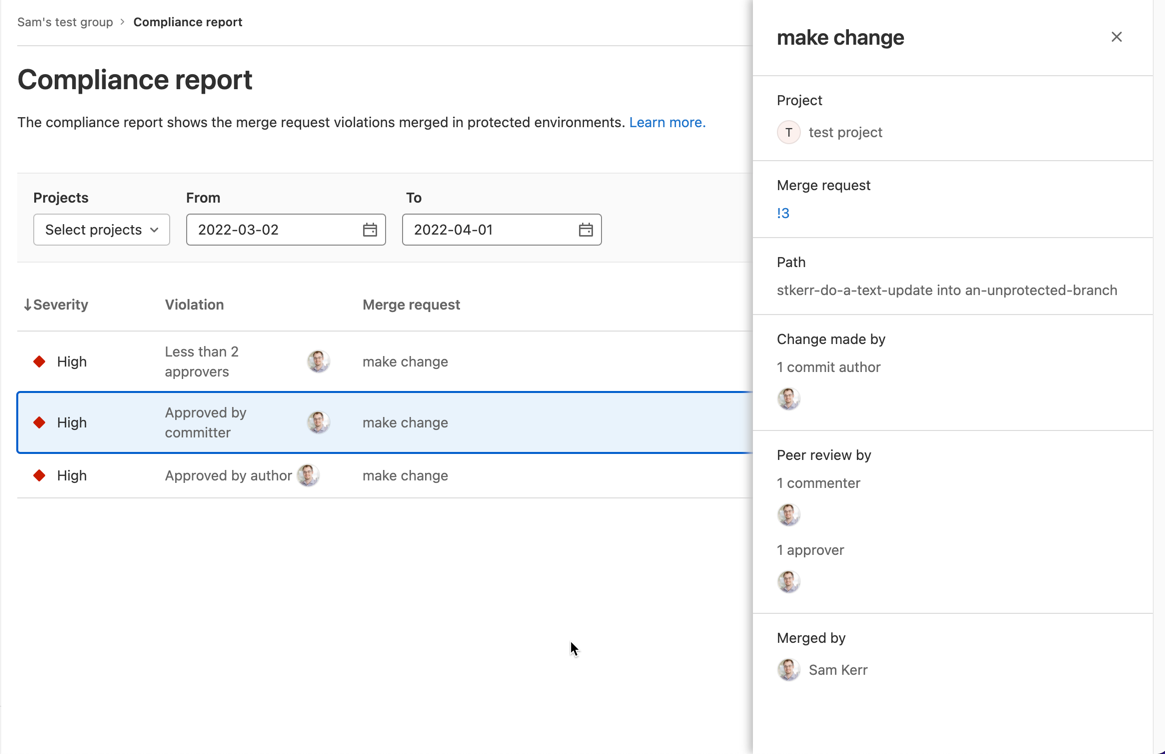
    Finally, a compliance report that surfaces every individual merge request violation has been added along with a tool for setting up streaming audit events.

    Brendan O’Leary, staff developer evangelist for GitLab, said that as DevOps processes continue to mature, DORA metrics make it simple for IT leaders to measure overall progress. While it’s not likely that any single set of DevOps practices will be universally implemented across an entire enterprise, O’Leary noted it’s important for DevOps teams to keep track of key performance indicators (KPIs) that enable teams to identify areas for ongoing improvement. For example, it’s not uncommon for technical debt to accumulate in the absence of metrics that track the progress of builds, he added.

    In general, a transition to microservices-based applications is increasing the need for CI/CD platforms that make it simpler to build them. Each of these applications is constructed using microservices that are typically built independently of one another. The challenge is that each microservice has dependencies on other microservices, so the need for DevOps workflows to optimally manage that development process is becoming more widespread, noted O’Leary.

    In some cases, organizations are deploying a CI/CD platform for the first time to build these applications. In other cases, they are looking to replace a CI/CD platform that was adopted to build legacy monolithic applications. Regardless of the type of application, there is a need to continuously refine and improve software engineering practices to increase developer productivity.

    It’s not clear to what degree developers are voting with their feet to work for one organization versus another based on the overall quality of developer experience. Organizations that do have a consistent approach to software engineering, however, make it easier for developers to spend more time writing code rather than managing the build process. The challenge is to make sure the DevOps platform itself does not become a bottleneck that hinders the rate at which developers can build code. It’s also not clear whether organizations are building applications faster than they can secure it and ensure overall quality. The only way to know for sure is, of course, to track metrics.

    Naturally, not every developer is a fan of metrics. Application development is still as much art as it is science. There is, however, a general appreciation that the amount of code that needs to be written far exceeds the available talent to write it; any effort to make software engineering more efficient benefits everyone involved. As such, given all the code that needs to be written, a software engineer is often today the best friend a developer can have.

  • SRE Vs. DevOps: The Wrong Question?

    SRE Vs. DevOps: The Wrong Question?

    The age-old question about the competition between DevOps and SRE sets up a false dichotomy. DevOps is a methodology while SRE is a team within operations. Although the two are often pitted against one another, developers also embody the skills and the capabilities to implement fixes. 

    Traditionally, application changes were reactive. The process of SRE formalizes problem resolution playbooks for better efficiency within the development life cycle. This has changed substantially over the past few years with DevOps seeing more traction and mainstream adoption.

    So what is the modern relationship between DevOps and SRE and how can they best be used together? Let’s understand DevOps first.

    Defining DevOps 

    According to Chef’s Embrace DevOps guide, DevOps is about transforming the way companies run; part of that transformation is understanding that companies should focus on managing people rather than products. DevOps evolved over the last decade and was originally born into the world of software. The adoption of cloud technologies, changes in the tech stack architecture, SaaS platforms, and security regulations have all impacted DevOps culture

    Some of the fundamentals of modern DevOps are:

    Everything-as-code: The current state of IT architecture has adopted an “everything-as-code” approach. Infrastructure, configuration, compliance and security can all be transformed into code.

    Automate everything: Codifying everything enables standardization of processes and policies across the organization. The processes are simplified into repeatable functional code, and this makes it easier to automate the development and deployment processes while significantly reducing human errors.

    Validation: There are many tools used for continuous integration, delivery and deployment in addition to other tools used for maintaining infrastructure and compliance. Without validation, there would be no way to know if everything is functioning as needed and it would be difficult to ensure seamless delivery in a highly agile environment.

    Above all, teams adopting DevOps methodologies take end-to-end responsibility of managing the application development life cycle (develop, deploy and maintain). They bridge the responsibilities gap between Dev and Ops into one team. 

    SRE Focus Areas 

    Successful site reliability engineering (SRE) teams focus on the volume of performance metrics and the process of shifting left the responsibility for managing and mitigating risk. Fundamentally, they share the same values as developers in creating efficient applications. However, SRE teams focus on introducing efficiencies based on incidents that occur and sometimes need development teams’ intervention to shift the risk left in the product development cycle. 

    Troubleshooting is one of the main responsibilities of SRE teams since they have to manage incidents. As a result, SRE teams have a strong knowledge of product design which is essential for product reliability, rollouts and reducing recovery time. Scalable automation is also a big part of the challenge SRE teams face. Oftentimes, tasks are done manually and this can increase the likelihood of human error. A solution is implementing a policy-as-code approach in concert with developer teams.

    It should be noted that when it comes to the responsibility and scope of work between SRE and DevOps, the lines are blurred—especially with the proliferation of APIs and when evaluating microservices. The types of tools being used are a differentiator since SRE teams measure efficiency through monitoring, detection and incident reporting systems. 

    Breaking the Silos 

    Modern organizations will fail when divided into silos. Developers understand that to optimize their internal processes, they need to use a DevOps methodology and involve SRE teams. For example, a startup growing and looking to scale needs development teams that are performing SRE functions with strong operational knowledge. It requires buy-in and understanding of every team member to know their role and the needs of the organization as it grows and responsibilities shift. 

    These fundamental values are crucial for an enterprise looking to achieve an efficient CI/CD pipeline. In a reactive cycle, SRE teams step in and are responsible for some parts of operations, but the DevOps paradigm is different because it integrates the responsibility of deployment, monitoring and remediation throughout the entire team. 

    Organizations embracing DevOps practices should embrace SREs’ expertise and welcome their practices into developer teams. SREs can leverage automation to fix issues as they occur and also make changes in software architecture to avoid such issues in the future. Compared to the reactive approach, developer teams are incentivized to keep things constantly running. 

    Scaling DevOps practices requires shared responsibility. Of note, developers have to answer when the phone rings and this can cause chaos in engineering teams responsible for large enterprise-grade applications with fast time-to-market and frequent update cycles.

    A Modern Perspective

    Efficiency is a core value shared by both SRE teams and the DevOps methodology. When organizations can fully integrate operations within the DevOps cycle, those silos can be broken down and integrate a shift left mentality. The traditional reactive remediation cycles won’t cut it anymore. Proactivity is essential for today’s lightning-fast application needs and continuous updates. 

    Application problems can be addressed immediately when approached with modern tooling and a policy-as-code approach enabling developers and SREs teams to work together. The modern relationship between DevOps and SRE teams should be one of coexistence. Both are needed for successful scalability within the enterprise. Many once thought SRE teams and developers couldn’t coexist in harmony, but debunking that myth helps organizations optimize their collaboration efforts. 

  • The Future of Low-Code Development

    The Future of Low-Code Development

    The days when IT teams relied on clunky software development processes and labor-intensive hand-coding to build tangible, reliable and modern applications are coming to an end. With the rise of new automation technology, rapidly rising expectations and demands from innovation-craving customers and end users and a shortage of developers, the software sector has been forced to seek alternative approaches to not only deliver their services and products but to also remain digitally-current. Now, overcoming this challenge is possible with low-code development platforms.

    What is Low-Code Development and Why all the Fuss? 

    Low-code development is a software development practice that empowers digital product teams and citizen developers to build apps without time-consuming hand-coding. In general, a typical low-code platform includes a visual integrated development environment (IDE), connectors to various backends or services, an application life cycle manager and an integrated design-to-code system.

    With these features and attributes, low-code platforms:

    • Abstract away the code behind complex commands and actions
    • Streamline how projects are being innovated and distributed in the span of weeks, not months
    • Enable citizen developers to build apps

    These tools are so effective because they break the mold and automate the app development cycle by providing reusable building blocks. These building blocks can easily be assembled into an entire app, allowing both experienced and beginner technical minds to handle a bigger volume of projects faster than ever. This flexibility is handy, especially when the digital world expects over 500 million apps and digital services to be built and deployed by the end of 2023, according to IDC FutureScape. That is more than all of the software solutions created in the last four decades. 

    A report by Gartner forecasts that by 2024, low-code adoption will be so widespread that 75% of the software solutions built around the world will be made with the help of such tools. While these tools won’t entirely replace traditional software development, they deliver a contemporary, simpler and faster approach to building apps.

    Benefits of Low-Code Development

    Whether it is automating individual manual tasks, eliminating old development models like waterfall methodology or making it easier for a tech newbie to build a prototype or a flexible app, low-code development has many benefits.

    The benefits of low-code software include:     

    Innovative projects can be assembled by a non-technical audience 

    Low-code app builders are game-changers. The need for experienced coders is reduced as this type of tool provides the necessary components and building blocks for non-technical audiences to be involved in full-cycle app development. Another recent Gartner report said that 80% of technology products and services will be created by people outside of tech-driven fields by 2024. And in times when the demand for commercial software, new progressive solutions and skilled developers exceeds the supply, low-code tools are a perfect fit for citizen developers, designers, professional developers, non-technical stakeholders and others.

    Velocity and optimized development cost

    Today, speed is everything. IT businesses and clients require their software to be built within short timeframes and within a strict budget. Legacy systems need rapid modernization without a big investment. One of the greatest advantages of low-code tools is that they let people build at scale without incurring heavy costs or consuming too much time. Automation apps, mission-critical systems and mobile applications can all be created with low-code software.

    Reinventing traditional processes and reshaping how software is built

    Using these automation tools, you don’t have to worry about HTML/CSS, scalability, coding rules, page layout, branding or screen sizes. As mentioned above, some low-code development platforms come with a system that covers everything from design to code and generates production-ready code in the end. Designers and developers come together to use a single platform that simultaneously:

    • Allows them to create solutions that are easy to maintain and that scale on cloud-native architecture
    • Modernizes and facilitates their work 
    • Improves productivity and collaboration
    • Fits their workflow and skills

    Low-code/no-code tools are quickly becoming the next prototyping tools in the enterprise—without needing the technical skills in traditional UX/visual designer-focused tooling. With low-code or no-code tools, screen design is typically done using drag-and-drop, WYSIWYG design-time experience; it’s usually as simple as making a PowerPoint deck. The main difference between this and a UX/visual design tool is that the low-code/no-code tool is building a running app in the background, with real code, connected data, real screen interactions and more. This means that any team member with an idea can express the design, not just a person who has access to a designer.

    No special skills are needed to build something tangible and real—while at the same time going beyond what a mockup or prototype can deliver.

    The future of tools in this space will include connectors and adapters to popular design tools, such as Sketch, Figma and Adobe XD. These connectors and adapters will enable digital product teams—designers and developers—to use a design process and then import designs, interactions, branding and themes into low-code tools, while still obtaining the considerable benefits of time and cost savings of not having to re-build screens that have already been designed pixel-perfect.

  • The Pros and Cons of Embedded SREs

    The Pros and Cons of Embedded SREs

    To embed or not to embed: That is the question.

    At least, that’s one of the questions that companies have to answer as they decide how to implement site reliability engineering. They can either embed SREs into existing teams, or they can build a new, separate team.

    Both approaches have their pros and cons. The right strategy for your company or team depends, of course, on your needs and priorities.

    What is an Embedded SRE?

    An embedded SRE works as part of a non-SRE team. They might join development or IT operations teams, for example—although they could also be part of quality assurance teams, security teams or any other unit within the organization that can benefit from their expertise.

    Embedded SREs are the opposite of creating a dedicated, general-purpose SRE team. In the latter approach, an organization hires talent that collaborates with non-SRE teams but who aren’t integrated directly into them.

    There are several other organizational models that fall somewhere between these two poles. But typically, the two main types of structures are embedded or dedicated teams.

    Advantages of Embedded SREs

    Embedding SREs into other teams offers several benefits.

    Arguably the most important advantage is that embedded SREs ensure the highest level of collaboration between site reliability engineers and other stakeholders. When they work directly alongside other engineers on a continuous basis, it’s a pretty safe bet that their perspective will inform every decision that the other engineers make. Separate teams will still generally collaborate with other teams, but not necessarily with the same level of dedication as embedded SREs.

    Embedded SREs are also beneficial for organizations where the site reliability engineering concept remains new, and where stakeholders still need to learn what SREs do and the value they can bring. It may be a bit challenging to get buy-in when you propose creating an entirely separate team; indeed, developers or IT engineers may even perceive such a team as a threat to their own jobs (even though in reality, of course, they complement other teams instead of competing with them). But when you add SREs to larger teams, it’s likely to be easier to get everyone on board with the concept and for other types of engineers to appreciate how SREs make their jobs easier.

    Finally, embedded SREs work well for organizations that are on the small side and don’t need an entire team. If you have just several dozen engineers on staff instead of several hundred, hiring a few SREs to embed into your existing teams probably makes more sense than investing in a brand-new team.

    The Challenges of Embedded SRE

    The embedded model has its drawbacks, too.

    One major risk is that the SRE’s influence within a larger team may not be strong enough to have a major impact on how that team operates. A single SRE working alongside a dozen developers or IT engineers, for example, may struggle to integrate site reliability engineering techniques and tools into the existing team’s workflow—especially if it’s a team that already has strong opinions about how it should operate.

    Along similar lines, a single SRE working within a team using the embedded model could end up being stretched too thin to do his or her job well. That’s especially true if other team members expect them to “own” functions that should really be a collective, team responsibility—like responding to incidents or using chaos engineering to test reliability. The latter processes may be led by SREs, but they shouldn’t be their responsibility alone, and the function can start to break down when other team members think of them as the person on whom they can simply “dump” all of their reliability-related tasks.

    Finally, the embedded model can be difficult to scale, which is one reason why it doesn’t work as well at large organizations. If you have dozens of different engineering teams, embedding an SRE into each one requires a lot of management effort. It also deprives the various SREs within your organization of the ability to work closely with each other. In that type of scenario, it probably makes more sense to create a dedicated team and have those SREs interface with other teams as needed, rather than trying to distribute site reliability engineers across the business by embedding them directly into other teams.

    Conclusion

    In general, then, embedded SREs make most sense for companies that have relatively small engineering organizations, and in which the concept of the function has not yet received complete buy-in. For large businesses that have numerous engineering teams, it will likely be easier to manage SREs by creating a separate team just for them.

    That said, your mileage may vary from the norm, and it may be worth experimenting a bit to determine which model—embedded or not—makes the most sense for your company. Keep in mind that you can also use a hybrid approach wherein you embed SREs into some teams, while simultaneously maintaining a dedicated team that leads site reliability initiatives for the organization as a whole.

    After all, site reliability engineering is all about thinking creatively and coming up with innovative solutions to challenges—even the challenge of figuring out how to structure the SREs within your organization.

  • What’s the Difference Between SLI, SLA and SLO?

    What’s the Difference Between SLI, SLA and SLO?

    If you’re just getting into site reliability engineering (SRE) or platform engineering, you’ve probably come across a bunch of new terminologies, like SLI, SLA and SLO. These benchmarks are commonly referenced in the day-to-day life of an SRE but may seem foreign to outsiders. So, what are the differences between these abbreviations?

    Well, one of the hallmarks of the SRE approach is to gauge performance and set targets for application metrics. These targets can be thought of as reliability thresholds. If a site’s latency reaches a certain point, for example, it may break the agreement the software provider has with its consumer.

    SREs create and monitor service-level performance benchmarks for all sorts of metrics, such as uptime, latency, error count, mean-time-to-recovery and throughput, among others. But not all these performance goals are part of public agreements. Companies usually take a more proactive approach to setting more internal targets to stay far away from breaking external agreements and user trust. It’s become a best practice to set these baselines to retain functional, reliable systems.

    As mentioned, the type of targets range from firm partner commitments to more internal goals. Below, we’ll attempt to define, in simple terms, the differences between service-level agreement (SLA), service-level objective (SLO) and service-level indicator (SLI). While these concepts share many similarities, it’s important to understand how they are applied in practice. Keep in mind that each company may have a nuanced understanding of these terms and may conceive and apply them differently.

    Service-Level Indicator (SLI)

    First off, service-level indicators (SLIs) refer to the actual metrics produced by software services. This is a direct measurement of a service’s behavior. These are the real numbers that indicate overall performances, such as error rate and latency over time.

    One example of SLI would be the number of successful requests out of total requests over a one-month period. Say an engineer used an application monitoring tool that ingests data from production logs. This data showed that out of one million requests made, ten requests failed. An SLI for availability would thus be 99.999% uptime.

    Service-Level Agreement (SLA)

    Second, most technologists are familiar with service-level agreements (SLAs). Even if you’re not, you’ve likely agreed to many throughout your history as a digital user. SLAs are like a pact between the software provider and the software user or client. These binding commitments often note availability expectations that must be upheld. SLAs may also include responsiveness to incidents and bugs. It depends on the contract, but if an SLA is broken, some kind of penalty may be incurred such as a refund or a service subscription credit.

    These days, the average business relies on many cloud-based SaaS, PaaS and IaaS. Just to initiate something as simple as an online payment might require hitting multiple remote servers. But if all these services just went offline whenever they felt like it, our digital operations would come to a grinding halt. SLAs are thus necessary for enterprise software contractual agreements to ensure both parties meet specific standards.

    Once an engineer tracks SLIs and has an idea of typical behavior, they can then set an SLA that makes sense. If we take the example above, an SRE may consider guaranteeing a lower threshold than what is being actively monitored. This would ensure that application performance, at its current pace, doesn’t break any legal or contractual obligations. In this scenario, perhaps the SLA mentions an availability objective: No more than 100 requests fail per one million requests made. This would essentially equate to 99.99% uptime.

    Service-Level Objective (SLO)

    Lastly, service-level objectives (SLOs) are similar to SLAs but explicitly refer to the performance or reliability targets. An SLA may refer to specific SLOs. Or SLOs may be tracked just for internal purposes. As Google described, “the availability SLO in the SLA is normally a looser objective than the internal availability SLO.”

    You don’t want the end users to be the first people clamoring about a 400%+ latency rise in your mobile web apps. Thus, SRE teams typically keep a close eye on performance to ensure they never even get close to breaking SLAs. Some do this by setting and monitoring internal baselines that are more ambitious than the SLA threshold.

    If we take our example above, if an SLA guarantees a service uptime of 99.99%, the business may set an internal target of 99.995%. In other words, for every one million requests, no more than 50 should fail. If software systems aren’t hitting these marks, it’s a sign that the company must reevaluate designs and search for bottlenecks. Or, perhaps engineering teams have goals to improve the average downtime for the next quarter—an internal objective could be set at a higher standard than the currently perceived performance.

    As the Google Cloud blog described, “every service should have an availability SLO—without it, your team and your stakeholders cannot make principled judgments.” It’s a good reminder to be modest in your reliability commitments, they added, as consumers will come to expect this level of performance. On the other hand, setting more ambitious internal performance targets has the benefit of delivering a better result than the agreement on paper, increasing a software service’s competitiveness.

    Real-World Performance Benchmarks

    Keep in mind that the above numbers are simply for demonstration purposes. One interesting resource for real-world figures is API.Expert, a service that queries popular APIs and posts weekly performance statistics. Since APIs are the heart of many UI-based platforms (and our digital economy at large), these benchmarks stand as a good indicator of average uptimes and latencies in the industry.

    For example, at the time of writing, API.Expert’s Enterprise APIs collection ranked Microsoft Office365 and Pivotal Tracker at the top, both with a 100.00% pass rate and a 220 ms and 248 ms latency, respectively. On the other end of the spectrum, Docusign is at 99.93% with an 877 ms latency and Box is at 99.99% with 414 ms latency.

    SLIs, SLAs and SLOs—Oh My!

    Although it may sound good to an unpracticed ear, an SLA of 99.99% still equates to 52 minutes and 36 seconds of downtime per year. That’s nearly an hour of downtime in which customers are left scratching their heads or, worse, searching for other options. For traumatic health care situations, a loss of connectivity could be a matter of life and death.

    Although creating SLAs and SLOs is important to gauge system health, the reality is that it can be challenging to track and enforce them. “These agreements—generally written by people who aren’t in the tech trenches themselves—often make promises that are difficult for teams to measure,” according to the Atlassian knowledge center.

    In summary, SLIs demonstrate the real behavior of software systems. These metrics inform the creation of SLAs, which must be met to ensure B2B agreements. These SLAs often reference particular service-level objectives (SLOs) that must be met, which usually give more breathing room around SLIs. Lastly, in a digital economy with accelerating digital expectations, it makes sense to monitor internal SLOs and improve baselines over time.