Category: Continuous Delivery

Continuous delivery is a software engineering discipline that allows organizations to consistently develop and release quality software at a rapid pace. It is achieved by automating the software development lifecycle, enabling tasks such as development, testing and release to occur concurrently and continuously.

  • Applying Automation to DevOps

    Applying Automation to DevOps

    In the book, “Life and the Art of Engineering,” author Haresh Sippy said, “Automation is cost-cutting by tightening the corners, not cutting them.” Today, businesses and organizations are constantly on the lookout for ways to improve productivity while reducing inefficiencies across their operations. Automation has emerged as the natural answer as it addresses these issues while enabling organizations to scale their operations.

    And this is a natural fit with DevOps, which aims to automate and streamline and accelerate the development process from code generation to application performance monitoring. Automation promises better results, greater efficiency and reduction or elimination of errors, but many organizations remain hesitant to deploy it in critical operational areas.

    But there are many benefits to DevOps automation that organizations shouldn’t ignore:

    • Consistency: The most crucial benefit of DevOps automation is consistency. The absence of human effort can remove errors because automation tools repeat processes in the same way, ensuring the development environment remains of consistently high quality.
    • Scalability: DevOps automation not only allows new code to be released quickly but in larger quantities, as well. Automation also allows teams to deliver multiple projects in multiple environments simultaneously, reducing manual processes.
    • Speed: One of the first visible benefits DevOps automation will bring to the table is the sheer speed of the product delivery process. DevOps automation streamlines the configuration process, the development environment and other aspects of deploying new software, making the process significantly faster. With DevOps automation, software delivery becomes less dependent on people. 
    • Flexibility: Flexibility can often be an overlooked aspect of automation. However, with DevOps automation, organizations can change and modify critical code based on new requirements and deploy these changes in real-time, rather than having to train the team to manage the operations based on the new changes. 

    Critical DevOps Automation Processes

    Once an organization is aware of the benefits, the obvious next step is to figure out which processes to automate. 

    While a core tenet of DevOps is to automate everything logically possible, that is a long-term goal. On a more immediate basis, organizations would be well-advised to focus on automating a few critical standard processes. 

    This will allow for a smoother transition as well as more efficient results. But the question of which exact processes to automate is a subjective decision that will depend on each organization’s unique needs and technological requirements. However, some fundamental areas that may benefit from DevOps automation in any organization include the following:

    • Software Testing: Any organization with a digital service or product to offer spends considerable time and human resources testing the new offering or updates before rolling them out. Naturally, automating the testing process would bring greater efficiency to the test results while significantly reducing any errors, especially human errors. Additional tests that may be automated include unit tests, smoke tests and UI tests. 
    • Monitoring: Most organizations understand how important it is to adopt a proactive approach to monitoring. A key aspect of DevOps is consistently reading, recording and maintaining crucial data from regular monitoring. By automating this process, organizations can further increase the extraction of valuable B2B data and insights while ensuring greater security against possible breaches and data theft. 
    • Infrastructure: Infrastructure management is a critical area that serves a vital role in ensuring things run smoothly. This includes networks or servers that are consistently in need of maintenance, configuration modifications and initial setups. By deploying an automated infrastructure, organizations can increase efficiency while freeing up valuable human resources to be deployed elsewhere. 
    • Continuous Integration/Continuous Delivery (CI/CD): CI/CD’s entire purpose is fast application development and delivery. By its very nature, this task is ripe for automation as it requires testing and monitoring every little change or modification. Similarly, automating the deployment phase of CI/CD would ensure the distribution of successful updates is carried out proactively the very second it is ready. As a result, organizations will see updates being rolled out more efficiently with minimal errors or bugs in the final updates.
  • Why Your DevSecOps Initiative Will Fail

    Why Your DevSecOps Initiative Will Fail

    When you’ve been in and around the security industry for long enough, you get used to the industry hype machine turning a cool innovation into, uh, meh. This hype cycle starts at the RSA conference each year, and folks like me look for new hot stuff on the show floor. For perhaps only the second time in 25 years, I wasn’t at the show in person, but it seems that DevSecOps was the preferred bandwagon on which every vendor jumped. Sigh.

    I’m not sure whether it’s my increasing age or this business that has made me cynical, but here we are.

    To be clear, from a customer’s perspective, there is great value in the concept of DevSecOps, as evidenced by the upcoming DevOps Connect: DevSecOps @ RSAC 2022 virtual event. Having these (sometimes) mortal enemies working together toward a common goal is great, in theory. But alas, in practice (and similar to what happened when DevOps hit the scene), it’s easier said (or displayed in a vendor booth) than done.

    Thus, I’ve come to a sobering conclusion: Your DevSecOps initiative will fail.

    Most organizations will talk a good game for a while and they may even try some stuff, buy some kit, send folks to training and the like. But in the end, despite all these efforts, you guessed it—they will still fail.

    Is this a foregone conclusion for every organization? Well, no. But this isn’t my first rodeo, and I’m pretty sure this one will end like the others—in failure.

    But let’s say you want it to be different this time. Really, you do. And you are willing to take some actions to give yourself a chance at success. If that’s the case, here are a couple of tips to increase your chances, however small.

    Culture

    First and foremost, DevSecOps is not a thing. It’s not a set of tools (no matter what the vendors tell you); you don’t buy it on a VAR line card. DevSecOps (like DevOps) is a cultural shift. Your teams need to work together. They need to collaborate. They need to have shared incentives. And they need to experience the consequences of not playing nicely in the sandbox.

    Cultural shifts are hard. People don’t like to change. They resist. They undermine. They sabotage. It all sounds nefarious, but they do. So unless you can change your culture, you’ve got no shot.

    Shift Left

    Another one of these security-marketing-terms-run-wild is shift left. It means you want to integrate security testing directly into the development process as early as possible. You should be running security checks in the developer’s IDE to ensure they don’t violate security policy (like hardcoding API keys in their source, for example) before they even commit the code.

    You must also integrate security testing into the CI/CD pipeline(s). Thus, you need tooling that works with your preferred pipeline.

    Security Champions

    Security testing will create angst for your developers. They will have false positives. They will have to fix things that they probably don’t understand. It will cause them to miss delivery dates. Of course, they should build it right the first time, but in their mind, they’ll see it as the security folks causing delays.

    The developers will be annoyed, and you’ve got to manage that annoyance—or have senior management quash any rebellions, but that’s not a long-term solution.

    On the other hand, you could establish a security champions program, which anoints (and trains) developers on each team to “represent” security within the development team. They help educate the developers on the tools and secure coding. They diffuse irritation when something goes wrong.

    A strong security champions program is one of the leading indicators of DevSecOps success.

    Break the Build

    Finally, the security team must have the juice to break the build if a critical issue is found during the deployment. We talk about this with many organizations and they nod their heads. But they are lying to me and to themselves. When it comes down to it, someone on the dev team calls someone in senior management and, all of a sudden, that critical issue is now an alert, not a failed deployment.

    Not being able to stop a build will kill your DevSecOps program. It’s like when a quality control issue forces someone to stop the assembly line. If you don’t stop the line, faulty products can result. In a security context, that means some critical vulnerabilities will be much more expensive to fix later.

    So, there you have it. If you can evolve your culture, integrate security testing into your toolchain, empower security champions and empower your team to stop a deployment, you’ve got a chance at a successful DevSecOps program.

    Unfortunately, you probably can’t do these things, and you’ll likely fail. In that case, I have some lovely property by a waterfall I’d like to sell you.

  • Survey Shows Increased Reliance on DORA Metrics

    Survey Shows Increased Reliance on DORA Metrics

    A new survey found just under a quarter (23%) of respondents are now tracking all four of the DevOps metrics defined by the DevOps Research and Assessment Team (DORA), with another 17% now tracking three.

    The State of Developer Experience survey polled 129 IT professionals that play a role in software development and was conducted by LeanIX, a provider of a platform for managing the building of enterprise applications.

    Dominick Rose, vice president of product management and strategy for LeanIX, said the ability to track DORA metrics such as deployment frequency (77%), failure rate (73%), lead time for changes (63%) and mean-time-to-recovery (MTTR) (55%) are leading indicators of DevOps maturity.

    DORA metrics, which are defined and maintained by a unit of Google, are being used most frequently to drive agile planning (69%) and optimize continuous integration/continuous delivery (CI/CD) platforms (58%), the survey found.

    Overall, the survey revealed just under half of the respondents (47%) said their organization had a high level of DevOps maturity, defined as having adopted three or more DevOps working methods. Those working methods are: Being flexible to changes in customer needs; having implemented a CI/CD platform; all engineers build, ship and own their own code; teams are organized around topologies and each team is free to choose its own technology stack.

    Of course, each individual organization will determine for itself what level of DevOps depth is required. For example, not every organization would see the need for teams to be organized around topologies or be free to choose its own technology stack. In fact, Rose said the survey made it clear that larger enterprise IT organizations tended to have a lower overall level of DevOps maturity. One reason for that is many larger organizations are still employing legacy processes to build and deploy software, noted Rose.

    Most developers are also further along in terms of embracing continuous integration (CI) than IT operations teams are in adopting continuous delivery (CD), added Rose. However, as the number of applications being developed using low-code and no-code tools continues to increase, it’s only a matter of time before application delivery needs to become more automated, he said. Achieving that goal will become easier as more artificial intelligence (AI) is incorporated into IT operations, Rose added.

    Nevertheless, the survey made it clear there is still a long way to go in terms of bridging the divide between DevOps teams and the rest of the business, with only 20% of respondents indicating that they use a value stream management (VSM) platform to track engineering efficiency to tie development activities to actual business results.

    A total of 71% of respondents, however, tracked open support tickets as a measure of customer value, followed by 66% that tracked monthly users and 45% that tracked feature adoption.

    It remains to be seen how DevOps will be further promulgated throughout organizations but as more organizations realize how dependent they are on software, it then becomes a question of how fully they embrace DevOps best practices as the pace at which applications are being built and deployed continues to accelerate.

  • TechStrongCon: Time to Build an Army of Citizen Developers

    TechStrongCon: Time to Build an Army of Citizen Developers

    DevOps teams need to start drafting a strategy to support what will soon become an army of citizen developers.

    Speaking at the virtual TechStrongCon event, JP Morgenthal, global director for modern applications development at DXC Technology, told conference attendees that the time to build an army of citizen developers is now.

    Citizen developers are typically end users that have developed enough expertise to build an application using low-code or no-code tools. Most organizations don’t have enough professional developers to address their application development backlogs, so it’s imperative that they enable end users to build applications, noted Morgenthal.

    Those citizen developers, however, need to be supported by DevOps teams to ensure guardrails are in place for building secure applications that scale. In addition, DevOps involvement also reduces the friction that a citizen developer will most certainly encounter when building an application, he added. “DevOps is fundamental, “ said Morgenthal. “We need to invest in it heavily.”

    Otherwise, citizen developers—who typically have other tasks that require their attention—will simply abandon their application development efforts, he noted. “This is not their primary task,” said Morgenthal. “They are going to need to be nurtured.”

    Most professional developers are focused on applications that are systems of record. The problem is that there simply are not enough of them to build necessary applications to drive systems of engagement, noted Morgenthal.

    That increased reliance on citizen developers is, in fact, part of a larger wave of democratization of IT in which individuals that don’t have advanced technology degrees take advantage of automation to build and deploy applications, he added.

    Organizations, however, run into issues when they fail to test those applications, make sure that configurations are not manually changed or don’t address the technical debt that inevitably accrues over time, said Morgenthal.

    Burnout can also become an issue, so Morgenthal said organizations need to make sure that agile development practices are used to first create a minimally viable product (MVP) and then plan development sprints to update and maintain it.

    Finally, there also needs to be a plan in place for shifting responsibility for the application to someone else when the individual that created it eventually leaves the organization, he added.

    Citizen developers, of course, are not the only ones using low-code and no-code tools. Many professional developers are using those same tools to build applications faster. In fact, it’s not clear how many end users have the skills required to successfully build applications, even though low-code and no-code tools automate much of the process. One way or another, many professional developers are now also collaborating more frequently with end users to build applications using low-code/no-code tools that make it easier for end users to, at the very least, describe the workflow of the application they want to build and deploy.

    Regardless of who builds the application, it’s a given that a lot more code will be moving through DevOps pipelines in the months and years ahead. DevOps teams, as a result, will inevitably need to revisit workflows and platforms to continuously update and maintain those applications at scale.

  • Salesforce Adds RPA Bots to MuleSoft Integration Platform

    Salesforce Adds RPA Bots to MuleSoft Integration Platform

    Salesforce today announced that it is now using robotic process automation (RPA) to connect disparate data via a no-code tool developed by its MuleSoft unit.

    Shaun Clowes, chief product officer for MuleSoft, said bots created using an RPA-infused integration platform can now automate much of the effort previously required to integrate data residing in different systems. Salesforce acquired MuleSoft in 2018 and, since then, has been working to make the platform for integrating application programming interfaces (APIs) a core element of its business process workflow tools.

    The news was announced at the MuleSoft CONNECT 2022 conference. The overall goal is to employ RPA and no-code tools to accelerate digital business transformation initiatives without writing code, noted Clowes. Overall, Salesforce claimed its customers are running 4.8 billion MuleSoft transactions daily, resulting in a 74% decrease in operational costs and a reduction of more than 100 billion hours of work every month, using Salesforce Flow tools that are integrated with the MuleSoft integration platform.

    In theory, no-code tools that integrate disparate data sources can be used by professional and so-called citizen developers alike. That capability should reduce the time and effort required to create those integrations. A recent survey conducted by Salesforce found nearly 96% of respondents said that modifying and rebuilding automation is a challenge as systems and business requirements change. In addition, four out of five respondents noted that restructuring existing application and data landscapes to support automation would likely compound their organization’s technical debt.

    More than half of respondents (53%) said they are using integration and API management capabilities to some extent, with 44% employing those capabilities to drive business process automation initiatives. A full 80% said they are working toward putting hyperautomation on their technology roadmap within the next 24 months.

    Of course, the MuleSoft platform can be employed beyond the portfolio of software-as-a-service (SaaS) applications provided by Salesforce. However, it’s also become apparent that more organizations are building and deploying custom applications on top of a range of SaaS applications in addition to building and deploying applications written in procedural code that might be running in the cloud or in an on-premises IT environment.

    It will be up to each IT organization to determine how much they need no-code integrations as part of a larger DevOps workflow, but as it becomes easier to create integrations using RPA tools their numbers should increase. The impact all those integrations will have on DevOps pipelines remains to be seen, as well. Many organizations will need to revisit their DevOps workflows as the number of application development projects being simultaneously launched continues to increase.

    In the meantime, it’s clear that no-code/low-code tools infused with RPA capabilities will empower more end users. That shift will have a profound impact on DevOps teams, as the sheer volume of code and associated integrations increases. The challenge, of course, will be finding a way to make sure that the integrations created are secure and that they can actually scale as more data sources are added.

  • GitLab To Embed Observability in CI/CD Platform

    GitLab To Embed Observability in CI/CD Platform

    The latest version of the GitLab continuous integration/continuous delivery (CI/CD) platform added a range of monitoring and visualization capabilities as part of an effort to embed a full set of observability capabilities in the core platform within the coming year.

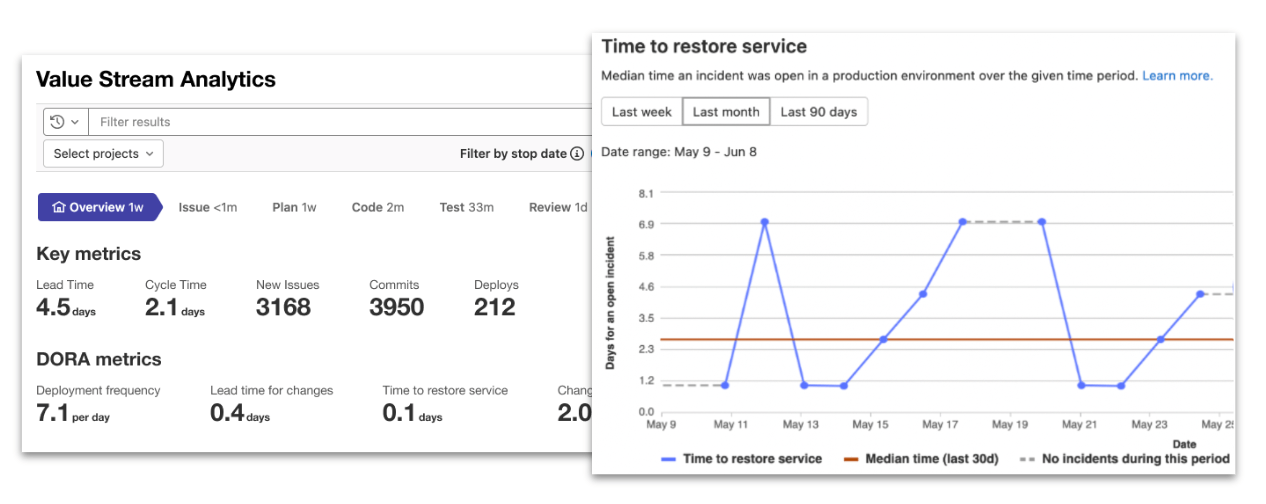
    As part of that effort, the latest version of GitLab, 15.1, has now added support for all the metrics defined by the DevOps Research and Assessment (DORA) team that is also part of Google.

    In total, the 15.1 version of the GitLab platform has more than 30 updates. These include additional security capabilities in the form of support for the security assertion markup language (SAML) Group Sync and the Supply chain Levels for Software Artifacts (SLSA) framework defined by Google.

    Finally, GitLab added links to all configuration files and templates included in the CI/CD platform to the pipeline editor to make it easier to manage large and complex pipelines.

    Cindy Blake, director of product marketing for GitLab, said the monitoring, observability and security capabilities added to the platform are part of an ongoing effort to eliminate the ‘digital duct tape’ that many DevOps teams currently rely on to extend a CI/CD platform. In fact, as many DevOps teams look to better secure their software supply chains, many are now taking advantage of the moment to replace do-it-yourself (DIY) approaches with an integrated CI/CD platform based on a common codebase, noted Blake.

    As part of that effort, Blake said GitLab is building its own dynamic application security testing (DAST) tools that are more tightly integrated with its CI/CD platform.

    In general, there is now an expectation that the tools required to secure software supply chains should be made available within a CI/CD platform, but organizations are still working through the processes that will need to be implemented to achieve that goal, added Blake.

    It’s not clear to what degree organizations are looking to replace legacy CI/CD platforms as they modernize application development and deployment. In many cases, however, the technical debt associated with maintaining custom integrations across their DevOps environment has become considerable. Many organizations are revisiting their DevOps workflows as part of an effort to increase overall developer productivity. The challenge, of course, is that migrating from one CI/CD platform to another requires considerable time and effort.

    In the meantime, the number of organizations embracing DevOps best practices continues to grow. GitLab is betting that as the total size of the CI/CD market continues to expand, most of those organizations will prefer an integrated platform rather than writing and maintaining custom integrations themselves.

    Regardless of approach, the ability to monitor and observe workflows is an essential element of any DevOps workflow. There is, of course, no shortage of observability platforms available. It’s not clear whether IT organizations will adopt one of those offerings versus taking advantage of observability and monitoring embedded within a CI/CD platform. One way or another, however, it’s getting easier to discover the root cause of any IT issue.

  • CodeSee Unveils Open Source Hub

    CodeSee Unveils Open Source Hub

    CodeSee today launched a free Open Source Hub (OSH) community through which developers can more easily analyze the codebase that makes up an open source software project.

    Shanea Leven, CodeSee CEO, said that capability is crucial because making it easier to explore open source codebases reduces the level of effort required for developers to understand where to make contributions.

    OSH is based on a namesake visualization tool that CodeSee created. The CodeSee tool makes it possible for developers to see how a codebase has been constructed using graph technologies that scan software repositories and identify components and their relationship to one another. Developers can also use CodeSee to better understand what impact changes to that codebase will have.

    In addition to making it easier for developers to discover open source software projects, OSH also enables maintainers and contributors to create personal profiles through which other members of the open source community can see how their efforts have impacted various projects.

    CodeSee, as part of OSH, is also providing integration with Discord, an online voice, video and text collaboration service, to make it simpler for maintainers and contributors of open source software projects to collaborate.

    Leven said it simply takes too long today for most developers to pore over a codebase to understand where they might contribute. The larger a codebase becomes, the less likely it is a developer will want to take the time required to begin making a meaningful contribution, she noted.

    OSH is arriving at a time when maintainers of open source projects are especially looking for help securing open source software. The core issue is that many of those projects are maintained by a small number of programmers that voluntarily contribute their time and effort to build components that others are free to use. Like any other developer, the amount of security expertise those individuals have is limited. Many of them simply don’t have the time to immediately provide a patch to an application when a zero-day vulnerability is discovered.

    Unfortunately, many IT vendors and large enterprise IT organizations benefit from open source code without contributing anything meaningful back to the project—whether in terms of financing or helping open source maintainers find and remediate vulnerabilities. Not every contribution has to be in the form of code, either. Many open source projects simply need help with documentation which, once provided, should free up other contributors to focus more of their time and effort on application security.

    It’s not clear to what degree business and IT leaders realize how dependent their organizations actually are on open source software. Even when they do, it’s not easy to onboard a developer to any software development project. It can take months before a developer is actually making meaningful contributions to a project.

    Application development, by definition, is now a group effort. The days when a lone developer cared for an entire application are long over. The issue is finding a way for teams of developers to more easily collaborate when most of them have never actually met in person.

  • What Is User Acceptance Testing and Why Is it so Important?

    What Is User Acceptance Testing and Why Is it so Important?

    Anyone involved in software development knows how important it is to ensure a positive end-user experience. One way to do that is through the use of user acceptance testing (UAT). 

    UAT is one of the types of testing that you can execute as part of your overall quality assurance process. 

    Source

    It’s essential in helping you determine if your product is market-ready and if it can perform effectively when used by real end-users. 

    UAT helps you avoid implementing software, iterations, upgrades, or customizations that are filled with pesky bugs that can destroy the user experience and render your software unusable (not to mention the damage done to your business’s reputation). 

    When the stakes are so high, it’s clear to see why businesses need a process such as this. In this article, we take a look at user acceptance testing, why it’s so important, and six ways brands can use it to their benefit.

    What is User Acceptance Testing (UAT)?

    User acceptance testing (sometimes known as end-user testing, user acceptability testing or beta testing) is the last step in the entire testing process of any software.

    In product management terminology, acceptance testing takes place as beta testing whereby a small group of early adopters test out the platform and provide user feedback to let you know if the solution meets user expectations and business requirements. 

    It’s done after the system, functionality and all other tests are completed and before the product is launched. 

    The image below shows some of the quality assurance (QA) tests that precede user acceptance testing. 

    Source 

    As you can see from the image, as development work moves forward, UAT progresses from unit testing to integration testing, then system testing and, finally, acceptance testing.

    This final stage is arguably the most crucial element of software development because it ensures a positive end-user experience. 

    As its name implies, it helps you determine if your platform will be accepted by end-users. 

    Testers (end users) work from a checklist of expected outcomes from the test platform and then record what happens when they attempt to execute the different tasks, such as:

    • Logging into the user’s account
    • Placing an item into a shopping cart
    • Checking out 
    • Buying multiple items that qualify for free shipping

    … and so on. 

    If the expected outcomes are achieved when each task is executed, then the software is approved for release. If not, it’s sent back to the developers. 

    This testing process requires collaboration between different stakeholders including project sponsors, business owners, analysts, QA teams and developers. 

    Why is UAT Important to Software Development?

    Although there are many ways projects can benefit from UAT (some of which we’ll look at below), this process is often overlooked by developers. 

    Many see it as a time-consuming and unnecessary process, which is unfortunate because acceptance testing can actually help improve software quality as well as the overall acceptance rate of any newly implemented software. 

    Think about it: You would never drive an untested car, would you? Similarly, businesses should not take risks by implementing software that has not been tested. 

    Considering the time and money you stand to save by ensuring that your software works in accordance with a predetermined test plan, it’s clear that this is something developers need to take more seriously. 

    In fact, far from being the time drain that many developers think it is, UAT can actually gain you a lot of time. How? By preventing unnecessary waste. 

    And far from being a one-off when you come to the end of the project, user acceptance testing extends beyond business application projects because of factors like additional phases, hotfixes, releases/further modifications or customizations and upgrades. 

    Take a look: 

    • Additional Phases: If you choose to roll out at this stage or upgrade an existing application in a phased approach, each phase can have different types of users, different companies (for parent companies, acquisitions, mergers, etc.), additional locations, etc., and you’ll need to plan and conduct separate additional acceptance tests for each individual phase.
    • Hot Fixes: Bug reporting or developer testing during regular day-to-day operations can lead to hotfixes. However, these bug fixes will have to be tested by end-users to make sure that they actually solve the problems originally reported.
    • Further Modifications: Software creators regularly release updates, including limited distribution releases (LTR) and general distribution releases (GDR). LTR releases usually fix issues in a specific problem area, whereas GDR releases are typically heavily tested before release. Both need to be tested to ensure that they fit users’ real-life scenarios so you can achieve your business objectives.
    • Upgrades: Everyone wants to offer their customers the best and most advanced experience. That’s why, for the most part, brands update software regularly to follow industry trends and keep up with the latest innovative technology. Regardless of the upgrade approach you take, whether it’s a little or a lot of customization, it’s crucial that your plan is completed according to business requirements. This will help ensure that the project’s end result is in line with the original business requirements.
    • Privacy Policy Updates: Many end-users may enjoy the overall functionality of the software, but they may desire increased integrations with other platforms or the ability to use a different payment method than that which is currently accepted. While these upgrades and modifications may be easily completed, you may need to alter the information you input into privacy policy generators to ensure that your users legally consent to any new use of their data or access to it by third parties.

    Now that you understand what UAT is and why it’s so important, let’s look at some of the benefits of user acceptance testing to give you a better idea of all the different ways you can leverage it in your own business. 

    Benefits of User Acceptance Testing

    At its core, user acceptance testing will be pivotal in the successful launch and/or maintenance of any type of online platform, whether it’s a simple mobile app or something more complex, such as an eCommerce website. 

    If the test object doesn’t work as desired, the faulty business functions are documented and the item is sent back to developers for repair. 

    Going through this final check ensures that your platform is well-built and performs as expected and that users accept the finished product. 

    Listed below is a summary of the top benefits of UAT: 

    • Benefit: The UAT process allows you to demonstrate that the software’s required functions are operating in a way that’s suited to real-world use and circumstances. As such, acceptance testing focuses on software performance and user behavior to ensure that interactions between the test software’s functionality and the end user’s thought process are aligned. 
    • Benefit: Furthermore, you’ll be getting a much better piece of software because it will be tested and verified by the same people who will be working with it every day. You’ll get optimal opportunities to quickly identify and repair any broken features. So, it’s easy to see how the time you invest in these beta testing cycles will lead to significant improvements in the quality of your software.
    • Benefit: Not only that, but the quality review provided by UAT is also a great way for stakeholders to secure a healthy return on investment (ROI) out of projects. Also, it keeps maintenance costs low and it’s cheaper and faster to fix usability/functionality issues early on.
    • Benefit: You’ll also be able to ensure that your software integrates with third-party platforms including various website builders, email marketing software, project management tools, communication apps and everything else you or your end-users might need to effectively use the software. If your software is supposed to allow for social media sharing, for example, you want to ensure that end-users are able to easily share without going through multiple steps that decrease an otherwise positive experience with the software.

    As you can see, user acceptance testing is vital to the successful deployment of new business applications and software enhancements, as well as to ensure organizational efficiency and success.

    The process helps you to mitigate risk and boost the ROI of your project. But most importantly, UAT ensures that your customers don’t end up being acceptance testers by default, which would have a negative impact effect on your business.

    6 Ways to Use UAT

    Here are six ways you can use this process to achieve better outcomes.

    1. Use user acceptance testing for internal development.
    2. Use the testing process to review new features.
    3. Invite users to take part in the tests to help them become more invested in the brand and become brand ambassadors.
    4. Use beta tests as a premium feature to convert subscribers to higher tier packages, increasing sales for the company.
    5. Share information about UAT and its results on social media platforms, email and other channels as part of your digital marketing campaigns.

    These are just a few of the different ways your organization can benefit from UAT far beyond the initial goal of the testing process. 

    And remember, it’s all about the users. 

    UAT isn’t just another testing technique. This test puts the user at the center of the discussion to answer questions such as:

    • Are users able to use the software without error(s)?
    • Does the solution meet promised specs? Does it behave in an expected way?
    • Does the software continue to work when users take unexpected actions?

    …and so on. 

    Whether the platform is constructed in-house or by a third-party company, all solutions must go through user acceptance testing because your users are the ultimate audience who will pay for your solutions. For this reason, it’s worth taking the time to ensure that your software solution meets both user expectations and business requirements.

    Planning and Managing the UAT Process

    The key to a successful UAT testing process is to understand the needs of your target users and their expected behavior. This way, you’ll be able to develop defined acceptance criteria so you can come up with efficient tests to complete the testing process fast. 

    Also, since the goal is to assess the market readiness of the product, it’s important to record all evidence and track progress with the dev team as well as report to stakeholders so everyone is on the same page. 

    With that said, here are five steps to help you plan and manage the user testing process: 

    Step One: Planning. The user acceptance testing strategy mainly includes a time frame outlined during the planning step.

    Step Two: Designing Test Cases. Test cases cover the core functional frameworks of the platform in real-world usage. When designing test cases, you need to do the following: 

    • Determine the needs of target users and stakeholders 
    • Design test cases according to the user journey and product specifications 
    • Summarize test runbook, acceptance criteria, etc. 
    • Prepare test data, e.g. registration, three days in use, one week in use, etc. 

    Step Three: Setting Up Your UAT Team. The acceptance testing team is comprised of real-world end-users or users who are not part of the development or testing phases to ensure objectivity. You should never use developers to test their own software as they may bring bias (albeit unintentionally) into the testing process. 

    Step Four: Executing and Documenting Test Cases. The UAT team executes the test cases, together with relevant random exploratory tests, after which all bugs are logged into the bug tracker along with steps to reproduce.

    Step Five: Bug Fixing. Once you’ve executed the test cases, you need to keep track of the tickets and user feedback. The development team can account for all the bugs found by the testers and start fixing bugs depending on severity. 

    Step Six: Confirm Fixes and Get Stakeholders to Sign Off. Once all UAT tests have been run and the results are in hand, the acceptance decision can be made. If all users are satisfied, then it’s a go. If not, it’s a no-go. 

    Last But Not Least

    UAT is the last stage in the software development life cycle. But, it’s also one of the most important things you can do to ensure the success of your software. Just keep in mind that for this process to be effective, it should be viewed as validation and not verification. Use your test procedures to validate functionality in both smaller scope (as a way to test functionality) and in a larger context (to simulate real-world processes) so you can get an end-user vision of your product which will ultimately help you increase the robustness and usability of your software.

    Are you ready to use UAT to get feedback on your software so you can increase end-user happiness? Share your thoughts below!

  • The Age of Software Supply Chain Disruption

    The Age of Software Supply Chain Disruption

    The software supply chain is swiftly becoming a widespread attack vector, and securing it is now in the spotlight. Software supply chain attacks have become a given in 2022, reports Darktrace.

    SolarWinds, Kaseya and GitLab are just a few examples of organizations that have been vulnerable to attack in recent years. We’ve also witnessed an increasing number of exploits, like Log4j and Log4Shell that have the potential to affect billions of devices. What these instances have in common is they leverage vulnerabilities in open source software and third-party dependencies commonly used in the software delivery process — meaning one corrupt package could have broad encompassing impacts on the tech industry at large.

    I recently chatted with Doug Dooley, COO, Data Theorem, about the consequences of today’s intricate software supply chains. “The software supply chain problem is bad, but it’s only going to get worse in the next five years,” he said. According to Dooley, application security requires a continuous context of how the app functions at runtime in a software ecosystem—otherwise, it will continue to miss gaping holes in the big picture.

    Understanding Software Supply Chain Disruption

    Most people understand what a traditional product supply chain is—it encompasses all the components involved to bring a product to the end consumer, from raw materials to manufacturing, distribution and retail locations. But, amid the pandemic and recent international conflict, we’ve witnessed how brittle this chain is. If you shut down one of these components, all consumers feel the effect, resulting in everything from gas hikes to baby food shortages. A full 61% of organizations were hit by supply chain attacks in 2021.

    In software, the supply chain can be thought of similarly—there are many components involved between a software product and the end consumer. The developer writes code, integrates third-party libraries and frameworks, puts it in source code systems, pushes it to test environments and eventually deploys it to production. And often, DevOps has the view of this whole picture.

    “DevOps has become some of the most powerful people in the business,” said Dooley. “They can take a business person’s idea and turn it into reality in the form of an application.”

    Third-party exposures can create huge disruptions in this above workflow. This could take the form of insecure libraries, underlying cloud vulnerabilities or API vulnerabilities, says Dooley. “Customers will embed APIs in the software stack—to them, it’s a black box.” There’s also the potential for misconfigured S3 buckets, which continually leak millions of records. More serious application security threats include remote code execution, which can invoke a detrimental loss of control.

    Why Now?

    So, why the sudden peak in software supply chain-related security incidents? After all, open source software, APIs and third-party vendors have been around for decades. Well, according to Dooley, there are several factors at play here.

    For years, the Silicon Valley mantra has been to ‘move fast and break things.’ Take Netflix engineering, for example, which is constantly evolving services and releasing dozens of changes per day. According to Dooley, such rapid application development often means that security is following development rather than preceding it or becoming integrated into the process, à la DevSecOps. This could lead to what he calls an “ambulance chaser moment.”

    The attack surface is heightened as the number of third-party suppliers and dependencies increases. The average company has 254 SaaS apps, Productiv data found. Also, on the attacker side, we’re seeing increasing levels of automation and sophistication. “You only have to be right one time when attacking,” said Dooley. “The deck is stacked in an attacker’s favor.”

    Strengthening The Chain

    The software supply chain issue is a complex problem that won’t be solved by any single action. However, Dooley offered several tips for companies to consider as they confront this broad problem:

    • Source code analysis and vendor management. It’s important to vet partners and have a process to audit new software by scanning for common vulnerabilities and exposures (CVEs). Yet, source code analysis falls short in many areas, admitted Dooley, as it is unlikely you will be able to view the source code behind cloud API calls and production behavior doesn’t always match documentation.
    • Continuous runtime security monitoring. New exploits are being found constantly. Thus, organizations require a continuous defensive posture at runtime, even if they were found to be secure in development. Continuous full-stack discovery must consider many third-party components, like SDKs, open source code, mobile apps, web services, cloud services, APIs and identity and access management, explains Dooley.
    • Increased transparency with SBOMs. More widespread use of software bills of materials (SBOMs) will be critical to increasing transparency across the industry. Just as nutrition facts describe the food we eat, SBOMs spell out the internal makeup of software components. “We’re trying to get to a place where we get more transparency into the software we depend on,” Dooley said.
    • Rapid vulnerability detection. Have a good handle on the attack surface. Businesses will want to collect an accurate inventory of what can be attacked.
    • Build protection around the “crown jewels.” Sometimes, you must prioritize which steps to take first. Dooley reiterated that securing applications that interface with customer data is critical, as these are the “crown jewels”—leaks here could have serious consequences around regulatory penalties and brand reputation.

    Caution: Heavy Lifting Required

    “The moment you ship a piece of software, you’ve taken on a risk,” said Dooley. But at the same time, if you’re not creating digital interfaces, you’re missing out on massive opportunities.

    Reusing code and open source packages have become necessary to maintain agility to help continuously release digital products. “Even if you build everything from scratch, you’re still reusing a lot,” said Dooley. “Without it, you’d never get to market.” While these tools enable unprecedented speed, we can’t overlook the potential vulnerabilities that may lie within the software supply chain.

    With its unique window into the software deployment and automation process, the DevOps sphere will undoubtedly have a role to play in protecting this paradigm. “Let’s push for more transparency and disclosure,” said Dooley. “But don’t hang your hat on that to make your program great—if you really care about this problem, you’ll have to do some heavy lifting in the real world.”

  • Not Everything That is Necessary Adds Value

    Not Everything That is Necessary Adds Value

    Since the Lean production method for manufacturing arose in the 1930s, organizations everywhere have been seeking ways to apply it to reduce waste and increase productivity. This model has served thousands of companies well, from manufacturing and product design to software development. Yet, one difficulty that comes up when discussing or applying Lean in software development is the debate about what is and isn’t considered value-added work.

    Some people get defensive when certain activities are labeled non-value-add (NVA). Others argue that if a customer expects an activity and is willing to pay for it, it must be value-add (VA). From my perspective, software engineers, business leaders and others must accept the reality that it’s entirely possible for necessary processes to add no tangible value. We must understand the intent of Lean within these classifications. In doing so, we can get past the defensiveness and disagreements and move on to improvement.

    Let’s explore a few examples of NVA activities that are unavoidable—and therefore necessary—to a successful software development value stream:

    • Resolving important defects
    • Rework to meet client specifications (i.e. after clarifying requirements)
    • Project time tracking and billing (i.e. for time and materials projects)
    • Complying with regulatory mandates
    • Testing

    Some customers expect these activities to be performed. Software professionals generally agree that all of these NVA activities can be necessary. Yet many Lean proponents will continue to insist that they are NVA and should be minimized. So, where does that leave us?

    Distilling ‘Value’ to Its Essence

    Regardless of how important or necessary NVA activities might be, from a Lean perspective, unless an activity is adding value to the finished product, it is technically an NVA activity. Testing is an NVA activity. Defect correction is an NVA activity. Complying with regulations, although important to protecting profit margins for the company—and an activity that might incent customers to select your product over your competitor’s due to their reduced risk—is nevertheless a NVA activity.

    This is where we enter the grey area of “necessary but NVA activities that actually add a lot of value.” One prominent example is resolving defects that cannot be postponed. You’re probably shaking your head and thinking, “No way. Resolving defects increases quality which makes the finished software product more valuable to the end user. Therefore, it must be a value-add activity.”

    The answer is actually, “No, it is not.” Why? While the cost of defect resolution may be incorporated into the final price tag of software, there is no line-item charge for it. Most purchasers will not pay extra for defect resolution. They’ll feel that quality software is essential to their project and defect resolution should be included.

    Furthermore, they believe quality should be built-in— designed into the product and the process used to build it. That makes it an NVA activity. It’s necessary to the delivery of quality software but it doesn’t add value in the Lean sense of the term.

    The truth, whether or not business leaders want to acknowledge it, is that NVA activities are built into almost every product or service. When someone goes to pick up a prescription at the pharmacy they are never asked to pay an extra research fee. When someone test drives a car and decides to purchase it, they aren’t charged for the gas they burned during the test drive. Both of those activities were necessary for the final outcome to be satisfactory to everyone, but they added no value to the effort.

    The same is true for successful software delivery. Lean approaches form the foundation for modern software development, but being Lean doesn’t mean that you have eliminated all NVA activities. In fact, quite the contrary.

    Lean suggests that perfection is never achieved. A Lean organization values continuous improvement and is always looking for ways to reduce NVA activities. For all software projects, some elements will always be NVA. The perpetual existence of both value-add and non-value-add are facts of life.

    Optimizing Necessary Activities

    Despite the fact that these activities might be necessary and, therefore, part of the project cost, they don’t have to be excessive. Responsible software professionals and the companies for whom they work will make an extra effort to reduce waste and optimize outcomes in all NVA activities.

    Reducing or eliminating waste is one of the most important tenets of Lean software engineering. Waste can be found everywhere, from too many people working on a project and ineffective communication to an excessive number of manual processes, backlog mismanagement and rework.

    Breaking the Stigma of “Non-Value Add”

    Companies must develop quality software and sell it at a price that pays for the effort. In my experience, the way to do that is by evaluating every activity. Consider whether it is VA or NVA and whether it is essential or non-essential. Then reduce or eliminate the NVA as much as possible, even if it’s essential, and optimize the VA.

    Software professionals should be ready to defend the importance of the many necessary but NVA activities that go into a quality outcome, while remaining unapologetic about calling them what they are—a process, procedure or other activity that adds no value.