Category: Continuous Delivery

Continuous delivery is a software engineering discipline that allows organizations to consistently develop and release quality software at a rapid pace. It is achieved by automating the software development lifecycle, enabling tasks such as development, testing and release to occur concurrently and continuously.

  • Release Automation: Delivering the Big Quality Payoff

    Release Automation: Delivering the Big Quality Payoff

    Have you ever gone down the path of testing the latest release of an application only to find out that you had the wrong version?

    Maybe you accidentally grabbed the wrong build or you didn’t have the correct configuration file for the environment you were testing against—or your database wasn’t updated correctly, or the script you were using was still pointing to a prior version of the software.

    Whatever the case, we can agree that keeping track of all the various artifacts, database schema changes, configuration parameters and other components needed to accurately test and deploy an application is both time-consuming and prone to errors.

    Today, many companies are looking to DevOps, continuous delivery and agile development methodologies to shorten their application delivery cycles and reduce the number of errors and the costs associated with application deployment processes. Nearly all enterprise companies are software companies, and their mere existence depends on delivering differentiating products and services via software to their customers.

    It’s imperative to be able to react to customer demands and competitive pressures quickly, if not immediately, to stay ahead of the competition. Gone are the days of yearly release cycles.

    Today we see companies deploying new capabilities into production environments on a monthly, weekly or even daily basis. At some companies, hundreds, if not thousands, of deployments are occurring across dev, test and production environments daily. The old methodologies we once used simply can’t support this type of volume and cadence.

    Employing Release Automation

    So, how are these companies transitioning to this new way of thinking? In a word—automation; specifically, by automating early and often.

    Everything about your release process is a candidate for automation. This includes environment provisioning and configuration automation, build automation, test automation and release and deployment automation.

    A customer of ours recently implemented CA Release Automation, and within eight weeks had automated 90 percent of its deployments. Deployments that once took more than five hours and a team of people now take a matter of minutes.

    “This not only saves us a huge amount of time, but it also mitigates the risk of human error being introduced by manual processes,” said Tim Dallmann, platform engineer at Jewelers Mutual.

    Another customer, a major airline, implemented CA Release Automation and immediately reduced their production outages from an average of 237 over a three-month period, down to 15, seven, six and five over the following four months.

    And Molina Medicaid Solutions reduced their cost of human error by 90 percent, all the while responding quicker to emergency deployment requests and improving deployment quality.

    Automation is critical, but I believe these results prove that implementing a framework to manage and deploy release processes in addition to automation works even better.

    Increased Flexibility and Visibility

    Continuous delivery helps break down barriers often seen between development and operations teams. It provides, even forces, a more collaborative approach and automation is a key enabler of this.

    “One of the best things about automation is that it gives us the flexibility to skill-up end users—deployments in our test environments are no longer solely the responsibility of the operations or IT teams,” explained Dallmann.

    With an application release automation (ARA) solution, artifact, build, configuration and release processes are no longer tracked with spreadsheets or embedded in complicated scripts.

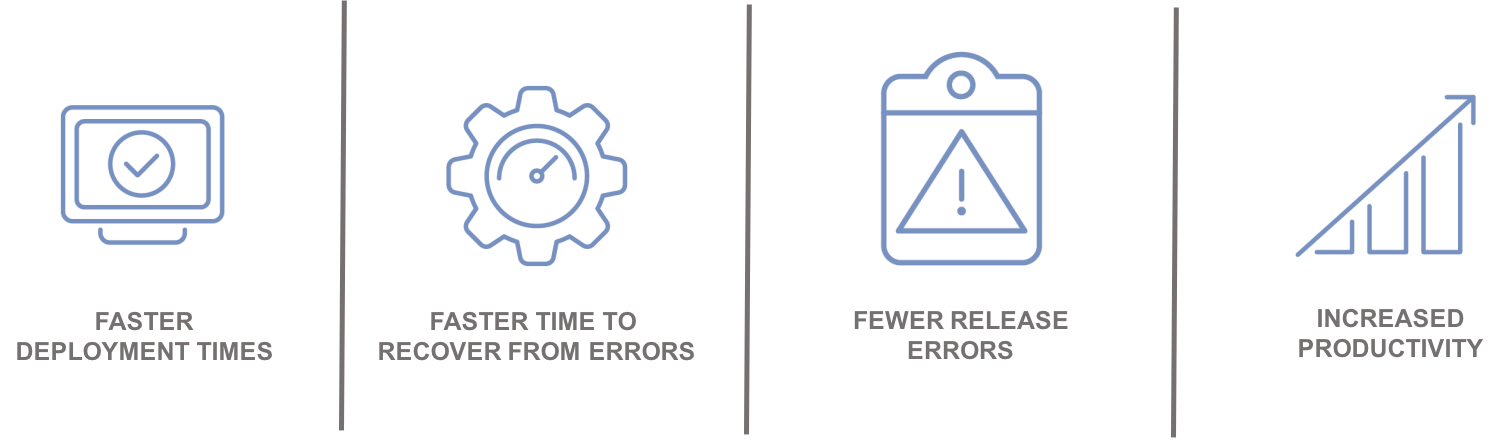
    Increased visibility into these processes ultimately enables all stakeholders to take a more active role in the release process, and access to real-time information can significantly reduce the amount of time and resources needed to resolve and recover from problems when they do occur.

    Automation leads to:
    Integrating with the Ecosystem

    An enterprise ARA solution can help you create a single control point to streamline all your application delivery processes for better predictability and reduced risk. A critical component of this is the ability to integrate and orchestrate tools and technologies required along the continuous delivery pipeline, including source control, automated testing tools, provisioning and configuration management solutions and change management and performance management solutions.
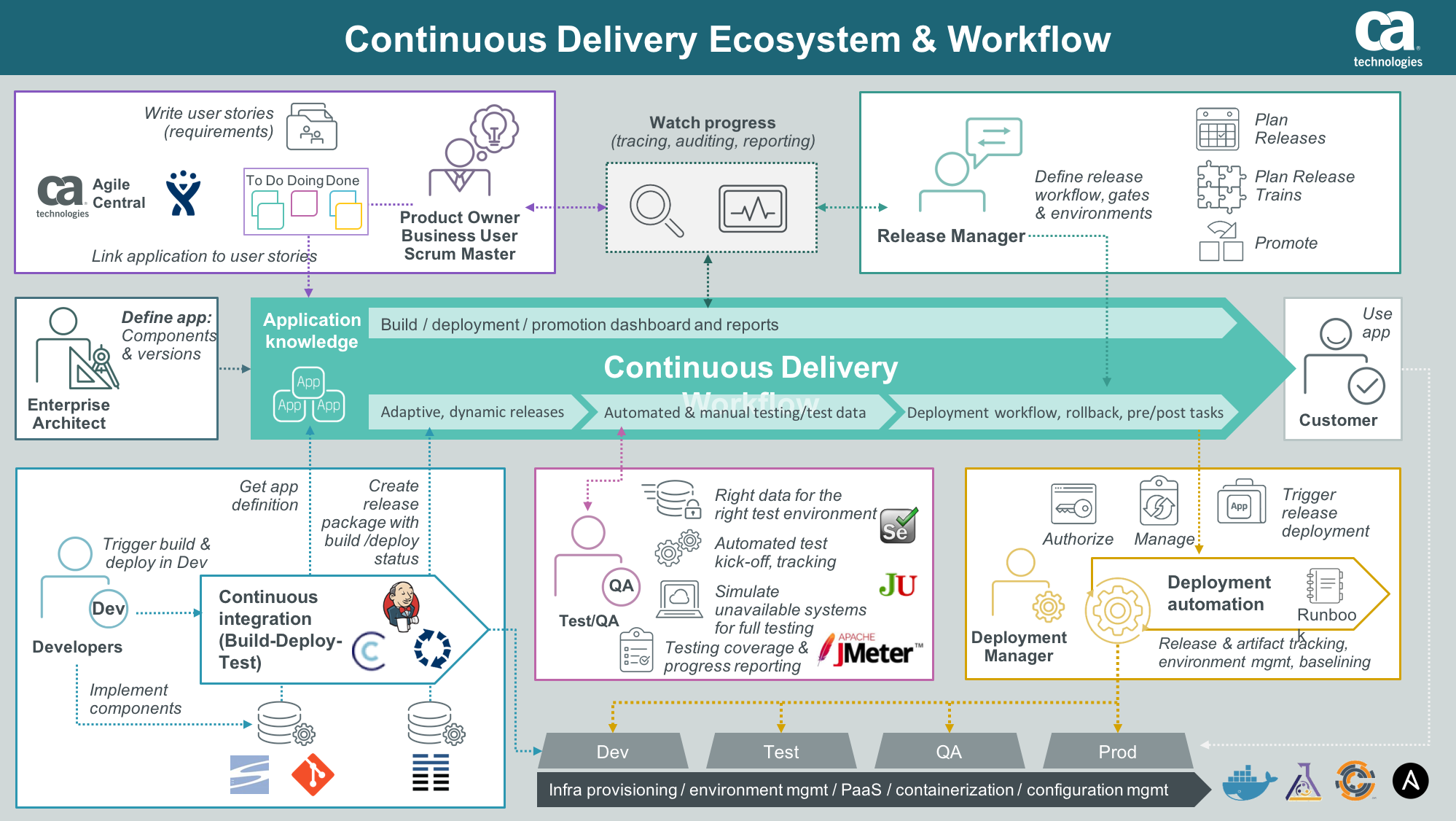
    Integration with an application lifecycle management solution can provide even further alignment, governance and traceability between development projects and what is ultimately being tested and promoted to production.

    “By integrating the two solutions, we will have a complete audit trail of deployments to help us understand how, where and by whom stories have changed,” said Phil Nickolai, director of application services at Jewelers Mutual.

    “What we really needed was a solution to streamline our whole way of working,” he said. “We had numerous people working on projects, competing for resources and causing complexity. Now we’re back in control and getting smarter every day.”

    The Time Is Now

    Let’s get rid of the problem that exists between the keyboard and information kept in spreadsheets, scripts or emails. Not only will you stop wasting time testing the wrong version of an application, but you can also ensure you have the right test data, the appropriate test cases and the correct configuration parameters for your environment.

    Stress-inducing release weekends and nights become a thing of the past. Developers can spend more time on developing innovative capabilities that generate revenue and keep customers coming back for more.

    — Tim Mueting

  • Why Financial Companies Love Continuous Delivery

    Why Financial Companies Love Continuous Delivery

    The other day I was on the American Express website paying bills and browsing around the benefits and services afforded me when I ran across a “who we are” section. It read:

    “We’re a global services company that provides customers with access to products, insights and experiences that enrich lives and build business success.”

    Surprisingly, the term “financial” was missing from the description. This led me to wonder if other financial institutions are evolving how they think about themselves. Here are some other examples:

    • Bank of America: “Here to help connect you to what matters most.”
    • ING: “Empowering people to stay a step ahead in life and in business.”
    • MasterCard: “As a technology company, we connect individuals, businesses and organizations around the world, creating greater opportunities for all.”

    Financial Companies Love Their Customers

    My unscientific assessment of various financial services companies suggests that they are centered on delighting their customers. They are transforming who they are by altering their customer engagement models and essentially becoming better software companies. MasterCard has even reclassified itself as a “technology” company. These companies are transcending the role of transaction engine to offer seamless, intuitive digital experiences for their customers.

    And the proof is in the performance. According to Forrester’s Customer Experience (CX) Index, financial services firms, including retail banks, credit card companies, investment firms and auto and home insurers, are some of the top brands worldwide when it comes to CX.

    You might think that large financial institutions would be digital laggards because of legacy infrastructure, regulatory compliance pressures and overall risk-avoidance. But you’d be wrong.

    In another study, 81 percent of financial services firms said they are embracing digital to redefine their businesses, and 87 percent are on the DevOps bandwagon. Sixty-one percent even said they are disrupting their industry with advanced digital initiatives.

    To stay competitive and improve their customer experience aptitude, financial services firms are undergoing significant digital transformation.

    Getting the Pulse of Fintech Continuous Delivery Adoption

    But how progressive are these firms in terms of their application delivery practices? Working with CA, Gatepoint Research recently surveyed more than 100 IT executives from financial services companies to take the pulse of where they are in continuous delivery adoption. Results can be found in this report and infographic.

    First off, to see if these companies might be considered unicorns or stragglers, they were asked the total volume of monthly deployments in all environments. Forty percent fell at the low end with fewer than 50 deployments per month. Now, lower deployment numbers could mean that these are less agile organizations or that they have fewer applications in general. Somewhat correlative to lower deployment numbers, the survey found that 48 percent currently are not using an application release automation (ARA) solution. Without automation, it’s tough to scale release processes—particularly to keep up with agile development.

    Moving up the spectrum, 41 percent are moderately prolific at 50-500 deployments per month, and then 15 percent are what I would consider rock stars with more than 500 (7 percent of those over 1,000). Those doing hundreds of deployments a month often have agile development teams and more modular applications. They likely have continuous delivery practices in place that push more frequent, iterative deployments left, helping higher-quality applications to move through the pipeline to production.

    The primary application delivery goals for financial services firms for the next 12 months are to get better control of release processes, tools and environments; to reduce risk and failures; and to release applications more frequently. All of these needs typically stem from companies undergoing digital transformation—it feels more chaotic and disconnected, manual processes are breaking under the weight and there’s intense pressure to move faster.

    Compliance was not a top goal, and the majority (83 percent) claim that their current release process is adequate to meet regulatory requirements. However, they did acknowledge that they could improve in terms of knowledge safekeeping and auditability of the release process.

    The data certainly shows that financial services companies are adopting continuous delivery practices in some form and exploring solutions, including many open-source tools, to help them get the job done. They currently are focusing continuous delivery practices on tracking and reporting releases, planning and scheduling releases and automating test deployments. These practices ultimately help financial services companies to release high-quality applications anywhere at any time.

    How Continuous Delivery Helps Fintech Win

    Continuous delivery sits at the heart of many digital initiatives because of what it enables these companies to achieve for their customers:

    • Delivering features and updates that customers need when they need them
    • Delivering applications that meet performance and quality expectations of customers
    • Delivering secure, compliant applications (for external and internal customers)

    Continuous delivery enables continuous devotion to the customer experience.

    Continuous Release: Fast Customer Response

    With continuous delivery, you establish an application release workflow that automatically connects a developer’s update to parallel testing to staging and ultimately to production release. Because of the underlying end-to-end automation technology, these steps can happen quickly, seamlessly and with little to no manual intervention. Some might call it “push button release” or “zero-touch release.”

    It’s a controlled, tracked, governed, collaborative process. Application stakeholders stay aligned as application changes traverse the pipeline. Your customers can have access to fixes, updates and new innovations in days instead of weeks or months.

    Continuous Testing: Building in Quality

    In contrast to the significant time penalties and shortfalls that can happen with manual testing, in the continuous delivery pipeline, testing is shifting left and happening in parallel. Hand-offs and feedback loops are automated and efficient.

    Testing can happen earlier and without delay with the help of test environment simulation. Testing is on target through automatic test case creation, even from requirements. Testing is real-world with on-demand test data generation. And testing is rigorous with developers able to performance test apps at their end. The continuous testing that occurs as part of the process helps to build in quality and ensure top performance before reaching the customer.

    Continuous Compliance: Audit-Ready Processes

    Ensuring applications are compliant and secure is critical for your customers. It’s making sure customer information is safe and that application changes are tracked sufficiently for SOX or other reporting. It’s also about helping out those internal “customers” like auditors to prove compliancy and easily build reports.

    An automated continuous delivery pipeline can track releases, apply role-based governance, orchestrate proper data masking, deploy security policy updates and provide an audit trail for application releases—who did what, when and why. All this data can be collected and reported easily, which saves time and effort for auditors. You essentially stay compliant and secure all the time.

    Customer Satisfaction Through Automation

    Financial services companies are laser focused on using technology to delight and retain customers. And continuous delivery is the application delivery practice that’s underpinning these efforts. The companies that are exceptional at this, with thousands of deployments per month, are using automation tools such as Application Release Automation (ARA). These tools are the backbone of continuous delivery, providing the automated orchestration, governance, tracking and reporting for your pipeline—development through production.

    That’s why I’m not surprised that leading financial services companies make up a large portion of CA’s release automation customers, including Euroclear, GM Financial, ING, Jewelers Mutual and Western Union. Our customers put high value on delivering excellent customer experiences and are implementing modern software delivery methodologies, practices and associated tools to support their efforts. GM Financial recently said it is “the software company that does auto finance.”

    If you are serious about customer satisfaction and staying ahead of nimble competitive threats in the market, you must get serious about end-to-end automation. It’s time to truly embrace the practice of continuous delivery to be able to consistently release applications that are progressive, always compliant and completely customer-satisfying.

    — Patricia Johnson

  • The Right Automation Tool for the Job

    The Right Automation Tool for the Job

    My father was an antique dealer, and we did a lot of furniture repair in the workshop. All of us kids took turns working for the business as we grew up, and we learned some solid lessons in the process.

    One day, when I was still pretty young and very new at working on things, he pointed out a set of screws someone had set into an otherwise beautiful oak chair and told me to remove them while he worked on another piece for the same customer. I grabbed a screwdriver from the workbench and went to work, but it was tough going: The screwdriver kept slipping, and I was new at it, but I knew enough that gouging the wood was certainly not on the list of things one wants to do with antique furniture. I took my time, got all four out, but the screw heads were pretty mangled—close to stripped—and the end of my screwdriver was also showing marks. Being new at it, I thought nothing of it, and was proud of how few scratches I’d put into the wood.

    My father was a patient man for the most part, and I was proud of having done my part. So it was a complete surprise to me when he could barely contain rage as I showed off my handiwork.

    After he pulled himself back under control, he took the time to teach me that there was a difference between a screwdriver and a wood chisel, and that I should have seen it didn’t look like a screwdriver. It turns out I had ruined his best chisel, and the “few marks” I had left in the chair were gouges that we would have to carefully repair.

    Are You Using a Chisel?

    I learned an important lesson from that day. Always be certain, despite what you think you know, that you have the right tool for the job.

    I’ve certainly said that enough in my career—in development, in ops and in my blog. It is easy to see the tool in your hand as good enough to get the job done, but it is worth stepping back for a second and making certain it is.

    Not too long ago, I worked with an automation company whose largest competitor was not any competitor; it was, “We can do that by hand.” Evidence over time showed that the company could get partway there, and then would find itself with issues that kept it from getting the features/reporting it wanted and a metric ton of code to maintain. Unsurprisingly, some called to have the tool brought in three to six months after embarking on a build project.

    Using bash scripts, Maven/Gradle/Cmake and a dose of Python to do release automation is a good example of that syndrome in action. So is cobbling an application provisioning tool into a release automation system. Like a chisel, these are all astounding tools that rock in their given area of expertise, but are far from optimal—and can even cause problems—when used to automate software releases.

    Familiar Questions

    There is almost always someone willing to say that building is better than buying. These people thrive on the creation aspects of IT and are valuable assets. But the equation has to make sense. In software development, we’ve come to the point of “core business function” as the differentiator in the build/buy equation, and it has cut down the number of systems for which we have to maintain source. But DevOps is new, and a lot of DevOps is scripting, be it command line (bash scripts/batch files/ps) or Python/Ruby/php, straight commands built in-house or scripts for use through tools such as Jenkins. We’re generating a lot of artifacts, and those artifacts will require maintenance. It’s the technical debt of the near future, because environments are not static things, and those scripts will need to change over time.

    So the questions to ask will be familiar if you went through previous build/buy cycles and include:

    • We can build it here, but should we? What long-term costs and risks are we taking on by doing so?
    • If we build it here, what are the tradeoffs? What functionality could we have today that will go missing? What functionality will we likely never have in a home-brew solution?
    • If we build it here, what flexibility will we have, and how does that compare to available tools?
    • What are the timelines? Generally speaking, CI/CD tools can be up and building in a week or less, be truly productive in six weeks or less, and be a standard part of the build/deploy process within six months, even at cautious companies. What would building it have for a timeline, and are the resources required to complete the implementation constrained?
    • DevOps is growing and changing. A dedicated product will incorporate those changes through the upgrade process. Will time be available to staff to do the same on a home-built system?

    There is a Right Tool

    My experience is that IT shops who allow someone who claims, “We can do CI/CD/ARA with the tools we have today, it’ll just take a little work” to run with that sentiment end up feeling more like my father than happy that they made the choices they did. The complexity of the process, combined with the growing functionality and integration of toolsets from different vendors (via plugins or APIs), have made the purpose-built toolsets more effective than cobbled together is likely to be. And when the home-built tools fall short or needs change, the cost in IT staff resources is not something to be dismissed lightly. While blocking off a chunk of time to make IT more effective is important, it is also important to make the most efficient use of that time possible. Having a toolset dedicated to CI/CD and even release automation means less time maintaining source that just manages builds and application deployment. Save that time for things that improve efficiency even more, not keeping the status quo. There will certainly be scripts for your server and application provisioning tools to maintain, because that’s how those tools are designed. And if you are using a tool such as Jenkins as part of your toolchain, it generally has scripts as part of the process too. Increasing beyond that just to avoid implementing the rest of the CI/CD/ARA ecosystem would be a poor investment of time.

    As I told a friend recently: Yes you can implement a full-blown end-to-end ARA system in an application provisioning tool. By the same token, you can implement a fully functional responsive web app in assembler, too.

    — Don Macvittie

  • CD 101 Podcast Episode 2: The Agile Enterprise

    CD 101 Podcast Episode 2: The Agile Enterprise

    And we’re back with another episode of the “Continuous Delivery 101 Podcast.”

    In Episode 1, we covered the three waves of IT disruption—and how these disruptions, combined with the move toward digital transformation, are drastically changing every industry.

    This, of course, underlined how accelerating speed-to-market is clearly more important than ever before.

    In this second episode, we talk about Agile methodologies with expert Dan Rice, who addresses how these practices can enable business strategies to be implemented at greater speed.

    Listen closely and you’ll learn more about what Agile actually means across various teams, roles, product owners and scrum masters, along with related points on DevOps and CD tooling.

    All of these topics are great food for thought as you think about how you can move to build software faster and with increased quality. Yet, if enterprises only focus on these issues, they aren’t tackling or talking about the real problem in their organization that Agile can solve.

    It’s time to take the conversation beyond the team level and talk about how work flows to every involved team, enterprise-wide—specifically, about how initiatives can expand across multiple teams, how to manage shared resources and how to pull in other dependent teams.

    For Agile to work, it has to expand universally and be ingrained further at program level, to understand precisely how work is coordinated and flows across every domain.

    You can listen to Episode 2 of the “Continuous Delivery 101 Podcast” via:

    • YouTube
    • iTunes store
    • Or by searching for it in the iTunes Podcast App under “Continuous Delivery 101 Podcast”

    Thanks for tuning in to the “Continuous Delivery 101 Podcast.” We hope you’ll continue the conversation by posting your comments below or in the comments section on YouTube or iTunes.

    Meanwhile, keep tuning in: We’ll be back soon with another episode!

    — Scott Edwards

  • What Happens Post-Deployment: The Rotating Roster

    What Happens Post-Deployment: The Rotating Roster

    DevOps has become that celebrity who’s always the talk of the town but is largely misunderstood. It’s even quoted in the wrong context.

    A few days back, while speaking at a conference, I was interacting with audience and one of the attendees said DevOps is like the backbone of Agile. I think that’s an excellent way of describing DevOps. In an industry where we are still struggling to implement Agile—and even more so to keep people from drifting—is DevOps ahead of its time? Maybe not.

    DevOps is the set of practices necessary to sustain the fast pace of delivery. The best part of DevOps is there are no levels or certifications one needs to achieve. It’s the stack of practices that you pick and implement and reap benefits. The 7Cs—continuous planning, continuous integration, continuous delivery, continuous testing, continuous deployment, continuous monitoring and continuous operations—help maintain sanity, though.

    One teams had to sustain fast-paced releases with a big customer base. We saw our users increase from .1 million to 2.4 million in three years. Agile, continuous integration and continuous delivery are not just fads for us, but needs for survival.

    Using the Rotating Roster Method

    When we talk about continuous delivery but then focus on just delivery, it’s not enough. It’s equally important to work on what happens post-deployment, such as continuous monitoring and continuous operations.

    Rotating Roster is one practice we use in our organization and this has helped us pull together the whole ecosystem of:

    • Resolving customer issues,
    • Feedback system pumping into out technical pipeline/debt for next releases,
    • Knowledge transfer and learning ecosystem to address attrition, and
    • Broken silos.

    Here’s how we do this. First, we define the scope of the Roster. We picked the following:

    • Production Outage
    • Customer issues/P1
    • Ad hoc requests from stakeholders
    • Data extraction (only tasks out of scope of a separate Data Analytics team)

    Next, we publish a schedule of every two to four weeks, designating at least one person to be on the Roster. It’s essential that the Roster rotates to all or most in the team to build a bus factor or a knowledge transfer ecosystem in the team.

    For each request received, we asked the Roster person to log it in JIRA. This was not just for bookkeeping sake, but as an essential step in line with the Roster objective.

    After every Roster period, we sat down and reviewed these JIRA requests for possible targets to:

    • Automate the task or the effort involved, such as account creation requests automated by writing php scripts, for example.
    • Delegate the task to the right team to cut the effort. For example, for a new data extraction we set up SQL slaves and replicate tables on analytics machines, then delegate the task to them for all future instances.
    • Mitigate the reason for the request, such as the root cause of an outage.

    The mitigation/automation steps had to be picked by development team in their Sprints. Otherwise, usually they become technical debt and lay around in the backlog.

    Since the development team was taking turns on the Roster, they understood the priority and necessity of doing the task. Thus, the technical pipeline was chosen and fed actively.

    Another advantage of the Roster was it showed the team the “big picture” and helped catch early trends.

    The Rotating Roster system turned out to be a big success for our teams; thus, we replicated the model through the rest of the organization. It’s a small but essential step to adopting DevOps culture.

    In one definition, Jez Humble explained that DevOps is “a cross-disciplinary community of practice dedicated to the study of building, evolving and operating rapidly changing resilient systems at scale.”

    I could not have put it in better words.

    About the Author / Kiran Chhabra

    Kiran Chhabra is Vice President of Engineering at Infoedge India Ltd. She has 14 years of industry experience designing and implementing highly scalable and available architectures with optimized continuous integration and delivery in technologies including LAMP, Java and mobile technologies.

    Kiran holds a U.S. Patent and has published technical papers. She is certified scrum master and certified scrum professional, and speaks at various Scrum Alliance & technical conferences in India and the United States. Connect with her on LinkedIn and Twitter.

  • Reality Check: Bringing Continuous Delivery Dreams to Life

    Reality Check: Bringing Continuous Delivery Dreams to Life

    Every developer shares the same dream: to write a piece of code or app that changes everything.

    Whether it makes your company do things more efficiently, attracts hordes of new customers, simply makes existing clients happier or maybe even changes the world a little bit, that code is what we strive for. Some of us don’t merely harbor that dream; many of us actually achieve that moment of brilliance. For those who have, it’s remembered as a moment of pure joy.

    So, where does this magical process begin? First, you talk to your manager and, if you’re lucky, she or he agrees that it is a fantastic idea and starts to sell it internally. Sometimes the idea is so good that you get the go-ahead on the same day and even get a small team to work on it!

    Then, soon thereafter, reality kicks in.

    You need data, inevitably from applications running somewhere in the cloud and/or some other data from on-premises data stores. You need to interface with APIs, some well-documented, some not. You need some user experience work done, and the standards your company has adopted don’t really match your vision.

    You also need to interface with many of the standard services your company has already implemented because, after all, your app doesn’t run in isolation—you work with existing billing systems, a CRM system, a fulfillment system … and all of them run on servers that can be anywhere. Soon you find yourself fighting for test data, systems to test with and applications and APIs to interface with. Before you know it, you’re banging your head against the wall.

    Fortunately, your teammates are flexible, creative people. And because your internal systems seem to work against you, you go around them. You download a trial version of some testing software; you install a copy of some internal systems on a virtualized test server (if you can find one) and start working with these.

    Since your app needs to be snazzy and snappy, you download some open-source software to help you test the performance on mobile devices. After three sprints, you’re now ready to move your app to an environment where you can start performing real tests!

    Most times this is the moment when the hardest reality kicks in. The copies of the systems you tested with were not up to date. Data has changed. APIs have changed. The real system responds three times slower than the copy that sat on the server right next to you. The data in the cloud has changed. The performance testing tool you used is not available in the official testing environment. … The list goes on.

    This doesn’t even include the difficulties of moving all the components of your new app to different environments. Trust me, this is not a fictional nightmare scenario; it is reality and I see it happen all the time.

    Now, what if you had the test-data generators necessary to create the data you need and a server that ran virtualized services, mimicking all the (up-to-date) external systems you need including the APIs to talk to them—services that would allow you to say, “What if this application responds three times slower when I request data?” or, “What happens if this system suddenly goes down?” What if, when you’re done building, you could simply migrate the app and all the components that go with it to another (test/QA) system with one click?

    Everybody wants to support people with good ideas and turn these ideas into working software without the frustration that very often distracts and demotivates people. To do so, you need to create the infrastructure that supports this. Is it difficult? Not really, the tools to automate services, create test data (and test scenarios) and migrate complete applications from A to Z are available.

    However, just like a great app, this too starts with a dream—the dream of allowing people with great ideas to work on these ideas without the overhead of an infrastructure that allows them to focus on the coding and not on the infrastructural issues; the dream to create a software factory where the creation of the app takes 90 percent of the time and the infrastructural burden only 10 percent, not the other way around.

    If you’re serious about developing software and want to create an environment where the infrastructure allows people to develop and release software faster instead of working against them, find the tools that support it and jump in, because they exist today.

    Enacting this change now and maybe the next time someone comes to you with a great idea you can be confident that they will have all the support needed to get there efficiently.

    — Marcel den Hartog

  • Warning Signs Your Organization Needs CI/CD

    Warning Signs Your Organization Needs CI/CD

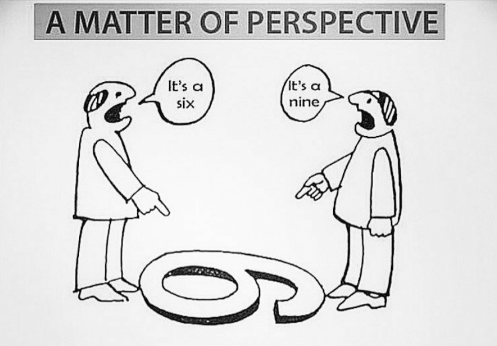
    imageSometimes, taking a look at a problem from a different angle makes it look different. As a recent meme showed, a six and a nine are the same marks, just viewed from different angles. I don’t know who originally created this image; if you do, drop me a line and I’ll give them all the credit.

    There are a lot of reasons for your organization to consider continuous integration and continuous delivery (CI/CD). A quick Google search can show lists of reasons, mostly technical or business-related, that attempt to give enterprise IT impetus to move toward the various forms of DevOps. But a solid set of reasons, discussed occasionally, is worth considering because it has a separate appeal.

    IT staff are people. They have the needs of people. They have (or lack) the skills of people. And they respond as people. Answer the following questions, and consider what your answers might mean for your organization:

    1. Twitching. Can your caffeine consumption and amount of sleep be tracked by the release cycle?
    2. The Pain. Do you have stress headaches based on work?
    3. Must. Not. Look. Are you still—or even more—stressed when you are away from work, even avoiding email when not on call?
    4. Those Guys. Do many in your organization see IT as an anchor that drags behind the ship, slowing it?
    5. Slippage! We Have Slippage! Does the phrase, “Yeah … the deadline slipped” not even cause you to raise an eyebrow anymore?
    6. Total Manhours: 1,440, assuming no full moons. Do development timelines mostly get expressed in terms of months or even years, and even then everyone expects the number is too small?
    7. And Then, We Put it on a Floppy… Are there areas of the development/deployment cycle that you avoid looking too closely at, or everyone rolls their eyes when the topic comes up?
    8. Ask Bob. No One Else Has a Clue. Are there critical software systems with just one or two people who can keep them running in your org?
    9. We’ll Test in Production! Is “due to deadline slippage, we have less time for testing” normal and expected, not even causing you to think of the implications anymore?
    10. Now That We Can Use it, that Chicken Dance Requirement for Order Entry Is … Not good. Are business-owner changes to requirements happening at the last minute, after the business sees how the functionality/flows of the system work, and can actually start using it?
    11. This Would All Be Better if Your People Learned to Use Left-Handed Smoke Shifters. When someone in the business starts talking glowingly about strange new development technology X, you start mentally calculating when you’ll find time outside of work to research it.
    12. Release Recovery. Is there always a period after rollout that critical development staff are kept on the project to fix problems that occur in production?
    13. Operations Claims That … Are the names of other IT departments used as swear words by App Dev?

    Sure, I’m being a bit tongue-in-cheek, but am I wrong? A ton of people and organizations actually feel many of these items. It would be unsurprising to hear your organization is one of them.

    And these are good reasons to consider CI/CD. Sure, we could dress them up with business or technical reasons based upon them, but the reality is that human overload, stress, burnout, and avoidance are reason in and of themselves – if for no other reason than they are symptoms of organizational inefficiency.

    If you are suffering from any of these symptoms, read the articles here on devopsy.kinsta.cloud, and others easily found on the web. Consider one of the excellent CI/CD books on the market, talk to trusted dev tool vendors about their CI/CD tools. See if the stories told by those who have implemented CI/CD is where you would like to end up.

    It might just cut down on those headaches. But it won’t free you from developing in JavaScript. There is no silver bullet, after all.

    — Don Macvittie

  • Intelligent DevOps for New Age Digital Systems

    Intelligent DevOps for New Age Digital Systems

    Transforming DevOps by leveraging the power of analytics and autonomics

    In a previous blog, I have written about how Quality Assurance is getting transformed to Quality Intelligence using the power of big data analytics and autonomics.

    In this blog, we will discuss how DevOps solutions of the future can become more intelligent by taking advantage of these same emerging digital technologies such as autonomics and analytics.

    Technologies such as predictive analytics, autonomic computing (autonomics), artificial intelligence and robotic process automation (RPA) are already driving unprecedented levels of automation in many other businesses. Combined, these three technologies are driving the next generation of automation—what is commonly referred to as “intelligent automation.”

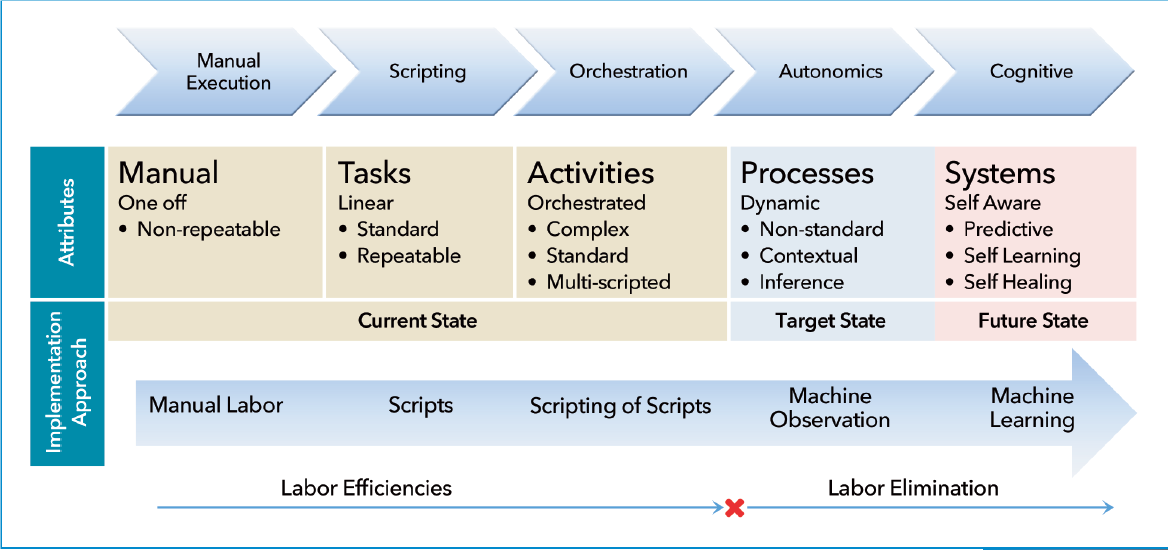
    Intelligent automation goes beyond basic automation and orchestration of manual tasks to incorporate adaptive self-learning—leading to fully autonomous systems. The figure below (courtesy IRPA) illustrates the evolution of automation as it moves toward full autonomy. The Google car (and other similar solutions) is a great example an intelligent automation system, capable of learning from its environment and adapting behavior accordingly.

    Automation in Traditional DevOps

    Digital systems are driven by new age technologies such as social, mobile, big data, analytics, cloud, internet of things (IoT), artificial intelligence, augmented and virtual reality, genomics, etc.  These technologies introduce significant change and complexity to how modern systems are built and deployed. Businesses that leverage these technologies to transform themselves into cognitive enterprises demand new and intelligent approaches to the underlying processes and techniques to support them. Such processes and techniques need to be more than agile; they need to adaptive and capable of reacting dynamically to frequently changing circumstances.

    Let’s look at some examples of current DevOps techniques and how they will need to evolve to support dynamic digital systems. Automation within traditional DevOps solutions is generally limited to scripting and orchestration as shown above.  Automation adoption levels vary, due to various reasons ranging from complexity to skills and organizational challenges. Maintenance of such scripts is itself sometimes a bottleneck, as applications and environments change rapidly, the scripts need to be updated manually and often become obsolete. New age agile digital businesses, by contrast, demand automation that is able to adapt dynamically and self-heal on demand.

    Further, classic DevOps automation techniques are typically driven by static predefined rules. For example, the criteria for promotion of an application build through different stages of the pipeline is often statically defined. This is a limitation for new age systems where the criteria needs to be dynamic and may vary depending on multiple circumstances. The automation system needs to able to look at past data, keep learning from current data and make adaptive intelligent predictions about the right course of action.

    DevOps for internet of things (IoT) systems is very different than that for traditional software systems. The target environment for production deployment in consumer IoT is geographically dispersed, typically not configuration controlled, may have unreliable network connectivity and may even be fragile. Further, IoT systems generate huge amounts of data that necessitate robust data mining and self-learning (adaptive) techniques not provided by traditional lifecycle automation tools.

    Similarly, customer experience (CX) is a key new metric for digital systems that transcends traditional DevOps metrics such as release velocity and quality. CX data is unstructured, fuzzy, voluminous and volatile. CX-driven DevOps (or CX-Ops) is an emerging discipline that requires big data analytics and cognitive approaches (such as natural language processing or NLP) to decode meaningful insight from such data.

    Hence, as digital enterprises evolve and businesses demand greater agility and flexibility, the DevOps function to support such systems will need to transform as well.

    Next-Generation Intelligent Automation Landscape

    Before we jump into what intelligent DevOps would look like, let’s first look at the different types of automation systems being adopted in the industry in general. The following types of automation are described as part of the “intelligent automation continuum”:

    • “Systems that Do”: These are basic automation systems that replicate human keystroke actions and static (pre-defined) rules-based activities. They also take advantage of descriptive analytics that reflect past trends and patterns. Examples of such systems include speech and image recognition.
    • “Systems that Think”: These use algorithms and intelligence to find meaning in data, handle judgment-oriented tasks using diagnostic analytics and make recommendations based on patterns. Examples of such systems include natural language processing and recommendation engines (such as email spam filters).
    • “Systems that Learn”: These understand context, interpret and dynamically adapt based on circumstances; they typically leverage predictive and prescriptive analytics to solve problems independently. Examples of such systems include self-driving cars and neural networks.

    A Peek at Intelligent DevOps

    So, what would transformed intelligent DevOps look like? Intelligent DevOps automation would take advantage of cognitive and autonomics systems to enable smarter adaptive lifecycle automation based on analytics. In my previous blog, I discussed how QA can take advantage of big data analytics. Intelligent DevOps, to a large extent, depends on such capability.

    Based on the above model, let’s look at the different types of DevOps automation we can create:

    DevOps Systems that Do: This includes traditional DevOps automation systems (e.g. for continuous integration and testing, continuous deployment), as well as pipeline lifecycle automation that are based on static rules (e.g. traditional release management automation)

    DevOps Systems that Think: This includes advanced automation systems such as:

    • Automated automation systems, for example, generation of automated test cases from manual tests (or test models) using NLP, generation of virtual services based on request-response data logs
    • Self-healing automation, for example virtual services (or test scripts) that can auto-update based on change in application endpoints (or behavior)
    • Monitoring of IoT systems, for example “smart homes,” which require continuous use of diagnostic analytics to mine huge volumes of data to understand failure modes and prescribe recovery techniques
    • Automated verification of system requirements based on customer experience analytics
    • Automated generation of test scenarios based on analytics on production logs

    DevOps Systems that Learn: This includes sophisticated test automation systems such as:

    • Adaptive continuous delivery pipeline—Learning systems that analyze past data to manage the pipeline based on dynamic rules. For example, correlate code quality and defect detection and slippage patterns to dynamically decide what tests to be run and what gates to be enforced (vs enforcement of statically defined gates) for different teams and products for promoting application builds
    • DevOps process optimization based on insight across the life cycle. For example, correlation of production log data with past code change data to determine the level of failure risk in different application modules. See more on this in the section below.

    We embody the evolution to intelligent DevOps in CA’s maturity model (shown below), which also aligns with the RPA maturity model described above. Beyond the continuous maturity level, Intelligent DevOps is the driving force behind continuous optimization and improvement.

    Cross-Life Cycle DevOps Intelligence

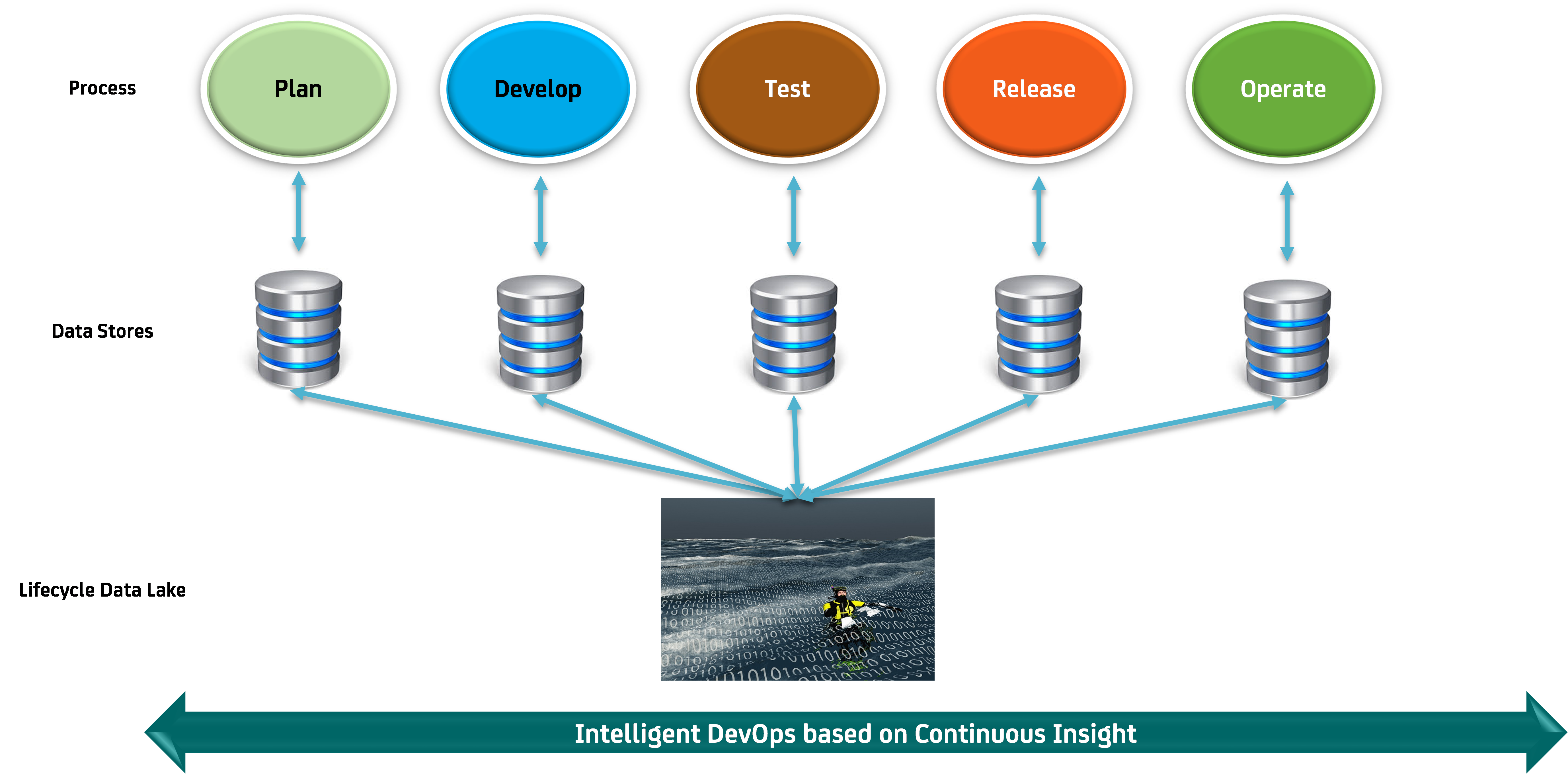
    Intelligent DevOps enables us to perform process optimization based on analytics from data correlated across the system life cycle, from planning through operation. Each process area generates a great amount of data that is typically analyzed within the process (and sometimes organizational) silo.

    While such analytics is useful in itself, correlation of data across these process areas (see figure below) may be used to provide a wide variety of intelligent lifecycle insight (and process improvement possibilities), such as:

    • Correlating configuration data analytics with code change and defect analytics helps us pro-actively identify failure modes related to code and infrastructure changes.
    • CX analytics (from the Operations process) can be used to validate requirements in the plan and define processes
    • Production log analytics may be correlated to test log data to identify missing test cases

    In the spirit of the “Continuous Everything” philosophy in DevOps, we envision a new solution stream around “Continuous Insight” where analytical insights are generated and acted upon continuously (and autonomously) as processes execute.  We will discuss more on the subject of Continuous Insight in a future blog.

    In conclusion, we believe that intelligent approaches described above will be infused into every aspect of DevOps going forward and revolutionize the way DevOps is performed. Stay tuned my friends, and may all our DevOps be intelligent!

    — Shamim Ahmed

  • DevOps Job Titles Emerging in Enterprise IT Organizations

    DevOps Job Titles Emerging in Enterprise IT Organizations

    IT job functions and, by extension, individual titles inside the classic enterprise have been relatively constant. Various hierarchies of developers labored separately alongside IT operations teams that focused mainly on infrastructure. However, the emphasis on continuous integration and continuous development (CI/CD) within the context of a modern DevOps environment is starting to blur the lines separating who does what inside these organizations. In fact, Phil Guido, general manager of IBM Global Technology Solutions in North America, says new titles such as DevOps engineer and Scrum Master, which better reflect new roles many IT professionals taking on, now are emerging.

    At the crux of this shift is the rise of programmable infrastructure coupled with a need for IT organizations to be more agile. Instead of rolling out a few applications and associated updates a year, IT organizations today are being urged by business leaders to roll out more applications and updates at a pace associated more often with web-scale companies than the classic enterprise. Much of that demand emanates from shareholders and Wall Street to accelerate investment in digital business initiatives that generate higher-margin revenue.

    To achieve those goals, enterprise IT organizations are trying to emulate as many of the DevOps processes employed by web-scale companies. For example, web-scale companies make extensive use of CI/CD technologies and processes to roll out as many new applications as fast as they possibly can. Overseeing those processes are developers who now are accountable for not just writing but also maintaining the application. The theory is that if developers are held accountable for the quality of the application, they will focus more on making sure that application attains a level of quality. The trick is to empower those developers to own everything from the code itself to the programmatic infrastructure it runs on. Because of that requirement, many of those developers adopted a “cloud first” mentality because deploying applications on a public cloud such as Amazon Web Services (AWS) eliminated the need for those developers to engage with IT infrastructure professionals altogether.

    However, most traditional enterprise IT organizations have a much smaller number of application developers. Every minute those developers are not writing code reduces the number of applications an enterprise can roll out. Because of that issue, many enterprises have been trying to find a way for existing IT operations teams and developers to work together hand in glove.

    That requirement, Guido says, is creating a lot of demand for advice from IBM about how to manage DevOps. IBM advises organizations to go slow to ensure they have a few quick successes under their belts before propagating DevOps across the entire organization, he notes. If an organization tries to do too much or move too fast, there’s a good chance that employee resistance to change will only increase. Above all, Guido says, organizations should avoid being too prescriptive in how they define DevOps.

    Of course, not everyone agrees that changing job titles is always the best way to go about fostering change. But human nature being what it is within large organizations, some job titles will have to be reclassified to bring about permanent change.

    — Mike Vizard

  • 4 Top Tips for Developing a New Feature

    4 Top Tips for Developing a New Feature

    As a backend developer at CA BlazeMeter, I recently had the chance to work on a big feature for our web app. The feature required a massive change on our backend code, a big change on our frontend and multiple migrations. You know what I’m talking about—it was one of those projects that developers fear.

    But, I gained a lot of valuable experience from the project. Not only did we deliver a kick-ass feature, I also learned the importance of teamwork and patience when developing something new. Armed with those two values, and the right tools and technologies, you can deliver a new feature quickly and efficiently.

    Here are a few more things that I learned that should prove helpful whether you’re developing a major feature or one that only requires a minor code change.

    Tip 1: Plan to understand the development requirements

    The process of development starts way before you start coding, with planning. After the product manager decides what needs to be developed, R&D needs to understand the cost: how many days (or weeks) of development the feature will take, how many people will be needed and which APIs are required.

    To do that, the product manager needs to conduct at least three “grooming” sessions with backend, frontend and QA leaders. The grooming sessions start with the product manager presenting the product flow and requirements.

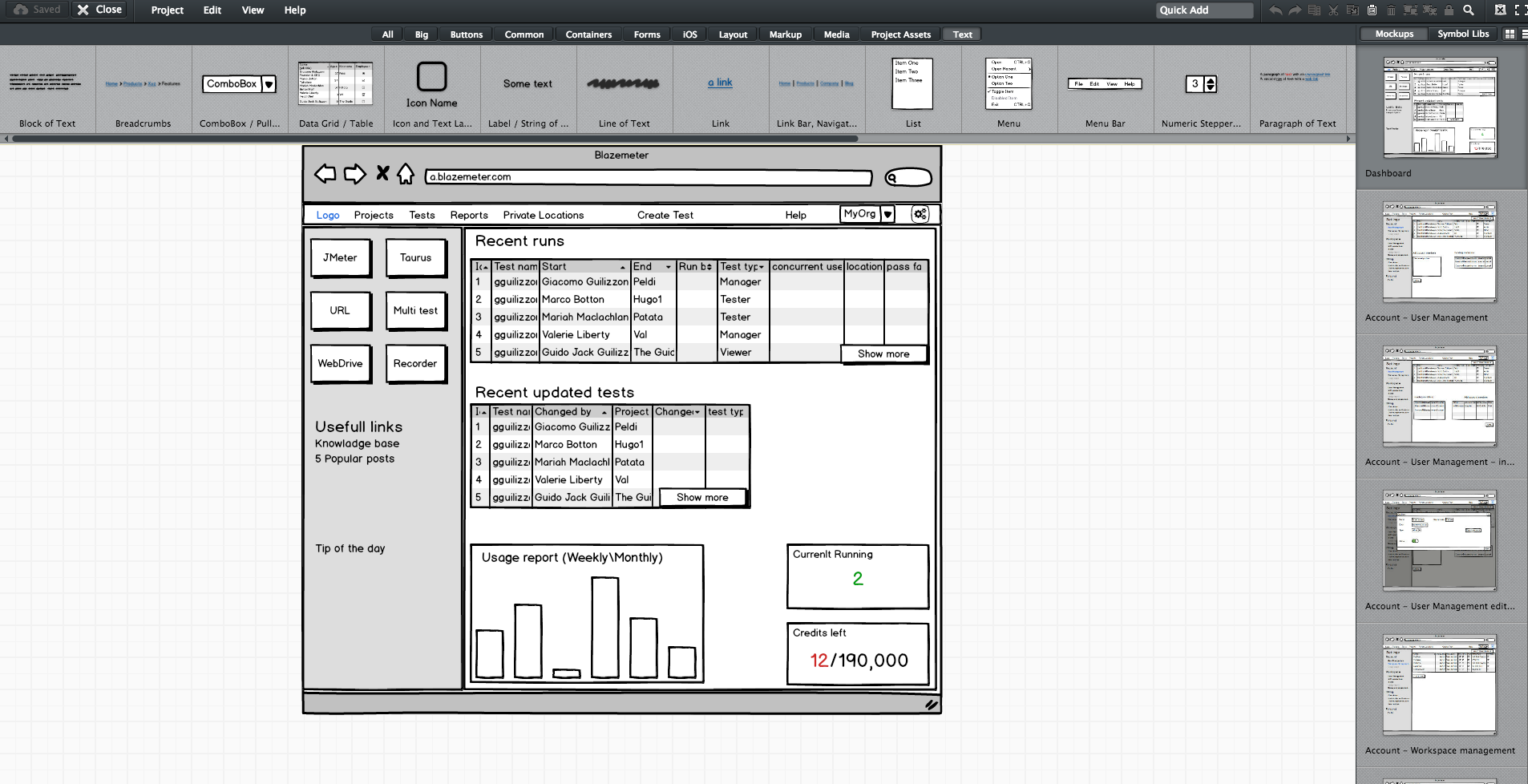
    Since no one wants to read a lot of text (except perhaps the awesome readers of this article), the product manager should prepare mockups. They don’t have to be designed or colorful, but they do need to show the team what the feature looks like in his or her vision. During our grooming sessions, we used Balsamiq, which lets you create screen sketches for how the product is supposed to look, feel and work.

    Editing screen sketches using Balsamiq

    After the initial presentation, the sessions should include a lot of open discussion—asking questions, checking for answers and examining compliance, etc. —until everyone is satisfied and understands what the feature requires from them and from others.

    This is the time and place for frontend, backend and QA to give their opinion about the schedule and to alert and flag any potential problems in development or extreme use cases. It’s the role of the product team to answer questions and change the flow and requirements until there are no R&D rejections.

    Afterward, the frontend and backend leaders need to create a feature development plan, sitting down to determine what data they need to transform the product vision into a real thing. Or in other words, which APIs are required for each flow or button, how long each step is supposed to take, including buffers, and the order of development. APIs are the agreed “contract” between the development teams. After determining the contract terms, each team can proceed individually.

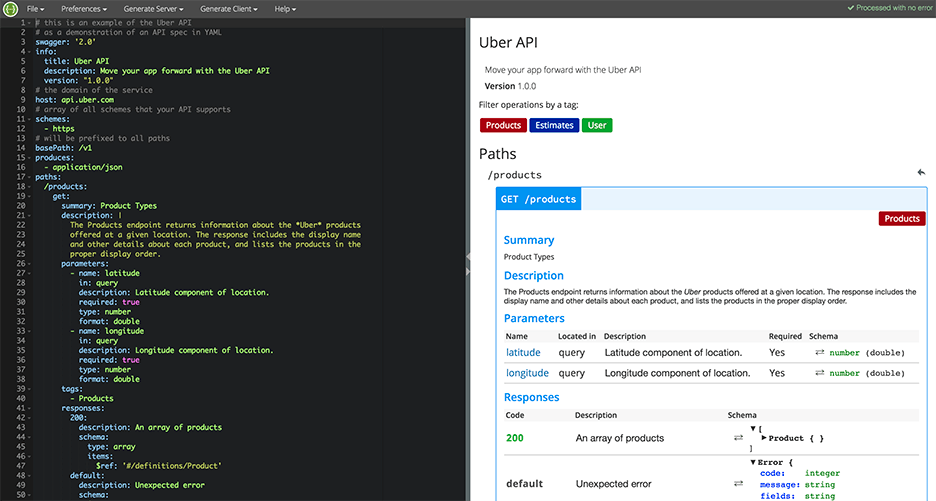
    I recommend you write your APIs in Swagger, which turns YAML files into detailed HTML pages with all the APIs.

    Swagger Editor

    This plan needs to be transparent to everyone working on the project. In fact, it’s even better if each project participant can add and describe scenarios. Tools such as TestLink and Atlassian do just that. Then, when the code is ready, developers can go over the list and see everything is covered.

    We will need to stick to this schedule later on, especially when new demands unrelated to the feature come in, such as fixing bugs. Sticking to this plan is the best way to distinguish the wheat from the chaff of the development process.

    Start writing automation ASAP

    After planning, we want everyone to start working, and not only the backend. To do that, the backend can prepare mocks, either through outsourcing services such as JSON servers, which show inputs and outputs, or by writing dummy code.

    I mentioned earlier that we used Swagger to write APIs. We also used it to generate a server in NodeJS/Python, like this:

    Generating a JSON Server through Swagger

    From this moment on, frontend can begin writing and building screens and QA can start writing API automated testing, by using tools suh as JMeter. At this point, frontend and QA have the response codes and response bodies; they know which features to put where; and which APIs they need and how to use them.

    QA also know which data they’re missing, such as field names and field data. Sure, the backend code isn’t ready yet and all of the automated exams will return “red” instead of “green,” but the main issue is making sure everyone is as prepared as possible.

    This includes load and performance testing. You can use open-source tools such as JMeter, which is enhanced by CA BlazeMeter. By uploading our test script into, configuring the number of virtual users and ramp-up time, determining geo-locations to test from and analyzing KPIs to determine trends and the health of our system, we can ensure our product is delivered to our customers without crashing.

    This is also true about sending code to QA: Developers should test their code themselves and ensure that when they commit their code, it works 99.9 percent of the time.

    By starting automation as soon as possible, you can minimize future bottlenecks in the development process.

    Ensure the team communicates and works together

    Like I said before, teamwork is the most basic requirement when creating a new feature. This is because new questions arise during development and because requirements change. Therefore, everyone in the team needs to be in sync all the time, from the product manager and the designer to the developers and QA.

    Open communication lines are crucial because everyone is working on the same product at the same time, but each developer or QA should be working on a different part of the product and on different functionalities. Communication ensures each person’s work is compatible with the rest of the team’s work. This saves time, prevents frustration and redundancy and ensures maximum professionalism.

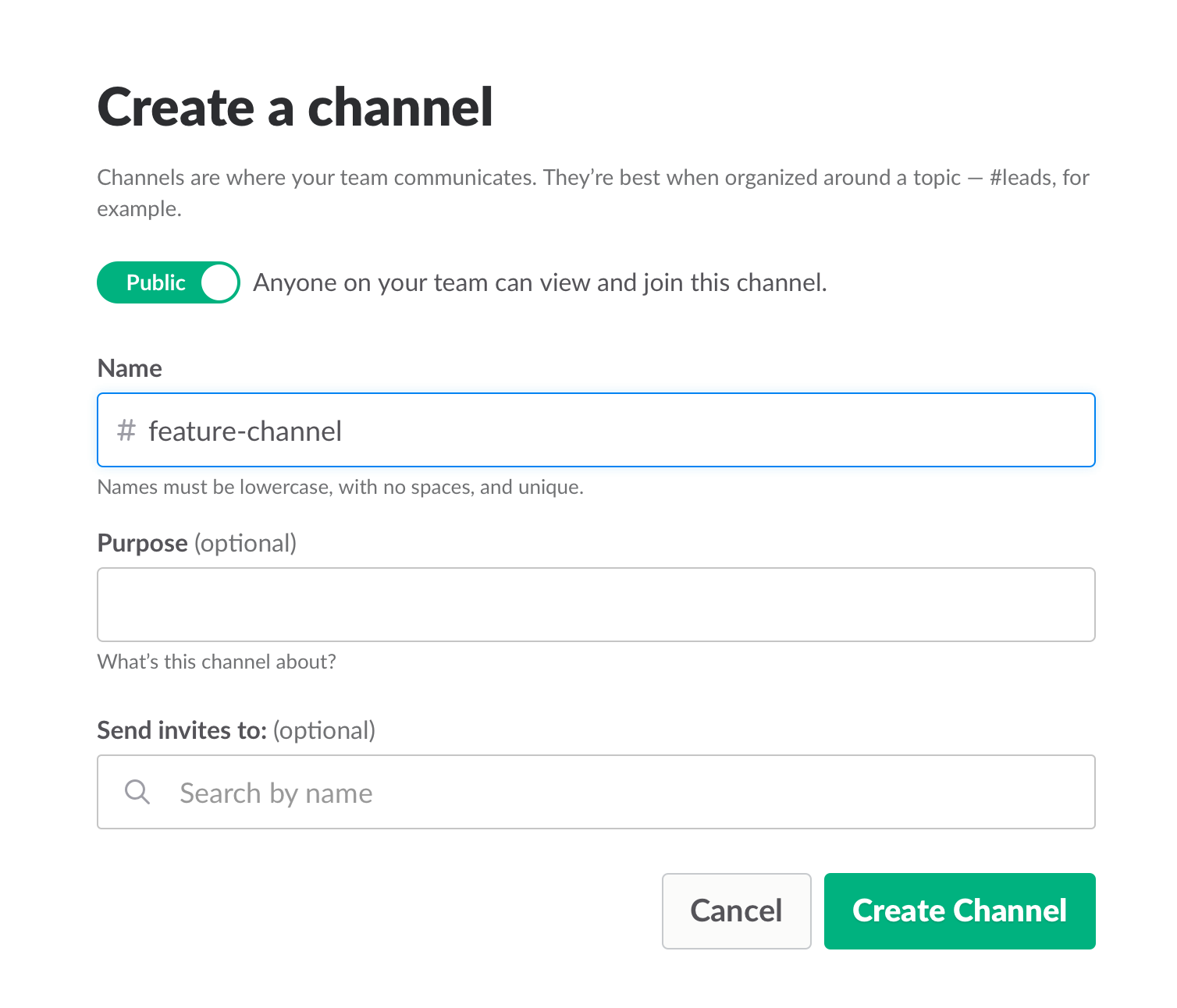
    To make sure everyone knew what was happening, we used Slack and opened a dedicated channel for the creation of this feature. We also had daily (short!) standups where we discussed what we have and what is missing.

    Opening a Slack channel

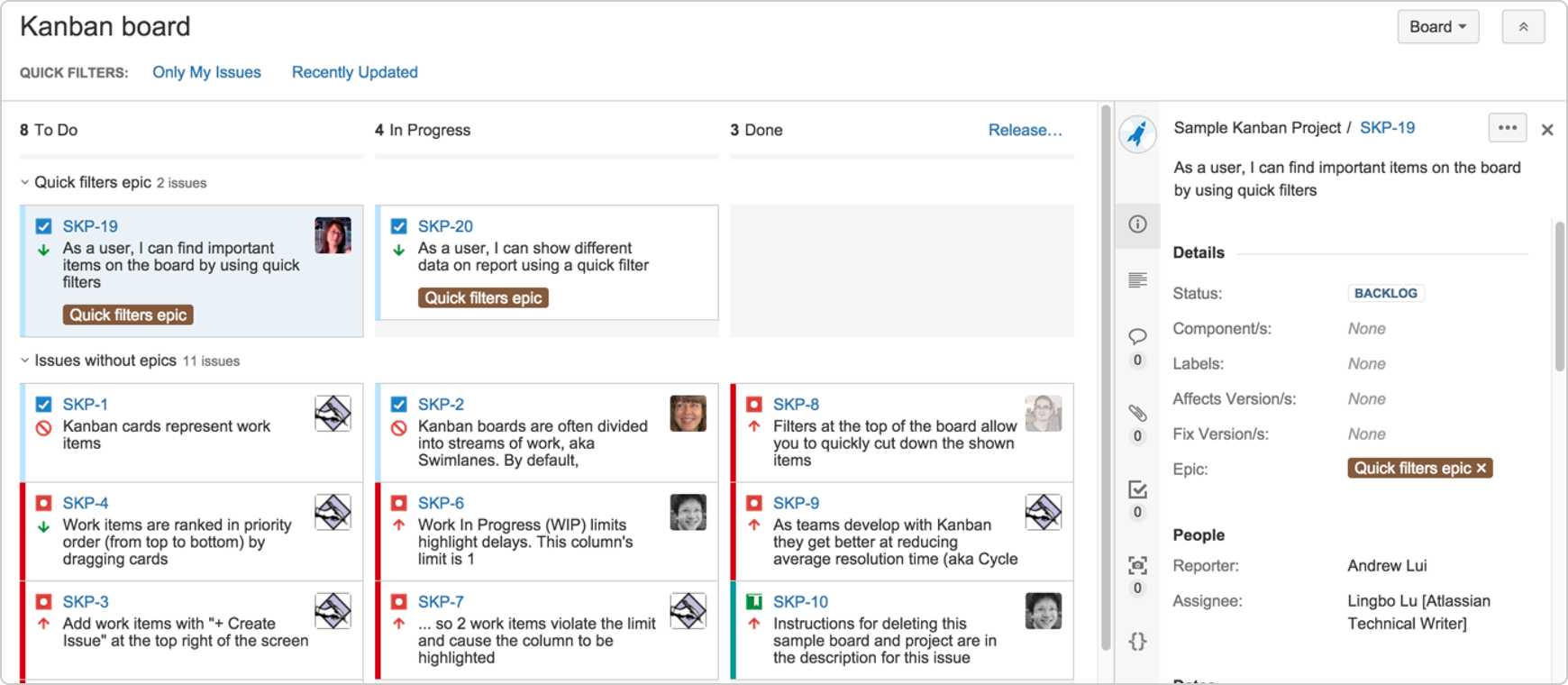
    Communication also includes team and assignment management. JIRA, our primary issue tracking tool, offers Kanban-style, Scrum and fully customizable boards, which show the progress of each development task, including the developer assigned to it, and his or her exact status or phase.

    This helps you understand what other people are working on, and just as importantly, where people are stuck. If you can, get everyone to work in an open space and put a large screen in the middle of it. This lets you stay in sync at all times.

    We used JIRA to open and manage bugs as well. This was helpful when multiple QAs found the same bug. It’s important to carefully choose which tickets are opened and put them under one epic, so everyone stays focused.


    JIRA Dashboard

    Another important aspect of communication is ensuring everyone uses the same terminology, as sometimes people might use the same term to describe different things or different terms to describe the same things. To prevent mixups that could waste your time, make sure everyone is on the same page. For example, do you say “system admin” or “<name (ex. BlazeMeter)> admin”?

    Work on the same development environments

    It’s important that everyone works on identical development environments and even on the same version of the tools and libraries. Otherwise, it could cause an (in)compatibility mess, including a lot of unnecessary back and forth and even might cause bugs to pop up. This environment needs to be as similar as possible to production, but only on a smaller scale.

    Conclusion

    Now look at the feature that came out of all that work here. I’m so grateful that I had the opportunity to work on it with an awesome team.

    I hope these best practices help you the next time you develop a new feature. Don’t forget to keep going agile after development and delivery by running tests in a continuous environment such as Jenkins for every commit.

    CA BlazeMeter works with Jenkins, ensuring you can load test in the cloud and analyze your data while shifting left. You can also use different APM tools, such as New Relic, AppDynamics and CA APM to alert you about errors before QA, which saves time.

    — Dor Atias